@apify/actors-mcp-server 0.1.5-beta.1 → 0.1.5-beta.3
This diff represents the content of publicly available package versions that have been released to one of the supported registries. The information contained in this diff is provided for informational purposes only and reflects changes between package versions as they appear in their respective public registries.
- package/README.md +16 -9
- package/package.json +1 -1
package/README.md
CHANGED
|
@@ -201,13 +201,18 @@ npm run build
|
|
|
201
201
|
|
|
202
202
|
#### Claude Desktop
|
|
203
203
|
|
|
204
|
-
|
|
205
|
-
Make sure that you enable developer mode in Claude Desktop to access the configuration settings.
|
|
204
|
+
To configure Claude Desktop to work with the MCP server, follow these steps. For a detailed guide, refer to the [Claude Desktop Users Guide](https://modelcontextprotocol.io/quickstart/user).
|
|
206
205
|
|
|
207
|
-
1.
|
|
206
|
+
1. Download Claude for desktop
|
|
207
|
+
- Available for Windows and macOS.
|
|
208
|
+
- For Linux users, you can build a Debian package using this [unofficial build script](https://github.com/aaddrick/claude-desktop-debian).
|
|
209
|
+
2. Open the Claude Desktop app and enable **Developer Mode** from the top-left menu bar.
|
|
210
|
+
3. Once enabled, open **Settings** (also from the top-left menu bar) and navigate to the **Developer Option**, where you'll find the **Edit Config** button
|
|
211
|
+
4. Open configuration file and edit the following file:
|
|
208
212
|
|
|
209
213
|
- On macOS: `~/Library/Application\ Support/Claude/claude_desktop_config.json`
|
|
210
214
|
- On Windows: `%APPDATA%/Claude/claude_desktop_config.json`
|
|
215
|
+
- On Linux: `~/.config/Claude/claude_desktop_config.json`
|
|
211
216
|
|
|
212
217
|
```json
|
|
213
218
|
{
|
|
@@ -222,14 +227,14 @@ Make sure that you enable developer mode in Claude Desktop to access the configu
|
|
|
222
227
|
}
|
|
223
228
|
}
|
|
224
229
|
```
|
|
225
|
-
Alternatively, you can use
|
|
230
|
+
Alternatively, you can use `actors` argument to select one or more Apify Actors:
|
|
226
231
|
```json
|
|
227
232
|
{
|
|
228
233
|
"mcpServers": {
|
|
229
234
|
"actors-mcp-server": {
|
|
230
235
|
"command": "npx",
|
|
231
236
|
"args": [
|
|
232
|
-
"-y", "@apify/actors-mcp-
|
|
237
|
+
"-y", "@apify/actors-mcp-server",
|
|
233
238
|
"--actors", "lukaskrivka/google-maps-with-contact-details,apify/instagram-scraper"
|
|
234
239
|
],
|
|
235
240
|
"env": {
|
|
@@ -239,16 +244,18 @@ Make sure that you enable developer mode in Claude Desktop to access the configu
|
|
|
239
244
|
}
|
|
240
245
|
}
|
|
241
246
|
```
|
|
242
|
-
|
|
243
|
-
2. Restart Claude Desktop
|
|
247
|
+
5. Restart Claude Desktop
|
|
244
248
|
|
|
245
249
|
- Fully quit Claude Desktop (ensure it’s not just minimized or closed).
|
|
246
250
|
- Restart Claude Desktop.
|
|
247
251
|
- Look for the 🔌 icon to confirm that the Exa server is connected.
|
|
248
252
|
|
|
249
|
-
|
|
253
|
+
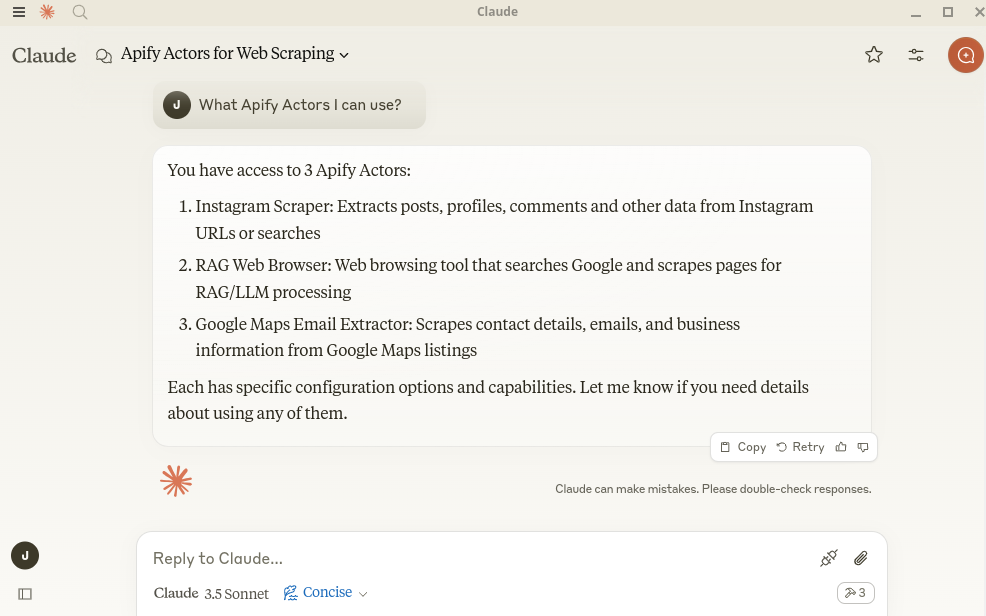
6. Open the Claude Desktop chat and ask "What Apify Actors I can use?"
|
|
254
|
+
|
|
255
|
+
|
|
256
|
+
7. Examples
|
|
250
257
|
|
|
251
|
-
You can ask Claude to perform
|
|
258
|
+
You can ask Claude to perform tasks, such as:
|
|
252
259
|
```text
|
|
253
260
|
Find and analyze recent research papers about LLMs.
|
|
254
261
|
Find top 10 best Italian restaurants in San Francisco.
|