@apify/actors-mcp-server 0.1.22-beta.9 → 0.1.23
This diff represents the content of publicly available package versions that have been released to one of the supported registries. The information contained in this diff is provided for informational purposes only and reflects changes between package versions as they appear in their respective public registries.
- package/README.md +62 -64
- package/dist/actors.d.ts +74 -0
- package/dist/actors.d.ts.map +1 -0
- package/dist/{tools/utils.js → actors.js} +241 -112
- package/dist/actors.js.map +1 -0
- package/dist/const.d.ts +18 -14
- package/dist/const.d.ts.map +1 -1
- package/dist/const.js +22 -22
- package/dist/const.js.map +1 -1
- package/dist/examples/clientSse.d.ts +1 -10
- package/dist/examples/clientSse.d.ts.map +1 -1
- package/dist/examples/clientSse.js +4 -7
- package/dist/examples/clientSse.js.map +1 -1
- package/dist/examples/clientStdio.js +2 -2
- package/dist/examples/clientStdio.js.map +1 -1
- package/dist/examples/clientStdioChat.js +1 -1
- package/dist/index.d.ts +14 -2
- package/dist/index.d.ts.map +1 -1
- package/dist/index.js +51 -6
- package/dist/index.js.map +1 -1
- package/dist/input.d.ts +1 -1
- package/dist/input.d.ts.map +1 -1
- package/dist/input.js +8 -6
- package/dist/input.js.map +1 -1
- package/dist/logger.d.ts +3 -0
- package/dist/logger.d.ts.map +1 -0
- package/dist/logger.js +4 -0
- package/dist/logger.js.map +1 -0
- package/dist/main.d.ts +0 -4
- package/dist/main.d.ts.map +1 -1
- package/dist/main.js +126 -31
- package/dist/main.js.map +1 -1
- package/dist/server.d.ts +43 -0
- package/dist/server.d.ts.map +1 -0
- package/dist/server.js +178 -0
- package/dist/server.js.map +1 -0
- package/dist/tools.d.ts +46 -0
- package/dist/tools.d.ts.map +1 -0
- package/dist/tools.js +128 -0
- package/dist/tools.js.map +1 -0
- package/dist/tsconfig.tsbuildinfo +1 -1
- package/dist/types.d.ts +10 -93
- package/dist/types.d.ts.map +1 -1
- package/package.json +16 -18
- package/dist/actor/const.d.ts +0 -10
- package/dist/actor/const.d.ts.map +0 -1
- package/dist/actor/const.js +0 -11
- package/dist/actor/const.js.map +0 -1
- package/dist/actor/server.d.ts +0 -4
- package/dist/actor/server.d.ts.map +0 -1
- package/dist/actor/server.js +0 -82
- package/dist/actor/server.js.map +0 -1
- package/dist/actor/types.d.ts +0 -23
- package/dist/actor/types.d.ts.map +0 -1
- package/dist/actor/types.js +0 -2
- package/dist/actor/types.js.map +0 -1
- package/dist/actor/utils.d.ts +0 -3
- package/dist/actor/utils.d.ts.map +0 -1
- package/dist/actor/utils.js +0 -26
- package/dist/actor/utils.js.map +0 -1
- package/dist/apify-client.d.ts +0 -6
- package/dist/apify-client.d.ts.map +0 -1
- package/dist/apify-client.js +0 -23
- package/dist/apify-client.js.map +0 -1
- package/dist/mcp/actors.d.ts +0 -3
- package/dist/mcp/actors.d.ts.map +0 -1
- package/dist/mcp/actors.js +0 -13
- package/dist/mcp/actors.js.map +0 -1
- package/dist/mcp/client.d.ts +0 -6
- package/dist/mcp/client.d.ts.map +0 -1
- package/dist/mcp/client.js +0 -33
- package/dist/mcp/client.js.map +0 -1
- package/dist/mcp/const.d.ts +0 -3
- package/dist/mcp/const.d.ts.map +0 -1
- package/dist/mcp/const.js +0 -3
- package/dist/mcp/const.js.map +0 -1
- package/dist/mcp/proxy.d.ts +0 -4
- package/dist/mcp/proxy.d.ts.map +0 -1
- package/dist/mcp/proxy.js +0 -29
- package/dist/mcp/proxy.js.map +0 -1
- package/dist/mcp/server.d.ts +0 -41
- package/dist/mcp/server.d.ts.map +0 -1
- package/dist/mcp/server.js +0 -177
- package/dist/mcp/server.js.map +0 -1
- package/dist/mcp/utils.d.ts +0 -34
- package/dist/mcp/utils.d.ts.map +0 -1
- package/dist/mcp/utils.js +0 -70
- package/dist/mcp/utils.js.map +0 -1
- package/dist/stdio.d.ts +0 -15
- package/dist/stdio.d.ts.map +0 -1
- package/dist/stdio.js +0 -46
- package/dist/stdio.js.map +0 -1
- package/dist/tools/actor.d.ts +0 -40
- package/dist/tools/actor.d.ts.map +0 -1
- package/dist/tools/actor.js +0 -136
- package/dist/tools/actor.js.map +0 -1
- package/dist/tools/build.d.ts +0 -12
- package/dist/tools/build.d.ts.map +0 -1
- package/dist/tools/build.js +0 -120
- package/dist/tools/build.js.map +0 -1
- package/dist/tools/helpers.d.ts +0 -19
- package/dist/tools/helpers.d.ts.map +0 -1
- package/dist/tools/helpers.js +0 -62
- package/dist/tools/helpers.js.map +0 -1
- package/dist/tools/index.d.ts +0 -6
- package/dist/tools/index.d.ts.map +0 -1
- package/dist/tools/index.js +0 -8
- package/dist/tools/index.js.map +0 -1
- package/dist/tools/store_collection.d.ts +0 -21
- package/dist/tools/store_collection.d.ts.map +0 -1
- package/dist/tools/store_collection.js +0 -80
- package/dist/tools/store_collection.js.map +0 -1
- package/dist/tools/utils.d.ts +0 -77
- package/dist/tools/utils.d.ts.map +0 -1
- package/dist/tools/utils.js.map +0 -1
package/README.md
CHANGED
|
@@ -11,36 +11,34 @@ The server can be used in two ways:
|
|
|
11
11
|
- **⾕ MCP Server Stdio** – Local server available via standard input/output (stdio), see [guide](#-mcp-server-at-a-local-host)
|
|
12
12
|
|
|
13
13
|
|
|
14
|
-
|
|
14
|
+
You can also interact with the MCP server using a chat-like UI with 💬 [Tester MCP Client](https://apify.com/jiri.spilka/tester-mcp-client)
|
|
15
15
|
|
|
16
16
|
# 🎯 What does Apify MCP server do?
|
|
17
17
|
|
|
18
18
|
The MCP Server Actor allows an AI assistant to use any [Apify Actor](https://apify.com/store) as a tool to perform a specific task.
|
|
19
|
-
For example it can:
|
|
20
|
-
-
|
|
21
|
-
-
|
|
22
|
-
-
|
|
23
|
-
-
|
|
24
|
-
-
|
|
19
|
+
For example, it can:
|
|
20
|
+
- Use [Facebook Posts Scraper](https://apify.com/apify/facebook-posts-scraper) to extract data from Facebook posts from multiple pages/profiles
|
|
21
|
+
- Use [Google Maps Email Extractor](https://apify.com/lukaskrivka/google-maps-with-contact-details) to extract Google Maps contact details
|
|
22
|
+
- Use [Google Search Results Scraper](https://apify.com/apify/google-search-scraper) to scrape Google Search Engine Results Pages (SERPs)
|
|
23
|
+
- Use [Instagram Scraper](https://apify.com/apify/instagram-scraper) to scrape Instagram posts, profiles, places, photos, and comments
|
|
24
|
+
- Use [RAG Web Browser](https://apify.com/apify/web-scraper) to search the web, scrape the top N URLs, and return their content
|
|
25
25
|
|
|
26
26
|
# MCP Clients
|
|
27
27
|
|
|
28
28
|
To interact with the Apify MCP server, you can use MCP clients such as:
|
|
29
29
|
- [Claude Desktop](https://claude.ai/download) (only Stdio support)
|
|
30
30
|
- [Visual Studio Code](https://code.visualstudio.com/) (Stdio and SSE support)
|
|
31
|
-
- [LibreChat](https://www.librechat.ai/) (
|
|
31
|
+
- [LibreChat](https://www.librechat.ai/) (Stdio and SSE support, yet without Authorization header)
|
|
32
32
|
- [Apify Tester MCP Client](https://apify.com/jiri.spilka/tester-mcp-client) (SSE support with Authorization headers)
|
|
33
|
-
-
|
|
34
|
-
-
|
|
35
|
-
|
|
36
|
-
Additionally, you can use simple example clients found in the [examples](https://github.com/apify/actor-mcp-server/tree/main/src/examples) directory.
|
|
33
|
+
- Other clients at [https://modelcontextprotocol.io/clients](https://modelcontextprotocol.io/clients)
|
|
34
|
+
- More clients at [https://glama.ai/mcp/clients](https://glama.ai/mcp/clients)
|
|
37
35
|
|
|
38
36
|
When you have Actors integrated with the MCP server, you can ask:
|
|
39
|
-
- "Search web and summarize recent trends about AI Agents"
|
|
40
|
-
- "Find top 10 best Italian restaurants in San Francisco"
|
|
41
|
-
- "Find and analyze Instagram profile of The Rock"
|
|
42
|
-
- "Provide a step-by-step guide on using the Model Context Protocol with source URLs
|
|
43
|
-
- "What Apify Actors I
|
|
37
|
+
- "Search the web and summarize recent trends about AI Agents"
|
|
38
|
+
- "Find the top 10 best Italian restaurants in San Francisco"
|
|
39
|
+
- "Find and analyze the Instagram profile of The Rock"
|
|
40
|
+
- "Provide a step-by-step guide on using the Model Context Protocol with source URLs"
|
|
41
|
+
- "What Apify Actors can I use?"
|
|
44
42
|
|
|
45
43
|
The following image shows how the Apify MCP server interacts with the Apify platform and AI clients:
|
|
46
44
|
|
|
@@ -54,7 +52,7 @@ We also plan to add more features, see [Roadmap](#-roadmap-march-2025) for more
|
|
|
54
52
|
The Model Context Protocol (MCP) allows AI applications (and AI agents), such as Claude Desktop, to connect to external tools and data sources.
|
|
55
53
|
MCP is an open protocol that enables secure, controlled interactions between AI applications, AI Agents, and local or remote resources.
|
|
56
54
|
|
|
57
|
-
For more information, see the [Model Context Protocol](https://modelcontextprotocol.org/) website or
|
|
55
|
+
For more information, see the [Model Context Protocol](https://modelcontextprotocol.org/) website or the blog post [What is MCP and why does it matter?](https://blog.apify.com/what-is-model-context-protocol/).
|
|
58
56
|
|
|
59
57
|
# 🤖 How is MCP Server related to AI Agents?
|
|
60
58
|
|
|
@@ -70,7 +68,7 @@ Interested in building and monetizing your own AI agent on Apify? Check out our
|
|
|
70
68
|
### Actors
|
|
71
69
|
|
|
72
70
|
Any [Apify Actor](https://apify.com/store) can be used as a tool.
|
|
73
|
-
By default, the server is pre-configured with the Actors specified below, but
|
|
71
|
+
By default, the server is pre-configured with the Actors specified below, but this can be overridden by providing Actor input.
|
|
74
72
|
|
|
75
73
|
```text
|
|
76
74
|
'apify/instagram-scraper'
|
|
@@ -90,7 +88,7 @@ For example, for the `apify/rag-web-browser` Actor, the arguments are:
|
|
|
90
88
|
"maxResults": 3
|
|
91
89
|
}
|
|
92
90
|
```
|
|
93
|
-
You don't need to specify the input parameters or which Actor to call
|
|
91
|
+
You don't need to specify the input parameters or which Actor to call; everything is managed by an LLM.
|
|
94
92
|
When a tool is called, the arguments are automatically passed to the Actor by the LLM.
|
|
95
93
|
You can refer to the specific Actor's documentation for a list of available arguments.
|
|
96
94
|
|
|
@@ -100,7 +98,7 @@ The server provides a set of helper tools to discover available Actors and retri
|
|
|
100
98
|
- `get-actor-details`: Retrieves documentation, input schema, and details about a specific Actor.
|
|
101
99
|
- `discover-actors`: Searches for relevant Actors using keywords and returns their details.
|
|
102
100
|
|
|
103
|
-
There are also tools to manage the available tools list. However, dynamically adding and removing tools requires the MCP client to have the capability to update tools list (handle `ToolListChangedNotificationSchema`), which is typically not supported.
|
|
101
|
+
There are also tools to manage the available tools list. However, dynamically adding and removing tools requires the MCP client to have the capability to update the tools list (handle `ToolListChangedNotificationSchema`), which is typically not supported.
|
|
104
102
|
|
|
105
103
|
You can try this functionality using the [Apify Tester MCP Client](https://apify.com/jiri.spilka/tester-mcp-client) Actor.
|
|
106
104
|
To enable it, set the `enableActorAutoLoading` parameter.
|
|
@@ -115,7 +113,7 @@ We plan to add [Apify's dataset](https://docs.apify.com/platform/storage/dataset
|
|
|
115
113
|
|
|
116
114
|
# ⚙️ Usage
|
|
117
115
|
|
|
118
|
-
The Apify MCP Server can be used in two ways: **as an Apify Actor** running
|
|
116
|
+
The Apify MCP Server can be used in two ways: **as an Apify Actor** running on the Apify platform
|
|
119
117
|
or as a **local server** running on your machine.
|
|
120
118
|
|
|
121
119
|
## 🇦 MCP Server Actor
|
|
@@ -124,15 +122,14 @@ or as a **local server** running on your machine.
|
|
|
124
122
|
|
|
125
123
|
The Actor runs in [**Standby mode**](https://docs.apify.com/platform/actors/running/standby) with an HTTP web server that receives and processes requests.
|
|
126
124
|
|
|
127
|
-
|
|
128
|
-
send an HTTP GET request with your [Apify API token](https://console.apify.com/settings/integrations) to the following URL.
|
|
125
|
+
To start the server with default Actors, send an HTTP GET request with your [Apify API token](https://console.apify.com/settings/integrations) to the following URL:
|
|
129
126
|
```
|
|
130
127
|
https://actors-mcp-server.apify.actor?token=<APIFY_TOKEN>
|
|
131
128
|
```
|
|
132
129
|
It is also possible to start the MCP server with a different set of Actors.
|
|
133
130
|
To do this, create a [task](https://docs.apify.com/platform/actors/running/tasks) and specify the list of Actors you want to use.
|
|
134
131
|
|
|
135
|
-
Then, run task in Standby mode with the selected Actors
|
|
132
|
+
Then, run the task in Standby mode with the selected Actors:
|
|
136
133
|
```shell
|
|
137
134
|
https://USERNAME--actors-mcp-server-task.apify.actor?token=<APIFY_TOKEN>
|
|
138
135
|
```
|
|
@@ -144,10 +141,10 @@ You can find a list of all available Actors in the [Apify Store](https://apify.c
|
|
|
144
141
|
Once the server is running, you can interact with Server-Sent Events (SSE) to send messages to the server and receive responses.
|
|
145
142
|
The easiest way is to use [Tester MCP Client](https://apify.com/jiri.spilka/tester-mcp-client) on Apify.
|
|
146
143
|
|
|
147
|
-
|
|
148
|
-
|
|
144
|
+
[Claude Desktop](https://claude.ai/download) currently lacks SSE support, but you can use it with Stdio transport; see [MCP Server at a local host](#-mcp-server-at-a-local-host) for more details.
|
|
145
|
+
Note: The free version of Claude Desktop may experience intermittent connection issues with the server.
|
|
149
146
|
|
|
150
|
-
In the client settings you need to provide server configuration:
|
|
147
|
+
In the client settings, you need to provide server configuration:
|
|
151
148
|
```json
|
|
152
149
|
{
|
|
153
150
|
"mcpServers": {
|
|
@@ -161,7 +158,7 @@ In the client settings you need to provide server configuration:
|
|
|
161
158
|
}
|
|
162
159
|
}
|
|
163
160
|
```
|
|
164
|
-
Alternatively, you can use
|
|
161
|
+
Alternatively, you can use [clientSse.ts](https://github.com/apify/actor-mcp-server/tree/main/src/examples/clientSse.ts) script or test the server using `curl` </> commands.
|
|
165
162
|
|
|
166
163
|
1. Initiate Server-Sent-Events (SSE) by sending a GET request to the following URL:
|
|
167
164
|
```
|
|
@@ -202,7 +199,7 @@ Alternatively, you can use simple python [client_see.py](https://github.com/apif
|
|
|
202
199
|
|
|
203
200
|
## ⾕ MCP Server at a local host
|
|
204
201
|
|
|
205
|
-
You can run the Apify MCP Server on your local machine by configuring it with Claude Desktop or any other [MCP
|
|
202
|
+
You can run the Apify MCP Server on your local machine by configuring it with Claude Desktop or any other [MCP client](https://modelcontextprotocol.io/clients).
|
|
206
203
|
You can also use [Smithery](https://smithery.ai/server/@apify/actors-mcp-server) to install the server automatically.
|
|
207
204
|
|
|
208
205
|
### Prerequisites
|
|
@@ -212,6 +209,13 @@ You can also use [Smithery](https://smithery.ai/server/@apify/actors-mcp-server)
|
|
|
212
209
|
- [Node.js](https://nodejs.org/en) (v18 or higher)
|
|
213
210
|
- [Apify API Token](https://docs.apify.com/platform/integrations/api#api-token) (`APIFY_TOKEN`)
|
|
214
211
|
|
|
212
|
+
Make sure you have the `node` and `npx` installed properly:
|
|
213
|
+
```bash
|
|
214
|
+
node -v
|
|
215
|
+
npx -v
|
|
216
|
+
```
|
|
217
|
+
If not, follow this guide to install Node.js: [Downloading and installing Node.js and npm](https://docs.npmjs.com/downloading-and-installing-node-js-and-npm).
|
|
218
|
+
|
|
215
219
|
#### Claude Desktop
|
|
216
220
|
|
|
217
221
|
To configure Claude Desktop to work with the MCP server, follow these steps. For a detailed guide, refer to the [Claude Desktop Users Guide](https://modelcontextprotocol.io/quickstart/user).
|
|
@@ -220,8 +224,8 @@ To configure Claude Desktop to work with the MCP server, follow these steps. For
|
|
|
220
224
|
- Available for Windows and macOS.
|
|
221
225
|
- For Linux users, you can build a Debian package using this [unofficial build script](https://github.com/aaddrick/claude-desktop-debian).
|
|
222
226
|
2. Open the Claude Desktop app and enable **Developer Mode** from the top-left menu bar.
|
|
223
|
-
3. Once enabled, open **Settings** (also from the top-left menu bar) and navigate to the **Developer Option**, where you'll find the **Edit Config** button
|
|
224
|
-
4. Open configuration file and edit the following file:
|
|
227
|
+
3. Once enabled, open **Settings** (also from the top-left menu bar) and navigate to the **Developer Option**, where you'll find the **Edit Config** button.
|
|
228
|
+
4. Open the configuration file and edit the following file:
|
|
225
229
|
|
|
226
230
|
- On macOS: `~/Library/Application\ Support/Claude/claude_desktop_config.json`
|
|
227
231
|
- On Windows: `%APPDATA%/Claude/claude_desktop_config.json`
|
|
@@ -240,7 +244,7 @@ To configure Claude Desktop to work with the MCP server, follow these steps. For
|
|
|
240
244
|
}
|
|
241
245
|
}
|
|
242
246
|
```
|
|
243
|
-
Alternatively, you can use `actors` argument to select one or more Apify Actors:
|
|
247
|
+
Alternatively, you can use the `actors` argument to select one or more Apify Actors:
|
|
244
248
|
```json
|
|
245
249
|
{
|
|
246
250
|
"mcpServers": {
|
|
@@ -261,9 +265,9 @@ To configure Claude Desktop to work with the MCP server, follow these steps. For
|
|
|
261
265
|
|
|
262
266
|
- Fully quit Claude Desktop (ensure it's not just minimized or closed).
|
|
263
267
|
- Restart Claude Desktop.
|
|
264
|
-
- Look for the 🔌 icon to confirm that the
|
|
268
|
+
- Look for the 🔌 icon to confirm that the Actors MCP server is connected.
|
|
265
269
|
|
|
266
|
-
6. Open the Claude Desktop chat and ask "What Apify Actors I
|
|
270
|
+
6. Open the Claude Desktop chat and ask "What Apify Actors can I use?"
|
|
267
271
|
|
|
268
272
|
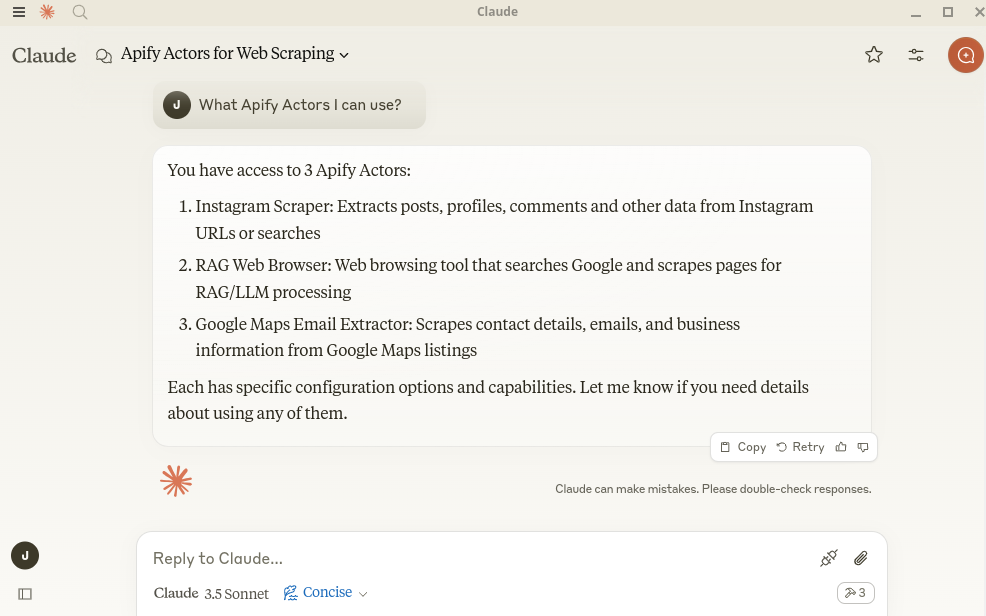
|
|
269
273
|
|
|
@@ -272,8 +276,8 @@ To configure Claude Desktop to work with the MCP server, follow these steps. For
|
|
|
272
276
|
You can ask Claude to perform tasks, such as:
|
|
273
277
|
```text
|
|
274
278
|
Find and analyze recent research papers about LLMs.
|
|
275
|
-
Find top 10 best Italian restaurants in San Francisco.
|
|
276
|
-
Find and analyze
|
|
279
|
+
Find the top 10 best Italian restaurants in San Francisco.
|
|
280
|
+
Find and analyze the Instagram profile of The Rock.
|
|
277
281
|
```
|
|
278
282
|
|
|
279
283
|
#### VS Code
|
|
@@ -352,16 +356,14 @@ npx -y @smithery/cli install @apify/actors-mcp-server --client claude
|
|
|
352
356
|
|
|
353
357
|
#### Stdio clients
|
|
354
358
|
|
|
355
|
-
Create environment file `.env` with the following content:
|
|
359
|
+
Create an environment file `.env` with the following content:
|
|
356
360
|
```text
|
|
357
361
|
APIFY_TOKEN=your-apify-token
|
|
358
|
-
# ANTHROPIC_API_KEY is only required when you want to run examples/clientStdioChat.js
|
|
359
|
-
ANTHROPIC_API_KEY=your-anthropic-api-token
|
|
360
362
|
```
|
|
361
|
-
In the `examples` directory, you can find
|
|
363
|
+
In the `examples` directory, you can find an example client to interact with the server via
|
|
362
364
|
standard input/output (stdio):
|
|
363
365
|
|
|
364
|
-
|
|
366
|
+
- [`clientStdio.ts`](https://github.com/apify/actor-mcp-server/tree/main/src/examples/clientStdio.ts)
|
|
365
367
|
This client script starts the MCP server with two specified Actors.
|
|
366
368
|
It then calls the `apify/rag-web-browser` tool with a query and prints the result.
|
|
367
369
|
It demonstrates how to connect to the MCP server, list available tools, and call a specific tool using stdio transport.
|
|
@@ -369,15 +371,6 @@ standard input/output (stdio):
|
|
|
369
371
|
node dist/examples/clientStdio.js
|
|
370
372
|
```
|
|
371
373
|
|
|
372
|
-
2. [`clientStdioChat.ts`](https://github.com/apify/actor-mcp-server/tree/main/src/examples/clientStdioChat.ts)
|
|
373
|
-
This client script also starts the MCP server but provides an interactive command-line chat interface.
|
|
374
|
-
It prompts the user to interact with the server, allowing for dynamic tool calls and responses.
|
|
375
|
-
This example is useful for testing and debugging interactions with the MCP server in conversational manner.
|
|
376
|
-
|
|
377
|
-
```bash
|
|
378
|
-
node dist/examples/clientStdioChat.js
|
|
379
|
-
```
|
|
380
|
-
|
|
381
374
|
# 👷🏼 Development
|
|
382
375
|
|
|
383
376
|
## Prerequisites
|
|
@@ -385,17 +378,22 @@ standard input/output (stdio):
|
|
|
385
378
|
- [Node.js](https://nodejs.org/en) (v18 or higher)
|
|
386
379
|
- Python 3.9 or higher
|
|
387
380
|
|
|
388
|
-
Create environment file `.env` with the following content:
|
|
381
|
+
Create an environment file `.env` with the following content:
|
|
389
382
|
```text
|
|
390
383
|
APIFY_TOKEN=your-apify-token
|
|
391
|
-
# ANTHROPIC_API_KEY is only required when you want to run examples/clientStdioChat.js
|
|
392
|
-
ANTHROPIC_API_KEY=your-anthropic-api-key
|
|
393
384
|
```
|
|
385
|
+
|
|
386
|
+
Build the actor-mcp-server package:
|
|
387
|
+
|
|
388
|
+
```bash
|
|
389
|
+
npm run build
|
|
390
|
+
```
|
|
391
|
+
|
|
394
392
|
## Local client (SSE)
|
|
395
393
|
|
|
396
|
-
To test the server with the SSE transport, you can use
|
|
397
|
-
Currently, the
|
|
398
|
-
You need to change URL to your local server URL in the script.
|
|
394
|
+
To test the server with the SSE transport, you can use the script `examples/clientSse.ts`:
|
|
395
|
+
Currently, the Node.js client does not support establishing a connection to a remote server with custom headers.
|
|
396
|
+
You need to change the URL to your local server URL in the script.
|
|
399
397
|
|
|
400
398
|
```bash
|
|
401
399
|
node dist/examples/clientSse.js
|
|
@@ -406,17 +404,11 @@ node dist/examples/clientSse.js
|
|
|
406
404
|
Since MCP servers operate over standard input/output (stdio), debugging can be challenging.
|
|
407
405
|
For the best debugging experience, use the [MCP Inspector](https://github.com/modelcontextprotocol/inspector).
|
|
408
406
|
|
|
409
|
-
Build the actor-mcp-server package:
|
|
410
|
-
|
|
411
|
-
```bash
|
|
412
|
-
npm run build
|
|
413
|
-
```
|
|
414
|
-
|
|
415
407
|
You can launch the MCP Inspector via [`npm`](https://docs.npmjs.com/downloading-and-installing-node-js-and-npm) with this command:
|
|
416
408
|
|
|
417
409
|
```bash
|
|
418
410
|
export APIFY_TOKEN=your-apify-token
|
|
419
|
-
npx @modelcontextprotocol/inspector node ./dist/
|
|
411
|
+
npx @modelcontextprotocol/inspector node ./dist/index.js
|
|
420
412
|
```
|
|
421
413
|
|
|
422
414
|
Upon launching, the Inspector will display a URL that you can access in your browser to begin debugging.
|
|
@@ -441,6 +433,12 @@ If you need other features or have any feedback, [submit an issue](https://conso
|
|
|
441
433
|
- Add Apify's dataset and key-value store as resources.
|
|
442
434
|
- Add tools such as Actor logs and Actor runs for debugging.
|
|
443
435
|
|
|
436
|
+
# 🐛 Troubleshooting
|
|
437
|
+
|
|
438
|
+
- Make sure you have the `node` installed by running `node -v`
|
|
439
|
+
- Make sure you have the `APIFY_TOKEN` environment variable set
|
|
440
|
+
- Always use the latest version of the MCP server by setting `@apify/actors-mcp-server@latest`
|
|
441
|
+
|
|
444
442
|
# 📚 Learn more
|
|
445
443
|
|
|
446
444
|
- [Model Context Protocol](https://modelcontextprotocol.org/)
|
package/dist/actors.d.ts
ADDED
|
@@ -0,0 +1,74 @@
|
|
|
1
|
+
import type { ActorDefinitionPruned, ISchemaProperties, Tool } from './types.js';
|
|
2
|
+
export declare function actorNameToToolName(actorName: string): string;
|
|
3
|
+
/**
|
|
4
|
+
* Get actor input schema by actor name.
|
|
5
|
+
* First, fetch the actor details to get the default build tag and buildId.
|
|
6
|
+
* Then, fetch the build details and return actorName, description, and input schema.
|
|
7
|
+
* @param {string} actorIdOrName - Actor ID or Actor full name.
|
|
8
|
+
* @param {number} limit - Truncate the README to this limit.
|
|
9
|
+
* @returns {Promise<ActorDefinitionWithDesc | null>} - The actor definition with description or null if not found.
|
|
10
|
+
*/
|
|
11
|
+
export declare function getActorDefinition(actorIdOrName: string, limit?: number): Promise<ActorDefinitionPruned | null>;
|
|
12
|
+
/**
|
|
13
|
+
* Helper function to shorten the enum list if it is too long.
|
|
14
|
+
*
|
|
15
|
+
* @param {string[]} enumList - The list of enum values to be shortened.
|
|
16
|
+
* @returns {string[] | undefined} - The shortened enum list or undefined if the list is too long.
|
|
17
|
+
*/
|
|
18
|
+
export declare function shortenEnum(enumList: string[]): string[] | undefined;
|
|
19
|
+
/**
|
|
20
|
+
* Shortens the description, enum, and items.enum properties of the schema properties.
|
|
21
|
+
* @param properties
|
|
22
|
+
*/
|
|
23
|
+
export declare function shortenProperties(properties: {
|
|
24
|
+
[key: string]: ISchemaProperties;
|
|
25
|
+
}): {
|
|
26
|
+
[key: string]: ISchemaProperties;
|
|
27
|
+
};
|
|
28
|
+
/** Prune Actor README if it is too long
|
|
29
|
+
* If the README is too long
|
|
30
|
+
* - We keep the README as it is up to the limit.
|
|
31
|
+
* - After the limit, we keep heading only
|
|
32
|
+
* - We add a note that the README was truncated because it was too long.
|
|
33
|
+
*/
|
|
34
|
+
export declare function truncateActorReadme(readme: string, limit?: number): string;
|
|
35
|
+
/**
|
|
36
|
+
* Helps determine the type of items in an array schema property.
|
|
37
|
+
* Priority order: explicit type in items > prefill type > default value type > editor type.
|
|
38
|
+
*
|
|
39
|
+
* Based on JSON schema, the array needs a type, and most of the time Actor input schema does not have this, so we need to infer that.
|
|
40
|
+
*
|
|
41
|
+
*/
|
|
42
|
+
export declare function inferArrayItemType(property: ISchemaProperties): string | null;
|
|
43
|
+
/**
|
|
44
|
+
* Filters schema properties to include only the necessary fields.
|
|
45
|
+
*
|
|
46
|
+
* This is done to reduce the size of the input schema and to make it more readable.
|
|
47
|
+
*
|
|
48
|
+
* @param properties
|
|
49
|
+
*/
|
|
50
|
+
export declare function filterSchemaProperties(properties: {
|
|
51
|
+
[key: string]: ISchemaProperties;
|
|
52
|
+
}): {
|
|
53
|
+
[key: string]: ISchemaProperties;
|
|
54
|
+
};
|
|
55
|
+
/**
|
|
56
|
+
* Fetches actor input schemas by Actor IDs or Actor full names and creates MCP tools.
|
|
57
|
+
*
|
|
58
|
+
* This function retrieves the input schemas for the specified actors and compiles them into MCP tools.
|
|
59
|
+
* It uses the AJV library to validate the input schemas.
|
|
60
|
+
*
|
|
61
|
+
* Tool name can't contain /, so it is replaced with _
|
|
62
|
+
*
|
|
63
|
+
* The input schema processing workflow:
|
|
64
|
+
* 1. Properties are marked as required using markInputPropertiesAsRequired() to add "REQUIRED" prefix to descriptions
|
|
65
|
+
* 2. Nested properties are built by analyzing editor type (proxy, requestListSources) using buildNestedProperties()
|
|
66
|
+
* 3. Properties are filtered using filterSchemaProperties()
|
|
67
|
+
* 4. Properties are shortened using shortenProperties()
|
|
68
|
+
* 5. Enums are added to descriptions with examples using addEnumsToDescriptionsWithExamples()
|
|
69
|
+
*
|
|
70
|
+
* @param {string[]} actors - An array of actor IDs or Actor full names.
|
|
71
|
+
* @returns {Promise<Tool[]>} - A promise that resolves to an array of MCP tools.
|
|
72
|
+
*/
|
|
73
|
+
export declare function getActorsAsTools(actors: string[]): Promise<Tool[]>;
|
|
74
|
+
//# sourceMappingURL=actors.d.ts.map
|
|
@@ -0,0 +1 @@
|
|
|
1
|
+
{"version":3,"file":"actors.d.ts","sourceRoot":"","sources":["../src/actors.ts"],"names":[],"mappings":"AAKA,OAAO,KAAK,EAAE,qBAAqB,EAA8C,iBAAiB,EAAE,IAAI,EAAE,MAAM,YAAY,CAAC;AAE7H,wBAAgB,mBAAmB,CAAC,SAAS,EAAE,MAAM,GAAG,MAAM,CAK7D;AAED;;;;;;;GAOG;AACH,wBAAsB,kBAAkB,CAAC,aAAa,EAAE,MAAM,EAAE,KAAK,GAAE,MAAgC,GAAG,OAAO,CAAC,qBAAqB,GAAG,IAAI,CAAC,CAuC9I;AAkBD;;;;;GAKG;AACH,wBAAgB,WAAW,CAAC,QAAQ,EAAE,MAAM,EAAE,GAAG,MAAM,EAAE,GAAG,SAAS,CAQpE;AAED;;;GAGG;AACH,wBAAgB,iBAAiB,CAAC,UAAU,EAAE;IAAE,CAAC,GAAG,EAAE,MAAM,GAAG,iBAAiB,CAAA;CAAC,GAAG;IAAE,CAAC,GAAG,EAAE,MAAM,GAAG,iBAAiB,CAAA;CAAE,CAgBvH;AAED;;;;;GAKG;AACH,wBAAgB,mBAAmB,CAAC,MAAM,EAAE,MAAM,EAAE,KAAK,SAA0B,GAAG,MAAM,CAS3F;AACD;;;;;;GAMG;AACH,wBAAgB,kBAAkB,CAAC,QAAQ,EAAE,iBAAiB,GAAG,MAAM,GAAG,IAAI,CAgB7E;AA2BD;;;;;;GAMG;AACH,wBAAgB,sBAAsB,CAAC,UAAU,EAAE;IAAE,CAAC,GAAG,EAAE,MAAM,GAAG,iBAAiB,CAAA;CAAE,GAAG;IAAE,CAAC,GAAG,EAAE,MAAM,GAAG,iBAAiB,CAAA;CAAE,CA2B7H;AAmFD;;;;;;;;;;;;;;;;;GAiBG;AACH,wBAAsB,gBAAgB,CAAC,MAAM,EAAE,MAAM,EAAE,GAAG,OAAO,CAAC,IAAI,EAAE,CAAC,CA6BxE"}
|