@amplify-studio/open-mcp 0.8.2 → 0.10.0
This diff represents the content of publicly available package versions that have been released to one of the supported registries. The information contained in this diff is provided for informational purposes only and reflects changes between package versions as they appear in their respective public registries.
- package/README.md +419 -158
- package/dist/api/zhipu.d.ts +32 -0
- package/dist/api/zhipu.js +68 -0
- package/dist/error-handler.d.ts +3 -9
- package/dist/error-handler.js +23 -35
- package/dist/http-server.js +37 -2
- package/dist/index.d.ts +1 -9
- package/dist/index.js +123 -86
- package/dist/resources.js +43 -16
- package/dist/search.d.ts +1 -1
- package/dist/search.js +69 -83
- package/dist/tools/image-generate.d.ts +5 -0
- package/dist/tools/image-generate.js +29 -0
- package/dist/tools/image-ocr.d.ts +5 -0
- package/dist/tools/image-ocr.js +102 -0
- package/dist/tools/image-understand.d.ts +5 -0
- package/dist/tools/image-understand.js +54 -0
- package/dist/types.d.ts +23 -12
- package/dist/types.js +120 -26
- package/dist/url-reader.d.ts +2 -1
- package/dist/url-reader.js +21 -27
- package/dist/utils/file-helper.d.ts +19 -0
- package/dist/utils/file-helper.js +77 -0
- package/package.json +4 -3
package/README.md
CHANGED
|
@@ -1,152 +1,362 @@
|
|
|
1
|
-
# Open MCP
|
|
2
|
-
|
|
3
|
-
> An open-source MCP (Model Context Protocol) server solution for AI agent integration.
|
|
1
|
+
# Open MCP Search Server
|
|
4
2
|
|
|
3
|
+
[](https://www.npmjs.com/package/@amplify-studio/open-mcp)
|
|
4
|
+
[](https://www.npmjs.com/package/@amplify-studio/open-mcp)
|
|
5
|
+
[](https://hub.docker.com/r/amplifystudio/open-mcp)
|
|
5
6
|
[](https://opensource.org/licenses/MIT)
|
|
7
|
+
[](https://github.com/amplify-studio/open-mcp)
|
|
8
|
+
|
|
9
|
+
Looking for free web search and page reading services? Want better MCP integration? Try this project!
|
|
10
|
+
|
|
11
|
+
**Doc Language:** [English](README.md) | [中文](readme/zh-CN.md)
|
|
12
|
+
|
|
13
|
+
Deploy your own local web search and page reading service in one click. Powered by SearXNG and Firecrawl, integrated with Claude via MCP protocol.
|
|
14
|
+
|
|
15
|
+
## Features
|
|
16
|
+
|
|
17
|
+
### MCP Tools
|
|
18
|
+
|
|
19
|
+
Tools provided to AI assistants via MCP protocol:
|
|
20
|
+
|
|
21
|
+
- 🔍 **Web Search** - Search the web with pagination, time filtering, and language options
|
|
22
|
+
- 📄 **URL Reading** - Extract web page content as markdown with advanced filtering
|
|
23
|
+
- 🎨 **Image Understanding** - Analyze images, videos, and documents using Zhipu AI
|
|
24
|
+
- 🖼️ **Image Generation** - Generate images from text using Zhipu AI
|
|
25
|
+
|
|
26
|
+
### Server Features
|
|
27
|
+
|
|
28
|
+
Infrastructure capabilities for deployment and performance:
|
|
29
|
+
|
|
30
|
+
- 💾 **Smart Caching** - Automatic caching with TTL to improve performance
|
|
31
|
+
- 🔄 **Dual Transport** - STDIO or HTTP modes for flexible deployment
|
|
32
|
+
- ⏱️ **Auto Cleanup** - Automatic shutdown after 3min of inactivity
|
|
33
|
+
|
|
34
|
+
### Powered By
|
|
35
|
+
|
|
36
|
+
| Feature | Powered By |
|
|
37
|
+
|---------|------------|
|
|
38
|
+
| Search | [SearXNG](https://searxng.org/) - Privacy-respecting metasearch |
|
|
39
|
+
| Scraping | [Firecrawl](https://www.firecrawl.dev/) - Web scraping API |
|
|
40
|
+
| Image AI | [Zhipu AI](https://open.bigmodel.cn/) - Free tier for vision models |
|
|
41
|
+
| Protocol | [MCP SDK](https://github.com/modelcontextprotocol/typescript-sdk) - Official implementation |
|
|
42
|
+
|
|
43
|
+
---
|
|
44
|
+
|
|
45
|
+
## Compatible Clients
|
|
46
|
+
|
|
47
|
+
Works with any MCP client:
|
|
48
|
+
|
|
49
|
+
- **Claude Desktop** / **Claude Code** / **Cursor** / **Cline**
|
|
50
|
+
- **Continue.dev**
|
|
51
|
+
- **HTTP Mode** (for remote deployment)
|
|
52
|
+
|
|
53
|
+
---
|
|
54
|
+
|
|
55
|
+
## Quick Start
|
|
56
|
+
|
|
57
|
+
### Prerequisites
|
|
58
|
+
|
|
59
|
+
Before using this MCP server, you need:
|
|
60
|
+
|
|
61
|
+
1. **A running Gateway API instance** with SearXNG and Firecrawl
|
|
62
|
+
- Deploy your own Gateway or use a hosted service
|
|
63
|
+
- Get your Gateway URL (e.g., `http://your-gateway.com:80`)
|
|
64
|
+
|
|
65
|
+
2. **(Optional) Zhipu AI API Key** for image features
|
|
66
|
+
- See [Getting Zhipu AI API Key](#getting-zhipu-ai-api-key) below
|
|
67
|
+
|
|
68
|
+
### Setting Up Gateway
|
|
69
|
+
|
|
70
|
+
The open-mcp server requires a Gateway API instance. You can deploy your own using Docker Compose:
|
|
71
|
+
|
|
72
|
+
**Quick Start:**
|
|
6
73
|
|
|
7
|
-
## Overview
|
|
8
|
-
|
|
9
|
-
Open MCP is a comprehensive server solution that enables AI assistants (like Claude) to interact with external services through the Model Context Protocol. Currently focused on web search and content extraction, with plans to expand into a full-featured AI agent platform.
|
|
10
|
-
|
|
11
|
-
## Current Features
|
|
12
|
-
|
|
13
|
-
### 🌐 Web Search
|
|
14
|
-
- General web queries with pagination
|
|
15
|
-
- Time-based filtering (day, month, year)
|
|
16
|
-
- Language selection
|
|
17
|
-
- Safe search levels
|
|
18
|
-
|
|
19
|
-
### 📄 URL Content Reading
|
|
20
|
-
- Extract web page content as text/markdown
|
|
21
|
-
- Intelligent caching with TTL
|
|
22
|
-
- Section extraction and pagination options
|
|
23
|
-
|
|
24
|
-
## Roadmap
|
|
25
|
-
|
|
26
|
-
### Phase 1: Current (Search & Content)
|
|
27
|
-
- ✅ Web search via Gateway API
|
|
28
|
-
- ✅ URL content reading
|
|
29
|
-
- ✅ Intelligent caching
|
|
30
|
-
|
|
31
|
-
### Phase 2: Knowledge Base (RAG)
|
|
32
|
-
- 🔄 Document indexing
|
|
33
|
-
- 🔄 Semantic search
|
|
34
|
-
- 🔄 Vector storage integration
|
|
35
|
-
|
|
36
|
-
### Phase 3: Data Integration
|
|
37
|
-
- ⏳ Database connectors
|
|
38
|
-
- ⏳ API integrations
|
|
39
|
-
- ⏳ File system access
|
|
40
|
-
|
|
41
|
-
### Phase 4: Agent Framework
|
|
42
|
-
- ⏳ Tool composition
|
|
43
|
-
- ⏳ Workflow orchestration
|
|
44
|
-
- ⏳ Multi-agent coordination
|
|
45
|
-
|
|
46
|
-
## Architecture
|
|
47
|
-
|
|
48
|
-
```
|
|
49
|
-
┌─────────────────────────────────────────────────────────────┐
|
|
50
|
-
│ Open MCP │
|
|
51
|
-
├─────────────────────────────────────────────────────────────┤
|
|
52
|
-
│ │
|
|
53
|
-
│ ┌────────────┐ ┌────────────┐ ┌────────────┐ │
|
|
54
|
-
│ │ Search │ │ Content │ │ Future │ │
|
|
55
|
-
│ │ Module │ │ Reader │ │ Modules │ │
|
|
56
|
-
│ └─────┬──────┘ └─────┬──────┘ └─────┬──────┘ │
|
|
57
|
-
│ │ │ │ │
|
|
58
|
-
│ └────────────────┴────────────────┘ │
|
|
59
|
-
│ │ │
|
|
60
|
-
│ ┌─────▼─────┐ │
|
|
61
|
-
│ │ Core │ │
|
|
62
|
-
│ │ Layer │ │
|
|
63
|
-
│ └─────┬─────┘ │
|
|
64
|
-
│ │ │
|
|
65
|
-
│ ┌──────────────────────┼──────────────────────┐ │
|
|
66
|
-
│ │ │ │ │
|
|
67
|
-
│ ▼▼ ▼▼ ▼▼ │
|
|
68
|
-
┌─────────┐ ┌─────────┐ ┌─────────┐ │
|
|
69
|
-
│ Cache │ │ Gateway │ │ Plugins │ │
|
|
70
|
-
└─────────┘ └─────────┘ └─────────┘ │
|
|
71
|
-
│ │
|
|
72
|
-
└─────────────────────────────────────────────────────────────┘
|
|
73
|
-
│
|
|
74
|
-
▼
|
|
75
|
-
┌─────────────────┐
|
|
76
|
-
│ Gateway API │
|
|
77
|
-
│ (External) │
|
|
78
|
-
└─────────────────┘
|
|
79
|
-
```
|
|
80
|
-
|
|
81
|
-
## Installation
|
|
82
|
-
|
|
83
|
-
### Option 1: From npm (Recommended)
|
|
84
|
-
|
|
85
|
-
**Using Claude CLI:**
|
|
86
74
|
```bash
|
|
87
|
-
|
|
88
|
-
|
|
89
|
-
|
|
90
|
-
|
|
75
|
+
# Clone the repository (if not already done)
|
|
76
|
+
git clone https://github.com/amplify-studio/open-mcp.git
|
|
77
|
+
cd open-mcp
|
|
78
|
+
|
|
79
|
+
# Start the Gateway services
|
|
80
|
+
docker compose --env-file .env up -d
|
|
81
|
+
|
|
82
|
+
# Verify it's running
|
|
83
|
+
curl http://localhost:80/health
|
|
91
84
|
```
|
|
92
85
|
|
|
93
|
-
**
|
|
86
|
+
**What's Included:**
|
|
87
|
+
|
|
88
|
+
The Gateway includes 7 services that work together:
|
|
89
|
+
|
|
90
|
+
| Service | Purpose | Port |
|
|
91
|
+
|---------|---------|------|
|
|
92
|
+
| **SearXNG** | Privacy-respecting metasearch engine | 8888 (internal) |
|
|
93
|
+
| **Firecrawl API** | Web scraping and crawling | 3002 (internal) |
|
|
94
|
+
| **Playwright** | Browser automation for dynamic content | 3000 (internal) |
|
|
95
|
+
| **Reader Adapter** | Jina Reader compatible API | 8082 (internal) |
|
|
96
|
+
| **Redis** | Rate limiting and caching | 6379 (internal) |
|
|
97
|
+
| **PostgreSQL** | Data persistence | 5432 (internal) |
|
|
98
|
+
| **Nginx** | API gateway (public endpoint) | **80** |
|
|
99
|
+
|
|
100
|
+
**API Endpoints (via Nginx on port 80):**
|
|
101
|
+
|
|
102
|
+
- 🔍 **Search:** `http://localhost:80/api/search/`
|
|
103
|
+
- 📄 **Read URL:** `http://localhost:80/api/read/<url>`
|
|
104
|
+
- 📊 **Status:** `http://localhost:80/api/status`
|
|
105
|
+
|
|
106
|
+
**Management:**
|
|
107
|
+
|
|
94
108
|
```bash
|
|
95
|
-
|
|
96
|
-
|
|
97
|
-
|
|
98
|
-
|
|
99
|
-
|
|
100
|
-
|
|
101
|
-
|
|
109
|
+
# View logs
|
|
110
|
+
docker compose logs -f
|
|
111
|
+
|
|
112
|
+
# Stop services
|
|
113
|
+
docker compose down
|
|
114
|
+
|
|
115
|
+
# Restart services
|
|
116
|
+
docker compose restart
|
|
102
117
|
```
|
|
103
118
|
|
|
104
|
-
|
|
119
|
+
For detailed configuration, see [docker-compose.yml](docker-compose.yml) and [.env.example](.env.example).
|
|
120
|
+
|
|
121
|
+
### Basic Usage
|
|
105
122
|
|
|
106
|
-
|
|
123
|
+
Add to your Claude Desktop configuration (`claude_desktop_config.json`):
|
|
107
124
|
|
|
108
125
|
```json
|
|
109
126
|
{
|
|
110
127
|
"mcpServers": {
|
|
111
128
|
"open-mcp": {
|
|
112
129
|
"command": "npx",
|
|
113
|
-
"args": ["-y", "@amplify-studio/open-mcp@latest"]
|
|
130
|
+
"args": ["-y", "@amplify-studio/open-mcp@latest"],
|
|
131
|
+
"env": {
|
|
132
|
+
"GATEWAY_URL": "http://your-gateway.com:80",
|
|
133
|
+
"ZHIPUAI_API_KEY": "your-zhipu-api-key"
|
|
134
|
+
}
|
|
114
135
|
}
|
|
115
136
|
}
|
|
116
137
|
}
|
|
117
138
|
```
|
|
118
139
|
|
|
119
|
-
**
|
|
140
|
+
**Replace:**
|
|
141
|
+
- `http://your-gateway.com:80` with your actual Gateway URL (**required**)
|
|
142
|
+
- `your-zhipu-api-key` with your Zhipu AI API key (**optional** - only needed for image features)
|
|
143
|
+
|
|
144
|
+
---
|
|
145
|
+
|
|
146
|
+
## Usage
|
|
147
|
+
|
|
148
|
+
### Web Search Tool
|
|
149
|
+
|
|
150
|
+
**Tool Name:** `searxng_web_search`
|
|
151
|
+
|
|
152
|
+
**Parameters:**
|
|
153
|
+
- `query` (string, required): The search query
|
|
154
|
+
- `limit` (number, optional): Maximum results (1-100, default: 10)
|
|
155
|
+
|
|
156
|
+
**Example:**
|
|
157
|
+
|
|
120
158
|
```json
|
|
121
159
|
{
|
|
122
|
-
"
|
|
123
|
-
|
|
124
|
-
|
|
125
|
-
|
|
126
|
-
|
|
127
|
-
|
|
128
|
-
|
|
160
|
+
"query": "Model Context Protocol",
|
|
161
|
+
"limit": 5
|
|
162
|
+
}
|
|
163
|
+
```
|
|
164
|
+
|
|
165
|
+
**Response:**
|
|
166
|
+
|
|
167
|
+
```json
|
|
168
|
+
{
|
|
169
|
+
"query": "Model Context Protocol",
|
|
170
|
+
"results": [
|
|
171
|
+
{
|
|
172
|
+
"title": "Result Title",
|
|
173
|
+
"content": "Description or snippet...",
|
|
174
|
+
"url": "https://example.com"
|
|
129
175
|
}
|
|
130
|
-
|
|
176
|
+
],
|
|
177
|
+
"totalCount": 5,
|
|
178
|
+
"duration": "234ms"
|
|
179
|
+
}
|
|
180
|
+
```
|
|
181
|
+
|
|
182
|
+
### URL Reading Tool
|
|
183
|
+
|
|
184
|
+
**Tool Name:** `web_url_read`
|
|
185
|
+
|
|
186
|
+
**Parameters:**
|
|
187
|
+
- `url` (string, required): The URL to fetch
|
|
188
|
+
- `startChar` (number, optional): Starting character position (default: 0)
|
|
189
|
+
- `maxLength` (number, optional): Maximum characters to return
|
|
190
|
+
- `section` (string, optional): Extract content under specific heading
|
|
191
|
+
- `paragraphRange` (string, optional): Paragraph range like '1-5', '3', '10-'
|
|
192
|
+
- `readHeadings` (boolean, optional): Return only headings (default: false)
|
|
193
|
+
|
|
194
|
+
**Example:**
|
|
195
|
+
|
|
196
|
+
```json
|
|
197
|
+
{
|
|
198
|
+
"url": "https://example.com/article",
|
|
199
|
+
"maxLength": 5000,
|
|
200
|
+
"section": "Introduction"
|
|
201
|
+
}
|
|
202
|
+
```
|
|
203
|
+
|
|
204
|
+
**Response:**
|
|
205
|
+
|
|
206
|
+
```json
|
|
207
|
+
{
|
|
208
|
+
"url": "https://example.com/article",
|
|
209
|
+
"content": "# Article Content\n\n...",
|
|
210
|
+
"charCount": 1500,
|
|
211
|
+
"duration": "456ms",
|
|
212
|
+
"cached": false
|
|
213
|
+
}
|
|
214
|
+
```
|
|
215
|
+
|
|
216
|
+
### Image Understanding Tool
|
|
217
|
+
|
|
218
|
+
**Tool Name:** `image_understand`
|
|
219
|
+
|
|
220
|
+
**Parameters:**
|
|
221
|
+
- `files` (array, required): File paths, URLs, or base64 data
|
|
222
|
+
- `prompt` (string, required): Question or instruction
|
|
223
|
+
- `thinking` (boolean, optional): Enable deep thinking mode
|
|
224
|
+
|
|
225
|
+
**Example:**
|
|
226
|
+
|
|
227
|
+
```json
|
|
228
|
+
{
|
|
229
|
+
"files": ["/path/to/image.png"],
|
|
230
|
+
"prompt": "What objects are in this image?",
|
|
231
|
+
"thinking": false
|
|
232
|
+
}
|
|
233
|
+
```
|
|
234
|
+
|
|
235
|
+
**Response:** Text description or answer
|
|
236
|
+
|
|
237
|
+
### Image Generation Tool
|
|
238
|
+
|
|
239
|
+
**Tool Name:** `image_generate`
|
|
240
|
+
|
|
241
|
+
**Parameters:**
|
|
242
|
+
- `prompt` (string, required): Image description
|
|
243
|
+
- `size` (string, optional): Image size (default: "1024x1024")
|
|
244
|
+
|
|
245
|
+
**Example:**
|
|
246
|
+
|
|
247
|
+
```json
|
|
248
|
+
{
|
|
249
|
+
"prompt": "A beautiful sunset over mountains",
|
|
250
|
+
"size": "1024x1024"
|
|
131
251
|
}
|
|
132
252
|
```
|
|
133
253
|
|
|
134
|
-
|
|
254
|
+
**Response:** Image URL
|
|
255
|
+
|
|
256
|
+
---
|
|
257
|
+
|
|
258
|
+
## Feature Showcase
|
|
259
|
+
|
|
260
|
+
### Image Understanding Example
|
|
261
|
+
|
|
262
|
+
Our image understanding feature is powered by Zhipu AI GLM-4.6V-Flash, capable of accurately analyzing images, videos, and documents.
|
|
263
|
+
|
|
264
|
+
**Original Image:**
|
|
265
|
+
|
|
266
|
+

|
|
267
|
+
|
|
268
|
+
**AI Understanding Result:**
|
|
269
|
+
|
|
270
|
+

|
|
271
|
+
|
|
272
|
+
For more details about image features, see [Image AI Tools Documentation](./docs/features/image-ai-tools.md)
|
|
273
|
+
|
|
274
|
+
---
|
|
275
|
+
|
|
276
|
+
## Configuration
|
|
277
|
+
|
|
278
|
+
### Required Environment Variables
|
|
279
|
+
|
|
280
|
+
| Variable | Description |
|
|
281
|
+
|----------|-------------|
|
|
282
|
+
| `GATEWAY_URL` | **Required.** Your Gateway API URL (e.g., `http://your-gateway.com:80`) |
|
|
283
|
+
|
|
284
|
+
### Optional Environment Variables
|
|
285
|
+
|
|
286
|
+
| Variable | Description |
|
|
287
|
+
|----------|-------------|
|
|
288
|
+
| `ZHIPUAI_API_KEY` | Optional. Required only for image understanding/generation features |
|
|
289
|
+
|
|
290
|
+
**Need advanced configuration?** See [Advanced Setup Guide](docs/advanced-setup.md) for proxy, authentication, and HTTP transport options.
|
|
291
|
+
|
|
292
|
+
### Getting Zhipu AI API Key
|
|
293
|
+
|
|
294
|
+
To use image understanding and generation features, you need a free API key from Zhipu AI:
|
|
295
|
+
|
|
296
|
+
1. **Register with Invite Link**: [https://www.bigmodel.cn/invite?icode=yn2yXKXS+Ba1UqrD19VwPwZ3c5owLmCCcMQXWcJRS8E=](https://www.bigmodel.cn/invite?icode=yn2yXKXS+Ba1UqrD19VwPwZ3c5owLmCCcMQXWcJRS8E=)
|
|
297
|
+
- Use the invite link for better benefits
|
|
298
|
+
|
|
299
|
+
2. **Get API Key**:
|
|
300
|
+
- After registration, visit [API Keys page](https://www.bigmodel.cn/usercenter/proj-mgmt/apikeys)
|
|
301
|
+
- Click "生成新的 API Key" (Generate new API key)
|
|
302
|
+
- Copy the generated key (format: `id.secret`)
|
|
303
|
+
|
|
304
|
+
3. **Free Tier Benefits**:
|
|
305
|
+
- GLM-4.6V-Flash: Free for vision understanding
|
|
306
|
+
- Cogview-3-Flash: Free for image generation
|
|
307
|
+
- No credit card required for basic usage
|
|
308
|
+
|
|
309
|
+
4. **Set Environment Variable**:
|
|
310
|
+
```bash
|
|
311
|
+
export ZHIPUAI_API_KEY="your-api-key-here"
|
|
312
|
+
```
|
|
135
313
|
|
|
136
|
-
|
|
314
|
+
**Note**: The API key is optional. Only required if you want to use image understanding or generation features.
|
|
315
|
+
|
|
316
|
+
---
|
|
317
|
+
|
|
318
|
+
### Option 1: NPX (Recommended)
|
|
319
|
+
|
|
320
|
+
```bash
|
|
321
|
+
npx -y @amplify-studio/open-mcp@latest
|
|
322
|
+
```
|
|
323
|
+
|
|
324
|
+
### Option 2: Global Install
|
|
325
|
+
|
|
326
|
+
```bash
|
|
327
|
+
npm install -g @amplify-studio/open-mcp
|
|
328
|
+
open-mcp
|
|
329
|
+
```
|
|
330
|
+
|
|
331
|
+
### Option 3: Docker
|
|
332
|
+
|
|
333
|
+
```bash
|
|
334
|
+
docker pull amplifystudio/open-mcp:latest
|
|
335
|
+
```
|
|
137
336
|
|
|
138
337
|
```json
|
|
139
338
|
{
|
|
140
339
|
"mcpServers": {
|
|
141
340
|
"open-mcp": {
|
|
142
|
-
"command": "
|
|
143
|
-
"args": [
|
|
341
|
+
"command": "docker",
|
|
342
|
+
"args": [
|
|
343
|
+
"run", "-i", "--rm",
|
|
344
|
+
"-e", "GATEWAY_URL",
|
|
345
|
+
"-e", "ZHIPUAI_API_KEY",
|
|
346
|
+
"amplifystudio/open-mcp:latest"
|
|
347
|
+
],
|
|
348
|
+
"env": {
|
|
349
|
+
"GATEWAY_URL": "http://your-gateway.com:80",
|
|
350
|
+
"ZHIPUAI_API_KEY": "your-zhipu-api-key"
|
|
351
|
+
}
|
|
144
352
|
}
|
|
145
353
|
}
|
|
146
354
|
}
|
|
147
355
|
```
|
|
148
356
|
|
|
149
|
-
|
|
357
|
+
**Note**: For full Docker Compose deployment with all services, see [docker-compose.yml](https://github.com/amplify-studio/open-mcp/blob/main/docker-compose.yml).
|
|
358
|
+
|
|
359
|
+
### Option 4: Local Development
|
|
150
360
|
|
|
151
361
|
```bash
|
|
152
362
|
# Clone the repository
|
|
@@ -163,59 +373,24 @@ npm run build
|
|
|
163
373
|
node dist/index.js
|
|
164
374
|
```
|
|
165
375
|
|
|
166
|
-
|
|
167
|
-
```json
|
|
168
|
-
{
|
|
169
|
-
"mcpServers": {
|
|
170
|
-
"open-mcp": {
|
|
171
|
-
"command": "node",
|
|
172
|
-
"args": ["/path/to/open-mcp/dist/index.js"]
|
|
173
|
-
}
|
|
174
|
-
}
|
|
175
|
-
}
|
|
176
|
-
```
|
|
376
|
+
## HTTP Transport Mode
|
|
177
377
|
|
|
178
|
-
|
|
378
|
+
The server supports HTTP transport for remote deployment. See [Advanced Setup Guide](docs/advanced-setup.md#http-transport-mode) for detailed instructions.
|
|
179
379
|
|
|
380
|
+
**Quick Start**:
|
|
180
381
|
```bash
|
|
181
|
-
|
|
182
|
-
npm run inspector
|
|
183
|
-
# Visit http://localhost:6274 to test
|
|
382
|
+
MCP_HTTP_PORT=3333 GATEWAY_URL=http://your-gateway.com:80 npx @amplify-studio/open-mcp@latest
|
|
184
383
|
```
|
|
185
384
|
|
|
186
|
-
|
|
187
|
-
|
|
385
|
+
Then connect from Claude Code:
|
|
188
386
|
```bash
|
|
189
|
-
|
|
190
|
-
npm link
|
|
191
|
-
# Then use: open-mcp
|
|
387
|
+
claude mcp add --transport http open-mcp http://localhost:3333/mcp
|
|
192
388
|
```
|
|
193
389
|
|
|
194
|
-
## Configuration
|
|
195
|
-
|
|
196
|
-
| Variable | Required | Default | Description |
|
|
197
|
-
|----------|----------|---------|-------------|
|
|
198
|
-
| `GATEWAY_URL` | No | `http://115.190.91.253:80` | Gateway API base URL |
|
|
199
|
-
| `AUTH_USERNAME` | No | - | Basic auth username |
|
|
200
|
-
| `AUTH_PASSWORD` | No | - | Basic auth password |
|
|
201
|
-
| `HTTP_PROXY` | No | - | Proxy URL for HTTP requests |
|
|
202
|
-
| `HTTPS_PROXY` | No | - | Proxy URL for HTTPS requests |
|
|
203
|
-
| `NO_PROXY` | No | - | Comma-separated bypass list |
|
|
204
|
-
| `MCP_HTTP_PORT` | No | - | Enable HTTP transport on specified port |
|
|
205
|
-
|
|
206
|
-
## Gateway API
|
|
207
|
-
|
|
208
|
-
The server connects to a Gateway API that provides:
|
|
209
|
-
|
|
210
|
-
| API | Method | Endpoint | Description |
|
|
211
|
-
|-----|--------|----------|-------------|
|
|
212
|
-
| Search | GET | `/api/search/` | Web search |
|
|
213
|
-
| Read | GET | `/api/read/{url}` | Extract web content |
|
|
214
|
-
| Health | GET | `/health` | Health check |
|
|
215
|
-
| Status | GET | `/api/status` | Service status |
|
|
216
|
-
|
|
217
390
|
## Development
|
|
218
391
|
|
|
392
|
+
### Setup
|
|
393
|
+
|
|
219
394
|
```bash
|
|
220
395
|
# Install dependencies
|
|
221
396
|
npm install
|
|
@@ -226,6 +401,9 @@ npm run watch
|
|
|
226
401
|
# Run tests
|
|
227
402
|
npm test
|
|
228
403
|
|
|
404
|
+
# Generate coverage report
|
|
405
|
+
npm run test:coverage
|
|
406
|
+
|
|
229
407
|
# Test with MCP Inspector
|
|
230
408
|
npm run inspector
|
|
231
409
|
|
|
@@ -233,23 +411,106 @@ npm run inspector
|
|
|
233
411
|
npm run build
|
|
234
412
|
```
|
|
235
413
|
|
|
414
|
+
### Testing
|
|
415
|
+
|
|
416
|
+
```bash
|
|
417
|
+
# Run all tests
|
|
418
|
+
npm test
|
|
419
|
+
|
|
420
|
+
# Run coverage report
|
|
421
|
+
npm run test:coverage
|
|
422
|
+
|
|
423
|
+
# Test specific file
|
|
424
|
+
npx tsx __tests__/unit/search.test.ts
|
|
425
|
+
```
|
|
426
|
+
|
|
427
|
+
## Updating
|
|
428
|
+
|
|
429
|
+
### Using Claude CLI
|
|
430
|
+
|
|
431
|
+
```bash
|
|
432
|
+
# Remove old version
|
|
433
|
+
claude mcp remove open-mcp
|
|
434
|
+
|
|
435
|
+
# Install latest version
|
|
436
|
+
claude mcp add-json -s user open-mcp '{
|
|
437
|
+
"command": "npx",
|
|
438
|
+
"args": ["-y", "@amplify-studio/open-mcp@latest"],
|
|
439
|
+
"env": {
|
|
440
|
+
"GATEWAY_URL": "https://your-gateway-instance.com",
|
|
441
|
+
"ZHIPUAI_API_KEY": "your-zhipu-api-key"
|
|
442
|
+
}
|
|
443
|
+
}'
|
|
444
|
+
```
|
|
445
|
+
|
|
446
|
+
### Clear npx Cache
|
|
447
|
+
|
|
448
|
+
If you encounter issues after updating:
|
|
449
|
+
|
|
450
|
+
```bash
|
|
451
|
+
npm cache clean --force
|
|
452
|
+
claude mcp remove open-mcp
|
|
453
|
+
claude mcp add-json -s user open-mcp '{
|
|
454
|
+
"command": "npx",
|
|
455
|
+
"args": ["-y", "@amplify-studio/open-mcp@latest"],
|
|
456
|
+
"env": {
|
|
457
|
+
"GATEWAY_URL": "https://your-gateway-instance.com",
|
|
458
|
+
"ZHIPUAI_API_KEY": "your-zhipu-api-key"
|
|
459
|
+
}
|
|
460
|
+
}'
|
|
461
|
+
```
|
|
462
|
+
|
|
236
463
|
## Contributing
|
|
237
464
|
|
|
238
|
-
We
|
|
465
|
+
We welcome contributions! Please follow these guidelines:
|
|
239
466
|
|
|
240
467
|
- Fork the repository
|
|
241
468
|
- Create a feature branch
|
|
242
469
|
- Make your changes
|
|
243
470
|
- Submit a pull request
|
|
244
471
|
|
|
472
|
+
### Coding Standards
|
|
473
|
+
|
|
474
|
+
- Use TypeScript with strict type safety
|
|
475
|
+
- Follow existing error handling patterns
|
|
476
|
+
- Write concise, informative error messages
|
|
477
|
+
- Include unit tests for new functionality
|
|
478
|
+
- Maintain 90%+ test coverage
|
|
479
|
+
|
|
245
480
|
## License
|
|
246
481
|
|
|
247
|
-
MIT
|
|
482
|
+
MIT License - see [LICENSE](LICENSE) for details.
|
|
483
|
+
|
|
484
|
+
## Credits & Acknowledgments
|
|
485
|
+
|
|
486
|
+
This project is a fork of [mcp-searxng](https://github.com/ihor-sokoliuk/mcp-searxng) by [Ihor Sokoliuk](https://github.com/ihor-sokoliuk), adapted and enhanced with additional features and improvements.
|
|
487
|
+
|
|
488
|
+
### Key Dependencies
|
|
248
489
|
|
|
249
|
-
|
|
490
|
+
This project is built upon these excellent open-source projects:
|
|
250
491
|
|
|
251
|
-
|
|
492
|
+
| Project | Purpose | License |
|
|
493
|
+
|---------|---------|---------|
|
|
494
|
+
| [@modelcontextprotocol/sdk](https://github.com/modelcontextprotocol/typescript-sdk) | Official MCP TypeScript SDK | MIT |
|
|
495
|
+
| [node-html-markdown](https://github.com/crosstype/node-html-markdown) | HTML to Markdown conversion | MIT |
|
|
496
|
+
| [undici](https://github.com/nodejs/undici) | HTTP client with proxy support | MIT |
|
|
497
|
+
| [express](https://github.com/expressjs/express) | HTTP server framework | MIT |
|
|
498
|
+
| [cors](https://github.com/expressjs/cors) | CORS middleware | MIT |
|
|
499
|
+
|
|
500
|
+
### Related Projects
|
|
501
|
+
|
|
502
|
+
Special thanks to these amazing projects:
|
|
503
|
+
|
|
504
|
+
- [mcp-searxng](https://github.com/ihor-sokoliuk/mcp-searxng) - Original project that we forked from, created by [Ihor Sokoliuk](https://github.com/ihor-sokoliuk)
|
|
505
|
+
- [Model Context Protocol](https://modelcontextprotocol.io/) - Official MCP documentation
|
|
506
|
+
- [SearXNG](https://searxng.org/) - Privacy-respecting metasearch engine
|
|
507
|
+
- [Firecrawl](https://www.firecrawl.dev/) - Web scraping and crawling API
|
|
252
508
|
|
|
253
509
|
---
|
|
254
510
|
|
|
511
|
+
## Star History
|
|
512
|
+
|
|
513
|
+
[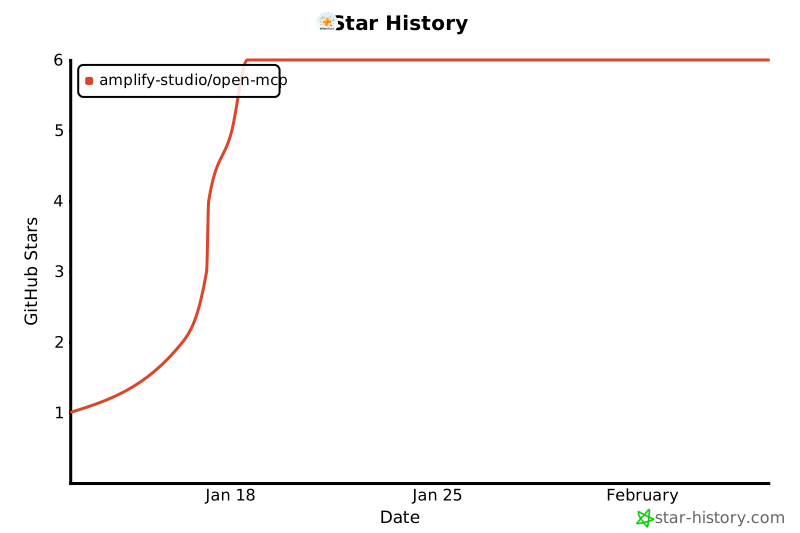](https://star-history.com/#amplify-studio/open-mcp&Date)
|
|
514
|
+
|
|
515
|
+
|
|
255
516
|
**Made with ❤️ by [Amplify Studio](https://github.com/amplify-studio)**
|
|
@@ -0,0 +1,32 @@
|
|
|
1
|
+
/**
|
|
2
|
+
* Zhipu AI API Client
|
|
3
|
+
* Handles HTTP requests to Zhipu AI vision and image generation APIs
|
|
4
|
+
*/
|
|
5
|
+
export interface VisionContentItem {
|
|
6
|
+
type: 'image_url' | 'video_url' | 'file_url';
|
|
7
|
+
image_url?: {
|
|
8
|
+
url: string;
|
|
9
|
+
};
|
|
10
|
+
video_url?: {
|
|
11
|
+
url: string;
|
|
12
|
+
};
|
|
13
|
+
file_url?: {
|
|
14
|
+
url: string;
|
|
15
|
+
};
|
|
16
|
+
}
|
|
17
|
+
interface VisionMessage {
|
|
18
|
+
role: 'user' | 'assistant' | 'system';
|
|
19
|
+
content: Array<VisionContentItem | {
|
|
20
|
+
type: 'text';
|
|
21
|
+
text: string;
|
|
22
|
+
}>;
|
|
23
|
+
}
|
|
24
|
+
/**
|
|
25
|
+
* Call GLM-4.6V-Flash for image/video/document understanding
|
|
26
|
+
*/
|
|
27
|
+
export declare function callVisionAPI(messages: VisionMessage[], thinking?: boolean): Promise<string>;
|
|
28
|
+
/**
|
|
29
|
+
* Call Cogview-3-Flash for image generation
|
|
30
|
+
*/
|
|
31
|
+
export declare function callImageGenAPI(prompt: string, size?: string): Promise<string>;
|
|
32
|
+
export {};
|