@alicloud/ecs20140526 7.8.6 → 7.9.0
This diff represents the content of publicly available package versions that have been released to one of the supported registries. The information contained in this diff is provided for informational purposes only and reflects changes between package versions as they appear in their respective public registries.
- package/dist/client.d.ts +843 -846
- package/dist/client.js +872 -842
- package/dist/client.js.map +1 -1
- package/dist/models/AcceptInquiredSystemEventRequest.d.ts +3 -3
- package/dist/models/AssignIpv6addressesRequest.d.ts +7 -7
- package/dist/models/AssignIpv6addressesResponseBody.d.ts +1 -1
- package/dist/models/AssignPrivateIpAddressesRequest.d.ts +13 -16
- package/dist/models/AssignPrivateIpAddressesRequest.js.map +1 -1
- package/dist/models/AssignPrivateIpAddressesResponseBody.d.ts +2 -2
- package/dist/models/AttachNetworkInterfaceRequest.d.ts +6 -7
- package/dist/models/AttachNetworkInterfaceRequest.js.map +1 -1
- package/dist/models/AuthorizeSecurityGroupEgressRequest.d.ts +73 -100
- package/dist/models/AuthorizeSecurityGroupEgressRequest.js.map +1 -1
- package/dist/models/AuthorizeSecurityGroupRequest.d.ts +70 -91
- package/dist/models/AuthorizeSecurityGroupRequest.js.map +1 -1
- package/dist/models/AuthorizeSecurityGroupResponseBody.d.ts +1 -1
- package/dist/models/CancelImagePipelineExecutionRequest.d.ts +2 -2
- package/dist/models/CreateActivationRequest.d.ts +17 -16
- package/dist/models/CreateActivationRequest.js.map +1 -1
- package/dist/models/CreateActivationResponseBody.d.ts +3 -3
- package/dist/models/CreateCommandRequest.d.ts +52 -73
- package/dist/models/CreateCommandRequest.js.map +1 -1
- package/dist/models/CreateCommandResponseBody.d.ts +2 -2
- package/dist/models/CreateDiskRequest.d.ts +57 -59
- package/dist/models/CreateDiskRequest.js.map +1 -1
- package/dist/models/CreateDiskResponseBody.d.ts +3 -3
- package/dist/models/CreateHpcClusterRequest.d.ts +5 -5
- package/dist/models/CreateHpcClusterResponseBody.d.ts +2 -2
- package/dist/models/CreateImageComponentRequest.d.ts +7 -7
- package/dist/models/CreateImageComponentResponseBody.d.ts +1 -1
- package/dist/models/CreateInstanceRequest.d.ts +184 -274
- package/dist/models/CreateInstanceRequest.js.map +1 -1
- package/dist/models/CreateInstanceResponseBody.d.ts +2 -2
- package/dist/models/CreateLaunchTemplateVersionRequest.d.ts +215 -244
- package/dist/models/CreateLaunchTemplateVersionRequest.js.map +1 -1
- package/dist/models/CreateLaunchTemplateVersionResponseBody.d.ts +2 -2
- package/dist/models/CreateSecurityGroupRequest.d.ts +13 -16
- package/dist/models/CreateSecurityGroupRequest.js.map +1 -1
- package/dist/models/CreateSecurityGroupResponseBody.d.ts +1 -1
- package/dist/models/DeleteHpcClusterRequest.d.ts +2 -2
- package/dist/models/DeleteImagePipelineRequest.d.ts +1 -1
- package/dist/models/DescribeAutoProvisioningGroupInstancesRequest.d.ts +5 -5
- package/dist/models/DescribeAutoProvisioningGroupInstancesResponseBody.d.ts +1 -1
- package/dist/models/DescribeAutoSnapshotPolicyExRequest.d.ts +11 -11
- package/dist/models/DescribeAutoSnapshotPolicyExResponseBody.d.ts +3 -3
- package/dist/models/DescribeAvailableResourceRequest.d.ts +50 -84
- package/dist/models/DescribeAvailableResourceRequest.js.map +1 -1
- package/dist/models/DescribeAvailableResourceResponseBody.d.ts +0 -4
- package/dist/models/DescribeAvailableResourceResponseBody.js.map +1 -1
- package/dist/models/DescribeDisksRequest.d.ts +40 -40
- package/dist/models/DescribeDisksResponseBody.d.ts +3 -3
- package/dist/models/DescribeImageComponentsRequest.d.ts +3 -3
- package/dist/models/DescribeImageComponentsResponseBody.d.ts +1 -1
- package/dist/models/DescribeInstanceAttributeRequest.d.ts +1 -1
- package/dist/models/DescribeInstanceAttributeResponseBody.d.ts +64 -96
- package/dist/models/DescribeInstanceAttributeResponseBody.js.map +1 -1
- package/dist/models/DescribeInstanceHistoryEventsRequest.d.ts +50 -85
- package/dist/models/DescribeInstanceHistoryEventsRequest.js.map +1 -1
- package/dist/models/DescribeInstanceHistoryEventsResponseBody.d.ts +16 -18
- package/dist/models/DescribeInstanceHistoryEventsResponseBody.js +2 -0
- package/dist/models/DescribeInstanceHistoryEventsResponseBody.js.map +1 -1
- package/dist/models/DescribeInstanceTopologyResponseBody.d.ts +14 -0
- package/dist/models/DescribeInstanceTopologyResponseBody.js +28 -1
- package/dist/models/DescribeInstanceTopologyResponseBody.js.map +1 -1
- package/dist/models/DescribeInstancesRequest.d.ts +54 -68
- package/dist/models/DescribeInstancesRequest.js.map +1 -1
- package/dist/models/DescribeInstancesResponseBody.d.ts +5 -5
- package/dist/models/DescribeInvocationResultsRequest.d.ts +52 -69
- package/dist/models/DescribeInvocationResultsRequest.js.map +1 -1
- package/dist/models/DescribeInvocationResultsResponseBody.d.ts +6 -52
- package/dist/models/DescribeInvocationResultsResponseBody.js.map +1 -1
- package/dist/models/DescribeInvocationsRequest.d.ts +49 -76
- package/dist/models/DescribeInvocationsRequest.js.map +1 -1
- package/dist/models/DescribeInvocationsResponseBody.d.ts +5 -5
- package/dist/models/DescribeLaunchTemplateVersionsRequest.d.ts +14 -14
- package/dist/models/DescribeLaunchTemplateVersionsResponseBody.d.ts +3 -3
- package/dist/models/DescribeNetworkInterfacePermissionsRequest.d.ts +4 -4
- package/dist/models/DescribePriceRequest.d.ts +158 -242
- package/dist/models/DescribePriceRequest.js.map +1 -1
- package/dist/models/DescribePriceResponseBody.d.ts +15 -15
- package/dist/models/DescribeRecommendInstanceTypeRequest.d.ts +45 -57
- package/dist/models/DescribeRecommendInstanceTypeRequest.js.map +1 -1
- package/dist/models/DescribeResourcesModificationRequest.d.ts +26 -37
- package/dist/models/DescribeResourcesModificationRequest.js.map +1 -1
- package/dist/models/DescribeSecurityGroupAttributeRequest.d.ts +17 -28
- package/dist/models/DescribeSecurityGroupAttributeRequest.js.map +1 -1
- package/dist/models/DescribeSecurityGroupAttributeResponseBody.d.ts +10 -9
- package/dist/models/DescribeSecurityGroupAttributeResponseBody.js.map +1 -1
- package/dist/models/DescribeSecurityGroupsRequest.d.ts +20 -20
- package/dist/models/DescribeSecurityGroupsResponseBody.d.ts +4 -4
- package/dist/models/DescribeSendFileResultsRequest.d.ts +21 -25
- package/dist/models/DescribeSendFileResultsRequest.js.map +1 -1
- package/dist/models/DescribeSendFileResultsResponseBody.d.ts +3 -3
- package/dist/models/DescribeSnapshotsRequest.d.ts +44 -59
- package/dist/models/DescribeSnapshotsRequest.js.map +1 -1
- package/dist/models/DescribeSnapshotsResponseBody.d.ts +4 -8
- package/dist/models/DescribeSnapshotsResponseBody.js.map +1 -1
- package/dist/models/DescribeSpotPriceHistoryRequest.d.ts +22 -28
- package/dist/models/DescribeSpotPriceHistoryRequest.js.map +1 -1
- package/dist/models/DescribeSpotPriceHistoryResponseBody.d.ts +7 -3
- package/dist/models/DescribeSpotPriceHistoryResponseBody.js.map +1 -1
- package/dist/models/DescribeTerminalSessionsRequest.d.ts +3 -3
- package/dist/models/DescribeTerminalSessionsResponseBody.d.ts +1 -1
- package/dist/models/DescribeZonesRequest.d.ts +18 -28
- package/dist/models/DescribeZonesRequest.js.map +1 -1
- package/dist/models/DescribeZonesResponseBody.d.ts +1 -1
- package/dist/models/GetInstanceConsoleOutputRequest.d.ts +1 -1
- package/dist/models/GetInstanceConsoleOutputResponseBody.d.ts +2 -2
- package/dist/models/ModifyHpcClusterAttributeRequest.d.ts +1 -1
- package/dist/models/ModifyInstanceAttributeRequest.d.ts +78 -106
- package/dist/models/ModifyInstanceAttributeRequest.js.map +1 -1
- package/dist/models/ModifyInstanceNetworkSpecRequest.d.ts +14 -14
- package/dist/models/ModifyInstanceNetworkSpecResponseBody.d.ts +1 -1
- package/dist/models/ModifyInstanceSpecRequest.d.ts +16 -16
- package/dist/models/ModifyPlanMaintenanceWindowRequest.d.ts +4 -4
- package/dist/models/ModifyPrepayInstanceSpecRequest.d.ts +28 -46
- package/dist/models/ModifyPrepayInstanceSpecRequest.js.map +1 -1
- package/dist/models/ModifyPrepayInstanceSpecResponseBody.d.ts +2 -2
- package/dist/models/ModifySecurityGroupEgressRuleRequest.d.ts +47 -46
- package/dist/models/ModifySecurityGroupEgressRuleRequest.js.map +1 -1
- package/dist/models/ModifySecurityGroupRuleRequest.d.ts +27 -24
- package/dist/models/ModifySecurityGroupRuleRequest.js.map +1 -1
- package/dist/models/ModifySystemEventAttributeRequest.d.ts +45 -0
- package/dist/models/ModifySystemEventAttributeRequest.js +64 -0
- package/dist/models/ModifySystemEventAttributeRequest.js.map +1 -0
- package/dist/models/ModifySystemEventAttributeResponse.d.ts +19 -0
- package/dist/models/ModifySystemEventAttributeResponse.js +69 -0
- package/dist/models/ModifySystemEventAttributeResponse.js.map +1 -0
- package/dist/models/ModifySystemEventAttributeResponseBody.d.ts +18 -0
- package/dist/models/ModifySystemEventAttributeResponseBody.js +58 -0
- package/dist/models/ModifySystemEventAttributeResponseBody.js.map +1 -0
- package/dist/models/RenewElasticityAssurancesRequest.d.ts +28 -24
- package/dist/models/RenewElasticityAssurancesRequest.js.map +1 -1
- package/dist/models/RenewElasticityAssurancesResponseBody.d.ts +1 -1
- package/dist/models/RevokeSecurityGroupEgressRequest.d.ts +35 -37
- package/dist/models/RevokeSecurityGroupEgressRequest.js.map +1 -1
- package/dist/models/RevokeSecurityGroupRequest.d.ts +71 -89
- package/dist/models/RevokeSecurityGroupRequest.js.map +1 -1
- package/dist/models/StartTerminalSessionRequest.d.ts +24 -32
- package/dist/models/StartTerminalSessionRequest.js.map +1 -1
- package/dist/models/StartTerminalSessionResponseBody.d.ts +2 -2
- package/dist/models/StartTerminalSessionShrinkRequest.d.ts +16 -18
- package/dist/models/StartTerminalSessionShrinkRequest.js.map +1 -1
- package/dist/models/StopInstanceRequest.d.ts +20 -27
- package/dist/models/StopInstanceRequest.js.map +1 -1
- package/dist/models/StopInstancesRequest.d.ts +24 -35
- package/dist/models/StopInstancesRequest.js.map +1 -1
- package/dist/models/UnassignIpv6addressesRequest.d.ts +3 -3
- package/dist/models/model.d.ts +4 -0
- package/dist/models/model.js +45 -37
- package/dist/models/model.js.map +1 -1
- package/package.json +1 -1
- package/src/client.ts +878 -842
- package/src/models/AcceptInquiredSystemEventRequest.ts +3 -3
- package/src/models/AssignIpv6addressesRequest.ts +7 -7
- package/src/models/AssignIpv6addressesResponseBody.ts +1 -1
- package/src/models/AssignPrivateIpAddressesRequest.ts +13 -16
- package/src/models/AssignPrivateIpAddressesResponseBody.ts +2 -2
- package/src/models/AttachNetworkInterfaceRequest.ts +6 -7
- package/src/models/AuthorizeSecurityGroupEgressRequest.ts +79 -106
- package/src/models/AuthorizeSecurityGroupRequest.ts +70 -91
- package/src/models/AuthorizeSecurityGroupResponseBody.ts +1 -1
- package/src/models/CancelImagePipelineExecutionRequest.ts +2 -2
- package/src/models/CreateActivationRequest.ts +17 -16
- package/src/models/CreateActivationResponseBody.ts +3 -3
- package/src/models/CreateCommandRequest.ts +52 -73
- package/src/models/CreateCommandResponseBody.ts +2 -2
- package/src/models/CreateDiskRequest.ts +57 -59
- package/src/models/CreateDiskResponseBody.ts +3 -3
- package/src/models/CreateHpcClusterRequest.ts +5 -5
- package/src/models/CreateHpcClusterResponseBody.ts +2 -2
- package/src/models/CreateImageComponentRequest.ts +7 -7
- package/src/models/CreateImageComponentResponseBody.ts +1 -1
- package/src/models/CreateInstanceRequest.ts +185 -275
- package/src/models/CreateInstanceResponseBody.ts +2 -2
- package/src/models/CreateLaunchTemplateVersionRequest.ts +215 -244
- package/src/models/CreateLaunchTemplateVersionResponseBody.ts +2 -2
- package/src/models/CreateSecurityGroupRequest.ts +13 -16
- package/src/models/CreateSecurityGroupResponseBody.ts +1 -1
- package/src/models/DeleteHpcClusterRequest.ts +2 -2
- package/src/models/DeleteImagePipelineRequest.ts +1 -1
- package/src/models/DescribeAutoProvisioningGroupInstancesRequest.ts +5 -5
- package/src/models/DescribeAutoProvisioningGroupInstancesResponseBody.ts +1 -1
- package/src/models/DescribeAutoSnapshotPolicyExRequest.ts +11 -11
- package/src/models/DescribeAutoSnapshotPolicyExResponseBody.ts +3 -3
- package/src/models/DescribeAvailableResourceRequest.ts +62 -96
- package/src/models/DescribeAvailableResourceResponseBody.ts +0 -4
- package/src/models/DescribeDisksRequest.ts +40 -40
- package/src/models/DescribeDisksResponseBody.ts +3 -3
- package/src/models/DescribeImageComponentsRequest.ts +3 -3
- package/src/models/DescribeImageComponentsResponseBody.ts +1 -1
- package/src/models/DescribeInstanceAttributeRequest.ts +1 -1
- package/src/models/DescribeInstanceAttributeResponseBody.ts +66 -98
- package/src/models/DescribeInstanceHistoryEventsRequest.ts +50 -85
- package/src/models/DescribeInstanceHistoryEventsResponseBody.ts +18 -18
- package/src/models/DescribeInstanceTopologyResponseBody.ts +32 -0
- package/src/models/DescribeInstancesRequest.ts +57 -71
- package/src/models/DescribeInstancesResponseBody.ts +5 -5
- package/src/models/DescribeInvocationResultsRequest.ts +52 -69
- package/src/models/DescribeInvocationResultsResponseBody.ts +6 -52
- package/src/models/DescribeInvocationsRequest.ts +50 -77
- package/src/models/DescribeInvocationsResponseBody.ts +5 -5
- package/src/models/DescribeLaunchTemplateVersionsRequest.ts +14 -14
- package/src/models/DescribeLaunchTemplateVersionsResponseBody.ts +3 -3
- package/src/models/DescribeNetworkInterfacePermissionsRequest.ts +4 -4
- package/src/models/DescribePriceRequest.ts +160 -244
- package/src/models/DescribePriceResponseBody.ts +15 -15
- package/src/models/DescribeRecommendInstanceTypeRequest.ts +45 -57
- package/src/models/DescribeResourcesModificationRequest.ts +30 -41
- package/src/models/DescribeSecurityGroupAttributeRequest.ts +18 -29
- package/src/models/DescribeSecurityGroupAttributeResponseBody.ts +11 -10
- package/src/models/DescribeSecurityGroupsRequest.ts +21 -21
- package/src/models/DescribeSecurityGroupsResponseBody.ts +4 -4
- package/src/models/DescribeSendFileResultsRequest.ts +21 -25
- package/src/models/DescribeSendFileResultsResponseBody.ts +3 -3
- package/src/models/DescribeSnapshotsRequest.ts +48 -63
- package/src/models/DescribeSnapshotsResponseBody.ts +4 -8
- package/src/models/DescribeSpotPriceHistoryRequest.ts +22 -28
- package/src/models/DescribeSpotPriceHistoryResponseBody.ts +7 -3
- package/src/models/DescribeTerminalSessionsRequest.ts +3 -3
- package/src/models/DescribeTerminalSessionsResponseBody.ts +1 -1
- package/src/models/DescribeZonesRequest.ts +20 -30
- package/src/models/DescribeZonesResponseBody.ts +1 -1
- package/src/models/GetInstanceConsoleOutputRequest.ts +1 -1
- package/src/models/GetInstanceConsoleOutputResponseBody.ts +2 -2
- package/src/models/ModifyHpcClusterAttributeRequest.ts +1 -1
- package/src/models/ModifyInstanceAttributeRequest.ts +80 -108
- package/src/models/ModifyInstanceNetworkSpecRequest.ts +14 -14
- package/src/models/ModifyInstanceNetworkSpecResponseBody.ts +1 -1
- package/src/models/ModifyInstanceSpecRequest.ts +16 -16
- package/src/models/ModifyPlanMaintenanceWindowRequest.ts +4 -4
- package/src/models/ModifyPrepayInstanceSpecRequest.ts +28 -46
- package/src/models/ModifyPrepayInstanceSpecResponseBody.ts +2 -2
- package/src/models/ModifySecurityGroupEgressRuleRequest.ts +47 -46
- package/src/models/ModifySecurityGroupRuleRequest.ts +27 -24
- package/src/models/ModifySystemEventAttributeRequest.ts +64 -0
- package/src/models/ModifySystemEventAttributeResponse.ts +40 -0
- package/src/models/ModifySystemEventAttributeResponseBody.ts +31 -0
- package/src/models/RenewElasticityAssurancesRequest.ts +28 -24
- package/src/models/RenewElasticityAssurancesResponseBody.ts +1 -1
- package/src/models/RevokeSecurityGroupEgressRequest.ts +35 -37
- package/src/models/RevokeSecurityGroupRequest.ts +75 -93
- package/src/models/StartTerminalSessionRequest.ts +24 -32
- package/src/models/StartTerminalSessionResponseBody.ts +2 -2
- package/src/models/StartTerminalSessionShrinkRequest.ts +16 -18
- package/src/models/StopInstanceRequest.ts +21 -28
- package/src/models/StopInstancesRequest.ts +25 -36
- package/src/models/UnassignIpv6addressesRequest.ts +3 -3
- package/src/models/model.ts +4 -0
package/dist/client.js
CHANGED
|
@@ -137,7 +137,7 @@ class Client extends openapi_core_1.default {
|
|
|
137
137
|
return openapi_core_2.OpenApiUtil.getEndpointRules(productId, regionId, endpointRule, network, suffix);
|
|
138
138
|
}
|
|
139
139
|
/**
|
|
140
|
-
*
|
|
140
|
+
* Accepts and authorizes the execution of a system event operation. For system events in the Inquiring state, this operation accepts the default action of the system event and authorizes the system to execute the default action.
|
|
141
141
|
*
|
|
142
142
|
* @param request - AcceptInquiredSystemEventRequest
|
|
143
143
|
* @param runtime - runtime options for this request RuntimeOptions
|
|
@@ -187,7 +187,7 @@ class Client extends openapi_core_1.default {
|
|
|
187
187
|
return $dara.cast(await this.callApi(params, req, runtime), new $_model.AcceptInquiredSystemEventResponse({}));
|
|
188
188
|
}
|
|
189
189
|
/**
|
|
190
|
-
*
|
|
190
|
+
* Accepts and authorizes the execution of a system event operation. For system events in the Inquiring state, this operation accepts the default action of the system event and authorizes the system to execute the default action.
|
|
191
191
|
*
|
|
192
192
|
* @param request - AcceptInquiredSystemEventRequest
|
|
193
193
|
* @returns AcceptInquiredSystemEventResponse
|
|
@@ -746,9 +746,9 @@ class Client extends openapi_core_1.default {
|
|
|
746
746
|
* You can specify IPv6 addresses from the CIDR block of the vSwitch to which the Elastic Network Interface (ENI) belongs, or specify the number of IPv6 addresses for automatic creation. Note the following items:
|
|
747
747
|
* - The vSwitch to which the ENI belongs must have IPv6 enabled. For more information, see [Enable an IPv6 CIDR block for an existing vSwitch](https://help.aliyun.com/document_detail/98923.html).
|
|
748
748
|
* - The ENI must be in the Active (Available) or InUse state.
|
|
749
|
-
* - When you operate
|
|
750
|
-
* - The number of IPv6 addresses that can be allocated to a single
|
|
751
|
-
* - If the ENI is in the Active (Available) state, up to 10 IPv6 addresses
|
|
749
|
+
* - When you operate a primary ENI, the instance to which the network interface controller (NIC) is attached must be in the Running or Stopped state.
|
|
750
|
+
* - The number of IPv6 addresses that can be allocated to a single network interface controller (NIC) depends on the instance type of the instance to which the ENI is attached.
|
|
751
|
+
* - If the ENI is in the Active (Available) state, you can allocate up to 10 IPv6 addresses to it.
|
|
752
752
|
* - If the ENI is attached to an instance, the number of IPv6 addresses that can be allocated is limited by the instance type. For more information, see [Instance family](https://help.aliyun.com/document_detail/25378.html).
|
|
753
753
|
* - After you successfully invoke this operation, you can obtain the allocated IPv6 address information from the response.
|
|
754
754
|
*
|
|
@@ -819,9 +819,9 @@ class Client extends openapi_core_1.default {
|
|
|
819
819
|
* You can specify IPv6 addresses from the CIDR block of the vSwitch to which the Elastic Network Interface (ENI) belongs, or specify the number of IPv6 addresses for automatic creation. Note the following items:
|
|
820
820
|
* - The vSwitch to which the ENI belongs must have IPv6 enabled. For more information, see [Enable an IPv6 CIDR block for an existing vSwitch](https://help.aliyun.com/document_detail/98923.html).
|
|
821
821
|
* - The ENI must be in the Active (Available) or InUse state.
|
|
822
|
-
* - When you operate
|
|
823
|
-
* - The number of IPv6 addresses that can be allocated to a single
|
|
824
|
-
* - If the ENI is in the Active (Available) state, up to 10 IPv6 addresses
|
|
822
|
+
* - When you operate a primary ENI, the instance to which the network interface controller (NIC) is attached must be in the Running or Stopped state.
|
|
823
|
+
* - The number of IPv6 addresses that can be allocated to a single network interface controller (NIC) depends on the instance type of the instance to which the ENI is attached.
|
|
824
|
+
* - If the ENI is in the Active (Available) state, you can allocate up to 10 IPv6 addresses to it.
|
|
825
825
|
* - If the ENI is attached to an instance, the number of IPv6 addresses that can be allocated is limited by the instance type. For more information, see [Instance family](https://help.aliyun.com/document_detail/25378.html).
|
|
826
826
|
* - After you successfully invoke this operation, you can obtain the allocated IPv6 address information from the response.
|
|
827
827
|
*
|
|
@@ -833,14 +833,14 @@ class Client extends openapi_core_1.default {
|
|
|
833
833
|
return await this.assignIpv6AddressesWithOptions(request, runtime);
|
|
834
834
|
}
|
|
835
835
|
/**
|
|
836
|
-
*
|
|
836
|
+
* Allocates one or more secondary private IP addresses to an Elastic Network Interface (ENI). You can specify available private IP addresses from the vSwitch to which the ENI belongs, or automatically allocate private IP addresses by specifying the number of private endpoint addresses.
|
|
837
837
|
*
|
|
838
838
|
* @remarks
|
|
839
|
-
* ##
|
|
840
|
-
* -
|
|
841
|
-
* - When you
|
|
842
|
-
* - When an ENI is in the Available state, you can
|
|
843
|
-
* - After
|
|
839
|
+
* ## Operation description
|
|
840
|
+
* - Only ENIs in the Available or InUse state are supported.
|
|
841
|
+
* - When you operate a primary ENI, the instance to which the ENI is attached must be in the Running or Stopped state.
|
|
842
|
+
* - When an ENI is in the Available state, you can allocate up to 49 secondary private IP addresses to it. After the ENI is attached to an instance, the number of secondary private IP addresses that can be allocated is limited by the instance type. For more information, see [Instance families](https://help.aliyun.com/document_detail/25378.html).
|
|
843
|
+
* - After you call this operation, you can obtain the allocated secondary private IP address information from the response.
|
|
844
844
|
*
|
|
845
845
|
* @param request - AssignPrivateIpAddressesRequest
|
|
846
846
|
* @param runtime - runtime options for this request RuntimeOptions
|
|
@@ -902,14 +902,14 @@ class Client extends openapi_core_1.default {
|
|
|
902
902
|
return $dara.cast(await this.callApi(params, req, runtime), new $_model.AssignPrivateIpAddressesResponse({}));
|
|
903
903
|
}
|
|
904
904
|
/**
|
|
905
|
-
*
|
|
905
|
+
* Allocates one or more secondary private IP addresses to an Elastic Network Interface (ENI). You can specify available private IP addresses from the vSwitch to which the ENI belongs, or automatically allocate private IP addresses by specifying the number of private endpoint addresses.
|
|
906
906
|
*
|
|
907
907
|
* @remarks
|
|
908
|
-
* ##
|
|
909
|
-
* -
|
|
910
|
-
* - When you
|
|
911
|
-
* - When an ENI is in the Available state, you can
|
|
912
|
-
* - After
|
|
908
|
+
* ## Operation description
|
|
909
|
+
* - Only ENIs in the Available or InUse state are supported.
|
|
910
|
+
* - When you operate a primary ENI, the instance to which the ENI is attached must be in the Running or Stopped state.
|
|
911
|
+
* - When an ENI is in the Available state, you can allocate up to 49 secondary private IP addresses to it. After the ENI is attached to an instance, the number of secondary private IP addresses that can be allocated is limited by the instance type. For more information, see [Instance families](https://help.aliyun.com/document_detail/25378.html).
|
|
912
|
+
* - After you call this operation, you can obtain the allocated secondary private IP address information from the response.
|
|
913
913
|
*
|
|
914
914
|
* @param request - AssignPrivateIpAddressesRequest
|
|
915
915
|
* @returns AssignPrivateIpAddressesResponse
|
|
@@ -1356,21 +1356,22 @@ class Client extends openapi_core_1.default {
|
|
|
1356
1356
|
return await this.attachKeyPairWithOptions(request, runtime);
|
|
1357
1357
|
}
|
|
1358
1358
|
/**
|
|
1359
|
-
*
|
|
1359
|
+
* Calls the AttachNetworkInterface operation to attach an Elastic Network Interface (ENI) to a VPC-connected ECS instance. You can specify parameters such as NetworkInterfaceId, InstanceId, and NetworkCardIndex.
|
|
1360
1360
|
*
|
|
1361
1361
|
* @remarks
|
|
1362
|
-
*
|
|
1363
|
-
* - The ENI must be in the **
|
|
1364
|
-
* - The instance must be in the Running or Stopped state.
|
|
1365
|
-
*
|
|
1366
|
-
* -
|
|
1367
|
-
*
|
|
1368
|
-
* -
|
|
1369
|
-
*
|
|
1370
|
-
*
|
|
1371
|
-
*
|
|
1372
|
-
*
|
|
1373
|
-
*
|
|
1362
|
+
* When you call this operation, take note of the following items:
|
|
1363
|
+
* - The Elastic Network Interface (ENI) must be in the **active** (`Available`) state. An ENI can be attached to only one instance that resides in the same zone and VPC as the network interface controller (NIC).
|
|
1364
|
+
* - The ECS instance must be in the Running or Stopped state. Some ECS instance types require the ECS instance to be in the Stopped state when you attach an Elastic Network Interface (ENI). For more information, see the section about ECS instance types that require the ECS instance to be stopped in [Attach an ENI](https://help.aliyun.com/document_detail/58503.html).
|
|
1365
|
+
* > If the instance was last started before April 1, 2018 (including but not limited to starting a newly purchased instance, restarting, or powering on), you must invoke RebootInstance to restart the instance that has been in the Running state. Otherwise, the network interface controller (NIC) cannot be attached.
|
|
1366
|
+
* - Multiple Elastic Network Interfaces (ENIs) can be attached to a single instance at the same time. For more information, see [ENI overview](https://help.aliyun.com/document_detail/58496.html).
|
|
1367
|
+
*
|
|
1368
|
+
* - The vSwitch to which the network interface controller (NIC) belongs must be in the same zone and VPC as the instance.
|
|
1369
|
+
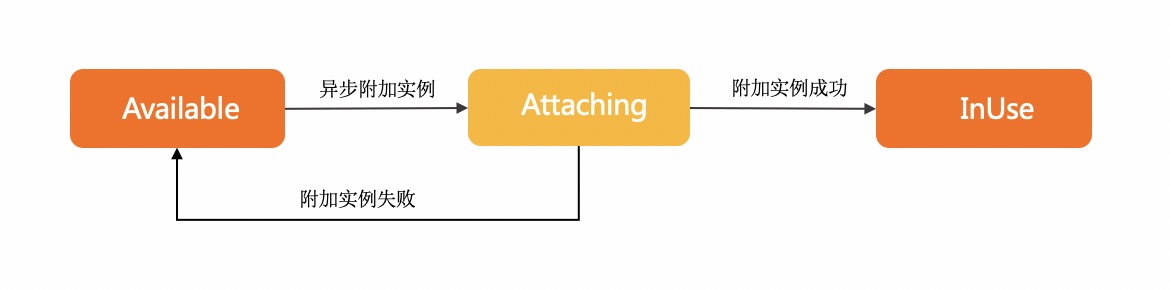
* - This is an asynchronous operation. After a successful invocation, you can check the Elastic Network Interface (ENI) status or listen for network interface controller (NIC) operation events to obtain the result. The ENI state machine is shown in the following figure:
|
|
1370
|
+
* 
|
|
1371
|
+
* - Attaching indicates that the request to attach the ENI was sent successfully and the ENI is being attached to the ECS instance.
|
|
1372
|
+
* - InUse indicates that the ENI has been attached to the ECS instance.
|
|
1373
|
+
* - Available indicates that the ENI failed to be attached to the ECS instance.
|
|
1374
|
+
* **For details, see** [Attach a network interface controller (NIC)](https://help.aliyun.com/document_detail/471550.html).
|
|
1374
1375
|
*
|
|
1375
1376
|
* @param request - AttachNetworkInterfaceRequest
|
|
1376
1377
|
* @param runtime - runtime options for this request RuntimeOptions
|
|
@@ -1429,21 +1430,22 @@ class Client extends openapi_core_1.default {
|
|
|
1429
1430
|
return $dara.cast(await this.callApi(params, req, runtime), new $_model.AttachNetworkInterfaceResponse({}));
|
|
1430
1431
|
}
|
|
1431
1432
|
/**
|
|
1432
|
-
*
|
|
1433
|
+
* Calls the AttachNetworkInterface operation to attach an Elastic Network Interface (ENI) to a VPC-connected ECS instance. You can specify parameters such as NetworkInterfaceId, InstanceId, and NetworkCardIndex.
|
|
1433
1434
|
*
|
|
1434
1435
|
* @remarks
|
|
1435
|
-
*
|
|
1436
|
-
* - The ENI must be in the **
|
|
1437
|
-
* - The instance must be in the Running or Stopped state.
|
|
1438
|
-
*
|
|
1439
|
-
* -
|
|
1440
|
-
*
|
|
1441
|
-
* -
|
|
1442
|
-
*
|
|
1443
|
-
*
|
|
1444
|
-
*
|
|
1445
|
-
*
|
|
1446
|
-
*
|
|
1436
|
+
* When you call this operation, take note of the following items:
|
|
1437
|
+
* - The Elastic Network Interface (ENI) must be in the **active** (`Available`) state. An ENI can be attached to only one instance that resides in the same zone and VPC as the network interface controller (NIC).
|
|
1438
|
+
* - The ECS instance must be in the Running or Stopped state. Some ECS instance types require the ECS instance to be in the Stopped state when you attach an Elastic Network Interface (ENI). For more information, see the section about ECS instance types that require the ECS instance to be stopped in [Attach an ENI](https://help.aliyun.com/document_detail/58503.html).
|
|
1439
|
+
* > If the instance was last started before April 1, 2018 (including but not limited to starting a newly purchased instance, restarting, or powering on), you must invoke RebootInstance to restart the instance that has been in the Running state. Otherwise, the network interface controller (NIC) cannot be attached.
|
|
1440
|
+
* - Multiple Elastic Network Interfaces (ENIs) can be attached to a single instance at the same time. For more information, see [ENI overview](https://help.aliyun.com/document_detail/58496.html).
|
|
1441
|
+
*
|
|
1442
|
+
* - The vSwitch to which the network interface controller (NIC) belongs must be in the same zone and VPC as the instance.
|
|
1443
|
+
* - This is an asynchronous operation. After a successful invocation, you can check the Elastic Network Interface (ENI) status or listen for network interface controller (NIC) operation events to obtain the result. The ENI state machine is shown in the following figure:
|
|
1444
|
+
* 
|
|
1445
|
+
* - Attaching indicates that the request to attach the ENI was sent successfully and the ENI is being attached to the ECS instance.
|
|
1446
|
+
* - InUse indicates that the ENI has been attached to the ECS instance.
|
|
1447
|
+
* - Available indicates that the ENI failed to be attached to the ECS instance.
|
|
1448
|
+
* **For details, see** [Attach a network interface controller (NIC)](https://help.aliyun.com/document_detail/471550.html).
|
|
1447
1449
|
*
|
|
1448
1450
|
* @param request - AttachNetworkInterfaceRequest
|
|
1449
1451
|
* @returns AttachNetworkInterfaceResponse
|
|
@@ -1453,54 +1455,54 @@ class Client extends openapi_core_1.default {
|
|
|
1453
1455
|
return await this.attachNetworkInterfaceWithOptions(request, runtime);
|
|
1454
1456
|
}
|
|
1455
1457
|
/**
|
|
1456
|
-
*
|
|
1458
|
+
* Adds one or more inbound rules to a security group. You can use this operation to specify inbound access permissions for a security group, allowing or denying other devices from sending inbound traffic to instances in the security group, which enables fine-grained network access control.
|
|
1457
1459
|
*
|
|
1458
1460
|
* @remarks
|
|
1459
|
-
* ###
|
|
1460
|
-
* -
|
|
1461
|
-
* -
|
|
1462
|
-
* ###
|
|
1463
|
-
*
|
|
1464
|
-
* ###
|
|
1465
|
-
*
|
|
1466
|
-
* -
|
|
1467
|
-
* -
|
|
1468
|
-
* -
|
|
1469
|
-
* -
|
|
1470
|
-
* >
|
|
1471
|
-
* ###
|
|
1472
|
-
*
|
|
1473
|
-
*
|
|
1474
|
-
*
|
|
1475
|
-
*
|
|
1476
|
-
*
|
|
1477
|
-
*
|
|
1478
|
-
*
|
|
1479
|
-
*
|
|
1480
|
-
*
|
|
1481
|
-
*
|
|
1482
|
-
*
|
|
1483
|
-
*
|
|
1484
|
-
*
|
|
1485
|
-
*
|
|
1486
|
-
*
|
|
1487
|
-
*
|
|
1488
|
-
*
|
|
1489
|
-
*
|
|
1490
|
-
*
|
|
1491
|
-
*
|
|
1492
|
-
*
|
|
1493
|
-
*
|
|
1494
|
-
*
|
|
1495
|
-
*
|
|
1496
|
-
*
|
|
1497
|
-
*
|
|
1498
|
-
*
|
|
1499
|
-
*
|
|
1500
|
-
*
|
|
1501
|
-
*
|
|
1502
|
-
*
|
|
1503
|
-
*
|
|
1461
|
+
* ### Before you begin
|
|
1462
|
+
* - **Quantity limit:** The total number of security group rules (including inbound rules and outbound rules) across all security groups associated with a single network interface controller (NIC) cannot exceed 1,000. For more information, see [Security group limits](~~25412#SecurityGroupQuota1~~).
|
|
1463
|
+
* - **Priority settings:** The priority (Priority) of inbound security group rules ranges from 1 to 100. A smaller number indicates a higher priority. If two security group rules have the same priority, the deny (drop) rule takes precedence. Access is denied first.
|
|
1464
|
+
* ### Notes
|
|
1465
|
+
* If the specified security group rule already exists, the call succeeds but no rule is added.
|
|
1466
|
+
* ### How to determine a rule
|
|
1467
|
+
* The following parameters are required to determine an inbound security group rule:
|
|
1468
|
+
* - Source settings: Specify one of the following: SourceCidrIp (IPv4 address), Ipv6SourceCidrIp (IPv6 address), SourcePrefixListId (prefix list ID), or SourceGroupId (source security group).
|
|
1469
|
+
* - Destination port range: PortRange.
|
|
1470
|
+
* - Protocol type: IpProtocol.
|
|
1471
|
+
* - Access policy: Policy.
|
|
1472
|
+
* > Advanced security groups do not support authorization for access from other security groups. Basic security groups support a maximum of 20 authorized security groups.
|
|
1473
|
+
* ### Request examples
|
|
1474
|
+
* The following examples show how to add inbound rules with different sources to a security group in the China (Hangzhou) region:
|
|
1475
|
+
* - Add access permissions for a specified IP address range.
|
|
1476
|
+
* ```
|
|
1477
|
+
* "RegionId":"cn-hangzhou", // Specify the region.
|
|
1478
|
+
* "SecurityGroupId":"sg-bp67acfmxazb4p****", // Specify the security group.
|
|
1479
|
+
* "Permissions":[
|
|
1480
|
+
* {
|
|
1481
|
+
* "SourceCidrIp":"10.0.0.0/8", // Specify the source IPv4 address.
|
|
1482
|
+
* "PortRange":"22/22", // Specify the port range.
|
|
1483
|
+
* "IpProtocol":"TCP", // Specify the protocol type.
|
|
1484
|
+
* "Policy":"Accept" // Specify the access policy.
|
|
1485
|
+
* }
|
|
1486
|
+
* ]
|
|
1487
|
+
* ```
|
|
1488
|
+
* - Add access permissions for another security group and a prefix list.
|
|
1489
|
+
* ```
|
|
1490
|
+
* "RegionId":"cn-hangzhou",
|
|
1491
|
+
* "SecurityGroupId":"sg-bp67acfmxazb4p****",
|
|
1492
|
+
* "Permissions":[
|
|
1493
|
+
* {
|
|
1494
|
+
* "SourceGroupId":"sg-bp17vs63txqxbd****", // Specify the source security group.
|
|
1495
|
+
* "PortRange":"22/22",
|
|
1496
|
+
* "IpProtocol":"TCP",
|
|
1497
|
+
* "Policy":"Drop"
|
|
1498
|
+
* },{
|
|
1499
|
+
* "SourcePrefixListId":"pl-x1j1k5ykzqlixdcy****", // Specify the source prefix list.
|
|
1500
|
+
* "PortRange":"22/22",
|
|
1501
|
+
* "IpProtocol":"TCP",
|
|
1502
|
+
* "Policy":"Drop"
|
|
1503
|
+
* }
|
|
1504
|
+
* ]
|
|
1505
|
+
* ```
|
|
1504
1506
|
*
|
|
1505
1507
|
* @param request - AuthorizeSecurityGroupRequest
|
|
1506
1508
|
* @param runtime - runtime options for this request RuntimeOptions
|
|
@@ -1607,54 +1609,54 @@ class Client extends openapi_core_1.default {
|
|
|
1607
1609
|
return $dara.cast(await this.callApi(params, req, runtime), new $_model.AuthorizeSecurityGroupResponse({}));
|
|
1608
1610
|
}
|
|
1609
1611
|
/**
|
|
1610
|
-
*
|
|
1612
|
+
* Adds one or more inbound rules to a security group. You can use this operation to specify inbound access permissions for a security group, allowing or denying other devices from sending inbound traffic to instances in the security group, which enables fine-grained network access control.
|
|
1611
1613
|
*
|
|
1612
1614
|
* @remarks
|
|
1613
|
-
* ###
|
|
1614
|
-
* -
|
|
1615
|
-
* -
|
|
1616
|
-
* ###
|
|
1617
|
-
*
|
|
1618
|
-
* ###
|
|
1619
|
-
*
|
|
1620
|
-
* -
|
|
1621
|
-
* -
|
|
1622
|
-
* -
|
|
1623
|
-
* -
|
|
1624
|
-
* >
|
|
1625
|
-
* ###
|
|
1626
|
-
*
|
|
1627
|
-
*
|
|
1628
|
-
*
|
|
1629
|
-
*
|
|
1630
|
-
*
|
|
1631
|
-
*
|
|
1632
|
-
*
|
|
1633
|
-
*
|
|
1634
|
-
*
|
|
1635
|
-
*
|
|
1636
|
-
*
|
|
1637
|
-
*
|
|
1638
|
-
*
|
|
1639
|
-
*
|
|
1640
|
-
*
|
|
1641
|
-
*
|
|
1642
|
-
*
|
|
1643
|
-
*
|
|
1644
|
-
*
|
|
1645
|
-
*
|
|
1646
|
-
*
|
|
1647
|
-
*
|
|
1648
|
-
*
|
|
1649
|
-
*
|
|
1650
|
-
*
|
|
1651
|
-
*
|
|
1652
|
-
*
|
|
1653
|
-
*
|
|
1654
|
-
*
|
|
1655
|
-
*
|
|
1656
|
-
*
|
|
1657
|
-
*
|
|
1615
|
+
* ### Before you begin
|
|
1616
|
+
* - **Quantity limit:** The total number of security group rules (including inbound rules and outbound rules) across all security groups associated with a single network interface controller (NIC) cannot exceed 1,000. For more information, see [Security group limits](~~25412#SecurityGroupQuota1~~).
|
|
1617
|
+
* - **Priority settings:** The priority (Priority) of inbound security group rules ranges from 1 to 100. A smaller number indicates a higher priority. If two security group rules have the same priority, the deny (drop) rule takes precedence. Access is denied first.
|
|
1618
|
+
* ### Notes
|
|
1619
|
+
* If the specified security group rule already exists, the call succeeds but no rule is added.
|
|
1620
|
+
* ### How to determine a rule
|
|
1621
|
+
* The following parameters are required to determine an inbound security group rule:
|
|
1622
|
+
* - Source settings: Specify one of the following: SourceCidrIp (IPv4 address), Ipv6SourceCidrIp (IPv6 address), SourcePrefixListId (prefix list ID), or SourceGroupId (source security group).
|
|
1623
|
+
* - Destination port range: PortRange.
|
|
1624
|
+
* - Protocol type: IpProtocol.
|
|
1625
|
+
* - Access policy: Policy.
|
|
1626
|
+
* > Advanced security groups do not support authorization for access from other security groups. Basic security groups support a maximum of 20 authorized security groups.
|
|
1627
|
+
* ### Request examples
|
|
1628
|
+
* The following examples show how to add inbound rules with different sources to a security group in the China (Hangzhou) region:
|
|
1629
|
+
* - Add access permissions for a specified IP address range.
|
|
1630
|
+
* ```
|
|
1631
|
+
* "RegionId":"cn-hangzhou", // Specify the region.
|
|
1632
|
+
* "SecurityGroupId":"sg-bp67acfmxazb4p****", // Specify the security group.
|
|
1633
|
+
* "Permissions":[
|
|
1634
|
+
* {
|
|
1635
|
+
* "SourceCidrIp":"10.0.0.0/8", // Specify the source IPv4 address.
|
|
1636
|
+
* "PortRange":"22/22", // Specify the port range.
|
|
1637
|
+
* "IpProtocol":"TCP", // Specify the protocol type.
|
|
1638
|
+
* "Policy":"Accept" // Specify the access policy.
|
|
1639
|
+
* }
|
|
1640
|
+
* ]
|
|
1641
|
+
* ```
|
|
1642
|
+
* - Add access permissions for another security group and a prefix list.
|
|
1643
|
+
* ```
|
|
1644
|
+
* "RegionId":"cn-hangzhou",
|
|
1645
|
+
* "SecurityGroupId":"sg-bp67acfmxazb4p****",
|
|
1646
|
+
* "Permissions":[
|
|
1647
|
+
* {
|
|
1648
|
+
* "SourceGroupId":"sg-bp17vs63txqxbd****", // Specify the source security group.
|
|
1649
|
+
* "PortRange":"22/22",
|
|
1650
|
+
* "IpProtocol":"TCP",
|
|
1651
|
+
* "Policy":"Drop"
|
|
1652
|
+
* },{
|
|
1653
|
+
* "SourcePrefixListId":"pl-x1j1k5ykzqlixdcy****", // Specify the source prefix list.
|
|
1654
|
+
* "PortRange":"22/22",
|
|
1655
|
+
* "IpProtocol":"TCP",
|
|
1656
|
+
* "Policy":"Drop"
|
|
1657
|
+
* }
|
|
1658
|
+
* ]
|
|
1659
|
+
* ```
|
|
1658
1660
|
*
|
|
1659
1661
|
* @param request - AuthorizeSecurityGroupRequest
|
|
1660
1662
|
* @returns AuthorizeSecurityGroupResponse
|
|
@@ -1664,54 +1666,54 @@ class Client extends openapi_core_1.default {
|
|
|
1664
1666
|
return await this.authorizeSecurityGroupWithOptions(request, runtime);
|
|
1665
1667
|
}
|
|
1666
1668
|
/**
|
|
1667
|
-
*
|
|
1669
|
+
* Adds one or more outbound rules to a security group. You can use this operation to specify outbound access permissions for a security group, allowing or denying instances in the security group from sending outbound traffic to other devices, which enables fine-grained network access control.
|
|
1668
1670
|
*
|
|
1669
1671
|
* @remarks
|
|
1670
|
-
* ###
|
|
1671
|
-
* -
|
|
1672
|
-
* -
|
|
1673
|
-
* ###
|
|
1674
|
-
*
|
|
1675
|
-
* ###
|
|
1676
|
-
*
|
|
1677
|
-
* -
|
|
1678
|
-
* -
|
|
1679
|
-
* -
|
|
1680
|
-
* -
|
|
1681
|
-
* >
|
|
1682
|
-
* ###
|
|
1683
|
-
*
|
|
1684
|
-
*
|
|
1685
|
-
*
|
|
1686
|
-
*
|
|
1687
|
-
*
|
|
1688
|
-
*
|
|
1689
|
-
*
|
|
1690
|
-
*
|
|
1691
|
-
*
|
|
1692
|
-
*
|
|
1693
|
-
*
|
|
1694
|
-
*
|
|
1695
|
-
*
|
|
1696
|
-
*
|
|
1697
|
-
*
|
|
1698
|
-
*
|
|
1699
|
-
*
|
|
1700
|
-
*
|
|
1701
|
-
*
|
|
1702
|
-
*
|
|
1703
|
-
*
|
|
1704
|
-
*
|
|
1705
|
-
*
|
|
1706
|
-
*
|
|
1707
|
-
*
|
|
1708
|
-
*
|
|
1709
|
-
*
|
|
1710
|
-
*
|
|
1711
|
-
*
|
|
1712
|
-
*
|
|
1713
|
-
*
|
|
1714
|
-
*
|
|
1672
|
+
* ### Before you begin
|
|
1673
|
+
* - **Quantity limit:** The total number of rules (including both inbound rules and outbound rules) across all security groups associated with a single network interface controller (NIC) cannot exceed 1,000. For more information, see [Security group limits](~~25412#SecurityGroupQuota1~~).
|
|
1674
|
+
* - **Priority settings:** The priority (Priority) of outbound security group rules ranges from 1 to 100. A smaller number indicates a higher priority. If two security group rules have the same priority, the deny (drop) rule takes precedence.
|
|
1675
|
+
* ### Notes
|
|
1676
|
+
* If the specified security group rule already exists, the call succeeds but no rule is added.
|
|
1677
|
+
* ### How to determine a rule
|
|
1678
|
+
* The following parameters are required to determine an outbound rule:
|
|
1679
|
+
* - Destination settings: Specify one of the following: DestCidrIp (IPv4 address), Ipv6DestCidrIp (IPv6 address), DestPrefixListId (prefix list ID), or DestGroupId (destination security group).
|
|
1680
|
+
* - Destination port range: PortRange.
|
|
1681
|
+
* - Protocol type: IpProtocol.
|
|
1682
|
+
* - Access policy: Policy.
|
|
1683
|
+
* > Advanced security groups do not support authorization of other security groups for access. Custom security groups support a maximum of 20 authorized security groups.
|
|
1684
|
+
* ### Request examples
|
|
1685
|
+
* The following examples show how to add outbound rules with different destinations to a security group in the China (Hangzhou) region:
|
|
1686
|
+
* - Add access permissions for a specified IP address range.
|
|
1687
|
+
* ```
|
|
1688
|
+
* "RegionId":"ap-southeast-1", // Specify the region.
|
|
1689
|
+
* "SecurityGroupId":"sg-bp17vs63txqxbds9***", // Specify the security group.
|
|
1690
|
+
* "Permissions":[
|
|
1691
|
+
* {
|
|
1692
|
+
* "DestCidrIp":"10.0.0.0/8", // Specify the destination IPv4 address.
|
|
1693
|
+
* "PortRange":"-1/-1", // Specify the port range.
|
|
1694
|
+
* "IpProtocol":"ICMP", // Specify the protocol type.
|
|
1695
|
+
* "Policy":"Accept" // Specify the access policy.
|
|
1696
|
+
* }
|
|
1697
|
+
* ]
|
|
1698
|
+
* ```
|
|
1699
|
+
* - Add access permissions for another security group and a prefix list.
|
|
1700
|
+
* ```
|
|
1701
|
+
* "RegionId":"ap-southeast-1",
|
|
1702
|
+
* "SecurityGroupId":"sg-bp17vs63txqxbds9***",
|
|
1703
|
+
* "Permissions":[
|
|
1704
|
+
* {
|
|
1705
|
+
* "DestGroupId":"sg-bp67acfmxazb4pi***", // Specify the destination security group.
|
|
1706
|
+
* "PortRange":"22/22",
|
|
1707
|
+
* "IpProtocol":"TCP",
|
|
1708
|
+
* "Policy":"Drop"
|
|
1709
|
+
* },{
|
|
1710
|
+
* "DestPrefixListId":"pl-x1j1k5ykzqlixdcy****", // Specify the destination prefix list.
|
|
1711
|
+
* "PortRange":"22/22",
|
|
1712
|
+
* "IpProtocol":"TCP",
|
|
1713
|
+
* "Policy":"Drop"
|
|
1714
|
+
* }
|
|
1715
|
+
* ]
|
|
1716
|
+
* ```
|
|
1715
1717
|
*
|
|
1716
1718
|
* @param request - AuthorizeSecurityGroupEgressRequest
|
|
1717
1719
|
* @param runtime - runtime options for this request RuntimeOptions
|
|
@@ -1818,54 +1820,54 @@ class Client extends openapi_core_1.default {
|
|
|
1818
1820
|
return $dara.cast(await this.callApi(params, req, runtime), new $_model.AuthorizeSecurityGroupEgressResponse({}));
|
|
1819
1821
|
}
|
|
1820
1822
|
/**
|
|
1821
|
-
*
|
|
1823
|
+
* Adds one or more outbound rules to a security group. You can use this operation to specify outbound access permissions for a security group, allowing or denying instances in the security group from sending outbound traffic to other devices, which enables fine-grained network access control.
|
|
1822
1824
|
*
|
|
1823
1825
|
* @remarks
|
|
1824
|
-
* ###
|
|
1825
|
-
* -
|
|
1826
|
-
* -
|
|
1827
|
-
* ###
|
|
1828
|
-
*
|
|
1829
|
-
* ###
|
|
1830
|
-
*
|
|
1831
|
-
* -
|
|
1832
|
-
* -
|
|
1833
|
-
* -
|
|
1834
|
-
* -
|
|
1835
|
-
* >
|
|
1836
|
-
* ###
|
|
1837
|
-
*
|
|
1838
|
-
*
|
|
1839
|
-
*
|
|
1840
|
-
*
|
|
1841
|
-
*
|
|
1842
|
-
*
|
|
1843
|
-
*
|
|
1844
|
-
*
|
|
1845
|
-
*
|
|
1846
|
-
*
|
|
1847
|
-
*
|
|
1848
|
-
*
|
|
1849
|
-
*
|
|
1850
|
-
*
|
|
1851
|
-
*
|
|
1852
|
-
*
|
|
1853
|
-
*
|
|
1854
|
-
*
|
|
1855
|
-
*
|
|
1856
|
-
*
|
|
1857
|
-
*
|
|
1858
|
-
*
|
|
1859
|
-
*
|
|
1860
|
-
*
|
|
1861
|
-
*
|
|
1862
|
-
*
|
|
1863
|
-
*
|
|
1864
|
-
*
|
|
1865
|
-
*
|
|
1866
|
-
*
|
|
1867
|
-
*
|
|
1868
|
-
*
|
|
1826
|
+
* ### Before you begin
|
|
1827
|
+
* - **Quantity limit:** The total number of rules (including both inbound rules and outbound rules) across all security groups associated with a single network interface controller (NIC) cannot exceed 1,000. For more information, see [Security group limits](~~25412#SecurityGroupQuota1~~).
|
|
1828
|
+
* - **Priority settings:** The priority (Priority) of outbound security group rules ranges from 1 to 100. A smaller number indicates a higher priority. If two security group rules have the same priority, the deny (drop) rule takes precedence.
|
|
1829
|
+
* ### Notes
|
|
1830
|
+
* If the specified security group rule already exists, the call succeeds but no rule is added.
|
|
1831
|
+
* ### How to determine a rule
|
|
1832
|
+
* The following parameters are required to determine an outbound rule:
|
|
1833
|
+
* - Destination settings: Specify one of the following: DestCidrIp (IPv4 address), Ipv6DestCidrIp (IPv6 address), DestPrefixListId (prefix list ID), or DestGroupId (destination security group).
|
|
1834
|
+
* - Destination port range: PortRange.
|
|
1835
|
+
* - Protocol type: IpProtocol.
|
|
1836
|
+
* - Access policy: Policy.
|
|
1837
|
+
* > Advanced security groups do not support authorization of other security groups for access. Custom security groups support a maximum of 20 authorized security groups.
|
|
1838
|
+
* ### Request examples
|
|
1839
|
+
* The following examples show how to add outbound rules with different destinations to a security group in the China (Hangzhou) region:
|
|
1840
|
+
* - Add access permissions for a specified IP address range.
|
|
1841
|
+
* ```
|
|
1842
|
+
* "RegionId":"ap-southeast-1", // Specify the region.
|
|
1843
|
+
* "SecurityGroupId":"sg-bp17vs63txqxbds9***", // Specify the security group.
|
|
1844
|
+
* "Permissions":[
|
|
1845
|
+
* {
|
|
1846
|
+
* "DestCidrIp":"10.0.0.0/8", // Specify the destination IPv4 address.
|
|
1847
|
+
* "PortRange":"-1/-1", // Specify the port range.
|
|
1848
|
+
* "IpProtocol":"ICMP", // Specify the protocol type.
|
|
1849
|
+
* "Policy":"Accept" // Specify the access policy.
|
|
1850
|
+
* }
|
|
1851
|
+
* ]
|
|
1852
|
+
* ```
|
|
1853
|
+
* - Add access permissions for another security group and a prefix list.
|
|
1854
|
+
* ```
|
|
1855
|
+
* "RegionId":"ap-southeast-1",
|
|
1856
|
+
* "SecurityGroupId":"sg-bp17vs63txqxbds9***",
|
|
1857
|
+
* "Permissions":[
|
|
1858
|
+
* {
|
|
1859
|
+
* "DestGroupId":"sg-bp67acfmxazb4pi***", // Specify the destination security group.
|
|
1860
|
+
* "PortRange":"22/22",
|
|
1861
|
+
* "IpProtocol":"TCP",
|
|
1862
|
+
* "Policy":"Drop"
|
|
1863
|
+
* },{
|
|
1864
|
+
* "DestPrefixListId":"pl-x1j1k5ykzqlixdcy****", // Specify the destination prefix list.
|
|
1865
|
+
* "PortRange":"22/22",
|
|
1866
|
+
* "IpProtocol":"TCP",
|
|
1867
|
+
* "Policy":"Drop"
|
|
1868
|
+
* }
|
|
1869
|
+
* ]
|
|
1870
|
+
* ```
|
|
1869
1871
|
*
|
|
1870
1872
|
* @param request - AuthorizeSecurityGroupEgressRequest
|
|
1871
1873
|
* @returns AuthorizeSecurityGroupEgressResponse
|
|
@@ -1993,10 +1995,10 @@ class Client extends openapi_core_1.default {
|
|
|
1993
1995
|
return await this.cancelCopyImageWithOptions(request, runtime);
|
|
1994
1996
|
}
|
|
1995
1997
|
/**
|
|
1996
|
-
* Cancels an image
|
|
1998
|
+
* Cancels an image build task.
|
|
1997
1999
|
*
|
|
1998
2000
|
* @remarks
|
|
1999
|
-
* Before you call
|
|
2001
|
+
* Before you call this operation, make sure that the image build task you want to cancel is in the PREPARING, REPAIRING, or BUILDING state.
|
|
2000
2002
|
*
|
|
2001
2003
|
* @param request - CancelImagePipelineExecutionRequest
|
|
2002
2004
|
* @param runtime - runtime options for this request RuntimeOptions
|
|
@@ -2046,10 +2048,10 @@ class Client extends openapi_core_1.default {
|
|
|
2046
2048
|
return $dara.cast(await this.callApi(params, req, runtime), new $_model.CancelImagePipelineExecutionResponse({}));
|
|
2047
2049
|
}
|
|
2048
2050
|
/**
|
|
2049
|
-
* Cancels an image
|
|
2051
|
+
* Cancels an image build task.
|
|
2050
2052
|
*
|
|
2051
2053
|
* @remarks
|
|
2052
|
-
* Before you call
|
|
2054
|
+
* Before you call this operation, make sure that the image build task you want to cancel is in the PREPARING, REPAIRING, or BUILDING state.
|
|
2053
2055
|
*
|
|
2054
2056
|
* @param request - CancelImagePipelineExecutionRequest
|
|
2055
2057
|
* @returns CancelImagePipelineExecutionResponse
|
|
@@ -2693,12 +2695,12 @@ class Client extends openapi_core_1.default {
|
|
|
2693
2695
|
return await this.copySnapshotWithOptions(request, runtime);
|
|
2694
2696
|
}
|
|
2695
2697
|
/**
|
|
2696
|
-
*
|
|
2698
|
+
* Creates an activation code that is used to register non-Alibaba Cloud servers as Alibaba Cloud managed instances.
|
|
2697
2699
|
*
|
|
2698
2700
|
* @remarks
|
|
2699
|
-
* ##
|
|
2700
|
-
* After you register a non-Alibaba Cloud server as an Alibaba Cloud managed instance
|
|
2701
|
-
* The operating system of the non-
|
|
2701
|
+
* ## Operation description
|
|
2702
|
+
* After you use an activation code to register a non-Alibaba Cloud server as an Alibaba Cloud managed instance, you can use various online services provided by Alibaba Cloud in the managed instance, such as Cloud Assistant, CloudOps Orchestration Service, and Alibaba Cloud DevOps.
|
|
2703
|
+
* The operating system of the non-Elastic Compute Service (ECS) server must meet the following version requirements, and the server must have Internet access to be registered as an Alibaba Cloud managed instance.
|
|
2702
2704
|
* - Alibaba Cloud Linux 2/3 and later
|
|
2703
2705
|
* - CentOS 6/7/8 and later
|
|
2704
2706
|
* - Debian 8/9/10 and later
|
|
@@ -2707,9 +2709,9 @@ class Client extends openapi_core_1.default {
|
|
|
2707
2709
|
* - OpenSUSE
|
|
2708
2710
|
* - RedHat 5/6/7 and later
|
|
2709
2711
|
* - SUSE Linux Enterprise Server 11/12/15 and later
|
|
2710
|
-
* -
|
|
2711
|
-
* In each Alibaba Cloud
|
|
2712
|
-
* >
|
|
2712
|
+
* - Window Server 2012/2016/2019 and later
|
|
2713
|
+
* In each Alibaba Cloud region, you can have up to 10 managed instance activation codes. Each activation code can be used to register up to 10 instances, and each activation code is valid for up to 4 hours.
|
|
2714
|
+
* > On the **ECS Cloud Assistant** page, click the **Managed Instances** tab, and then click **Register New Instance** to view the usage data of activation codes.
|
|
2713
2715
|
*
|
|
2714
2716
|
* @param request - CreateActivationRequest
|
|
2715
2717
|
* @param runtime - runtime options for this request RuntimeOptions
|
|
@@ -2777,12 +2779,12 @@ class Client extends openapi_core_1.default {
|
|
|
2777
2779
|
return $dara.cast(await this.callApi(params, req, runtime), new $_model.CreateActivationResponse({}));
|
|
2778
2780
|
}
|
|
2779
2781
|
/**
|
|
2780
|
-
*
|
|
2782
|
+
* Creates an activation code that is used to register non-Alibaba Cloud servers as Alibaba Cloud managed instances.
|
|
2781
2783
|
*
|
|
2782
2784
|
* @remarks
|
|
2783
|
-
* ##
|
|
2784
|
-
* After you register a non-Alibaba Cloud server as an Alibaba Cloud managed instance
|
|
2785
|
-
* The operating system of the non-
|
|
2785
|
+
* ## Operation description
|
|
2786
|
+
* After you use an activation code to register a non-Alibaba Cloud server as an Alibaba Cloud managed instance, you can use various online services provided by Alibaba Cloud in the managed instance, such as Cloud Assistant, CloudOps Orchestration Service, and Alibaba Cloud DevOps.
|
|
2787
|
+
* The operating system of the non-Elastic Compute Service (ECS) server must meet the following version requirements, and the server must have Internet access to be registered as an Alibaba Cloud managed instance.
|
|
2786
2788
|
* - Alibaba Cloud Linux 2/3 and later
|
|
2787
2789
|
* - CentOS 6/7/8 and later
|
|
2788
2790
|
* - Debian 8/9/10 and later
|
|
@@ -2791,9 +2793,9 @@ class Client extends openapi_core_1.default {
|
|
|
2791
2793
|
* - OpenSUSE
|
|
2792
2794
|
* - RedHat 5/6/7 and later
|
|
2793
2795
|
* - SUSE Linux Enterprise Server 11/12/15 and later
|
|
2794
|
-
* -
|
|
2795
|
-
* In each Alibaba Cloud
|
|
2796
|
-
* >
|
|
2796
|
+
* - Window Server 2012/2016/2019 and later
|
|
2797
|
+
* In each Alibaba Cloud region, you can have up to 10 managed instance activation codes. Each activation code can be used to register up to 10 instances, and each activation code is valid for up to 4 hours.
|
|
2798
|
+
* > On the **ECS Cloud Assistant** page, click the **Managed Instances** tab, and then click **Register New Instance** to view the usage data of activation codes.
|
|
2797
2799
|
*
|
|
2798
2800
|
* @param request - CreateActivationRequest
|
|
2799
2801
|
* @returns CreateActivationResponse
|
|
@@ -3172,23 +3174,23 @@ class Client extends openapi_core_1.default {
|
|
|
3172
3174
|
return await this.createCapacityReservationWithOptions(request, runtime);
|
|
3173
3175
|
}
|
|
3174
3176
|
/**
|
|
3175
|
-
*
|
|
3177
|
+
* Creates a Cloud Assistant command of the Shell, PowerShell, or Bat script type.
|
|
3176
3178
|
*
|
|
3177
3179
|
* @remarks
|
|
3178
|
-
* ##
|
|
3179
|
-
* - You can create
|
|
3180
|
-
*
|
|
3181
|
-
*
|
|
3182
|
-
*
|
|
3183
|
-
* - You can specify the Timeout parameter to set the maximum timeout
|
|
3184
|
-
*
|
|
3185
|
-
*
|
|
3186
|
-
*
|
|
3187
|
-
*
|
|
3188
|
-
*
|
|
3189
|
-
* -
|
|
3190
|
-
* - You can
|
|
3191
|
-
* - You can enable the
|
|
3180
|
+
* ## Operation description
|
|
3181
|
+
* - You can create the following types of commands:
|
|
3182
|
+
* - Bat scripts for Windows instances (RunBatScript).
|
|
3183
|
+
* - PowerShell scripts for Windows instances (RunPowerShellScript).
|
|
3184
|
+
* - Shell scripts for Linux instances (RunShellScript).
|
|
3185
|
+
* - You can specify the Timeout parameter to set the maximum timeout period for a command to run on an ECS instance. If the command times out, [Cloud Assistant Agent](https://help.aliyun.com/document_detail/64921.html) forcefully terminates the command process by canceling the PID of the command.
|
|
3186
|
+
* - For a one-time execution, after the command times out, the execution status ([InvokeRecordStatus](https://help.aliyun.com/document_detail/64845.html)) of the command on the specified ECS instance changes to Failed.
|
|
3187
|
+
* - For a scheduled execution:
|
|
3188
|
+
* - The timeout period takes effect for each execution record.
|
|
3189
|
+
* - After a specific execution times out, the status ([InvokeRecordStatus](https://help.aliyun.com/document_detail/64845.html)) of that execution record changes to Failed.
|
|
3190
|
+
* - The timeout of a previous execution does not affect the next execution.
|
|
3191
|
+
* - You can retain up to 500 to 50,000 Cloud Assistant commands in a region. You can also request a quota increase. For information about how to query and increase quotas, refer to [Quota management](https://help.aliyun.com/document_detail/184116.html).
|
|
3192
|
+
* - You can specify the WorkingDir parameter to set the execution path of a command. For Linux instances, the default path is the home directory of the root user, which is `/root`. For Windows instances, the default path is the directory where the Cloud Assistant Agent process is located, such as `C:\\Windows\\System32`.
|
|
3193
|
+
* - You can set EnableParameter to true to enable the custom parameter feature. When you set CommandContent, you can define custom parameters in the {{parameter}} format and pass in custom parameter key-value pairs when you run the command by calling [InvokeCommand](https://help.aliyun.com/document_detail/64841.html). For example, if you create the command `echo {{name}}` and pass in the key-value pair `<name, Jack>` through the Parameters parameter when you call InvokeCommand, the custom parameter is automatically replaced. The resulting command `echo Jack` is then run on the instance.
|
|
3192
3194
|
*
|
|
3193
3195
|
* @param request - CreateCommandRequest
|
|
3194
3196
|
* @param runtime - runtime options for this request RuntimeOptions
|
|
@@ -3268,23 +3270,23 @@ class Client extends openapi_core_1.default {
|
|
|
3268
3270
|
return $dara.cast(await this.callApi(params, req, runtime), new $_model.CreateCommandResponse({}));
|
|
3269
3271
|
}
|
|
3270
3272
|
/**
|
|
3271
|
-
*
|
|
3273
|
+
* Creates a Cloud Assistant command of the Shell, PowerShell, or Bat script type.
|
|
3272
3274
|
*
|
|
3273
3275
|
* @remarks
|
|
3274
|
-
* ##
|
|
3275
|
-
* - You can create
|
|
3276
|
-
*
|
|
3277
|
-
*
|
|
3278
|
-
*
|
|
3279
|
-
* - You can specify the Timeout parameter to set the maximum timeout
|
|
3280
|
-
*
|
|
3281
|
-
*
|
|
3282
|
-
*
|
|
3283
|
-
*
|
|
3284
|
-
*
|
|
3285
|
-
* -
|
|
3286
|
-
* - You can
|
|
3287
|
-
* - You can enable the
|
|
3276
|
+
* ## Operation description
|
|
3277
|
+
* - You can create the following types of commands:
|
|
3278
|
+
* - Bat scripts for Windows instances (RunBatScript).
|
|
3279
|
+
* - PowerShell scripts for Windows instances (RunPowerShellScript).
|
|
3280
|
+
* - Shell scripts for Linux instances (RunShellScript).
|
|
3281
|
+
* - You can specify the Timeout parameter to set the maximum timeout period for a command to run on an ECS instance. If the command times out, [Cloud Assistant Agent](https://help.aliyun.com/document_detail/64921.html) forcefully terminates the command process by canceling the PID of the command.
|
|
3282
|
+
* - For a one-time execution, after the command times out, the execution status ([InvokeRecordStatus](https://help.aliyun.com/document_detail/64845.html)) of the command on the specified ECS instance changes to Failed.
|
|
3283
|
+
* - For a scheduled execution:
|
|
3284
|
+
* - The timeout period takes effect for each execution record.
|
|
3285
|
+
* - After a specific execution times out, the status ([InvokeRecordStatus](https://help.aliyun.com/document_detail/64845.html)) of that execution record changes to Failed.
|
|
3286
|
+
* - The timeout of a previous execution does not affect the next execution.
|
|
3287
|
+
* - You can retain up to 500 to 50,000 Cloud Assistant commands in a region. You can also request a quota increase. For information about how to query and increase quotas, refer to [Quota management](https://help.aliyun.com/document_detail/184116.html).
|
|
3288
|
+
* - You can specify the WorkingDir parameter to set the execution path of a command. For Linux instances, the default path is the home directory of the root user, which is `/root`. For Windows instances, the default path is the directory where the Cloud Assistant Agent process is located, such as `C:\\Windows\\System32`.
|
|
3289
|
+
* - You can set EnableParameter to true to enable the custom parameter feature. When you set CommandContent, you can define custom parameters in the {{parameter}} format and pass in custom parameter key-value pairs when you run the command by calling [InvokeCommand](https://help.aliyun.com/document_detail/64841.html). For example, if you create the command `echo {{name}}` and pass in the key-value pair `<name, Jack>` through the Parameters parameter when you call InvokeCommand, the custom parameter is automatically replaced. The resulting command `echo Jack` is then run on the instance.
|
|
3288
3290
|
*
|
|
3289
3291
|
* @param request - CreateCommandRequest
|
|
3290
3292
|
* @returns CreateCommandResponse
|
|
@@ -3557,14 +3559,14 @@ class Client extends openapi_core_1.default {
|
|
|
3557
3559
|
* Creates a pay-as-you-go or subscription data disk.
|
|
3558
3560
|
*
|
|
3559
3561
|
* @remarks
|
|
3560
|
-
* - When
|
|
3561
|
-
* -
|
|
3562
|
-
* -
|
|
3563
|
-
* - Creating a disk
|
|
3564
|
-
* - Default settings when
|
|
3565
|
-
* - Automatic snapshots of the disk are deleted when the disk is deleted
|
|
3566
|
-
* - When
|
|
3567
|
-
* - The billing method is pay-as-you-go,
|
|
3562
|
+
* - When you create a disk, you can enable the multi-attach feature (`MultiAttach`). Learn about this attribute and its limits before you use it. For more information, see [ESSD cloud disks that support NVMe](https://help.aliyun.com/document_detail/256487.html) and [Use the multi-attach feature](https://help.aliyun.com/document_detail/262105.html).
|
|
3563
|
+
* - The following disk types can be created: basic disks, ultra disks, standard SSDs, enterprise SSDs, ESSD Entry disks, regional Enterprise SSDs (ESSDs), ESSD AutoPL disks, elastic ephemeral disks - Standard Edition, and elastic ephemeral disks - Premium Edition.
|
|
3564
|
+
* - To create a disk, complete [real-name registration](https://account.console.aliyun.com/#/auth/home).
|
|
3565
|
+
* - Creating a disk incurs fees. Learn about the billing method of Elastic Compute Service (ECS) in advance. For more information, see [Billing overview](https://help.aliyun.com/document_detail/25398.html).
|
|
3566
|
+
* - Default settings when you create a disk:
|
|
3567
|
+
* - Automatic snapshots of the disk are deleted when the disk is deleted. That is, `DeleteAutoSnapshot` is set to `true`. You can call [DescribeDisks](https://help.aliyun.com/document_detail/2679767.html) to query the parameter settings, and call [ModifyDiskAttribute](https://help.aliyun.com/document_detail/25517.html) to modify the property.
|
|
3568
|
+
* - When you create an enterprise SSD, if you do not configure a performance level, the default level is PL1. You can call [ModifyDiskSpec](https://help.aliyun.com/document_detail/123780.html) to change the performance level.
|
|
3569
|
+
* - The billing method is pay-as-you-go, which means the `Portable` property defaults to `true`.
|
|
3568
3570
|
*
|
|
3569
3571
|
* @param request - CreateDiskRequest
|
|
3570
3572
|
* @param runtime - runtime options for this request RuntimeOptions
|
|
@@ -3674,14 +3676,14 @@ class Client extends openapi_core_1.default {
|
|
|
3674
3676
|
* Creates a pay-as-you-go or subscription data disk.
|
|
3675
3677
|
*
|
|
3676
3678
|
* @remarks
|
|
3677
|
-
* - When
|
|
3678
|
-
* -
|
|
3679
|
-
* -
|
|
3680
|
-
* - Creating a disk
|
|
3681
|
-
* - Default settings when
|
|
3682
|
-
* - Automatic snapshots of the disk are deleted when the disk is deleted
|
|
3683
|
-
* - When
|
|
3684
|
-
* - The billing method is pay-as-you-go,
|
|
3679
|
+
* - When you create a disk, you can enable the multi-attach feature (`MultiAttach`). Learn about this attribute and its limits before you use it. For more information, see [ESSD cloud disks that support NVMe](https://help.aliyun.com/document_detail/256487.html) and [Use the multi-attach feature](https://help.aliyun.com/document_detail/262105.html).
|
|
3680
|
+
* - The following disk types can be created: basic disks, ultra disks, standard SSDs, enterprise SSDs, ESSD Entry disks, regional Enterprise SSDs (ESSDs), ESSD AutoPL disks, elastic ephemeral disks - Standard Edition, and elastic ephemeral disks - Premium Edition.
|
|
3681
|
+
* - To create a disk, complete [real-name registration](https://account.console.aliyun.com/#/auth/home).
|
|
3682
|
+
* - Creating a disk incurs fees. Learn about the billing method of Elastic Compute Service (ECS) in advance. For more information, see [Billing overview](https://help.aliyun.com/document_detail/25398.html).
|
|
3683
|
+
* - Default settings when you create a disk:
|
|
3684
|
+
* - Automatic snapshots of the disk are deleted when the disk is deleted. That is, `DeleteAutoSnapshot` is set to `true`. You can call [DescribeDisks](https://help.aliyun.com/document_detail/2679767.html) to query the parameter settings, and call [ModifyDiskAttribute](https://help.aliyun.com/document_detail/25517.html) to modify the property.
|
|
3685
|
+
* - When you create an enterprise SSD, if you do not configure a performance level, the default level is PL1. You can call [ModifyDiskSpec](https://help.aliyun.com/document_detail/123780.html) to change the performance level.
|
|
3686
|
+
* - The billing method is pay-as-you-go, which means the `Portable` property defaults to `true`.
|
|
3685
3687
|
*
|
|
3686
3688
|
* @param request - CreateDiskRequest
|
|
3687
3689
|
* @returns CreateDiskResponse
|
|
@@ -3944,7 +3946,7 @@ class Client extends openapi_core_1.default {
|
|
|
3944
3946
|
return await this.createHaVipWithOptions(request, runtime);
|
|
3945
3947
|
}
|
|
3946
3948
|
/**
|
|
3947
|
-
* Creates
|
|
3949
|
+
* Creates an HPC cluster by calling CreateHpcCluster.
|
|
3948
3950
|
*
|
|
3949
3951
|
* @param request - CreateHpcClusterRequest
|
|
3950
3952
|
* @param runtime - runtime options for this request RuntimeOptions
|
|
@@ -3997,7 +3999,7 @@ class Client extends openapi_core_1.default {
|
|
|
3997
3999
|
return $dara.cast(await this.callApi(params, req, runtime), new $_model.CreateHpcClusterResponse({}));
|
|
3998
4000
|
}
|
|
3999
4001
|
/**
|
|
4000
|
-
* Creates
|
|
4002
|
+
* Creates an HPC cluster by calling CreateHpcCluster.
|
|
4001
4003
|
*
|
|
4002
4004
|
* @param request - CreateHpcClusterRequest
|
|
4003
4005
|
* @returns CreateHpcClusterResponse
|
|
@@ -4144,13 +4146,13 @@ class Client extends openapi_core_1.default {
|
|
|
4144
4146
|
return await this.createImageWithOptions(request, runtime);
|
|
4145
4147
|
}
|
|
4146
4148
|
/**
|
|
4147
|
-
* Creates an image component. Image components store commonly used build template commands for image building.
|
|
4149
|
+
* Creates an image component. Image components are used to store commonly used build template commands for image building.
|
|
4148
4150
|
*
|
|
4149
4151
|
* @remarks
|
|
4150
4152
|
* ## Operation description
|
|
4151
4153
|
* Before you create an image component, take note of the following items:
|
|
4152
|
-
* -
|
|
4153
|
-
* - Component version numbers must be unique for
|
|
4154
|
+
* - Only custom image components can be created.
|
|
4155
|
+
* - Component version numbers must be unique for the same component name. When using a component in a template, you can reference it by name and version number.
|
|
4154
4156
|
* - The content size of an image component cannot exceed 16 KB. For details about supported commands, see [Commands supported by Image Builder](https://help.aliyun.com/document_detail/200206.html).
|
|
4155
4157
|
* For more information, see [Image Builder overview](https://help.aliyun.com/document_detail/197410.html).
|
|
4156
4158
|
*
|
|
@@ -4226,13 +4228,13 @@ class Client extends openapi_core_1.default {
|
|
|
4226
4228
|
return $dara.cast(await this.callApi(params, req, runtime), new $_model.CreateImageComponentResponse({}));
|
|
4227
4229
|
}
|
|
4228
4230
|
/**
|
|
4229
|
-
* Creates an image component. Image components store commonly used build template commands for image building.
|
|
4231
|
+
* Creates an image component. Image components are used to store commonly used build template commands for image building.
|
|
4230
4232
|
*
|
|
4231
4233
|
* @remarks
|
|
4232
4234
|
* ## Operation description
|
|
4233
4235
|
* Before you create an image component, take note of the following items:
|
|
4234
|
-
* -
|
|
4235
|
-
* - Component version numbers must be unique for
|
|
4236
|
+
* - Only custom image components can be created.
|
|
4237
|
+
* - Component version numbers must be unique for the same component name. When using a component in a template, you can reference it by name and version number.
|
|
4236
4238
|
* - The content size of an image component cannot exceed 16 KB. For details about supported commands, see [Commands supported by Image Builder](https://help.aliyun.com/document_detail/200206.html).
|
|
4237
4239
|
* For more information, see [Image Builder overview](https://help.aliyun.com/document_detail/197410.html).
|
|
4238
4240
|
*
|
|
@@ -4392,31 +4394,32 @@ class Client extends openapi_core_1.default {
|
|
|
4392
4394
|
return await this.createImagePipelineWithOptions(request, runtime);
|
|
4393
4395
|
}
|
|
4394
4396
|
/**
|
|
4395
|
-
*
|
|
4397
|
+
* Creates a subscription or pay-as-you-go Elastic Compute Service (ECS) instance with customizable parameters.
|
|
4396
4398
|
*
|
|
4397
4399
|
* @remarks
|
|
4398
|
-
* > This
|
|
4400
|
+
* > This operation is no longer maintained. Use [RunInstances](https://help.aliyun.com/document_detail/2679677.html) instead.
|
|
4399
4401
|
* <props="china">
|
|
4400
|
-
* **Before
|
|
4402
|
+
* **Before you call this operation, make sure that you fully understand the billing methods and [pricing](https://www.aliyun.com/price/product#/ecs/detail) of ECS.**
|
|
4401
4403
|
* <props="intl">
|
|
4402
|
-
* **Before
|
|
4403
|
-
*
|
|
4404
|
-
* ###
|
|
4404
|
+
* **Before you call this operation, make sure that you fully understand the billing methods and [pricing](https://www.alibabacloud.com/zh/pricing-calculator#/commodity/vm_intl) of ECS.**
|
|
4405
|
+
* This is an asynchronous operation. After a request to create an instance is sent, the instance ID is returned. The instance is not immediately created. Call [DescribeInstanceStatus](https://help.aliyun.com/document_detail/2679688.html) to query the instance status. When the status is `Stopped`, the instance is created. Then you can call [StartInstance](https://help.aliyun.com/document_detail/2679679.html) to start the instance.
|
|
4406
|
+
* ### Before you begin
|
|
4405
4407
|
* <props="china">
|
|
4406
|
-
* - Make sure that your account has passed real-name
|
|
4407
|
-
* - Creating an instance incurs charges. Make sure that you understand the
|
|
4408
|
-
*
|
|
4409
|
-
* -
|
|
4410
|
-
*
|
|
4411
|
-
*
|
|
4412
|
-
* -
|
|
4413
|
-
* -
|
|
4414
|
-
* -
|
|
4415
|
-
*
|
|
4408
|
+
* - Make sure that your account has passed real-name registration. For more information, see [Real-name registration documentation](https://help.aliyun.com/document_detail/48263.html).
|
|
4409
|
+
* - Creating an instance incurs charges. Make sure that you understand the billable methods of Elastic Computing Service (ECS). For more information, see [Billing overview](https://help.aliyun.com/document_detail/25398.html).
|
|
4410
|
+
*
|
|
4411
|
+
* - Make sure that the total number of instances or the total number of vCPUs across all instance types does not exceed the quota. For more information, see [Quota Center](https://quotas.console.aliyun.com/products/ecs/quotas).
|
|
4412
|
+
* - Before creating a VPC-connected instance, create a VPC in the corresponding region. For more information, see [Create a VPC](https://help.aliyun.com/document_detail/65430.html).
|
|
4413
|
+
* ### Before you begin
|
|
4414
|
+
* - When you invoke this operation, the system does not send notifications (including text messages, emails, or internal messages) about instance creation.
|
|
4415
|
+
* - If the billable methods of the instance is subscription (`PrePaid`), active coupon in your account are used by default during payment.
|
|
4416
|
+
* - If the instance memory is 512 MiB, you cannot use Windows Server images except through the half-year channel. If the instance memory is 4 GiB or more, you cannot use 32-bit operating system images.
|
|
4417
|
+
* - Instances created by invoking this operation are not assigned Internet IP addresses. If the public bandwidth is greater than 0, invoke [AllocatePublicIpAddress](https://help.aliyun.com/document_detail/25544.html) to assign a public IP address. If the public bandwidth is 0, invoke [ModifyInstanceNetworkSpec](https://help.aliyun.com/document_detail/2679879.html) to adjust the bandwidth and then invoke [AllocatePublicIpAddress](https://help.aliyun.com/document_detail/25544.html) to assign a public IP address.
|
|
4418
|
+
* > In a single region, the total peak pay-by-bandwidth Internet bandwidth for a single Alibaba Cloud account is limited. For more information, see [Public bandwidth limits](~~25412#BandwidthQuota~~).
|
|
4416
4419
|
* ### Recommendations
|
|
4417
|
-
* - **
|
|
4418
|
-
* - **Check
|
|
4419
|
-
* - **User data**: If
|
|
4420
|
+
* - **Instance type selection**: See [Instance family](https://help.aliyun.com/document_detail/25378.html) or invoke [DescribeInstanceTypes](https://help.aliyun.com/document_detail/25620.html) to query the performance data of the target instance type. You can also see [Settings for instance type selection](https://help.aliyun.com/document_detail/58291.html) to learn how to select an instance type.
|
|
4421
|
+
* - **Check active resources**: Invoke [DescribeAvailableResource](https://help.aliyun.com/document_detail/66186.html) to query active resources in a specific region or zone.
|
|
4422
|
+
* - **User data**: If the instance meets the requirements for [instance user data](https://help.aliyun.com/document_detail/49121.html), you can pass in UserData. The `UserData` data is not encrypted when the API request is sent. Do not send confidential information such as passwords or private keys in plaintext. If you must pass in such information, encrypt it and use Base64 encoding before passing it in. Then perform decryption inside the instance.
|
|
4420
4423
|
*
|
|
4421
4424
|
* @param request - CreateInstanceRequest
|
|
4422
4425
|
* @param runtime - runtime options for this request RuntimeOptions
|
|
@@ -4625,31 +4628,32 @@ class Client extends openapi_core_1.default {
|
|
|
4625
4628
|
return $dara.cast(await this.callApi(params, req, runtime), new $_model.CreateInstanceResponse({}));
|
|
4626
4629
|
}
|
|
4627
4630
|
/**
|
|
4628
|
-
*
|
|
4631
|
+
* Creates a subscription or pay-as-you-go Elastic Compute Service (ECS) instance with customizable parameters.
|
|
4629
4632
|
*
|
|
4630
4633
|
* @remarks
|
|
4631
|
-
* > This
|
|
4634
|
+
* > This operation is no longer maintained. Use [RunInstances](https://help.aliyun.com/document_detail/2679677.html) instead.
|
|
4632
4635
|
* <props="china">
|
|
4633
|
-
* **Before
|
|
4636
|
+
* **Before you call this operation, make sure that you fully understand the billing methods and [pricing](https://www.aliyun.com/price/product#/ecs/detail) of ECS.**
|
|
4634
4637
|
* <props="intl">
|
|
4635
|
-
* **Before
|
|
4636
|
-
*
|
|
4637
|
-
* ###
|
|
4638
|
+
* **Before you call this operation, make sure that you fully understand the billing methods and [pricing](https://www.alibabacloud.com/zh/pricing-calculator#/commodity/vm_intl) of ECS.**
|
|
4639
|
+
* This is an asynchronous operation. After a request to create an instance is sent, the instance ID is returned. The instance is not immediately created. Call [DescribeInstanceStatus](https://help.aliyun.com/document_detail/2679688.html) to query the instance status. When the status is `Stopped`, the instance is created. Then you can call [StartInstance](https://help.aliyun.com/document_detail/2679679.html) to start the instance.
|
|
4640
|
+
* ### Before you begin
|
|
4638
4641
|
* <props="china">
|
|
4639
|
-
* - Make sure that your account has passed real-name
|
|
4640
|
-
* - Creating an instance incurs charges. Make sure that you understand the
|
|
4641
|
-
*
|
|
4642
|
-
* -
|
|
4643
|
-
*
|
|
4644
|
-
*
|
|
4645
|
-
* -
|
|
4646
|
-
* -
|
|
4647
|
-
* -
|
|
4648
|
-
*
|
|
4642
|
+
* - Make sure that your account has passed real-name registration. For more information, see [Real-name registration documentation](https://help.aliyun.com/document_detail/48263.html).
|
|
4643
|
+
* - Creating an instance incurs charges. Make sure that you understand the billable methods of Elastic Computing Service (ECS). For more information, see [Billing overview](https://help.aliyun.com/document_detail/25398.html).
|
|
4644
|
+
*
|
|
4645
|
+
* - Make sure that the total number of instances or the total number of vCPUs across all instance types does not exceed the quota. For more information, see [Quota Center](https://quotas.console.aliyun.com/products/ecs/quotas).
|
|
4646
|
+
* - Before creating a VPC-connected instance, create a VPC in the corresponding region. For more information, see [Create a VPC](https://help.aliyun.com/document_detail/65430.html).
|
|
4647
|
+
* ### Before you begin
|
|
4648
|
+
* - When you invoke this operation, the system does not send notifications (including text messages, emails, or internal messages) about instance creation.
|
|
4649
|
+
* - If the billable methods of the instance is subscription (`PrePaid`), active coupon in your account are used by default during payment.
|
|
4650
|
+
* - If the instance memory is 512 MiB, you cannot use Windows Server images except through the half-year channel. If the instance memory is 4 GiB or more, you cannot use 32-bit operating system images.
|
|
4651
|
+
* - Instances created by invoking this operation are not assigned Internet IP addresses. If the public bandwidth is greater than 0, invoke [AllocatePublicIpAddress](https://help.aliyun.com/document_detail/25544.html) to assign a public IP address. If the public bandwidth is 0, invoke [ModifyInstanceNetworkSpec](https://help.aliyun.com/document_detail/2679879.html) to adjust the bandwidth and then invoke [AllocatePublicIpAddress](https://help.aliyun.com/document_detail/25544.html) to assign a public IP address.
|
|
4652
|
+
* > In a single region, the total peak pay-by-bandwidth Internet bandwidth for a single Alibaba Cloud account is limited. For more information, see [Public bandwidth limits](~~25412#BandwidthQuota~~).
|
|
4649
4653
|
* ### Recommendations
|
|
4650
|
-
* - **
|
|
4651
|
-
* - **Check
|
|
4652
|
-
* - **User data**: If
|
|
4654
|
+
* - **Instance type selection**: See [Instance family](https://help.aliyun.com/document_detail/25378.html) or invoke [DescribeInstanceTypes](https://help.aliyun.com/document_detail/25620.html) to query the performance data of the target instance type. You can also see [Settings for instance type selection](https://help.aliyun.com/document_detail/58291.html) to learn how to select an instance type.
|
|
4655
|
+
* - **Check active resources**: Invoke [DescribeAvailableResource](https://help.aliyun.com/document_detail/66186.html) to query active resources in a specific region or zone.
|
|
4656
|
+
* - **User data**: If the instance meets the requirements for [instance user data](https://help.aliyun.com/document_detail/49121.html), you can pass in UserData. The `UserData` data is not encrypted when the API request is sent. Do not send confidential information such as passwords or private keys in plaintext. If you must pass in such information, encrypt it and use Base64 encoding before passing it in. Then perform decryption inside the instance.
|
|
4653
4657
|
*
|
|
4654
4658
|
* @param request - CreateInstanceRequest
|
|
4655
4659
|
* @returns CreateInstanceResponse
|
|
@@ -4944,11 +4948,11 @@ class Client extends openapi_core_1.default {
|
|
|
4944
4948
|
return await this.createLaunchTemplateWithOptions(request, runtime);
|
|
4945
4949
|
}
|
|
4946
4950
|
/**
|
|
4947
|
-
*
|
|
4951
|
+
* Creates a new version in a specified ECS launch template for subsequent creation of ECS instances, elastic scaling groups, or auto provisioning groups.
|
|
4948
4952
|
*
|
|
4949
4953
|
* @remarks
|
|
4950
|
-
* ##
|
|
4951
|
-
*
|
|
4954
|
+
* ## Operation description
|
|
4955
|
+
* To modify the parameters of a specific version, create a new template version. Each instance launch template supports a maximum of 30 versions.
|
|
4952
4956
|
*
|
|
4953
4957
|
* @param request - CreateLaunchTemplateVersionRequest
|
|
4954
4958
|
* @param runtime - runtime options for this request RuntimeOptions
|
|
@@ -5139,11 +5143,11 @@ class Client extends openapi_core_1.default {
|
|
|
5139
5143
|
return $dara.cast(await this.callApi(params, req, runtime), new $_model.CreateLaunchTemplateVersionResponse({}));
|
|
5140
5144
|
}
|
|
5141
5145
|
/**
|
|
5142
|
-
*
|
|
5146
|
+
* Creates a new version in a specified ECS launch template for subsequent creation of ECS instances, elastic scaling groups, or auto provisioning groups.
|
|
5143
5147
|
*
|
|
5144
5148
|
* @remarks
|
|
5145
|
-
* ##
|
|
5146
|
-
*
|
|
5149
|
+
* ## Operation description
|
|
5150
|
+
* To modify the parameters of a specific version, create a new template version. Each instance launch template supports a maximum of 30 versions.
|
|
5147
5151
|
*
|
|
5148
5152
|
* @param request - CreateLaunchTemplateVersionRequest
|
|
5149
5153
|
* @returns CreateLaunchTemplateVersionResponse
|
|
@@ -6093,10 +6097,10 @@ class Client extends openapi_core_1.default {
|
|
|
6093
6097
|
* Creates a security group.
|
|
6094
6098
|
*
|
|
6095
6099
|
* @remarks
|
|
6096
|
-
* -
|
|
6097
|
-
* -
|
|
6098
|
-
* -
|
|
6099
|
-
* -
|
|
6100
|
+
* - The default internal connectivity policy for a basic security group created by this operation is **intra-group connectivity**. You can modify this policy by calling [ModifySecurityGroupPolicy](https://help.aliyun.com/document_detail/2679846.html).
|
|
6101
|
+
* - The default internal connectivity policy for an advanced security group created by this operation is **internal isolation**, and this policy cannot be modified.
|
|
6102
|
+
* - The number of security groups in a single region is limited. You can create a minimum of 100 security groups. For more information, see [Security group limits](~~25412#SecurityGroupQuota1~~).
|
|
6103
|
+
* - To create a security group of the VPC type, you must specify the VpcId parameter.
|
|
6100
6104
|
*
|
|
6101
6105
|
* @param request - CreateSecurityGroupRequest
|
|
6102
6106
|
* @param runtime - runtime options for this request RuntimeOptions
|
|
@@ -6164,10 +6168,10 @@ class Client extends openapi_core_1.default {
|
|
|
6164
6168
|
* Creates a security group.
|
|
6165
6169
|
*
|
|
6166
6170
|
* @remarks
|
|
6167
|
-
* -
|
|
6168
|
-
* -
|
|
6169
|
-
* -
|
|
6170
|
-
* -
|
|
6171
|
+
* - The default internal connectivity policy for a basic security group created by this operation is **intra-group connectivity**. You can modify this policy by calling [ModifySecurityGroupPolicy](https://help.aliyun.com/document_detail/2679846.html).
|
|
6172
|
+
* - The default internal connectivity policy for an advanced security group created by this operation is **internal isolation**, and this policy cannot be modified.
|
|
6173
|
+
* - The number of security groups in a single region is limited. You can create a minimum of 100 security groups. For more information, see [Security group limits](~~25412#SecurityGroupQuota1~~).
|
|
6174
|
+
* - To create a security group of the VPC type, you must specify the VpcId parameter.
|
|
6171
6175
|
*
|
|
6172
6176
|
* @param request - CreateSecurityGroupRequest
|
|
6173
6177
|
* @returns CreateSecurityGroupResponse
|
|
@@ -7618,7 +7622,7 @@ class Client extends openapi_core_1.default {
|
|
|
7618
7622
|
return await this.deleteHaVipWithOptions(request, runtime);
|
|
7619
7623
|
}
|
|
7620
7624
|
/**
|
|
7621
|
-
*
|
|
7625
|
+
* Calls DeleteHpcCluster to delete an HPC cluster.
|
|
7622
7626
|
*
|
|
7623
7627
|
* @param request - DeleteHpcClusterRequest
|
|
7624
7628
|
* @param runtime - runtime options for this request RuntimeOptions
|
|
@@ -7668,7 +7672,7 @@ class Client extends openapi_core_1.default {
|
|
|
7668
7672
|
return $dara.cast(await this.callApi(params, req, runtime), new $_model.DeleteHpcClusterResponse({}));
|
|
7669
7673
|
}
|
|
7670
7674
|
/**
|
|
7671
|
-
*
|
|
7675
|
+
* Calls DeleteHpcCluster to delete an HPC cluster.
|
|
7672
7676
|
*
|
|
7673
7677
|
* @param request - DeleteHpcClusterRequest
|
|
7674
7678
|
* @returns DeleteHpcClusterResponse
|
|
@@ -7812,7 +7816,7 @@ class Client extends openapi_core_1.default {
|
|
|
7812
7816
|
* Deletes an image template.
|
|
7813
7817
|
*
|
|
7814
7818
|
* @remarks
|
|
7815
|
-
* If a build task is running, you cannot directly delete the template. Wait until the build task reaches a desired state: SUCCESS, FAILED, TEST_FAILED, PARTITION_SUCCESS, or CANCELLED. You can call [DescribeImagePipelineExecutions](https://help.aliyun.com/document_detail/25609.html) to query the details of build tasks.
|
|
7819
|
+
* If a build task is currently running, you cannot directly delete the template. Wait until the build task reaches a desired state: SUCCESS, FAILED, TEST_FAILED, PARTITION_SUCCESS, or CANCELLED. You can call [DescribeImagePipelineExecutions](https://help.aliyun.com/document_detail/25609.html) to query the details of build tasks.
|
|
7816
7820
|
*
|
|
7817
7821
|
* @param request - DeleteImagePipelineRequest
|
|
7818
7822
|
* @param runtime - runtime options for this request RuntimeOptions
|
|
@@ -7862,7 +7866,7 @@ class Client extends openapi_core_1.default {
|
|
|
7862
7866
|
* Deletes an image template.
|
|
7863
7867
|
*
|
|
7864
7868
|
* @remarks
|
|
7865
|
-
* If a build task is running, you cannot directly delete the template. Wait until the build task reaches a desired state: SUCCESS, FAILED, TEST_FAILED, PARTITION_SUCCESS, or CANCELLED. You can call [DescribeImagePipelineExecutions](https://help.aliyun.com/document_detail/25609.html) to query the details of build tasks.
|
|
7869
|
+
* If a build task is currently running, you cannot directly delete the template. Wait until the build task reaches a desired state: SUCCESS, FAILED, TEST_FAILED, PARTITION_SUCCESS, or CANCELLED. You can call [DescribeImagePipelineExecutions](https://help.aliyun.com/document_detail/25609.html) to query the details of build tasks.
|
|
7866
7870
|
*
|
|
7867
7871
|
* @param request - DeleteImagePipelineRequest
|
|
7868
7872
|
* @returns DeleteImagePipelineResponse
|
|
@@ -8618,10 +8622,10 @@ class Client extends openapi_core_1.default {
|
|
|
8618
8622
|
return await this.deletePortRangeListWithOptions(request, runtime);
|
|
8619
8623
|
}
|
|
8620
8624
|
/**
|
|
8621
|
-
*
|
|
8625
|
+
* Calls DeletePrefixList to delete a specified prefix list and all entries in the prefix list.
|
|
8622
8626
|
*
|
|
8623
8627
|
* @remarks
|
|
8624
|
-
* If a prefix list is associated with other resources, you cannot directly delete it. Dissociate the prefix list from the resources first, and then delete it. You can call [DescribePrefixListAssociations](https://help.aliyun.com/document_detail/204724.html) to query the resources
|
|
8628
|
+
* If a prefix list is associated with other resources, you cannot directly delete it. Dissociate the prefix list from the other resources first, and then delete it. You can call [DescribePrefixListAssociations](https://help.aliyun.com/document_detail/204724.html) to query the resources associated with a specified prefix list.
|
|
8625
8629
|
*
|
|
8626
8630
|
* @param request - DeletePrefixListRequest
|
|
8627
8631
|
* @param runtime - runtime options for this request RuntimeOptions
|
|
@@ -8668,10 +8672,10 @@ class Client extends openapi_core_1.default {
|
|
|
8668
8672
|
return $dara.cast(await this.callApi(params, req, runtime), new $_model.DeletePrefixListResponse({}));
|
|
8669
8673
|
}
|
|
8670
8674
|
/**
|
|
8671
|
-
*
|
|
8675
|
+
* Calls DeletePrefixList to delete a specified prefix list and all entries in the prefix list.
|
|
8672
8676
|
*
|
|
8673
8677
|
* @remarks
|
|
8674
|
-
* If a prefix list is associated with other resources, you cannot directly delete it. Dissociate the prefix list from the resources first, and then delete it. You can call [DescribePrefixListAssociations](https://help.aliyun.com/document_detail/204724.html) to query the resources
|
|
8678
|
+
* If a prefix list is associated with other resources, you cannot directly delete it. Dissociate the prefix list from the other resources first, and then delete it. You can call [DescribePrefixListAssociations](https://help.aliyun.com/document_detail/204724.html) to query the resources associated with a specified prefix list.
|
|
8675
8679
|
*
|
|
8676
8680
|
* @param request - DeletePrefixListRequest
|
|
8677
8681
|
* @returns DeletePrefixListResponse
|
|
@@ -9661,7 +9665,7 @@ class Client extends openapi_core_1.default {
|
|
|
9661
9665
|
return await this.describeAutoProvisioningGroupHistoryWithOptions(request, runtime);
|
|
9662
9666
|
}
|
|
9663
9667
|
/**
|
|
9664
|
-
* Queries information about
|
|
9668
|
+
* Queries information about instances in an auto provisioning group.
|
|
9665
9669
|
*
|
|
9666
9670
|
* @param request - DescribeAutoProvisioningGroupInstancesRequest
|
|
9667
9671
|
* @param runtime - runtime options for this request RuntimeOptions
|
|
@@ -9711,7 +9715,7 @@ class Client extends openapi_core_1.default {
|
|
|
9711
9715
|
return $dara.cast(await this.callApi(params, req, runtime), new $_model.DescribeAutoProvisioningGroupInstancesResponse({}));
|
|
9712
9716
|
}
|
|
9713
9717
|
/**
|
|
9714
|
-
* Queries information about
|
|
9718
|
+
* Queries information about instances in an auto provisioning group.
|
|
9715
9719
|
*
|
|
9716
9720
|
* @param request - DescribeAutoProvisioningGroupInstancesRequest
|
|
9717
9721
|
* @returns DescribeAutoProvisioningGroupInstancesResponse
|
|
@@ -9859,7 +9863,7 @@ class Client extends openapi_core_1.default {
|
|
|
9859
9863
|
return await this.describeAutoSnapshotPolicyAssociationsWithOptions(request, runtime);
|
|
9860
9864
|
}
|
|
9861
9865
|
/**
|
|
9862
|
-
* Queries the details of automatic snapshot policies that are created in a
|
|
9866
|
+
* Queries the details of automatic snapshot policies that are created in a specified region.
|
|
9863
9867
|
*
|
|
9864
9868
|
* @param request - DescribeAutoSnapshotPolicyExRequest
|
|
9865
9869
|
* @param runtime - runtime options for this request RuntimeOptions
|
|
@@ -9918,7 +9922,7 @@ class Client extends openapi_core_1.default {
|
|
|
9918
9922
|
return $dara.cast(await this.callApi(params, req, runtime), new $_model.DescribeAutoSnapshotPolicyExResponse({}));
|
|
9919
9923
|
}
|
|
9920
9924
|
/**
|
|
9921
|
-
* Queries the details of automatic snapshot policies that are created in a
|
|
9925
|
+
* Queries the details of automatic snapshot policies that are created in a specified region.
|
|
9922
9926
|
*
|
|
9923
9927
|
* @param request - DescribeAutoSnapshotPolicyExRequest
|
|
9924
9928
|
* @returns DescribeAutoSnapshotPolicyExResponse
|
|
@@ -9928,43 +9932,37 @@ class Client extends openapi_core_1.default {
|
|
|
9928
9932
|
return await this.describeAutoSnapshotPolicyExWithOptions(request, runtime);
|
|
9929
9933
|
}
|
|
9930
9934
|
/**
|
|
9931
|
-
*
|
|
9935
|
+
* Queries the inventory status of resources in a specified zone. This operation is primarily used to check whether target resources, such as instance types and system disk types, are available in a specific zone before you create instances (RunInstances) or modify instance specifications (ModifyInstanceSpec).
|
|
9932
9936
|
*
|
|
9933
9937
|
* @remarks
|
|
9934
|
-
* The
|
|
9935
|
-
* - Value
|
|
9938
|
+
* The DestinationResource parameter has different logic and requirements depending on its value. In the following ordered list, a lower-ranked value requires more parameters to be set. You cannot use a lower-ranked value to filter resources of a higher-ranked category.
|
|
9939
|
+
* - Value order: `Zone > IoOptimized > InstanceType = Network = ddh > SystemDisk > DataDisk`
|
|
9936
9940
|
* - Examples:
|
|
9937
|
-
*
|
|
9938
|
-
*
|
|
9939
|
-
*
|
|
9940
|
-
*
|
|
9941
|
-
*
|
|
9942
|
-
*
|
|
9943
|
-
*
|
|
9941
|
+
* - If DestinationResource is set to `DataDisk`:
|
|
9942
|
+
* - If `ResourceType` is set to `disk`, the operation queries data disk types that are not associated with a specific ECS instance type. In this case, the InstanceType parameter is optional.
|
|
9943
|
+
* - If `ResourceType` is set to `instance`, the operation queries data disk types that can be attached to an ECS instance. Because instance types impose restrictions on data disks, you must specify both `InstanceType` and `DataDiskCategory`.
|
|
9944
|
+
* - If DestinationResource is set to `SystemDisk` and `ResourceType` is set to `instance`, you must specify the InstanceType parameter because ECS instance types impose restrictions on system disks.
|
|
9945
|
+
* - If DestinationResource is set to `InstanceType`, specify the IoOptimized and InstanceType parameters.
|
|
9946
|
+
* - Query the inventory of ecs.g5.large across all zones in a specified region: `RegionId=ap-southeast-1 &DestinationResource=InstanceType &IoOptimized=optimized &InstanceType=ecs.g5.large`.
|
|
9947
|
+
* - Query the zones in a specified region where ecs.g5.large is available: `RegionId=ap-southeast-1 &DestinationResource=Zone &IoOptimized=optimized &InstanceType=ecs.g5.large`.
|
|
9944
9948
|
* <details>
|
|
9945
|
-
* <summary>
|
|
9946
|
-
* Query for availability zones in the China (Hangzhou) region that have the `ecs.g5.large` instance type.
|
|
9947
|
-
* </summary>
|
|
9949
|
+
* <summary>Query the zones in the China (Hangzhou) region where the ecs.g5.large instance type is available.</summary>
|
|
9948
9950
|
* ```
|
|
9949
9951
|
* "RegionId": "cn-hangzhou",
|
|
9950
|
-
* "DestinationResource": "Zone"
|
|
9952
|
+
* "DestinationResource": "Zone",
|
|
9951
9953
|
* "InstanceType": "ecs.g5.large"
|
|
9952
9954
|
* ```
|
|
9953
9955
|
* </details>
|
|
9954
9956
|
* <details>
|
|
9955
|
-
* <summary>
|
|
9956
|
-
* Query the inventory of the `ecs.g5.large` instance type across all availability zones in the China (Hangzhou) region.
|
|
9957
|
-
* </summary>
|
|
9957
|
+
* <summary>Query the inventory of the ecs.g5.large instance type across all zones in the China (Hangzhou) region.</summary>
|
|
9958
9958
|
* ```
|
|
9959
9959
|
* "RegionId": "cn-hangzhou",
|
|
9960
|
-
* "DestinationResource": "InstanceType"
|
|
9960
|
+
* "DestinationResource": "InstanceType",
|
|
9961
9961
|
* "InstanceType": "ecs.g5.large"
|
|
9962
9962
|
* ```
|
|
9963
9963
|
* </details>
|
|
9964
9964
|
* <details>
|
|
9965
|
-
* <summary>
|
|
9966
|
-
* Query the inventory of `cloud_efficiency` data disks in availability zone b of the China (Hangzhou) region, independent of any ECS instance type.
|
|
9967
|
-
* </summary>
|
|
9965
|
+
* <summary>[Purchase only a data disk] Query the inventory of the cloud_efficiency data disk type in Zone B of the China (Hangzhou) region.</summary>
|
|
9968
9966
|
* ```
|
|
9969
9967
|
* "RegionId": "cn-hangzhou",
|
|
9970
9968
|
* "ZoneId": "cn-hangzhou-b",
|
|
@@ -9973,9 +9971,7 @@ class Client extends openapi_core_1.default {
|
|
|
9973
9971
|
* ```
|
|
9974
9972
|
* </details>
|
|
9975
9973
|
* <details>
|
|
9976
|
-
* <summary>
|
|
9977
|
-
* Query the inventory of `cloud_essd` system disks for the `ecs.g7.large` instance type in availability zone b of the China (Hangzhou) region.
|
|
9978
|
-
* </summary>
|
|
9974
|
+
* <summary>[Purchase an ECS instance and a system disk] Query the inventory of the ecs.g7.large instance type with the cloud_essd system disk type in Zone B of the China (Hangzhou) region.</summary>
|
|
9979
9975
|
* ```
|
|
9980
9976
|
* "RegionId": "cn-hangzhou",
|
|
9981
9977
|
* "ZoneId": "cn-hangzhou-b",
|
|
@@ -10070,43 +10066,37 @@ class Client extends openapi_core_1.default {
|
|
|
10070
10066
|
return $dara.cast(await this.callApi(params, req, runtime), new $_model.DescribeAvailableResourceResponse({}));
|
|
10071
10067
|
}
|
|
10072
10068
|
/**
|
|
10073
|
-
*
|
|
10069
|
+
* Queries the inventory status of resources in a specified zone. This operation is primarily used to check whether target resources, such as instance types and system disk types, are available in a specific zone before you create instances (RunInstances) or modify instance specifications (ModifyInstanceSpec).
|
|
10074
10070
|
*
|
|
10075
10071
|
* @remarks
|
|
10076
|
-
* The
|
|
10077
|
-
* - Value
|
|
10072
|
+
* The DestinationResource parameter has different logic and requirements depending on its value. In the following ordered list, a lower-ranked value requires more parameters to be set. You cannot use a lower-ranked value to filter resources of a higher-ranked category.
|
|
10073
|
+
* - Value order: `Zone > IoOptimized > InstanceType = Network = ddh > SystemDisk > DataDisk`
|
|
10078
10074
|
* - Examples:
|
|
10079
|
-
*
|
|
10080
|
-
*
|
|
10081
|
-
*
|
|
10082
|
-
*
|
|
10083
|
-
*
|
|
10084
|
-
*
|
|
10085
|
-
*
|
|
10075
|
+
* - If DestinationResource is set to `DataDisk`:
|
|
10076
|
+
* - If `ResourceType` is set to `disk`, the operation queries data disk types that are not associated with a specific ECS instance type. In this case, the InstanceType parameter is optional.
|
|
10077
|
+
* - If `ResourceType` is set to `instance`, the operation queries data disk types that can be attached to an ECS instance. Because instance types impose restrictions on data disks, you must specify both `InstanceType` and `DataDiskCategory`.
|
|
10078
|
+
* - If DestinationResource is set to `SystemDisk` and `ResourceType` is set to `instance`, you must specify the InstanceType parameter because ECS instance types impose restrictions on system disks.
|
|
10079
|
+
* - If DestinationResource is set to `InstanceType`, specify the IoOptimized and InstanceType parameters.
|
|
10080
|
+
* - Query the inventory of ecs.g5.large across all zones in a specified region: `RegionId=ap-southeast-1 &DestinationResource=InstanceType &IoOptimized=optimized &InstanceType=ecs.g5.large`.
|
|
10081
|
+
* - Query the zones in a specified region where ecs.g5.large is available: `RegionId=ap-southeast-1 &DestinationResource=Zone &IoOptimized=optimized &InstanceType=ecs.g5.large`.
|
|
10086
10082
|
* <details>
|
|
10087
|
-
* <summary>
|
|
10088
|
-
* Query for availability zones in the China (Hangzhou) region that have the `ecs.g5.large` instance type.
|
|
10089
|
-
* </summary>
|
|
10083
|
+
* <summary>Query the zones in the China (Hangzhou) region where the ecs.g5.large instance type is available.</summary>
|
|
10090
10084
|
* ```
|
|
10091
10085
|
* "RegionId": "cn-hangzhou",
|
|
10092
|
-
* "DestinationResource": "Zone"
|
|
10086
|
+
* "DestinationResource": "Zone",
|
|
10093
10087
|
* "InstanceType": "ecs.g5.large"
|
|
10094
10088
|
* ```
|
|
10095
10089
|
* </details>
|
|
10096
10090
|
* <details>
|
|
10097
|
-
* <summary>
|
|
10098
|
-
* Query the inventory of the `ecs.g5.large` instance type across all availability zones in the China (Hangzhou) region.
|
|
10099
|
-
* </summary>
|
|
10091
|
+
* <summary>Query the inventory of the ecs.g5.large instance type across all zones in the China (Hangzhou) region.</summary>
|
|
10100
10092
|
* ```
|
|
10101
10093
|
* "RegionId": "cn-hangzhou",
|
|
10102
|
-
* "DestinationResource": "InstanceType"
|
|
10094
|
+
* "DestinationResource": "InstanceType",
|
|
10103
10095
|
* "InstanceType": "ecs.g5.large"
|
|
10104
10096
|
* ```
|
|
10105
10097
|
* </details>
|
|
10106
10098
|
* <details>
|
|
10107
|
-
* <summary>
|
|
10108
|
-
* Query the inventory of `cloud_efficiency` data disks in availability zone b of the China (Hangzhou) region, independent of any ECS instance type.
|
|
10109
|
-
* </summary>
|
|
10099
|
+
* <summary>[Purchase only a data disk] Query the inventory of the cloud_efficiency data disk type in Zone B of the China (Hangzhou) region.</summary>
|
|
10110
10100
|
* ```
|
|
10111
10101
|
* "RegionId": "cn-hangzhou",
|
|
10112
10102
|
* "ZoneId": "cn-hangzhou-b",
|
|
@@ -10115,9 +10105,7 @@ class Client extends openapi_core_1.default {
|
|
|
10115
10105
|
* ```
|
|
10116
10106
|
* </details>
|
|
10117
10107
|
* <details>
|
|
10118
|
-
* <summary>
|
|
10119
|
-
* Query the inventory of `cloud_essd` system disks for the `ecs.g7.large` instance type in availability zone b of the China (Hangzhou) region.
|
|
10120
|
-
* </summary>
|
|
10108
|
+
* <summary>[Purchase an ECS instance and a system disk] Query the inventory of the ecs.g7.large instance type with the cloud_essd system disk type in Zone B of the China (Hangzhou) region.</summary>
|
|
10121
10109
|
* ```
|
|
10122
10110
|
* "RegionId": "cn-hangzhou",
|
|
10123
10111
|
* "ZoneId": "cn-hangzhou-b",
|
|
@@ -11604,14 +11592,14 @@ class Client extends openapi_core_1.default {
|
|
|
11604
11592
|
return await this.describeDiskMonitorDataWithOptions(request, runtime);
|
|
11605
11593
|
}
|
|
11606
11594
|
/**
|
|
11607
|
-
* Queries information about one or more created block storage devices, including disks, local disks, and elastic ephemeral disks.
|
|
11595
|
+
* Queries information about one or more created block storage devices, including cloud disks, local disks, and elastic ephemeral disks.
|
|
11608
11596
|
*
|
|
11609
11597
|
* @remarks
|
|
11610
|
-
* - The request parameters RegionId, ZoneId, DiskIds, and InstanceId are filters.
|
|
11611
|
-
* - The DiskIds request parameter is a JSON format array. If
|
|
11612
|
-
* - Token-based paged query is supported. Set NextToken to the NextToken value returned in the previous call of DescribeDisks
|
|
11613
|
-
* - A disk with the multi-attach feature enabled can be attached to multiple instances. You can
|
|
11614
|
-
* When you
|
|
11598
|
+
* - The request parameters RegionId, ZoneId, DiskIds, and InstanceId are filters. These parameters have a logical AND relationship.
|
|
11599
|
+
* - The DiskIds request parameter is a JSON format array. If this parameter is empty, the filter does not take effect. However, if DiskIds is an empty array, the filter is considered valid and an empty result is returned.
|
|
11600
|
+
* - Token-based paged query is supported. Set the NextToken parameter to specify the query token. Its value is the NextToken value returned in the previous call of DescribeDisks. Use MaxResults to settings the maximum number of entries per page.
|
|
11601
|
+
* - A cloud disk with the multi-attach feature enabled can be attached to multiple instances. You can view all attachment information for the disk from the Attachment list in the response.
|
|
11602
|
+
* When you invoke an API operation by using Cloud Assistant CLI, specify request parameters of different data types in the required formats. For more information, see [Parameter format overview](https://help.aliyun.com/document_detail/110340.html).
|
|
11615
11603
|
*
|
|
11616
11604
|
* @param request - DescribeDisksRequest
|
|
11617
11605
|
* @param runtime - runtime options for this request RuntimeOptions
|
|
@@ -11739,14 +11727,14 @@ class Client extends openapi_core_1.default {
|
|
|
11739
11727
|
return $dara.cast(await this.callApi(params, req, runtime), new $_model.DescribeDisksResponse({}));
|
|
11740
11728
|
}
|
|
11741
11729
|
/**
|
|
11742
|
-
* Queries information about one or more created block storage devices, including disks, local disks, and elastic ephemeral disks.
|
|
11730
|
+
* Queries information about one or more created block storage devices, including cloud disks, local disks, and elastic ephemeral disks.
|
|
11743
11731
|
*
|
|
11744
11732
|
* @remarks
|
|
11745
|
-
* - The request parameters RegionId, ZoneId, DiskIds, and InstanceId are filters.
|
|
11746
|
-
* - The DiskIds request parameter is a JSON format array. If
|
|
11747
|
-
* - Token-based paged query is supported. Set NextToken to the NextToken value returned in the previous call of DescribeDisks
|
|
11748
|
-
* - A disk with the multi-attach feature enabled can be attached to multiple instances. You can
|
|
11749
|
-
* When you
|
|
11733
|
+
* - The request parameters RegionId, ZoneId, DiskIds, and InstanceId are filters. These parameters have a logical AND relationship.
|
|
11734
|
+
* - The DiskIds request parameter is a JSON format array. If this parameter is empty, the filter does not take effect. However, if DiskIds is an empty array, the filter is considered valid and an empty result is returned.
|
|
11735
|
+
* - Token-based paged query is supported. Set the NextToken parameter to specify the query token. Its value is the NextToken value returned in the previous call of DescribeDisks. Use MaxResults to settings the maximum number of entries per page.
|
|
11736
|
+
* - A cloud disk with the multi-attach feature enabled can be attached to multiple instances. You can view all attachment information for the disk from the Attachment list in the response.
|
|
11737
|
+
* When you invoke an API operation by using Cloud Assistant CLI, specify request parameters of different data types in the required formats. For more information, see [Parameter format overview](https://help.aliyun.com/document_detail/110340.html).
|
|
11750
11738
|
*
|
|
11751
11739
|
* @param request - DescribeDisksRequest
|
|
11752
11740
|
* @returns DescribeDisksResponse
|
|
@@ -12489,7 +12477,7 @@ class Client extends openapi_core_1.default {
|
|
|
12489
12477
|
* Queries the details of one or more image components.
|
|
12490
12478
|
*
|
|
12491
12479
|
* @remarks
|
|
12492
|
-
* You can set
|
|
12480
|
+
* You can set NextToken to the value of NextToken returned by the previous call to DescribeImageComponents, and set MaxResults to specify the maximum number of entries per page.
|
|
12493
12481
|
*
|
|
12494
12482
|
* @param request - DescribeImageComponentsRequest
|
|
12495
12483
|
* @param runtime - runtime options for this request RuntimeOptions
|
|
@@ -12569,7 +12557,7 @@ class Client extends openapi_core_1.default {
|
|
|
12569
12557
|
* Queries the details of one or more image components.
|
|
12570
12558
|
*
|
|
12571
12559
|
* @remarks
|
|
12572
|
-
* You can set
|
|
12560
|
+
* You can set NextToken to the value of NextToken returned by the previous call to DescribeImageComponents, and set MaxResults to specify the maximum number of entries per page.
|
|
12573
12561
|
*
|
|
12574
12562
|
* @param request - DescribeImageComponentsRequest
|
|
12575
12563
|
* @returns DescribeImageComponentsResponse
|
|
@@ -13122,7 +13110,7 @@ class Client extends openapi_core_1.default {
|
|
|
13122
13110
|
return await this.describeInstanceAttachmentAttributesWithOptions(request, runtime);
|
|
13123
13111
|
}
|
|
13124
13112
|
/**
|
|
13125
|
-
*
|
|
13113
|
+
* Queries the attribute information of a specified ECS instance.
|
|
13126
13114
|
*
|
|
13127
13115
|
* @param request - DescribeInstanceAttributeRequest
|
|
13128
13116
|
* @param runtime - runtime options for this request RuntimeOptions
|
|
@@ -13163,7 +13151,7 @@ class Client extends openapi_core_1.default {
|
|
|
13163
13151
|
return $dara.cast(await this.callApi(params, req, runtime), new $_model.DescribeInstanceAttributeResponse({}));
|
|
13164
13152
|
}
|
|
13165
13153
|
/**
|
|
13166
|
-
*
|
|
13154
|
+
* Queries the attribute information of a specified ECS instance.
|
|
13167
13155
|
*
|
|
13168
13156
|
* @param request - DescribeInstanceAttributeRequest
|
|
13169
13157
|
* @returns DescribeInstanceAttributeResponse
|
|
@@ -13244,12 +13232,12 @@ class Client extends openapi_core_1.default {
|
|
|
13244
13232
|
return await this.describeInstanceAutoRenewAttributeWithOptions(request, runtime);
|
|
13245
13233
|
}
|
|
13246
13234
|
/**
|
|
13247
|
-
*
|
|
13235
|
+
* Queries system event information for a specified instance by calling the DescribeInstanceHistoryEvents operation. You can specify parameters such as InstanceId and EventType. By default, this operation queries historical system events in inactive states.
|
|
13248
13236
|
*
|
|
13249
13237
|
* @remarks
|
|
13250
|
-
* - You can query completed historical system events from
|
|
13251
|
-
* -
|
|
13252
|
-
* - By specifying the InstanceEventCycleStatus parameter, you can also query system events in the Scheduled
|
|
13238
|
+
* - You can query completed historical system events from the last 30 days. There is no time limit for querying uncompleted system events.
|
|
13239
|
+
* - If neither EventCycleStatus nor InstanceEventCycleStatus is specified, the query results include only system events in the Avoided, Executed, Canceled, and Failed states by default.
|
|
13240
|
+
* - By specifying the InstanceEventCycleStatus parameter, you can also query system events in the Scheduled, Executing, and Inquiring states.
|
|
13253
13241
|
*
|
|
13254
13242
|
* @param request - DescribeInstanceHistoryEventsRequest
|
|
13255
13243
|
* @param runtime - runtime options for this request RuntimeOptions
|
|
@@ -13344,12 +13332,12 @@ class Client extends openapi_core_1.default {
|
|
|
13344
13332
|
return $dara.cast(await this.callApi(params, req, runtime), new $_model.DescribeInstanceHistoryEventsResponse({}));
|
|
13345
13333
|
}
|
|
13346
13334
|
/**
|
|
13347
|
-
*
|
|
13335
|
+
* Queries system event information for a specified instance by calling the DescribeInstanceHistoryEvents operation. You can specify parameters such as InstanceId and EventType. By default, this operation queries historical system events in inactive states.
|
|
13348
13336
|
*
|
|
13349
13337
|
* @remarks
|
|
13350
|
-
* - You can query completed historical system events from
|
|
13351
|
-
* -
|
|
13352
|
-
* - By specifying the InstanceEventCycleStatus parameter, you can also query system events in the Scheduled
|
|
13338
|
+
* - You can query completed historical system events from the last 30 days. There is no time limit for querying uncompleted system events.
|
|
13339
|
+
* - If neither EventCycleStatus nor InstanceEventCycleStatus is specified, the query results include only system events in the Avoided, Executed, Canceled, and Failed states by default.
|
|
13340
|
+
* - By specifying the InstanceEventCycleStatus parameter, you can also query system events in the Scheduled, Executing, and Inquiring states.
|
|
13353
13341
|
*
|
|
13354
13342
|
* @param request - DescribeInstanceHistoryEventsRequest
|
|
13355
13343
|
* @returns DescribeInstanceHistoryEventsResponse
|
|
@@ -14161,14 +14149,14 @@ class Client extends openapi_core_1.default {
|
|
|
14161
14149
|
return await this.describeInstanceVncUrlWithOptions(request, runtime);
|
|
14162
14150
|
}
|
|
14163
14151
|
/**
|
|
14164
|
-
*
|
|
14152
|
+
* Queries a list of instances based on specified request conditions and returns the associated detailed information of the instances.
|
|
14165
14153
|
*
|
|
14166
14154
|
* @remarks
|
|
14155
|
+
* ### Before you begin
|
|
14156
|
+
* - When you invoke API operations by using Cloud Assistant CLI, make sure that request parameters of different data types are in the required formats. For more information, see [CLI parameter format](https://help.aliyun.com/document_detail/110340.html).
|
|
14167
14157
|
* ### Usage notes
|
|
14168
|
-
* -
|
|
14169
|
-
*
|
|
14170
|
-
* - We recommend that you perform a dry run by setting the DryRun parameter to check parameter validity and authorization status.
|
|
14171
|
-
* - To query the first page of results, set the `MaxResults` parameter to limit the number of entries returned. Use the `NextToken` value in the response to retrieve subsequent pages. For subsequent page queries, set the `NextToken` parameter to the value from the previous response and set `MaxResults` to limit the number of entries returned.
|
|
14158
|
+
* - Send a dry run request by using the DryRun request parameter to check the validity of parameters and authorization.
|
|
14159
|
+
* - When performing a paging query for the first page of results, set only `MaxResults` to limit the number of entries to return. The `NextToken` value in the response is used as the credential for querying subsequent pages. When performing a paging query for subsequent pages, set `NextToken` to the `NextToken` value obtained from the previous response and set `MaxResults` to limit the number of entries to return.
|
|
14172
14160
|
*
|
|
14173
14161
|
* @param request - DescribeInstancesRequest
|
|
14174
14162
|
* @param runtime - runtime options for this request RuntimeOptions
|
|
@@ -14320,14 +14308,14 @@ class Client extends openapi_core_1.default {
|
|
|
14320
14308
|
return $dara.cast(await this.callApi(params, req, runtime), new $_model.DescribeInstancesResponse({}));
|
|
14321
14309
|
}
|
|
14322
14310
|
/**
|
|
14323
|
-
*
|
|
14311
|
+
* Queries a list of instances based on specified request conditions and returns the associated detailed information of the instances.
|
|
14324
14312
|
*
|
|
14325
14313
|
* @remarks
|
|
14314
|
+
* ### Before you begin
|
|
14315
|
+
* - When you invoke API operations by using Cloud Assistant CLI, make sure that request parameters of different data types are in the required formats. For more information, see [CLI parameter format](https://help.aliyun.com/document_detail/110340.html).
|
|
14326
14316
|
* ### Usage notes
|
|
14327
|
-
* -
|
|
14328
|
-
*
|
|
14329
|
-
* - We recommend that you perform a dry run by setting the DryRun parameter to check parameter validity and authorization status.
|
|
14330
|
-
* - To query the first page of results, set the `MaxResults` parameter to limit the number of entries returned. Use the `NextToken` value in the response to retrieve subsequent pages. For subsequent page queries, set the `NextToken` parameter to the value from the previous response and set `MaxResults` to limit the number of entries returned.
|
|
14317
|
+
* - Send a dry run request by using the DryRun request parameter to check the validity of parameters and authorization.
|
|
14318
|
+
* - When performing a paging query for the first page of results, set only `MaxResults` to limit the number of entries to return. The `NextToken` value in the response is used as the credential for querying subsequent pages. When performing a paging query for subsequent pages, set `NextToken` to the `NextToken` value obtained from the previous response and set `MaxResults` to limit the number of entries to return.
|
|
14331
14319
|
*
|
|
14332
14320
|
* @param request - DescribeInstancesRequest
|
|
14333
14321
|
* @returns DescribeInstancesResponse
|
|
@@ -14431,22 +14419,22 @@ class Client extends openapi_core_1.default {
|
|
|
14431
14419
|
return await this.describeInstancesFullStatusWithOptions(request, runtime);
|
|
14432
14420
|
}
|
|
14433
14421
|
/**
|
|
14434
|
-
*
|
|
14422
|
+
* Queries the execution results of one or more Cloud Assistant commands, which are the actual execution results on ECS instances.
|
|
14435
14423
|
*
|
|
14436
14424
|
* @remarks
|
|
14437
|
-
* ##
|
|
14438
|
-
* - After you
|
|
14439
|
-
* - You can query execution information from the last
|
|
14440
|
-
* - You can
|
|
14441
|
-
* - When
|
|
14425
|
+
* ## Operation description
|
|
14426
|
+
* - After you run a command, the command is not guaranteed to succeed or produce the expected results. Call this operation to view the actual execution results based on the actual output.
|
|
14427
|
+
* - You can query execution information from the last 30 days. A maximum of 10,000 entries of execution information can be retained.
|
|
14428
|
+
* - You can use [Cloud Assistant task status event subscription](https://help.aliyun.com/document_detail/2669130.html) to obtain task results through events, which avoids frequent polling and improves efficiency.
|
|
14429
|
+
* - When paged query the first page, set only MaxResults to limit the number of entries to return. The NextToken value in the response serves as the token for querying subsequent pages. When paged query subsequent pages, set NextToken to the NextToken value obtained from the previous response and set MaxResults to limit the number of entries to return.
|
|
14442
14430
|
* - Differences between `DescribeInvocations` and `DescribeInvocationResults`:
|
|
14443
|
-
*
|
|
14444
|
-
*
|
|
14445
|
-
*
|
|
14446
|
-
*
|
|
14447
|
-
*
|
|
14448
|
-
*
|
|
14449
|
-
*
|
|
14431
|
+
* - When a single `RunCommand`/`InvokeCommand` call specifies multiple instances:
|
|
14432
|
+
* - `DescribeInvocations` returns the execution status on each instance and the aggregated status across all instances.
|
|
14433
|
+
* - `DescribeInvocationResults` returns only the individual execution status on each instance, without the aggregated status across instances.
|
|
14434
|
+
* - When a single `RunCommand`/`InvokeCommand` call specifies one instance:
|
|
14435
|
+
* - `DescribeInvocations` and `DescribeInvocationResults` are largely interchangeable.
|
|
14436
|
+
* - When you want to view the execution history of scheduled (periodic) tasks or tasks that run at each system startup (`RepeatMode=Period, EveryReboot`), only `DescribeInvocationResults` can return historical execution records (you must specify `IncludeHistory=true`). `DescribeInvocations` returns only the latest task status.
|
|
14437
|
+
* - When you want to view the command content and parameters, only `DescribeInvocations` returns `CommandContent`.
|
|
14450
14438
|
*
|
|
14451
14439
|
* @param request - DescribeInvocationResultsRequest
|
|
14452
14440
|
* @param runtime - runtime options for this request RuntimeOptions
|
|
@@ -14526,22 +14514,22 @@ class Client extends openapi_core_1.default {
|
|
|
14526
14514
|
return $dara.cast(await this.callApi(params, req, runtime), new $_model.DescribeInvocationResultsResponse({}));
|
|
14527
14515
|
}
|
|
14528
14516
|
/**
|
|
14529
|
-
*
|
|
14517
|
+
* Queries the execution results of one or more Cloud Assistant commands, which are the actual execution results on ECS instances.
|
|
14530
14518
|
*
|
|
14531
14519
|
* @remarks
|
|
14532
|
-
* ##
|
|
14533
|
-
* - After you
|
|
14534
|
-
* - You can query execution information from the last
|
|
14535
|
-
* - You can
|
|
14536
|
-
* - When
|
|
14520
|
+
* ## Operation description
|
|
14521
|
+
* - After you run a command, the command is not guaranteed to succeed or produce the expected results. Call this operation to view the actual execution results based on the actual output.
|
|
14522
|
+
* - You can query execution information from the last 30 days. A maximum of 10,000 entries of execution information can be retained.
|
|
14523
|
+
* - You can use [Cloud Assistant task status event subscription](https://help.aliyun.com/document_detail/2669130.html) to obtain task results through events, which avoids frequent polling and improves efficiency.
|
|
14524
|
+
* - When paged query the first page, set only MaxResults to limit the number of entries to return. The NextToken value in the response serves as the token for querying subsequent pages. When paged query subsequent pages, set NextToken to the NextToken value obtained from the previous response and set MaxResults to limit the number of entries to return.
|
|
14537
14525
|
* - Differences between `DescribeInvocations` and `DescribeInvocationResults`:
|
|
14538
|
-
*
|
|
14539
|
-
*
|
|
14540
|
-
*
|
|
14541
|
-
*
|
|
14542
|
-
*
|
|
14543
|
-
*
|
|
14544
|
-
*
|
|
14526
|
+
* - When a single `RunCommand`/`InvokeCommand` call specifies multiple instances:
|
|
14527
|
+
* - `DescribeInvocations` returns the execution status on each instance and the aggregated status across all instances.
|
|
14528
|
+
* - `DescribeInvocationResults` returns only the individual execution status on each instance, without the aggregated status across instances.
|
|
14529
|
+
* - When a single `RunCommand`/`InvokeCommand` call specifies one instance:
|
|
14530
|
+
* - `DescribeInvocations` and `DescribeInvocationResults` are largely interchangeable.
|
|
14531
|
+
* - When you want to view the execution history of scheduled (periodic) tasks or tasks that run at each system startup (`RepeatMode=Period, EveryReboot`), only `DescribeInvocationResults` can return historical execution records (you must specify `IncludeHistory=true`). `DescribeInvocations` returns only the latest task status.
|
|
14532
|
+
* - When you want to view the command content and parameters, only `DescribeInvocations` returns `CommandContent`.
|
|
14545
14533
|
*
|
|
14546
14534
|
* @param request - DescribeInvocationResultsRequest
|
|
14547
14535
|
* @returns DescribeInvocationResultsResponse
|
|
@@ -14551,21 +14539,21 @@ class Client extends openapi_core_1.default {
|
|
|
14551
14539
|
return await this.describeInvocationResultsWithOptions(request, runtime);
|
|
14552
14540
|
}
|
|
14553
14541
|
/**
|
|
14554
|
-
*
|
|
14542
|
+
* Queries the execution list and status of Cloud Assistant commands.
|
|
14555
14543
|
*
|
|
14556
14544
|
* @remarks
|
|
14557
|
-
* - After you
|
|
14558
|
-
* - You can query execution information from the
|
|
14559
|
-
* - You can subscribe to [Cloud Assistant task status
|
|
14560
|
-
* - When
|
|
14545
|
+
* - After you run a command, the command does not necessarily run successfully or produce the expected results. You must check the actual execution results based on the return values of this operation. The actual output takes precedence.
|
|
14546
|
+
* - You can query execution information from the last 30 days. A maximum of 10,000 execution records are retained.
|
|
14547
|
+
* - You can subscribe to [Cloud Assistant task status events](https://help.aliyun.com/document_detail/2669130.html) to obtain task results through events, which avoids frequent polling and improves efficiency.
|
|
14548
|
+
* - When paged query the first page, set only MaxResults to limit the number of entries to return. The NextToken value in the response serves as the token for querying subsequent pages. When paged query subsequent pages, set NextToken to the NextToken value obtained from the previous response and set MaxResults to limit the number of entries to return.
|
|
14561
14549
|
* - Differences between `DescribeInvocations` and `DescribeInvocationResults`:
|
|
14562
|
-
*
|
|
14563
|
-
*
|
|
14564
|
-
*
|
|
14565
|
-
*
|
|
14566
|
-
*
|
|
14567
|
-
*
|
|
14568
|
-
*
|
|
14550
|
+
* - When a single `RunCommand`/`InvokeCommand` call specifies multiple instances:
|
|
14551
|
+
* - `DescribeInvocations` returns the execution status on each instance and the aggregated status across all instances.
|
|
14552
|
+
* - `DescribeInvocationResults` returns only the individual execution status on each instance, without the aggregated status.
|
|
14553
|
+
* - When a single `RunCommand`/`InvokeCommand` call specifies one instance:
|
|
14554
|
+
* - `DescribeInvocations` and `DescribeInvocationResults` are largely interchangeable.
|
|
14555
|
+
* - To view the execution details of each run for scheduled (periodic) or boot-triggered tasks (`RepeatMode=Period, EveryReboot`), only `DescribeInvocationResults` can return historical execution records (with `IncludeHistory=true` specified). `DescribeInvocations` returns only the latest task status.
|
|
14556
|
+
* - To view the command content and parameters, only `DescribeInvocations` returns `CommandContent`.
|
|
14569
14557
|
*
|
|
14570
14558
|
* @param request - DescribeInvocationsRequest
|
|
14571
14559
|
* @param runtime - runtime options for this request RuntimeOptions
|
|
@@ -14657,21 +14645,21 @@ class Client extends openapi_core_1.default {
|
|
|
14657
14645
|
return $dara.cast(await this.callApi(params, req, runtime), new $_model.DescribeInvocationsResponse({}));
|
|
14658
14646
|
}
|
|
14659
14647
|
/**
|
|
14660
|
-
*
|
|
14648
|
+
* Queries the execution list and status of Cloud Assistant commands.
|
|
14661
14649
|
*
|
|
14662
14650
|
* @remarks
|
|
14663
|
-
* - After you
|
|
14664
|
-
* - You can query execution information from the
|
|
14665
|
-
* - You can subscribe to [Cloud Assistant task status
|
|
14666
|
-
* - When
|
|
14651
|
+
* - After you run a command, the command does not necessarily run successfully or produce the expected results. You must check the actual execution results based on the return values of this operation. The actual output takes precedence.
|
|
14652
|
+
* - You can query execution information from the last 30 days. A maximum of 10,000 execution records are retained.
|
|
14653
|
+
* - You can subscribe to [Cloud Assistant task status events](https://help.aliyun.com/document_detail/2669130.html) to obtain task results through events, which avoids frequent polling and improves efficiency.
|
|
14654
|
+
* - When paged query the first page, set only MaxResults to limit the number of entries to return. The NextToken value in the response serves as the token for querying subsequent pages. When paged query subsequent pages, set NextToken to the NextToken value obtained from the previous response and set MaxResults to limit the number of entries to return.
|
|
14667
14655
|
* - Differences between `DescribeInvocations` and `DescribeInvocationResults`:
|
|
14668
|
-
*
|
|
14669
|
-
*
|
|
14670
|
-
*
|
|
14671
|
-
*
|
|
14672
|
-
*
|
|
14673
|
-
*
|
|
14674
|
-
*
|
|
14656
|
+
* - When a single `RunCommand`/`InvokeCommand` call specifies multiple instances:
|
|
14657
|
+
* - `DescribeInvocations` returns the execution status on each instance and the aggregated status across all instances.
|
|
14658
|
+
* - `DescribeInvocationResults` returns only the individual execution status on each instance, without the aggregated status.
|
|
14659
|
+
* - When a single `RunCommand`/`InvokeCommand` call specifies one instance:
|
|
14660
|
+
* - `DescribeInvocations` and `DescribeInvocationResults` are largely interchangeable.
|
|
14661
|
+
* - To view the execution details of each run for scheduled (periodic) or boot-triggered tasks (`RepeatMode=Period, EveryReboot`), only `DescribeInvocationResults` can return historical execution records (with `IncludeHistory=true` specified). `DescribeInvocations` returns only the latest task status.
|
|
14662
|
+
* - To view the command content and parameters, only `DescribeInvocations` returns `CommandContent`.
|
|
14675
14663
|
*
|
|
14676
14664
|
* @param request - DescribeInvocationsRequest
|
|
14677
14665
|
* @returns DescribeInvocationsResponse
|
|
@@ -14750,7 +14738,7 @@ class Client extends openapi_core_1.default {
|
|
|
14750
14738
|
return await this.describeKeyPairsWithOptions(request, runtime);
|
|
14751
14739
|
}
|
|
14752
14740
|
/**
|
|
14753
|
-
*
|
|
14741
|
+
* Queries information about launch template versions of ECS instances, such as the total number of launch templates, template names, and template version numbers.
|
|
14754
14742
|
*
|
|
14755
14743
|
* @param request - DescribeLaunchTemplateVersionsRequest
|
|
14756
14744
|
* @param runtime - runtime options for this request RuntimeOptions
|
|
@@ -14818,7 +14806,7 @@ class Client extends openapi_core_1.default {
|
|
|
14818
14806
|
return $dara.cast(await this.callApi(params, req, runtime), new $_model.DescribeLaunchTemplateVersionsResponse({}));
|
|
14819
14807
|
}
|
|
14820
14808
|
/**
|
|
14821
|
-
*
|
|
14809
|
+
* Queries information about launch template versions of ECS instances, such as the total number of launch templates, template names, and template version numbers.
|
|
14822
14810
|
*
|
|
14823
14811
|
* @param request - DescribeLaunchTemplateVersionsRequest
|
|
14824
14812
|
* @returns DescribeLaunchTemplateVersionsResponse
|
|
@@ -16045,17 +16033,18 @@ class Client extends openapi_core_1.default {
|
|
|
16045
16033
|
return await this.describePrefixListsWithOptions(request, runtime);
|
|
16046
16034
|
}
|
|
16047
16035
|
/**
|
|
16048
|
-
*
|
|
16036
|
+
* Queries the latest prices of specified resources. You can query the latest prices of ECS instances, disks, dedicated hosts, elasticity assurance services, and capacity reservation services based on resource type. The response includes promotion rules, prices, and discounts.
|
|
16049
16037
|
*
|
|
16050
16038
|
* @remarks
|
|
16051
|
-
*
|
|
16052
|
-
*
|
|
16053
|
-
*
|
|
16054
|
-
*
|
|
16055
|
-
* -
|
|
16056
|
-
*
|
|
16057
|
-
*
|
|
16058
|
-
*
|
|
16039
|
+
* The parameter settings vary based on the resource type:
|
|
16040
|
+
* - When `ResourceType=instance`, you must also specify `InstanceType`.
|
|
16041
|
+
* By default, the price of the pay-as-you-go (`PostPaid`) billing method (`ChargeType`) is queried. You can specify the `PriceUnit` parameter to query Elastic Compute Service (ECS) prices for different billing cycles.
|
|
16042
|
+
* - When `ResourceType=disk`, you must also specify `DataDisk.1.Category` and `DataDisk.1.Size`. When you query the price of `disk` resources, only the pay-as-you-go price of disks is returned. This means that the `PriceUnit` parameter can only be set to `Hour`.
|
|
16043
|
+
* - When `ResourceType=diskperformance`, you must also specify `DataDisk.1.Category` and `DataDisk.1.ProvisionedIops`.
|
|
16044
|
+
* - When `ResourceType=ddh`, you must also specify `DedicatedHostType`.
|
|
16045
|
+
* - When `ResourceType=ElasticityAssurance`, you must also specify `InstanceType`.
|
|
16046
|
+
* - When `ResourceType=CapacityReservation`, you must also specify `InstanceType`.
|
|
16047
|
+
* - When `ResourceType=bandwidth`, only the pay-by-traffic (`PayByTraffic`) price is returned.
|
|
16059
16048
|
*
|
|
16060
16049
|
* @param request - DescribePriceRequest
|
|
16061
16050
|
* @param runtime - runtime options for this request RuntimeOptions
|
|
@@ -16180,17 +16169,18 @@ class Client extends openapi_core_1.default {
|
|
|
16180
16169
|
return $dara.cast(await this.callApi(params, req, runtime), new $_model.DescribePriceResponse({}));
|
|
16181
16170
|
}
|
|
16182
16171
|
/**
|
|
16183
|
-
*
|
|
16172
|
+
* Queries the latest prices of specified resources. You can query the latest prices of ECS instances, disks, dedicated hosts, elasticity assurance services, and capacity reservation services based on resource type. The response includes promotion rules, prices, and discounts.
|
|
16184
16173
|
*
|
|
16185
16174
|
* @remarks
|
|
16186
|
-
*
|
|
16187
|
-
*
|
|
16188
|
-
*
|
|
16189
|
-
*
|
|
16190
|
-
* -
|
|
16191
|
-
*
|
|
16192
|
-
*
|
|
16193
|
-
*
|
|
16175
|
+
* The parameter settings vary based on the resource type:
|
|
16176
|
+
* - When `ResourceType=instance`, you must also specify `InstanceType`.
|
|
16177
|
+
* By default, the price of the pay-as-you-go (`PostPaid`) billing method (`ChargeType`) is queried. You can specify the `PriceUnit` parameter to query Elastic Compute Service (ECS) prices for different billing cycles.
|
|
16178
|
+
* - When `ResourceType=disk`, you must also specify `DataDisk.1.Category` and `DataDisk.1.Size`. When you query the price of `disk` resources, only the pay-as-you-go price of disks is returned. This means that the `PriceUnit` parameter can only be set to `Hour`.
|
|
16179
|
+
* - When `ResourceType=diskperformance`, you must also specify `DataDisk.1.Category` and `DataDisk.1.ProvisionedIops`.
|
|
16180
|
+
* - When `ResourceType=ddh`, you must also specify `DedicatedHostType`.
|
|
16181
|
+
* - When `ResourceType=ElasticityAssurance`, you must also specify `InstanceType`.
|
|
16182
|
+
* - When `ResourceType=CapacityReservation`, you must also specify `InstanceType`.
|
|
16183
|
+
* - When `ResourceType=bandwidth`, only the pay-by-traffic (`PayByTraffic`) price is returned.
|
|
16194
16184
|
*
|
|
16195
16185
|
* @param request - DescribePriceRequest
|
|
16196
16186
|
* @returns DescribePriceResponse
|
|
@@ -16200,7 +16190,7 @@ class Client extends openapi_core_1.default {
|
|
|
16200
16190
|
return await this.describePriceWithOptions(request, runtime);
|
|
16201
16191
|
}
|
|
16202
16192
|
/**
|
|
16203
|
-
*
|
|
16193
|
+
* (Beta)调用 DescribeRecommendInstanceType 根据一个指定的实例规格,查找一个或多个备选的实例规格。针对已经或者即将停售的实例规格,DescribeRecommendInstanceType会罗列出作为替补的所有实例规格。
|
|
16204
16194
|
*
|
|
16205
16195
|
* @param request - DescribeRecommendInstanceTypeRequest
|
|
16206
16196
|
* @param runtime - runtime options for this request RuntimeOptions
|
|
@@ -16286,7 +16276,7 @@ class Client extends openapi_core_1.default {
|
|
|
16286
16276
|
return $dara.cast(await this.callApi(params, req, runtime), new $_model.DescribeRecommendInstanceTypeResponse({}));
|
|
16287
16277
|
}
|
|
16288
16278
|
/**
|
|
16289
|
-
*
|
|
16279
|
+
* (Beta)调用 DescribeRecommendInstanceType 根据一个指定的实例规格,查找一个或多个备选的实例规格。针对已经或者即将停售的实例规格,DescribeRecommendInstanceType会罗列出作为替补的所有实例规格。
|
|
16290
16280
|
*
|
|
16291
16281
|
* @param request - DescribeRecommendInstanceTypeRequest
|
|
16292
16282
|
* @returns DescribeRecommendInstanceTypeResponse
|
|
@@ -16691,42 +16681,42 @@ class Client extends openapi_core_1.default {
|
|
|
16691
16681
|
return await this.describeResourceByTagsWithOptions(request, runtime);
|
|
16692
16682
|
}
|
|
16693
16683
|
/**
|
|
16694
|
-
* Queries
|
|
16684
|
+
* Queries the inventory of instance types or system disk types in a zone before you change the instance type or system disk type of an instance.
|
|
16695
16685
|
*
|
|
16696
16686
|
* @remarks
|
|
16697
|
-
*
|
|
16698
|
-
* ###
|
|
16699
|
-
* Query the instance types to which
|
|
16687
|
+
* The following examples describe common change scenarios:
|
|
16688
|
+
* ### Example 1: Query instance types to which the current instance can be changed
|
|
16689
|
+
* Query the instance types to which instance i-bp67acfmxazb4p**** can be changed, and the inventory of the corresponding instance types in the zone where the instance resides.
|
|
16700
16690
|
* ```
|
|
16701
16691
|
* http(s)://ecs.aliyuncs.com/?Action=DescribeResourcesModification
|
|
16702
|
-
* &RegionId=
|
|
16692
|
+
* &RegionId=ap-southeast-1
|
|
16703
16693
|
* &ResourceId=i-bp67acfmxazb4p****
|
|
16704
16694
|
* &DestinationResource=InstanceType
|
|
16705
16695
|
* &OperationType=Upgrade
|
|
16706
|
-
*
|
|
16696
|
+
* &Common request parameters
|
|
16707
16697
|
* ```
|
|
16708
|
-
* ###
|
|
16709
|
-
* Query the instance types to which
|
|
16698
|
+
* ### Example 2: Query instance types available after changing the disk type of the current instance
|
|
16699
|
+
* Query the instance types to which instance i-bp67acfmxazb4p**** can be changed after the disk type is changed, and the inventory of the corresponding instance types in the zone where the instance resides.
|
|
16710
16700
|
* ```
|
|
16711
16701
|
* http(s)://ecs.aliyuncs.com/?Action=DescribeResourcesModification
|
|
16712
|
-
* &RegionId=
|
|
16702
|
+
* &RegionId=ap-southeast-1
|
|
16713
16703
|
* &ResourceId=i-bp67acfmxazb4p****
|
|
16714
16704
|
* &DestinationResource=InstanceType
|
|
16715
16705
|
* &OperationType=Upgrade
|
|
16716
16706
|
* &Conditions.0=DiskCategory
|
|
16717
|
-
*
|
|
16707
|
+
* &Common request parameters
|
|
16718
16708
|
* ```
|
|
16719
|
-
* ###
|
|
16720
|
-
* Query the
|
|
16721
|
-
* >
|
|
16709
|
+
* ### Example 3: Query the disk type required by the target instance type
|
|
16710
|
+
* Query the disk type required by the target instance type (for example, ecs.g7.large). The current instance i-bp67acfmxazb4p**** must be changed to this disk type before it can be changed to the target instance type. Also query the inventory of the disk type in the zone where the instance resides.
|
|
16711
|
+
* > The target instance type must be obtained by using Example 2.
|
|
16722
16712
|
* ```
|
|
16723
16713
|
* http(s)://ecs.aliyuncs.com/?Action=DescribeResourcesModification
|
|
16724
|
-
* &RegionId=
|
|
16714
|
+
* &RegionId=ap-southeast-1
|
|
16725
16715
|
* &ResourceId=i-bp67acfmxazb4p****
|
|
16726
16716
|
* &DestinationResource=SystemDisk
|
|
16727
16717
|
* &OperationType=Upgrade
|
|
16728
16718
|
* &InstanceType=ecs.g7.large
|
|
16729
|
-
*
|
|
16719
|
+
* &Common request parameters
|
|
16730
16720
|
* ```
|
|
16731
16721
|
*
|
|
16732
16722
|
* @param request - DescribeResourcesModificationRequest
|
|
@@ -16795,42 +16785,42 @@ class Client extends openapi_core_1.default {
|
|
|
16795
16785
|
return $dara.cast(await this.callApi(params, req, runtime), new $_model.DescribeResourcesModificationResponse({}));
|
|
16796
16786
|
}
|
|
16797
16787
|
/**
|
|
16798
|
-
* Queries
|
|
16788
|
+
* Queries the inventory of instance types or system disk types in a zone before you change the instance type or system disk type of an instance.
|
|
16799
16789
|
*
|
|
16800
16790
|
* @remarks
|
|
16801
|
-
*
|
|
16802
|
-
* ###
|
|
16803
|
-
* Query the instance types to which
|
|
16791
|
+
* The following examples describe common change scenarios:
|
|
16792
|
+
* ### Example 1: Query instance types to which the current instance can be changed
|
|
16793
|
+
* Query the instance types to which instance i-bp67acfmxazb4p**** can be changed, and the inventory of the corresponding instance types in the zone where the instance resides.
|
|
16804
16794
|
* ```
|
|
16805
16795
|
* http(s)://ecs.aliyuncs.com/?Action=DescribeResourcesModification
|
|
16806
|
-
* &RegionId=
|
|
16796
|
+
* &RegionId=ap-southeast-1
|
|
16807
16797
|
* &ResourceId=i-bp67acfmxazb4p****
|
|
16808
16798
|
* &DestinationResource=InstanceType
|
|
16809
16799
|
* &OperationType=Upgrade
|
|
16810
|
-
*
|
|
16800
|
+
* &Common request parameters
|
|
16811
16801
|
* ```
|
|
16812
|
-
* ###
|
|
16813
|
-
* Query the instance types to which
|
|
16802
|
+
* ### Example 2: Query instance types available after changing the disk type of the current instance
|
|
16803
|
+
* Query the instance types to which instance i-bp67acfmxazb4p**** can be changed after the disk type is changed, and the inventory of the corresponding instance types in the zone where the instance resides.
|
|
16814
16804
|
* ```
|
|
16815
16805
|
* http(s)://ecs.aliyuncs.com/?Action=DescribeResourcesModification
|
|
16816
|
-
* &RegionId=
|
|
16806
|
+
* &RegionId=ap-southeast-1
|
|
16817
16807
|
* &ResourceId=i-bp67acfmxazb4p****
|
|
16818
16808
|
* &DestinationResource=InstanceType
|
|
16819
16809
|
* &OperationType=Upgrade
|
|
16820
16810
|
* &Conditions.0=DiskCategory
|
|
16821
|
-
*
|
|
16811
|
+
* &Common request parameters
|
|
16822
16812
|
* ```
|
|
16823
|
-
* ###
|
|
16824
|
-
* Query the
|
|
16825
|
-
* >
|
|
16813
|
+
* ### Example 3: Query the disk type required by the target instance type
|
|
16814
|
+
* Query the disk type required by the target instance type (for example, ecs.g7.large). The current instance i-bp67acfmxazb4p**** must be changed to this disk type before it can be changed to the target instance type. Also query the inventory of the disk type in the zone where the instance resides.
|
|
16815
|
+
* > The target instance type must be obtained by using Example 2.
|
|
16826
16816
|
* ```
|
|
16827
16817
|
* http(s)://ecs.aliyuncs.com/?Action=DescribeResourcesModification
|
|
16828
|
-
* &RegionId=
|
|
16818
|
+
* &RegionId=ap-southeast-1
|
|
16829
16819
|
* &ResourceId=i-bp67acfmxazb4p****
|
|
16830
16820
|
* &DestinationResource=SystemDisk
|
|
16831
16821
|
* &OperationType=Upgrade
|
|
16832
16822
|
* &InstanceType=ecs.g7.large
|
|
16833
|
-
*
|
|
16823
|
+
* &Common request parameters
|
|
16834
16824
|
* ```
|
|
16835
16825
|
*
|
|
16836
16826
|
* @param request - DescribeResourcesModificationRequest
|
|
@@ -17103,7 +17093,7 @@ class Client extends openapi_core_1.default {
|
|
|
17103
17093
|
return await this.describeSavingsPlanPriceWithOptions(request, runtime);
|
|
17104
17094
|
}
|
|
17105
17095
|
/**
|
|
17106
|
-
* Queries the details of a specified security group
|
|
17096
|
+
* Queries the details of a specified security group, including the list of security group rules.
|
|
17107
17097
|
*
|
|
17108
17098
|
* @param request - DescribeSecurityGroupAttributeRequest
|
|
17109
17099
|
* @param runtime - runtime options for this request RuntimeOptions
|
|
@@ -17162,7 +17152,7 @@ class Client extends openapi_core_1.default {
|
|
|
17162
17152
|
return $dara.cast(await this.callApi(params, req, runtime), new $_model.DescribeSecurityGroupAttributeResponse({}));
|
|
17163
17153
|
}
|
|
17164
17154
|
/**
|
|
17165
|
-
* Queries the details of a specified security group
|
|
17155
|
+
* Queries the details of a specified security group, including the list of security group rules.
|
|
17166
17156
|
*
|
|
17167
17157
|
* @param request - DescribeSecurityGroupAttributeRequest
|
|
17168
17158
|
* @returns DescribeSecurityGroupAttributeResponse
|
|
@@ -17232,14 +17222,14 @@ class Client extends openapi_core_1.default {
|
|
|
17232
17222
|
return await this.describeSecurityGroupReferencesWithOptions(request, runtime);
|
|
17233
17223
|
}
|
|
17234
17224
|
/**
|
|
17235
|
-
*
|
|
17225
|
+
* Queries the basic information about security groups. You can filter results by region, security group ID, security group type, and other parameters through parameter query.
|
|
17236
17226
|
*
|
|
17237
17227
|
* @remarks
|
|
17238
|
-
* - **
|
|
17239
|
-
* -
|
|
17240
|
-
* -
|
|
17241
|
-
* -
|
|
17242
|
-
* - When
|
|
17228
|
+
* - **Paging query**: Use `MaxResults` and `NextToken` for paging query.
|
|
17229
|
+
* - If `NextToken` is not returned, the current page is the last page.
|
|
17230
|
+
* - For the first page, set only `MaxResults` to limit the number of entries to return. The `NextToken` value in the response is used to query subsequent pages.
|
|
17231
|
+
* - For subsequent pages, set `NextToken` to the `NextToken` value returned in the previous response and set `MaxResults` to limit the number of entries to return.
|
|
17232
|
+
* - When you invoke an API operation by using Cloud Assistant CLI, specify request parameters in the required format. For more information, see [Parameter format of CLI commands](https://help.aliyun.com/document_detail/110340.html).
|
|
17243
17233
|
*
|
|
17244
17234
|
* @param request - DescribeSecurityGroupsRequest
|
|
17245
17235
|
* @param runtime - runtime options for this request RuntimeOptions
|
|
@@ -17328,14 +17318,14 @@ class Client extends openapi_core_1.default {
|
|
|
17328
17318
|
return $dara.cast(await this.callApi(params, req, runtime), new $_model.DescribeSecurityGroupsResponse({}));
|
|
17329
17319
|
}
|
|
17330
17320
|
/**
|
|
17331
|
-
*
|
|
17321
|
+
* Queries the basic information about security groups. You can filter results by region, security group ID, security group type, and other parameters through parameter query.
|
|
17332
17322
|
*
|
|
17333
17323
|
* @remarks
|
|
17334
|
-
* - **
|
|
17335
|
-
* -
|
|
17336
|
-
* -
|
|
17337
|
-
* -
|
|
17338
|
-
* - When
|
|
17324
|
+
* - **Paging query**: Use `MaxResults` and `NextToken` for paging query.
|
|
17325
|
+
* - If `NextToken` is not returned, the current page is the last page.
|
|
17326
|
+
* - For the first page, set only `MaxResults` to limit the number of entries to return. The `NextToken` value in the response is used to query subsequent pages.
|
|
17327
|
+
* - For subsequent pages, set `NextToken` to the `NextToken` value returned in the previous response and set `MaxResults` to limit the number of entries to return.
|
|
17328
|
+
* - When you invoke an API operation by using Cloud Assistant CLI, specify request parameters in the required format. For more information, see [Parameter format of CLI commands](https://help.aliyun.com/document_detail/110340.html).
|
|
17339
17329
|
*
|
|
17340
17330
|
* @param request - DescribeSecurityGroupsRequest
|
|
17341
17331
|
* @returns DescribeSecurityGroupsResponse
|
|
@@ -17345,13 +17335,13 @@ class Client extends openapi_core_1.default {
|
|
|
17345
17335
|
return await this.describeSecurityGroupsWithOptions(request, runtime);
|
|
17346
17336
|
}
|
|
17347
17337
|
/**
|
|
17348
|
-
* Queries the files sent by Cloud Assistant
|
|
17338
|
+
* Queries the list and status of files sent by Cloud Assistant by calling DescribeSendFileResults.
|
|
17349
17339
|
*
|
|
17350
17340
|
* @remarks
|
|
17351
|
-
* ##
|
|
17352
|
-
* -
|
|
17353
|
-
* - You can
|
|
17354
|
-
* -
|
|
17341
|
+
* ## Operation description:
|
|
17342
|
+
* - After you send a file, the file is not necessarily sent. You must check the actual sending result based on the return value of this operation.
|
|
17343
|
+
* - You can query execution information from the last 30 days. A maximum of 10,000 entries of execution information can be retained.
|
|
17344
|
+
* - When paged query the first page, set only MaxResults to limit the number of entries to return. The NextToken value returned in the result serves as the token for querying subsequent pages. When paged query subsequent pages, set NextToken to the value obtained from the previous response and set MaxResults to limit the number of entries to return.
|
|
17355
17345
|
*
|
|
17356
17346
|
* @param request - DescribeSendFileResultsRequest
|
|
17357
17347
|
* @param runtime - runtime options for this request RuntimeOptions
|
|
@@ -17425,13 +17415,13 @@ class Client extends openapi_core_1.default {
|
|
|
17425
17415
|
return $dara.cast(await this.callApi(params, req, runtime), new $_model.DescribeSendFileResultsResponse({}));
|
|
17426
17416
|
}
|
|
17427
17417
|
/**
|
|
17428
|
-
* Queries the files sent by Cloud Assistant
|
|
17418
|
+
* Queries the list and status of files sent by Cloud Assistant by calling DescribeSendFileResults.
|
|
17429
17419
|
*
|
|
17430
17420
|
* @remarks
|
|
17431
|
-
* ##
|
|
17432
|
-
* -
|
|
17433
|
-
* - You can
|
|
17434
|
-
* -
|
|
17421
|
+
* ## Operation description:
|
|
17422
|
+
* - After you send a file, the file is not necessarily sent. You must check the actual sending result based on the return value of this operation.
|
|
17423
|
+
* - You can query execution information from the last 30 days. A maximum of 10,000 entries of execution information can be retained.
|
|
17424
|
+
* - When paged query the first page, set only MaxResults to limit the number of entries to return. The NextToken value returned in the result serves as the token for querying subsequent pages. When paged query subsequent pages, set NextToken to the value obtained from the previous response and set MaxResults to limit the number of entries to return.
|
|
17435
17425
|
*
|
|
17436
17426
|
* @param request - DescribeSendFileResultsRequest
|
|
17437
17427
|
* @returns DescribeSendFileResultsResponse
|
|
@@ -17741,47 +17731,39 @@ class Client extends openapi_core_1.default {
|
|
|
17741
17731
|
return await this.describeSnapshotPackageWithOptions(request, runtime);
|
|
17742
17732
|
}
|
|
17743
17733
|
/**
|
|
17744
|
-
* Queries
|
|
17734
|
+
* Queries the snapshot list of a disk, including snapshot status, remaining time for a snapshot being created, and automatic snapshot retention days.
|
|
17745
17735
|
*
|
|
17746
17736
|
* @remarks
|
|
17747
|
-
*
|
|
17748
|
-
* When you
|
|
17737
|
+
* InstanceId, DiskId, and SnapshotIds are not required request parameters, but you can use them to build filter logic. These parameters are evaluated by using a logical AND.
|
|
17738
|
+
* When you invoke an API operation by using Cloud Assistant CLI, specify request parameter values in the required formats based on their data types. For details, see [CLI parameter format](https://help.aliyun.com/document_detail/110340.html).
|
|
17749
17739
|
* Request examples:
|
|
17750
17740
|
* <details>
|
|
17751
|
-
* <summary>
|
|
17752
|
-
* Query the snapshots of all cloud disks attached to an ECS instance in the China (Hangzhou) region
|
|
17753
|
-
* </summary>
|
|
17741
|
+
* <summary>Query the snapshot list of all disks attached to an ECS instance in the China (Hangzhou) region</summary>
|
|
17754
17742
|
* ```
|
|
17755
|
-
* RegionId: cn-hangzhou, //
|
|
17756
|
-
* InstanceId: i-bp1fh7by6d9mw7zr**** //
|
|
17743
|
+
* RegionId: cn-hangzhou, // Set the region to China (Hangzhou).
|
|
17744
|
+
* InstanceId: i-bp1fh7by6d9mw7zr**** // Set the instance ID to query.
|
|
17757
17745
|
* ```
|
|
17758
17746
|
* </details>
|
|
17759
17747
|
* <details>
|
|
17760
|
-
* <summary>
|
|
17761
|
-
* Query the snapshots of a cloud disk in the China (Hangzhou) region
|
|
17762
|
-
* </summary>
|
|
17748
|
+
* <summary>Query the snapshot information of a specific disk in the China (Hangzhou) region</summary>
|
|
17763
17749
|
* ```
|
|
17764
|
-
* RegionId: cn-hangzhou, //
|
|
17765
|
-
* DiskId: d-bp10e7ej8z743dmu**** //
|
|
17750
|
+
* RegionId: cn-hangzhou, // Set the region to China (Hangzhou).
|
|
17751
|
+
* DiskId: d-bp10e7ej8z743dmu**** // Set the disk ID to query.
|
|
17766
17752
|
* ```
|
|
17767
17753
|
* </details>
|
|
17768
17754
|
* <details>
|
|
17769
|
-
* <summary>
|
|
17770
|
-
* Query two snapshots in the China (Hangzhou) region by snapshot ID
|
|
17771
|
-
* </summary>
|
|
17755
|
+
* <summary>Query the information of two snapshots in the China (Hangzhou) region by snapshot ID</summary>
|
|
17772
17756
|
* ```
|
|
17773
|
-
* RegionId: cn-hangzhou, //
|
|
17774
|
-
* SnapshotIds: ["d-bp10e7ej8z743dmu****", "s-bp19vd1lorzgzt2s****"] //
|
|
17757
|
+
* RegionId: cn-hangzhou, // Set the region to China (Hangzhou).
|
|
17758
|
+
* SnapshotIds: ["d-bp10e7ej8z743dmu****", "s-bp19vd1lorzgzt2s****"] // Set the array of snapshot IDs to query.
|
|
17775
17759
|
* ```
|
|
17776
17760
|
* </details>
|
|
17777
17761
|
* <details>
|
|
17778
|
-
* <summary>
|
|
17779
|
-
* Query snapshots created after a specific time in the China (Hangzhou) region
|
|
17780
|
-
* </summary>
|
|
17762
|
+
* <summary>Query the snapshot information created after a specific point in time in the China (Hangzhou) region</summary>
|
|
17781
17763
|
* ```
|
|
17782
|
-
* RegionId: cn-hangzhou, //
|
|
17783
|
-
* Filter.1.Key: CreationStartTime, //
|
|
17784
|
-
* Filter.1.Value: 2024-11-27T00:00Z
|
|
17764
|
+
* RegionId: cn-hangzhou, // Set the region to China (Hangzhou).
|
|
17765
|
+
* Filter.1.Key: CreationStartTime, // Set the filter key for the creation start time.
|
|
17766
|
+
* Filter.1.Value: 2024-11-27T00:00Z.
|
|
17785
17767
|
* ```
|
|
17786
17768
|
* </details>
|
|
17787
17769
|
*
|
|
@@ -17884,47 +17866,39 @@ class Client extends openapi_core_1.default {
|
|
|
17884
17866
|
return $dara.cast(await this.callApi(params, req, runtime), new $_model.DescribeSnapshotsResponse({}));
|
|
17885
17867
|
}
|
|
17886
17868
|
/**
|
|
17887
|
-
* Queries
|
|
17869
|
+
* Queries the snapshot list of a disk, including snapshot status, remaining time for a snapshot being created, and automatic snapshot retention days.
|
|
17888
17870
|
*
|
|
17889
17871
|
* @remarks
|
|
17890
|
-
*
|
|
17891
|
-
* When you
|
|
17872
|
+
* InstanceId, DiskId, and SnapshotIds are not required request parameters, but you can use them to build filter logic. These parameters are evaluated by using a logical AND.
|
|
17873
|
+
* When you invoke an API operation by using Cloud Assistant CLI, specify request parameter values in the required formats based on their data types. For details, see [CLI parameter format](https://help.aliyun.com/document_detail/110340.html).
|
|
17892
17874
|
* Request examples:
|
|
17893
17875
|
* <details>
|
|
17894
|
-
* <summary>
|
|
17895
|
-
* Query the snapshots of all cloud disks attached to an ECS instance in the China (Hangzhou) region
|
|
17896
|
-
* </summary>
|
|
17876
|
+
* <summary>Query the snapshot list of all disks attached to an ECS instance in the China (Hangzhou) region</summary>
|
|
17897
17877
|
* ```
|
|
17898
|
-
* RegionId: cn-hangzhou, //
|
|
17899
|
-
* InstanceId: i-bp1fh7by6d9mw7zr**** //
|
|
17878
|
+
* RegionId: cn-hangzhou, // Set the region to China (Hangzhou).
|
|
17879
|
+
* InstanceId: i-bp1fh7by6d9mw7zr**** // Set the instance ID to query.
|
|
17900
17880
|
* ```
|
|
17901
17881
|
* </details>
|
|
17902
17882
|
* <details>
|
|
17903
|
-
* <summary>
|
|
17904
|
-
* Query the snapshots of a cloud disk in the China (Hangzhou) region
|
|
17905
|
-
* </summary>
|
|
17883
|
+
* <summary>Query the snapshot information of a specific disk in the China (Hangzhou) region</summary>
|
|
17906
17884
|
* ```
|
|
17907
|
-
* RegionId: cn-hangzhou, //
|
|
17908
|
-
* DiskId: d-bp10e7ej8z743dmu**** //
|
|
17885
|
+
* RegionId: cn-hangzhou, // Set the region to China (Hangzhou).
|
|
17886
|
+
* DiskId: d-bp10e7ej8z743dmu**** // Set the disk ID to query.
|
|
17909
17887
|
* ```
|
|
17910
17888
|
* </details>
|
|
17911
17889
|
* <details>
|
|
17912
|
-
* <summary>
|
|
17913
|
-
* Query two snapshots in the China (Hangzhou) region by snapshot ID
|
|
17914
|
-
* </summary>
|
|
17890
|
+
* <summary>Query the information of two snapshots in the China (Hangzhou) region by snapshot ID</summary>
|
|
17915
17891
|
* ```
|
|
17916
|
-
* RegionId: cn-hangzhou, //
|
|
17917
|
-
* SnapshotIds: ["d-bp10e7ej8z743dmu****", "s-bp19vd1lorzgzt2s****"] //
|
|
17892
|
+
* RegionId: cn-hangzhou, // Set the region to China (Hangzhou).
|
|
17893
|
+
* SnapshotIds: ["d-bp10e7ej8z743dmu****", "s-bp19vd1lorzgzt2s****"] // Set the array of snapshot IDs to query.
|
|
17918
17894
|
* ```
|
|
17919
17895
|
* </details>
|
|
17920
17896
|
* <details>
|
|
17921
|
-
* <summary>
|
|
17922
|
-
* Query snapshots created after a specific time in the China (Hangzhou) region
|
|
17923
|
-
* </summary>
|
|
17897
|
+
* <summary>Query the snapshot information created after a specific point in time in the China (Hangzhou) region</summary>
|
|
17924
17898
|
* ```
|
|
17925
|
-
* RegionId: cn-hangzhou, //
|
|
17926
|
-
* Filter.1.Key: CreationStartTime, //
|
|
17927
|
-
* Filter.1.Value: 2024-11-27T00:00Z
|
|
17899
|
+
* RegionId: cn-hangzhou, // Set the region to China (Hangzhou).
|
|
17900
|
+
* Filter.1.Key: CreationStartTime, // Set the filter key for the creation start time.
|
|
17901
|
+
* Filter.1.Value: 2024-11-27T00:00Z.
|
|
17928
17902
|
* ```
|
|
17929
17903
|
* </details>
|
|
17930
17904
|
*
|
|
@@ -18092,11 +18066,11 @@ class Client extends openapi_core_1.default {
|
|
|
18092
18066
|
return await this.describeSpotAdviceWithOptions(request, runtime);
|
|
18093
18067
|
}
|
|
18094
18068
|
/**
|
|
18095
|
-
* Queries the historical prices of spot instances
|
|
18069
|
+
* Queries the historical prices of spot instances. You can query price data from the last 30 days. The historical price data helps you set a reasonable maximum price for a spot instance.
|
|
18096
18070
|
*
|
|
18097
18071
|
* @remarks
|
|
18098
|
-
* -
|
|
18099
|
-
* - The data returned by
|
|
18072
|
+
* - Only I/O optimized spot instances are supported.
|
|
18073
|
+
* - The data returned by this operation may be paginated. If the response contains the `NextOffset` parameter, set the `Offset` request parameter to the value of `NextOffset` to query the next page of data.
|
|
18100
18074
|
*
|
|
18101
18075
|
* @param request - DescribeSpotPriceHistoryRequest
|
|
18102
18076
|
* @param runtime - runtime options for this request RuntimeOptions
|
|
@@ -18167,11 +18141,11 @@ class Client extends openapi_core_1.default {
|
|
|
18167
18141
|
return $dara.cast(await this.callApi(params, req, runtime), new $_model.DescribeSpotPriceHistoryResponse({}));
|
|
18168
18142
|
}
|
|
18169
18143
|
/**
|
|
18170
|
-
* Queries the historical prices of spot instances
|
|
18144
|
+
* Queries the historical prices of spot instances. You can query price data from the last 30 days. The historical price data helps you set a reasonable maximum price for a spot instance.
|
|
18171
18145
|
*
|
|
18172
18146
|
* @remarks
|
|
18173
|
-
* -
|
|
18174
|
-
* - The data returned by
|
|
18147
|
+
* - Only I/O optimized spot instances are supported.
|
|
18148
|
+
* - The data returned by this operation may be paginated. If the response contains the `NextOffset` parameter, set the `Offset` request parameter to the value of `NextOffset` to query the next page of data.
|
|
18175
18149
|
*
|
|
18176
18150
|
* @param request - DescribeSpotPriceHistoryRequest
|
|
18177
18151
|
* @returns DescribeSpotPriceHistoryResponse
|
|
@@ -18603,10 +18577,10 @@ class Client extends openapi_core_1.default {
|
|
|
18603
18577
|
return await this.describeTasksWithOptions(request, runtime);
|
|
18604
18578
|
}
|
|
18605
18579
|
/**
|
|
18606
|
-
* Queries the session
|
|
18580
|
+
* Queries the session history of Session Manager.
|
|
18607
18581
|
*
|
|
18608
18582
|
* @remarks
|
|
18609
|
-
* You can query
|
|
18583
|
+
* You can query Session Manager session records created within the last 30 days. A maximum of 1,000 successful records are retained.
|
|
18610
18584
|
*
|
|
18611
18585
|
* @param request - DescribeTerminalSessionsRequest
|
|
18612
18586
|
* @param runtime - runtime options for this request RuntimeOptions
|
|
@@ -18659,10 +18633,10 @@ class Client extends openapi_core_1.default {
|
|
|
18659
18633
|
return $dara.cast(await this.callApi(params, req, runtime), new $_model.DescribeTerminalSessionsResponse({}));
|
|
18660
18634
|
}
|
|
18661
18635
|
/**
|
|
18662
|
-
* Queries the session
|
|
18636
|
+
* Queries the session history of Session Manager.
|
|
18663
18637
|
*
|
|
18664
18638
|
* @remarks
|
|
18665
|
-
* You can query
|
|
18639
|
+
* You can query Session Manager session records created within the last 30 days. A maximum of 1,000 successful records are retained.
|
|
18666
18640
|
*
|
|
18667
18641
|
* @param request - DescribeTerminalSessionsRequest
|
|
18668
18642
|
* @returns DescribeTerminalSessionsResponse
|
|
@@ -19200,11 +19174,10 @@ class Client extends openapi_core_1.default {
|
|
|
19200
19174
|
return await this.describeVscsWithOptions(request, runtime);
|
|
19201
19175
|
}
|
|
19202
19176
|
/**
|
|
19203
|
-
* Queries
|
|
19177
|
+
* Queries the list of active zones based on parameters such as region ID and billing method.
|
|
19204
19178
|
*
|
|
19205
19179
|
* @remarks
|
|
19206
|
-
*
|
|
19207
|
-
* When you call this operation, only a list of zones and some resource information of each zone are returned. If you want to query instance types and disk categories that are available for purchase in a specific zone, we recommend that you call the [DescribeAvailableResource](https://help.aliyun.com/document_detail/66186.html) operation.
|
|
19180
|
+
* DescribeZones only queries the list of zones provided by Alibaba Cloud and returns limited inventory information. To query the instance types and disk categories available for purchase in a specific zone, use [DescribeAvailableResource](https://help.aliyun.com/document_detail/66186.html).
|
|
19208
19181
|
*
|
|
19209
19182
|
* @param request - DescribeZonesRequest
|
|
19210
19183
|
* @param runtime - runtime options for this request RuntimeOptions
|
|
@@ -19257,11 +19230,10 @@ class Client extends openapi_core_1.default {
|
|
|
19257
19230
|
return $dara.cast(await this.callApi(params, req, runtime), new $_model.DescribeZonesResponse({}));
|
|
19258
19231
|
}
|
|
19259
19232
|
/**
|
|
19260
|
-
* Queries
|
|
19233
|
+
* Queries the list of active zones based on parameters such as region ID and billing method.
|
|
19261
19234
|
*
|
|
19262
19235
|
* @remarks
|
|
19263
|
-
*
|
|
19264
|
-
* When you call this operation, only a list of zones and some resource information of each zone are returned. If you want to query instance types and disk categories that are available for purchase in a specific zone, we recommend that you call the [DescribeAvailableResource](https://help.aliyun.com/document_detail/66186.html) operation.
|
|
19236
|
+
* DescribeZones only queries the list of zones provided by Alibaba Cloud and returns limited inventory information. To query the instance types and disk categories available for purchase in a specific zone, use [DescribeAvailableResource](https://help.aliyun.com/document_detail/66186.html).
|
|
19265
19237
|
*
|
|
19266
19238
|
* @param request - DescribeZonesRequest
|
|
19267
19239
|
* @returns DescribeZonesResponse
|
|
@@ -20262,7 +20234,7 @@ class Client extends openapi_core_1.default {
|
|
|
20262
20234
|
return await this.exportSnapshotWithOptions(request, runtime);
|
|
20263
20235
|
}
|
|
20264
20236
|
/**
|
|
20265
|
-
* Retrieves the system command
|
|
20237
|
+
* Retrieves the system command-line output of an instance. The data is returned in Base64-encoded format.
|
|
20266
20238
|
*
|
|
20267
20239
|
* @remarks
|
|
20268
20240
|
* - Elastic Compute Service (ECS) is a virtualization-based cloud server that cannot be connected to display devices or manually screenshotted. However, Alibaba Cloud caches the system command line output from the last time an instance was started, restarted, or shut down. You can invoke GetInstanceConsoleOutput to retrieve this output.
|
|
@@ -20317,7 +20289,7 @@ class Client extends openapi_core_1.default {
|
|
|
20317
20289
|
return $dara.cast(await this.callApi(params, req, runtime), new $_model.GetInstanceConsoleOutputResponse({}));
|
|
20318
20290
|
}
|
|
20319
20291
|
/**
|
|
20320
|
-
* Retrieves the system command
|
|
20292
|
+
* Retrieves the system command-line output of an instance. The data is returned in Base64-encoded format.
|
|
20321
20293
|
*
|
|
20322
20294
|
* @remarks
|
|
20323
20295
|
* - Elastic Compute Service (ECS) is a virtualization-based cloud server that cannot be connected to display devices or manually screenshotted. However, Alibaba Cloud caches the system command line output from the last time an instance was started, restarted, or shut down. You can invoke GetInstanceConsoleOutput to retrieve this output.
|
|
@@ -20332,13 +20304,13 @@ class Client extends openapi_core_1.default {
|
|
|
20332
20304
|
return await this.getInstanceConsoleOutputWithOptions(request, runtime);
|
|
20333
20305
|
}
|
|
20334
20306
|
/**
|
|
20335
|
-
* Calls GetInstanceScreenshot to
|
|
20307
|
+
* Calls GetInstanceScreenshot to retrieve the screenshot information of an instance.
|
|
20336
20308
|
*
|
|
20337
20309
|
* @remarks
|
|
20338
|
-
* After Elastic Compute Service (ECS) returns the instance screenshot
|
|
20310
|
+
* After Elastic Compute Service (ECS) returns the instance screenshot in Base64-encoded JPG image format, you must decode it yourself. You can call this operation when troubleshooting faults. Note the following items:
|
|
20339
20311
|
* - The instance must be in the Running state.
|
|
20340
|
-
* -
|
|
20341
|
-
* - If you call this operation multiple times on the same instance, the interval between calls must be at least 10 seconds. Otherwise, the
|
|
20312
|
+
* - Screenshots cannot be retrieved for [retired instance types](https://help.aliyun.com/document_detail/55263.html).
|
|
20313
|
+
* - If you call this operation multiple times on the same instance, the interval between calls must be at least 10 seconds. Otherwise, the Throttling error code is returned.
|
|
20342
20314
|
*
|
|
20343
20315
|
* @param request - GetInstanceScreenshotRequest
|
|
20344
20316
|
* @param runtime - runtime options for this request RuntimeOptions
|
|
@@ -20388,13 +20360,13 @@ class Client extends openapi_core_1.default {
|
|
|
20388
20360
|
return $dara.cast(await this.callApi(params, req, runtime), new $_model.GetInstanceScreenshotResponse({}));
|
|
20389
20361
|
}
|
|
20390
20362
|
/**
|
|
20391
|
-
* Calls GetInstanceScreenshot to
|
|
20363
|
+
* Calls GetInstanceScreenshot to retrieve the screenshot information of an instance.
|
|
20392
20364
|
*
|
|
20393
20365
|
* @remarks
|
|
20394
|
-
* After Elastic Compute Service (ECS) returns the instance screenshot
|
|
20366
|
+
* After Elastic Compute Service (ECS) returns the instance screenshot in Base64-encoded JPG image format, you must decode it yourself. You can call this operation when troubleshooting faults. Note the following items:
|
|
20395
20367
|
* - The instance must be in the Running state.
|
|
20396
|
-
* -
|
|
20397
|
-
* - If you call this operation multiple times on the same instance, the interval between calls must be at least 10 seconds. Otherwise, the
|
|
20368
|
+
* - Screenshots cannot be retrieved for [retired instance types](https://help.aliyun.com/document_detail/55263.html).
|
|
20369
|
+
* - If you call this operation multiple times on the same instance, the interval between calls must be at least 10 seconds. Otherwise, the Throttling error code is returned.
|
|
20398
20370
|
*
|
|
20399
20371
|
* @param request - GetInstanceScreenshotRequest
|
|
20400
20372
|
* @returns GetInstanceScreenshotResponse
|
|
@@ -23195,7 +23167,7 @@ class Client extends openapi_core_1.default {
|
|
|
23195
23167
|
return await this.modifyHaVipAttributeWithOptions(request, runtime);
|
|
23196
23168
|
}
|
|
23197
23169
|
/**
|
|
23198
|
-
* Modifies the description of an HPC cluster
|
|
23170
|
+
* Modifies the description of an HPC cluster.
|
|
23199
23171
|
*
|
|
23200
23172
|
* @param request - ModifyHpcClusterAttributeRequest
|
|
23201
23173
|
* @param runtime - runtime options for this request RuntimeOptions
|
|
@@ -23251,7 +23223,7 @@ class Client extends openapi_core_1.default {
|
|
|
23251
23223
|
return $dara.cast(await this.callApi(params, req, runtime), new $_model.ModifyHpcClusterAttributeResponse({}));
|
|
23252
23224
|
}
|
|
23253
23225
|
/**
|
|
23254
|
-
* Modifies the description of an HPC cluster
|
|
23226
|
+
* Modifies the description of an HPC cluster.
|
|
23255
23227
|
*
|
|
23256
23228
|
* @param request - ModifyHpcClusterAttributeRequest
|
|
23257
23229
|
* @returns ModifyHpcClusterAttributeResponse
|
|
@@ -23578,10 +23550,10 @@ class Client extends openapi_core_1.default {
|
|
|
23578
23550
|
return await this.modifyInstanceAttachmentAttributesWithOptions(request, runtime);
|
|
23579
23551
|
}
|
|
23580
23552
|
/**
|
|
23581
|
-
*
|
|
23553
|
+
* Modifies some properties of an ECS instance, including the password, instance name, hostname, security group membership, MTU, and instance user data.
|
|
23582
23554
|
*
|
|
23583
23555
|
* @remarks
|
|
23584
|
-
*
|
|
23556
|
+
* Instances that are locked for security reasons do not support this operation. For more information, see [Impact of resource security locks on API calls](https://help.aliyun.com/document_detail/25695.html).
|
|
23585
23557
|
*
|
|
23586
23558
|
* @param request - ModifyInstanceAttributeRequest
|
|
23587
23559
|
* @param runtime - runtime options for this request RuntimeOptions
|
|
@@ -23667,10 +23639,10 @@ class Client extends openapi_core_1.default {
|
|
|
23667
23639
|
return $dara.cast(await this.callApi(params, req, runtime), new $_model.ModifyInstanceAttributeResponse({}));
|
|
23668
23640
|
}
|
|
23669
23641
|
/**
|
|
23670
|
-
*
|
|
23642
|
+
* Modifies some properties of an ECS instance, including the password, instance name, hostname, security group membership, MTU, and instance user data.
|
|
23671
23643
|
*
|
|
23672
23644
|
* @remarks
|
|
23673
|
-
*
|
|
23645
|
+
* Instances that are locked for security reasons do not support this operation. For more information, see [Impact of resource security locks on API calls](https://help.aliyun.com/document_detail/25695.html).
|
|
23674
23646
|
*
|
|
23675
23647
|
* @param request - ModifyInstanceAttributeRequest
|
|
23676
23648
|
* @returns ModifyInstanceAttributeResponse
|
|
@@ -24302,15 +24274,14 @@ class Client extends openapi_core_1.default {
|
|
|
24302
24274
|
* Modifies the bandwidth configuration of an ECS instance, allocates a public IP address, or converts the network billing method. Both upgrades and downgrades are supported.
|
|
24303
24275
|
*
|
|
24304
24276
|
* @remarks
|
|
24305
|
-
* - When
|
|
24306
|
-
* - When
|
|
24307
|
-
*
|
|
24308
|
-
* > Within a single region, there is a limit on the total peak pay-by-bandwidth public bandwidth for a single Alibaba Cloud account. For more information, see [Public bandwidth limits](~~25412#BandwidthQuota~~).
|
|
24277
|
+
* - When you modify the bandwidth configuration of a subscription (PrePaid) instance, a public IP address is automatically allocated if the outbound public bandwidth (InternetMaxBandwidthOut) is upgraded from 0 Mbit/s to a non-zero value.
|
|
24278
|
+
* - When you modify the bandwidth configuration of a pay-as-you-go (PostPaid) instance, a public IP address is not automatically allocated if the outbound public bandwidth (InternetMaxBandwidthOut) is upgraded from 0 Mbit/s to a non-zero value. You need to set the `AllocatePublicIp` parameter to `true` to allocate a public IP address.
|
|
24279
|
+
* > In a single region, the total peak pay-by-bandwidth public bandwidth of a single Alibaba Cloud account is subject to a limit. For more information, see [Public bandwidth limits](~~25412#BandwidthQuota~~).
|
|
24309
24280
|
*
|
|
24310
24281
|
* - Fees:
|
|
24311
24282
|
*
|
|
24312
|
-
* - After
|
|
24313
|
-
* - After
|
|
24283
|
+
* - After the bandwidth is upgraded, the payment is automatically deducted by default. Make sure that your payment method has sufficient balance. Otherwise, an abnormal order is generated, and you can only cancel the order. If your account balance is insufficient, you can set the AutoPay parameter to false. In this case, a normal unpaid order is generated. You can log on to the ECS console to pay for the order.
|
|
24284
|
+
* - After the bandwidth is downgraded, the price difference is refunded to the original payment method. Vouchers that have been used are not refundable.
|
|
24314
24285
|
*
|
|
24315
24286
|
* @param request - ModifyInstanceNetworkSpecRequest
|
|
24316
24287
|
* @param runtime - runtime options for this request RuntimeOptions
|
|
@@ -24381,15 +24352,14 @@ class Client extends openapi_core_1.default {
|
|
|
24381
24352
|
* Modifies the bandwidth configuration of an ECS instance, allocates a public IP address, or converts the network billing method. Both upgrades and downgrades are supported.
|
|
24382
24353
|
*
|
|
24383
24354
|
* @remarks
|
|
24384
|
-
* - When
|
|
24385
|
-
* - When
|
|
24386
|
-
*
|
|
24387
|
-
* > Within a single region, there is a limit on the total peak pay-by-bandwidth public bandwidth for a single Alibaba Cloud account. For more information, see [Public bandwidth limits](~~25412#BandwidthQuota~~).
|
|
24355
|
+
* - When you modify the bandwidth configuration of a subscription (PrePaid) instance, a public IP address is automatically allocated if the outbound public bandwidth (InternetMaxBandwidthOut) is upgraded from 0 Mbit/s to a non-zero value.
|
|
24356
|
+
* - When you modify the bandwidth configuration of a pay-as-you-go (PostPaid) instance, a public IP address is not automatically allocated if the outbound public bandwidth (InternetMaxBandwidthOut) is upgraded from 0 Mbit/s to a non-zero value. You need to set the `AllocatePublicIp` parameter to `true` to allocate a public IP address.
|
|
24357
|
+
* > In a single region, the total peak pay-by-bandwidth public bandwidth of a single Alibaba Cloud account is subject to a limit. For more information, see [Public bandwidth limits](~~25412#BandwidthQuota~~).
|
|
24388
24358
|
*
|
|
24389
24359
|
* - Fees:
|
|
24390
24360
|
*
|
|
24391
|
-
* - After
|
|
24392
|
-
* - After
|
|
24361
|
+
* - After the bandwidth is upgraded, the payment is automatically deducted by default. Make sure that your payment method has sufficient balance. Otherwise, an abnormal order is generated, and you can only cancel the order. If your account balance is insufficient, you can set the AutoPay parameter to false. In this case, a normal unpaid order is generated. You can log on to the ECS console to pay for the order.
|
|
24362
|
+
* - After the bandwidth is downgraded, the price difference is refunded to the original payment method. Vouchers that have been used are not refundable.
|
|
24393
24363
|
*
|
|
24394
24364
|
* @param request - ModifyInstanceNetworkSpecRequest
|
|
24395
24365
|
* @returns ModifyInstanceNetworkSpecResponse
|
|
@@ -24403,18 +24373,18 @@ class Client extends openapi_core_1.default {
|
|
|
24403
24373
|
*
|
|
24404
24374
|
* @remarks
|
|
24405
24375
|
* <props="china">.
|
|
24406
|
-
* **Before you
|
|
24376
|
+
* **Before you use this operation, make sure that you fully understand the billing methods and [pricing](https://www.aliyun.com/price/product#/ecs/detail) of ECS.**.
|
|
24407
24377
|
* .
|
|
24408
24378
|
* <props="intl">.
|
|
24409
|
-
* **Before you
|
|
24379
|
+
* **Before you use this operation, make sure that you fully understand the billing methods and [pricing](https://www.alibabacloud.com/zh/pricing-calculator#/commodity/vm_intl) of ECS.**.
|
|
24410
24380
|
* .
|
|
24411
24381
|
* Before you [change the instance type of a pay-as-you-go instance](https://help.aliyun.com/document_detail/60051.html), you can call [DescribeResourcesModification](https://help.aliyun.com/document_detail/66187.html) to query the instance types to which the current instance can be changed.
|
|
24412
24382
|
* **Before you begin**.
|
|
24413
24383
|
* - Your account must not have overdue payments.
|
|
24414
|
-
* - Each call can modify only one configuration. You can
|
|
24384
|
+
* - Each call can modify only one configuration at a time. You can modify only the instance type or adjust only the public bandwidth in a single request.
|
|
24415
24385
|
* - The instance status must be **Running** (`Running`) or **Stopped** (`Stopped`) before you can adjust the public bandwidth. The change takes effect immediately.
|
|
24416
|
-
* - The instance status must be **Stopped** (`Stopped`) before you can
|
|
24417
|
-
* >
|
|
24386
|
+
* - The instance status must be **Stopped** (`Stopped`) before you can modify the instance type. After the modification, you must [start the instance](https://help.aliyun.com/document_detail/25441.html) for the change to take effect.
|
|
24387
|
+
* > In a single region, the total peak pay-by-bandwidth public bandwidth for a single Alibaba Cloud account is limited. For more information, see [Public bandwidth limits](~~25412#BandwidthQuota~~).
|
|
24418
24388
|
*
|
|
24419
24389
|
* @param request - ModifyInstanceSpecRequest
|
|
24420
24390
|
* @param runtime - runtime options for this request RuntimeOptions
|
|
@@ -24492,18 +24462,18 @@ class Client extends openapi_core_1.default {
|
|
|
24492
24462
|
*
|
|
24493
24463
|
* @remarks
|
|
24494
24464
|
* <props="china">.
|
|
24495
|
-
* **Before you
|
|
24465
|
+
* **Before you use this operation, make sure that you fully understand the billing methods and [pricing](https://www.aliyun.com/price/product#/ecs/detail) of ECS.**.
|
|
24496
24466
|
* .
|
|
24497
24467
|
* <props="intl">.
|
|
24498
|
-
* **Before you
|
|
24468
|
+
* **Before you use this operation, make sure that you fully understand the billing methods and [pricing](https://www.alibabacloud.com/zh/pricing-calculator#/commodity/vm_intl) of ECS.**.
|
|
24499
24469
|
* .
|
|
24500
24470
|
* Before you [change the instance type of a pay-as-you-go instance](https://help.aliyun.com/document_detail/60051.html), you can call [DescribeResourcesModification](https://help.aliyun.com/document_detail/66187.html) to query the instance types to which the current instance can be changed.
|
|
24501
24471
|
* **Before you begin**.
|
|
24502
24472
|
* - Your account must not have overdue payments.
|
|
24503
|
-
* - Each call can modify only one configuration. You can
|
|
24473
|
+
* - Each call can modify only one configuration at a time. You can modify only the instance type or adjust only the public bandwidth in a single request.
|
|
24504
24474
|
* - The instance status must be **Running** (`Running`) or **Stopped** (`Stopped`) before you can adjust the public bandwidth. The change takes effect immediately.
|
|
24505
|
-
* - The instance status must be **Stopped** (`Stopped`) before you can
|
|
24506
|
-
* >
|
|
24475
|
+
* - The instance status must be **Stopped** (`Stopped`) before you can modify the instance type. After the modification, you must [start the instance](https://help.aliyun.com/document_detail/25441.html) for the change to take effect.
|
|
24476
|
+
* > In a single region, the total peak pay-by-bandwidth public bandwidth for a single Alibaba Cloud account is limited. For more information, see [Public bandwidth limits](~~25412#BandwidthQuota~~).
|
|
24507
24477
|
*
|
|
24508
24478
|
* @param request - ModifyInstanceSpecRequest
|
|
24509
24479
|
* @returns ModifyInstanceSpecResponse
|
|
@@ -25121,7 +25091,7 @@ class Client extends openapi_core_1.default {
|
|
|
25121
25091
|
* Updates an O&M window.
|
|
25122
25092
|
*
|
|
25123
25093
|
* @remarks
|
|
25124
|
-
* Modifies the attributes of an O&M window. When the TargetResource parameter of an O&M window is set to associate ECS instances and
|
|
25094
|
+
* Modifies the attributes of an O&M window. When the TargetResource parameter of an O&M window is set to associate ECS instances and underlying hardware risks are detected that require scheduled O&M to mitigate, the execution time of the scheduled O&M is determined based on the time range specified by the TimePeriod parameter of the O&M window. When the execution time of an O&M event is reached, the platform automatically performs the corresponding O&M operation based on the type of the O&M event.
|
|
25125
25095
|
*
|
|
25126
25096
|
* @param tmpReq - ModifyPlanMaintenanceWindowRequest
|
|
25127
25097
|
* @param runtime - runtime options for this request RuntimeOptions
|
|
@@ -25182,7 +25152,7 @@ class Client extends openapi_core_1.default {
|
|
|
25182
25152
|
* Updates an O&M window.
|
|
25183
25153
|
*
|
|
25184
25154
|
* @remarks
|
|
25185
|
-
* Modifies the attributes of an O&M window. When the TargetResource parameter of an O&M window is set to associate ECS instances and
|
|
25155
|
+
* Modifies the attributes of an O&M window. When the TargetResource parameter of an O&M window is set to associate ECS instances and underlying hardware risks are detected that require scheduled O&M to mitigate, the execution time of the scheduled O&M is determined based on the time range specified by the TimePeriod parameter of the O&M window. When the execution time of an O&M event is reached, the platform automatically performs the corresponding O&M operation based on the type of the O&M event.
|
|
25186
25156
|
*
|
|
25187
25157
|
* @param request - ModifyPlanMaintenanceWindowRequest
|
|
25188
25158
|
* @returns ModifyPlanMaintenanceWindowResponse
|
|
@@ -25351,20 +25321,24 @@ class Client extends openapi_core_1.default {
|
|
|
25351
25321
|
return await this.modifyPrefixListWithOptions(request, runtime);
|
|
25352
25322
|
}
|
|
25353
25323
|
/**
|
|
25354
|
-
*
|
|
25324
|
+
* Modifies the instance type of a subscription ECS instance. You can upgrade or downgrade the instance type. The new instance type takes effect for the entire lifecycle of the instance.
|
|
25355
25325
|
*
|
|
25356
25326
|
* @remarks
|
|
25357
|
-
*
|
|
25358
|
-
*
|
|
25359
|
-
*
|
|
25360
|
-
*
|
|
25361
|
-
*
|
|
25362
|
-
*
|
|
25363
|
-
* -
|
|
25364
|
-
* -
|
|
25365
|
-
*
|
|
25366
|
-
*
|
|
25367
|
-
*
|
|
25327
|
+
* <props="china">
|
|
25328
|
+
* **Before you call this operation, make sure that you fully understand the billing methods, [pricing](https://www.aliyun.com/price/product#/ecs/detail), and [downgrade refund rules](https://help.aliyun.com/document_detail/116043.html) of ECS.**
|
|
25329
|
+
* <props="intl">
|
|
25330
|
+
* **Before you call this operation, make sure that you fully understand the billing methods, [pricing](https://www.alibabacloud.com/zh/pricing-calculator#/commodity/vm_intl), and [downgrade refund rules](https://help.aliyun.com/document_detail/476339.html) of ECS.**
|
|
25331
|
+
* This operation is asynchronous. The configuration change takes effect after approximately 5 to 10 seconds. Before you upgrade or downgrade ECS instance type of a subscription ECS instance, you can call [DescribeResourcesModification](https://help.aliyun.com/document_detail/2679954.html) to query ECS instance types to which the current instance can be changed.
|
|
25332
|
+
* **Precautions**
|
|
25333
|
+
* - If the NVMe property of the source and target instance types are different (the `NvmeSupport` field returned by [DescribeInstanceTypes](https://help.aliyun.com/document_detail/2679699.html)) and the operating system is Windows (the `OSType` field returned by [DescribeInstances](https://help.aliyun.com/document_detail/2679689.html)), complete the [preventive measures](~~2978777#7de04a1c9fo50~~) before you perform the Upgrade/Downgrade.
|
|
25334
|
+
* - Expired instances cannot be changed to a different instance type. Complete the renewal and try again.
|
|
25335
|
+
* - Downgrade the instance type:
|
|
25336
|
+
* - The instance must be in the **Stopped** (`Stopped`) state.
|
|
25337
|
+
* - The price difference between the original and new instance types is refunded to your original billing method. Used vouchers are not refundable. The payer receives the refund.
|
|
25338
|
+
* - The new instance type takes effect only after you [start the instance](https://help.aliyun.com/document_detail/25441.html) after the Upgrade/Downgrade.
|
|
25339
|
+
* - Upgrade the instance type:
|
|
25340
|
+
* - The instance must be in the **Stopped** (`Stopped`) or **Running** (`Running`) state.
|
|
25341
|
+
* - The new instance type takes effect only after you [start the instance](https://help.aliyun.com/document_detail/25441.html) or [restart the instance](https://help.aliyun.com/document_detail/25440.html).
|
|
25368
25342
|
*
|
|
25369
25343
|
* @param request - ModifyPrepayInstanceSpecRequest
|
|
25370
25344
|
* @param runtime - runtime options for this request RuntimeOptions
|
|
@@ -25441,20 +25415,24 @@ class Client extends openapi_core_1.default {
|
|
|
25441
25415
|
return $dara.cast(await this.callApi(params, req, runtime), new $_model.ModifyPrepayInstanceSpecResponse({}));
|
|
25442
25416
|
}
|
|
25443
25417
|
/**
|
|
25444
|
-
*
|
|
25418
|
+
* Modifies the instance type of a subscription ECS instance. You can upgrade or downgrade the instance type. The new instance type takes effect for the entire lifecycle of the instance.
|
|
25445
25419
|
*
|
|
25446
25420
|
* @remarks
|
|
25447
|
-
*
|
|
25448
|
-
*
|
|
25449
|
-
*
|
|
25450
|
-
*
|
|
25451
|
-
*
|
|
25452
|
-
*
|
|
25453
|
-
* -
|
|
25454
|
-
* -
|
|
25455
|
-
*
|
|
25456
|
-
*
|
|
25457
|
-
*
|
|
25421
|
+
* <props="china">
|
|
25422
|
+
* **Before you call this operation, make sure that you fully understand the billing methods, [pricing](https://www.aliyun.com/price/product#/ecs/detail), and [downgrade refund rules](https://help.aliyun.com/document_detail/116043.html) of ECS.**
|
|
25423
|
+
* <props="intl">
|
|
25424
|
+
* **Before you call this operation, make sure that you fully understand the billing methods, [pricing](https://www.alibabacloud.com/zh/pricing-calculator#/commodity/vm_intl), and [downgrade refund rules](https://help.aliyun.com/document_detail/476339.html) of ECS.**
|
|
25425
|
+
* This operation is asynchronous. The configuration change takes effect after approximately 5 to 10 seconds. Before you upgrade or downgrade ECS instance type of a subscription ECS instance, you can call [DescribeResourcesModification](https://help.aliyun.com/document_detail/2679954.html) to query ECS instance types to which the current instance can be changed.
|
|
25426
|
+
* **Precautions**
|
|
25427
|
+
* - If the NVMe property of the source and target instance types are different (the `NvmeSupport` field returned by [DescribeInstanceTypes](https://help.aliyun.com/document_detail/2679699.html)) and the operating system is Windows (the `OSType` field returned by [DescribeInstances](https://help.aliyun.com/document_detail/2679689.html)), complete the [preventive measures](~~2978777#7de04a1c9fo50~~) before you perform the Upgrade/Downgrade.
|
|
25428
|
+
* - Expired instances cannot be changed to a different instance type. Complete the renewal and try again.
|
|
25429
|
+
* - Downgrade the instance type:
|
|
25430
|
+
* - The instance must be in the **Stopped** (`Stopped`) state.
|
|
25431
|
+
* - The price difference between the original and new instance types is refunded to your original billing method. Used vouchers are not refundable. The payer receives the refund.
|
|
25432
|
+
* - The new instance type takes effect only after you [start the instance](https://help.aliyun.com/document_detail/25441.html) after the Upgrade/Downgrade.
|
|
25433
|
+
* - Upgrade the instance type:
|
|
25434
|
+
* - The instance must be in the **Stopped** (`Stopped`) or **Running** (`Running`) state.
|
|
25435
|
+
* - The new instance type takes effect only after you [start the instance](https://help.aliyun.com/document_detail/25441.html) or [restart the instance](https://help.aliyun.com/document_detail/25440.html).
|
|
25458
25436
|
*
|
|
25459
25437
|
* @param request - ModifyPrepayInstanceSpecRequest
|
|
25460
25438
|
* @returns ModifyPrepayInstanceSpecResponse
|
|
@@ -25966,12 +25944,12 @@ class Client extends openapi_core_1.default {
|
|
|
25966
25944
|
return await this.modifySecurityGroupAttributeWithOptions(request, runtime);
|
|
25967
25945
|
}
|
|
25968
25946
|
/**
|
|
25969
|
-
* Modifies an
|
|
25947
|
+
* Modifies an outbound security group rule.
|
|
25970
25948
|
*
|
|
25971
25949
|
* @remarks
|
|
25972
|
-
* When
|
|
25973
|
-
* -
|
|
25974
|
-
* -
|
|
25950
|
+
* When you modify a security group rule by specifying the security group rule ID, take note of the following limits:
|
|
25951
|
+
* - The authorization object of a security group rule can be an IPv4 Classless Inter-Domain Routing (CIDR) block (or IP address), an IPv6 CIDR block (or IP address), a security group, or a prefix list. You cannot use this operation to change the type of the authorization object of an existing security group rule. For example, if the original authorization object type is an IPv4 CIDR block, you can change it to another IPv4 CIDR block (or IP address), but you cannot change it to an IPv6 CIDR block (or IP address), a security group, or a prefix list.
|
|
25952
|
+
* - You cannot change a field value from a non-empty value to an empty value. To modify security group rules in this case, increase a new rule and then delete the current rule.
|
|
25975
25953
|
*
|
|
25976
25954
|
* @param request - ModifySecurityGroupEgressRuleRequest
|
|
25977
25955
|
* @param runtime - runtime options for this request RuntimeOptions
|
|
@@ -26072,12 +26050,12 @@ class Client extends openapi_core_1.default {
|
|
|
26072
26050
|
return $dara.cast(await this.callApi(params, req, runtime), new $_model.ModifySecurityGroupEgressRuleResponse({}));
|
|
26073
26051
|
}
|
|
26074
26052
|
/**
|
|
26075
|
-
* Modifies an
|
|
26053
|
+
* Modifies an outbound security group rule.
|
|
26076
26054
|
*
|
|
26077
26055
|
* @remarks
|
|
26078
|
-
* When
|
|
26079
|
-
* -
|
|
26080
|
-
* -
|
|
26056
|
+
* When you modify a security group rule by specifying the security group rule ID, take note of the following limits:
|
|
26057
|
+
* - The authorization object of a security group rule can be an IPv4 Classless Inter-Domain Routing (CIDR) block (or IP address), an IPv6 CIDR block (or IP address), a security group, or a prefix list. You cannot use this operation to change the type of the authorization object of an existing security group rule. For example, if the original authorization object type is an IPv4 CIDR block, you can change it to another IPv4 CIDR block (or IP address), but you cannot change it to an IPv6 CIDR block (or IP address), a security group, or a prefix list.
|
|
26058
|
+
* - You cannot change a field value from a non-empty value to an empty value. To modify security group rules in this case, increase a new rule and then delete the current rule.
|
|
26081
26059
|
*
|
|
26082
26060
|
* @param request - ModifySecurityGroupEgressRuleRequest
|
|
26083
26061
|
* @returns ModifySecurityGroupEgressRuleResponse
|
|
@@ -26164,7 +26142,7 @@ class Client extends openapi_core_1.default {
|
|
|
26164
26142
|
* @remarks
|
|
26165
26143
|
* When you modify a security group rule by specifying the security group rule ID, take note of the following limits:
|
|
26166
26144
|
* - The authorization object of a security group rule can be an IPv4 Classless Inter-Domain Routing (CIDR) block (or IP address), an IPv6 CIDR block (or IP address), a security group, or a prefix list. You cannot use this operation to change the type of the authorization object of an existing security group rule. For example, if the original authorization object type is an IPv4 CIDR block, you can change it to another IPv4 CIDR block (or IP address), but you cannot change it to an IPv6 CIDR block (or IP address), a security group, or a prefix list.
|
|
26167
|
-
* - You cannot change a field from a non-empty value to an empty value. To modify security group rules in this case, increase a new rule and then delete the current rule.
|
|
26145
|
+
* - You cannot change a field value from a non-empty value to an empty value. To modify security group rules in this case, increase a new rule and then delete the current rule.
|
|
26168
26146
|
*
|
|
26169
26147
|
* @param request - ModifySecurityGroupRuleRequest
|
|
26170
26148
|
* @param runtime - runtime options for this request RuntimeOptions
|
|
@@ -26270,7 +26248,7 @@ class Client extends openapi_core_1.default {
|
|
|
26270
26248
|
* @remarks
|
|
26271
26249
|
* When you modify a security group rule by specifying the security group rule ID, take note of the following limits:
|
|
26272
26250
|
* - The authorization object of a security group rule can be an IPv4 Classless Inter-Domain Routing (CIDR) block (or IP address), an IPv6 CIDR block (or IP address), a security group, or a prefix list. You cannot use this operation to change the type of the authorization object of an existing security group rule. For example, if the original authorization object type is an IPv4 CIDR block, you can change it to another IPv4 CIDR block (or IP address), but you cannot change it to an IPv6 CIDR block (or IP address), a security group, or a prefix list.
|
|
26273
|
-
* - You cannot change a field from a non-empty value to an empty value. To modify security group rules in this case, increase a new rule and then delete the current rule.
|
|
26251
|
+
* - You cannot change a field value from a non-empty value to an empty value. To modify security group rules in this case, increase a new rule and then delete the current rule.
|
|
26274
26252
|
*
|
|
26275
26253
|
* @param request - ModifySecurityGroupRuleRequest
|
|
26276
26254
|
* @returns ModifySecurityGroupRuleResponse
|
|
@@ -26596,6 +26574,66 @@ class Client extends openapi_core_1.default {
|
|
|
26596
26574
|
let runtime = new $dara.RuntimeOptions({});
|
|
26597
26575
|
return await this.modifyStorageSetAttributeWithOptions(request, runtime);
|
|
26598
26576
|
}
|
|
26577
|
+
/**
|
|
26578
|
+
* 修改计划内运维事件属性
|
|
26579
|
+
*
|
|
26580
|
+
* @remarks
|
|
26581
|
+
* ## 接口说明
|
|
26582
|
+
* - 只能修改状态为Scheduled的计划内运维事件。
|
|
26583
|
+
* - 传入的NotBefore不早于当前时间。
|
|
26584
|
+
* - 传入的NotBefore不晚于事件产生时初始的计划执行时间。
|
|
26585
|
+
*
|
|
26586
|
+
* @param request - ModifySystemEventAttributeRequest
|
|
26587
|
+
* @param runtime - runtime options for this request RuntimeOptions
|
|
26588
|
+
* @returns ModifySystemEventAttributeResponse
|
|
26589
|
+
*/
|
|
26590
|
+
async modifySystemEventAttributeWithOptions(request, runtime) {
|
|
26591
|
+
request.validate();
|
|
26592
|
+
let query = {};
|
|
26593
|
+
if (!$dara.isNull(request.eventId)) {
|
|
26594
|
+
query["EventId"] = request.eventId;
|
|
26595
|
+
}
|
|
26596
|
+
if (!$dara.isNull(request.instanceId)) {
|
|
26597
|
+
query["InstanceId"] = request.instanceId;
|
|
26598
|
+
}
|
|
26599
|
+
if (!$dara.isNull(request.notBefore)) {
|
|
26600
|
+
query["NotBefore"] = request.notBefore;
|
|
26601
|
+
}
|
|
26602
|
+
if (!$dara.isNull(request.regionId)) {
|
|
26603
|
+
query["RegionId"] = request.regionId;
|
|
26604
|
+
}
|
|
26605
|
+
let req = new openapi_core_2.$OpenApiUtil.OpenApiRequest({
|
|
26606
|
+
query: openapi_core_2.OpenApiUtil.query(query),
|
|
26607
|
+
});
|
|
26608
|
+
let params = new openapi_core_2.$OpenApiUtil.Params({
|
|
26609
|
+
action: "ModifySystemEventAttribute",
|
|
26610
|
+
version: "2014-05-26",
|
|
26611
|
+
protocol: "HTTPS",
|
|
26612
|
+
pathname: "/",
|
|
26613
|
+
method: "POST",
|
|
26614
|
+
authType: "AK",
|
|
26615
|
+
style: "RPC",
|
|
26616
|
+
reqBodyType: "formData",
|
|
26617
|
+
bodyType: "json",
|
|
26618
|
+
});
|
|
26619
|
+
return $dara.cast(await this.callApi(params, req, runtime), new $_model.ModifySystemEventAttributeResponse({}));
|
|
26620
|
+
}
|
|
26621
|
+
/**
|
|
26622
|
+
* 修改计划内运维事件属性
|
|
26623
|
+
*
|
|
26624
|
+
* @remarks
|
|
26625
|
+
* ## 接口说明
|
|
26626
|
+
* - 只能修改状态为Scheduled的计划内运维事件。
|
|
26627
|
+
* - 传入的NotBefore不早于当前时间。
|
|
26628
|
+
* - 传入的NotBefore不晚于事件产生时初始的计划执行时间。
|
|
26629
|
+
*
|
|
26630
|
+
* @param request - ModifySystemEventAttributeRequest
|
|
26631
|
+
* @returns ModifySystemEventAttributeResponse
|
|
26632
|
+
*/
|
|
26633
|
+
async modifySystemEventAttribute(request) {
|
|
26634
|
+
let runtime = new $dara.RuntimeOptions({});
|
|
26635
|
+
return await this.modifySystemEventAttributeWithOptions(request, runtime);
|
|
26636
|
+
}
|
|
26599
26637
|
/**
|
|
26600
26638
|
* Modifies the default user-level attributes.
|
|
26601
26639
|
*
|
|
@@ -28253,7 +28291,7 @@ class Client extends openapi_core_1.default {
|
|
|
28253
28291
|
return await this.renewDedicatedHostsWithOptions(request, runtime);
|
|
28254
28292
|
}
|
|
28255
28293
|
/**
|
|
28256
|
-
* Renews
|
|
28294
|
+
* Renews one or more purchased elasticity assurance services.
|
|
28257
28295
|
*
|
|
28258
28296
|
* @param request - RenewElasticityAssurancesRequest
|
|
28259
28297
|
* @param runtime - runtime options for this request RuntimeOptions
|
|
@@ -28315,7 +28353,7 @@ class Client extends openapi_core_1.default {
|
|
|
28315
28353
|
return $dara.cast(await this.callApi(params, req, runtime), new $_model.RenewElasticityAssurancesResponse({}));
|
|
28316
28354
|
}
|
|
28317
28355
|
/**
|
|
28318
|
-
* Renews
|
|
28356
|
+
* Renews one or more purchased elasticity assurance services.
|
|
28319
28357
|
*
|
|
28320
28358
|
* @param request - RenewElasticityAssurancesRequest
|
|
28321
28359
|
* @returns RenewElasticityAssurancesResponse
|
|
@@ -28954,61 +28992,57 @@ class Client extends openapi_core_1.default {
|
|
|
28954
28992
|
return await this.resizeDiskWithOptions(request, runtime);
|
|
28955
28993
|
}
|
|
28956
28994
|
/**
|
|
28957
|
-
* Deletes inbound security group rules from a
|
|
28995
|
+
* Deletes one or more inbound security group rules from a specified security group.
|
|
28958
28996
|
*
|
|
28959
28997
|
* @remarks
|
|
28960
|
-
* > Alibaba Cloud
|
|
28961
|
-
* You can use one of the following
|
|
28962
|
-
* -
|
|
28963
|
-
*
|
|
28964
|
-
* -
|
|
28965
|
-
*
|
|
28966
|
-
*
|
|
28967
|
-
*
|
|
28968
|
-
*
|
|
28969
|
-
*
|
|
28970
|
-
*
|
|
28971
|
-
* > You cannot specify
|
|
28972
|
-
* ###
|
|
28973
|
-
* - Delete
|
|
28974
|
-
* <!---->
|
|
28998
|
+
* >Notice: Starting July 8, 2024, Alibaba Cloud adjusted the validation rules for this operation. When you attempt to delete a security group rule that does not exist, the operation now returns the error code "InvalidParam.SecurityGroupRuleId" instead of a success response. Update your error code handling to be compatible accordingly to avoid impact on your production workloads.
|
|
28999
|
+
* You can use one of the following methods to pass parameters to delete rules:
|
|
29000
|
+
* - Specify security group rule IDs to delete rules (recommended).
|
|
29001
|
+
* - If a specified security group rule ID does not exist, the API invocation fails.
|
|
29002
|
+
* - Specify Permissions to delete rules.
|
|
29003
|
+
* - If no matching security group rule exists, the invocation succeeds but no rule is deleted.
|
|
29004
|
+
* - The following parameters are required to identify an inbound rule:
|
|
29005
|
+
* - Source settings: Set one of SourceCidrIp (IPv4 address), Ipv6SourceCidrIp (IPv6 address), SourcePrefixListId (prefix list ID), or SourceGroupId (source security group).
|
|
29006
|
+
* - Destination port range: PortRange.
|
|
29007
|
+
* - Protocol type: IpProtocol.
|
|
29008
|
+
* - Access policy: Policy.
|
|
29009
|
+
* > You cannot specify both security group rule IDs and Permissions at the same time.
|
|
29010
|
+
* ### Request examples
|
|
29011
|
+
* - Delete by specifying security group rule IDs.
|
|
28975
29012
|
* ```
|
|
28976
|
-
* "SecurityGroupId":"sg-bp67acfmxazb4p****", //Specify the
|
|
28977
|
-
* "SecurityGroupRuleId":["sgr-bpdfmk****","sgr-bpdfmg****"] //Specify the
|
|
29013
|
+
* "SecurityGroupId":"sg-bp67acfmxazb4p****", // Specify the security group ID.
|
|
29014
|
+
* "SecurityGroupRuleId":["sgr-bpdfmk****","sgr-bpdfmg****"] // Specify the security group rule IDs.
|
|
28978
29015
|
* ```
|
|
28979
|
-
* - Delete
|
|
28980
|
-
* <!---->
|
|
29016
|
+
* - Delete by specifying an IP address range.
|
|
28981
29017
|
* ```
|
|
28982
29018
|
* "SecurityGroupId":"sg-bp67acfmxazb4p****",
|
|
28983
29019
|
* "Permissions":[
|
|
28984
29020
|
* {
|
|
28985
|
-
* "SourceCidrIp":"10.0.0.0/8", //Specify the source
|
|
28986
|
-
* "IpProtocol":"TCP", //Specify the protocol.
|
|
28987
|
-
* "PortRange":"80/80", //Specify the destination port range.
|
|
28988
|
-
* "Policy":"accept" //Specify the
|
|
29021
|
+
* "SourceCidrIp":"10.0.0.0/8", // Specify the source IP address range.
|
|
29022
|
+
* "IpProtocol":"TCP", // Specify the protocol type.
|
|
29023
|
+
* "PortRange":"80/80", // Specify the destination port range.
|
|
29024
|
+
* "Policy":"accept" // Specify the access policy.
|
|
28989
29025
|
* }
|
|
28990
29026
|
* ]
|
|
28991
29027
|
* ```
|
|
28992
|
-
* - Delete
|
|
28993
|
-
* <!---->
|
|
29028
|
+
* - Delete by specifying another security group.
|
|
28994
29029
|
* ```
|
|
28995
29030
|
* "SecurityGroupId":"sg-bp67acfmxazb4p****",
|
|
28996
29031
|
* "Permissions":[
|
|
28997
29032
|
* {
|
|
28998
|
-
* "SourceGroupId":"sg-bp67acfmxa123b****", //Specify the
|
|
29033
|
+
* "SourceGroupId":"sg-bp67acfmxa123b****", // Specify the source security group ID.
|
|
28999
29034
|
* "IpProtocol":"TCP,"
|
|
29000
29035
|
* "PortRange":"80/80",
|
|
29001
29036
|
* "Policy":"accept"
|
|
29002
29037
|
* ]
|
|
29003
29038
|
* }
|
|
29004
29039
|
* ```
|
|
29005
|
-
* - Delete
|
|
29006
|
-
* <!---->
|
|
29040
|
+
* - Delete by specifying a prefix list.
|
|
29007
29041
|
* ```
|
|
29008
29042
|
* "SecurityGroupId":"sg-bp67acfmxazb4p****",
|
|
29009
29043
|
* "Permissions":[
|
|
29010
29044
|
* {
|
|
29011
|
-
* "SourcePrefixListId":pl-x1j1k5ykzqlixdcy****", //Specify the
|
|
29045
|
+
* "SourcePrefixListId":pl-x1j1k5ykzqlixdcy****", // Specify the source prefix list ID.
|
|
29012
29046
|
* "IpProtocol":"TCP",
|
|
29013
29047
|
* "PortRange":"80/80",
|
|
29014
29048
|
* "Policy":"accept"
|
|
@@ -29121,61 +29155,57 @@ class Client extends openapi_core_1.default {
|
|
|
29121
29155
|
return $dara.cast(await this.callApi(params, req, runtime), new $_model.RevokeSecurityGroupResponse({}));
|
|
29122
29156
|
}
|
|
29123
29157
|
/**
|
|
29124
|
-
* Deletes inbound security group rules from a
|
|
29158
|
+
* Deletes one or more inbound security group rules from a specified security group.
|
|
29125
29159
|
*
|
|
29126
29160
|
* @remarks
|
|
29127
|
-
* > Alibaba Cloud
|
|
29128
|
-
* You can use one of the following
|
|
29129
|
-
* -
|
|
29130
|
-
*
|
|
29131
|
-
* -
|
|
29132
|
-
*
|
|
29133
|
-
*
|
|
29134
|
-
*
|
|
29135
|
-
*
|
|
29136
|
-
*
|
|
29137
|
-
*
|
|
29138
|
-
* > You cannot specify
|
|
29139
|
-
* ###
|
|
29140
|
-
* - Delete
|
|
29141
|
-
* <!---->
|
|
29161
|
+
* >Notice: Starting July 8, 2024, Alibaba Cloud adjusted the validation rules for this operation. When you attempt to delete a security group rule that does not exist, the operation now returns the error code "InvalidParam.SecurityGroupRuleId" instead of a success response. Update your error code handling to be compatible accordingly to avoid impact on your production workloads.
|
|
29162
|
+
* You can use one of the following methods to pass parameters to delete rules:
|
|
29163
|
+
* - Specify security group rule IDs to delete rules (recommended).
|
|
29164
|
+
* - If a specified security group rule ID does not exist, the API invocation fails.
|
|
29165
|
+
* - Specify Permissions to delete rules.
|
|
29166
|
+
* - If no matching security group rule exists, the invocation succeeds but no rule is deleted.
|
|
29167
|
+
* - The following parameters are required to identify an inbound rule:
|
|
29168
|
+
* - Source settings: Set one of SourceCidrIp (IPv4 address), Ipv6SourceCidrIp (IPv6 address), SourcePrefixListId (prefix list ID), or SourceGroupId (source security group).
|
|
29169
|
+
* - Destination port range: PortRange.
|
|
29170
|
+
* - Protocol type: IpProtocol.
|
|
29171
|
+
* - Access policy: Policy.
|
|
29172
|
+
* > You cannot specify both security group rule IDs and Permissions at the same time.
|
|
29173
|
+
* ### Request examples
|
|
29174
|
+
* - Delete by specifying security group rule IDs.
|
|
29142
29175
|
* ```
|
|
29143
|
-
* "SecurityGroupId":"sg-bp67acfmxazb4p****", //Specify the
|
|
29144
|
-
* "SecurityGroupRuleId":["sgr-bpdfmk****","sgr-bpdfmg****"] //Specify the
|
|
29176
|
+
* "SecurityGroupId":"sg-bp67acfmxazb4p****", // Specify the security group ID.
|
|
29177
|
+
* "SecurityGroupRuleId":["sgr-bpdfmk****","sgr-bpdfmg****"] // Specify the security group rule IDs.
|
|
29145
29178
|
* ```
|
|
29146
|
-
* - Delete
|
|
29147
|
-
* <!---->
|
|
29179
|
+
* - Delete by specifying an IP address range.
|
|
29148
29180
|
* ```
|
|
29149
29181
|
* "SecurityGroupId":"sg-bp67acfmxazb4p****",
|
|
29150
29182
|
* "Permissions":[
|
|
29151
29183
|
* {
|
|
29152
|
-
* "SourceCidrIp":"10.0.0.0/8", //Specify the source
|
|
29153
|
-
* "IpProtocol":"TCP", //Specify the protocol.
|
|
29154
|
-
* "PortRange":"80/80", //Specify the destination port range.
|
|
29155
|
-
* "Policy":"accept" //Specify the
|
|
29184
|
+
* "SourceCidrIp":"10.0.0.0/8", // Specify the source IP address range.
|
|
29185
|
+
* "IpProtocol":"TCP", // Specify the protocol type.
|
|
29186
|
+
* "PortRange":"80/80", // Specify the destination port range.
|
|
29187
|
+
* "Policy":"accept" // Specify the access policy.
|
|
29156
29188
|
* }
|
|
29157
29189
|
* ]
|
|
29158
29190
|
* ```
|
|
29159
|
-
* - Delete
|
|
29160
|
-
* <!---->
|
|
29191
|
+
* - Delete by specifying another security group.
|
|
29161
29192
|
* ```
|
|
29162
29193
|
* "SecurityGroupId":"sg-bp67acfmxazb4p****",
|
|
29163
29194
|
* "Permissions":[
|
|
29164
29195
|
* {
|
|
29165
|
-
* "SourceGroupId":"sg-bp67acfmxa123b****", //Specify the
|
|
29196
|
+
* "SourceGroupId":"sg-bp67acfmxa123b****", // Specify the source security group ID.
|
|
29166
29197
|
* "IpProtocol":"TCP,"
|
|
29167
29198
|
* "PortRange":"80/80",
|
|
29168
29199
|
* "Policy":"accept"
|
|
29169
29200
|
* ]
|
|
29170
29201
|
* }
|
|
29171
29202
|
* ```
|
|
29172
|
-
* - Delete
|
|
29173
|
-
* <!---->
|
|
29203
|
+
* - Delete by specifying a prefix list.
|
|
29174
29204
|
* ```
|
|
29175
29205
|
* "SecurityGroupId":"sg-bp67acfmxazb4p****",
|
|
29176
29206
|
* "Permissions":[
|
|
29177
29207
|
* {
|
|
29178
|
-
* "SourcePrefixListId":pl-x1j1k5ykzqlixdcy****", //Specify the
|
|
29208
|
+
* "SourcePrefixListId":pl-x1j1k5ykzqlixdcy****", // Specify the source prefix list ID.
|
|
29179
29209
|
* "IpProtocol":"TCP",
|
|
29180
29210
|
* "PortRange":"80/80",
|
|
29181
29211
|
* "Policy":"accept"
|
|
@@ -29194,14 +29224,14 @@ class Client extends openapi_core_1.default {
|
|
|
29194
29224
|
* Deletes one or more outbound security group rules from a specified security group.
|
|
29195
29225
|
*
|
|
29196
29226
|
* @remarks
|
|
29197
|
-
* >Notice:
|
|
29227
|
+
* >Notice: Alibaba Cloud adjusted the validation rules for this operation on July 8, 2024. When you attempt to delete a security group rule that does not exist, the operation now returns the error code "InvalidSecurityGroupRule.RuleNotExist" instead of a success response. Update your error code handling to be compatible with this change to avoid impacts on your production workloads.
|
|
29198
29228
|
* You can use one of the following methods to pass parameters to delete security group rules:
|
|
29199
29229
|
* - Delete rules by specifying security group rule IDs (recommended).
|
|
29200
|
-
* - If
|
|
29230
|
+
* - If a specified security group rule ID does not exist, a fault is returned.
|
|
29201
29231
|
* - Delete rules by specifying the Permissions parameter.
|
|
29202
|
-
* - If
|
|
29232
|
+
* - If no matching security group rule exists, the invocation succeeds but no rule is deleted.
|
|
29203
29233
|
* - The following parameters are required to delete a security group rule:
|
|
29204
|
-
* - Destination
|
|
29234
|
+
* - Destination: Specify one of DestCidrIp (IPv4 address), Ipv6DestCidrIp (IPv6 address), DestPrefixListId (prefix list ID), or DestGroupId (destination security group).
|
|
29205
29235
|
* - Destination port range: PortRange.
|
|
29206
29236
|
* - Protocol type: IpProtocol.
|
|
29207
29237
|
* - Access policy: Policy.
|
|
@@ -29212,15 +29242,15 @@ class Client extends openapi_core_1.default {
|
|
|
29212
29242
|
* "SecurityGroupId":"sg-bp67acfmxazb4p****", // Specify the security group ID.
|
|
29213
29243
|
* "SecurityGroupRuleId":["sgr-bpdfmk****","sgr-bpdfmg****"] // Specify the security group rule IDs.
|
|
29214
29244
|
* ```
|
|
29215
|
-
* - Delete by IP
|
|
29245
|
+
* - Delete by IP CIDR block.
|
|
29216
29246
|
* ```
|
|
29217
29247
|
* "SecurityGroupId":"sg-bp67acfmxazb4ph***",
|
|
29218
29248
|
* "Permissions":[
|
|
29219
29249
|
* {
|
|
29220
29250
|
* "IpProtocol":"TCP", // Specify the protocol type.
|
|
29221
|
-
* "DestCidrIp":"10.0.0.0/8", // Specify the destination IP
|
|
29251
|
+
* "DestCidrIp":"10.0.0.0/8", // Specify the destination IP CIDR block.
|
|
29222
29252
|
* "PortRange":"22/22", // Specify the destination port range.
|
|
29223
|
-
* "Policy":"accept" // Specify the
|
|
29253
|
+
* "Policy":"accept" // Specify the authorization policy.
|
|
29224
29254
|
* }
|
|
29225
29255
|
* ]
|
|
29226
29256
|
* ```
|
|
@@ -29248,7 +29278,7 @@ class Client extends openapi_core_1.default {
|
|
|
29248
29278
|
* "Policy":"accept",
|
|
29249
29279
|
* }
|
|
29250
29280
|
* ]
|
|
29251
|
-
*
|
|
29281
|
+
* ```
|
|
29252
29282
|
*
|
|
29253
29283
|
* @param request - RevokeSecurityGroupEgressRequest
|
|
29254
29284
|
* @param runtime - runtime options for this request RuntimeOptions
|
|
@@ -29361,14 +29391,14 @@ class Client extends openapi_core_1.default {
|
|
|
29361
29391
|
* Deletes one or more outbound security group rules from a specified security group.
|
|
29362
29392
|
*
|
|
29363
29393
|
* @remarks
|
|
29364
|
-
* >Notice:
|
|
29394
|
+
* >Notice: Alibaba Cloud adjusted the validation rules for this operation on July 8, 2024. When you attempt to delete a security group rule that does not exist, the operation now returns the error code "InvalidSecurityGroupRule.RuleNotExist" instead of a success response. Update your error code handling to be compatible with this change to avoid impacts on your production workloads.
|
|
29365
29395
|
* You can use one of the following methods to pass parameters to delete security group rules:
|
|
29366
29396
|
* - Delete rules by specifying security group rule IDs (recommended).
|
|
29367
|
-
* - If
|
|
29397
|
+
* - If a specified security group rule ID does not exist, a fault is returned.
|
|
29368
29398
|
* - Delete rules by specifying the Permissions parameter.
|
|
29369
|
-
* - If
|
|
29399
|
+
* - If no matching security group rule exists, the invocation succeeds but no rule is deleted.
|
|
29370
29400
|
* - The following parameters are required to delete a security group rule:
|
|
29371
|
-
* - Destination
|
|
29401
|
+
* - Destination: Specify one of DestCidrIp (IPv4 address), Ipv6DestCidrIp (IPv6 address), DestPrefixListId (prefix list ID), or DestGroupId (destination security group).
|
|
29372
29402
|
* - Destination port range: PortRange.
|
|
29373
29403
|
* - Protocol type: IpProtocol.
|
|
29374
29404
|
* - Access policy: Policy.
|
|
@@ -29379,15 +29409,15 @@ class Client extends openapi_core_1.default {
|
|
|
29379
29409
|
* "SecurityGroupId":"sg-bp67acfmxazb4p****", // Specify the security group ID.
|
|
29380
29410
|
* "SecurityGroupRuleId":["sgr-bpdfmk****","sgr-bpdfmg****"] // Specify the security group rule IDs.
|
|
29381
29411
|
* ```
|
|
29382
|
-
* - Delete by IP
|
|
29412
|
+
* - Delete by IP CIDR block.
|
|
29383
29413
|
* ```
|
|
29384
29414
|
* "SecurityGroupId":"sg-bp67acfmxazb4ph***",
|
|
29385
29415
|
* "Permissions":[
|
|
29386
29416
|
* {
|
|
29387
29417
|
* "IpProtocol":"TCP", // Specify the protocol type.
|
|
29388
|
-
* "DestCidrIp":"10.0.0.0/8", // Specify the destination IP
|
|
29418
|
+
* "DestCidrIp":"10.0.0.0/8", // Specify the destination IP CIDR block.
|
|
29389
29419
|
* "PortRange":"22/22", // Specify the destination port range.
|
|
29390
|
-
* "Policy":"accept" // Specify the
|
|
29420
|
+
* "Policy":"accept" // Specify the authorization policy.
|
|
29391
29421
|
* }
|
|
29392
29422
|
* ]
|
|
29393
29423
|
* ```
|
|
@@ -29415,7 +29445,7 @@ class Client extends openapi_core_1.default {
|
|
|
29415
29445
|
* "Policy":"accept",
|
|
29416
29446
|
* }
|
|
29417
29447
|
* ]
|
|
29418
|
-
*
|
|
29448
|
+
* ```
|
|
29419
29449
|
*
|
|
29420
29450
|
* @param request - RevokeSecurityGroupEgressRequest
|
|
29421
29451
|
* @returns RevokeSecurityGroupEgressResponse
|
|
@@ -30437,22 +30467,22 @@ class Client extends openapi_core_1.default {
|
|
|
30437
30467
|
return await this.startInstancesWithOptions(request, runtime);
|
|
30438
30468
|
}
|
|
30439
30469
|
/**
|
|
30440
|
-
*
|
|
30470
|
+
* Invokes StartTerminalSession to create a session based on the session management feature. You can establish a WebSocket session with an ECS instance by specifying the instance ID. The WebSocketUrl returned by this operation can be used to establish a remote connection to the ECS instance.
|
|
30441
30471
|
*
|
|
30442
30472
|
* @remarks
|
|
30443
|
-
* ##
|
|
30444
|
-
* When you customize a remote connection client
|
|
30445
|
-
* - The specified ECS instance must be in the
|
|
30446
|
-
* -
|
|
30447
|
-
*
|
|
30448
|
-
*
|
|
30449
|
-
*
|
|
30450
|
-
*
|
|
30451
|
-
* - After
|
|
30452
|
-
* -
|
|
30453
|
-
* -
|
|
30454
|
-
* - The port forwarding feature
|
|
30455
|
-
* - To permanently
|
|
30473
|
+
* ## Operation description
|
|
30474
|
+
* When you customize a remote connection client by using code, you can invoke this operation to obtain the WebSocketUrl for establishing a remote connection to an ECS instance. Take note of the following items:
|
|
30475
|
+
* - The specified ECS instance must be in the Running state.
|
|
30476
|
+
* - Cloud Assistant Agent must be installed on the specified ECS instance. You can invoke [DescribeCloudAssistantStatus](https://help.aliyun.com/document_detail/87346.html) to check whether Cloud Assistant Agent is installed on the ECS instance and query the version number of Cloud Assistant Agent.
|
|
30477
|
+
* - If Cloud Assistant Agent is not installed on the ECS instance, invoke [InstallCloudAssistant](https://help.aliyun.com/document_detail/85916.html) to install it.
|
|
30478
|
+
* - The version number of Cloud Assistant Agent must be later than the following versions to support the session management feature. To upgrade Cloud Assistant Agent, see [Update or disable updates for Cloud Assistant Agent](https://help.aliyun.com/document_detail/134383.html).
|
|
30479
|
+
* - Linux operating system: 2.2.3.256
|
|
30480
|
+
* - Windows operating system: 2.1.3.256
|
|
30481
|
+
* - After this operation is invoked, the WebSocketUrl is valid for 10 minutes.
|
|
30482
|
+
* - After a session is established, Cloud Assistant closes the connection if no data is transmitted for 3 minutes.
|
|
30483
|
+
* - In a single region, a maximum of 100 sessions can be created and active. A maximum of 20 sessions can be in the connected state for a single ECS instance. The bandwidth limit for a single session is 200 KB/s.
|
|
30484
|
+
* - The port forwarding feature supports only TCP port forwarding. UDP is not supported.
|
|
30485
|
+
* - To permanently shutdown a session and invalidate the WebSocketUrl, invoke the EndTerminalSession operation.
|
|
30456
30486
|
*
|
|
30457
30487
|
* @param tmpReq - StartTerminalSessionRequest
|
|
30458
30488
|
* @param runtime - runtime options for this request RuntimeOptions
|
|
@@ -30528,22 +30558,22 @@ class Client extends openapi_core_1.default {
|
|
|
30528
30558
|
return $dara.cast(await this.callApi(params, req, runtime), new $_model.StartTerminalSessionResponse({}));
|
|
30529
30559
|
}
|
|
30530
30560
|
/**
|
|
30531
|
-
*
|
|
30561
|
+
* Invokes StartTerminalSession to create a session based on the session management feature. You can establish a WebSocket session with an ECS instance by specifying the instance ID. The WebSocketUrl returned by this operation can be used to establish a remote connection to the ECS instance.
|
|
30532
30562
|
*
|
|
30533
30563
|
* @remarks
|
|
30534
|
-
* ##
|
|
30535
|
-
* When you customize a remote connection client
|
|
30536
|
-
* - The specified ECS instance must be in the
|
|
30537
|
-
* -
|
|
30538
|
-
*
|
|
30539
|
-
*
|
|
30540
|
-
*
|
|
30541
|
-
*
|
|
30542
|
-
* - After
|
|
30543
|
-
* -
|
|
30544
|
-
* -
|
|
30545
|
-
* - The port forwarding feature
|
|
30546
|
-
* - To permanently
|
|
30564
|
+
* ## Operation description
|
|
30565
|
+
* When you customize a remote connection client by using code, you can invoke this operation to obtain the WebSocketUrl for establishing a remote connection to an ECS instance. Take note of the following items:
|
|
30566
|
+
* - The specified ECS instance must be in the Running state.
|
|
30567
|
+
* - Cloud Assistant Agent must be installed on the specified ECS instance. You can invoke [DescribeCloudAssistantStatus](https://help.aliyun.com/document_detail/87346.html) to check whether Cloud Assistant Agent is installed on the ECS instance and query the version number of Cloud Assistant Agent.
|
|
30568
|
+
* - If Cloud Assistant Agent is not installed on the ECS instance, invoke [InstallCloudAssistant](https://help.aliyun.com/document_detail/85916.html) to install it.
|
|
30569
|
+
* - The version number of Cloud Assistant Agent must be later than the following versions to support the session management feature. To upgrade Cloud Assistant Agent, see [Update or disable updates for Cloud Assistant Agent](https://help.aliyun.com/document_detail/134383.html).
|
|
30570
|
+
* - Linux operating system: 2.2.3.256
|
|
30571
|
+
* - Windows operating system: 2.1.3.256
|
|
30572
|
+
* - After this operation is invoked, the WebSocketUrl is valid for 10 minutes.
|
|
30573
|
+
* - After a session is established, Cloud Assistant closes the connection if no data is transmitted for 3 minutes.
|
|
30574
|
+
* - In a single region, a maximum of 100 sessions can be created and active. A maximum of 20 sessions can be in the connected state for a single ECS instance. The bandwidth limit for a single session is 200 KB/s.
|
|
30575
|
+
* - The port forwarding feature supports only TCP port forwarding. UDP is not supported.
|
|
30576
|
+
* - To permanently shutdown a session and invalidate the WebSocketUrl, invoke the EndTerminalSession operation.
|
|
30547
30577
|
*
|
|
30548
30578
|
* @param request - StartTerminalSessionRequest
|
|
30549
30579
|
* @returns StartTerminalSessionResponse
|
|
@@ -30553,13 +30583,13 @@ class Client extends openapi_core_1.default {
|
|
|
30553
30583
|
return await this.startTerminalSessionWithOptions(request, runtime);
|
|
30554
30584
|
}
|
|
30555
30585
|
/**
|
|
30556
|
-
* Stops an Elastic Compute Service (ECS) instance. You can specify
|
|
30586
|
+
* Stops an Elastic Compute Service (ECS) instance. You can specify different stop strategies, stop modes, and batch operation modes to stop the ECS instance.
|
|
30557
30587
|
*
|
|
30558
30588
|
* @remarks
|
|
30559
|
-
*
|
|
30560
|
-
* ###
|
|
30561
|
-
* -
|
|
30562
|
-
* -
|
|
30589
|
+
* This is an asynchronous operation. The ECS instance is not stopped immediately after a successful invocation. The ECS instance first enters the Stopping state. You can invoke [DescribeInstanceStatus](https://help.aliyun.com/document_detail/2679688.html) to query the instance status. When the returned status is `Stopped`, the ECS instance is stopped.
|
|
30590
|
+
* ### Before you begin
|
|
30591
|
+
* - ECS instances that are locked for security reasons cannot be stopped by invoking this operation. For more information, see [Impact of resource security locks on API calls](https://help.aliyun.com/document_detail/25695.html).
|
|
30592
|
+
* - After you enable the economical mode for VPC-connected instances, you can set `StoppedMode=KeepCharging` to enable the standard stop mode. The ECS instance continues billing after it is stopped, and the ECS instance type inventory and Internet IP address are retained.
|
|
30563
30593
|
*
|
|
30564
30594
|
* @param request - StopInstanceRequest
|
|
30565
30595
|
* @param runtime - runtime options for this request RuntimeOptions
|
|
@@ -30615,13 +30645,13 @@ class Client extends openapi_core_1.default {
|
|
|
30615
30645
|
return $dara.cast(await this.callApi(params, req, runtime), new $_model.StopInstanceResponse({}));
|
|
30616
30646
|
}
|
|
30617
30647
|
/**
|
|
30618
|
-
* Stops an Elastic Compute Service (ECS) instance. You can specify
|
|
30648
|
+
* Stops an Elastic Compute Service (ECS) instance. You can specify different stop strategies, stop modes, and batch operation modes to stop the ECS instance.
|
|
30619
30649
|
*
|
|
30620
30650
|
* @remarks
|
|
30621
|
-
*
|
|
30622
|
-
* ###
|
|
30623
|
-
* -
|
|
30624
|
-
* -
|
|
30651
|
+
* This is an asynchronous operation. The ECS instance is not stopped immediately after a successful invocation. The ECS instance first enters the Stopping state. You can invoke [DescribeInstanceStatus](https://help.aliyun.com/document_detail/2679688.html) to query the instance status. When the returned status is `Stopped`, the ECS instance is stopped.
|
|
30652
|
+
* ### Before you begin
|
|
30653
|
+
* - ECS instances that are locked for security reasons cannot be stopped by invoking this operation. For more information, see [Impact of resource security locks on API calls](https://help.aliyun.com/document_detail/25695.html).
|
|
30654
|
+
* - After you enable the economical mode for VPC-connected instances, you can set `StoppedMode=KeepCharging` to enable the standard stop mode. The ECS instance continues billing after it is stopped, and the ECS instance type inventory and Internet IP address are retained.
|
|
30625
30655
|
*
|
|
30626
30656
|
* @param request - StopInstanceRequest
|
|
30627
30657
|
* @returns StopInstanceResponse
|
|
@@ -30631,13 +30661,13 @@ class Client extends openapi_core_1.default {
|
|
|
30631
30661
|
return await this.stopInstanceWithOptions(request, runtime);
|
|
30632
30662
|
}
|
|
30633
30663
|
/**
|
|
30634
|
-
* Stops
|
|
30664
|
+
* Stops one or more ECS instances. You can specify the stop method, stop mode, and batch operation mode.
|
|
30635
30665
|
*
|
|
30636
30666
|
* @remarks
|
|
30637
|
-
*
|
|
30638
|
-
* ###
|
|
30639
|
-
* -
|
|
30640
|
-
* -
|
|
30667
|
+
* This is an asynchronous operation. After a successful call, the instance enters the Stopping state. Call [DescribeInstanceStatus](https://help.aliyun.com/document_detail/2679688.html) to query the instance status. When the returned status is `Stopped`, the instance is stopped.
|
|
30668
|
+
* ### Before you begin
|
|
30669
|
+
* - After an instance is stopped, it becomes unavailable. Make sure that stopping the instance does not affect your business. Call [StartInstance](https://help.aliyun.com/document_detail/2679679.html) or [StartInstances](https://help.aliyun.com/document_detail/2679680.html) to start the instance.
|
|
30670
|
+
* - Instances that are locked for security reasons cannot be stopped by calling this operation. For more information, see [Impacts of resource security locks on API calls](https://help.aliyun.com/document_detail/25695.html).
|
|
30641
30671
|
*
|
|
30642
30672
|
* @param request - StopInstancesRequest
|
|
30643
30673
|
* @param runtime - runtime options for this request RuntimeOptions
|
|
@@ -30693,13 +30723,13 @@ class Client extends openapi_core_1.default {
|
|
|
30693
30723
|
return $dara.cast(await this.callApi(params, req, runtime), new $_model.StopInstancesResponse({}));
|
|
30694
30724
|
}
|
|
30695
30725
|
/**
|
|
30696
|
-
* Stops
|
|
30726
|
+
* Stops one or more ECS instances. You can specify the stop method, stop mode, and batch operation mode.
|
|
30697
30727
|
*
|
|
30698
30728
|
* @remarks
|
|
30699
|
-
*
|
|
30700
|
-
* ###
|
|
30701
|
-
* -
|
|
30702
|
-
* -
|
|
30729
|
+
* This is an asynchronous operation. After a successful call, the instance enters the Stopping state. Call [DescribeInstanceStatus](https://help.aliyun.com/document_detail/2679688.html) to query the instance status. When the returned status is `Stopped`, the instance is stopped.
|
|
30730
|
+
* ### Before you begin
|
|
30731
|
+
* - After an instance is stopped, it becomes unavailable. Make sure that stopping the instance does not affect your business. Call [StartInstance](https://help.aliyun.com/document_detail/2679679.html) or [StartInstances](https://help.aliyun.com/document_detail/2679680.html) to start the instance.
|
|
30732
|
+
* - Instances that are locked for security reasons cannot be stopped by calling this operation. For more information, see [Impacts of resource security locks on API calls](https://help.aliyun.com/document_detail/25695.html).
|
|
30703
30733
|
*
|
|
30704
30734
|
* @param request - StopInstancesRequest
|
|
30705
30735
|
* @returns StopInstancesResponse
|
|
@@ -30984,8 +31014,8 @@ class Client extends openapi_core_1.default {
|
|
|
30984
31014
|
* @remarks
|
|
30985
31015
|
* ## Operation description
|
|
30986
31016
|
* When you invoke this operation, take note of the following items:
|
|
30987
|
-
* - The Elastic Network Interface (ENI) must be in the **Active**
|
|
30988
|
-
* - If you are operating on a primary
|
|
31017
|
+
* - The Elastic Network Interface (ENI) must be in the **Active** or **InUse** state.
|
|
31018
|
+
* - If you are operating on a primary network interface controller (NIC), the ECS instance to which the NIC is attached must be in the **Running** or **Stopped** state.
|
|
30989
31019
|
*
|
|
30990
31020
|
* @param request - UnassignIpv6AddressesRequest
|
|
30991
31021
|
* @param runtime - runtime options for this request RuntimeOptions
|
|
@@ -31043,8 +31073,8 @@ class Client extends openapi_core_1.default {
|
|
|
31043
31073
|
* @remarks
|
|
31044
31074
|
* ## Operation description
|
|
31045
31075
|
* When you invoke this operation, take note of the following items:
|
|
31046
|
-
* - The Elastic Network Interface (ENI) must be in the **Active**
|
|
31047
|
-
* - If you are operating on a primary
|
|
31076
|
+
* - The Elastic Network Interface (ENI) must be in the **Active** or **InUse** state.
|
|
31077
|
+
* - If you are operating on a primary network interface controller (NIC), the ECS instance to which the NIC is attached must be in the **Running** or **Stopped** state.
|
|
31048
31078
|
*
|
|
31049
31079
|
* @param request - UnassignIpv6AddressesRequest
|
|
31050
31080
|
* @returns UnassignIpv6AddressesResponse
|