@alicloud/ecs20140526 3.0.5 → 3.0.6
This diff represents the content of publicly available package versions that have been released to one of the supported registries. The information contained in this diff is provided for informational purposes only and reflects changes between package versions as they appear in their respective public registries.
- package/dist/client.d.ts +886 -1202
- package/dist/client.js +902 -1202
- package/dist/client.js.map +1 -1
- package/package.json +1 -1
- package/src/client.ts +912 -1202
package/src/client.ts
CHANGED
|
@@ -12095,6 +12095,7 @@ export class DescribeDeploymentSetSupportedInstanceTypeFamilyRequest extends $te
|
|
|
12095
12095
|
regionId?: string;
|
|
12096
12096
|
resourceOwnerAccount?: string;
|
|
12097
12097
|
resourceOwnerId?: number;
|
|
12098
|
+
strategy?: string;
|
|
12098
12099
|
static names(): { [key: string]: string } {
|
|
12099
12100
|
return {
|
|
12100
12101
|
ownerAccount: 'OwnerAccount',
|
|
@@ -12102,6 +12103,7 @@ export class DescribeDeploymentSetSupportedInstanceTypeFamilyRequest extends $te
|
|
|
12102
12103
|
regionId: 'RegionId',
|
|
12103
12104
|
resourceOwnerAccount: 'ResourceOwnerAccount',
|
|
12104
12105
|
resourceOwnerId: 'ResourceOwnerId',
|
|
12106
|
+
strategy: 'Strategy',
|
|
12105
12107
|
};
|
|
12106
12108
|
}
|
|
12107
12109
|
|
|
@@ -12112,6 +12114,7 @@ export class DescribeDeploymentSetSupportedInstanceTypeFamilyRequest extends $te
|
|
|
12112
12114
|
regionId: 'string',
|
|
12113
12115
|
resourceOwnerAccount: 'string',
|
|
12114
12116
|
resourceOwnerId: 'number',
|
|
12117
|
+
strategy: 'string',
|
|
12115
12118
|
};
|
|
12116
12119
|
}
|
|
12117
12120
|
|
|
@@ -23448,6 +23451,7 @@ export class InstallCloudAssistantResponse extends $tea.Model {
|
|
|
23448
23451
|
}
|
|
23449
23452
|
|
|
23450
23453
|
export class InvokeCommandRequest extends $tea.Model {
|
|
23454
|
+
clientToken?: string;
|
|
23451
23455
|
commandId?: string;
|
|
23452
23456
|
containerId?: string;
|
|
23453
23457
|
containerName?: string;
|
|
@@ -23468,6 +23472,7 @@ export class InvokeCommandRequest extends $tea.Model {
|
|
|
23468
23472
|
windowsPasswordName?: string;
|
|
23469
23473
|
static names(): { [key: string]: string } {
|
|
23470
23474
|
return {
|
|
23475
|
+
clientToken: 'ClientToken',
|
|
23471
23476
|
commandId: 'CommandId',
|
|
23472
23477
|
containerId: 'ContainerId',
|
|
23473
23478
|
containerName: 'ContainerName',
|
|
@@ -23491,6 +23496,7 @@ export class InvokeCommandRequest extends $tea.Model {
|
|
|
23491
23496
|
|
|
23492
23497
|
static types(): { [key: string]: any } {
|
|
23493
23498
|
return {
|
|
23499
|
+
clientToken: 'string',
|
|
23494
23500
|
commandId: 'string',
|
|
23495
23501
|
containerId: 'string',
|
|
23496
23502
|
containerName: 'string',
|
|
@@ -23518,6 +23524,7 @@ export class InvokeCommandRequest extends $tea.Model {
|
|
|
23518
23524
|
}
|
|
23519
23525
|
|
|
23520
23526
|
export class InvokeCommandShrinkRequest extends $tea.Model {
|
|
23527
|
+
clientToken?: string;
|
|
23521
23528
|
commandId?: string;
|
|
23522
23529
|
containerId?: string;
|
|
23523
23530
|
containerName?: string;
|
|
@@ -23538,6 +23545,7 @@ export class InvokeCommandShrinkRequest extends $tea.Model {
|
|
|
23538
23545
|
windowsPasswordName?: string;
|
|
23539
23546
|
static names(): { [key: string]: string } {
|
|
23540
23547
|
return {
|
|
23548
|
+
clientToken: 'ClientToken',
|
|
23541
23549
|
commandId: 'CommandId',
|
|
23542
23550
|
containerId: 'ContainerId',
|
|
23543
23551
|
containerName: 'ContainerName',
|
|
@@ -23561,6 +23569,7 @@ export class InvokeCommandShrinkRequest extends $tea.Model {
|
|
|
23561
23569
|
|
|
23562
23570
|
static types(): { [key: string]: any } {
|
|
23563
23571
|
return {
|
|
23572
|
+
clientToken: 'string',
|
|
23564
23573
|
commandId: 'string',
|
|
23565
23574
|
containerId: 'string',
|
|
23566
23575
|
containerName: 'string',
|
|
@@ -32134,6 +32143,7 @@ export class RevokeSecurityGroupEgressResponse extends $tea.Model {
|
|
|
32134
32143
|
}
|
|
32135
32144
|
|
|
32136
32145
|
export class RunCommandRequest extends $tea.Model {
|
|
32146
|
+
clientToken?: string;
|
|
32137
32147
|
commandContent?: string;
|
|
32138
32148
|
containerId?: string;
|
|
32139
32149
|
containerName?: string;
|
|
@@ -32161,6 +32171,7 @@ export class RunCommandRequest extends $tea.Model {
|
|
|
32161
32171
|
workingDir?: string;
|
|
32162
32172
|
static names(): { [key: string]: string } {
|
|
32163
32173
|
return {
|
|
32174
|
+
clientToken: 'ClientToken',
|
|
32164
32175
|
commandContent: 'CommandContent',
|
|
32165
32176
|
containerId: 'ContainerId',
|
|
32166
32177
|
containerName: 'ContainerName',
|
|
@@ -32191,6 +32202,7 @@ export class RunCommandRequest extends $tea.Model {
|
|
|
32191
32202
|
|
|
32192
32203
|
static types(): { [key: string]: any } {
|
|
32193
32204
|
return {
|
|
32205
|
+
clientToken: 'string',
|
|
32194
32206
|
commandContent: 'string',
|
|
32195
32207
|
containerId: 'string',
|
|
32196
32208
|
containerName: 'string',
|
|
@@ -32225,6 +32237,7 @@ export class RunCommandRequest extends $tea.Model {
|
|
|
32225
32237
|
}
|
|
32226
32238
|
|
|
32227
32239
|
export class RunCommandShrinkRequest extends $tea.Model {
|
|
32240
|
+
clientToken?: string;
|
|
32228
32241
|
commandContent?: string;
|
|
32229
32242
|
containerId?: string;
|
|
32230
32243
|
containerName?: string;
|
|
@@ -32252,6 +32265,7 @@ export class RunCommandShrinkRequest extends $tea.Model {
|
|
|
32252
32265
|
workingDir?: string;
|
|
32253
32266
|
static names(): { [key: string]: string } {
|
|
32254
32267
|
return {
|
|
32268
|
+
clientToken: 'ClientToken',
|
|
32255
32269
|
commandContent: 'CommandContent',
|
|
32256
32270
|
containerId: 'ContainerId',
|
|
32257
32271
|
containerName: 'ContainerName',
|
|
@@ -32282,6 +32296,7 @@ export class RunCommandShrinkRequest extends $tea.Model {
|
|
|
32282
32296
|
|
|
32283
32297
|
static types(): { [key: string]: any } {
|
|
32284
32298
|
return {
|
|
32299
|
+
clientToken: 'string',
|
|
32285
32300
|
commandContent: 'string',
|
|
32286
32301
|
containerId: 'string',
|
|
32287
32302
|
containerName: 'string',
|
|
@@ -39298,12 +39313,14 @@ export class DescribeDemandsRequestTag extends $tea.Model {
|
|
|
39298
39313
|
|
|
39299
39314
|
export class DescribeDemandsResponseBodyDemandsDemandSupplyInfosSupplyInfo extends $tea.Model {
|
|
39300
39315
|
amount?: number;
|
|
39316
|
+
privatePoolId?: string;
|
|
39301
39317
|
supplyEndTime?: string;
|
|
39302
39318
|
supplyStartTime?: string;
|
|
39303
39319
|
supplyStatus?: string;
|
|
39304
39320
|
static names(): { [key: string]: string } {
|
|
39305
39321
|
return {
|
|
39306
39322
|
amount: 'Amount',
|
|
39323
|
+
privatePoolId: 'PrivatePoolId',
|
|
39307
39324
|
supplyEndTime: 'SupplyEndTime',
|
|
39308
39325
|
supplyStartTime: 'SupplyStartTime',
|
|
39309
39326
|
supplyStatus: 'SupplyStatus',
|
|
@@ -39313,6 +39330,7 @@ export class DescribeDemandsResponseBodyDemandsDemandSupplyInfosSupplyInfo exten
|
|
|
39313
39330
|
static types(): { [key: string]: any } {
|
|
39314
39331
|
return {
|
|
39315
39332
|
amount: 'number',
|
|
39333
|
+
privatePoolId: 'string',
|
|
39316
39334
|
supplyEndTime: 'string',
|
|
39317
39335
|
supplyStartTime: 'string',
|
|
39318
39336
|
supplyStatus: 'string',
|
|
@@ -41884,15 +41902,18 @@ export class DescribeImagePipelinesResponseBodyImagePipeline extends $tea.Model
|
|
|
41884
41902
|
|
|
41885
41903
|
export class DescribeImageSharePermissionResponseBodyAccountsAccount extends $tea.Model {
|
|
41886
41904
|
aliyunId?: string;
|
|
41905
|
+
sharedTime?: string;
|
|
41887
41906
|
static names(): { [key: string]: string } {
|
|
41888
41907
|
return {
|
|
41889
41908
|
aliyunId: 'AliyunId',
|
|
41909
|
+
sharedTime: 'SharedTime',
|
|
41890
41910
|
};
|
|
41891
41911
|
}
|
|
41892
41912
|
|
|
41893
41913
|
static types(): { [key: string]: any } {
|
|
41894
41914
|
return {
|
|
41895
41915
|
aliyunId: 'string',
|
|
41916
|
+
sharedTime: 'string',
|
|
41896
41917
|
};
|
|
41897
41918
|
}
|
|
41898
41919
|
|
|
@@ -53837,12 +53858,12 @@ export default class Client extends OpenApi {
|
|
|
53837
53858
|
}
|
|
53838
53859
|
|
|
53839
53860
|
/**
|
|
53840
|
-
* Before you create a dedicated host, you can call the [DescribeAvailableResource](~~66186~~) operation to query the available
|
|
53861
|
+
* Before you create a dedicated host, you can call the [DescribeAvailableResource](~~66186~~) operation to query the resources available in a specific region or zone.
|
|
53841
53862
|
* We recommend that you understand the billing methods of resources before you create a dedicated host. You are charged for resources used by the created dedicated host. For more information, see [Billing overview](~~68978~~).
|
|
53842
|
-
* *
|
|
53843
|
-
* *
|
|
53844
|
-
* *
|
|
53845
|
-
* *
|
|
53863
|
+
* * You can create up to 100 pay-as-you-go or subscription dedicated hosts at a time.
|
|
53864
|
+
* * After a dedicated host is created, you can use the returned dedicated host ID as the value of a request parameter to call the [DescribeDedicatedHosts](~~134242~~) operation to query the state of the dedicated host.
|
|
53865
|
+
* * After you submit a request to create a dedicated host, an error is returned if a specific parameter is invalid or if the requested resources are insufficient. For more information about error causes, see the "Error codes" section of this topic.
|
|
53866
|
+
* * After a dedicated host is created, you can call the [ModifyInstanceDeployment](~~134248~~) operation to migrate ECS instances from a shared host to the dedicated host. You can also migrate ECS instances from another dedicated host to the created dedicated host.
|
|
53846
53867
|
*
|
|
53847
53868
|
* @param request AllocateDedicatedHostsRequest
|
|
53848
53869
|
* @param runtime runtime options for this request RuntimeOptions
|
|
@@ -53969,12 +53990,12 @@ export default class Client extends OpenApi {
|
|
|
53969
53990
|
}
|
|
53970
53991
|
|
|
53971
53992
|
/**
|
|
53972
|
-
* Before you create a dedicated host, you can call the [DescribeAvailableResource](~~66186~~) operation to query the available
|
|
53993
|
+
* Before you create a dedicated host, you can call the [DescribeAvailableResource](~~66186~~) operation to query the resources available in a specific region or zone.
|
|
53973
53994
|
* We recommend that you understand the billing methods of resources before you create a dedicated host. You are charged for resources used by the created dedicated host. For more information, see [Billing overview](~~68978~~).
|
|
53974
|
-
* *
|
|
53975
|
-
* *
|
|
53976
|
-
* *
|
|
53977
|
-
* *
|
|
53995
|
+
* * You can create up to 100 pay-as-you-go or subscription dedicated hosts at a time.
|
|
53996
|
+
* * After a dedicated host is created, you can use the returned dedicated host ID as the value of a request parameter to call the [DescribeDedicatedHosts](~~134242~~) operation to query the state of the dedicated host.
|
|
53997
|
+
* * After you submit a request to create a dedicated host, an error is returned if a specific parameter is invalid or if the requested resources are insufficient. For more information about error causes, see the "Error codes" section of this topic.
|
|
53998
|
+
* * After a dedicated host is created, you can call the [ModifyInstanceDeployment](~~134248~~) operation to migrate ECS instances from a shared host to the dedicated host. You can also migrate ECS instances from another dedicated host to the created dedicated host.
|
|
53978
53999
|
*
|
|
53979
54000
|
* @param request AllocateDedicatedHostsRequest
|
|
53980
54001
|
* @return AllocateDedicatedHostsResponse
|
|
@@ -54067,13 +54088,13 @@ export default class Client extends OpenApi {
|
|
|
54067
54088
|
}
|
|
54068
54089
|
|
|
54069
54090
|
/**
|
|
54070
|
-
*
|
|
54071
|
-
* * The instance to which to assign a public IP address must be in the **Running**
|
|
54072
|
-
* * If `OperationLocks` in the DescribeInstances
|
|
54073
|
-
* * You can assign only
|
|
54074
|
-
* * After you assign a public IP address to an instance, you must restart the instance ([RebootInstance](~~25502~~)) or start the instance ([StartInstance](~~25500~~))
|
|
54075
|
-
* If an instance
|
|
54076
|
-
* > After an EIP
|
|
54091
|
+
* Take note of the following items:
|
|
54092
|
+
* * The instance to which you want to assign a public IP address must be in the **Running** or **Stopped** state.````
|
|
54093
|
+
* * If `OperationLocks` in the response of the DescribeInstances operation contains `"LockReason" : "security"` for an instance, the instance is [locked for security reasons](~~25695~~) and cannot be assigned a public IP address.
|
|
54094
|
+
* * You can assign only one public IP address to an instance. If the instance already has a public IP address, the `AllocatedAlready` error is returned.
|
|
54095
|
+
* * After you assign a public IP address to an instance, you must restart the instance ([RebootInstance](~~25502~~)) or start the instance ([StartInstance](~~25500~~)) to make the public IP address take effect.
|
|
54096
|
+
* If an instance resides in a virtual private cloud (VPC), you can assign a public IP address to the instance or associate an elastic IP address (EIP) with the instance. For more information, see [AssociateEipAddress](~~36017~~).
|
|
54097
|
+
* > After you associate an EIP with an instance that resides in a VPC, you cannot assign a public IP address to the instance.
|
|
54077
54098
|
*
|
|
54078
54099
|
* @param request AllocatePublicIpAddressRequest
|
|
54079
54100
|
* @param runtime runtime options for this request RuntimeOptions
|
|
@@ -54128,13 +54149,13 @@ export default class Client extends OpenApi {
|
|
|
54128
54149
|
}
|
|
54129
54150
|
|
|
54130
54151
|
/**
|
|
54131
|
-
*
|
|
54132
|
-
* * The instance to which to assign a public IP address must be in the **Running**
|
|
54133
|
-
* * If `OperationLocks` in the DescribeInstances
|
|
54134
|
-
* * You can assign only
|
|
54135
|
-
* * After you assign a public IP address to an instance, you must restart the instance ([RebootInstance](~~25502~~)) or start the instance ([StartInstance](~~25500~~))
|
|
54136
|
-
* If an instance
|
|
54137
|
-
* > After an EIP
|
|
54152
|
+
* Take note of the following items:
|
|
54153
|
+
* * The instance to which you want to assign a public IP address must be in the **Running** or **Stopped** state.````
|
|
54154
|
+
* * If `OperationLocks` in the response of the DescribeInstances operation contains `"LockReason" : "security"` for an instance, the instance is [locked for security reasons](~~25695~~) and cannot be assigned a public IP address.
|
|
54155
|
+
* * You can assign only one public IP address to an instance. If the instance already has a public IP address, the `AllocatedAlready` error is returned.
|
|
54156
|
+
* * After you assign a public IP address to an instance, you must restart the instance ([RebootInstance](~~25502~~)) or start the instance ([StartInstance](~~25500~~)) to make the public IP address take effect.
|
|
54157
|
+
* If an instance resides in a virtual private cloud (VPC), you can assign a public IP address to the instance or associate an elastic IP address (EIP) with the instance. For more information, see [AssociateEipAddress](~~36017~~).
|
|
54158
|
+
* > After you associate an EIP with an instance that resides in a VPC, you cannot assign a public IP address to the instance.
|
|
54138
54159
|
*
|
|
54139
54160
|
* @param request AllocatePublicIpAddressRequest
|
|
54140
54161
|
* @return AllocatePublicIpAddressResponse
|
|
@@ -54145,7 +54166,7 @@ export default class Client extends OpenApi {
|
|
|
54145
54166
|
}
|
|
54146
54167
|
|
|
54147
54168
|
/**
|
|
54148
|
-
* * Each disk can have only one automatic snapshot policy
|
|
54169
|
+
* * Each disk can have only one automatic snapshot policy.
|
|
54149
54170
|
* * Each automatic snapshot policy can be applied to multiple disks.
|
|
54150
54171
|
*
|
|
54151
54172
|
* @param request ApplyAutoSnapshotPolicyRequest
|
|
@@ -54197,7 +54218,7 @@ export default class Client extends OpenApi {
|
|
|
54197
54218
|
}
|
|
54198
54219
|
|
|
54199
54220
|
/**
|
|
54200
|
-
* * Each disk can have only one automatic snapshot policy
|
|
54221
|
+
* * Each disk can have only one automatic snapshot policy.
|
|
54201
54222
|
* * Each automatic snapshot policy can be applied to multiple disks.
|
|
54202
54223
|
*
|
|
54203
54224
|
* @param request ApplyAutoSnapshotPolicyRequest
|
|
@@ -54209,14 +54230,14 @@ export default class Client extends OpenApi {
|
|
|
54209
54230
|
}
|
|
54210
54231
|
|
|
54211
54232
|
/**
|
|
54212
|
-
* You can specify IPv6 addresses
|
|
54233
|
+
* You can specify IPv6 addresses within the CIDR block of the vSwitch that is connected to the ENI, or specify the number of IPv6 addresses that are automatically generated for the ENI. When you call this operation, take note of the following items:
|
|
54213
54234
|
* * IPv6 must be enabled for the vSwitch with which the ENI is associated. For more information, see [Enable IPv6 for a vSwitch](~~98923~~).
|
|
54214
54235
|
* * The ENI must be in the Available (Available) or InUse (InUse) state.
|
|
54215
54236
|
* * If you want to assign IPv6 addresses to a primary ENI, make sure that the instance to which the ENI is attached is in the Running (Running) or Stopped (Stopped) state.
|
|
54216
|
-
* * The maximum number of IPv6 addresses that can be assigned to an ENI varies
|
|
54237
|
+
* * The maximum number of IPv6 addresses that can be assigned to an ENI varies based on the instance type.
|
|
54217
54238
|
* * If the ENI is in the Available (Available) state, it can be assigned a maximum of 10 IPv6 addresses.
|
|
54218
54239
|
* * If the ENI is already attached to an Elastic Compute Service (ECS) instance, the maximum number of IPv6 addresses that can be assigned to the ENI varies based on the instance type. For more information, see [Overview of instance families](~~25378~~).
|
|
54219
|
-
* * After the operation is called,
|
|
54240
|
+
* * After the operation is called, the IPv6 addresses that are assigned to the ENI can be obtained from the response.
|
|
54220
54241
|
*
|
|
54221
54242
|
* @param request AssignIpv6AddressesRequest
|
|
54222
54243
|
* @param runtime runtime options for this request RuntimeOptions
|
|
@@ -54291,14 +54312,14 @@ export default class Client extends OpenApi {
|
|
|
54291
54312
|
}
|
|
54292
54313
|
|
|
54293
54314
|
/**
|
|
54294
|
-
* You can specify IPv6 addresses
|
|
54315
|
+
* You can specify IPv6 addresses within the CIDR block of the vSwitch that is connected to the ENI, or specify the number of IPv6 addresses that are automatically generated for the ENI. When you call this operation, take note of the following items:
|
|
54295
54316
|
* * IPv6 must be enabled for the vSwitch with which the ENI is associated. For more information, see [Enable IPv6 for a vSwitch](~~98923~~).
|
|
54296
54317
|
* * The ENI must be in the Available (Available) or InUse (InUse) state.
|
|
54297
54318
|
* * If you want to assign IPv6 addresses to a primary ENI, make sure that the instance to which the ENI is attached is in the Running (Running) or Stopped (Stopped) state.
|
|
54298
|
-
* * The maximum number of IPv6 addresses that can be assigned to an ENI varies
|
|
54319
|
+
* * The maximum number of IPv6 addresses that can be assigned to an ENI varies based on the instance type.
|
|
54299
54320
|
* * If the ENI is in the Available (Available) state, it can be assigned a maximum of 10 IPv6 addresses.
|
|
54300
54321
|
* * If the ENI is already attached to an Elastic Compute Service (ECS) instance, the maximum number of IPv6 addresses that can be assigned to the ENI varies based on the instance type. For more information, see [Overview of instance families](~~25378~~).
|
|
54301
|
-
* * After the operation is called,
|
|
54322
|
+
* * After the operation is called, the IPv6 addresses that are assigned to the ENI can be obtained from the response.
|
|
54302
54323
|
*
|
|
54303
54324
|
* @param request AssignIpv6AddressesRequest
|
|
54304
54325
|
* @return AssignIpv6AddressesResponse
|
|
@@ -54309,9 +54330,9 @@ export default class Client extends OpenApi {
|
|
|
54309
54330
|
}
|
|
54310
54331
|
|
|
54311
54332
|
/**
|
|
54312
|
-
* * The ENI to which you want to assign secondary private IP addresses must be in the Available or InUse state.
|
|
54313
|
-
* * When you assign secondary private IP addresses to a primary ENI, the instance to which the ENI is attached must be in the Running or Stopped state.
|
|
54314
|
-
* * When an ENI is in the Available state, you can assign up to 50 secondary private IP addresses to it. When an ENI is attached to an instance, the number of secondary private IP addresses that can be assigned to the ENI is subject to the instance type. For more information, see [
|
|
54333
|
+
* * The ENI to which you want to assign secondary private IP addresses must be in the Available (Available) or InUse (InUse) state.
|
|
54334
|
+
* * When you assign secondary private IP addresses to a primary ENI, the instance to which the ENI is attached must be in the Running (Running) or Stopped (Stopped) state.
|
|
54335
|
+
* * When an ENI is in the Available (Available) state, you can assign up to 50 secondary private IP addresses to it. When an ENI is attached to an instance, the number of secondary private IP addresses that can be assigned to the ENI is subject to the instance type. For more information, see [Overview of instance families](~~25378~~).
|
|
54315
54336
|
* * After you call this operation for an ENI, you can obtain the secondary private IP addresses that are assigned to the ENI from the response.
|
|
54316
54337
|
*
|
|
54317
54338
|
* @param request AssignPrivateIpAddressesRequest
|
|
@@ -54387,9 +54408,9 @@ export default class Client extends OpenApi {
|
|
|
54387
54408
|
}
|
|
54388
54409
|
|
|
54389
54410
|
/**
|
|
54390
|
-
* * The ENI to which you want to assign secondary private IP addresses must be in the Available or InUse state.
|
|
54391
|
-
* * When you assign secondary private IP addresses to a primary ENI, the instance to which the ENI is attached must be in the Running or Stopped state.
|
|
54392
|
-
* * When an ENI is in the Available state, you can assign up to 50 secondary private IP addresses to it. When an ENI is attached to an instance, the number of secondary private IP addresses that can be assigned to the ENI is subject to the instance type. For more information, see [
|
|
54411
|
+
* * The ENI to which you want to assign secondary private IP addresses must be in the Available (Available) or InUse (InUse) state.
|
|
54412
|
+
* * When you assign secondary private IP addresses to a primary ENI, the instance to which the ENI is attached must be in the Running (Running) or Stopped (Stopped) state.
|
|
54413
|
+
* * When an ENI is in the Available (Available) state, you can assign up to 50 secondary private IP addresses to it. When an ENI is attached to an instance, the number of secondary private IP addresses that can be assigned to the ENI is subject to the instance type. For more information, see [Overview of instance families](~~25378~~).
|
|
54393
54414
|
* * After you call this operation for an ENI, you can obtain the secondary private IP addresses that are assigned to the ENI from the response.
|
|
54394
54415
|
*
|
|
54395
54416
|
* @param request AssignPrivateIpAddressesRequest
|
|
@@ -54545,11 +54566,10 @@ export default class Client extends OpenApi {
|
|
|
54545
54566
|
}
|
|
54546
54567
|
|
|
54547
54568
|
/**
|
|
54548
|
-
* ## Description
|
|
54549
54569
|
* When you call this operation, take note of the following items:
|
|
54550
|
-
* * The instance to
|
|
54551
|
-
* * The ClassicLink feature must be enabled for the
|
|
54552
|
-
* * The instance and the VPC must
|
|
54570
|
+
* * The instance that you want to connect to a VPC must be in the **Running** or **Stopped** state.
|
|
54571
|
+
* * The ClassicLink feature must be enabled for the destination VPC. For more information, see [Create a ClassicLink connection](~~65413~~).
|
|
54572
|
+
* * The instance and the VPC must reside in the same region.
|
|
54553
54573
|
*
|
|
54554
54574
|
* @param request AttachClassicLinkVpcRequest
|
|
54555
54575
|
* @param runtime runtime options for this request RuntimeOptions
|
|
@@ -54600,11 +54620,10 @@ export default class Client extends OpenApi {
|
|
|
54600
54620
|
}
|
|
54601
54621
|
|
|
54602
54622
|
/**
|
|
54603
|
-
* ## Description
|
|
54604
54623
|
* When you call this operation, take note of the following items:
|
|
54605
|
-
* * The instance to
|
|
54606
|
-
* * The ClassicLink feature must be enabled for the
|
|
54607
|
-
* * The instance and the VPC must
|
|
54624
|
+
* * The instance that you want to connect to a VPC must be in the **Running** or **Stopped** state.
|
|
54625
|
+
* * The ClassicLink feature must be enabled for the destination VPC. For more information, see [Create a ClassicLink connection](~~65413~~).
|
|
54626
|
+
* * The instance and the VPC must reside in the same region.
|
|
54608
54627
|
*
|
|
54609
54628
|
* @param request AttachClassicLinkVpcRequest
|
|
54610
54629
|
* @return AttachClassicLinkVpcResponse
|
|
@@ -54615,7 +54634,7 @@ export default class Client extends OpenApi {
|
|
|
54615
54634
|
}
|
|
54616
54635
|
|
|
54617
54636
|
/**
|
|
54618
|
-
* When you call this operation, take note of the following
|
|
54637
|
+
* When you call this operation, take note of the following items:
|
|
54619
54638
|
* * The disk to be attached must be in the **Unattached** (`Available`) state.
|
|
54620
54639
|
* * When the disk is attached as a data disk, take note of the following items:
|
|
54621
54640
|
* * The instance must be in the **Running** (`Running`) or **Stopped** (`Stopped`) state.
|
|
@@ -54623,10 +54642,9 @@ export default class Client extends OpenApi {
|
|
|
54623
54642
|
* * If the disk is a system disk detached from an instance, no limits apply to the billing method of the disk.
|
|
54624
54643
|
* * When the disk is attached as a system disk, take note of the following items:
|
|
54625
54644
|
* * The instance must be the original instance from which the system disk was detached.
|
|
54626
|
-
* * The instance must be in the **Stopped**
|
|
54645
|
+
* * The instance must be in the **Stopped** state.``
|
|
54627
54646
|
* * The logon credentials must be configured.
|
|
54628
|
-
* * If
|
|
54629
|
-
* * Disks for which the multi-attach feature is enabled can be attached only to instances that support the NVMe protocol. For more information, see [NVMe protocol](~~256487~~) and [Use the multi-attach feature](~~262105~~).
|
|
54647
|
+
* * If a response contains `{"OperationLocks": {"LockReason" : "security"}}` when you query instance information, the instance is locked for security reasons and all operations are prohibited on it.
|
|
54630
54648
|
*
|
|
54631
54649
|
* @param request AttachDiskRequest
|
|
54632
54650
|
* @param runtime runtime options for this request RuntimeOptions
|
|
@@ -54697,7 +54715,7 @@ export default class Client extends OpenApi {
|
|
|
54697
54715
|
}
|
|
54698
54716
|
|
|
54699
54717
|
/**
|
|
54700
|
-
* When you call this operation, take note of the following
|
|
54718
|
+
* When you call this operation, take note of the following items:
|
|
54701
54719
|
* * The disk to be attached must be in the **Unattached** (`Available`) state.
|
|
54702
54720
|
* * When the disk is attached as a data disk, take note of the following items:
|
|
54703
54721
|
* * The instance must be in the **Running** (`Running`) or **Stopped** (`Stopped`) state.
|
|
@@ -54705,10 +54723,9 @@ export default class Client extends OpenApi {
|
|
|
54705
54723
|
* * If the disk is a system disk detached from an instance, no limits apply to the billing method of the disk.
|
|
54706
54724
|
* * When the disk is attached as a system disk, take note of the following items:
|
|
54707
54725
|
* * The instance must be the original instance from which the system disk was detached.
|
|
54708
|
-
* * The instance must be in the **Stopped**
|
|
54726
|
+
* * The instance must be in the **Stopped** state.``
|
|
54709
54727
|
* * The logon credentials must be configured.
|
|
54710
|
-
* * If
|
|
54711
|
-
* * Disks for which the multi-attach feature is enabled can be attached only to instances that support the NVMe protocol. For more information, see [NVMe protocol](~~256487~~) and [Use the multi-attach feature](~~262105~~).
|
|
54728
|
+
* * If a response contains `{"OperationLocks": {"LockReason" : "security"}}` when you query instance information, the instance is locked for security reasons and all operations are prohibited on it.
|
|
54712
54729
|
*
|
|
54713
54730
|
* @param request AttachDiskRequest
|
|
54714
54731
|
* @return AttachDiskResponse
|
|
@@ -54774,10 +54791,10 @@ export default class Client extends OpenApi {
|
|
|
54774
54791
|
/**
|
|
54775
54792
|
* When you call this operation, take note of the following items:
|
|
54776
54793
|
* * SSH key pairs are not supported on Windows instances.
|
|
54777
|
-
* * If an SSH key pair is
|
|
54778
|
-
* * If you
|
|
54779
|
-
* * If you
|
|
54780
|
-
* * If an instance already
|
|
54794
|
+
* * If an SSH key pair is bound to an instance, authentication by using the username and password is disabled for the instance.
|
|
54795
|
+
* * If you bind an SSH key pair to an instance in the **Running** (Running) state, you must call the [RebootInstance](~~25502~~) operation to restart the instance for the key pair to take effect.
|
|
54796
|
+
* * If you bind an SSH key pair to an instance in the **Stopped** state, you must call the [StartInstance](~~25500~~) operation to start the instance for the key pair to take effect.
|
|
54797
|
+
* * If an instance is already bound to an SSH key pair, the new SSH key pair will replace the original one.
|
|
54781
54798
|
*
|
|
54782
54799
|
* @param request AttachKeyPairRequest
|
|
54783
54800
|
* @param runtime runtime options for this request RuntimeOptions
|
|
@@ -54830,10 +54847,10 @@ export default class Client extends OpenApi {
|
|
|
54830
54847
|
/**
|
|
54831
54848
|
* When you call this operation, take note of the following items:
|
|
54832
54849
|
* * SSH key pairs are not supported on Windows instances.
|
|
54833
|
-
* * If an SSH key pair is
|
|
54834
|
-
* * If you
|
|
54835
|
-
* * If you
|
|
54836
|
-
* * If an instance already
|
|
54850
|
+
* * If an SSH key pair is bound to an instance, authentication by using the username and password is disabled for the instance.
|
|
54851
|
+
* * If you bind an SSH key pair to an instance in the **Running** (Running) state, you must call the [RebootInstance](~~25502~~) operation to restart the instance for the key pair to take effect.
|
|
54852
|
+
* * If you bind an SSH key pair to an instance in the **Stopped** state, you must call the [StartInstance](~~25500~~) operation to start the instance for the key pair to take effect.
|
|
54853
|
+
* * If an instance is already bound to an SSH key pair, the new SSH key pair will replace the original one.
|
|
54837
54854
|
*
|
|
54838
54855
|
* @param request AttachKeyPairRequest
|
|
54839
54856
|
* @return AttachKeyPairResponse
|
|
@@ -54844,16 +54861,16 @@ export default class Client extends OpenApi {
|
|
|
54844
54861
|
}
|
|
54845
54862
|
|
|
54846
54863
|
/**
|
|
54847
|
-
*
|
|
54848
|
-
* * The ENI must be in the **Available**
|
|
54849
|
-
* * The instance must be in the Running
|
|
54850
|
-
*
|
|
54851
|
-
*
|
|
54864
|
+
* Take note of the following items:
|
|
54865
|
+
* * The ENI must be in the **Available** state. You can attach an ENI to only one instance that resides in the same zone and VPC as the ENI.``
|
|
54866
|
+
* * The instance must be in the Running or Stopped state. When you attach ENIs to instances of specific instance types, make sure that the instances are in the Stopped state. For more information, see the "Instance types of the ECS instances that must be in the Stopped (Stopped) state" section in the [Bind an ENI](~~58503~~) topic.
|
|
54867
|
+
* **
|
|
54868
|
+
* **Note**If the last start time of the instance (including the start time of the instance if it is a new instance, the last restart time of the instance, and the last reactivation time of the instance) is before April 1st, 2018 and the instance is in the Running state, you must call the RebootInstance operation to restart the instance. If you do not call the RebootInstance operation to restart the instance, you cannot attach the ENI to the instance.
|
|
54869
|
+
* * You can attach multiple ENIs to one instance. For more information, see [ENI overview](~~58496~~).
|
|
54852
54870
|
* * The vSwitch to which the ENI is connected must be in the same zone and VPC as the vSwitch to which the instance is connected.
|
|
54853
|
-
* * This operation is an asynchronous operation. After this operation
|
|
54854
|
-
* .
|
|
54871
|
+
* * This operation is an asynchronous operation. After you call this operation to attach an ENI, you can view the status or events of the ENI to check whether the ENI is attached. The following figure shows the transitions between the statuses of the ENI.
|
|
54872
|
+
* 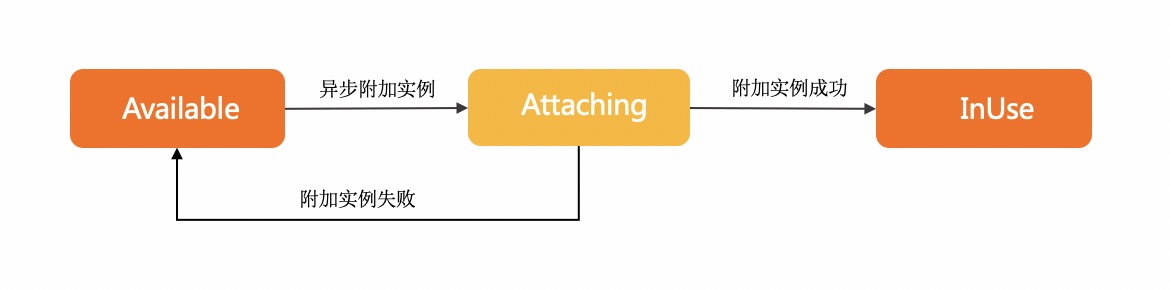 If the ENI is in the Attaching state, the ENI attachment request is sent and the ENI is being attached to the specified instance. If the ENI is in the InUse state, the ENI is attached to the specified instance. If the ENI is in the Available state, the ENI failed to be attached.
|
|
54873
|
+
* **For examples on how to call this operation, see **[Attach an ENI](~~471550~~).
|
|
54857
54874
|
*
|
|
54858
54875
|
* @param request AttachNetworkInterfaceRequest
|
|
54859
54876
|
* @param runtime runtime options for this request RuntimeOptions
|
|
@@ -54924,16 +54941,16 @@ export default class Client extends OpenApi {
|
|
|
54924
54941
|
}
|
|
54925
54942
|
|
|
54926
54943
|
/**
|
|
54927
|
-
*
|
|
54928
|
-
* * The ENI must be in the **Available**
|
|
54929
|
-
* * The instance must be in the Running
|
|
54930
|
-
*
|
|
54931
|
-
*
|
|
54944
|
+
* Take note of the following items:
|
|
54945
|
+
* * The ENI must be in the **Available** state. You can attach an ENI to only one instance that resides in the same zone and VPC as the ENI.``
|
|
54946
|
+
* * The instance must be in the Running or Stopped state. When you attach ENIs to instances of specific instance types, make sure that the instances are in the Stopped state. For more information, see the "Instance types of the ECS instances that must be in the Stopped (Stopped) state" section in the [Bind an ENI](~~58503~~) topic.
|
|
54947
|
+
* **
|
|
54948
|
+
* **Note**If the last start time of the instance (including the start time of the instance if it is a new instance, the last restart time of the instance, and the last reactivation time of the instance) is before April 1st, 2018 and the instance is in the Running state, you must call the RebootInstance operation to restart the instance. If you do not call the RebootInstance operation to restart the instance, you cannot attach the ENI to the instance.
|
|
54949
|
+
* * You can attach multiple ENIs to one instance. For more information, see [ENI overview](~~58496~~).
|
|
54932
54950
|
* * The vSwitch to which the ENI is connected must be in the same zone and VPC as the vSwitch to which the instance is connected.
|
|
54933
|
-
* * This operation is an asynchronous operation. After this operation
|
|
54934
|
-
* .
|
|
54951
|
+
* * This operation is an asynchronous operation. After you call this operation to attach an ENI, you can view the status or events of the ENI to check whether the ENI is attached. The following figure shows the transitions between the statuses of the ENI.
|
|
54952
|
+
*  If the ENI is in the Attaching state, the ENI attachment request is sent and the ENI is being attached to the specified instance. If the ENI is in the InUse state, the ENI is attached to the specified instance. If the ENI is in the Available state, the ENI failed to be attached.
|
|
54953
|
+
* **For examples on how to call this operation, see **[Attach an ENI](~~471550~~).
|
|
54937
54954
|
*
|
|
54938
54955
|
* @param request AttachNetworkInterfaceRequest
|
|
54939
54956
|
* @return AttachNetworkInterfaceResponse
|
|
@@ -54944,17 +54961,18 @@ export default class Client extends OpenApi {
|
|
|
54944
54961
|
}
|
|
54945
54962
|
|
|
54946
54963
|
/**
|
|
54964
|
+
* In security group-related API documents, traffic is sent from the source to the destination.
|
|
54947
54965
|
* When you call this operation, take note of the following items:
|
|
54948
|
-
* * The total number of
|
|
54949
|
-
* * The valid
|
|
54950
|
-
* *
|
|
54951
|
-
* * The source can be a CIDR block specified by SourceCidrIp, Ipv6SourceCidrIp, or SourcePrefixListId
|
|
54952
|
-
* *
|
|
54953
|
-
* *
|
|
54954
|
-
* * If the specified security group rule exists in the security group, the
|
|
54955
|
-
* * The `Permissions.N` prefix is added to
|
|
54966
|
+
* * The total number of outbound and inbound rules of each security group cannot exceed 200. For more information, see the "Security group limits" section in [Limits](~~25412#SecurityGroupQuota1~~).
|
|
54967
|
+
* * The valid values of Priority range from 1 to 100. A smaller value specifies a higher priority.
|
|
54968
|
+
* * If several security group rules have the same priority, drop rules take precedence.
|
|
54969
|
+
* * The source can be a CIDR block that is specified by SourceCidrIp, Ipv6SourceCidrIp, or SourcePrefixListId. The source can also be Elastic Compute Service (ECS) instances in a security group that is specified by SourceGroupId.
|
|
54970
|
+
* * You cannot reference security groups as sources or destinations in the rules of advanced security groups.
|
|
54971
|
+
* * You can reference up to 20 security groups as sources or destinations in the rules of each basic security group.
|
|
54972
|
+
* * If the specified security group rule exists in the security group, the operation is successful but no security group rule is added to the security group.
|
|
54973
|
+
* * The `Permissions.N` prefix is added to specific parameters to generate new parameters. You cannot specify the original parameters and the parameters that contain the Permissions.N prefix at the same time. We recommend that you use the parameters that contain the `Permissions.N` prefix.
|
|
54956
54974
|
* * You can determine a security group rule by specifying one of the following groups of parameters. You cannot determine a security group rule by specifying only one parameter.
|
|
54957
|
-
* * Parameters used to specify an inbound security group rule that
|
|
54975
|
+
* * Parameters that are used to specify an inbound security group rule that manages access from a specific CIDR block: IpProtocol, PortRange, SourcePortRange (optional), NicType, Policy, and SourceCidrIp. For a security group of the Virtual Private Cloud (VPC) type, you must set NicType to intranet. For a security group of the classic network type, you can set NicType to internet or intranet. Sample request:
|
|
54958
54976
|
* http(s)://ecs.aliyuncs.com/?Action=AuthorizeSecurityGroup
|
|
54959
54977
|
* &SecurityGroupId=sg-bp67acfmxazb4p****
|
|
54960
54978
|
* &Permissions.1.SourceCidrIp=10.0.0.0/8
|
|
@@ -54963,7 +54981,7 @@ export default class Client extends OpenApi {
|
|
|
54963
54981
|
* &Permissions.1.NicType=intranet
|
|
54964
54982
|
* &Permissions.1.Policy=Accept
|
|
54965
54983
|
* &<Common request parameters>
|
|
54966
|
-
* * Parameters used to specify an inbound security group rule that
|
|
54984
|
+
* * Parameters that are used to specify an inbound security group rule that manages access from a security group: IpProtocol, PortRange, SourcePortRange (optional), NicType, Policy, SourceGroupOwnerAccount, and SourceGroupId. If you specify this group of parameters, you must set NicType to intranet. To manage access between security groups in the classic network, you can allow or deny access from another security group within the same region to your security group. The security group that is allowed to access your security group can belong to your Alibaba Cloud account or another Alibaba Cloud account that is specified by SourceGroupOwnerAccount. To manage access between security groups in VPCs, you can allow or deny access from another security group within the same VPC to your security group. Sample request:
|
|
54967
54985
|
* http(s)://ecs.aliyuncs.com/?Action=AuthorizeSecurityGroup
|
|
54968
54986
|
* &SecurityGroupId=sg-bp67acfmxazb4p****
|
|
54969
54987
|
* &Permissions.1.SourceGroupId=sg-1651FBB**
|
|
@@ -54973,7 +54991,7 @@ export default class Client extends OpenApi {
|
|
|
54973
54991
|
* &Permissions.1.NicType=intranet
|
|
54974
54992
|
* &Permissions.1.Policy=Drop
|
|
54975
54993
|
* &<Common request parameters>
|
|
54976
|
-
* * Parameters used to specify an
|
|
54994
|
+
* * Parameters that are used to specify an inbound security group rule that manages access from a prefix list: IpProtocol, PortRange, SourcePortRange (optional), NicType, Policy, and SourcePrefixListId. If you specify this group of parameters, prefix lists support only security groups in VPCs. You must specify NicType to intranet. Sample request:
|
|
54977
54995
|
* http(s)://ecs.aliyuncs.com/?Action=AuthorizeSecurityGroup
|
|
54978
54996
|
* &SecurityGroupId=sg-bp67acfmxazb4p****
|
|
54979
54997
|
* &Permissions.1.SourcePrefixListId=pl-x1j1k5ykzqlixdcy****
|
|
@@ -54983,7 +55001,7 @@ export default class Client extends OpenApi {
|
|
|
54983
55001
|
* &Permissions.1.NicType=intranet
|
|
54984
55002
|
* &Permissions.1.Policy=Drop
|
|
54985
55003
|
* &<Common request parameters>
|
|
54986
|
-
* * For
|
|
55004
|
+
* * For examples on how to configure security group rules, see [Security groups for different use cases](~~25475~~) and [Security group quintuple rules](~~97439~~).
|
|
54987
55005
|
*
|
|
54988
55006
|
* @param request AuthorizeSecurityGroupRequest
|
|
54989
55007
|
* @param runtime runtime options for this request RuntimeOptions
|
|
@@ -55118,17 +55136,18 @@ export default class Client extends OpenApi {
|
|
|
55118
55136
|
}
|
|
55119
55137
|
|
|
55120
55138
|
/**
|
|
55139
|
+
* In security group-related API documents, traffic is sent from the source to the destination.
|
|
55121
55140
|
* When you call this operation, take note of the following items:
|
|
55122
|
-
* * The total number of
|
|
55123
|
-
* * The valid
|
|
55124
|
-
* *
|
|
55125
|
-
* * The source can be a CIDR block specified by SourceCidrIp, Ipv6SourceCidrIp, or SourcePrefixListId
|
|
55126
|
-
* *
|
|
55127
|
-
* *
|
|
55128
|
-
* * If the specified security group rule exists in the security group, the
|
|
55129
|
-
* * The `Permissions.N` prefix is added to
|
|
55141
|
+
* * The total number of outbound and inbound rules of each security group cannot exceed 200. For more information, see the "Security group limits" section in [Limits](~~25412#SecurityGroupQuota1~~).
|
|
55142
|
+
* * The valid values of Priority range from 1 to 100. A smaller value specifies a higher priority.
|
|
55143
|
+
* * If several security group rules have the same priority, drop rules take precedence.
|
|
55144
|
+
* * The source can be a CIDR block that is specified by SourceCidrIp, Ipv6SourceCidrIp, or SourcePrefixListId. The source can also be Elastic Compute Service (ECS) instances in a security group that is specified by SourceGroupId.
|
|
55145
|
+
* * You cannot reference security groups as sources or destinations in the rules of advanced security groups.
|
|
55146
|
+
* * You can reference up to 20 security groups as sources or destinations in the rules of each basic security group.
|
|
55147
|
+
* * If the specified security group rule exists in the security group, the operation is successful but no security group rule is added to the security group.
|
|
55148
|
+
* * The `Permissions.N` prefix is added to specific parameters to generate new parameters. You cannot specify the original parameters and the parameters that contain the Permissions.N prefix at the same time. We recommend that you use the parameters that contain the `Permissions.N` prefix.
|
|
55130
55149
|
* * You can determine a security group rule by specifying one of the following groups of parameters. You cannot determine a security group rule by specifying only one parameter.
|
|
55131
|
-
* * Parameters used to specify an inbound security group rule that
|
|
55150
|
+
* * Parameters that are used to specify an inbound security group rule that manages access from a specific CIDR block: IpProtocol, PortRange, SourcePortRange (optional), NicType, Policy, and SourceCidrIp. For a security group of the Virtual Private Cloud (VPC) type, you must set NicType to intranet. For a security group of the classic network type, you can set NicType to internet or intranet. Sample request:
|
|
55132
55151
|
* http(s)://ecs.aliyuncs.com/?Action=AuthorizeSecurityGroup
|
|
55133
55152
|
* &SecurityGroupId=sg-bp67acfmxazb4p****
|
|
55134
55153
|
* &Permissions.1.SourceCidrIp=10.0.0.0/8
|
|
@@ -55137,7 +55156,7 @@ export default class Client extends OpenApi {
|
|
|
55137
55156
|
* &Permissions.1.NicType=intranet
|
|
55138
55157
|
* &Permissions.1.Policy=Accept
|
|
55139
55158
|
* &<Common request parameters>
|
|
55140
|
-
* * Parameters used to specify an inbound security group rule that
|
|
55159
|
+
* * Parameters that are used to specify an inbound security group rule that manages access from a security group: IpProtocol, PortRange, SourcePortRange (optional), NicType, Policy, SourceGroupOwnerAccount, and SourceGroupId. If you specify this group of parameters, you must set NicType to intranet. To manage access between security groups in the classic network, you can allow or deny access from another security group within the same region to your security group. The security group that is allowed to access your security group can belong to your Alibaba Cloud account or another Alibaba Cloud account that is specified by SourceGroupOwnerAccount. To manage access between security groups in VPCs, you can allow or deny access from another security group within the same VPC to your security group. Sample request:
|
|
55141
55160
|
* http(s)://ecs.aliyuncs.com/?Action=AuthorizeSecurityGroup
|
|
55142
55161
|
* &SecurityGroupId=sg-bp67acfmxazb4p****
|
|
55143
55162
|
* &Permissions.1.SourceGroupId=sg-1651FBB**
|
|
@@ -55147,7 +55166,7 @@ export default class Client extends OpenApi {
|
|
|
55147
55166
|
* &Permissions.1.NicType=intranet
|
|
55148
55167
|
* &Permissions.1.Policy=Drop
|
|
55149
55168
|
* &<Common request parameters>
|
|
55150
|
-
* * Parameters used to specify an
|
|
55169
|
+
* * Parameters that are used to specify an inbound security group rule that manages access from a prefix list: IpProtocol, PortRange, SourcePortRange (optional), NicType, Policy, and SourcePrefixListId. If you specify this group of parameters, prefix lists support only security groups in VPCs. You must specify NicType to intranet. Sample request:
|
|
55151
55170
|
* http(s)://ecs.aliyuncs.com/?Action=AuthorizeSecurityGroup
|
|
55152
55171
|
* &SecurityGroupId=sg-bp67acfmxazb4p****
|
|
55153
55172
|
* &Permissions.1.SourcePrefixListId=pl-x1j1k5ykzqlixdcy****
|
|
@@ -55157,7 +55176,7 @@ export default class Client extends OpenApi {
|
|
|
55157
55176
|
* &Permissions.1.NicType=intranet
|
|
55158
55177
|
* &Permissions.1.Policy=Drop
|
|
55159
55178
|
* &<Common request parameters>
|
|
55160
|
-
* * For
|
|
55179
|
+
* * For examples on how to configure security group rules, see [Security groups for different use cases](~~25475~~) and [Security group quintuple rules](~~97439~~).
|
|
55161
55180
|
*
|
|
55162
55181
|
* @param request AuthorizeSecurityGroupRequest
|
|
55163
55182
|
* @return AuthorizeSecurityGroupResponse
|
|
@@ -55168,46 +55187,7 @@ export default class Client extends OpenApi {
|
|
|
55168
55187
|
}
|
|
55169
55188
|
|
|
55170
55189
|
/**
|
|
55171
|
-
*
|
|
55172
|
-
* * The total number of inbound and outbound security group rules in each security group cannot exceed 200. For more information, see the "Security group limits" section in [](~~25412#SecurityGroupQuota1~~).
|
|
55173
|
-
* * You can set Policy to accept or drop for each security group rule to allow or deny access.
|
|
55174
|
-
* * The valid value of Priority ranges from 1 to 100. A smaller value indicates a higher priority.
|
|
55175
|
-
* * When several security group rules have the same priority, drop rules take precedence.
|
|
55176
|
-
* * The destination can be a CIDR block specified by DestCidrIp, Ipv6DestCidrIp, or DestPrefixListId or can be Elastic Compute Service (ECS) instances in a security group specified by DestGroupId.
|
|
55177
|
-
* * Security groups cannot be referenced as authorization objects in the rules of advanced security groups.
|
|
55178
|
-
* * Up to 20 security groups can be referenced as authorization objects in the rules of each basic security group.
|
|
55179
|
-
* * If the specified security group rule exists in the security group, the call is successful but no security group rule is created.
|
|
55180
|
-
* * The `Permissions.N` prefix is added to certain parameters to generate new parameters. Original parameters and parameters prefixed with Permissions.N cannot be specified together. We recommend that you use parameters prefixed with `Permissions.N`.
|
|
55181
|
-
* * You can determine a security group rule by specifying one of the following groups of parameters. You cannot determine a security group rule by specifying only one parameter.
|
|
55182
|
-
* * Parameters used to specify a security group rule that controls access to a specified CIDR block: IpProtocol, PortRange, SourcePortRange (optional), NicType, Policy, and DestCidrIp. Sample request:
|
|
55183
|
-
* http(s)://ecs.aliyuncs.com/?Action=AuthorizeSecurityGroupEgress
|
|
55184
|
-
* &SecurityGroupId=sg-bp67acfmxazb4ph***
|
|
55185
|
-
* &Permissions.1.IpProtocol=ICMP
|
|
55186
|
-
* &Permissions.1.DestCidrIp=10.0.0.0/8
|
|
55187
|
-
* &Permissions.1.PortRange=-1/-1
|
|
55188
|
-
* &Permissions.1.NicType=intranet
|
|
55189
|
-
* &Permissions.1.Policy=Accept
|
|
55190
|
-
* &<Common request parameters>
|
|
55191
|
-
* * Parameters used to specify a security group rule that controls access to a security group: IpProtocol, PortRange, SourcePortRange (optional), NicType, Policy, DestGroupOwnerAccount, and DestGroupId. Sample request:
|
|
55192
|
-
* http(s)://ecs.aliyuncs.com/?Action=AuthorizeSecurityGroupEgress
|
|
55193
|
-
* &SecurityGroupId=sg-bp67acfmxazb4ph***
|
|
55194
|
-
* &Permissions.1.DestGroupId=sg-bp67acfmxazb4pi***
|
|
55195
|
-
* &Permissions.1.DestGroupOwnerAccount=Test@aliyun.com
|
|
55196
|
-
* &Permissions.1.IpProtocol=TCP
|
|
55197
|
-
* &Permissions.1.PortRange=22/22
|
|
55198
|
-
* &Permissions.1.NicType=intranet
|
|
55199
|
-
* &Permissions.1.Policy=Drop
|
|
55200
|
-
* &<Common request parameters>
|
|
55201
|
-
* * Parameters used to specify a security group rule that controls access to a prefix list: IpProtocol, PortRange, SourcePortRange (optional), NicType, Policy, and DestPrefixListId. In this case, prefix lists support only security groups in virtual private clouds (VPCs). NicType must be set to intranet. Sample request:
|
|
55202
|
-
* http(s)://ecs.aliyuncs.com/?Action=AuthorizeSecurityGroupEgress
|
|
55203
|
-
* &SecurityGroupId=sg-bp67acfmxazb4ph***
|
|
55204
|
-
* &Permissions.1.DestPrefixListId=pl-x1j1k5ykzqlixdcy****
|
|
55205
|
-
* &Permissions.1.DestGroupOwnerAccount=Test@aliyun.com
|
|
55206
|
-
* &Permissions.1.IpProtocol=TCP
|
|
55207
|
-
* &Permissions.1.PortRange=22/22
|
|
55208
|
-
* &Permissions.1.NicType=intranet
|
|
55209
|
-
* &Permissions.1.Policy=Drop
|
|
55210
|
-
* &<Common request parameters>
|
|
55190
|
+
* The region ID of the source security group. You can call the [DescribeRegions](~~25609~~) operation to query the most recent region list.
|
|
55211
55191
|
*
|
|
55212
55192
|
* @param request AuthorizeSecurityGroupEgressRequest
|
|
55213
55193
|
* @param runtime runtime options for this request RuntimeOptions
|
|
@@ -55342,46 +55322,7 @@ export default class Client extends OpenApi {
|
|
|
55342
55322
|
}
|
|
55343
55323
|
|
|
55344
55324
|
/**
|
|
55345
|
-
*
|
|
55346
|
-
* * The total number of inbound and outbound security group rules in each security group cannot exceed 200. For more information, see the "Security group limits" section in [](~~25412#SecurityGroupQuota1~~).
|
|
55347
|
-
* * You can set Policy to accept or drop for each security group rule to allow or deny access.
|
|
55348
|
-
* * The valid value of Priority ranges from 1 to 100. A smaller value indicates a higher priority.
|
|
55349
|
-
* * When several security group rules have the same priority, drop rules take precedence.
|
|
55350
|
-
* * The destination can be a CIDR block specified by DestCidrIp, Ipv6DestCidrIp, or DestPrefixListId or can be Elastic Compute Service (ECS) instances in a security group specified by DestGroupId.
|
|
55351
|
-
* * Security groups cannot be referenced as authorization objects in the rules of advanced security groups.
|
|
55352
|
-
* * Up to 20 security groups can be referenced as authorization objects in the rules of each basic security group.
|
|
55353
|
-
* * If the specified security group rule exists in the security group, the call is successful but no security group rule is created.
|
|
55354
|
-
* * The `Permissions.N` prefix is added to certain parameters to generate new parameters. Original parameters and parameters prefixed with Permissions.N cannot be specified together. We recommend that you use parameters prefixed with `Permissions.N`.
|
|
55355
|
-
* * You can determine a security group rule by specifying one of the following groups of parameters. You cannot determine a security group rule by specifying only one parameter.
|
|
55356
|
-
* * Parameters used to specify a security group rule that controls access to a specified CIDR block: IpProtocol, PortRange, SourcePortRange (optional), NicType, Policy, and DestCidrIp. Sample request:
|
|
55357
|
-
* http(s)://ecs.aliyuncs.com/?Action=AuthorizeSecurityGroupEgress
|
|
55358
|
-
* &SecurityGroupId=sg-bp67acfmxazb4ph***
|
|
55359
|
-
* &Permissions.1.IpProtocol=ICMP
|
|
55360
|
-
* &Permissions.1.DestCidrIp=10.0.0.0/8
|
|
55361
|
-
* &Permissions.1.PortRange=-1/-1
|
|
55362
|
-
* &Permissions.1.NicType=intranet
|
|
55363
|
-
* &Permissions.1.Policy=Accept
|
|
55364
|
-
* &<Common request parameters>
|
|
55365
|
-
* * Parameters used to specify a security group rule that controls access to a security group: IpProtocol, PortRange, SourcePortRange (optional), NicType, Policy, DestGroupOwnerAccount, and DestGroupId. Sample request:
|
|
55366
|
-
* http(s)://ecs.aliyuncs.com/?Action=AuthorizeSecurityGroupEgress
|
|
55367
|
-
* &SecurityGroupId=sg-bp67acfmxazb4ph***
|
|
55368
|
-
* &Permissions.1.DestGroupId=sg-bp67acfmxazb4pi***
|
|
55369
|
-
* &Permissions.1.DestGroupOwnerAccount=Test@aliyun.com
|
|
55370
|
-
* &Permissions.1.IpProtocol=TCP
|
|
55371
|
-
* &Permissions.1.PortRange=22/22
|
|
55372
|
-
* &Permissions.1.NicType=intranet
|
|
55373
|
-
* &Permissions.1.Policy=Drop
|
|
55374
|
-
* &<Common request parameters>
|
|
55375
|
-
* * Parameters used to specify a security group rule that controls access to a prefix list: IpProtocol, PortRange, SourcePortRange (optional), NicType, Policy, and DestPrefixListId. In this case, prefix lists support only security groups in virtual private clouds (VPCs). NicType must be set to intranet. Sample request:
|
|
55376
|
-
* http(s)://ecs.aliyuncs.com/?Action=AuthorizeSecurityGroupEgress
|
|
55377
|
-
* &SecurityGroupId=sg-bp67acfmxazb4ph***
|
|
55378
|
-
* &Permissions.1.DestPrefixListId=pl-x1j1k5ykzqlixdcy****
|
|
55379
|
-
* &Permissions.1.DestGroupOwnerAccount=Test@aliyun.com
|
|
55380
|
-
* &Permissions.1.IpProtocol=TCP
|
|
55381
|
-
* &Permissions.1.PortRange=22/22
|
|
55382
|
-
* &Permissions.1.NicType=intranet
|
|
55383
|
-
* &Permissions.1.Policy=Drop
|
|
55384
|
-
* &<Common request parameters>
|
|
55325
|
+
* The region ID of the source security group. You can call the [DescribeRegions](~~25609~~) operation to query the most recent region list.
|
|
55385
55326
|
*
|
|
55386
55327
|
* @param request AuthorizeSecurityGroupEgressRequest
|
|
55387
55328
|
* @return AuthorizeSecurityGroupEgressResponse
|
|
@@ -55439,7 +55380,7 @@ export default class Client extends OpenApi {
|
|
|
55439
55380
|
/**
|
|
55440
55381
|
* When you call this operation, take note of the following items:
|
|
55441
55382
|
* * After you cancel an image copy task, the image copy created in the destination region is deleted, and the copied image remains unchanged.
|
|
55442
|
-
* * If the image copy task is complete, the CancelCopyImage operation fails and an error is returned.
|
|
55383
|
+
* * If the image copy task is complete, the CancelCopyImage operation fails, and an error is returned.
|
|
55443
55384
|
*
|
|
55444
55385
|
* @param request CancelCopyImageRequest
|
|
55445
55386
|
* @param runtime runtime options for this request RuntimeOptions
|
|
@@ -55492,7 +55433,7 @@ export default class Client extends OpenApi {
|
|
|
55492
55433
|
/**
|
|
55493
55434
|
* When you call this operation, take note of the following items:
|
|
55494
55435
|
* * After you cancel an image copy task, the image copy created in the destination region is deleted, and the copied image remains unchanged.
|
|
55495
|
-
* * If the image copy task is complete, the CancelCopyImage operation fails and an error is returned.
|
|
55436
|
+
* * If the image copy task is complete, the CancelCopyImage operation fails, and an error is returned.
|
|
55496
55437
|
*
|
|
55497
55438
|
* @param request CancelCopyImageRequest
|
|
55498
55439
|
* @return CancelCopyImageResponse
|
|
@@ -55803,9 +55744,9 @@ export default class Client extends OpenApi {
|
|
|
55803
55744
|
}
|
|
55804
55745
|
|
|
55805
55746
|
/**
|
|
55806
|
-
* After a public IP address is converted
|
|
55807
|
-
*
|
|
55808
|
-
* * The instance is in the
|
|
55747
|
+
* After a public IP address is converted into an EIP, the EIP is billed separately. Make sure that you understand the billing methods of EIPs. For more information, see [Billing overview](~~122035~~).
|
|
55748
|
+
* When you call this operation, make sure that the following requirements are met:
|
|
55749
|
+
* * The instance is in the `Stopped` or `Running` state.********
|
|
55809
55750
|
* * No EIPs are associated with the instance.
|
|
55810
55751
|
* * The instance has no configuration change tasks that have not taken effect.
|
|
55811
55752
|
* * The public bandwidth of the instance is not 0 Mbit/s.
|
|
@@ -55857,9 +55798,9 @@ export default class Client extends OpenApi {
|
|
|
55857
55798
|
}
|
|
55858
55799
|
|
|
55859
55800
|
/**
|
|
55860
|
-
* After a public IP address is converted
|
|
55861
|
-
*
|
|
55862
|
-
* * The instance is in the
|
|
55801
|
+
* After a public IP address is converted into an EIP, the EIP is billed separately. Make sure that you understand the billing methods of EIPs. For more information, see [Billing overview](~~122035~~).
|
|
55802
|
+
* When you call this operation, make sure that the following requirements are met:
|
|
55803
|
+
* * The instance is in the `Stopped` or `Running` state.********
|
|
55863
55804
|
* * No EIPs are associated with the instance.
|
|
55864
55805
|
* * The instance has no configuration change tasks that have not taken effect.
|
|
55865
55806
|
* * The public bandwidth of the instance is not 0 Mbit/s.
|
|
@@ -55875,13 +55816,13 @@ export default class Client extends OpenApi {
|
|
|
55875
55816
|
}
|
|
55876
55817
|
|
|
55877
55818
|
/**
|
|
55878
|
-
* After you copy a custom image (source image) to the destination region, you can use the image copy to create ECS instances by calling the RunInstances operation or replace the system disks of ECS instances by calling the ReplaceSystemDisk operation in the destination region.
|
|
55879
|
-
*
|
|
55819
|
+
* After you copy a custom image (source image) to the destination region, you can use the image copy to create ECS instances by calling the RunInstances operation or replace the system disks of the ECS instances by calling the ReplaceSystemDisk operation in the destination region.
|
|
55820
|
+
* When you call this operation, take note of the following items:
|
|
55880
55821
|
* * You can copy only custom images that are in the `Available` state.
|
|
55881
|
-
* * Custom images that you want to copy must belong to your Alibaba Cloud account or be shared
|
|
55882
|
-
* * When an image is being copied, the
|
|
55883
|
-
* * A region can have only one image copying task running at a time. Other image copying tasks queue up for the current task to complete before the tasks run in sequence.
|
|
55884
|
-
* * You can configure the `ResourceGroupId` parameter to specify the resource group to which
|
|
55822
|
+
* * Custom images that you want to copy must belong to your Alibaba Cloud account or be shared to you by others, and cannot be copied across accounts.
|
|
55823
|
+
* * When an image is being copied, the image copy cannot be deleted by calling the [DeleteImage](~~25537~~) operation. However, you can cancel the copying task that is running by calling the [CancelCopyImage](~~25539~~) operation.
|
|
55824
|
+
* * A region can have only one image copying task running at a time. Other image copying tasks queue up for the current task to complete before the tasks can run in sequence.
|
|
55825
|
+
* * You can configure the `ResourceGroupId` parameter to specify the resource group to which the image copy belongs. If you do not configure the `ResourceGroupId` parameter, the image copy belongs to the default resource group.
|
|
55885
55826
|
*
|
|
55886
55827
|
* @param request CopyImageRequest
|
|
55887
55828
|
* @param runtime runtime options for this request RuntimeOptions
|
|
@@ -55964,13 +55905,13 @@ export default class Client extends OpenApi {
|
|
|
55964
55905
|
}
|
|
55965
55906
|
|
|
55966
55907
|
/**
|
|
55967
|
-
* After you copy a custom image (source image) to the destination region, you can use the image copy to create ECS instances by calling the RunInstances operation or replace the system disks of ECS instances by calling the ReplaceSystemDisk operation in the destination region.
|
|
55968
|
-
*
|
|
55908
|
+
* After you copy a custom image (source image) to the destination region, you can use the image copy to create ECS instances by calling the RunInstances operation or replace the system disks of the ECS instances by calling the ReplaceSystemDisk operation in the destination region.
|
|
55909
|
+
* When you call this operation, take note of the following items:
|
|
55969
55910
|
* * You can copy only custom images that are in the `Available` state.
|
|
55970
|
-
* * Custom images that you want to copy must belong to your Alibaba Cloud account or be shared
|
|
55971
|
-
* * When an image is being copied, the
|
|
55972
|
-
* * A region can have only one image copying task running at a time. Other image copying tasks queue up for the current task to complete before the tasks run in sequence.
|
|
55973
|
-
* * You can configure the `ResourceGroupId` parameter to specify the resource group to which
|
|
55911
|
+
* * Custom images that you want to copy must belong to your Alibaba Cloud account or be shared to you by others, and cannot be copied across accounts.
|
|
55912
|
+
* * When an image is being copied, the image copy cannot be deleted by calling the [DeleteImage](~~25537~~) operation. However, you can cancel the copying task that is running by calling the [CancelCopyImage](~~25539~~) operation.
|
|
55913
|
+
* * A region can have only one image copying task running at a time. Other image copying tasks queue up for the current task to complete before the tasks can run in sequence.
|
|
55914
|
+
* * You can configure the `ResourceGroupId` parameter to specify the resource group to which the image copy belongs. If you do not configure the `ResourceGroupId` parameter, the image copy belongs to the default resource group.
|
|
55974
55915
|
*
|
|
55975
55916
|
* @param request CopyImageRequest
|
|
55976
55917
|
* @return CopyImageResponse
|
|
@@ -56081,19 +56022,8 @@ export default class Client extends OpenApi {
|
|
|
56081
56022
|
}
|
|
56082
56023
|
|
|
56083
56024
|
/**
|
|
56084
|
-
*
|
|
56085
|
-
*
|
|
56086
|
-
* * Alibaba Cloud Linux 2, Alibaba Cloud Linux 3, and later
|
|
56087
|
-
* * CentOS 6, CentOS 7, CentOS 8, and later
|
|
56088
|
-
* * Debian 8, Debian 9, Debian 10, and later
|
|
56089
|
-
* * Ubuntu 12, Ubuntu 14, Ubuntu 16, Ubuntu 18, and later
|
|
56090
|
-
* * CoreOS
|
|
56091
|
-
* * OpenSUSE
|
|
56092
|
-
* * Red Hat 5, Red Hat 6, Red Hat 7, and later
|
|
56093
|
-
* * SUSE Linux Enterprise Server (SLES) 11, SLES 12, SLES 15, and later
|
|
56094
|
-
* * Windows Server 2012, Windows Server 2016, Windows Server 2019, and later
|
|
56095
|
-
* You can create up to 5,000 activation codes for managed instances within an Alibaba Cloud region. When the number of activation codes exceeds 1,000, the usage of activation codes must be greater than 50% before you can proceed to create more activation codes.
|
|
56096
|
-
* > You can go to the **Cloud Assistant** page in the Elastic Compute Service (ECS) console and click **Register Instance** on the **Managed Instances** tab to check the usage of activation codes.
|
|
56025
|
+
* The ID of the region in which you want to create the activation code. Supported regions: China (Qingdao), China (Beijing), China (Zhangjiakou), China (Hohhot), China (Hangzhou), China (Shanghai), China (Shenzhen), China (Heyuan), and China (Hong Kong).
|
|
56026
|
+
* You can call the [DescribeRegions](~~25609~~) operation to query the most recent region list.
|
|
56097
56027
|
*
|
|
56098
56028
|
* @param request CreateActivationRequest
|
|
56099
56029
|
* @param runtime runtime options for this request RuntimeOptions
|
|
@@ -56168,19 +56098,8 @@ export default class Client extends OpenApi {
|
|
|
56168
56098
|
}
|
|
56169
56099
|
|
|
56170
56100
|
/**
|
|
56171
|
-
*
|
|
56172
|
-
*
|
|
56173
|
-
* * Alibaba Cloud Linux 2, Alibaba Cloud Linux 3, and later
|
|
56174
|
-
* * CentOS 6, CentOS 7, CentOS 8, and later
|
|
56175
|
-
* * Debian 8, Debian 9, Debian 10, and later
|
|
56176
|
-
* * Ubuntu 12, Ubuntu 14, Ubuntu 16, Ubuntu 18, and later
|
|
56177
|
-
* * CoreOS
|
|
56178
|
-
* * OpenSUSE
|
|
56179
|
-
* * Red Hat 5, Red Hat 6, Red Hat 7, and later
|
|
56180
|
-
* * SUSE Linux Enterprise Server (SLES) 11, SLES 12, SLES 15, and later
|
|
56181
|
-
* * Windows Server 2012, Windows Server 2016, Windows Server 2019, and later
|
|
56182
|
-
* You can create up to 5,000 activation codes for managed instances within an Alibaba Cloud region. When the number of activation codes exceeds 1,000, the usage of activation codes must be greater than 50% before you can proceed to create more activation codes.
|
|
56183
|
-
* > You can go to the **Cloud Assistant** page in the Elastic Compute Service (ECS) console and click **Register Instance** on the **Managed Instances** tab to check the usage of activation codes.
|
|
56101
|
+
* The ID of the region in which you want to create the activation code. Supported regions: China (Qingdao), China (Beijing), China (Zhangjiakou), China (Hohhot), China (Hangzhou), China (Shanghai), China (Shenzhen), China (Heyuan), and China (Hong Kong).
|
|
56102
|
+
* You can call the [DescribeRegions](~~25609~~) operation to query the most recent region list.
|
|
56184
56103
|
*
|
|
56185
56104
|
* @param request CreateActivationRequest
|
|
56186
56105
|
* @return CreateActivationResponse
|
|
@@ -56191,10 +56110,10 @@ export default class Client extends OpenApi {
|
|
|
56191
56110
|
}
|
|
56192
56111
|
|
|
56193
56112
|
/**
|
|
56194
|
-
* *
|
|
56195
|
-
* *
|
|
56196
|
-
* *
|
|
56197
|
-
* *
|
|
56113
|
+
* * Auto Provisioning is a service that allows quick deployment of an instance cluster that consists of preemptible and pay-as-you-go instances. Auto Provisioning supports push-button deployment of instance clusters across different billing methods, instance families, and zones. For more information, see [Use auto provisioning group-related API operations to create multiple ECS instances at the same time](~~200772~~).
|
|
56114
|
+
* * Auto Provisioning uses auto provisioning groups to schedule and maintain computing resources. You can use auto provisioning groups to obtain a steady supply of computing resources. This helps reduce the impact on computing capacity when preemptible instances are reclaimed.
|
|
56115
|
+
* * Auto Provisioning is provided free-of-charge. However, you are charged for instance resources that are created in auto provisioning groups. For more information about the billing, see [Overview](~~52088~~) and [Pay-as-you-go](~~40653~~).
|
|
56116
|
+
* * If you specify both the `LaunchTemplate*` and `LaunchConfiguration.*` parameters, the LaunchTemplate\\* parameter takes precedence.
|
|
56198
56117
|
*
|
|
56199
56118
|
* @param request CreateAutoProvisioningGroupRequest
|
|
56200
56119
|
* @param runtime runtime options for this request RuntimeOptions
|
|
@@ -56349,10 +56268,10 @@ export default class Client extends OpenApi {
|
|
|
56349
56268
|
}
|
|
56350
56269
|
|
|
56351
56270
|
/**
|
|
56352
|
-
* *
|
|
56353
|
-
* *
|
|
56354
|
-
* *
|
|
56355
|
-
* *
|
|
56271
|
+
* * Auto Provisioning is a service that allows quick deployment of an instance cluster that consists of preemptible and pay-as-you-go instances. Auto Provisioning supports push-button deployment of instance clusters across different billing methods, instance families, and zones. For more information, see [Use auto provisioning group-related API operations to create multiple ECS instances at the same time](~~200772~~).
|
|
56272
|
+
* * Auto Provisioning uses auto provisioning groups to schedule and maintain computing resources. You can use auto provisioning groups to obtain a steady supply of computing resources. This helps reduce the impact on computing capacity when preemptible instances are reclaimed.
|
|
56273
|
+
* * Auto Provisioning is provided free-of-charge. However, you are charged for instance resources that are created in auto provisioning groups. For more information about the billing, see [Overview](~~52088~~) and [Pay-as-you-go](~~40653~~).
|
|
56274
|
+
* * If you specify both the `LaunchTemplate*` and `LaunchConfiguration.*` parameters, the LaunchTemplate\\* parameter takes precedence.
|
|
56356
56275
|
*
|
|
56357
56276
|
* @param request CreateAutoProvisioningGroupRequest
|
|
56358
56277
|
* @return CreateAutoProvisioningGroupResponse
|
|
@@ -56465,12 +56384,12 @@ export default class Client extends OpenApi {
|
|
|
56465
56384
|
}
|
|
56466
56385
|
|
|
56467
56386
|
/**
|
|
56468
|
-
* When you create a capacity reservation, you can specify attributes such as a zone and an instance type.
|
|
56469
|
-
* * Currently, only immediate capacity reservations are supported. Immediate capacity reservations take effect
|
|
56470
|
-
* * You can call the [CreateInstance](~~25499~~) or [RunInstances](~~63440~~) operation to specify private pool attributes when you create instances.
|
|
56471
|
-
* * Before a capacity reservation
|
|
56472
|
-
* *
|
|
56473
|
-
* >
|
|
56387
|
+
* When you create a capacity reservation, you can specify attributes such as a zone and an instance type. The system uses a private pool to reserve resources that match the specified attributes. For more information, see [Overview of Immediate Capacity Reservation](~~193633~~).
|
|
56388
|
+
* * Currently, only immediate capacity reservations are supported. Immediate capacity reservations take effect immediately after you purchase them. After you purchase an immediate capacity reservation, you are charged for the specified instance type based on the pay-as-you-go billing method regardless of whether you use the capacity reservation to create pay-as-you-go instances. Billing stops when you manually release the capacity reservation or when the capacity reservation expires and is automatically released.
|
|
56389
|
+
* * You can call the [CreateInstance](~~25499~~) or [RunInstances](~~63440~~) operation to specify private pool attributes when you create instances. To modify the attributes of a private pool, you can call the [ModifyInstanceAttachmentAttributes](~~190006~~) operation. If an instance matches a private pool associated with a capacity reservation, you are charged based on the configurations of the instance such as the instance type, disks, and public bandwidth.
|
|
56390
|
+
* * Before you use a private pool associated with a capacity reservation to create pay-as-you-go instances, you are charged only for the specified instance type.
|
|
56391
|
+
* * You can apply savings plans or regional reserved instances to offset hourly billing of unused immediate capacity reservations, and hourly fees of the instances that match the immediate capacity reservations. However, you cannot use zonal reserved instances to offset the hourly fees. We recommend that you purchase reserved instances or savings plans before you purchase immediate capacity reservations. This way, you can access resources free of charge within the coverage of the reserved instances or savings plans.
|
|
56392
|
+
* > You can call the CreateCapacityReservation operation to create only immediate capacity reservations. You can create immediate or scheduled capacity reservations in the Elastic Compute Service (ECS) console. For more information, see [Overview](~~193626#section-oil-qh5-xvx~~).
|
|
56474
56393
|
*
|
|
56475
56394
|
* @param request CreateCapacityReservationRequest
|
|
56476
56395
|
* @param runtime runtime options for this request RuntimeOptions
|
|
@@ -56565,12 +56484,12 @@ export default class Client extends OpenApi {
|
|
|
56565
56484
|
}
|
|
56566
56485
|
|
|
56567
56486
|
/**
|
|
56568
|
-
* When you create a capacity reservation, you can specify attributes such as a zone and an instance type.
|
|
56569
|
-
* * Currently, only immediate capacity reservations are supported. Immediate capacity reservations take effect
|
|
56570
|
-
* * You can call the [CreateInstance](~~25499~~) or [RunInstances](~~63440~~) operation to specify private pool attributes when you create instances.
|
|
56571
|
-
* * Before a capacity reservation
|
|
56572
|
-
* *
|
|
56573
|
-
* >
|
|
56487
|
+
* When you create a capacity reservation, you can specify attributes such as a zone and an instance type. The system uses a private pool to reserve resources that match the specified attributes. For more information, see [Overview of Immediate Capacity Reservation](~~193633~~).
|
|
56488
|
+
* * Currently, only immediate capacity reservations are supported. Immediate capacity reservations take effect immediately after you purchase them. After you purchase an immediate capacity reservation, you are charged for the specified instance type based on the pay-as-you-go billing method regardless of whether you use the capacity reservation to create pay-as-you-go instances. Billing stops when you manually release the capacity reservation or when the capacity reservation expires and is automatically released.
|
|
56489
|
+
* * You can call the [CreateInstance](~~25499~~) or [RunInstances](~~63440~~) operation to specify private pool attributes when you create instances. To modify the attributes of a private pool, you can call the [ModifyInstanceAttachmentAttributes](~~190006~~) operation. If an instance matches a private pool associated with a capacity reservation, you are charged based on the configurations of the instance such as the instance type, disks, and public bandwidth.
|
|
56490
|
+
* * Before you use a private pool associated with a capacity reservation to create pay-as-you-go instances, you are charged only for the specified instance type.
|
|
56491
|
+
* * You can apply savings plans or regional reserved instances to offset hourly billing of unused immediate capacity reservations, and hourly fees of the instances that match the immediate capacity reservations. However, you cannot use zonal reserved instances to offset the hourly fees. We recommend that you purchase reserved instances or savings plans before you purchase immediate capacity reservations. This way, you can access resources free of charge within the coverage of the reserved instances or savings plans.
|
|
56492
|
+
* > You can call the CreateCapacityReservation operation to create only immediate capacity reservations. You can create immediate or scheduled capacity reservations in the Elastic Compute Service (ECS) console. For more information, see [Overview](~~193626#section-oil-qh5-xvx~~).
|
|
56574
56493
|
*
|
|
56575
56494
|
* @param request CreateCapacityReservationRequest
|
|
56576
56495
|
* @return CreateCapacityReservationResponse
|
|
@@ -57045,14 +56964,12 @@ export default class Client extends OpenApi {
|
|
|
57045
56964
|
}
|
|
57046
56965
|
|
|
57047
56966
|
/**
|
|
57048
|
-
*
|
|
57049
|
-
* * You can enable the multi-attach feature when you create a disk. We recommend that you first understand this feature and its limits. For more information, see [NVMe protocol](~~256487~~) and [Use the multi-attach feature](~~262105~~).
|
|
57050
|
-
* <!---->
|
|
56967
|
+
* * When you create a disk, the multi-attach (`MultiAttach`) feature can be enabled. Before you enable the multi-attach feature, we recommend that you get familiar with the multi-attach feature and its limits. For more information, see [NVMe protocol](~~256487~~) and [Use the multi-attach feature](~~262105~~).
|
|
57051
56968
|
* * The disk can be a basic disk, an ultra disk, a standard SSD, or an enhanced SSD (ESSD).
|
|
57052
|
-
* * When you create disks, you may be charged for the resources used. We recommend that you
|
|
57053
|
-
* * By default, the `DeleteAutoSnapshot` parameter is set to `true` when a disk is created. This
|
|
57054
|
-
* * If you do not
|
|
57055
|
-
* *
|
|
56969
|
+
* * When you create disks, you may be charged for the resources used. We recommend that you get familiar with the Elastic Compute Service (ECS) billing methods before you create a disk. For more information, see [Billing overview](~~25398~~).
|
|
56970
|
+
* * By default, the `DeleteAutoSnapshot` parameter is set to `true` when a disk is created. This specifies that the automatic snapshots be deleted when the disk is released. You can call the [ModifyDiskAttribute](~~25517~~) operation to modify the parameter.
|
|
56971
|
+
* * If you do not specify the performance level when you create an ESSD, the disk is created as a PL1 ESSD by default. You can call the [ModifyDiskSpec](~~123780~~) operation to change the performance level of the ESSD.
|
|
56972
|
+
* * Disks that are created by calling this operation have their `Portable` attribute set to `true` and the billing method set to pay-as-you-go.
|
|
57056
56973
|
*
|
|
57057
56974
|
* @param request CreateDiskRequest
|
|
57058
56975
|
* @param runtime runtime options for this request RuntimeOptions
|
|
@@ -57187,14 +57104,12 @@ export default class Client extends OpenApi {
|
|
|
57187
57104
|
}
|
|
57188
57105
|
|
|
57189
57106
|
/**
|
|
57190
|
-
*
|
|
57191
|
-
* * You can enable the multi-attach feature when you create a disk. We recommend that you first understand this feature and its limits. For more information, see [NVMe protocol](~~256487~~) and [Use the multi-attach feature](~~262105~~).
|
|
57192
|
-
* <!---->
|
|
57107
|
+
* * When you create a disk, the multi-attach (`MultiAttach`) feature can be enabled. Before you enable the multi-attach feature, we recommend that you get familiar with the multi-attach feature and its limits. For more information, see [NVMe protocol](~~256487~~) and [Use the multi-attach feature](~~262105~~).
|
|
57193
57108
|
* * The disk can be a basic disk, an ultra disk, a standard SSD, or an enhanced SSD (ESSD).
|
|
57194
|
-
* * When you create disks, you may be charged for the resources used. We recommend that you
|
|
57195
|
-
* * By default, the `DeleteAutoSnapshot` parameter is set to `true` when a disk is created. This
|
|
57196
|
-
* * If you do not
|
|
57197
|
-
* *
|
|
57109
|
+
* * When you create disks, you may be charged for the resources used. We recommend that you get familiar with the Elastic Compute Service (ECS) billing methods before you create a disk. For more information, see [Billing overview](~~25398~~).
|
|
57110
|
+
* * By default, the `DeleteAutoSnapshot` parameter is set to `true` when a disk is created. This specifies that the automatic snapshots be deleted when the disk is released. You can call the [ModifyDiskAttribute](~~25517~~) operation to modify the parameter.
|
|
57111
|
+
* * If you do not specify the performance level when you create an ESSD, the disk is created as a PL1 ESSD by default. You can call the [ModifyDiskSpec](~~123780~~) operation to change the performance level of the ESSD.
|
|
57112
|
+
* * Disks that are created by calling this operation have their `Portable` attribute set to `true` and the billing method set to pay-as-you-go.
|
|
57198
57113
|
*
|
|
57199
57114
|
* @param request CreateDiskRequest
|
|
57200
57115
|
* @return CreateDiskResponse
|
|
@@ -57208,7 +57123,7 @@ export default class Client extends OpenApi {
|
|
|
57208
57123
|
* Elasticity Assurance provides a new method to purchase and use resources with flexibility and assurance. It offers assured resource reservations for pay-as-you-go Elastic Compute Service (ECS) instances. For more information, see [Overview of Elasticity Assurance](~~193630~~).
|
|
57209
57124
|
* * Elasticity assurances are not refundable after purchase.
|
|
57210
57125
|
* * Elasticity assurances are applicable to only pay-as-you-go ECS instances.
|
|
57211
|
-
* * Elasticity assurances only support
|
|
57126
|
+
* * Elasticity assurances only support unlimited mode. Therefore, you must set `AssuranceTimes` to `Unlimited`. Elasticity assurances in unlimited mode can be applied an unlimited number of times within their effective period and take effect immediately after they are purchased.
|
|
57212
57127
|
*
|
|
57213
57128
|
* @param request CreateElasticityAssuranceRequest
|
|
57214
57129
|
* @param runtime runtime options for this request RuntimeOptions
|
|
@@ -57310,7 +57225,7 @@ export default class Client extends OpenApi {
|
|
|
57310
57225
|
* Elasticity Assurance provides a new method to purchase and use resources with flexibility and assurance. It offers assured resource reservations for pay-as-you-go Elastic Compute Service (ECS) instances. For more information, see [Overview of Elasticity Assurance](~~193630~~).
|
|
57311
57226
|
* * Elasticity assurances are not refundable after purchase.
|
|
57312
57227
|
* * Elasticity assurances are applicable to only pay-as-you-go ECS instances.
|
|
57313
|
-
* * Elasticity assurances only support
|
|
57228
|
+
* * Elasticity assurances only support unlimited mode. Therefore, you must set `AssuranceTimes` to `Unlimited`. Elasticity assurances in unlimited mode can be applied an unlimited number of times within their effective period and take effect immediately after they are purchased.
|
|
57314
57229
|
*
|
|
57315
57230
|
* @param request CreateElasticityAssuranceRequest
|
|
57316
57231
|
* @return CreateElasticityAssuranceResponse
|
|
@@ -57543,17 +57458,17 @@ export default class Client extends OpenApi {
|
|
|
57543
57458
|
|
|
57544
57459
|
/**
|
|
57545
57460
|
* When you call this operation, take note of the following items:
|
|
57546
|
-
* * You can use the created custom image only
|
|
57547
|
-
* * If the
|
|
57548
|
-
* You can call the CreateImage operation to create a custom image by using one of the following methods. The following request parameters are sorted by priority: `InstanceId` > `DiskDeviceMapping` > `SnapshotId`. If your request contains two or more
|
|
57549
|
-
* * **Method 1**: Create a custom image from an instance. You need to only specify the
|
|
57550
|
-
* * **Method 2**: Create a custom image from the system disk snapshot of an instance. You need to only specify the ID of the system disk snapshot
|
|
57551
|
-
* * **Method 3**: Create a custom image from multiple disk snapshots. You must specify the data mapping between the disks and the snapshots
|
|
57552
|
-
* When you use
|
|
57461
|
+
* * You can use the created custom image only when the image is in the Available state.
|
|
57462
|
+
* * If the responses contain `{"OperationLocks": {"LockReason" : "security"}}` when you query instance information, the instance is locked for security reasons. In this case, no operation can be performed on the instance.
|
|
57463
|
+
* You can call the CreateImage operation to create a custom image by using one of the following methods. The following request parameters are sorted by priority: `InstanceId` > `DiskDeviceMapping` > `SnapshotId`. If your request contains two or more parameters, the custom image is created based on the parameter that has a higher priority.
|
|
57464
|
+
* * **Method 1**: Create a custom image from an instance. You need to only specify the instance ID (`InstanceId`). The instance must be in the `Running` or `Stopped` state. After the CreateImage operation is called, a snapshot is created for each disk of the instance. When you create a custom image from a running instance, some cache data may not be written to the disks. As a result, the data of the created custom image may be slightly inconsistent with that of the instance. We recommend that you create custom images from instances after you stop the instances ([StopInstances](~~155372~~)).
|
|
57465
|
+
* * **Method 2**: Create a custom image from the system disk snapshot of an instance. You need to only specify the ID of the system disk snapshot (`SnapshotId`). The specified snapshot must be created on or after July 15, 2013.
|
|
57466
|
+
* * **Method 3**: Create a custom image from multiple disk snapshots. You must specify the data mapping between the disks and the snapshots (`DiskDeviceMapping`).
|
|
57467
|
+
* When you use method 3 to create a custom image, take note of the following items:
|
|
57553
57468
|
* * You can specify only one system disk snapshot. The device name of the system disk must be /dev/xvda.
|
|
57554
|
-
* * You can specify multiple data disk snapshots. The device names of the data disks
|
|
57555
|
-
* * You can leave the `SnapshotId` parameter empty. In this case, an empty data disk
|
|
57556
|
-
* * The specified disk snapshot must be created after July 15, 2013.
|
|
57469
|
+
* * You can specify multiple data disk snapshots. The device names of the data disks must be unique and in alphabetical order from /dev/xvdb to /dev/xvdz.
|
|
57470
|
+
* * You can leave the `SnapshotId` parameter empty. In this case, an empty data disk with a specified size is created.
|
|
57471
|
+
* * The specified disk snapshot must be created on or after July 15, 2013.
|
|
57557
57472
|
*
|
|
57558
57473
|
* @param request CreateImageRequest
|
|
57559
57474
|
* @param runtime runtime options for this request RuntimeOptions
|
|
@@ -57657,17 +57572,17 @@ export default class Client extends OpenApi {
|
|
|
57657
57572
|
|
|
57658
57573
|
/**
|
|
57659
57574
|
* When you call this operation, take note of the following items:
|
|
57660
|
-
* * You can use the created custom image only
|
|
57661
|
-
* * If the
|
|
57662
|
-
* You can call the CreateImage operation to create a custom image by using one of the following methods. The following request parameters are sorted by priority: `InstanceId` > `DiskDeviceMapping` > `SnapshotId`. If your request contains two or more
|
|
57663
|
-
* * **Method 1**: Create a custom image from an instance. You need to only specify the
|
|
57664
|
-
* * **Method 2**: Create a custom image from the system disk snapshot of an instance. You need to only specify the ID of the system disk snapshot
|
|
57665
|
-
* * **Method 3**: Create a custom image from multiple disk snapshots. You must specify the data mapping between the disks and the snapshots
|
|
57666
|
-
* When you use
|
|
57575
|
+
* * You can use the created custom image only when the image is in the Available state.
|
|
57576
|
+
* * If the responses contain `{"OperationLocks": {"LockReason" : "security"}}` when you query instance information, the instance is locked for security reasons. In this case, no operation can be performed on the instance.
|
|
57577
|
+
* You can call the CreateImage operation to create a custom image by using one of the following methods. The following request parameters are sorted by priority: `InstanceId` > `DiskDeviceMapping` > `SnapshotId`. If your request contains two or more parameters, the custom image is created based on the parameter that has a higher priority.
|
|
57578
|
+
* * **Method 1**: Create a custom image from an instance. You need to only specify the instance ID (`InstanceId`). The instance must be in the `Running` or `Stopped` state. After the CreateImage operation is called, a snapshot is created for each disk of the instance. When you create a custom image from a running instance, some cache data may not be written to the disks. As a result, the data of the created custom image may be slightly inconsistent with that of the instance. We recommend that you create custom images from instances after you stop the instances ([StopInstances](~~155372~~)).
|
|
57579
|
+
* * **Method 2**: Create a custom image from the system disk snapshot of an instance. You need to only specify the ID of the system disk snapshot (`SnapshotId`). The specified snapshot must be created on or after July 15, 2013.
|
|
57580
|
+
* * **Method 3**: Create a custom image from multiple disk snapshots. You must specify the data mapping between the disks and the snapshots (`DiskDeviceMapping`).
|
|
57581
|
+
* When you use method 3 to create a custom image, take note of the following items:
|
|
57667
57582
|
* * You can specify only one system disk snapshot. The device name of the system disk must be /dev/xvda.
|
|
57668
|
-
* * You can specify multiple data disk snapshots. The device names of the data disks
|
|
57669
|
-
* * You can leave the `SnapshotId` parameter empty. In this case, an empty data disk
|
|
57670
|
-
* * The specified disk snapshot must be created after July 15, 2013.
|
|
57583
|
+
* * You can specify multiple data disk snapshots. The device names of the data disks must be unique and in alphabetical order from /dev/xvdb to /dev/xvdz.
|
|
57584
|
+
* * You can leave the `SnapshotId` parameter empty. In this case, an empty data disk with a specified size is created.
|
|
57585
|
+
* * The specified disk snapshot must be created on or after July 15, 2013.
|
|
57671
57586
|
*
|
|
57672
57587
|
* @param request CreateImageRequest
|
|
57673
57588
|
* @return CreateImageResponse
|
|
@@ -57677,18 +57592,6 @@ export default class Client extends OpenApi {
|
|
|
57677
57592
|
return await this.createImageWithOptions(request, runtime);
|
|
57678
57593
|
}
|
|
57679
57594
|
|
|
57680
|
-
/**
|
|
57681
|
-
* When you call this operation, take note of the following items:
|
|
57682
|
-
* * Only custom image components can be created.
|
|
57683
|
-
* * Image components can be used to create only Linux images, so you must set the `SystemType` parameter to Linux.
|
|
57684
|
-
* * You must configure the image component type to image building component by setting the `ComponentType` parameter to Build.
|
|
57685
|
-
* * You can use Dockerfile to edit the content of image components and then pass the edited content into the `Content` parameter. The content cannot be greater than 16 KB in size and can contain up to 127 commands. `FROM` commands cannot be used in image components. For information about the commands that are supported, see [Commands supported by Image Builder](~~200206~~).
|
|
57686
|
-
* You can use image components to create image templates in the Elastic Compute Service (ECS) console, but cannot call API operations to use image components to create image templates. For more information, see [Overview](~~197410~~).
|
|
57687
|
-
*
|
|
57688
|
-
* @param request CreateImageComponentRequest
|
|
57689
|
-
* @param runtime runtime options for this request RuntimeOptions
|
|
57690
|
-
* @return CreateImageComponentResponse
|
|
57691
|
-
*/
|
|
57692
57595
|
async createImageComponentWithOptions(request: CreateImageComponentRequest, runtime: $Util.RuntimeOptions): Promise<CreateImageComponentResponse> {
|
|
57693
57596
|
Util.validateModel(request);
|
|
57694
57597
|
let query = { };
|
|
@@ -57769,32 +57672,21 @@ export default class Client extends OpenApi {
|
|
|
57769
57672
|
return $tea.cast<CreateImageComponentResponse>(await this.callApi(params, req, runtime), new CreateImageComponentResponse({}));
|
|
57770
57673
|
}
|
|
57771
57674
|
|
|
57772
|
-
/**
|
|
57773
|
-
* When you call this operation, take note of the following items:
|
|
57774
|
-
* * Only custom image components can be created.
|
|
57775
|
-
* * Image components can be used to create only Linux images, so you must set the `SystemType` parameter to Linux.
|
|
57776
|
-
* * You must configure the image component type to image building component by setting the `ComponentType` parameter to Build.
|
|
57777
|
-
* * You can use Dockerfile to edit the content of image components and then pass the edited content into the `Content` parameter. The content cannot be greater than 16 KB in size and can contain up to 127 commands. `FROM` commands cannot be used in image components. For information about the commands that are supported, see [Commands supported by Image Builder](~~200206~~).
|
|
57778
|
-
* You can use image components to create image templates in the Elastic Compute Service (ECS) console, but cannot call API operations to use image components to create image templates. For more information, see [Overview](~~197410~~).
|
|
57779
|
-
*
|
|
57780
|
-
* @param request CreateImageComponentRequest
|
|
57781
|
-
* @return CreateImageComponentResponse
|
|
57782
|
-
*/
|
|
57783
57675
|
async createImageComponent(request: CreateImageComponentRequest): Promise<CreateImageComponentResponse> {
|
|
57784
57676
|
let runtime = new $Util.RuntimeOptions({ });
|
|
57785
57677
|
return await this.createImageComponentWithOptions(request, runtime);
|
|
57786
57678
|
}
|
|
57787
57679
|
|
|
57788
57680
|
/**
|
|
57789
|
-
* You can use image templates to specify custom image content and create images across regions and accounts. When you
|
|
57681
|
+
* You can use image templates to specify custom image content and create images across regions and accounts. When you call this operation, take note of the following items:
|
|
57790
57682
|
* * You can create only custom image templates.
|
|
57791
|
-
* * You can
|
|
57792
|
-
* * When you use an image template to create an image, you must create an intermediate instance
|
|
57683
|
+
* * You can configure only public, custom, or shared Linux images or image families as the source images when you create image templates.
|
|
57684
|
+
* * When you use an image template to create an image, you must create an intermediate Elastic Compute Service (ECS) instance to help create the image. The intermediate instance is billed by using the pay-as-you-go billing method. For more information, see [Pay-as-you-go](~~40653~~).
|
|
57793
57685
|
* For the `BuildContent` parameter that specifies the content of image templates, take note of the following items:
|
|
57794
|
-
* * If the
|
|
57795
|
-
* * If the
|
|
57796
|
-
* * You can use Dockerfile to
|
|
57797
|
-
* You can use image components to create image templates in the
|
|
57686
|
+
* * If the `BuildContent` value contains `FROM` commands, the `FROM` commands override the values of `BaseImageType` that specifies the type of the source images and `BaseImage` that specifies the source image.
|
|
57687
|
+
* * If the `BuildContent` value does not contain `FROM` commands, the system creates a `FROM` command that consists of the `BaseImageType` and `BaseImage` values in the format of `<BaseImageType>:<BaseImage>` and adds the command to the first line of the template content.
|
|
57688
|
+
* * You can use Dockerfile to edit the content of image templates and then pass the edited content into the `BuildContent` parameter. The content of an image template cannot exceed 16 KB in size and can contain up to 127 commands. For information about commands supported by image templates, see [Description of commands supported by Image Builder](~~200206~~).
|
|
57689
|
+
* You can use image components to create image templates in the ECS console, but cannot call API operations to use image components to create image templates. For more information, see [Overview of Image Builder](~~197410~~).
|
|
57798
57690
|
*
|
|
57799
57691
|
* @param request CreateImagePipelineRequest
|
|
57800
57692
|
* @param runtime runtime options for this request RuntimeOptions
|
|
@@ -57913,15 +57805,15 @@ export default class Client extends OpenApi {
|
|
|
57913
57805
|
}
|
|
57914
57806
|
|
|
57915
57807
|
/**
|
|
57916
|
-
* You can use image templates to specify custom image content and create images across regions and accounts. When you
|
|
57808
|
+
* You can use image templates to specify custom image content and create images across regions and accounts. When you call this operation, take note of the following items:
|
|
57917
57809
|
* * You can create only custom image templates.
|
|
57918
|
-
* * You can
|
|
57919
|
-
* * When you use an image template to create an image, you must create an intermediate instance
|
|
57810
|
+
* * You can configure only public, custom, or shared Linux images or image families as the source images when you create image templates.
|
|
57811
|
+
* * When you use an image template to create an image, you must create an intermediate Elastic Compute Service (ECS) instance to help create the image. The intermediate instance is billed by using the pay-as-you-go billing method. For more information, see [Pay-as-you-go](~~40653~~).
|
|
57920
57812
|
* For the `BuildContent` parameter that specifies the content of image templates, take note of the following items:
|
|
57921
|
-
* * If the
|
|
57922
|
-
* * If the
|
|
57923
|
-
* * You can use Dockerfile to
|
|
57924
|
-
* You can use image components to create image templates in the
|
|
57813
|
+
* * If the `BuildContent` value contains `FROM` commands, the `FROM` commands override the values of `BaseImageType` that specifies the type of the source images and `BaseImage` that specifies the source image.
|
|
57814
|
+
* * If the `BuildContent` value does not contain `FROM` commands, the system creates a `FROM` command that consists of the `BaseImageType` and `BaseImage` values in the format of `<BaseImageType>:<BaseImage>` and adds the command to the first line of the template content.
|
|
57815
|
+
* * You can use Dockerfile to edit the content of image templates and then pass the edited content into the `BuildContent` parameter. The content of an image template cannot exceed 16 KB in size and can contain up to 127 commands. For information about commands supported by image templates, see [Description of commands supported by Image Builder](~~200206~~).
|
|
57816
|
+
* You can use image components to create image templates in the ECS console, but cannot call API operations to use image components to create image templates. For more information, see [Overview of Image Builder](~~197410~~).
|
|
57925
57817
|
*
|
|
57926
57818
|
* @param request CreateImagePipelineRequest
|
|
57927
57819
|
* @return CreateImagePipelineResponse
|
|
@@ -58588,7 +58480,6 @@ export default class Client extends OpenApi {
|
|
|
58588
58480
|
}
|
|
58589
58481
|
|
|
58590
58482
|
/**
|
|
58591
|
-
* ## Description
|
|
58592
58483
|
* If you want to modify the parameters of a launch template version, you can create another version with different parameter settings for the launch template. A maximum of 30 versions can be created for each launch template.
|
|
58593
58484
|
*
|
|
58594
58485
|
* @param request CreateLaunchTemplateVersionRequest
|
|
@@ -58796,7 +58687,6 @@ export default class Client extends OpenApi {
|
|
|
58796
58687
|
}
|
|
58797
58688
|
|
|
58798
58689
|
/**
|
|
58799
|
-
* ## Description
|
|
58800
58690
|
* If you want to modify the parameters of a launch template version, you can create another version with different parameter settings for the launch template. A maximum of 30 versions can be created for each launch template.
|
|
58801
58691
|
*
|
|
58802
58692
|
* @param request CreateLaunchTemplateVersionRequest
|
|
@@ -58888,7 +58778,6 @@ export default class Client extends OpenApi {
|
|
|
58888
58778
|
}
|
|
58889
58779
|
|
|
58890
58780
|
/**
|
|
58891
|
-
* ## Description
|
|
58892
58781
|
* When you call this operation, take note of the following items:
|
|
58893
58782
|
* * This operation is a synchronous operation. After an ENI is created, it immediately enters the Available state and can be attached to an Elastic Compute Service (ECS) instance.
|
|
58894
58783
|
* * If the NetworkInterfaceId parameter is empty in the response, it indicates that no ENI is created. Call the operation again to create an ENI.
|
|
@@ -59039,7 +58928,6 @@ export default class Client extends OpenApi {
|
|
|
59039
58928
|
}
|
|
59040
58929
|
|
|
59041
58930
|
/**
|
|
59042
|
-
* ## Description
|
|
59043
58931
|
* When you call this operation, take note of the following items:
|
|
59044
58932
|
* * This operation is a synchronous operation. After an ENI is created, it immediately enters the Available state and can be attached to an Elastic Compute Service (ECS) instance.
|
|
59045
58933
|
* * If the NetworkInterfaceId parameter is empty in the response, it indicates that no ENI is created. Call the operation again to create an ENI.
|
|
@@ -59231,14 +59119,7 @@ export default class Client extends OpenApi {
|
|
|
59231
59119
|
}
|
|
59232
59120
|
|
|
59233
59121
|
/**
|
|
59234
|
-
*
|
|
59235
|
-
* * A prefix list is a set of one or more network prefixes (CIDR blocks). You can reference prefix lists to configure network rules for other network resources. For more information, see [Overview](~~206223~~).
|
|
59236
|
-
* * When you create a prefix list, take note of the following items:
|
|
59237
|
-
* * You must specify an IP address family (IPv4 or IPv6) for the prefix list, and cannot change the IP address family after the prefix list is created. You cannot combine IPv4 and IPv6 CIDR blocks in a single prefix list.
|
|
59238
|
-
* * You must specify the maximum number of entries that the prefix list can contain. You cannot modify the maximum number of entries after the prefix list is created.
|
|
59239
|
-
* * You can specify one or more entries for the prefix list. Each entry consists of a CIDR block and a description for the CIDR block. The total number of your specified entries cannot exceed the maximum number.
|
|
59240
|
-
* * For more information about the limits on prefix lists and other resources, see [Limits](~~25412~~).
|
|
59241
|
-
* * You can create RAM users and grant them minimum permissions. This eliminates the need to share the AccessKey pair of your Alibaba Cloud account with other users and reduces security risks for your enterprises. For information about how to grant permissions on prefix lists to RAM users, see [Grant permissions on prefix lists to RAM users](~~206175~~)
|
|
59122
|
+
* PrefixListNameSample
|
|
59242
59123
|
*
|
|
59243
59124
|
* @param request CreatePrefixListRequest
|
|
59244
59125
|
* @param runtime runtime options for this request RuntimeOptions
|
|
@@ -59313,14 +59194,7 @@ export default class Client extends OpenApi {
|
|
|
59313
59194
|
}
|
|
59314
59195
|
|
|
59315
59196
|
/**
|
|
59316
|
-
*
|
|
59317
|
-
* * A prefix list is a set of one or more network prefixes (CIDR blocks). You can reference prefix lists to configure network rules for other network resources. For more information, see [Overview](~~206223~~).
|
|
59318
|
-
* * When you create a prefix list, take note of the following items:
|
|
59319
|
-
* * You must specify an IP address family (IPv4 or IPv6) for the prefix list, and cannot change the IP address family after the prefix list is created. You cannot combine IPv4 and IPv6 CIDR blocks in a single prefix list.
|
|
59320
|
-
* * You must specify the maximum number of entries that the prefix list can contain. You cannot modify the maximum number of entries after the prefix list is created.
|
|
59321
|
-
* * You can specify one or more entries for the prefix list. Each entry consists of a CIDR block and a description for the CIDR block. The total number of your specified entries cannot exceed the maximum number.
|
|
59322
|
-
* * For more information about the limits on prefix lists and other resources, see [Limits](~~25412~~).
|
|
59323
|
-
* * You can create RAM users and grant them minimum permissions. This eliminates the need to share the AccessKey pair of your Alibaba Cloud account with other users and reduces security risks for your enterprises. For information about how to grant permissions on prefix lists to RAM users, see [Grant permissions on prefix lists to RAM users](~~206175~~)
|
|
59197
|
+
* PrefixListNameSample
|
|
59324
59198
|
*
|
|
59325
59199
|
* @param request CreatePrefixListRequest
|
|
59326
59200
|
* @return CreatePrefixListResponse
|
|
@@ -59564,7 +59438,7 @@ export default class Client extends OpenApi {
|
|
|
59564
59438
|
|
|
59565
59439
|
/**
|
|
59566
59440
|
* When you call this operation, take note of the following items:
|
|
59567
|
-
* * You can create up to 100 security groups
|
|
59441
|
+
* * You can create up to 100 security groups within a single Alibaba Cloud region.
|
|
59568
59442
|
* * To create a security group of the Virtual Private Cloud (VPC) type, you must specify the VpcId parameter.
|
|
59569
59443
|
*
|
|
59570
59444
|
* @param request CreateSecurityGroupRequest
|
|
@@ -59645,7 +59519,7 @@ export default class Client extends OpenApi {
|
|
|
59645
59519
|
|
|
59646
59520
|
/**
|
|
59647
59521
|
* When you call this operation, take note of the following items:
|
|
59648
|
-
* * You can create up to 100 security groups
|
|
59522
|
+
* * You can create up to 100 security groups within a single Alibaba Cloud region.
|
|
59649
59523
|
* * To create a security group of the Virtual Private Cloud (VPC) type, you must specify the VpcId parameter.
|
|
59650
59524
|
*
|
|
59651
59525
|
* @param request CreateSecurityGroupRequest
|
|
@@ -59741,21 +59615,21 @@ export default class Client extends OpenApi {
|
|
|
59741
59615
|
}
|
|
59742
59616
|
|
|
59743
59617
|
/**
|
|
59744
|
-
* The local snapshot feature is replaced by the instant access feature.
|
|
59618
|
+
* The local snapshot feature is replaced by the instant access feature. Parameter description:
|
|
59745
59619
|
* * If you used the local snapshot feature before December 14, 2020, you can use the `Category` or `InstantAccess` parameter as expected and must take note of the following items:
|
|
59746
59620
|
* * The `Category` and `InstantAccess` parameters cannot be specified at the same time.
|
|
59747
|
-
* * If
|
|
59621
|
+
* * If neither the `Category` nor `InstantAccess` parameters is specified, normal snapshots are created.
|
|
59748
59622
|
* * If you did not use the local snapshot feature before December 14, 2020, you can use the `InstantAccess` parameter but cannot use the `Category` parameter.
|
|
59749
59623
|
* You cannot create snapshots for a disk in the following scenarios:
|
|
59750
59624
|
* * The number of manual snapshots of the disk has reached 256.
|
|
59751
59625
|
* * A snapshot is being created for the disk.
|
|
59752
59626
|
* * The instance to which the disk is attached has never been started.
|
|
59753
|
-
* * The ECS instance to which the disk is attached is not in the **Stopped**
|
|
59627
|
+
* * The ECS instance to which the disk is attached is not in the **Stopped** or **Running** state.````
|
|
59754
59628
|
* * If the response contains `{"OperationLocks": {"LockReason" : "security"}}`, the instance is locked for security reasons. No operations are allowed on the instance.
|
|
59755
59629
|
* When you create a snapshot, take note of the following items:
|
|
59756
59630
|
* * If a snapshot is being created, you cannot use this snapshot to create a custom image by calling the [CreateImage](~~25535~~) operation.
|
|
59757
59631
|
* * When a snapshot is being created for a disk that is attached to an instance, do not change the instance state.
|
|
59758
|
-
* * You can create snapshots for a disk that is in the **Expired**
|
|
59632
|
+
* * You can create snapshots for a disk that is in the **Expired** state.`` If the release time scheduled for a disk arrives while a snapshot is being created for the disk, the snapshot is in the **Creating** state and is deleted when the disk is released.``
|
|
59759
59633
|
*
|
|
59760
59634
|
* @param request CreateSnapshotRequest
|
|
59761
59635
|
* @param runtime runtime options for this request RuntimeOptions
|
|
@@ -59842,21 +59716,21 @@ export default class Client extends OpenApi {
|
|
|
59842
59716
|
}
|
|
59843
59717
|
|
|
59844
59718
|
/**
|
|
59845
|
-
* The local snapshot feature is replaced by the instant access feature.
|
|
59719
|
+
* The local snapshot feature is replaced by the instant access feature. Parameter description:
|
|
59846
59720
|
* * If you used the local snapshot feature before December 14, 2020, you can use the `Category` or `InstantAccess` parameter as expected and must take note of the following items:
|
|
59847
59721
|
* * The `Category` and `InstantAccess` parameters cannot be specified at the same time.
|
|
59848
|
-
* * If
|
|
59722
|
+
* * If neither the `Category` nor `InstantAccess` parameters is specified, normal snapshots are created.
|
|
59849
59723
|
* * If you did not use the local snapshot feature before December 14, 2020, you can use the `InstantAccess` parameter but cannot use the `Category` parameter.
|
|
59850
59724
|
* You cannot create snapshots for a disk in the following scenarios:
|
|
59851
59725
|
* * The number of manual snapshots of the disk has reached 256.
|
|
59852
59726
|
* * A snapshot is being created for the disk.
|
|
59853
59727
|
* * The instance to which the disk is attached has never been started.
|
|
59854
|
-
* * The ECS instance to which the disk is attached is not in the **Stopped**
|
|
59728
|
+
* * The ECS instance to which the disk is attached is not in the **Stopped** or **Running** state.````
|
|
59855
59729
|
* * If the response contains `{"OperationLocks": {"LockReason" : "security"}}`, the instance is locked for security reasons. No operations are allowed on the instance.
|
|
59856
59730
|
* When you create a snapshot, take note of the following items:
|
|
59857
59731
|
* * If a snapshot is being created, you cannot use this snapshot to create a custom image by calling the [CreateImage](~~25535~~) operation.
|
|
59858
59732
|
* * When a snapshot is being created for a disk that is attached to an instance, do not change the instance state.
|
|
59859
|
-
* * You can create snapshots for a disk that is in the **Expired**
|
|
59733
|
+
* * You can create snapshots for a disk that is in the **Expired** state.`` If the release time scheduled for a disk arrives while a snapshot is being created for the disk, the snapshot is in the **Creating** state and is deleted when the disk is released.``
|
|
59860
59734
|
*
|
|
59861
59735
|
* @param request CreateSnapshotRequest
|
|
59862
59736
|
* @return CreateSnapshotResponse
|
|
@@ -59867,17 +59741,17 @@ export default class Client extends OpenApi {
|
|
|
59867
59741
|
}
|
|
59868
59742
|
|
|
59869
59743
|
/**
|
|
59870
|
-
* You can specify `InstanceId` to create a snapshot-consistent group for the specified disks
|
|
59871
|
-
* > You cannot specify both `DiskId.N` and `ExcludeDiskId.N
|
|
59744
|
+
* You can specify `InstanceId` to create a snapshot-consistent group for the specified cloud disks of an instance. You can also specify `DiskId.N` to create a snapshot-consistent group for multiple cloud disks that are attached to multiple instances within the same zone.
|
|
59745
|
+
* > You cannot specify both `DiskId.N` and `ExcludeDiskId.N` in the same request. If `InstanceId` is set, you can use `DiskId.N` to specify only cloud disks attached to the instance specified by InstanceId. You cannot use DiskId.N to specify cloud disks attached to multiple instances.
|
|
59872
59746
|
* When you call this operation, take note of the following items:
|
|
59873
|
-
* * The disk for which you want to create a snapshot must be in the **In Use**
|
|
59874
|
-
* * If the disk is in the **In Use**
|
|
59875
|
-
* * If the disk is in the **Unattached** (`Available`) state, make sure that the disk has been attached to an ECS instance. Snapshots cannot be created for disks that have never been attached to ECS
|
|
59747
|
+
* * The cloud disk for which you want to create a snapshot must be in the **In Use**or **Unattached** (`Available`) state.``
|
|
59748
|
+
* * If the cloud disk is in the **In Use** state, the instance to which the cloud disk is attached must be in the **Running**or **Stopped** state.``````
|
|
59749
|
+
* * If the cloud disk is in the **Unattached** (`Available`) state, make sure that the cloud disk has been attached to an ECS instance. Snapshots cannot be created for cloud disks that have never been attached to an ECS instance.
|
|
59876
59750
|
* * The snapshot-consistent group feature can be used to create snapshots only for enhanced SSDs (ESSDs).
|
|
59877
|
-
* * A
|
|
59878
|
-
* * Snapshots that you created by using the snapshot-consistent group feature are retained until they are deleted. We recommend that you delete unnecessary snapshots on a regular basis to prevent them from incurring
|
|
59879
|
-
* * Snapshot-consistent groups cannot be created for disks that have the multi-attach feature enabled. If disks
|
|
59880
|
-
* For information about the snapshot-consistent group feature
|
|
59751
|
+
* * A snapshot-consistent group can contain snapshots of up to 16 cloud disks (including the system disk and data disks) whose total disk size does not exceed 32 TiB.
|
|
59752
|
+
* * Snapshots that you created by using the snapshot-consistent group feature are retained until they are deleted. We recommend that you delete unnecessary snapshots on a regular basis to prevent them from incurring excess fees.
|
|
59753
|
+
* * Snapshot-consistent groups cannot be created for cloud disks that have the multi-attach feature enabled. If cloud disks for which the multi-attach feature is enabled are attached to an instance, you must set `ExcludeDiskId.N` to exclude these cloud disks.
|
|
59754
|
+
* For more information about the snapshot-consistent group feature, see [Create a snapshot-consistent group](~~199625~~).
|
|
59881
59755
|
*
|
|
59882
59756
|
* @param request CreateSnapshotGroupRequest
|
|
59883
59757
|
* @param runtime runtime options for this request RuntimeOptions
|
|
@@ -59964,17 +59838,17 @@ export default class Client extends OpenApi {
|
|
|
59964
59838
|
}
|
|
59965
59839
|
|
|
59966
59840
|
/**
|
|
59967
|
-
* You can specify `InstanceId` to create a snapshot-consistent group for the specified disks
|
|
59968
|
-
* > You cannot specify both `DiskId.N` and `ExcludeDiskId.N
|
|
59841
|
+
* You can specify `InstanceId` to create a snapshot-consistent group for the specified cloud disks of an instance. You can also specify `DiskId.N` to create a snapshot-consistent group for multiple cloud disks that are attached to multiple instances within the same zone.
|
|
59842
|
+
* > You cannot specify both `DiskId.N` and `ExcludeDiskId.N` in the same request. If `InstanceId` is set, you can use `DiskId.N` to specify only cloud disks attached to the instance specified by InstanceId. You cannot use DiskId.N to specify cloud disks attached to multiple instances.
|
|
59969
59843
|
* When you call this operation, take note of the following items:
|
|
59970
|
-
* * The disk for which you want to create a snapshot must be in the **In Use**
|
|
59971
|
-
* * If the disk is in the **In Use**
|
|
59972
|
-
* * If the disk is in the **Unattached** (`Available`) state, make sure that the disk has been attached to an ECS instance. Snapshots cannot be created for disks that have never been attached to ECS
|
|
59844
|
+
* * The cloud disk for which you want to create a snapshot must be in the **In Use**or **Unattached** (`Available`) state.``
|
|
59845
|
+
* * If the cloud disk is in the **In Use** state, the instance to which the cloud disk is attached must be in the **Running**or **Stopped** state.``````
|
|
59846
|
+
* * If the cloud disk is in the **Unattached** (`Available`) state, make sure that the cloud disk has been attached to an ECS instance. Snapshots cannot be created for cloud disks that have never been attached to an ECS instance.
|
|
59973
59847
|
* * The snapshot-consistent group feature can be used to create snapshots only for enhanced SSDs (ESSDs).
|
|
59974
|
-
* * A
|
|
59975
|
-
* * Snapshots that you created by using the snapshot-consistent group feature are retained until they are deleted. We recommend that you delete unnecessary snapshots on a regular basis to prevent them from incurring
|
|
59976
|
-
* * Snapshot-consistent groups cannot be created for disks that have the multi-attach feature enabled. If disks
|
|
59977
|
-
* For information about the snapshot-consistent group feature
|
|
59848
|
+
* * A snapshot-consistent group can contain snapshots of up to 16 cloud disks (including the system disk and data disks) whose total disk size does not exceed 32 TiB.
|
|
59849
|
+
* * Snapshots that you created by using the snapshot-consistent group feature are retained until they are deleted. We recommend that you delete unnecessary snapshots on a regular basis to prevent them from incurring excess fees.
|
|
59850
|
+
* * Snapshot-consistent groups cannot be created for cloud disks that have the multi-attach feature enabled. If cloud disks for which the multi-attach feature is enabled are attached to an instance, you must set `ExcludeDiskId.N` to exclude these cloud disks.
|
|
59851
|
+
* For more information about the snapshot-consistent group feature, see [Create a snapshot-consistent group](~~199625~~).
|
|
59978
59852
|
*
|
|
59979
59853
|
* @param request CreateSnapshotGroupRequest
|
|
59980
59854
|
* @return CreateSnapshotGroupResponse
|
|
@@ -59987,8 +59861,8 @@ export default class Client extends OpenApi {
|
|
|
59987
59861
|
/**
|
|
59988
59862
|
* A storage set can distribute disks or Shared Block Storage devices to different locations. You can specify the number of partitions in a storage set. A larger number of partitions indicate more discrete distribution of disks or Shared Block Storage devices.
|
|
59989
59863
|
* When you call this operation, take note of the following items:
|
|
59990
|
-
* *
|
|
59991
|
-
* *
|
|
59864
|
+
* * The number of storage sets that you can create in a region is limited. You can call the [DescribeAccountAttributes](~~73772~~) operation to query the limit.
|
|
59865
|
+
* * The number of partitions in a zone is limited. You can call the [DescribeAccountAttributes](~~73772~~) operation to query the limit.
|
|
59992
59866
|
*
|
|
59993
59867
|
* @param request CreateStorageSetRequest
|
|
59994
59868
|
* @param runtime runtime options for this request RuntimeOptions
|
|
@@ -60057,8 +59931,8 @@ export default class Client extends OpenApi {
|
|
|
60057
59931
|
/**
|
|
60058
59932
|
* A storage set can distribute disks or Shared Block Storage devices to different locations. You can specify the number of partitions in a storage set. A larger number of partitions indicate more discrete distribution of disks or Shared Block Storage devices.
|
|
60059
59933
|
* When you call this operation, take note of the following items:
|
|
60060
|
-
* *
|
|
60061
|
-
* *
|
|
59934
|
+
* * The number of storage sets that you can create in a region is limited. You can call the [DescribeAccountAttributes](~~73772~~) operation to query the limit.
|
|
59935
|
+
* * The number of partitions in a zone is limited. You can call the [DescribeAccountAttributes](~~73772~~) operation to query the limit.
|
|
60062
59936
|
*
|
|
60063
59937
|
* @param request CreateStorageSetRequest
|
|
60064
59938
|
* @return CreateStorageSetResponse
|
|
@@ -60931,12 +60805,11 @@ export default class Client extends OpenApi {
|
|
|
60931
60805
|
}
|
|
60932
60806
|
|
|
60933
60807
|
/**
|
|
60934
|
-
*
|
|
60935
|
-
* When you call this operation to release a pay-as-you-go data disk, take note of the following items:
|
|
60808
|
+
* When you call this operation, take note of the following items:
|
|
60936
60809
|
* * Manual snapshots of the disk are retained.
|
|
60937
|
-
* * You can call the [ModifyDiskAttribute](~~25517~~) operation to configure whether to
|
|
60810
|
+
* * You can call the [ModifyDiskAttribute](~~25517~~) operation to configure whether to retain automatic snapshots of the disk or release the snapshots along with the disk. We recommend that you delete the snapshots that are no longer needed to maintain a sufficient quota for new automatic snapshots.
|
|
60938
60811
|
* * The disk must be in the Unattached (Available) state.
|
|
60939
|
-
* * If the specified
|
|
60812
|
+
* * If the specified DiskId parameter does not exist, the request is ignored.
|
|
60940
60813
|
*
|
|
60941
60814
|
* @param request DeleteDiskRequest
|
|
60942
60815
|
* @param runtime runtime options for this request RuntimeOptions
|
|
@@ -60983,12 +60856,11 @@ export default class Client extends OpenApi {
|
|
|
60983
60856
|
}
|
|
60984
60857
|
|
|
60985
60858
|
/**
|
|
60986
|
-
*
|
|
60987
|
-
* When you call this operation to release a pay-as-you-go data disk, take note of the following items:
|
|
60859
|
+
* When you call this operation, take note of the following items:
|
|
60988
60860
|
* * Manual snapshots of the disk are retained.
|
|
60989
|
-
* * You can call the [ModifyDiskAttribute](~~25517~~) operation to configure whether to
|
|
60861
|
+
* * You can call the [ModifyDiskAttribute](~~25517~~) operation to configure whether to retain automatic snapshots of the disk or release the snapshots along with the disk. We recommend that you delete the snapshots that are no longer needed to maintain a sufficient quota for new automatic snapshots.
|
|
60990
60862
|
* * The disk must be in the Unattached (Available) state.
|
|
60991
|
-
* * If the specified
|
|
60863
|
+
* * If the specified DiskId parameter does not exist, the request is ignored.
|
|
60992
60864
|
*
|
|
60993
60865
|
* @param request DeleteDiskRequest
|
|
60994
60866
|
* @return DeleteDiskResponse
|
|
@@ -61379,15 +61251,14 @@ export default class Client extends OpenApi {
|
|
|
61379
61251
|
}
|
|
61380
61252
|
|
|
61381
61253
|
/**
|
|
61382
|
-
*
|
|
61383
|
-
* *
|
|
61384
|
-
*
|
|
61385
|
-
* *
|
|
61386
|
-
* *
|
|
61387
|
-
* *
|
|
61388
|
-
* * For disks for which `DeleteAutoSnapshot` is set to true, the automatic snapshots of the disks are released.
|
|
61254
|
+
* * After an instance is released, all the physical resources used by the instance are reclaimed by Alibaba Cloud. Data stored on the instance is deleted permanently and cannot be restored.
|
|
61255
|
+
* * Disk settings may affect their behavior when the instances they are attached to are released. Take note of the following items:
|
|
61256
|
+
* * If `DeleteWithInstance` is set to false, the disks are retained as pay-as-you-go disks.
|
|
61257
|
+
* * If `DeleteWithInstance` is set to true, the disks are released along with the instance.
|
|
61258
|
+
* * If `DeleteAutoSnapshot` is set to false, automatic snapshots of the disks are retained.
|
|
61259
|
+
* * If `DeleteAutoSnapshot` is set to true, automatic snapshots of the disks are released.
|
|
61389
61260
|
* * Manual snapshots of the disks are retained.
|
|
61390
|
-
* * If
|
|
61261
|
+
* * If the response contains `{"OperationLocks": {"LockReason" : "security"}}`, the instance is locked for security reasons. In this case, even if the `DeleteWithInstance` parameter is set to `false` for the data disks that are attached to the instance, the parameter is ignored and the data disks are released along with the instance. For more information, see [API behavior when an instance is locked for security reasons](~~25695~~).``
|
|
61391
61262
|
*
|
|
61392
61263
|
* @param request DeleteInstanceRequest
|
|
61393
61264
|
* @param runtime runtime options for this request RuntimeOptions
|
|
@@ -61442,15 +61313,14 @@ export default class Client extends OpenApi {
|
|
|
61442
61313
|
}
|
|
61443
61314
|
|
|
61444
61315
|
/**
|
|
61445
|
-
*
|
|
61446
|
-
* *
|
|
61447
|
-
*
|
|
61448
|
-
* *
|
|
61449
|
-
* *
|
|
61450
|
-
* *
|
|
61451
|
-
* * For disks for which `DeleteAutoSnapshot` is set to true, the automatic snapshots of the disks are released.
|
|
61316
|
+
* * After an instance is released, all the physical resources used by the instance are reclaimed by Alibaba Cloud. Data stored on the instance is deleted permanently and cannot be restored.
|
|
61317
|
+
* * Disk settings may affect their behavior when the instances they are attached to are released. Take note of the following items:
|
|
61318
|
+
* * If `DeleteWithInstance` is set to false, the disks are retained as pay-as-you-go disks.
|
|
61319
|
+
* * If `DeleteWithInstance` is set to true, the disks are released along with the instance.
|
|
61320
|
+
* * If `DeleteAutoSnapshot` is set to false, automatic snapshots of the disks are retained.
|
|
61321
|
+
* * If `DeleteAutoSnapshot` is set to true, automatic snapshots of the disks are released.
|
|
61452
61322
|
* * Manual snapshots of the disks are retained.
|
|
61453
|
-
* * If
|
|
61323
|
+
* * If the response contains `{"OperationLocks": {"LockReason" : "security"}}`, the instance is locked for security reasons. In this case, even if the `DeleteWithInstance` parameter is set to `false` for the data disks that are attached to the instance, the parameter is ignored and the data disks are released along with the instance. For more information, see [API behavior when an instance is locked for security reasons](~~25695~~).``
|
|
61454
61324
|
*
|
|
61455
61325
|
* @param request DeleteInstanceRequest
|
|
61456
61326
|
* @return DeleteInstanceResponse
|
|
@@ -61461,14 +61331,14 @@ export default class Client extends OpenApi {
|
|
|
61461
61331
|
}
|
|
61462
61332
|
|
|
61463
61333
|
/**
|
|
61464
|
-
* * After an instance is released, all
|
|
61334
|
+
* * After an instance is released, all physical resources used by the instance are recycled. Relevant data is erased and cannot be restored.
|
|
61465
61335
|
* * Disks attached to the instance:
|
|
61466
|
-
* *
|
|
61467
|
-
* *
|
|
61468
|
-
* *
|
|
61469
|
-
* *
|
|
61336
|
+
* * If `DeleteWithInstance` is set to false for disks that are attached to the instance, the disks are retained as pay-as-you-go disks.
|
|
61337
|
+
* * If `DeleteWithInstance` is set to true for disks that are attached to the instance, the disks are released along with the instance.
|
|
61338
|
+
* * If `DeleteAutoSnapshot` is set to false for disks that are attached to the instance, the automatic snapshots of the disks are retained.
|
|
61339
|
+
* * If `DeleteAutoSnapshot` is set to true for disks that are attached to the instance, the automatic snapshots of the disks are released.
|
|
61470
61340
|
* * Manual snapshots of the disks are retained.
|
|
61471
|
-
* * If `OperationLocks` in the
|
|
61341
|
+
* * If `OperationLocks` in the DeleteInstances response contains `"LockReason" : "security"` for an instance, the instance is locked for security reasons. Even if `DeleteWithInstance` is set to `false` for disks that are attached to the instance, the parameter is ignored and the disks are released along with the instance. For more information, see [API behavior when an instance is locked for security reasons](~~25695~~).
|
|
61472
61342
|
*
|
|
61473
61343
|
* @param request DeleteInstancesRequest
|
|
61474
61344
|
* @param runtime runtime options for this request RuntimeOptions
|
|
@@ -61535,14 +61405,14 @@ export default class Client extends OpenApi {
|
|
|
61535
61405
|
}
|
|
61536
61406
|
|
|
61537
61407
|
/**
|
|
61538
|
-
* * After an instance is released, all
|
|
61408
|
+
* * After an instance is released, all physical resources used by the instance are recycled. Relevant data is erased and cannot be restored.
|
|
61539
61409
|
* * Disks attached to the instance:
|
|
61540
|
-
* *
|
|
61541
|
-
* *
|
|
61542
|
-
* *
|
|
61543
|
-
* *
|
|
61410
|
+
* * If `DeleteWithInstance` is set to false for disks that are attached to the instance, the disks are retained as pay-as-you-go disks.
|
|
61411
|
+
* * If `DeleteWithInstance` is set to true for disks that are attached to the instance, the disks are released along with the instance.
|
|
61412
|
+
* * If `DeleteAutoSnapshot` is set to false for disks that are attached to the instance, the automatic snapshots of the disks are retained.
|
|
61413
|
+
* * If `DeleteAutoSnapshot` is set to true for disks that are attached to the instance, the automatic snapshots of the disks are released.
|
|
61544
61414
|
* * Manual snapshots of the disks are retained.
|
|
61545
|
-
* * If `OperationLocks` in the
|
|
61415
|
+
* * If `OperationLocks` in the DeleteInstances response contains `"LockReason" : "security"` for an instance, the instance is locked for security reasons. Even if `DeleteWithInstance` is set to `false` for disks that are attached to the instance, the parameter is ignored and the disks are released along with the instance. For more information, see [API behavior when an instance is locked for security reasons](~~25695~~).
|
|
61546
61416
|
*
|
|
61547
61417
|
* @param request DeleteInstancesRequest
|
|
61548
61418
|
* @return DeleteInstancesResponse
|
|
@@ -62019,8 +61889,7 @@ export default class Client extends OpenApi {
|
|
|
62019
61889
|
}
|
|
62020
61890
|
|
|
62021
61891
|
/**
|
|
62022
|
-
*
|
|
62023
|
-
* If a prefix list is associated with resources, you cannot delete the prefix list. You must disassociate the prefix list from the resources before you can delete the prefix list. You can call the [DescribePrefixListAssociations](https://www.alibabacloud.com/help/en/elastic-compute-service/latest/describeprefixlistassociations) operation to query resources that are associated with a specific prefix list.
|
|
61892
|
+
* The region ID of the prefix list. You can call the [DescribeRegions](~~25609~~) operation to query the most recent region list.
|
|
62024
61893
|
*
|
|
62025
61894
|
* @param request DeletePrefixListRequest
|
|
62026
61895
|
* @param runtime runtime options for this request RuntimeOptions
|
|
@@ -62075,8 +61944,7 @@ export default class Client extends OpenApi {
|
|
|
62075
61944
|
}
|
|
62076
61945
|
|
|
62077
61946
|
/**
|
|
62078
|
-
*
|
|
62079
|
-
* If a prefix list is associated with resources, you cannot delete the prefix list. You must disassociate the prefix list from the resources before you can delete the prefix list. You can call the [DescribePrefixListAssociations](https://www.alibabacloud.com/help/en/elastic-compute-service/latest/describeprefixlistassociations) operation to query resources that are associated with a specific prefix list.
|
|
61947
|
+
* The region ID of the prefix list. You can call the [DescribeRegions](~~25609~~) operation to query the most recent region list.
|
|
62080
61948
|
*
|
|
62081
61949
|
* @param request DeletePrefixListRequest
|
|
62082
61950
|
* @return DeletePrefixListResponse
|
|
@@ -62234,13 +62102,6 @@ export default class Client extends OpenApi {
|
|
|
62234
62102
|
return await this.deleteRouterInterfaceWithOptions(request, runtime);
|
|
62235
62103
|
}
|
|
62236
62104
|
|
|
62237
|
-
/**
|
|
62238
|
-
* Before you delete a security group, make sure that no instances are present in the security group and that the security group is not referenced by other security groups [DescribeSecurityGroupReferences](~~57320~~)). Otherwise, the DeleteSecurityGroup request fails.
|
|
62239
|
-
*
|
|
62240
|
-
* @param request DeleteSecurityGroupRequest
|
|
62241
|
-
* @param runtime runtime options for this request RuntimeOptions
|
|
62242
|
-
* @return DeleteSecurityGroupResponse
|
|
62243
|
-
*/
|
|
62244
62105
|
async deleteSecurityGroupWithOptions(request: DeleteSecurityGroupRequest, runtime: $Util.RuntimeOptions): Promise<DeleteSecurityGroupResponse> {
|
|
62245
62106
|
Util.validateModel(request);
|
|
62246
62107
|
let query = { };
|
|
@@ -62285,22 +62146,16 @@ export default class Client extends OpenApi {
|
|
|
62285
62146
|
return $tea.cast<DeleteSecurityGroupResponse>(await this.callApi(params, req, runtime), new DeleteSecurityGroupResponse({}));
|
|
62286
62147
|
}
|
|
62287
62148
|
|
|
62288
|
-
/**
|
|
62289
|
-
* Before you delete a security group, make sure that no instances are present in the security group and that the security group is not referenced by other security groups [DescribeSecurityGroupReferences](~~57320~~)). Otherwise, the DeleteSecurityGroup request fails.
|
|
62290
|
-
*
|
|
62291
|
-
* @param request DeleteSecurityGroupRequest
|
|
62292
|
-
* @return DeleteSecurityGroupResponse
|
|
62293
|
-
*/
|
|
62294
62149
|
async deleteSecurityGroup(request: DeleteSecurityGroupRequest): Promise<DeleteSecurityGroupResponse> {
|
|
62295
62150
|
let runtime = new $Util.RuntimeOptions({ });
|
|
62296
62151
|
return await this.deleteSecurityGroupWithOptions(request, runtime);
|
|
62297
62152
|
}
|
|
62298
62153
|
|
|
62299
62154
|
/**
|
|
62300
|
-
*
|
|
62301
|
-
* * If the
|
|
62302
|
-
* * If
|
|
62303
|
-
* * If the
|
|
62155
|
+
* Take note of the following items:
|
|
62156
|
+
* * If the snapshot does not exist, the request is ignored.
|
|
62157
|
+
* * If the snapshot has been used to create custom images, the snapshot cannot be deleted. You need to call the [DeleteImage](~~25537~~) operation to delete the custom images before you can delete the snapshot.
|
|
62158
|
+
* * If the snapshot has been used to create disks and `Force` is not specified or is set to `false`, the snapshot cannot be deleted directly. If you want to delete the snapshot, set `Force` to true to forcibly delete the snapshot. The disks created from the snapshot cannot be re-initialized after the snapshot is forcibly deleted.
|
|
62304
62159
|
*
|
|
62305
62160
|
* @param request DeleteSnapshotRequest
|
|
62306
62161
|
* @param runtime runtime options for this request RuntimeOptions
|
|
@@ -62351,10 +62206,10 @@ export default class Client extends OpenApi {
|
|
|
62351
62206
|
}
|
|
62352
62207
|
|
|
62353
62208
|
/**
|
|
62354
|
-
*
|
|
62355
|
-
* * If the
|
|
62356
|
-
* * If
|
|
62357
|
-
* * If the
|
|
62209
|
+
* Take note of the following items:
|
|
62210
|
+
* * If the snapshot does not exist, the request is ignored.
|
|
62211
|
+
* * If the snapshot has been used to create custom images, the snapshot cannot be deleted. You need to call the [DeleteImage](~~25537~~) operation to delete the custom images before you can delete the snapshot.
|
|
62212
|
+
* * If the snapshot has been used to create disks and `Force` is not specified or is set to `false`, the snapshot cannot be deleted directly. If you want to delete the snapshot, set `Force` to true to forcibly delete the snapshot. The disks created from the snapshot cannot be re-initialized after the snapshot is forcibly deleted.
|
|
62358
62213
|
*
|
|
62359
62214
|
* @param request DeleteSnapshotRequest
|
|
62360
62215
|
* @return DeleteSnapshotResponse
|
|
@@ -62365,8 +62220,7 @@ export default class Client extends OpenApi {
|
|
|
62365
62220
|
}
|
|
62366
62221
|
|
|
62367
62222
|
/**
|
|
62368
|
-
*
|
|
62369
|
-
* If you have custom images that were created from a disk snapshot contained in a snapshot-consistent group, the disk snapshot is retained when the snapshot-consistent group is deleted. Before you can delete the disk snapshot, you must call the [DeleteImage](~~25537~~) operation to delete the custom images. Then, you can call the [DeleteSnapshot](~~25525~~) operation to delete the disk snapshot.
|
|
62223
|
+
* If you have custom images that were created from a disk snapshot contained in a snapshot-consistent group, the disk snapshot is retained when the snapshot-consistent group is deleted. Before you can delete the disk snapshot, you must call the [DeleteImage](~~25537~~) operation to delete the custom images. After the custom images are deleted, you can call the [DeleteSnapshot](~~25525~~) operation to delete the disk snapshot.
|
|
62370
62224
|
*
|
|
62371
62225
|
* @param request DeleteSnapshotGroupRequest
|
|
62372
62226
|
* @param runtime runtime options for this request RuntimeOptions
|
|
@@ -62417,8 +62271,7 @@ export default class Client extends OpenApi {
|
|
|
62417
62271
|
}
|
|
62418
62272
|
|
|
62419
62273
|
/**
|
|
62420
|
-
*
|
|
62421
|
-
* If you have custom images that were created from a disk snapshot contained in a snapshot-consistent group, the disk snapshot is retained when the snapshot-consistent group is deleted. Before you can delete the disk snapshot, you must call the [DeleteImage](~~25537~~) operation to delete the custom images. Then, you can call the [DeleteSnapshot](~~25525~~) operation to delete the disk snapshot.
|
|
62274
|
+
* If you have custom images that were created from a disk snapshot contained in a snapshot-consistent group, the disk snapshot is retained when the snapshot-consistent group is deleted. Before you can delete the disk snapshot, you must call the [DeleteImage](~~25537~~) operation to delete the custom images. After the custom images are deleted, you can call the [DeleteSnapshot](~~25525~~) operation to delete the disk snapshot.
|
|
62422
62275
|
*
|
|
62423
62276
|
* @param request DeleteSnapshotGroupRequest
|
|
62424
62277
|
* @return DeleteSnapshotGroupResponse
|
|
@@ -63614,7 +63467,7 @@ export default class Client extends OpenApi {
|
|
|
63614
63467
|
* When you call this operation, take note of the following items:
|
|
63615
63468
|
* * This operation applies only to instances that reside in the classic network.
|
|
63616
63469
|
* * You can query up to 100 instances that reside in the classic network at a time.
|
|
63617
|
-
* * At least
|
|
63470
|
+
* * At least the `VpcId` or `InstanceId` parameter is specified.
|
|
63618
63471
|
*
|
|
63619
63472
|
* @param request DescribeClassicLinkInstancesRequest
|
|
63620
63473
|
* @param runtime runtime options for this request RuntimeOptions
|
|
@@ -63676,7 +63529,7 @@ export default class Client extends OpenApi {
|
|
|
63676
63529
|
* When you call this operation, take note of the following items:
|
|
63677
63530
|
* * This operation applies only to instances that reside in the classic network.
|
|
63678
63531
|
* * You can query up to 100 instances that reside in the classic network at a time.
|
|
63679
|
-
* * At least
|
|
63532
|
+
* * At least the `VpcId` or `InstanceId` parameter is specified.
|
|
63680
63533
|
*
|
|
63681
63534
|
* @param request DescribeClassicLinkInstancesRequest
|
|
63682
63535
|
* @return DescribeClassicLinkInstancesResponse
|
|
@@ -63812,7 +63665,7 @@ export default class Client extends OpenApi {
|
|
|
63812
63665
|
}
|
|
63813
63666
|
|
|
63814
63667
|
/**
|
|
63815
|
-
*
|
|
63668
|
+
* The region ID of the command. You can call the [DescribeRegions](~~25609~~) operation to query the most recent region list.
|
|
63816
63669
|
*
|
|
63817
63670
|
* @param request DescribeCommandsRequest
|
|
63818
63671
|
* @param runtime runtime options for this request RuntimeOptions
|
|
@@ -63903,7 +63756,7 @@ export default class Client extends OpenApi {
|
|
|
63903
63756
|
}
|
|
63904
63757
|
|
|
63905
63758
|
/**
|
|
63906
|
-
*
|
|
63759
|
+
* The region ID of the command. You can call the [DescribeRegions](~~25609~~) operation to query the most recent region list.
|
|
63907
63760
|
*
|
|
63908
63761
|
* @param request DescribeCommandsRequest
|
|
63909
63762
|
* @return DescribeCommandsResponse
|
|
@@ -64110,10 +63963,9 @@ export default class Client extends OpenApi {
|
|
|
64110
63963
|
}
|
|
64111
63964
|
|
|
64112
63965
|
/**
|
|
64113
|
-
* ## Description
|
|
64114
63966
|
* You can use one of the following methods to query the details of one or more dedicated hosts:
|
|
64115
|
-
* * Specify the `DedicatedHostIds` parameter to query the details of
|
|
64116
|
-
* * Specify the `DedicatedHostClusterId` parameter to query the details of the dedicated hosts in a dedicated host cluster.
|
|
63967
|
+
* * Specify the `DedicatedHostIds` parameter to query the details of specific dedicated hosts.
|
|
63968
|
+
* * Specify the `DedicatedHostClusterId` parameter to query the details of the dedicated hosts in a specific dedicated host cluster.
|
|
64117
63969
|
*
|
|
64118
63970
|
* @param request DescribeDedicatedHostsRequest
|
|
64119
63971
|
* @param runtime runtime options for this request RuntimeOptions
|
|
@@ -64208,10 +64060,9 @@ export default class Client extends OpenApi {
|
|
|
64208
64060
|
}
|
|
64209
64061
|
|
|
64210
64062
|
/**
|
|
64211
|
-
* ## Description
|
|
64212
64063
|
* You can use one of the following methods to query the details of one or more dedicated hosts:
|
|
64213
|
-
* * Specify the `DedicatedHostIds` parameter to query the details of
|
|
64214
|
-
* * Specify the `DedicatedHostClusterId` parameter to query the details of the dedicated hosts in a dedicated host cluster.
|
|
64064
|
+
* * Specify the `DedicatedHostIds` parameter to query the details of specific dedicated hosts.
|
|
64065
|
+
* * Specify the `DedicatedHostClusterId` parameter to query the details of the dedicated hosts in a specific dedicated host cluster.
|
|
64215
64066
|
*
|
|
64216
64067
|
* @param request DescribeDedicatedHostsRequest
|
|
64217
64068
|
* @return DescribeDedicatedHostsResponse
|
|
@@ -64222,9 +64073,7 @@ export default class Client extends OpenApi {
|
|
|
64222
64073
|
}
|
|
64223
64074
|
|
|
64224
64075
|
/**
|
|
64225
|
-
*
|
|
64226
|
-
* By default, the filing tickets of I/O optimized VPC-type instances are queried.
|
|
64227
|
-
* For information about how to create (CreateDemand), modify (ModifyDemand), and delete (DeleteDemand) filing tickets on ECS resources, contact your account manager.
|
|
64076
|
+
* The end time when the filed resources are delivered and available. The time follows the [ISO 8601](~~25696~~) standard in the yyyy-MM-ddTHH:mm:ssZ format. The time is displayed in UTC.
|
|
64228
64077
|
*
|
|
64229
64078
|
* @param request DescribeDemandsRequest
|
|
64230
64079
|
* @param runtime runtime options for this request RuntimeOptions
|
|
@@ -64319,9 +64168,7 @@ export default class Client extends OpenApi {
|
|
|
64319
64168
|
}
|
|
64320
64169
|
|
|
64321
64170
|
/**
|
|
64322
|
-
*
|
|
64323
|
-
* By default, the filing tickets of I/O optimized VPC-type instances are queried.
|
|
64324
|
-
* For information about how to create (CreateDemand), modify (ModifyDemand), and delete (DeleteDemand) filing tickets on ECS resources, contact your account manager.
|
|
64171
|
+
* The end time when the filed resources are delivered and available. The time follows the [ISO 8601](~~25696~~) standard in the yyyy-MM-ddTHH:mm:ssZ format. The time is displayed in UTC.
|
|
64325
64172
|
*
|
|
64326
64173
|
* @param request DescribeDemandsRequest
|
|
64327
64174
|
* @return DescribeDemandsResponse
|
|
@@ -64361,6 +64208,10 @@ export default class Client extends OpenApi {
|
|
|
64361
64208
|
query["ResourceOwnerId"] = request.resourceOwnerId;
|
|
64362
64209
|
}
|
|
64363
64210
|
|
|
64211
|
+
if (!Util.isUnset(request.strategy)) {
|
|
64212
|
+
query["Strategy"] = request.strategy;
|
|
64213
|
+
}
|
|
64214
|
+
|
|
64364
64215
|
let req = new $OpenApi.OpenApiRequest({
|
|
64365
64216
|
query: OpenApiUtil.query(query),
|
|
64366
64217
|
});
|
|
@@ -64650,9 +64501,10 @@ export default class Client extends OpenApi {
|
|
|
64650
64501
|
* The monitoring data includes read IOPS, write IOPS, read bandwidth (byte/s), write bandwidth (byte/s), read latency (microseconds), and write latency (microseconds) of the disk.
|
|
64651
64502
|
* When you call this operation, take note of the following items:
|
|
64652
64503
|
* * Only the monitoring data of disks that are in the Running (`In_use`) state can be queried. For more information, see [Disk states](~~25689~~).
|
|
64653
|
-
*
|
|
64654
|
-
*
|
|
64655
|
-
* *
|
|
64504
|
+
* **
|
|
64505
|
+
* **Note**Some information may be missing from the monitoring data of a disk because the disk is not in the In Use (`In_Use`) state and the system cannot obtain the relevant information.
|
|
64506
|
+
* * A maximum of 400 monitoring data entries can be returned at a time. An error is returned if the value calculated based on the following formula is greater than 400: `(EndTime - StartTime)/Period`.
|
|
64507
|
+
* * You can query the monitoring data in a maximum of the last 30 days. If the value of `StartTime` is greater than 30 days before the current time, an error is returned.
|
|
64656
64508
|
*
|
|
64657
64509
|
* @param request DescribeDiskMonitorDataRequest
|
|
64658
64510
|
* @param runtime runtime options for this request RuntimeOptions
|
|
@@ -64714,9 +64566,10 @@ export default class Client extends OpenApi {
|
|
|
64714
64566
|
* The monitoring data includes read IOPS, write IOPS, read bandwidth (byte/s), write bandwidth (byte/s), read latency (microseconds), and write latency (microseconds) of the disk.
|
|
64715
64567
|
* When you call this operation, take note of the following items:
|
|
64716
64568
|
* * Only the monitoring data of disks that are in the Running (`In_use`) state can be queried. For more information, see [Disk states](~~25689~~).
|
|
64717
|
-
*
|
|
64718
|
-
*
|
|
64719
|
-
* *
|
|
64569
|
+
* **
|
|
64570
|
+
* **Note**Some information may be missing from the monitoring data of a disk because the disk is not in the In Use (`In_Use`) state and the system cannot obtain the relevant information.
|
|
64571
|
+
* * A maximum of 400 monitoring data entries can be returned at a time. An error is returned if the value calculated based on the following formula is greater than 400: `(EndTime - StartTime)/Period`.
|
|
64572
|
+
* * You can query the monitoring data in a maximum of the last 30 days. If the value of `StartTime` is greater than 30 days before the current time, an error is returned.
|
|
64720
64573
|
*
|
|
64721
64574
|
* @param request DescribeDiskMonitorDataRequest
|
|
64722
64575
|
* @return DescribeDiskMonitorDataResponse
|
|
@@ -64727,14 +64580,14 @@ export default class Client extends OpenApi {
|
|
|
64727
64580
|
}
|
|
64728
64581
|
|
|
64729
64582
|
/**
|
|
64730
|
-
* *
|
|
64731
|
-
* *
|
|
64732
|
-
* *
|
|
64733
|
-
* *
|
|
64734
|
-
* *
|
|
64735
|
-
*
|
|
64736
|
-
* *
|
|
64737
|
-
* When you call an API operation by using Alibaba Cloud CLI, you must specify request parameter values of different data types in required formats. For more information, see [Parameter format overview](~~110340~~).
|
|
64583
|
+
* * You can specify multiple request parameters such as `RegionId`, `ZoneId`, `DiskIds`, and `InstanceId` as filters. Specified parameters are evaluated by using the "AND" operator. If you specify more than one filter, the records that match all filters are returned.
|
|
64584
|
+
* * The value of the `DiskIds` parameter is a JSON array. If it is not specified, it is not used as a filter, and if `DiskIds` is set to an empty JSON array, it is regarded as a valid filter, and an empty result is returned.
|
|
64585
|
+
* * You can use one of the following methods to check the responses:
|
|
64586
|
+
* * Method 1: Use `NextToken` to configure the query token. Set the value to the `NextToken` value that was returned in the last call made to the DescribeDisks operation. Then, use `MaxResults` to specify the maximum number of entries to return on each page.
|
|
64587
|
+
* * Method 2: Use `PageSize` to specify the number of entries to return on each page and then use `PageNumber` to specify the page number to return.
|
|
64588
|
+
* You can use only one of the preceding methods. If you require a large number of entries to be returned, we recommend that you use method 1. If `NextToken` is specified, `PageSize` and `PageNumber` do not take effect and `TotalCount` in the response is invalid.
|
|
64589
|
+
* * A disk that has the multi-attach feature enabled can be attached to multiple instances. You can query the attachment information of the disk based on the `Attachment` values in the response.
|
|
64590
|
+
* When you call an API operation by using Alibaba Cloud CLI, you must specify the request parameter values of different data types in the required formats. For more information, see [Parameter format overview](~~110340~~).
|
|
64738
64591
|
*
|
|
64739
64592
|
* @param request DescribeDisksRequest
|
|
64740
64593
|
* @param runtime runtime options for this request RuntimeOptions
|
|
@@ -64897,14 +64750,14 @@ export default class Client extends OpenApi {
|
|
|
64897
64750
|
}
|
|
64898
64751
|
|
|
64899
64752
|
/**
|
|
64900
|
-
* *
|
|
64901
|
-
* *
|
|
64902
|
-
* *
|
|
64903
|
-
* *
|
|
64904
|
-
* *
|
|
64905
|
-
*
|
|
64906
|
-
* *
|
|
64907
|
-
* When you call an API operation by using Alibaba Cloud CLI, you must specify request parameter values of different data types in required formats. For more information, see [Parameter format overview](~~110340~~).
|
|
64753
|
+
* * You can specify multiple request parameters such as `RegionId`, `ZoneId`, `DiskIds`, and `InstanceId` as filters. Specified parameters are evaluated by using the "AND" operator. If you specify more than one filter, the records that match all filters are returned.
|
|
64754
|
+
* * The value of the `DiskIds` parameter is a JSON array. If it is not specified, it is not used as a filter, and if `DiskIds` is set to an empty JSON array, it is regarded as a valid filter, and an empty result is returned.
|
|
64755
|
+
* * You can use one of the following methods to check the responses:
|
|
64756
|
+
* * Method 1: Use `NextToken` to configure the query token. Set the value to the `NextToken` value that was returned in the last call made to the DescribeDisks operation. Then, use `MaxResults` to specify the maximum number of entries to return on each page.
|
|
64757
|
+
* * Method 2: Use `PageSize` to specify the number of entries to return on each page and then use `PageNumber` to specify the page number to return.
|
|
64758
|
+
* You can use only one of the preceding methods. If you require a large number of entries to be returned, we recommend that you use method 1. If `NextToken` is specified, `PageSize` and `PageNumber` do not take effect and `TotalCount` in the response is invalid.
|
|
64759
|
+
* * A disk that has the multi-attach feature enabled can be attached to multiple instances. You can query the attachment information of the disk based on the `Attachment` values in the response.
|
|
64760
|
+
* When you call an API operation by using Alibaba Cloud CLI, you must specify the request parameter values of different data types in the required formats. For more information, see [Parameter format overview](~~110340~~).
|
|
64908
64761
|
*
|
|
64909
64762
|
* @param request DescribeDisksRequest
|
|
64910
64763
|
* @return DescribeDisksResponse
|
|
@@ -65811,9 +65664,9 @@ export default class Client extends OpenApi {
|
|
|
65811
65664
|
}
|
|
65812
65665
|
|
|
65813
65666
|
/**
|
|
65814
|
-
* *
|
|
65815
|
-
* *
|
|
65816
|
-
* *
|
|
65667
|
+
* * The image template that is specified by the `ImagePipelineId` parameter cannot be a deleted image template. When an image template is deleted, the corresponding image creation task is deleted.
|
|
65668
|
+
* * You must specify `ImagePipelineId` or `ExecutionId`.
|
|
65669
|
+
* * You can configure the query token by using the `NextToken` parameter. Set the value of the query token to the value of `NextToken` that was returned the last time you called the `DescribeImagePipelineExecutions` operation. Then, use the `MaxResults` parameter to specify the maximum number of entries to return on each page to query the details of the image creation task.
|
|
65817
65670
|
*
|
|
65818
65671
|
* @param request DescribeImagePipelineExecutionsRequest
|
|
65819
65672
|
* @param runtime runtime options for this request RuntimeOptions
|
|
@@ -65888,9 +65741,9 @@ export default class Client extends OpenApi {
|
|
|
65888
65741
|
}
|
|
65889
65742
|
|
|
65890
65743
|
/**
|
|
65891
|
-
* *
|
|
65892
|
-
* *
|
|
65893
|
-
* *
|
|
65744
|
+
* * The image template that is specified by the `ImagePipelineId` parameter cannot be a deleted image template. When an image template is deleted, the corresponding image creation task is deleted.
|
|
65745
|
+
* * You must specify `ImagePipelineId` or `ExecutionId`.
|
|
65746
|
+
* * You can configure the query token by using the `NextToken` parameter. Set the value of the query token to the value of `NextToken` that was returned the last time you called the `DescribeImagePipelineExecutions` operation. Then, use the `MaxResults` parameter to specify the maximum number of entries to return on each page to query the details of the image creation task.
|
|
65894
65747
|
*
|
|
65895
65748
|
* @param request DescribeImagePipelineExecutionsRequest
|
|
65896
65749
|
* @return DescribeImagePipelineExecutionsResponse
|
|
@@ -66101,10 +65954,9 @@ export default class Client extends OpenApi {
|
|
|
66101
65954
|
}
|
|
66102
65955
|
|
|
66103
65956
|
/**
|
|
66104
|
-
*
|
|
66105
|
-
* *
|
|
66106
|
-
* *
|
|
66107
|
-
* * When you call an API operation by using Alibaba Cloud CLI, you must specify request parameter values of different data types in required formats. For more information, see [Parameter format overview](~~110340~~).
|
|
65957
|
+
* * You can query your custom images, public images provided by Alibaba Cloud, Alibaba Cloud Marketplace images, and shared images from other Alibaba Cloud accounts.
|
|
65958
|
+
* * This operation supports paged query. The response contains the total number of available images as well as the number of images on the returned page. By default, 10 entries are displayed on each page.
|
|
65959
|
+
* * When you call an API operation by using Alibaba Cloud CLI, you must specify the request parameter values in their required formats. For more information, see [Parameter format overview](~~110340~~).
|
|
66108
65960
|
*
|
|
66109
65961
|
* @param request DescribeImagesRequest
|
|
66110
65962
|
* @param runtime runtime options for this request RuntimeOptions
|
|
@@ -66239,10 +66091,9 @@ export default class Client extends OpenApi {
|
|
|
66239
66091
|
}
|
|
66240
66092
|
|
|
66241
66093
|
/**
|
|
66242
|
-
*
|
|
66243
|
-
* *
|
|
66244
|
-
* *
|
|
66245
|
-
* * When you call an API operation by using Alibaba Cloud CLI, you must specify request parameter values of different data types in required formats. For more information, see [Parameter format overview](~~110340~~).
|
|
66094
|
+
* * You can query your custom images, public images provided by Alibaba Cloud, Alibaba Cloud Marketplace images, and shared images from other Alibaba Cloud accounts.
|
|
66095
|
+
* * This operation supports paged query. The response contains the total number of available images as well as the number of images on the returned page. By default, 10 entries are displayed on each page.
|
|
66096
|
+
* * When you call an API operation by using Alibaba Cloud CLI, you must specify the request parameter values in their required formats. For more information, see [Parameter format overview](~~110340~~).
|
|
66246
66097
|
*
|
|
66247
66098
|
* @param request DescribeImagesRequest
|
|
66248
66099
|
* @return DescribeImagesResponse
|
|
@@ -66253,8 +66104,8 @@ export default class Client extends OpenApi {
|
|
|
66253
66104
|
}
|
|
66254
66105
|
|
|
66255
66106
|
/**
|
|
66256
|
-
* A private pool is generated after an elasticity assurance or a capacity reservation is created. The private pool is associated with the
|
|
66257
|
-
* When a private pool expires, data about the association between instances and the private pool becomes invalid.
|
|
66107
|
+
* A private pool is generated after an elasticity assurance or a capacity reservation is created. The private pool is associated with information about the instances that are created by using the private pool. You can configure a private pool when you create an instance. This way, the instance matches the elasticity assurance or capacity reservation that is associated with the private pool.
|
|
66108
|
+
* When a private pool expires, data about the association between instances and the private pool becomes invalid. If you call this operation to query the information about the private pool, empty values are returned.
|
|
66258
66109
|
*
|
|
66259
66110
|
* @param request DescribeInstanceAttachmentAttributesRequest
|
|
66260
66111
|
* @param runtime runtime options for this request RuntimeOptions
|
|
@@ -66313,8 +66164,8 @@ export default class Client extends OpenApi {
|
|
|
66313
66164
|
}
|
|
66314
66165
|
|
|
66315
66166
|
/**
|
|
66316
|
-
* A private pool is generated after an elasticity assurance or a capacity reservation is created. The private pool is associated with the
|
|
66317
|
-
* When a private pool expires, data about the association between instances and the private pool becomes invalid.
|
|
66167
|
+
* A private pool is generated after an elasticity assurance or a capacity reservation is created. The private pool is associated with information about the instances that are created by using the private pool. You can configure a private pool when you create an instance. This way, the instance matches the elasticity assurance or capacity reservation that is associated with the private pool.
|
|
66168
|
+
* When a private pool expires, data about the association between instances and the private pool becomes invalid. If you call this operation to query the information about the private pool, empty values are returned.
|
|
66318
66169
|
*
|
|
66319
66170
|
* @param request DescribeInstanceAttachmentAttributesRequest
|
|
66320
66171
|
* @return DescribeInstanceAttachmentAttributesResponse
|
|
@@ -66446,9 +66297,8 @@ export default class Client extends OpenApi {
|
|
|
66446
66297
|
}
|
|
66447
66298
|
|
|
66448
66299
|
/**
|
|
66449
|
-
* ## Description
|
|
66450
66300
|
* * You can query system events that were finished within the last 30 days. The time range for querying unfinished system events is unlimited.
|
|
66451
|
-
* * You can also specify the InstanceEventCycleStatus.N parameter to
|
|
66301
|
+
* * You can also specify the InstanceEventCycleStatus.N parameter to filter the system events in the Scheduled, Executing, or Inquiring state.
|
|
66452
66302
|
*
|
|
66453
66303
|
* @param request DescribeInstanceHistoryEventsRequest
|
|
66454
66304
|
* @param runtime runtime options for this request RuntimeOptions
|
|
@@ -66559,9 +66409,8 @@ export default class Client extends OpenApi {
|
|
|
66559
66409
|
}
|
|
66560
66410
|
|
|
66561
66411
|
/**
|
|
66562
|
-
* ## Description
|
|
66563
66412
|
* * You can query system events that were finished within the last 30 days. The time range for querying unfinished system events is unlimited.
|
|
66564
|
-
* * You can also specify the InstanceEventCycleStatus.N parameter to
|
|
66413
|
+
* * You can also specify the InstanceEventCycleStatus.N parameter to filter the system events in the Scheduled, Executing, or Inquiring state.
|
|
66565
66414
|
*
|
|
66566
66415
|
* @param request DescribeInstanceHistoryEventsRequest
|
|
66567
66416
|
* @return DescribeInstanceHistoryEventsResponse
|
|
@@ -66646,10 +66495,7 @@ export default class Client extends OpenApi {
|
|
|
66646
66495
|
}
|
|
66647
66496
|
|
|
66648
66497
|
/**
|
|
66649
|
-
*
|
|
66650
|
-
* * Pricing information can be queried for unexpired subscription ECS instances only when you upgrade their configurations. The pricing information cannot be queried when the instance configurations are downgraded.
|
|
66651
|
-
* * Pricing information cannot be queried for pay-as-you-go ECS instances when you change their configurations. Prices of existing pay-as-you-go ECS instances whose configurations are changed are the same as those of new pay-as-you-go instances. You can call the [DescribePrice](~~107829~~) operation to query the latest prices of ECS instances.
|
|
66652
|
-
* * Before you upgrade the configurations of an instance, we recommend that you call the [DescribeResourcesModification](~~66187~~) operation to query the instance types available for configuration upgrades in a specified zone.
|
|
66498
|
+
* The price.
|
|
66653
66499
|
*
|
|
66654
66500
|
* @param request DescribeInstanceModificationPriceRequest
|
|
66655
66501
|
* @param runtime runtime options for this request RuntimeOptions
|
|
@@ -66712,10 +66558,7 @@ export default class Client extends OpenApi {
|
|
|
66712
66558
|
}
|
|
66713
66559
|
|
|
66714
66560
|
/**
|
|
66715
|
-
*
|
|
66716
|
-
* * Pricing information can be queried for unexpired subscription ECS instances only when you upgrade their configurations. The pricing information cannot be queried when the instance configurations are downgraded.
|
|
66717
|
-
* * Pricing information cannot be queried for pay-as-you-go ECS instances when you change their configurations. Prices of existing pay-as-you-go ECS instances whose configurations are changed are the same as those of new pay-as-you-go instances. You can call the [DescribePrice](~~107829~~) operation to query the latest prices of ECS instances.
|
|
66718
|
-
* * Before you upgrade the configurations of an instance, we recommend that you call the [DescribeResourcesModification](~~66187~~) operation to query the instance types available for configuration upgrades in a specified zone.
|
|
66561
|
+
* The price.
|
|
66719
66562
|
*
|
|
66720
66563
|
* @param request DescribeInstanceModificationPriceRequest
|
|
66721
66564
|
* @return DescribeInstanceModificationPriceResponse
|
|
@@ -66727,7 +66570,7 @@ export default class Client extends OpenApi {
|
|
|
66727
66570
|
|
|
66728
66571
|
/**
|
|
66729
66572
|
* When you call this operation, take note of the following items:
|
|
66730
|
-
* * Up to 400 monitoring data entries can be returned at a time. An error is returned if the value calculated
|
|
66573
|
+
* * Up to 400 monitoring data entries can be returned at a time. An error is returned if the value that is calculated by using the following formula is greater than 400: `(EndTime − StartTime)/Period`.
|
|
66731
66574
|
* * You can query the monitoring data of the last 30 days. If the value of the `StartTime` parameter is more than 30 days earlier than the current time, an error is returned.
|
|
66732
66575
|
* * In some scenarios, such as when the instance is in the Stopped state, the system cannot obtain the relevant information and a portion may be missing from the returned monitoring data.
|
|
66733
66576
|
*
|
|
@@ -66789,7 +66632,7 @@ export default class Client extends OpenApi {
|
|
|
66789
66632
|
|
|
66790
66633
|
/**
|
|
66791
66634
|
* When you call this operation, take note of the following items:
|
|
66792
|
-
* * Up to 400 monitoring data entries can be returned at a time. An error is returned if the value calculated
|
|
66635
|
+
* * Up to 400 monitoring data entries can be returned at a time. An error is returned if the value that is calculated by using the following formula is greater than 400: `(EndTime − StartTime)/Period`.
|
|
66793
66636
|
* * You can query the monitoring data of the last 30 days. If the value of the `StartTime` parameter is more than 30 days earlier than the current time, an error is returned.
|
|
66794
66637
|
* * In some scenarios, such as when the instance is in the Stopped state, the system cannot obtain the relevant information and a portion may be missing from the returned monitoring data.
|
|
66795
66638
|
*
|
|
@@ -66801,13 +66644,6 @@ export default class Client extends OpenApi {
|
|
|
66801
66644
|
return await this.describeInstanceMonitorDataWithOptions(request, runtime);
|
|
66802
66645
|
}
|
|
66803
66646
|
|
|
66804
|
-
/**
|
|
66805
|
-
* When you call an API operation by using Alibaba Cloud CLI, you must specify request parameter values of different data types in required formats. For more information, see [Parameter format overview](~~110340~~).
|
|
66806
|
-
*
|
|
66807
|
-
* @param request DescribeInstanceRamRoleRequest
|
|
66808
|
-
* @param runtime runtime options for this request RuntimeOptions
|
|
66809
|
-
* @return DescribeInstanceRamRoleResponse
|
|
66810
|
-
*/
|
|
66811
66647
|
async describeInstanceRamRoleWithOptions(request: DescribeInstanceRamRoleRequest, runtime: $Util.RuntimeOptions): Promise<DescribeInstanceRamRoleResponse> {
|
|
66812
66648
|
Util.validateModel(request);
|
|
66813
66649
|
let query = { };
|
|
@@ -66860,20 +66696,14 @@ export default class Client extends OpenApi {
|
|
|
66860
66696
|
return $tea.cast<DescribeInstanceRamRoleResponse>(await this.callApi(params, req, runtime), new DescribeInstanceRamRoleResponse({}));
|
|
66861
66697
|
}
|
|
66862
66698
|
|
|
66863
|
-
/**
|
|
66864
|
-
* When you call an API operation by using Alibaba Cloud CLI, you must specify request parameter values of different data types in required formats. For more information, see [Parameter format overview](~~110340~~).
|
|
66865
|
-
*
|
|
66866
|
-
* @param request DescribeInstanceRamRoleRequest
|
|
66867
|
-
* @return DescribeInstanceRamRoleResponse
|
|
66868
|
-
*/
|
|
66869
66699
|
async describeInstanceRamRole(request: DescribeInstanceRamRoleRequest): Promise<DescribeInstanceRamRoleResponse> {
|
|
66870
66700
|
let runtime = new $Util.RuntimeOptions({ });
|
|
66871
66701
|
return await this.describeInstanceRamRoleWithOptions(request, runtime);
|
|
66872
66702
|
}
|
|
66873
66703
|
|
|
66874
66704
|
/**
|
|
66875
|
-
* *
|
|
66876
|
-
* *
|
|
66705
|
+
* * For information about the lifecycle states of an ECS instance, see [Instance states](~~25687~~).
|
|
66706
|
+
* * You can also call this operation to query the list of ECS instances.
|
|
66877
66707
|
*
|
|
66878
66708
|
* @param request DescribeInstanceStatusRequest
|
|
66879
66709
|
* @param runtime runtime options for this request RuntimeOptions
|
|
@@ -66940,8 +66770,8 @@ export default class Client extends OpenApi {
|
|
|
66940
66770
|
}
|
|
66941
66771
|
|
|
66942
66772
|
/**
|
|
66943
|
-
* *
|
|
66944
|
-
* *
|
|
66773
|
+
* * For information about the lifecycle states of an ECS instance, see [Instance states](~~25687~~).
|
|
66774
|
+
* * You can also call this operation to query the list of ECS instances.
|
|
66945
66775
|
*
|
|
66946
66776
|
* @param request DescribeInstanceStatusRequest
|
|
66947
66777
|
* @return DescribeInstanceStatusResponse
|
|
@@ -67334,28 +67164,6 @@ export default class Client extends OpenApi {
|
|
|
67334
67164
|
return await this.describeInstanceVncPasswdWithOptions(request, runtime);
|
|
67335
67165
|
}
|
|
67336
67166
|
|
|
67337
|
-
/**
|
|
67338
|
-
* When you call this operation, take note of the following items:
|
|
67339
|
-
* * The URL returned is valid only for 15 seconds. If a connection is not established within 15 seconds after a successful query, the URL expires and you must query it again.
|
|
67340
|
-
* * The **KeepAlive** time of a connection to a VNC management terminal is 60 seconds. If you do not interact with the VNC management terminal within 60 seconds, the VNC management terminal is automatically disconnected.
|
|
67341
|
-
* * After the VNC management terminal is disconnected, you can only reconnect to the VNC management terminal a maximum of 30 times a minute.
|
|
67342
|
-
* * You need to add `vncUrl`, `instanceId`, `isWindows`, and `password` parameters at the end of the URL `https://g.alicdn.com/aliyun/ecs-console-vnc2/0.0.8/index.html?`. Separate each parameter with an ampersand (`&`).``
|
|
67343
|
-
* * `vncUrl:` the value of the `VncUrl` parameter that is returned after a successful query.
|
|
67344
|
-
* * `instanceId:` the ID of your instance.
|
|
67345
|
-
* * `isWindows:` specifies whether the operating system of the instance is Windows. Set the parameter to `true` if the operating system is Windows. Set the parameter to `false` if the operating system is not Windows.
|
|
67346
|
-
* * `password:` Optional. A six-character password that is used to connect to the VNC management terminal. It can contain digits and letters. If you specify this parameter, you do not need to enter your password again when the connection is being established.
|
|
67347
|
-
* Examples:
|
|
67348
|
-
* ```
|
|
67349
|
-
* ```
|
|
67350
|
-
* <https://g.alicdn.com/aliyun/ecs-console-vnc2/0.0.8/index.html?vncUrl=ws%3A%2F%\\\\*\\\\*\\\\*\\\\*&instanceId=i-wz9hhwq5a6tm\\\\*\\\\*\\\\*\\\\*&isWindows=true> \\`\\`\\`
|
|
67351
|
-
* or:
|
|
67352
|
-
* ```
|
|
67353
|
-
* <https://g.alicdn.com/aliyun/ecs-console-vnc2/0.0.8/index.html?vncUrl=ws%3A%2F%\\\\*\\\\*\\\\*\\\\*&instanceId=i-wz9hhwq5a6tm\\\\*\\\\*\\\\*\\\\*&isWindows=true&password=\\\\*\\\\*\\\\*\\\\>\\* \\`\\`\\`
|
|
67354
|
-
*
|
|
67355
|
-
* @param request DescribeInstanceVncUrlRequest
|
|
67356
|
-
* @param runtime runtime options for this request RuntimeOptions
|
|
67357
|
-
* @return DescribeInstanceVncUrlResponse
|
|
67358
|
-
*/
|
|
67359
67167
|
async describeInstanceVncUrlWithOptions(request: DescribeInstanceVncUrlRequest, runtime: $Util.RuntimeOptions): Promise<DescribeInstanceVncUrlResponse> {
|
|
67360
67168
|
Util.validateModel(request);
|
|
67361
67169
|
let query = { };
|
|
@@ -67400,27 +67208,6 @@ export default class Client extends OpenApi {
|
|
|
67400
67208
|
return $tea.cast<DescribeInstanceVncUrlResponse>(await this.callApi(params, req, runtime), new DescribeInstanceVncUrlResponse({}));
|
|
67401
67209
|
}
|
|
67402
67210
|
|
|
67403
|
-
/**
|
|
67404
|
-
* When you call this operation, take note of the following items:
|
|
67405
|
-
* * The URL returned is valid only for 15 seconds. If a connection is not established within 15 seconds after a successful query, the URL expires and you must query it again.
|
|
67406
|
-
* * The **KeepAlive** time of a connection to a VNC management terminal is 60 seconds. If you do not interact with the VNC management terminal within 60 seconds, the VNC management terminal is automatically disconnected.
|
|
67407
|
-
* * After the VNC management terminal is disconnected, you can only reconnect to the VNC management terminal a maximum of 30 times a minute.
|
|
67408
|
-
* * You need to add `vncUrl`, `instanceId`, `isWindows`, and `password` parameters at the end of the URL `https://g.alicdn.com/aliyun/ecs-console-vnc2/0.0.8/index.html?`. Separate each parameter with an ampersand (`&`).``
|
|
67409
|
-
* * `vncUrl:` the value of the `VncUrl` parameter that is returned after a successful query.
|
|
67410
|
-
* * `instanceId:` the ID of your instance.
|
|
67411
|
-
* * `isWindows:` specifies whether the operating system of the instance is Windows. Set the parameter to `true` if the operating system is Windows. Set the parameter to `false` if the operating system is not Windows.
|
|
67412
|
-
* * `password:` Optional. A six-character password that is used to connect to the VNC management terminal. It can contain digits and letters. If you specify this parameter, you do not need to enter your password again when the connection is being established.
|
|
67413
|
-
* Examples:
|
|
67414
|
-
* ```
|
|
67415
|
-
* ```
|
|
67416
|
-
* <https://g.alicdn.com/aliyun/ecs-console-vnc2/0.0.8/index.html?vncUrl=ws%3A%2F%\\\\*\\\\*\\\\*\\\\*&instanceId=i-wz9hhwq5a6tm\\\\*\\\\*\\\\*\\\\*&isWindows=true> \\`\\`\\`
|
|
67417
|
-
* or:
|
|
67418
|
-
* ```
|
|
67419
|
-
* <https://g.alicdn.com/aliyun/ecs-console-vnc2/0.0.8/index.html?vncUrl=ws%3A%2F%\\\\*\\\\*\\\\*\\\\*&instanceId=i-wz9hhwq5a6tm\\\\*\\\\*\\\\*\\\\*&isWindows=true&password=\\\\*\\\\*\\\\*\\\\>\\* \\`\\`\\`
|
|
67420
|
-
*
|
|
67421
|
-
* @param request DescribeInstanceVncUrlRequest
|
|
67422
|
-
* @return DescribeInstanceVncUrlResponse
|
|
67423
|
-
*/
|
|
67424
67211
|
async describeInstanceVncUrl(request: DescribeInstanceVncUrlRequest): Promise<DescribeInstanceVncUrlResponse> {
|
|
67425
67212
|
let runtime = new $Util.RuntimeOptions({ });
|
|
67426
67213
|
return await this.describeInstanceVncUrlWithOptions(request, runtime);
|
|
@@ -67749,8 +67536,7 @@ export default class Client extends OpenApi {
|
|
|
67749
67536
|
}
|
|
67750
67537
|
|
|
67751
67538
|
/**
|
|
67752
|
-
*
|
|
67753
|
-
* * You can query information about command executions within the last four weeks. A maximum of 100,000 pieces of execution information can be retained.
|
|
67539
|
+
* The ID of the resource group. After you set this parameter, command execution results in the specified resource group are queried.
|
|
67754
67540
|
*
|
|
67755
67541
|
* @param request DescribeInvocationResultsRequest
|
|
67756
67542
|
* @param runtime runtime options for this request RuntimeOptions
|
|
@@ -67841,8 +67627,7 @@ export default class Client extends OpenApi {
|
|
|
67841
67627
|
}
|
|
67842
67628
|
|
|
67843
67629
|
/**
|
|
67844
|
-
*
|
|
67845
|
-
* * You can query information about command executions within the last four weeks. A maximum of 100,000 pieces of execution information can be retained.
|
|
67630
|
+
* The ID of the resource group. After you set this parameter, command execution results in the specified resource group are queried.
|
|
67846
67631
|
*
|
|
67847
67632
|
* @param request DescribeInvocationResultsRequest
|
|
67848
67633
|
* @return DescribeInvocationResultsResponse
|
|
@@ -67853,8 +67638,8 @@ export default class Client extends OpenApi {
|
|
|
67853
67638
|
}
|
|
67854
67639
|
|
|
67855
67640
|
/**
|
|
67856
|
-
* * After you run a command, the command may not succeed or return the expected
|
|
67857
|
-
* * You can query information about command executions within the last four weeks. A maximum of 100,000
|
|
67641
|
+
* * After you run a command, the command may not succeed or return the expected result. You can call this operation to query the execution result.
|
|
67642
|
+
* * You can query information about command executions within the last four weeks. A maximum of 100,000 entries of execution information can be retained.
|
|
67858
67643
|
*
|
|
67859
67644
|
* @param request DescribeInvocationsRequest
|
|
67860
67645
|
* @param runtime runtime options for this request RuntimeOptions
|
|
@@ -67961,8 +67746,8 @@ export default class Client extends OpenApi {
|
|
|
67961
67746
|
}
|
|
67962
67747
|
|
|
67963
67748
|
/**
|
|
67964
|
-
* * After you run a command, the command may not succeed or return the expected
|
|
67965
|
-
* * You can query information about command executions within the last four weeks. A maximum of 100,000
|
|
67749
|
+
* * After you run a command, the command may not succeed or return the expected result. You can call this operation to query the execution result.
|
|
67750
|
+
* * You can query information about command executions within the last four weeks. A maximum of 100,000 entries of execution information can be retained.
|
|
67966
67751
|
*
|
|
67967
67752
|
* @param request DescribeInvocationsRequest
|
|
67968
67753
|
* @return DescribeInvocationsResponse
|
|
@@ -68531,8 +68316,8 @@ export default class Client extends OpenApi {
|
|
|
68531
68316
|
}
|
|
68532
68317
|
|
|
68533
68318
|
/**
|
|
68534
|
-
* The `DescribeNetworkInterfaces` operation supports
|
|
68535
|
-
* >
|
|
68319
|
+
* The `DescribeNetworkInterfaces` operation supports paged queries. During a paged query, when you call the DescribeNetworkInterfaces operation to retrieve the first page of results, set `MaxResults` to limit the maximum number of entries to return in the call. The return value of `NextToken` is a pagination token, which can be used in the next call to retrieve a new page of results. When you perform the next request, set `NextToken` to the `NextToken` value returned in the previous call and set `MaxResults` to specify the maximum number of entries to return in this call.
|
|
68320
|
+
* > You must specify `MaxResults` or `NextToken` for the system to return results based on the preceding pagination mechanism. Otherwise, the system paginates the results based on the `PageNumber` and `PageSize` parameters.
|
|
68536
68321
|
*
|
|
68537
68322
|
* @param request DescribeNetworkInterfacesRequest
|
|
68538
68323
|
* @param runtime runtime options for this request RuntimeOptions
|
|
@@ -68659,8 +68444,8 @@ export default class Client extends OpenApi {
|
|
|
68659
68444
|
}
|
|
68660
68445
|
|
|
68661
68446
|
/**
|
|
68662
|
-
* The `DescribeNetworkInterfaces` operation supports
|
|
68663
|
-
* >
|
|
68447
|
+
* The `DescribeNetworkInterfaces` operation supports paged queries. During a paged query, when you call the DescribeNetworkInterfaces operation to retrieve the first page of results, set `MaxResults` to limit the maximum number of entries to return in the call. The return value of `NextToken` is a pagination token, which can be used in the next call to retrieve a new page of results. When you perform the next request, set `NextToken` to the `NextToken` value returned in the previous call and set `MaxResults` to specify the maximum number of entries to return in this call.
|
|
68448
|
+
* > You must specify `MaxResults` or `NextToken` for the system to return results based on the preceding pagination mechanism. Otherwise, the system paginates the results based on the `PageNumber` and `PageSize` parameters.
|
|
68664
68449
|
*
|
|
68665
68450
|
* @param request DescribeNetworkInterfacesRequest
|
|
68666
68451
|
* @return DescribeNetworkInterfacesResponse
|
|
@@ -69025,16 +68810,15 @@ export default class Client extends OpenApi {
|
|
|
69025
68810
|
}
|
|
69026
68811
|
|
|
69027
68812
|
/**
|
|
69028
|
-
*
|
|
69029
|
-
*
|
|
69030
|
-
* * When
|
|
69031
|
-
* * When
|
|
69032
|
-
* * When
|
|
69033
|
-
* * When
|
|
69034
|
-
*
|
|
69035
|
-
* * When
|
|
69036
|
-
* *
|
|
69037
|
-
* * By default, the `ChargeType` parameter is set to `PostPaid`. You can specify the `PriceUnit` parameter to query the prices of ECS resources that have different billing cycles.
|
|
68813
|
+
* * The required parameters vary based on the type of resource whose prices you want to query.
|
|
68814
|
+
* * When `ResourceType` is set to instance, you must specify `InstanceType`.
|
|
68815
|
+
* * When `ResourceType` is set to disk, you must specify `DataDisk.1.Category` and `DataDisk.1.Size`. When `ResourceType` is set to disk, only pay-as-you-go prices of cloud disks are returned. In this case, `PriceUnit` can be set only to `Hour`.
|
|
68816
|
+
* * When `ResourceType` is set to ddh, you must specify `DedicatedHostType`.
|
|
68817
|
+
* * When `ResourceType` is set to ElasticityAssurance, you must specify `InstanceType`.
|
|
68818
|
+
* * When `ResourceType` is set to CapacityReservation, you must specify `InstanceType`.
|
|
68819
|
+
* * When `ResourceType` is set to bandwidth, only the pay-by-traffic (`PayByTraffic`) prices of network usage is returned.
|
|
68820
|
+
* * When `ResourceType` is set to instance, the prices of up to four data disks can be queried.
|
|
68821
|
+
* * By default, `ChargeType` is set to `PostPaid`. You can specify `PriceUnit` to query the prices of ECS resources that have different billing cycles.
|
|
69038
68822
|
*
|
|
69039
68823
|
* @param request DescribePriceRequest
|
|
69040
68824
|
* @param runtime runtime options for this request RuntimeOptions
|
|
@@ -69185,16 +68969,15 @@ export default class Client extends OpenApi {
|
|
|
69185
68969
|
}
|
|
69186
68970
|
|
|
69187
68971
|
/**
|
|
69188
|
-
*
|
|
69189
|
-
*
|
|
69190
|
-
* * When
|
|
69191
|
-
* * When
|
|
69192
|
-
* * When
|
|
69193
|
-
* * When
|
|
69194
|
-
*
|
|
69195
|
-
* * When
|
|
69196
|
-
* *
|
|
69197
|
-
* * By default, the `ChargeType` parameter is set to `PostPaid`. You can specify the `PriceUnit` parameter to query the prices of ECS resources that have different billing cycles.
|
|
68972
|
+
* * The required parameters vary based on the type of resource whose prices you want to query.
|
|
68973
|
+
* * When `ResourceType` is set to instance, you must specify `InstanceType`.
|
|
68974
|
+
* * When `ResourceType` is set to disk, you must specify `DataDisk.1.Category` and `DataDisk.1.Size`. When `ResourceType` is set to disk, only pay-as-you-go prices of cloud disks are returned. In this case, `PriceUnit` can be set only to `Hour`.
|
|
68975
|
+
* * When `ResourceType` is set to ddh, you must specify `DedicatedHostType`.
|
|
68976
|
+
* * When `ResourceType` is set to ElasticityAssurance, you must specify `InstanceType`.
|
|
68977
|
+
* * When `ResourceType` is set to CapacityReservation, you must specify `InstanceType`.
|
|
68978
|
+
* * When `ResourceType` is set to bandwidth, only the pay-by-traffic (`PayByTraffic`) prices of network usage is returned.
|
|
68979
|
+
* * When `ResourceType` is set to instance, the prices of up to four data disks can be queried.
|
|
68980
|
+
* * By default, `ChargeType` is set to `PostPaid`. You can specify `PriceUnit` to query the prices of ECS resources that have different billing cycles.
|
|
69198
68981
|
*
|
|
69199
68982
|
* @param request DescribePriceRequest
|
|
69200
68983
|
* @return DescribePriceResponse
|
|
@@ -69376,10 +69159,9 @@ export default class Client extends OpenApi {
|
|
|
69376
69159
|
}
|
|
69377
69160
|
|
|
69378
69161
|
/**
|
|
69379
|
-
* ## Description
|
|
69380
69162
|
* * You can call this operation to query the price for renewing a subscription instance for a specific period of time or to a synchronized expiration date.
|
|
69381
69163
|
* * Take note of the following items:
|
|
69382
|
-
* * If you
|
|
69164
|
+
* * If you specify only the required parameters, the price for renewing an instance for one month is queried by default.
|
|
69383
69165
|
* * The renewal period-related parameter pair (`Period` and `PeriodUnit`) and the synchronized expiration date-related parameter (`ExpectedRenewDay`) are mutually exclusive. You cannot set these parameters together to query the prices for renewing a specified instance for a period of time and to a synchronized expiration date at the same time.
|
|
69384
69166
|
*
|
|
69385
69167
|
* @param request DescribeRenewalPriceRequest
|
|
@@ -69447,10 +69229,9 @@ export default class Client extends OpenApi {
|
|
|
69447
69229
|
}
|
|
69448
69230
|
|
|
69449
69231
|
/**
|
|
69450
|
-
* ## Description
|
|
69451
69232
|
* * You can call this operation to query the price for renewing a subscription instance for a specific period of time or to a synchronized expiration date.
|
|
69452
69233
|
* * Take note of the following items:
|
|
69453
|
-
* * If you
|
|
69234
|
+
* * If you specify only the required parameters, the price for renewing an instance for one month is queried by default.
|
|
69454
69235
|
* * The renewal period-related parameter pair (`Period` and `PeriodUnit`) and the synchronized expiration date-related parameter (`ExpectedRenewDay`) are mutually exclusive. You cannot set these parameters together to query the prices for renewing a specified instance for a period of time and to a synchronized expiration date at the same time.
|
|
69455
69236
|
*
|
|
69456
69237
|
* @param request DescribeRenewalPriceRequest
|
|
@@ -70031,10 +69812,7 @@ export default class Client extends OpenApi {
|
|
|
70031
69812
|
}
|
|
70032
69813
|
|
|
70033
69814
|
/**
|
|
70034
|
-
*
|
|
70035
|
-
* * The basic information of security groups includes the IDs and descriptions. The response returns security groups in descending order based on their IDs.
|
|
70036
|
-
* * We recommend that you use the NextToken and MaxResults parameters for a paged query. We recommend that you use the MaxResults parameter to specify the maximum number of entries to return in each request. The returned value of NextToken is a pagination token, which can be used in the next request to retrieve a new page of results. When you perform the next request, set the NextToken parameter to the NextToken value that is returned in the previous call and use the MaxResults parameter to specify the maximum number of entries to return in this request. If the returned value of the NextToken parameter is empty, the current page of results is the last page and no more results are to be returned.
|
|
70037
|
-
* * When you use Alibaba Cloud CLI to call an API operation, you must specify request parameter values of different data types in the required formats. For more information, see [Parameter format overview](~~110340~~).
|
|
69815
|
+
* The region ID of the security groups. You can call the [DescribeRegions](~~25609~~) operation to query the most recent region list.
|
|
70038
69816
|
*
|
|
70039
69817
|
* @param request DescribeSecurityGroupsRequest
|
|
70040
69818
|
* @param runtime runtime options for this request RuntimeOptions
|
|
@@ -70141,10 +69919,7 @@ export default class Client extends OpenApi {
|
|
|
70141
69919
|
}
|
|
70142
69920
|
|
|
70143
69921
|
/**
|
|
70144
|
-
*
|
|
70145
|
-
* * The basic information of security groups includes the IDs and descriptions. The response returns security groups in descending order based on their IDs.
|
|
70146
|
-
* * We recommend that you use the NextToken and MaxResults parameters for a paged query. We recommend that you use the MaxResults parameter to specify the maximum number of entries to return in each request. The returned value of NextToken is a pagination token, which can be used in the next request to retrieve a new page of results. When you perform the next request, set the NextToken parameter to the NextToken value that is returned in the previous call and use the MaxResults parameter to specify the maximum number of entries to return in this request. If the returned value of the NextToken parameter is empty, the current page of results is the last page and no more results are to be returned.
|
|
70147
|
-
* * When you use Alibaba Cloud CLI to call an API operation, you must specify request parameter values of different data types in the required formats. For more information, see [Parameter format overview](~~110340~~).
|
|
69922
|
+
* The region ID of the security groups. You can call the [DescribeRegions](~~25609~~) operation to query the most recent region list.
|
|
70148
69923
|
*
|
|
70149
69924
|
* @param request DescribeSecurityGroupsRequest
|
|
70150
69925
|
* @return DescribeSecurityGroupsResponse
|
|
@@ -70344,8 +70119,8 @@ export default class Client extends OpenApi {
|
|
|
70344
70119
|
|
|
70345
70120
|
/**
|
|
70346
70121
|
* When you call this operation, take note of the following items:
|
|
70347
|
-
* * You can
|
|
70348
|
-
* * Only the
|
|
70122
|
+
* * You can configure multiple request parameters, such as `RegionId`, `DiskIds`, and `InstanceId`, to query snapshot chains. The parameters have logical AND relations.
|
|
70123
|
+
* * Only the configured parameters are used as filter conditions. If `DiskIds` and `SnapshotLinkIds` are set to empty JSON arrays, the values are considered as valid filter conditions. In this case, an empty result is returned.
|
|
70349
70124
|
*
|
|
70350
70125
|
* @param request DescribeSnapshotLinksRequest
|
|
70351
70126
|
* @param runtime runtime options for this request RuntimeOptions
|
|
@@ -70413,8 +70188,8 @@ export default class Client extends OpenApi {
|
|
|
70413
70188
|
|
|
70414
70189
|
/**
|
|
70415
70190
|
* When you call this operation, take note of the following items:
|
|
70416
|
-
* * You can
|
|
70417
|
-
* * Only the
|
|
70191
|
+
* * You can configure multiple request parameters, such as `RegionId`, `DiskIds`, and `InstanceId`, to query snapshot chains. The parameters have logical AND relations.
|
|
70192
|
+
* * Only the configured parameters are used as filter conditions. If `DiskIds` and `SnapshotLinkIds` are set to empty JSON arrays, the values are considered as valid filter conditions. In this case, an empty result is returned.
|
|
70418
70193
|
*
|
|
70419
70194
|
* @param request DescribeSnapshotLinksRequest
|
|
70420
70195
|
* @return DescribeSnapshotLinksResponse
|
|
@@ -70425,9 +70200,9 @@ export default class Client extends OpenApi {
|
|
|
70425
70200
|
}
|
|
70426
70201
|
|
|
70427
70202
|
/**
|
|
70428
|
-
*
|
|
70203
|
+
* Take note of the following items:
|
|
70429
70204
|
* * Up to 400 entries of monitoring data can be returned at a time. If the result of the `(EndTime - StartTime)/Period` formula is greater than 400, an error is returned.
|
|
70430
|
-
* * Only the
|
|
70205
|
+
* * Only the monitoring data within the last 30 days can be queried. If the value of `StartTime` is more than 30 days earlier than the time when you call this operation, an error is returned.
|
|
70431
70206
|
*
|
|
70432
70207
|
* @param request DescribeSnapshotMonitorDataRequest
|
|
70433
70208
|
* @param runtime runtime options for this request RuntimeOptions
|
|
@@ -70490,9 +70265,9 @@ export default class Client extends OpenApi {
|
|
|
70490
70265
|
}
|
|
70491
70266
|
|
|
70492
70267
|
/**
|
|
70493
|
-
*
|
|
70268
|
+
* Take note of the following items:
|
|
70494
70269
|
* * Up to 400 entries of monitoring data can be returned at a time. If the result of the `(EndTime - StartTime)/Period` formula is greater than 400, an error is returned.
|
|
70495
|
-
* * Only the
|
|
70270
|
+
* * Only the monitoring data within the last 30 days can be queried. If the value of `StartTime` is more than 30 days earlier than the time when you call this operation, an error is returned.
|
|
70496
70271
|
*
|
|
70497
70272
|
* @param request DescribeSnapshotMonitorDataRequest
|
|
70498
70273
|
* @return DescribeSnapshotMonitorDataResponse
|
|
@@ -70556,8 +70331,8 @@ export default class Client extends OpenApi {
|
|
|
70556
70331
|
}
|
|
70557
70332
|
|
|
70558
70333
|
/**
|
|
70559
|
-
* ##
|
|
70560
|
-
* You can specify multiple request parameters such as `InstanceId`, `DiskId`, and `SnapshotIds` to
|
|
70334
|
+
* ## Usage notes
|
|
70335
|
+
* You can specify multiple request parameters such as `InstanceId`, `DiskId`, and `SnapshotIds` to query snapshots. Specified parameters have logical AND relations. Only the specified parameters are included in the filter conditions.
|
|
70561
70336
|
* When you use Alibaba Cloud CLI to call an API operation, you must specify request parameter values of different data types in required formats. For more information, see [Parameter format overview](~~110340~~).
|
|
70562
70337
|
*
|
|
70563
70338
|
* @param request DescribeSnapshotsRequest
|
|
@@ -70685,8 +70460,8 @@ export default class Client extends OpenApi {
|
|
|
70685
70460
|
}
|
|
70686
70461
|
|
|
70687
70462
|
/**
|
|
70688
|
-
* ##
|
|
70689
|
-
* You can specify multiple request parameters such as `InstanceId`, `DiskId`, and `SnapshotIds` to
|
|
70463
|
+
* ## Usage notes
|
|
70464
|
+
* You can specify multiple request parameters such as `InstanceId`, `DiskId`, and `SnapshotIds` to query snapshots. Specified parameters have logical AND relations. Only the specified parameters are included in the filter conditions.
|
|
70690
70465
|
* When you use Alibaba Cloud CLI to call an API operation, you must specify request parameter values of different data types in required formats. For more information, see [Parameter format overview](~~110340~~).
|
|
70691
70466
|
*
|
|
70692
70467
|
* @param request DescribeSnapshotsRequest
|
|
@@ -71174,7 +70949,7 @@ export default class Client extends OpenApi {
|
|
|
71174
70949
|
}
|
|
71175
70950
|
|
|
71176
70951
|
/**
|
|
71177
|
-
* If a tag key
|
|
70952
|
+
* If a tag key that has no tag value is specified, all tags that contain the tag key are returned. If a tag key-value pair is specified, only tags that exactly match the key-value pair are returned.
|
|
71178
70953
|
*
|
|
71179
70954
|
* @param request DescribeTagsRequest
|
|
71180
70955
|
* @param runtime runtime options for this request RuntimeOptions
|
|
@@ -71241,7 +71016,7 @@ export default class Client extends OpenApi {
|
|
|
71241
71016
|
}
|
|
71242
71017
|
|
|
71243
71018
|
/**
|
|
71244
|
-
* If a tag key
|
|
71019
|
+
* If a tag key that has no tag value is specified, all tags that contain the tag key are returned. If a tag key-value pair is specified, only tags that exactly match the key-value pair are returned.
|
|
71245
71020
|
*
|
|
71246
71021
|
* @param request DescribeTagsRequest
|
|
71247
71022
|
* @return DescribeTagsResponse
|
|
@@ -71996,11 +71771,11 @@ export default class Client extends OpenApi {
|
|
|
71996
71771
|
|
|
71997
71772
|
/**
|
|
71998
71773
|
* When you call this operation, take note of the following items:
|
|
71999
|
-
* * The disk that you want to detach must be in the
|
|
72000
|
-
* * The instance from which you want to detach a data disk must be in the **Running**
|
|
72001
|
-
* * The instance from which you want to detach
|
|
72002
|
-
* * If the `OperationLocks` parameter in the response contains `"LockReason" : "security"
|
|
72003
|
-
* * DetachDisk is an asynchronous operation.
|
|
71774
|
+
* * The disk that you want to detach must be in the `In_Use` state.
|
|
71775
|
+
* * The instance from which you want to detach a pay-as-you-go data disk must be in the **Running** or **Stopped** state.````
|
|
71776
|
+
* * The instance from which you want to detach a system disk must be in the **Stopped** state.``
|
|
71777
|
+
* * If the `OperationLocks` parameter in the response contains `"LockReason" : "security"`, the instance is locked for security reasons and no operations are allowed on the instance.
|
|
71778
|
+
* * DetachDisk is an asynchronous operation. After you call the operation, a disk is detached from an instance in approximately 1 minute.
|
|
72004
71779
|
*
|
|
72005
71780
|
* @param request DetachDiskRequest
|
|
72006
71781
|
* @param runtime runtime options for this request RuntimeOptions
|
|
@@ -72056,11 +71831,11 @@ export default class Client extends OpenApi {
|
|
|
72056
71831
|
|
|
72057
71832
|
/**
|
|
72058
71833
|
* When you call this operation, take note of the following items:
|
|
72059
|
-
* * The disk that you want to detach must be in the
|
|
72060
|
-
* * The instance from which you want to detach a data disk must be in the **Running**
|
|
72061
|
-
* * The instance from which you want to detach
|
|
72062
|
-
* * If the `OperationLocks` parameter in the response contains `"LockReason" : "security"
|
|
72063
|
-
* * DetachDisk is an asynchronous operation.
|
|
71834
|
+
* * The disk that you want to detach must be in the `In_Use` state.
|
|
71835
|
+
* * The instance from which you want to detach a pay-as-you-go data disk must be in the **Running** or **Stopped** state.````
|
|
71836
|
+
* * The instance from which you want to detach a system disk must be in the **Stopped** state.``
|
|
71837
|
+
* * If the `OperationLocks` parameter in the response contains `"LockReason" : "security"`, the instance is locked for security reasons and no operations are allowed on the instance.
|
|
71838
|
+
* * DetachDisk is an asynchronous operation. After you call the operation, a disk is detached from an instance in approximately 1 minute.
|
|
72064
71839
|
*
|
|
72065
71840
|
* @param request DetachDiskRequest
|
|
72066
71841
|
* @return DetachDiskResponse
|
|
@@ -72121,8 +71896,8 @@ export default class Client extends OpenApi {
|
|
|
72121
71896
|
|
|
72122
71897
|
/**
|
|
72123
71898
|
* When you call this operation, take note of the following items:
|
|
72124
|
-
* * After you
|
|
72125
|
-
* *
|
|
71899
|
+
* * After you unbind an SSH key pair from an instance, you must call the [RebootInstance](~~25502~~) operation to restart the instance to allow the unbind operation to take effect.
|
|
71900
|
+
* * After you unbind an SSH key pair from an instance, the username and password authentication method is selected for the instance.
|
|
72126
71901
|
*
|
|
72127
71902
|
* @param request DetachKeyPairRequest
|
|
72128
71903
|
* @param runtime runtime options for this request RuntimeOptions
|
|
@@ -72174,8 +71949,8 @@ export default class Client extends OpenApi {
|
|
|
72174
71949
|
|
|
72175
71950
|
/**
|
|
72176
71951
|
* When you call this operation, take note of the following items:
|
|
72177
|
-
* * After you
|
|
72178
|
-
* *
|
|
71952
|
+
* * After you unbind an SSH key pair from an instance, you must call the [RebootInstance](~~25502~~) operation to restart the instance to allow the unbind operation to take effect.
|
|
71953
|
+
* * After you unbind an SSH key pair from an instance, the username and password authentication method is selected for the instance.
|
|
72179
71954
|
*
|
|
72180
71955
|
* @param request DetachKeyPairRequest
|
|
72181
71956
|
* @return DetachKeyPairResponse
|
|
@@ -72280,7 +72055,6 @@ export default class Client extends OpenApi {
|
|
|
72280
72055
|
}
|
|
72281
72056
|
|
|
72282
72057
|
/**
|
|
72283
|
-
* ## Description
|
|
72284
72058
|
* To prevent an activation code from being leaked, you can call the DisableActivation operation to disable the activation code. Disabled activation codes cannot be used to register new managed instances. However, managed instances that are already registered are not affected.
|
|
72285
72059
|
*
|
|
72286
72060
|
* @param request DisableActivationRequest
|
|
@@ -72336,7 +72110,6 @@ export default class Client extends OpenApi {
|
|
|
72336
72110
|
}
|
|
72337
72111
|
|
|
72338
72112
|
/**
|
|
72339
|
-
* ## Description
|
|
72340
72113
|
* To prevent an activation code from being leaked, you can call the DisableActivation operation to disable the activation code. Disabled activation codes cannot be used to register new managed instances. However, managed instances that are already registered are not affected.
|
|
72341
72114
|
*
|
|
72342
72115
|
* @param request DisableActivationRequest
|
|
@@ -72626,42 +72399,46 @@ export default class Client extends OpenApi {
|
|
|
72626
72399
|
/**
|
|
72627
72400
|
* Before you export a custom image, complete the following operations:
|
|
72628
72401
|
* * Understand the prerequisites and precautions. For more information, see [Export images](~~58181~~).
|
|
72629
|
-
* * Use Resource Access Management (RAM) to
|
|
72630
|
-
* 1. Create a role named `AliyunECSImageExportDefaultRole
|
|
72402
|
+
* * Use Resource Access Management (RAM) to grant Elastic Compute Service (ECS) the permissions to write data to OSS. To complete the authorization, perform the following operations:
|
|
72403
|
+
* 1. Create a role named `AliyunECSImageExportDefaultRole`. Configure the following policy for the role:
|
|
72404
|
+
* ```json
|
|
72405
|
+
* {
|
|
72406
|
+
* "Statement": [
|
|
72631
72407
|
* {
|
|
72632
|
-
* "
|
|
72633
|
-
*
|
|
72634
|
-
*
|
|
72635
|
-
*
|
|
72636
|
-
* "
|
|
72637
|
-
*
|
|
72638
|
-
*
|
|
72639
|
-
* ]
|
|
72640
|
-
* }
|
|
72641
|
-
* }
|
|
72642
|
-
* ],
|
|
72643
|
-
* "Version": "1"
|
|
72408
|
+
* "Action": "sts:AssumeRole",
|
|
72409
|
+
* "Effect": "Allow",
|
|
72410
|
+
* "Principal": {
|
|
72411
|
+
* "Service": [
|
|
72412
|
+
* "ecs.aliyuncs.com"
|
|
72413
|
+
* ]
|
|
72414
|
+
* }
|
|
72644
72415
|
* }
|
|
72645
|
-
*
|
|
72416
|
+
* ],
|
|
72417
|
+
* "Version": "1"
|
|
72418
|
+
* }
|
|
72419
|
+
* ```
|
|
72420
|
+
* 2. Attach the `AliyunECSImageExportRolePolicy` system policy to the `AliyunECSImageExportDefaultRole` role. This policy is the default policy that grants ECS the permissions to export images. For more information, go to the [Cloud Resource Access Authorization](https://ram.console.aliyun.com/?spm=5176.2020520101.0.0.64c64df5dfpmdY#/role/authorize?request=%7B%22Requests%22:%20%7B%22request1%22:%20%7B%22RoleName%22:%20%22AliyunECSImageImportDefaultRole%22,%20%22TemplateId%22:%20%22ECSImportRole%22%7D,%20%22request2%22:%20%7B%22RoleName%22:%20%22AliyunECSImageExportDefaultRole%22,%20%22TemplateId%22:%20%22ECSExportRole%22%7D%7D,%20%22ReturnUrl%22:%20%22https:%2F%2Fecs.console.aliyun.com%2F%22,%20%22Service%22:%20%22ECS%22%7D) page. You can also create a custom policy that contains the following document and attach the policy to the role:
|
|
72421
|
+
* ```json
|
|
72422
|
+
* {
|
|
72423
|
+
* "Version": "1",
|
|
72424
|
+
* "Statement": [
|
|
72646
72425
|
* {
|
|
72647
|
-
* "
|
|
72648
|
-
*
|
|
72649
|
-
*
|
|
72650
|
-
*
|
|
72651
|
-
*
|
|
72652
|
-
*
|
|
72653
|
-
*
|
|
72654
|
-
*
|
|
72655
|
-
*
|
|
72656
|
-
*
|
|
72657
|
-
*
|
|
72658
|
-
*
|
|
72659
|
-
* ],
|
|
72660
|
-
* "Resource": "*",
|
|
72661
|
-
* "Effect": "Allow"
|
|
72662
|
-
* }
|
|
72663
|
-
* ]
|
|
72426
|
+
* "Action": [
|
|
72427
|
+
* "oss:GetObject",
|
|
72428
|
+
* "oss:PutObject",
|
|
72429
|
+
* "oss:DeleteObject",
|
|
72430
|
+
* "oss:GetBucketLocation",
|
|
72431
|
+
* "oss:GetBucketInfo",
|
|
72432
|
+
* "oss:AbortMultipartUpload",
|
|
72433
|
+
* "oss:ListMultipartUploads",
|
|
72434
|
+
* "oss:ListParts"
|
|
72435
|
+
* ],
|
|
72436
|
+
* "Resource": "*",
|
|
72437
|
+
* "Effect": "Allow"
|
|
72664
72438
|
* }
|
|
72439
|
+
* ]
|
|
72440
|
+
* }
|
|
72441
|
+
* ```
|
|
72665
72442
|
* After you export a custom image, the following situation occurs:
|
|
72666
72443
|
* The custom image is stored in the specified OSS bucket. You can download the custom image. For more information, see [Download objects](~~31912~~).
|
|
72667
72444
|
*
|
|
@@ -72728,42 +72505,46 @@ export default class Client extends OpenApi {
|
|
|
72728
72505
|
/**
|
|
72729
72506
|
* Before you export a custom image, complete the following operations:
|
|
72730
72507
|
* * Understand the prerequisites and precautions. For more information, see [Export images](~~58181~~).
|
|
72731
|
-
* * Use Resource Access Management (RAM) to
|
|
72732
|
-
* 1. Create a role named `AliyunECSImageExportDefaultRole
|
|
72508
|
+
* * Use Resource Access Management (RAM) to grant Elastic Compute Service (ECS) the permissions to write data to OSS. To complete the authorization, perform the following operations:
|
|
72509
|
+
* 1. Create a role named `AliyunECSImageExportDefaultRole`. Configure the following policy for the role:
|
|
72510
|
+
* ```json
|
|
72511
|
+
* {
|
|
72512
|
+
* "Statement": [
|
|
72733
72513
|
* {
|
|
72734
|
-
* "
|
|
72735
|
-
*
|
|
72736
|
-
*
|
|
72737
|
-
*
|
|
72738
|
-
* "
|
|
72739
|
-
*
|
|
72740
|
-
*
|
|
72741
|
-
* ]
|
|
72742
|
-
* }
|
|
72743
|
-
* }
|
|
72744
|
-
* ],
|
|
72745
|
-
* "Version": "1"
|
|
72514
|
+
* "Action": "sts:AssumeRole",
|
|
72515
|
+
* "Effect": "Allow",
|
|
72516
|
+
* "Principal": {
|
|
72517
|
+
* "Service": [
|
|
72518
|
+
* "ecs.aliyuncs.com"
|
|
72519
|
+
* ]
|
|
72520
|
+
* }
|
|
72746
72521
|
* }
|
|
72747
|
-
*
|
|
72522
|
+
* ],
|
|
72523
|
+
* "Version": "1"
|
|
72524
|
+
* }
|
|
72525
|
+
* ```
|
|
72526
|
+
* 2. Attach the `AliyunECSImageExportRolePolicy` system policy to the `AliyunECSImageExportDefaultRole` role. This policy is the default policy that grants ECS the permissions to export images. For more information, go to the [Cloud Resource Access Authorization](https://ram.console.aliyun.com/?spm=5176.2020520101.0.0.64c64df5dfpmdY#/role/authorize?request=%7B%22Requests%22:%20%7B%22request1%22:%20%7B%22RoleName%22:%20%22AliyunECSImageImportDefaultRole%22,%20%22TemplateId%22:%20%22ECSImportRole%22%7D,%20%22request2%22:%20%7B%22RoleName%22:%20%22AliyunECSImageExportDefaultRole%22,%20%22TemplateId%22:%20%22ECSExportRole%22%7D%7D,%20%22ReturnUrl%22:%20%22https:%2F%2Fecs.console.aliyun.com%2F%22,%20%22Service%22:%20%22ECS%22%7D) page. You can also create a custom policy that contains the following document and attach the policy to the role:
|
|
72527
|
+
* ```json
|
|
72528
|
+
* {
|
|
72529
|
+
* "Version": "1",
|
|
72530
|
+
* "Statement": [
|
|
72748
72531
|
* {
|
|
72749
|
-
* "
|
|
72750
|
-
*
|
|
72751
|
-
*
|
|
72752
|
-
*
|
|
72753
|
-
*
|
|
72754
|
-
*
|
|
72755
|
-
*
|
|
72756
|
-
*
|
|
72757
|
-
*
|
|
72758
|
-
*
|
|
72759
|
-
*
|
|
72760
|
-
*
|
|
72761
|
-
* ],
|
|
72762
|
-
* "Resource": "*",
|
|
72763
|
-
* "Effect": "Allow"
|
|
72764
|
-
* }
|
|
72765
|
-
* ]
|
|
72532
|
+
* "Action": [
|
|
72533
|
+
* "oss:GetObject",
|
|
72534
|
+
* "oss:PutObject",
|
|
72535
|
+
* "oss:DeleteObject",
|
|
72536
|
+
* "oss:GetBucketLocation",
|
|
72537
|
+
* "oss:GetBucketInfo",
|
|
72538
|
+
* "oss:AbortMultipartUpload",
|
|
72539
|
+
* "oss:ListMultipartUploads",
|
|
72540
|
+
* "oss:ListParts"
|
|
72541
|
+
* ],
|
|
72542
|
+
* "Resource": "*",
|
|
72543
|
+
* "Effect": "Allow"
|
|
72766
72544
|
* }
|
|
72545
|
+
* ]
|
|
72546
|
+
* }
|
|
72547
|
+
* ```
|
|
72767
72548
|
* After you export a custom image, the following situation occurs:
|
|
72768
72549
|
* The custom image is stored in the specified OSS bucket. You can download the custom image. For more information, see [Download objects](~~31912~~).
|
|
72769
72550
|
*
|
|
@@ -72844,9 +72625,9 @@ export default class Client extends OpenApi {
|
|
|
72844
72625
|
}
|
|
72845
72626
|
|
|
72846
72627
|
/**
|
|
72847
|
-
* * ECS is a virtualized cloud-based service and cannot be connected to display devices.
|
|
72848
|
-
* *
|
|
72849
|
-
* *
|
|
72628
|
+
* * ECS is a virtualized cloud-based service and cannot be connected to display devices. Alibaba Cloud caches system command outputs for the last start, restart, or shutdown of ECS instances. You can call the GetInstanceConsoleOutput operation to query the command outputs.
|
|
72629
|
+
* * For instances of the retired instance types, you cannot obtain command outputs. For more information, see [Retired instance types](~~55263~~).
|
|
72630
|
+
* * You cannot obtain the command outputs of Windows instances.
|
|
72850
72631
|
*
|
|
72851
72632
|
* @param request GetInstanceConsoleOutputRequest
|
|
72852
72633
|
* @param runtime runtime options for this request RuntimeOptions
|
|
@@ -72905,9 +72686,9 @@ export default class Client extends OpenApi {
|
|
|
72905
72686
|
}
|
|
72906
72687
|
|
|
72907
72688
|
/**
|
|
72908
|
-
* * ECS is a virtualized cloud-based service and cannot be connected to display devices.
|
|
72909
|
-
* *
|
|
72910
|
-
* *
|
|
72689
|
+
* * ECS is a virtualized cloud-based service and cannot be connected to display devices. Alibaba Cloud caches system command outputs for the last start, restart, or shutdown of ECS instances. You can call the GetInstanceConsoleOutput operation to query the command outputs.
|
|
72690
|
+
* * For instances of the retired instance types, you cannot obtain command outputs. For more information, see [Retired instance types](~~55263~~).
|
|
72691
|
+
* * You cannot obtain the command outputs of Windows instances.
|
|
72911
72692
|
*
|
|
72912
72693
|
* @param request GetInstanceConsoleOutputRequest
|
|
72913
72694
|
* @return GetInstanceConsoleOutputResponse
|
|
@@ -72918,10 +72699,10 @@ export default class Client extends OpenApi {
|
|
|
72918
72699
|
}
|
|
72919
72700
|
|
|
72920
72701
|
/**
|
|
72921
|
-
* ECS returns
|
|
72702
|
+
* After ECS returns a Base64-encoded instance screenshot in the JPG format, you must decode the screenshot. We recommend that you call this operation for troubleshooting and diagnosis. When you call this operation, take note of the following items:
|
|
72922
72703
|
* * The instance must be in the Running state.
|
|
72923
|
-
* *
|
|
72924
|
-
* * If you
|
|
72704
|
+
* * For instances of the retired instance types, you cannot obtain screenshots. For more information, see [Retired instance types](~~55263~~).
|
|
72705
|
+
* * If you call this operation on an instance for multiple times, the call interval must be at least 10 seconds. Otherwise, the `Throttling` error is returned.
|
|
72925
72706
|
*
|
|
72926
72707
|
* @param request GetInstanceScreenshotRequest
|
|
72927
72708
|
* @param runtime runtime options for this request RuntimeOptions
|
|
@@ -72980,10 +72761,10 @@ export default class Client extends OpenApi {
|
|
|
72980
72761
|
}
|
|
72981
72762
|
|
|
72982
72763
|
/**
|
|
72983
|
-
* ECS returns
|
|
72764
|
+
* After ECS returns a Base64-encoded instance screenshot in the JPG format, you must decode the screenshot. We recommend that you call this operation for troubleshooting and diagnosis. When you call this operation, take note of the following items:
|
|
72984
72765
|
* * The instance must be in the Running state.
|
|
72985
|
-
* *
|
|
72986
|
-
* * If you
|
|
72766
|
+
* * For instances of the retired instance types, you cannot obtain screenshots. For more information, see [Retired instance types](~~55263~~).
|
|
72767
|
+
* * If you call this operation on an instance for multiple times, the call interval must be at least 10 seconds. Otherwise, the `Throttling` error is returned.
|
|
72987
72768
|
*
|
|
72988
72769
|
* @param request GetInstanceScreenshotRequest
|
|
72989
72770
|
* @return GetInstanceScreenshotResponse
|
|
@@ -72996,8 +72777,8 @@ export default class Client extends OpenApi {
|
|
|
72996
72777
|
/**
|
|
72997
72778
|
* When you call this operation, take note of the following items:
|
|
72998
72779
|
* * Before you can import an image, you must upload the image to an Object Storage Service (OSS) bucket. For more information, see [Upload objects](~~31886~~).
|
|
72999
|
-
* * In some scenarios, you may want to create
|
|
73000
|
-
* *
|
|
72780
|
+
* * In some scenarios, you may want to create an image based on the operating system data of a source server, import the image to ECS, and then create an ECS instance from the imported image. The source server can be a physical server, a virtual machine, or a cloud host. If the virtio driver is not installed on the source server, the created ECS instance may be unable to start. To prevent this issue, make sure that the virtio driver is installed on the source server before you import an image to Alibaba Cloud. For more information, see [Install the virtio driver](~~62423~~).
|
|
72781
|
+
* * Before you import images for the first time, you must use Resource Access Management (RAM) to authorize ECS to access your OSS buckets. If ECS is not authorized to access your OSS buckets, the `NoSetRoletoECSServiceAcount` error code is returned when you call the ImportImage operation. The [Cloud Resource Access Authorization](https://ram.console.aliyun.com/?spm=5176.2020520101image.0.0.2ffa4df57kSoHX#/role/authorize?request=%7B%22Requests%22%3A%20%7B%22request1%22%3A%20%7B%22RoleName%22%3A%20%22AliyunECSImageImportDefaultRole%22%2C%20%22TemplateId%22%3A%20%22ECSImportRole%22%7D%2C%20%22request2%22%3A%20%7B%22RoleName%22%3A%20%22AliyunECSImageExportDefaultRole%22%2C%20%22TemplateId%22%3A%20%22ECSExportRole%22%7D%7D%2C%20%22ReturnUrl%22%3A%20%22https%3A//ecs.console.aliyun.com/%22%2C%20%22Service%22%3A%20%22ECS%22%7D) page in the RAM console provides a convenient push-button authorization feature for this operation. You can also perform the authorization by using a RAM role and RAM policies. The following examples show the policies and permissions required for some steps in the authorization procedure. For more information, see [Control access to resources by using RAM users](~~25481~~).
|
|
73001
72782
|
* 1. Create a role named `AliyunECSImageImportDefaultRole`. You must use this exact name. Otherwise, the image cannot be imported. Configure the following trust policy for the role:
|
|
73002
72783
|
* {
|
|
73003
72784
|
* "Statement": [
|
|
@@ -73031,19 +72812,19 @@ export default class Client extends OpenApi {
|
|
|
73031
72812
|
* }
|
|
73032
72813
|
* ```
|
|
73033
72814
|
* * You cannot delete an image that is being imported. However, you can call the [CancelTask](~~25624~~) operation to cancel the image import task.
|
|
73034
|
-
* *
|
|
72815
|
+
* * You can import an image only to the same region as the OSS bucket to which the image was uploaded.
|
|
73035
72816
|
* * The valid values of N in the `DiskDeviceMapping.N` parameter range from 1 to 17. When N is set to 1, the disk is a system disk. When N is set to a value from 2 to 17, the disk is a data disk.
|
|
73036
|
-
* * When you set
|
|
73037
|
-
* *
|
|
73038
|
-
* * The
|
|
73039
|
-
* * The
|
|
72817
|
+
* * When you set `Architecture` to `arm64` or when you set `Platform` to `CentOS Stream`, `Anolis`, `AlmaLinux`, `UOS`, `Kylin`, or `Rocky Linux`, take note of the following items:
|
|
72818
|
+
* * To ensure that the password can be set, or that the key pair can be modified for an imported image, the image must meet the following requirements:
|
|
72819
|
+
* * The operating system kernel supports the `CONFIG_FW_CFG_SYSFS` feature. By default, Linux community kernel 4.6 and later, as well as CentOS kernel 3.10.0-826.el7 and later, support this feature. You can run the `grep -nr CONFIG_FW_CFG_SYSFS /boot/config-$(uname -r)` command in the source server of the image. If the command output contains `CONFIG_FW_CFG_SYSFS=y`, the kernel of this image supports the `CONFIG_FW_CFG_SYSFS` feature.
|
|
72820
|
+
* * The latest version of Alibaba Cloud cloud-init is installed on the operating system. If the installed version of cloud-init is 19.1, make sure that the minor version is 19.1.3 or later. If the installed version of cloud-init is 0.7.6a as in some early versions of operating systems, make sure that the minor version is 0.7.6a15 or later. For more information, see [Install cloud-init](~~57803~~).
|
|
73040
72821
|
* * The operating system supports the SHA-512 encryption algorithm.
|
|
73041
|
-
* * If you want
|
|
72822
|
+
* * If you want an imported image to support the resizing of disks and file systems, make sure that the image meets the following requirements before you import it:
|
|
73042
72823
|
* * The kernel version of the operating system is later than 3.6.
|
|
73043
|
-
* * The image supports the growpart command.
|
|
73044
|
-
* * The image
|
|
73045
|
-
* * The
|
|
73046
|
-
* * If the image that you want to import uses the ARM64 architecture, you must
|
|
72824
|
+
* * The image supports the growpart command. To support this command, you must install the `cloud-utils-growpart` package. Package installation methods vary based on operating systems. For more information, see [Resize partitions and file systems of Linux system disks](~~111738~~).
|
|
72825
|
+
* * The image supports the resize2fs command. To support this command, you must install the `e2fsprogs` package. By default, the package is installed on the operating system. If the package is not installed, you must install it.
|
|
72826
|
+
* * The latest version of Alibaba Cloud cloud-init is installed on the operating system. If the installed version of cloud-init is 19.1, make sure that the minor version is 19.1.3 or later. If the installed version of cloud-init is 0.7.6a as in some early versions of operating systems, make sure that the minor version is 0.7.6a15 or later. For more information, see [Install cloud-init](~~57803~~).
|
|
72827
|
+
* * If the image that you want to import uses the ARM64 architecture, you must configure the real-time clock (RTC) to use the Coordinated Universal Time (UTC) time standard. For more information, see [Linux time and time zones](https://icms.alibaba-inc.com/content/ecs/image?l=1\\&m=4656\\&n=3385033).
|
|
73047
72828
|
*
|
|
73048
72829
|
* @param request ImportImageRequest
|
|
73049
72830
|
* @param runtime runtime options for this request RuntimeOptions
|
|
@@ -73136,8 +72917,8 @@ export default class Client extends OpenApi {
|
|
|
73136
72917
|
/**
|
|
73137
72918
|
* When you call this operation, take note of the following items:
|
|
73138
72919
|
* * Before you can import an image, you must upload the image to an Object Storage Service (OSS) bucket. For more information, see [Upload objects](~~31886~~).
|
|
73139
|
-
* * In some scenarios, you may want to create
|
|
73140
|
-
* *
|
|
72920
|
+
* * In some scenarios, you may want to create an image based on the operating system data of a source server, import the image to ECS, and then create an ECS instance from the imported image. The source server can be a physical server, a virtual machine, or a cloud host. If the virtio driver is not installed on the source server, the created ECS instance may be unable to start. To prevent this issue, make sure that the virtio driver is installed on the source server before you import an image to Alibaba Cloud. For more information, see [Install the virtio driver](~~62423~~).
|
|
72921
|
+
* * Before you import images for the first time, you must use Resource Access Management (RAM) to authorize ECS to access your OSS buckets. If ECS is not authorized to access your OSS buckets, the `NoSetRoletoECSServiceAcount` error code is returned when you call the ImportImage operation. The [Cloud Resource Access Authorization](https://ram.console.aliyun.com/?spm=5176.2020520101image.0.0.2ffa4df57kSoHX#/role/authorize?request=%7B%22Requests%22%3A%20%7B%22request1%22%3A%20%7B%22RoleName%22%3A%20%22AliyunECSImageImportDefaultRole%22%2C%20%22TemplateId%22%3A%20%22ECSImportRole%22%7D%2C%20%22request2%22%3A%20%7B%22RoleName%22%3A%20%22AliyunECSImageExportDefaultRole%22%2C%20%22TemplateId%22%3A%20%22ECSExportRole%22%7D%7D%2C%20%22ReturnUrl%22%3A%20%22https%3A//ecs.console.aliyun.com/%22%2C%20%22Service%22%3A%20%22ECS%22%7D) page in the RAM console provides a convenient push-button authorization feature for this operation. You can also perform the authorization by using a RAM role and RAM policies. The following examples show the policies and permissions required for some steps in the authorization procedure. For more information, see [Control access to resources by using RAM users](~~25481~~).
|
|
73141
72922
|
* 1. Create a role named `AliyunECSImageImportDefaultRole`. You must use this exact name. Otherwise, the image cannot be imported. Configure the following trust policy for the role:
|
|
73142
72923
|
* {
|
|
73143
72924
|
* "Statement": [
|
|
@@ -73171,19 +72952,19 @@ export default class Client extends OpenApi {
|
|
|
73171
72952
|
* }
|
|
73172
72953
|
* ```
|
|
73173
72954
|
* * You cannot delete an image that is being imported. However, you can call the [CancelTask](~~25624~~) operation to cancel the image import task.
|
|
73174
|
-
* *
|
|
72955
|
+
* * You can import an image only to the same region as the OSS bucket to which the image was uploaded.
|
|
73175
72956
|
* * The valid values of N in the `DiskDeviceMapping.N` parameter range from 1 to 17. When N is set to 1, the disk is a system disk. When N is set to a value from 2 to 17, the disk is a data disk.
|
|
73176
|
-
* * When you set
|
|
73177
|
-
* *
|
|
73178
|
-
* * The
|
|
73179
|
-
* * The
|
|
72957
|
+
* * When you set `Architecture` to `arm64` or when you set `Platform` to `CentOS Stream`, `Anolis`, `AlmaLinux`, `UOS`, `Kylin`, or `Rocky Linux`, take note of the following items:
|
|
72958
|
+
* * To ensure that the password can be set, or that the key pair can be modified for an imported image, the image must meet the following requirements:
|
|
72959
|
+
* * The operating system kernel supports the `CONFIG_FW_CFG_SYSFS` feature. By default, Linux community kernel 4.6 and later, as well as CentOS kernel 3.10.0-826.el7 and later, support this feature. You can run the `grep -nr CONFIG_FW_CFG_SYSFS /boot/config-$(uname -r)` command in the source server of the image. If the command output contains `CONFIG_FW_CFG_SYSFS=y`, the kernel of this image supports the `CONFIG_FW_CFG_SYSFS` feature.
|
|
72960
|
+
* * The latest version of Alibaba Cloud cloud-init is installed on the operating system. If the installed version of cloud-init is 19.1, make sure that the minor version is 19.1.3 or later. If the installed version of cloud-init is 0.7.6a as in some early versions of operating systems, make sure that the minor version is 0.7.6a15 or later. For more information, see [Install cloud-init](~~57803~~).
|
|
73180
72961
|
* * The operating system supports the SHA-512 encryption algorithm.
|
|
73181
|
-
* * If you want
|
|
72962
|
+
* * If you want an imported image to support the resizing of disks and file systems, make sure that the image meets the following requirements before you import it:
|
|
73182
72963
|
* * The kernel version of the operating system is later than 3.6.
|
|
73183
|
-
* * The image supports the growpart command.
|
|
73184
|
-
* * The image
|
|
73185
|
-
* * The
|
|
73186
|
-
* * If the image that you want to import uses the ARM64 architecture, you must
|
|
72964
|
+
* * The image supports the growpart command. To support this command, you must install the `cloud-utils-growpart` package. Package installation methods vary based on operating systems. For more information, see [Resize partitions and file systems of Linux system disks](~~111738~~).
|
|
72965
|
+
* * The image supports the resize2fs command. To support this command, you must install the `e2fsprogs` package. By default, the package is installed on the operating system. If the package is not installed, you must install it.
|
|
72966
|
+
* * The latest version of Alibaba Cloud cloud-init is installed on the operating system. If the installed version of cloud-init is 19.1, make sure that the minor version is 19.1.3 or later. If the installed version of cloud-init is 0.7.6a as in some early versions of operating systems, make sure that the minor version is 0.7.6a15 or later. For more information, see [Install cloud-init](~~57803~~).
|
|
72967
|
+
* * If the image that you want to import uses the ARM64 architecture, you must configure the real-time clock (RTC) to use the Coordinated Universal Time (UTC) time standard. For more information, see [Linux time and time zones](https://icms.alibaba-inc.com/content/ecs/image?l=1\\&m=4656\\&n=3385033).
|
|
73187
72968
|
*
|
|
73188
72969
|
* @param request ImportImageRequest
|
|
73189
72970
|
* @return ImportImageResponse
|
|
@@ -73195,20 +72976,20 @@ export default class Client extends OpenApi {
|
|
|
73195
72976
|
|
|
73196
72977
|
/**
|
|
73197
72978
|
* When you call this operation, take note of the following items:
|
|
73198
|
-
* *
|
|
73199
|
-
* *
|
|
73200
|
-
* *
|
|
73201
|
-
* *
|
|
73202
|
-
* *
|
|
73203
|
-
* *
|
|
73204
|
-
* *
|
|
73205
|
-
* *
|
|
73206
|
-
* *
|
|
73207
|
-
* *
|
|
73208
|
-
* *
|
|
73209
|
-
* *
|
|
73210
|
-
* *
|
|
73211
|
-
* *
|
|
72979
|
+
* * A maximum of 500 key pairs can be created in each region.
|
|
72980
|
+
* * The key pair that you want to import must support one of the following encryption methods:
|
|
72981
|
+
* * rsa
|
|
72982
|
+
* * dsa
|
|
72983
|
+
* * ssh-rsa
|
|
72984
|
+
* * ssh-dss
|
|
72985
|
+
* * ecdsa
|
|
72986
|
+
* * <ssh-rsa-cert-v00@openssh.com>
|
|
72987
|
+
* * <ssh-dss-cert-v00@openssh.com>
|
|
72988
|
+
* * <ssh-rsa-cert-v01@openssh.com>
|
|
72989
|
+
* * <ssh-dss-cert-v01@openssh.com>
|
|
72990
|
+
* * <ecdsa-sha2-nistp256-cert-v01@openssh.com>
|
|
72991
|
+
* * <ecdsa-sha2-nistp384-cert-v01@openssh.com>
|
|
72992
|
+
* * <ecdsa-sha2-nistp521-cert-v01@openssh.com>
|
|
73212
72993
|
*
|
|
73213
72994
|
* @param request ImportKeyPairRequest
|
|
73214
72995
|
* @param runtime runtime options for this request RuntimeOptions
|
|
@@ -73268,20 +73049,20 @@ export default class Client extends OpenApi {
|
|
|
73268
73049
|
|
|
73269
73050
|
/**
|
|
73270
73051
|
* When you call this operation, take note of the following items:
|
|
73271
|
-
* *
|
|
73272
|
-
* *
|
|
73273
|
-
* *
|
|
73274
|
-
* *
|
|
73275
|
-
* *
|
|
73276
|
-
* *
|
|
73277
|
-
* *
|
|
73278
|
-
* *
|
|
73279
|
-
* *
|
|
73280
|
-
* *
|
|
73281
|
-
* *
|
|
73282
|
-
* *
|
|
73283
|
-
* *
|
|
73284
|
-
* *
|
|
73052
|
+
* * A maximum of 500 key pairs can be created in each region.
|
|
73053
|
+
* * The key pair that you want to import must support one of the following encryption methods:
|
|
73054
|
+
* * rsa
|
|
73055
|
+
* * dsa
|
|
73056
|
+
* * ssh-rsa
|
|
73057
|
+
* * ssh-dss
|
|
73058
|
+
* * ecdsa
|
|
73059
|
+
* * <ssh-rsa-cert-v00@openssh.com>
|
|
73060
|
+
* * <ssh-dss-cert-v00@openssh.com>
|
|
73061
|
+
* * <ssh-rsa-cert-v01@openssh.com>
|
|
73062
|
+
* * <ssh-dss-cert-v01@openssh.com>
|
|
73063
|
+
* * <ecdsa-sha2-nistp256-cert-v01@openssh.com>
|
|
73064
|
+
* * <ecdsa-sha2-nistp384-cert-v01@openssh.com>
|
|
73065
|
+
* * <ecdsa-sha2-nistp521-cert-v01@openssh.com>
|
|
73285
73066
|
*
|
|
73286
73067
|
* @param request ImportKeyPairRequest
|
|
73287
73068
|
* @return ImportKeyPairResponse
|
|
@@ -73430,20 +73211,20 @@ export default class Client extends OpenApi {
|
|
|
73430
73211
|
}
|
|
73431
73212
|
|
|
73432
73213
|
/**
|
|
73433
|
-
* * The ECS instances on which you want to run the Cloud Assistant command must meet the following requirements. If you specify multiple ECS instances and one of the instances does not meet the requirements
|
|
73434
|
-
* * The network type is
|
|
73435
|
-
* * The instances are in the
|
|
73214
|
+
* * The ECS instances on which you want to run the Cloud Assistant command must meet the following requirements. If you specify multiple ECS instances and one of the instances does not meet the requirements for running the command, the call fails. Specify instances that meet the requirements and call the InvokeCommand operation again.
|
|
73215
|
+
* * The network type is Virtual Private Cloud (VPC). For more information, see [What is a VPC?](~~34217~~)
|
|
73216
|
+
* * The instances are in the `Running` state.
|
|
73436
73217
|
* * The Cloud Assistant client is installed on the instances. For more information, see [Install the Cloud Assistant client](~~64921~~).
|
|
73437
|
-
* * Before you run PowerShell commands, make sure that the PowerShell module
|
|
73438
|
-
* * If
|
|
73439
|
-
* * If
|
|
73440
|
-
* * The schedule is specified by the `Frequency` parameter. The
|
|
73441
|
-
* * If you want to specify a schedule by using a cron expression, you can specify a time zone based on your
|
|
73442
|
-
* To ensure that scheduled tasks can run as expected, make sure that the version of the Cloud Assistant client is not earlier than the following
|
|
73218
|
+
* * Before you run PowerShell commands, make sure that the instances have the PowerShell module configured.
|
|
73219
|
+
* * If `Timed` is set to false, the command is run only once.
|
|
73220
|
+
* * If `Timed` is set to true, the command is run on a schedule.
|
|
73221
|
+
* * The schedule is specified by the `Frequency` parameter. The results of each execution of a command do not affect the next execution of the command.
|
|
73222
|
+
* * If you want to specify a schedule by using a cron expression, you can specify a time zone based on your requirements. If you do not specify a time zone, the schedule is based on the system time of the instance. Make sure that the time or time zone of the instance meets your business requirements. For more information, see [Configure the NTP service and time zone for Linux instances](~~92803~~) or [Configure the NTP service for Windows instances](~~51890~~).
|
|
73223
|
+
* To ensure that scheduled tasks can run as expected, make sure that the version of the Cloud Assistant client is not earlier than the following ones. A scheduled task can run a command at a specified interval, only once at a specified point in time, or at designated points in time based on a cron expression with a specified year or time zone. If the `ClientNeedUpgrade` error code is returned, you must upgrade the Cloud Assistant client to the latest version. For more information, see [Update or disable updates for the Cloud Assistant client](~~134383~~).
|
|
73443
73224
|
* - Linux: 2.2.3.282
|
|
73444
73225
|
* - Windows: 2.1.3.282
|
|
73445
73226
|
* * Command executions may fail due to instance status exceptions, network exceptions, or exceptions on the Cloud Assistant client. If an execution fails, no execution information is generated.
|
|
73446
|
-
* * If you enable the custom parameter feature by setting
|
|
73227
|
+
* * If you enable the custom parameter feature by setting EnableParameter to true when you create a command, you must configure custom parameters in the `Parameters` when you run the command.
|
|
73447
73228
|
*
|
|
73448
73229
|
* @param tmpReq InvokeCommandRequest
|
|
73449
73230
|
* @param runtime runtime options for this request RuntimeOptions
|
|
@@ -73458,6 +73239,10 @@ export default class Client extends OpenApi {
|
|
|
73458
73239
|
}
|
|
73459
73240
|
|
|
73460
73241
|
let query = { };
|
|
73242
|
+
if (!Util.isUnset(request.clientToken)) {
|
|
73243
|
+
query["ClientToken"] = request.clientToken;
|
|
73244
|
+
}
|
|
73245
|
+
|
|
73461
73246
|
if (!Util.isUnset(request.commandId)) {
|
|
73462
73247
|
query["CommandId"] = request.commandId;
|
|
73463
73248
|
}
|
|
@@ -73552,20 +73337,20 @@ export default class Client extends OpenApi {
|
|
|
73552
73337
|
}
|
|
73553
73338
|
|
|
73554
73339
|
/**
|
|
73555
|
-
* * The ECS instances on which you want to run the Cloud Assistant command must meet the following requirements. If you specify multiple ECS instances and one of the instances does not meet the requirements
|
|
73556
|
-
* * The network type is
|
|
73557
|
-
* * The instances are in the
|
|
73340
|
+
* * The ECS instances on which you want to run the Cloud Assistant command must meet the following requirements. If you specify multiple ECS instances and one of the instances does not meet the requirements for running the command, the call fails. Specify instances that meet the requirements and call the InvokeCommand operation again.
|
|
73341
|
+
* * The network type is Virtual Private Cloud (VPC). For more information, see [What is a VPC?](~~34217~~)
|
|
73342
|
+
* * The instances are in the `Running` state.
|
|
73558
73343
|
* * The Cloud Assistant client is installed on the instances. For more information, see [Install the Cloud Assistant client](~~64921~~).
|
|
73559
|
-
* * Before you run PowerShell commands, make sure that the PowerShell module
|
|
73560
|
-
* * If
|
|
73561
|
-
* * If
|
|
73562
|
-
* * The schedule is specified by the `Frequency` parameter. The
|
|
73563
|
-
* * If you want to specify a schedule by using a cron expression, you can specify a time zone based on your
|
|
73564
|
-
* To ensure that scheduled tasks can run as expected, make sure that the version of the Cloud Assistant client is not earlier than the following
|
|
73344
|
+
* * Before you run PowerShell commands, make sure that the instances have the PowerShell module configured.
|
|
73345
|
+
* * If `Timed` is set to false, the command is run only once.
|
|
73346
|
+
* * If `Timed` is set to true, the command is run on a schedule.
|
|
73347
|
+
* * The schedule is specified by the `Frequency` parameter. The results of each execution of a command do not affect the next execution of the command.
|
|
73348
|
+
* * If you want to specify a schedule by using a cron expression, you can specify a time zone based on your requirements. If you do not specify a time zone, the schedule is based on the system time of the instance. Make sure that the time or time zone of the instance meets your business requirements. For more information, see [Configure the NTP service and time zone for Linux instances](~~92803~~) or [Configure the NTP service for Windows instances](~~51890~~).
|
|
73349
|
+
* To ensure that scheduled tasks can run as expected, make sure that the version of the Cloud Assistant client is not earlier than the following ones. A scheduled task can run a command at a specified interval, only once at a specified point in time, or at designated points in time based on a cron expression with a specified year or time zone. If the `ClientNeedUpgrade` error code is returned, you must upgrade the Cloud Assistant client to the latest version. For more information, see [Update or disable updates for the Cloud Assistant client](~~134383~~).
|
|
73565
73350
|
* - Linux: 2.2.3.282
|
|
73566
73351
|
* - Windows: 2.1.3.282
|
|
73567
73352
|
* * Command executions may fail due to instance status exceptions, network exceptions, or exceptions on the Cloud Assistant client. If an execution fails, no execution information is generated.
|
|
73568
|
-
* * If you enable the custom parameter feature by setting
|
|
73353
|
+
* * If you enable the custom parameter feature by setting EnableParameter to true when you create a command, you must configure custom parameters in the `Parameters` when you run the command.
|
|
73569
73354
|
*
|
|
73570
73355
|
* @param request InvokeCommandRequest
|
|
73571
73356
|
* @return InvokeCommandResponse
|
|
@@ -73646,14 +73431,15 @@ export default class Client extends OpenApi {
|
|
|
73646
73431
|
}
|
|
73647
73432
|
|
|
73648
73433
|
/**
|
|
73434
|
+
* ## Usage notes
|
|
73649
73435
|
* > This operation is not recommended. We recommend that you call the [ModifyInstanceAttribute](~~25503~~) operation to add instances to or remove instances from a security group, and call the [ModifyNetworkInterfaceAttribute](~~58513~~) operation to add ENIs to or remove ENIs from a security group.
|
|
73650
73436
|
* When you call this operation, take note of the following items:
|
|
73651
|
-
* * Before you add an instance to a security group, the instance must be in the **Stopped**
|
|
73652
|
-
* *
|
|
73653
|
-
* * To add an instance to more security groups, [submit a ticket](https://selfservice.console.aliyun.com/ticket/createIndex.htm). An instance can be added to up to 16 security groups.
|
|
73437
|
+
* * Before you add an instance to a security group, the instance must be in the **Stopped** or **Running** state.
|
|
73438
|
+
* * Each instance can be added to up to five security groups by default.
|
|
73654
73439
|
* *
|
|
73440
|
+
* You can increase this number to 16 by [submitting a ticket](https://workorder-intl.console.aliyun.com/#/ticket/createIndex).
|
|
73655
73441
|
* * A basic security group can contain up to 2,000 instances. An advanced security group can contain up to 65,536 instances.
|
|
73656
|
-
* * The security group and the instance must
|
|
73442
|
+
* * The security group and the instance must reside in the same region.
|
|
73657
73443
|
* * The security group and the instance must be of the same network type. If the network type is Virtual Private Cloud (VPC), the security group and the instance must be in the same VPC.
|
|
73658
73444
|
* * An instance and an ENI cannot be added to a security group at the same time. You cannot specify the `InstanceId` and `NetworkInterfaceId` parameters at the same time.
|
|
73659
73445
|
*
|
|
@@ -73714,14 +73500,15 @@ export default class Client extends OpenApi {
|
|
|
73714
73500
|
}
|
|
73715
73501
|
|
|
73716
73502
|
/**
|
|
73503
|
+
* ## Usage notes
|
|
73717
73504
|
* > This operation is not recommended. We recommend that you call the [ModifyInstanceAttribute](~~25503~~) operation to add instances to or remove instances from a security group, and call the [ModifyNetworkInterfaceAttribute](~~58513~~) operation to add ENIs to or remove ENIs from a security group.
|
|
73718
73505
|
* When you call this operation, take note of the following items:
|
|
73719
|
-
* * Before you add an instance to a security group, the instance must be in the **Stopped**
|
|
73720
|
-
* *
|
|
73721
|
-
* * To add an instance to more security groups, [submit a ticket](https://selfservice.console.aliyun.com/ticket/createIndex.htm). An instance can be added to up to 16 security groups.
|
|
73506
|
+
* * Before you add an instance to a security group, the instance must be in the **Stopped** or **Running** state.
|
|
73507
|
+
* * Each instance can be added to up to five security groups by default.
|
|
73722
73508
|
* *
|
|
73509
|
+
* You can increase this number to 16 by [submitting a ticket](https://workorder-intl.console.aliyun.com/#/ticket/createIndex).
|
|
73723
73510
|
* * A basic security group can contain up to 2,000 instances. An advanced security group can contain up to 65,536 instances.
|
|
73724
|
-
* * The security group and the instance must
|
|
73511
|
+
* * The security group and the instance must reside in the same region.
|
|
73725
73512
|
* * The security group and the instance must be of the same network type. If the network type is Virtual Private Cloud (VPC), the security group and the instance must be in the same VPC.
|
|
73726
73513
|
* * An instance and an ENI cannot be added to a security group at the same time. You cannot specify the `InstanceId` and `NetworkInterfaceId` parameters at the same time.
|
|
73727
73514
|
*
|
|
@@ -73734,11 +73521,11 @@ export default class Client extends OpenApi {
|
|
|
73734
73521
|
}
|
|
73735
73522
|
|
|
73736
73523
|
/**
|
|
73737
|
-
* > This operation is not recommended. We recommend that you call the [ModifyInstanceAttribute](~~25503~~) operation to add
|
|
73524
|
+
* > This operation is not recommended. We recommend that you call the [ModifyInstanceAttribute](~~25503~~) operation to add an instance to or remove an instance from a security group, and call the [ModifyNetworkInterfaceAttribute](~~58513~~) operation to add an ENI to or remove an ENI from a security group.
|
|
73738
73525
|
* When you call this operation, take note of the following items:
|
|
73739
|
-
* * Before you remove an instance from a security group, the instance must be in the **Stopped**
|
|
73740
|
-
* * An instance must belong to at least one security group. Therefore, if the instance to
|
|
73741
|
-
* *
|
|
73526
|
+
* * Before you remove an instance from a security group, the instance must be in the **Stopped** or **Running** state.
|
|
73527
|
+
* * An instance must belong to at least one security group. Therefore, if the instance that you want to remove belongs to only one security group, the LeaveSecurityGroup operation fails.
|
|
73528
|
+
* * You cannot remove an instance and an ENI from a security group at the same time. This indicates that you cannot configure both `InstanceId` and `NetworkInterfaceId` in a request.
|
|
73742
73529
|
*
|
|
73743
73530
|
* @param request LeaveSecurityGroupRequest
|
|
73744
73531
|
* @param runtime runtime options for this request RuntimeOptions
|
|
@@ -73797,11 +73584,11 @@ export default class Client extends OpenApi {
|
|
|
73797
73584
|
}
|
|
73798
73585
|
|
|
73799
73586
|
/**
|
|
73800
|
-
* > This operation is not recommended. We recommend that you call the [ModifyInstanceAttribute](~~25503~~) operation to add
|
|
73587
|
+
* > This operation is not recommended. We recommend that you call the [ModifyInstanceAttribute](~~25503~~) operation to add an instance to or remove an instance from a security group, and call the [ModifyNetworkInterfaceAttribute](~~58513~~) operation to add an ENI to or remove an ENI from a security group.
|
|
73801
73588
|
* When you call this operation, take note of the following items:
|
|
73802
|
-
* * Before you remove an instance from a security group, the instance must be in the **Stopped**
|
|
73803
|
-
* * An instance must belong to at least one security group. Therefore, if the instance to
|
|
73804
|
-
* *
|
|
73589
|
+
* * Before you remove an instance from a security group, the instance must be in the **Stopped** or **Running** state.
|
|
73590
|
+
* * An instance must belong to at least one security group. Therefore, if the instance that you want to remove belongs to only one security group, the LeaveSecurityGroup operation fails.
|
|
73591
|
+
* * You cannot remove an instance and an ENI from a security group at the same time. This indicates that you cannot configure both `InstanceId` and `NetworkInterfaceId` in a request.
|
|
73805
73592
|
*
|
|
73806
73593
|
* @param request LeaveSecurityGroupRequest
|
|
73807
73594
|
* @return LeaveSecurityGroupResponse
|
|
@@ -73813,8 +73600,8 @@ export default class Client extends OpenApi {
|
|
|
73813
73600
|
|
|
73814
73601
|
/**
|
|
73815
73602
|
* Before you call this operation to query the states of Cloud Assistant plug-ins on ECS instances, make sure that the versions of the Cloud Assistant client installed on the instances are not earlier than the following ones:
|
|
73816
|
-
*
|
|
73817
|
-
*
|
|
73603
|
+
* * 2.2.3.344 for Linux instances
|
|
73604
|
+
* * 2.1.3.344 for Windows instances
|
|
73818
73605
|
*
|
|
73819
73606
|
* @param request ListPluginStatusRequest
|
|
73820
73607
|
* @param runtime runtime options for this request RuntimeOptions
|
|
@@ -73882,8 +73669,8 @@ export default class Client extends OpenApi {
|
|
|
73882
73669
|
|
|
73883
73670
|
/**
|
|
73884
73671
|
* Before you call this operation to query the states of Cloud Assistant plug-ins on ECS instances, make sure that the versions of the Cloud Assistant client installed on the instances are not earlier than the following ones:
|
|
73885
|
-
*
|
|
73886
|
-
*
|
|
73672
|
+
* * 2.2.3.344 for Linux instances
|
|
73673
|
+
* * 2.1.3.344 for Windows instances
|
|
73887
73674
|
*
|
|
73888
73675
|
* @param request ListPluginStatusRequest
|
|
73889
73676
|
* @return ListPluginStatusResponse
|
|
@@ -73989,8 +73776,8 @@ export default class Client extends OpenApi {
|
|
|
73989
73776
|
|
|
73990
73777
|
/**
|
|
73991
73778
|
* Before you call this operation, take note of the following items:
|
|
73992
|
-
* * If you modify the capacity or capacity-related settings of an auto
|
|
73993
|
-
* * You cannot modify an auto
|
|
73779
|
+
* * If you modify the capacity or capacity-related settings of an auto-provisioning group, the group executes a scheduling task after the group is modified.
|
|
73780
|
+
* * You cannot modify an auto-provisioning group when the group is being deleted.
|
|
73994
73781
|
*
|
|
73995
73782
|
* @param request ModifyAutoProvisioningGroupRequest
|
|
73996
73783
|
* @param runtime runtime options for this request RuntimeOptions
|
|
@@ -74078,8 +73865,8 @@ export default class Client extends OpenApi {
|
|
|
74078
73865
|
|
|
74079
73866
|
/**
|
|
74080
73867
|
* Before you call this operation, take note of the following items:
|
|
74081
|
-
* * If you modify the capacity or capacity-related settings of an auto
|
|
74082
|
-
* * You cannot modify an auto
|
|
73868
|
+
* * If you modify the capacity or capacity-related settings of an auto-provisioning group, the group executes a scheduling task after the group is modified.
|
|
73869
|
+
* * You cannot modify an auto-provisioning group when the group is being deleted.
|
|
74083
73870
|
*
|
|
74084
73871
|
* @param request ModifyAutoProvisioningGroupRequest
|
|
74085
73872
|
* @return ModifyAutoProvisioningGroupResponse
|
|
@@ -74392,8 +74179,7 @@ export default class Client extends OpenApi {
|
|
|
74392
74179
|
}
|
|
74393
74180
|
|
|
74394
74181
|
/**
|
|
74395
|
-
*
|
|
74396
|
-
* You cannot modify the command type. For example, you cannot change a shell command (RunShellScript) to a batch command (RunBatScript).
|
|
74182
|
+
* Modifies the parameters and content of a Cloud Assistant command.
|
|
74397
74183
|
*
|
|
74398
74184
|
* @param request ModifyCommandRequest
|
|
74399
74185
|
* @param runtime runtime options for this request RuntimeOptions
|
|
@@ -74468,8 +74254,7 @@ export default class Client extends OpenApi {
|
|
|
74468
74254
|
}
|
|
74469
74255
|
|
|
74470
74256
|
/**
|
|
74471
|
-
*
|
|
74472
|
-
* You cannot modify the command type. For example, you cannot change a shell command (RunShellScript) to a batch command (RunBatScript).
|
|
74257
|
+
* Modifies the parameters and content of a Cloud Assistant command.
|
|
74473
74258
|
*
|
|
74474
74259
|
* @param request ModifyCommandRequest
|
|
74475
74260
|
* @return ModifyCommandResponse
|
|
@@ -74574,7 +74359,7 @@ export default class Client extends OpenApi {
|
|
|
74574
74359
|
}
|
|
74575
74360
|
|
|
74576
74361
|
/**
|
|
74577
|
-
* The pay-as-you-go dedicated host is automatically released at the specified time.
|
|
74362
|
+
* The pay-as-you-go dedicated host is automatically released at the specified time. Before you release a dedicated host, make sure that it is no longer in use and you have backed up all the necessary application data.
|
|
74578
74363
|
*
|
|
74579
74364
|
* @param request ModifyDedicatedHostAutoReleaseTimeRequest
|
|
74580
74365
|
* @param runtime runtime options for this request RuntimeOptions
|
|
@@ -74629,7 +74414,7 @@ export default class Client extends OpenApi {
|
|
|
74629
74414
|
}
|
|
74630
74415
|
|
|
74631
74416
|
/**
|
|
74632
|
-
* The pay-as-you-go dedicated host is automatically released at the specified time.
|
|
74417
|
+
* The pay-as-you-go dedicated host is automatically released at the specified time. Before you release a dedicated host, make sure that it is no longer in use and you have backed up all the necessary application data.
|
|
74633
74418
|
*
|
|
74634
74419
|
* @param request ModifyDedicatedHostAutoReleaseTimeRequest
|
|
74635
74420
|
* @return ModifyDedicatedHostAutoReleaseTimeResponse
|
|
@@ -74640,8 +74425,7 @@ export default class Client extends OpenApi {
|
|
|
74640
74425
|
}
|
|
74641
74426
|
|
|
74642
74427
|
/**
|
|
74643
|
-
*
|
|
74644
|
-
* * If you enable auto-renewal for your subscription dedicated host, the dedicated host is automatically renewed nine days before expiration. The renewal fees are automatically paid at 08:00:00 (UTC+8). If the fees are not paid, they are paid at the same point in time the next day. Automatic payment stops after the fees are paid or after the dedicated host expires and is locked. Make sure that you have sufficient balance within your account.
|
|
74428
|
+
* * If you enable auto-renewal for your subscription dedicated host, the system attempts to deduct the renewal payment at 08:00:00 (UTC+8) nine days before the dedicated host expires to renew the dedicated host. If this deduction attempt fails, the system attempt to deduct the payment at the same point in time the next day. The system attempts to deduct the payment once every day until the dedicated host expires or until the payment is deducted. Make sure that your account balance is sufficient.
|
|
74645
74429
|
* * Subscription dedicated hosts can be automatically renewed along with the subscription Elastic Compute Service (ECS) instances hosted on the dedicated hosts. For more information, see the description of the AutoRenewWithEcs parameter.
|
|
74646
74430
|
*
|
|
74647
74431
|
* @param request ModifyDedicatedHostAutoRenewAttributeRequest
|
|
@@ -74713,8 +74497,7 @@ export default class Client extends OpenApi {
|
|
|
74713
74497
|
}
|
|
74714
74498
|
|
|
74715
74499
|
/**
|
|
74716
|
-
*
|
|
74717
|
-
* * If you enable auto-renewal for your subscription dedicated host, the dedicated host is automatically renewed nine days before expiration. The renewal fees are automatically paid at 08:00:00 (UTC+8). If the fees are not paid, they are paid at the same point in time the next day. Automatic payment stops after the fees are paid or after the dedicated host expires and is locked. Make sure that you have sufficient balance within your account.
|
|
74500
|
+
* * If you enable auto-renewal for your subscription dedicated host, the system attempts to deduct the renewal payment at 08:00:00 (UTC+8) nine days before the dedicated host expires to renew the dedicated host. If this deduction attempt fails, the system attempt to deduct the payment at the same point in time the next day. The system attempts to deduct the payment once every day until the dedicated host expires or until the payment is deducted. Make sure that your account balance is sufficient.
|
|
74718
74501
|
* * Subscription dedicated hosts can be automatically renewed along with the subscription Elastic Compute Service (ECS) instances hosted on the dedicated hosts. For more information, see the description of the AutoRenewWithEcs parameter.
|
|
74719
74502
|
*
|
|
74720
74503
|
* @param request ModifyDedicatedHostAutoRenewAttributeRequest
|
|
@@ -75166,15 +74949,14 @@ export default class Client extends OpenApi {
|
|
|
75166
74949
|
}
|
|
75167
74950
|
|
|
75168
74951
|
/**
|
|
75169
|
-
* After you change the billing method,
|
|
74952
|
+
* After you change the billing method, any outstanding payments are automatically completed. Make sure that the balance in your account is sufficient. Otherwise, your order becomes invalid and is canceled. If your account balance is insufficient, you can set the AutoPay parameter to false to generate an unpaid order. Then, you can log on to the [ECS console](https://ecs.console.aliyun.com/) to pay for the order.
|
|
75170
74953
|
* When you call this operation, take note of the following items:
|
|
75171
74954
|
* * You can change the billing method from subscription to pay-as-you-go for disks that are attached to a subscription instance.
|
|
75172
74955
|
* * You can change the billing method from pay-as-you-go to subscription for data disks that are attached to a subscription or pay-as-you-go instance.
|
|
75173
74956
|
* * The instance cannot be in the Stopped state due to overdue payments.
|
|
75174
74957
|
* * You can change the billing method of each disk up to three times. Up to three refunds can be made for the price differences for each disk.
|
|
75175
|
-
* * The price difference is refunded to the payment account that you used. Vouchers that have been redeemed are
|
|
74958
|
+
* * The price difference is refunded to the payment account that you used. Vouchers that have been redeemed are nonrefundable.
|
|
75176
74959
|
* * You cannot change the billing method again within 5 minutes of a successful change.
|
|
75177
|
-
* * The billing method of disks with the multi-attach feature enabled must be pay-as-you-go and cannot be changed to subscription.
|
|
75178
74960
|
*
|
|
75179
74961
|
* @param request ModifyDiskChargeTypeRequest
|
|
75180
74962
|
* @param runtime runtime options for this request RuntimeOptions
|
|
@@ -75241,15 +75023,14 @@ export default class Client extends OpenApi {
|
|
|
75241
75023
|
}
|
|
75242
75024
|
|
|
75243
75025
|
/**
|
|
75244
|
-
* After you change the billing method,
|
|
75026
|
+
* After you change the billing method, any outstanding payments are automatically completed. Make sure that the balance in your account is sufficient. Otherwise, your order becomes invalid and is canceled. If your account balance is insufficient, you can set the AutoPay parameter to false to generate an unpaid order. Then, you can log on to the [ECS console](https://ecs.console.aliyun.com/) to pay for the order.
|
|
75245
75027
|
* When you call this operation, take note of the following items:
|
|
75246
75028
|
* * You can change the billing method from subscription to pay-as-you-go for disks that are attached to a subscription instance.
|
|
75247
75029
|
* * You can change the billing method from pay-as-you-go to subscription for data disks that are attached to a subscription or pay-as-you-go instance.
|
|
75248
75030
|
* * The instance cannot be in the Stopped state due to overdue payments.
|
|
75249
75031
|
* * You can change the billing method of each disk up to three times. Up to three refunds can be made for the price differences for each disk.
|
|
75250
|
-
* * The price difference is refunded to the payment account that you used. Vouchers that have been redeemed are
|
|
75032
|
+
* * The price difference is refunded to the payment account that you used. Vouchers that have been redeemed are nonrefundable.
|
|
75251
75033
|
* * You cannot change the billing method again within 5 minutes of a successful change.
|
|
75252
|
-
* * The billing method of disks with the multi-attach feature enabled must be pay-as-you-go and cannot be changed to subscription.
|
|
75253
75034
|
*
|
|
75254
75035
|
* @param request ModifyDiskChargeTypeRequest
|
|
75255
75036
|
* @return ModifyDiskChargeTypeResponse
|
|
@@ -75321,16 +75102,15 @@ export default class Client extends OpenApi {
|
|
|
75321
75102
|
}
|
|
75322
75103
|
|
|
75323
75104
|
/**
|
|
75324
|
-
* ## Description
|
|
75325
75105
|
* When you call this operation, take note of the following items:
|
|
75326
75106
|
* * To modify the performance level of an ESSD, take note of the following items:
|
|
75327
75107
|
* * For a subscription ESSD, you can only upgrade its performance level.
|
|
75328
75108
|
* * For a pay-as-you-go ESSD, You can upgrade or downgrade its performance level. However, you cannot downgrade the performance level to PL0.
|
|
75329
|
-
* * The ESSD must be in the **In Use**
|
|
75330
|
-
* * If the ESSD is attached to an ECS instance, the instance must be in the **Running**
|
|
75331
|
-
* * If you cannot upgrade the performance level of the ESSD due to
|
|
75332
|
-
* * For
|
|
75333
|
-
* The new disk category or performance level takes effect immediately after this operation is
|
|
75109
|
+
* * The ESSD must be in the **In Use** or **Unattached** (Available) state.
|
|
75110
|
+
* * If the ESSD is attached to an Elastic Compute Service (ECS) instance, the instance must be in the **Running** or **Stopped** state. The instance cannot be in the Expired state or stopped due to an overdue payment.
|
|
75111
|
+
* * If you cannot upgrade the performance level of the ESSD due to the capacity limit, resize the ESSD by calling the [ResizeDisk](~~25522~~) operation and then try again. For more information, see [ESSDs](~~122389~~).
|
|
75112
|
+
* * For information about the limits on changing the category of a cloud disk, see the "Limits" section of the [Change the category of a disk](~~161980~~) topic.
|
|
75113
|
+
* The new cloud disk category or performance level takes effect immediately after this operation is performed. Alibaba Cloud charges you based on the new disk category and performance level.
|
|
75334
75114
|
*
|
|
75335
75115
|
* @param request ModifyDiskSpecRequest
|
|
75336
75116
|
* @param runtime runtime options for this request RuntimeOptions
|
|
@@ -75397,16 +75177,15 @@ export default class Client extends OpenApi {
|
|
|
75397
75177
|
}
|
|
75398
75178
|
|
|
75399
75179
|
/**
|
|
75400
|
-
* ## Description
|
|
75401
75180
|
* When you call this operation, take note of the following items:
|
|
75402
75181
|
* * To modify the performance level of an ESSD, take note of the following items:
|
|
75403
75182
|
* * For a subscription ESSD, you can only upgrade its performance level.
|
|
75404
75183
|
* * For a pay-as-you-go ESSD, You can upgrade or downgrade its performance level. However, you cannot downgrade the performance level to PL0.
|
|
75405
|
-
* * The ESSD must be in the **In Use**
|
|
75406
|
-
* * If the ESSD is attached to an ECS instance, the instance must be in the **Running**
|
|
75407
|
-
* * If you cannot upgrade the performance level of the ESSD due to
|
|
75408
|
-
* * For
|
|
75409
|
-
* The new disk category or performance level takes effect immediately after this operation is
|
|
75184
|
+
* * The ESSD must be in the **In Use** or **Unattached** (Available) state.
|
|
75185
|
+
* * If the ESSD is attached to an Elastic Compute Service (ECS) instance, the instance must be in the **Running** or **Stopped** state. The instance cannot be in the Expired state or stopped due to an overdue payment.
|
|
75186
|
+
* * If you cannot upgrade the performance level of the ESSD due to the capacity limit, resize the ESSD by calling the [ResizeDisk](~~25522~~) operation and then try again. For more information, see [ESSDs](~~122389~~).
|
|
75187
|
+
* * For information about the limits on changing the category of a cloud disk, see the "Limits" section of the [Change the category of a disk](~~161980~~) topic.
|
|
75188
|
+
* The new cloud disk category or performance level takes effect immediately after this operation is performed. Alibaba Cloud charges you based on the new disk category and performance level.
|
|
75410
75189
|
*
|
|
75411
75190
|
* @param request ModifyDiskSpecRequest
|
|
75412
75191
|
* @return ModifyDiskSpecResponse
|
|
@@ -75912,17 +75691,17 @@ export default class Client extends OpenApi {
|
|
|
75912
75691
|
}
|
|
75913
75692
|
|
|
75914
75693
|
/**
|
|
75915
|
-
*
|
|
75916
|
-
* * You can share only your custom images with other Alibaba Cloud accounts.
|
|
75917
|
-
* * You can share a custom image with up to 10 Alibaba Cloud accounts
|
|
75918
|
-
* * You can share a custom image with up to 50 Alibaba Cloud accounts
|
|
75694
|
+
* Take note of the following items:
|
|
75695
|
+
* * You can share only your own custom images with other Alibaba Cloud accounts.
|
|
75696
|
+
* * You can share a custom image with up to 10 Alibaba Cloud accounts at a time. You can specify up to 10 Alibaba Cloud account IDs by using the AddAccount.N or RemoveAccount.N parameter. If you specify more than 10 account IDs, the parameter will be ignored.
|
|
75697
|
+
* * You can share a custom image with up to 50 Alibaba Cloud accounts.
|
|
75919
75698
|
* * After you create an instance from a shared custom image by calling the [RunInstances](~~63440~~) operation, you cannot call the [ReInitDisk](~~25519~~) operation to reinitialize the system disk of the instance if the image owner unshares the image or calls the [DeleteImage](~~25537~~) operation to delete the image.
|
|
75920
|
-
*
|
|
75921
|
-
* * Alibaba Cloud provides only the platform
|
|
75699
|
+
* When you publish or unpublish a community image, take note of the following items:
|
|
75700
|
+
* * Alibaba Cloud provides only the platform on which community images can be published and managed. The owner of a community image is responsible for the quality and updates of the image. Make sure that you read and agree to the Community Image Agreement. Otherwise, you cannot publish community images. For more information, see [Publish a community image](~~208370~~)
|
|
75922
75701
|
* * You cannot publish encrypted images as community images.
|
|
75923
75702
|
* * All community images are publicly available. All Alibaba Cloud accounts that reside in the same region as a community image can access the image.
|
|
75924
75703
|
* * You cannot share, export, or copy community images.
|
|
75925
|
-
* * After a community image is unpublished,
|
|
75704
|
+
* * After a community image is unpublished, it is no longer available to other Alibaba Cloud accounts. If a custom image is shared to other Alibaba cloud accounts before it is published as a community image, the accounts can still use the image after it is unpublished.
|
|
75926
75705
|
*
|
|
75927
75706
|
* @param request ModifyImageSharePermissionRequest
|
|
75928
75707
|
* @param runtime runtime options for this request RuntimeOptions
|
|
@@ -75989,17 +75768,17 @@ export default class Client extends OpenApi {
|
|
|
75989
75768
|
}
|
|
75990
75769
|
|
|
75991
75770
|
/**
|
|
75992
|
-
*
|
|
75993
|
-
* * You can share only your custom images with other Alibaba Cloud accounts.
|
|
75994
|
-
* * You can share a custom image with up to 10 Alibaba Cloud accounts
|
|
75995
|
-
* * You can share a custom image with up to 50 Alibaba Cloud accounts
|
|
75771
|
+
* Take note of the following items:
|
|
75772
|
+
* * You can share only your own custom images with other Alibaba Cloud accounts.
|
|
75773
|
+
* * You can share a custom image with up to 10 Alibaba Cloud accounts at a time. You can specify up to 10 Alibaba Cloud account IDs by using the AddAccount.N or RemoveAccount.N parameter. If you specify more than 10 account IDs, the parameter will be ignored.
|
|
75774
|
+
* * You can share a custom image with up to 50 Alibaba Cloud accounts.
|
|
75996
75775
|
* * After you create an instance from a shared custom image by calling the [RunInstances](~~63440~~) operation, you cannot call the [ReInitDisk](~~25519~~) operation to reinitialize the system disk of the instance if the image owner unshares the image or calls the [DeleteImage](~~25537~~) operation to delete the image.
|
|
75997
|
-
*
|
|
75998
|
-
* * Alibaba Cloud provides only the platform
|
|
75776
|
+
* When you publish or unpublish a community image, take note of the following items:
|
|
75777
|
+
* * Alibaba Cloud provides only the platform on which community images can be published and managed. The owner of a community image is responsible for the quality and updates of the image. Make sure that you read and agree to the Community Image Agreement. Otherwise, you cannot publish community images. For more information, see [Publish a community image](~~208370~~)
|
|
75999
75778
|
* * You cannot publish encrypted images as community images.
|
|
76000
75779
|
* * All community images are publicly available. All Alibaba Cloud accounts that reside in the same region as a community image can access the image.
|
|
76001
75780
|
* * You cannot share, export, or copy community images.
|
|
76002
|
-
* * After a community image is unpublished,
|
|
75781
|
+
* * After a community image is unpublished, it is no longer available to other Alibaba Cloud accounts. If a custom image is shared to other Alibaba cloud accounts before it is published as a community image, the accounts can still use the image after it is unpublished.
|
|
76003
75782
|
*
|
|
76004
75783
|
* @param request ModifyImageSharePermissionRequest
|
|
76005
75784
|
* @return ModifyImageSharePermissionResponse
|
|
@@ -76010,10 +75789,10 @@ export default class Client extends OpenApi {
|
|
|
76010
75789
|
}
|
|
76011
75790
|
|
|
76012
75791
|
/**
|
|
76013
|
-
* A private pool is generated after an elasticity assurance or a capacity reservation is created. The private pool is associated with information about instances that are created by using the
|
|
76014
|
-
* *
|
|
76015
|
-
* * When you call the following operations, the system
|
|
76016
|
-
* * StartInstance
|
|
75792
|
+
* A private pool is generated after an elasticity assurance or a capacity reservation is created. The private pool is associated with information about the instances that are created by using the resources in the private pool. When you create ECS instances, you can configure the instances to use private pool resources, matching them to active elasticity assurances or capacity reservations.
|
|
75793
|
+
* * This operation does not require you to restart the instances for the changes to take effect.
|
|
75794
|
+
* * When you call the following operations on an instance, the system attempts to match the instance with active private pools. If the instance is configured to a specific private pool. the call may fail because the private pool is no longer active or does not have sufficient resources. If the call fails, call the ModifyInstanceAttachmentAttributes operation to change the match mode of the private pool to `Open`.
|
|
75795
|
+
* * StartInstance: starts an instance that is stopped in economical mode.
|
|
76017
75796
|
* * ReActivateInstances
|
|
76018
75797
|
* * ModifyInstanceChargeType
|
|
76019
75798
|
* * ModifyPrepayInstanceSpec
|
|
@@ -76072,10 +75851,10 @@ export default class Client extends OpenApi {
|
|
|
76072
75851
|
}
|
|
76073
75852
|
|
|
76074
75853
|
/**
|
|
76075
|
-
* A private pool is generated after an elasticity assurance or a capacity reservation is created. The private pool is associated with information about instances that are created by using the
|
|
76076
|
-
* *
|
|
76077
|
-
* * When you call the following operations, the system
|
|
76078
|
-
* * StartInstance
|
|
75854
|
+
* A private pool is generated after an elasticity assurance or a capacity reservation is created. The private pool is associated with information about the instances that are created by using the resources in the private pool. When you create ECS instances, you can configure the instances to use private pool resources, matching them to active elasticity assurances or capacity reservations.
|
|
75855
|
+
* * This operation does not require you to restart the instances for the changes to take effect.
|
|
75856
|
+
* * When you call the following operations on an instance, the system attempts to match the instance with active private pools. If the instance is configured to a specific private pool. the call may fail because the private pool is no longer active or does not have sufficient resources. If the call fails, call the ModifyInstanceAttachmentAttributes operation to change the match mode of the private pool to `Open`.
|
|
75857
|
+
* * StartInstance: starts an instance that is stopped in economical mode.
|
|
76079
75858
|
* * ReActivateInstances
|
|
76080
75859
|
* * ModifyInstanceChargeType
|
|
76081
75860
|
* * ModifyPrepayInstanceSpec
|
|
@@ -76090,23 +75869,23 @@ export default class Client extends OpenApi {
|
|
|
76090
75869
|
}
|
|
76091
75870
|
|
|
76092
75871
|
/**
|
|
76093
|
-
* If the response contains `{"OperationLocks": {"LockReason" : "security"}}` when you query the information of an instance, the instance is locked for security reasons and all operations are prohibited
|
|
75872
|
+
* If the response contains `{"OperationLocks": {"LockReason" : "security"}}` when you query the information of an instance, this indicates that the instance is locked for security reasons and all operations on it are prohibited.
|
|
76094
75873
|
* When you call this operation, take note of the following items:
|
|
76095
|
-
* * Modify the hostname (`HostName`): After the hostname
|
|
75874
|
+
* * Modify the hostname (`HostName`): After you modify the hostname, you need to restart the instance for the changes to take effect. You can do this by following the instructions in [Restart an instance](~~25440~~) or by calling the [RebootInstance](~~25502~~) operation. The new hostname does not take effect if you restart the instance from within the operating system.
|
|
76096
75875
|
* * Reset the password (`Password`):
|
|
76097
|
-
* * The instance
|
|
76098
|
-
* * After the password
|
|
75876
|
+
* * The instance can not be in the **Starting** state.``
|
|
75877
|
+
* * After you reset the password, you need to restart the instance for the changes to take effect., You can do this by following the instructions in [Restart an instance](~~25440~~) or by calling the [RebootInstance](~~25502~~) operation. The new password does not take effect if you restart the instance from within the operating system.
|
|
76099
75878
|
* * Modify user data (`UserData`):
|
|
76100
|
-
* * The instance must be in the **Stopped**
|
|
76101
|
-
* * The instance must meet the conditions on user data. For more information, see [
|
|
75879
|
+
* * The instance must be in the **Stopped** state.``
|
|
75880
|
+
* * The instance must meet the required conditions on user data. For more information, see [Prepare user data](~~49121~~).
|
|
76102
75881
|
* * Change the security group (`SecurityGroupIds.N`):
|
|
76103
|
-
* * You can move an instance to a security group of a different type.
|
|
75882
|
+
* * You can move an instance to a security group of a different type. If you want to switch an instance to a security group of a different type, we recommend that you familiarize yourself with the differences between the rule configurations of the two security group types to avoid impacts on the instance network.
|
|
76104
75883
|
* * Security groups of instances in the classic network cannot be changed. For more information, see the description of the `SecurityGroupIds.N` parameter.
|
|
76105
75884
|
* * Modify the number of queues supported by the primary elastic network interface (ENI) (`NetworkInterfaceQueueNumber`):
|
|
76106
|
-
* * The instance must be in the
|
|
76107
|
-
* * The value of this parameter cannot exceed the maximum number of queues per ENI
|
|
76108
|
-
* * The total number of queues for all ENIs on the instance cannot exceed the queue quota for the instance type. To obtain the maximum number of queues per ENI and the queue quota for an instance type, you can call the [DescribeInstanceTypes](~~25620~~) operation
|
|
76109
|
-
* * If you set
|
|
75885
|
+
* * The instance must be in the `Stopped` state.
|
|
75886
|
+
* * The value of this parameter cannot exceed the maximum number of queues allowed per ENI. The number varies with the instance type.
|
|
75887
|
+
* * The total number of queues for all ENIs on the instance cannot exceed the queue quota for the instance type. To obtain the maximum number of queues per ENI and the queue quota for an instance type, you can call the [DescribeInstanceTypes](~~25620~~) operation. The results are returned in the `MaximumQueueNumberPerEni` and `TotalEniQueueQuantity` parameters.
|
|
75888
|
+
* * If you set this parameter to -1, the value is reset to the default value for the instance type. To obtain the default number of queues supported by the primary ENI for an instance type, you can call the [DescribeInstanceTypes](~~25620~~) operation. The result is returned in the `PrimaryEniQueueNumber` parameter.
|
|
76110
75889
|
*
|
|
76111
75890
|
* @param request ModifyInstanceAttributeRequest
|
|
76112
75891
|
* @param runtime runtime options for this request RuntimeOptions
|
|
@@ -76201,23 +75980,23 @@ export default class Client extends OpenApi {
|
|
|
76201
75980
|
}
|
|
76202
75981
|
|
|
76203
75982
|
/**
|
|
76204
|
-
* If the response contains `{"OperationLocks": {"LockReason" : "security"}}` when you query the information of an instance, the instance is locked for security reasons and all operations are prohibited
|
|
75983
|
+
* If the response contains `{"OperationLocks": {"LockReason" : "security"}}` when you query the information of an instance, this indicates that the instance is locked for security reasons and all operations on it are prohibited.
|
|
76205
75984
|
* When you call this operation, take note of the following items:
|
|
76206
|
-
* * Modify the hostname (`HostName`): After the hostname
|
|
75985
|
+
* * Modify the hostname (`HostName`): After you modify the hostname, you need to restart the instance for the changes to take effect. You can do this by following the instructions in [Restart an instance](~~25440~~) or by calling the [RebootInstance](~~25502~~) operation. The new hostname does not take effect if you restart the instance from within the operating system.
|
|
76207
75986
|
* * Reset the password (`Password`):
|
|
76208
|
-
* * The instance
|
|
76209
|
-
* * After the password
|
|
75987
|
+
* * The instance can not be in the **Starting** state.``
|
|
75988
|
+
* * After you reset the password, you need to restart the instance for the changes to take effect., You can do this by following the instructions in [Restart an instance](~~25440~~) or by calling the [RebootInstance](~~25502~~) operation. The new password does not take effect if you restart the instance from within the operating system.
|
|
76210
75989
|
* * Modify user data (`UserData`):
|
|
76211
|
-
* * The instance must be in the **Stopped**
|
|
76212
|
-
* * The instance must meet the conditions on user data. For more information, see [
|
|
75990
|
+
* * The instance must be in the **Stopped** state.``
|
|
75991
|
+
* * The instance must meet the required conditions on user data. For more information, see [Prepare user data](~~49121~~).
|
|
76213
75992
|
* * Change the security group (`SecurityGroupIds.N`):
|
|
76214
|
-
* * You can move an instance to a security group of a different type.
|
|
75993
|
+
* * You can move an instance to a security group of a different type. If you want to switch an instance to a security group of a different type, we recommend that you familiarize yourself with the differences between the rule configurations of the two security group types to avoid impacts on the instance network.
|
|
76215
75994
|
* * Security groups of instances in the classic network cannot be changed. For more information, see the description of the `SecurityGroupIds.N` parameter.
|
|
76216
75995
|
* * Modify the number of queues supported by the primary elastic network interface (ENI) (`NetworkInterfaceQueueNumber`):
|
|
76217
|
-
* * The instance must be in the
|
|
76218
|
-
* * The value of this parameter cannot exceed the maximum number of queues per ENI
|
|
76219
|
-
* * The total number of queues for all ENIs on the instance cannot exceed the queue quota for the instance type. To obtain the maximum number of queues per ENI and the queue quota for an instance type, you can call the [DescribeInstanceTypes](~~25620~~) operation
|
|
76220
|
-
* * If you set
|
|
75996
|
+
* * The instance must be in the `Stopped` state.
|
|
75997
|
+
* * The value of this parameter cannot exceed the maximum number of queues allowed per ENI. The number varies with the instance type.
|
|
75998
|
+
* * The total number of queues for all ENIs on the instance cannot exceed the queue quota for the instance type. To obtain the maximum number of queues per ENI and the queue quota for an instance type, you can call the [DescribeInstanceTypes](~~25620~~) operation. The results are returned in the `MaximumQueueNumberPerEni` and `TotalEniQueueQuantity` parameters.
|
|
75999
|
+
* * If you set this parameter to -1, the value is reset to the default value for the instance type. To obtain the default number of queues supported by the primary ENI for an instance type, you can call the [DescribeInstanceTypes](~~25620~~) operation. The result is returned in the `PrimaryEniQueueNumber` parameter.
|
|
76221
76000
|
*
|
|
76222
76001
|
* @param request ModifyInstanceAttributeRequest
|
|
76223
76002
|
* @return ModifyInstanceAttributeResponse
|
|
@@ -76281,9 +76060,9 @@ export default class Client extends OpenApi {
|
|
|
76281
76060
|
}
|
|
76282
76061
|
|
|
76283
76062
|
/**
|
|
76284
|
-
* Before you call this operation, make sure that you are familiar with the billing methods and pricing
|
|
76285
|
-
* * The payment for auto-renewal is deducted
|
|
76286
|
-
* * If the
|
|
76063
|
+
* Before you call this operation, make sure that you are familiar with the billing methods and pricing of Elastic Compute Service (ECS). For more information, see the [Elastic Compute Service](https://www.alibabacloud.com/product/ecs#pricing) product page.
|
|
76064
|
+
* * The payment for auto-renewal of an instance is automatically deducted at 08:00:00 (UTC+8) nine days before the instance expires.
|
|
76065
|
+
* * If the deduction fails, Alibaba Cloud attempts to deduct the payment every day until the payment is deducted or until the instance is locked after the nine-day period ends. Make sure that your account balance or credit balance is sufficient.
|
|
76287
76066
|
*
|
|
76288
76067
|
* @param request ModifyInstanceAutoRenewAttributeRequest
|
|
76289
76068
|
* @param runtime runtime options for this request RuntimeOptions
|
|
@@ -76350,9 +76129,9 @@ export default class Client extends OpenApi {
|
|
|
76350
76129
|
}
|
|
76351
76130
|
|
|
76352
76131
|
/**
|
|
76353
|
-
* Before you call this operation, make sure that you are familiar with the billing methods and pricing
|
|
76354
|
-
* * The payment for auto-renewal is deducted
|
|
76355
|
-
* * If the
|
|
76132
|
+
* Before you call this operation, make sure that you are familiar with the billing methods and pricing of Elastic Compute Service (ECS). For more information, see the [Elastic Compute Service](https://www.alibabacloud.com/product/ecs#pricing) product page.
|
|
76133
|
+
* * The payment for auto-renewal of an instance is automatically deducted at 08:00:00 (UTC+8) nine days before the instance expires.
|
|
76134
|
+
* * If the deduction fails, Alibaba Cloud attempts to deduct the payment every day until the payment is deducted or until the instance is locked after the nine-day period ends. Make sure that your account balance or credit balance is sufficient.
|
|
76356
76135
|
*
|
|
76357
76136
|
* @param request ModifyInstanceAutoRenewAttributeRequest
|
|
76358
76137
|
* @return ModifyInstanceAutoRenewAttributeResponse
|
|
@@ -76365,12 +76144,12 @@ export default class Client extends OpenApi {
|
|
|
76365
76144
|
/**
|
|
76366
76145
|
* Before you call this operation, make sure that you are familiar with the billing methods and pricing of ECS. For more information, see the [Elastic Compute Service](https://www.alibabacloud.com/product/ecs#pricing) product page.
|
|
76367
76146
|
* When you call this operation, take note of the following items:
|
|
76368
|
-
* * The instances must be in the
|
|
76369
|
-
* * After you change the billing method,
|
|
76147
|
+
* * The instances must be in the `Running` or `Stopped` state, and you have no overdue payments for the instances.********
|
|
76148
|
+
* * After you change the billing method, outstanding payments, if any, are automatically completed. Make sure that you have sufficient balance in your account. Otherwise, your order becomes invalid and is canceled. If your account balance is insufficient, you can set `AutoPay` to `false` to generate an unpaid order. Then, you can log on to the [ECS console](https://ecs.console.aliyun.com/) to pay for the order.
|
|
76370
76149
|
* * **Change the billing method from subscription to pay-as-you-go**:
|
|
76371
|
-
* * Your ECS usage determines whether the billing method of
|
|
76150
|
+
* * Your ECS usage determines whether you can change the billing method of your instance from subscription to pay-as-you-go.
|
|
76372
76151
|
* * After you change the billing method of an instance from subscription to pay-as-you-go, the new billing method remains in effect for the remaining lifecycle of the instance. The price difference is refunded to the payment account that you used. Vouchers that have been redeemed are not refundable.
|
|
76373
|
-
* * **Refund rule**: You have a quota for the total refund amount each month, and the unused balance of this quota is not carried over to the next month. If you use up the refund quota of the current month, you can change the billing method
|
|
76152
|
+
* * **Refund rule**: You have a quota for the total refund amount each month, and the unused balance of this quota is not carried over to the next month. If you use up the refund quota of the current month, you can change the billing method in the next month. The refund amount incurred after you change the billing method is calculated based on the following formula: **Number of vCPUs × (Number of remaining days × 24 ± Number of remaining or elapsed hours)**.
|
|
76374
76153
|
* * **Change the billing method from pay-as-you-go to subscription**:
|
|
76375
76154
|
* * You can change the billing method of all data disks that are attached to an instance from pay-as-you-go to subscription.
|
|
76376
76155
|
* * This operation cannot be called for a pay-as-you-go instance that has an automatic release time set.
|
|
@@ -76458,12 +76237,12 @@ export default class Client extends OpenApi {
|
|
|
76458
76237
|
/**
|
|
76459
76238
|
* Before you call this operation, make sure that you are familiar with the billing methods and pricing of ECS. For more information, see the [Elastic Compute Service](https://www.alibabacloud.com/product/ecs#pricing) product page.
|
|
76460
76239
|
* When you call this operation, take note of the following items:
|
|
76461
|
-
* * The instances must be in the
|
|
76462
|
-
* * After you change the billing method,
|
|
76240
|
+
* * The instances must be in the `Running` or `Stopped` state, and you have no overdue payments for the instances.********
|
|
76241
|
+
* * After you change the billing method, outstanding payments, if any, are automatically completed. Make sure that you have sufficient balance in your account. Otherwise, your order becomes invalid and is canceled. If your account balance is insufficient, you can set `AutoPay` to `false` to generate an unpaid order. Then, you can log on to the [ECS console](https://ecs.console.aliyun.com/) to pay for the order.
|
|
76463
76242
|
* * **Change the billing method from subscription to pay-as-you-go**:
|
|
76464
|
-
* * Your ECS usage determines whether the billing method of
|
|
76243
|
+
* * Your ECS usage determines whether you can change the billing method of your instance from subscription to pay-as-you-go.
|
|
76465
76244
|
* * After you change the billing method of an instance from subscription to pay-as-you-go, the new billing method remains in effect for the remaining lifecycle of the instance. The price difference is refunded to the payment account that you used. Vouchers that have been redeemed are not refundable.
|
|
76466
|
-
* * **Refund rule**: You have a quota for the total refund amount each month, and the unused balance of this quota is not carried over to the next month. If you use up the refund quota of the current month, you can change the billing method
|
|
76245
|
+
* * **Refund rule**: You have a quota for the total refund amount each month, and the unused balance of this quota is not carried over to the next month. If you use up the refund quota of the current month, you can change the billing method in the next month. The refund amount incurred after you change the billing method is calculated based on the following formula: **Number of vCPUs × (Number of remaining days × 24 ± Number of remaining or elapsed hours)**.
|
|
76467
76246
|
* * **Change the billing method from pay-as-you-go to subscription**:
|
|
76468
76247
|
* * You can change the billing method of all data disks that are attached to an instance from pay-as-you-go to subscription.
|
|
76469
76248
|
* * This operation cannot be called for a pay-as-you-go instance that has an automatic release time set.
|
|
@@ -76730,15 +76509,7 @@ export default class Client extends OpenApi {
|
|
|
76730
76509
|
}
|
|
76731
76510
|
|
|
76732
76511
|
/**
|
|
76733
|
-
*
|
|
76734
|
-
* * As of November 27, 2020, the maximum bandwidth value available for you to create ECS instances or to change ECS instance configurations is subject to throttling policies for your account. To increase the maximum bandwidth value, submit a ticket. The following throttling policies apply:
|
|
76735
|
-
* * Within a single region, the sum of actual peak bandwidths of all ECS instances that use the pay-by-traffic billing method for network usage cannot exceed 5 Gbit/s.
|
|
76736
|
-
* * Within a single region, the sum of actual peak bandwidths of all ECS instances that use the pay-by-bandwidth billing method for network usage cannot exceed 50 Gbit/s.
|
|
76737
|
-
* * If you upgrade the outbound public bandwidth (InternetMaxBandwidthOut) of a subscription (PrePaid) instance from 0 Mbit/s when you modify the bandwidth configurations of the instance, a public IP address is automatically assigned to the instance.
|
|
76738
|
-
* * If you upgrade the outbound public bandwidth (InternetMaxBandwidthOut) of a pay-as-you-go (PostPaid) instance from 0 Mbit/s when you modify the bandwidth configurations of the instance, no public IP address is automatically assigned to the instance. You must call the [AllocatePublicIpAddress](~~25544~~) operation to assign a public IP address to the instance.
|
|
76739
|
-
* * An instance in the classic network must be in the Stopped state before you can upgrade the outbound public bandwidth (InternetMaxBandwidthOut) of the instance from 0 Mbit/s.
|
|
76740
|
-
* * After the bandwidth is upgraded, AutoPay is set to true by default and the payment is automatically made. Maintain a sufficient account balance. Otherwise, your order becomes invalid and must be canceled. If your account balance is insufficient, you can set AutoPay to false. When you call the ModifyInstanceNetworkSpec operation, an unpaid order is generated. Then, you can log on to the ECS console to pay for the order.
|
|
76741
|
-
* * The price difference is refunded to the payment account that you used. Vouchers or coupons that have been redeemed cannot be returned.
|
|
76512
|
+
* The ID of the instance for which you want to modify bandwidth configurations.
|
|
76742
76513
|
*
|
|
76743
76514
|
* @param request ModifyInstanceNetworkSpecRequest
|
|
76744
76515
|
* @param runtime runtime options for this request RuntimeOptions
|
|
@@ -76821,15 +76592,7 @@ export default class Client extends OpenApi {
|
|
|
76821
76592
|
}
|
|
76822
76593
|
|
|
76823
76594
|
/**
|
|
76824
|
-
*
|
|
76825
|
-
* * As of November 27, 2020, the maximum bandwidth value available for you to create ECS instances or to change ECS instance configurations is subject to throttling policies for your account. To increase the maximum bandwidth value, submit a ticket. The following throttling policies apply:
|
|
76826
|
-
* * Within a single region, the sum of actual peak bandwidths of all ECS instances that use the pay-by-traffic billing method for network usage cannot exceed 5 Gbit/s.
|
|
76827
|
-
* * Within a single region, the sum of actual peak bandwidths of all ECS instances that use the pay-by-bandwidth billing method for network usage cannot exceed 50 Gbit/s.
|
|
76828
|
-
* * If you upgrade the outbound public bandwidth (InternetMaxBandwidthOut) of a subscription (PrePaid) instance from 0 Mbit/s when you modify the bandwidth configurations of the instance, a public IP address is automatically assigned to the instance.
|
|
76829
|
-
* * If you upgrade the outbound public bandwidth (InternetMaxBandwidthOut) of a pay-as-you-go (PostPaid) instance from 0 Mbit/s when you modify the bandwidth configurations of the instance, no public IP address is automatically assigned to the instance. You must call the [AllocatePublicIpAddress](~~25544~~) operation to assign a public IP address to the instance.
|
|
76830
|
-
* * An instance in the classic network must be in the Stopped state before you can upgrade the outbound public bandwidth (InternetMaxBandwidthOut) of the instance from 0 Mbit/s.
|
|
76831
|
-
* * After the bandwidth is upgraded, AutoPay is set to true by default and the payment is automatically made. Maintain a sufficient account balance. Otherwise, your order becomes invalid and must be canceled. If your account balance is insufficient, you can set AutoPay to false. When you call the ModifyInstanceNetworkSpec operation, an unpaid order is generated. Then, you can log on to the ECS console to pay for the order.
|
|
76832
|
-
* * The price difference is refunded to the payment account that you used. Vouchers or coupons that have been redeemed cannot be returned.
|
|
76595
|
+
* The ID of the instance for which you want to modify bandwidth configurations.
|
|
76833
76596
|
*
|
|
76834
76597
|
* @param request ModifyInstanceNetworkSpecRequest
|
|
76835
76598
|
* @return ModifyInstanceNetworkSpecResponse
|
|
@@ -76840,17 +76603,15 @@ export default class Client extends OpenApi {
|
|
|
76840
76603
|
}
|
|
76841
76604
|
|
|
76842
76605
|
/**
|
|
76843
|
-
*
|
|
76844
|
-
* Before you call this operation, make sure that you understand the billing methods and pricing schedule of ECS. For more information, visit the [Elastic Compute Service](https://www.aliyun.com/price/product#/ecs/detail) product page.
|
|
76845
|
-
* For information about ECS SDK for Python used to change resource configurations, see [Query available resources for configuration changes](~~109517~~).
|
|
76606
|
+
* For information about how to use the SDK for Python to change resource configurations, see [Query available resources for configuration changes](~~109517~~).
|
|
76846
76607
|
* When you call this operation, take note of the following items:
|
|
76847
|
-
* *
|
|
76608
|
+
* * Make sure that you have no overdue payments in your account.
|
|
76848
76609
|
* * You can adjust the public bandwidth of an instance only when the instance is in the **Running** (`Running`) or **Stopped** (`Stopped`) state.
|
|
76849
76610
|
* * Before you change the instance type of a pay-as-you-go instance, you can call the [DescribeResourcesModification](~~66187~~) operation to query the instance types to which you can change.
|
|
76850
76611
|
* * You can change the instance type of an instance only when the instance is in the **Stopped** (`Stopped`) state.
|
|
76851
|
-
* * The instance type and the public bandwidth of an instance cannot be changed together.
|
|
76852
|
-
* *
|
|
76853
|
-
* * Within a single region, the sum of actual
|
|
76612
|
+
* * You can change only the instance type or only the public bandwidth of an instance at a time. The instance type and the public bandwidth of an instance cannot be changed together.
|
|
76613
|
+
* * From November 27, 2020, the maximum bandwidth value available for you to create ECS instances or to change ECS instance configurations is subject to the throttling policy of your account. To increase the maximum bandwidth value, submit a ticket. The following throttling policies apply:
|
|
76614
|
+
* * Within a single region, the sum of actual peak bandwidths of all ECS instances that use the pay-by-traffic billing method for network usage cannot exceed 5 Gbit/s.
|
|
76854
76615
|
* * Within a single region, the sum of actual maximum bandwidths of all ECS instances that use the pay-by-bandwidth billing method for network usage cannot exceed 50 Gbit/s.
|
|
76855
76616
|
*
|
|
76856
76617
|
* @param request ModifyInstanceSpecRequest
|
|
@@ -76938,17 +76699,15 @@ export default class Client extends OpenApi {
|
|
|
76938
76699
|
}
|
|
76939
76700
|
|
|
76940
76701
|
/**
|
|
76941
|
-
*
|
|
76942
|
-
* Before you call this operation, make sure that you understand the billing methods and pricing schedule of ECS. For more information, visit the [Elastic Compute Service](https://www.aliyun.com/price/product#/ecs/detail) product page.
|
|
76943
|
-
* For information about ECS SDK for Python used to change resource configurations, see [Query available resources for configuration changes](~~109517~~).
|
|
76702
|
+
* For information about how to use the SDK for Python to change resource configurations, see [Query available resources for configuration changes](~~109517~~).
|
|
76944
76703
|
* When you call this operation, take note of the following items:
|
|
76945
|
-
* *
|
|
76704
|
+
* * Make sure that you have no overdue payments in your account.
|
|
76946
76705
|
* * You can adjust the public bandwidth of an instance only when the instance is in the **Running** (`Running`) or **Stopped** (`Stopped`) state.
|
|
76947
76706
|
* * Before you change the instance type of a pay-as-you-go instance, you can call the [DescribeResourcesModification](~~66187~~) operation to query the instance types to which you can change.
|
|
76948
76707
|
* * You can change the instance type of an instance only when the instance is in the **Stopped** (`Stopped`) state.
|
|
76949
|
-
* * The instance type and the public bandwidth of an instance cannot be changed together.
|
|
76950
|
-
* *
|
|
76951
|
-
* * Within a single region, the sum of actual
|
|
76708
|
+
* * You can change only the instance type or only the public bandwidth of an instance at a time. The instance type and the public bandwidth of an instance cannot be changed together.
|
|
76709
|
+
* * From November 27, 2020, the maximum bandwidth value available for you to create ECS instances or to change ECS instance configurations is subject to the throttling policy of your account. To increase the maximum bandwidth value, submit a ticket. The following throttling policies apply:
|
|
76710
|
+
* * Within a single region, the sum of actual peak bandwidths of all ECS instances that use the pay-by-traffic billing method for network usage cannot exceed 5 Gbit/s.
|
|
76952
76711
|
* * Within a single region, the sum of actual maximum bandwidths of all ECS instances that use the pay-by-bandwidth billing method for network usage cannot exceed 50 Gbit/s.
|
|
76953
76712
|
*
|
|
76954
76713
|
* @param request ModifyInstanceSpecRequest
|
|
@@ -76963,7 +76722,7 @@ export default class Client extends OpenApi {
|
|
|
76963
76722
|
* * The password must be six characters in length and can contain only uppercase letters, lowercase letters, and digits.
|
|
76964
76723
|
* * After you modify the VNC password of an instance, take note of the following items:
|
|
76965
76724
|
* * If the instance is I/O optimized, the new password takes effect immediately.
|
|
76966
|
-
* * If the instance is
|
|
76725
|
+
* * If the instance is not I/O optimized, you must [restart the instance](~~25440~~) by using the ECS console or by calling the [RebootInstance](~~25502~~) operation for the new password to take effect.
|
|
76967
76726
|
*
|
|
76968
76727
|
* @param request ModifyInstanceVncPasswdRequest
|
|
76969
76728
|
* @param runtime runtime options for this request RuntimeOptions
|
|
@@ -77021,7 +76780,7 @@ export default class Client extends OpenApi {
|
|
|
77021
76780
|
* * The password must be six characters in length and can contain only uppercase letters, lowercase letters, and digits.
|
|
77022
76781
|
* * After you modify the VNC password of an instance, take note of the following items:
|
|
77023
76782
|
* * If the instance is I/O optimized, the new password takes effect immediately.
|
|
77024
|
-
* * If the instance is
|
|
76783
|
+
* * If the instance is not I/O optimized, you must [restart the instance](~~25440~~) by using the ECS console or by calling the [RebootInstance](~~25502~~) operation for the new password to take effect.
|
|
77025
76784
|
*
|
|
77026
76785
|
* @param request ModifyInstanceVncPasswdRequest
|
|
77027
76786
|
* @return ModifyInstanceVncPasswdResponse
|
|
@@ -77034,8 +76793,8 @@ export default class Client extends OpenApi {
|
|
|
77034
76793
|
/**
|
|
77035
76794
|
* The instance must be in the **Stopped** state.``
|
|
77036
76795
|
* * When you call this operation to modify the private IP address or vSwitch of an instance, take note of the following items:
|
|
77037
|
-
* * If the instance is newly created, you must restart the instance before you
|
|
77038
|
-
* * After you modify the private IP address or vSwitch of an instance, you must restart the instance before you
|
|
76796
|
+
* * If the instance is newly created, you must restart the instance before you call this operation.
|
|
76797
|
+
* * After you modify the private IP address or vSwitch of an instance, you must restart the instance before you call this operation again.
|
|
77039
76798
|
* * When you call this operation to modify the VPC of an instance, take note of the following items:
|
|
77040
76799
|
* * **Instance:**
|
|
77041
76800
|
* * The instance cannot be associated with Server Load Balancer (SLB) instances.
|
|
@@ -77051,14 +76810,14 @@ export default class Client extends OpenApi {
|
|
|
77051
76810
|
* * The primary ENI of the instance cannot be associated with multiple IP addresses.
|
|
77052
76811
|
* * The vSwitch specified by the VSwitchId parameter must belong to the new VPC.
|
|
77053
76812
|
* * The new and original vSwitches must reside within the same zone.
|
|
77054
|
-
* * If the private IP address of the primary ENI is specified, the private IP address must be available and within the CIDR block of the vSwitch. If the private IP address is not specified, the system randomly assigns one. The
|
|
76813
|
+
* * If the private IP address of the primary ENI is specified, the private IP address must be available and within the CIDR block of the vSwitch. If the private IP address is not specified, the system randomly assigns one. The new vSwitch must have a sufficient amount of available IP addresses in the CIDR block.
|
|
77055
76814
|
* * If advanced features are enabled in the new VPC, take note of the instance families that do not support advanced VPC features. For more information, see [Instance families that do not support advanced VPC features](~~163466~~).
|
|
77056
76815
|
* * The Alibaba Cloud account that owns the new VPC cannot share the VPC with other accounts.
|
|
77057
76816
|
* * **Security group (SecurityGroupId.N):**
|
|
77058
76817
|
* * All security groups must be of the same type.
|
|
77059
|
-
* * The valid values of N depend on the maximum number of security groups to which an instance can belong. For more information, see [Limits](~~25412~~).
|
|
77060
|
-
* * The
|
|
77061
|
-
* * You can switch the instance to a security group of a different type. If you want to switch an instance to a security group of a different type, you
|
|
76818
|
+
* * The valid values of N depend on the maximum number of security groups to which an instance can belong. For more information, see the "Security group limits" section in [Limits](~~25412~~).
|
|
76819
|
+
* * The security groups that you specify must belong to the new VPC.
|
|
76820
|
+
* * You can switch the instance to a security group of a different type. If you want to switch an instance to a security group of a different type, we recommend that you familiarize yourself with the differences between the rule configurations of the two security group types to avoid impacts on the instance network. For more information, see [Overview](~~25387~~).
|
|
77062
76821
|
*
|
|
77063
76822
|
* @param request ModifyInstanceVpcAttributeRequest
|
|
77064
76823
|
* @param runtime runtime options for this request RuntimeOptions
|
|
@@ -77123,8 +76882,8 @@ export default class Client extends OpenApi {
|
|
|
77123
76882
|
/**
|
|
77124
76883
|
* The instance must be in the **Stopped** state.``
|
|
77125
76884
|
* * When you call this operation to modify the private IP address or vSwitch of an instance, take note of the following items:
|
|
77126
|
-
* * If the instance is newly created, you must restart the instance before you
|
|
77127
|
-
* * After you modify the private IP address or vSwitch of an instance, you must restart the instance before you
|
|
76885
|
+
* * If the instance is newly created, you must restart the instance before you call this operation.
|
|
76886
|
+
* * After you modify the private IP address or vSwitch of an instance, you must restart the instance before you call this operation again.
|
|
77128
76887
|
* * When you call this operation to modify the VPC of an instance, take note of the following items:
|
|
77129
76888
|
* * **Instance:**
|
|
77130
76889
|
* * The instance cannot be associated with Server Load Balancer (SLB) instances.
|
|
@@ -77140,14 +76899,14 @@ export default class Client extends OpenApi {
|
|
|
77140
76899
|
* * The primary ENI of the instance cannot be associated with multiple IP addresses.
|
|
77141
76900
|
* * The vSwitch specified by the VSwitchId parameter must belong to the new VPC.
|
|
77142
76901
|
* * The new and original vSwitches must reside within the same zone.
|
|
77143
|
-
* * If the private IP address of the primary ENI is specified, the private IP address must be available and within the CIDR block of the vSwitch. If the private IP address is not specified, the system randomly assigns one. The
|
|
76902
|
+
* * If the private IP address of the primary ENI is specified, the private IP address must be available and within the CIDR block of the vSwitch. If the private IP address is not specified, the system randomly assigns one. The new vSwitch must have a sufficient amount of available IP addresses in the CIDR block.
|
|
77144
76903
|
* * If advanced features are enabled in the new VPC, take note of the instance families that do not support advanced VPC features. For more information, see [Instance families that do not support advanced VPC features](~~163466~~).
|
|
77145
76904
|
* * The Alibaba Cloud account that owns the new VPC cannot share the VPC with other accounts.
|
|
77146
76905
|
* * **Security group (SecurityGroupId.N):**
|
|
77147
76906
|
* * All security groups must be of the same type.
|
|
77148
|
-
* * The valid values of N depend on the maximum number of security groups to which an instance can belong. For more information, see [Limits](~~25412~~).
|
|
77149
|
-
* * The
|
|
77150
|
-
* * You can switch the instance to a security group of a different type. If you want to switch an instance to a security group of a different type, you
|
|
76907
|
+
* * The valid values of N depend on the maximum number of security groups to which an instance can belong. For more information, see the "Security group limits" section in [Limits](~~25412~~).
|
|
76908
|
+
* * The security groups that you specify must belong to the new VPC.
|
|
76909
|
+
* * You can switch the instance to a security group of a different type. If you want to switch an instance to a security group of a different type, we recommend that you familiarize yourself with the differences between the rule configurations of the two security group types to avoid impacts on the instance network. For more information, see [Overview](~~25387~~).
|
|
77151
76910
|
*
|
|
77152
76911
|
* @param request ModifyInstanceVpcAttributeRequest
|
|
77153
76912
|
* @return ModifyInstanceVpcAttributeResponse
|
|
@@ -77215,8 +76974,7 @@ export default class Client extends OpenApi {
|
|
|
77215
76974
|
}
|
|
77216
76975
|
|
|
77217
76976
|
/**
|
|
77218
|
-
*
|
|
77219
|
-
* The ModifyManagedInstance operation can be called to modify only the name of a single managed instance.
|
|
76977
|
+
* You can call the ModifyManagedInstance operation to change only the name of a managed instance.
|
|
77220
76978
|
*
|
|
77221
76979
|
* @param request ModifyManagedInstanceRequest
|
|
77222
76980
|
* @param runtime runtime options for this request RuntimeOptions
|
|
@@ -77275,8 +77033,7 @@ export default class Client extends OpenApi {
|
|
|
77275
77033
|
}
|
|
77276
77034
|
|
|
77277
77035
|
/**
|
|
77278
|
-
*
|
|
77279
|
-
* The ModifyManagedInstance operation can be called to modify only the name of a single managed instance.
|
|
77036
|
+
* You can call the ModifyManagedInstance operation to change only the name of a managed instance.
|
|
77280
77037
|
*
|
|
77281
77038
|
* @param request ModifyManagedInstanceRequest
|
|
77282
77039
|
* @return ModifyManagedInstanceResponse
|
|
@@ -77558,15 +77315,15 @@ export default class Client extends OpenApi {
|
|
|
77558
77315
|
}
|
|
77559
77316
|
|
|
77560
77317
|
/**
|
|
77561
|
-
* Before you call this operation,
|
|
77562
|
-
* Before you change the instance type of a subscription instance, you can call the [DescribeResourcesModification](~~66187~~) operation to query the instance types to which you can change. You can use ECS SDK for Python to query the instance types to which you can change. For more information, see [Query available resources for configuration changes](~~109517~~).
|
|
77318
|
+
* Before you call this operation, we recommend that you familiarize yourself with the billing methods, pricing schedule, and refund rules of [ECS](https://www.alibabacloud.com/product/ecs#pricing). For more information, see [Refund rules for real-time configuration downgrade](~~201955~~).
|
|
77319
|
+
* Before you change the instance type of a subscription instance, you can call the [DescribeResourcesModification](~~66187~~) operation to query the instance types to which you can change the instance. You can use ECS SDK for Python to query the instance types to which you can change. For more information, see [Query available resources for configuration changes](~~109517~~).
|
|
77563
77320
|
* When you call this operation, take note of the following items:
|
|
77564
|
-
* *
|
|
77321
|
+
* * You cannot change the instance type of an expired instance. Renew the instance and try again.
|
|
77565
77322
|
* * When you downgrade the instance type of an instance, take note of the following items:
|
|
77566
|
-
* * The instance must be in the
|
|
77323
|
+
* * The instance must be in the `Stopped` state.****
|
|
77567
77324
|
* * You must specify the operation type by setting `OperatorType` to downgrade.
|
|
77568
|
-
* * You can downgrade the configurations of an instance up to three times. Therefore,
|
|
77569
|
-
* * The price difference is refunded to the payment account you used. Vouchers that have been redeemed are not refundable.
|
|
77325
|
+
* * You can downgrade the configurations of an instance up to three times. Therefore, up to three refunds for the price difference can be made for an instance. Downgrade operations include instance type downgrades, bandwidth configuration downgrades, and the change of the disk billing method from subscription to pay-as-you-go.
|
|
77326
|
+
* * The price difference is refunded to the payment account you used. Vouchers that have been redeemed during purchase are not refundable.
|
|
77570
77327
|
* * This operation is asynchronous. It takes 5 to 10 seconds for the instance type to change. You must restart the instance by calling the RebootInstance operation or by using the ECS console for the instance type change to take effect. If you restart only the operating system of the instance, the instance type change does not take effect.
|
|
77571
77328
|
* * If the instance is in the **Stopped** state, you only need to start the instance. You do not need to restart the instance after it enters the Running state.
|
|
77572
77329
|
* * If `RebootWhenFinished` is set to true for the instance, you do not need to manually restart the instance.
|
|
@@ -77664,15 +77421,15 @@ export default class Client extends OpenApi {
|
|
|
77664
77421
|
}
|
|
77665
77422
|
|
|
77666
77423
|
/**
|
|
77667
|
-
* Before you call this operation,
|
|
77668
|
-
* Before you change the instance type of a subscription instance, you can call the [DescribeResourcesModification](~~66187~~) operation to query the instance types to which you can change. You can use ECS SDK for Python to query the instance types to which you can change. For more information, see [Query available resources for configuration changes](~~109517~~).
|
|
77424
|
+
* Before you call this operation, we recommend that you familiarize yourself with the billing methods, pricing schedule, and refund rules of [ECS](https://www.alibabacloud.com/product/ecs#pricing). For more information, see [Refund rules for real-time configuration downgrade](~~201955~~).
|
|
77425
|
+
* Before you change the instance type of a subscription instance, you can call the [DescribeResourcesModification](~~66187~~) operation to query the instance types to which you can change the instance. You can use ECS SDK for Python to query the instance types to which you can change. For more information, see [Query available resources for configuration changes](~~109517~~).
|
|
77669
77426
|
* When you call this operation, take note of the following items:
|
|
77670
|
-
* *
|
|
77427
|
+
* * You cannot change the instance type of an expired instance. Renew the instance and try again.
|
|
77671
77428
|
* * When you downgrade the instance type of an instance, take note of the following items:
|
|
77672
|
-
* * The instance must be in the
|
|
77429
|
+
* * The instance must be in the `Stopped` state.****
|
|
77673
77430
|
* * You must specify the operation type by setting `OperatorType` to downgrade.
|
|
77674
|
-
* * You can downgrade the configurations of an instance up to three times. Therefore,
|
|
77675
|
-
* * The price difference is refunded to the payment account you used. Vouchers that have been redeemed are not refundable.
|
|
77431
|
+
* * You can downgrade the configurations of an instance up to three times. Therefore, up to three refunds for the price difference can be made for an instance. Downgrade operations include instance type downgrades, bandwidth configuration downgrades, and the change of the disk billing method from subscription to pay-as-you-go.
|
|
77432
|
+
* * The price difference is refunded to the payment account you used. Vouchers that have been redeemed during purchase are not refundable.
|
|
77676
77433
|
* * This operation is asynchronous. It takes 5 to 10 seconds for the instance type to change. You must restart the instance by calling the RebootInstance operation or by using the ECS console for the instance type change to take effect. If you restart only the operating system of the instance, the instance type change does not take effect.
|
|
77677
77434
|
* * If the instance is in the **Stopped** state, you only need to start the instance. You do not need to restart the instance after it enters the Running state.
|
|
77678
77435
|
* * If `RebootWhenFinished` is set to true for the instance, you do not need to manually restart the instance.
|
|
@@ -77806,10 +77563,10 @@ export default class Client extends OpenApi {
|
|
|
77806
77563
|
/**
|
|
77807
77564
|
* ## Description
|
|
77808
77565
|
* When you call this operation, take note of the following items:
|
|
77809
|
-
* * For information about limits on reserved instances, see the "Limits" section in [
|
|
77810
|
-
* * Before you call this operation to split a reserved instance, make sure that you
|
|
77811
|
-
* * Before you call this operation to merge reserved instances, make sure that you
|
|
77812
|
-
* * Before you call this operation to modify a reserved instance, make sure that you
|
|
77566
|
+
* * For information about limits on reserved instances, see the "Limits" section in [Overview](~~100370~~).
|
|
77567
|
+
* * Before you call this operation to split a reserved instance, make sure that you are familiar with the limits on splitting a reserved instance. For more information, see [Split a reserved instance](~~100375~~).
|
|
77568
|
+
* * Before you call this operation to merge reserved instances, make sure that you are familiar with the limits on merging reserved instances. For more information, see [Merge reserved instances](~~132229~~).
|
|
77569
|
+
* * Before you call this operation to modify a reserved instance, make sure that you are familiar with the limits and methods of modifying a reserved instance. For more information, see [Modify a reserved instance](~~132230~~).
|
|
77813
77570
|
*
|
|
77814
77571
|
* @param request ModifyReservedInstancesRequest
|
|
77815
77572
|
* @param runtime runtime options for this request RuntimeOptions
|
|
@@ -77866,10 +77623,10 @@ export default class Client extends OpenApi {
|
|
|
77866
77623
|
/**
|
|
77867
77624
|
* ## Description
|
|
77868
77625
|
* When you call this operation, take note of the following items:
|
|
77869
|
-
* * For information about limits on reserved instances, see the "Limits" section in [
|
|
77870
|
-
* * Before you call this operation to split a reserved instance, make sure that you
|
|
77871
|
-
* * Before you call this operation to merge reserved instances, make sure that you
|
|
77872
|
-
* * Before you call this operation to modify a reserved instance, make sure that you
|
|
77626
|
+
* * For information about limits on reserved instances, see the "Limits" section in [Overview](~~100370~~).
|
|
77627
|
+
* * Before you call this operation to split a reserved instance, make sure that you are familiar with the limits on splitting a reserved instance. For more information, see [Split a reserved instance](~~100375~~).
|
|
77628
|
+
* * Before you call this operation to merge reserved instances, make sure that you are familiar with the limits on merging reserved instances. For more information, see [Merge reserved instances](~~132229~~).
|
|
77629
|
+
* * Before you call this operation to modify a reserved instance, make sure that you are familiar with the limits and methods of modifying a reserved instance. For more information, see [Modify a reserved instance](~~132230~~).
|
|
77873
77630
|
*
|
|
77874
77631
|
* @param request ModifyReservedInstancesRequest
|
|
77875
77632
|
* @return ModifyReservedInstancesResponse
|
|
@@ -78105,12 +77862,12 @@ export default class Client extends OpenApi {
|
|
|
78105
77862
|
}
|
|
78106
77863
|
|
|
78107
77864
|
/**
|
|
78108
|
-
*
|
|
78109
|
-
*
|
|
78110
|
-
* *
|
|
77865
|
+
* In the security group-related API documents, inbound traffic refers to the traffic that is sent by the source device and received at the destination device.
|
|
77866
|
+
* Take note of the following items:
|
|
77867
|
+
* * An authorization object in a security group rule can be one of the following types: IP address or CIDR block, security group, or prefix list. The type of an existing security group authorization object cannot be modified. If the original authorization object is an IP address, you can change it to another IP address or a CIDR block, but not to a security group or prefix list.
|
|
78111
77868
|
* * The IP address family of the authorization object cannot be changed. For example, if the original authorization object is an IPv4 CIDR block, you cannot change it to an IPv6 CIDR block. If the original authorization object is an IPv4 prefix list, you cannot change it to an IPv6 prefix list.
|
|
78112
|
-
* * The
|
|
78113
|
-
* *
|
|
77869
|
+
* * The new security group rule after modification cannot be the same as other existing rules.
|
|
77870
|
+
* * You cannot delete the value of a non-empty parameter in a security group rule. We recommend that you create a rule that has the same parameter configurations as the original rule, except that the specified parameters are left empty, and then delete the original rule.
|
|
78114
77871
|
*
|
|
78115
77872
|
* @param request ModifySecurityGroupEgressRuleRequest
|
|
78116
77873
|
* @param runtime runtime options for this request RuntimeOptions
|
|
@@ -78233,12 +77990,12 @@ export default class Client extends OpenApi {
|
|
|
78233
77990
|
}
|
|
78234
77991
|
|
|
78235
77992
|
/**
|
|
78236
|
-
*
|
|
78237
|
-
*
|
|
78238
|
-
* *
|
|
77993
|
+
* In the security group-related API documents, inbound traffic refers to the traffic that is sent by the source device and received at the destination device.
|
|
77994
|
+
* Take note of the following items:
|
|
77995
|
+
* * An authorization object in a security group rule can be one of the following types: IP address or CIDR block, security group, or prefix list. The type of an existing security group authorization object cannot be modified. If the original authorization object is an IP address, you can change it to another IP address or a CIDR block, but not to a security group or prefix list.
|
|
78239
77996
|
* * The IP address family of the authorization object cannot be changed. For example, if the original authorization object is an IPv4 CIDR block, you cannot change it to an IPv6 CIDR block. If the original authorization object is an IPv4 prefix list, you cannot change it to an IPv6 prefix list.
|
|
78240
|
-
* * The
|
|
78241
|
-
* *
|
|
77997
|
+
* * The new security group rule after modification cannot be the same as other existing rules.
|
|
77998
|
+
* * You cannot delete the value of a non-empty parameter in a security group rule. We recommend that you create a rule that has the same parameter configurations as the original rule, except that the specified parameters are left empty, and then delete the original rule.
|
|
78242
77999
|
*
|
|
78243
78000
|
* @param request ModifySecurityGroupEgressRuleRequest
|
|
78244
78001
|
* @return ModifySecurityGroupEgressRuleResponse
|
|
@@ -78249,7 +78006,7 @@ export default class Client extends OpenApi {
|
|
|
78249
78006
|
}
|
|
78250
78007
|
|
|
78251
78008
|
/**
|
|
78252
|
-
*
|
|
78009
|
+
* Take note of the following items:
|
|
78253
78010
|
* * When InnerAccessPolicy is set to Accept for a security group, the instances in the security group can communicate with each other. In this case, the Accept internal access control policy takes precedence over user-created security group rules to keep instances in the security group accessible to each other.
|
|
78254
78011
|
* * When InnerAccessPolicy is set to Drop for a security group, the instances in the security group are isolated from each other. In this case, user-created security group rules take precedence over the Drop internal access control policy and can be used to allow access between the instances. For example, you can call the [AuthorizeSecurityGroup](~~25554~~) operation to create an inbound security group rule that allows the instances in the security group to communicate with each other.
|
|
78255
78012
|
* * You can call the [DescribeSecurityGroupAttribute](~~25555~~) operation to query the internal access policy of a security group.
|
|
@@ -78311,7 +78068,7 @@ export default class Client extends OpenApi {
|
|
|
78311
78068
|
}
|
|
78312
78069
|
|
|
78313
78070
|
/**
|
|
78314
|
-
*
|
|
78071
|
+
* Take note of the following items:
|
|
78315
78072
|
* * When InnerAccessPolicy is set to Accept for a security group, the instances in the security group can communicate with each other. In this case, the Accept internal access control policy takes precedence over user-created security group rules to keep instances in the security group accessible to each other.
|
|
78316
78073
|
* * When InnerAccessPolicy is set to Drop for a security group, the instances in the security group are isolated from each other. In this case, user-created security group rules take precedence over the Drop internal access control policy and can be used to allow access between the instances. For example, you can call the [AuthorizeSecurityGroup](~~25554~~) operation to create an inbound security group rule that allows the instances in the security group to communicate with each other.
|
|
78317
78074
|
* * You can call the [DescribeSecurityGroupAttribute](~~25555~~) operation to query the internal access policy of a security group.
|
|
@@ -78325,11 +78082,12 @@ export default class Client extends OpenApi {
|
|
|
78325
78082
|
}
|
|
78326
78083
|
|
|
78327
78084
|
/**
|
|
78328
|
-
*
|
|
78329
|
-
*
|
|
78330
|
-
* *
|
|
78085
|
+
* In the security group-related API documents, inbound traffic refers to the traffic that is sent by the source device and received at the destination device.
|
|
78086
|
+
* When you modify the rules of a security group by specifying the rule IDs, take note of the following limits:
|
|
78087
|
+
* * A security group authorization object can be one of the following types: IP address or CIDR block, security group, or prefix list. The type of an existing security group authorization object cannot be changed. If the original authorization object is an IP address, you can change it to another IP address or a CIDR block, but not to a security group or prefix list.
|
|
78088
|
+
* * The IP address family of the authorization object cannot be changed. For example, if the original authorization object is an IPv4 CIDR block, you cannot change it to an IPv6 CIDR block. If the original authorization object is a prefix list of an IPv4 address family, you cannot change it to a prefix list of an IPv6 address family.
|
|
78331
78089
|
* * The modified security group rule cannot be the same as other existing rules.
|
|
78332
|
-
* *
|
|
78090
|
+
* * You cannot delete the value of a non-empty parameter. We recommend that you create a new rule and delete the original rule.
|
|
78333
78091
|
*
|
|
78334
78092
|
* @param request ModifySecurityGroupRuleRequest
|
|
78335
78093
|
* @param runtime runtime options for this request RuntimeOptions
|
|
@@ -78452,11 +78210,12 @@ export default class Client extends OpenApi {
|
|
|
78452
78210
|
}
|
|
78453
78211
|
|
|
78454
78212
|
/**
|
|
78455
|
-
*
|
|
78456
|
-
*
|
|
78457
|
-
* *
|
|
78213
|
+
* In the security group-related API documents, inbound traffic refers to the traffic that is sent by the source device and received at the destination device.
|
|
78214
|
+
* When you modify the rules of a security group by specifying the rule IDs, take note of the following limits:
|
|
78215
|
+
* * A security group authorization object can be one of the following types: IP address or CIDR block, security group, or prefix list. The type of an existing security group authorization object cannot be changed. If the original authorization object is an IP address, you can change it to another IP address or a CIDR block, but not to a security group or prefix list.
|
|
78216
|
+
* * The IP address family of the authorization object cannot be changed. For example, if the original authorization object is an IPv4 CIDR block, you cannot change it to an IPv6 CIDR block. If the original authorization object is a prefix list of an IPv4 address family, you cannot change it to a prefix list of an IPv6 address family.
|
|
78458
78217
|
* * The modified security group rule cannot be the same as other existing rules.
|
|
78459
|
-
* *
|
|
78218
|
+
* * You cannot delete the value of a non-empty parameter. We recommend that you create a new rule and delete the original rule.
|
|
78460
78219
|
*
|
|
78461
78220
|
* @param request ModifySecurityGroupRuleRequest
|
|
78462
78221
|
* @return ModifySecurityGroupRuleResponse
|
|
@@ -79211,7 +78970,7 @@ export default class Client extends OpenApi {
|
|
|
79211
78970
|
}
|
|
79212
78971
|
|
|
79213
78972
|
/**
|
|
79214
|
-
* Before you call this operation, make sure that you
|
|
78973
|
+
* Before you call this operation, make sure that you are familiar with the billing and pricing plans of SCUs. For more information, see [Storage capacity units](~~137897~~).
|
|
79215
78974
|
*
|
|
79216
78975
|
* @param request PurchaseStorageCapacityUnitRequest
|
|
79217
78976
|
* @param runtime runtime options for this request RuntimeOptions
|
|
@@ -79298,7 +79057,7 @@ export default class Client extends OpenApi {
|
|
|
79298
79057
|
}
|
|
79299
79058
|
|
|
79300
79059
|
/**
|
|
79301
|
-
* Before you call this operation, make sure that you
|
|
79060
|
+
* Before you call this operation, make sure that you are familiar with the billing and pricing plans of SCUs. For more information, see [Storage capacity units](~~137897~~).
|
|
79302
79061
|
*
|
|
79303
79062
|
* @param request PurchaseStorageCapacityUnitRequest
|
|
79304
79063
|
* @return PurchaseStorageCapacityUnitResponse
|
|
@@ -79309,12 +79068,11 @@ export default class Client extends OpenApi {
|
|
|
79309
79068
|
}
|
|
79310
79069
|
|
|
79311
79070
|
/**
|
|
79312
|
-
* When you call this operation, take note of the following
|
|
79313
|
-
* * The instance must be in the
|
|
79314
|
-
* *
|
|
79315
|
-
* * After
|
|
79316
|
-
* *
|
|
79317
|
-
* * You cannot call this operation on ECS instances that are locked for security reasons. An instance is locked for security reasons if `OperationLocks` in the response returned when you query information of the instance contains `"LockReason": "security"`. For more information, see [API behavior when an instance is locked for security reasons](~~25695~~).
|
|
79071
|
+
* When you call this operation, take note of the following items:
|
|
79072
|
+
* * The instance must be in the `Stopped` state.****
|
|
79073
|
+
* * If an instance has overdue payments for more than 15 days, the instance is stopped and released, and data on the instance can no longer be recovered. You must complete the overdue payments and reactivate the instance within 15 days. If you cannot reactivate an instance that resides in a virtual private cloud (VPC), wait a few minutes and try again.
|
|
79074
|
+
* * After the operation is called, the instance enters the `Starting` state.****
|
|
79075
|
+
* * You cannot call this operation on ECS instances that are locked for security reasons. If `OperationLocks` in the response returned for the DescribeInstances operation contains `LockReason: security`, the instance is locked for security reasons. For more information, see [API behavior when an instance is locked for security reasons](~~25695~~).
|
|
79318
79076
|
*
|
|
79319
79077
|
* @param request ReActivateInstancesRequest
|
|
79320
79078
|
* @param runtime runtime options for this request RuntimeOptions
|
|
@@ -79365,12 +79123,11 @@ export default class Client extends OpenApi {
|
|
|
79365
79123
|
}
|
|
79366
79124
|
|
|
79367
79125
|
/**
|
|
79368
|
-
* When you call this operation, take note of the following
|
|
79369
|
-
* * The instance must be in the
|
|
79370
|
-
* *
|
|
79371
|
-
* * After
|
|
79372
|
-
* *
|
|
79373
|
-
* * You cannot call this operation on ECS instances that are locked for security reasons. An instance is locked for security reasons if `OperationLocks` in the response returned when you query information of the instance contains `"LockReason": "security"`. For more information, see [API behavior when an instance is locked for security reasons](~~25695~~).
|
|
79126
|
+
* When you call this operation, take note of the following items:
|
|
79127
|
+
* * The instance must be in the `Stopped` state.****
|
|
79128
|
+
* * If an instance has overdue payments for more than 15 days, the instance is stopped and released, and data on the instance can no longer be recovered. You must complete the overdue payments and reactivate the instance within 15 days. If you cannot reactivate an instance that resides in a virtual private cloud (VPC), wait a few minutes and try again.
|
|
79129
|
+
* * After the operation is called, the instance enters the `Starting` state.****
|
|
79130
|
+
* * You cannot call this operation on ECS instances that are locked for security reasons. If `OperationLocks` in the response returned for the DescribeInstances operation contains `LockReason: security`, the instance is locked for security reasons. For more information, see [API behavior when an instance is locked for security reasons](~~25695~~).
|
|
79374
79131
|
*
|
|
79375
79132
|
* @param request ReActivateInstancesRequest
|
|
79376
79133
|
* @return ReActivateInstancesResponse
|
|
@@ -79381,11 +79138,10 @@ export default class Client extends OpenApi {
|
|
|
79381
79138
|
}
|
|
79382
79139
|
|
|
79383
79140
|
/**
|
|
79384
|
-
* When you call this operation, take note of the following
|
|
79141
|
+
* When you call this operation, take note of the following points:
|
|
79385
79142
|
* * The disk that you want to re-initialize must be in the **In Use** (In_use) state and the instance to which the disk is attached must be in the **Stopped** (Stopped) state.
|
|
79386
79143
|
* * If the instance has never been started since it was created, the disks attached to it cannot be re-initialized.
|
|
79387
79144
|
* * If a local snapshot has been created for a disk, the disk cannot be re-initialized.
|
|
79388
|
-
* * Disks that have the multi-attach feature enabled cannot be re-initialized.
|
|
79389
79145
|
* * When a system disk is re-initialized, it is restored to the state of the image from which it was created. If the source image is deleted, the system disk cannot be re-initialized.
|
|
79390
79146
|
* * When a separately created data disk is re-initialized, it is restored to an empty data disk.
|
|
79391
79147
|
* * When a data disk that was created from a snapshot is re-initialized, the disk is restored to the state of the snapshot.
|
|
@@ -79452,11 +79208,10 @@ export default class Client extends OpenApi {
|
|
|
79452
79208
|
}
|
|
79453
79209
|
|
|
79454
79210
|
/**
|
|
79455
|
-
* When you call this operation, take note of the following
|
|
79211
|
+
* When you call this operation, take note of the following points:
|
|
79456
79212
|
* * The disk that you want to re-initialize must be in the **In Use** (In_use) state and the instance to which the disk is attached must be in the **Stopped** (Stopped) state.
|
|
79457
79213
|
* * If the instance has never been started since it was created, the disks attached to it cannot be re-initialized.
|
|
79458
79214
|
* * If a local snapshot has been created for a disk, the disk cannot be re-initialized.
|
|
79459
|
-
* * Disks that have the multi-attach feature enabled cannot be re-initialized.
|
|
79460
79215
|
* * When a system disk is re-initialized, it is restored to the state of the image from which it was created. If the source image is deleted, the system disk cannot be re-initialized.
|
|
79461
79216
|
* * When a separately created data disk is re-initialized, it is restored to an empty data disk.
|
|
79462
79217
|
* * When a data disk that was created from a snapshot is re-initialized, the disk is restored to the state of the snapshot.
|
|
@@ -79471,10 +79226,10 @@ export default class Client extends OpenApi {
|
|
|
79471
79226
|
}
|
|
79472
79227
|
|
|
79473
79228
|
/**
|
|
79474
|
-
* *
|
|
79475
|
-
* * After
|
|
79476
|
-
* * An instance can be
|
|
79477
|
-
* * If `OperationLocks` in the
|
|
79229
|
+
* * Only instances that are in the `Running` state can be restarted.****
|
|
79230
|
+
* * After an instance is restarted, the status of the instance changes to `Starting`.****
|
|
79231
|
+
* * An instance can be forcibly restarted. A forced restart (`ForceStop`) is equivalent to performing a hard restart. This operation can cause data loss if data in the instance is not written to the disk.
|
|
79232
|
+
* * If you call the DescribeInstances operation to query the details of an instance and `OperationLocks` in the response contains "LockReason": "security", the instance is locked for security reasons and cannot be restarted. For more information, see [API behavior when an instance is locked for security reasons](~~25695~~).
|
|
79478
79233
|
*
|
|
79479
79234
|
* @param request RebootInstanceRequest
|
|
79480
79235
|
* @param runtime runtime options for this request RuntimeOptions
|
|
@@ -79529,10 +79284,10 @@ export default class Client extends OpenApi {
|
|
|
79529
79284
|
}
|
|
79530
79285
|
|
|
79531
79286
|
/**
|
|
79532
|
-
* *
|
|
79533
|
-
* * After
|
|
79534
|
-
* * An instance can be
|
|
79535
|
-
* * If `OperationLocks` in the
|
|
79287
|
+
* * Only instances that are in the `Running` state can be restarted.****
|
|
79288
|
+
* * After an instance is restarted, the status of the instance changes to `Starting`.****
|
|
79289
|
+
* * An instance can be forcibly restarted. A forced restart (`ForceStop`) is equivalent to performing a hard restart. This operation can cause data loss if data in the instance is not written to the disk.
|
|
79290
|
+
* * If you call the DescribeInstances operation to query the details of an instance and `OperationLocks` in the response contains "LockReason": "security", the instance is locked for security reasons and cannot be restarted. For more information, see [API behavior when an instance is locked for security reasons](~~25695~~).
|
|
79536
79291
|
*
|
|
79537
79292
|
* @param request RebootInstanceRequest
|
|
79538
79293
|
* @return RebootInstanceResponse
|
|
@@ -79542,6 +79297,16 @@ export default class Client extends OpenApi {
|
|
|
79542
79297
|
return await this.rebootInstanceWithOptions(request, runtime);
|
|
79543
79298
|
}
|
|
79544
79299
|
|
|
79300
|
+
/**
|
|
79301
|
+
* * The ECS instances are in the **Running** state.``
|
|
79302
|
+
* * You can use the `BatchOptimization` parameter to enable the batch operation mode and restart multiple instances at a time.
|
|
79303
|
+
* * Instances can be forcibly restarted by calling the `ForceReboot` operation. A forced restart is equivalent to a power-off restart for a traditional server. If data in the instance operating system is not written to block-storage devices when the instance is forcibly restarted, the data is lost.
|
|
79304
|
+
* * If a response contains `{"OperationLocks": {"LockReason" : "security"}}` when you query instance information, the instance is locked for security reasons and all operations are prohibited on it.
|
|
79305
|
+
*
|
|
79306
|
+
* @param request RebootInstancesRequest
|
|
79307
|
+
* @param runtime runtime options for this request RuntimeOptions
|
|
79308
|
+
* @return RebootInstancesResponse
|
|
79309
|
+
*/
|
|
79545
79310
|
async rebootInstancesWithOptions(request: RebootInstancesRequest, runtime: $Util.RuntimeOptions): Promise<RebootInstancesResponse> {
|
|
79546
79311
|
Util.validateModel(request);
|
|
79547
79312
|
let query = { };
|
|
@@ -79598,6 +79363,15 @@ export default class Client extends OpenApi {
|
|
|
79598
79363
|
return $tea.cast<RebootInstancesResponse>(await this.callApi(params, req, runtime), new RebootInstancesResponse({}));
|
|
79599
79364
|
}
|
|
79600
79365
|
|
|
79366
|
+
/**
|
|
79367
|
+
* * The ECS instances are in the **Running** state.``
|
|
79368
|
+
* * You can use the `BatchOptimization` parameter to enable the batch operation mode and restart multiple instances at a time.
|
|
79369
|
+
* * Instances can be forcibly restarted by calling the `ForceReboot` operation. A forced restart is equivalent to a power-off restart for a traditional server. If data in the instance operating system is not written to block-storage devices when the instance is forcibly restarted, the data is lost.
|
|
79370
|
+
* * If a response contains `{"OperationLocks": {"LockReason" : "security"}}` when you query instance information, the instance is locked for security reasons and all operations are prohibited on it.
|
|
79371
|
+
*
|
|
79372
|
+
* @param request RebootInstancesRequest
|
|
79373
|
+
* @return RebootInstancesResponse
|
|
79374
|
+
*/
|
|
79601
79375
|
async rebootInstances(request: RebootInstancesRequest): Promise<RebootInstancesResponse> {
|
|
79602
79376
|
let runtime = new $Util.RuntimeOptions({ });
|
|
79603
79377
|
return await this.rebootInstancesWithOptions(request, runtime);
|
|
@@ -80198,8 +79972,7 @@ export default class Client extends OpenApi {
|
|
|
80198
79972
|
}
|
|
80199
79973
|
|
|
80200
79974
|
/**
|
|
80201
|
-
*
|
|
80202
|
-
* When you renew the subscription dedicated hosts, deductible vouchers are used first by default. Make sure that your account supports credit card payments or balance payments.
|
|
79975
|
+
* Valid vouchers can be applied when you renew the subscription plan dedicated hosts. In order to use vouchers, make sure that your account supports the credit card payment method.
|
|
80203
79976
|
*
|
|
80204
79977
|
* @param request RenewDedicatedHostsRequest
|
|
80205
79978
|
* @param runtime runtime options for this request RuntimeOptions
|
|
@@ -80262,8 +80035,7 @@ export default class Client extends OpenApi {
|
|
|
80262
80035
|
}
|
|
80263
80036
|
|
|
80264
80037
|
/**
|
|
80265
|
-
*
|
|
80266
|
-
* When you renew the subscription dedicated hosts, deductible vouchers are used first by default. Make sure that your account supports credit card payments or balance payments.
|
|
80038
|
+
* Valid vouchers can be applied when you renew the subscription plan dedicated hosts. In order to use vouchers, make sure that your account supports the credit card payment method.
|
|
80267
80039
|
*
|
|
80268
80040
|
* @param request RenewDedicatedHostsRequest
|
|
80269
80041
|
* @return RenewDedicatedHostsResponse
|
|
@@ -80274,9 +80046,9 @@ export default class Client extends OpenApi {
|
|
|
80274
80046
|
}
|
|
80275
80047
|
|
|
80276
80048
|
/**
|
|
80277
|
-
* * Before you call this operation, make sure that you are familiar with the billing methods and pricing
|
|
80278
|
-
* * You can call this operation to renew a subscription
|
|
80279
|
-
* * You cannot renew a subscription instance for a specific period of time and to a synchronized expiration date at the same time
|
|
80049
|
+
* * Before you call this operation, make sure that you are familiar with the billing methods and pricing of ECS. For more information, see the [Elastic Compute Service](https://www.alibabacloud.com/product/ecs#pricing) product page.
|
|
80050
|
+
* * You can call this operation to renew a subscription instance for a specific period of time or to a synchronized expiration date.
|
|
80051
|
+
* * You cannot call this operation to renew a subscription instance for a specific period of time and to a synchronized expiration date at the same time. The parameter pair (`Period` and `PeriodUnit`) that is related to the renewal period and `ExpectedRenewDay` are mutually exclusive.
|
|
80280
80052
|
* * Your account must have sufficient credits.
|
|
80281
80053
|
*
|
|
80282
80054
|
* @param request RenewInstanceRequest
|
|
@@ -80340,9 +80112,9 @@ export default class Client extends OpenApi {
|
|
|
80340
80112
|
}
|
|
80341
80113
|
|
|
80342
80114
|
/**
|
|
80343
|
-
* * Before you call this operation, make sure that you are familiar with the billing methods and pricing
|
|
80344
|
-
* * You can call this operation to renew a subscription
|
|
80345
|
-
* * You cannot renew a subscription instance for a specific period of time and to a synchronized expiration date at the same time
|
|
80115
|
+
* * Before you call this operation, make sure that you are familiar with the billing methods and pricing of ECS. For more information, see the [Elastic Compute Service](https://www.alibabacloud.com/product/ecs#pricing) product page.
|
|
80116
|
+
* * You can call this operation to renew a subscription instance for a specific period of time or to a synchronized expiration date.
|
|
80117
|
+
* * You cannot call this operation to renew a subscription instance for a specific period of time and to a synchronized expiration date at the same time. The parameter pair (`Period` and `PeriodUnit`) that is related to the renewal period and `ExpectedRenewDay` are mutually exclusive.
|
|
80346
80118
|
* * Your account must have sufficient credits.
|
|
80347
80119
|
*
|
|
80348
80120
|
* @param request RenewInstanceRequest
|
|
@@ -80354,7 +80126,7 @@ export default class Client extends OpenApi {
|
|
|
80354
80126
|
}
|
|
80355
80127
|
|
|
80356
80128
|
/**
|
|
80357
|
-
* * Before you call this operation, make sure that you
|
|
80129
|
+
* * Before you call this operation, make sure that you are familiar with the billing method of reserved instances. For more information, see [Reserved instances](~~100371~~).
|
|
80358
80130
|
* * You can call the [DescribeReservedInstances](~~100065~~) operation to query the reserved instances that you purchased.
|
|
80359
80131
|
*
|
|
80360
80132
|
* @param request RenewReservedInstancesRequest
|
|
@@ -80426,7 +80198,7 @@ export default class Client extends OpenApi {
|
|
|
80426
80198
|
}
|
|
80427
80199
|
|
|
80428
80200
|
/**
|
|
80429
|
-
* * Before you call this operation, make sure that you
|
|
80201
|
+
* * Before you call this operation, make sure that you are familiar with the billing method of reserved instances. For more information, see [Reserved instances](~~100371~~).
|
|
80430
80202
|
* * You can call the [DescribeReservedInstances](~~100065~~) operation to query the reserved instances that you purchased.
|
|
80431
80203
|
*
|
|
80432
80204
|
* @param request RenewReservedInstancesRequest
|
|
@@ -80438,16 +80210,17 @@ export default class Client extends OpenApi {
|
|
|
80438
80210
|
}
|
|
80439
80211
|
|
|
80440
80212
|
/**
|
|
80213
|
+
* ## Description
|
|
80441
80214
|
* When you call this operation, take note of the following items:
|
|
80442
|
-
* * You must specify the
|
|
80443
|
-
* > You can use the `DiskId` parameter to replace the operating system of an instance. This feature is
|
|
80215
|
+
* * You must specify the ImageId parameter or the DiskId parameter. You cannot specify both of these parameters at the same time. Otherwise, the call fails and an error message is returned.
|
|
80216
|
+
* > You can use the `DiskId` parameter to replace the operating system of an instance. This feature is available to select users. To use this feature, [submit a ticket](https://workorder-intl.console.aliyun.com/console.htm).
|
|
80444
80217
|
* * The category of the system disk cannot be changed.
|
|
80445
80218
|
* * The billing method of the system disk cannot be changed.
|
|
80446
80219
|
* * The instance must be in the `Stopped` state.
|
|
80447
80220
|
* **
|
|
80448
|
-
* **Note**This item is applicable only to instances in virtual private clouds (VPCs). If the instance is a pay-as-you-go instance and
|
|
80449
|
-
* * If the response contains `{"OperationLocks": {"LockReason" : "security"}}`, the instance is locked for security reasons
|
|
80450
|
-
* * You cannot have
|
|
80221
|
+
* **Note**This item is applicable only to instances in virtual private clouds (VPCs). If the instance is a pay-as-you-go instance and economical mode is enabled by default for the instance, you must switch from stop mode to standard mode when you stop the instance. This prevents instance restart failures caused by insufficient resources after the system disk is replaced. For more information, see [StopInstance](~~25501~~).
|
|
80222
|
+
* * If the response contains `{"OperationLocks": {"LockReason" : "security"}}`, the instance is locked for security reasons and no operations are allowed on the instance.`` For more information, see [API behavior when an instance is locked for security reasons](~~25695~~).
|
|
80223
|
+
* * You cannot have outstanding payment orders associated with the instance.
|
|
80451
80224
|
* * You can configure the `SystemDisk.Size` parameter to specify the capacity of the new system disk.
|
|
80452
80225
|
* After you call this operation, you can use one of the following methods to check whether the system disk is replaced:
|
|
80453
80226
|
* * Call the [DescribeDisks](~~25514~~) operation to query the state of the new system disk. If the new system disk is in the In_use state, the system disk is replaced.
|
|
@@ -80558,16 +80331,17 @@ export default class Client extends OpenApi {
|
|
|
80558
80331
|
}
|
|
80559
80332
|
|
|
80560
80333
|
/**
|
|
80334
|
+
* ## Description
|
|
80561
80335
|
* When you call this operation, take note of the following items:
|
|
80562
|
-
* * You must specify the
|
|
80563
|
-
* > You can use the `DiskId` parameter to replace the operating system of an instance. This feature is
|
|
80336
|
+
* * You must specify the ImageId parameter or the DiskId parameter. You cannot specify both of these parameters at the same time. Otherwise, the call fails and an error message is returned.
|
|
80337
|
+
* > You can use the `DiskId` parameter to replace the operating system of an instance. This feature is available to select users. To use this feature, [submit a ticket](https://workorder-intl.console.aliyun.com/console.htm).
|
|
80564
80338
|
* * The category of the system disk cannot be changed.
|
|
80565
80339
|
* * The billing method of the system disk cannot be changed.
|
|
80566
80340
|
* * The instance must be in the `Stopped` state.
|
|
80567
80341
|
* **
|
|
80568
|
-
* **Note**This item is applicable only to instances in virtual private clouds (VPCs). If the instance is a pay-as-you-go instance and
|
|
80569
|
-
* * If the response contains `{"OperationLocks": {"LockReason" : "security"}}`, the instance is locked for security reasons
|
|
80570
|
-
* * You cannot have
|
|
80342
|
+
* **Note**This item is applicable only to instances in virtual private clouds (VPCs). If the instance is a pay-as-you-go instance and economical mode is enabled by default for the instance, you must switch from stop mode to standard mode when you stop the instance. This prevents instance restart failures caused by insufficient resources after the system disk is replaced. For more information, see [StopInstance](~~25501~~).
|
|
80343
|
+
* * If the response contains `{"OperationLocks": {"LockReason" : "security"}}`, the instance is locked for security reasons and no operations are allowed on the instance.`` For more information, see [API behavior when an instance is locked for security reasons](~~25695~~).
|
|
80344
|
+
* * You cannot have outstanding payment orders associated with the instance.
|
|
80571
80345
|
* * You can configure the `SystemDisk.Size` parameter to specify the capacity of the new system disk.
|
|
80572
80346
|
* After you call this operation, you can use one of the following methods to check whether the system disk is replaced:
|
|
80573
80347
|
* * Call the [DescribeDisks](~~25514~~) operation to query the state of the new system disk. If the new system disk is in the In_use state, the system disk is replaced.
|
|
@@ -80667,7 +80441,7 @@ export default class Client extends OpenApi {
|
|
|
80667
80441
|
* * The disk must be in the In Use (In_Use) or Unattached (Available) state.
|
|
80668
80442
|
* * The Elastic Compute Service (ECS) instance to which the disk is attached must be in the Stopped (Stopped) state. You can call the [StopInstances](~~155372~~) operation to stop an instance.
|
|
80669
80443
|
* * The snapshot specified by the SnapshotId parameter must be created from the disk specified by the DiskId parameter.
|
|
80670
|
-
* * When you call the [DescribeInstances](~~25506~~) operation to query instance information
|
|
80444
|
+
* * When you call the [DescribeInstances](~~25506~~) operation to query instance information and the response contains `{"OperationLocks": {"LockReason" : "security"}}`, then this indicates that the instance is locked for security reasons and no operations can be performed on the instance.
|
|
80671
80445
|
*
|
|
80672
80446
|
* @param request ResetDiskRequest
|
|
80673
80447
|
* @param runtime runtime options for this request RuntimeOptions
|
|
@@ -80726,7 +80500,7 @@ export default class Client extends OpenApi {
|
|
|
80726
80500
|
* * The disk must be in the In Use (In_Use) or Unattached (Available) state.
|
|
80727
80501
|
* * The Elastic Compute Service (ECS) instance to which the disk is attached must be in the Stopped (Stopped) state. You can call the [StopInstances](~~155372~~) operation to stop an instance.
|
|
80728
80502
|
* * The snapshot specified by the SnapshotId parameter must be created from the disk specified by the DiskId parameter.
|
|
80729
|
-
* * When you call the [DescribeInstances](~~25506~~) operation to query instance information
|
|
80503
|
+
* * When you call the [DescribeInstances](~~25506~~) operation to query instance information and the response contains `{"OperationLocks": {"LockReason" : "security"}}`, then this indicates that the instance is locked for security reasons and no operations can be performed on the instance.
|
|
80730
80504
|
*
|
|
80731
80505
|
* @param request ResetDiskRequest
|
|
80732
80506
|
* @return ResetDiskResponse
|
|
@@ -80803,12 +80577,11 @@ export default class Client extends OpenApi {
|
|
|
80803
80577
|
}
|
|
80804
80578
|
|
|
80805
80579
|
/**
|
|
80806
|
-
*
|
|
80807
|
-
* > Before you call this operation to resize a disk, you must check the partition format of the disk. You cannot resize a master boot record (MBR) disk to greater than or equal to 2 TiB without data loss. To resize an MBR disk to greater than or equal to 2 TiB in size, we recommend that you create and attach a new data disk with the desired size. Then, you can partition and format the new data disk to GUID partition table (GPT) and copy data from the MBR disk to the new GPT data disk. For more information, see [Resize disks offline](~~44986~~).
|
|
80580
|
+
* > Before you call this operation to resize a disk, you must check the partition format of the disk. A master boot record (MBR) disk cannot be resized to a size that is larger than 2 TiB. If an MBR disk is resized to a size that is larger than 2 TiB, data may be lost. To resize an MBR disk to a size that is larger than 2 TiB, we recommend that you create and attach a new data disk. Then, you can partition and format the new data disk to GUID partition table (GPT), and then copy data from the MBR disk to the new GPT data disk. For more information, see [Resize disks offline for Linux and Windows instances](~~44986~~).
|
|
80808
80581
|
* * You can resize the following categories of disks: basic disks (`cloud`), ultra disks (`cloud_efficiency`), standard SSDs (`cloud_ssd`), and enhanced SSDs (ESSDs) (`cloud_essd`).
|
|
80809
|
-
* *
|
|
80810
|
-
* * The instance to which the disk
|
|
80811
|
-
* * After you resize a disk,
|
|
80582
|
+
* * A disk cannot be resized when a snapshot is being created for the disk.
|
|
80583
|
+
* * The instance to which the disk is attached must be in the **Running** (`Running`) or **Stopped** (`Stopped`) state.
|
|
80584
|
+
* * After you resize a disk, the partitions and file systems are not changed. You must allocate the storage space on the disk after the disk is resized.
|
|
80812
80585
|
* * Disks for which the multi-attach feature is enabled can only be resized offline. Before you resize the disks, make sure that instances to which the disks are attached are in the **Stopped** (`Stopped`) state.
|
|
80813
80586
|
*
|
|
80814
80587
|
* @param request ResizeDiskRequest
|
|
@@ -80868,12 +80641,11 @@ export default class Client extends OpenApi {
|
|
|
80868
80641
|
}
|
|
80869
80642
|
|
|
80870
80643
|
/**
|
|
80871
|
-
*
|
|
80872
|
-
* > Before you call this operation to resize a disk, you must check the partition format of the disk. You cannot resize a master boot record (MBR) disk to greater than or equal to 2 TiB without data loss. To resize an MBR disk to greater than or equal to 2 TiB in size, we recommend that you create and attach a new data disk with the desired size. Then, you can partition and format the new data disk to GUID partition table (GPT) and copy data from the MBR disk to the new GPT data disk. For more information, see [Resize disks offline](~~44986~~).
|
|
80644
|
+
* > Before you call this operation to resize a disk, you must check the partition format of the disk. A master boot record (MBR) disk cannot be resized to a size that is larger than 2 TiB. If an MBR disk is resized to a size that is larger than 2 TiB, data may be lost. To resize an MBR disk to a size that is larger than 2 TiB, we recommend that you create and attach a new data disk. Then, you can partition and format the new data disk to GUID partition table (GPT), and then copy data from the MBR disk to the new GPT data disk. For more information, see [Resize disks offline for Linux and Windows instances](~~44986~~).
|
|
80873
80645
|
* * You can resize the following categories of disks: basic disks (`cloud`), ultra disks (`cloud_efficiency`), standard SSDs (`cloud_ssd`), and enhanced SSDs (ESSDs) (`cloud_essd`).
|
|
80874
|
-
* *
|
|
80875
|
-
* * The instance to which the disk
|
|
80876
|
-
* * After you resize a disk,
|
|
80646
|
+
* * A disk cannot be resized when a snapshot is being created for the disk.
|
|
80647
|
+
* * The instance to which the disk is attached must be in the **Running** (`Running`) or **Stopped** (`Stopped`) state.
|
|
80648
|
+
* * After you resize a disk, the partitions and file systems are not changed. You must allocate the storage space on the disk after the disk is resized.
|
|
80877
80649
|
* * Disks for which the multi-attach feature is enabled can only be resized offline. Before you resize the disks, make sure that instances to which the disks are attached are in the **Stopped** (`Stopped`) state.
|
|
80878
80650
|
*
|
|
80879
80651
|
* @param request ResizeDiskRequest
|
|
@@ -80885,8 +80657,9 @@ export default class Client extends OpenApi {
|
|
|
80885
80657
|
}
|
|
80886
80658
|
|
|
80887
80659
|
/**
|
|
80660
|
+
* In the security group-related API documents, inbound traffic is sent by the source and received by the destination.
|
|
80888
80661
|
* When you call this operation, you can use one of the following groups of parameters to specify the security group rules that you want to delete:
|
|
80889
|
-
* *
|
|
80662
|
+
* * The parameter used to specify the IDs of security group rules. We recommend that you specify the IDs of security group rules to delete the rules. - If the ID of a specified security group rule does not exist, an error is reported. - You cannot specify the parameters that are no longer available and the Permissions.N-prefixed counterparts of the parameters at the same time. - Sample request:
|
|
80890
80663
|
* http(s)://ecs.aliyuncs.com/?Action=RevokeSecurityGroup
|
|
80891
80664
|
* &SecurityGroupId=sg-bp67acfmxazb4p****
|
|
80892
80665
|
* &SecurityGroupRuleId.1=sgr-bpdfmk****
|
|
@@ -80894,20 +80667,20 @@ export default class Client extends OpenApi {
|
|
|
80894
80667
|
* &<Common request parameters>
|
|
80895
80668
|
* * Parameters prefixed with Permissions.N.
|
|
80896
80669
|
* * If no security group rule matches the specified parameters, the call to RevokeSecurityGroup is successful but no security group rule is deleted.
|
|
80897
|
-
* *
|
|
80898
|
-
* * You can
|
|
80899
|
-
* * Parameters used to
|
|
80670
|
+
* * You cannot specify the SecurityGroupRuleId parameter or parameters that are not prefixed with Permissions.N.
|
|
80671
|
+
* * You can delete a specific inbound security group rule by specifying one of the following groups of parameters. However, you cannot delete the security group rule if you specify only one of the parameters in a group.
|
|
80672
|
+
* * Parameters used to delete an inbound security group rule that controls access from a specified CIDR block: IpProtocol, PortRange, SourcePortRange (optional), NicType, Policy, DestCidrIp (optional), and SourceCidrIp.
|
|
80900
80673
|
* ```
|
|
80901
|
-
* http(s)://ecs.aliyuncs.com/?Action=RevokeSecurityGroup&SecurityGroupId=sg-bp67acfmxazb4p****&Permissions.1.SourceCidrIp=10.0.0.0/8&Permissions.1.IpProtocol=TCP&Permissions.1.PortRange=80/80&Permissions.1.NicType=intranet&Permissions.1.Policy=accept&<Common request parameters>
|
|
80902
80674
|
* ```
|
|
80903
|
-
*
|
|
80675
|
+
* http(s)://ecs.aliyuncs.com/?Action=RevokeSecurityGroup \\&SecurityGroupId=sg-bp67acfmxazb4p\\*\\*\\*\\* \\&Permissions.1.SourceCidrIp=10.0.0.0/8 \\&Permissions.1.IpProtocol=TCP \\&Permissions.1.PortRange=80/80 \\&Permissions.1.NicType=intranet \\&Permissions.1.Policy=accept &\\<Common request parameters> \\`\\`\\`
|
|
80676
|
+
* * Parameters used to delete an inbound security group rule that controls access from a security group: IpProtocol, PortRange, SourcePortRange (optional), NicType, Policy, DestCidrIp (optional), and SourceGroupId.
|
|
80904
80677
|
* ```
|
|
80905
|
-
* http(s)://ecs.aliyuncs.com/?Action=RevokeSecurityGroup \\&SecurityGroupId=sg-bp67acfmxazb4p****&Permissions.1.SourceGroupId=sg-bp67acfmxa123b****&Permissions.1.IpProtocol=TCP&Permissions.1.PortRange=80/80&Permissions.1.NicType=intranet&Permissions.1.Policy=accept&<Common request parameters>
|
|
80906
80678
|
* ```
|
|
80907
|
-
*
|
|
80679
|
+
* http(s)://ecs.aliyuncs.com/?Action=RevokeSecurityGroup \\&SecurityGroupId=sg-bp67acfmxazb4p\\*\\*\\*\\* \\&Permissions.1.SourceGroupId=sg-bp67acfmxa123b\\*\\*\\*\\* \\&Permissions.1.IpProtocol=TCP \\&Permissions.1.PortRange=80/80 \\&Permissions.1.NicType=intranet \\&Permissions.1.Policy=accept &\\<Common request parameters> \\`\\`\\`
|
|
80680
|
+
* * Parameters used to delete an inbound security group rule that controls access from a prefix list: IpProtocol, PortRange, SourcePortRange (optional), NicType, Policy, DestCidrIp (optional), and SourcePrefixListId.
|
|
80908
80681
|
* ```
|
|
80909
|
-
* http(s)://ecs.aliyuncs.com/?Action=RevokeSecurityGroup&SecurityGroupId=sg-bp67acfmxazb4p****&Permissions.1.SourcePrefixListId=pl-x1j1k5ykzqlixdcy****&Permissions.1.IpProtocol=TCP&Permissions.1.PortRange=80/80&Permissions.1.NicType=intranet&Permissions.1.Policy=accept&<Common request parameters>
|
|
80910
80682
|
* ```
|
|
80683
|
+
* http(s)://ecs.aliyuncs.com/?Action=RevokeSecurityGroup \\&SecurityGroupId=sg-bp67acfmxazb4p\\*\\*\\*\\* \\&Permissions.1.SourcePrefixListId=pl-x1j1k5ykzqlixdcy\\*\\*\\*\\* \\&Permissions.1.IpProtocol=TCP \\&Permissions.1.PortRange=80/80 \\&Permissions.1.NicType=intranet \\&Permissions.1.Policy=accept &\\<Common request parameters> \\`\\`\\`
|
|
80911
80684
|
*
|
|
80912
80685
|
* @param request RevokeSecurityGroupRequest
|
|
80913
80686
|
* @param runtime runtime options for this request RuntimeOptions
|
|
@@ -81042,8 +80815,9 @@ export default class Client extends OpenApi {
|
|
|
81042
80815
|
}
|
|
81043
80816
|
|
|
81044
80817
|
/**
|
|
80818
|
+
* In the security group-related API documents, inbound traffic is sent by the source and received by the destination.
|
|
81045
80819
|
* When you call this operation, you can use one of the following groups of parameters to specify the security group rules that you want to delete:
|
|
81046
|
-
* *
|
|
80820
|
+
* * The parameter used to specify the IDs of security group rules. We recommend that you specify the IDs of security group rules to delete the rules. - If the ID of a specified security group rule does not exist, an error is reported. - You cannot specify the parameters that are no longer available and the Permissions.N-prefixed counterparts of the parameters at the same time. - Sample request:
|
|
81047
80821
|
* http(s)://ecs.aliyuncs.com/?Action=RevokeSecurityGroup
|
|
81048
80822
|
* &SecurityGroupId=sg-bp67acfmxazb4p****
|
|
81049
80823
|
* &SecurityGroupRuleId.1=sgr-bpdfmk****
|
|
@@ -81051,20 +80825,20 @@ export default class Client extends OpenApi {
|
|
|
81051
80825
|
* &<Common request parameters>
|
|
81052
80826
|
* * Parameters prefixed with Permissions.N.
|
|
81053
80827
|
* * If no security group rule matches the specified parameters, the call to RevokeSecurityGroup is successful but no security group rule is deleted.
|
|
81054
|
-
* *
|
|
81055
|
-
* * You can
|
|
81056
|
-
* * Parameters used to
|
|
80828
|
+
* * You cannot specify the SecurityGroupRuleId parameter or parameters that are not prefixed with Permissions.N.
|
|
80829
|
+
* * You can delete a specific inbound security group rule by specifying one of the following groups of parameters. However, you cannot delete the security group rule if you specify only one of the parameters in a group.
|
|
80830
|
+
* * Parameters used to delete an inbound security group rule that controls access from a specified CIDR block: IpProtocol, PortRange, SourcePortRange (optional), NicType, Policy, DestCidrIp (optional), and SourceCidrIp.
|
|
81057
80831
|
* ```
|
|
81058
|
-
* http(s)://ecs.aliyuncs.com/?Action=RevokeSecurityGroup&SecurityGroupId=sg-bp67acfmxazb4p****&Permissions.1.SourceCidrIp=10.0.0.0/8&Permissions.1.IpProtocol=TCP&Permissions.1.PortRange=80/80&Permissions.1.NicType=intranet&Permissions.1.Policy=accept&<Common request parameters>
|
|
81059
80832
|
* ```
|
|
81060
|
-
*
|
|
80833
|
+
* http(s)://ecs.aliyuncs.com/?Action=RevokeSecurityGroup \\&SecurityGroupId=sg-bp67acfmxazb4p\\*\\*\\*\\* \\&Permissions.1.SourceCidrIp=10.0.0.0/8 \\&Permissions.1.IpProtocol=TCP \\&Permissions.1.PortRange=80/80 \\&Permissions.1.NicType=intranet \\&Permissions.1.Policy=accept &\\<Common request parameters> \\`\\`\\`
|
|
80834
|
+
* * Parameters used to delete an inbound security group rule that controls access from a security group: IpProtocol, PortRange, SourcePortRange (optional), NicType, Policy, DestCidrIp (optional), and SourceGroupId.
|
|
81061
80835
|
* ```
|
|
81062
|
-
* http(s)://ecs.aliyuncs.com/?Action=RevokeSecurityGroup \\&SecurityGroupId=sg-bp67acfmxazb4p****&Permissions.1.SourceGroupId=sg-bp67acfmxa123b****&Permissions.1.IpProtocol=TCP&Permissions.1.PortRange=80/80&Permissions.1.NicType=intranet&Permissions.1.Policy=accept&<Common request parameters>
|
|
81063
80836
|
* ```
|
|
81064
|
-
*
|
|
80837
|
+
* http(s)://ecs.aliyuncs.com/?Action=RevokeSecurityGroup \\&SecurityGroupId=sg-bp67acfmxazb4p\\*\\*\\*\\* \\&Permissions.1.SourceGroupId=sg-bp67acfmxa123b\\*\\*\\*\\* \\&Permissions.1.IpProtocol=TCP \\&Permissions.1.PortRange=80/80 \\&Permissions.1.NicType=intranet \\&Permissions.1.Policy=accept &\\<Common request parameters> \\`\\`\\`
|
|
80838
|
+
* * Parameters used to delete an inbound security group rule that controls access from a prefix list: IpProtocol, PortRange, SourcePortRange (optional), NicType, Policy, DestCidrIp (optional), and SourcePrefixListId.
|
|
81065
80839
|
* ```
|
|
81066
|
-
* http(s)://ecs.aliyuncs.com/?Action=RevokeSecurityGroup&SecurityGroupId=sg-bp67acfmxazb4p****&Permissions.1.SourcePrefixListId=pl-x1j1k5ykzqlixdcy****&Permissions.1.IpProtocol=TCP&Permissions.1.PortRange=80/80&Permissions.1.NicType=intranet&Permissions.1.Policy=accept&<Common request parameters>
|
|
81067
80840
|
* ```
|
|
80841
|
+
* http(s)://ecs.aliyuncs.com/?Action=RevokeSecurityGroup \\&SecurityGroupId=sg-bp67acfmxazb4p\\*\\*\\*\\* \\&Permissions.1.SourcePrefixListId=pl-x1j1k5ykzqlixdcy\\*\\*\\*\\* \\&Permissions.1.IpProtocol=TCP \\&Permissions.1.PortRange=80/80 \\&Permissions.1.NicType=intranet \\&Permissions.1.Policy=accept &\\<Common request parameters> \\`\\`\\`
|
|
81068
80842
|
*
|
|
81069
80843
|
* @param request RevokeSecurityGroupRequest
|
|
81070
80844
|
* @return RevokeSecurityGroupResponse
|
|
@@ -81075,48 +80849,30 @@ export default class Client extends OpenApi {
|
|
|
81075
80849
|
}
|
|
81076
80850
|
|
|
81077
80851
|
/**
|
|
81078
|
-
*
|
|
81079
|
-
*
|
|
81080
|
-
*
|
|
81081
|
-
*
|
|
81082
|
-
*
|
|
81083
|
-
*
|
|
81084
|
-
*
|
|
81085
|
-
*
|
|
81086
|
-
*
|
|
81087
|
-
*
|
|
81088
|
-
*
|
|
81089
|
-
*
|
|
81090
|
-
*
|
|
81091
|
-
*
|
|
81092
|
-
*
|
|
81093
|
-
*
|
|
81094
|
-
*
|
|
81095
|
-
*
|
|
81096
|
-
*
|
|
81097
|
-
*
|
|
81098
|
-
*
|
|
81099
|
-
*
|
|
81100
|
-
*
|
|
81101
|
-
*
|
|
81102
|
-
* &Permissions.1.PortRange=22/22
|
|
81103
|
-
* &Permissions.1.NicType=intranet
|
|
81104
|
-
* &Permissions.1.Policy=accept
|
|
81105
|
-
* &<Common request parameters>
|
|
81106
|
-
*
|
|
81107
|
-
* ```
|
|
81108
|
-
* * Parameters used to delete an outbound security group rule that controls access to a prefix list: IpProtocol, PortRange, SourcePortRange (optional), NicType, Policy, SourceCidrIp (optional), and DestPrefixListId.
|
|
81109
|
-
* ```
|
|
81110
|
-
* http(s)://ecs.aliyuncs.com/?Action=RevokeSecurityGroupEgress
|
|
81111
|
-
* &SecurityGroupId=sg-bp67acfmxazb4ph***
|
|
81112
|
-
* &Permissions.1.IpProtocol=TCP
|
|
81113
|
-
* &Permissions.1.DestPrefixListId=pl-x1j1k5ykzqlixdcy****
|
|
81114
|
-
* &Permissions.1.PortRange=-22/22
|
|
81115
|
-
* &Permissions.1.NicType=intranet
|
|
81116
|
-
* &Permissions.1.Policy=accept
|
|
81117
|
-
* &<Common request parameters>
|
|
81118
|
-
*
|
|
81119
|
-
* ```
|
|
80852
|
+
* In the security group-related API documents, outbound traffic is sent by the source and received by the destination.
|
|
80853
|
+
* When you call this operation, you can use one of the following groups of parameters to specify the security group rules that you want to delete:
|
|
80854
|
+
* * The parameter used to specify the IDs of security group rules. We recommend that you specify the IDs of security group rules to delete the rules. - If the ID of a specified security group rule does not exist, an error is reported. - You cannot specify the parameters that are no longer available and the Permissions.N-prefixed counterparts of the parameters at the same time. - Sample request:
|
|
80855
|
+
* http(s)://ecs.aliyuncs.com/?Action=RevokeSecurityGroupEgress
|
|
80856
|
+
* &SecurityGroupId=sg-bp67acfmxazb4p****
|
|
80857
|
+
* &SecurityGroupRuleId.1=sgr-bpdfmk****
|
|
80858
|
+
* &SecurityGroupRuleId.2=sgr-bpdfmg****
|
|
80859
|
+
* &<Common request parameters>
|
|
80860
|
+
* * Parameters prefixed with Permissions.N.
|
|
80861
|
+
* * If no security group rule matches the specified parameters, the call to RevokeSecurityGroupEgress is successful but no security group rule is deleted.
|
|
80862
|
+
* * You cannot specify the SecurityGroupRuleId parameter or parameters that are not prefixed with Permissions.N.
|
|
80863
|
+
* * You can delete a specific outbound security group rule by specifying one of the following groups of parameters. However, you cannot delete the security group rule if you specify only one of the parameters in a group.
|
|
80864
|
+
* * Parameters used to delete an outbound security group rule that controls access from a specified CIDR block: IpProtocol, PortRange, SourcePortRange (optional), NicType, Policy, SourceCidrIp (optional), and DestCidrIp.
|
|
80865
|
+
* ```
|
|
80866
|
+
* ```
|
|
80867
|
+
* http(s)://ecs.aliyuncs.com/?Action=RevokeSecurityGroupEgress \\&SecurityGroupId=sg-bp67acfmxazb4ph\\*\\*\\* \\&Permissions.1.IpProtocol=TCP \\&Permissions.1.DestCidrIp=10.0.0.0/8 \\&Permissions.1.PortRange=-22/22 \\&Permissions.1.NicType=intranet \\&Permissions.1.Policy=accept &\\<Common request parameters> \\`\\`\\`
|
|
80868
|
+
* * Parameters used to delete an outbound security group rule that controls access from a security group: IpProtocol, PortRange, SourcePortRange (optional), NicType, Policy, SourceCidrIp (optional), and DestGroupId.
|
|
80869
|
+
* ```
|
|
80870
|
+
* ```
|
|
80871
|
+
* http(s)://ecs.aliyuncs.com/?Action=RevokeSecurityGroupEgress \\&SecurityGroupId=sg-bp67acfmxazb4ph\\*\\*\\* \\&Permissions.1.DestGroupId=sg-bp67acfmxa123b\\*\\*\\*\\* \\&Permissions.1.IpProtocol=TCP \\&Permissions.1.PortRange=22/22 \\&Permissions.1.NicType=intranet \\&Permissions.1.Policy=accept &\\<Common request parameters> \\`\\`\\`
|
|
80872
|
+
* * Parameters used to delete an outbound security group rule that controls access from a prefix list: IpProtocol, PortRange, SourcePortRange (optional), NicType, Policy, SourceCidrIp (optional), and DestPrefixListId.
|
|
80873
|
+
* ```
|
|
80874
|
+
* ```
|
|
80875
|
+
* http(s)://ecs.aliyuncs.com/?Action=RevokeSecurityGroupEgress \\&SecurityGroupId=sg-bp67acfmxazb4ph\\*\\*\\* \\&Permissions.1.IpProtocol=TCP \\&Permissions.1.DestPrefixListId=pl-x1j1k5ykzqlixdcy\\*\\*\\*\\* \\&Permissions.1.PortRange=-22/22 \\&Permissions.1.NicType=intranet \\&Permissions.1.Policy=accept &\\<Common request parameters> \\`\\`\\`
|
|
81120
80876
|
*
|
|
81121
80877
|
* @param request RevokeSecurityGroupEgressRequest
|
|
81122
80878
|
* @param runtime runtime options for this request RuntimeOptions
|
|
@@ -81255,48 +81011,30 @@ export default class Client extends OpenApi {
|
|
|
81255
81011
|
}
|
|
81256
81012
|
|
|
81257
81013
|
/**
|
|
81258
|
-
*
|
|
81259
|
-
*
|
|
81260
|
-
*
|
|
81261
|
-
*
|
|
81262
|
-
*
|
|
81263
|
-
*
|
|
81264
|
-
*
|
|
81265
|
-
*
|
|
81266
|
-
*
|
|
81267
|
-
*
|
|
81268
|
-
*
|
|
81269
|
-
*
|
|
81270
|
-
*
|
|
81271
|
-
*
|
|
81272
|
-
*
|
|
81273
|
-
*
|
|
81274
|
-
*
|
|
81275
|
-
*
|
|
81276
|
-
*
|
|
81277
|
-
*
|
|
81278
|
-
*
|
|
81279
|
-
*
|
|
81280
|
-
*
|
|
81281
|
-
*
|
|
81282
|
-
* &Permissions.1.PortRange=22/22
|
|
81283
|
-
* &Permissions.1.NicType=intranet
|
|
81284
|
-
* &Permissions.1.Policy=accept
|
|
81285
|
-
* &<Common request parameters>
|
|
81286
|
-
*
|
|
81287
|
-
* ```
|
|
81288
|
-
* * Parameters used to delete an outbound security group rule that controls access to a prefix list: IpProtocol, PortRange, SourcePortRange (optional), NicType, Policy, SourceCidrIp (optional), and DestPrefixListId.
|
|
81289
|
-
* ```
|
|
81290
|
-
* http(s)://ecs.aliyuncs.com/?Action=RevokeSecurityGroupEgress
|
|
81291
|
-
* &SecurityGroupId=sg-bp67acfmxazb4ph***
|
|
81292
|
-
* &Permissions.1.IpProtocol=TCP
|
|
81293
|
-
* &Permissions.1.DestPrefixListId=pl-x1j1k5ykzqlixdcy****
|
|
81294
|
-
* &Permissions.1.PortRange=-22/22
|
|
81295
|
-
* &Permissions.1.NicType=intranet
|
|
81296
|
-
* &Permissions.1.Policy=accept
|
|
81297
|
-
* &<Common request parameters>
|
|
81298
|
-
*
|
|
81299
|
-
* ```
|
|
81014
|
+
* In the security group-related API documents, outbound traffic is sent by the source and received by the destination.
|
|
81015
|
+
* When you call this operation, you can use one of the following groups of parameters to specify the security group rules that you want to delete:
|
|
81016
|
+
* * The parameter used to specify the IDs of security group rules. We recommend that you specify the IDs of security group rules to delete the rules. - If the ID of a specified security group rule does not exist, an error is reported. - You cannot specify the parameters that are no longer available and the Permissions.N-prefixed counterparts of the parameters at the same time. - Sample request:
|
|
81017
|
+
* http(s)://ecs.aliyuncs.com/?Action=RevokeSecurityGroupEgress
|
|
81018
|
+
* &SecurityGroupId=sg-bp67acfmxazb4p****
|
|
81019
|
+
* &SecurityGroupRuleId.1=sgr-bpdfmk****
|
|
81020
|
+
* &SecurityGroupRuleId.2=sgr-bpdfmg****
|
|
81021
|
+
* &<Common request parameters>
|
|
81022
|
+
* * Parameters prefixed with Permissions.N.
|
|
81023
|
+
* * If no security group rule matches the specified parameters, the call to RevokeSecurityGroupEgress is successful but no security group rule is deleted.
|
|
81024
|
+
* * You cannot specify the SecurityGroupRuleId parameter or parameters that are not prefixed with Permissions.N.
|
|
81025
|
+
* * You can delete a specific outbound security group rule by specifying one of the following groups of parameters. However, you cannot delete the security group rule if you specify only one of the parameters in a group.
|
|
81026
|
+
* * Parameters used to delete an outbound security group rule that controls access from a specified CIDR block: IpProtocol, PortRange, SourcePortRange (optional), NicType, Policy, SourceCidrIp (optional), and DestCidrIp.
|
|
81027
|
+
* ```
|
|
81028
|
+
* ```
|
|
81029
|
+
* http(s)://ecs.aliyuncs.com/?Action=RevokeSecurityGroupEgress \\&SecurityGroupId=sg-bp67acfmxazb4ph\\*\\*\\* \\&Permissions.1.IpProtocol=TCP \\&Permissions.1.DestCidrIp=10.0.0.0/8 \\&Permissions.1.PortRange=-22/22 \\&Permissions.1.NicType=intranet \\&Permissions.1.Policy=accept &\\<Common request parameters> \\`\\`\\`
|
|
81030
|
+
* * Parameters used to delete an outbound security group rule that controls access from a security group: IpProtocol, PortRange, SourcePortRange (optional), NicType, Policy, SourceCidrIp (optional), and DestGroupId.
|
|
81031
|
+
* ```
|
|
81032
|
+
* ```
|
|
81033
|
+
* http(s)://ecs.aliyuncs.com/?Action=RevokeSecurityGroupEgress \\&SecurityGroupId=sg-bp67acfmxazb4ph\\*\\*\\* \\&Permissions.1.DestGroupId=sg-bp67acfmxa123b\\*\\*\\*\\* \\&Permissions.1.IpProtocol=TCP \\&Permissions.1.PortRange=22/22 \\&Permissions.1.NicType=intranet \\&Permissions.1.Policy=accept &\\<Common request parameters> \\`\\`\\`
|
|
81034
|
+
* * Parameters used to delete an outbound security group rule that controls access from a prefix list: IpProtocol, PortRange, SourcePortRange (optional), NicType, Policy, SourceCidrIp (optional), and DestPrefixListId.
|
|
81035
|
+
* ```
|
|
81036
|
+
* ```
|
|
81037
|
+
* http(s)://ecs.aliyuncs.com/?Action=RevokeSecurityGroupEgress \\&SecurityGroupId=sg-bp67acfmxazb4ph\\*\\*\\* \\&Permissions.1.IpProtocol=TCP \\&Permissions.1.DestPrefixListId=pl-x1j1k5ykzqlixdcy\\*\\*\\*\\* \\&Permissions.1.PortRange=-22/22 \\&Permissions.1.NicType=intranet \\&Permissions.1.Policy=accept &\\<Common request parameters> \\`\\`\\`
|
|
81300
81038
|
*
|
|
81301
81039
|
* @param request RevokeSecurityGroupEgressRequest
|
|
81302
81040
|
* @return RevokeSecurityGroupEgressResponse
|
|
@@ -81307,22 +81045,7 @@ export default class Client extends OpenApi {
|
|
|
81307
81045
|
}
|
|
81308
81046
|
|
|
81309
81047
|
/**
|
|
81310
|
-
*
|
|
81311
|
-
* When you call this operation, take note of the following items:
|
|
81312
|
-
* * The instances on which you want to run a command must reside in a virtual private cloud (VPC).
|
|
81313
|
-
* * The instances must be in the `Running` state.
|
|
81314
|
-
* * The Cloud Assistant client must be installed on the instances. For more information, see [InstallCloudAssistant](~~85916~~).
|
|
81315
|
-
* * Before you run a PowerShell command on a Windows instance, make sure that the PowerShell module is installed on the instance.
|
|
81316
|
-
* * If you want to specify a schedule by using a cron expression, you can specify a time zone based on your business requirements. If you do not specify a time zone, the schedule is determined by the system time of the instance. Make sure that the time or time zone of the instance meets your business requirements. For information about time zones, see [Configure the NTP service for ECS instances that run CentOS 6](~~92803~~) or [Configure the NTP service for Windows instances](~~51890~~).
|
|
81317
|
-
* * You can specify the `TimeOut` parameter to specify a timeout period for executions of the command on instances. If an execution times out, the Cloud Assistant client forcibly terminates the command process.
|
|
81318
|
-
* * If the one-time execution of a command times out, the execution state of the command changes to Failed. You can call the [InvokeRecordStatus](~~64845~~) operation to query the command execution state.
|
|
81319
|
-
* * For a scheduled task, the timeout period takes effect on each execution of the command. When a command execution times out, the subsequent executions of the command are not affected. If a scheduled execution of a command times out, the execution state of the command changes to Failed. You can call the [InvokeRecordStatus](~~64845~~) operation to query the command execution state.
|
|
81320
|
-
* To ensure that scheduled tasks can run as expected, make sure that the version of the Cloud Assistant client is not earlier than the following versions. A scheduled task can run a command at a specific interval, only once at a specific time, or at specific times based on a cron expression that includes a specific year or time zone. If the `ClientNeedUpgrade` error code is returned, you must update the Cloud Assistant client to the latest version. For more information, see [Upgrade or disable upgrades for the Cloud Assistant client](~~134383~~).
|
|
81321
|
-
* - Linux: 2.2.3.282
|
|
81322
|
-
* - Windows: 2.1.3.282
|
|
81323
|
-
* * Command executions may fail due to instance status exceptions, network exceptions, or exceptions on the Cloud Assistant client. If an execution fails, no execution information is generated.
|
|
81324
|
-
* * If you set the `EnableParameter` parameter to true, the custom parameter feature is enabled. If you specify the `CommandContent` parameter, you can specify custom parameters in the `{{parameter}}` format. After the command is run, the key-value pairs of the custom parameters are passed in.
|
|
81325
|
-
* * You can retain up to 500 to 10,000 Cloud Assistant commands in each region based on your ECS usage. You can call the [DescribeAccountAttribute](~~73772~~) operation to query quotas.
|
|
81048
|
+
* /home/
|
|
81326
81049
|
*
|
|
81327
81050
|
* @param tmpReq RunCommandRequest
|
|
81328
81051
|
* @param runtime runtime options for this request RuntimeOptions
|
|
@@ -81337,6 +81060,10 @@ export default class Client extends OpenApi {
|
|
|
81337
81060
|
}
|
|
81338
81061
|
|
|
81339
81062
|
let query = { };
|
|
81063
|
+
if (!Util.isUnset(request.clientToken)) {
|
|
81064
|
+
query["ClientToken"] = request.clientToken;
|
|
81065
|
+
}
|
|
81066
|
+
|
|
81340
81067
|
if (!Util.isUnset(request.commandContent)) {
|
|
81341
81068
|
query["CommandContent"] = request.commandContent;
|
|
81342
81069
|
}
|
|
@@ -81459,22 +81186,7 @@ export default class Client extends OpenApi {
|
|
|
81459
81186
|
}
|
|
81460
81187
|
|
|
81461
81188
|
/**
|
|
81462
|
-
*
|
|
81463
|
-
* When you call this operation, take note of the following items:
|
|
81464
|
-
* * The instances on which you want to run a command must reside in a virtual private cloud (VPC).
|
|
81465
|
-
* * The instances must be in the `Running` state.
|
|
81466
|
-
* * The Cloud Assistant client must be installed on the instances. For more information, see [InstallCloudAssistant](~~85916~~).
|
|
81467
|
-
* * Before you run a PowerShell command on a Windows instance, make sure that the PowerShell module is installed on the instance.
|
|
81468
|
-
* * If you want to specify a schedule by using a cron expression, you can specify a time zone based on your business requirements. If you do not specify a time zone, the schedule is determined by the system time of the instance. Make sure that the time or time zone of the instance meets your business requirements. For information about time zones, see [Configure the NTP service for ECS instances that run CentOS 6](~~92803~~) or [Configure the NTP service for Windows instances](~~51890~~).
|
|
81469
|
-
* * You can specify the `TimeOut` parameter to specify a timeout period for executions of the command on instances. If an execution times out, the Cloud Assistant client forcibly terminates the command process.
|
|
81470
|
-
* * If the one-time execution of a command times out, the execution state of the command changes to Failed. You can call the [InvokeRecordStatus](~~64845~~) operation to query the command execution state.
|
|
81471
|
-
* * For a scheduled task, the timeout period takes effect on each execution of the command. When a command execution times out, the subsequent executions of the command are not affected. If a scheduled execution of a command times out, the execution state of the command changes to Failed. You can call the [InvokeRecordStatus](~~64845~~) operation to query the command execution state.
|
|
81472
|
-
* To ensure that scheduled tasks can run as expected, make sure that the version of the Cloud Assistant client is not earlier than the following versions. A scheduled task can run a command at a specific interval, only once at a specific time, or at specific times based on a cron expression that includes a specific year or time zone. If the `ClientNeedUpgrade` error code is returned, you must update the Cloud Assistant client to the latest version. For more information, see [Upgrade or disable upgrades for the Cloud Assistant client](~~134383~~).
|
|
81473
|
-
* - Linux: 2.2.3.282
|
|
81474
|
-
* - Windows: 2.1.3.282
|
|
81475
|
-
* * Command executions may fail due to instance status exceptions, network exceptions, or exceptions on the Cloud Assistant client. If an execution fails, no execution information is generated.
|
|
81476
|
-
* * If you set the `EnableParameter` parameter to true, the custom parameter feature is enabled. If you specify the `CommandContent` parameter, you can specify custom parameters in the `{{parameter}}` format. After the command is run, the key-value pairs of the custom parameters are passed in.
|
|
81477
|
-
* * You can retain up to 500 to 10,000 Cloud Assistant commands in each region based on your ECS usage. You can call the [DescribeAccountAttribute](~~73772~~) operation to query quotas.
|
|
81189
|
+
* /home/
|
|
81478
81190
|
*
|
|
81479
81191
|
* @param request RunCommandRequest
|
|
81480
81192
|
* @return RunCommandResponse
|
|
@@ -82057,8 +81769,8 @@ export default class Client extends OpenApi {
|
|
|
82057
81769
|
}
|
|
82058
81770
|
|
|
82059
81771
|
/**
|
|
82060
|
-
* *
|
|
82061
|
-
* *
|
|
81772
|
+
* * After you create an image template, you can call the StartImagePipelineExecution operation to create a pipeline task. The system creates, copies, and shares images based on the parameters configured in the image template.
|
|
81773
|
+
* * You can execute only one pipeline task for each image template.
|
|
82062
81774
|
*
|
|
82063
81775
|
* @param request StartImagePipelineExecutionRequest
|
|
82064
81776
|
* @param runtime runtime options for this request RuntimeOptions
|
|
@@ -82121,8 +81833,8 @@ export default class Client extends OpenApi {
|
|
|
82121
81833
|
}
|
|
82122
81834
|
|
|
82123
81835
|
/**
|
|
82124
|
-
* *
|
|
82125
|
-
* *
|
|
81836
|
+
* * After you create an image template, you can call the StartImagePipelineExecution operation to create a pipeline task. The system creates, copies, and shares images based on the parameters configured in the image template.
|
|
81837
|
+
* * You can execute only one pipeline task for each image template.
|
|
82126
81838
|
*
|
|
82127
81839
|
* @param request StartImagePipelineExecutionRequest
|
|
82128
81840
|
* @return StartImagePipelineExecutionResponse
|
|
@@ -82133,10 +81845,9 @@ export default class Client extends OpenApi {
|
|
|
82133
81845
|
}
|
|
82134
81846
|
|
|
82135
81847
|
/**
|
|
82136
|
-
* ## Usage notes
|
|
82137
81848
|
* When you call this operation, take note of the following items:
|
|
82138
|
-
* *
|
|
82139
|
-
* * If
|
|
81849
|
+
* * Before the instances are started, they must first be in the `Stopped` state.****
|
|
81850
|
+
* * If `OperationLocks` in the response to the query for the instance information contains `"LockReason" : "security"`, the instance is [locked for security reasons](~~25695~~) and cannot be started.
|
|
82140
81851
|
*
|
|
82141
81852
|
* @param request StartInstanceRequest
|
|
82142
81853
|
* @param runtime runtime options for this request RuntimeOptions
|
|
@@ -82191,10 +81902,9 @@ export default class Client extends OpenApi {
|
|
|
82191
81902
|
}
|
|
82192
81903
|
|
|
82193
81904
|
/**
|
|
82194
|
-
* ## Usage notes
|
|
82195
81905
|
* When you call this operation, take note of the following items:
|
|
82196
|
-
* *
|
|
82197
|
-
* * If
|
|
81906
|
+
* * Before the instances are started, they must first be in the `Stopped` state.****
|
|
81907
|
+
* * If `OperationLocks` in the response to the query for the instance information contains `"LockReason" : "security"`, the instance is [locked for security reasons](~~25695~~) and cannot be started.
|
|
82198
81908
|
*
|
|
82199
81909
|
* @param request StartInstanceRequest
|
|
82200
81910
|
* @return StartInstanceResponse
|
|
@@ -82206,7 +81916,7 @@ export default class Client extends OpenApi {
|
|
|
82206
81916
|
|
|
82207
81917
|
/**
|
|
82208
81918
|
* When you call this operation, take note of the following items:
|
|
82209
|
-
* * The ECS instances that you want to start must be in the **Stopped**
|
|
81919
|
+
* * The ECS instances that you want to start must be in the **Stopped** state.``
|
|
82210
81920
|
* * If the response contains `{"OperationLocks": {"LockReason" : "security"}}`, the ECS instance is locked to ensure security. No operations are allowed on the ECS instance.
|
|
82211
81921
|
* * You can start multiple ECS instances at the same time and use the `BatchOptimization` parameter to specify the batch operation mode.
|
|
82212
81922
|
*
|
|
@@ -82268,7 +81978,7 @@ export default class Client extends OpenApi {
|
|
|
82268
81978
|
|
|
82269
81979
|
/**
|
|
82270
81980
|
* When you call this operation, take note of the following items:
|
|
82271
|
-
* * The ECS instances that you want to start must be in the **Stopped**
|
|
81981
|
+
* * The ECS instances that you want to start must be in the **Stopped** state.``
|
|
82272
81982
|
* * If the response contains `{"OperationLocks": {"LockReason" : "security"}}`, the ECS instance is locked to ensure security. No operations are allowed on the ECS instance.
|
|
82273
81983
|
* * You can start multiple ECS instances at the same time and use the `BatchOptimization` parameter to specify the batch operation mode.
|
|
82274
81984
|
*
|
|
@@ -82447,8 +82157,8 @@ export default class Client extends OpenApi {
|
|
|
82447
82157
|
}
|
|
82448
82158
|
|
|
82449
82159
|
/**
|
|
82450
|
-
* * If
|
|
82451
|
-
* *
|
|
82160
|
+
* * If the response contains `{"OperationLocks": {"LockReason" : "security"}}` when you query the information of an instance, this indicates that the instance is locked for security reasons and all operations on it are prohibited.
|
|
82161
|
+
* * Once economy mode is enabled for pay-as-you-go instances, you can then switch `StoppedMode` to KeepCharging, which enables standard mode for the instances. In standard mode, you continue to be charged for the instances are stopped, and the resources of the instance type as well as public IP addresses of the instances are retained.
|
|
82452
82162
|
* * Batch operations are supported. You can use the `BatchOptimization` parameter to specify the batch operation mode.
|
|
82453
82163
|
*
|
|
82454
82164
|
* @param request StopInstancesRequest
|
|
@@ -82516,8 +82226,8 @@ export default class Client extends OpenApi {
|
|
|
82516
82226
|
}
|
|
82517
82227
|
|
|
82518
82228
|
/**
|
|
82519
|
-
* * If
|
|
82520
|
-
* *
|
|
82229
|
+
* * If the response contains `{"OperationLocks": {"LockReason" : "security"}}` when you query the information of an instance, this indicates that the instance is locked for security reasons and all operations on it are prohibited.
|
|
82230
|
+
* * Once economy mode is enabled for pay-as-you-go instances, you can then switch `StoppedMode` to KeepCharging, which enables standard mode for the instances. In standard mode, you continue to be charged for the instances are stopped, and the resources of the instance type as well as public IP addresses of the instances are retained.
|
|
82521
82231
|
* * Batch operations are supported. You can use the `BatchOptimization` parameter to specify the batch operation mode.
|
|
82522
82232
|
*
|
|
82523
82233
|
* @param request StopInstancesRequest
|