@aks-dev/react-native-splash-screen 1.0.3
This diff represents the content of publicly available package versions that have been released to one of the supported registries. The information contained in this diff is provided for informational purposes only and reflects changes between package versions as they appear in their respective public registries.
- package/LICENSE +21 -0
- package/README.md +330 -0
- package/README.zh.md +232 -0
- package/android/build.gradle +37 -0
- package/android/src/main/AndroidManifest.xml +4 -0
- package/android/src/main/java/org/devio/rn/splashscreen/SplashScreen.java +107 -0
- package/android/src/main/java/org/devio/rn/splashscreen/SplashScreenModule.java +40 -0
- package/android/src/main/java/org/devio/rn/splashscreen/SplashScreenReactPackage.java +39 -0
- package/android/src/main/res/values/refs.xml +6 -0
- package/android/src/main/res/values/strings.xml +3 -0
- package/android/src/main/res/values/styles.xml +12 -0
- package/index.d.ts +6 -0
- package/index.js +14 -0
- package/ios/RNSplashScreen.h +16 -0
- package/ios/RNSplashScreen.m +73 -0
- package/ios/SplashScreen.xcodeproj/project.pbxproj +251 -0
- package/ios/SplashScreen.xcodeproj/project.xcworkspace/contents.xcworkspacedata +7 -0
- package/ios/SplashScreen.xcodeproj/project.xcworkspace/xcuserdata/penn.xcuserdatad/UserInterfaceState.xcuserstate +0 -0
- package/package.json +49 -0
- package/react-native-splash-screen.podspec +16 -0
package/LICENSE
ADDED
|
@@ -0,0 +1,21 @@
|
|
|
1
|
+
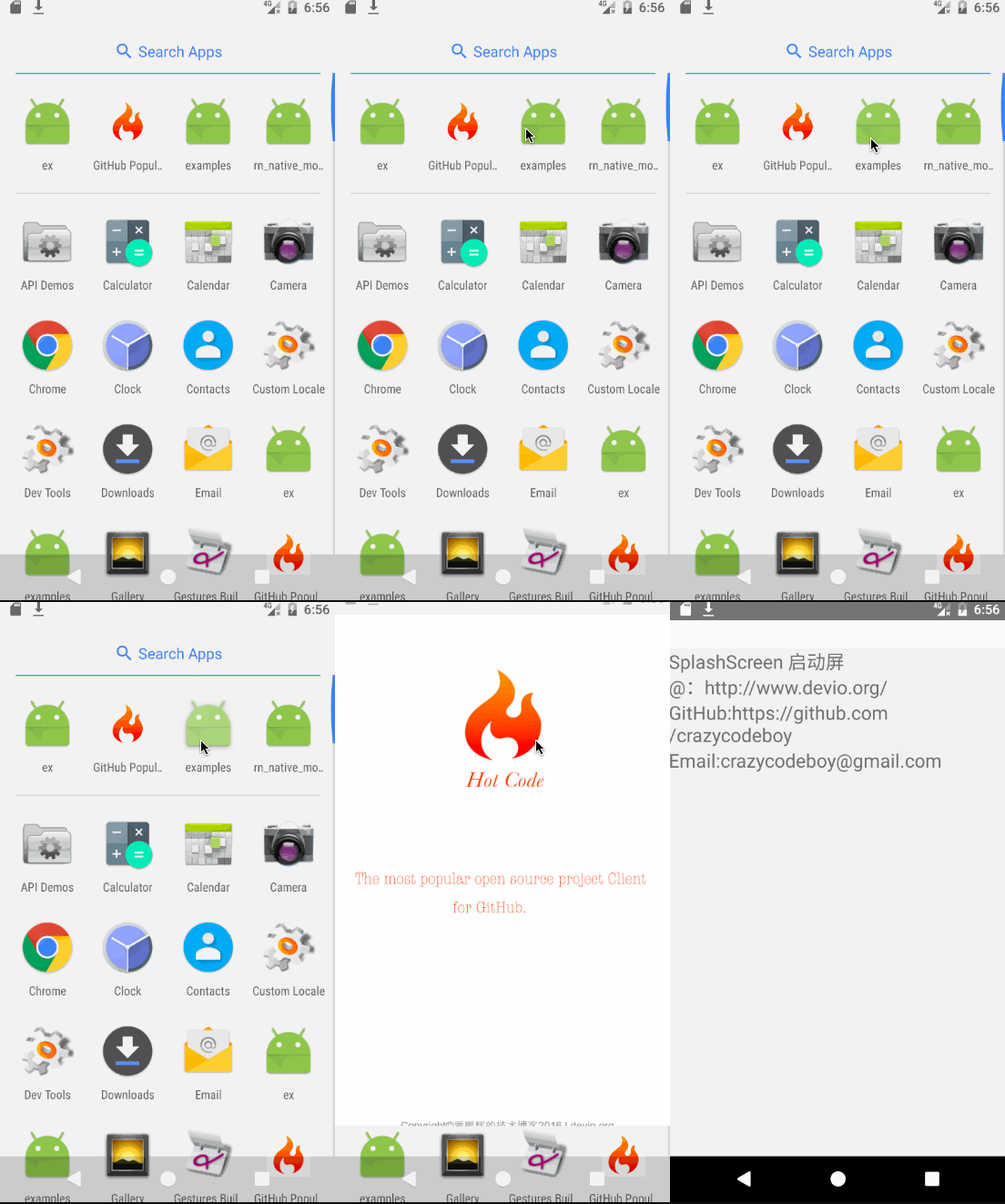
MIT License
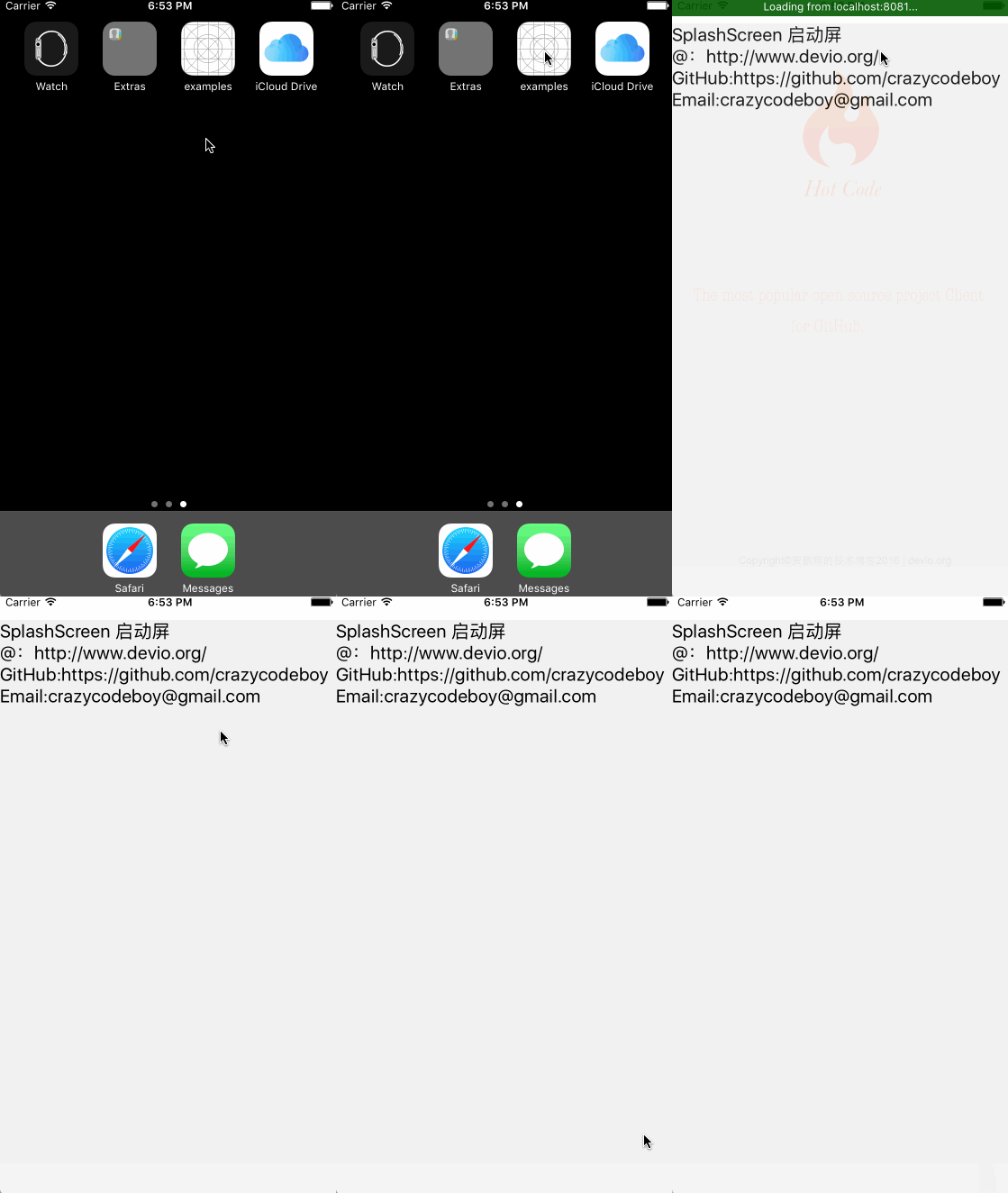
|
|
2
|
+
|
|
3
|
+
Copyright (c) 2022 十国
|
|
4
|
+
|
|
5
|
+
Permission is hereby granted, free of charge, to any person obtaining a copy
|
|
6
|
+
of this software and associated documentation files (the "Software"), to deal
|
|
7
|
+
in the Software without restriction, including without limitation the rights
|
|
8
|
+
to use, copy, modify, merge, publish, distribute, sublicense, and/or sell
|
|
9
|
+
copies of the Software, and to permit persons to whom the Software is
|
|
10
|
+
furnished to do so, subject to the following conditions:
|
|
11
|
+
|
|
12
|
+
The above copyright notice and this permission notice shall be included in all
|
|
13
|
+
copies or substantial portions of the Software.
|
|
14
|
+
|
|
15
|
+
THE SOFTWARE IS PROVIDED "AS IS", WITHOUT WARRANTY OF ANY KIND, EXPRESS OR
|
|
16
|
+
IMPLIED, INCLUDING BUT NOT LIMITED TO THE WARRANTIES OF MERCHANTABILITY,
|
|
17
|
+
FITNESS FOR A PARTICULAR PURPOSE AND NONINFRINGEMENT. IN NO EVENT SHALL THE
|
|
18
|
+
AUTHORS OR COPYRIGHT HOLDERS BE LIABLE FOR ANY CLAIM, DAMAGES OR OTHER
|
|
19
|
+
LIABILITY, WHETHER IN AN ACTION OF CONTRACT, TORT OR OTHERWISE, ARISING FROM,
|
|
20
|
+
OUT OF OR IN CONNECTION WITH THE SOFTWARE OR THE USE OR OTHER DEALINGS IN THE
|
|
21
|
+
SOFTWARE.
|
package/README.md
ADDED
|
@@ -0,0 +1,330 @@
|
|
|
1
|
+
# react-native-splash-screen
|
|
2
|
+
|
|
3
|
+
|
|
4
|
+
[ ](https://www.npmjs.com/package/react-native-splash-screen)
|
|
5
|
+
[ ](https://github.com/crazycodeboy/react-native-splash-screen/pulls)
|
|
6
|
+
[ ](https://github.com/crazycodeboy/GitHubPopular/releases)
|
|
7
|
+
[ ](https://github.com/crazycodeboy/react-native-splash-screen/blob/master/README.zh.md)
|
|
8
|
+
[](https://raw.githubusercontent.com/crazycodeboy/react-native-check-box/master/LICENSE)
|
|
9
|
+
[ ](https://github.com/crazycodeboy/RNStudyNotes/blob/master/React%20Native%20%E9%97%AE%E9%A2%98%E5%8F%8A%E8%A7%A3%E5%86%B3%E6%96%B9%E6%A1%88%E5%90%88%E9%9B%86/React%20Native%20%E5%90%AF%E5%8A%A8%E7%99%BD%E5%B1%8F%E9%97%AE%E9%A2%98%E8%A7%A3%E5%86%B3%E6%95%99%E7%A8%8B/React%20Native%20%E5%90%AF%E5%8A%A8%E7%99%BD%E5%B1%8F%E9%97%AE%E9%A2%98%E8%A7%A3%E5%86%B3%E6%95%99%E7%A8%8B.md)
|
|
10
|
+
[ ](https://github.com/crazycodeboy/flutter_splash_screen)
|
|
11
|
+
|
|
12
|
+
A splash screen API for react-native which can programatically hide and show the splash screen. Works on iOS and Android.
|
|
13
|
+
|
|
14
|
+
## Content
|
|
15
|
+
|
|
16
|
+
- [Changes](#changes)
|
|
17
|
+
- [Installation](#installation)
|
|
18
|
+
- [Examples](#examples)
|
|
19
|
+
- [Getting started](#getting-started)
|
|
20
|
+
- [API](#api)
|
|
21
|
+
- [Testing](#testing)
|
|
22
|
+
- [Troubleshooting](#troubleshooting)
|
|
23
|
+
- [Contribution](#contribution)
|
|
24
|
+
|
|
25
|
+
|
|
26
|
+
## Changes
|
|
27
|
+
For React Native >= 0.47.0 use [v3.+](https://github.com/crazycodeboy/react-native-splash-screen/releases), for React Native < 0.47.0 use [v2.1.0](https://github.com/crazycodeboy/react-native-splash-screen/releases/tag/v1.0.9)
|
|
28
|
+
|
|
29
|
+
## Examples
|
|
30
|
+
* [Examples](https://github.com/crazycodeboy/react-native-splash-screen/tree/master/examples)
|
|
31
|
+
|
|
32
|
+
|
|
33
|
+
|
|
34
|
+
|
|
35
|
+
|
|
36
|
+
|
|
37
|
+
## Installation
|
|
38
|
+
|
|
39
|
+
### First step(Download):
|
|
40
|
+
Run `npm i react-native-splash-screen --save`
|
|
41
|
+
|
|
42
|
+
### Second step(Plugin Installation):
|
|
43
|
+
|
|
44
|
+
#### Automatic installation
|
|
45
|
+
|
|
46
|
+
`react-native link react-native-splash-screen` or `rnpm link react-native-splash-screen`
|
|
47
|
+
|
|
48
|
+
#### Manual installation
|
|
49
|
+
|
|
50
|
+
**Android:**
|
|
51
|
+
|
|
52
|
+
1. In your `android/settings.gradle` file, make the following additions:
|
|
53
|
+
```java
|
|
54
|
+
include ':react-native-splash-screen'
|
|
55
|
+
project(':react-native-splash-screen').projectDir = new File(rootProject.projectDir, '../node_modules/react-native-splash-screen/android')
|
|
56
|
+
```
|
|
57
|
+
|
|
58
|
+
2. In your android/app/build.gradle file, add the `:react-native-splash-screen` project as a compile-time dependency:
|
|
59
|
+
|
|
60
|
+
```java
|
|
61
|
+
...
|
|
62
|
+
dependencies {
|
|
63
|
+
...
|
|
64
|
+
implementation project(':react-native-splash-screen')
|
|
65
|
+
}
|
|
66
|
+
```
|
|
67
|
+
|
|
68
|
+
3. Update the MainApplication.java file to use `react-native-splash-screen` via the following changes:
|
|
69
|
+
|
|
70
|
+
```java
|
|
71
|
+
// react-native-splash-screen >= 0.3.1
|
|
72
|
+
import org.devio.rn.splashscreen.SplashScreenReactPackage;
|
|
73
|
+
// react-native-splash-screen < 0.3.1
|
|
74
|
+
import com.cboy.rn.splashscreen.SplashScreenReactPackage;
|
|
75
|
+
|
|
76
|
+
public class MainApplication extends Application implements ReactApplication {
|
|
77
|
+
|
|
78
|
+
private final ReactNativeHost mReactNativeHost = new ReactNativeHost(this) {
|
|
79
|
+
@Override
|
|
80
|
+
public boolean getUseDeveloperSupport() {
|
|
81
|
+
return BuildConfig.DEBUG;
|
|
82
|
+
}
|
|
83
|
+
|
|
84
|
+
@Override
|
|
85
|
+
protected List<ReactPackage> getPackages() {
|
|
86
|
+
return Arrays.<ReactPackage>asList(
|
|
87
|
+
new MainReactPackage(),
|
|
88
|
+
new SplashScreenReactPackage() //here
|
|
89
|
+
);
|
|
90
|
+
}
|
|
91
|
+
};
|
|
92
|
+
|
|
93
|
+
@Override
|
|
94
|
+
public ReactNativeHost getReactNativeHost() {
|
|
95
|
+
return mReactNativeHost;
|
|
96
|
+
}
|
|
97
|
+
}
|
|
98
|
+
```
|
|
99
|
+
|
|
100
|
+
**iOS:**
|
|
101
|
+
|
|
102
|
+
1. `cd ios`
|
|
103
|
+
2. `run pod install`
|
|
104
|
+
|
|
105
|
+
>OR
|
|
106
|
+
|
|
107
|
+
1. In XCode, in the project navigator, right click `Libraries` ➜ `Add Files to [your project's name]`
|
|
108
|
+
2. Go to `node_modules` ➜ `react-native-splash-screen` and add `SplashScreen.xcodeproj`
|
|
109
|
+
3. In XCode, in the project navigator, select your project. Add `libSplashScreen.a` to your project's `Build Phases` ➜ `Link Binary With Libraries`
|
|
110
|
+
4. To fix `'RNSplashScreen.h' file not found`, you have to select your project → Build Settings → Search Paths → Header Search Paths to add:
|
|
111
|
+
|
|
112
|
+
`$(SRCROOT)/../node_modules/react-native-splash-screen/ios`
|
|
113
|
+
|
|
114
|
+
|
|
115
|
+
|
|
116
|
+
### Third step(Plugin Configuration):
|
|
117
|
+
|
|
118
|
+
**Android:**
|
|
119
|
+
|
|
120
|
+
Update the `MainActivity.java` to use `react-native-splash-screen` via the following changes:
|
|
121
|
+
|
|
122
|
+
```java
|
|
123
|
+
import android.os.Bundle; // here
|
|
124
|
+
import com.facebook.react.ReactActivity;
|
|
125
|
+
// react-native-splash-screen >= 0.3.1
|
|
126
|
+
import org.devio.rn.splashscreen.SplashScreen; // here
|
|
127
|
+
// react-native-splash-screen < 0.3.1
|
|
128
|
+
import com.cboy.rn.splashscreen.SplashScreen; // here
|
|
129
|
+
|
|
130
|
+
public class MainActivity extends ReactActivity {
|
|
131
|
+
@Override
|
|
132
|
+
protected void onCreate(Bundle savedInstanceState) {
|
|
133
|
+
SplashScreen.show(this); // here
|
|
134
|
+
super.onCreate(savedInstanceState);
|
|
135
|
+
}
|
|
136
|
+
// ...other code
|
|
137
|
+
}
|
|
138
|
+
```
|
|
139
|
+
|
|
140
|
+
**iOS:**
|
|
141
|
+
|
|
142
|
+
Update `AppDelegate.m` with the following additions:
|
|
143
|
+
|
|
144
|
+
|
|
145
|
+
```obj-c
|
|
146
|
+
#import "AppDelegate.h"
|
|
147
|
+
|
|
148
|
+
#import <React/RCTBundleURLProvider.h>
|
|
149
|
+
#import <React/RCTRootView.h>
|
|
150
|
+
#import "RNSplashScreen.h" // here
|
|
151
|
+
|
|
152
|
+
@implementation AppDelegate
|
|
153
|
+
|
|
154
|
+
- (BOOL)application:(UIApplication *)application didFinishLaunchingWithOptions:(NSDictionary *)launchOptions
|
|
155
|
+
{
|
|
156
|
+
// ...other code
|
|
157
|
+
|
|
158
|
+
[RNSplashScreen show]; // here
|
|
159
|
+
// or
|
|
160
|
+
//[RNSplashScreen showSplash:@"LaunchScreen" inRootView:rootView];
|
|
161
|
+
return YES;
|
|
162
|
+
}
|
|
163
|
+
|
|
164
|
+
@end
|
|
165
|
+
|
|
166
|
+
```
|
|
167
|
+
|
|
168
|
+
## Getting started
|
|
169
|
+
|
|
170
|
+
Import `react-native-splash-screen` in your JS file.
|
|
171
|
+
|
|
172
|
+
`import SplashScreen from 'react-native-splash-screen'`
|
|
173
|
+
|
|
174
|
+
### Android:
|
|
175
|
+
|
|
176
|
+
Create a file called `launch_screen.xml` in `app/src/main/res/layout` (create the `layout`-folder if it doesn't exist). The contents of the file should be the following:
|
|
177
|
+
|
|
178
|
+
```xml
|
|
179
|
+
<?xml version="1.0" encoding="utf-8"?>
|
|
180
|
+
<RelativeLayout xmlns:android="http://schemas.android.com/apk/res/android"
|
|
181
|
+
android:orientation="vertical" android:layout_width="match_parent"
|
|
182
|
+
android:layout_height="match_parent">
|
|
183
|
+
<ImageView android:layout_width="match_parent" android:layout_height="match_parent" android:src="@drawable/launch_screen" android:scaleType="centerCrop" />
|
|
184
|
+
</RelativeLayout>
|
|
185
|
+
```
|
|
186
|
+
|
|
187
|
+
Customize your launch screen by creating a `launch_screen.png`-file and placing it in an appropriate `drawable`-folder. Android automatically scales drawable, so you do not necessarily need to provide images for all phone densities.
|
|
188
|
+
You can create splash screens in the following folders:
|
|
189
|
+
* `drawable-ldpi`
|
|
190
|
+
* `drawable-mdpi`
|
|
191
|
+
* `drawable-hdpi`
|
|
192
|
+
* `drawable-xhdpi`
|
|
193
|
+
* `drawable-xxhdpi`
|
|
194
|
+
* `drawable-xxxhdpi`
|
|
195
|
+
|
|
196
|
+
Add a color called `primary_dark` in `app/src/main/res/values/colors.xml`
|
|
197
|
+
|
|
198
|
+
```
|
|
199
|
+
<?xml version="1.0" encoding="utf-8"?>
|
|
200
|
+
<resources>
|
|
201
|
+
<color name="primary_dark">#000000</color>
|
|
202
|
+
</resources>
|
|
203
|
+
```
|
|
204
|
+
|
|
205
|
+
|
|
206
|
+
**Optional steps:**
|
|
207
|
+
|
|
208
|
+
If you want the splash screen to be transparent, follow these steps.
|
|
209
|
+
|
|
210
|
+
Open `android/app/src/main/res/values/styles.xml` and add `<item name="android:windowIsTranslucent">true</item>` to the file. It should look like this:
|
|
211
|
+
|
|
212
|
+
```xml
|
|
213
|
+
<resources>
|
|
214
|
+
<!-- Base application theme. -->
|
|
215
|
+
<style name="AppTheme" parent="Theme.AppCompat.Light.NoActionBar">
|
|
216
|
+
<!-- Customize your theme here. -->
|
|
217
|
+
<!--设置透明背景-->
|
|
218
|
+
<item name="android:windowIsTranslucent">true</item>
|
|
219
|
+
</style>
|
|
220
|
+
</resources>
|
|
221
|
+
```
|
|
222
|
+
|
|
223
|
+
**To learn more see [examples](https://github.com/crazycodeboy/react-native-splash-screen/tree/master/examples)**
|
|
224
|
+
|
|
225
|
+
|
|
226
|
+
If you want to customize the color of the status bar when the splash screen is displayed:
|
|
227
|
+
|
|
228
|
+
Create `android/app/src/main/res/values/colors.xml` and add
|
|
229
|
+
```xml
|
|
230
|
+
<?xml version="1.0" encoding="utf-8"?>
|
|
231
|
+
<resources>
|
|
232
|
+
<color name="status_bar_color"><!-- Colour of your status bar here --></color>
|
|
233
|
+
</resources>
|
|
234
|
+
```
|
|
235
|
+
|
|
236
|
+
Create a style definition for this in `android/app/src/main/res/values/styles.xml`:
|
|
237
|
+
```xml
|
|
238
|
+
<?xml version="1.0" encoding="utf-8"?>
|
|
239
|
+
<resources>
|
|
240
|
+
<style name="SplashScreenTheme" parent="SplashScreen_SplashTheme">
|
|
241
|
+
<item name="colorPrimaryDark">@color/status_bar_color</item>
|
|
242
|
+
</style>
|
|
243
|
+
</resources>
|
|
244
|
+
```
|
|
245
|
+
|
|
246
|
+
Change your `show` method to include your custom style:
|
|
247
|
+
```java
|
|
248
|
+
SplashScreen.show(this, R.style.SplashScreenTheme);
|
|
249
|
+
```
|
|
250
|
+
|
|
251
|
+
### iOS
|
|
252
|
+
|
|
253
|
+
Customize your splash screen via `LaunchScreen.storyboard` or `LaunchScreen.xib`。
|
|
254
|
+
|
|
255
|
+
**Learn more to see [examples](https://github.com/crazycodeboy/react-native-splash-screen/tree/master/examples)**
|
|
256
|
+
|
|
257
|
+
- [via LaunchScreen.storyboard Tutorial](https://github.com/crazycodeboy/react-native-splash-screen/blob/master/add-LaunchScreen-tutorial-for-ios.md)
|
|
258
|
+
|
|
259
|
+
|
|
260
|
+
## Usage
|
|
261
|
+
|
|
262
|
+
Use like so:
|
|
263
|
+
|
|
264
|
+
```javascript
|
|
265
|
+
import SplashScreen from 'react-native-splash-screen'
|
|
266
|
+
|
|
267
|
+
export default class WelcomePage extends Component {
|
|
268
|
+
|
|
269
|
+
componentDidMount() {
|
|
270
|
+
// do stuff while splash screen is shown
|
|
271
|
+
// After having done stuff (such as async tasks) hide the splash screen
|
|
272
|
+
SplashScreen.hide();
|
|
273
|
+
}
|
|
274
|
+
}
|
|
275
|
+
```
|
|
276
|
+
|
|
277
|
+
## API
|
|
278
|
+
|
|
279
|
+
|
|
280
|
+
| Method | Type | Optional | Description |
|
|
281
|
+
|--------|----------|----------|-------------------------------------|
|
|
282
|
+
| show() | function | false | Open splash screen (Native Method ) |
|
|
283
|
+
| show(final Activity activity, final boolean fullScreen) | function | false | Open splash screen (Native Method ) |
|
|
284
|
+
| hide() | function | false | Close splash screen |
|
|
285
|
+
|
|
286
|
+
## Testing
|
|
287
|
+
|
|
288
|
+
### Jest
|
|
289
|
+
|
|
290
|
+
For Jest to work you will need to mock this component. Here is an example:
|
|
291
|
+
|
|
292
|
+
```
|
|
293
|
+
// __mocks__/react-native-splash-screen.js
|
|
294
|
+
export default {
|
|
295
|
+
show: jest.fn().mockImplementation( () => { console.log('show splash screen'); } ),
|
|
296
|
+
hide: jest.fn().mockImplementation( () => { console.log('hide splash screen'); } ),
|
|
297
|
+
}
|
|
298
|
+
```
|
|
299
|
+
|
|
300
|
+
## Troubleshooting
|
|
301
|
+
|
|
302
|
+
### Splash screen always appears stretched/distorted
|
|
303
|
+
Add the ImageView with a scaleType in the `launch_screen.xml`, e.g.:
|
|
304
|
+
```
|
|
305
|
+
<?xml version="1.0" encoding="utf-8"?>
|
|
306
|
+
<FrameLayout
|
|
307
|
+
xmlns:android="http://schemas.android.com/apk/res/android"
|
|
308
|
+
android:layout_width="match_parent"
|
|
309
|
+
android:layout_height="match_parent"
|
|
310
|
+
android:orientation="vertical"
|
|
311
|
+
>
|
|
312
|
+
<ImageView
|
|
313
|
+
android:src="@drawable/launch_screen"
|
|
314
|
+
android:layout_width="match_parent"
|
|
315
|
+
android:layout_height="match_parent"
|
|
316
|
+
android:scaleType="centerCrop"
|
|
317
|
+
>
|
|
318
|
+
</ImageView>
|
|
319
|
+
</FrameLayout>
|
|
320
|
+
```
|
|
321
|
+
|
|
322
|
+
## Contribution
|
|
323
|
+
|
|
324
|
+
Issues are welcome. Please add a screenshot of you bug and a code snippet. Quickest way to solve issue is to reproduce it in one of the examples.
|
|
325
|
+
|
|
326
|
+
Pull requests are welcome. If you want to change the API or do something big it is best to create an issue and discuss it first.
|
|
327
|
+
|
|
328
|
+
---
|
|
329
|
+
|
|
330
|
+
**[MIT Licensed](https://github.com/crazycodeboy/react-native-splash-screen/blob/master/LICENSE)**
|
package/README.zh.md
ADDED
|
@@ -0,0 +1,232 @@
|
|
|
1
|
+
# react-native-splash-screen
|
|
2
|
+
|
|
3
|
+
[ ](https://www.npmjs.com/package/react-native-splash-screen)
|
|
4
|
+
[ ](https://github.com/crazycodeboy/react-native-splash-screen/pulls)
|
|
5
|
+
[ ](https://github.com/crazycodeboy/GitHubPopular/releases)
|
|
6
|
+
[ ](https://github.com/crazycodeboy/GitHubPopular/)
|
|
7
|
+
[](https://raw.githubusercontent.com/crazycodeboy/react-native-check-box/master/LICENSE)
|
|
8
|
+
[ ](https://github.com/crazycodeboy/RNStudyNotes/blob/master/React%20Native%20%E9%97%AE%E9%A2%98%E5%8F%8A%E8%A7%A3%E5%86%B3%E6%96%B9%E6%A1%88%E5%90%88%E9%9B%86/React%20Native%20%E5%90%AF%E5%8A%A8%E7%99%BD%E5%B1%8F%E9%97%AE%E9%A2%98%E8%A7%A3%E5%86%B3%E6%95%99%E7%A8%8B/React%20Native%20%E5%90%AF%E5%8A%A8%E7%99%BD%E5%B1%8F%E9%97%AE%E9%A2%98%E8%A7%A3%E5%86%B3%E6%95%99%E7%A8%8B.md)
|
|
9
|
+
|
|
10
|
+
|
|
11
|
+
|
|
12
|
+
React Native启动屏,解决iOS,Android启动白屏问题,支持Android和iOS。
|
|
13
|
+
|
|
14
|
+
## 目录
|
|
15
|
+
|
|
16
|
+
- [安装说明](#安装说明)
|
|
17
|
+
- [演示](#演示)
|
|
18
|
+
- [使用说明](#使用说明)
|
|
19
|
+
- [API](#api)
|
|
20
|
+
- [贡献](#贡献)
|
|
21
|
+
- [改变](#改变)
|
|
22
|
+
|
|
23
|
+
## 演示
|
|
24
|
+
* [Examples](https://github.com/crazycodeboy/react-native-splash-screen/tree/master/examples)
|
|
25
|
+
|
|
26
|
+

|
|
27
|
+

|
|
28
|
+
|
|
29
|
+
|
|
30
|
+
## 改变
|
|
31
|
+
|
|
32
|
+
如果你项目的React Native>=0.47.请使用[v3.+](https://github.com/crazycodeboy/react-native-splash-screen/releases),
|
|
33
|
+
如果<0.47.0请使用[v2.1.0](https://github.com/crazycodeboy/react-native-splash-screen/releases/tag/v1.0.9)。
|
|
34
|
+
|
|
35
|
+
## 安装说明
|
|
36
|
+
|
|
37
|
+
### 第一步(下载):
|
|
38
|
+
在项目根目录打开终端运行 `npm i react-native-splash-screen --save`
|
|
39
|
+
|
|
40
|
+
### 第二步 (安装):
|
|
41
|
+
|
|
42
|
+
大家可以通过自动或手动两种方式来安装`react-native-splash-screen`。
|
|
43
|
+
|
|
44
|
+
|
|
45
|
+
#### 自动安装
|
|
46
|
+
|
|
47
|
+
终端运行:
|
|
48
|
+
|
|
49
|
+
|
|
50
|
+
`react-native link react-native-splash-screen` 或 `rnpm link react-native-splash-screen`
|
|
51
|
+
|
|
52
|
+
#### 手动安装
|
|
53
|
+
|
|
54
|
+
**Android:**
|
|
55
|
+
|
|
56
|
+
1.在你的 android/settings.gradle 文件中添加下列代码:
|
|
57
|
+
```
|
|
58
|
+
include ':react-native-splash-screen'
|
|
59
|
+
project(':react-native-splash-screen').projectDir = new File(rootProject.projectDir, '../node_modules/react-native-splash-screen/android')
|
|
60
|
+
```
|
|
61
|
+
|
|
62
|
+
2.在你的 android/app/build.gradle 文件中添加 `:react-native-splash-screen`:
|
|
63
|
+
|
|
64
|
+
代码如下:
|
|
65
|
+
|
|
66
|
+
```
|
|
67
|
+
...
|
|
68
|
+
dependencies {
|
|
69
|
+
...
|
|
70
|
+
implementation project(':react-native-splash-screen')
|
|
71
|
+
}
|
|
72
|
+
```
|
|
73
|
+
|
|
74
|
+
3.更新你的MainApplication.java 文件,如下:
|
|
75
|
+
|
|
76
|
+
```java
|
|
77
|
+
public class MainApplication extends Application implements ReactApplication {
|
|
78
|
+
|
|
79
|
+
private final ReactNativeHost mReactNativeHost = new ReactNativeHost(this) {
|
|
80
|
+
@Override
|
|
81
|
+
protected boolean getUseDeveloperSupport() {
|
|
82
|
+
return BuildConfig.DEBUG;
|
|
83
|
+
}
|
|
84
|
+
|
|
85
|
+
@Override
|
|
86
|
+
protected List<ReactPackage> getPackages() {
|
|
87
|
+
return Arrays.<ReactPackage>asList(
|
|
88
|
+
new MainReactPackage(),
|
|
89
|
+
new SplashScreenReactPackage() //添加这一句
|
|
90
|
+
);
|
|
91
|
+
}
|
|
92
|
+
};
|
|
93
|
+
|
|
94
|
+
@Override
|
|
95
|
+
public ReactNativeHost getReactNativeHost() {
|
|
96
|
+
return mReactNativeHost;
|
|
97
|
+
}
|
|
98
|
+
}
|
|
99
|
+
```
|
|
100
|
+
|
|
101
|
+
**iOS:**
|
|
102
|
+
|
|
103
|
+
1. 在 XCode的项目导航视图中单击 `Libraries` ➜ `Add Files to [your project's name]`
|
|
104
|
+
2. 将 `SplashScreen.xcodeproj`添加到你的项目中,`node_modules` ➜ `react-native-splash-screen` ➜ `SplashScreen.xcodeproj`
|
|
105
|
+
|
|
106
|
+
3. 在XCode中打开`Build Phases` ➜ `Link Binary With Libraries`将`libSplashScreen.a` 添加到你的项目中。
|
|
107
|
+
4. 如果在使用过过程中出现 `'SplashScreen.h' file not found`问题,你可以下面的代码添加到Header Search Paths中,步骤如下:
|
|
108
|
+
|
|
109
|
+
|
|
110
|
+
选择你的项目,TARGET → Build Settings → Search Paths → Header Search Paths 添加:
|
|
111
|
+
|
|
112
|
+
`$(SRCROOT)/../node_modules/react-native-splash-screen/ios`
|
|
113
|
+
|
|
114
|
+
|
|
115
|
+
### 第三步(配置):
|
|
116
|
+
|
|
117
|
+
**Android:**
|
|
118
|
+
|
|
119
|
+
更新你的 MainActivity.java 文件如下:
|
|
120
|
+
```java
|
|
121
|
+
public class MainActivity extends ReactActivity {
|
|
122
|
+
@Override
|
|
123
|
+
protected void onCreate(Bundle savedInstanceState) {
|
|
124
|
+
SplashScreen.show(this); // 添加这一句
|
|
125
|
+
super.onCreate(savedInstanceState);
|
|
126
|
+
}
|
|
127
|
+
// ...other code
|
|
128
|
+
}
|
|
129
|
+
```
|
|
130
|
+
|
|
131
|
+
**iOS:**
|
|
132
|
+
|
|
133
|
+
更新你的AppDelegate.m 文件如下:
|
|
134
|
+
|
|
135
|
+
|
|
136
|
+
```obj-c
|
|
137
|
+
#import "AppDelegate.h"
|
|
138
|
+
|
|
139
|
+
#import <React/RCTBundleURLProvider.h>
|
|
140
|
+
#import <React/RCTRootView.h>
|
|
141
|
+
#import "RNSplashScreen.h" // 添加这一句
|
|
142
|
+
|
|
143
|
+
@implementation AppDelegate
|
|
144
|
+
|
|
145
|
+
- (BOOL)application:(UIApplication *)application didFinishLaunchingWithOptions:(NSDictionary *)launchOptions
|
|
146
|
+
{
|
|
147
|
+
// ...other code
|
|
148
|
+
|
|
149
|
+
[RNSplashScreen show]; // 添加这一句,这一句一定要在最后
|
|
150
|
+
return YES;
|
|
151
|
+
}
|
|
152
|
+
|
|
153
|
+
@end
|
|
154
|
+
|
|
155
|
+
```
|
|
156
|
+
|
|
157
|
+
|
|
158
|
+
## 使用说明
|
|
159
|
+
|
|
160
|
+
将 `react-native-splash-screen` 导入你的JS 文件。
|
|
161
|
+
|
|
162
|
+
|
|
163
|
+
`import SplashScreen from 'react-native-splash-screen'`
|
|
164
|
+
|
|
165
|
+
**Android:**
|
|
166
|
+
|
|
167
|
+
创建一个名为 launch_screen.xml 的布局文件来自定义你的启动屏幕。
|
|
168
|
+
|
|
169
|
+
```
|
|
170
|
+
<?xml version="1.0" encoding="utf-8"?>
|
|
171
|
+
<LinearLayout xmlns:android="http://schemas.android.com/apk/res/android"
|
|
172
|
+
android:orientation="vertical" android:layout_width="match_parent"
|
|
173
|
+
android:layout_height="match_parent"
|
|
174
|
+
android:background="@drawable/launch_screen">
|
|
175
|
+
</LinearLayout>
|
|
176
|
+
```
|
|
177
|
+
|
|
178
|
+
**另外:**
|
|
179
|
+
|
|
180
|
+
你也可以启用app主题透明选项来解决在APP启动时因主题原因导致的短暂白屏的问题,具体步骤如下:
|
|
181
|
+
|
|
182
|
+
打开 `android/app/src/main/res/values/styles.xml`文件,添加 `<item name="android:windowIsTranslucent">true</item>`,如下 :
|
|
183
|
+
|
|
184
|
+
```xml
|
|
185
|
+
<resources>
|
|
186
|
+
<!-- Base application theme. -->
|
|
187
|
+
<style name="AppTheme" parent="Theme.AppCompat.Light.NoActionBar">
|
|
188
|
+
<!-- Customize your theme here. -->
|
|
189
|
+
<!--设置透明背景-->
|
|
190
|
+
+ <item name="android:windowIsTranslucent">true</item>
|
|
191
|
+
</style>
|
|
192
|
+
</resources>
|
|
193
|
+
```
|
|
194
|
+
|
|
195
|
+
|
|
196
|
+
**更详细的介绍,可以查看 [examples](https://github.com/crazycodeboy/react-native-splash-screen/tree/master/examples)**
|
|
197
|
+
|
|
198
|
+
**iOS**
|
|
199
|
+
|
|
200
|
+
iOS可以通过LaunchScreen.storyboard或LaunchScreen.xib来自定义你的启动屏幕。
|
|
201
|
+
|
|
202
|
+
**更详细的介绍,可以查看 [examples](https://github.com/crazycodeboy/react-native-splash-screen/tree/master/examples)**
|
|
203
|
+
|
|
204
|
+
最后,你可以在适当的时候关闭启动屏幕(如:启动初始化完成后):
|
|
205
|
+
|
|
206
|
+
```JavaScript
|
|
207
|
+
import SplashScreen from 'react-native-splash-screen'
|
|
208
|
+
|
|
209
|
+
export default class WelcomePage extends Component {
|
|
210
|
+
|
|
211
|
+
componentDidMount() {
|
|
212
|
+
// do anything while splash screen keeps, use await to wait for an async task.
|
|
213
|
+
SplashScreen.hide();//关闭启动屏幕
|
|
214
|
+
}
|
|
215
|
+
}
|
|
216
|
+
```
|
|
217
|
+
|
|
218
|
+
## API
|
|
219
|
+
|
|
220
|
+
|
|
221
|
+
方法 | 类型 | 可选 | 描述
|
|
222
|
+
----------------- | -------- | -------- | -----------
|
|
223
|
+
show() | function | false | 打开启动屏幕(原生方法)
|
|
224
|
+
hide() | function | false | 关闭启动屏幕
|
|
225
|
+
|
|
226
|
+
## 贡献
|
|
227
|
+
|
|
228
|
+
欢迎大家提问题,如果能给问题加上一个截图,则是极好的。另外欢迎`Pull requests`贡献你的代码。
|
|
229
|
+
|
|
230
|
+
---
|
|
231
|
+
|
|
232
|
+
**MIT Licensed**
|
|
@@ -0,0 +1,37 @@
|
|
|
1
|
+
def safeExtGet(prop, fallback) {
|
|
2
|
+
rootProject.ext.has(prop) ? rootProject.ext.get(prop) : fallback
|
|
3
|
+
}
|
|
4
|
+
|
|
5
|
+
apply plugin: 'com.android.library'
|
|
6
|
+
|
|
7
|
+
def DEFAULT_COMPILE_SDK_VERSION = 26
|
|
8
|
+
def DEFAULT_BUILD_TOOLS_VERSION = "26.0.2"
|
|
9
|
+
def DEFAULT_TARGET_SDK_VERSION = 26
|
|
10
|
+
def DEFAULT_SUPPORT_LIB_VERSION = "26.1.0"
|
|
11
|
+
|
|
12
|
+
android {
|
|
13
|
+
compileSdkVersion rootProject.hasProperty('compileSdkVersion') ? rootProject.compileSdkVersion : DEFAULT_COMPILE_SDK_VERSION
|
|
14
|
+
buildToolsVersion rootProject.hasProperty('buildToolsVersion') ? rootProject.buildToolsVersion : DEFAULT_BUILD_TOOLS_VERSION
|
|
15
|
+
|
|
16
|
+
defaultConfig {
|
|
17
|
+
minSdkVersion safeExtGet('minSdkVersion', 16)
|
|
18
|
+
targetSdkVersion rootProject.hasProperty('targetSdkVersion') ? rootProject.targetSdkVersion : DEFAULT_TARGET_SDK_VERSION
|
|
19
|
+
versionCode 1
|
|
20
|
+
versionName "1.0"
|
|
21
|
+
}
|
|
22
|
+
buildTypes {
|
|
23
|
+
release {
|
|
24
|
+
minifyEnabled false
|
|
25
|
+
proguardFiles getDefaultProguardFile('proguard-android.txt'), 'proguard-rules.pro'
|
|
26
|
+
}
|
|
27
|
+
}
|
|
28
|
+
}
|
|
29
|
+
|
|
30
|
+
dependencies {
|
|
31
|
+
def supportLibVersion = rootProject.hasProperty('supportLibVersion') ? rootProject.supportLibVersion : DEFAULT_SUPPORT_LIB_VERSION
|
|
32
|
+
|
|
33
|
+
implementation fileTree(dir: 'libs', include: ['*.jar'])
|
|
34
|
+
testImplementation 'junit:junit:4.12'
|
|
35
|
+
// implementation "com.android.support:appcompat-v7:$supportLibVersion"
|
|
36
|
+
implementation "com.facebook.react:react-native:+" // From node_modules
|
|
37
|
+
}
|
|
@@ -0,0 +1,107 @@
|
|
|
1
|
+
package org.devio.rn.splashscreen;
|
|
2
|
+
|
|
3
|
+
import android.app.Activity;
|
|
4
|
+
import android.app.Dialog;
|
|
5
|
+
import android.os.Build;
|
|
6
|
+
import android.view.WindowManager;
|
|
7
|
+
|
|
8
|
+
import java.lang.ref.WeakReference;
|
|
9
|
+
|
|
10
|
+
/**
|
|
11
|
+
* SplashScreen
|
|
12
|
+
* 启动屏
|
|
13
|
+
* from:http://www.devio.org
|
|
14
|
+
* Author:CrazyCodeBoy
|
|
15
|
+
* GitHub:https://github.com/crazycodeboy
|
|
16
|
+
* Email:crazycodeboy@gmail.com
|
|
17
|
+
*/
|
|
18
|
+
public class SplashScreen {
|
|
19
|
+
private static Dialog mSplashDialog;
|
|
20
|
+
private static WeakReference<Activity> mActivity;
|
|
21
|
+
|
|
22
|
+
/**
|
|
23
|
+
* 打开启动屏
|
|
24
|
+
*/
|
|
25
|
+
public static void show(final Activity activity, final int themeResId, final boolean fullScreen) {
|
|
26
|
+
if (activity == null) return;
|
|
27
|
+
mActivity = new WeakReference<Activity>(activity);
|
|
28
|
+
activity.runOnUiThread(new Runnable() {
|
|
29
|
+
@Override
|
|
30
|
+
public void run() {
|
|
31
|
+
if (!activity.isFinishing()) {
|
|
32
|
+
mSplashDialog = new Dialog(activity, themeResId);
|
|
33
|
+
mSplashDialog.setContentView(R.layout.launch_screen);
|
|
34
|
+
mSplashDialog.setCancelable(false);
|
|
35
|
+
if (fullScreen) {
|
|
36
|
+
setActivityAndroidP(mSplashDialog);
|
|
37
|
+
}
|
|
38
|
+
if (!mSplashDialog.isShowing()) {
|
|
39
|
+
mSplashDialog.show();
|
|
40
|
+
}
|
|
41
|
+
}
|
|
42
|
+
}
|
|
43
|
+
});
|
|
44
|
+
}
|
|
45
|
+
|
|
46
|
+
/**
|
|
47
|
+
* 打开启动屏
|
|
48
|
+
*/
|
|
49
|
+
public static void show(final Activity activity, final boolean fullScreen) {
|
|
50
|
+
int resourceId = fullScreen ? R.style.SplashScreen_Fullscreen : R.style.SplashScreen_SplashTheme;
|
|
51
|
+
|
|
52
|
+
show(activity, resourceId, fullScreen);
|
|
53
|
+
}
|
|
54
|
+
|
|
55
|
+
/**
|
|
56
|
+
* 打开启动屏
|
|
57
|
+
*/
|
|
58
|
+
public static void show(final Activity activity) {
|
|
59
|
+
show(activity, false);
|
|
60
|
+
}
|
|
61
|
+
|
|
62
|
+
/**
|
|
63
|
+
* 关闭启动屏
|
|
64
|
+
*/
|
|
65
|
+
public static void hide(Activity activity) {
|
|
66
|
+
if (activity == null) {
|
|
67
|
+
if (mActivity == null) {
|
|
68
|
+
return;
|
|
69
|
+
}
|
|
70
|
+
activity = mActivity.get();
|
|
71
|
+
}
|
|
72
|
+
|
|
73
|
+
if (activity == null) return;
|
|
74
|
+
|
|
75
|
+
final Activity _activity = activity;
|
|
76
|
+
|
|
77
|
+
_activity.runOnUiThread(new Runnable() {
|
|
78
|
+
@Override
|
|
79
|
+
public void run() {
|
|
80
|
+
if (mSplashDialog != null && mSplashDialog.isShowing()) {
|
|
81
|
+
boolean isDestroyed = false;
|
|
82
|
+
|
|
83
|
+
if (Build.VERSION.SDK_INT >= Build.VERSION_CODES.JELLY_BEAN_MR1) {
|
|
84
|
+
isDestroyed = _activity.isDestroyed();
|
|
85
|
+
}
|
|
86
|
+
|
|
87
|
+
if (!_activity.isFinishing() && !isDestroyed) {
|
|
88
|
+
mSplashDialog.dismiss();
|
|
89
|
+
}
|
|
90
|
+
mSplashDialog = null;
|
|
91
|
+
}
|
|
92
|
+
}
|
|
93
|
+
});
|
|
94
|
+
}
|
|
95
|
+
|
|
96
|
+
private static void setActivityAndroidP(Dialog dialog) {
|
|
97
|
+
//设置全屏展示
|
|
98
|
+
if (Build.VERSION.SDK_INT >= 28) {
|
|
99
|
+
if (dialog != null && dialog.getWindow() != null) {
|
|
100
|
+
dialog.getWindow().addFlags(WindowManager.LayoutParams.FLAG_LAYOUT_NO_LIMITS);//全屏显示
|
|
101
|
+
WindowManager.LayoutParams lp = dialog.getWindow().getAttributes();
|
|
102
|
+
lp.layoutInDisplayCutoutMode = WindowManager.LayoutParams.LAYOUT_IN_DISPLAY_CUTOUT_MODE_SHORT_EDGES;
|
|
103
|
+
dialog.getWindow().setAttributes(lp);
|
|
104
|
+
}
|
|
105
|
+
}
|
|
106
|
+
}
|
|
107
|
+
}
|
|
@@ -0,0 +1,40 @@
|
|
|
1
|
+
package org.devio.rn.splashscreen;
|
|
2
|
+
|
|
3
|
+
import com.facebook.react.bridge.ReactApplicationContext;
|
|
4
|
+
import com.facebook.react.bridge.ReactContextBaseJavaModule;
|
|
5
|
+
import com.facebook.react.bridge.ReactMethod;
|
|
6
|
+
|
|
7
|
+
/**
|
|
8
|
+
* SplashScreen
|
|
9
|
+
* 启动屏
|
|
10
|
+
* from:http://www.devio.org
|
|
11
|
+
* Author:CrazyCodeBoy
|
|
12
|
+
* GitHub:https://github.com/crazycodeboy
|
|
13
|
+
* Email:crazycodeboy@gmail.com
|
|
14
|
+
*/
|
|
15
|
+
public class SplashScreenModule extends ReactContextBaseJavaModule{
|
|
16
|
+
public SplashScreenModule(ReactApplicationContext reactContext) {
|
|
17
|
+
super(reactContext);
|
|
18
|
+
}
|
|
19
|
+
|
|
20
|
+
@Override
|
|
21
|
+
public String getName() {
|
|
22
|
+
return "SplashScreen";
|
|
23
|
+
}
|
|
24
|
+
|
|
25
|
+
/**
|
|
26
|
+
* 打开启动屏
|
|
27
|
+
*/
|
|
28
|
+
@ReactMethod
|
|
29
|
+
public void show() {
|
|
30
|
+
SplashScreen.show(getCurrentActivity());
|
|
31
|
+
}
|
|
32
|
+
|
|
33
|
+
/**
|
|
34
|
+
* 关闭启动屏
|
|
35
|
+
*/
|
|
36
|
+
@ReactMethod
|
|
37
|
+
public void hide() {
|
|
38
|
+
SplashScreen.hide(getCurrentActivity());
|
|
39
|
+
}
|
|
40
|
+
}
|
|
@@ -0,0 +1,39 @@
|
|
|
1
|
+
package org.devio.rn.splashscreen;
|
|
2
|
+
|
|
3
|
+
import com.facebook.react.ReactPackage;
|
|
4
|
+
import com.facebook.react.bridge.JavaScriptModule;
|
|
5
|
+
import com.facebook.react.bridge.NativeModule;
|
|
6
|
+
import com.facebook.react.bridge.ReactApplicationContext;
|
|
7
|
+
import com.facebook.react.uimanager.ViewManager;
|
|
8
|
+
import java.util.ArrayList;
|
|
9
|
+
import java.util.Collections;
|
|
10
|
+
import java.util.List;
|
|
11
|
+
|
|
12
|
+
/**
|
|
13
|
+
* SplashScreen
|
|
14
|
+
* 启动屏
|
|
15
|
+
* from:http://www.devio.org
|
|
16
|
+
* Author:CrazyCodeBoy
|
|
17
|
+
* GitHub:https://github.com/crazycodeboy
|
|
18
|
+
* Email:crazycodeboy@gmail.com
|
|
19
|
+
*/
|
|
20
|
+
public class SplashScreenReactPackage implements ReactPackage {
|
|
21
|
+
|
|
22
|
+
// Deprecated RN 0.47
|
|
23
|
+
public List<Class<? extends JavaScriptModule>> createJSModules() {
|
|
24
|
+
return Collections.emptyList();
|
|
25
|
+
}
|
|
26
|
+
|
|
27
|
+
@Override
|
|
28
|
+
public List<ViewManager> createViewManagers(ReactApplicationContext reactContext) {
|
|
29
|
+
return Collections.emptyList();
|
|
30
|
+
}
|
|
31
|
+
|
|
32
|
+
@Override
|
|
33
|
+
public List<NativeModule> createNativeModules(
|
|
34
|
+
ReactApplicationContext reactContext) {
|
|
35
|
+
List<NativeModule> modules = new ArrayList<>();
|
|
36
|
+
modules.add(new SplashScreenModule(reactContext));
|
|
37
|
+
return modules;
|
|
38
|
+
}
|
|
39
|
+
}
|
|
@@ -0,0 +1,12 @@
|
|
|
1
|
+
<resources>
|
|
2
|
+
<style name="SplashScreen_SplashAnimation">
|
|
3
|
+
<item name="android:windowExitAnimation">@android:anim/fade_out</item>
|
|
4
|
+
</style>
|
|
5
|
+
|
|
6
|
+
<style name="SplashScreen_SplashTheme" parent="Theme.AppCompat.NoActionBar">
|
|
7
|
+
<item name="android:windowAnimationStyle">@style/SplashScreen_SplashAnimation</item>
|
|
8
|
+
</style>
|
|
9
|
+
<style name="SplashScreen_Fullscreen" parent="SplashScreen_SplashTheme">
|
|
10
|
+
<item name="android:windowFullscreen">true</item>
|
|
11
|
+
</style>
|
|
12
|
+
</resources>
|
package/index.d.ts
ADDED
package/index.js
ADDED
|
@@ -0,0 +1,14 @@
|
|
|
1
|
+
/**
|
|
2
|
+
* SplashScreen
|
|
3
|
+
* 启动屏
|
|
4
|
+
* from:http://www.devio.org
|
|
5
|
+
* Author:CrazyCodeBoy
|
|
6
|
+
* GitHub:https://github.com/crazycodeboy
|
|
7
|
+
* Email:crazycodeboy@gmail.com
|
|
8
|
+
* @flow
|
|
9
|
+
*/
|
|
10
|
+
'use strict';
|
|
11
|
+
|
|
12
|
+
import { NativeModules } from 'react-native';
|
|
13
|
+
export default NativeModules.SplashScreen;
|
|
14
|
+
|
|
@@ -0,0 +1,16 @@
|
|
|
1
|
+
/**
|
|
2
|
+
* SplashScreen
|
|
3
|
+
* 启动屏
|
|
4
|
+
* from:http://www.devio.org
|
|
5
|
+
* Author:CrazyCodeBoy
|
|
6
|
+
* GitHub:https://github.com/crazycodeboy
|
|
7
|
+
* Email:crazycodeboy@gmail.com
|
|
8
|
+
*/
|
|
9
|
+
#import <React/RCTBridgeModule.h>
|
|
10
|
+
#import <UIKit/UIKit.h>
|
|
11
|
+
|
|
12
|
+
@interface RNSplashScreen : NSObject<RCTBridgeModule>
|
|
13
|
+
+ (void)showSplash:(NSString*)splashScreen inRootView:(UIView*)rootView;
|
|
14
|
+
+ (void)show;
|
|
15
|
+
+ (void)hide;
|
|
16
|
+
@end
|
|
@@ -0,0 +1,73 @@
|
|
|
1
|
+
/**
|
|
2
|
+
* SplashScreen
|
|
3
|
+
* 启动屏
|
|
4
|
+
* from:http://www.devio.org
|
|
5
|
+
* Author:CrazyCodeBoy
|
|
6
|
+
* GitHub:https://github.com/crazycodeboy
|
|
7
|
+
* Email:crazycodeboy@gmail.com
|
|
8
|
+
*/
|
|
9
|
+
|
|
10
|
+
#import "RNSplashScreen.h"
|
|
11
|
+
#import <React/RCTBridge.h>
|
|
12
|
+
|
|
13
|
+
static bool waiting = true;
|
|
14
|
+
static bool addedJsLoadErrorObserver = false;
|
|
15
|
+
static UIView* loadingView = nil;
|
|
16
|
+
|
|
17
|
+
@implementation RNSplashScreen
|
|
18
|
+
- (dispatch_queue_t)methodQueue{
|
|
19
|
+
return dispatch_get_main_queue();
|
|
20
|
+
}
|
|
21
|
+
RCT_EXPORT_MODULE(SplashScreen)
|
|
22
|
+
|
|
23
|
+
+ (void)show {
|
|
24
|
+
if (!addedJsLoadErrorObserver) {
|
|
25
|
+
[[NSNotificationCenter defaultCenter] addObserver:self selector:@selector(jsLoadError:) name:RCTJavaScriptDidFailToLoadNotification object:nil];
|
|
26
|
+
addedJsLoadErrorObserver = true;
|
|
27
|
+
}
|
|
28
|
+
|
|
29
|
+
while (waiting) {
|
|
30
|
+
NSDate* later = [NSDate dateWithTimeIntervalSinceNow:0.1];
|
|
31
|
+
[[NSRunLoop mainRunLoop] runUntilDate:later];
|
|
32
|
+
}
|
|
33
|
+
}
|
|
34
|
+
|
|
35
|
+
+ (void)showSplash:(NSString*)splashScreen inRootView:(UIView*)rootView {
|
|
36
|
+
if (!loadingView) {
|
|
37
|
+
loadingView = [[[NSBundle mainBundle] loadNibNamed:splashScreen owner:self options:nil] objectAtIndex:0];
|
|
38
|
+
CGRect frame = rootView.frame;
|
|
39
|
+
frame.origin = CGPointMake(0, 0);
|
|
40
|
+
loadingView.frame = frame;
|
|
41
|
+
}
|
|
42
|
+
waiting = false;
|
|
43
|
+
|
|
44
|
+
[rootView addSubview:loadingView];
|
|
45
|
+
}
|
|
46
|
+
|
|
47
|
+
+ (void)hide {
|
|
48
|
+
if (waiting) {
|
|
49
|
+
dispatch_async(dispatch_get_main_queue(), ^{
|
|
50
|
+
waiting = false;
|
|
51
|
+
});
|
|
52
|
+
} else {
|
|
53
|
+
dispatch_after(dispatch_time(DISPATCH_TIME_NOW, (int64_t)(0.1 * NSEC_PER_SEC)), dispatch_get_main_queue(), ^{
|
|
54
|
+
[loadingView removeFromSuperview];
|
|
55
|
+
});
|
|
56
|
+
}
|
|
57
|
+
}
|
|
58
|
+
|
|
59
|
+
+ (void) jsLoadError:(NSNotification*)notification
|
|
60
|
+
{
|
|
61
|
+
// If there was an error loading javascript, hide the splash screen so it can be shown. Otherwise the splash screen will remain forever, which is a hassle to debug.
|
|
62
|
+
[RNSplashScreen hide];
|
|
63
|
+
}
|
|
64
|
+
|
|
65
|
+
RCT_EXPORT_METHOD(hide) {
|
|
66
|
+
[RNSplashScreen hide];
|
|
67
|
+
}
|
|
68
|
+
|
|
69
|
+
RCT_EXPORT_METHOD(show) {
|
|
70
|
+
[RNSplashScreen show];
|
|
71
|
+
}
|
|
72
|
+
|
|
73
|
+
@end
|
|
@@ -0,0 +1,251 @@
|
|
|
1
|
+
// !$*UTF8*$!
|
|
2
|
+
{
|
|
3
|
+
archiveVersion = 1;
|
|
4
|
+
classes = {
|
|
5
|
+
};
|
|
6
|
+
objectVersion = 46;
|
|
7
|
+
objects = {
|
|
8
|
+
|
|
9
|
+
/* Begin PBXBuildFile section */
|
|
10
|
+
3D7682841D8E76D10014119E /* RNSplashScreen.m in Sources */ = {isa = PBXBuildFile; fileRef = 3D7682831D8E76D10014119E /* RNSplashScreen.m */; };
|
|
11
|
+
/* End PBXBuildFile section */
|
|
12
|
+
|
|
13
|
+
/* Begin PBXCopyFilesBuildPhase section */
|
|
14
|
+
3D7682741D8E76B80014119E /* CopyFiles */ = {
|
|
15
|
+
isa = PBXCopyFilesBuildPhase;
|
|
16
|
+
buildActionMask = 2147483647;
|
|
17
|
+
dstPath = "include/$(PRODUCT_NAME)";
|
|
18
|
+
dstSubfolderSpec = 16;
|
|
19
|
+
files = (
|
|
20
|
+
);
|
|
21
|
+
runOnlyForDeploymentPostprocessing = 0;
|
|
22
|
+
};
|
|
23
|
+
/* End PBXCopyFilesBuildPhase section */
|
|
24
|
+
|
|
25
|
+
/* Begin PBXFileReference section */
|
|
26
|
+
3D7682761D8E76B80014119E /* libSplashScreen.a */ = {isa = PBXFileReference; explicitFileType = archive.ar; includeInIndex = 0; path = libSplashScreen.a; sourceTree = BUILT_PRODUCTS_DIR; };
|
|
27
|
+
3D7682821D8E76D10014119E /* RNSplashScreen.h */ = {isa = PBXFileReference; fileEncoding = 4; lastKnownFileType = sourcecode.c.h; path = RNSplashScreen.h; sourceTree = "<group>"; };
|
|
28
|
+
3D7682831D8E76D10014119E /* RNSplashScreen.m */ = {isa = PBXFileReference; fileEncoding = 4; lastKnownFileType = sourcecode.c.objc; path = RNSplashScreen.m; sourceTree = "<group>"; };
|
|
29
|
+
/* End PBXFileReference section */
|
|
30
|
+
|
|
31
|
+
/* Begin PBXFrameworksBuildPhase section */
|
|
32
|
+
3D7682731D8E76B80014119E /* Frameworks */ = {
|
|
33
|
+
isa = PBXFrameworksBuildPhase;
|
|
34
|
+
buildActionMask = 2147483647;
|
|
35
|
+
files = (
|
|
36
|
+
);
|
|
37
|
+
runOnlyForDeploymentPostprocessing = 0;
|
|
38
|
+
};
|
|
39
|
+
/* End PBXFrameworksBuildPhase section */
|
|
40
|
+
|
|
41
|
+
/* Begin PBXGroup section */
|
|
42
|
+
3D76826D1D8E76B80014119E = {
|
|
43
|
+
isa = PBXGroup;
|
|
44
|
+
children = (
|
|
45
|
+
3D7682821D8E76D10014119E /* RNSplashScreen.h */,
|
|
46
|
+
3D7682831D8E76D10014119E /* RNSplashScreen.m */,
|
|
47
|
+
3D7682771D8E76B80014119E /* Products */,
|
|
48
|
+
);
|
|
49
|
+
sourceTree = "<group>";
|
|
50
|
+
};
|
|
51
|
+
3D7682771D8E76B80014119E /* Products */ = {
|
|
52
|
+
isa = PBXGroup;
|
|
53
|
+
children = (
|
|
54
|
+
3D7682761D8E76B80014119E /* libSplashScreen.a */,
|
|
55
|
+
);
|
|
56
|
+
name = Products;
|
|
57
|
+
sourceTree = "<group>";
|
|
58
|
+
};
|
|
59
|
+
/* End PBXGroup section */
|
|
60
|
+
|
|
61
|
+
/* Begin PBXNativeTarget section */
|
|
62
|
+
3D7682751D8E76B80014119E /* SplashScreen */ = {
|
|
63
|
+
isa = PBXNativeTarget;
|
|
64
|
+
buildConfigurationList = 3D76827F1D8E76B80014119E /* Build configuration list for PBXNativeTarget "SplashScreen" */;
|
|
65
|
+
buildPhases = (
|
|
66
|
+
3D7682721D8E76B80014119E /* Sources */,
|
|
67
|
+
3D7682731D8E76B80014119E /* Frameworks */,
|
|
68
|
+
3D7682741D8E76B80014119E /* CopyFiles */,
|
|
69
|
+
);
|
|
70
|
+
buildRules = (
|
|
71
|
+
);
|
|
72
|
+
dependencies = (
|
|
73
|
+
);
|
|
74
|
+
name = SplashScreen;
|
|
75
|
+
productName = SplashScreen;
|
|
76
|
+
productReference = 3D7682761D8E76B80014119E /* libSplashScreen.a */;
|
|
77
|
+
productType = "com.apple.product-type.library.static";
|
|
78
|
+
};
|
|
79
|
+
/* End PBXNativeTarget section */
|
|
80
|
+
|
|
81
|
+
/* Begin PBXProject section */
|
|
82
|
+
3D76826E1D8E76B80014119E /* Project object */ = {
|
|
83
|
+
isa = PBXProject;
|
|
84
|
+
attributes = {
|
|
85
|
+
LastUpgradeCheck = 0730;
|
|
86
|
+
ORGANIZATIONNAME = cboy;
|
|
87
|
+
TargetAttributes = {
|
|
88
|
+
3D7682751D8E76B80014119E = {
|
|
89
|
+
CreatedOnToolsVersion = 7.3.1;
|
|
90
|
+
DevelopmentTeam = Y3MLDMF5L7;
|
|
91
|
+
};
|
|
92
|
+
};
|
|
93
|
+
};
|
|
94
|
+
buildConfigurationList = 3D7682711D8E76B80014119E /* Build configuration list for PBXProject "SplashScreen" */;
|
|
95
|
+
compatibilityVersion = "Xcode 3.2";
|
|
96
|
+
developmentRegion = English;
|
|
97
|
+
hasScannedForEncodings = 0;
|
|
98
|
+
knownRegions = (
|
|
99
|
+
en,
|
|
100
|
+
);
|
|
101
|
+
mainGroup = 3D76826D1D8E76B80014119E;
|
|
102
|
+
productRefGroup = 3D7682771D8E76B80014119E /* Products */;
|
|
103
|
+
projectDirPath = "";
|
|
104
|
+
projectRoot = "";
|
|
105
|
+
targets = (
|
|
106
|
+
3D7682751D8E76B80014119E /* SplashScreen */,
|
|
107
|
+
);
|
|
108
|
+
};
|
|
109
|
+
/* End PBXProject section */
|
|
110
|
+
|
|
111
|
+
/* Begin PBXSourcesBuildPhase section */
|
|
112
|
+
3D7682721D8E76B80014119E /* Sources */ = {
|
|
113
|
+
isa = PBXSourcesBuildPhase;
|
|
114
|
+
buildActionMask = 2147483647;
|
|
115
|
+
files = (
|
|
116
|
+
3D7682841D8E76D10014119E /* RNSplashScreen.m in Sources */,
|
|
117
|
+
);
|
|
118
|
+
runOnlyForDeploymentPostprocessing = 0;
|
|
119
|
+
};
|
|
120
|
+
/* End PBXSourcesBuildPhase section */
|
|
121
|
+
|
|
122
|
+
/* Begin XCBuildConfiguration section */
|
|
123
|
+
3D76827D1D8E76B80014119E /* Debug */ = {
|
|
124
|
+
isa = XCBuildConfiguration;
|
|
125
|
+
buildSettings = {
|
|
126
|
+
ALWAYS_SEARCH_USER_PATHS = NO;
|
|
127
|
+
CLANG_ANALYZER_NONNULL = YES;
|
|
128
|
+
CLANG_CXX_LANGUAGE_STANDARD = "gnu++0x";
|
|
129
|
+
CLANG_CXX_LIBRARY = "libc++";
|
|
130
|
+
CLANG_ENABLE_MODULES = YES;
|
|
131
|
+
CLANG_ENABLE_OBJC_ARC = YES;
|
|
132
|
+
CLANG_WARN_BOOL_CONVERSION = YES;
|
|
133
|
+
CLANG_WARN_CONSTANT_CONVERSION = YES;
|
|
134
|
+
CLANG_WARN_DIRECT_OBJC_ISA_USAGE = YES_ERROR;
|
|
135
|
+
CLANG_WARN_EMPTY_BODY = YES;
|
|
136
|
+
CLANG_WARN_ENUM_CONVERSION = YES;
|
|
137
|
+
CLANG_WARN_INT_CONVERSION = YES;
|
|
138
|
+
CLANG_WARN_OBJC_ROOT_CLASS = YES_ERROR;
|
|
139
|
+
CLANG_WARN_UNREACHABLE_CODE = YES;
|
|
140
|
+
CLANG_WARN__DUPLICATE_METHOD_MATCH = YES;
|
|
141
|
+
"CODE_SIGN_IDENTITY[sdk=iphoneos*]" = "iPhone Developer";
|
|
142
|
+
COPY_PHASE_STRIP = NO;
|
|
143
|
+
DEBUG_INFORMATION_FORMAT = dwarf;
|
|
144
|
+
ENABLE_STRICT_OBJC_MSGSEND = YES;
|
|
145
|
+
ENABLE_TESTABILITY = YES;
|
|
146
|
+
GCC_C_LANGUAGE_STANDARD = gnu99;
|
|
147
|
+
GCC_DYNAMIC_NO_PIC = NO;
|
|
148
|
+
GCC_NO_COMMON_BLOCKS = YES;
|
|
149
|
+
GCC_OPTIMIZATION_LEVEL = 0;
|
|
150
|
+
GCC_PREPROCESSOR_DEFINITIONS = (
|
|
151
|
+
"DEBUG=1",
|
|
152
|
+
"$(inherited)",
|
|
153
|
+
);
|
|
154
|
+
GCC_WARN_64_TO_32_BIT_CONVERSION = YES;
|
|
155
|
+
GCC_WARN_ABOUT_RETURN_TYPE = YES_ERROR;
|
|
156
|
+
GCC_WARN_UNDECLARED_SELECTOR = YES;
|
|
157
|
+
GCC_WARN_UNINITIALIZED_AUTOS = YES_AGGRESSIVE;
|
|
158
|
+
GCC_WARN_UNUSED_FUNCTION = YES;
|
|
159
|
+
GCC_WARN_UNUSED_VARIABLE = YES;
|
|
160
|
+
IPHONEOS_DEPLOYMENT_TARGET = 9.3;
|
|
161
|
+
MTL_ENABLE_DEBUG_INFO = YES;
|
|
162
|
+
ONLY_ACTIVE_ARCH = YES;
|
|
163
|
+
SDKROOT = iphoneos;
|
|
164
|
+
};
|
|
165
|
+
name = Debug;
|
|
166
|
+
};
|
|
167
|
+
3D76827E1D8E76B80014119E /* Release */ = {
|
|
168
|
+
isa = XCBuildConfiguration;
|
|
169
|
+
buildSettings = {
|
|
170
|
+
ALWAYS_SEARCH_USER_PATHS = NO;
|
|
171
|
+
CLANG_ANALYZER_NONNULL = YES;
|
|
172
|
+
CLANG_CXX_LANGUAGE_STANDARD = "gnu++0x";
|
|
173
|
+
CLANG_CXX_LIBRARY = "libc++";
|
|
174
|
+
CLANG_ENABLE_MODULES = YES;
|
|
175
|
+
CLANG_ENABLE_OBJC_ARC = YES;
|
|
176
|
+
CLANG_WARN_BOOL_CONVERSION = YES;
|
|
177
|
+
CLANG_WARN_CONSTANT_CONVERSION = YES;
|
|
178
|
+
CLANG_WARN_DIRECT_OBJC_ISA_USAGE = YES_ERROR;
|
|
179
|
+
CLANG_WARN_EMPTY_BODY = YES;
|
|
180
|
+
CLANG_WARN_ENUM_CONVERSION = YES;
|
|
181
|
+
CLANG_WARN_INT_CONVERSION = YES;
|
|
182
|
+
CLANG_WARN_OBJC_ROOT_CLASS = YES_ERROR;
|
|
183
|
+
CLANG_WARN_UNREACHABLE_CODE = YES;
|
|
184
|
+
CLANG_WARN__DUPLICATE_METHOD_MATCH = YES;
|
|
185
|
+
"CODE_SIGN_IDENTITY[sdk=iphoneos*]" = "iPhone Developer";
|
|
186
|
+
COPY_PHASE_STRIP = NO;
|
|
187
|
+
DEBUG_INFORMATION_FORMAT = "dwarf-with-dsym";
|
|
188
|
+
ENABLE_NS_ASSERTIONS = NO;
|
|
189
|
+
ENABLE_STRICT_OBJC_MSGSEND = YES;
|
|
190
|
+
GCC_C_LANGUAGE_STANDARD = gnu99;
|
|
191
|
+
GCC_NO_COMMON_BLOCKS = YES;
|
|
192
|
+
GCC_WARN_64_TO_32_BIT_CONVERSION = YES;
|
|
193
|
+
GCC_WARN_ABOUT_RETURN_TYPE = YES_ERROR;
|
|
194
|
+
GCC_WARN_UNDECLARED_SELECTOR = YES;
|
|
195
|
+
GCC_WARN_UNINITIALIZED_AUTOS = YES_AGGRESSIVE;
|
|
196
|
+
GCC_WARN_UNUSED_FUNCTION = YES;
|
|
197
|
+
GCC_WARN_UNUSED_VARIABLE = YES;
|
|
198
|
+
IPHONEOS_DEPLOYMENT_TARGET = 9.3;
|
|
199
|
+
MTL_ENABLE_DEBUG_INFO = NO;
|
|
200
|
+
SDKROOT = iphoneos;
|
|
201
|
+
VALIDATE_PRODUCT = YES;
|
|
202
|
+
};
|
|
203
|
+
name = Release;
|
|
204
|
+
};
|
|
205
|
+
3D7682801D8E76B80014119E /* Debug */ = {
|
|
206
|
+
isa = XCBuildConfiguration;
|
|
207
|
+
buildSettings = {
|
|
208
|
+
HEADER_SEARCH_PATHS = "";
|
|
209
|
+
IPHONEOS_DEPLOYMENT_TARGET = 7.0;
|
|
210
|
+
OTHER_LDFLAGS = "-ObjC";
|
|
211
|
+
PRODUCT_NAME = "$(TARGET_NAME)";
|
|
212
|
+
SKIP_INSTALL = YES;
|
|
213
|
+
};
|
|
214
|
+
name = Debug;
|
|
215
|
+
};
|
|
216
|
+
3D7682811D8E76B80014119E /* Release */ = {
|
|
217
|
+
isa = XCBuildConfiguration;
|
|
218
|
+
buildSettings = {
|
|
219
|
+
HEADER_SEARCH_PATHS = "";
|
|
220
|
+
IPHONEOS_DEPLOYMENT_TARGET = 7.0;
|
|
221
|
+
OTHER_LDFLAGS = "-ObjC";
|
|
222
|
+
PRODUCT_NAME = "$(TARGET_NAME)";
|
|
223
|
+
SKIP_INSTALL = YES;
|
|
224
|
+
};
|
|
225
|
+
name = Release;
|
|
226
|
+
};
|
|
227
|
+
/* End XCBuildConfiguration section */
|
|
228
|
+
|
|
229
|
+
/* Begin XCConfigurationList section */
|
|
230
|
+
3D7682711D8E76B80014119E /* Build configuration list for PBXProject "SplashScreen" */ = {
|
|
231
|
+
isa = XCConfigurationList;
|
|
232
|
+
buildConfigurations = (
|
|
233
|
+
3D76827D1D8E76B80014119E /* Debug */,
|
|
234
|
+
3D76827E1D8E76B80014119E /* Release */,
|
|
235
|
+
);
|
|
236
|
+
defaultConfigurationIsVisible = 0;
|
|
237
|
+
defaultConfigurationName = Release;
|
|
238
|
+
};
|
|
239
|
+
3D76827F1D8E76B80014119E /* Build configuration list for PBXNativeTarget "SplashScreen" */ = {
|
|
240
|
+
isa = XCConfigurationList;
|
|
241
|
+
buildConfigurations = (
|
|
242
|
+
3D7682801D8E76B80014119E /* Debug */,
|
|
243
|
+
3D7682811D8E76B80014119E /* Release */,
|
|
244
|
+
);
|
|
245
|
+
defaultConfigurationIsVisible = 0;
|
|
246
|
+
defaultConfigurationName = Release;
|
|
247
|
+
};
|
|
248
|
+
/* End XCConfigurationList section */
|
|
249
|
+
};
|
|
250
|
+
rootObject = 3D76826E1D8E76B80014119E /* Project object */;
|
|
251
|
+
}
|
|
Binary file
|
package/package.json
ADDED
|
@@ -0,0 +1,49 @@
|
|
|
1
|
+
{
|
|
2
|
+
"name": "@aks-dev/react-native-splash-screen",
|
|
3
|
+
"version": "1.0.3",
|
|
4
|
+
"description": "react-native-splash-screen@v3.3.0",
|
|
5
|
+
"main": "index.js",
|
|
6
|
+
"types": "index.d.ts",
|
|
7
|
+
"scripts": {
|
|
8
|
+
"test": "echo \"Error: no test specified\" && exit 1"
|
|
9
|
+
},
|
|
10
|
+
"homepage": "https://gitee.com/the_period_of_the_ten_kingdoms",
|
|
11
|
+
"repository": {
|
|
12
|
+
"type": "git",
|
|
13
|
+
"url": "https://gitee.com/the_period_of_the_ten_kingdoms/aks-dev/tree/master/react-native-splash-screen"
|
|
14
|
+
},
|
|
15
|
+
"files": [
|
|
16
|
+
"/*.d.ts",
|
|
17
|
+
"/android",
|
|
18
|
+
"!/android/build",
|
|
19
|
+
"/ios",
|
|
20
|
+
"/*.podspec",
|
|
21
|
+
"/**/*.png",
|
|
22
|
+
"/**/*.bundle",
|
|
23
|
+
"!/i.sh",
|
|
24
|
+
"!/examples",
|
|
25
|
+
"!/screenshot",
|
|
26
|
+
"!/ios/*/xcuserdata"
|
|
27
|
+
],
|
|
28
|
+
"keywords": [
|
|
29
|
+
"react-native",
|
|
30
|
+
"react-native-component",
|
|
31
|
+
"react-native-splash-screen",
|
|
32
|
+
"splash-screen",
|
|
33
|
+
"splashscreen",
|
|
34
|
+
"splash",
|
|
35
|
+
"launch-screen",
|
|
36
|
+
"launchscreen",
|
|
37
|
+
"android",
|
|
38
|
+
"ios"
|
|
39
|
+
],
|
|
40
|
+
"author": "shiguo",
|
|
41
|
+
"license": "MIT",
|
|
42
|
+
"peerDependencies": {
|
|
43
|
+
"react-native": ">=0.57.0"
|
|
44
|
+
},
|
|
45
|
+
"publishConfig": {
|
|
46
|
+
"registry": "https://registry.npmjs.org/",
|
|
47
|
+
"access": "public"
|
|
48
|
+
}
|
|
49
|
+
}
|
|
@@ -0,0 +1,16 @@
|
|
|
1
|
+
require "json"
|
|
2
|
+
|
|
3
|
+
package = JSON.parse(File.read(File.join(__dir__, "package.json")))
|
|
4
|
+
|
|
5
|
+
Pod::Spec.new do |s|
|
|
6
|
+
s.name = "react-native-splash-screen"
|
|
7
|
+
s.version = package["version"]
|
|
8
|
+
s.summary = package["description"]
|
|
9
|
+
s.author = 'crazycodeboy'
|
|
10
|
+
s.homepage = package["homepage"]
|
|
11
|
+
s.license = package["license"]
|
|
12
|
+
s.platform = :ios, "7.0"
|
|
13
|
+
s.source = { :git => "https://github.com/crazycodeboy/react-native-splash-screen", :tag => "v#{s.version}" }
|
|
14
|
+
s.source_files = "ios/*.{h,m}"
|
|
15
|
+
s.dependency "React-Core"
|
|
16
|
+
end
|