@aikotools/repo-maintenance 1.0.2 → 1.1.1
This diff represents the content of publicly available package versions that have been released to one of the supported registries. The information contained in this diff is provided for informational purposes only and reflects changes between package versions as they appear in their respective public registries.
- package/README.md +132 -160
- package/dist/client/assets/index-A88ae84P.js +15 -0
- package/dist/client/assets/{index-D-CxJxP4.css → index-uJRcSvhV.css} +1 -1
- package/dist/client/index.html +2 -2
- package/dist/server/server/services/config-service.js +6 -0
- package/dist/server/server/trpc/procedures/project.js +3 -0
- package/package.json +1 -1
- package/dist/client/assets/index-Bh_JYZxI.js +0 -15
package/README.md
CHANGED
|
@@ -1,227 +1,199 @@
|
|
|
1
|
-
# RepoHub
|
|
1
|
+
# RepoHub
|
|
2
2
|
|
|
3
|
-
Web-
|
|
3
|
+
Web-based dashboard for managing multi-repo monorepos. Provides dependency graph visualization, cascade updates, bulk operations, and Git management across all your packages.
|
|
4
4
|
|
|
5
|
-
|
|
5
|
+
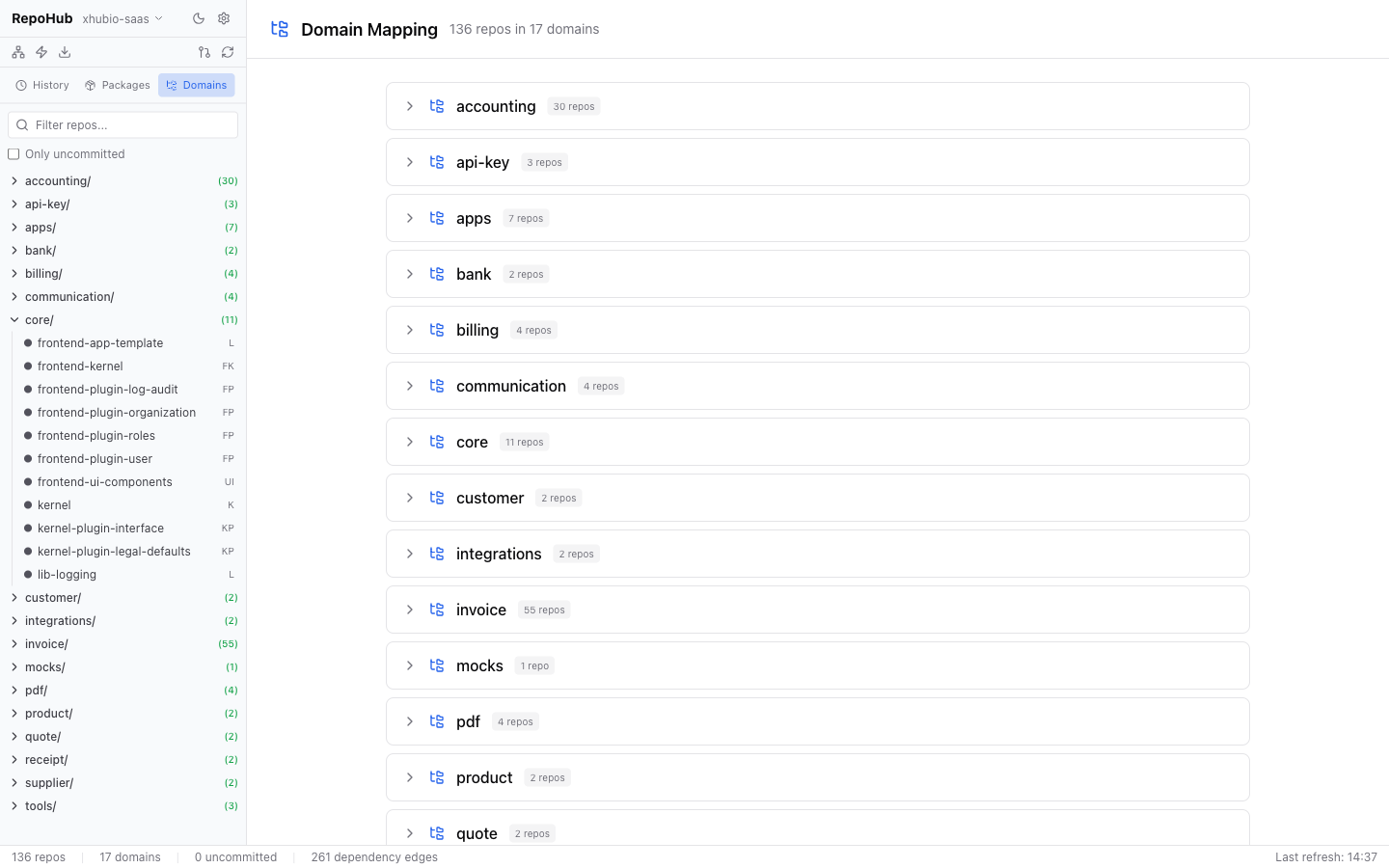
|
|
6
6
|
|
|
7
|
-
|
|
8
|
-
|------|---------|-------|
|
|
9
|
-
| **Bun** | latest | Backend-Runtime |
|
|
10
|
-
| **pnpm** | 10+ | Package Manager |
|
|
11
|
-
| **Node.js** | 24+ | Build-Tools |
|
|
12
|
-
| **Git** | - | Repository-Operationen |
|
|
13
|
-
| **GitHub CLI (`gh`)** | - | Pull-All (Clone + GitHub-Abfrage) |
|
|
14
|
-
|
|
15
|
-
GitHub CLI muss authentifiziert sein (`gh auth login`).
|
|
16
|
-
|
|
17
|
-
## Installation & Start
|
|
18
|
-
|
|
19
|
-
|
|
20
|
-
```bash
|
|
21
|
-
cd repo/tools/tool-repo-maintenance
|
|
22
|
-
pnpm install
|
|
23
|
-
cp .env.example .env # Anpassen falls noetig
|
|
24
|
-
```
|
|
25
|
-
|
|
26
|
-
### Development
|
|
27
|
-
|
|
28
|
-
```bash
|
|
29
|
-
pnpm dev # Backend (3100) + Frontend (3101) parallel
|
|
30
|
-
pnpm dev:server # Nur Backend
|
|
31
|
-
pnpm dev:client # Nur Frontend
|
|
32
|
-
```
|
|
7
|
+
## Features
|
|
33
8
|
|
|
34
|
-
|
|
9
|
+
- **Dashboard** with repo statistics and domain overview
|
|
10
|
+
- **Interactive dependency graph** visualization with domain filtering
|
|
11
|
+
- **Cascade updates** — propagate dependency changes through the entire chain
|
|
12
|
+
- **Pull All** — clone/pull all repos from GitHub in parallel
|
|
13
|
+
- **Bulk operations** — run shell commands across multiple repos
|
|
14
|
+
- **Repository detail** with diff viewer, dependencies, commit & push
|
|
15
|
+
- **File-URL dependency management** — switch between `file:` and npm versions
|
|
16
|
+
- **Persistent operation history** for cascade and pull-all runs
|
|
35
17
|
|
|
36
|
-
|
|
18
|
+
## Installation
|
|
37
19
|
|
|
38
20
|
```bash
|
|
39
|
-
|
|
40
|
-
pnpm start # http://localhost:3100
|
|
21
|
+
npm install -g @aikotools/repo-maintenance
|
|
41
22
|
```
|
|
42
23
|
|
|
43
|
-
##
|
|
24
|
+
## Quick Start
|
|
44
25
|
|
|
45
|
-
|
|
26
|
+
1. Run `repohub`
|
|
27
|
+
2. Open http://localhost:3100
|
|
28
|
+
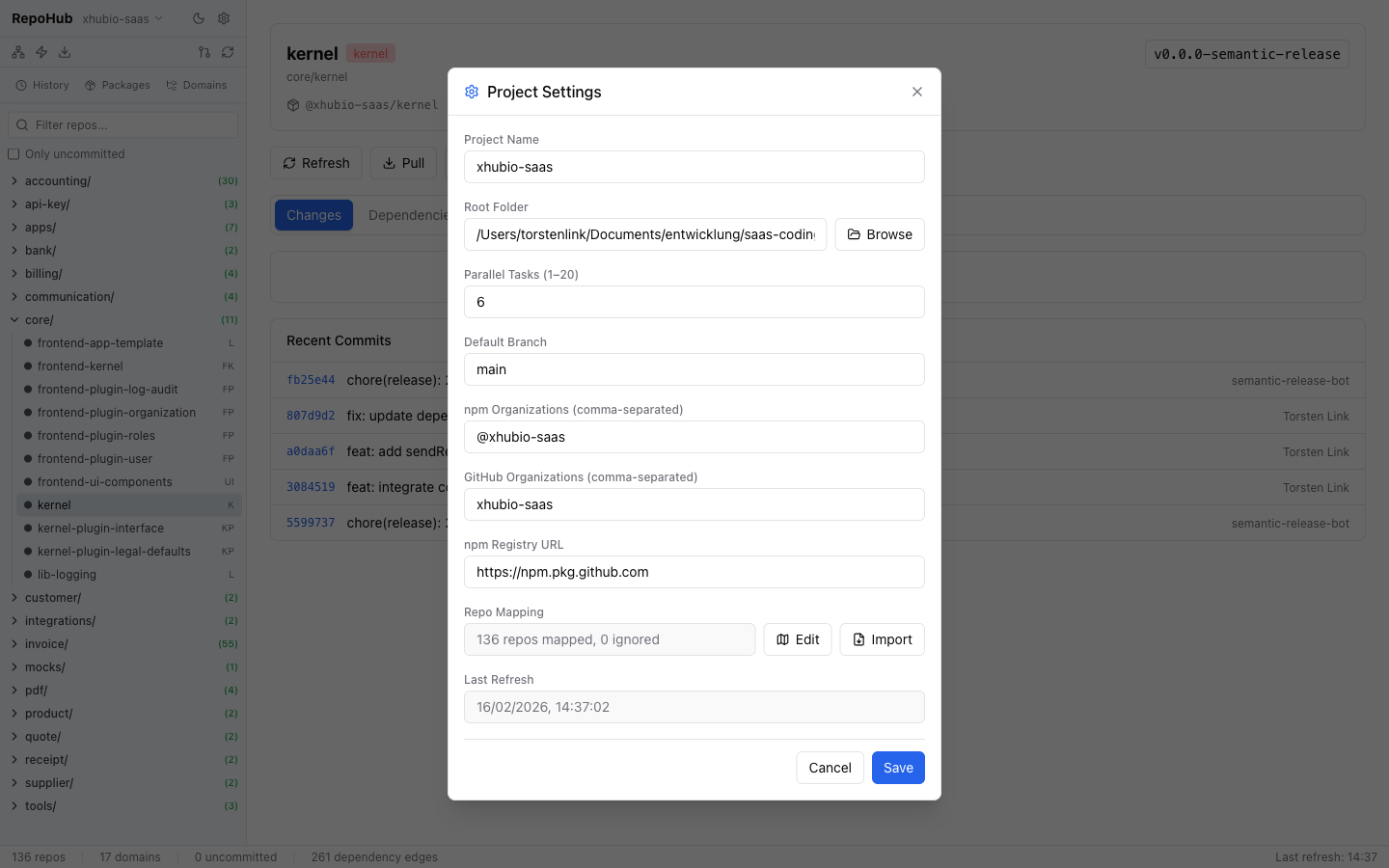
3. Click the gear icon (Settings) and configure:
|
|
29
|
+
- **Project Name** — a label for your monorepo
|
|
30
|
+
- **Root Folder** — path to the directory containing all your repos
|
|
31
|
+
- **npm Organizations** — scoped packages to detect as internal deps (e.g. `@myorg`)
|
|
32
|
+
- **GitHub Organizations** — for Pull All operations (e.g. `myorg`)
|
|
33
|
+
- **Parallel Tasks** (1–20, default: 6)
|
|
34
|
+
- **Default Branch** (e.g. `main`)
|
|
35
|
+
4. Click **"Refresh repo structure"** to scan your repos
|
|
46
36
|
|
|
47
|
-
|
|
48
|
-
PORT=3100 # Backend-Port
|
|
49
|
-
VITE_PORT=3101 # Vite Dev-Server Port
|
|
50
|
-
NPM_REGISTRY=https://npm.pkg.github.com # npm Registry (fuer Cascade)
|
|
51
|
-
```
|
|
37
|
+
|
|
52
38
|
|
|
53
|
-
|
|
39
|
+
## Prerequisites
|
|
54
40
|
|
|
55
|
-
|
|
41
|
+
| Tool | Version | Purpose |
|
|
42
|
+
|------|---------|---------|
|
|
43
|
+
| **Node.js** | 24+ | Runtime |
|
|
44
|
+
| **Git** | — | Repository operations |
|
|
45
|
+
| **GitHub CLI (`gh`)** | — | Pull All (clone + GitHub queries) |
|
|
56
46
|
|
|
57
|
-
|
|
58
|
-
- **GitHub Organizations** - z.B. `xhubio-saas` (fuer Pull-All)
|
|
59
|
-
- **Parallel Tasks** - Anzahl gleichzeitiger Operationen (1-20, Default: 6)
|
|
60
|
-
- **Default Branch** - z.B. `main`
|
|
47
|
+
GitHub CLI must be authenticated (`gh auth login`).
|
|
61
48
|
|
|
62
|
-
|
|
49
|
+
## Feature Details
|
|
63
50
|
|
|
64
|
-
|
|
51
|
+
### Repository Detail
|
|
65
52
|
|
|
66
|
-
|
|
53
|
+
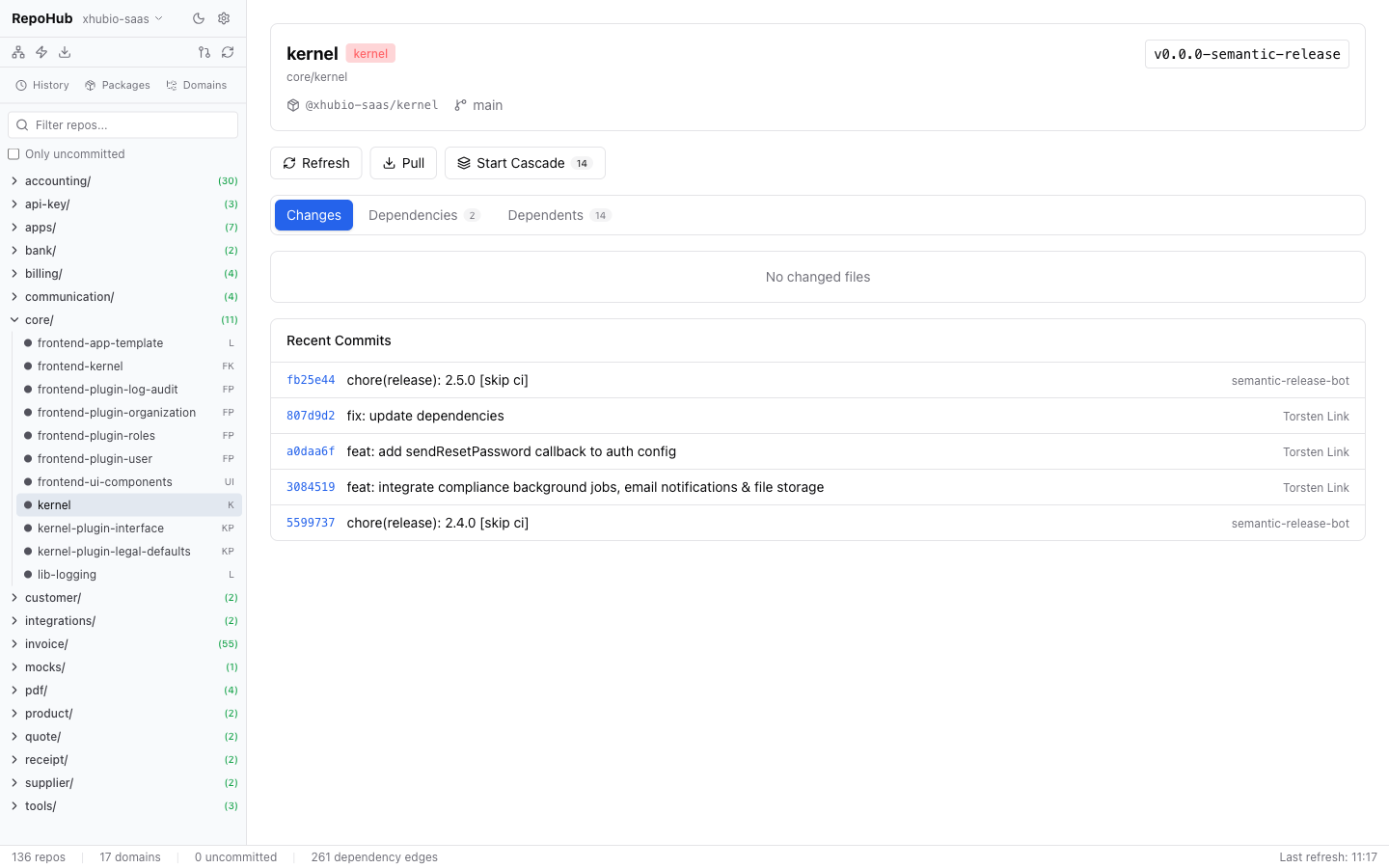
Click on any repo in the sidebar to open the detail view:
|
|
67
54
|
|
|
68
|
-
|
|
55
|
+
- **Changes tab** — modified files with diff viewer. Untracked files can be added to `.gitignore` with one click.
|
|
56
|
+
- **Dependencies tab** — internal dependencies with links to the respective repo.
|
|
57
|
+
- **Dependents tab** — repos that depend on this repo.
|
|
58
|
+
- **Actions** — Refresh, Pull, Start Cascade.
|
|
59
|
+
- **Recent Commits** — last commits for the repo.
|
|
69
60
|
|
|
70
|
-
|
|
71
|
-
|
|
72
|
-
Klick auf ein Repo in der Sidebar oeffnet die Detailansicht:
|
|
73
|
-
|
|
74
|
-
- **Changes-Tab** - Geaenderte Dateien mit Diff-Viewer. Untracked Files koennen per Klick zu `.gitignore` hinzugefuegt werden.
|
|
75
|
-
- **Dependencies-Tab** - Interne Abhaengigkeiten mit Links zum jeweiligen Repo.
|
|
76
|
-
- **Dependents-Tab** - Repos die von diesem Repo abhaengen.
|
|
77
|
-
- **Actions** - Commit & Push, Pull, Start Cascade.
|
|
78
|
-
- **Recent Commits** - Letzte Commits des Repos.
|
|
61
|
+
|
|
79
62
|
|
|
80
63
|
### Dependency Graph
|
|
81
64
|
|
|
82
|
-
|
|
65
|
+
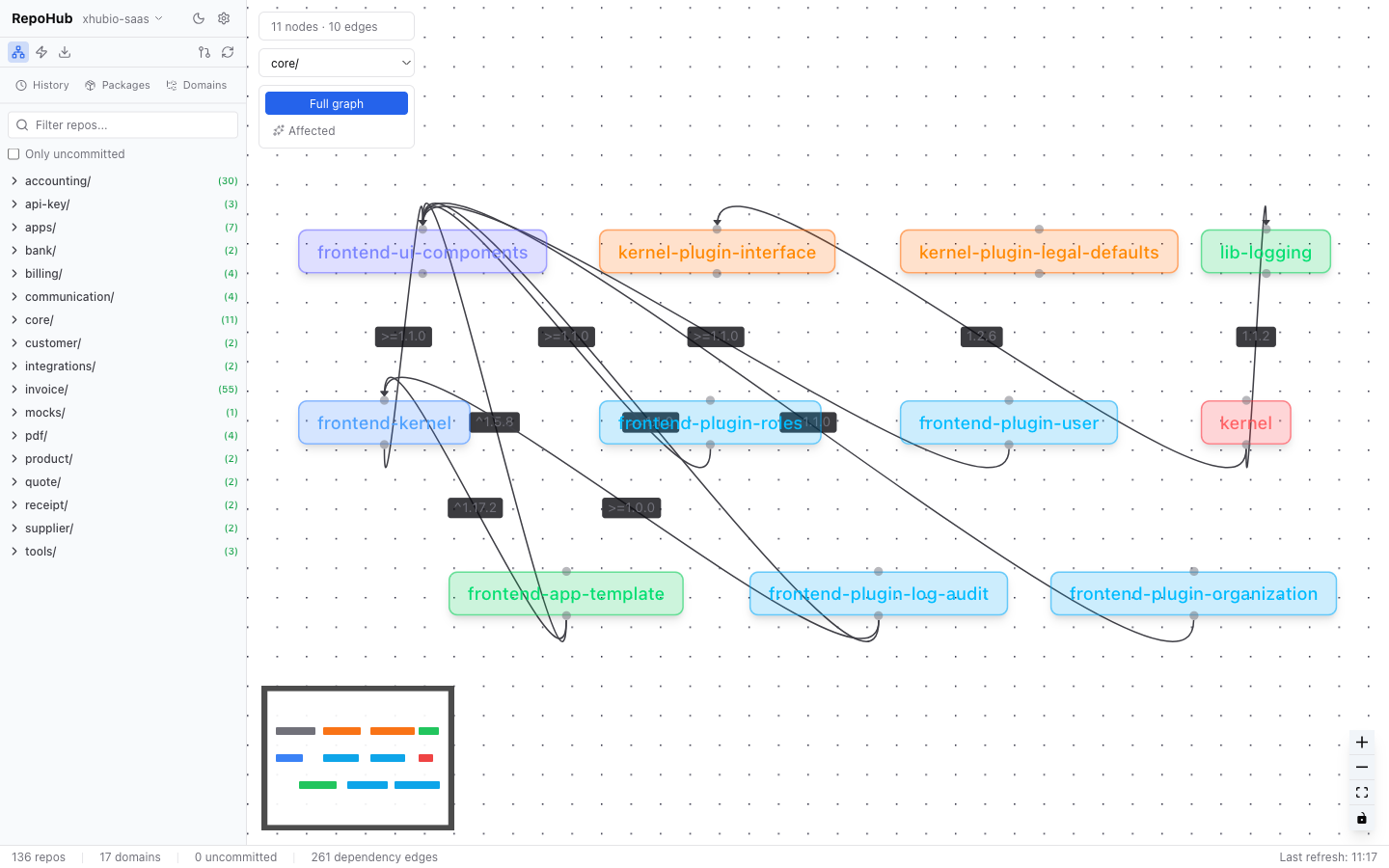
Interactive visualization of all internal dependencies as a node-edge graph (React Flow). Filter by domain, toggle between full graph and affected-only views. Click on a node to navigate to the repo detail.
|
|
66
|
+
|
|
67
|
+
|
|
83
68
|
|
|
84
69
|
### Pull All
|
|
85
70
|
|
|
86
|
-
|
|
71
|
+
Synchronizes all repos with GitHub:
|
|
87
72
|
|
|
88
|
-
1.
|
|
89
|
-
2. **
|
|
90
|
-
3. **
|
|
91
|
-
4.
|
|
73
|
+
1. Fetches all repos from the configured GitHub organization via `gh repo list`
|
|
74
|
+
2. **Clones** missing repos into the correct domain folder
|
|
75
|
+
3. **Pulls** existing repos (skips repos with uncommitted changes)
|
|
76
|
+
4. Shows live progress with per-repo status
|
|
92
77
|
|
|
93
|
-
**Status
|
|
78
|
+
**Status types:**
|
|
94
79
|
|
|
95
|
-
| Status |
|
|
96
|
-
|
|
97
|
-
| Updated |
|
|
98
|
-
| Already up-to-date |
|
|
99
|
-
| Cloned |
|
|
100
|
-
| Skipped | In
|
|
101
|
-
| Unmapped |
|
|
102
|
-
| Has changes |
|
|
103
|
-
| Failed |
|
|
80
|
+
| Status | Meaning |
|
|
81
|
+
|--------|---------|
|
|
82
|
+
| Updated | Successfully pulled |
|
|
83
|
+
| Already up-to-date | No changes |
|
|
84
|
+
| Cloned | Newly cloned from GitHub |
|
|
85
|
+
| Skipped | In ignore list |
|
|
86
|
+
| Unmapped | No domain mapping configured |
|
|
87
|
+
| Has changes | Skipped due to uncommitted changes |
|
|
88
|
+
| Failed | Error during pull/clone |
|
|
104
89
|
|
|
105
|
-
**Repo
|
|
90
|
+
**Repo mapping:** Settings > Repo Mapping > Edit. Assign repos to domains, ignore repos, or map unmapped repos.
|
|
106
91
|
|
|
107
92
|
### Cascade Updates
|
|
108
93
|
|
|
109
|
-
|
|
94
|
+
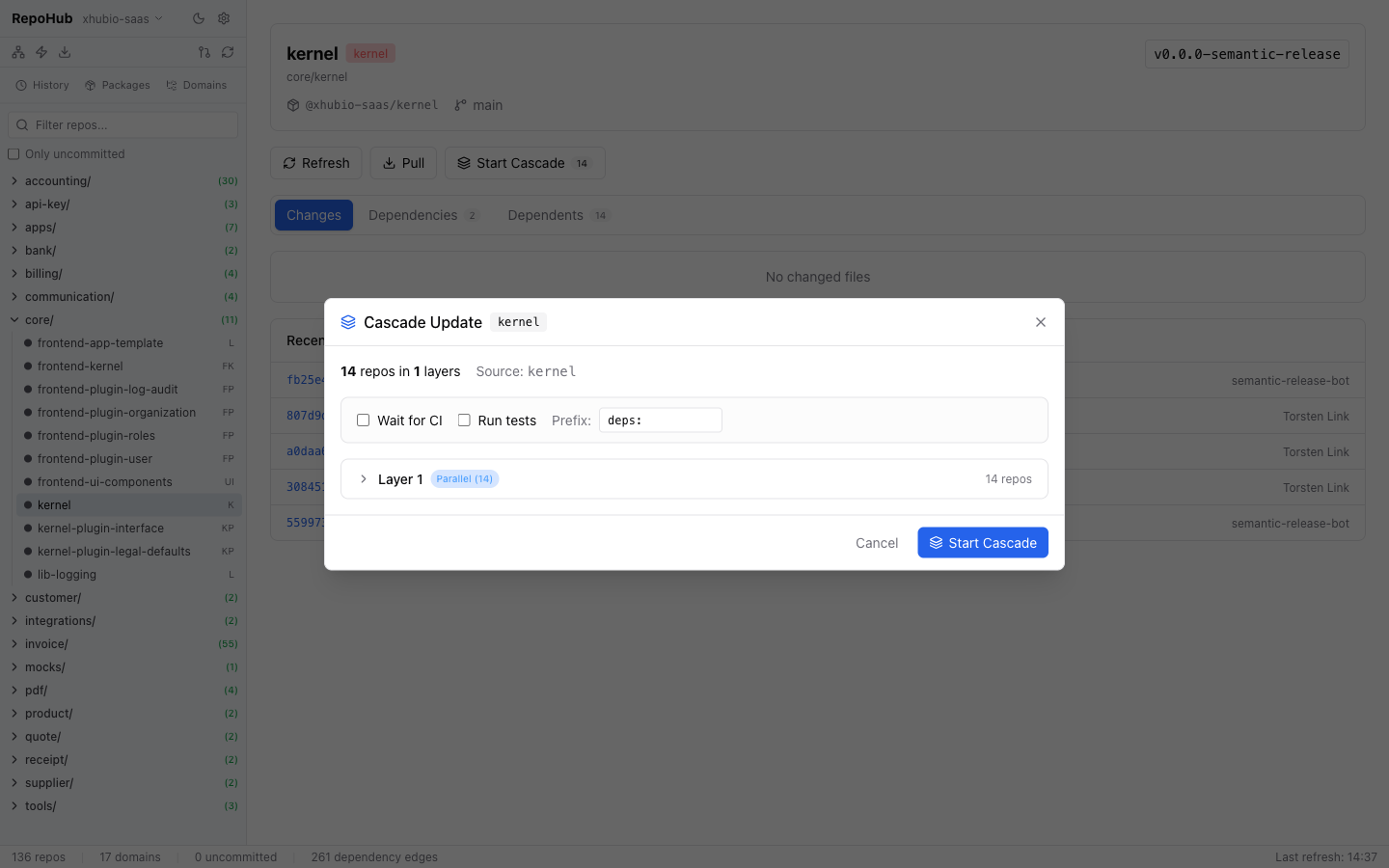
Propagates dependency updates automatically through the entire dependency chain.
|
|
95
|
+
|
|
96
|
+
**Example:** `lib-core` is updated. Cascade automatically updates all dependent packages in the correct order (topologically sorted, layer by layer).
|
|
110
97
|
|
|
111
|
-
**
|
|
98
|
+
**Workflow:**
|
|
112
99
|
|
|
113
|
-
|
|
100
|
+
1. Select source repo (e.g. `lib-core`)
|
|
101
|
+
2. Tool calculates all affected repos in topological order
|
|
102
|
+
3. Configure options:
|
|
103
|
+
- **Wait for CI** — wait between layers for CI/CD to publish
|
|
104
|
+
- **Run Tests** — run tests before committing
|
|
105
|
+
- **Commit Prefix** — e.g. `deps: ` or `chore: `
|
|
106
|
+
4. Review the plan and start
|
|
114
107
|
|
|
115
|
-
|
|
116
|
-
2. Tool berechnet alle betroffenen Repos in topologischer Reihenfolge
|
|
117
|
-
3. Optionen konfigurieren:
|
|
118
|
-
- **Wait for CI** - Wartet zwischen Layern auf CI/CD-Publish
|
|
119
|
-
- **Run Tests** - Fuehrt `pnpm test` vor dem Commit aus
|
|
120
|
-
- **Commit Prefix** - z.B. `deps: ` oder `chore: `
|
|
121
|
-
4. Plan bestaetigen und starten
|
|
108
|
+
|
|
122
109
|
|
|
123
|
-
**
|
|
110
|
+
**Per repo, the cascade executes:**
|
|
124
111
|
|
|
125
|
-
1. `package.json`
|
|
112
|
+
1. Update `package.json` dependencies
|
|
126
113
|
2. `npm install`
|
|
127
|
-
3.
|
|
114
|
+
3. Run tests (optional)
|
|
128
115
|
4. Commit + Push
|
|
129
|
-
5.
|
|
116
|
+
5. Wait for CI (optional) + resolve published version
|
|
130
117
|
|
|
131
|
-
**
|
|
118
|
+
**Controls during execution:** Pause, Resume, Abort, Skip Failed, manually set version.
|
|
132
119
|
|
|
133
120
|
### Bulk Operations
|
|
134
121
|
|
|
135
|
-
|
|
122
|
+
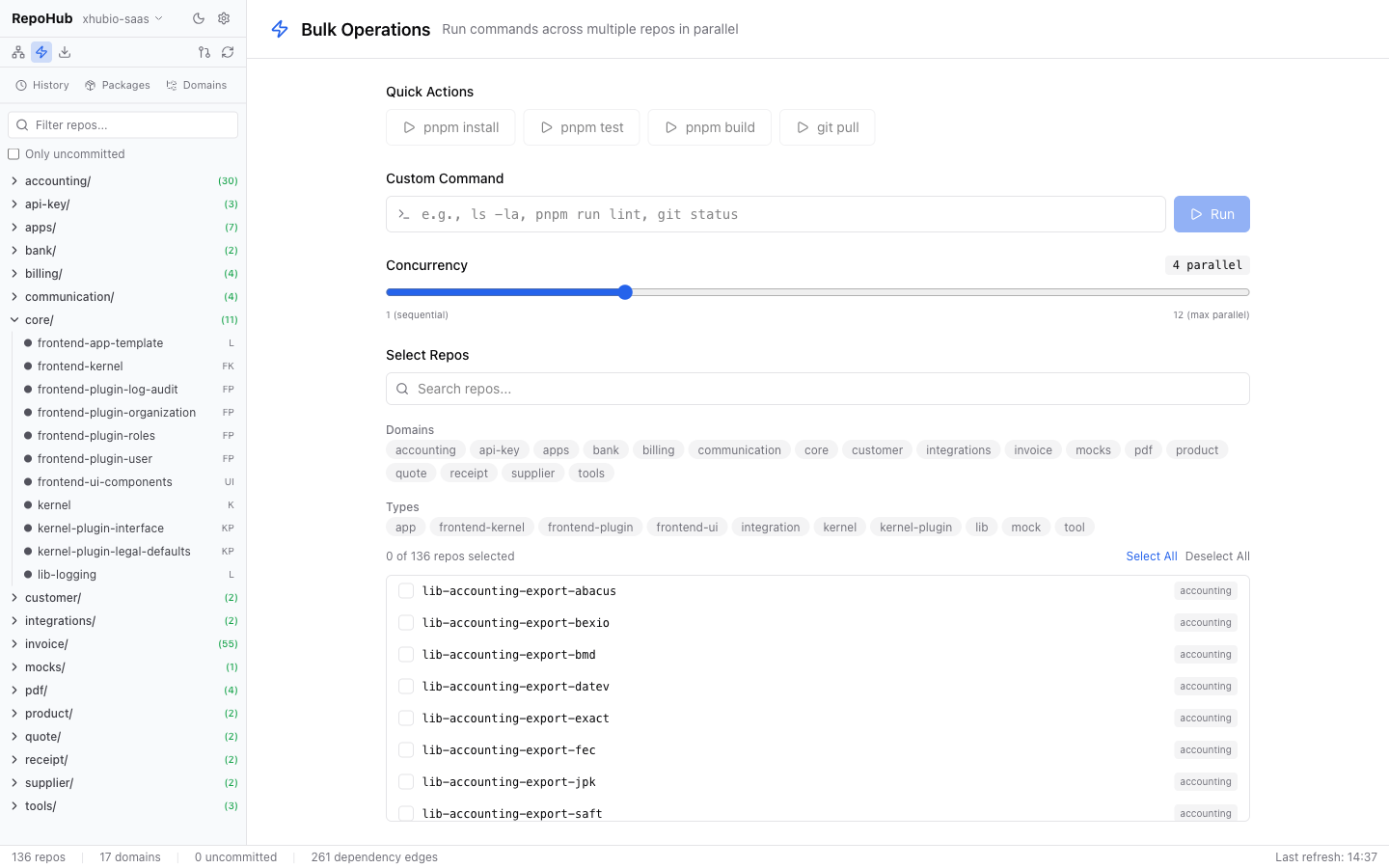
Run arbitrary shell commands across multiple repos in parallel:
|
|
136
123
|
|
|
137
|
-
1.
|
|
138
|
-
2.
|
|
139
|
-
3.
|
|
140
|
-
4.
|
|
124
|
+
1. Filter repos by domain, type, or search term
|
|
125
|
+
2. Enter a command (e.g. `npm run build`, `git status`, `npm test`)
|
|
126
|
+
3. Choose concurrency (1–20)
|
|
127
|
+
4. Start — live output per repo with exit code and duration
|
|
128
|
+
|
|
129
|
+
|
|
141
130
|
|
|
142
131
|
### Packages (File-URL Management)
|
|
143
132
|
|
|
144
|
-
|
|
133
|
+
Shows repos with `file:` dependencies in `package.json`. Enables batch switching between local `file:` paths (development) and npm versions (production).
|
|
145
134
|
|
|
146
135
|
### History
|
|
147
136
|
|
|
148
|
-
|
|
137
|
+
Persistent history of all Cascade and Pull All operations with status, affected repos, and duration.
|
|
138
|
+
|
|
139
|
+
## Configuration
|
|
140
|
+
|
|
141
|
+
### Environment (.env)
|
|
142
|
+
|
|
143
|
+
```bash
|
|
144
|
+
PORT=3100 # Backend port
|
|
145
|
+
VITE_PORT=3101 # Vite dev server port
|
|
146
|
+
NPM_REGISTRY=https://npm.pkg.github.com # npm registry (for Cascade version resolution)
|
|
147
|
+
```
|
|
148
|
+
|
|
149
|
+
### Project Settings
|
|
150
|
+
|
|
151
|
+
Configured via the Settings dialog (gear icon) in the UI. Persisted in `.repoMaintenance/project.json`.
|
|
149
152
|
|
|
150
|
-
|
|
153
|
+
### Data Storage
|
|
151
154
|
|
|
152
155
|
```
|
|
153
156
|
.repoMaintenance/
|
|
154
|
-
├── project.json #
|
|
155
|
-
├── cached-repos.json # Repo
|
|
156
|
-
├── cached-graph.json # Dependency
|
|
157
|
-
├── cascade-history/ # Cascade
|
|
158
|
-
└── pull-history/ # Pull
|
|
157
|
+
├── project.json # Project configuration + repo mapping
|
|
158
|
+
├── cached-repos.json # Repo cache (for fast startup)
|
|
159
|
+
├── cached-graph.json # Dependency graph cache
|
|
160
|
+
├── cascade-history/ # Cascade execution logs
|
|
161
|
+
└── pull-history/ # Pull All execution logs
|
|
159
162
|
```
|
|
160
163
|
|
|
161
|
-
##
|
|
164
|
+
## Development
|
|
162
165
|
|
|
163
|
-
|
|
166
|
+
For contributors working on RepoHub itself:
|
|
167
|
+
|
|
168
|
+
```bash
|
|
169
|
+
git clone <repo-url>
|
|
170
|
+
cd repo-maintenance
|
|
171
|
+
pnpm install
|
|
172
|
+
cp .env.example .env # Adjust if needed
|
|
173
|
+
pnpm dev # Backend (3100) + Frontend (3101) concurrently
|
|
174
|
+
```
|
|
175
|
+
|
|
176
|
+
| Script | Description |
|
|
164
177
|
|--------|-------------|
|
|
165
|
-
| `pnpm dev` | Development (
|
|
166
|
-
| `pnpm build` | TypeScript + Vite
|
|
167
|
-
| `pnpm start` |
|
|
168
|
-
| `pnpm test` |
|
|
178
|
+
| `pnpm dev` | Development (backend + frontend) |
|
|
179
|
+
| `pnpm build` | TypeScript + Vite build |
|
|
180
|
+
| `pnpm start` | Start production server |
|
|
181
|
+
| `pnpm test` | Lint + build + depcheck + tests with coverage |
|
|
169
182
|
| `pnpm lint` | ESLint |
|
|
170
183
|
| `pnpm format` | Prettier |
|
|
171
|
-
| `pnpm depcheck` |
|
|
172
|
-
|
|
173
|
-
## Architektur
|
|
174
|
-
|
|
175
|
-
```
|
|
176
|
-
src/
|
|
177
|
-
├── server/ # Hono + tRPC Backend (Bun Runtime)
|
|
178
|
-
│ ├── index.ts # Server Entry Point
|
|
179
|
-
│ ├── services/ # Business Logic
|
|
180
|
-
│ │ ├── repo-scanner.ts # Scannt repo/ nach Packages
|
|
181
|
-
│ │ ├── dependency-resolver.ts # Baut Dependency-Graph
|
|
182
|
-
│ │ ├── cascade-service.ts # Cascade-Update Orchestrierung
|
|
183
|
-
│ │ ├── bulk-service.ts # Bulk-Command Ausfuehrung
|
|
184
|
-
│ │ ├── git-service.ts # Git-Operationen (simple-git)
|
|
185
|
-
│ │ ├── pull-all-service.ts # Pull/Clone aller Repos
|
|
186
|
-
│ │ ├── package-service.ts # file: URL Management
|
|
187
|
-
│ │ ├── task-queue.ts # Paralleler Task-Executor
|
|
188
|
-
│ │ └── config-service.ts # Config + Cache Persistenz
|
|
189
|
-
│ └── trpc/ # tRPC Router + Procedures
|
|
190
|
-
│ ├── router.ts
|
|
191
|
-
│ └── procedures/
|
|
192
|
-
│ ├── project.ts # Projekt-Konfiguration
|
|
193
|
-
│ ├── repos.ts # Repo-Liste / Refresh
|
|
194
|
-
│ ├── git.ts # Git-Operationen
|
|
195
|
-
│ ├── cascade.ts # Cascade-Updates
|
|
196
|
-
│ ├── bulk.ts # Bulk-Operationen
|
|
197
|
-
│ ├── dependencies.ts # Dependency-Graph
|
|
198
|
-
│ └── package.ts # Package-Management
|
|
199
|
-
├── client/ # React Frontend
|
|
200
|
-
│ ├── main.tsx # App Entry Point
|
|
201
|
-
│ ├── App.tsx # Root-Komponente
|
|
202
|
-
│ ├── trpc.ts # tRPC Client Setup
|
|
203
|
-
│ └── components/
|
|
204
|
-
│ ├── layout/ # AppLayout, Sidebar, StatusBar
|
|
205
|
-
│ ├── dashboard/ # Dashboard-Ansicht
|
|
206
|
-
│ ├── repo-detail/ # Repository-Detail
|
|
207
|
-
│ ├── graph/ # Dependency-Graph (React Flow)
|
|
208
|
-
│ ├── cascade/ # Cascade Planner & Monitor
|
|
209
|
-
│ ├── bulk/ # Bulk-Operationen
|
|
210
|
-
│ ├── history/ # History-Ansicht
|
|
211
|
-
│ ├── packages/ # File-URL Ansicht
|
|
212
|
-
│ ├── settings/ # Settings + Repo-Mapping Dialog
|
|
213
|
-
│ └── shared/ # Shared Components
|
|
214
|
-
└── shared/ # Shared Types (Server + Client)
|
|
215
|
-
└── types.ts
|
|
216
|
-
```
|
|
184
|
+
| `pnpm depcheck` | Check for unused dependencies |
|
|
217
185
|
|
|
218
186
|
## Tech Stack
|
|
219
187
|
|
|
220
|
-
|
|
|
221
|
-
|
|
222
|
-
| Backend |
|
|
188
|
+
| Component | Technology |
|
|
189
|
+
|-----------|------------|
|
|
190
|
+
| Backend | Node.js + Hono + tRPC |
|
|
223
191
|
| Frontend | React 19 + Vite + Tailwind CSS 4 |
|
|
224
|
-
| State | TanStack Query (
|
|
192
|
+
| State | TanStack Query (polling for live updates) |
|
|
225
193
|
| Graph | React Flow (@xyflow/react) |
|
|
226
194
|
| Git | simple-git |
|
|
227
195
|
| Icons | Lucide React |
|
|
196
|
+
|
|
197
|
+
## License
|
|
198
|
+
|
|
199
|
+
MIT
|