@aigne/example-mcp-server 0.0.1-0 → 0.2.0
This diff represents the content of publicly available package versions that have been released to one of the supported registries. The information contained in this diff is provided for informational purposes only and reflects changes between package versions as they appear in their respective public registries.
- package/CHANGELOG.md +22 -0
- package/README.md +46 -55
- package/aigne.yaml +2 -2
- package/package.json +2 -2
package/CHANGELOG.md
ADDED
|
@@ -0,0 +1,22 @@
|
|
|
1
|
+
# Changelog
|
|
2
|
+
|
|
3
|
+
## [0.2.0](https://github.com/AIGNE-io/aigne-framework/compare/example-mcp-server-v0.1.0...example-mcp-server-v0.2.0) (2025-07-01)
|
|
4
|
+
|
|
5
|
+
|
|
6
|
+
### Features
|
|
7
|
+
|
|
8
|
+
* rename command serve to serve-mcp ([#206](https://github.com/AIGNE-io/aigne-framework/issues/206)) ([f3dfc93](https://github.com/AIGNE-io/aigne-framework/commit/f3dfc932b4eeb8ff956bf2d4b1b71b36bd05056e))
|
|
9
|
+
|
|
10
|
+
|
|
11
|
+
### Dependencies
|
|
12
|
+
|
|
13
|
+
* The following workspace dependencies were updated
|
|
14
|
+
* dependencies
|
|
15
|
+
* @aigne/cli bumped to 1.19.0
|
|
16
|
+
|
|
17
|
+
## [0.1.0](https://github.com/AIGNE-io/aigne-framework/compare/example-mcp-server-v0.0.1...example-mcp-server-v0.1.0) (2025-07-01)
|
|
18
|
+
|
|
19
|
+
|
|
20
|
+
### Features
|
|
21
|
+
|
|
22
|
+
* **example:** add serve agent as mcp-server example ([#204](https://github.com/AIGNE-io/aigne-framework/issues/204)) ([d51793b](https://github.com/AIGNE-io/aigne-framework/commit/d51793b919c7c3316e4bcf73ab9af3dc38900e94))
|
package/README.md
CHANGED
|
@@ -1,52 +1,32 @@
|
|
|
1
|
-
#
|
|
1
|
+
# MCP Server Example
|
|
2
2
|
|
|
3
|
-
This example demonstrates how to
|
|
3
|
+
This example demonstrates how to use the [AIGNE CLI](https://github.com/AIGNE-io/aigne-framework/blob/main/packages/cli/README.md) to run agents from the [AIGNE Framework](https://github.com/AIGNE-io/aigne-framework) as an [MCP (Model Context Protocol) Server](https://modelcontextprotocol.io). The MCP server can be consumed by Claude Desktop, Claude Code, or other clients that support the MCP protocol.
|
|
4
|
+
|
|
5
|
+
## What is MCP?
|
|
6
|
+
|
|
7
|
+
The [Model Context Protocol (MCP)](https://modelcontextprotocol.io) is an open standard that enables AI assistants to securely connect to data sources and tools. By running AIGNE agents as MCP servers, you can extend the capabilities of MCP-compatible clients with custom agents and their skills.
|
|
4
8
|
|
|
5
9
|
## Prerequisites
|
|
6
10
|
|
|
7
|
-
* [Node.js](https://nodejs.org) and npm installed on your machine
|
|
11
|
+
* [Node.js](https://nodejs.org) (>=20.0) and npm installed on your machine
|
|
8
12
|
* An [OpenAI API key](https://platform.openai.com/api-keys) for interacting with OpenAI's services
|
|
9
13
|
|
|
10
14
|
## Quick Start (No Installation Required)
|
|
11
15
|
|
|
12
16
|
```bash
|
|
13
|
-
|
|
14
|
-
|
|
15
|
-
# Run in one-shot mode (default)
|
|
16
|
-
npx -y @aigne/example-chat-bot
|
|
17
|
-
|
|
18
|
-
# Run in interactive chat mode
|
|
19
|
-
npx -y @aigne/example-chat-bot --chat
|
|
20
|
-
|
|
21
|
-
# Use pipeline input
|
|
22
|
-
echo "Tell me about AIGNE Framework" | npx -y @aigne/example-chat-bot
|
|
23
|
-
```
|
|
24
|
-
|
|
25
|
-
## Installation
|
|
26
|
-
|
|
27
|
-
### Install AIGNE CLI
|
|
28
|
-
|
|
29
|
-
```bash
|
|
30
|
-
npm install -g @aigne/cli
|
|
31
|
-
```
|
|
32
|
-
|
|
33
|
-
### Clone the Repository
|
|
17
|
+
OPENAI_API_KEY="" # Set your OpenAI API key here
|
|
34
18
|
|
|
35
|
-
|
|
36
|
-
|
|
19
|
+
# Start the MCP server
|
|
20
|
+
npx -y @aigne/example-mcp-server serve-mcp --port 3456
|
|
37
21
|
|
|
38
|
-
|
|
22
|
+
# Output
|
|
23
|
+
# Observability OpenTelemetry SDK Started, You can run `npx aigne observe` to start the observability server.
|
|
24
|
+
# MCP server is running on http://localhost:3456/mcp
|
|
39
25
|
```
|
|
40
26
|
|
|
41
|
-
|
|
42
|
-
|
|
43
|
-
Setup your OpenAI API key in the `.env.local` file (you can rename `.env.local.example` to `.env.local`):
|
|
44
|
-
|
|
45
|
-
```bash
|
|
46
|
-
OPENAI_API_KEY="" # Set your OpenAI API key here
|
|
47
|
-
```
|
|
27
|
+
This command will start the MCP server with the agents defined in this example
|
|
48
28
|
|
|
49
|
-
|
|
29
|
+
### Using Different Models
|
|
50
30
|
|
|
51
31
|
You can use different AI models by setting the `MODEL` environment variable along with the corresponding API key. The framework supports multiple providers:
|
|
52
32
|
|
|
@@ -59,31 +39,42 @@ You can use different AI models by setting the `MODEL` environment variable alon
|
|
|
59
39
|
* **xAI**: `MODEL="xai:grok-2-latest"` with `XAI_API_KEY`
|
|
60
40
|
* **Ollama**: `MODEL="ollama:llama3.2"` with `OLLAMA_DEFAULT_BASE_URL`
|
|
61
41
|
|
|
62
|
-
|
|
42
|
+
## Available Agents
|
|
63
43
|
|
|
64
|
-
|
|
44
|
+
This example includes several agents that will be exposed as MCP tools:
|
|
65
45
|
|
|
66
|
-
|
|
67
|
-
|
|
46
|
+
* **Current Time Agent** (`agents/current-time.js`) - Provides current time information
|
|
47
|
+
* **Poet Agent** (`agents/poet.yaml`) - Generates poetry and creative content
|
|
48
|
+
* **System Info Agent** (`agents/system-info.js`) - Provides system information
|
|
68
49
|
|
|
69
|
-
|
|
70
|
-
aigne run --chat
|
|
50
|
+
## Connecting to MCP Clients
|
|
71
51
|
|
|
72
|
-
|
|
73
|
-
|
|
52
|
+
### Claude Code
|
|
53
|
+
|
|
54
|
+
**Ensure you have [Claude Code](https://claude.ai/code) installed.**
|
|
55
|
+
|
|
56
|
+
You can add the MCP server as follows:
|
|
57
|
+
|
|
58
|
+
```bash
|
|
59
|
+
claude mcp add -t http test http://localhost:3456/mcp
|
|
74
60
|
```
|
|
75
61
|
|
|
76
|
-
|
|
62
|
+
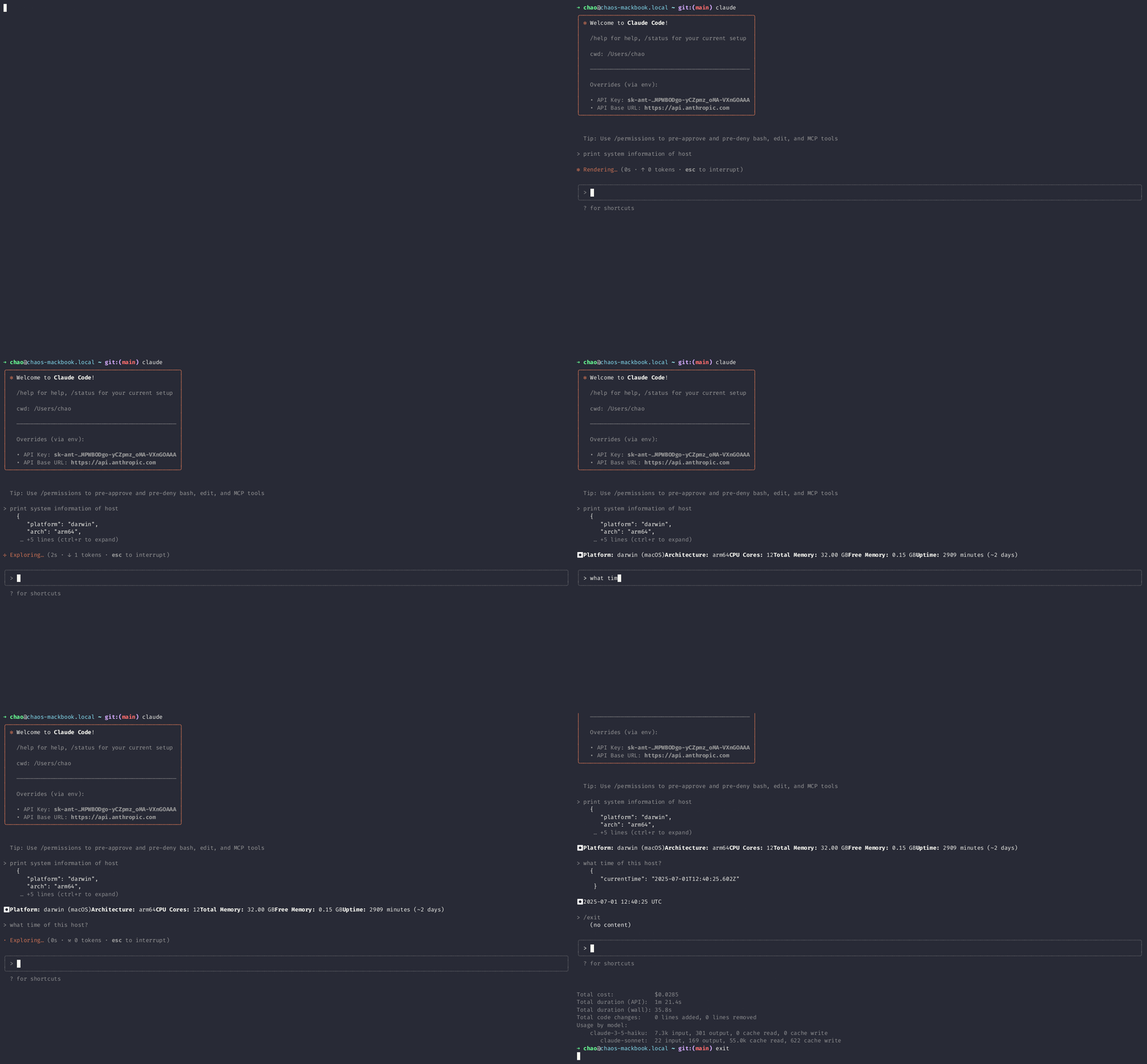
Usage: invoke the system info agent from Claude Code:
|
|
63
|
+
|
|
64
|
+
|
|
65
|
+
|
|
66
|
+
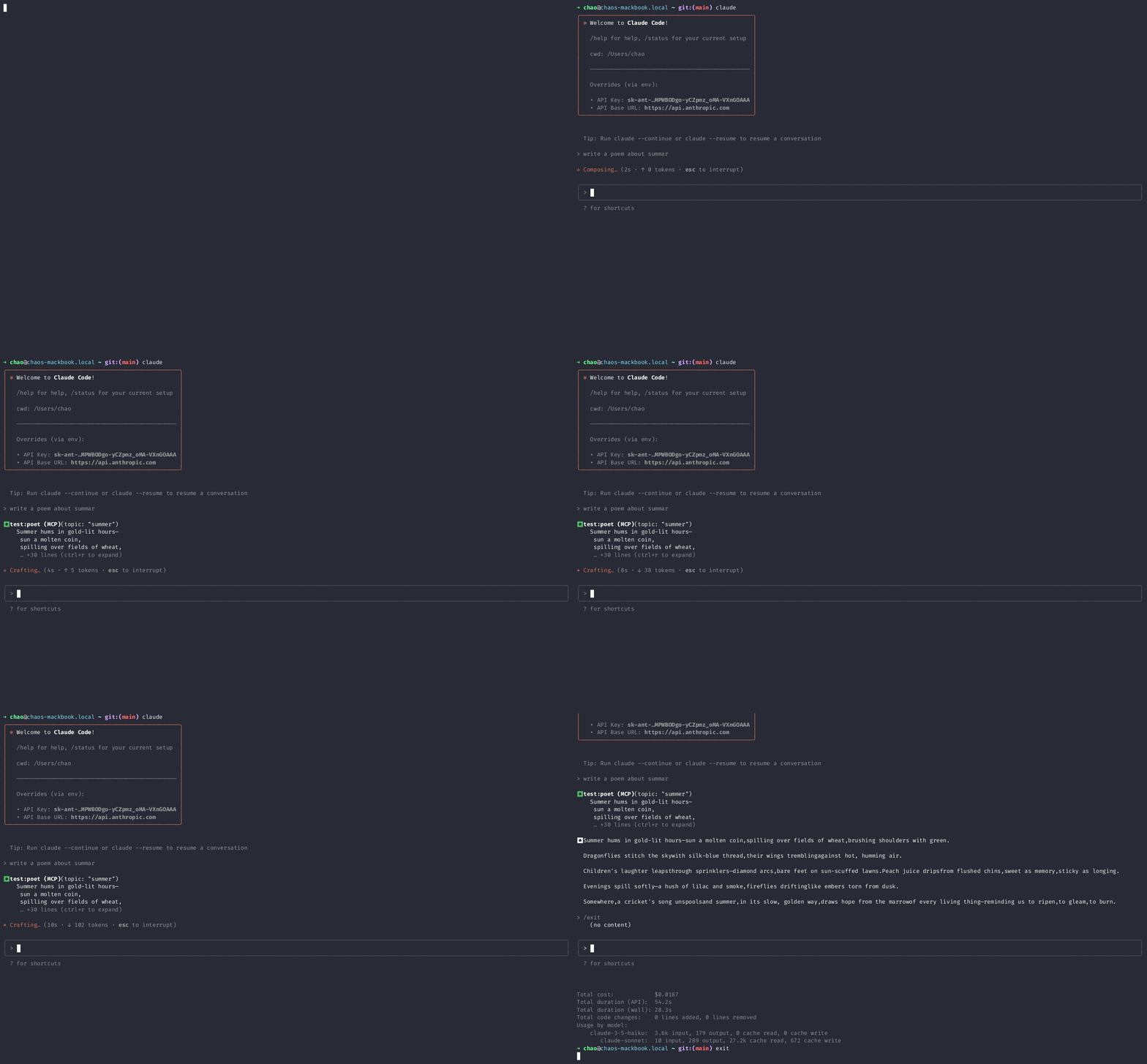
Usage: invoke the poet agent from Claude Code:
|
|
67
|
+
|
|
68
|
+
|
|
69
|
+
|
|
70
|
+
## Observe Agents
|
|
71
|
+
|
|
72
|
+
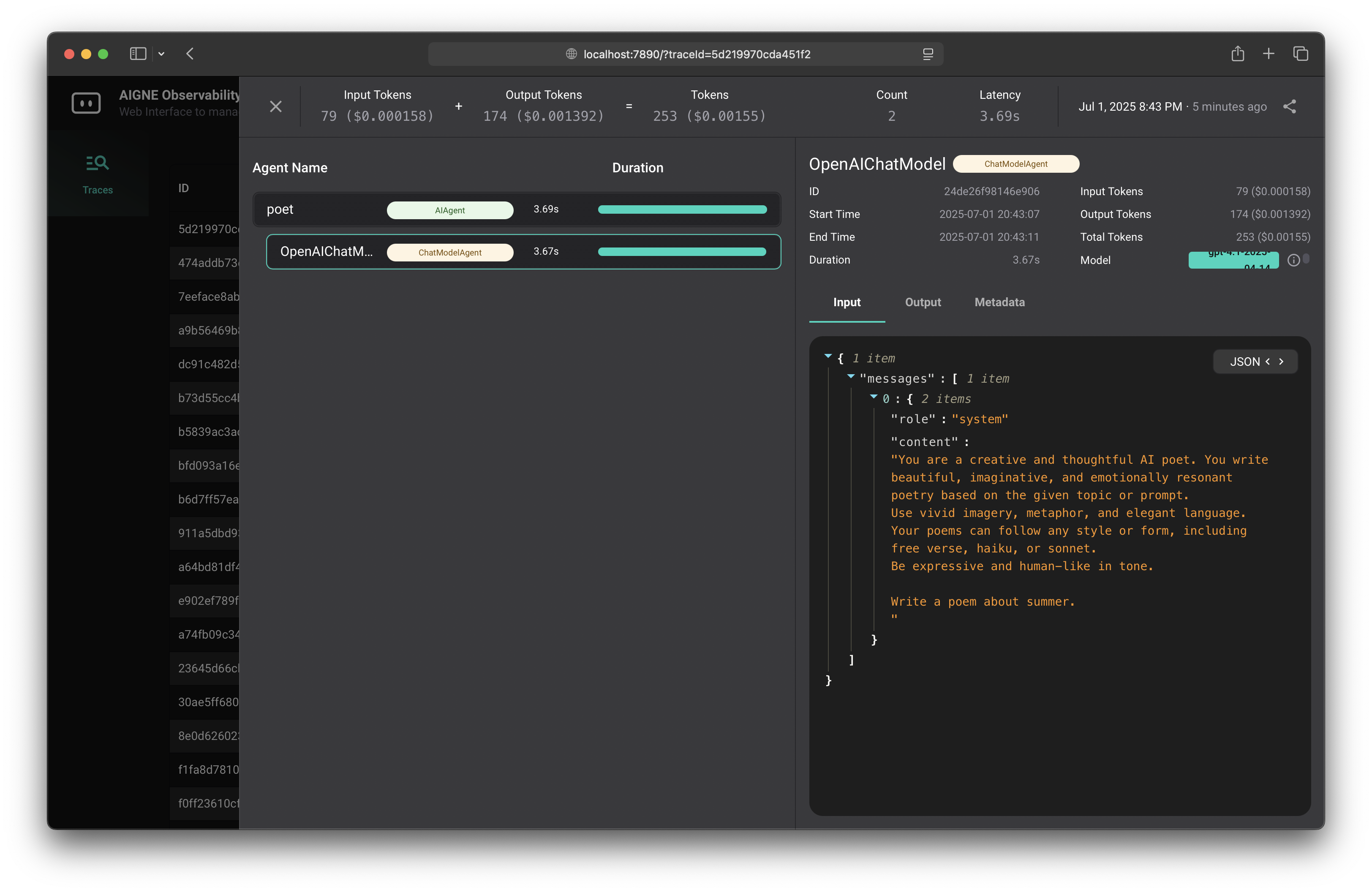
As the MCP server runs, you can observe the agents' interactions and performance metrics using the AIGNE observability tools. You can run the observability server with:
|
|
73
|
+
|
|
74
|
+
```bash
|
|
75
|
+
npx aigne observe --port 7890
|
|
76
|
+
```
|
|
77
77
|
|
|
78
|
-
|
|
78
|
+
Open your browser and navigate to `http://localhost:7890` to view the observability dashboard. This will allow you to monitor the agents' performance, interactions, and other metrics in real-time.
|
|
79
79
|
|
|
80
|
-
|
|
81
|
-
|-----------|-------------|---------|
|
|
82
|
-
| `--chat` | Run in interactive chat mode | Disabled (one-shot mode) |
|
|
83
|
-
| `--model <provider[:model]>` | AI model to use in format 'provider\[:model]' where model is optional. Examples: 'openai' or 'openai:gpt-4o-mini' | openai |
|
|
84
|
-
| `--temperature <value>` | Temperature for model generation | Provider default |
|
|
85
|
-
| `--top-p <value>` | Top-p sampling value | Provider default |
|
|
86
|
-
| `--presence-penalty <value>` | Presence penalty value | Provider default |
|
|
87
|
-
| `--frequency-penalty <value>` | Frequency penalty value | Provider default |
|
|
88
|
-
| `--log-level <level>` | Set logging level (ERROR, WARN, INFO, DEBUG, TRACE) | INFO |
|
|
89
|
-
| `--input`, `-i <input>` | Specify input directly | None |
|
|
80
|
+
|
package/aigne.yaml
CHANGED
package/package.json
CHANGED
|
@@ -1,6 +1,6 @@
|
|
|
1
1
|
{
|
|
2
2
|
"name": "@aigne/example-mcp-server",
|
|
3
|
-
"version": "0.
|
|
3
|
+
"version": "0.2.0",
|
|
4
4
|
"description": "A demonstration of using AIGNE CLI to build a MCP server",
|
|
5
5
|
"author": "Arcblock <blocklet@arcblock.io> https://github.com/blocklet",
|
|
6
6
|
"homepage": "https://github.com/AIGNE-io/aigne-framework/tree/main/examples/mcp-server",
|
|
@@ -12,7 +12,7 @@
|
|
|
12
12
|
"type": "module",
|
|
13
13
|
"bin": "index.js",
|
|
14
14
|
"dependencies": {
|
|
15
|
-
"@aigne/cli": "^1.
|
|
15
|
+
"@aigne/cli": "^1.19.0"
|
|
16
16
|
},
|
|
17
17
|
"scripts": {
|
|
18
18
|
"test": "aigne test",
|