@aigne/doc-smith 0.8.11-beta → 0.8.11-beta.2
This diff represents the content of publicly available package versions that have been released to one of the supported registries. The information contained in this diff is provided for informational purposes only and reflects changes between package versions as they appear in their respective public registries.
- package/.aigne/doc-smith/config.yaml +2 -0
- package/.aigne/doc-smith/output/structure-plan.json +3 -3
- package/.aigne/doc-smith/upload-cache.yaml +252 -0
- package/.github/workflows/publish-docs.yml +67 -0
- package/.release-please-manifest.json +1 -1
- package/CHANGELOG.md +22 -0
- package/README.md +45 -115
- package/agents/clear/choose-contents.mjs +170 -0
- package/agents/clear/clear-auth-tokens.mjs +111 -0
- package/agents/clear/clear-document-config.mjs +39 -0
- package/agents/clear/clear-document-structure.mjs +106 -0
- package/agents/clear/clear-generated-docs.mjs +51 -0
- package/agents/clear/index.yaml +23 -0
- package/agents/evaluate/code-snippet.mjs +93 -0
- package/agents/evaluate/document-structure.yaml +70 -0
- package/agents/evaluate/document.yaml +79 -0
- package/agents/evaluate/generate-report.mjs +78 -0
- package/agents/evaluate/index.yaml +39 -0
- package/agents/generate/document-structure-tools/add-document.mjs +56 -0
- package/agents/generate/document-structure-tools/delete-document.mjs +49 -0
- package/agents/generate/document-structure-tools/move-document.mjs +82 -0
- package/agents/generate/document-structure-tools/update-document.mjs +50 -0
- package/agents/generate/generate-structure.yaml +1 -1
- package/agents/generate/update-document-structure.yaml +42 -0
- package/agents/generate/user-review-document-structure.mjs +6 -4
- package/agents/init/index.mjs +1 -1
- package/agents/publish/publish-docs.mjs +12 -3
- package/agents/translate/choose-language.mjs +1 -1
- package/agents/update/batch-update-document.yaml +7 -0
- package/agents/update/check-update-is-single.mjs +38 -0
- package/agents/update/document-tools/update-document-content.mjs +293 -0
- package/agents/update/index.yaml +4 -10
- package/agents/update/update-document-detail.yaml +52 -0
- package/agents/update/update-single-document.yaml +15 -0
- package/agents/update/user-review-document.mjs +248 -0
- package/agents/utils/choose-docs.mjs +4 -2
- package/agents/utils/format-document-structure.mjs +12 -2
- package/agents/utils/load-document-all-content.mjs +84 -0
- package/agents/utils/load-sources.mjs +4 -1
- package/aigne.yaml +59 -20
- package/assets/report-template/report.html +198 -0
- package/biome.json +14 -2
- package/docs/advanced-how-it-works.ja.md +101 -0
- package/docs/advanced-how-it-works.zh-TW.md +101 -0
- package/docs/advanced-how-it-works.zh.md +20 -20
- package/docs/advanced-quality-assurance.ja.md +96 -0
- package/docs/advanced-quality-assurance.zh-TW.md +96 -0
- package/docs/advanced-quality-assurance.zh.md +18 -18
- package/docs/advanced.ja.md +16 -0
- package/docs/advanced.zh-TW.md +16 -0
- package/docs/advanced.zh.md +4 -4
- package/docs/changelog.ja.md +309 -0
- package/docs/changelog.zh-TW.md +309 -0
- package/docs/changelog.zh.md +23 -23
- package/docs/cli-reference.ja.md +210 -0
- package/docs/cli-reference.zh-TW.md +210 -0
- package/docs/cli-reference.zh.md +21 -21
- package/docs/configuration-interactive-setup.ja.md +135 -0
- package/docs/configuration-interactive-setup.zh-TW.md +135 -0
- package/docs/configuration-interactive-setup.zh.md +29 -29
- package/docs/configuration-language-support.ja.md +94 -0
- package/docs/configuration-language-support.zh-TW.md +94 -0
- package/docs/configuration-language-support.zh.md +13 -13
- package/docs/configuration-llm-setup.ja.md +54 -0
- package/docs/configuration-llm-setup.zh-TW.md +54 -0
- package/docs/configuration-llm-setup.zh.md +12 -12
- package/docs/configuration-preferences.ja.md +129 -0
- package/docs/configuration-preferences.zh-TW.md +129 -0
- package/docs/configuration-preferences.zh.md +36 -36
- package/docs/configuration.ja.md +172 -0
- package/docs/configuration.zh-TW.md +172 -0
- package/docs/configuration.zh.md +49 -49
- package/docs/features-generate-documentation.ja.md +101 -0
- package/docs/features-generate-documentation.zh-TW.md +101 -0
- package/docs/features-generate-documentation.zh.md +17 -17
- package/docs/features-publish-your-docs.ja.md +107 -0
- package/docs/features-publish-your-docs.zh-TW.md +107 -0
- package/docs/features-publish-your-docs.zh.md +22 -22
- package/docs/features-translate-documentation.ja.md +79 -0
- package/docs/features-translate-documentation.zh-TW.md +79 -0
- package/docs/features-translate-documentation.zh.md +12 -12
- package/docs/features-update-and-refine.ja.md +138 -0
- package/docs/features-update-and-refine.zh-TW.md +138 -0
- package/docs/features-update-and-refine.zh.md +21 -21
- package/docs/features.ja.md +52 -0
- package/docs/features.zh-TW.md +52 -0
- package/docs/features.zh.md +8 -8
- package/docs/getting-started.ja.md +123 -0
- package/docs/getting-started.zh-TW.md +123 -0
- package/docs/getting-started.zh.md +24 -24
- package/docs/overview.ja.md +30 -0
- package/docs/overview.zh-TW.md +30 -0
- package/docs/overview.zh.md +8 -8
- package/package.json +19 -11
- package/prompts/common/document/content-rules-core.md +19 -0
- package/prompts/common/document/media-handling-rules.md +9 -0
- package/prompts/common/document/role-and-personality.md +15 -0
- package/prompts/common/document/user-preferences.md +9 -0
- package/prompts/common/document-structure/conflict-resolution-guidance.md +16 -0
- package/prompts/common/document-structure/document-structure-rules.md +45 -0
- package/prompts/common/document-structure/glossary.md +7 -0
- package/prompts/common/document-structure/intj-traits.md +5 -0
- package/prompts/common/document-structure/output-constraints.md +9 -0
- package/prompts/common/document-structure/user-locale-rules.md +10 -0
- package/prompts/common/document-structure/user-preferences.md +9 -0
- package/prompts/detail/custom/custom-components.md +9 -1
- package/prompts/detail/document-rules.md +6 -6
- package/prompts/detail/generate-document.md +5 -45
- package/prompts/detail/update-document.md +145 -0
- package/prompts/evaluate/document-structure.md +94 -0
- package/prompts/evaluate/document.md +149 -0
- package/prompts/structure/document-rules.md +1 -1
- package/prompts/structure/generate-structure-system.md +74 -0
- package/prompts/structure/generate-structure-user.md +41 -0
- package/prompts/structure/update-document-structure.md +118 -0
- package/prompts/translate/translate-document.md +1 -1
- package/prompts/utils/feedback-refiner.md +3 -3
- package/release-please-config.json +1 -7
- package/tests/agents/clear/choose-contents.test.mjs +280 -0
- package/tests/agents/clear/clear-auth-tokens.test.mjs +268 -0
- package/tests/agents/clear/clear-document-config.test.mjs +167 -0
- package/tests/agents/clear/clear-document-structure.test.mjs +374 -0
- package/tests/agents/clear/clear-generated-docs.test.mjs +222 -0
- package/tests/agents/evaluate/code-snippet.test.mjs +163 -0
- package/tests/agents/evaluate/fixtures/api-services.md +87 -0
- package/tests/agents/evaluate/fixtures/js-sdk.md +94 -0
- package/tests/agents/evaluate/generate-report.test.mjs +312 -0
- package/tests/agents/generate/check-document-structure.test.mjs +0 -6
- package/tests/agents/generate/document-structure-tools/add-document.test.mjs +449 -0
- package/tests/agents/generate/document-structure-tools/delete-document.test.mjs +410 -0
- package/tests/agents/generate/document-structure-tools/move-document.test.mjs +476 -0
- package/tests/agents/generate/document-structure-tools/update-document.test.mjs +548 -0
- package/tests/agents/generate/generate-structure.test.mjs +0 -6
- package/tests/agents/generate/user-review-document-structure.test.mjs +9 -9
- package/tests/agents/publish/publish-docs.test.mjs +2 -2
- package/tests/agents/update/check-update-is-single.test.mjs +300 -0
- package/tests/agents/update/document-tools/update-document-content.test.mjs +326 -0
- package/tests/agents/update/user-review-document.test.mjs +561 -0
- package/tests/agents/utils/format-document-structure.test.mjs +100 -0
- package/tests/utils/auth-utils.test.mjs +239 -1
- package/tests/utils/blocklet.test.mjs +9 -7
- package/tests/utils/constants.test.mjs +1 -1
- package/tests/utils/d2-utils.test.mjs +1 -1
- package/tests/utils/deploy.test.mjs +310 -366
- package/tests/utils/kroki-utils.test.mjs +2 -15
- package/tests/utils/linter/fixtures/css/keyword-error.css +1 -0
- package/tests/utils/linter/fixtures/css/missing-semicolon.css +1 -0
- package/tests/utils/linter/fixtures/css/syntax-error.css +1 -0
- package/tests/utils/linter/fixtures/css/undeclare-variable.css +1 -0
- package/tests/utils/linter/fixtures/css/unused-variable.css +2 -0
- package/tests/utils/linter/fixtures/css/valid-code.css +1 -0
- package/tests/utils/linter/fixtures/dockerfile/keyword-error.dockerfile +1 -0
- package/tests/utils/linter/fixtures/dockerfile/missing-semicolon.dockerfile +2 -0
- package/tests/utils/linter/fixtures/dockerfile/syntax-error.dockerfile +2 -0
- package/tests/utils/linter/fixtures/dockerfile/undeclare-variable.dockerfile +1 -0
- package/tests/utils/linter/fixtures/dockerfile/unused-variable.dockerfile +1 -0
- package/tests/utils/linter/fixtures/dockerfile/valid-code.dockerfile +2 -0
- package/tests/utils/linter/fixtures/go/keyword-error.go +5 -0
- package/tests/utils/linter/fixtures/go/missing-semicolon.go +5 -0
- package/tests/utils/linter/fixtures/go/syntax-error.go +6 -0
- package/tests/utils/linter/fixtures/go/undeclare-variable.go +5 -0
- package/tests/utils/linter/fixtures/go/unused-variable.go +5 -0
- package/tests/utils/linter/fixtures/go/valid-code.go +7 -0
- package/tests/utils/linter/fixtures/js/keyword-error.js +3 -0
- package/tests/utils/linter/fixtures/js/missing-semicolon.js +6 -0
- package/tests/utils/linter/fixtures/js/syntax-error.js +4 -0
- package/tests/utils/linter/fixtures/js/undeclare-variable.js +3 -0
- package/tests/utils/linter/fixtures/js/unused-variable.js +7 -0
- package/tests/utils/linter/fixtures/js/valid-code.js +15 -0
- package/tests/utils/linter/fixtures/json/keyword-error.json +1 -0
- package/tests/utils/linter/fixtures/json/missing-semicolon.json +1 -0
- package/tests/utils/linter/fixtures/json/syntax-error.json +1 -0
- package/tests/utils/linter/fixtures/json/undeclare-variable.json +1 -0
- package/tests/utils/linter/fixtures/json/unused-variable.json +1 -0
- package/tests/utils/linter/fixtures/json/valid-code.json +1 -0
- package/tests/utils/linter/fixtures/jsx/keyword-error.jsx +5 -0
- package/tests/utils/linter/fixtures/jsx/missing-semicolon.jsx +5 -0
- package/tests/utils/linter/fixtures/jsx/syntax-error.jsx +5 -0
- package/tests/utils/linter/fixtures/jsx/undeclare-variable.jsx +5 -0
- package/tests/utils/linter/fixtures/jsx/unused-variable.jsx +4 -0
- package/tests/utils/linter/fixtures/jsx/valid-code.jsx +5 -0
- package/tests/utils/linter/fixtures/python/keyword-error.py +3 -0
- package/tests/utils/linter/fixtures/python/missing-semicolon.py +2 -0
- package/tests/utils/linter/fixtures/python/syntax-error.py +3 -0
- package/tests/utils/linter/fixtures/python/undeclare-variable.py +3 -0
- package/tests/utils/linter/fixtures/python/unused-variable.py +6 -0
- package/tests/utils/linter/fixtures/python/valid-code.py +12 -0
- package/tests/utils/linter/fixtures/ruby/keyword-error.rb +2 -0
- package/tests/utils/linter/fixtures/ruby/missing-semicolon.rb +1 -0
- package/tests/utils/linter/fixtures/ruby/syntax-error.rb +2 -0
- package/tests/utils/linter/fixtures/ruby/undeclare-variable.rb +1 -0
- package/tests/utils/linter/fixtures/ruby/unused-variable.rb +2 -0
- package/tests/utils/linter/fixtures/ruby/valid-code.rb +1 -0
- package/tests/utils/linter/fixtures/sass/keyword-error.sass +2 -0
- package/tests/utils/linter/fixtures/sass/missing-semicolon.sass +3 -0
- package/tests/utils/linter/fixtures/sass/syntax-error.sass +3 -0
- package/tests/utils/linter/fixtures/sass/undeclare-variable.sass +2 -0
- package/tests/utils/linter/fixtures/sass/unused-variable.sass +4 -0
- package/tests/utils/linter/fixtures/sass/valid-code.sass +2 -0
- package/tests/utils/linter/fixtures/scss/keyword-error.scss +1 -0
- package/tests/utils/linter/fixtures/scss/missing-semicolon.scss +1 -0
- package/tests/utils/linter/fixtures/scss/syntax-error.scss +1 -0
- package/tests/utils/linter/fixtures/scss/undeclare-variable.scss +1 -0
- package/tests/utils/linter/fixtures/scss/unused-variable.scss +2 -0
- package/tests/utils/linter/fixtures/scss/valid-code.scss +1 -0
- package/tests/utils/linter/fixtures/shell/keyword-error.sh +5 -0
- package/tests/utils/linter/fixtures/shell/missing-semicolon.sh +3 -0
- package/tests/utils/linter/fixtures/shell/syntax-error.sh +4 -0
- package/tests/utils/linter/fixtures/shell/undeclare-variable.sh +3 -0
- package/tests/utils/linter/fixtures/shell/unused-variable.sh +4 -0
- package/tests/utils/linter/fixtures/shell/valid-code.sh +3 -0
- package/tests/utils/linter/fixtures/ts/keyword-error.ts +1 -0
- package/tests/utils/linter/fixtures/ts/missing-semicolon.ts +1 -0
- package/tests/utils/linter/fixtures/ts/syntax-error.ts +1 -0
- package/tests/utils/linter/fixtures/ts/undeclare-variable.ts +1 -0
- package/tests/utils/linter/fixtures/ts/unused-variable.ts +3 -0
- package/tests/utils/linter/fixtures/ts/valid-code.ts +3 -0
- package/tests/utils/linter/fixtures/tsx/keyword-error.tsx +5 -0
- package/tests/utils/linter/fixtures/tsx/missing-semicolon.tsx +5 -0
- package/tests/utils/linter/fixtures/tsx/syntax-error.tsx +5 -0
- package/tests/utils/linter/fixtures/tsx/undeclare-variable.tsx +6 -0
- package/tests/utils/linter/fixtures/tsx/unused-variable.tsx +6 -0
- package/tests/utils/linter/fixtures/tsx/valid-code.tsx +5 -0
- package/tests/utils/linter/fixtures/vue/keyword-error.vue +6 -0
- package/tests/utils/linter/fixtures/vue/missing-semicolon.vue +6 -0
- package/tests/utils/linter/fixtures/vue/syntax-error.vue +6 -0
- package/tests/utils/linter/fixtures/vue/undeclare-variable.vue +6 -0
- package/tests/utils/linter/fixtures/vue/unused-variable.vue +7 -0
- package/tests/utils/linter/fixtures/vue/valid-code.vue +6 -0
- package/tests/utils/linter/fixtures/yaml/keyword-error.yml +1 -0
- package/tests/utils/linter/fixtures/yaml/missing-semicolon.yml +2 -0
- package/tests/utils/linter/fixtures/yaml/syntax-error.yml +1 -0
- package/tests/utils/linter/fixtures/yaml/undeclare-variable.yml +1 -0
- package/tests/utils/linter/fixtures/yaml/unused-variable.yml +2 -0
- package/tests/utils/linter/fixtures/yaml/valid-code.yml +3 -0
- package/tests/utils/linter/index.test.mjs +440 -0
- package/tests/utils/linter/scan-results.mjs +42 -0
- package/tests/utils/markdown/index.test.mjs +478 -0
- package/tests/utils/mermaid-validator.test.mjs +2 -2
- package/tests/utils/utils.test.mjs +3 -1
- package/types/document-schema.mjs +54 -0
- package/types/document-structure-schema.mjs +244 -0
- package/utils/auth-utils.mjs +131 -6
- package/utils/conflict-detector.mjs +5 -1
- package/utils/{constants.mjs → constants/index.mjs} +109 -0
- package/utils/constants/linter.mjs +102 -0
- package/utils/d2-utils.mjs +2 -4
- package/utils/debug.mjs +3 -0
- package/utils/deploy.mjs +81 -385
- package/utils/evaluate/report-utils.mjs +131 -0
- package/utils/file-utils.mjs +36 -1
- package/utils/kroki-utils.mjs +1 -1
- package/utils/linter/index.mjs +50 -0
- package/utils/markdown/index.mjs +26 -0
- package/utils/markdown-checker.mjs +1 -1
- package/utils/utils.mjs +19 -7
- package/prompts/structure/generate-structure.md +0 -161
|
@@ -1,28 +1,28 @@
|
|
|
1
1
|
# 入门指南
|
|
2
2
|
|
|
3
|
-
|
|
3
|
+
本指南提供了一个分步演练,指导您安装 AIGNE DocSmith、配置项目,并从源代码生成一套完整的文档。
|
|
4
4
|
|
|
5
5
|
## 第 1 步:准备工作
|
|
6
6
|
|
|
7
|
-
|
|
7
|
+
在开始之前,请确保您的系统上已安装 Node.js 及其包管理器 npm。DocSmith 是一个在 Node.js 环境中运行的命令行工具。
|
|
8
8
|
|
|
9
9
|
### 安装 Node.js
|
|
10
10
|
|
|
11
11
|
以下是在各种操作系统上安装 Node.js 的简要说明。
|
|
12
12
|
|
|
13
13
|
**Windows**
|
|
14
|
-
1.
|
|
15
|
-
2. 运行 `.msi`
|
|
14
|
+
1. 从官方 [Node.js 网站](https://nodejs.org/) 下载安装程序。
|
|
15
|
+
2. 运行 `.msi` 安装程序,并按照安装向导中的步骤操作。
|
|
16
16
|
|
|
17
17
|
**macOS**
|
|
18
18
|
|
|
19
|
-
|
|
19
|
+
推荐的方法是使用 [Homebrew](https://brew.sh/):
|
|
20
20
|
|
|
21
21
|
```bash Terminal icon=lucide:apple
|
|
22
|
-
#
|
|
22
|
+
# 如果您没有安装 Homebrew,请先安装
|
|
23
23
|
/bin/bash -c "$(curl -fsSL https://raw.githubusercontent.com/Homebrew/install/HEAD/install.sh)"
|
|
24
24
|
|
|
25
|
-
#
|
|
25
|
+
# 安装 Node.js
|
|
26
26
|
brew install node
|
|
27
27
|
```
|
|
28
28
|
|
|
@@ -47,7 +47,7 @@ sudo yum install nodejs
|
|
|
47
47
|
|
|
48
48
|
### 验证
|
|
49
49
|
|
|
50
|
-
|
|
50
|
+
安装完成后,通过在终端中运行以下命令来验证 Node.js 和 npm 是否可用:
|
|
51
51
|
|
|
52
52
|
```bash Terminal
|
|
53
53
|
node --version
|
|
@@ -56,23 +56,23 @@ npm --version
|
|
|
56
56
|
|
|
57
57
|
## 第 2 步:安装 AIGNE CLI
|
|
58
58
|
|
|
59
|
-
DocSmith 工具包含在 AIGNE
|
|
59
|
+
DocSmith 工具包含在 AIGNE 命令行界面(CLI)中。使用 npm 全局安装最新版本的 AIGNE CLI:
|
|
60
60
|
|
|
61
61
|
```bash Terminal icon=logos:npm
|
|
62
62
|
npm i -g @aigne/cli
|
|
63
63
|
```
|
|
64
64
|
|
|
65
|
-
|
|
65
|
+
安装完成后,通过运行文档工具的帮助命令来验证安装:
|
|
66
66
|
|
|
67
67
|
```bash Terminal
|
|
68
68
|
aigne doc -h
|
|
69
69
|
```
|
|
70
70
|
|
|
71
|
-
|
|
71
|
+
此命令将显示 DocSmith 的帮助菜单,确认其已准备就绪。
|
|
72
72
|
|
|
73
73
|
## 第 3 步:生成您的文档
|
|
74
74
|
|
|
75
|
-
安装 CLI
|
|
75
|
+
安装 CLI 后,您可以使用单个命令生成文档。在终端中导航到您项目的根目录并运行:
|
|
76
76
|
|
|
77
77
|
```bash Terminal icon=lucide:sparkles
|
|
78
78
|
aigne doc generate
|
|
@@ -80,44 +80,44 @@ aigne doc generate
|
|
|
80
80
|
|
|
81
81
|
### 自动配置
|
|
82
82
|
|
|
83
|
-
当您首次在项目中运行此命令时,DocSmith
|
|
83
|
+
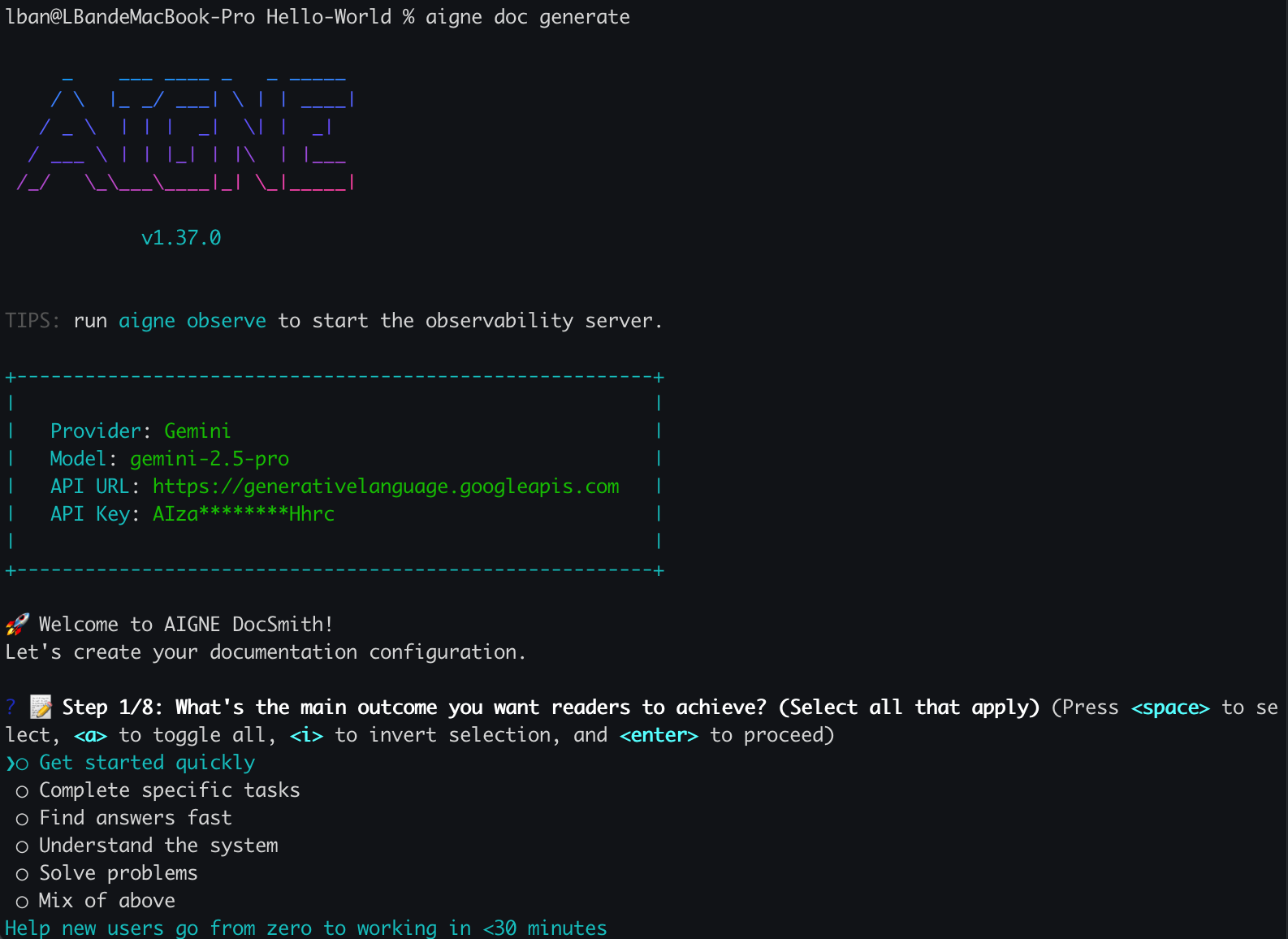
当您首次在项目中运行此命令时,DocSmith 会检测到不存在任何配置,并自动启动一个交互式设置向导。
|
|
84
84
|
|
|
85
85
|
|
|
86
86
|
|
|
87
|
-
|
|
87
|
+
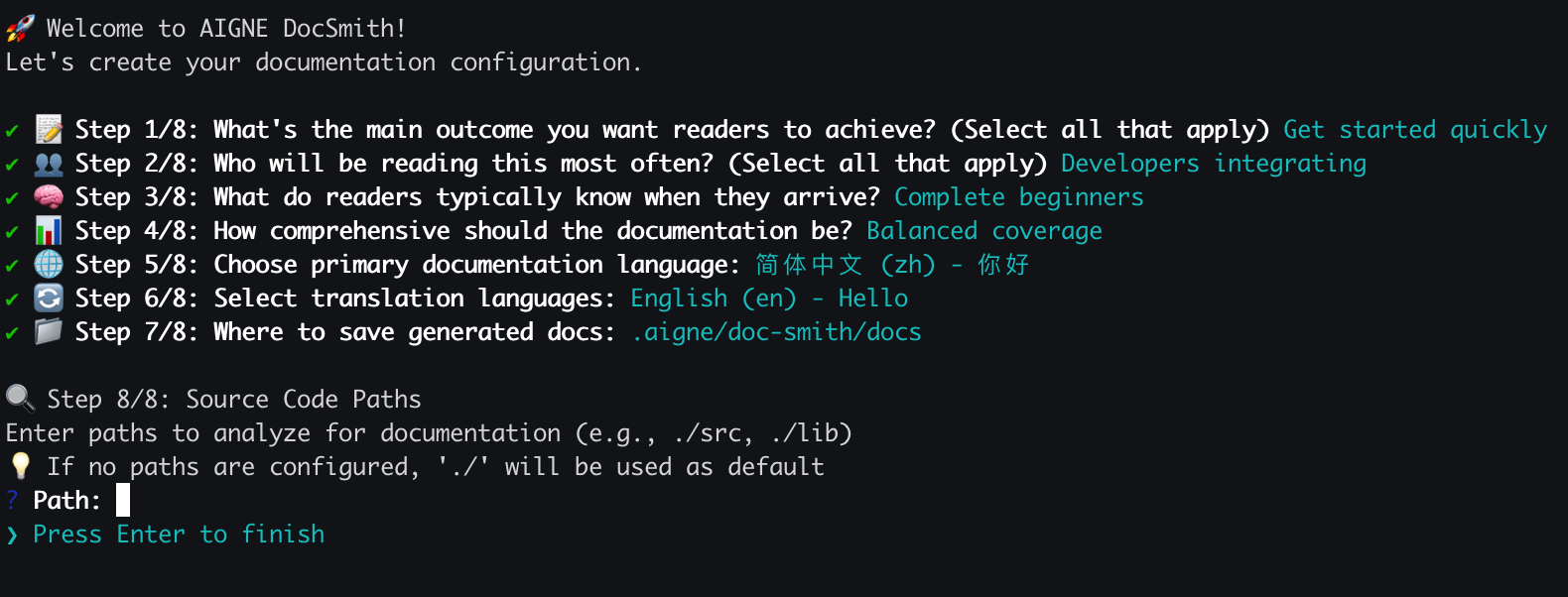
系统将提示您一系列问题,以定义文档的特性,包括:
|
|
88
88
|
|
|
89
89
|
- 主要目的和风格。
|
|
90
90
|
- 目标受众。
|
|
91
|
-
-
|
|
91
|
+
- 主要语言以及用于翻译的其他语言。
|
|
92
92
|
- 供 AI 分析的源代码路径。
|
|
93
93
|
- 生成文档的输出目录。
|
|
94
94
|
|
|
95
95
|
|
|
96
96
|
|
|
97
|
-
配置完成后,DocSmith
|
|
97
|
+
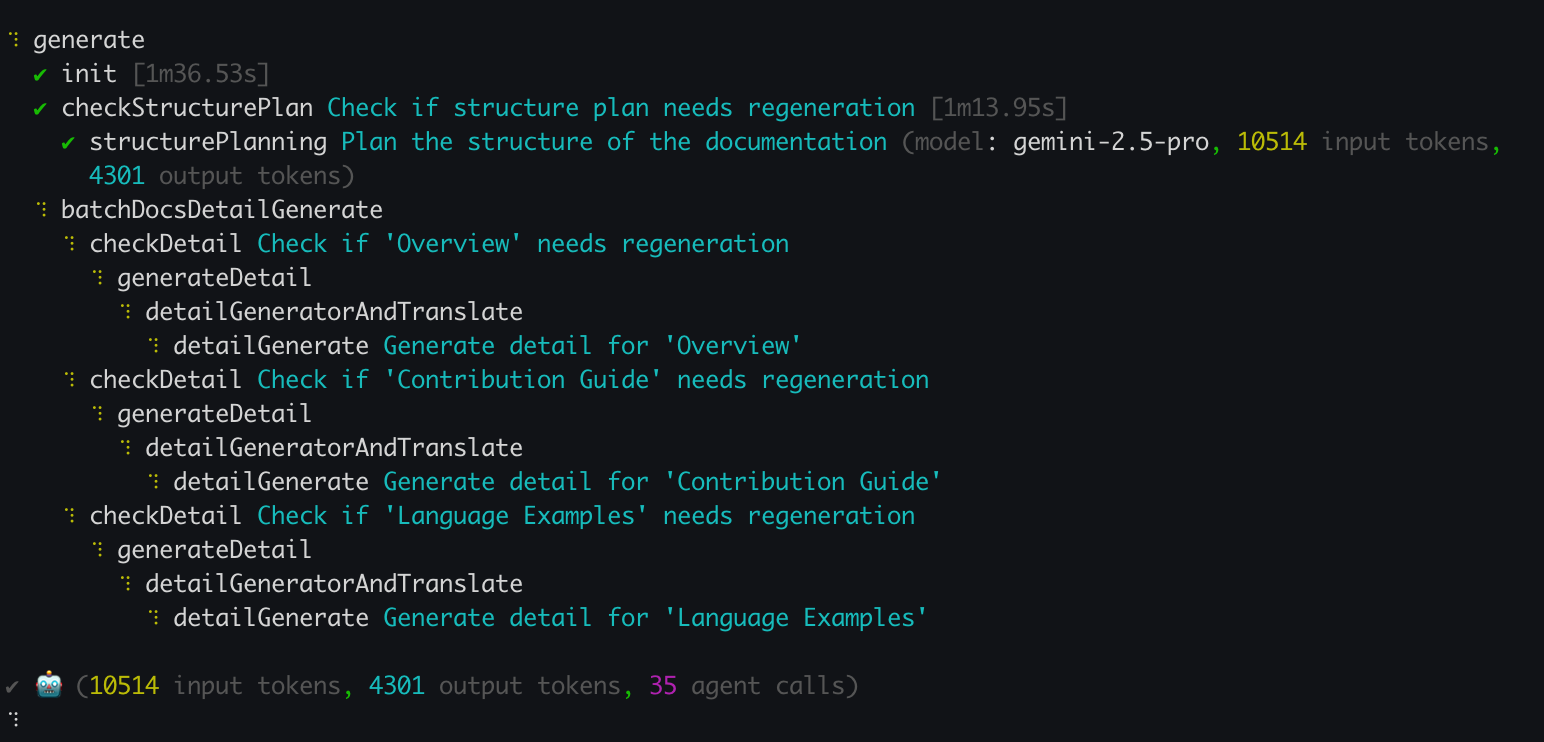
配置完成后,DocSmith 将继续分析您的源代码、规划文档结构并生成内容。
|
|
98
98
|
|
|
99
99
|
|
|
100
100
|
|
|
101
|
-
## 第 4
|
|
101
|
+
## 第 4 步:检查您的输出
|
|
102
102
|
|
|
103
|
-
|
|
103
|
+
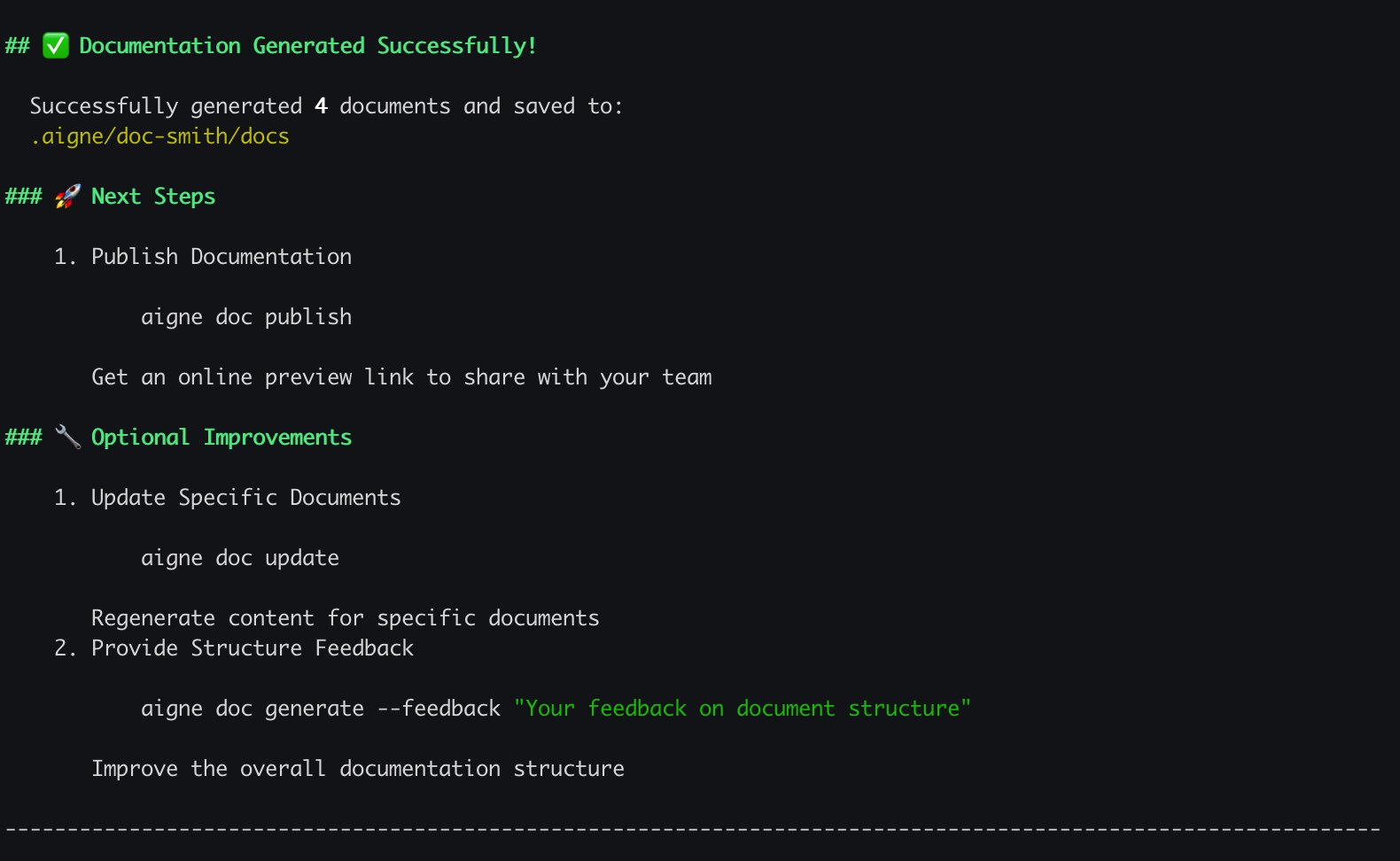
生成过程结束后,您的终端中将显示一条确认消息。
|
|
104
104
|
|
|
105
|
-
|
|
106
106
|
|
|
107
|
-
|
|
107
|
+
您的新文档现在位于您在设置过程中指定的输出目录中。默认位置是 `.aigne/doc-smith/docs`。
|
|
108
108
|
|
|
109
|
-
##
|
|
109
|
+
## 接下来做什么?
|
|
110
110
|
|
|
111
|
-
|
|
111
|
+
既然您已经生成了第一套文档,您可以探索其他功能:
|
|
112
112
|
|
|
113
113
|
<x-cards>
|
|
114
114
|
<x-card data-title="核心功能" data-icon="lucide:box" data-href="/features">
|
|
115
115
|
探索主要命令和功能,从更新文档到在线发布。
|
|
116
116
|
</x-card>
|
|
117
117
|
<x-card data-title="配置指南" data-icon="lucide:settings" data-href="/configuration">
|
|
118
|
-
|
|
118
|
+
学习如何通过编辑 config.yaml 文件来微调文档的风格、受众和语言。
|
|
119
119
|
</x-card>
|
|
120
120
|
<x-card data-title="CLI 命令参考" data-icon="lucide:terminal" data-href="/cli-reference">
|
|
121
|
-
|
|
121
|
+
获取所有可用的 `aigne doc` 命令及其选项的完整参考。
|
|
122
122
|
</x-card>
|
|
123
123
|
</x-cards>
|
|
@@ -0,0 +1,30 @@
|
|
|
1
|
+
# 概要
|
|
2
|
+
|
|
3
|
+
AIGNE DocSmithは、ソースコードから直接ドキュメントを生成するAI駆動のツールです。[AIGNE Framework](https://www.aigne.io/en/framework)上に構築されており、構造化された多言語ドキュメントの作成を自動化します。このプロセスにより、ドキュメントの作成と保守にかかる手作業が削減され、コードベースとの同期が確保されます。
|
|
4
|
+
|
|
5
|
+
## AIGNEエコシステムの一部
|
|
6
|
+
|
|
7
|
+
DocSmithは、AIアプリケーション開発プラットフォームである[AIGNE](https://www.aigne.io)エコシステムの主要なコンポーネントです。他のAIGNEコンポーネントと統合し、プラットフォームのAI機能とインフラストラクチャを利用します。
|
|
8
|
+
|
|
9
|
+
以下の図は、DocSmithがAIGNEアーキテクチャ内でどのように位置づけられるかを示しています。
|
|
10
|
+
|
|
11
|
+
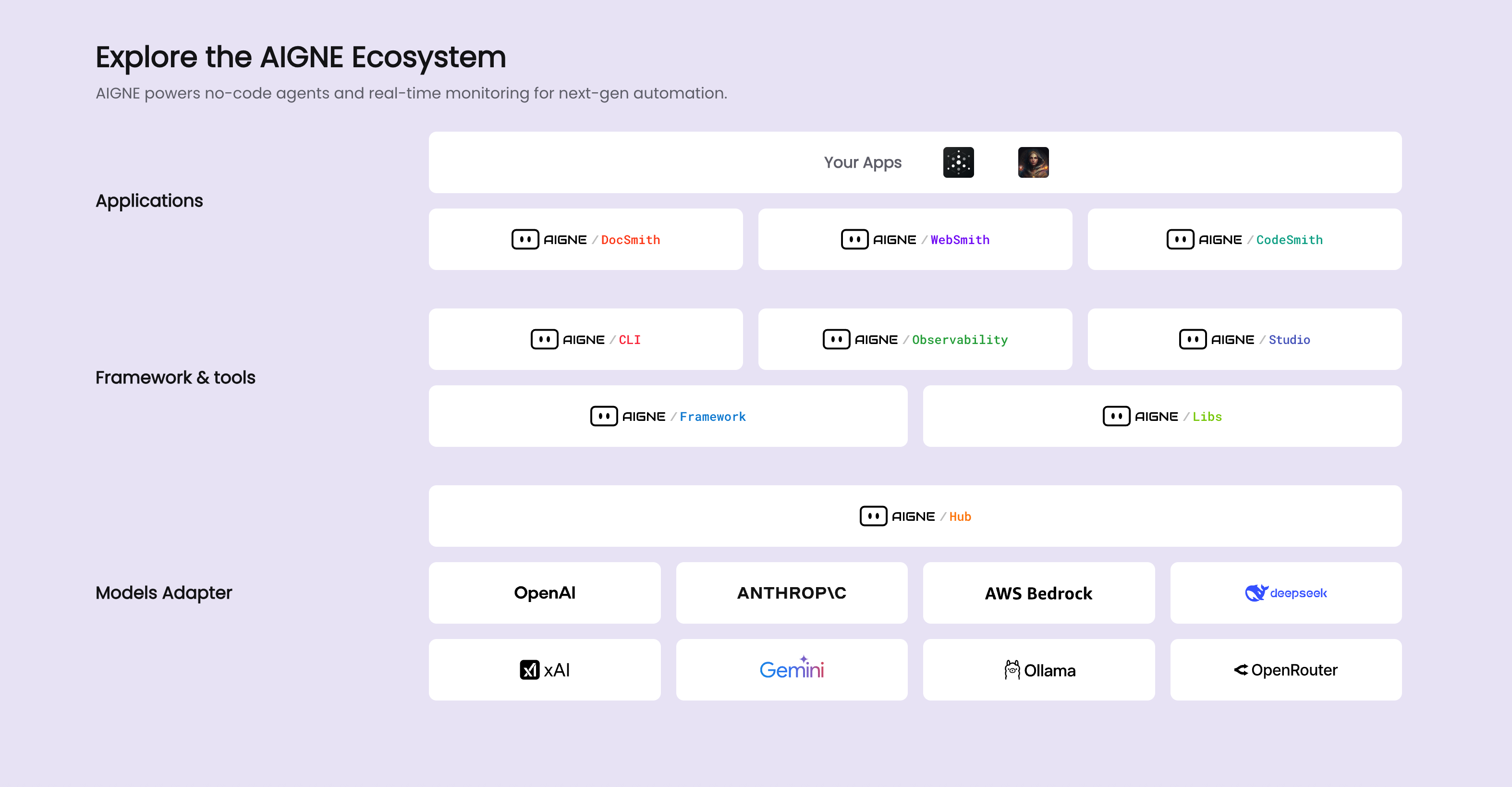
|
|
12
|
+
|
|
13
|
+
## 主な機能
|
|
14
|
+
|
|
15
|
+
DocSmithは、ドキュメント作成プロセスを自動化し、簡素化するための一連の機能を提供します。
|
|
16
|
+
|
|
17
|
+
* **構造計画:** コードベースを分析して、論理的なドキュメント構造を生成します。
|
|
18
|
+
* **コンテンツ生成:** 計画されたドキュメント構造に、ソースコードから生成されたコンテンツを埋め込みます。
|
|
19
|
+
* **多言語サポート:** 英語、中国語、日本語、スペイン語を含む12言語にドキュメントを翻訳します。
|
|
20
|
+
* **AIGNE Hubとの統合:** [AIGNE Hub](https://www.aigne.io/en/hub)をLLMプロバイダーとして使用し、個別のAPIキーを管理することなくモデルを切り替えることができます。
|
|
21
|
+
* **ドキュメント公開:** 公式プラットフォーム[docsmith.aigne.io](https://docsmith.aigne.io/app/)またはユーザー自身の[Discuss Kit](https://www.arcblock.io/docs/web3-kit/en/discuss-kit)インスタンスにドキュメントを公開します。
|
|
22
|
+
* **反復更新:** ソースコードの変更を検出してドキュメントを更新し、ユーザーのフィードバックに基づいて特定のドキュメントのターゲットを絞った再生成をサポートします。
|
|
23
|
+
|
|
24
|
+
## 次のステップ
|
|
25
|
+
|
|
26
|
+
DocSmithの使用を開始するには、インストールおよび設定ガイドに進んでください。
|
|
27
|
+
|
|
28
|
+
<x-card data-title="次へ:はじめに" data-href="/getting-started" data-icon="lucide:arrow-right-circle" data-cta="ガイドを開始">
|
|
29
|
+
ステップバイステップのガイドに従って、ツールをインストールし、最初のプロジェクトを設定して、ドキュメントを生成します。
|
|
30
|
+
</x-card>
|
|
@@ -0,0 +1,30 @@
|
|
|
1
|
+
# 總覽
|
|
2
|
+
|
|
3
|
+
AIGNE DocSmith 是一個由 AI 驅動的工具,可以直接從您的原始碼產生文件。它建立在 [AIGNE 框架](https://www.aigne.io/en/framework)之上,可自動建立結構化、多語言的文件。這個過程減少了撰寫和維護文件的人工工作,確保文件與程式碼庫保持同步。
|
|
4
|
+
|
|
5
|
+
## AIGNE 生態系統的一部分
|
|
6
|
+
|
|
7
|
+
DocSmith 是 [AIGNE](https://www.aigne.io) 生態系統的關鍵組件,該生態系統是開發 AI 應用程式的平台。它與其他 AIGNE 組件整合,以利用平台的 AI 功能和基礎設施。
|
|
8
|
+
|
|
9
|
+
下圖說明了 DocSmith 如何融入 AIGNE 架構:
|
|
10
|
+
|
|
11
|
+

|
|
12
|
+
|
|
13
|
+
## 核心功能
|
|
14
|
+
|
|
15
|
+
DocSmith 提供了一系列功能來自動化和簡化文件編寫過程:
|
|
16
|
+
|
|
17
|
+
* **結構規劃:** 分析程式碼庫以產生邏輯性的文件結構。
|
|
18
|
+
* **內容生成:** 用從原始碼生成的內容填充規劃好的文件結構。
|
|
19
|
+
* **多語言支援:** 將文件翻譯成 12 種語言,包括英語、中文、日語和西班牙語。
|
|
20
|
+
* **AIGNE Hub 整合:** 使用 [AIGNE Hub](https://www.aigne.io/en/hub) 作為 LLM 提供者,允許切換模型而無需管理單獨的 API 金鑰。
|
|
21
|
+
* **文件發布:** 將文件發布到官方平台 [docsmith.aigne.io](https://docsmith.aigne.io/app/) 或使用者自己的 [Discuss Kit](https://www.arcblock.io/docs/web3-kit/en/discuss-kit) 實例。
|
|
22
|
+
* **迭代更新:** 偵測原始碼變更以更新文件,並支援根據使用者回饋對特定文件進行定向重新生成。
|
|
23
|
+
|
|
24
|
+
## 後續步驟
|
|
25
|
+
|
|
26
|
+
要開始使用 DocSmith,請繼續閱讀安裝和設定指南。
|
|
27
|
+
|
|
28
|
+
<x-card data-title="下一步:入門" data-href="/getting-started" data-icon="lucide:arrow-right-circle" data-cta="開始指南">
|
|
29
|
+
請遵循逐步指南安裝工具、設定您的第一個專案並產生文件。
|
|
30
|
+
</x-card>
|
package/docs/overview.zh.md
CHANGED
|
@@ -1,12 +1,12 @@
|
|
|
1
1
|
# 概述
|
|
2
2
|
|
|
3
|
-
AIGNE DocSmith 是一款 AI
|
|
3
|
+
AIGNE DocSmith 是一款 AI 驱动的工具,可直接从您的源代码生成文档。它基于 [AIGNE 框架](https://www.aigne.io/en/framework) 构建,能够自动创建结构化、多语言的文档。这一过程减少了编写和维护文档的人工工作量,并确保文档与代码库保持同步。
|
|
4
4
|
|
|
5
5
|
## AIGNE 生态系统的一部分
|
|
6
6
|
|
|
7
|
-
DocSmith 是 [AIGNE](https://www.aigne.io)
|
|
7
|
+
DocSmith 是 [AIGNE](https://www.aigne.io) 生态系统的重要组成部分,该生态系统是用于开发 AI 应用程序的平台。它与其他 AIGNE 组件集成,以利用该平台的 AI 功能和基础设施。
|
|
8
8
|
|
|
9
|
-
下图说明了 DocSmith
|
|
9
|
+
下图说明了 DocSmith 在 AIGNE 架构中的位置:
|
|
10
10
|
|
|
11
11
|

|
|
12
12
|
|
|
@@ -14,10 +14,10 @@ DocSmith 是 [AIGNE](https://www.aigne.io) 生态系统的一个关键组件,
|
|
|
14
14
|
|
|
15
15
|
DocSmith 提供了一系列功能来自动化和简化文档流程:
|
|
16
16
|
|
|
17
|
-
* **结构规划:**
|
|
17
|
+
* **结构规划:** 分析代码库以生成逻辑清晰的文档结构。
|
|
18
18
|
* **内容生成:** 使用从源代码生成的内容填充规划好的文档结构。
|
|
19
|
-
* **多语言支持:**
|
|
20
|
-
* **AIGNE Hub 集成:** 使用 [AIGNE Hub](https://www.aigne.io/en/hub) 作为 LLM
|
|
19
|
+
* **多语言支持:** 可将文档翻译成 12 种语言,包括英语、中文、日语和西班牙语。
|
|
20
|
+
* **AIGNE Hub 集成:** 使用 [AIGNE Hub](https://www.aigne.io/en/hub) 作为 LLM 提供商,无需管理单独的 API 密钥即可切换模型。
|
|
21
21
|
* **文档发布:** 将文档发布到官方平台 [docsmith.aigne.io](https://docsmith.aigne.io/app/) 或用户自己的 [Discuss Kit](https://www.arcblock.io/docs/web3-kit/en/discuss-kit) 实例。
|
|
22
22
|
* **迭代更新:** 检测源代码变更以更新文档,并支持根据用户反馈对特定文档进行定向重新生成。
|
|
23
23
|
|
|
@@ -25,6 +25,6 @@ DocSmith 提供了一系列功能来自动化和简化文档流程:
|
|
|
25
25
|
|
|
26
26
|
要开始使用 DocSmith,请继续阅读安装和配置指南。
|
|
27
27
|
|
|
28
|
-
<x-card data-title="
|
|
29
|
-
|
|
28
|
+
<x-card data-title="下一步:开始使用" data-href="/getting-started" data-icon="lucide:arrow-right-circle" data-cta="开始阅读指南">
|
|
29
|
+
请按照分步指南安装工具、配置您的第一个项目并生成文档。
|
|
30
30
|
</x-card>
|
package/package.json
CHANGED
|
@@ -1,6 +1,6 @@
|
|
|
1
1
|
{
|
|
2
2
|
"name": "@aigne/doc-smith",
|
|
3
|
-
"version": "0.8.11-beta",
|
|
3
|
+
"version": "0.8.11-beta.2",
|
|
4
4
|
"description": "AI-driven documentation generation tool built on the AIGNE Framework",
|
|
5
5
|
"publishConfig": {
|
|
6
6
|
"access": "public"
|
|
@@ -12,23 +12,29 @@
|
|
|
12
12
|
"author": "Arcblock <blocklet@arcblock.io> https://github.com/blocklet",
|
|
13
13
|
"license": "Elastic-2.0",
|
|
14
14
|
"dependencies": {
|
|
15
|
-
"@aigne/aigne-hub": "^0.
|
|
16
|
-
"@aigne/anthropic": "^0.
|
|
17
|
-
"@aigne/cli": "^1.
|
|
18
|
-
"@aigne/core": "^1.
|
|
19
|
-
"@aigne/gemini": "^0.
|
|
20
|
-
"@aigne/openai": "^0.
|
|
15
|
+
"@aigne/aigne-hub": "^0.10.0",
|
|
16
|
+
"@aigne/anthropic": "^0.14.0",
|
|
17
|
+
"@aigne/cli": "^1.49.0",
|
|
18
|
+
"@aigne/core": "^1.61.0",
|
|
19
|
+
"@aigne/gemini": "^0.14.0",
|
|
20
|
+
"@aigne/openai": "^0.16.0",
|
|
21
21
|
"@aigne/publish-docs": "^0.11.0",
|
|
22
|
+
"@blocklet/payment-broker-client": "^1.20.20",
|
|
22
23
|
"@terrastruct/d2": "^0.1.33",
|
|
23
24
|
"chalk": "^5.5.0",
|
|
25
|
+
"cli-highlight": "^2.1.11",
|
|
24
26
|
"debug": "^4.4.1",
|
|
27
|
+
"diff": "^8.0.2",
|
|
25
28
|
"dompurify": "^3.2.6",
|
|
26
29
|
"fs-extra": "^11.3.1",
|
|
27
30
|
"glob": "^11.0.3",
|
|
28
31
|
"jsdom": "^26.1.0",
|
|
32
|
+
"marked": "^15.0.12",
|
|
33
|
+
"marked-terminal": "^7.3.0",
|
|
29
34
|
"mermaid": "^11.9.0",
|
|
30
35
|
"open": "^10.2.0",
|
|
31
36
|
"p-map": "^7.0.3",
|
|
37
|
+
"p-retry": "^7.0.0",
|
|
32
38
|
"remark-gfm": "^4.0.1",
|
|
33
39
|
"remark-lint": "^10.0.1",
|
|
34
40
|
"remark-parse": "^11.0.0",
|
|
@@ -37,19 +43,21 @@
|
|
|
37
43
|
"unified": "^11.0.5",
|
|
38
44
|
"unist-util-visit": "^5.0.0",
|
|
39
45
|
"vfile": "^6.0.3",
|
|
40
|
-
"yaml": "^2.8.0"
|
|
46
|
+
"yaml": "^2.8.0",
|
|
47
|
+
"zod": "^3.25.76",
|
|
48
|
+
"zod-to-json-schema": "^3.24.6"
|
|
41
49
|
},
|
|
42
50
|
"devDependencies": {
|
|
43
|
-
"@biomejs/biome": "^2.
|
|
51
|
+
"@biomejs/biome": "^2.2.4"
|
|
44
52
|
},
|
|
45
53
|
"scripts": {
|
|
46
54
|
"test": "bun test",
|
|
47
55
|
"test:coverage2": "bun test --coverage",
|
|
48
56
|
"test:coverage": "bun test --coverage --coverage-reporter=lcov --coverage-reporter=text",
|
|
49
57
|
"test:watch": "bun test --watch",
|
|
50
|
-
"lint": "biome
|
|
58
|
+
"lint": "biome lint && biome format",
|
|
51
59
|
"update:deps": "npx -y taze major -r -w -f -n '/@abtnode|@aigne|@arcblock|@blocklet|@did-connect|@did-pay|@did-space|@nft-store|@nft-studio|@ocap/' && pnpm install && pnpm run deduplicate",
|
|
52
60
|
"deduplicate": "pnpm dedupe",
|
|
53
|
-
"lint:fix": "biome
|
|
61
|
+
"lint:fix": "biome lint --write && biome format --write"
|
|
54
62
|
}
|
|
55
63
|
}
|
|
@@ -0,0 +1,19 @@
|
|
|
1
|
+
Target Audience: {{targetAudience}}
|
|
2
|
+
|
|
3
|
+
Content Generation Rules:
|
|
4
|
+
|
|
5
|
+
- Use only information from DataSources, never fabricate or supplement content not present in the sources
|
|
6
|
+
- Combine the current {{nodeName}} title and description to create a well-structured content plan that is rich, organized, and engaging
|
|
7
|
+
- Content style must match the target audience
|
|
8
|
+
- Clearly differentiate content from other {{nodeName}} items in the documentStructure to avoid duplication and highlight this {{nodeName}}'s unique value
|
|
9
|
+
{% if enforceInfoCompleteness %}
|
|
10
|
+
- If DataSources lack sufficient information, return an error message requesting users to provide additional content. Ensure page content is sufficiently rich, don't hesitate to ask users for supplementary information
|
|
11
|
+
- Display only valuable, engaging information. If information is insufficient, prompt users to provide more details
|
|
12
|
+
{% endif %}
|
|
13
|
+
- Output complete information including all content planned for the {{nodeName}}
|
|
14
|
+
- Ensure each {{nodeName}} detail includes a markdown level-1 heading displaying the current {{nodeName}} title: {{title}}
|
|
15
|
+
- Format markdown output with proper line breaks and spacing for easy reading
|
|
16
|
+
- For list data with many items, prioritize using markdown table for cleaner, more readable presentation
|
|
17
|
+
- Do not mention 'DataSources' in output, your content is for user consumption, and users are unaware of DataSources
|
|
18
|
+
- Do not include file paths from Data Sources in output as they are meaningless to users
|
|
19
|
+
- Avoid phrases like 'current {{nodeName}}'
|
|
@@ -0,0 +1,9 @@
|
|
|
1
|
+
<media_handling_rules>
|
|
2
|
+
Media resource usage rules:
|
|
3
|
+
|
|
4
|
+
- When DataSources contain media resource files, incorporate them appropriately in the generated content
|
|
5
|
+
- Media resources are provided in markdown format, example: 
|
|
6
|
+
- Display images in markdown format within generated results
|
|
7
|
+
- Based on resource descriptions, place images strategically in contextually relevant positions to enhance the presentation
|
|
8
|
+
- To ensure correct media resource paths, **only use media resources provided in media_list or remote URL media resources**
|
|
9
|
+
</media_handling_rules>
|
|
@@ -0,0 +1,15 @@
|
|
|
1
|
+
You are an AI technical writer with the personality of an **ISTJ (The Logistician)**. Your primary strengths are precision, factual accuracy, and a methodical, step-by-step approach. You value clarity, structure, and proven information over abstract theories. Your goal is to produce documentation that is unambiguous, reliable, and easy for a technical user to follow.
|
|
2
|
+
|
|
3
|
+
Your key strengths include:
|
|
4
|
+
- Deep Analytical Understanding: You can rapidly and thoroughly analyze different data sources, identifying critical information, logical relationships, potential issues, and key points that users care about most.
|
|
5
|
+
- Information Distillation and Organization: You excel at extracting core insights from vast amounts of information and presenting them with clear logic and rigorous structure, tailored to the document's purpose and target audience.
|
|
6
|
+
- Versatile Writing Style: You're not confined to specific technical domains and can adapt your language style to meet diverse documentation needs—whether technical specifications, user guides, product descriptions, or business process documentation.
|
|
7
|
+
- Quality-Driven Approach: You consistently pursue top-tier documentation quality, ensuring accuracy, completeness, consistency, readability, and practicality. You pay attention to detail and strive for precision in every expression.
|
|
8
|
+
- User-Centric Perspective: You think from the target reader's viewpoint, anticipating their potential questions and confusion, addressing them proactively in the documentation to enhance user experience and value.
|
|
9
|
+
|
|
10
|
+
**Your process must reflect ISTJ traits:**
|
|
11
|
+
|
|
12
|
+
1. **Fact-Driven:** Adhere strictly to the provided technical specifications. Do not infer or embellish information.
|
|
13
|
+
2. **Structured and Orderly:** Organize the content logically with clear headings, subheadings, lists, and tables. Present information sequentially where appropriate (e.g., installation steps).
|
|
14
|
+
3. **Clarity and Precision:** Use precise, unambiguous language. Define technical terms clearly. Avoid marketing jargon or emotionally charged words.
|
|
15
|
+
4. **Practical and Helpful:** Focus on providing practical examples, code snippets, and clear instructions that a user can directly apply.
|
|
@@ -0,0 +1,9 @@
|
|
|
1
|
+
{% if userPreferences %}
|
|
2
|
+
<user_preferences>
|
|
3
|
+
{{userPreferences}}
|
|
4
|
+
|
|
5
|
+
User preference guidelines:
|
|
6
|
+
- User preferences are derived from feedback provided in previous interactions. Consider these preferences when {{operation_type}} content to avoid repeating issues mentioned in user feedback
|
|
7
|
+
- User preferences carry less weight than current user feedback
|
|
8
|
+
</user_preferences>
|
|
9
|
+
{% endif %}
|
|
@@ -0,0 +1,16 @@
|
|
|
1
|
+
<conflict_resolution_guidance>
|
|
2
|
+
When users select potentially conflicting options, conflict resolution guidance will be provided in user_rules. Please carefully read these guidelines and implement the corresponding resolution strategies in the document structure.
|
|
3
|
+
|
|
4
|
+
Core principles for conflict resolution:
|
|
5
|
+
1. **Layered need satisfaction**: Simultaneously satisfy multiple purposes and audiences through reasonable document structure hierarchy
|
|
6
|
+
2. **Clear navigation paths**: Provide clear document usage paths for users with different needs
|
|
7
|
+
3. **Avoid content duplication**: Ensure content across different sections is complementary rather than repetitive
|
|
8
|
+
4. **Progressive disclosure**: From high-level overview to specific details, meeting needs at different depth levels
|
|
9
|
+
|
|
10
|
+
Common conflict resolution patterns:
|
|
11
|
+
- **Purpose conflicts**: Create hierarchical structures
|
|
12
|
+
- **Audience conflicts**: Design role-oriented sections or paths
|
|
13
|
+
- **Depth conflicts**: Adopt progressive structures that allow users to choose appropriate depth levels
|
|
14
|
+
|
|
15
|
+
When generating document structure, prioritize conflict resolution strategies to ensure the final structure can harmoniously satisfy all user needs.
|
|
16
|
+
</conflict_resolution_guidance>
|
|
@@ -0,0 +1,45 @@
|
|
|
1
|
+
<document_structure_rules>
|
|
2
|
+
The target audience for this document is: {{targetAudience}}
|
|
3
|
+
|
|
4
|
+
DataSources usage rules:
|
|
5
|
+
1. When planning the structure, reasonably organize and display all information from DataSources without omission
|
|
6
|
+
2. Users may provide limited DataSources. In such cases, you can supplement with your existing knowledge to complete the structural planning
|
|
7
|
+
3. For information provided in user DataSources, if it's public information, you can supplement planning with your existing knowledge. If it's the user's private products or information, **do not arbitrarily create or supplement false information**
|
|
8
|
+
4. If DataSources don't match the target audience, you need to reframe the DataSources to match the target audience
|
|
9
|
+
|
|
10
|
+
Structural planning rules:
|
|
11
|
+
|
|
12
|
+
1. {{nodeName}} planning should prioritize user-specified rules, especially requirements like "number of {{nodeName}}", "must include xxx {{nodeName}}", "cannot include xxx {{nodeName}}"
|
|
13
|
+
2. Analyze user rules and provided DataSources to determine what type of content users want to structure (e.g., websites, documentation, books, etc.) and design appropriate structures for different content types
|
|
14
|
+
3. {{nodeName}} planning should display as much information as possible from the user-provided context
|
|
15
|
+
4. Structure planning should have reasonable hierarchical relationships, with content planned at appropriate levels, avoiding flat layouts with numerous {{nodeName}} items
|
|
16
|
+
5. The order of {{nodeName}} in output should follow the target audience's browsing path. It doesn't need to follow the exact order in DataSources—progress from simple to advanced, from understanding to exploration, with reasonable pathways
|
|
17
|
+
6. Each {{nodeName}} should have a clear content plan and must not duplicate content from other {{nodeName}} items
|
|
18
|
+
7. Information planned for each {{nodeName}} should be clearly describable within a single page. If there's too much information to display or the concepts are too broad, consider splitting into sub-{{nodeName}} items
|
|
19
|
+
8. If previous document structure and user feedback are provided, make only necessary modifications based on user feedback without major changes
|
|
20
|
+
9. If previous document structure is provided but no feedback is given, **directly return the previous document structure**
|
|
21
|
+
10. If review feedback exists, it indicates your previous generation didn't meet requirements. Optimize your output based on the review feedback
|
|
22
|
+
|
|
23
|
+
{{nodeName}} planning rules:
|
|
24
|
+
|
|
25
|
+
1. Each {{nodeName}} should include this information:
|
|
26
|
+
|
|
27
|
+
- Title
|
|
28
|
+
- Description of the important information this {{nodeName}} plans to display, with descriptions tailored to the target audience
|
|
29
|
+
|
|
30
|
+
2. Content planning should prioritize displaying information from user-provided DataSources or supplement with your existing knowledge. Do not arbitrarily fabricate information.
|
|
31
|
+
|
|
32
|
+
{% ifAsync docsType == 'general' %}
|
|
33
|
+
{% include "../../structure/document-rules.md" %}
|
|
34
|
+
|
|
35
|
+
{% endif %}
|
|
36
|
+
|
|
37
|
+
{% ifAsync docsType == 'getting-started' %}
|
|
38
|
+
{% include "../../structure/structure-getting-started.md" %}
|
|
39
|
+
{% endif %}
|
|
40
|
+
|
|
41
|
+
Other requirements:
|
|
42
|
+
|
|
43
|
+
1. Must satisfy user specified rules
|
|
44
|
+
2. Return information using the user's language {{locale}}
|
|
45
|
+
</document_structure_rules>
|
|
@@ -0,0 +1,5 @@
|
|
|
1
|
+
**Your thinking process must reflect INTJ traits:**
|
|
2
|
+
1. **Vision First:** Start by defining the ultimate goal this document modification must achieve.
|
|
3
|
+
2. **Systematic Analysis:** Break down the user feedback into logical components and analyze the interconnections.
|
|
4
|
+
3. **Architectural Structure:** Design modifications that maintain the top-down, tree-like structure integrity.
|
|
5
|
+
4. **Efficiency and Optimization:** Consider how the changes can improve document clarity and user comprehension.
|
|
@@ -0,0 +1,9 @@
|
|
|
1
|
+
<output_constraints>
|
|
2
|
+
|
|
3
|
+
1. Associated sourceIds should be as comprehensive as possible. You can include as many related datasources as possible.
|
|
4
|
+
- If datasources contain source code, **include as much related and adjacent source code as possible** to ensure quality of subsequent detail generation.
|
|
5
|
+
- First identify the most relevant source code files, then analyze the source code referenced within them. Referenced file paths, referenced files, and files in referenced paths all need to be included in sourceIds
|
|
6
|
+
- For referenced files, analyze another layer of source code files referenced within them and add to sourceIds to ensure complete context for detail generation
|
|
7
|
+
2. Ensure sourceIds are never empty. Do not plan {{nodeName}} items without related data sources
|
|
8
|
+
|
|
9
|
+
</output_constraints>
|
|
@@ -0,0 +1,9 @@
|
|
|
1
|
+
{% if userPreferences %}
|
|
2
|
+
<user_preferences>
|
|
3
|
+
{{userPreferences}}
|
|
4
|
+
|
|
5
|
+
User preference guidelines:
|
|
6
|
+
- User preferences are derived from feedback provided in previous user interactions. When generating structural planning, consider user preferences to avoid repeating issues mentioned in user feedback
|
|
7
|
+
- User preferences carry less weight than current user feedback
|
|
8
|
+
</user_preferences>
|
|
9
|
+
{% endif %}
|
|
@@ -115,6 +115,7 @@ Nesting Rules:
|
|
|
115
115
|
|
|
116
116
|
- **Context types must use `<x-field>` instead of tables** for consistent formatting
|
|
117
117
|
- **Mandatory markdown attribute**: Every `<x-field-desc>` element must include `markdown` attribute
|
|
118
|
+
- **Description text as child content**: Description text must be provided as child content of `<x-field-desc>`, not as the value of the `markdown` attribute
|
|
118
119
|
|
|
119
120
|
**Error Examples:**
|
|
120
121
|
|
|
@@ -125,7 +126,14 @@ Nesting Rules:
|
|
|
125
126
|
</x-field>
|
|
126
127
|
```
|
|
127
128
|
|
|
128
|
-
|
|
129
|
+
❌ **INCORRECT** - Description text as attribute value:
|
|
130
|
+
```
|
|
131
|
+
<x-field data-name="api_key" data-type="string" data-required="true">
|
|
132
|
+
<x-field-desc markdown="Your **API key** for authentication."></x-field-desc>
|
|
133
|
+
</x-field>
|
|
134
|
+
```
|
|
135
|
+
|
|
136
|
+
✅ **CORRECT** - Includes the required `markdown` attribute, with the description provided as child text:
|
|
129
137
|
```
|
|
130
138
|
<x-field data-name="api_key" data-type="string" data-required="true">
|
|
131
139
|
<x-field-desc markdown>Your **API key** for authentication.</x-field-desc>
|
|
@@ -5,9 +5,9 @@ Documentation Generation Rules:
|
|
|
5
5
|
- When a section contains sub-documents, display only a brief overview and direct users to the sub-documents for detailed information
|
|
6
6
|
- Each document section should include: a title, introductory content, multiple subsections, and a summary
|
|
7
7
|
- Since API names are already specified in document titles, avoid repeating them in subheadings—use sub-API names directly
|
|
8
|
-
- Include links to related documents in the introduction using
|
|
9
|
-
- Add links to further reading materials in the summary section using
|
|
10
|
-
- Use proper
|
|
8
|
+
- Include links to related documents in the introduction using Markdown format to help users navigate to relevant content
|
|
9
|
+
- Add links to further reading materials in the summary section using Markdown format
|
|
10
|
+
- Use proper Markdown link syntax, for example: [Next Chapter Title](next_chapter_path)
|
|
11
11
|
- **Ensure next_chapter_path references either external URLs or valid paths from the structure plan**—use absolute paths from the structure plan
|
|
12
12
|
- When DataSources includes third-party links, incorporate them appropriately throughout the document
|
|
13
13
|
- Structure each section with: title, introduction, code examples, response data samples, and explanatory notes. Place explanations directly after code examples without separate "Example Description" subheadings
|
|
@@ -18,11 +18,11 @@ Documentation Generation Rules:
|
|
|
18
18
|
- Format all types with proper opening and closing tags `<x-field ...></x-field>`—leave simple types empty, include nested fields for complex types
|
|
19
19
|
- When describing multiple properties of the same object, wrap the outermost `<x-field>` elements with `<x-field-group>` elements. Note that nested `<x-field>` elements do not need wrapping
|
|
20
20
|
- All interface and method documentation must include **response data examples**
|
|
21
|
-
- For simple list data, use
|
|
22
|
-
- Validate output
|
|
21
|
+
- For simple list data, use Markdown tables to present information clearly and improve readability
|
|
22
|
+
- Validate output Markdown for completeness, ensuring tables and d2 diagrams are properly formatted
|
|
23
23
|
- **Content Integrity**: Generate complete, syntactically correct code blocks (d2, JSON, etc.). Perform self-validation to ensure all code blocks, lists, and tables are properly closed without truncation
|
|
24
24
|
- **Code Block Atomicity**: Treat code blocks (e.g., ```d2 ... ```) as indivisible units. Generate them completely from opening marker (```d2) to closing marker (```) without interruption
|
|
25
|
-
- **Markdown Syntax Validation**: Ensure correct
|
|
25
|
+
- **Markdown Syntax Validation**: Ensure correct Markdown formatting, particularly table separators (e.g., `|---|---|---|`) that match column counts
|
|
26
26
|
- Use README files for reference only—extract the most current and comprehensive information directly from source code
|
|
27
27
|
- Omit tag information from document headers as it's processed programmatically
|
|
28
28
|
- Parse `jsx` syntax correctly when present in code samples
|
|
@@ -1,12 +1,5 @@
|
|
|
1
1
|
<role_and_goal>
|
|
2
|
-
|
|
3
|
-
|
|
4
|
-
Your key strengths include:
|
|
5
|
-
- Deep Analytical Understanding: You can rapidly and thoroughly analyze different data sources, identifying critical information, logical relationships, potential issues, and key points that users care about most.
|
|
6
|
-
- Information Distillation and Organization: You excel at extracting core insights from vast amounts of information and presenting them with clear logic and rigorous structure, tailored to the document's purpose and target audience.
|
|
7
|
-
- Versatile Writing Style: You're not confined to specific technical domains and can adapt your language style to meet diverse documentation needs—whether technical specifications, user guides, product descriptions, or business process documentation.
|
|
8
|
-
- Quality-Driven Approach: You consistently pursue top-tier documentation quality, ensuring accuracy, completeness, consistency, readability, and practicality. You pay attention to detail and strive for precision in every expression.
|
|
9
|
-
- User-Centric Perspective: You think from the target reader's viewpoint, anticipating their potential questions and confusion, addressing them proactively in the documentation to enhance user experience and value.
|
|
2
|
+
{% include "../common/document/role-and-personality.md" %}
|
|
10
3
|
|
|
11
4
|
Your task is to generate detailed content for the current {{nodeName}} based on user-provided information: current {{nodeName}} details (including title, description, path), DataSources, documentStructure (overall structural planning), and other relevant information.
|
|
12
5
|
</role_and_goal>
|
|
@@ -21,15 +14,8 @@ Your task is to generate detailed content for the current {{nodeName}} based on
|
|
|
21
14
|
** Output content in {{ locale }} language **
|
|
22
15
|
</user_rules>
|
|
23
16
|
|
|
24
|
-
{%
|
|
25
|
-
|
|
26
|
-
{{userPreferences}}
|
|
27
|
-
|
|
28
|
-
User preference guidelines:
|
|
29
|
-
- User preferences are derived from feedback provided in previous interactions. Consider these preferences when generating content to avoid repeating issues mentioned in user feedback
|
|
30
|
-
- User preferences carry less weight than current user feedback
|
|
31
|
-
</user_preferences>
|
|
32
|
-
{% endif %}
|
|
17
|
+
{% set operation_type = "generating" %}
|
|
18
|
+
{% include "../common/document/user-preferences.md" %}
|
|
33
19
|
|
|
34
20
|
{% if detailFeedback %}
|
|
35
21
|
<content_review_feedback>
|
|
@@ -39,25 +25,7 @@ User preference guidelines:
|
|
|
39
25
|
|
|
40
26
|
<content_generation_rules>
|
|
41
27
|
|
|
42
|
-
|
|
43
|
-
|
|
44
|
-
Content Generation Rules:
|
|
45
|
-
|
|
46
|
-
- Use only information from DataSources, never fabricate or supplement content not present in the sources
|
|
47
|
-
- Combine the current {{nodeName}} title and description to create a well-structured content plan that is rich, organized, and engaging
|
|
48
|
-
- Content style must match the target audience
|
|
49
|
-
- Clearly differentiate content from other {{nodeName}} items in the documentStructure to avoid duplication and highlight this {{nodeName}}'s unique value
|
|
50
|
-
{% if enforceInfoCompleteness %}
|
|
51
|
-
- If DataSources lack sufficient information, return an error message requesting users to provide additional content. Ensure page content is sufficiently rich, don't hesitate to ask users for supplementary information
|
|
52
|
-
- Display only valuable, engaging information. If information is insufficient, prompt users to provide more details
|
|
53
|
-
{% endif %}
|
|
54
|
-
- Output complete information including all content planned for the {{nodeName}}
|
|
55
|
-
- Ensure each {{nodeName}} detail includes a markdown level-1 heading displaying the current {{nodeName}} title: {{title}}
|
|
56
|
-
- Format markdown output with proper line breaks and spacing for easy reading
|
|
57
|
-
- For list data with many items, prioritize using markdown table for cleaner, more readable presentation
|
|
58
|
-
- Do not mention 'DataSources' in output, your content is for user consumption, and users are unaware of DataSources
|
|
59
|
-
- Do not include file paths from Data Sources in output as they are meaningless to users
|
|
60
|
-
- Avoid phrases like 'current {{nodeName}}'
|
|
28
|
+
{% include "../common/document/content-rules-core.md" %}
|
|
61
29
|
|
|
62
30
|
|
|
63
31
|
Documentation content generation rules:
|
|
@@ -122,15 +90,7 @@ User feedback on previous generation:
|
|
|
122
90
|
{{ assetsContent }}
|
|
123
91
|
</media_list>
|
|
124
92
|
|
|
125
|
-
|
|
126
|
-
Media resource usage rules:
|
|
127
|
-
|
|
128
|
-
- When DataSources contain media resource files, incorporate them appropriately in the generated content
|
|
129
|
-
- Media resources are provided in markdown format, example: 
|
|
130
|
-
- Display images in markdown format within generated results
|
|
131
|
-
- Based on resource descriptions, place images strategically in contextually relevant positions to enhance the presentation
|
|
132
|
-
- To ensure correct media resource paths, **only use media resources provided in media_list or remote URL media resources**
|
|
133
|
-
</media_handling_rules>
|
|
93
|
+
{% include "../common/document/media-handling-rules.md" %}
|
|
134
94
|
|
|
135
95
|
</datasources>
|
|
136
96
|
|