@aigne/doc-smith 0.6.0 → 0.7.1
This diff represents the content of publicly available package versions that have been released to one of the supported registries. The information contained in this diff is provided for informational purposes only and reflects changes between package versions as they appear in their respective public registries.
- package/.aigne/doc-smith/config.yaml +70 -0
- package/.aigne/doc-smith/output/structure-plan.json +152 -0
- package/.aigne/doc-smith/preferences.yml +31 -0
- package/.aigne/doc-smith/upload-cache.yaml +288 -0
- package/.github/workflows/ci.yml +46 -0
- package/.github/workflows/reviewer.yml +2 -1
- package/CHANGELOG.md +17 -0
- package/README.md +33 -15
- package/agents/chat.yaml +30 -0
- package/agents/check-structure-plan.mjs +1 -1
- package/agents/docs-fs.yaml +25 -0
- package/agents/exit.mjs +6 -0
- package/agents/feedback-refiner.yaml +5 -1
- package/agents/find-items-by-paths.mjs +10 -4
- package/agents/fs.mjs +60 -0
- package/agents/input-generator.mjs +150 -91
- package/agents/load-config.mjs +0 -5
- package/agents/load-sources.mjs +61 -8
- package/agents/publish-docs.mjs +27 -12
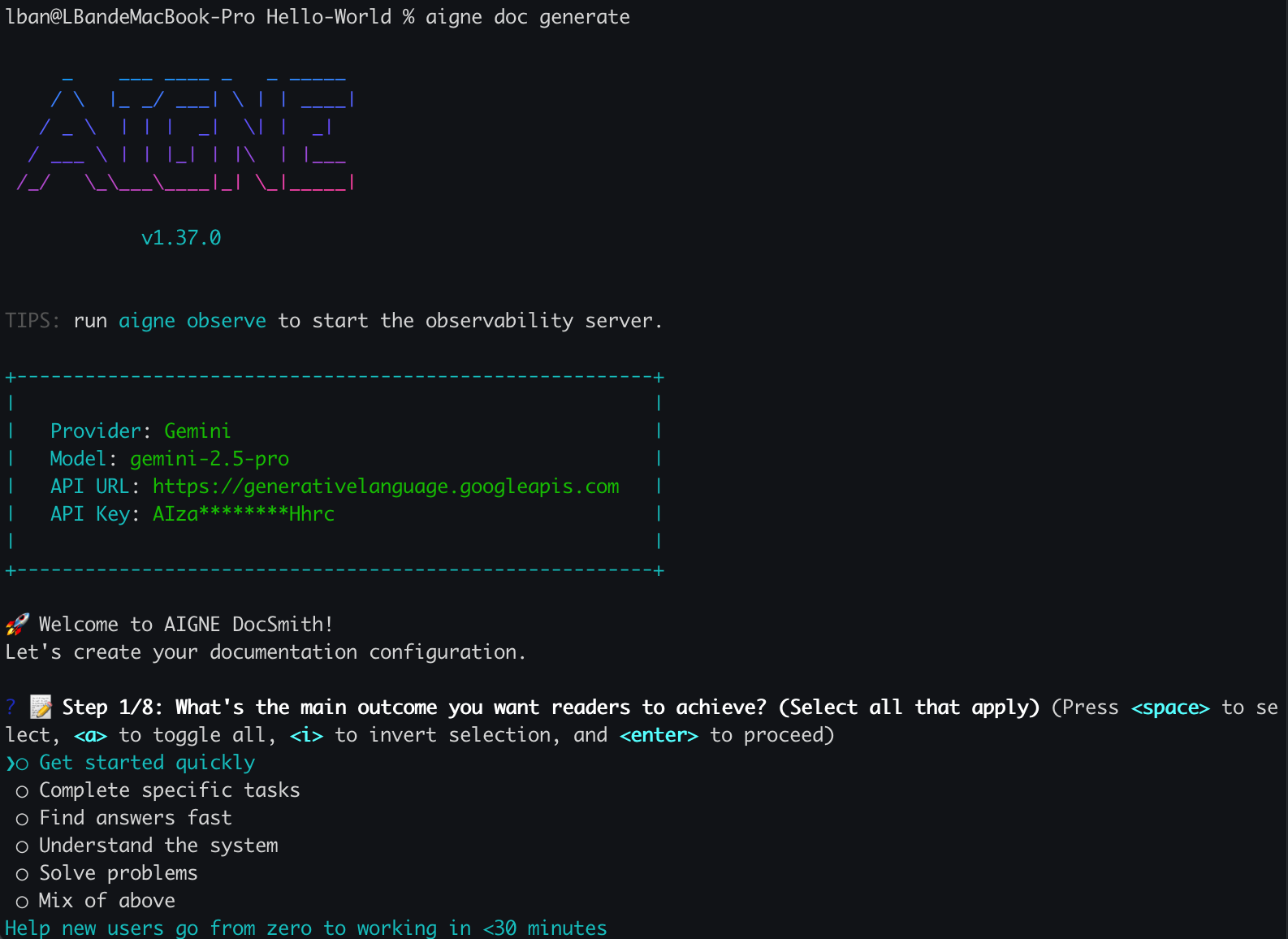
- package/agents/retranslate.yaml +1 -1
- package/agents/team-publish-docs.yaml +2 -2
- package/aigne.yaml +1 -0
- package/docs/_sidebar.md +17 -0
- package/docs/advanced-how-it-works.md +104 -0
- package/docs/advanced-how-it-works.zh.md +104 -0
- package/docs/advanced-quality-assurance.md +64 -0
- package/docs/advanced-quality-assurance.zh.md +64 -0
- package/docs/advanced.md +28 -0
- package/docs/advanced.zh.md +28 -0
- package/docs/changelog.md +272 -0
- package/docs/changelog.zh.md +272 -0
- package/docs/cli-reference.md +185 -0
- package/docs/cli-reference.zh.md +185 -0
- package/docs/configuration-interactive-setup.md +82 -0
- package/docs/configuration-interactive-setup.zh.md +82 -0
- package/docs/configuration-language-support.md +64 -0
- package/docs/configuration-language-support.zh.md +64 -0
- package/docs/configuration-llm-setup.md +90 -0
- package/docs/configuration-llm-setup.zh.md +90 -0
- package/docs/configuration-preferences.md +122 -0
- package/docs/configuration-preferences.zh.md +123 -0
- package/docs/configuration.md +173 -0
- package/docs/configuration.zh.md +173 -0
- package/docs/features-generate-documentation.md +82 -0
- package/docs/features-generate-documentation.zh.md +82 -0
- package/docs/features-publish-your-docs.md +98 -0
- package/docs/features-publish-your-docs.zh.md +98 -0
- package/docs/features-translate-documentation.md +83 -0
- package/docs/features-translate-documentation.zh.md +83 -0
- package/docs/features-update-and-refine.md +86 -0
- package/docs/features-update-and-refine.zh.md +86 -0
- package/docs/features.md +56 -0
- package/docs/features.zh.md +56 -0
- package/docs/getting-started.md +74 -0
- package/docs/getting-started.zh.md +74 -0
- package/docs/overview.md +48 -0
- package/docs/overview.zh.md +48 -0
- package/media.md +19 -0
- package/package.json +13 -10
- package/prompts/content-detail-generator.md +7 -3
- package/prompts/document/custom-components.md +80 -0
- package/prompts/document/d2-chart/diy-examples.md +44 -0
- package/prompts/document/d2-chart/official-examples.md +708 -0
- package/prompts/document/d2-chart/rules.md +48 -0
- package/prompts/document/detail-generator.md +12 -15
- package/prompts/document/structure-planning.md +1 -3
- package/prompts/feedback-refiner.md +81 -60
- package/prompts/structure-planning.md +20 -3
- package/tests/check-detail-result.test.mjs +3 -4
- package/tests/conflict-resolution.test.mjs +237 -0
- package/tests/input-generator.test.mjs +940 -0
- package/tests/load-sources.test.mjs +627 -3
- package/tests/preferences-utils.test.mjs +94 -0
- package/tests/save-value-to-config.test.mjs +182 -5
- package/tests/utils.test.mjs +49 -0
- package/utils/conflict-detector.mjs +72 -1
- package/utils/constants.mjs +125 -124
- package/utils/kroki-utils.mjs +162 -0
- package/utils/markdown-checker.mjs +98 -70
- package/utils/utils.mjs +96 -28
|
@@ -0,0 +1,173 @@
|
|
|
1
|
+
---
|
|
2
|
+
labels: ["Reference"]
|
|
3
|
+
---
|
|
4
|
+
|
|
5
|
+
# 配置指南
|
|
6
|
+
|
|
7
|
+
AIGNE DocSmith 的行为由一个强大的配置文件 `config.yaml` 控制。该文件位于项目的 `.aigne/doc-smith` 目录中,你可以通过它自定义文档生成过程的各个方面,从目标受众、风格到语言支持和文件结构。
|
|
8
|
+
|
|
9
|
+
本指南为所有可用设置提供了详细的参考。虽然你可以随时手动编辑此文件,但我们建议使用 [交互式设置](./configuration-interactive-setup.md) 向导来完成初始配置。
|
|
10
|
+
|
|
11
|
+
## 配置概览
|
|
12
|
+
|
|
13
|
+
DocSmith 提供灵活的配置系统,以满足你项目的独特需求。你可以定义文档的目标、指定受众、设置 AI 模型以及管理多种语言。请在下方探索主要的配置领域。
|
|
14
|
+
|
|
15
|
+
<x-cards data-columns="2">
|
|
16
|
+
<x-card data-title="交互式设置" data-href="/configuration/interactive-setup" data-icon="lucide:wand-2">
|
|
17
|
+
了解如何使用 `aigne doc init` 命令运行引导式向导,轻松创建初始配置文件。
|
|
18
|
+
</x-card>
|
|
19
|
+
<x-card data-title="LLM 设置" data-href="/configuration/llm-setup" data-icon="lucide:brain-circuit">
|
|
20
|
+
配置不同的大语言模型,包括使用集成的 AIGNE Hub 免密钥访问热门模型。
|
|
21
|
+
</x-card>
|
|
22
|
+
<x-card data-title="语言支持" data-href="/configuration/language-support" data-icon="lucide:languages">
|
|
23
|
+
设置你的主要文档语言,并从超过 12 种支持的语言中选择进行自动翻译。
|
|
24
|
+
</x-card>
|
|
25
|
+
<x-card data-title="管理偏好" data-href="/configuration/preferences" data-icon="lucide:sliders-horizontal">
|
|
26
|
+
了解 DocSmith 如何从你的反馈中学习以创建持久化规则,以及如何管理这些规则。
|
|
27
|
+
</x-card>
|
|
28
|
+
</x-cards>
|
|
29
|
+
|
|
30
|
+
## 参数参考
|
|
31
|
+
|
|
32
|
+
`config.yaml` 文件包含几个关键部分,用于定义文档的生成方式。以下是每个参数的详细说明。
|
|
33
|
+
|
|
34
|
+
### 项目信息
|
|
35
|
+
|
|
36
|
+
这些设置用于发布文档时的信息展示。
|
|
37
|
+
|
|
38
|
+
```yaml
|
|
39
|
+
# 用于文档发布的项目信息
|
|
40
|
+
projectName: AIGNE DocSmith
|
|
41
|
+
projectDesc: 一款 AI 驱动的文档生成工具。
|
|
42
|
+
projectLogo: https://docsmith.aigne.io/image-bin/uploads/def424c20bbdb3c77483894fe0e22819.png
|
|
43
|
+
```
|
|
44
|
+
|
|
45
|
+
- `projectName`: 你的项目名称。
|
|
46
|
+
- `projectDesc`: 你的项目的简短描述。
|
|
47
|
+
- `projectLogo`: 你的项目徽标的 URL。
|
|
48
|
+
|
|
49
|
+
### 文档风格
|
|
50
|
+
|
|
51
|
+
这些参数定义了文档的用途、受众和整体基调。
|
|
52
|
+
|
|
53
|
+
#### `documentPurpose`
|
|
54
|
+
|
|
55
|
+
定义读者的主要目标。你可以选择多个用途。
|
|
56
|
+
|
|
57
|
+
| Key | Name | Description |
|
|
58
|
+
|---|---|---|
|
|
59
|
+
| `getStarted` | 快速入门 | 帮助新用户在 30 分钟内从零开始上手。 |
|
|
60
|
+
| `completeTasks` | 完成特定任务 | 引导用户完成常见的工作流程和用例。 |
|
|
61
|
+
| `findAnswers` | 快速查找答案 | 为所有功能和 API 提供可搜索的参考。 |
|
|
62
|
+
| `understandSystem` | 理解系统 | 解释其工作原理以及做出设计决策的原因。 |
|
|
63
|
+
| `solveProblems` | 排查常见问题 | 帮助用户排查和修复问题。 |
|
|
64
|
+
| `mixedPurpose` | 满足多种用途 | 涵盖多种需求的综合性文档。 |
|
|
65
|
+
|
|
66
|
+
**示例:**
|
|
67
|
+
```yaml
|
|
68
|
+
documentPurpose:
|
|
69
|
+
- getStarted
|
|
70
|
+
- findAnswers
|
|
71
|
+
```
|
|
72
|
+
|
|
73
|
+
#### `targetAudienceTypes`
|
|
74
|
+
|
|
75
|
+
指定文档的主要受众。
|
|
76
|
+
|
|
77
|
+
| Key | Name | Description |
|
|
78
|
+
|---|---|---|
|
|
79
|
+
| `endUsers` | 最终用户(非技术人员) | 使用产品但不编写代码的人员。 |
|
|
80
|
+
| `developers` | 集成你的产品/API 的开发者 | 将此产品添加到其项目中的工程师。 |
|
|
81
|
+
| `devops` | DevOps / SRE / 基础设施团队 | 负责部署、监控和维护系统的团队。 |
|
|
82
|
+
| `decisionMakers` | 技术决策者 | 评估或规划实施方案的架构师和负责人。 |
|
|
83
|
+
| `supportTeams` | 支持团队 | 帮助他人使用产品的人员。 |
|
|
84
|
+
| `mixedTechnical` | 混合技术受众 | 开发者、DevOps 和技术用户。 |
|
|
85
|
+
|
|
86
|
+
**示例:**
|
|
87
|
+
```yaml
|
|
88
|
+
targetAudienceTypes:
|
|
89
|
+
- developers
|
|
90
|
+
```
|
|
91
|
+
|
|
92
|
+
#### `readerKnowledgeLevel`
|
|
93
|
+
|
|
94
|
+
描述读者的典型初始知识水平。
|
|
95
|
+
|
|
96
|
+
| Key | Name | Description |
|
|
97
|
+
|---|---|---|
|
|
98
|
+
| `completeBeginners` | 完全的初学者,从零开始 | 完全不了解该领域/技术。 |
|
|
99
|
+
| `domainFamiliar` | 以前使用过类似的工具 | 了解问题领域,但对这个具体解决方案不熟悉。 |
|
|
100
|
+
| `experiencedUsers` | 试图做特定事情的专家 | 需要参考/高级主题的普通用户。 |
|
|
101
|
+
| `emergencyTroubleshooting` | 紧急情况/故障排查 | 出现问题,需要快速修复。 |
|
|
102
|
+
| `exploringEvaluating` | 正在评估此工具并与其他工具进行比较 | 试图了解这是否满足他们的需求。 |
|
|
103
|
+
|
|
104
|
+
**示例:**
|
|
105
|
+
```yaml
|
|
106
|
+
readerKnowledgeLevel: completeBeginners
|
|
107
|
+
```
|
|
108
|
+
|
|
109
|
+
#### `documentationDepth`
|
|
110
|
+
|
|
111
|
+
控制文档的全面程度。
|
|
112
|
+
|
|
113
|
+
| Key | Name | Description |
|
|
114
|
+
|---|---|---|
|
|
115
|
+
| `essentialOnly` | 仅包含基本内容 | 覆盖 80% 的用例,保持简洁。 |
|
|
116
|
+
| `balancedCoverage` | 平衡的覆盖范围 | 具有良好深度和实际示例 [推荐]。 |
|
|
117
|
+
| `comprehensive` | 全面 | 覆盖所有功能、边缘情况和高级场景。 |
|
|
118
|
+
| `aiDecide` | 让 AI 决定 | 分析代码复杂性并建议适当的深度。 |
|
|
119
|
+
|
|
120
|
+
**示例:**
|
|
121
|
+
```yaml
|
|
122
|
+
documentationDepth: balancedCoverage
|
|
123
|
+
```
|
|
124
|
+
|
|
125
|
+
### 自定义规则和描述
|
|
126
|
+
|
|
127
|
+
这些字段允许你向 AI 提供更具体的指令。
|
|
128
|
+
|
|
129
|
+
- `rules`: 一个多行字符串,你可以在其中定义具体的生成规则和要求,例如“在教程中始终包含‘先决条件’部分”。
|
|
130
|
+
- `targetAudience`: 一个多行字符串,用于比预设选项更详细地描述你的目标受众。
|
|
131
|
+
|
|
132
|
+
**示例:**
|
|
133
|
+
```yaml
|
|
134
|
+
rules: |
|
|
135
|
+
- 所有代码示例必须是完整的,并且可以直接复制粘贴。
|
|
136
|
+
- 避免使用未加解释的技术术语。
|
|
137
|
+
targetAudience: |
|
|
138
|
+
我们的受众是熟悉 JavaScript 但可能不熟悉后端概念的前端开发者。他们重视清晰、实用的示例。
|
|
139
|
+
```
|
|
140
|
+
|
|
141
|
+
### 语言和路径设置
|
|
142
|
+
|
|
143
|
+
这些参数用于配置文档的语言和文件位置。
|
|
144
|
+
|
|
145
|
+
- `locale`: 文档的主要语言(例如 `en`、`zh`)。
|
|
146
|
+
- `translateLanguages`: 要将文档翻译成的目标语言代码列表。
|
|
147
|
+
- `glossary`: 指向一个 Markdown 文件的路径,该文件包含项目特定术语,以确保翻译的一致性。
|
|
148
|
+
- `docsDir`: 用于保存生成的文档的目录。
|
|
149
|
+
- `sourcesPath`: 供 AI 分析的源代码路径或 glob 模式列表。
|
|
150
|
+
|
|
151
|
+
**示例:**
|
|
152
|
+
```yaml
|
|
153
|
+
# 语言设置
|
|
154
|
+
locale: en
|
|
155
|
+
translateLanguages:
|
|
156
|
+
- zh
|
|
157
|
+
- ja
|
|
158
|
+
|
|
159
|
+
# 用于确保术语一致性的词汇表
|
|
160
|
+
glossary: "@glossary.md"
|
|
161
|
+
|
|
162
|
+
# 目录和源路径配置
|
|
163
|
+
docsDir: .aigne/doc-smith/docs # 保存生成文档的目录
|
|
164
|
+
sourcesPath: # 需要分析的源代码路径
|
|
165
|
+
- ./src
|
|
166
|
+
- ./README.md
|
|
167
|
+
```
|
|
168
|
+
|
|
169
|
+
---
|
|
170
|
+
|
|
171
|
+
根据你的项目定制好 `config.yaml` 文件后,你就可以开始创建文档了。下一步是运行生成命令。
|
|
172
|
+
|
|
173
|
+
➡️ **下一步:** 学习如何 [生成文档](./features-generate-documentation.md)。
|
|
@@ -0,0 +1,82 @@
|
|
|
1
|
+
---
|
|
2
|
+
labels: ["Reference"]
|
|
3
|
+
---
|
|
4
|
+
|
|
5
|
+
# Generate Documentation
|
|
6
|
+
|
|
7
|
+
The `aigne doc generate` command is the core function of DocSmith, designed to transform your source code into a comprehensive and well-structured documentation suite with a single command.
|
|
8
|
+
|
|
9
|
+
This process involves analyzing your codebase, planning a logical document structure, and then generating detailed content for each section. It's the primary way to create your documentation from scratch.
|
|
10
|
+
|
|
11
|
+
## Your First Generation
|
|
12
|
+
|
|
13
|
+
To begin, navigate to your project's root directory and run the following command:
|
|
14
|
+
|
|
15
|
+
```bash
|
|
16
|
+
aigne doc generate
|
|
17
|
+
```
|
|
18
|
+
|
|
19
|
+
### Smart Auto-Configuration
|
|
20
|
+
|
|
21
|
+
If you're running this command for the first time in a project, DocSmith will intelligently detect that no configuration exists. It will automatically launch an interactive setup wizard to guide you through the initial setup. This ensures you have a properly configured environment before generation begins.
|
|
22
|
+
|
|
23
|
+
|
|
24
|
+
|
|
25
|
+
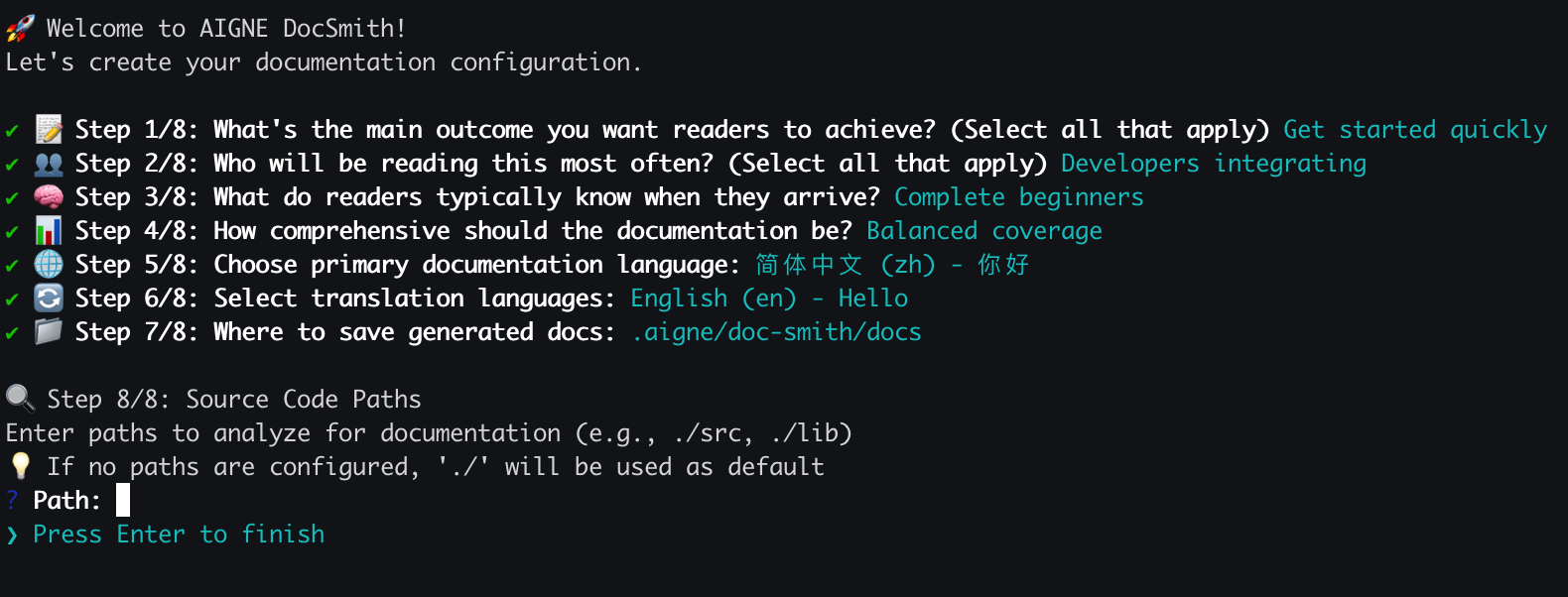
You will be asked a series of questions to define:
|
|
26
|
+
- Document generation rules and style
|
|
27
|
+
- The target audience
|
|
28
|
+
- Primary and translation languages
|
|
29
|
+
- Source code and output paths
|
|
30
|
+
|
|
31
|
+
|
|
32
|
+
|
|
33
|
+
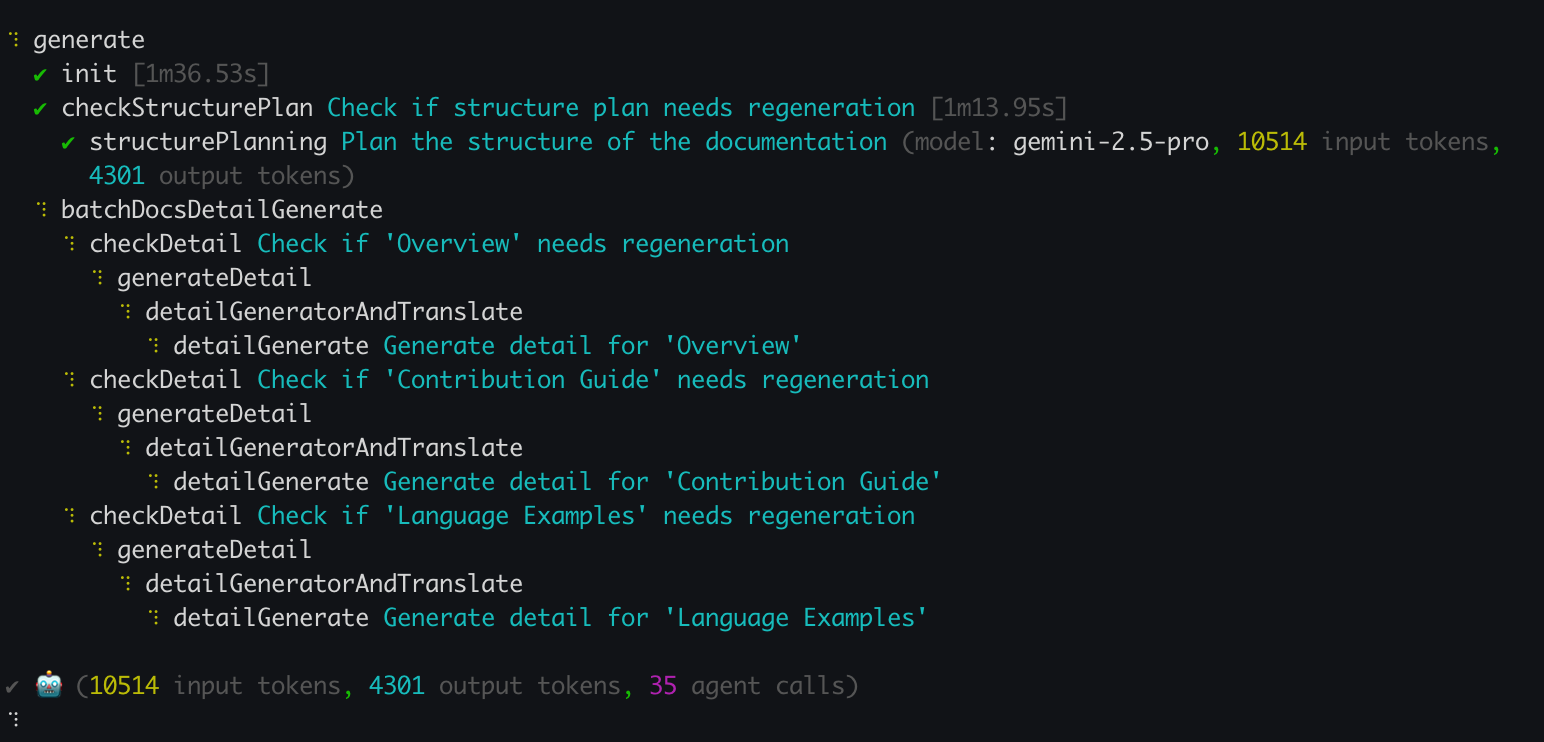
Once the configuration is complete, DocSmith proceeds with the documentation generation.
|
|
34
|
+
|
|
35
|
+
|
|
36
|
+
|
|
37
|
+
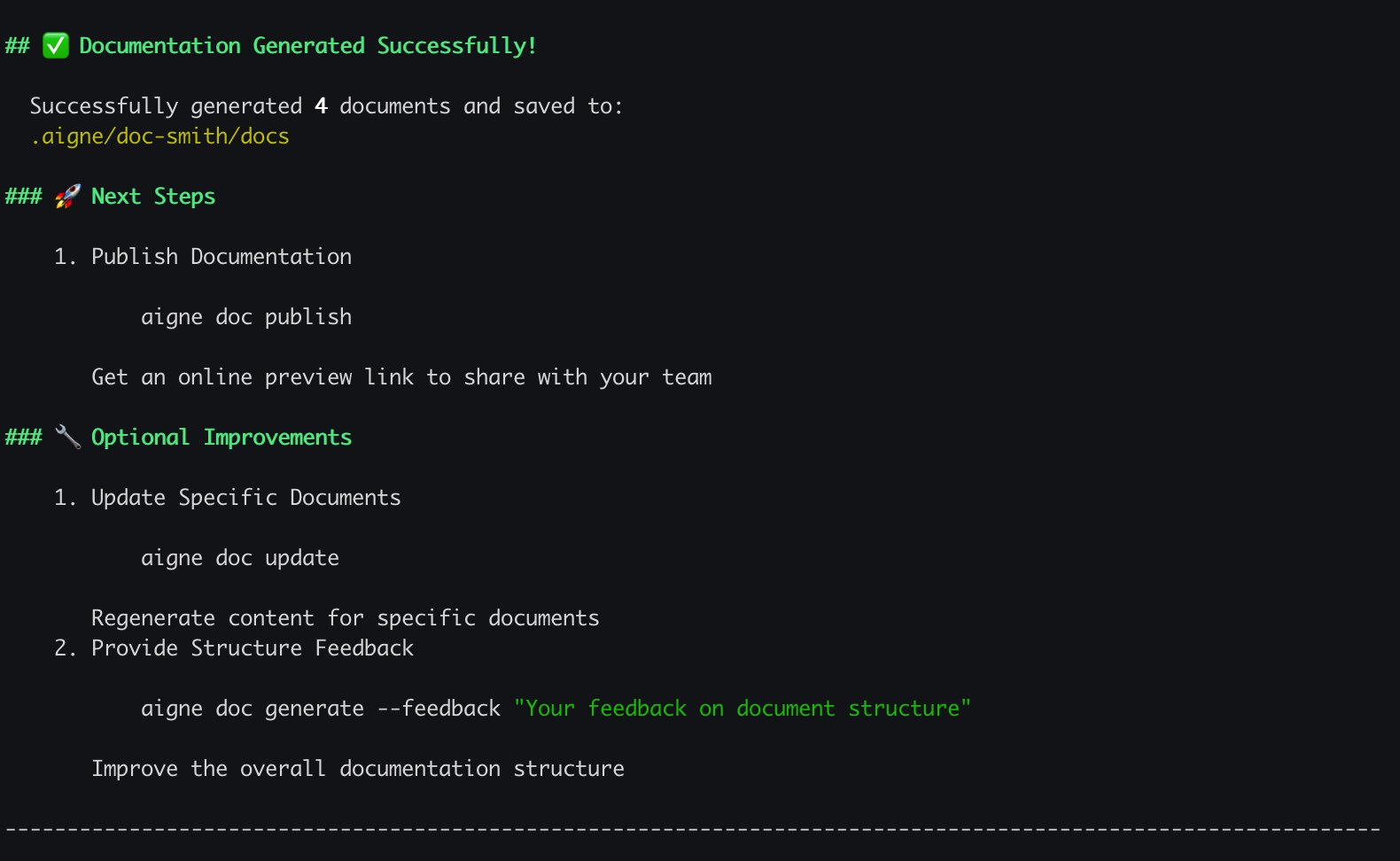
Upon successful completion, your newly created documentation will be available in the output directory you specified.
|
|
38
|
+
|
|
39
|
+
|
|
40
|
+
|
|
41
|
+
## The Generation Process
|
|
42
|
+
|
|
43
|
+
The `generate` command follows a clear, automated workflow to ensure consistent and high-quality results. The process can be visualized as follows:
|
|
44
|
+
|
|
45
|
+
```d2
|
|
46
|
+
direction: down
|
|
47
|
+
|
|
48
|
+
start: "Start"
|
|
49
|
+
run_cmd: "Run `aigne doc generate`"
|
|
50
|
+
check_config: "Configuration exists?" {
|
|
51
|
+
shape: diamond
|
|
52
|
+
}
|
|
53
|
+
interactive_setup: "Interactive Setup Wizard"
|
|
54
|
+
plan_structure: "Analyze Code & Plan Structure"
|
|
55
|
+
gen_content: "Generate Document Content"
|
|
56
|
+
save_docs: "Save Documents to Output Directory"
|
|
57
|
+
end: "End"
|
|
58
|
+
|
|
59
|
+
start -> run_cmd -> check_config
|
|
60
|
+
check_config -> interactive_setup: "No"
|
|
61
|
+
interactive_setup -> plan_structure
|
|
62
|
+
check_config -> plan_structure: "Yes"
|
|
63
|
+
plan_structure -> gen_content -> save_docs -> end
|
|
64
|
+
```
|
|
65
|
+
|
|
66
|
+
## Fine-Tuning Your Generation
|
|
67
|
+
|
|
68
|
+
While the default `generate` command is sufficient for most use cases, you can use several options to control the generation process. These are particularly useful for regenerating content or refining the document structure.
|
|
69
|
+
|
|
70
|
+
| Option | Description | Example |
|
|
71
|
+
|---------------------|------------------------------------------------------------------------------------------------------------------------------------------|----------------------------------------------------------------------|
|
|
72
|
+
| `--forceRegenerate` | Deletes all existing documents and regenerates them from scratch. Use this after making significant changes to your source code or configuration. | `aigne doc generate --forceRegenerate` |
|
|
73
|
+
| `--feedback` | Provides high-level feedback to refine the overall document structure plan, such as adding, removing, or reorganizing sections. | `aigne doc generate --feedback "Add an API Reference section"` |
|
|
74
|
+
| `--model` | Specifies a particular Large Language Model from AIGNE Hub to use for content generation, allowing you to switch between models easily. | `aigne doc generate --model claude:claude-3-5-sonnet` |
|
|
75
|
+
|
|
76
|
+
## What's Next?
|
|
77
|
+
|
|
78
|
+
Now that you have generated your initial documentation, your project will continue to evolve. To keep your documents synchronized with your code, you will need to update them. Proceed to the next section to learn how to make targeted changes and regenerate specific files.
|
|
79
|
+
|
|
80
|
+
<x-card data-title="Update and Refine" data-icon="lucide:file-edit" data-href="/features/update-and-refine">
|
|
81
|
+
Discover how to intelligently update documents when your code changes or make specific improvements using feedback.
|
|
82
|
+
</x-card>.
|
|
@@ -0,0 +1,82 @@
|
|
|
1
|
+
---
|
|
2
|
+
labels: ["Reference"]
|
|
3
|
+
---
|
|
4
|
+
|
|
5
|
+
# 生成文档
|
|
6
|
+
|
|
7
|
+
`aigne doc generate` 命令是 DocSmith 的核心功能,旨在通过一个命令将您的源代码转换为内容全面、结构清晰的文档套件。
|
|
8
|
+
|
|
9
|
+
该过程包括分析您的代码库、规划合理的文档结构,然后为每个部分生成详细内容。这是从零开始创建文档的主要方式。
|
|
10
|
+
|
|
11
|
+
## 首次生成
|
|
12
|
+
|
|
13
|
+
首先,请进入您项目的根目录并运行以下命令:
|
|
14
|
+
|
|
15
|
+
```bash
|
|
16
|
+
aigne doc generate
|
|
17
|
+
```
|
|
18
|
+
|
|
19
|
+
### 智能自动配置
|
|
20
|
+
|
|
21
|
+
如果您首次在项目中运行此命令,DocSmith 将智能地检测到尚无配置。它会自动启动一个交互式设置向导,引导您完成初始设置。这能确保在生成开始前,您已拥有一个正确配置的环境。
|
|
22
|
+
|
|
23
|
+

|
|
24
|
+
|
|
25
|
+
系统将询问您一系列问题以定义:
|
|
26
|
+
- 文档生成规则和风格
|
|
27
|
+
- 目标受众
|
|
28
|
+
- 主要语言和翻译语言
|
|
29
|
+
- 源代码和输出路径
|
|
30
|
+
|
|
31
|
+

|
|
32
|
+
|
|
33
|
+
配置完成后,DocSmith 会继续进行文档生成。
|
|
34
|
+
|
|
35
|
+

|
|
36
|
+
|
|
37
|
+
成功完成后,您新创建的文档将位于您指定的输出目录中。
|
|
38
|
+
|
|
39
|
+

|
|
40
|
+
|
|
41
|
+
## 生成过程
|
|
42
|
+
|
|
43
|
+
`generate` 命令遵循一个清晰、自动化的工作流程,以确保结果的一致性和高质量。该过程的可视化流程如下:
|
|
44
|
+
|
|
45
|
+
```d2
|
|
46
|
+
direction: down
|
|
47
|
+
|
|
48
|
+
start: "开始"
|
|
49
|
+
run_cmd: "运行 `aigne doc generate`"
|
|
50
|
+
check_config: "配置是否存在?" {
|
|
51
|
+
shape: diamond
|
|
52
|
+
}
|
|
53
|
+
interactive_setup: "交互式设置向导"
|
|
54
|
+
plan_structure: "分析代码并规划结构"
|
|
55
|
+
gen_content: "生成文档内容"
|
|
56
|
+
save_docs: "将文档保存到输出目录"
|
|
57
|
+
end: "结束"
|
|
58
|
+
|
|
59
|
+
start -> run_cmd -> check_config
|
|
60
|
+
check_config -> interactive_setup: "否"
|
|
61
|
+
interactive_setup -> plan_structure
|
|
62
|
+
check_config -> plan_structure: "是"
|
|
63
|
+
plan_structure -> gen_content -> save_docs -> end
|
|
64
|
+
```
|
|
65
|
+
|
|
66
|
+
## 微调生成过程
|
|
67
|
+
|
|
68
|
+
虽然默认的 `generate` 命令足以满足大多数使用场景,但您也可以使用一些选项来控制生成过程。这些选项在重新生成内容或优化文档结构时尤其有用。
|
|
69
|
+
|
|
70
|
+
| 选项 | 描述 | 示例 |
|
|
71
|
+
|---------------------|------------------------------------------------------------------------------------------------------------------------------------------|----------------------------------------------------------------------|
|
|
72
|
+
| `--forceRegenerate` | 删除所有现有文档并从头开始重新生成。在对源代码或配置进行重大更改后使用此选项。 | `aigne doc generate --forceRegenerate` |
|
|
73
|
+
| `--feedback` | 提供高级反馈以优化整体文档结构规划,例如添加、删除或重组章节。 | `aigne doc generate --feedback "添加一个 API 参考部分"` |
|
|
74
|
+
| `--model` | 指定 AIGNE Hub 中的特定大语言模型用于内容生成,让您可以轻松切换模型。 | `aigne doc generate --model claude:claude-3-5-sonnet` |
|
|
75
|
+
|
|
76
|
+
## 下一步
|
|
77
|
+
|
|
78
|
+
既然您已经生成了初始文档,您的项目还将继续迭代。为了使文档与代码保持同步,您需要更新文档。请继续阅读下一章节,了解如何进行针对性修改和重新生成特定文件。
|
|
79
|
+
|
|
80
|
+
<x-card data-title="更新和优化" data-icon="lucide:file-edit" data-href="/features/update-and-refine">
|
|
81
|
+
了解当代码发生变化时如何智能更新文档,或利用反馈进行特定改进。
|
|
82
|
+
</x-card>.
|
|
@@ -0,0 +1,98 @@
|
|
|
1
|
+
---
|
|
2
|
+
labels: ["Reference"]
|
|
3
|
+
---
|
|
4
|
+
|
|
5
|
+
# Publish Your Docs
|
|
6
|
+
|
|
7
|
+
Once your documentation is generated, the next step is to make it accessible online. AIGNE DocSmith simplifies this process with the `aigne doc publish` command, which uploads your content to a Discuss Kit platform, making it instantly available to your audience.
|
|
8
|
+
|
|
9
|
+
This guide covers how to publish your documentation, whether you're using the free official platform or your own self-hosted instance.
|
|
10
|
+
|
|
11
|
+
## The Publishing Process
|
|
12
|
+
|
|
13
|
+
The `aigne doc publish` command initiates an interactive process that guides you through the necessary steps. The diagram below shows the typical workflow for publishing your documentation for the first time.
|
|
14
|
+
|
|
15
|
+
```d2
|
|
16
|
+
shape: sequence_diagram
|
|
17
|
+
|
|
18
|
+
User; CLI; "Discuss Kit Platform"
|
|
19
|
+
|
|
20
|
+
User -> CLI: runs `aigne doc publish`
|
|
21
|
+
|
|
22
|
+
alt "First time or not configured"
|
|
23
|
+
CLI -> User: "Prompt: Select platform"
|
|
24
|
+
User -> CLI: "Selects Official or Self-Hosted"
|
|
25
|
+
CLI -> User: "Opens browser for authentication"
|
|
26
|
+
User -> "Discuss Kit Platform": "Logs in and authorizes"
|
|
27
|
+
"Discuss Kit Platform" -> CLI: "Provides access token"
|
|
28
|
+
CLI -> CLI: "Saves token for future use"
|
|
29
|
+
end
|
|
30
|
+
|
|
31
|
+
CLI -> "Discuss Kit Platform": "Uploads documentation & media"
|
|
32
|
+
"Discuss Kit Platform" -> CLI: "Confirms success"
|
|
33
|
+
CLI -> User: "✅ Documentation Published Successfully!"
|
|
34
|
+
```
|
|
35
|
+
|
|
36
|
+
## Publishing Options
|
|
37
|
+
|
|
38
|
+
You have two primary options for hosting your documentation, catering to different needs for visibility and control.
|
|
39
|
+
|
|
40
|
+
<x-cards data-columns="2">
|
|
41
|
+
<x-card data-title="Official Platform" data-icon="lucide:globe">
|
|
42
|
+
Publish to docsmith.aigne.io, the official hosting platform. This option is free, ideal for open-source projects, and makes your documentation publicly accessible.
|
|
43
|
+
</x-card>
|
|
44
|
+
<x-card data-title="Self-Hosted Platform" data-icon="lucide:server">
|
|
45
|
+
Publish to your own private instance of Discuss Kit. This gives you full control over who can access your documentation, making it suitable for internal or private projects.
|
|
46
|
+
</x-card>
|
|
47
|
+
</x-cards>
|
|
48
|
+
|
|
49
|
+
## Step-by-Step Guide
|
|
50
|
+
|
|
51
|
+
Publishing your documentation for the first time is a simple, interactive process.
|
|
52
|
+
|
|
53
|
+
### 1. Run the Publish Command
|
|
54
|
+
|
|
55
|
+
Navigate to your project's root directory in your terminal and run the following command:
|
|
56
|
+
|
|
57
|
+
```bash
|
|
58
|
+
aigne doc publish
|
|
59
|
+
```
|
|
60
|
+
|
|
61
|
+
### 2. Choose Your Platform
|
|
62
|
+
|
|
63
|
+
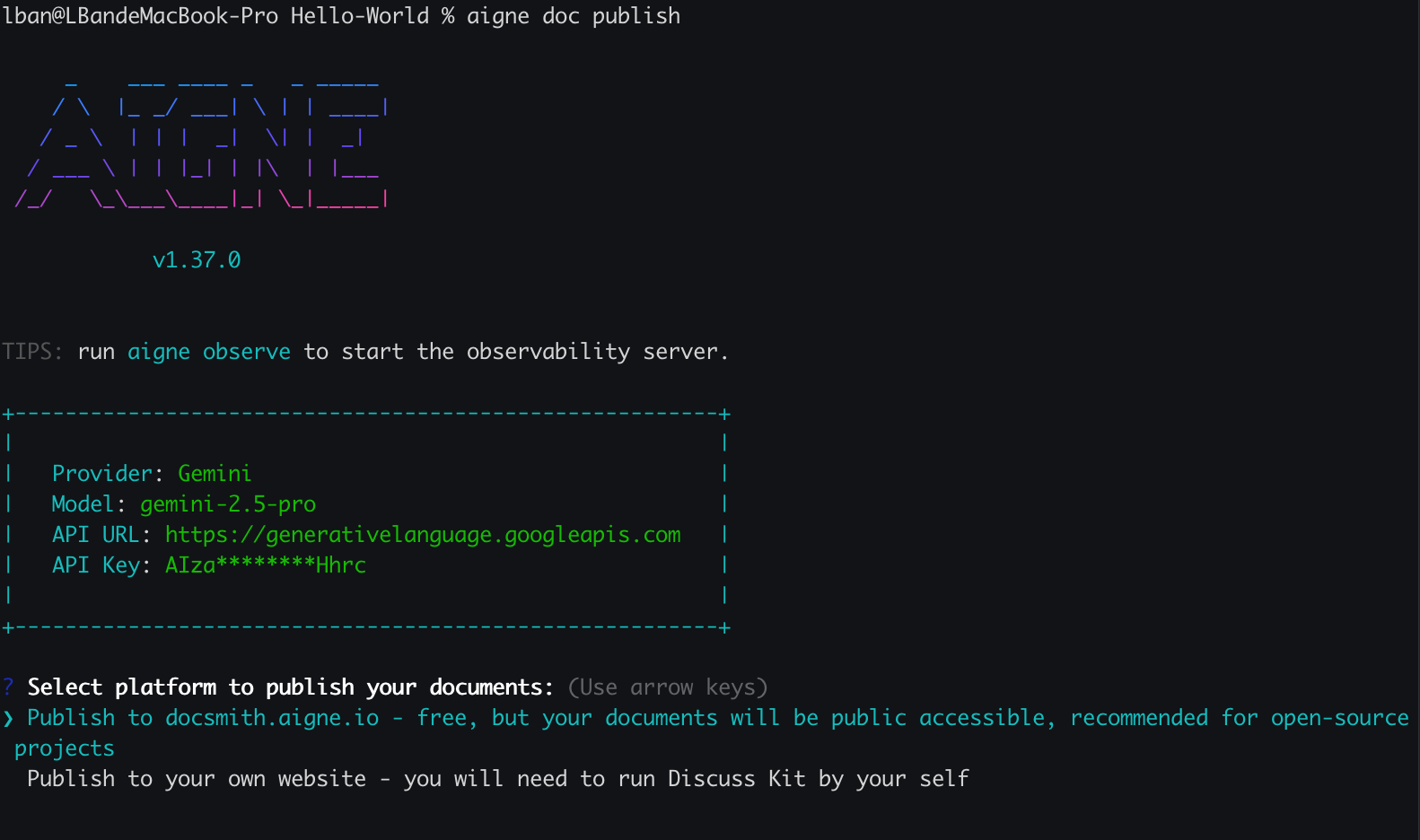
If you haven't configured a publishing destination before, you will be prompted to choose between the official platform and a self-hosted one. Select the option that best suits your needs.
|
|
64
|
+
|
|
65
|
+
|
|
66
|
+
|
|
67
|
+
If you select the self-hosted option, you will be asked to enter the URL for your Discuss Kit instance.
|
|
68
|
+
|
|
69
|
+
### 3. Authenticate Your Account
|
|
70
|
+
|
|
71
|
+
For the first connection to a new platform, DocSmith will automatically open a browser window for you to log in and authorize the CLI. This is a one-time step; your access token will be saved locally for all future publishes to that platform.
|
|
72
|
+
|
|
73
|
+
### 4. Confirmation
|
|
74
|
+
|
|
75
|
+
Once the upload is complete, you will see a success message in your terminal, and your documentation will be live.
|
|
76
|
+
|
|
77
|
+
```
|
|
78
|
+
✅ Documentation Published Successfully!
|
|
79
|
+
```
|
|
80
|
+
|
|
81
|
+
## Publishing in CI/CD Environments
|
|
82
|
+
|
|
83
|
+
For automated workflows, you can bypass the interactive prompts by using command-line arguments or environment variables.
|
|
84
|
+
|
|
85
|
+
| Method | Name | Description | Example |
|
|
86
|
+
|---|---|---|---|
|
|
87
|
+
| **Argument** | `--appUrl` | Specifies the URL of your self-hosted Discuss Kit instance directly. | `aigne doc publish --appUrl https://docs.mycompany.com` |
|
|
88
|
+
| **Env Var** | `DOC_DISCUSS_KIT_URL` | Sets the target platform URL, overriding any other configuration. | `export DOC_DISCUSS_KIT_URL=...` |
|
|
89
|
+
| **Env Var** | `DOC_DISCUSS_KIT_ACCESS_TOKEN` | Provides the access token directly, skipping the interactive login. | `export DOC_DISCUSS_KIT_ACCESS_TOKEN=...` |
|
|
90
|
+
|
|
91
|
+
## Troubleshooting
|
|
92
|
+
|
|
93
|
+
If you encounter issues during the publishing process, here are some common causes and their solutions:
|
|
94
|
+
|
|
95
|
+
- **Invalid URL or Connection Error**: This often happens if the provided URL for a self-hosted instance is incorrect or the server is not reachable. Double-check the URL and your network connection.
|
|
96
|
+
- **Missing Required Components**: The destination website must have the Discuss Kit component installed to host the documentation. If it's missing, the CLI will return an error with guidance on how to install it.
|
|
97
|
+
|
|
98
|
+
For a complete list of commands and options, please refer to the [CLI Command Reference](./cli-reference.md).
|
|
@@ -0,0 +1,98 @@
|
|
|
1
|
+
---
|
|
2
|
+
labels: ["Reference"]
|
|
3
|
+
---
|
|
4
|
+
|
|
5
|
+
# 发布文档
|
|
6
|
+
|
|
7
|
+
文档生成后,下一步是将其发布到线上。AIGNE DocSmith 通过 `aigne doc publish` 命令简化了这一过程,该命令会将您的内容上传到 Discuss Kit 平台,使其即时对您的受众可用。
|
|
8
|
+
|
|
9
|
+
本指南将介绍如何发布您的文档,无论您使用的是免费的官方平台还是自托管的实例。
|
|
10
|
+
|
|
11
|
+
## 发布流程
|
|
12
|
+
|
|
13
|
+
`aigne doc publish` 命令会启动一个交互式流程,引导您完成必要的步骤。下图展示了首次发布文档的典型工作流程。
|
|
14
|
+
|
|
15
|
+
```d2
|
|
16
|
+
shape: sequence_diagram
|
|
17
|
+
|
|
18
|
+
用户; CLI; "Discuss Kit 平台"
|
|
19
|
+
|
|
20
|
+
用户 -> CLI: 运行 `aigne doc publish`
|
|
21
|
+
|
|
22
|
+
alt "首次使用或未配置"
|
|
23
|
+
CLI -> 用户: "提示:选择平台"
|
|
24
|
+
用户 -> CLI: "选择官方或自托管"
|
|
25
|
+
CLI -> 用户: "打开浏览器进行身份验证"
|
|
26
|
+
用户 -> "Discuss Kit 平台": "登录并授权"
|
|
27
|
+
"Discuss Kit 平台" -> CLI: "提供访问令牌"
|
|
28
|
+
CLI -> CLI: "保存令牌供将来使用"
|
|
29
|
+
end
|
|
30
|
+
|
|
31
|
+
CLI -> "Discuss Kit 平台": "上传文档和媒体文件"
|
|
32
|
+
"Discuss Kit 平台" -> CLI: "确认成功"
|
|
33
|
+
CLI -> 用户: "✅ 文档发布成功!"
|
|
34
|
+
```
|
|
35
|
+
|
|
36
|
+
## 发布选项
|
|
37
|
+
|
|
38
|
+
您有两种主要选项来托管您的文档,以满足不同的可见性和控制需求。
|
|
39
|
+
|
|
40
|
+
<x-cards data-columns="2">
|
|
41
|
+
<x-card data-title="官方平台" data-icon="lucide:globe">
|
|
42
|
+
发布到官方托管平台 docsmith.aigne.io。该选项免费,非常适合开源项目,并能让您的文档公开访问。
|
|
43
|
+
</x-card>
|
|
44
|
+
<x-card data-title="自托管平台" data-icon="lucide:server">
|
|
45
|
+
发布到您自己的 Discuss Kit 私有实例。这使您可以完全控制谁可以访问您的文档,适合内部或私有项目。
|
|
46
|
+
</x-card>
|
|
47
|
+
</x-cards>
|
|
48
|
+
|
|
49
|
+
## 分步指南
|
|
50
|
+
|
|
51
|
+
首次发布文档是一个简单的交互式过程。
|
|
52
|
+
|
|
53
|
+
### 1. 运行发布命令
|
|
54
|
+
|
|
55
|
+
在终端中,导航到您项目的根目录并运行以下命令:
|
|
56
|
+
|
|
57
|
+
```bash
|
|
58
|
+
aigne doc publish
|
|
59
|
+
```
|
|
60
|
+
|
|
61
|
+
### 2. 选择您的平台
|
|
62
|
+
|
|
63
|
+
如果您之前没有配置过发布目标,系统将提示您在官方平台和自托管平台之间进行选择。请选择最适合您需求的选项。
|
|
64
|
+
|
|
65
|
+

|
|
66
|
+
|
|
67
|
+
如果您选择自托管选项,系统将要求您输入您的 Discuss Kit 实例的 URL。
|
|
68
|
+
|
|
69
|
+
### 3. 验证您的账户
|
|
70
|
+
|
|
71
|
+
首次连接到新平台时,DocSmith 会自动打开一个浏览器窗口,供您登录并授权 CLI。这是一个一次性步骤;您的访问令牌将被保存在本地,用于将来向该平台进行的所有发布。
|
|
72
|
+
|
|
73
|
+
### 4. 确认
|
|
74
|
+
|
|
75
|
+
上传完成后,您将在终端中看到一条成功消息,您的文档即已上线。
|
|
76
|
+
|
|
77
|
+
```
|
|
78
|
+
✅ 文档发布成功!
|
|
79
|
+
```
|
|
80
|
+
|
|
81
|
+
## 在 CI/CD 环境中发布
|
|
82
|
+
|
|
83
|
+
对于自动化工作流,您可以通过使用命令行参数或环境变量来绕过交互式提示。
|
|
84
|
+
|
|
85
|
+
| 方法 | 名称 | 描述 | 示例 |
|
|
86
|
+
|---|---|---|---|
|
|
87
|
+
| **参数** | `--appUrl` | 直接指定您自托管的 Discuss Kit 实例的 URL。 | `aigne doc publish --appUrl https://docs.mycompany.com` |
|
|
88
|
+
| **环境变量** | `DOC_DISCUSS_KIT_URL` | 设置目标平台 URL,覆盖任何其他配置。 | `export DOC_DISCUSS_KIT_URL=...` |
|
|
89
|
+
| **环境变量** | `DOC_DISCUSS_KIT_ACCESS_TOKEN` | 直接提供访问令牌,跳过交互式登录。 | `export DOC_DISCUSS_KIT_ACCESS_TOKEN=...` |
|
|
90
|
+
|
|
91
|
+
## 故障排除
|
|
92
|
+
|
|
93
|
+
如果您在发布过程中遇到问题,以下是一些常见原因及其解决方案:
|
|
94
|
+
|
|
95
|
+
- **无效的 URL 或连接错误**:这通常发生在为自托管实例提供的 URL 不正确或服务器无法访问时。请仔细检查 URL 和您的网络连接。
|
|
96
|
+
- **缺少必需组件**:目标网站必须安装 Discuss Kit 组件才能托管文档。如果缺少该组件,CLI 将返回错误并提供安装指导。
|
|
97
|
+
|
|
98
|
+
有关命令和选项的完整列表,请参阅 [CLI 命令参考](./cli-reference.md)。
|
|
@@ -0,0 +1,83 @@
|
|
|
1
|
+
---
|
|
2
|
+
labels: ["Reference"]
|
|
3
|
+
---
|
|
4
|
+
|
|
5
|
+
# Translate Documentation
|
|
6
|
+
|
|
7
|
+
AIGNE DocSmith helps you reach a global audience by automatically translating your documentation into over 12 languages. This feature streamlines the localization process, ensuring your content is accessible to users worldwide with a single command.
|
|
8
|
+
|
|
9
|
+
## Easy Translation with Interactive Mode
|
|
10
|
+
|
|
11
|
+
For a guided experience, the simplest way to start is by running the `translate` command without any arguments:
|
|
12
|
+
|
|
13
|
+
```bash
|
|
14
|
+
aigne doc translate
|
|
15
|
+
```
|
|
16
|
+
|
|
17
|
+
This will launch an interactive wizard that walks you through the process:
|
|
18
|
+
|
|
19
|
+
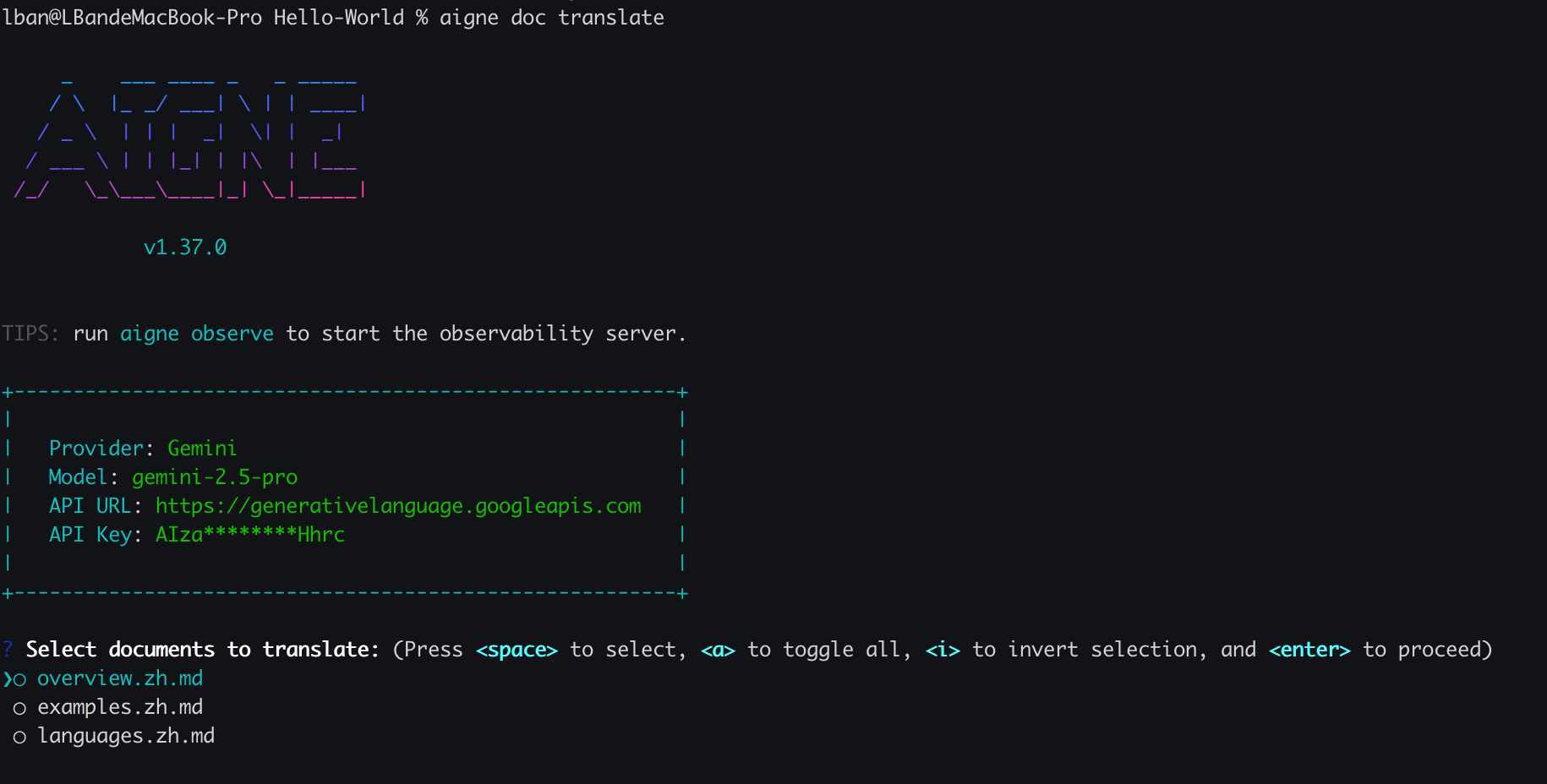
1. **Select Documents to Translate:** You'll be presented with a list of your existing documents. Simply choose the ones you want to translate.
|
|
20
|
+
|
|
21
|
+
|
|
22
|
+
|
|
23
|
+
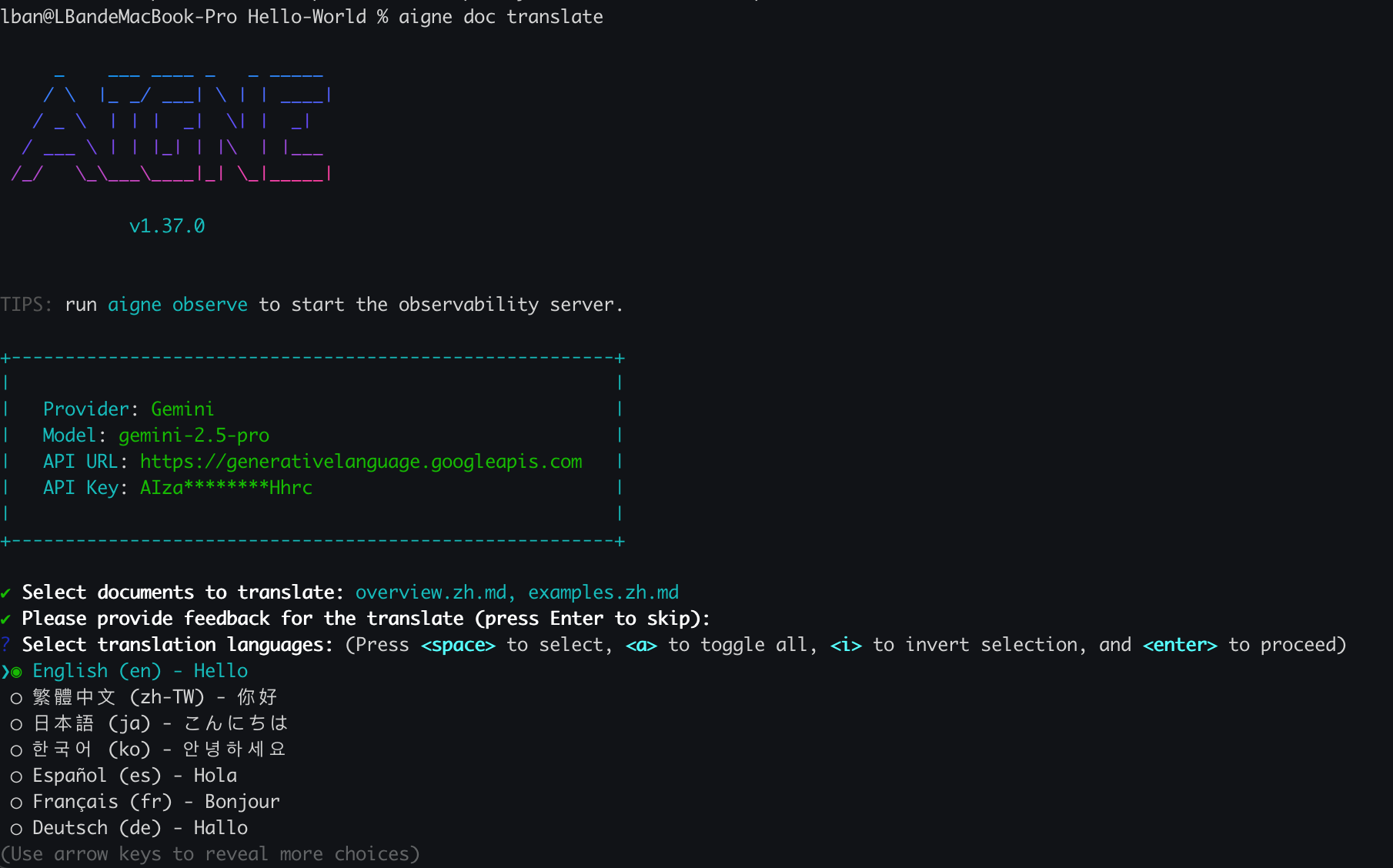
2. **Choose Target Languages:** After selecting your documents, you can pick one or more target languages from the list of supported options.
|
|
24
|
+
|
|
25
|
+
|
|
26
|
+
|
|
27
|
+
3. **Confirm and Run:** DocSmith will then handle the translation, generating new versions of your selected files for each language.
|
|
28
|
+
|
|
29
|
+
## Advanced Control with Command-Line Flags
|
|
30
|
+
|
|
31
|
+
For automation or more specific tasks, you can use command-line flags to control the translation process directly. This is ideal for integrating into CI/CD pipelines or for power users who prefer the command line.
|
|
32
|
+
|
|
33
|
+
Here are the primary options available:
|
|
34
|
+
|
|
35
|
+
| Parameter | Description |
|
|
36
|
+
|---|---|
|
|
37
|
+
| `--langs` | Specify one or more target languages. This flag can be used multiple times (e.g., `--langs zh --langs ja`). |
|
|
38
|
+
| `--docs` | Specify the paths of the documents to translate. This flag can also be used multiple times. |
|
|
39
|
+
| `--feedback` | Provide feedback to the AI to improve the quality of future translations (e.g., `--feedback "Use formal tone"`). |
|
|
40
|
+
| `--glossary` | Use a glossary file in markdown format to ensure consistent terminology for specific terms (e.g., `--glossary @path/to/glossary.md`). |
|
|
41
|
+
|
|
42
|
+
### Example: Translating Specific Documents
|
|
43
|
+
|
|
44
|
+
To translate `overview.md` and `examples.md` into Chinese and Japanese, you would run:
|
|
45
|
+
|
|
46
|
+
```bash
|
|
47
|
+
aigne doc translate --langs zh --langs ja --docs overview.md --docs examples.md
|
|
48
|
+
```
|
|
49
|
+
|
|
50
|
+
### Example: Using a Glossary and Feedback
|
|
51
|
+
|
|
52
|
+
To ensure brand names and technical terms are translated correctly, you can provide a glossary file. You can also give feedback to refine the translation style.
|
|
53
|
+
|
|
54
|
+
```bash
|
|
55
|
+
aigne doc translate --glossary @glossary.md --feedback "Use technical terminology consistently" --docs overview.md --langs de
|
|
56
|
+
```
|
|
57
|
+
|
|
58
|
+
## Supported Languages
|
|
59
|
+
|
|
60
|
+
DocSmith supports automatic translation for the following languages:
|
|
61
|
+
|
|
62
|
+
| Language | Code |
|
|
63
|
+
|---|---|
|
|
64
|
+
| English | en |
|
|
65
|
+
| Simplified Chinese | zh-CN |
|
|
66
|
+
| Traditional Chinese | zh-TW |
|
|
67
|
+
| Japanese | ja |
|
|
68
|
+
| Korean | ko |
|
|
69
|
+
| Spanish | es |
|
|
70
|
+
| French | fr |
|
|
71
|
+
| German | de |
|
|
72
|
+
| Portuguese | pt-BR |
|
|
73
|
+
| Russian | ru |
|
|
74
|
+
| Italian | it |
|
|
75
|
+
| Arabic | ar |
|
|
76
|
+
|
|
77
|
+
---
|
|
78
|
+
|
|
79
|
+
Once your documentation is translated, you're ready to share it with the world. Learn how in the next section.
|
|
80
|
+
|
|
81
|
+
<x-card data-title="Next: Publish Your Docs" data-icon="lucide:upload-cloud" data-href="/features/publish-your-docs" data-cta="Read More">
|
|
82
|
+
A guide on how to easily publish your documentation to a public platform or your own private website.
|
|
83
|
+
</x-card>
|