@aide-family/dsh-remote 0.6.1 → 0.6.2
This diff represents the content of publicly available package versions that have been released to one of the supported registries. The information contained in this diff is provided for informational purposes only and reflects changes between package versions as they appear in their respective public registries.
package/README.md
CHANGED
|
@@ -2,6 +2,96 @@
|
|
|
2
2
|
|
|
3
3
|
SSH remote-server operations for [DeepSeek Harness](https://www.deepseek.com/harness/) (DSH).
|
|
4
4
|
|
|
5
|
+
## Quick start
|
|
6
|
+
|
|
7
|
+
### 1. Install DSH
|
|
8
|
+
|
|
9
|
+
`dsh-remote` is a DSH plugin, so install and launch DSH first.
|
|
10
|
+
|
|
11
|
+
**Desktop app (recommended).** Download the official app for
|
|
12
|
+
[macOS or Windows](https://www.deepseek.com/en/download/), open it, and finish the
|
|
13
|
+
first-run sign-in. The desktop app bundles its own `dsh` CLI and Node.js.
|
|
14
|
+
|
|
15
|
+
**CLI / Web UI.** Requires Node.js `>= 24.9.0`:
|
|
16
|
+
|
|
17
|
+
```sh
|
|
18
|
+
# run without a global install
|
|
19
|
+
npx -y @deepseek-ai/dsh web
|
|
20
|
+
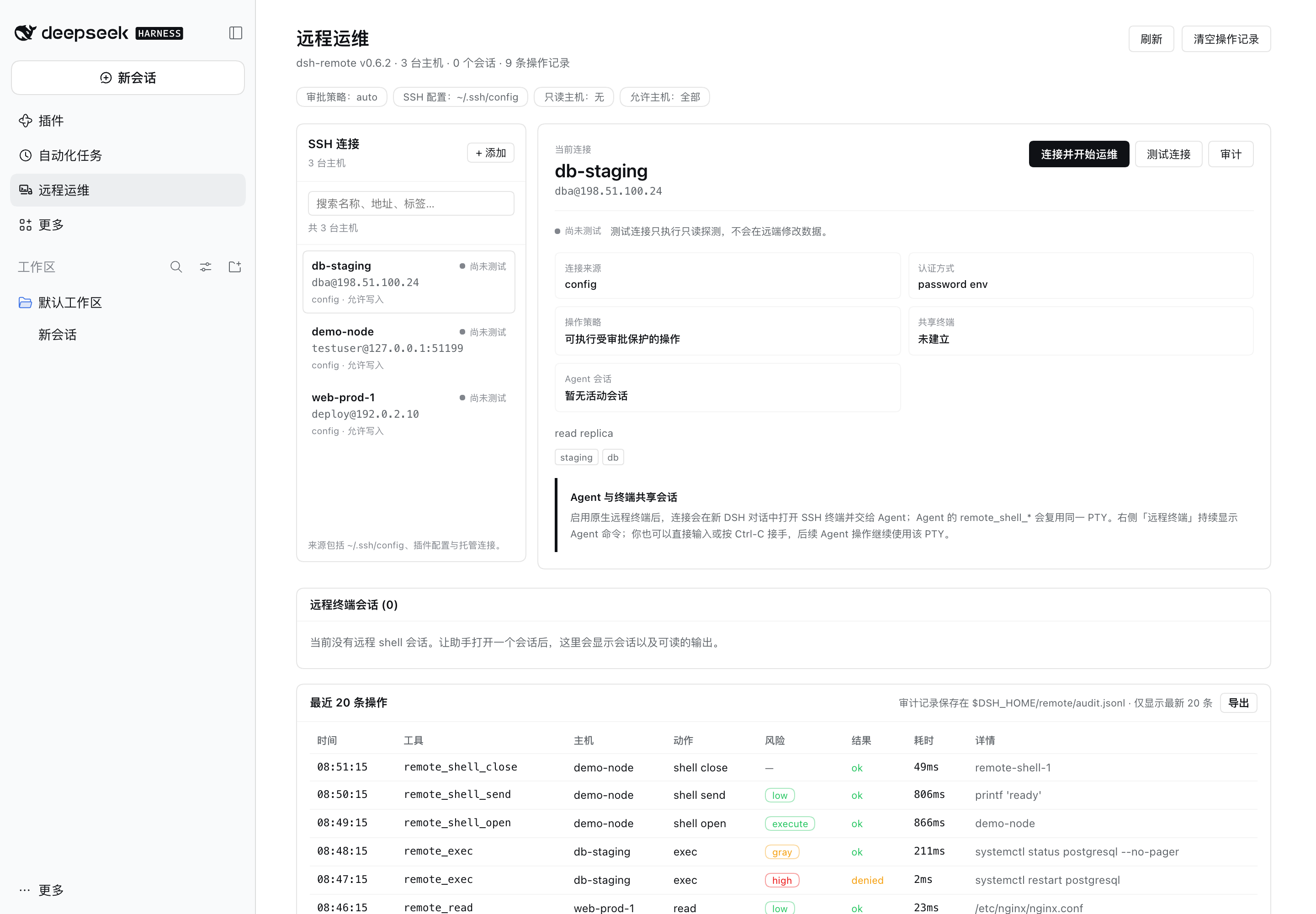
|
|
21
|
+
# or install the CLI once and reuse it
|
|
22
|
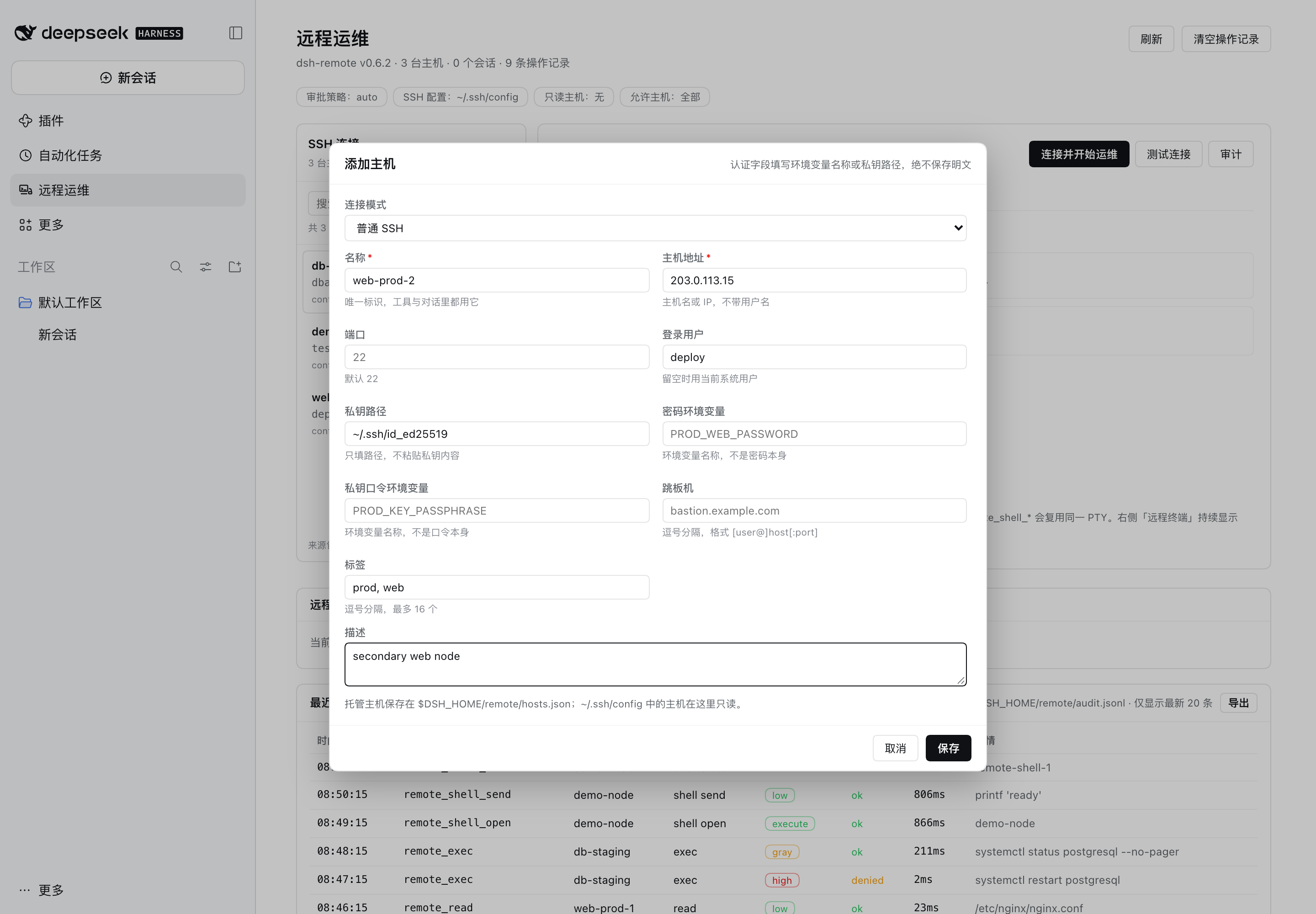
+
npm install -g @deepseek-ai/dsh
|
|
23
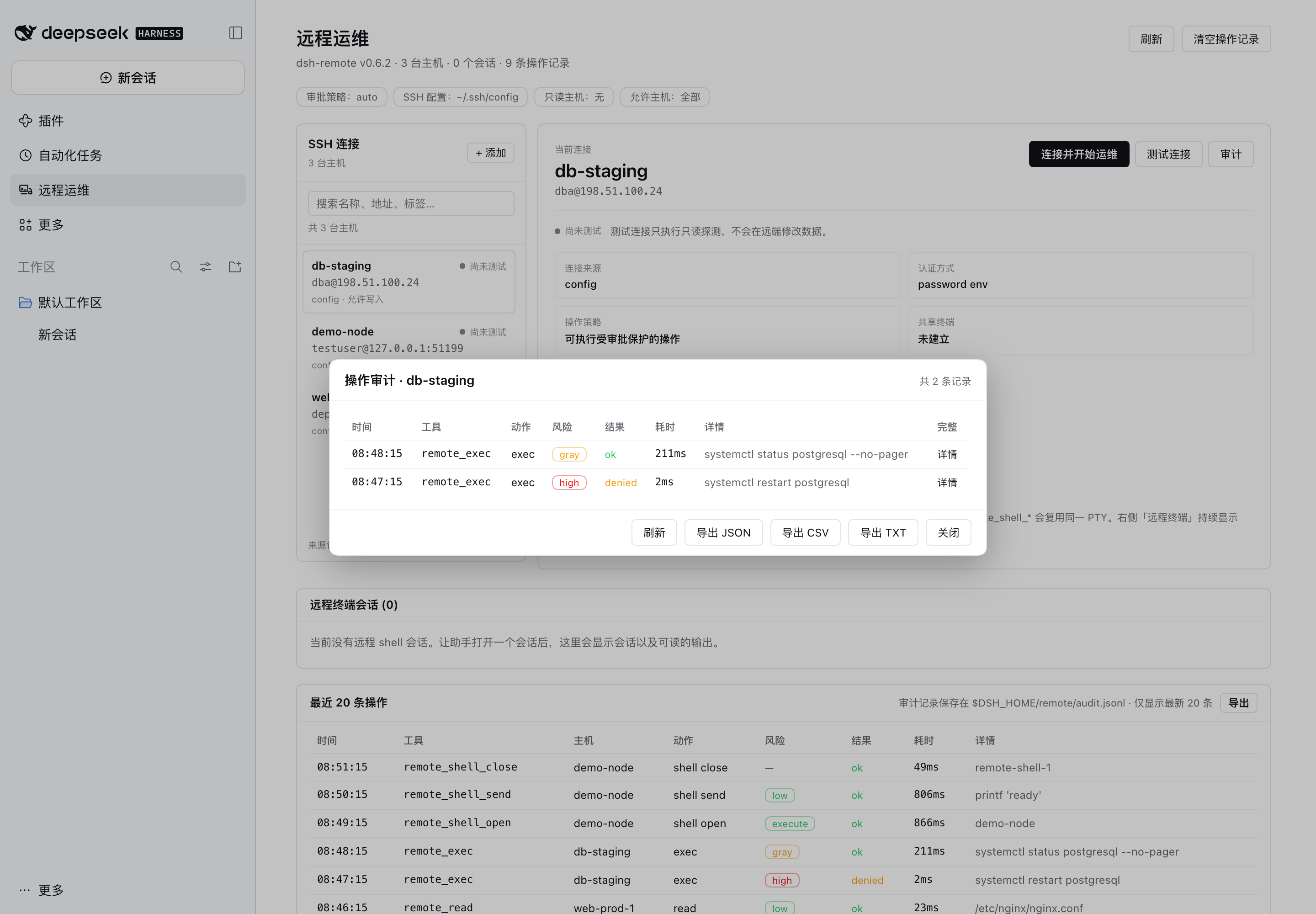
|
+
dsh web
|
|
24
|
+
```
|
|
25
|
+
|
|
26
|
+
`dsh web` prints an authenticated local URL (for example
|
|
27
|
+
`http://127.0.0.1:3080/`). Open it in a browser. Then check the version:
|
|
28
|
+
|
|
29
|
+
```sh
|
|
30
|
+
dsh --version # must be >= 0.2.1-rc.5
|
|
31
|
+
```
|
|
32
|
+
|
|
33
|
+
> With the Desktop app, `dsh` may not be on your shell `PATH`; either use the
|
|
34
|
+
> app or install the CLI as above. The plugin also needs SSH access to the
|
|
35
|
+
> target hosts: key files, `ssh-agent`, or a password supplied through an
|
|
36
|
+
> environment variable. `~/.ssh/config` settings (`HostName`, `User`, `Port`,
|
|
37
|
+
> `IdentityFile`, `ProxyJump`) are honored.
|
|
38
|
+
|
|
39
|
+
### 2. Install dsh-remote
|
|
40
|
+
|
|
41
|
+
From npm:
|
|
42
|
+
|
|
43
|
+
```sh
|
|
44
|
+
dsh plugin --profile desktop add @aide-family/dsh-remote --ignore-scripts
|
|
45
|
+
```
|
|
46
|
+
|
|
47
|
+
From a local checkout:
|
|
48
|
+
|
|
49
|
+
```sh
|
|
50
|
+
cd /path/to/dsh-remote
|
|
51
|
+
npm install # once: ssh2 + test devDependencies
|
|
52
|
+
npm run install:profile # packs dist/aide-family-dsh-remote-<version>.tgz and installs
|
|
53
|
+
# it into the "desktop" profile
|
|
54
|
+
```
|
|
55
|
+
|
|
56
|
+
Or pack and install manually into another profile:
|
|
57
|
+
|
|
58
|
+
```sh
|
|
59
|
+
npm run pack:plugin
|
|
60
|
+
dsh plugin --profile desktop add file:$PWD/dist/aide-family-dsh-remote-0.6.2.tgz --ignore-scripts
|
|
61
|
+
```
|
|
62
|
+
|
|
63
|
+
Install into the profile you actually boot: `desktop` for the Desktop app, or
|
|
64
|
+
`web` when you launched `dsh web` (the CLI also accepts `--profile web`).
|
|
65
|
+
|
|
66
|
+
Then fully quit and reopen the DSH Desktop app (a newly installed bundle is
|
|
67
|
+
loaded on the next boot), or boot the CLI profile you installed into. Open the
|
|
68
|
+
**远程运维** panel in the sidebar, or ask the agent to call `remote_hosts`, to
|
|
69
|
+
confirm the plugin loaded.
|
|
70
|
+
|
|
71
|
+
> **`--ignore-scripts` is required with pnpm 11.** pnpm refuses to install
|
|
72
|
+
> packages that declare unapproved install scripts, and `ssh2` declares an
|
|
73
|
+
> install script for its *optional* native cipher-speed addon (`cpu-features`).
|
|
74
|
+
> ssh2's pure-JavaScript implementation is fully functional without it, so
|
|
75
|
+
> skipping the scripts is safe and avoids needing a C toolchain. (Alternatively,
|
|
76
|
+
> add `allowBuilds: [ssh2, cpu-features]` to the profile's `pnpm-workspace.yaml`
|
|
77
|
+
> and install without the flag; that does require a working compiler setup.)
|
|
78
|
+
>
|
|
79
|
+
> **Do not install a development checkout with `link:`.** DSH routes
|
|
80
|
+
> `@deepseek-ai/*` imports only for packages that physically live inside the
|
|
81
|
+
> profile's `node_modules`; a symlink to a directory outside the profile cannot
|
|
82
|
+
> resolve them and the plugin fails to load. Use the tarball (`file:…tgz`) for
|
|
83
|
+
> local installs, or the npm package when published.
|
|
84
|
+
|
|
85
|
+
The plugin is a DSH **bundle**: installing it adds the
|
|
86
|
+
`@aide-family/dsh-remote` package and a `dsh-remote` plugin row to the profile.
|
|
87
|
+
To remove it:
|
|
88
|
+
|
|
89
|
+
```sh
|
|
90
|
+
dsh plugin --profile desktop remove @aide-family/dsh-remote
|
|
91
|
+
```
|
|
92
|
+
|
|
93
|
+
## What dsh-remote does
|
|
94
|
+
|
|
5
95
|
`dsh-remote` lets the agent in your DSH session actually operate remote servers:
|
|
6
96
|
list the hosts you already configured in `~/.ssh/config`, probe a box, run
|
|
7
97
|
non-interactive commands, read and edit remote files over SFTP, and move files
|
|
@@ -14,6 +104,37 @@ operations workbench: the same idea that the agent should gather evidence on the
|
|
|
14
104
|
real host, one bounded action at a time, with risky commands reviewed before
|
|
15
105
|
execution.
|
|
16
106
|
|
|
107
|
+
## Screenshots
|
|
108
|
+
|
|
109
|
+
The screenshots below come from an isolated documentation profile: synthetic
|
|
110
|
+
hosts on RFC 5737 documentation addresses, a loopback SSH fixture, and synthetic
|
|
111
|
+
command output. No real host, account, key, or local path is shown.
|
|
112
|
+
|
|
113
|
+
**Remote Ops management page.** Host inventory, per-host detail, live shell
|
|
114
|
+
sessions, and the recent-operation audit trail in one panel.
|
|
115
|
+
|
|
116
|
+
|
|
117
|
+
|
|
118
|
+
**Live terminal mirror.** Every agent command streams into the conversation's
|
|
119
|
+
right sidebar; the same panel opens DSH's native terminal on a chosen host.
|
|
120
|
+
|
|
121
|
+

|
|
122
|
+
|
|
123
|
+
**Host manager.** Add, edit, or remove managed connections. Secrets stay as
|
|
124
|
+
environment-variable names or key paths.
|
|
125
|
+
|
|
126
|
+
|
|
127
|
+
|
|
128
|
+
**Per-host audit.** Filter by host, expand the full command, or export
|
|
129
|
+
JSON/CSV/TXT.
|
|
130
|
+
|
|
131
|
+
|
|
132
|
+
|
|
133
|
+
**Native remote terminal.** A real xterm attached to the per-conversation SSH
|
|
134
|
+
session; close and re-open the tab to reattach it.
|
|
135
|
+
|
|
136
|
+

|
|
137
|
+
|
|
17
138
|
## Features
|
|
18
139
|
|
|
19
140
|
- **Hosts you already have** — discovers every concrete `Host` in
|
|
@@ -71,64 +192,6 @@ execution.
|
|
|
71
192
|
- **Hard limits** — per-host read-only lock, host allowlist, command deny
|
|
72
193
|
patterns, output caps, transfer caps, and TOFU host-key verification.
|
|
73
194
|
|
|
74
|
-
## Requirements
|
|
75
|
-
|
|
76
|
-
- DSH `>= 0.2.1-rc.5` (bundled in the Desktop app and the `dsh` CLI).
|
|
77
|
-
- Node.js `^22.19.0 || >=24.0.0` (already bundled with DSH).
|
|
78
|
-
- SSH access to the target hosts: key files, `ssh-agent`, or a password supplied
|
|
79
|
-
through an environment variable. `~/.ssh/config` settings (`HostName`, `User`,
|
|
80
|
-
`Port`, `IdentityFile`, `ProxyJump`) are honored.
|
|
81
|
-
|
|
82
|
-
## Install
|
|
83
|
-
|
|
84
|
-
### From a local tarball (recommended for this checkout)
|
|
85
|
-
|
|
86
|
-
```sh
|
|
87
|
-
cd /path/to/dsh-remote
|
|
88
|
-
npm install # once: ssh2 + test devDependencies
|
|
89
|
-
npm run install:profile # packs dist/aide-family-dsh-remote-<version>.tgz and installs
|
|
90
|
-
# it into the "desktop" profile
|
|
91
|
-
```
|
|
92
|
-
|
|
93
|
-
Or do the steps manually and choose another profile:
|
|
94
|
-
|
|
95
|
-
```sh
|
|
96
|
-
npm run pack:plugin
|
|
97
|
-
dsh plugin --profile desktop add file:$PWD/dist/aide-family-dsh-remote-0.5.3.tgz --ignore-scripts
|
|
98
|
-
```
|
|
99
|
-
|
|
100
|
-
Then fully quit and reopen the DSH Desktop app (a newly installed bundle is
|
|
101
|
-
loaded on the next boot), or boot the CLI profile you installed into.
|
|
102
|
-
|
|
103
|
-
> **`--ignore-scripts` is required with pnpm 11.** pnpm refuses to install
|
|
104
|
-
> packages that declare unapproved install scripts, and `ssh2` declares an
|
|
105
|
-
> install script for its *optional* native cipher-speed addon (`cpu-features`).
|
|
106
|
-
> ssh2's pure-JavaScript implementation is fully functional without it, so
|
|
107
|
-
> skipping the scripts is safe and avoids needing a C toolchain. (Alternatively,
|
|
108
|
-
> add `allowBuilds: [ssh2, cpu-features]` to the profile's `pnpm-workspace.yaml`
|
|
109
|
-
> and install without the flag; that does require a working compiler setup.)
|
|
110
|
-
>
|
|
111
|
-
> **Do not install a development checkout with `link:`.** DSH routes
|
|
112
|
-
> `@deepseek-ai/*` imports only for packages that physically live inside the
|
|
113
|
-
> profile's `node_modules`; a symlink to a directory outside the profile cannot
|
|
114
|
-
> resolve them and the plugin fails to load. Use the tarball (`file:…tgz`) for
|
|
115
|
-
> local installs, or the npm package when published.
|
|
116
|
-
|
|
117
|
-
### From npm (when published)
|
|
118
|
-
|
|
119
|
-
```sh
|
|
120
|
-
dsh plugin --profile desktop add @aide-family/dsh-remote --ignore-scripts
|
|
121
|
-
```
|
|
122
|
-
|
|
123
|
-
### Where it lands
|
|
124
|
-
|
|
125
|
-
The plugin is a DSH **bundle**: installing it adds the `@aide-family/dsh-remote`
|
|
126
|
-
package and a `dsh-remote` plugin row to the profile. To remove the package:
|
|
127
|
-
|
|
128
|
-
```sh
|
|
129
|
-
dsh plugin --profile desktop remove @aide-family/dsh-remote
|
|
130
|
-
```
|
|
131
|
-
|
|
132
195
|
## Configure
|
|
133
196
|
|
|
134
197
|
All settings live on the plugin's row in the profile patch. The desktop profile
|
|
@@ -565,7 +628,7 @@ The npm package name is `@aide-family/dsh-remote`; the DSH plugin row id remains
|
|
|
565
628
|
`NPM_TOKEN` with publish permission for the `@aide-family` scope. Do not put the
|
|
566
629
|
token in the repository or a checked-in `.npmrc`.
|
|
567
630
|
|
|
568
|
-
Pushing a tag that exactly matches the manifest version (for example, `v0.
|
|
631
|
+
Pushing a tag that exactly matches the manifest version (for example, `v0.6.2`)
|
|
569
632
|
starts the [publish workflow](https://github.com/aide-family/dsh-remote/blob/main/.github/workflows/publish-npm.yml).
|
|
570
633
|
The workflow installs from the lockfile, runs unit tests plus the DSH-independent
|
|
571
634
|
integration suites, checks the tag/package version match, previews the tarball,
|
|
@@ -573,8 +636,8 @@ then publishes publicly with provenance.
|
|
|
573
636
|
The publisher must have rights to create packages in the `@aide-family` scope.
|
|
574
637
|
|
|
575
638
|
```sh
|
|
576
|
-
git tag v0.
|
|
577
|
-
git push origin v0.
|
|
639
|
+
git tag v0.6.2
|
|
640
|
+
git push origin v0.6.2
|
|
578
641
|
```
|
|
579
642
|
|
|
580
643
|
Published versions cannot be reused. If a release has a mistake, fix it and
|
|
@@ -650,7 +713,8 @@ test/
|
|
|
650
713
|
unit/ pure-module tests
|
|
651
714
|
integration/ fake-ctx plugin tests + fixture SSH server
|
|
652
715
|
fixtures/ ssh-server.mjs
|
|
653
|
-
scripts/ dev-profile, sync-profile, e2e, dev-web
|
|
716
|
+
scripts/ dev-profile, sync-profile, e2e, dev-web, docs-screenshots
|
|
717
|
+
docs/assets/ README screenshots (generated from the synthetic profile only)
|
|
654
718
|
```
|
|
655
719
|
|
|
656
720
|
Attribution: the command-risk classifier in `lib/policy/` is ported from the
|
|
@@ -674,9 +738,10 @@ contents before publication; never commit live connection records or secrets.
|
|
|
674
738
|
## Verification
|
|
675
739
|
|
|
676
740
|
```sh
|
|
677
|
-
npm test #
|
|
741
|
+
npm test # unit + real-fixture integration (no external servers)
|
|
678
742
|
npm run e2e # real DSH headless run against a fixture SSH server
|
|
679
743
|
node scripts/dev-web-test.mjs --remote-terminal --docs-shots # real browser loop (v0.5)
|
|
744
|
+
npm run docs:screenshots # regenerate docs/assets/ from an isolated synthetic profile
|
|
680
745
|
```
|
|
681
746
|
|
|
682
747
|
The e2e suite proves the model actually calls the tools through the DSH pipeline,
|
|
@@ -684,8 +749,12 @@ that read-only remote actions work, that mutating actions fail closed in headles
|
|
|
684
749
|
mode, that a persistent PTY shell opens, echoes a command, and closes cleanly,
|
|
685
750
|
and that an unproven (gray) command now runs without approval. The management page is verified in a real browser against an isolated
|
|
686
751
|
DSH Web profile (`npm run dev:web` boots it, drives it with headless Chrome, and
|
|
687
|
-
writes a local screenshot).
|
|
688
|
-
|
|
752
|
+
writes a local screenshot). `npm run docs:screenshots` regenerates the README
|
|
753
|
+
images from a profile that disables SSH-config discovery, contains only synthetic
|
|
754
|
+
inventory and a loopback fixture, and refuses to write a capture if the page
|
|
755
|
+
shows a real-looking host, account, or local path. Earlier screenshots were
|
|
756
|
+
removed because they contained real connection details; the README now uses
|
|
757
|
+
generated synthetic captures, but still review every image before publishing it.
|
|
689
758
|
`--emit-live` verifies the v0.4 live mirror (guide entry, auto-open, streamed
|
|
690
759
|
commands/output, session and host filters, scrolling, Clear). `--remote-terminal`
|
|
691
760
|
boots the same profile with a real SSH fixture host and verifies v0.5 end to end:
|
|
Binary file
|
|
Binary file
|
|
Binary file
|
|
Binary file
|
|
Binary file
|
package/package.json
CHANGED
|
@@ -1,6 +1,6 @@
|
|
|
1
1
|
{
|
|
2
2
|
"name": "@aide-family/dsh-remote",
|
|
3
|
-
"version": "0.6.
|
|
3
|
+
"version": "0.6.2",
|
|
4
4
|
"description": "SSH remote-server operations for DeepSeek Harness: host discovery from ~/.ssh/config, remote command execution, SFTP file tools, and Crescent-style command risk review with approval gating.",
|
|
5
5
|
"type": "module",
|
|
6
6
|
"main": "lib/index.js",
|
|
@@ -20,7 +20,8 @@
|
|
|
20
20
|
"README.md",
|
|
21
21
|
"LICENSE",
|
|
22
22
|
"docs/icon.svg",
|
|
23
|
-
"docs/TERMINAL_ACTIONS.md"
|
|
23
|
+
"docs/TERMINAL_ACTIONS.md",
|
|
24
|
+
"docs/assets"
|
|
24
25
|
],
|
|
25
26
|
"keywords": [
|
|
26
27
|
"dsh",
|
|
@@ -57,7 +58,8 @@
|
|
|
57
58
|
"pack:plugin": "mkdir -p dist && npm pack --pack-destination dist",
|
|
58
59
|
"install:profile": "bash scripts/install-into-profile.sh",
|
|
59
60
|
"dev:screenshot": "node scripts/dev-screenshot.mjs",
|
|
60
|
-
"dev:web": "node scripts/dev-web-test.mjs"
|
|
61
|
+
"dev:web": "node scripts/dev-web-test.mjs",
|
|
62
|
+
"docs:screenshots": "node scripts/docs-screenshots.mjs"
|
|
61
63
|
},
|
|
62
64
|
"peerDependencies": {
|
|
63
65
|
"@deepseek-ai/cordis": "^4.0.5",
|