@aicore/cocodb-ws-client 1.0.7 → 1.0.9
This diff represents the content of publicly available package versions that have been released to one of the supported registries. The information contained in this diff is provided for informational purposes only and reflects changes between package versions as they appear in their respective public registries.
- package/README.md +64 -23
- package/package.json +11 -11
- package/src/index.js +48 -1
- package/src/utils/client.js +143 -29
package/README.md
CHANGED
|
@@ -2,33 +2,74 @@
|
|
|
2
2
|
WebSocket client for cocoDb. This will client can pipeline the requests to increase through put connection
|
|
3
3
|
|
|
4
4
|
## Code Guardian
|
|
5
|
-
[](https://github.com/aicore/template-nodejs/actions/workflows/build_verify.yml)
|
|
6
|
+
|
|
7
|
+
<a href="https://sonarcloud.io/summary/new_code?id=aicore_cocoDbWsClient">
|
|
8
|
+
<img src="https://sonarcloud.io/api/project_badges/measure?project=aicore_cocoDbWsClient&metric=alert_status" alt="Sonar code quality check" />
|
|
9
|
+
<img src="https://sonarcloud.io/api/project_badges/measure?project=aicore_cocoDbWsClient&metric=security_rating" alt="Security rating" />
|
|
10
|
+
<img src="https://sonarcloud.io/api/project_badges/measure?project=aicore_cocoDbWsClient&metric=vulnerabilities" alt="vulnerabilities" />
|
|
11
|
+
<img src="https://sonarcloud.io/api/project_badges/measure?project=aicore_cocoDbWsClient&metric=coverage" alt="Code Coverage" />
|
|
12
|
+
<img src="https://sonarcloud.io/api/project_badges/measure?project=aicore_cocoDbWsClient&metric=bugs" alt="Code Bugs" />
|
|
13
|
+
<img src="https://sonarcloud.io/api/project_badges/measure?project=aicore_cocoDbWsClient&metric=reliability_rating" alt="Reliability Rating" />
|
|
14
|
+
<img src="https://sonarcloud.io/api/project_badges/measure?project=aicore_cocoDbWsClient&metric=sqale_rating" alt="Maintainability Rating" />
|
|
15
|
+
<img src="https://sonarcloud.io/api/project_badges/measure?project=aicore_cocoDbWsClient&metric=ncloc" alt="Lines of Code" />
|
|
16
|
+
<img src="https://sonarcloud.io/api/project_badges/measure?project=aicore_cocoDbWsClient&metric=sqale_index" alt="Technical debt" />
|
|
17
17
|
</a>
|
|
18
18
|
|
|
19
|
+
## Installing the library
|
|
20
|
+
|
|
21
|
+
```bash
|
|
22
|
+
npm install @aicore/cocodb-ws-client
|
|
23
|
+
```
|
|
24
|
+
|
|
25
|
+
## importing in your js file
|
|
26
|
+
|
|
27
|
+
```js
|
|
28
|
+
import * as coco from "@aicore/cocodb-ws-client"; // to import all functions
|
|
29
|
+
```
|
|
30
|
+
|
|
31
|
+
## Initializing the client
|
|
32
|
+
|
|
33
|
+
Create a connection to the cocoDbServiceEndPoint and listens for messages. The connection will
|
|
34
|
+
be maintained and it will try to automatically re-establish broken connections if there are network issues.
|
|
35
|
+
You need to await on this function before staring to use any db APIs. Any APIs called while the connection is
|
|
36
|
+
not fully setup will throw an error.
|
|
37
|
+
|
|
38
|
+
### Parameters
|
|
39
|
+
|
|
40
|
+
* `cocoDbServiceEndPoint` **\[string]\[1]** The URL of the coco-db service.
|
|
41
|
+
* `authKey` **\[string]\[1]** The authKey is a base64 encoded string of the username and password.
|
|
42
|
+
|
|
43
|
+
Returns **\[Promise]\[2]\<null>** Resolves when the cocodb client is ready to send/receive requests for the first time.
|
|
44
|
+
Rejects only if the user calls `close` API before any connection is established.
|
|
45
|
+
|
|
46
|
+
```js
|
|
47
|
+
await db.init("ws://endpoint.coco", "your_auth_key");
|
|
48
|
+
```
|
|
49
|
+
|
|
50
|
+
## Detailed API Docs
|
|
51
|
+
|
|
52
|
+
See this wiki for detailed API docs
|
|
53
|
+
|
|
54
|
+
* [https://github.com/aicore/cocoDbWsClient/wiki/api-API][1]
|
|
55
|
+
* More coco lib level detailed docs can be found at [https://github.com/aicore/libmysql/wiki/db-API][2]
|
|
56
|
+
|
|
57
|
+
## close the client
|
|
58
|
+
|
|
59
|
+
Closes the connection to the server. You need to await on this function before you can call init again.
|
|
60
|
+
|
|
61
|
+
Returns **\[Promise]\[2]\<null>** Resolves when the cocodb client is closed and you are free to call init again. Never rejects.
|
|
62
|
+
|
|
63
|
+
```js
|
|
64
|
+
await db.close();
|
|
65
|
+
```
|
|
66
|
+
|
|
67
|
+
[1]: https://github.com/aicore/cocoDbWsClient/wiki/api-API
|
|
68
|
+
|
|
69
|
+
[2]: https://github.com/aicore/libmysql/wiki/db-API
|
|
19
70
|
|
|
20
|
-
# TODOs after template use
|
|
21
|
-
## !!!Please see all issues in the generated repository as an issue will be generated tracking the fix of each of the below items.
|
|
22
|
-
1. Update package.json with your app defaults
|
|
23
|
-
2. Check Build actions on pull requests.
|
|
24
|
-
3. create a home page in wiki by going to wiki link https://github.com/<your_org>/<your_repo>/wiki
|
|
25
|
-
4. Goto github `repository` > `settings`> and uncheck `Allow merge commits`. this is usually automatically done by code guardian bots in core.ai org. so you may just need to verify it.
|
|
26
|
-
5. In sonar cloud, enable Automatic analysis from `Administration
|
|
27
|
-
Analysis Method` for the first time before a pull request is raised: 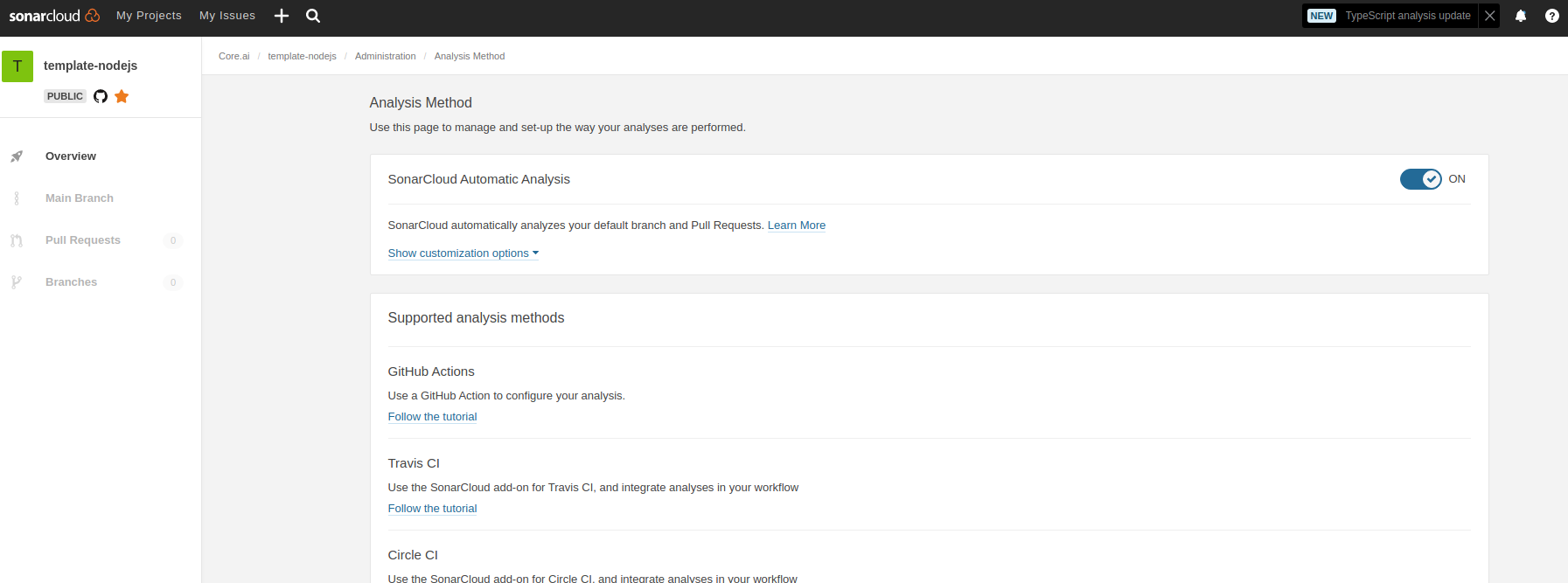
|
|
28
|
-
6. Check codacy runs on pull requests, set codacy defaults. You may remove codacy if sonar cloud is only needed.
|
|
29
|
-
7. Update the above Code Guardian badges; change all `id=aicore_template-nodejs-ts` to the sonar id of your project fields. see this PR: https://github.com/aicore/libcache/pull/13
|
|
30
71
|
|
|
31
|
-
#
|
|
72
|
+
# Development notes
|
|
32
73
|
|
|
33
74
|
## Building
|
|
34
75
|
Since this is a pure JS template project, build command just runs test with coverage.
|
package/package.json
CHANGED
|
@@ -1,6 +1,6 @@
|
|
|
1
1
|
{
|
|
2
2
|
"name": "@aicore/cocodb-ws-client",
|
|
3
|
-
"version": "1.0.
|
|
3
|
+
"version": "1.0.9",
|
|
4
4
|
"description": "Websocket client for cocoDb",
|
|
5
5
|
"main": "src/index.js",
|
|
6
6
|
"type": "module",
|
|
@@ -47,23 +47,23 @@
|
|
|
47
47
|
},
|
|
48
48
|
"homepage": "https://github.com/aicore/cocoDbWsClient#readme",
|
|
49
49
|
"devDependencies": {
|
|
50
|
-
"@commitlint/cli": "17.1
|
|
51
|
-
"@commitlint/config-conventional": "17.
|
|
50
|
+
"@commitlint/cli": "17.4.1",
|
|
51
|
+
"@commitlint/config-conventional": "17.4.0",
|
|
52
52
|
"c8": "7.12.0",
|
|
53
|
-
"chai": "4.3.
|
|
53
|
+
"chai": "4.3.7",
|
|
54
54
|
"cli-color": "2.0.3",
|
|
55
|
-
"documentation": "14.0.
|
|
56
|
-
"eslint": "8.
|
|
55
|
+
"documentation": "14.0.1",
|
|
56
|
+
"eslint": "8.31.0",
|
|
57
57
|
"glob": "8.0.3",
|
|
58
|
-
"husky": "8.0.
|
|
59
|
-
"mocha": "10.
|
|
58
|
+
"husky": "8.0.3",
|
|
59
|
+
"mocha": "10.2.0"
|
|
60
60
|
},
|
|
61
61
|
"dependencies": {
|
|
62
62
|
"@aicore/libcommonutils": "1.0.19",
|
|
63
|
-
"ws": "8.
|
|
63
|
+
"ws": "8.12.0"
|
|
64
64
|
},
|
|
65
65
|
"optionalDependencies": {
|
|
66
|
-
"bufferutil": "4.0.
|
|
67
|
-
"utf-8-validate": "5.0.
|
|
66
|
+
"bufferutil": "4.0.7",
|
|
67
|
+
"utf-8-validate": "5.0.10"
|
|
68
68
|
}
|
|
69
69
|
}
|
package/src/index.js
CHANGED
|
@@ -16,6 +16,8 @@
|
|
|
16
16
|
*
|
|
17
17
|
*/
|
|
18
18
|
|
|
19
|
+
// @INCLUDE_IN_API_DOCS
|
|
20
|
+
|
|
19
21
|
export {
|
|
20
22
|
get,
|
|
21
23
|
init,
|
|
@@ -31,6 +33,51 @@ export {
|
|
|
31
33
|
createTable,
|
|
32
34
|
getFromNonIndex,
|
|
33
35
|
hello,
|
|
34
|
-
update
|
|
36
|
+
update,
|
|
37
|
+
query
|
|
35
38
|
|
|
36
39
|
} from './utils/api.js';
|
|
40
|
+
|
|
41
|
+
/**
|
|
42
|
+
* ## Installing the library
|
|
43
|
+
* ```bash
|
|
44
|
+
* npm install @aicore/cocodb-ws-client
|
|
45
|
+
* ```
|
|
46
|
+
* ## importing in your js file
|
|
47
|
+
* ```js
|
|
48
|
+
* import * as coco from "@aicore/cocodb-ws-client"; // to import all functions
|
|
49
|
+
* ```
|
|
50
|
+
*
|
|
51
|
+
* ## Initializing the client
|
|
52
|
+
*
|
|
53
|
+
* Create a connection to the cocoDbServiceEndPoint and listens for messages. The connection will
|
|
54
|
+
* be maintained and it will try to automatically re-establish broken connections if there are network issues.
|
|
55
|
+
* You need to await on this function before staring to use any db APIs. Any APIs called while the connection is
|
|
56
|
+
* not fully setup will throw an error.
|
|
57
|
+
*
|
|
58
|
+
* ### Parameters
|
|
59
|
+
*
|
|
60
|
+
* * `cocoDbServiceEndPoint` **[string][1]** The URL of the coco-db service.
|
|
61
|
+
* * `authKey` **[string][1]** The authKey is a base64 encoded string of the username and password.
|
|
62
|
+
*
|
|
63
|
+
* Returns **[Promise][2]\<null>** Resolves when the cocodb client is ready to send/receive requests for the first time.
|
|
64
|
+
* Rejects only if the user calls `close` API before any connection is established.
|
|
65
|
+
* ```js
|
|
66
|
+
* await db.init("ws://endpoint.coco", "your_auth_key");
|
|
67
|
+
* ```
|
|
68
|
+
*
|
|
69
|
+
* ## Detailed API Docs
|
|
70
|
+
* See this wiki for detailed API docs
|
|
71
|
+
* * https://github.com/aicore/cocoDbWsClient/wiki/api-API
|
|
72
|
+
* * More coco lib level detailed docs can be found at https://github.com/aicore/libmysql/wiki/db-API
|
|
73
|
+
*
|
|
74
|
+
* ## close the client
|
|
75
|
+
*
|
|
76
|
+
* Closes the connection to the server. You need to await on this function before you can call init again.
|
|
77
|
+
*
|
|
78
|
+
* Returns **[Promise][2]\<null>** Resolves when the cocodb client is closed and you are free to call init again. Never rejects.
|
|
79
|
+
* ```js
|
|
80
|
+
* await db.close();
|
|
81
|
+
* ```
|
|
82
|
+
* @module @aicore/cocodb-ws-client
|
|
83
|
+
*/
|
package/src/utils/client.js
CHANGED
|
@@ -1,19 +1,132 @@
|
|
|
1
1
|
import {WS} from "./WebSocket.js";
|
|
2
2
|
import {isString, isObject, isStringEmpty, COCO_DB_FUNCTIONS} from "@aicore/libcommonutils";
|
|
3
3
|
|
|
4
|
-
let client = null
|
|
4
|
+
let client = null,
|
|
5
|
+
cocoDBEndPointURL = null,
|
|
6
|
+
cocoAuthKey = null;
|
|
5
7
|
const WEBSOCKET_ENDPOINT_COCO_DB = '/ws/';
|
|
6
8
|
const ID_TO_RESOLVE_REJECT_MAP = {};
|
|
9
|
+
const CONNECT_BACKOFF_TIME_MS = [1, 500, 1000, 3000, 5000, 10000, 20000];
|
|
7
10
|
let id = 0;
|
|
8
11
|
|
|
12
|
+
let currentBackoffIndex = 0;
|
|
13
|
+
function _resetBackoffTime() {
|
|
14
|
+
currentBackoffIndex = 0;
|
|
15
|
+
}
|
|
16
|
+
function _getBackoffTime() {
|
|
17
|
+
if(currentBackoffIndex >= CONNECT_BACKOFF_TIME_MS.length){
|
|
18
|
+
currentBackoffIndex = CONNECT_BACKOFF_TIME_MS.length - 1;
|
|
19
|
+
}
|
|
20
|
+
return CONNECT_BACKOFF_TIME_MS[currentBackoffIndex++];
|
|
21
|
+
}
|
|
22
|
+
|
|
9
23
|
// @INCLUDE_IN_API_DOCS
|
|
10
24
|
|
|
25
|
+
|
|
11
26
|
/**
|
|
12
|
-
*
|
|
27
|
+
* Sets up the websocket client and returns a promise that will be resolved when the connection is closed or broken.
|
|
28
|
+
*
|
|
29
|
+
* @param {function} connectedCb a callbak that will be executed when a connection is established to db
|
|
30
|
+
* @return {Promise<null>} promise that will be resolved when the connection is closed/broken/error.
|
|
31
|
+
* @private
|
|
32
|
+
*/
|
|
33
|
+
function _setupClientAndWaitForClose(connectedCb) {
|
|
34
|
+
return new Promise(resolve =>{
|
|
35
|
+
client = new WS.WebSocket(cocoDBEndPointURL.trim() + WEBSOCKET_ENDPOINT_COCO_DB, {
|
|
36
|
+
perMessageDeflate: false,
|
|
37
|
+
headers: {
|
|
38
|
+
Authorization: `Basic ${cocoAuthKey}`
|
|
39
|
+
}
|
|
40
|
+
});
|
|
41
|
+
client.on('open', function open() {
|
|
42
|
+
console.log('connected to server');
|
|
43
|
+
client.connectionEstablished = true;
|
|
44
|
+
connectedCb && connectedCb();
|
|
45
|
+
});
|
|
46
|
+
|
|
47
|
+
client.on('message', function message(data) {
|
|
48
|
+
__receiveMessage(data);
|
|
49
|
+
});
|
|
50
|
+
|
|
51
|
+
function _connectionTerminated(reason) {
|
|
52
|
+
console.log(reason);
|
|
53
|
+
client.connectionEstablished = false;
|
|
54
|
+
for (let sequenceNumber in ID_TO_RESOLVE_REJECT_MAP) {
|
|
55
|
+
let rejectHandler = ID_TO_RESOLVE_REJECT_MAP[sequenceNumber].reject;
|
|
56
|
+
rejectHandler(reason);
|
|
57
|
+
delete ID_TO_RESOLVE_REJECT_MAP[sequenceNumber];
|
|
58
|
+
}
|
|
59
|
+
resolve();
|
|
60
|
+
}
|
|
61
|
+
client.on('close', function () {
|
|
62
|
+
// https://websockets.spec.whatwg.org/#eventdef-websocket-error
|
|
63
|
+
// https://stackoverflow.com/questions/40084398/is-onclose-always-called-after-onerror-for-websocket
|
|
64
|
+
// we do not need to listen for error event as an error event is immediately followed by a close event.
|
|
65
|
+
_connectionTerminated('connection closed');
|
|
66
|
+
});
|
|
67
|
+
});
|
|
68
|
+
}
|
|
69
|
+
|
|
70
|
+
let backoffTimer = null, backoffResolveFn = null;
|
|
71
|
+
function _backoffTimer(timeInMilliSec) {
|
|
72
|
+
return new Promise(resolve => {
|
|
73
|
+
backoffResolveFn = resolve;
|
|
74
|
+
backoffTimer = setTimeout(()=>{
|
|
75
|
+
backoffTimer = null;
|
|
76
|
+
backoffResolveFn = null;
|
|
77
|
+
resolve();
|
|
78
|
+
}, timeInMilliSec);
|
|
79
|
+
});
|
|
80
|
+
}
|
|
81
|
+
|
|
82
|
+
function _cancelBackoffTimer() {
|
|
83
|
+
_resetBackoffTime();
|
|
84
|
+
if(backoffTimer){
|
|
85
|
+
clearTimeout(backoffTimer);
|
|
86
|
+
backoffTimer = null;
|
|
87
|
+
backoffResolveFn();
|
|
88
|
+
backoffResolveFn = null;
|
|
89
|
+
}
|
|
90
|
+
}
|
|
91
|
+
|
|
92
|
+
async function _setupAndMaintainConnection(firstConnectionCb, neverConnectedCB) {
|
|
93
|
+
backoffTimer = null;
|
|
94
|
+
function connected() {
|
|
95
|
+
_resetBackoffTime();
|
|
96
|
+
if(firstConnectionCb){
|
|
97
|
+
firstConnectionCb("connected");
|
|
98
|
+
firstConnectionCb = null;
|
|
99
|
+
}
|
|
100
|
+
}
|
|
101
|
+
while(!client || !client.userClosedConnection){
|
|
102
|
+
await _setupClientAndWaitForClose(connected);
|
|
103
|
+
if(!client || !client.userClosedConnection){
|
|
104
|
+
await _backoffTimer(_getBackoffTime());
|
|
105
|
+
}
|
|
106
|
+
}
|
|
107
|
+
client.userClosedConnectionCB && client.userClosedConnectionCB();
|
|
108
|
+
client = cocoDBEndPointURL = cocoAuthKey = null;
|
|
109
|
+
id = 0;
|
|
110
|
+
if(neverConnectedCB){
|
|
111
|
+
neverConnectedCB(new Error("user Cancelled"));
|
|
112
|
+
}
|
|
113
|
+
}
|
|
114
|
+
|
|
115
|
+
/**
|
|
116
|
+
* Create a connection to the cocoDbServiceEndPoint and listens for messages. The connection will
|
|
117
|
+
* be maintained and it will try to automatically re-establish broken connections if there are network issues.
|
|
118
|
+
* You need to await on this function before staring to use any db APIs. Any APIs called while the connection is
|
|
119
|
+
* not fully setup will throw an error.
|
|
120
|
+
*
|
|
13
121
|
* @param {string} cocoDbServiceEndPoint - The URL of the coco-db service.
|
|
14
122
|
* @param {string} authKey - The authKey is a base64 encoded string of the username and password.
|
|
123
|
+
* @return {Promise<null>} Resolves when the cocodb client is ready to send/receive requests for the first time.
|
|
124
|
+
* Rejects only if the user calls `close` API before any connection is established.
|
|
15
125
|
*/
|
|
16
126
|
export function init(cocoDbServiceEndPoint, authKey) {
|
|
127
|
+
if(client) {
|
|
128
|
+
throw new Error('Please close the existing connection before calling init again');
|
|
129
|
+
}
|
|
17
130
|
if (isStringEmpty(cocoDbServiceEndPoint) || !(cocoDbServiceEndPoint.startsWith('ws://')
|
|
18
131
|
|| cocoDbServiceEndPoint.startsWith('wss://'))) {
|
|
19
132
|
throw new Error('Please provide valid cocoDbServiceEndPoint');
|
|
@@ -21,40 +134,37 @@ export function init(cocoDbServiceEndPoint, authKey) {
|
|
|
21
134
|
if (isStringEmpty(authKey)) {
|
|
22
135
|
throw new Error('Please provide valid authKey');
|
|
23
136
|
}
|
|
24
|
-
|
|
25
|
-
|
|
26
|
-
|
|
27
|
-
|
|
28
|
-
}
|
|
29
|
-
});
|
|
30
|
-
client.on('open', function open() {
|
|
31
|
-
console.log('connected to server');
|
|
32
|
-
});
|
|
33
|
-
|
|
34
|
-
client.on('message', function message(data) {
|
|
35
|
-
__receiveMessage(data);
|
|
36
|
-
});
|
|
37
|
-
client.on('close', function terminate() {
|
|
38
|
-
console.log('closing connection');
|
|
39
|
-
for (let sequenceNumber in ID_TO_RESOLVE_REJECT_MAP) {
|
|
40
|
-
let reject = ID_TO_RESOLVE_REJECT_MAP[sequenceNumber].reject;
|
|
41
|
-
reject('connection closed');
|
|
42
|
-
delete ID_TO_RESOLVE_REJECT_MAP[sequenceNumber];
|
|
43
|
-
}
|
|
44
|
-
client = null;
|
|
45
|
-
id = 0;
|
|
137
|
+
cocoDBEndPointURL = cocoDbServiceEndPoint;
|
|
138
|
+
cocoAuthKey = authKey;
|
|
139
|
+
return new Promise((resolve, reject) => {
|
|
140
|
+
_setupAndMaintainConnection(resolve, reject);
|
|
46
141
|
});
|
|
47
142
|
}
|
|
48
143
|
|
|
49
144
|
/**
|
|
50
|
-
*
|
|
51
|
-
*
|
|
145
|
+
* Closes the connection to the server. You need to await on this function before you can call init again.
|
|
146
|
+
*
|
|
147
|
+
* @return {Promise<null>} Resolves when the cocodb client is closed and you are free to call init again. Never rejects.
|
|
52
148
|
*/
|
|
53
149
|
export function close() {
|
|
54
|
-
|
|
55
|
-
|
|
150
|
+
// we need to save the current client for the callback function hooks below. the global client may change
|
|
151
|
+
// as init and close gets called by the user.
|
|
152
|
+
let currentClient = client;
|
|
153
|
+
if (!currentClient) {
|
|
154
|
+
return Promise.resolve();
|
|
56
155
|
}
|
|
57
|
-
|
|
156
|
+
if(currentClient.closePromise){
|
|
157
|
+
return currentClient.closePromise;
|
|
158
|
+
}
|
|
159
|
+
currentClient.closePromise = new Promise((resolve)=>{
|
|
160
|
+
currentClient.userClosedConnection = true;
|
|
161
|
+
currentClient.userClosedConnectionCB = function () {
|
|
162
|
+
resolve();
|
|
163
|
+
};
|
|
164
|
+
_cancelBackoffTimer(); // this is for if the connection is broken and, we are retrying the connection
|
|
165
|
+
currentClient.terminate();
|
|
166
|
+
});
|
|
167
|
+
return currentClient.closePromise;
|
|
58
168
|
}
|
|
59
169
|
|
|
60
170
|
/**
|
|
@@ -78,6 +188,10 @@ export function sendMessage(message) {
|
|
|
78
188
|
reject('Please call init before sending message');
|
|
79
189
|
return;
|
|
80
190
|
}
|
|
191
|
+
if (!client.connectionEstablished) {
|
|
192
|
+
reject('Db connection is not ready, please retry in some time');
|
|
193
|
+
return;
|
|
194
|
+
}
|
|
81
195
|
if (!isObject(message)) {
|
|
82
196
|
reject('Please provide valid Object');
|
|
83
197
|
return;
|