@agentscope-ai/agentscope 0.0.2
This diff represents the content of publicly available package versions that have been released to one of the supported registries. The information contained in this diff is provided for informational purposes only and reflects changes between package versions as they appear in their respective public registries.
- package/dist/agent/index.d.mts +234 -0
- package/dist/agent/index.d.ts +234 -0
- package/dist/agent/index.js +1412 -0
- package/dist/agent/index.js.map +1 -0
- package/dist/agent/index.mjs +1375 -0
- package/dist/agent/index.mjs.map +1 -0
- package/dist/base-BOx3UzOl.d.mts +41 -0
- package/dist/base-BoIps2RL.d.ts +41 -0
- package/dist/base-C7jwyH4Z.d.mts +52 -0
- package/dist/base-Cwi4bjze.d.ts +127 -0
- package/dist/base-DYlBMCy_.d.mts +127 -0
- package/dist/base-NX-knWOv.d.ts +52 -0
- package/dist/block-VsnHrllL.d.mts +48 -0
- package/dist/block-VsnHrllL.d.ts +48 -0
- package/dist/event/index.d.mts +181 -0
- package/dist/event/index.d.ts +181 -0
- package/dist/event/index.js +58 -0
- package/dist/event/index.js.map +1 -0
- package/dist/event/index.mjs +33 -0
- package/dist/event/index.mjs.map +1 -0
- package/dist/formatter/index.d.mts +187 -0
- package/dist/formatter/index.d.ts +187 -0
- package/dist/formatter/index.js +647 -0
- package/dist/formatter/index.js.map +1 -0
- package/dist/formatter/index.mjs +616 -0
- package/dist/formatter/index.mjs.map +1 -0
- package/dist/index-BTJDlKvQ.d.mts +195 -0
- package/dist/index-BcatlwXQ.d.ts +195 -0
- package/dist/index-CAxQAkiP.d.mts +21 -0
- package/dist/index-CAxQAkiP.d.ts +21 -0
- package/dist/mcp/index.d.mts +9 -0
- package/dist/mcp/index.d.ts +9 -0
- package/dist/mcp/index.js +432 -0
- package/dist/mcp/index.js.map +1 -0
- package/dist/mcp/index.mjs +408 -0
- package/dist/mcp/index.mjs.map +1 -0
- package/dist/message/index.d.mts +10 -0
- package/dist/message/index.d.ts +10 -0
- package/dist/message/index.js +67 -0
- package/dist/message/index.js.map +1 -0
- package/dist/message/index.mjs +37 -0
- package/dist/message/index.mjs.map +1 -0
- package/dist/message-CkN21KaY.d.mts +99 -0
- package/dist/message-CzLeTlua.d.ts +99 -0
- package/dist/model/index.d.mts +377 -0
- package/dist/model/index.d.ts +377 -0
- package/dist/model/index.js +1880 -0
- package/dist/model/index.js.map +1 -0
- package/dist/model/index.mjs +1849 -0
- package/dist/model/index.mjs.map +1 -0
- package/dist/storage/index.d.mts +68 -0
- package/dist/storage/index.d.ts +68 -0
- package/dist/storage/index.js +250 -0
- package/dist/storage/index.js.map +1 -0
- package/dist/storage/index.mjs +212 -0
- package/dist/storage/index.mjs.map +1 -0
- package/dist/tool/index.d.mts +311 -0
- package/dist/tool/index.d.ts +311 -0
- package/dist/tool/index.js +1494 -0
- package/dist/tool/index.js.map +1 -0
- package/dist/tool/index.mjs +1447 -0
- package/dist/tool/index.mjs.map +1 -0
- package/dist/toolkit-CEpulFi0.d.ts +99 -0
- package/dist/toolkit-CGEZSZPa.d.mts +99 -0
- package/jest.config.js +11 -0
- package/package.json +92 -0
- package/src/_utils/common.ts +104 -0
- package/src/_utils/index.ts +1 -0
- package/src/agent/agent-base.ts +0 -0
- package/src/agent/agent.test.ts +1028 -0
- package/src/agent/agent.ts +1032 -0
- package/src/agent/index.ts +2 -0
- package/src/agent/interfaces.ts +23 -0
- package/src/agent/test-compression.ts +72 -0
- package/src/event/index.ts +250 -0
- package/src/formatter/base.ts +133 -0
- package/src/formatter/dashscope-chat-formatter.test.ts +372 -0
- package/src/formatter/dashscope-chat-formatter.ts +163 -0
- package/src/formatter/deepseek-chat-formatter.ts +130 -0
- package/src/formatter/index.ts +5 -0
- package/src/formatter/ollama-chat-formatter.ts +67 -0
- package/src/formatter/openai-chat-formatter.test.ts +263 -0
- package/src/formatter/openai-chat-formatter.ts +301 -0
- package/src/formatter/openai.md +767 -0
- package/src/mcp/base.ts +114 -0
- package/src/mcp/http.test.ts +303 -0
- package/src/mcp/http.ts +224 -0
- package/src/mcp/index.ts +2 -0
- package/src/mcp/stdio.test.ts +91 -0
- package/src/mcp/stdio.ts +119 -0
- package/src/message/block.ts +60 -0
- package/src/message/enums.ts +4 -0
- package/src/message/index.ts +12 -0
- package/src/message/message.test.ts +80 -0
- package/src/message/message.ts +131 -0
- package/src/model/base.ts +226 -0
- package/src/model/dashscope-model.test.ts +335 -0
- package/src/model/dashscope-model.ts +441 -0
- package/src/model/deepseek-model.test.ts +279 -0
- package/src/model/deepseek-model.ts +401 -0
- package/src/model/index.ts +7 -0
- package/src/model/ollama-model.test.ts +307 -0
- package/src/model/ollama-model.ts +356 -0
- package/src/model/openai-model.ts +327 -0
- package/src/model/response.ts +22 -0
- package/src/model/usage.ts +12 -0
- package/src/storage/base.ts +52 -0
- package/src/storage/file-system.test.ts +587 -0
- package/src/storage/file-system.ts +269 -0
- package/src/storage/index.ts +2 -0
- package/src/tool/base.ts +23 -0
- package/src/tool/bash.test.ts +174 -0
- package/src/tool/bash.ts +152 -0
- package/src/tool/edit.test.ts +83 -0
- package/src/tool/edit.ts +95 -0
- package/src/tool/glob.test.ts +63 -0
- package/src/tool/glob.ts +166 -0
- package/src/tool/grep.test.ts +74 -0
- package/src/tool/grep.ts +256 -0
- package/src/tool/index.ts +10 -0
- package/src/tool/read.test.ts +77 -0
- package/src/tool/read.ts +117 -0
- package/src/tool/response.ts +82 -0
- package/src/tool/task.test.ts +299 -0
- package/src/tool/task.ts +399 -0
- package/src/tool/toolkit.test.ts +636 -0
- package/src/tool/toolkit.ts +601 -0
- package/src/tool/write.test.ts +52 -0
- package/src/tool/write.ts +57 -0
- package/src/type/index.ts +52 -0
- package/tsconfig.build.json +4 -0
- package/tsconfig.cjs.json +11 -0
- package/tsconfig.esm.json +10 -0
- package/tsconfig.json +14 -0
- package/tsup.config.ts +20 -0
- package/typedoc.json +52 -0
|
@@ -0,0 +1,767 @@
|
|
|
1
|
+
# Function calling
|
|
2
|
+
|
|
3
|
+
**Function calling** (also known as **tool calling**) provides a powerful and flexible way for OpenAI models to interface with external systems and access data outside their training data. This guide shows how you can connect a model to data and actions provided by your application. We'll show how to use function tools (defined by a JSON schema) and custom tools which work with free form text inputs and outputs.
|
|
4
|
+
|
|
5
|
+
## How it works
|
|
6
|
+
|
|
7
|
+
Let's begin by understanding a few key terms about tool calling. After we have a shared vocabulary for tool calling, we'll show you how it's done with some practical examples.
|
|
8
|
+
|
|
9
|
+
Tools - functionality we give the model
|
|
10
|
+
|
|
11
|
+
A **function** or **tool** refers in the abstract to a piece of functionality that we tell the model it has access to. As a model generates a response to a prompt, it may decide that it needs data or functionality provided by a tool to follow the prompt's instructions.
|
|
12
|
+
|
|
13
|
+
You could give the model access to tools that:
|
|
14
|
+
|
|
15
|
+
- Get today's weather for a location
|
|
16
|
+
- Access account details for a given user ID
|
|
17
|
+
- Issue refunds for a lost order
|
|
18
|
+
|
|
19
|
+
Or anything else you'd like the model to be able to know or do as it responds to a prompt.
|
|
20
|
+
|
|
21
|
+
When we make an API request to the model with a prompt, we can include a list of tools the model could consider using. For example, if we wanted the model to be able to answer questions about the current weather somewhere in the world, we might give it access to a `get_weather` tool that takes `location` as an argument.
|
|
22
|
+
|
|
23
|
+
Tool calls - requests from the model to use tools
|
|
24
|
+
|
|
25
|
+
A **function call** or **tool call** refers to a special kind of response we can get from the model if it examines a prompt, and then determines that in order to follow the instructions in the prompt, it needs to call one of the tools we made available to it.
|
|
26
|
+
|
|
27
|
+
If the model receives a prompt like "what is the weather in Paris?" in an API request, it could respond to that prompt with a tool call for the `get_weather` tool, with `Paris` as the `location` argument.
|
|
28
|
+
|
|
29
|
+
Tool call outputs - output we generate for the model
|
|
30
|
+
|
|
31
|
+
A **function call output** or **tool call output** refers to the response a tool generates using the input from a model's tool call. The tool call output can either be structured JSON or plain text, and it should contain a reference to a specific model tool call (referenced by `call_id` in the examples to come).
|
|
32
|
+
To complete our weather example:
|
|
33
|
+
|
|
34
|
+
- The model has access to a `get_weather` **tool** that takes `location` as an argument.
|
|
35
|
+
- In response to a prompt like "what's the weather in Paris?" the model returns a **tool call** that contains a `location` argument with a value of `Paris`
|
|
36
|
+
- The **tool call output** might return a JSON object (e.g., `{"temperature": "25", "unit": "C"}`, indicating a current temperature of 25 degrees), [Image contents](https://developers.openai.com/api/docs/guides/images), or [File contents](https://developers.openai.com/api/docs/guides/file-inputs).
|
|
37
|
+
|
|
38
|
+
We then send all of the tool definition, the original prompt, the model's tool call, and the tool call output back to the model to finally receive a text response like:
|
|
39
|
+
|
|
40
|
+
```
|
|
41
|
+
The weather in Paris today is 25C.
|
|
42
|
+
```
|
|
43
|
+
|
|
44
|
+
Functions versus tools
|
|
45
|
+
|
|
46
|
+
- A function is a specific kind of tool, defined by a JSON schema. A function definition allows the model to pass data to your application, where your code can access data or take actions suggested by the model.
|
|
47
|
+
- In addition to function tools, there are custom tools (described in this guide) that work with free text inputs and outputs.
|
|
48
|
+
- There are also [built-in tools](https://developers.openai.com/api/docs/guides/tools) that are part of the OpenAI platform. These tools enable the model to [search the web](https://developers.openai.com/api/docs/guides/tools-web-search), [execute code](https://developers.openai.com/api/docs/guides/tools-code-interpreter), access the functionality of an [MCP server](https://developers.openai.com/api/docs/guides/tools-remote-mcp), and more.
|
|
49
|
+
|
|
50
|
+
### The tool calling flow
|
|
51
|
+
|
|
52
|
+
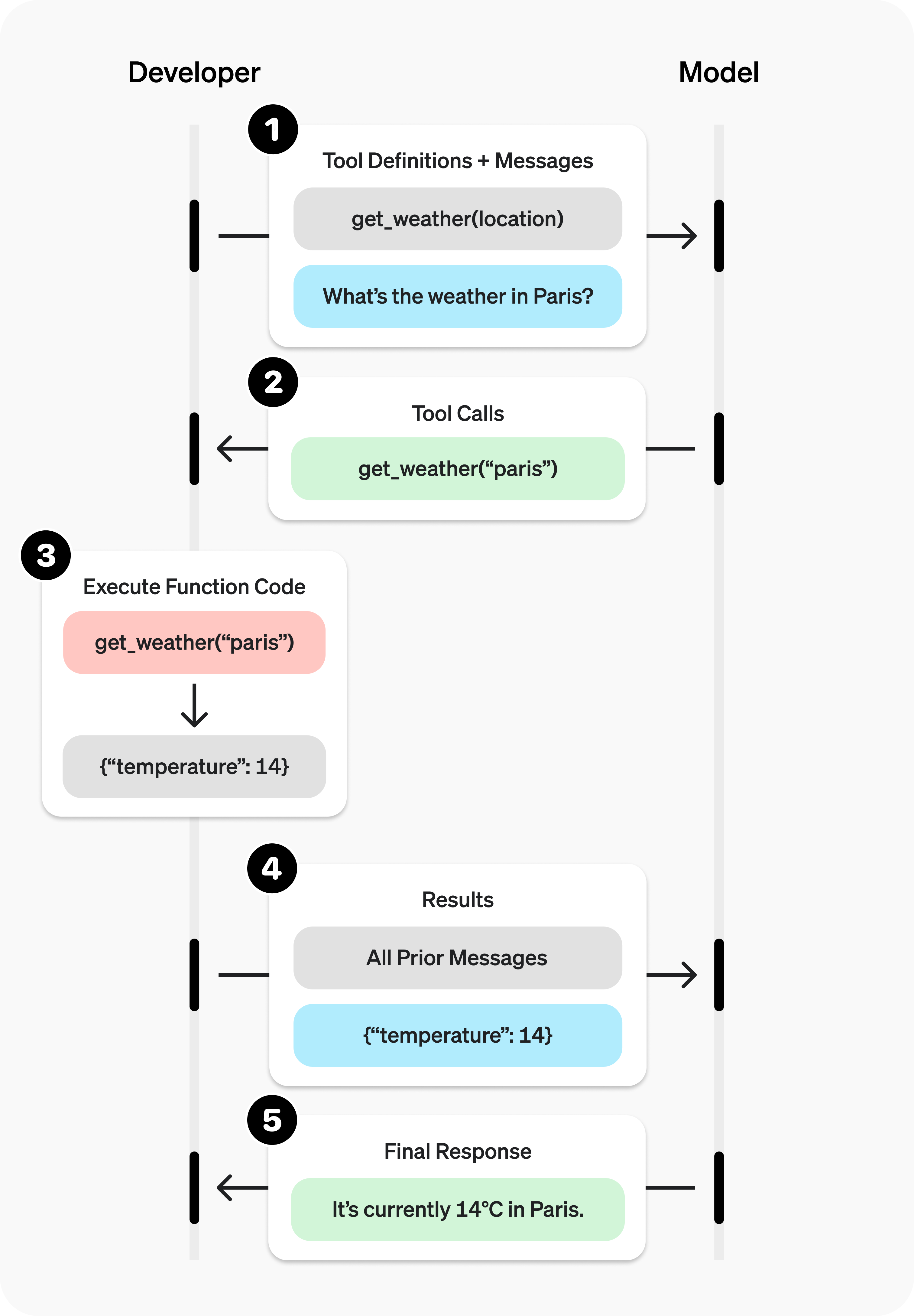
Tool calling is a multi-step conversation between your application and a model via the OpenAI API. The tool calling flow has five high level steps:
|
|
53
|
+
|
|
54
|
+
1. Make a request to the model with tools it could call
|
|
55
|
+
1. Receive a tool call from the model
|
|
56
|
+
1. Execute code on the application side with input from the tool call
|
|
57
|
+
1. Make a second request to the model with the tool output
|
|
58
|
+
1. Receive a final response from the model (or more tool calls)
|
|
59
|
+
|
|
60
|
+
|
|
61
|
+
|
|
62
|
+
## Function tool example
|
|
63
|
+
|
|
64
|
+
Let's look at an end-to-end tool calling flow for a `get_horoscope` function that gets a daily horoscope for an astrological sign.
|
|
65
|
+
|
|
66
|
+
Complete tool calling example
|
|
67
|
+
|
|
68
|
+
```python
|
|
69
|
+
from openai import OpenAI
|
|
70
|
+
import json
|
|
71
|
+
|
|
72
|
+
client = OpenAI()
|
|
73
|
+
|
|
74
|
+
# 1. Define a list of callable tools for the model
|
|
75
|
+
tools = [
|
|
76
|
+
{
|
|
77
|
+
"type": "function",
|
|
78
|
+
"name": "get_horoscope",
|
|
79
|
+
"description": "Get today's horoscope for an astrological sign.",
|
|
80
|
+
"parameters": {
|
|
81
|
+
"type": "object",
|
|
82
|
+
"properties": {
|
|
83
|
+
"sign": {
|
|
84
|
+
"type": "string",
|
|
85
|
+
"description": "An astrological sign like Taurus or Aquarius",
|
|
86
|
+
},
|
|
87
|
+
},
|
|
88
|
+
"required": ["sign"],
|
|
89
|
+
},
|
|
90
|
+
},
|
|
91
|
+
]
|
|
92
|
+
|
|
93
|
+
def get_horoscope(sign):
|
|
94
|
+
return f"{sign}: Next Tuesday you will befriend a baby otter."
|
|
95
|
+
|
|
96
|
+
# Create a running input list we will add to over time
|
|
97
|
+
input_list = [
|
|
98
|
+
{"role": "user", "content": "What is my horoscope? I am an Aquarius."}
|
|
99
|
+
]
|
|
100
|
+
|
|
101
|
+
# 2. Prompt the model with tools defined
|
|
102
|
+
response = client.responses.create(
|
|
103
|
+
model="gpt-5",
|
|
104
|
+
tools=tools,
|
|
105
|
+
input=input_list,
|
|
106
|
+
)
|
|
107
|
+
|
|
108
|
+
# Save function call outputs for subsequent requests
|
|
109
|
+
input_list += response.output
|
|
110
|
+
|
|
111
|
+
for item in response.output:
|
|
112
|
+
if item.type == "function_call":
|
|
113
|
+
if item.name == "get_horoscope":
|
|
114
|
+
# 3. Execute the function logic for get_horoscope
|
|
115
|
+
horoscope = get_horoscope(json.loads(item.arguments))
|
|
116
|
+
|
|
117
|
+
# 4. Provide function call results to the model
|
|
118
|
+
input_list.append({
|
|
119
|
+
"type": "function_call_output",
|
|
120
|
+
"call_id": item.call_id,
|
|
121
|
+
"output": json.dumps({
|
|
122
|
+
"horoscope": horoscope
|
|
123
|
+
})
|
|
124
|
+
})
|
|
125
|
+
|
|
126
|
+
print("Final input:")
|
|
127
|
+
print(input_list)
|
|
128
|
+
|
|
129
|
+
response = client.responses.create(
|
|
130
|
+
model="gpt-5",
|
|
131
|
+
instructions="Respond only with a horoscope generated by a tool.",
|
|
132
|
+
tools=tools,
|
|
133
|
+
input=input_list,
|
|
134
|
+
)
|
|
135
|
+
|
|
136
|
+
# 5. The model should be able to give a response!
|
|
137
|
+
print("Final output:")
|
|
138
|
+
print(response.model_dump_json(indent=2))
|
|
139
|
+
print("\\n" + response.output_text)
|
|
140
|
+
```
|
|
141
|
+
|
|
142
|
+
```javascript
|
|
143
|
+
import OpenAI from "openai";
|
|
144
|
+
const openai = new OpenAI();
|
|
145
|
+
|
|
146
|
+
// 1. Define a list of callable tools for the model
|
|
147
|
+
const tools = [
|
|
148
|
+
{
|
|
149
|
+
type: "function",
|
|
150
|
+
name: "get_horoscope",
|
|
151
|
+
description: "Get today's horoscope for an astrological sign.",
|
|
152
|
+
parameters: {
|
|
153
|
+
type: "object",
|
|
154
|
+
properties: {
|
|
155
|
+
sign: {
|
|
156
|
+
type: "string",
|
|
157
|
+
description: "An astrological sign like Taurus or Aquarius",
|
|
158
|
+
},
|
|
159
|
+
},
|
|
160
|
+
required: ["sign"],
|
|
161
|
+
},
|
|
162
|
+
},
|
|
163
|
+
];
|
|
164
|
+
|
|
165
|
+
function getHoroscope(sign) {
|
|
166
|
+
return sign + " Next Tuesday you will befriend a baby otter.";
|
|
167
|
+
}
|
|
168
|
+
|
|
169
|
+
// Create a running input list we will add to over time
|
|
170
|
+
let input = [
|
|
171
|
+
{ role: "user", content: "What is my horoscope? I am an Aquarius." },
|
|
172
|
+
];
|
|
173
|
+
|
|
174
|
+
// 2. Prompt the model with tools defined
|
|
175
|
+
let response = await openai.responses.create({
|
|
176
|
+
model: "gpt-5",
|
|
177
|
+
tools,
|
|
178
|
+
input,
|
|
179
|
+
});
|
|
180
|
+
|
|
181
|
+
response.output.forEach((item) => {
|
|
182
|
+
if (item.type == "function_call") {
|
|
183
|
+
if (item.name == "get_horoscope"):
|
|
184
|
+
// 3. Execute the function logic for get_horoscope
|
|
185
|
+
const horoscope = get_horoscope(JSON.parse(item.arguments))
|
|
186
|
+
|
|
187
|
+
// 4. Provide function call results to the model
|
|
188
|
+
input_list.push({
|
|
189
|
+
type: "function_call_output",
|
|
190
|
+
call_id: item.call_id,
|
|
191
|
+
output: json.dumps({
|
|
192
|
+
horoscope
|
|
193
|
+
})
|
|
194
|
+
})
|
|
195
|
+
}
|
|
196
|
+
});
|
|
197
|
+
|
|
198
|
+
console.log("Final input:");
|
|
199
|
+
console.log(JSON.stringify(input, null, 2));
|
|
200
|
+
|
|
201
|
+
response = await openai.responses.create({
|
|
202
|
+
model: "gpt-5",
|
|
203
|
+
instructions: "Respond only with a horoscope generated by a tool.",
|
|
204
|
+
tools,
|
|
205
|
+
input,
|
|
206
|
+
});
|
|
207
|
+
|
|
208
|
+
// 5. The model should be able to give a response!
|
|
209
|
+
console.log("Final output:");
|
|
210
|
+
console.log(JSON.stringify(response.output, null, 2));
|
|
211
|
+
```
|
|
212
|
+
|
|
213
|
+
Note that for reasoning models like GPT-5 or o4-mini, any reasoning items
|
|
214
|
+
returned in model responses with tool calls must also be passed back with tool
|
|
215
|
+
call outputs.
|
|
216
|
+
|
|
217
|
+
## Defining functions
|
|
218
|
+
|
|
219
|
+
Functions can be set in the `tools` parameter of each API request. A function is defined by its schema, which informs the model what it does and what input arguments it expects. A function definition has the following properties:
|
|
220
|
+
|
|
221
|
+
| Field | Description |
|
|
222
|
+
| ------------- | ------------------------------------------------------------------------------- |
|
|
223
|
+
| `type` | This should always be `function` |
|
|
224
|
+
| `name` | The function's name (e.g. `get_weather`) |
|
|
225
|
+
| `description` | Details on when and how to use the function |
|
|
226
|
+
| `parameters` | [JSON schema](https://json-schema.org/) defining the function's input arguments |
|
|
227
|
+
| `strict` | Whether to enforce strict mode for the function call |
|
|
228
|
+
|
|
229
|
+
Here is an example function definition for a `get_weather` function
|
|
230
|
+
|
|
231
|
+
```json
|
|
232
|
+
{
|
|
233
|
+
"type": "function",
|
|
234
|
+
"name": "get_weather",
|
|
235
|
+
"description": "Retrieves current weather for the given location.",
|
|
236
|
+
"parameters": {
|
|
237
|
+
"type": "object",
|
|
238
|
+
"properties": {
|
|
239
|
+
"location": {
|
|
240
|
+
"type": "string",
|
|
241
|
+
"description": "City and country e.g. Bogotá, Colombia"
|
|
242
|
+
},
|
|
243
|
+
"units": {
|
|
244
|
+
"type": "string",
|
|
245
|
+
"enum": ["celsius", "fahrenheit"],
|
|
246
|
+
"description": "Units the temperature will be returned in."
|
|
247
|
+
}
|
|
248
|
+
},
|
|
249
|
+
"required": ["location", "units"],
|
|
250
|
+
"additionalProperties": false
|
|
251
|
+
},
|
|
252
|
+
"strict": true
|
|
253
|
+
}
|
|
254
|
+
```
|
|
255
|
+
|
|
256
|
+
Because the `parameters` are defined by a [JSON schema](https://json-schema.org/), you can leverage many of its rich features like property types, enums, descriptions, nested objects, and, recursive objects.
|
|
257
|
+
|
|
258
|
+
### Best practices for defining functions
|
|
259
|
+
|
|
260
|
+
1. **Write clear and detailed function names, parameter descriptions, and instructions.**
|
|
261
|
+
- **Explicitly describe the purpose of the function and each parameter** (and its format), and what the output represents.
|
|
262
|
+
- **Use the system prompt to describe when (and when not) to use each function.** Generally, tell the model _exactly_ what to do.
|
|
263
|
+
- **Include examples and edge cases**, especially to rectify any recurring failures. (**Note:** Adding examples may hurt performance for [reasoning models](https://developers.openai.com/api/docs/guides/reasoning).)
|
|
264
|
+
|
|
265
|
+
1. **Apply software engineering best practices.**
|
|
266
|
+
- **Make the functions obvious and intuitive**. ([principle of least surprise](https://en.wikipedia.org/wiki/Principle_of_least_astonishment))
|
|
267
|
+
- **Use enums** and object structure to make invalid states unrepresentable. (e.g. `toggle_light(on: bool, off: bool)` allows for invalid calls)
|
|
268
|
+
- **Pass the intern test.** Can an intern/human correctly use the function given nothing but what you gave the model? (If not, what questions do they ask you? Add the answers to the prompt.)
|
|
269
|
+
|
|
270
|
+
1. **Offload the burden from the model and use code where possible.**
|
|
271
|
+
- **Don't make the model fill arguments you already know.** For example, if you already have an `order_id` based on a previous menu, don't have an `order_id` param – instead, have no params `submit_refund()` and pass the `order_id` with code.
|
|
272
|
+
- **Combine functions that are always called in sequence.** For example, if you always call `mark_location()` after `query_location()`, just move the marking logic into the query function call.
|
|
273
|
+
|
|
274
|
+
1. **Keep the number of functions small for higher accuracy.**
|
|
275
|
+
- **Evaluate your performance** with different numbers of functions.
|
|
276
|
+
- **Aim for fewer than 20 functions** at any one time, though this is just a soft suggestion.
|
|
277
|
+
|
|
278
|
+
1. **Leverage OpenAI resources.**
|
|
279
|
+
- **Generate and iterate on function schemas** in the [Playground](https://platform.openai.com/playground).
|
|
280
|
+
- **Consider [fine-tuning](https://developers.openai.com/api/docs/guides/fine-tuning) to increase function calling accuracy** for large numbers of functions or difficult tasks. ([cookbook](https://developers.openai.com/cookbook/examples/fine_tuning_for_function_calling))
|
|
281
|
+
|
|
282
|
+
### Token Usage
|
|
283
|
+
|
|
284
|
+
Under the hood, functions are injected into the system message in a syntax the model has been trained on. This means functions count against the model's context limit and are billed as input tokens. If you run into token limits, we suggest limiting the number of functions or the length of the descriptions you provide for function parameters.
|
|
285
|
+
|
|
286
|
+
It is also possible to use [fine-tuning](https://developers.openai.com/api/docs/guides/fine-tuning#fine-tuning-examples) to reduce the number of tokens used if you have many functions defined in your tools specification.
|
|
287
|
+
|
|
288
|
+
## Handling function calls
|
|
289
|
+
|
|
290
|
+
When the model calls a function, you must execute it and return the result. Since model responses can include zero, one, or multiple calls, it is best practice to assume there are several.
|
|
291
|
+
|
|
292
|
+
The response `output` array contains an entry with the `type` having a value of `function_call`. Each entry with a `call_id` (used later to submit the function result), `name`, and JSON-encoded `arguments`.
|
|
293
|
+
|
|
294
|
+
In the example above, we have a hypothetical `call_function` to route each call. Here’s a possible implementation:
|
|
295
|
+
|
|
296
|
+
### Formatting results
|
|
297
|
+
|
|
298
|
+
The result you pass in the `function_call_output` message should typically be a string, where the format is up to you (JSON, error codes, plain text, etc.). The model will interpret that string as needed.
|
|
299
|
+
|
|
300
|
+
For functions that return images or files, you can pass an [array of image or file objects](https://developers.openai.com/api/docs/api-reference/responses/create#responses_create-input-input_item_list-item-function_tool_call_output-output) instead of a string.
|
|
301
|
+
|
|
302
|
+
If your function has no return value (e.g. `send_email`), simply return a string that indicates success or failure. (e.g. `"success"`)
|
|
303
|
+
|
|
304
|
+
### Incorporating results into response
|
|
305
|
+
|
|
306
|
+
After appending the results to your `input`, you can send them back to the model to get a final response.
|
|
307
|
+
|
|
308
|
+
## Additional configurations
|
|
309
|
+
|
|
310
|
+
### Tool choice
|
|
311
|
+
|
|
312
|
+
By default the model will determine when and how many tools to use. You can force specific behavior with the `tool_choice` parameter.
|
|
313
|
+
|
|
314
|
+
1. **Auto:** (_Default_) Call zero, one, or multiple functions. `tool_choice: "auto"`
|
|
315
|
+
1. **Required:** Call one or more functions.
|
|
316
|
+
`tool_choice: "required"`
|
|
317
|
+
1. **Forced Function:** Call exactly one specific function.
|
|
318
|
+
`tool_choice: {"type": "function", "name": "get_weather"}`
|
|
319
|
+
1. **Allowed tools:** Restrict the tool calls the model can make to a subset of
|
|
320
|
+
the tools available to the model.
|
|
321
|
+
|
|
322
|
+
**When to use allowed_tools**
|
|
323
|
+
|
|
324
|
+
You might want to configure an `allowed_tools` list in case you want to make only
|
|
325
|
+
a subset of tools available across model requests, but not modify the list of tools you pass in, so you can maximize savings from [prompt caching](https://developers.openai.com/api/docs/guides/prompt-caching).
|
|
326
|
+
|
|
327
|
+
```json
|
|
328
|
+
"tool_choice": {
|
|
329
|
+
"type": "allowed_tools",
|
|
330
|
+
"mode": "auto",
|
|
331
|
+
"tools": [
|
|
332
|
+
{ "type": "function", "name": "get_weather" },
|
|
333
|
+
{ "type": "function", "name": "search_docs" }
|
|
334
|
+
]
|
|
335
|
+
}
|
|
336
|
+
}
|
|
337
|
+
```
|
|
338
|
+
|
|
339
|
+
You can also set `tool_choice` to `"none"` to imitate the behavior of passing no functions.
|
|
340
|
+
|
|
341
|
+
### Parallel function calling
|
|
342
|
+
|
|
343
|
+
Parallel function calling is not possible when using [built-in
|
|
344
|
+
tools](https://developers.openai.com/api/docs/guides/tools).
|
|
345
|
+
|
|
346
|
+
The model may choose to call multiple functions in a single turn. You can prevent this by setting `parallel_tool_calls` to `false`, which ensures exactly zero or one tool is called.
|
|
347
|
+
|
|
348
|
+
**Note:** Currently, if you are using a fine tuned model and the model calls multiple functions in one turn then [strict mode](#strict-mode) will be disabled for those calls.
|
|
349
|
+
|
|
350
|
+
**Note for `gpt-4.1-nano-2025-04-14`:** This snapshot of `gpt-4.1-nano` can sometimes include multiple tools calls for the same tool if parallel tool calls are enabled. It is recommended to disable this feature when using this nano snapshot.
|
|
351
|
+
|
|
352
|
+
### Strict mode
|
|
353
|
+
|
|
354
|
+
Setting `strict` to `true` will ensure function calls reliably adhere to the function schema, instead of being best effort. We recommend always enabling strict mode.
|
|
355
|
+
|
|
356
|
+
Under the hood, strict mode works by leveraging our [structured outputs](https://developers.openai.com/api/docs/guides/structured-outputs) feature and therefore introduces a couple requirements:
|
|
357
|
+
|
|
358
|
+
1. `additionalProperties` must be set to `false` for each object in the `parameters`.
|
|
359
|
+
1. All fields in `properties` must be marked as `required`.
|
|
360
|
+
|
|
361
|
+
You can denote optional fields by adding `null` as a `type` option (see example below).
|
|
362
|
+
|
|
363
|
+
<div data-content-switcher-pane data-value="enabled">
|
|
364
|
+
<div class="hidden">Strict mode enabled</div>
|
|
365
|
+
</div>
|
|
366
|
+
<div data-content-switcher-pane data-value="disabled" hidden>
|
|
367
|
+
<div class="hidden">Strict mode disabled</div>
|
|
368
|
+
</div>
|
|
369
|
+
|
|
370
|
+
All schemas generated in the
|
|
371
|
+
[playground](https://platform.openai.com/playground) have strict mode enabled.
|
|
372
|
+
|
|
373
|
+
While we recommend you enable strict mode, it has a few limitations:
|
|
374
|
+
|
|
375
|
+
1. Some features of JSON schema are not supported. (See [supported schemas](https://developers.openai.com/api/docs/guides/structured-outputs?context=with_parse#supported-schemas).)
|
|
376
|
+
|
|
377
|
+
Specifically for fine tuned models:
|
|
378
|
+
|
|
379
|
+
1. Schemas undergo additional processing on the first request (and are then cached). If your schemas vary from request to request, this may result in higher latencies.
|
|
380
|
+
2. Schemas are cached for performance, and are not eligible for [zero data retention](https://developers.openai.com/api/docs/models#how-we-use-your-data).
|
|
381
|
+
|
|
382
|
+
## Streaming
|
|
383
|
+
|
|
384
|
+
Streaming can be used to surface progress by showing which function is called as the model fills its arguments, and even displaying the arguments in real time.
|
|
385
|
+
|
|
386
|
+
Streaming function calls is very similar to streaming regular responses: you set `stream` to `true` and get different `event` objects.
|
|
387
|
+
|
|
388
|
+
Instead of aggregating chunks into a single `content` string, however, you're aggregating chunks into an encoded `arguments` JSON object.
|
|
389
|
+
|
|
390
|
+
When the model calls one or more functions an event of type `response.output_item.added` will be emitted for each function call that contains the following fields:
|
|
391
|
+
|
|
392
|
+
| Field | Description |
|
|
393
|
+
| -------------- | ------------------------------------------------------------------------------------------------------------ |
|
|
394
|
+
| `response_id` | The id of the response that the function call belongs to |
|
|
395
|
+
| `output_index` | The index of the output item in the response. This represents the individual function calls in the response. |
|
|
396
|
+
| `item` | The in-progress function call item that includes a `name`, `arguments` and `id` field |
|
|
397
|
+
|
|
398
|
+
Afterwards you will receive a series of events of type `response.function_call_arguments.delta` which will contain the `delta` of the `arguments` field. These events contain the following fields:
|
|
399
|
+
|
|
400
|
+
| Field | Description |
|
|
401
|
+
| -------------- | ------------------------------------------------------------------------------------------------------------ |
|
|
402
|
+
| `response_id` | The id of the response that the function call belongs to |
|
|
403
|
+
| `item_id` | The id of the function call item that the delta belongs to |
|
|
404
|
+
| `output_index` | The index of the output item in the response. This represents the individual function calls in the response. |
|
|
405
|
+
| `delta` | The delta of the `arguments` field. |
|
|
406
|
+
|
|
407
|
+
Below is a code snippet demonstrating how to aggregate the `delta`s into a final `tool_call` object.
|
|
408
|
+
|
|
409
|
+
When the model has finished calling the functions an event of type `response.function_call_arguments.done` will be emitted. This event contains the entire function call including the following fields:
|
|
410
|
+
|
|
411
|
+
| Field | Description |
|
|
412
|
+
| -------------- | ------------------------------------------------------------------------------------------------------------ |
|
|
413
|
+
| `response_id` | The id of the response that the function call belongs to |
|
|
414
|
+
| `output_index` | The index of the output item in the response. This represents the individual function calls in the response. |
|
|
415
|
+
| `item` | The function call item that includes a `name`, `arguments` and `id` field. |
|
|
416
|
+
|
|
417
|
+
## Custom tools
|
|
418
|
+
|
|
419
|
+
Custom tools work in much the same way as JSON schema-driven function tools. But rather than providing the model explicit instructions on what input your tool requires, the model can pass an arbitrary string back to your tool as input. This is useful to avoid unnecessarily wrapping a response in JSON, or to apply a custom grammar to the response (more on this below).
|
|
420
|
+
|
|
421
|
+
The following code sample shows creating a custom tool that expects to receive a string of text containing Python code as a response.
|
|
422
|
+
|
|
423
|
+
Custom tool calling example
|
|
424
|
+
|
|
425
|
+
```python
|
|
426
|
+
from openai import OpenAI
|
|
427
|
+
|
|
428
|
+
client = OpenAI()
|
|
429
|
+
|
|
430
|
+
response = client.responses.create(
|
|
431
|
+
model="gpt-5",
|
|
432
|
+
input="Use the code_exec tool to print hello world to the console.",
|
|
433
|
+
tools=[
|
|
434
|
+
{
|
|
435
|
+
"type": "custom",
|
|
436
|
+
"name": "code_exec",
|
|
437
|
+
"description": "Executes arbitrary Python code.",
|
|
438
|
+
}
|
|
439
|
+
]
|
|
440
|
+
)
|
|
441
|
+
print(response.output)
|
|
442
|
+
```
|
|
443
|
+
|
|
444
|
+
```javascript
|
|
445
|
+
import OpenAI from 'openai';
|
|
446
|
+
const client = new OpenAI();
|
|
447
|
+
|
|
448
|
+
const response = await client.responses.create({
|
|
449
|
+
model: 'gpt-5',
|
|
450
|
+
input: 'Use the code_exec tool to print hello world to the console.',
|
|
451
|
+
tools: [
|
|
452
|
+
{
|
|
453
|
+
type: 'custom',
|
|
454
|
+
name: 'code_exec',
|
|
455
|
+
description: 'Executes arbitrary Python code.',
|
|
456
|
+
},
|
|
457
|
+
],
|
|
458
|
+
});
|
|
459
|
+
|
|
460
|
+
console.log(response.output);
|
|
461
|
+
```
|
|
462
|
+
|
|
463
|
+
Just as before, the `output` array will contain a tool call generated by the model. Except this time, the tool call input is given as plain text.
|
|
464
|
+
|
|
465
|
+
```json
|
|
466
|
+
[
|
|
467
|
+
{
|
|
468
|
+
"id": "rs_6890e972fa7c819ca8bc561526b989170694874912ae0ea6",
|
|
469
|
+
"type": "reasoning",
|
|
470
|
+
"content": [],
|
|
471
|
+
"summary": []
|
|
472
|
+
},
|
|
473
|
+
{
|
|
474
|
+
"id": "ctc_6890e975e86c819c9338825b3e1994810694874912ae0ea6",
|
|
475
|
+
"type": "custom_tool_call",
|
|
476
|
+
"status": "completed",
|
|
477
|
+
"call_id": "call_aGiFQkRWSWAIsMQ19fKqxUgb",
|
|
478
|
+
"input": "print(\"hello world\")",
|
|
479
|
+
"name": "code_exec"
|
|
480
|
+
}
|
|
481
|
+
]
|
|
482
|
+
```
|
|
483
|
+
|
|
484
|
+
## Context-free grammars
|
|
485
|
+
|
|
486
|
+
A [context-free grammar](https://en.wikipedia.org/wiki/Context-free_grammar) (CFG) is a set of rules that define how to produce valid text in a given format. For custom tools, you can provide a CFG that will constrain the model's text input for a custom tool.
|
|
487
|
+
|
|
488
|
+
You can provide a custom CFG using the `grammar` parameter when configuring a custom tool. Currently, we support two CFG syntaxes when defining grammars: `lark` and `regex`.
|
|
489
|
+
|
|
490
|
+
## Lark CFG
|
|
491
|
+
|
|
492
|
+
Lark context free grammar example
|
|
493
|
+
|
|
494
|
+
```python
|
|
495
|
+
from openai import OpenAI
|
|
496
|
+
|
|
497
|
+
client = OpenAI()
|
|
498
|
+
|
|
499
|
+
grammar = """
|
|
500
|
+
start: expr
|
|
501
|
+
expr: term (SP ADD SP term)* -> add
|
|
502
|
+
| term
|
|
503
|
+
term: factor (SP MUL SP factor)* -> mul
|
|
504
|
+
| factor
|
|
505
|
+
factor: INT
|
|
506
|
+
SP: " "
|
|
507
|
+
ADD: "+"
|
|
508
|
+
MUL: "*"
|
|
509
|
+
%import common.INT
|
|
510
|
+
"""
|
|
511
|
+
|
|
512
|
+
response = client.responses.create(
|
|
513
|
+
model="gpt-5",
|
|
514
|
+
input="Use the math_exp tool to add four plus four.",
|
|
515
|
+
tools=[
|
|
516
|
+
{
|
|
517
|
+
"type": "custom",
|
|
518
|
+
"name": "math_exp",
|
|
519
|
+
"description": "Creates valid mathematical expressions",
|
|
520
|
+
"format": {
|
|
521
|
+
"type": "grammar",
|
|
522
|
+
"syntax": "lark",
|
|
523
|
+
"definition": grammar,
|
|
524
|
+
},
|
|
525
|
+
}
|
|
526
|
+
]
|
|
527
|
+
)
|
|
528
|
+
print(response.output)
|
|
529
|
+
```
|
|
530
|
+
|
|
531
|
+
```javascript
|
|
532
|
+
import OpenAI from "openai";
|
|
533
|
+
const client = new OpenAI();
|
|
534
|
+
|
|
535
|
+
const grammar = \`
|
|
536
|
+
start: expr
|
|
537
|
+
expr: term (SP ADD SP term)* -> add
|
|
538
|
+
| term
|
|
539
|
+
term: factor (SP MUL SP factor)* -> mul
|
|
540
|
+
| factor
|
|
541
|
+
factor: INT
|
|
542
|
+
SP: " "
|
|
543
|
+
ADD: "+"
|
|
544
|
+
MUL: "*"
|
|
545
|
+
%import common.INT
|
|
546
|
+
\`;
|
|
547
|
+
|
|
548
|
+
const response = await client.responses.create({
|
|
549
|
+
model: "gpt-5",
|
|
550
|
+
input: "Use the math_exp tool to add four plus four.",
|
|
551
|
+
tools: [
|
|
552
|
+
{
|
|
553
|
+
type: "custom",
|
|
554
|
+
name: "math_exp",
|
|
555
|
+
description: "Creates valid mathematical expressions",
|
|
556
|
+
format: {
|
|
557
|
+
type: "grammar",
|
|
558
|
+
syntax: "lark",
|
|
559
|
+
definition: grammar,
|
|
560
|
+
},
|
|
561
|
+
},
|
|
562
|
+
],
|
|
563
|
+
});
|
|
564
|
+
|
|
565
|
+
console.log(response.output);
|
|
566
|
+
```
|
|
567
|
+
|
|
568
|
+
The output from the tool should then conform to the Lark CFG that you defined:
|
|
569
|
+
|
|
570
|
+
```json
|
|
571
|
+
[
|
|
572
|
+
{
|
|
573
|
+
"id": "rs_6890ed2b6374819dbbff5353e6664ef103f4db9848be4829",
|
|
574
|
+
"type": "reasoning",
|
|
575
|
+
"content": [],
|
|
576
|
+
"summary": []
|
|
577
|
+
},
|
|
578
|
+
{
|
|
579
|
+
"id": "ctc_6890ed2f32e8819daa62bef772b8c15503f4db9848be4829",
|
|
580
|
+
"type": "custom_tool_call",
|
|
581
|
+
"status": "completed",
|
|
582
|
+
"call_id": "call_pmlLjmvG33KJdyVdC4MVdk5N",
|
|
583
|
+
"input": "4 + 4",
|
|
584
|
+
"name": "math_exp"
|
|
585
|
+
}
|
|
586
|
+
]
|
|
587
|
+
```
|
|
588
|
+
|
|
589
|
+
Grammars are specified using a variation of [Lark](https://lark-parser.readthedocs.io/en/stable/index.html). Model sampling is constrained using [LLGuidance](https://github.com/guidance-ai/llguidance/blob/main/docs/syntax.md). Some features of Lark are not supported:
|
|
590
|
+
|
|
591
|
+
- Lookarounds in lexer regexes
|
|
592
|
+
- Lazy modifiers (`*?`, `+?`, `??`) in lexer regexes
|
|
593
|
+
- Priorities of terminals
|
|
594
|
+
- Templates
|
|
595
|
+
- Imports (other than built-in `%import` common)
|
|
596
|
+
- `%declare`s
|
|
597
|
+
|
|
598
|
+
We recommend using the [Lark IDE](https://www.lark-parser.org/ide/) to experiment with custom grammars.
|
|
599
|
+
|
|
600
|
+
### Keep grammars simple
|
|
601
|
+
|
|
602
|
+
Try to make your grammar as simple as possible. The OpenAI API may return an error if the grammar is too complex, so you should ensure that your desired grammar is compatible before using it in the API.
|
|
603
|
+
|
|
604
|
+
Lark grammars can be tricky to perfect. While simple grammars perform most reliably, complex grammars often require iteration on the grammar definition itself, the prompt, and the tool description to ensure that the model does not go out of distribution.
|
|
605
|
+
|
|
606
|
+
### Correct versus incorrect patterns
|
|
607
|
+
|
|
608
|
+
Correct (single, bounded terminal):
|
|
609
|
+
|
|
610
|
+
```
|
|
611
|
+
start: SENTENCE
|
|
612
|
+
SENTENCE: /[A-Za-z, ]*(the hero|a dragon|an old man|the princess)[A-Za-z, ]*(fought|saved|found|lost)[A-Za-z, ]*(a treasure|the kingdom|a secret|his way)[A-Za-z, ]*\./
|
|
613
|
+
```
|
|
614
|
+
|
|
615
|
+
Do NOT do this (splitting across rules/terminals). This attempts to let rules partition free text between terminals. The lexer will greedily match the free-text pieces and you'll lose control:
|
|
616
|
+
|
|
617
|
+
```
|
|
618
|
+
start: sentence
|
|
619
|
+
sentence: /[A-Za-z, ]+/ subject /[A-Za-z, ]+/ verb /[A-Za-z, ]+/ object /[A-Za-z, ]+/
|
|
620
|
+
```
|
|
621
|
+
|
|
622
|
+
Lowercase rules don't influence how terminals are cut from the input—only terminal definitions do. When you need “free text between anchors,” make it one giant regex terminal so the lexer matches it exactly once with the structure you intend.
|
|
623
|
+
|
|
624
|
+
### Terminals versus rules
|
|
625
|
+
|
|
626
|
+
Lark uses terminals for lexer tokens (by convention, `UPPERCASE`) and rules for parser productions (by convention, `lowercase`). The most practical way to stay within the supported subset and avoid surprises is to keep your grammar simple and explicit, and to use terminals and rules with a clear separation of concerns.
|
|
627
|
+
|
|
628
|
+
The regex syntax used by terminals is the [Rust regex crate syntax](https://docs.rs/regex/latest/regex/#syntax), not Python's `re` [module](https://docs.python.org/3/library/re.html).
|
|
629
|
+
|
|
630
|
+
### Key ideas and best practices
|
|
631
|
+
|
|
632
|
+
**Lexer runs before the parser**
|
|
633
|
+
|
|
634
|
+
Terminals are matched by the lexer (greedily / longest match wins) before any CFG rule logic is applied. If you try to "shape" a terminal by splitting it across several rules, the lexer cannot be guided by those rules—only by terminal regexes.
|
|
635
|
+
|
|
636
|
+
**Prefer one terminal when you're carving text out of freeform spans**
|
|
637
|
+
|
|
638
|
+
If you need to recognize a pattern embedded in arbitrary text (e.g., natural language with “anything” between anchors), express that as a single terminal. Do not try to interleave free‑text terminals with parser rules; the greedy lexer will not respect your intended boundaries and it is highly likely the model will go out of distribution.
|
|
639
|
+
|
|
640
|
+
**Use rules to compose discrete tokens**
|
|
641
|
+
|
|
642
|
+
Rules are ideal when you're combining clearly delimited terminals (numbers, keywords, punctuation) into larger structures. They're not the right tool for constraining "the stuff in between" two terminals.
|
|
643
|
+
|
|
644
|
+
**Keep terminals simple, bounded, and self-contained**
|
|
645
|
+
|
|
646
|
+
Favor explicit character classes and bounded quantifiers (`{0,10}`, not unbounded `*` everywhere). If you need "any text up to a period", prefer something like `/[^.\n]{0,10}*\./` rather than `/.+\./` to avoid runaway growth.
|
|
647
|
+
|
|
648
|
+
**Use rules to combine tokens, not to steer regex internals**
|
|
649
|
+
|
|
650
|
+
Good rule usage example:
|
|
651
|
+
|
|
652
|
+
```
|
|
653
|
+
start: expr
|
|
654
|
+
NUMBER: /[0-9]+/
|
|
655
|
+
PLUS: "+"
|
|
656
|
+
MINUS: "-"
|
|
657
|
+
expr: term (("+"|"-") term)*
|
|
658
|
+
term: NUMBER
|
|
659
|
+
```
|
|
660
|
+
|
|
661
|
+
**Treat whitespace explicitly**
|
|
662
|
+
|
|
663
|
+
Don't rely on open-ended `%ignore` directives. Using unbounded ignore directives may cause the grammar to be too complex and/or may cause the model to go out of distribution. Prefer threading explicit terminals wherever whitespace is allowed.
|
|
664
|
+
|
|
665
|
+
### Troubleshooting
|
|
666
|
+
|
|
667
|
+
- If the API rejects the grammar because it is too complex, simplify the rules and terminals and remove unbounded `%ignore`s.
|
|
668
|
+
- If custom tools are called with unexpected tokens, confirm terminals aren’t overlapping; check greedy lexer.
|
|
669
|
+
- When the model drifts "out‑of‑distribution" (shows up as the model producing excessively long or repetitive outputs, it is syntactically valid but is semantically wrong):
|
|
670
|
+
- Tighten the grammar.
|
|
671
|
+
- Iterate on the prompt (add few-shot examples) and tool description (explain the grammar and instruct the model to reason and conform to it).
|
|
672
|
+
- Experiment with a higher reasoning effort (e.g, bump from medium to high).
|
|
673
|
+
|
|
674
|
+
## Regex CFG
|
|
675
|
+
|
|
676
|
+
Regex context free grammar example
|
|
677
|
+
|
|
678
|
+
```python
|
|
679
|
+
from openai import OpenAI
|
|
680
|
+
|
|
681
|
+
client = OpenAI()
|
|
682
|
+
|
|
683
|
+
grammar = r"^(?P<month>January|February|March|April|May|June|July|August|September|October|November|December)\\s+(?P<day>\\d{1,2})(?:st|nd|rd|th)?\\s+(?P<year>\\d{4})\\s+at\\s+(?P<hour>0?[1-9]|1[0-2])(?P<ampm>AM|PM)$"
|
|
684
|
+
|
|
685
|
+
response = client.responses.create(
|
|
686
|
+
model="gpt-5",
|
|
687
|
+
input="Use the timestamp tool to save a timestamp for August 7th 2025 at 10AM.",
|
|
688
|
+
tools=[
|
|
689
|
+
{
|
|
690
|
+
"type": "custom",
|
|
691
|
+
"name": "timestamp",
|
|
692
|
+
"description": "Saves a timestamp in date + time in 24-hr format.",
|
|
693
|
+
"format": {
|
|
694
|
+
"type": "grammar",
|
|
695
|
+
"syntax": "regex",
|
|
696
|
+
"definition": grammar,
|
|
697
|
+
},
|
|
698
|
+
}
|
|
699
|
+
]
|
|
700
|
+
)
|
|
701
|
+
print(response.output)
|
|
702
|
+
```
|
|
703
|
+
|
|
704
|
+
```javascript
|
|
705
|
+
import OpenAI from 'openai';
|
|
706
|
+
const client = new OpenAI();
|
|
707
|
+
|
|
708
|
+
const grammar =
|
|
709
|
+
'^(?P<month>January|February|March|April|May|June|July|August|September|October|November|December)\\s+(?P<day>\\d{1,2})(?:st|nd|rd|th)?\\s+(?P<year>\\d{4})\\s+at\\s+(?P<hour>0?[1-9]|1[0-2])(?P<ampm>AM|PM)$';
|
|
710
|
+
|
|
711
|
+
const response = await client.responses.create({
|
|
712
|
+
model: 'gpt-5',
|
|
713
|
+
input: 'Use the timestamp tool to save a timestamp for August 7th 2025 at 10AM.',
|
|
714
|
+
tools: [
|
|
715
|
+
{
|
|
716
|
+
type: 'custom',
|
|
717
|
+
name: 'timestamp',
|
|
718
|
+
description: 'Saves a timestamp in date + time in 24-hr format.',
|
|
719
|
+
format: {
|
|
720
|
+
type: 'grammar',
|
|
721
|
+
syntax: 'regex',
|
|
722
|
+
definition: grammar,
|
|
723
|
+
},
|
|
724
|
+
},
|
|
725
|
+
],
|
|
726
|
+
});
|
|
727
|
+
|
|
728
|
+
console.log(response.output);
|
|
729
|
+
```
|
|
730
|
+
|
|
731
|
+
The output from the tool should then conform to the Regex CFG that you defined:
|
|
732
|
+
|
|
733
|
+
```json
|
|
734
|
+
[
|
|
735
|
+
{
|
|
736
|
+
"id": "rs_6894f7a3dd4c81a1823a723a00bfa8710d7962f622d1c260",
|
|
737
|
+
"type": "reasoning",
|
|
738
|
+
"content": [],
|
|
739
|
+
"summary": []
|
|
740
|
+
},
|
|
741
|
+
{
|
|
742
|
+
"id": "ctc_6894f7ad7fb881a1bffa1f377393b1a40d7962f622d1c260",
|
|
743
|
+
"type": "custom_tool_call",
|
|
744
|
+
"status": "completed",
|
|
745
|
+
"call_id": "call_8m4XCnYvEmFlzHgDHbaOCFlK",
|
|
746
|
+
"input": "August 7th 2025 at 10AM",
|
|
747
|
+
"name": "timestamp"
|
|
748
|
+
}
|
|
749
|
+
]
|
|
750
|
+
```
|
|
751
|
+
|
|
752
|
+
As with the Lark syntax, regexes use the [Rust regex crate syntax](https://docs.rs/regex/latest/regex/#syntax), not Python's `re` [module](https://docs.python.org/3/library/re.html).
|
|
753
|
+
|
|
754
|
+
Some features of Regex are not supported:
|
|
755
|
+
|
|
756
|
+
- Lookarounds
|
|
757
|
+
- Lazy modifiers (`*?`, `+?`, `??`)
|
|
758
|
+
|
|
759
|
+
### Key ideas and best practices
|
|
760
|
+
|
|
761
|
+
**Pattern must be on one line**
|
|
762
|
+
|
|
763
|
+
If you need to match a newline in the input, use the escaped sequence `\n`. Do not use verbose/extended mode, which allows patterns to span multiple lines.
|
|
764
|
+
|
|
765
|
+
**Provide the regex as a plain pattern string**
|
|
766
|
+
|
|
767
|
+
Don't enclose the pattern in `//`.
|