@agent-native/core 0.41.1 → 0.43.0
This diff represents the content of publicly available package versions that have been released to one of the supported registries. The information contained in this diff is provided for informational purposes only and reflects changes between package versions as they appear in their respective public registries.
- package/README.md +17 -56
- package/dist/action.d.ts +13 -1
- package/dist/action.d.ts.map +1 -1
- package/dist/action.js.map +1 -1
- package/dist/agent/production-agent.d.ts +8 -0
- package/dist/agent/production-agent.d.ts.map +1 -1
- package/dist/agent/production-agent.js +93 -0
- package/dist/agent/production-agent.js.map +1 -1
- package/dist/cli/app-skill.d.ts +16 -0
- package/dist/cli/app-skill.d.ts.map +1 -1
- package/dist/cli/app-skill.js +33 -3
- package/dist/cli/app-skill.js.map +1 -1
- package/dist/cli/pr-visual-recap-workflow.d.ts +1 -1
- package/dist/cli/pr-visual-recap-workflow.d.ts.map +1 -1
- package/dist/cli/pr-visual-recap-workflow.js +1 -1
- package/dist/cli/pr-visual-recap-workflow.js.map +1 -1
- package/dist/cli/recap.d.ts.map +1 -1
- package/dist/cli/recap.js +38 -16
- package/dist/cli/recap.js.map +1 -1
- package/dist/cli/skills.d.ts +30 -3
- package/dist/cli/skills.d.ts.map +1 -1
- package/dist/cli/skills.js +180 -114
- package/dist/cli/skills.js.map +1 -1
- package/dist/client/AssistantChat.d.ts.map +1 -1
- package/dist/client/AssistantChat.js +2 -2
- package/dist/client/AssistantChat.js.map +1 -1
- package/dist/client/agent-chat-adapter.d.ts.map +1 -1
- package/dist/client/agent-chat-adapter.js +172 -5
- package/dist/client/agent-chat-adapter.js.map +1 -1
- package/dist/client/blocks/index.d.ts +11 -0
- package/dist/client/blocks/index.d.ts.map +1 -1
- package/dist/client/blocks/index.js +11 -0
- package/dist/client/blocks/index.js.map +1 -1
- package/dist/client/blocks/library/AnnotatedCodeBlock.d.ts +19 -0
- package/dist/client/blocks/library/AnnotatedCodeBlock.d.ts.map +1 -1
- package/dist/client/blocks/library/AnnotatedCodeBlock.js +6 -58
- package/dist/client/blocks/library/AnnotatedCodeBlock.js.map +1 -1
- package/dist/client/blocks/library/ApiEndpointBlock.d.ts.map +1 -1
- package/dist/client/blocks/library/ApiEndpointBlock.js +116 -7
- package/dist/client/blocks/library/ApiEndpointBlock.js.map +1 -1
- package/dist/client/blocks/library/DataModelBlock.d.ts.map +1 -1
- package/dist/client/blocks/library/DataModelBlock.js +75 -9
- package/dist/client/blocks/library/DataModelBlock.js.map +1 -1
- package/dist/client/blocks/library/DiffBlock.d.ts +1 -1
- package/dist/client/blocks/library/DiffBlock.d.ts.map +1 -1
- package/dist/client/blocks/library/DiffBlock.js +265 -39
- package/dist/client/blocks/library/DiffBlock.js.map +1 -1
- package/dist/client/blocks/library/FileTreeBlock.d.ts.map +1 -1
- package/dist/client/blocks/library/FileTreeBlock.js +27 -4
- package/dist/client/blocks/library/FileTreeBlock.js.map +1 -1
- package/dist/client/blocks/library/HighlightedCode.d.ts +1 -1
- package/dist/client/blocks/library/HighlightedCode.js +1 -1
- package/dist/client/blocks/library/HighlightedCode.js.map +1 -1
- package/dist/client/blocks/library/JsonExplorerBlock.js +1 -1
- package/dist/client/blocks/library/JsonExplorerBlock.js.map +1 -1
- package/dist/client/blocks/library/MermaidBlock.js +1 -1
- package/dist/client/blocks/library/MermaidBlock.js.map +1 -1
- package/dist/client/blocks/library/annotation-rail.d.ts +115 -0
- package/dist/client/blocks/library/annotation-rail.d.ts.map +1 -0
- package/dist/client/blocks/library/annotation-rail.js +139 -0
- package/dist/client/blocks/library/annotation-rail.js.map +1 -0
- package/dist/client/blocks/library/api-endpoint.config.d.ts +31 -6
- package/dist/client/blocks/library/api-endpoint.config.d.ts.map +1 -1
- package/dist/client/blocks/library/api-endpoint.config.js +30 -6
- package/dist/client/blocks/library/api-endpoint.config.js.map +1 -1
- package/dist/client/blocks/library/callout.config.d.ts +29 -0
- package/dist/client/blocks/library/callout.config.d.ts.map +1 -0
- package/dist/client/blocks/library/callout.config.js +33 -0
- package/dist/client/blocks/library/callout.config.js.map +1 -0
- package/dist/client/blocks/library/callout.d.ts +20 -0
- package/dist/client/blocks/library/callout.d.ts.map +1 -0
- package/dist/client/blocks/library/callout.js +61 -0
- package/dist/client/blocks/library/callout.js.map +1 -0
- package/dist/client/blocks/library/checklist.d.ts.map +1 -1
- package/dist/client/blocks/library/checklist.js +3 -3
- package/dist/client/blocks/library/checklist.js.map +1 -1
- package/dist/client/blocks/library/code.d.ts.map +1 -1
- package/dist/client/blocks/library/code.js +32 -15
- package/dist/client/blocks/library/code.js.map +1 -1
- package/dist/client/blocks/library/columns.d.ts.map +1 -1
- package/dist/client/blocks/library/columns.js +56 -35
- package/dist/client/blocks/library/columns.js.map +1 -1
- package/dist/client/blocks/library/data-model.config.d.ts +17 -0
- package/dist/client/blocks/library/data-model.config.d.ts.map +1 -1
- package/dist/client/blocks/library/data-model.config.js +15 -0
- package/dist/client/blocks/library/data-model.config.js.map +1 -1
- package/dist/client/blocks/library/decision.config.d.ts +37 -0
- package/dist/client/blocks/library/decision.config.d.ts.map +1 -0
- package/dist/client/blocks/library/decision.config.js +32 -0
- package/dist/client/blocks/library/decision.config.js.map +1 -0
- package/dist/client/blocks/library/decision.d.ts +19 -0
- package/dist/client/blocks/library/decision.d.ts.map +1 -0
- package/dist/client/blocks/library/decision.js +119 -0
- package/dist/client/blocks/library/decision.js.map +1 -0
- package/dist/client/blocks/library/diagram.config.d.ts +64 -0
- package/dist/client/blocks/library/diagram.config.d.ts.map +1 -0
- package/dist/client/blocks/library/diagram.config.js +111 -0
- package/dist/client/blocks/library/diagram.config.js.map +1 -0
- package/dist/client/blocks/library/diagram.d.ts +16 -0
- package/dist/client/blocks/library/diagram.d.ts.map +1 -0
- package/dist/client/blocks/library/diagram.js +261 -0
- package/dist/client/blocks/library/diagram.js.map +1 -0
- package/dist/client/blocks/library/diff.config.d.ts +28 -6
- package/dist/client/blocks/library/diff.config.d.ts.map +1 -1
- package/dist/client/blocks/library/diff.config.js +30 -6
- package/dist/client/blocks/library/diff.config.js.map +1 -1
- package/dist/client/blocks/library/question-form.config.d.ts +69 -0
- package/dist/client/blocks/library/question-form.config.d.ts.map +1 -0
- package/dist/client/blocks/library/question-form.config.js +58 -0
- package/dist/client/blocks/library/question-form.config.js.map +1 -0
- package/dist/client/blocks/library/question-form.d.ts +20 -0
- package/dist/client/blocks/library/question-form.d.ts.map +1 -0
- package/dist/client/blocks/library/question-form.js +286 -0
- package/dist/client/blocks/library/question-form.js.map +1 -0
- package/dist/client/blocks/library/sanitize-html.d.ts +5 -0
- package/dist/client/blocks/library/sanitize-html.d.ts.map +1 -0
- package/dist/client/blocks/library/sanitize-html.js +240 -0
- package/dist/client/blocks/library/sanitize-html.js.map +1 -0
- package/dist/client/blocks/library/server-specs.d.ts.map +1 -1
- package/dist/client/blocks/library/server-specs.js +59 -0
- package/dist/client/blocks/library/server-specs.js.map +1 -1
- package/dist/client/blocks/library/specs.d.ts.map +1 -1
- package/dist/client/blocks/library/specs.js +11 -0
- package/dist/client/blocks/library/specs.js.map +1 -1
- package/dist/client/blocks/library/tabs.d.ts.map +1 -1
- package/dist/client/blocks/library/tabs.js +12 -12
- package/dist/client/blocks/library/tabs.js.map +1 -1
- package/dist/client/blocks/library/wireframe-kit.d.ts +260 -0
- package/dist/client/blocks/library/wireframe-kit.d.ts.map +1 -0
- package/dist/client/blocks/library/wireframe-kit.js +920 -0
- package/dist/client/blocks/library/wireframe-kit.js.map +1 -0
- package/dist/client/blocks/library/wireframe.config.d.ts +123 -0
- package/dist/client/blocks/library/wireframe.config.d.ts.map +1 -0
- package/dist/client/blocks/library/wireframe.config.js +294 -0
- package/dist/client/blocks/library/wireframe.config.js.map +1 -0
- package/dist/client/blocks/library/wireframe.d.ts +15 -0
- package/dist/client/blocks/library/wireframe.d.ts.map +1 -0
- package/dist/client/blocks/library/wireframe.js +206 -0
- package/dist/client/blocks/library/wireframe.js.map +1 -0
- package/dist/client/blocks/registry.d.ts +9 -0
- package/dist/client/blocks/registry.d.ts.map +1 -1
- package/dist/client/blocks/registry.js +12 -5
- package/dist/client/blocks/registry.js.map +1 -1
- package/dist/client/blocks/server.d.ts +1 -0
- package/dist/client/blocks/server.d.ts.map +1 -1
- package/dist/client/blocks/server.js +1 -0
- package/dist/client/blocks/server.js.map +1 -1
- package/dist/client/blocks/types.d.ts +10 -2
- package/dist/client/blocks/types.d.ts.map +1 -1
- package/dist/client/blocks/types.js.map +1 -1
- package/dist/client/rich-markdown-editor/DragHandle.d.ts.map +1 -1
- package/dist/client/rich-markdown-editor/DragHandle.js +152 -21
- package/dist/client/rich-markdown-editor/DragHandle.js.map +1 -1
- package/dist/client/rich-markdown-editor/RegistryBlockNode.d.ts +25 -1
- package/dist/client/rich-markdown-editor/RegistryBlockNode.d.ts.map +1 -1
- package/dist/client/rich-markdown-editor/RegistryBlockNode.js +29 -6
- package/dist/client/rich-markdown-editor/RegistryBlockNode.js.map +1 -1
- package/dist/client/rich-markdown-editor/SharedRichEditor.d.ts +8 -1
- package/dist/client/rich-markdown-editor/SharedRichEditor.d.ts.map +1 -1
- package/dist/client/rich-markdown-editor/SharedRichEditor.js +5 -1
- package/dist/client/rich-markdown-editor/SharedRichEditor.js.map +1 -1
- package/dist/extensions/actions.d.ts.map +1 -1
- package/dist/extensions/actions.js +159 -12
- package/dist/extensions/actions.js.map +1 -1
- package/dist/extensions/store.d.ts +21 -0
- package/dist/extensions/store.d.ts.map +1 -1
- package/dist/extensions/store.js +33 -1
- package/dist/extensions/store.js.map +1 -1
- package/dist/server/recap-image-route.d.ts.map +1 -1
- package/dist/server/recap-image-route.js +12 -3
- package/dist/server/recap-image-route.js.map +1 -1
- package/dist/styles/agent-native.css +1 -0
- package/dist/styles/blocks.css +1380 -0
- package/dist/templates/workspace-core/.agents/skills/extensions/SKILL.md +30 -5
- package/docs/content/plan-plugin.md +107 -0
- package/docs/content/pr-visual-recap.md +2 -2
- package/docs/content/skills-guide.md +8 -0
- package/docs/content/template-plan.md +94 -17
- package/package.json +2 -1
- package/src/templates/workspace-core/.agents/skills/extensions/SKILL.md +30 -5
- package/docs/content/visual-plans.md +0 -80
|
@@ -133,14 +133,39 @@ POST /_agent-native/extensions
|
|
|
133
133
|
|
|
134
134
|
The action accepts:
|
|
135
135
|
|
|
136
|
-
| Field
|
|
137
|
-
|
|
|
138
|
-
| `name`
|
|
139
|
-
| `description`
|
|
140
|
-
| `content`
|
|
136
|
+
| Field | Type | Required | Purpose |
|
|
137
|
+
| ---------------------- | -------- | -------- | -------------------------------------------------- |
|
|
138
|
+
| `name` | `string` | yes | Display name of the extension |
|
|
139
|
+
| `description` | `string` | no | Short summary |
|
|
140
|
+
| `content` | `string` | yes\* | Alpine.js HTML body (\*unless `contentFromAttachment`) |
|
|
141
|
+
| `contentFromAttachment`| `string` | no | Host a pasted/attached file verbatim, by reference |
|
|
142
|
+
| `icon` | `string` | no | Icon name or short label |
|
|
141
143
|
|
|
142
144
|
See `references/examples.md` for full, runnable `content` bodies.
|
|
143
145
|
|
|
146
|
+
### Hosting a pasted file (by reference)
|
|
147
|
+
|
|
148
|
+
When the user **pastes a large file** (e.g. a finished HTML/Alpine app) and asks
|
|
149
|
+
you to host it as an extension, do NOT copy that file into the `content`
|
|
150
|
+
argument. A big paste shows up in your context as a
|
|
151
|
+
`<attachment name="pasted-text-…">` block; re-typing it as a tool argument burns
|
|
152
|
+
thousands of output tokens and frequently gets cut off mid-stream, stalling the
|
|
153
|
+
turn.
|
|
154
|
+
|
|
155
|
+
Instead, leave `content` empty and pass `contentFromAttachment` set to that
|
|
156
|
+
attachment's `name` — or the literal string `"latest"` for the most recent
|
|
157
|
+
pasted block. The server reads the attachment verbatim and stores it as the
|
|
158
|
+
extension content:
|
|
159
|
+
|
|
160
|
+
```json
|
|
161
|
+
{ "name": "My Dashboard", "contentFromAttachment": "latest" }
|
|
162
|
+
```
|
|
163
|
+
|
|
164
|
+
`update-extension` accepts the same `contentFromAttachment` for full-body
|
|
165
|
+
replacement. Inline `content` still works for everything you author yourself —
|
|
166
|
+
use `contentFromAttachment` only to avoid regurgitating something the user
|
|
167
|
+
already pasted.
|
|
168
|
+
|
|
144
169
|
## Editing an extension
|
|
145
170
|
|
|
146
171
|
Use the `update-extension` action. Prefer granular `edits` for surgical
|
|
@@ -0,0 +1,107 @@
|
|
|
1
|
+
---
|
|
2
|
+
title: "Plan plugin & marketplace"
|
|
3
|
+
description: "Install the Agent-Native Plan skills (/visual-plan, /visual-recap) plus the hosted Plan MCP connector as a Claude Code or Codex plugin, or with the universal CLI. How updates work and whether you need to submit anything."
|
|
4
|
+
---
|
|
5
|
+
|
|
6
|
+
# Plan plugin & marketplace
|
|
7
|
+
|
|
8
|
+
The Agent-Native **Plan** app ships as one installable bundle. A single install adds both Plan slash-command skills **and** wires up the hosted Plan MCP connector, so the agent can generate plans and the skills can publish them straight into the Plan app.
|
|
9
|
+
|
|
10
|
+
## What you get {#what-you-get}
|
|
11
|
+
|
|
12
|
+
One install gives you:
|
|
13
|
+
|
|
14
|
+
- **Two skills** — `/visual-plan` (the canonical entry point) and `/visual-recap`.
|
|
15
|
+
- **The Plan MCP connector** — registered against the hosted app at `https://plan.agent-native.com` (MCP endpoint `https://plan.agent-native.com/_agent-native/mcp`, server name `agent-native-plans`).
|
|
16
|
+
|
|
17
|
+
Both skills **always publish to the hosted Plan app** — they create a plan via the MCP connector and hand you a link or inline plan to review. They never dump an inline Markdown/ASCII plan into chat as the deliverable. If a Plan tool returns `needs auth`, `Unauthorized`, or `Session terminated`, authenticate the connector (see each route below) instead of falling back to inline output.
|
|
18
|
+
|
|
19
|
+
> The plugin (`agent-native-visual-plans`) carries app id `visual-plans`, which is why the Claude Code plugin name and Codex plugin name are both `agent-native-visual-plans`. The Plan app's display name is "Agent-Native Plan".
|
|
20
|
+
|
|
21
|
+
## Install routes {#install}
|
|
22
|
+
|
|
23
|
+
There are three ways in. The **universal CLI route** is the one we recommend by default, because it installs the skills **and** registers and authenticates the MCP connector in a single step. The plugin routes are for hosts with a first-class plugin/marketplace system.
|
|
24
|
+
|
|
25
|
+
### Universal skill route (any MCP host) {#universal}
|
|
26
|
+
|
|
27
|
+
Works for any host — Claude Code, Codex, Cursor, Cline, Goose, ChatGPT custom MCP apps, Claude Cowork, and anything else MCP-compatible. The Agent-Native CLI installs both skills, registers the hosted Plan MCP connector, **and authenticates it in the same step**, so your first tool call does not hit an OAuth wall:
|
|
28
|
+
|
|
29
|
+
```bash
|
|
30
|
+
npx @agent-native/core@latest skills add visual-plan
|
|
31
|
+
# or, if the CLI is already on PATH:
|
|
32
|
+
agent-native skills add visual-plan
|
|
33
|
+
```
|
|
34
|
+
|
|
35
|
+
This installs `visual-plan` plus the companion `visual-recap` skill, then registers the `agent-native-plans` connector and runs auth (OAuth prompt for hosted/account-backed sharing). Useful flags:
|
|
36
|
+
|
|
37
|
+
- `--client codex|claude-code|claude-code-cli|cowork|all` — which local agents to write the MCP config for (default `codex`).
|
|
38
|
+
- `--no-connect` — register the connector without authenticating; run `agent-native connect https://plan.agent-native.com` later.
|
|
39
|
+
- `--mcp-url <url>` — point the connector at a custom origin (an ngrok tunnel, a local dev server, or a self-hosted deployment) instead of the hosted default.
|
|
40
|
+
- `--with-github-action` — also write the PR Visual Recap GitHub Action (see [PR Visual Recap](/docs/pr-visual-recap)).
|
|
41
|
+
|
|
42
|
+
After it finishes, restart or reload the agent client so the new skills and tools load, then run `/visual-plan`.
|
|
43
|
+
|
|
44
|
+
> Note: the bare `npx skills add BuilderIO/agent-native --skill visual-plan` (Vercel/open Skills CLI) installs **instructions only** — it does not register the MCP connector. Use the Agent-Native CLI above when you want the connector wired up too.
|
|
45
|
+
|
|
46
|
+
### Claude Code (plugin) {#claude-code}
|
|
47
|
+
|
|
48
|
+
The public `BuilderIO/agent-native` repo is itself a Claude Code plugin marketplace, so you add it directly — no build step. Inside Claude Code:
|
|
49
|
+
|
|
50
|
+
```text
|
|
51
|
+
/plugin marketplace add BuilderIO/agent-native
|
|
52
|
+
/plugin install agent-native-visual-plans@agent-native-apps
|
|
53
|
+
/reload-plugins
|
|
54
|
+
/mcp # authenticate the Plan connector (one OAuth approval)
|
|
55
|
+
```
|
|
56
|
+
|
|
57
|
+
`/plugin install` adds both Plan skills and a **URL-only** MCP config (no secrets in the package); `/mcp` → **Authenticate** completes the OAuth handshake.
|
|
58
|
+
|
|
59
|
+
> The marketplace catalog is named `agent-native-apps` and the Plan plugin is `agent-native-visual-plans`, so the install target is always `agent-native-visual-plans@agent-native-apps`.
|
|
60
|
+
|
|
61
|
+
### Codex (plugin) {#codex}
|
|
62
|
+
|
|
63
|
+
The same repo is a Codex plugin marketplace. Add it, install the plugin, then authenticate the connector:
|
|
64
|
+
|
|
65
|
+
```bash
|
|
66
|
+
codex plugin marketplace add BuilderIO/agent-native
|
|
67
|
+
codex plugin add agent-native-visual-plans@agent-native-apps
|
|
68
|
+
codex mcp login agent-native-plans # OAuth in the browser
|
|
69
|
+
```
|
|
70
|
+
|
|
71
|
+
After install, **start a new Codex thread** so the skills and MCP tools load into the session. The plugin ships a URL-only connector (`[mcp_servers.agent-native-plans]` → `https://plan.agent-native.com/_agent-native/mcp`); `codex mcp login` runs the OAuth flow. The universal CLI route above also works for Codex (`agent-native skills add visual-plan --client codex`) if you prefer one command that installs and authenticates together.
|
|
72
|
+
|
|
73
|
+
## Updates {#updates}
|
|
74
|
+
|
|
75
|
+
The plugin routes auto-update — you do not re-pack or re-add the marketplace for routine skill changes:
|
|
76
|
+
|
|
77
|
+
- **Claude Code** — the marketplace entry sets `autoUpdate: true` and the plugin uses commit-SHA versioning, so Claude Code pulls new versions from the repo at startup; run `/reload-plugins` to activate. Every push to the repo's default branch reaches installed users automatically.
|
|
78
|
+
- **Codex** — the plugin `version` embeds a content hash of the bundled skills and MCP endpoint (e.g. `1.0.0+codex.<hash>`), so any skill or endpoint change yields a new version. Codex's startup auto-upgrade re-installs configured git marketplaces on its own; just **start a new thread** to pick up the change. No manual `codex plugin marketplace upgrade` is needed for routine updates.
|
|
79
|
+
- **Universal CLI route** — re-run `npx @agent-native/core@latest skills add visual-plan` to refresh the skills and re-register the connector. `@latest` always pulls the current skills from the published `@agent-native/core` package.
|
|
80
|
+
|
|
81
|
+
The connector points at a **hosted** app, so the Plan app's actions and live tool surface always reflect the deployed version regardless of when you installed; only the bundled skill instructions follow the update mechanisms above.
|
|
82
|
+
|
|
83
|
+
> **Maintainers:** the marketplace bundle (`.claude-plugin/`, `.agents/plugins/`) is generated from the canonical plan skills by `pnpm sync:plan-marketplace` and verified in CI by `pnpm guard:plan-marketplace`, so the published marketplace always matches the canonical skills. Edit the skill, run `pnpm sync:plan-marketplace`, and commit.
|
|
84
|
+
|
|
85
|
+
## Do you need to submit anything? {#submission}
|
|
86
|
+
|
|
87
|
+
**No submission or review is required to distribute or install this.** `BuilderIO/agent-native` is a self-hosted, public git marketplace, so users add it directly with the commands above on **both Claude Code and Codex** — no application or approval. The universal CLI route needs no marketplace at all.
|
|
88
|
+
|
|
89
|
+
Optional discoverability, if you want a public listing:
|
|
90
|
+
|
|
91
|
+
- **Claude Code** has a community marketplace you can _optionally_ submit to for listing (submission plus an automated review). The official, Anthropic-curated marketplace is listed at Anthropic's discretion — there is no open self-serve application. Neither is required to use the install commands above.
|
|
92
|
+
- **Codex** has an OpenAI-curated plugin catalog (a closed allow-list, sourced as a partnership rather than a self-serve submission). Self-hosted git marketplaces and the CLI route need no submission to work.
|
|
93
|
+
|
|
94
|
+
In short: ship it as a self-hosted/public git marketplace and users install directly; submit to a curated catalog only if you want it listed for discovery.
|
|
95
|
+
|
|
96
|
+
## Plugin vs. skill {#plugin-vs-skill}
|
|
97
|
+
|
|
98
|
+
A **skill** is a single `SKILL.md` instruction file the agent reads when a task matches. A **plugin** (Claude Code marketplace plugin or Codex plugin) is a package that bundles one or more skills **plus** an MCP connector and metadata, so a host can install everything in one step.
|
|
99
|
+
|
|
100
|
+
Under the hood, all three routes are produced from the same source by the `agent-native app-skill` CLI: `app-skill pack` builds the marketplace/plugin adapters, and `skills add` is the friendly one-step installer that also registers and authenticates the MCP connector. See [Skills Guide](/docs/skills-guide) for the app-skill manifest format, and [External Agents](/docs/external-agents) for connecting any MCP host and the `agent-native connect` flow.
|
|
101
|
+
|
|
102
|
+
## What's next {#whats-next}
|
|
103
|
+
|
|
104
|
+
- [**Visual Plans**](/docs/template-plan) — what the skills do and how to use them
|
|
105
|
+
- [**PR Visual Recap**](/docs/pr-visual-recap) — run `/visual-recap` automatically on every pull request
|
|
106
|
+
- [**Skills Guide**](/docs/skills-guide) — app-backed skills and the manifest format
|
|
107
|
+
- [**External Agents**](/docs/external-agents) — connect any MCP host and round-trip artifacts
|
|
@@ -5,7 +5,7 @@ description: "A GitHub Action that runs your repo's visual-recap skill on every
|
|
|
5
5
|
|
|
6
6
|
# PR Visual Recap
|
|
7
7
|
|
|
8
|
-
PR Visual Recap is a GitHub Action that turns every pull request into a **visual code review**. On each push, an LLM coding agent runs your repo's [`visual-recap`](/docs/
|
|
8
|
+
PR Visual Recap is a GitHub Action that turns every pull request into a **visual code review**. On each push, an LLM coding agent runs your repo's [`visual-recap`](/docs/template-plan) skill against the PR diff, publishes a structured recap plan to the hosted Plans app, and upserts **one sticky PR comment** that links to the interactive plan with an **inline screenshot** embedded right in the comment.
|
|
9
9
|
|
|
10
10
|
This is not a deterministic diff renderer. The action invokes a real coding agent (Claude Code CLI by default, or OpenAI Codex CLI) that reads the change, decides what matters, and authors the recap by calling the Plans MCP tool `create-visual-recap` — the same tool the `/visual-recap` slash command uses. You get a high-altitude, schema/API/before-after view of the change instead of a wall of raw diff.
|
|
11
11
|
|
|
@@ -99,5 +99,5 @@ The recap is a review aid layered on top of the normal PR flow:
|
|
|
99
99
|
|
|
100
100
|
## Related
|
|
101
101
|
|
|
102
|
-
- [Visual Plans](/docs/
|
|
102
|
+
- [Visual Plans](/docs/template-plan) — the `/visual-plan` and `/visual-recap` skills, the hosted Plans connector, and the interactive review surface this action publishes to.
|
|
103
103
|
- [Skills](/docs/skills-guide) — installing agent-native skills into your coding agent.
|
|
@@ -124,6 +124,14 @@ plugin directory containing `skills/<name>/SKILL.md` and `.mcp.json`. In Claude
|
|
|
124
124
|
Code, add the marketplace, install `agent-native-assets@agent-native-apps`,
|
|
125
125
|
reload plugins, then authenticate the URL-only MCP connector from `/mcp`.
|
|
126
126
|
|
|
127
|
+
Generated plugin manifests are set up to auto-update: the Claude Code
|
|
128
|
+
marketplace entry sets `autoUpdate: true` (with commit-SHA versioning) and the
|
|
129
|
+
Codex plugin `version` embeds a content hash of the bundled skills and MCP
|
|
130
|
+
endpoint, so installed plugins pick up skill changes without re-packing. The
|
|
131
|
+
Plan app is published this way as a ready-to-add marketplace at the repo root —
|
|
132
|
+
see [Plan plugin & marketplace](/docs/plan-plugin) for the end-to-end install
|
|
133
|
+
and auto-update flow.
|
|
134
|
+
|
|
127
135
|
## Creating custom skills {#creating-skills}
|
|
128
136
|
|
|
129
137
|
Create a skill when:
|
|
@@ -1,9 +1,9 @@
|
|
|
1
1
|
---
|
|
2
|
-
title: "Plans"
|
|
3
|
-
description: "
|
|
2
|
+
title: "Visual Plans"
|
|
3
|
+
description: "Agent-Native Plans turns your coding agent's plan into a structured, reviewable document — diagrams, wireframes, annotated code, comments, and share links. Install once from the CLI; reviewers you share with edit as a guest and sign in only to save or share."
|
|
4
4
|
---
|
|
5
5
|
|
|
6
|
-
# Plans
|
|
6
|
+
# Visual Plans
|
|
7
7
|
|
|
8
8
|
Agent-Native Plans is visual plan mode for coding agents. It turns an ordinary
|
|
9
9
|
Codex, Claude Code, Markdown, or pasted implementation plan into a structured
|
|
@@ -18,11 +18,20 @@ agent the same way.
|
|
|
18
18
|
|
|
19
19
|
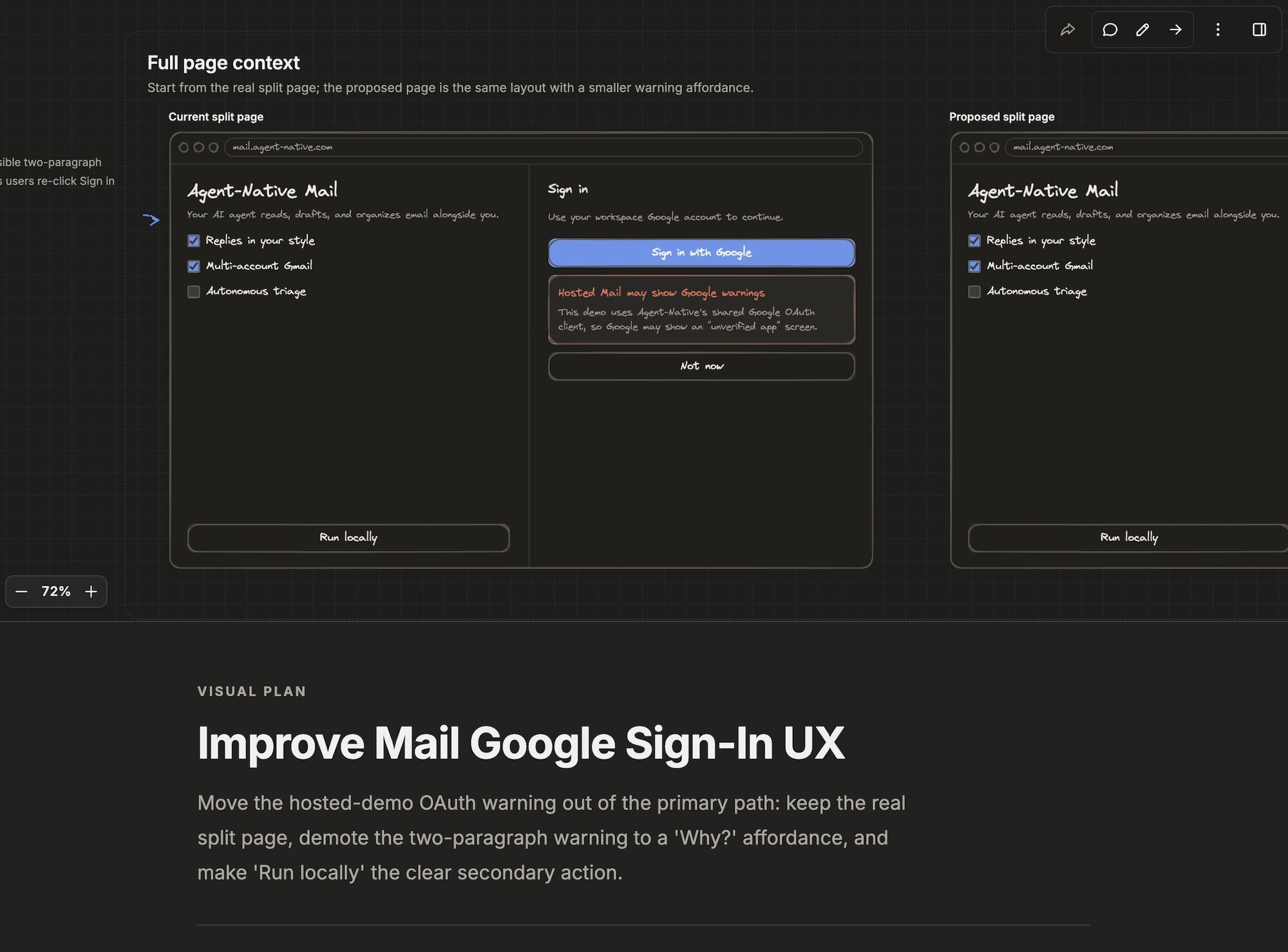
|
|
20
20
|
|
|
21
|
-
|
|
21
|
+
There are two ways into Plans:
|
|
22
|
+
|
|
23
|
+
- **From your coding agent (CLI)** — one command installs the skill, registers
|
|
24
|
+
the hosted Plans connector, and authenticates it.
|
|
25
|
+
- **In the browser** — anyone you share with can open the editor and create or
|
|
26
|
+
edit as a **guest, with no sign-up**. They sign in only when they want to save
|
|
27
|
+
or share.
|
|
28
|
+
|
|
29
|
+
## Install the skill {#install}
|
|
22
30
|
|
|
23
31
|
Use the Agent-Native CLI. This is the recommended setup because it installs the
|
|
24
|
-
Plans skill instructions, registers the hosted Plans MCP connector, and runs
|
|
25
|
-
client-specific auth/setup flow in one step
|
|
32
|
+
Plans skill instructions, registers the hosted Plans MCP connector, **and** runs
|
|
33
|
+
the client-specific auth/setup flow in one step, so your first tool call does not
|
|
34
|
+
hit an OAuth wall:
|
|
26
35
|
|
|
27
36
|
```bash
|
|
28
37
|
npx @agent-native/core@latest skills add visual-plan
|
|
@@ -36,10 +45,16 @@ agent-native skills add visual-plan
|
|
|
36
45
|
|
|
37
46
|
The command installs both commands: `/visual-plan` and `/visual-recap`.
|
|
38
47
|
|
|
39
|
-
|
|
40
|
-
|
|
41
|
-
|
|
42
|
-
|
|
48
|
+
Authentication is a one-time browser sign-in at setup — this is intended, and it
|
|
49
|
+
is what lets the agent persist and share the plans it generates. What the auth
|
|
50
|
+
step does depends on your client:
|
|
51
|
+
|
|
52
|
+
- **OAuth-capable hosts** (Claude Code) get a URL-only MCP entry plus a prompt to
|
|
53
|
+
run `/mcp` and choose **Authenticate**.
|
|
54
|
+
- **Codex / Cowork** run a short browser device-code flow: the CLI prints a code,
|
|
55
|
+
opens the verification page, and writes the connector once you approve.
|
|
56
|
+
- In a **non-interactive shell or CI**, the auth step is skipped and the exact
|
|
57
|
+
command to run later is printed for you.
|
|
43
58
|
|
|
44
59
|
By default the CLI targets Codex. Add `--client claude-code` or `--client all`
|
|
45
60
|
when you want to configure another host:
|
|
@@ -48,6 +63,22 @@ when you want to configure another host:
|
|
|
48
63
|
npx @agent-native/core@latest skills add visual-plan --client all
|
|
49
64
|
```
|
|
50
65
|
|
|
66
|
+
Pass `--no-connect` to register the connector without authenticating, then run
|
|
67
|
+
`agent-native connect https://plan.agent-native.com` whenever you are ready:
|
|
68
|
+
|
|
69
|
+
```bash
|
|
70
|
+
npx @agent-native/core@latest skills add visual-plan --no-connect
|
|
71
|
+
```
|
|
72
|
+
|
|
73
|
+
To auto-generate a recap on **every pull request**, pass `--with-github-action`.
|
|
74
|
+
This writes a GitHub Action that runs the `visual-recap` skill on each PR and
|
|
75
|
+
posts an interactive recap plan with an inline screenshot as a sticky comment —
|
|
76
|
+
see [PR Visual Recap](/docs/pr-visual-recap).
|
|
77
|
+
|
|
78
|
+
```bash
|
|
79
|
+
npx @agent-native/core@latest skills add visual-plan --with-github-action
|
|
80
|
+
```
|
|
81
|
+
|
|
51
82
|
If you only want the portable instruction file through the open Skills CLI, use:
|
|
52
83
|
|
|
53
84
|
```bash
|
|
@@ -57,6 +88,11 @@ npx skills add BuilderIO/agent-native --skill visual-plan
|
|
|
57
88
|
That installs the skill instructions only. It does not register the hosted MCP
|
|
58
89
|
connector, so use the Agent-Native CLI path when you want the one-command setup.
|
|
59
90
|
|
|
91
|
+
> **Prefer a one-install plugin?** Claude Code and Codex can add
|
|
92
|
+
> `BuilderIO/agent-native` directly as a plugin marketplace, which bundles the
|
|
93
|
+
> Plan skills _and_ the connector in one install and auto-updates as the skills
|
|
94
|
+
> improve — see [Plan plugin & marketplace](/docs/plan-plugin).
|
|
95
|
+
|
|
60
96
|
## Use it from your coding agent
|
|
61
97
|
|
|
62
98
|
After installation, ask your agent for the command that fits the work:
|
|
@@ -74,6 +110,10 @@ wrong direction would be costly. The returned Plans link opens the review UI so
|
|
|
74
110
|
you can annotate, correct, choose options, and ask for updates before code
|
|
75
111
|
changes begin.
|
|
76
112
|
|
|
113
|
+
When a Codex, Claude Code, Markdown, or pasted plan already exists, use
|
|
114
|
+
`/visual-plan`; the agent preserves that source plan and builds the richer review
|
|
115
|
+
surface from it instead of starting over.
|
|
116
|
+
|
|
77
117
|
If the first pass still has answerable decisions, the agent can place an
|
|
78
118
|
**Open Questions** form at the bottom of the same plan. Answering it and sending
|
|
79
119
|
it to the agent starts a revision turn against the existing plan.
|
|
@@ -91,14 +131,36 @@ it to the agent starts a revision turn against the existing plan.
|
|
|
91
131
|
prose block, visual comments include exact target metadata, and browser
|
|
92
132
|
handoff includes focused screenshots for a small set of visual/canvas comment
|
|
93
133
|
locations instead of one hard-to-read giant image.
|
|
94
|
-
- **Share with reviewers.** Hosted Plans can create private review links and
|
|
95
|
-
account-backed sharing. Viewing shared plans works from the browser; saving
|
|
96
|
-
and sharing require sign-in.
|
|
97
134
|
- **Export the result.** Keep an HTML, Markdown, or JSON receipt of the plan
|
|
98
135
|
when you need a source-control-friendly handoff.
|
|
99
|
-
|
|
100
|
-
|
|
101
|
-
|
|
136
|
+
|
|
137
|
+
## Editing in the browser as a guest {#guest}
|
|
138
|
+
|
|
139
|
+
People you share a plan with do not need to install anything. They open the Plans
|
|
140
|
+
editor and **create and edit with no sign-up** — they work as a guest. Signing in
|
|
141
|
+
is only required when someone wants to **save or share** their own work.
|
|
142
|
+
|
|
143
|
+
When a guest signs in, the plans they created as a guest are **claimed** into
|
|
144
|
+
their account, so nothing they built is lost.
|
|
145
|
+
|
|
146
|
+
Plan prose edits inline: click into any text section, type, format with the rich
|
|
147
|
+
editor toolbar or slash menu, and Plans autosaves the underlying markdown. Review
|
|
148
|
+
annotation mode temporarily turns text sections read-only so clicks can pin
|
|
149
|
+
feedback; leave review mode to keep editing prose.
|
|
150
|
+
|
|
151
|
+
## Sharing and commenting {#sharing}
|
|
152
|
+
|
|
153
|
+
Sharing and commenting are the workflows that need an account:
|
|
154
|
+
|
|
155
|
+
- **Viewing** a public or shared plan works for anyone with the link — no account
|
|
156
|
+
required.
|
|
157
|
+
- **Commenting** on a shared plan requires an agent-native account.
|
|
158
|
+
- **Sharing** a plan (publishing it to a link, private sharing, reviewer access,
|
|
159
|
+
cross-device or team review) requires signing in. Google sign-in appears when
|
|
160
|
+
the standard Google OAuth env vars are configured.
|
|
161
|
+
|
|
162
|
+
The hosted Plans connector lives at `https://plan.agent-native.com/_agent-native/mcp`.
|
|
163
|
+
Never put shared secrets in skill files.
|
|
102
164
|
|
|
103
165
|
## Useful prompts
|
|
104
166
|
|
|
@@ -108,6 +170,14 @@ it to the agent starts a revision turn against the existing plan.
|
|
|
108
170
|
- "Run `/visual-recap` on this PR so I can review the shape of the change first."
|
|
109
171
|
- "Use `/visual-recap` on the diff between `main` and this branch."
|
|
110
172
|
|
|
173
|
+
## Recovering from auth errors {#auth-errors}
|
|
174
|
+
|
|
175
|
+
If a Plans tool ever returns `needs auth`, `Unauthorized`, or `Session
|
|
176
|
+
terminated`, do not keep retrying it. Authenticate the connector with
|
|
177
|
+
`agent-native connect https://plan.agent-native.com` (or re-run `/mcp` →
|
|
178
|
+
**Authenticate** in an OAuth-capable host), then continue once the connector is
|
|
179
|
+
available.
|
|
180
|
+
|
|
111
181
|
## For developers
|
|
112
182
|
|
|
113
183
|
The rest of this doc is for anyone forking or self-hosting the Plans template.
|
|
@@ -130,10 +200,17 @@ The hosted app-backed skill uses:
|
|
|
130
200
|
The local template is useful when you are developing Plans itself, testing local
|
|
131
201
|
persistence, or running a fully self-hosted review surface.
|
|
132
202
|
|
|
203
|
+
### Local mode (advanced, offline)
|
|
204
|
+
|
|
205
|
+
For fully offline, no-account use, you can run the Plans app locally and sync
|
|
206
|
+
your plans to your repo as MDX. This local mode is a separate, advanced path —
|
|
207
|
+
not the default hosted flow — and is best when you need everything to stay on
|
|
208
|
+
your machine and in version control.
|
|
209
|
+
|
|
133
210
|
## What's next
|
|
134
211
|
|
|
135
|
-
- [**Visual Plans**](/docs/visual-plans) — the full skill flow and auth details
|
|
136
212
|
- [**PR Visual Recap**](/docs/pr-visual-recap) — run `/visual-recap` automatically on every pull request
|
|
213
|
+
- [**Plan plugin & marketplace**](/docs/plan-plugin) — install the Plan skills as a Claude Code or Codex plugin
|
|
137
214
|
- [**Skills**](/docs/skills-guide) — how Agent-Native installs skills
|
|
138
215
|
- [**MCP Clients**](/docs/mcp-clients) — configuring hosted MCP connectors
|
|
139
216
|
- [**Templates**](/docs/cloneable-saas) — the clone-and-own model
|
package/package.json
CHANGED
|
@@ -1,6 +1,6 @@
|
|
|
1
1
|
{
|
|
2
2
|
"name": "@agent-native/core",
|
|
3
|
-
"version": "0.
|
|
3
|
+
"version": "0.43.0",
|
|
4
4
|
"type": "module",
|
|
5
5
|
"engines": {
|
|
6
6
|
"node": ">=22"
|
|
@@ -198,6 +198,7 @@
|
|
|
198
198
|
"react-router": "^7.16.0",
|
|
199
199
|
"recharts": "3.8.1",
|
|
200
200
|
"remark-gfm": "^4.0.1",
|
|
201
|
+
"roughjs": "4.6.6",
|
|
201
202
|
"shiki": "^4.0.2",
|
|
202
203
|
"tailwind-merge": "^3.5.0",
|
|
203
204
|
"tiptap-markdown": "^0.9.0",
|
|
@@ -133,14 +133,39 @@ POST /_agent-native/extensions
|
|
|
133
133
|
|
|
134
134
|
The action accepts:
|
|
135
135
|
|
|
136
|
-
| Field
|
|
137
|
-
|
|
|
138
|
-
| `name`
|
|
139
|
-
| `description`
|
|
140
|
-
| `content`
|
|
136
|
+
| Field | Type | Required | Purpose |
|
|
137
|
+
| ---------------------- | -------- | -------- | -------------------------------------------------- |
|
|
138
|
+
| `name` | `string` | yes | Display name of the extension |
|
|
139
|
+
| `description` | `string` | no | Short summary |
|
|
140
|
+
| `content` | `string` | yes\* | Alpine.js HTML body (\*unless `contentFromAttachment`) |
|
|
141
|
+
| `contentFromAttachment`| `string` | no | Host a pasted/attached file verbatim, by reference |
|
|
142
|
+
| `icon` | `string` | no | Icon name or short label |
|
|
141
143
|
|
|
142
144
|
See `references/examples.md` for full, runnable `content` bodies.
|
|
143
145
|
|
|
146
|
+
### Hosting a pasted file (by reference)
|
|
147
|
+
|
|
148
|
+
When the user **pastes a large file** (e.g. a finished HTML/Alpine app) and asks
|
|
149
|
+
you to host it as an extension, do NOT copy that file into the `content`
|
|
150
|
+
argument. A big paste shows up in your context as a
|
|
151
|
+
`<attachment name="pasted-text-…">` block; re-typing it as a tool argument burns
|
|
152
|
+
thousands of output tokens and frequently gets cut off mid-stream, stalling the
|
|
153
|
+
turn.
|
|
154
|
+
|
|
155
|
+
Instead, leave `content` empty and pass `contentFromAttachment` set to that
|
|
156
|
+
attachment's `name` — or the literal string `"latest"` for the most recent
|
|
157
|
+
pasted block. The server reads the attachment verbatim and stores it as the
|
|
158
|
+
extension content:
|
|
159
|
+
|
|
160
|
+
```json
|
|
161
|
+
{ "name": "My Dashboard", "contentFromAttachment": "latest" }
|
|
162
|
+
```
|
|
163
|
+
|
|
164
|
+
`update-extension` accepts the same `contentFromAttachment` for full-body
|
|
165
|
+
replacement. Inline `content` still works for everything you author yourself —
|
|
166
|
+
use `contentFromAttachment` only to avoid regurgitating something the user
|
|
167
|
+
already pasted.
|
|
168
|
+
|
|
144
169
|
## Editing an extension
|
|
145
170
|
|
|
146
171
|
Use the `update-extension` action. Prefer granular `edits` for surgical
|
|
@@ -1,80 +0,0 @@
|
|
|
1
|
-
---
|
|
2
|
-
title: "Visual Plans"
|
|
3
|
-
description: "Turn your coding agent's plans into interactive, reviewable documents with /visual-plan. Install authenticates once; reviewers you share with edit as a guest, sign in only to save or share."
|
|
4
|
-
---
|
|
5
|
-
|
|
6
|
-
# Visual Plans
|
|
7
|
-
|
|
8
|
-
`/visual-plan` is a coding-agent skill that turns the plan your agent would normally write in Markdown into a **structured visual document**: an optional pan/zoom wireframe canvas on top and a Notion-like technical document below, with diagrams, mockups, prototype options, answerable Open Questions, annotations, and comments you can react to before any code changes.
|
|
9
|
-
|
|
10
|
-
There are two ways into Plans:
|
|
11
|
-
|
|
12
|
-
- **From your coding agent (CLI)** — one command installs the skill, registers the hosted Plans connector, and authenticates it.
|
|
13
|
-
- **In the browser** — anyone you share with can open the editor and create or edit as a **guest, with no sign-up**. They sign in only when they want to save or share.
|
|
14
|
-
|
|
15
|
-
## Coding agent setup {#install}
|
|
16
|
-
|
|
17
|
-
Install with the Agent-Native CLI. The command installs the skill instructions, registers the hosted Plans MCP connector, **and authenticates it in the same step**, so your first tool call does not hit an OAuth wall:
|
|
18
|
-
|
|
19
|
-
```bash
|
|
20
|
-
agent-native skills add visual-plan
|
|
21
|
-
```
|
|
22
|
-
|
|
23
|
-
Authentication is a one-time browser sign-in at setup — this is intended, and it is what lets the agent persist and share the plans it generates. This also installs the companion `/visual-recap` command for reviewing changes that already landed (see [Invoking the skill](#invoke)).
|
|
24
|
-
|
|
25
|
-
What the auth step does depends on your client:
|
|
26
|
-
|
|
27
|
-
- **OAuth-capable hosts** (Claude Code) get a URL-only MCP entry plus a prompt to run `/mcp` and choose **Authenticate**.
|
|
28
|
-
- **Codex / Cowork** run a short browser device-code flow: the CLI prints a code, opens the verification page, and writes the connector once you approve.
|
|
29
|
-
- In a **non-interactive shell or CI**, the auth step is skipped and the exact command to run later is printed for you.
|
|
30
|
-
|
|
31
|
-
Pass `--no-connect` to register the connector without authenticating, then run `agent-native connect https://plan.agent-native.com` whenever you are ready:
|
|
32
|
-
|
|
33
|
-
```bash
|
|
34
|
-
agent-native skills add visual-plan --no-connect
|
|
35
|
-
```
|
|
36
|
-
|
|
37
|
-
To auto-generate a recap on **every pull request**, pass `--with-github-action`. This writes a GitHub Action that runs the `visual-recap` skill on each PR and posts an interactive recap plan with an inline screenshot as a sticky comment — see [PR Visual Recap](/docs/pr-visual-recap).
|
|
38
|
-
|
|
39
|
-
```bash
|
|
40
|
-
agent-native skills add visual-plan --with-github-action
|
|
41
|
-
```
|
|
42
|
-
|
|
43
|
-
## Invoking the skill {#invoke}
|
|
44
|
-
|
|
45
|
-
Once installed, there are two commands:
|
|
46
|
-
|
|
47
|
-
- `/visual-plan` — plan **before** implementation. The canonical command for any rich plan: architecture, backend, refactors, or UI. It pulls in diagrams, wireframes, mockups, clickable prototypes, and implementation maps as the work calls for them, and can open with a short visual intake step when the direction is still open.
|
|
48
|
-
- `/visual-recap` — review **after** the change. Turns a PR, commit, branch, or git diff that already landed into a high-altitude recap — schema, API, file, and before/after blocks instead of a wall of raw diff. A recap is a review aid, not a replacement for reading the diff. See [PR Visual Recap](/docs/pr-visual-recap) to run it automatically on every pull request.
|
|
49
|
-
|
|
50
|
-
The agent gates hard: it only builds a polished visual plan when a wrong direction would be costly, and skips it for trivial, unambiguous work. Each command generates a plan and opens the editor.
|
|
51
|
-
|
|
52
|
-
When a Codex, Claude Code, Markdown, or pasted plan already exists, use `/visual-plan`. The agent should preserve that source plan and build the richer review surface from it instead of starting over.
|
|
53
|
-
|
|
54
|
-
When a plan has unresolved decisions that are useful to answer after the first pass, the agent can put them in an **Open Questions** form at the bottom of the same plan. You can choose single or multiple options, fill in freeform answers, and send the answers back to the agent to revise the plan.
|
|
55
|
-
|
|
56
|
-
## Editing in the browser as a guest {#guest}
|
|
57
|
-
|
|
58
|
-
People you share a plan with do not need to install anything. They open the Plans editor and **create and edit with no sign-up** — they work as a guest. Signing in is only required when someone wants to **save or share** their own work.
|
|
59
|
-
|
|
60
|
-
When a guest signs in, the plans they created as a guest are **claimed** into their account, so nothing they built is lost.
|
|
61
|
-
|
|
62
|
-
Plan prose edits inline: click into any text section, type, format with the rich editor toolbar or slash menu, and Plans autosaves the underlying markdown. Review annotation mode temporarily turns text sections read-only so clicks can pin feedback; leave review mode to keep editing prose.
|
|
63
|
-
|
|
64
|
-
## Sharing and commenting {#sharing}
|
|
65
|
-
|
|
66
|
-
Sharing and commenting are the workflows that need an account:
|
|
67
|
-
|
|
68
|
-
- **Viewing** a public or shared plan works for anyone with the link — no account required.
|
|
69
|
-
- **Commenting** on a shared plan requires an agent-native account.
|
|
70
|
-
- **Sharing** a plan (publishing it to a link, private sharing, reviewer access, cross-device or team review) requires signing in. Google sign-in appears when the standard Google OAuth env vars are configured.
|
|
71
|
-
|
|
72
|
-
The hosted Plans connector lives at `https://plan.agent-native.com/_agent-native/mcp`. Never put shared secrets in skill files.
|
|
73
|
-
|
|
74
|
-
## Local mode (advanced, offline) {#local}
|
|
75
|
-
|
|
76
|
-
For fully offline, no-account use, you can run the Plans app locally and sync your plans to your repo as MDX. This local mode is a separate, advanced path — not the default hosted flow — and is best when you need everything to stay on your machine and in version control.
|
|
77
|
-
|
|
78
|
-
## Recovering from auth errors {#auth-errors}
|
|
79
|
-
|
|
80
|
-
If a Plans tool ever returns `needs auth`, `Unauthorized`, or `Session terminated`, do not keep retrying it. Authenticate the connector with `agent-native connect https://plan.agent-native.com` (or re-run `/mcp` → **Authenticate** in an OAuth-capable host), then continue once the connector is available.
|