@adamchanadam/cer-workflow 0.3.17 → 0.3.18
This diff represents the content of publicly available package versions that have been released to one of the supported registries. The information contained in this diff is provided for informational purposes only and reflects changes between package versions as they appear in their respective public registries.
- package/README.md +209 -23
- package/package.json +1 -1
- package/skills/cer-workflow/VERSION +1 -1
- package/skills/cer-workflow-en/VERSION +1 -1
package/README.md
CHANGED
|
@@ -2,57 +2,243 @@
|
|
|
2
2
|
|
|
3
3
|
Installable npm package for the CER Workflow Codex skills.
|
|
4
4
|
|
|
5
|
-
|
|
5
|
+
CER = Controller, Executor, Reviewer.
|
|
6
6
|
|
|
7
|
-
|
|
8
|
-
- npm support is an installability layer for future users. It does not change CER runtime behavior.
|
|
9
|
-
- Validator, package, and install checks do not by themselves prove manual UAT pass, token saving, or universal task quality.
|
|
7
|
+
CER is a workflow skill for Codex. It does not replace ordinary chat, and it does not replace Goal. Use ordinary chat for small tasks. Use Goal when Codex needs to keep working across multiple steps and the endpoint is clear. Use CER when the task is not fully settled, or when you need mid-work decisions, role boundaries, or independent review.
|
|
10
8
|
|
|
11
|
-
|
|
9
|
+
In plain language: when you discover halfway through that the direction, constraints, or risk has changed, CER brings that change back to you before assigning the next batch of work. It is for tasks where the human and the AI need to make decisions together. It is not worth using for every small task.
|
|
12
10
|
|
|
13
|
-
|
|
14
|
-
- `skills/cer-workflow-en`: English installable Skill package.
|
|
15
|
-
- `bin/cer-workflow.mjs`: small local helper for package inspection and explicit-target install tests.
|
|
11
|
+
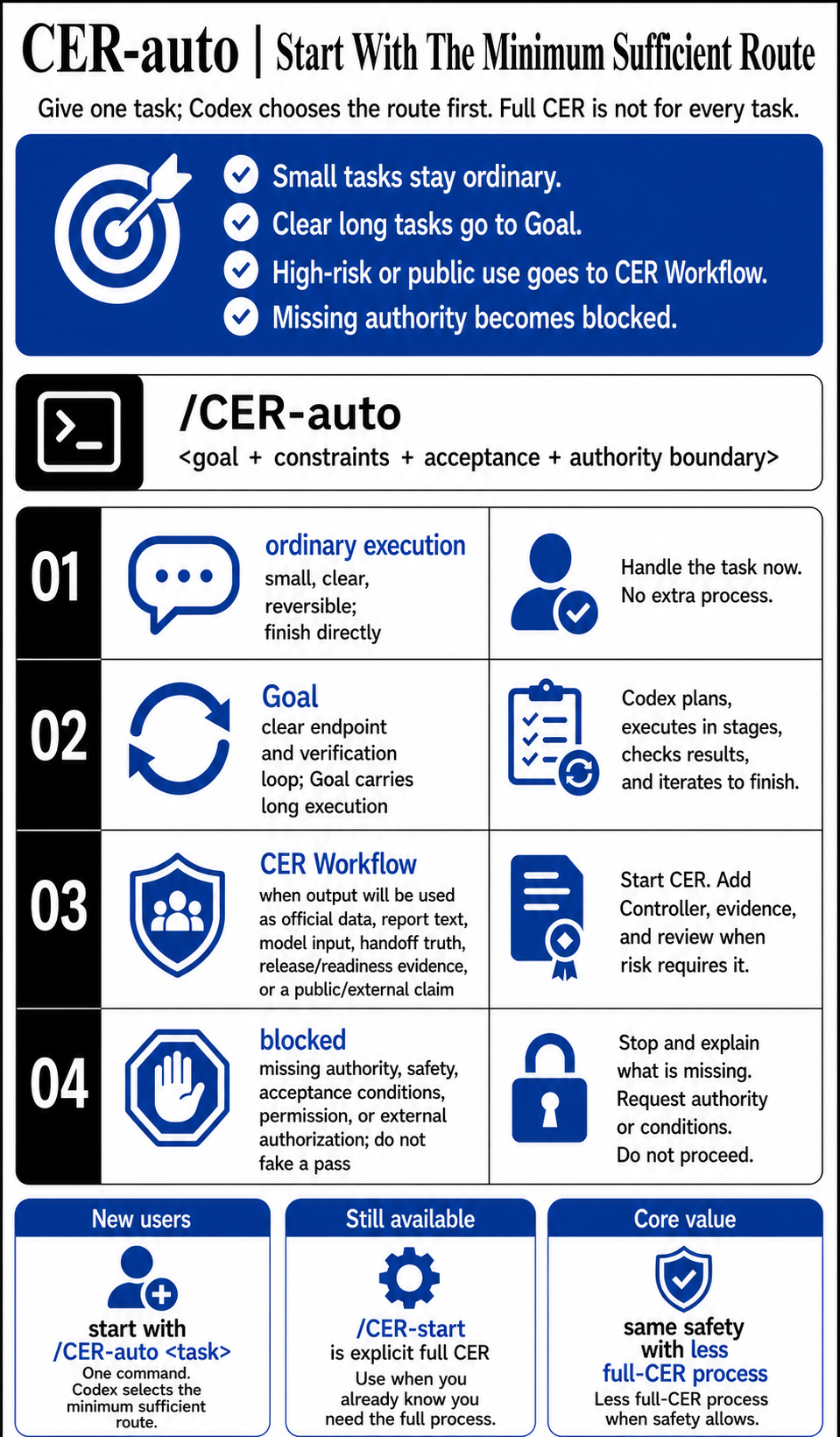
If you do not want to choose between ordinary chat, Goal, and CER up front, use `/CER-auto <task>` after installation. It first selects the minimum sufficient route: ordinary execution, Goal, CER Workflow, or blocked because authority, safety, or acceptance conditions are missing.
|
|
16
12
|
|
|
17
|
-
|
|
13
|
+
[Traditional Chinese README](https://github.com/Adamchanadam/cer-workflow/blob/v0.3.17/README.md) | [GitHub repository](https://github.com/Adamchanadam/cer-workflow)
|
|
14
|
+
|
|
15
|
+
|
|
18
16
|
|
|
19
17
|
## Install
|
|
20
18
|
|
|
19
|
+
Install the package:
|
|
20
|
+
|
|
21
21
|
```sh
|
|
22
22
|
npm install -g @adamchanadam/cer-workflow
|
|
23
23
|
cer-workflow help
|
|
24
24
|
```
|
|
25
25
|
|
|
26
|
-
|
|
26
|
+
Then install the Skill files into your Codex Skill directory. The helper requires an explicit empty target and refuses to overwrite existing files.
|
|
27
|
+
|
|
28
|
+
macOS / Linux example:
|
|
27
29
|
|
|
28
30
|
```sh
|
|
29
|
-
|
|
31
|
+
cer-workflow install --skill en --target "$HOME/.codex/skills/cer-workflow-en" --yes
|
|
30
32
|
```
|
|
31
33
|
|
|
32
|
-
|
|
34
|
+
Windows PowerShell example:
|
|
33
35
|
|
|
34
|
-
```
|
|
35
|
-
|
|
36
|
-
npm run pack:dry-run
|
|
36
|
+
```powershell
|
|
37
|
+
cer-workflow install --skill en --target "$env:USERPROFILE\.codex\skills\cer-workflow-en" --yes
|
|
37
38
|
```
|
|
38
39
|
|
|
39
|
-
|
|
40
|
+
Traditional Chinese Skill:
|
|
40
41
|
|
|
41
42
|
```sh
|
|
42
|
-
|
|
43
|
+
cer-workflow install --skill zh --target "<your-skill-root>/cer-workflow" --yes
|
|
43
44
|
```
|
|
44
45
|
|
|
45
|
-
|
|
46
|
+
If your Codex setup uses another Skill root such as `.agents/skills`, use that root instead. If the target directory already contains files, stop and inspect it first; the helper does not overwrite, delete, migrate, or back up an existing Skill directory.
|
|
46
47
|
|
|
47
|
-
|
|
48
|
+
For one-off inspection without a global install:
|
|
48
49
|
|
|
49
50
|
```sh
|
|
50
|
-
npx cer-workflow
|
|
51
|
-
|
|
51
|
+
npx @adamchanadam/cer-workflow inspect
|
|
52
|
+
```
|
|
53
|
+
|
|
54
|
+
## If You Are Not Sure Which Mode To Use
|
|
55
|
+
|
|
56
|
+
Use:
|
|
57
|
+
|
|
58
|
+
```text
|
|
59
|
+
/CER-auto <goal, constraints, priorities>
|
|
60
|
+
```
|
|
61
|
+
|
|
62
|
+
A stronger task shape is: `goal + constraints/do-not-do + acceptance + authority/source/authorization boundary`. Examples do not need to use a fixed domain; Codex should adapt the wording to your background, material, and current work.
|
|
63
|
+
|
|
64
|
+
```text
|
|
65
|
+
/CER-auto help me compare/organize/fix <my material or problem>; do not <forbidden action>; success means <verifiable output>; before a formal decision, payment, publication, or external commitment, stop and use CER Workflow.
|
|
52
66
|
```
|
|
53
67
|
|
|
54
|
-
|
|
68
|
+
Codex first replies with one route:
|
|
69
|
+
|
|
70
|
+
- `ordinary execution`: the task is small, clear, reversible, and ordinary chat is enough.
|
|
71
|
+
- `Goal`: the task is longer, and the endpoint plus verification loop are clear.
|
|
72
|
+
- `CER Workflow`: the result will be used as official data, report text, model input, handoff truth, release/readiness evidence, or a public/external claim, so full CER handles the acceptance.
|
|
73
|
+
- `blocked`: authority, safety, acceptance conditions, permissions, or external-action authorization are missing, so Codex must not pretend the task passed.
|
|
74
|
+
|
|
75
|
+
New users should start with `/CER-auto`. If it returns ordinary execution or Goal, there is no C/E1/R. If it returns CER Workflow, it enters full CER, with R only when risk requires it. If you already know you need the full CER workflow, use `/CER-start` directly; it has not been replaced and remains available for explicitly full CER work.
|
|
76
|
+
|
|
77
|
+
## What You See When CER Starts
|
|
78
|
+
|
|
79
|
+
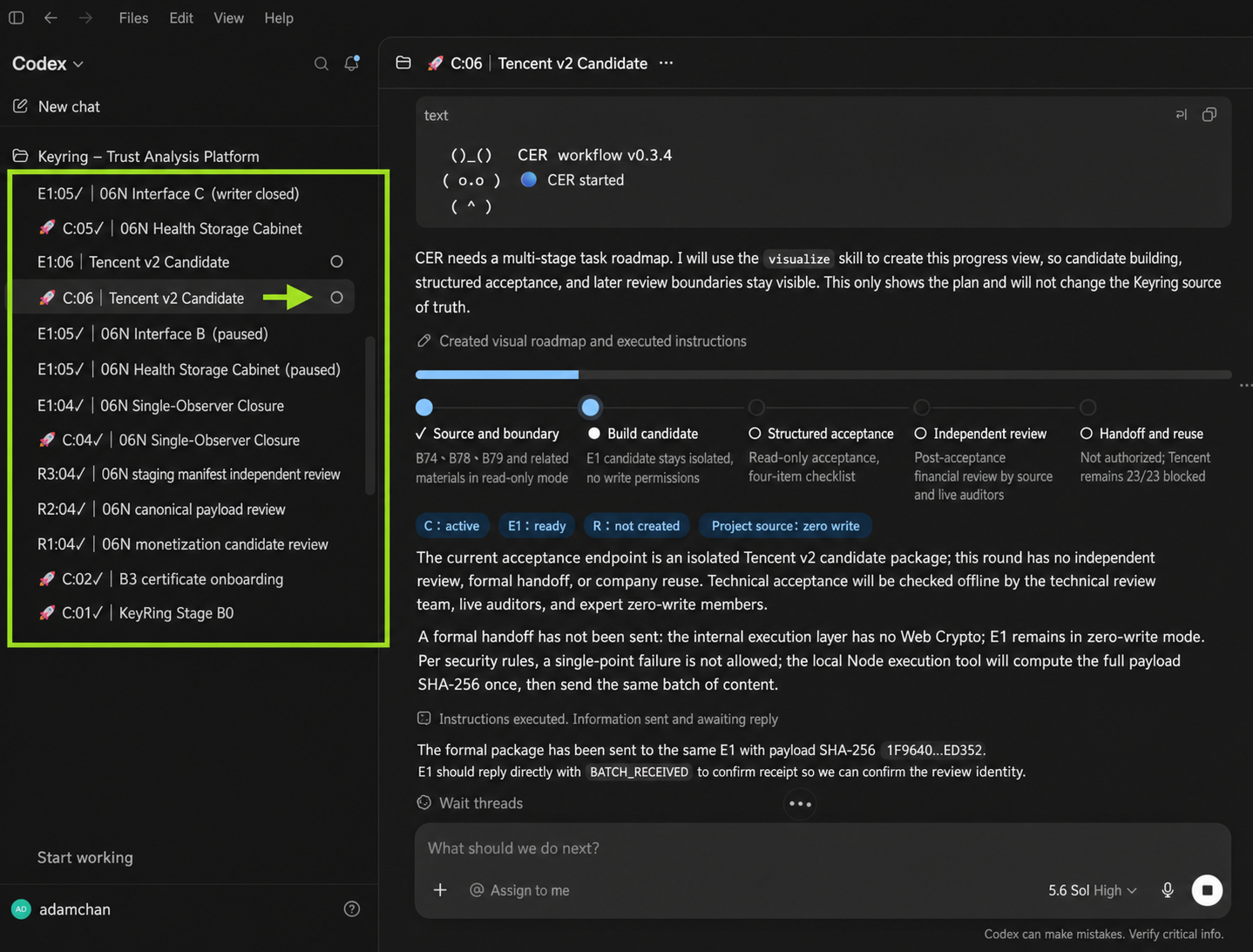
When CER starts, the Controller first shows a startup card and a roadmap. The tasks in the left sidebar are named with C / E1 / R, so you can tell which task coordinates, which one writes, and which one reviews in read-only mode. The inline roadmap in the main chat shows the current stage, confirmed context, and the next checkpoint.
|
|
80
|
+
|
|
81
|
+
|
|
82
|
+
|
|
83
|
+
## Choose First
|
|
84
|
+
|
|
85
|
+
If you are not sure, start with `/CER-auto`; this is a simple guide for choosing manually. The Skill still decides the actual route from the task's consequences, authority, and acceptance conditions.
|
|
86
|
+
|
|
87
|
+
Use ordinary chat when:
|
|
88
|
+
|
|
89
|
+
- You need a one-off summary, translation, formatting pass, or small edit.
|
|
90
|
+
- You only need a short result, not long-running Codex work.
|
|
91
|
+
|
|
92
|
+
Use Goal when:
|
|
93
|
+
|
|
94
|
+
- The task has several steps, but the endpoint and completion criteria are clear.
|
|
95
|
+
- For example, a clearly scoped refactor, upgrade, or test repair.
|
|
96
|
+
- You know the endpoint, even if implementation details may change.
|
|
97
|
+
- You want Codex to keep moving with less management from you.
|
|
98
|
+
|
|
99
|
+
Use CER when:
|
|
100
|
+
|
|
101
|
+
- The direction is not fully settled, and the tradeoffs only become clear during the work.
|
|
102
|
+
- The work affects public content, workflow design, drift-prone areas, or long-running work that needs mid-work decisions, official acceptance, or independent review.
|
|
103
|
+
- You need mid-work decisions, clear role boundaries, or independent review on important or risky work.
|
|
104
|
+
|
|
105
|
+
Examples:
|
|
106
|
+
|
|
107
|
+
- "Turn these meeting notes into a one-page summary": use ordinary chat.
|
|
108
|
+
- "Translate one English paragraph into Traditional Chinese while keeping the meaning": use ordinary chat.
|
|
109
|
+
- "Upgrade the project to a newer framework version, preserve existing behavior, fix compatibility issues, and run tests": use Goal.
|
|
110
|
+
- "Build a CSV import feature from an existing spec, add tests, and make CI pass": use Goal.
|
|
111
|
+
- "Design an internal knowledge-base workflow for a support team; halfway through, we need to check whether the categories, permissions, and usage flow make sense": use CER.
|
|
112
|
+
- "Rework a public product page; the copy, screenshots, risk claims, and acceptance standard may need to change after the first preview": use CER.
|
|
113
|
+
|
|
114
|
+
Editing a README is not automatically a CER task. Consider CER only when public positioning, bilingual text and visuals, release impact, handoff, or independent review are part of the real work.
|
|
115
|
+
|
|
116
|
+
## When The Plan Changes During The Work
|
|
117
|
+
|
|
118
|
+
Goal and CER can both start from a short request. Both let you add information, change constraints, and check progress while the work is running. The difference is how they handle things that only become clear halfway through.
|
|
119
|
+
|
|
120
|
+
Goal keeps moving inside the same target. You can add context in the same chat, use Steer to change the current work, use Queue for the next turn, or ask for a progress recap. When Codex needs a decision or approval, it pauses and asks. This suits tasks where the target is clear and only the implementation path changes as Codex learns more.
|
|
121
|
+
|
|
122
|
+
CER puts the new discovery in front of the Controller before the next batch is assigned. The Controller separates what is confirmed, what is only a safe assumption, and what gap would change the result. It only sets the next batch that is safe to run. If a test result, tool response, user correction, or Reviewer finding changes the direction, scope, deliverable shape, or acceptance standard, the Controller updates the roadmap before sending the next batch.
|
|
123
|
+
|
|
124
|
+
The difference is the working style:
|
|
125
|
+
|
|
126
|
+
- Goal: the AI adjusts the next step inside the same target.
|
|
127
|
+
- CER: the workflow brings result-changing discoveries back for a decision before the next batch.
|
|
128
|
+
|
|
129
|
+
## Long-Task Drift Protection
|
|
130
|
+
|
|
131
|
+
In long-running work, CER is not just "send work out and read the result back." The Controller keeps the original accepted outcome in view. When a new test result, new source, or Reviewer finding would change direction, it first separates an original acceptance defect, a necessary blocker, and an adjacent improvement. Only issues that affect safe acceptance of the original outcome enter the mainline. Other improvements are listed separately instead of becoming the next batch automatically. This is meant to stop long tasks from widening, moving the finish line, or spending tokens on side paths that do not change the delivered result.
|
|
132
|
+
|
|
133
|
+
The full Skill currently has 12 related guardrails. The README only shows the 5 a user is most likely to notice:
|
|
134
|
+
|
|
135
|
+
- Outcome anchor: keep the real endpoint in view.
|
|
136
|
+
- Classify new discoveries first: separate acceptance defects, necessary blockers, and adjacent improvements.
|
|
137
|
+
- Adjacent improvements do not automatically become the mainline: keep the task from widening.
|
|
138
|
+
- Group same-cause fixes: avoid chasing review comments one sentence at a time.
|
|
139
|
+
- Progress is not the same as activity: candidates, reviews, and passing format checks do not automatically count as completion.
|
|
55
140
|
|
|
56
|
-
##
|
|
141
|
+
## Goal And CER: 10 Practical Differences
|
|
142
|
+
|
|
143
|
+
| # | Point of comparison | Goal | CER | How most users should read it |
|
|
144
|
+
|---:|---|---|---|---|
|
|
145
|
+
| 1 | First prompt | The `/goal` text becomes both the first prompt and the completion criteria. If the direction is still unclear, you can use `/plan` first. | The Controller separates confirmed facts, safe assumptions, and critical gaps. It asks before delegating when a gap would materially change the result. | Use ordinary chat for small tasks; use Goal only when the clear endpoint needs multiple steps. |
|
|
146
|
+
| 2 | Working rhythm | Codex keeps moving toward the same Goal, which suits long tasks that need less intervention. | The Controller divides the work into reviewable batches and decides the next batch after reading back the current one. | Use Goal for a clear target; use CER when batches need checkpoints. |
|
|
147
|
+
| 3 | Feedback during the work | In the same chat, Steer can change the current run and Queue can hold a message for the next run. You can also pause or edit the Goal. | You give feedback to the Controller. It identifies the affected scope, updates the roadmap, and sends a new batch to the same Executor. | Goal handles normal added context; CER is clearer when feedback changes direction. |
|
|
148
|
+
| 4 | Progress display | The desktop app shows a Goal progress row, and you can ask Codex for a progress recap. | Long or multi-stage work uses a CER roadmap showing the current stage, accepted results, blockers, and the next user checkpoint. | CER is clearer when checkpoints matter. |
|
|
149
|
+
| 5 | Previews and checkpoints | You can ask to inspect, explain, or adjust the work at any time. Preview timing usually comes from the prompt or the immediate need. | The roadmap marks points that need a preview or decision. When direction, deliverable shape, or acceptance changes, it shows what changed. | Use CER when you need to see intermediate work before deciding. |
|
|
150
|
+
| 6 | Your place in the workflow | You set the Goal and can intervene at any time, while Codex chooses the next step. It pauses when it needs a decision or approval. | You mainly stay in the Controller chat, adding requirements or changing direction after seeing intermediate work. The Controller carries those decisions into the implementation track. | Use Goal when you want less management; use CER when you want clearer decision points. |
|
|
151
|
+
| 7 | Task and agent structure | The main chat can work alone or use native, sidebar-visible subagents. Roles and handoffs depend on the task. | Each cycle has a fixed C for coordination and the same E1 for file changes. A fresh, read-only R is created only when risk warrants it. | Use CER when role boundaries and handoff clarity matter. |
|
|
152
|
+
| 8 | File ownership | The main agent or a subagent used for the task may make changes. Parallel work must avoid writing to the same source. | Only E1 writes files during a cycle. C and R stay read-only, avoiding concurrent changes from different roles. | Use CER when you want to avoid multiple roles writing at once. |
|
|
153
|
+
| 9 | Independent review | You can request a review, such as `/review`, or ask a subagent to check the work, but it is not a fixed part of every Goal. | A fresh R is used only for important, high-risk work or when independent evidence is needed. C groups the findings and returns them to the same E1. | Use CER for risky or public deliverables. |
|
|
154
|
+
| 10 | Best fit | The endpoint is stable, the completion criteria can be stated clearly, and Codex needs to keep working across multiple steps. | The task is not fully settled, or it needs mid-work decisions, role boundaries, or independent review. | Neither replaces the other; choose by task. |
|
|
155
|
+
|
|
156
|
+
The Goal details above follow OpenAI's [Long-running work](https://learn.chatgpt.com/docs/long-running-work), [Prompting](https://learn.chatgpt.com/docs/prompting), and [Subagents](https://learn.chatgpt.com/docs/agent-configuration/subagents) documentation. The CER details follow this package's [Controller Preflight](skills/cer-workflow-en/references/core-runtime.md#controller-preflight), [Execution Loop](skills/cer-workflow-en/references/core-runtime.md#execution-loop), and [inline roadmap](skills/cer-workflow-en/references/roadmap.md#two-different-surfaces).
|
|
157
|
+
|
|
158
|
+
## CER Roles
|
|
159
|
+
|
|
160
|
+
|
|
161
|
+
|
|
162
|
+
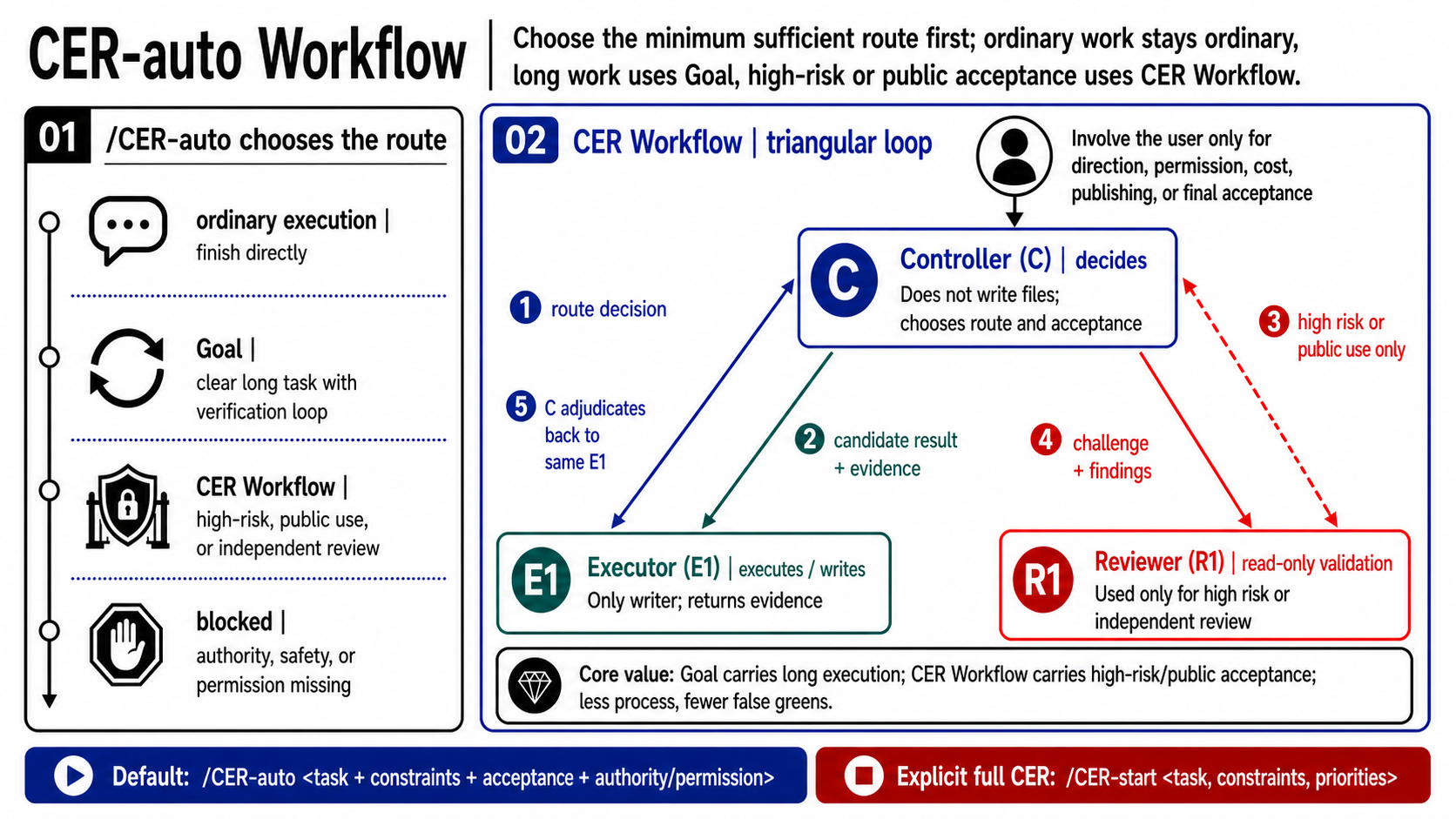
**Controller (C): coordination and decisions**
|
|
163
|
+
|
|
164
|
+
Understands the goal, constraints, and completion criteria; assigns work and judges results. The Controller does not modify project files.
|
|
165
|
+
|
|
166
|
+
**Executor (E1): implementation and file changes**
|
|
167
|
+
|
|
168
|
+
The only role that modifies files. It implements in batches, tests, and returns candidate results with evidence. The same E1 stays in use throughout one CER cycle, so file changes do not come from several roles at once.
|
|
169
|
+
|
|
170
|
+
**Reviewer (R1): independent review**
|
|
171
|
+
|
|
172
|
+
An independent Codex task that checks in read-only mode, gives conclusions, and does not write files. It is used only for important or high-risk work, or when independent verification is needed.
|
|
173
|
+
|
|
174
|
+
Sidebar labels such as `C:01`, `E1:01`, and `R1:01` mark the roles in the same CER cycle.
|
|
175
|
+
|
|
176
|
+
## Advanced: Exploration Helpers
|
|
177
|
+
|
|
178
|
+
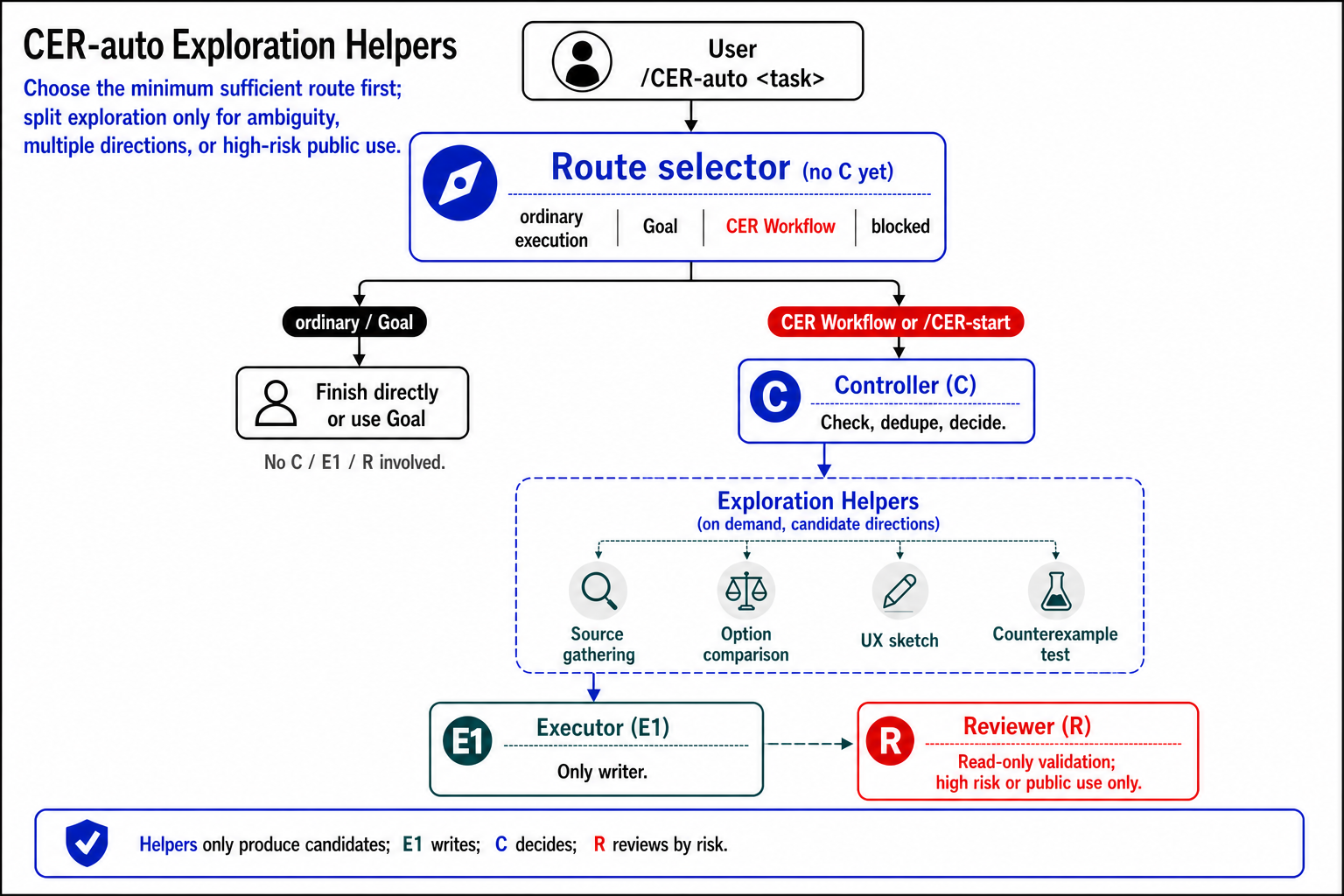
This section applies only after CER has started, or after `/CER-auto` has selected CER Workflow. Ordinary execution and Goal do not start CER Exploration Helpers.
|
|
179
|
+
|
|
180
|
+
Exploration Helpers are not a fourth formal role. The formal roles remain Controller, Executor, and Reviewer.
|
|
181
|
+
|
|
182
|
+
Medium and large tasks sometimes need several kinds of preparation at once: finding information, comparing options, sketching interface directions, or spotting likely risks. If the Controller handles all of that one item at a time, the early analysis can slow down the workflow. When it is useful, the Controller may start a small number of Exploration Helpers to organize candidate information before the Controller checks, deduplicates, and decides.
|
|
183
|
+
|
|
184
|
+
Exploration Helpers only produce candidate material. They do not modify the project, replace the Executor or Reviewer, or declare the work complete. The Controller decides whether to start them based on task size, source clarity, and whether parallel preparation is actually useful. The complete conditions live in the [complete Exploration Helper rules](skills/cer-workflow-en/references/parallel-producers.md#activation-eligibility).
|
|
185
|
+
|
|
186
|
+
|
|
187
|
+
|
|
188
|
+
## Commands
|
|
189
|
+
|
|
190
|
+
| Command | Natural language | Use |
|
|
191
|
+
|---|---|---|
|
|
192
|
+
| `/CER-auto <task, constraints, priorities>` | `Run CER adaptively: ...` | Select the minimum sufficient route first: ordinary execution, Goal, CER Workflow, or blocked; CER Workflow enters full C/E/R, with R only when risk requires it. |
|
|
193
|
+
| `/CER-start <task, constraints, priorities>` | `Start CER: ...` | Start CER, with the Controller coordinating the work. |
|
|
194
|
+
| `/CER-stop` | `Stop CER and continue in one ordinary conversation.` | Stop using CER and stop assigning new Executor or Reviewer work; this does not mean the task is complete. |
|
|
195
|
+
| `/CER-close` | `Close CER.` | Formally end this CER cycle; summarize the result, risks, and remaining work. |
|
|
196
|
+
| `/CER-status` | `Show CER status.` | Show current progress, the next stopping point, and known issues. |
|
|
197
|
+
| `/CER-help` | `Show CER commands.` | Show the commands and `/CER-auto` task shape. |
|
|
198
|
+
|
|
199
|
+
A plain close/finish message does not close CER and is not treated as `/CER-stop`.
|
|
200
|
+
|
|
201
|
+
## How CER Works
|
|
202
|
+
|
|
203
|
+
1. You give the task to the Controller, including the goal, constraints, and priorities.
|
|
204
|
+
2. The Controller confirms the completion criteria, sources, and stopping points, then sets only the next batch that is safe to run.
|
|
205
|
+
3. The Executor changes files, tests the work, and returns candidate results with evidence to the Controller.
|
|
206
|
+
4. For important or risky work, the Controller asks the Reviewer to perform an independent read-only check.
|
|
207
|
+
5. The Controller groups issues, decides what should be fixed, and returns the result, risks, and decisions that need you.
|
|
208
|
+
|
|
209
|
+
Issues with the same cause are grouped into one batch and sent back to the same Executor. The scope widens only for a different problem, a new effect, or a new risk.
|
|
210
|
+
|
|
211
|
+
When CER starts, it first confirms that the working tasks can return messages to each other. If that cannot be confirmed, CER stops and tells you instead of pretending it has started.
|
|
212
|
+
|
|
213
|
+
## Stop Versus Close CER
|
|
214
|
+
|
|
215
|
+
`/CER-stop` stops using CER and returns to one ordinary conversation. It means the Controller will not assign new Executor or Reviewer work; it does not mean the task is complete.
|
|
216
|
+
|
|
217
|
+
`/CER-close` formally ends this CER cycle. The Controller summarizes the result, risks, and remaining work, and confirms that the Executor has stopped writing. After close, the old C/E/R tasks are history only; the next cycle uses new role tasks.
|
|
218
|
+
|
|
219
|
+
## Package Boundary
|
|
57
220
|
|
|
58
221
|
This package is a distribution wrapper for the included Skill packages. Public runtime behavior remains owned by the Skill files and their references.
|
|
222
|
+
|
|
223
|
+
Package version `0.3.18` matches the included CER Workflow Skill runtime VERSION files. npm support is an installability and onboarding layer for future users. It does not change CER runtime behavior. Validator, package, and install checks do not by themselves prove manual UAT pass, token saving, or universal task quality.
|
|
224
|
+
|
|
225
|
+
Packaged surfaces:
|
|
226
|
+
|
|
227
|
+
- `skills/cer-workflow`: Traditional Chinese installable Skill package.
|
|
228
|
+
- `skills/cer-workflow-en`: English installable Skill package.
|
|
229
|
+
- `bin/cer-workflow.mjs`: small local helper for package inspection and explicit-target install tests.
|
|
230
|
+
|
|
231
|
+
The package whitelist intentionally excludes internal maintenance material such as `dev/`, `CER_docs/`, handoff and log files, backups, temporary evidence, local workspace paths, and cross-project comparison evidence. The diagrams in this README are loaded from released GitHub assets so the npm package remains small.
|
|
232
|
+
|
|
233
|
+
## Local Checks
|
|
234
|
+
|
|
235
|
+
```sh
|
|
236
|
+
npm run package:inspect
|
|
237
|
+
npm run pack:dry-run
|
|
238
|
+
```
|
|
239
|
+
|
|
240
|
+
After packing and installing the generated tarball into a temporary project, run:
|
|
241
|
+
|
|
242
|
+
```sh
|
|
243
|
+
npx cer-workflow inspect --strict-package
|
|
244
|
+
```
|
package/package.json
CHANGED
|
@@ -1 +1 @@
|
|
|
1
|
-
0.3.
|
|
1
|
+
0.3.18
|
|
@@ -1 +1 @@
|
|
|
1
|
-
0.3.
|
|
1
|
+
0.3.18
|