@adamchanadam/agent-handoff-kit 0.3.67 → 0.4.1
This diff represents the content of publicly available package versions that have been released to one of the supported registries. The information contained in this diff is provided for informational purposes only and reflects changes between package versions as they appear in their respective public registries.
- package/README.en.md +44 -180
- package/README.md +45 -187
- package/bin/agent-handoff-kit.mjs +149 -36
- package/bin/commands.mjs +134 -0
- package/bin/handoff-read.mjs +88 -0
- package/bin/installed-file-contract.mjs +79 -63
- package/bin/migration-baselines/official-origin-catalog.json +433 -1
- package/bin/official-origin-catalog.mjs +267 -257
- package/bin/progress/ICON-LICENSE.txt +21 -0
- package/bin/progress/agent-handoff-kit-logo2-256.png +0 -0
- package/bin/progress/assets.mjs +6 -0
- package/bin/progress/dashboard-hero.png +0 -0
- package/bin/progress/dashboard.mjs +134 -0
- package/bin/progress/icons.svg +36 -0
- package/bin/progress/index.html +31 -0
- package/bin/progress/launch.mjs +40 -0
- package/bin/progress/open.mjs +43 -0
- package/bin/progress/project-version.mjs +121 -0
- package/bin/progress/projection.mjs +144 -0
- package/bin/progress/renderer.js +152 -0
- package/bin/progress/server.mjs +78 -0
- package/bin/progress/styles.css +31 -0
- package/bin/upgrade-inventory.mjs +153 -273
- package/docs/commands.md +61 -0
- package/docs/progress.md +73 -0
- package/package.json +3 -1
- package/packs/closeout.md +71 -66
- package/runtime-core/AGENTS.core.md +112 -101
- package/runtime-core/PROJECT_INDEX.md +8 -1
- package/runtime-core/SESSION_HANDOFF.md +157 -147
- package/runtime-core/SESSION_LOG.md +2 -0
package/README.en.md
CHANGED
|
@@ -1,213 +1,77 @@
|
|
|
1
1
|
# Agent Handoff Kit
|
|
2
2
|
|
|
3
|
-
[繁體中文](README.md) · [
|
|
3
|
+
[繁體中文](README.md) · [Introduction](https://adamchanadam.github.io/agent-handoff-kit/agent-handoff-kit-intro.en.html) · [Command guide](https://adamchanadam.github.io/agent-handoff-kit/agent-handoff-kit-guide.en.html)
|
|
4
4
|
|
|
5
|
-
|
|
5
|
+
**Your session relay baton.** Help the next AI conversation pick up your work: keep progress, key decisions, file locations and unfinished tasks.
|
|
6
6
|
|
|
7
|
-
|
|
8
|
-
<img src="https://raw.githubusercontent.com/Adamchanadam/agent-handoff-kit/main/images/agent-handoff-kit-promo-30s.gif" alt="Agent Handoff Kit overview animation" width="720">
|
|
9
|
-
</p>
|
|
7
|
+
Code version covered: `v0.4.1`. This guide includes updates that have not been released yet. Features available to download depend on the published version.
|
|
10
8
|
|
|
11
|
-
Agent Handoff Kit
|
|
9
|
+
[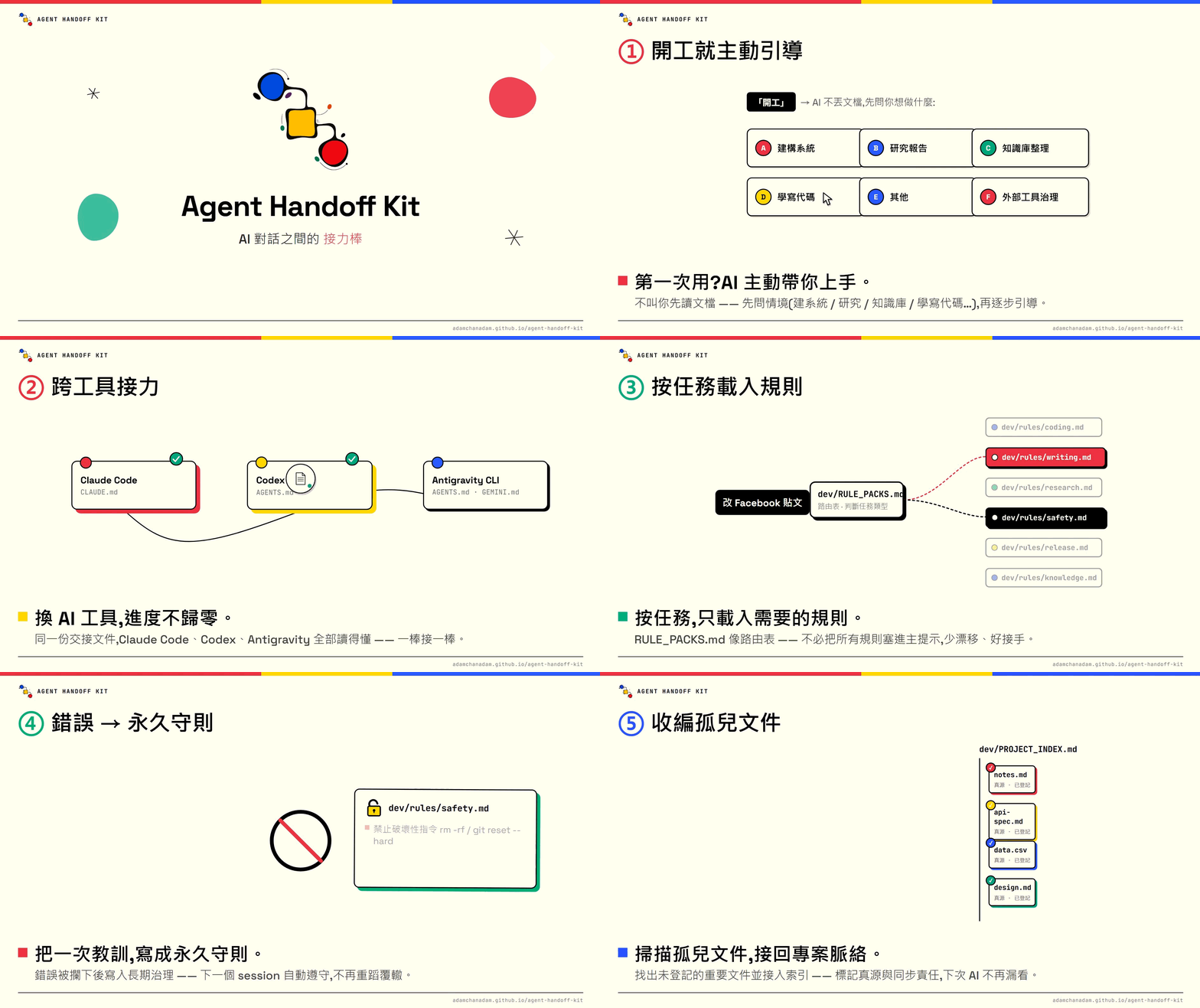](https://youtu.be/RopbfBiSw1I)
|
|
12
10
|
|
|
13
|
-
|
|
11
|
+
## How this tool helps your project
|
|
14
12
|
|
|
15
|
-
|
|
13
|
+
- **Carry work between conversations**: save goals, your corrections, important decisions, completed work and outstanding items, so you do not retell everything. Supported tools can reuse saved content in the same project.
|
|
14
|
+
- **Keep important files connected**: record what files are for, when to read them and what related content needs updating, reducing missing material and wrong-version use.
|
|
15
|
+
- **Keep a useful long-term record**: preserve important choices and reasons so you can ask “Why did we do this?” later. Older records are organized and archived as needed, without rereading everything every time.
|
|
16
|
+
- **Adapt to the task**: writing checks audience and tone; research checks sources; coding reads files and tests results; cloud document work checks permissions. You do not select the rules yourself.
|
|
17
|
+
- **Keep future working requirements**: save the preferences you explicitly want followed in this project for relevant work next time, beyond the current chat.
|
|
18
|
+
- **Handle tools and data carefully**: check important actions and obtain required approval, keep secrets out of records, and close only temporary processes confirmed to belong to this task.
|
|
16
19
|
|
|
17
|
-
|
|
20
|
+
The commands are entry points to these functions. The dashboard brings saved progress, history and file connections into view. The tool is not a cloud sync tool and does not automatically carry unsaved chats between tools.
|
|
18
21
|
|
|
19
|
-
|
|
22
|
+
## First time here
|
|
20
23
|
|
|
21
|
-
1. Open
|
|
22
|
-
|
|
23
|
-
|
|
24
|
-
Read https://adamchanadam.github.io/agent-handoff-kit/agent-handoff-kit-ai-install.en.html and install or upgrade Agent Handoff Kit in this folder.
|
|
25
|
-
```
|
|
26
|
-
|
|
27
|
-
You can also open the [AI install page](https://adamchanadam.github.io/agent-handoff-kit/agent-handoff-kit-ai-install.en.html) first to see the procedure the AI must follow.
|
|
28
|
-
|
|
29
|
-
2. When installation finishes, say `Start Agent Handoff` or `開工` to the AI.
|
|
30
|
-
3. When you are genuinely ending this work session, say `wrap up` or `收工`.
|
|
31
|
-
|
|
32
|
-
You do not decide whether the folder needs an install, upgrade, health check, or a safe stop. The AI must show the folder it sees, explain risk and the next action, and ask when your confirmation is needed.
|
|
33
|
-
|
|
34
|
-
If the folder already contains older Kit files or AI memory files such as `AGENTS.md`, `CLAUDE.md`, or `GEMINI.md`, use the same request. The AI inspects first; it must not silently overwrite them.
|
|
35
|
-
|
|
36
|
-
For a non-technical introduction, open the [English introduction](https://adamchanadam.github.io/agent-handoff-kit/agent-handoff-kit-intro.en.html). For complete walkthroughs, open the [English practical guide](https://adamchanadam.github.io/agent-handoff-kit/agent-handoff-kit-guide.en.html).
|
|
37
|
-
To see how Agent Handoff Kit sits in a local agentic AI workflow, open [`local-agentic-ai-workflow-case-study.en.html`](https://adamchanadam.github.io/agent-handoff-kit/local-agentic-ai-workflow-case-study.en.html).
|
|
38
|
-
|
|
39
|
-
## 🐱 How to read the status card
|
|
40
|
-
|
|
41
|
-
| Status | Meaning |
|
|
42
|
-
|---|---|
|
|
43
|
-
| `( o.o ) continuity ready` | Ready to continue; the AI has loaded resumable state. |
|
|
44
|
-
| `( -.- ) handoff saved` | Closeout has been saved; next time you can say `Start Agent Handoff` or `開工`. |
|
|
45
|
-
| `( x.x ) handoff blocked` | Not broken; something still needs to be saved, committed, verified, or handled. Follow the Blocker line first and do not treat this session as handed off. |
|
|
46
|
-
|
|
47
|
-
The closeout card checks saved handoff state, required fields, and recorded check results; it does not automatically prove that task conclusions are correct. Blocked work can still be handed off when its cause, impact, and conditions for resuming are clearly saved. “Saved” does not mean the overall task is complete.
|
|
48
|
-
|
|
49
|
-
## 🧭 How to read this repository
|
|
50
|
-
|
|
51
|
-
If you only want to use the kit, start from these four pages:
|
|
52
|
-
|
|
53
|
-
| Entry | Purpose |
|
|
54
|
-
|---|---|
|
|
55
|
-
| [This README](README.en.md) | Product purpose, safe use, and boundaries. |
|
|
56
|
-
| [60-second introduction](https://adamchanadam.github.io/agent-handoff-kit/agent-handoff-kit-intro.en.html) | A non-technical overview. |
|
|
57
|
-
| [Practical guide](https://adamchanadam.github.io/agent-handoff-kit/agent-handoff-kit-guide.en.html) | Three detailed scenarios: everyday local work, research with external tools, and a long-lived project. |
|
|
58
|
-
| [AI install page](https://adamchanadam.github.io/agent-handoff-kit/agent-handoff-kit-ai-install.en.html) | The instructions an AI follows to install, upgrade, check, or stop safely. |
|
|
59
|
-
|
|
60
|
-
This public repository keeps the material needed for use, installation, GitHub Pages, and the npm runtime. Normal users only need the four entries above.
|
|
61
|
-
|
|
62
|
-
## 🔎 What problem does it solve?
|
|
63
|
-
|
|
64
|
-
Long-running work with AI commonly has five problems:
|
|
65
|
-
|
|
66
|
-
| Problem | What Agent Handoff Kit does |
|
|
67
|
-
|---|---|
|
|
68
|
-
| A new AI does not know the current state | Keeps `dev/SESSION_HANDOFF.md` with the current objective, risks, validation, and next action. |
|
|
69
|
-
| New files or reference sources become disconnected | Lets you ask the AI to connect a document to the Kit, recording what it is for, which source is authoritative, and when it must be refreshed. |
|
|
70
|
-
| Different local AI tools start differently | Installs `AGENTS.md`, `CLAUDE.md`, and `GEMINI.md` as routes into one startup flow. Antigravity CLI reads the work folder’s `AGENTS.md` and `GEMINI.md`. |
|
|
71
|
-
| An AI could overwrite, delete, or publish carelessly | Requires an explanation and confirmation for high-risk work; destructive commands and unapproved release actions are prohibited. |
|
|
72
|
-
| External tools leave resources behind or clear shared resources | Applies ownership: resources demonstrably created for this task may be closed; shared, user-owned, or unclear resources are reported with evidence and kept until confirmed. |
|
|
73
|
-
|
|
74
|
-
It is not a chatbot and not a development framework. Think of it as a durable project handoff book.
|
|
75
|
-
|
|
76
|
-
## 🧰 Supported tools
|
|
77
|
-
|
|
78
|
-
Agent Handoff Kit is for agentic AI tools that can read and write a local project folder, such as Claude Code, OpenAI Codex, Gemini CLI, Google Antigravity, or another local-workspace agent. Antigravity CLI uses the work folder’s `AGENTS.md` and `GEMINI.md` routes to reach the same startup flow.
|
|
79
|
-
|
|
80
|
-
It is not for ordinary web-chat AI that cannot access your local folder. Uploading a file or pasting a handoff into a web chat does not give that chat the ability to maintain the project’s handoff files safely.
|
|
81
|
-
|
|
82
|
-
## 🟢 Start work
|
|
83
|
-
|
|
84
|
-
Open a local AI agent in the correct project folder.
|
|
85
|
-
|
|
86
|
-
If the AI is already in that folder, ordinary continuity startup is simply:
|
|
24
|
+
1. Open your project folder in your AI tool and paste the sentence below into the conversation.
|
|
25
|
+
2. The AI confirms the folder, installs or upgrades the tool, then checks the result. You do not have to choose installation commands.
|
|
26
|
+
3. Once it is ready, use `handoff-kit-onboard` for guidance or `handoff-kit-start` to pick up your work.
|
|
87
27
|
|
|
88
28
|
```text
|
|
89
|
-
|
|
29
|
+
Read https://adamchanadam.github.io/agent-handoff-kit/agent-handoff-kit-ai-install.en.html and install or upgrade Agent Handoff Kit in this project folder.
|
|
90
30
|
```
|
|
91
31
|
|
|
92
|
-
You
|
|
93
|
-
|
|
94
|
-
When the active platform can safely control the current conversation title, a plain start may replace a generic or stale title with a concise `<project name>|<primary action>` title. The title is generated from the startup card's already-finalized current objective or recommended next action; generic triggers such as `Start Agent Handoff`, `開工`, or "start handoff" cannot be the primary action. It performs no extra file or network reads, keeps an informative title, and skips silently when title control is unavailable. The title is display-only: it is not project state, progress, completion evidence, or additional authority.
|
|
95
|
-
|
|
96
|
-
If the AI is not yet pointed at the project folder, use the path-bearing startup sentence:
|
|
97
|
-
|
|
98
|
-
```text
|
|
99
|
-
Work in <your project folder>. Read AGENTS.md first, then Start Agent Handoff. Before changing anything, tell me the current state and your recommended next step.
|
|
100
|
-
```
|
|
32
|
+
Use the same sentence if you have an older version, existing AI work files, or are unsure whether setup is complete. You need an AI tool that can read and write your project folder, plus Node.js 18 or later. Ordinary web chat without folder access is not supported; the AI can check your setup first.
|
|
101
33
|
|
|
102
|
-
|
|
34
|
+
## Useful commands, as you need them
|
|
103
35
|
|
|
104
|
-
|
|
36
|
+
Enter shortcuts in your project’s AI conversation, not in the terminal. Claude Code, Gemini CLI and Antigravity CLI use /; Codex uses $, or selection through /skills. For example, the Codex start shortcut is `$handoff-kit-start`.
|
|
105
37
|
|
|
106
|
-
|
|
107
|
-
|
|
108
|
-
Then describe your task in ordinary language. The AI should explain the current state, next action, and risk before it starts the requested work.
|
|
109
|
-
|
|
110
|
-
## 💾 Wrap up
|
|
111
|
-
|
|
112
|
-
When the work session is really ending, say:
|
|
113
|
-
|
|
114
|
-
```text
|
|
115
|
-
wrap up
|
|
116
|
-
```
|
|
117
|
-
|
|
118
|
-
You can also say `收工`, `Wrap up Agent Handoff`, or `handoff`.
|
|
119
|
-
|
|
120
|
-
If the phrase could instead mean a real-world closing event, such as a restaurant closing, the AI should ask one short question rather than immediately changing the project handoff.
|
|
121
|
-
|
|
122
|
-
The AI should record the overall outcome, current subtask, exact resume point, and remaining acceptance checks, together with the necessary source versions, sections read, reading depth, and unresolved gaps. Simple tasks need only the relevant facts, not a multi-level task table. Before closeout, the AI reconstructs the next step using only the handoff, then compares it with your original request and actual results so a completed small step is not mistaken for the overall outcome. When resuming, the AI must still read the sources needed for the task; a predecessor's “read” record is not its own verification.
|
|
123
|
-
|
|
124
|
-
The AI should update only changed handoff state and compare the next-session prompt copy, regenerating it only when it differs:
|
|
125
|
-
|
|
126
|
-
```text
|
|
127
|
-
START_NEXT_SESSION_PROMPT.txt
|
|
128
|
-
```
|
|
129
|
-
|
|
130
|
-
That file is a portable convenience copy for an AI that is not yet in the project folder. The authority remains the next-session opening message in `dev/SESSION_HANDOFF.md`; if the two differ, the AI rebuilds the copy from the handoff.
|
|
131
|
-
|
|
132
|
-
## 🩺 When you are unsure about the state
|
|
133
|
-
|
|
134
|
-
If you are unsure whether the folder is installed correctly, needs an upgrade, or is healthy after an upgrade, ask the AI:
|
|
135
|
-
|
|
136
|
-
```text
|
|
137
|
-
Read the AI install page and check the Agent Handoff Kit state of this folder.
|
|
138
|
-
```
|
|
139
|
-
|
|
140
|
-
The AI performs the check. A successful check does not mean it has understood your project task; when you want continuity work, still say `Start Agent Handoff` or `開工`.
|
|
141
|
-
|
|
142
|
-
## 🗂️ What the AI maintains for you
|
|
143
|
-
|
|
144
|
-
After installation, the Kit places a small set of handoff files in the project. You do not need to read or maintain each one manually.
|
|
145
|
-
|
|
146
|
-
- **Startup entries:** `AGENTS.md`, `CLAUDE.md`, `GEMINI.md`, and `START_NEXT_SESSION_PROMPT.txt` route local AI tools into the same startup flow.
|
|
147
|
-
- **Current state:** `dev/SESSION_HANDOFF.md` records progress, next action, risks, and validation.
|
|
148
|
-
- **Trace record:** recent work remains available for trace-back; long-running use is compacted so the record does not grow without limit.
|
|
149
|
-
- **Project index and decisions:** important files, external sources, synchronization responsibilities, and durable decisions remain findable when you later ask “why did we choose this?”
|
|
150
|
-
- **Routed work rules:** the AI loads the rules needed for the task; you do not have to memorize rule-file names.
|
|
151
|
-
|
|
152
|
-
## 🧭 How work rules operate
|
|
153
|
-
|
|
154
|
-
You do not need to remember rule file names. The Kit lets the AI classify what you need and load only the relevant work rules.
|
|
155
|
-
|
|
156
|
-
| What you want to do | What the AI does |
|
|
38
|
+
| What you want to do | Shortcut |
|
|
157
39
|
|---|---|
|
|
158
|
-
|
|
|
159
|
-
|
|
|
160
|
-
|
|
|
161
|
-
| Delete files, use Git, publish, or use npm | For high-risk operations, explains impact first and waits for your confirmation. |
|
|
162
|
-
| Use Notion, Google Drive, or another external tool | Checks the current tool guidance, handles resources by ownership, and keeps secrets out of project files. |
|
|
40
|
+
| Pick up where you left off | [`/handoff-kit-start`](https://adamchanadam.github.io/agent-handoff-kit/agent-handoff-kit-guide.en.html#start) |
|
|
41
|
+
| See the whole project | [`/handoff-kit-progress`](https://adamchanadam.github.io/agent-handoff-kit/agent-handoff-kit-guide.en.html#progress) |
|
|
42
|
+
| Finish this conversation | [`/handoff-kit-close`](https://adamchanadam.github.io/agent-handoff-kit/agent-handoff-kit-guide.en.html#close) |
|
|
163
43
|
|
|
164
|
-
|
|
44
|
+
[All commands: guidance, files, working requirements, checks and updates](https://adamchanadam.github.io/agent-handoff-kit/agent-handoff-kit-guide.en.html#commands)
|
|
165
45
|
|
|
166
|
-
|
|
46
|
+
The daily rhythm: **start → describe your task → check progress when useful → wrap up before ending the conversation**. You do not need all commands every time. Natural phrases such as “Start Agent Handoff” and “wrap up” still work.
|
|
167
47
|
|
|
168
|
-
|
|
169
|
-
For future public Chinese documents, use written Traditional Chinese and avoid mixing Chinese and English fragments. Connect this rule to Agent Handoff Kit.
|
|
170
|
-
```
|
|
171
|
-
|
|
172
|
-
The AI should distinguish a current request from a durable rule, then read the existing categories, relevant rule pack, and project supplements; when a suitable home exists, it should merge the change there. Project rules belong in a writable supplement or registered reference, preserving the Kit's official body. On the next relevant task, the AI should read and apply the rule through the existing route, respecting your objective and instruction priority without inventing a new goal or acceptance threshold.
|
|
173
|
-
|
|
174
|
-
These requirements guide the AI and check the result; they cannot intercept arbitrary editor writes. If older local rules are already mixed into official prose, the AI still needs to verify their sources and preserve and reconcile them after receiving merge authorization. Upgrades will not guess what to delete.
|
|
48
|
+
Start on its own reads the full handoff, explains the current state and waits for your task. On first use, with no goal yet, it adds a short welcome. To continue immediately, add “continue the current goal”. If the handoff has not been read in full, the AI must say so instead of claiming it has resumed.
|
|
175
49
|
|
|
176
|
-
|
|
50
|
+
Installation and upgrades include the shortcuts for this project only, without installing them in shared computer-wide settings. If an older conversation does not show them, reopen the project conversation. See [shortcut help](docs/commands.md) for other issues.
|
|
177
51
|
|
|
178
|
-
|
|
52
|
+
## The dashboard: find your bearings
|
|
179
53
|
|
|
180
|
-
|
|
181
|
-
|---|---|
|
|
182
|
-
| Continue the last session | `Start Agent Handoff` or `開工` |
|
|
183
|
-
| End this session | `wrap up` or `收工` |
|
|
184
|
-
| Keep a new document from becoming disconnected | “Connect this document to Agent Handoff Kit so the next AI knows when to read and update it.” |
|
|
185
|
-
| Find important unconnected documents | “Scan for important documents not yet connected to Agent Handoff Kit.” |
|
|
186
|
-
| Avoid the same mistake in future work | “Turn this mistake into a durable work rule for future sessions.” |
|
|
187
|
-
| Keep an API or tool practice usable | “Use this API approach in future sessions too.” |
|
|
188
|
-
| Use Notion, Google Drive, GitHub, or another external tool | “This project uses these tools. Record what can be used directly and keep secrets out of project files.” |
|
|
189
|
-
| Finish a long task that used MCP, browser, or automation tools | “At wrap up, show the external-tool resource closeout: which task-owned resources were closed and which uncertain resources were retained with evidence.” |
|
|
54
|
+
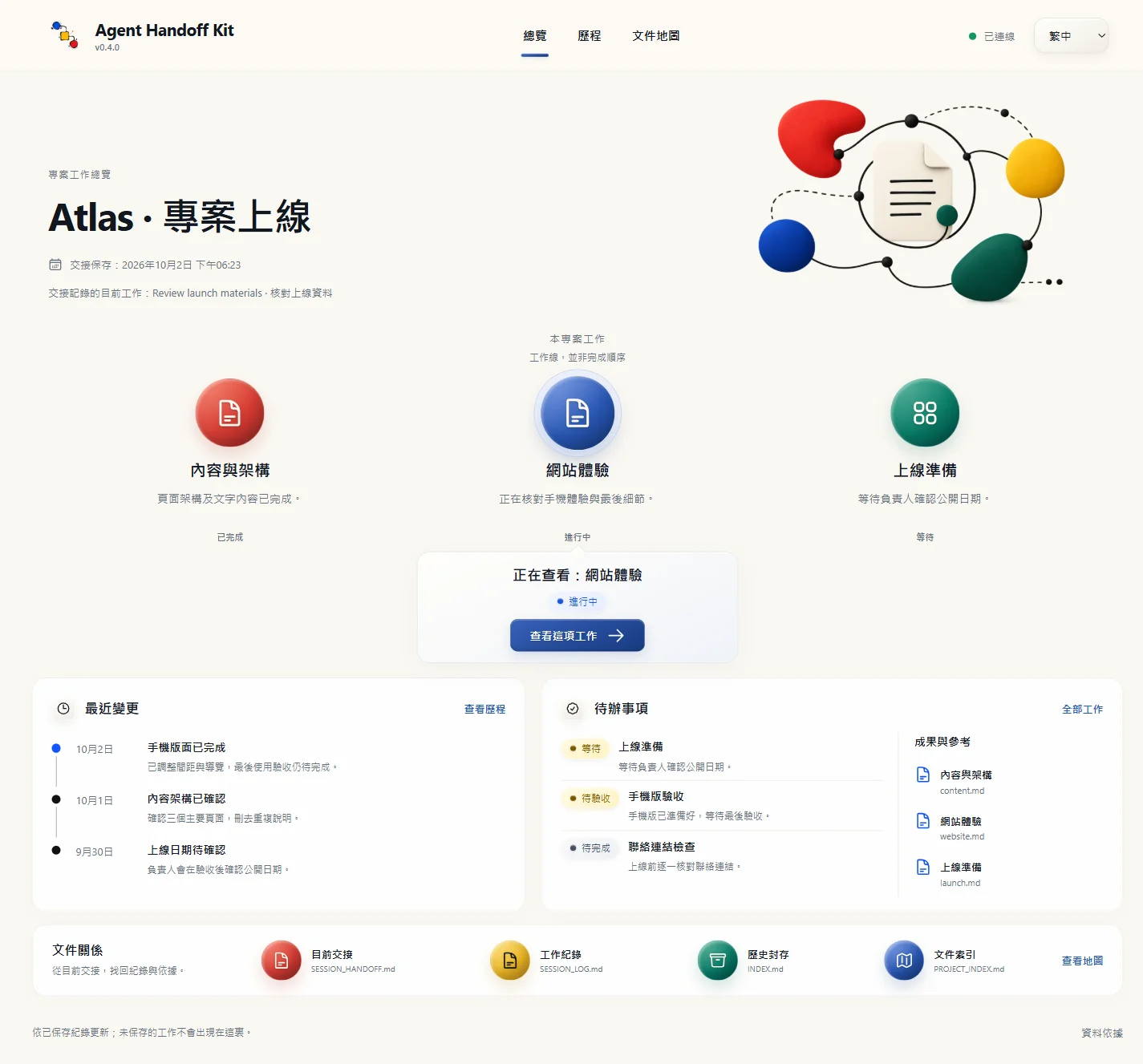
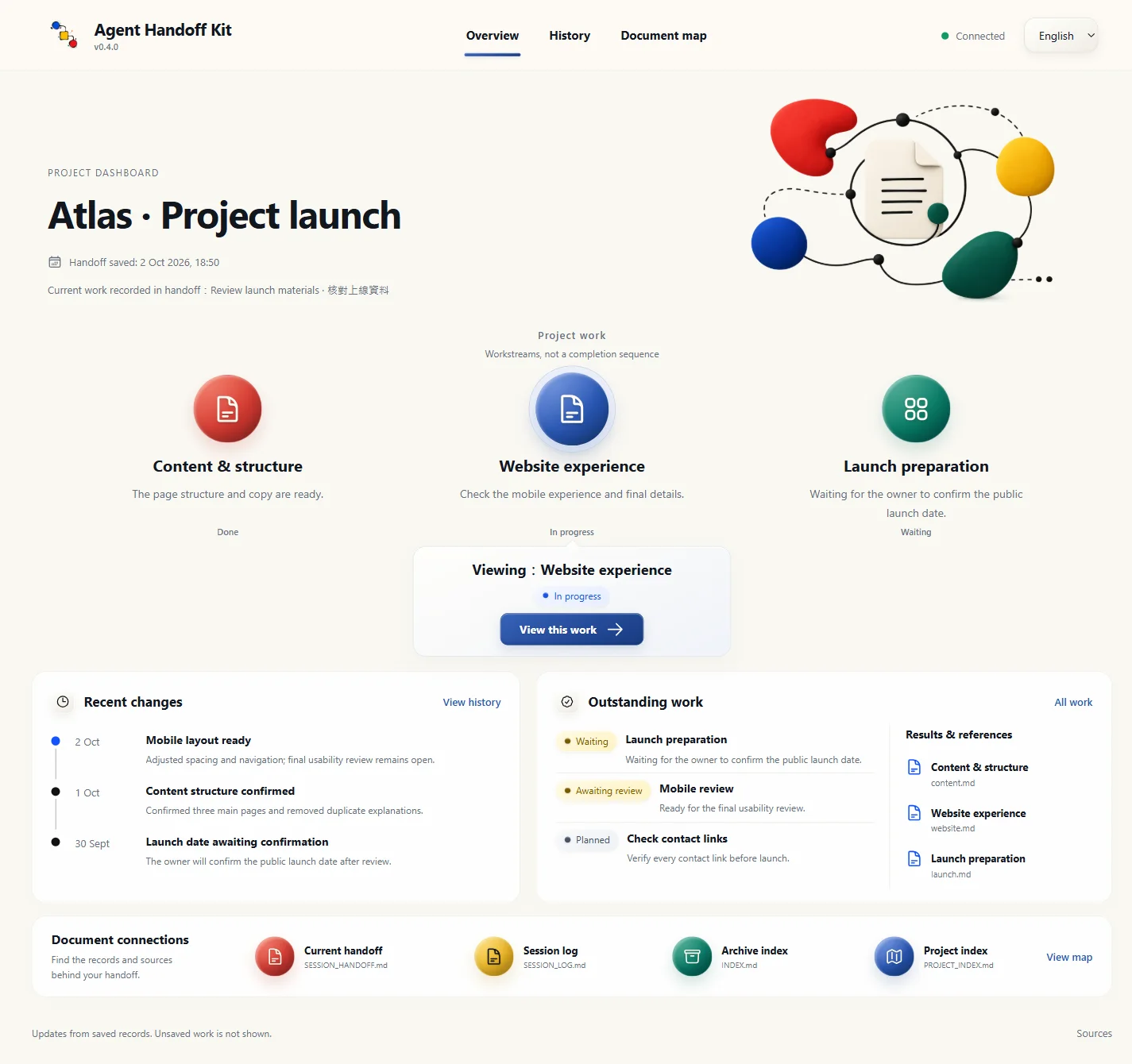
Use `handoff-kit-progress` to see current work, unfinished items, things waiting or needing confirmation, recent changes and connections between important files.
|
|
190
55
|
|
|
191
|
-
|
|
56
|
+
|
|
192
57
|
|
|
193
|
-
|
|
58
|
+
*Actual interface screenshot; Atlas is a fictional example. The same page reads each project’s own saved records.*
|
|
194
59
|
|
|
195
|
-
|
|
60
|
+
<details>
|
|
61
|
+
<summary>View the English interface</summary>
|
|
196
62
|
|
|
197
|
-
|
|
63
|
+
|
|
198
64
|
|
|
199
|
-
|
|
200
|
-
- **Secrets:** do not print, commit, or upload `.env` values, API keys, or tokens.
|
|
201
|
-
- **Verify; do not guess:** before using a third-party service, connector, MCP, CLI, API, or plugin, check current official or already verified local guidance. If it cannot be verified, say so.
|
|
202
|
-
- **External-tool closeout:** an AI may close only resources it can show were created for the current task. Shared, user-owned, other-agent-owned, or unclear resources must be reported and left alone until you confirm.
|
|
203
|
-
- **Permission failures:** if a file is locked or permission is missing, stop and provide safe manual steps; do not bypass the protection.
|
|
204
|
-
- **Publishing:** tags, GitHub Releases, npm publication, deployment, and upload always require explicit approval. “Ready” is never approval.
|
|
65
|
+
</details>
|
|
205
66
|
|
|
206
|
-
|
|
67
|
+
The page updates automatically when the AI saves records, without a refresh. Asking the AI to open it and saving normal records use some tokens. After that, viewing, filtering and page updates run locally without asking the AI to write another report. Unsaved work does not appear. [Dashboard help](docs/progress.md)
|
|
207
68
|
|
|
208
|
-
|
|
69
|
+
## A few things to know
|
|
209
70
|
|
|
210
|
-
-
|
|
211
|
-
-
|
|
71
|
+
- The AI handles reading, organizing, doing the work and checking results. You give requirements, feedback and necessary decisions; you do not maintain internal files.
|
|
72
|
+
- Wrapping up saves a handoff. Unfinished work stays unfinished; it does not mean the whole project is complete.
|
|
73
|
+
- Checking the installation does not repair or upgrade it. Checking for updates automatically upgrades when a newer release exists. Conflicting custom content is kept, and the operation stops.
|
|
74
|
+
- Before deleting important data, uploading, publishing or changing access, the AI must explain the effects and obtain the required approval. Passwords and secret keys must not go into handoff records.
|
|
75
|
+
- The tool’s rules and checks support handoff; they cannot guarantee an AI will never make a mistake. Missing context, failed reads and incomplete checks should be clearly reported.
|
|
212
76
|
|
|
213
|
-
|
|
77
|
+
For step-by-step help, open the [guide](https://adamchanadam.github.io/agent-handoff-kit/agent-handoff-kit-guide.en.html). To set the AI’s reply style separately, you can also use [Adam-AI-Instructions](https://github.com/prompt-templates/Adam-AI-Instructions). It is optional, not a requirement for the tool.
|
package/README.md
CHANGED
|
@@ -1,219 +1,77 @@
|
|
|
1
|
-
# Agent Handoff Kit
|
|
2
|
-
|
|
3
|
-
English: [README.en.md](README.en.md) · [Getting started](https://adamchanadam.github.io/agent-handoff-kit/agent-handoff-kit-intro.en.html) · [Practical guide](https://adamchanadam.github.io/agent-handoff-kit/agent-handoff-kit-guide.en.html) · [AI install page](https://adamchanadam.github.io/agent-handoff-kit/agent-handoff-kit-ai-install.en.html)
|
|
4
|
-
|
|
5
|
-
原始碼套件版本:`v0.3.67`。npm `@latest` 與 GitHub Release 以發佈後讀回為準。
|
|
1
|
+
# Agent Handoff Kit
|
|
6
2
|
|
|
7
|
-
|
|
8
|
-
<img src="https://raw.githubusercontent.com/Adamchanadam/agent-handoff-kit/main/images/agent-handoff-kit-promo-30s.gif" alt="Agent Handoff Kit 功能簡介動畫" width="720">
|
|
9
|
-
</p>
|
|
3
|
+
[English](README.en.md) · [入門介紹](https://adamchanadam.github.io/agent-handoff-kit/agent-handoff-kit-intro.html) · [常用指令用法](https://adamchanadam.github.io/agent-handoff-kit/agent-handoff-kit-guide.html)
|
|
10
4
|
|
|
11
|
-
|
|
5
|
+
**Session 接力棒**。讓下一次 AI 對話接得上:保留進度、重要決定、文件位置和未完事項。
|
|
12
6
|
|
|
13
|
-
|
|
7
|
+
文件對應程式版本:`v0.4.1`。這份說明包含尚未發布的更新;正式下載可用的功能,以已發布版本為準。
|
|
14
8
|
|
|
15
|
-
|
|
9
|
+
[](https://youtu.be/RopbfBiSw1I)
|
|
16
10
|
|
|
17
|
-
##
|
|
11
|
+
## 這套工具怎樣幫你
|
|
18
12
|
|
|
19
|
-
|
|
13
|
+
- **跨對話接力**:保存目標、你的修正、重要決定、已完成和未完事項,下次不用從頭交代。不同支援工具開啟同一專案,可沿用已保存內容。
|
|
14
|
+
- **重要文件不漏掉**:記下文件用途、何時要讀、哪些改動需要一起更新,減少拿錯版本或找不到資料。
|
|
15
|
+
- **長期紀錄找得回**:保留重要選擇及原因,讓你日後追問「之前為甚麼這樣做」。舊紀錄按需要整理和封存,不必每次全部重讀。
|
|
16
|
+
- **按任務選做法**:寫作先看讀者和語氣,研究先核對來源,寫程式先讀檔再測試,整理雲端文件先查權限。你不用自己選規則。
|
|
17
|
+
- **保留日後要求**:把你明示要長期遵守的習慣留在專案,讓下一次相關工作讀得到;不是只記在當次聊天。
|
|
18
|
+
- **安全處理工具與資料**:重要操作先核對及取得所需批准,秘密不寫進紀錄;用完只關閉確定屬於本次工作的臨時程式,不亂停其他工作。
|
|
20
19
|
|
|
21
|
-
|
|
20
|
+
常用指令是這些功能的使用入口。Dashboard 則把已保存的進度、歷程和文件關係放到眼前。這套工具不是雲端同步工具,也不會自動帶走未保存的對話。
|
|
22
21
|
|
|
23
|
-
|
|
24
|
-
請讀取 https://adamchanadam.github.io/agent-handoff-kit/agent-handoff-kit-ai-install.html ,並在這個資料夾安裝或升級 Agent Handoff Kit。
|
|
25
|
-
```
|
|
22
|
+
## 第一次使用
|
|
26
23
|
|
|
27
|
-
|
|
28
|
-
|
|
29
|
-
|
|
30
|
-
3. 完成本輪工作後,對 AI 說「收工」。
|
|
31
|
-
|
|
32
|
-
🔎 你不用判斷安裝、升級、檢查或檔案結構。AI 會先說明它看到的資料夾、風險與下一步;需要你確認時才停下來。
|
|
33
|
-
|
|
34
|
-
已裝過舊版,或資料夾裡已有 `AGENTS.md`、`CLAUDE.md`、`GEMINI.md` 等 AI 記憶文件,也用同一句交給 AI 判斷。AI 會先檢查,不會靜默覆寫。
|
|
35
|
-
|
|
36
|
-
想先看非技術版介紹,可打開 GitHub Pages 上的 [`agent-handoff-kit-intro.html`](https://adamchanadam.github.io/agent-handoff-kit/agent-handoff-kit-intro.html)。想看完整操作示範,可開 [`agent-handoff-kit-guide.html`](https://adamchanadam.github.io/agent-handoff-kit/agent-handoff-kit-guide.html)。想了解它在本機 Agentic AI 工作系統中的位置,可看 [`local-agentic-ai-workflow-case-study.html`](https://adamchanadam.github.io/agent-handoff-kit/local-agentic-ai-workflow-case-study.html)。
|
|
37
|
-
|
|
38
|
-
## 🐱 狀態卡怎樣讀
|
|
39
|
-
|
|
40
|
-
| 狀態 | 意思 |
|
|
41
|
-
|---|---|
|
|
42
|
-
| `( o.o ) continuity ready` | 可以接力,AI 已讀到可繼續的狀態。 |
|
|
43
|
-
| `( -.- ) handoff saved` | 已收工保存,下次可以再說「開工」。 |
|
|
44
|
-
| `( x.x ) handoff blocked` | 不是壞了;只是仍有未保存、未提交、未驗證或需要處理的事。先照 Blocker 行處理,不要把本輪當作已完成交接。 |
|
|
45
|
-
|
|
46
|
-
收工卡核對交接是否保存、必要欄位與已記錄的檢查結果;它不會自動證明任務結論正確。工作仍受阻時,只要原因、影響與續接條件已清楚保存,也可以完成交接;「已保存」不等於整體任務完成。
|
|
47
|
-
|
|
48
|
-
## 🧭 這個 repo 怎樣讀
|
|
49
|
-
|
|
50
|
-
如果你只是想使用 Agent Handoff Kit,只需要看四個入口:
|
|
51
|
-
|
|
52
|
-
| 入口 | 用途 |
|
|
53
|
-
|---|---|
|
|
54
|
-
| `README.md` | 正式用途、安裝路徑與安全邊界。 |
|
|
55
|
-
| [`agent-handoff-kit-intro.html`](https://adamchanadam.github.io/agent-handoff-kit/agent-handoff-kit-intro.html) | 非技術版 60 秒入門與宣傳動畫。 |
|
|
56
|
-
| [`agent-handoff-kit-guide.html`](https://adamchanadam.github.io/agent-handoff-kit/agent-handoff-kit-guide.html) | 三個實操情景,示範開工、工作、收工。 |
|
|
57
|
-
| [`agent-handoff-kit-ai-install.html`](https://adamchanadam.github.io/agent-handoff-kit/agent-handoff-kit-ai-install.html) | 給 AI 讀的安裝與升級指令頁。 |
|
|
58
|
-
|
|
59
|
-
這個公開 repo 保留使用、安裝、入門、GitHub Pages 與 npm 執行所需內容。日常使用時,你只需要從上面四個入口開始。
|
|
60
|
-
|
|
61
|
-
## 🔎 它解決甚麼問題
|
|
62
|
-
|
|
63
|
-
用 AI 做長期項目,常見五個問題:
|
|
64
|
-
|
|
65
|
-
| 問題 | Agent Handoff Kit 怎樣處理 |
|
|
66
|
-
|---|---|
|
|
67
|
-
| 新 AI 不知做到哪 | 用 `dev/SESSION_HANDOFF.md` 保存目前狀態、下一步、風險與驗收。 |
|
|
68
|
-
| 新建檔案、參考資料變孤兒 | 你可以叫 AI 把文件接入 Agent Handoff Kit,記低每份文件的用途、哪份作準、何時要同步。 |
|
|
69
|
-
| 不同 AI 工具入口不同 | 同時安裝 `AGENTS.md`、`CLAUDE.md`、`GEMINI.md`,全部指向同一套開工流程;Antigravity CLI 會讀工作資料夾內的 `AGENTS.md` 與 `GEMINI.md`。 |
|
|
70
|
-
| AI 可能亂改、亂刪或誤發佈 | 內置安全規則;高風險操作必須先講計劃,破壞性指令與未批准發佈一律禁止。 |
|
|
71
|
-
| 外部工具用完後殘留或亂清理 | 使用 MCP、browser、自動化工具、notebook 或 helper server 後,AI 會按 ownership 判斷:本任務資源可收口,不明或共享資源先回報證據並等你確認。 |
|
|
72
|
-
|
|
73
|
-
|
|
74
|
-
它不是聊天機器人,也不是開發框架。它比較像一本固定放在專案內的交接簿。
|
|
75
|
-
|
|
76
|
-
## 🧰 適用工具
|
|
77
|
-
|
|
78
|
-
Agent Handoff Kit 適合能讀寫本機專案資料夾的 agentic AI 工具,例如 Claude Code、OpenAI Codex、Gemini CLI、Google Antigravity,或其他具備本機工作區讀寫能力的工具。
|
|
79
|
-
|
|
80
|
-
它不適合普通 web chat AI,例如沒有本機檔案讀寫能力的 ChatGPT、Claude、Gemini 網頁版。上載檔案或貼上交接內容不能取代本工具需要的本機讀寫能力;這類工具不能可靠維護專案內的交接文件。
|
|
81
|
-
|
|
82
|
-
## 🟢 開工
|
|
83
|
-
|
|
84
|
-
打開能讀寫本機專案資料夾的 AI agent。
|
|
85
|
-
|
|
86
|
-
若 AI 已經在正確專案資料夾內,日常開工只需輸入:
|
|
87
|
-
|
|
88
|
-
```text
|
|
89
|
-
Start Agent Handoff
|
|
90
|
-
```
|
|
91
|
-
|
|
92
|
-
中文可說「開工」。
|
|
93
|
-
|
|
94
|
-
若目前平台能安全控制當前對話標題,單獨開工可順手把過於籠統或過時的標題改成簡潔的「`<項目名稱>|<主要動作>`」。標題要從開工卡片已載入的目前目標或推薦下一步產生;「開工」、「開始交接工作」這類泛稱不能當主要動作。它不為命名額外讀檔或連網;已有清楚標題便保留,不支援標題控制時則靜默略過。標題只供顯示,不代表項目狀態、進度、完成證據或額外授權。
|
|
95
|
-
|
|
96
|
-
若 AI 還未指向你的專案資料夾,才使用帶路徑啟動句:
|
|
97
|
-
|
|
98
|
-
```text
|
|
99
|
-
Work in <你的專案資料夾>. Read AGENTS.md first, then Start Agent Handoff. Before changing anything, tell me the current state and your recommended next step.
|
|
100
|
-
```
|
|
101
|
-
|
|
102
|
-
第一次安裝會把新手引導標記為待使用。只有該標記仍為 `eligible`、目前目標空白或 `TBD`,而且沒有同句明確任務時,AI 才在開工卡後進入簡短新手歡迎引導;升級既有項目不會重置這個標記。你已清楚描述目標和現有資料時,AI 可開始第一個安全步驟,不必先走新手流程。日常「開工」先讀 `dev/SESSION_HANDOFF.md`;同一資料夾內不會再重讀 `START_NEXT_SESSION_PROMPT.txt` 或 `dev/SESSION_LOG.md`。提示副本只供尚未指向專案資料夾的 AI 接入。
|
|
103
|
-
|
|
104
|
-
「開工,繼續 <任務>」、「<項目> 開工」或 `Start Agent Handoff and continue <task>` 都是接力指令。只有語句明顯可能指現實世界的開業、輪班或其他無關事件時,AI 才作一次簡短確認。單獨開工或只加項目名稱,會恢復最小狀態、顯示開工卡與建議下一步,然後等待;不會因此研究、計劃、驗收、改檔、連網或啟用子代理。只有同句明確任務或長程指令才授權開始工作;上面列明的新手引導例外仍適用。
|
|
105
|
-
|
|
106
|
-
然後用日常話描述你要完成的任務。AI 應先讀交接文件,說明目前狀態、下一步與風險,再開始工作。
|
|
107
|
-
|
|
108
|
-
## 💾 收工
|
|
109
|
-
|
|
110
|
-
本輪工作完成、準備結束時,只需輸入:
|
|
111
|
-
|
|
112
|
-
```text
|
|
113
|
-
收工
|
|
114
|
-
```
|
|
115
|
-
|
|
116
|
-
也可以輸入:
|
|
24
|
+
1. 在你的專案資料夾打開 AI,把下面這句貼進對話。
|
|
25
|
+
2. AI 會確認資料夾、安裝或升級,然後檢查結果;你不用選安裝指令。
|
|
26
|
+
3. 完成後用 `handoff-kit-onboard` 取得引導,或用 `handoff-kit-start` 接回工作。
|
|
117
27
|
|
|
118
28
|
```text
|
|
119
|
-
|
|
120
|
-
wrap up
|
|
121
|
-
handoff
|
|
29
|
+
請讀取 https://adamchanadam.github.io/agent-handoff-kit/agent-handoff-kit-ai-install.html ,並在這個資料夾安裝或升級 Agent Handoff Kit。
|
|
122
30
|
```
|
|
123
31
|
|
|
124
|
-
|
|
125
|
-
|
|
126
|
-
AI 應把整體目標、目前子任務、準確續接點和剩餘驗收寫清楚,保留必要真源的版本、已讀段落、閱讀深度與未解缺口。簡單任務只記必要資訊,不必建立多層任務表。收工前,AI 要只憑交接內容重建下一步,再對照你的原始要求和實際成果,避免把小步完成當成整體完成;接續時仍須讀取任務所需真源,不能把上一位的「已讀」當作自己已核實。
|
|
127
|
-
|
|
128
|
-
AI 應只更新有變的交接狀態,並核對下一次開工提示副本;有差異時才重新產生:
|
|
32
|
+
已裝過舊版、資料夾已有 AI 工作文件,或不確定是否裝好,都用同一句。需要能讀寫專案資料夾的 AI 工具及 Node.js 18 以上;普通網頁聊天若不能存取資料夾便不適用,AI 可先替你檢查環境。
|
|
129
33
|
|
|
130
|
-
|
|
131
|
-
START_NEXT_SESSION_PROMPT.txt
|
|
132
|
-
```
|
|
34
|
+
## 常用指令,按需要用
|
|
133
35
|
|
|
134
|
-
|
|
36
|
+
在專案的 AI 對話輸入指令,不是在終端機。Claude Code、Gemini CLI、Antigravity CLI 用 /;Codex 用 $,也可從 /skills 選取。 例如 Codex 的開工指令是 `$handoff-kit-start`。
|
|
135
37
|
|
|
136
|
-
|
|
137
|
-
|
|
138
|
-
如你不確定目前資料夾是否安裝完整、是否需要升級,或剛升級後想確認狀態,直接叫 AI:
|
|
139
|
-
|
|
140
|
-
```text
|
|
141
|
-
請讀取頁頂的安裝頁,幫我檢查這個資料夾的 Agent Handoff Kit 狀態。
|
|
142
|
-
```
|
|
143
|
-
|
|
144
|
-
AI 會處理檢查,不會把「檢查通過」誤當成已理解你的專案。真正開始工作前,仍要對 AI 說 `Start Agent Handoff` 或「開工」。
|
|
145
|
-
|
|
146
|
-
## 🗂️ AI 會替你維護甚麼
|
|
147
|
-
|
|
148
|
-
安裝後,Agent Handoff Kit 會在你的專案中放入一組交接文件。你不需要逐一閱讀,也不需要手動維護。
|
|
149
|
-
|
|
150
|
-
- **開工入口**:讓不同 AI 工具找到同一套開工方式,例如 `AGENTS.md`、`CLAUDE.md`、`GEMINI.md` 和 `START_NEXT_SESSION_PROMPT.txt`。
|
|
151
|
-
- **目前狀態**:保存做到哪裡、下一步、風險和檢查結果,例如 `dev/SESSION_HANDOFF.md`。
|
|
152
|
-
- **追溯紀錄**:保存近期做過的事;長期使用後,AI 會自動整理,避免紀錄無止境膨脹。
|
|
153
|
-
- **項目索引與決策**:記錄重要文件、外部來源、同步責任和長期決策,方便你日後問「之前為何這樣做」。
|
|
154
|
-
- **工作規則**:AI 會按你的任務自己載入需要的規則;你不用記規則名稱。
|
|
155
|
-
|
|
156
|
-
## 🧭 AI 工作規則怎樣運作
|
|
157
|
-
|
|
158
|
-
你不需要記住任何規則檔名。Agent Handoff Kit 會讓 AI 先判斷你現在要做甚麼,再只載入需要的工作規則。
|
|
159
|
-
|
|
160
|
-
| 你要做的事 | AI 會套用的規則 |
|
|
38
|
+
| 想做甚麼 | 指令 |
|
|
161
39
|
|---|---|
|
|
162
|
-
|
|
|
163
|
-
|
|
|
164
|
-
|
|
|
165
|
-
| 刪檔 / Git / 發佈 / npm | 高風險操作必須先說明影響,並等你確認。 |
|
|
166
|
-
| Notion / Google Drive 等外部工具 | 先核對目前工具說明或官方文件;用後按資源歸屬安全收口;機密不寫入項目文件。 |
|
|
167
|
-
|
|
168
|
-
你只要用日常話說目的,例如「幫我改 README」、「幫我查這個工具是否適合」、「把這份文件接入 Agent Handoff Kit」。AI 會自己判斷要用哪些規則。
|
|
169
|
-
|
|
170
|
-
想加入自己的長期規則,也不用手改規則檔。你可以直接說:
|
|
40
|
+
| 接回上次工作 | [`/handoff-kit-start`](https://adamchanadam.github.io/agent-handoff-kit/agent-handoff-kit-guide.html#start) |
|
|
41
|
+
| 看專案全貌 | [`/handoff-kit-progress`](https://adamchanadam.github.io/agent-handoff-kit/agent-handoff-kit-guide.html#progress) |
|
|
42
|
+
| 準備結束這次對話 | [`/handoff-kit-close`](https://adamchanadam.github.io/agent-handoff-kit/agent-handoff-kit-guide.html#close) |
|
|
171
43
|
|
|
172
|
-
|
|
173
|
-
以後寫公開中文文件時,請用繁體中文書面語,避免半中半英。請把這條規則接入 Agent Handoff Kit。
|
|
174
|
-
```
|
|
44
|
+
[完整指令用法:新手引導、整理文件、記住要求、檢查及更新](https://adamchanadam.github.io/agent-handoff-kit/agent-handoff-kit-guide.html#commands)
|
|
175
45
|
|
|
176
|
-
|
|
177
|
-
|
|
178
|
-
這些要求用來引導 AI 並檢查結果,不能攔截任意編輯器寫入。若舊規則已混入官方正文,仍需由 AI 核對來源,在取得合併授權後保留並整理;升級不會自動猜刪。
|
|
46
|
+
日常節奏:**開工 → 說明任務 → 需要時看進度 → 結束對話前收工**。不用每次跑完常用指令。原有「開工」「收工」說法仍可使用。
|
|
179
47
|
|
|
180
|
-
|
|
48
|
+
單獨開工會先完整讀取交接、說明現況,再等你提出任務;初次使用而尚未有目標時會簡短引導。想立即繼續,可在指令後加「繼續完成目前目標」。交接未讀齊時,AI 必須明說,不能假裝已接上。
|
|
181
49
|
|
|
182
|
-
|
|
50
|
+
新安裝或升級會一併放好快捷入口,只供這個專案使用,不會安裝到整部電腦的共用設定。舊對話未顯示入口時,重新開啟專案對話;其他問題見[快捷入口說明](docs/commands.md)。
|
|
183
51
|
|
|
184
|
-
|
|
185
|
-
|---|---|
|
|
186
|
-
| 接上上次工作 | `Start Agent Handoff` 或「開工」 |
|
|
187
|
-
| 結束本輪工作 | 「收工」 |
|
|
188
|
-
| 讓新文件不變成孤兒 | 「把這份文件接入 Agent Handoff Kit,讓下次 AI 知道何時要讀、何時要更新。」 |
|
|
189
|
-
| 掃描可能被遺漏的重要文件 | 「掃描未接入 Agent Handoff Kit 的重要文件。」 |
|
|
190
|
-
| 讓 AI 下次避免同類錯誤 | 「把今次錯誤整理成日後工作規則,讓下次 AI 知道要怎樣避免。」 |
|
|
191
|
-
| 讓 API / 工具用法下次仍生效 | 「以後都用這個 API 調用方式,之後開新對話也要沿用。」 |
|
|
192
|
-
| 使用外部工具,例如 Notion、Google Drive、GitHub | 「這個項目會用到這些外部工具,請記住哪些能直接使用,機密不要寫入項目文件。」 |
|
|
193
|
-
| 長任務用了 MCP、browser 或自動化工具 | 「收工時請顯示外部工具資源收口結果:已關閉哪些本任務資源,哪些因歸屬不明而保留並列證據。」 |
|
|
52
|
+
## 進度頁:一眼找回方向
|
|
194
53
|
|
|
195
|
-
|
|
54
|
+
用 `handoff-kit-progress` 打開 Dashboard,看目前工作、未完成/等待/待確認事項、最近變更及重要文件的關係。
|
|
196
55
|
|
|
197
|
-
|
|
56
|
+

|
|
198
57
|
|
|
199
|
-
|
|
58
|
+
*實際介面截圖;Atlas 是虛構範例。相同頁面會讀取每個專案自己的紀錄。*
|
|
200
59
|
|
|
201
|
-
|
|
60
|
+
<details>
|
|
61
|
+
<summary>查看英文介面</summary>
|
|
202
62
|
|
|
203
|
-
|
|
63
|
+

|
|
204
64
|
|
|
205
|
-
|
|
206
|
-
- 機密保護:`.env`、API key、token 不可印出、不可提交、不可上傳。
|
|
207
|
-
- 查證不猜:使用第三方服務、Connector、MCP、CLI、API 或 plugin API 前,先核對目前工具說明、官方文件或已驗證的本地操作說明;查不到就標示未核實。
|
|
208
|
-
- 外部工具安全收口:用完 MCP、browser、自動化工具、notebook 或 helper server 後,AI 只可自動關閉能證明屬於本任務的資源;不明、共享、使用者或其他 AI agent 可能擁有的程序與暫存資料,必須先回報並等你確認。
|
|
209
|
-
- 權限不足就停手:檔案被鎖或沒有權限時,輸出手動操作清單,不嘗試繞過。
|
|
210
|
-
- 發佈需明確批准:建立版本標籤、GitHub Release、npm publish、部署或上傳,都不能因「準備好了」而自動執行。
|
|
65
|
+
</details>
|
|
211
66
|
|
|
212
|
-
|
|
67
|
+
AI 保存紀錄後,畫面自動更新,不用刷新。你叫 AI 開啟頁面及平常保存紀錄會使用一些 token;之後查看、篩選和更新畫面由本機程式處理,不另叫 AI 寫報告。未保存的工作不會出現。[進度頁用法與常見問題](docs/progress.md)
|
|
213
68
|
|
|
214
|
-
|
|
69
|
+
## 放心使用前,知道這幾點
|
|
215
70
|
|
|
216
|
-
-
|
|
217
|
-
-
|
|
71
|
+
- AI 負責讀取、整理、執行及檢查;你提出需求、回饋和必要決定,不用維護內部文件。
|
|
72
|
+
- 收工保存的是交接,未做完的工作會保留為未完成;這不等於整個專案已完成。
|
|
73
|
+
- 檢查安裝不會修復或升級;檢查更新會在有正式新版時自動升級。你的自訂內容遇到衝突會保留並停止處理。
|
|
74
|
+
- 刪除重要資料、上傳、發布或更改權限等操作,AI 必須先說明影響並取得所需批准。密碼和金鑰不可寫入交接。
|
|
75
|
+
- 這套工具用規則和檢查協助交接,不能保證 AI 永不出錯。交接缺漏、讀取失敗或未完成的檢查,應明確告訴你。
|
|
218
76
|
|
|
219
|
-
|
|
77
|
+
想一步步學,開啟[使用指南](https://adamchanadam.github.io/agent-handoff-kit/agent-handoff-kit-guide.html)。想另外設定 AI 的回覆語氣,可選用 [Adam-AI-Instructions](https://github.com/prompt-templates/Adam-AI-Instructions);它不是使用這套工具的必要條件。
|