@adamchanadam/agent-handoff-kit 0.3.28 → 0.3.30
This diff represents the content of publicly available package versions that have been released to one of the supported registries. The information contained in this diff is provided for informational purposes only and reflects changes between package versions as they appear in their respective public registries.
- package/README.md +91 -225
- package/bin/agent-handoff-kit.mjs +11 -10
- package/package.json +1 -1
- package/packs/agent-governance.md +22 -0
- package/packs/writing.md +2 -0
- package/runtime-core/AGENTS.core.md +2 -0
- package/runtime-core/RULE_PACKS.md +2 -1
package/README.md
CHANGED
|
@@ -1,34 +1,37 @@
|
|
|
1
1
|
# Agent Handoff Kit
|
|
2
2
|
|
|
3
|
-
狀態:目前版本為 `v0.3.
|
|
3
|
+
狀態:目前版本為 `v0.3.30`。這是早期可用版本,仍在持續完善中。
|
|
4
4
|
|
|
5
5
|

|
|
6
6
|
|
|
7
7
|
Agent Handoff Kit 是 **AI 對話之間的接力棒**。
|
|
8
8
|
|
|
9
|
-
它只處理一件狹窄但重要的事:AI 跨對話失憶。每次開新對話,AI 往往不記得你上次做到哪裡,也認不出中途新建的文件、你引入的參考資料、哪些檔案是真源。這套工具把進度、下一步、風險、檔案登記與下次開工提示寫進固定文件,讓下一個 AI 工具能接得上上一棒。
|
|
10
|
-
|
|
11
|
-
|
|
12
|
-
|
|
13
|
-
|
|
14
|
-
|
|
15
|
-
|
|
16
|
-
|
|
17
|
-
|
|
18
|
-
|
|
19
|
-
|
|
20
|
-
|
|
21
|
-
|
|
22
|
-
|
|
23
|
-
|
|
24
|
-
|
|
25
|
-
|
|
26
|
-
|
|
27
|
-
|
|
28
|
-
|
|
29
|
-
|
|
30
|
-
|
|
31
|
-
|
|
9
|
+
它只處理一件狹窄但重要的事:AI 跨對話失憶。每次開新對話,AI 往往不記得你上次做到哪裡,也認不出中途新建的文件、你引入的參考資料、哪些檔案是真源。這套工具把進度、下一步、風險、檔案登記與下次開工提示寫進固定文件,讓下一個 AI 工具能接得上上一棒。
|
|
10
|
+
|
|
11
|
+
📌 使用時,你只需要說明目的;確認資料夾、判斷安裝或升級、執行指令和檢查結果,交給能讀寫本機資料夾的 AI 處理。
|
|
12
|
+
|
|
13
|
+
## 🚀 三步上手
|
|
14
|
+
|
|
15
|
+
第一次用,不需要先讀完整 README,也不需要研究終端機指令。只做三件事:
|
|
16
|
+
|
|
17
|
+
1. 在你想使用 Agent Handoff Kit 的資料夾打開 AI,貼上這句話:
|
|
18
|
+
|
|
19
|
+
```text
|
|
20
|
+
請讀取 https://adamchanadam.github.io/agent-handoff-kit/agent-handoff-kit-ai-install.html,並在這個資料夾安裝或升級 Agent Handoff Kit。
|
|
21
|
+
```
|
|
22
|
+
|
|
23
|
+
你也可以先打開 [`agent-handoff-kit-ai-install.html`](https://adamchanadam.github.io/agent-handoff-kit/agent-handoff-kit-ai-install.html) 看看 AI 會照甚麼步驟處理。
|
|
24
|
+
|
|
25
|
+
2. 安裝完成後,對 AI 說 `Start Agent Handoff` 或「開工」。
|
|
26
|
+
3. 完成本輪工作後,對 AI 說「收工」。
|
|
27
|
+
|
|
28
|
+
🔎 你不用判斷安裝、升級、檢查或檔案結構。AI 會先說明它看到的資料夾、風險與下一步;需要你確認時才停下來。
|
|
29
|
+
|
|
30
|
+
已裝過舊版,或資料夾裡已有 `AGENTS.md`、`CLAUDE.md`、`GEMINI.md` 等 AI 記憶文件,也用同一句交給 AI 判斷。AI 會先檢查,不會靜默覆寫。
|
|
31
|
+
|
|
32
|
+
想先看非技術版介紹,可打開 GitHub Pages 上的 [`agent-handoff-kit-intro.html`](https://adamchanadam.github.io/agent-handoff-kit/agent-handoff-kit-intro.html)。想看完整操作示範,可開 [`agent-handoff-kit-guide.html`](https://adamchanadam.github.io/agent-handoff-kit/agent-handoff-kit-guide.html)。想了解它在本機 Agentic AI 工作系統中的位置,可看 [`local-agentic-ai-workflow-case-study.html`](https://adamchanadam.github.io/agent-handoff-kit/local-agentic-ai-workflow-case-study.html)。
|
|
33
|
+
|
|
34
|
+
## 🔎 它解決甚麼問題
|
|
32
35
|
|
|
33
36
|
用 AI 做長期項目,常見四個問題:
|
|
34
37
|
|
|
@@ -41,69 +44,13 @@ Agent Handoff Kit 是 **AI 對話之間的接力棒**。
|
|
|
41
44
|
|
|
42
45
|
它不是聊天機器人,也不是開發框架。它比較像一本固定放在專案內的交接簿。
|
|
43
46
|
|
|
44
|
-
##
|
|
45
|
-
|
|
46
|
-
|
|
47
|
-
|
|
48
|
-
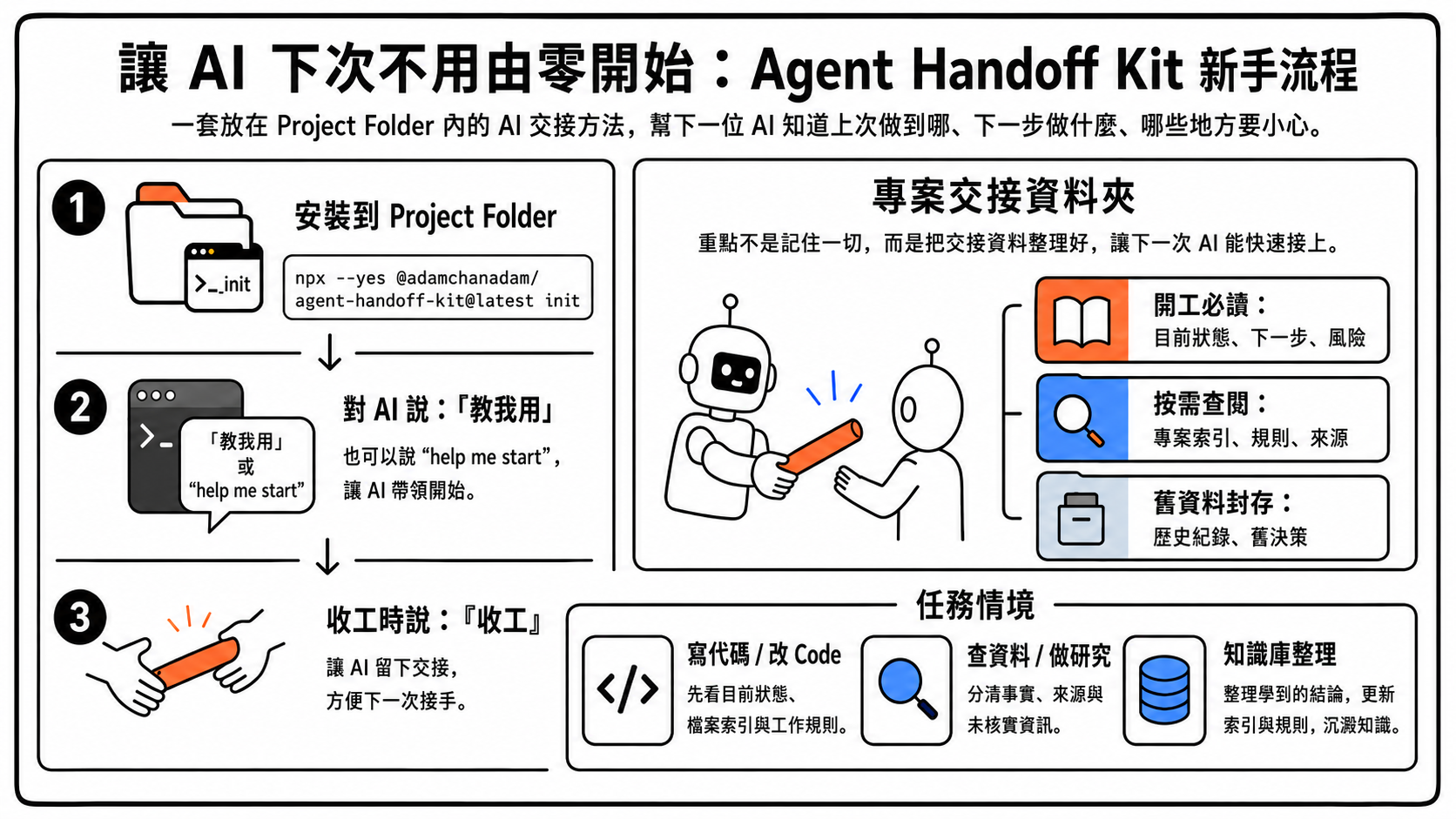
這張圖是給第一次使用的人看的流程摘要:先在專案資料夾安裝,然後在能讀寫本機資料夾的 AI 對話輸入 `Start Agent Handoff` 或「開工」;AI 會依 `AGENTS.md` 打開 `START_NEXT_SESSION_PROMPT.txt` 進入新手引導。準備結束本輪工作時說「收工」,讓 AI 留下下一次能接上的交接。
|
|
49
|
-
|
|
50
|
-
### 適用工具
|
|
47
|
+
## 🧰 適用工具
|
|
51
48
|
|
|
52
49
|
Agent Handoff Kit 適合能讀寫本機專案資料夾的 agentic AI 工具,例如 Claude Code、OpenAI Codex、Gemini CLI、Google Antigravity,或其他具備本機工作區讀寫能力的工具。
|
|
53
50
|
|
|
54
51
|
它不適合普通 web chat AI,例如沒有本機檔案讀寫能力的 ChatGPT、Claude、Gemini 網頁版。上載檔案或貼上交接內容不能取代本工具需要的本機讀寫能力;這類工具不能可靠維護專案內的交接文件。
|
|
55
52
|
|
|
56
|
-
|
|
57
|
-
|
|
58
|
-
在你的專案資料夾打開終端機,執行:
|
|
59
|
-
|
|
60
|
-
```bash
|
|
61
|
-
npx --yes @adamchanadam/agent-handoff-kit@latest init
|
|
62
|
-
```
|
|
63
|
-
|
|
64
|
-
出現確認問題時,輸入 `yes`。
|
|
65
|
-
|
|
66
|
-
安裝完成後,終端機會顯示 AI 對話的下一步。請特別留意:`Start Agent Handoff`、中文「開工」或帶路徑啟動句都不是終端機指令,而是給 AI agent 的對話內容。
|
|
67
|
-
|
|
68
|
-
可用的 AI 工具必須能讀寫此資料夾。不同工具對入口檔的支援可能不同;本工具會同時放置 `AGENTS.md`、`CLAUDE.md`、`GEMINI.md`,讓常見工具能找到同一套開工路徑。Google 官方遷移文件說明,Antigravity CLI 會讀工作資料夾內的 `GEMINI.md` 和 `AGENTS.md`;因此 `AGENTS.md` 仍是唯一真源,`GEMINI.md` 只做橋接。
|
|
69
|
-
|
|
70
|
-
> 補充:`--yes` 只是讓 npm 先取得這個工具,避免多問一次安裝確認。真正會建立項目文件的是 `init`;`doctor` 只檢查,不會安裝或改動你的項目文件。
|
|
71
|
-
|
|
72
|
-
安裝成功後,先做 AI 對話,不必立刻跑 `doctor`。`doctor` 是之後不確定狀態、升級後驗收,或 AI 要排錯時才需要用的檢查工具。
|
|
73
|
-
|
|
74
|
-
### 常見入口
|
|
75
|
-
|
|
76
|
-
| 你現在的狀態 | 建議指令 |
|
|
77
|
-
|---|---|
|
|
78
|
-
| 第一次在新資料夾使用 | `npx --yes @adamchanadam/agent-handoff-kit@latest init` |
|
|
79
|
-
| 已安裝舊版,或已有 AI 記憶文件 | `npx --yes @adamchanadam/agent-handoff-kit@latest upgrade` |
|
|
80
|
-
| 不確定是否安裝完整,或升級後想檢查 | `npx --yes @adamchanadam/agent-handoff-kit@latest doctor` |
|
|
81
|
-
|
|
82
|
-
### 已安裝舊版,或已有 AI 記憶文件?
|
|
83
|
-
|
|
84
|
-
如果你的專案已經裝過舊版 Agent Handoff Kit,或本來已有 `AGENTS.md`、`CLAUDE.md`、`GEMINI.md` 等 AI 記憶文件,不要重新 `init`,改用 `upgrade`。
|
|
85
|
-
|
|
86
|
-
你可以先預演:
|
|
87
|
-
|
|
88
|
-
```bash
|
|
89
|
-
npx --yes @adamchanadam/agent-handoff-kit@latest upgrade --dry-run
|
|
90
|
-
```
|
|
91
|
-
|
|
92
|
-
`dry-run` 只會預覽,不會完成升級,也不會寫入檔案。確認沒有問題後,才執行正式升級:
|
|
93
|
-
|
|
94
|
-
```bash
|
|
95
|
-
npx --yes @adamchanadam/agent-handoff-kit@latest upgrade
|
|
96
|
-
```
|
|
97
|
-
|
|
98
|
-
`@latest` 代表使用 npm 上最新版本的 Agent Handoff Kit。`upgrade` 負責把專案內已安裝的文件、規則與檢查結構安全更新。升級工具會保留既有檔案;能安全合併時才合併,不能安全合併時會回報衝突,不會靜默覆寫。
|
|
99
|
-
|
|
100
|
-
正式升級最後會自動做一次 `doctor` 健康檢查。若檔案已是最新版本,但交接狀態仍需要處理,工具會列出需要修正的位置;若屬於工具可安全判斷的 Kit 結構或提示副本問題,會先自動修復再檢查。
|
|
101
|
-
|
|
102
|
-
看到「衝突」不代表檔案壞掉。它只代表工具不能安全判斷怎樣合併,所以先停手,等你或 AI 判斷下一步。最簡單做法是把預演輸出貼給 AI,請它幫你判斷要保留、合併還是手動修改。
|
|
103
|
-
|
|
104
|
-
即使目前資料夾已安裝舊版 Kit 文件,電腦也未必已經有可直接執行的 npm 工具。判斷點不是資料夾有沒有 `AGENTS.md` 或 `dev/`,而是你是否用上方 `npx --yes ... @latest` 路徑取得最新工具。裸寫不帶 `--yes` / `@latest` 的 `npx ... doctor` 不是本工具的建議用戶路徑,容易先出現 npm 自己的安裝提示。
|
|
105
|
-
|
|
106
|
-
### 二、開工
|
|
53
|
+
## 🟢 開工
|
|
107
54
|
|
|
108
55
|
打開能讀寫本機專案資料夾的 AI agent。
|
|
109
56
|
|
|
@@ -127,7 +74,7 @@ Work in <你的專案資料夾>. Read AGENTS.md first, then Start Agent Handoff.
|
|
|
127
74
|
|
|
128
75
|
然後用日常話描述你要完成的任務。AI 應先讀交接文件,說明目前狀態、下一步與風險,再開始工作。
|
|
129
76
|
|
|
130
|
-
|
|
77
|
+
## 💾 收工
|
|
131
78
|
|
|
132
79
|
本輪工作完成、準備結束時,只需輸入:
|
|
133
80
|
|
|
@@ -151,143 +98,71 @@ AI 應更新交接文件,並同步更新下一次開工提示副本:
|
|
|
151
98
|
START_NEXT_SESSION_PROMPT.txt
|
|
152
99
|
```
|
|
153
100
|
|
|
154
|
-
這個檔案保存下一次真正要讀的開工內容。你下次仍只需說 `Start Agent Handoff` 或「開工」;若 AI 尚未指向專案資料夾,才使用帶路徑啟動句。真正的權威來源仍是 `dev/SESSION_HANDOFF.md` 裡的「下次開工提示」段。若兩者不同,永遠以 `dev/SESSION_HANDOFF.md` 為準重新產生副本。
|
|
155
|
-
|
|
156
|
-
## 檢查是否安裝完整
|
|
157
|
-
|
|
158
|
-
如你不確定目前資料夾是否安裝完整,或剛做完升級,可在終端機執行:
|
|
159
|
-
|
|
160
|
-
```bash
|
|
161
|
-
npx --yes @adamchanadam/agent-handoff-kit@latest doctor
|
|
162
|
-
```
|
|
163
|
-
|
|
164
|
-
看到「檢查通過」代表必要文件與基本結構通過檢查。若 `START_NEXT_SESSION_PROMPT.txt` 落後於 `dev/SESSION_HANDOFF.md`,`doctor` 只會提醒;這個便利副本應在收工 closeout 時由 AI 重新生成,不需要在 session 中途手動更新。
|
|
165
|
-
|
|
166
|
-
`doctor` 只檢查,不會建立或修改項目文件。這個檢查只能確認文件齊不齊、格式是否正常,不代表 AI 已理解你的專案。真正開始工作前,應在能讀寫本機資料夾的 AI agent 對話輸入 `Start Agent Handoff` 或「開工」;若 AI 尚未指向資料夾,才使用帶路徑啟動句。
|
|
167
|
-
|
|
168
|
-
## 會安裝甚麼
|
|
169
|
-
|
|
170
|
-
安裝工具會在你的專案中建立:
|
|
171
|
-
|
|
172
|
-
```text
|
|
173
|
-
AGENTS.md
|
|
174
|
-
CLAUDE.md
|
|
175
|
-
GEMINI.md
|
|
176
|
-
START_NEXT_SESSION_PROMPT.txt
|
|
177
|
-
dev/SESSION_HANDOFF.md
|
|
178
|
-
dev/SESSION_LOG.md
|
|
179
|
-
dev/PROJECT_INDEX.md
|
|
180
|
-
dev/PROJECT_DECISIONS.md
|
|
181
|
-
dev/DOC_SYNC_REGISTRY.md
|
|
182
|
-
dev/RULE_PACKS.md
|
|
183
|
-
dev/rules/*.md
|
|
184
|
-
```
|
|
185
|
-
|
|
186
|
-
| 文件 | 用途 |
|
|
187
|
-
|---|---|
|
|
188
|
-
| `AGENTS.md` | AI 開工時最先讀的入口文件。 |
|
|
189
|
-
| `CLAUDE.md` | 讓 Claude Code 找到同一套入口。 |
|
|
190
|
-
| `GEMINI.md` | 讓 Google Antigravity CLI、Gemini CLI 遷移期或相容入口工具找到同一套入口。Antigravity CLI 會讀 `AGENTS.md` 與 `GEMINI.md`,所以此檔只做橋接,不另寫一套規則。 |
|
|
191
|
-
| `START_NEXT_SESSION_PROMPT.txt` | 下一次開工時由 AI 讀取的提示副本;初次安裝時放新手引導,收工後由交接文件自動產生。 |
|
|
192
|
-
| `dev/SESSION_HANDOFF.md` | 保存目前狀態、下一步、風險、驗收結果與下一次開工文字。 |
|
|
193
|
-
| `dev/SESSION_LOG.md` | 保存近期實際做過的事與檢查結果。每次收工會先做維護觸發檢查;長期使用後,命中條件時舊條目會整理入封存資料夾,主檔保持簡短。日常使用不需要打開本檔,做審計或追溯時才看。 |
|
|
194
|
-
| `dev/PROJECT_INDEX.md` | 記錄專案檔案、必讀資料、外部來源與常用檢查。 |
|
|
195
|
-
| `dev/PROJECT_DECISIONS.md` | 保存項目的長期演進、決策、架構取捨與學習觀察。AI 在每次收工時檢查是否需要維護,重大決策可即時寫入;日常開工不需要讀。當你問「之前為何這樣做」時,AI 會自己從這裡找答案。 |
|
|
196
|
-
| `dev/DOC_SYNC_REGISTRY.md` | 記錄哪些文件改動後需要同步。 |
|
|
197
|
-
| `dev/RULE_PACKS.md` | 告訴 AI 不同任務應讀哪些工作規則。 |
|
|
198
|
-
| `dev/rules/*.md` | 按任務載入的工作規則,共十份:安全、寫代碼、寫作、研究、AI 治理、發佈、知識整理、溝通、新手引導、外部工具治理。 |
|
|
199
|
-
|
|
200
|
-
你不需要自己逐一閱讀全部文件。你的工作是描述目標;AI 的工作是讀入口文件、判斷要讀哪些資料,再告訴你它準備怎樣做。
|
|
201
|
-
|
|
202
|
-
## SESSION_LOG 的自動整理機制
|
|
203
|
-
|
|
204
|
-
長期使用後,`dev/SESSION_LOG.md` 不會無止境膨脹。每次你講「收工」,AI 會先做一次很短的維護觸發檢查;命中條件時才完整整理:
|
|
205
|
-
|
|
206
|
-
- 最新三條對話紀錄保留完整內容,作為意外時的後備。
|
|
207
|
-
- 之後的條目,如核心內容已被交接文件吸收,會在需要整理時縮成一行短索引(日期 + 標題 + 對應資料來源)。
|
|
208
|
-
- 累積到第十一條開始,會封存到 `dev/SESSION_LOG_archive/` 資料夾;主檔末尾留一份封存索引,方便日後追溯。
|
|
209
|
-
- 即使沒有明顯觸發,AI 也會每十次收工做一次完整維護兜底,避免長期使用後慢慢漏記。
|
|
210
|
-
|
|
211
|
-
接力責任由 `dev/SESSION_HANDOFF.md` 承擔;`dev/SESSION_LOG.md` 主要用來日後追溯。**新對話開工不需要讀完整紀錄**,只需要讀 `AGENTS.md`、`dev/SESSION_HANDOFF.md` 和索引文件,就足夠接力。
|
|
212
|
-
|
|
213
|
-
所以你的電腦中的 `dev/` 資料夾不會被對話紀錄不停撐大,也不需要你手動清理。如主檔意外膨脹,`doctor` 會在輸出顯示提醒,請 AI 下次收工時整理;這只是提醒,不會令 `doctor` 失敗,也不阻擋安裝。
|
|
214
|
-
|
|
215
|
-
## 項目決策日誌
|
|
216
|
-
|
|
217
|
-
`dev/PROJECT_DECISIONS.md` 保存項目的長期演進、決策、架構取捨與學習觀察。AI 每次收工都會檢查是否需要維護;遇到重大決策、方向轉變、架構取捨或重複出現的模式時才寫入,並且每十次收工做一次完整兜底。日常開工不需要讀本檔;當你問「之前為何這樣做」時,AI 會自己從這裡找答案。
|
|
218
|
-
|
|
219
|
-
短期單一任務的項目,本檔幾乎保持空白,你不需要維護。長期持續演進的項目,AI 會自動累積以下四類紀錄:
|
|
220
|
-
|
|
221
|
-
- **長期演進** —— 任務需求隨時間的變化
|
|
222
|
-
- **決策封存** —— 累積決策的歷史紀錄
|
|
223
|
-
- **架構取捨** —— 主要設計選擇與原因
|
|
224
|
-
- **學習觀察** —— 多次對話累積的觀察與心得
|
|
101
|
+
這個檔案保存下一次真正要讀的開工內容。你下次仍只需說 `Start Agent Handoff` 或「開工」;若 AI 尚未指向專案資料夾,才使用帶路徑啟動句。真正的權威來源仍是 `dev/SESSION_HANDOFF.md` 裡的「下次開工提示」段。若兩者不同,永遠以 `dev/SESSION_HANDOFF.md` 為準重新產生副本。
|
|
225
102
|
|
|
226
|
-
|
|
227
|
-
|
|
228
|
-
新手用戶完全不需要打開本檔,也不需要記任何結構 —— 一切由 AI 自動處理。
|
|
103
|
+
## 🩺 不確定狀態時
|
|
229
104
|
|
|
230
|
-
|
|
105
|
+
如你不確定目前資料夾是否安裝完整、是否需要升級,或剛升級後想確認狀態,直接叫 AI:
|
|
231
106
|
|
|
232
|
-
|
|
107
|
+
```text
|
|
108
|
+
請讀取頁頂的安裝頁,幫我檢查這個資料夾的 Agent Handoff Kit 狀態。
|
|
109
|
+
```
|
|
233
110
|
|
|
234
|
-
|
|
111
|
+
AI 會處理檢查,不會把「檢查通過」誤當成已理解你的專案。真正開始工作前,仍要對 AI 說 `Start Agent Handoff` 或「開工」。
|
|
235
112
|
|
|
236
|
-
|
|
113
|
+
## 🗂️ AI 會替你維護甚麼
|
|
237
114
|
|
|
238
|
-
|
|
239
|
-
把 docs/production-guide.md 接入 Agent Handoff Kit
|
|
240
|
-
治理打通 docs/production-guide.md
|
|
241
|
-
```
|
|
115
|
+
安裝後,Agent Handoff Kit 會在你的專案中放入一組交接文件。你不需要逐一閱讀,也不需要手動維護。
|
|
242
116
|
|
|
243
|
-
|
|
117
|
+
- **開工入口**:讓不同 AI 工具找到同一套開工方式,例如 `AGENTS.md`、`CLAUDE.md`、`GEMINI.md` 和 `START_NEXT_SESSION_PROMPT.txt`。
|
|
118
|
+
- **目前狀態**:保存做到哪裡、下一步、風險和檢查結果,例如 `dev/SESSION_HANDOFF.md`。
|
|
119
|
+
- **追溯紀錄**:保存近期做過的事;長期使用後,AI 會自動整理,避免紀錄無止境膨脹。
|
|
120
|
+
- **項目索引與決策**:記錄重要文件、外部來源、同步責任和長期決策,方便你日後問「之前為何這樣做」。
|
|
121
|
+
- **工作規則**:AI 會按你的任務自己載入需要的規則;你不用記規則名稱。
|
|
244
122
|
|
|
245
|
-
|
|
246
|
-
|
|
247
|
-
|
|
248
|
-
|
|
123
|
+
## 🧭 AI 工作規則怎樣運作
|
|
124
|
+
|
|
125
|
+
你不需要記住任何規則檔名。Agent Handoff Kit 會讓 AI 先判斷你現在要做甚麼,再只載入需要的工作規則。
|
|
126
|
+
|
|
127
|
+
| 你要做的事 | AI 會套用的規則 |
|
|
128
|
+
|---|---|
|
|
129
|
+
| 寫程式 / 修錯誤 | 先讀項目索引、相關檔案,再改動和測試。 |
|
|
130
|
+
| 寫文章 / README / 社交帖文 | 先確認讀者、目的、語氣和發布位置。 |
|
|
131
|
+
| 查資料 / 比較工具 | 分清已驗證事實、來源摘要和 AI 推論。 |
|
|
132
|
+
| 刪檔 / Git / 發佈 / npm | 高風險操作必須先說明影響,並等你確認。 |
|
|
133
|
+
| Notion / Google Drive 等外部工具 | 先確認是否已連接;機密不寫入項目文件。 |
|
|
249
134
|
|
|
250
|
-
|
|
135
|
+
你只要用日常話說目的,例如「幫我改 README」、「幫我查這個工具是否適合」、「把這份文件接入 Agent Handoff Kit」。AI 會自己判斷要用哪些規則。
|
|
251
136
|
|
|
252
|
-
|
|
137
|
+
想加入自己的長期規則,也不用手改規則檔。你可以直接說:
|
|
253
138
|
|
|
254
139
|
```text
|
|
255
|
-
|
|
256
|
-
掃描 repo 有沒有未接合文件
|
|
257
|
-
scan for unbridged governance documents
|
|
140
|
+
以後寫公開中文文件時,請用繁體中文書面語,避免半中半英。請把這條規則接入 Agent Handoff Kit。
|
|
258
141
|
```
|
|
259
142
|
|
|
260
|
-
|
|
143
|
+
AI 應先判斷這條規則應放在哪裡:是一次性備忘、下次交接、項目索引,還是長期工作規則。它不應把所有東西都塞進同一個檔案。
|
|
261
144
|
|
|
262
|
-
##
|
|
263
|
-
|
|
264
|
-
|
|
265
|
-
|
|
266
|
-
|
|
267
|
-
|
|
268
|
-
|
|
269
|
-
|
|
270
|
-
|
|
271
|
-
|
|
272
|
-
|
|
273
|
-
|
|
274
|
-
|
|
275
|
-
|
|
276
|
-
|
|
277
|
-
|
|
278
|
-
|
|
279
|
-
|
|
280
|
-
|
|
281
|
-
| 查資料、比較來源、整理證據 | 研究規則 |
|
|
282
|
-
| 改 README、寫說明、整理文案 | 寫作規則,通常再加溝通規則 |
|
|
283
|
-
| 整理 Notion、Google Drive 或知識庫 | 知識整理規則 |
|
|
284
|
-
| 準備發佈說明 | 發佈規則;真正發佈、上傳或建立版本前必須再讀安全規則 |
|
|
285
|
-
| 改規則、改流程、整理交接 | AI 治理規則;先找既有真源,不盲目新增規則 |
|
|
286
|
-
| 新建重要文件後想避免變孤兒 | AI 治理規則;說「把 <檔案> 接入 Agent Handoff Kit」,讓 AI 檢查索引、同步責任、相關流程與重複真源風險 |
|
|
287
|
-
|
|
288
|
-
原則是只讀當前任務需要的規則,不是每次讀全部文件。
|
|
145
|
+
## 💬 你可以怎樣叫 AI
|
|
146
|
+
|
|
147
|
+
你只要用自然語言講目的,AI 會自己判斷要讀哪些交接文件、規則或索引。
|
|
148
|
+
|
|
149
|
+
| 你想做的事 | 可以這樣說 |
|
|
150
|
+
|---|---|
|
|
151
|
+
| 接上上次工作 | `Start Agent Handoff` 或「開工」 |
|
|
152
|
+
| 結束本輪工作 | 「收工」 |
|
|
153
|
+
| 讓新文件不變成孤兒 | 「把這份文件接入 Agent Handoff Kit,讓下次 AI 知道何時要讀、何時要更新。」 |
|
|
154
|
+
| 掃描可能被遺漏的重要文件 | 「掃描未接入 Agent Handoff Kit 的重要文件。」 |
|
|
155
|
+
| 把錯誤經驗保存成日後機制 | 「把今次錯誤變成日後機制,寫入長期治理。」 |
|
|
156
|
+
| 讓 API / 工具用法之後都生效 | 「以後都用這個 API 調用方式,跨 session 生效。」 |
|
|
157
|
+
| 使用外部工具,例如 Notion、Google Drive、GitHub | 「這個項目會用到這些外部工具,請記住哪些能直接使用,機密不要寫入項目文件。」 |
|
|
158
|
+
|
|
159
|
+
這個掃描只列出候選與缺口,不會自動修改;是否接入、合併或退役由你確認。
|
|
160
|
+
|
|
161
|
+
長期機制不應只寫入 `dev/SESSION_LOG.md`,也不只留在 session log 或 handoff;AI 應放入合適的長期治理位置。
|
|
162
|
+
|
|
163
|
+
如涉及刪除、改名、合併真源、發佈、上傳或權限變更,AI 應先說明影響並等你確認。
|
|
289
164
|
|
|
290
|
-
## 安全護欄
|
|
165
|
+
## 🛡️ 安全護欄
|
|
291
166
|
|
|
292
167
|
就算你不懂代碼,這套工具也會要求 AI 在高風險操作前停下來講清楚。
|
|
293
168
|
|
|
@@ -297,29 +172,20 @@ scan for unbridged governance documents
|
|
|
297
172
|
- 權限不足就停手:檔案被鎖或沒有權限時,輸出手動操作清單,不嘗試繞過。
|
|
298
173
|
- 發佈需明確批准:建立版本標籤、GitHub Release、npm publish、部署或上傳,都不能因「準備好了」而自動執行。
|
|
299
174
|
|
|
300
|
-
##
|
|
301
|
-
|
|
302
|
-
|
|
303
|
-
|
|
304
|
-
|
|
305
|
-
|
|
306
|
-
|
|
307
|
-
|
|
308
|
-
```
|
|
309
|
-
|
|
310
|
-
## 配合 Adam-AI-Instructions 使用
|
|
311
|
-
|
|
312
|
-
Agent Handoff Kit 可與 [Adam-AI-Instructions](https://github.com/prompt-templates/Adam-AI-Instructions) 配合使用。兩者分工互補,不重疊:
|
|
313
|
-
|
|
314
|
-
- **Adam-AI-Instructions** 負責 AI 在**單一對話**內的做事規矩:語氣、做事優先序、回覆骨架、計算紀律、用語紀律、安全護欄、輸出層分工。屬「AI 應該怎樣答你」的持久基準。
|
|
315
|
-
- **Agent Handoff Kit** 負責 AI 在**對話之間**的接力:當前狀態、下一步、檔案登記、收工同下次開工。屬「AI 在對話之間怎樣記住你的項目」的持久基準。
|
|
316
|
-
|
|
317
|
-
到該倉庫的「五、提示詞索引」選擇適合你 AI 工具的版本(Claude Cowork、Claude Code、OpenAI Codex、ChatGPT 等),複製對應子目錄的 `prompt.md` 全文,貼入 AI 工具設定。然後再在項目資料夾執行 `npx --yes @adamchanadam/agent-handoff-kit@latest init` 安裝本工具。兩者配合,就能同時照顧單次對話的做事規矩,以及不同對話之間的項目接力。
|
|
175
|
+
## 🔗 可選配合:Adam-AI-Instructions
|
|
176
|
+
|
|
177
|
+
Agent Handoff Kit 可與 [Adam-AI-Instructions](https://github.com/prompt-templates/Adam-AI-Instructions) 配合使用。兩者分工互補,不重疊:
|
|
178
|
+
|
|
179
|
+
- **Adam-AI-Instructions** 負責 AI 在**單一對話**內的做事規矩:語氣、做事優先序、回覆骨架、計算紀律、用語紀律、安全護欄、輸出層分工。屬「AI 應該怎樣答你」的持久基準。
|
|
180
|
+
- **Agent Handoff Kit** 負責 AI 在**對話之間**的接力:當前狀態、下一步、檔案登記、收工同下次開工。屬「AI 在對話之間怎樣記住你的項目」的持久基準。
|
|
181
|
+
|
|
182
|
+
這是可選配合,不影響 Agent Handoff Kit 的安裝和日常使用。想使用時,到該倉庫選擇適合你 AI 工具的版本,貼入 AI 工具設定即可。
|
|
318
183
|
|
|
319
|
-
## 目前限制
|
|
184
|
+
## ⚠️ 目前限制
|
|
320
185
|
|
|
321
|
-
- 目前版本為 `v0.3.
|
|
186
|
+
- 目前版本為 `v0.3.30`;正式安裝請以 npm registry `latest` 顯示為準。
|
|
322
187
|
- 這是早期可用版本,仍在持續完善中。
|
|
323
188
|
- 升級合併屬窄範圍策略,不是完整的複雜合併工具。
|
|
324
189
|
- `doctor` 能檢查結構,不能代替 AI 對專案內容的理解。
|
|
325
|
-
- 未取得明確批准前,不應因安裝成功而自動建立新版本、發佈或上傳任何內容。
|
|
190
|
+
- 未取得明確批准前,不應因安裝成功而自動建立新版本、發佈或上傳任何內容。
|
|
191
|
+
|
|
@@ -57,8 +57,9 @@ const requiredAnchors = [
|
|
|
57
57
|
"Start Agent Handoff",
|
|
58
58
|
"Ambiguous startup phrases",
|
|
59
59
|
"Reachable is not the same as ingested",
|
|
60
|
-
"Do not treat unread sources as absent",
|
|
61
|
-
|
|
60
|
+
"Do not treat unread sources as absent",
|
|
61
|
+
"Task contract changes are durable facts",
|
|
62
|
+
// R-030 v0.3.0+: forces managed-core merge on v0.2.x → v0.3.0 upgrade to propagate
|
|
62
63
|
// startup availability probe + integrations pack reference + credential separation discipline.
|
|
63
64
|
"startup availability probe",
|
|
64
65
|
"dev/rules/integrations.md",
|
|
@@ -871,12 +872,12 @@ async function runDoctor(root, version, options = {}) {
|
|
|
871
872
|
failedCount: !credentialResult.ok ? credentialResult.findings.length : 0,
|
|
872
873
|
warningKind: mirrorWarnings.length > 0 ? "prompt mirror warning" : null,
|
|
873
874
|
warningCount: mirrorWarnings.length,
|
|
874
|
-
nextStep: !credentialResult.ok
|
|
875
|
-
? "立即從相關檔案 redact credential value + rotate 已泄露 token;credential 應該由 AI 工具自身 secure storage 管理,永不寫入 dev/* 任何檔。"
|
|
876
|
-
: disciplineResult.ok
|
|
877
|
-
? versionNextStep ?? promptMirrorNextStep ?? onboardingNextStep ?? "檢查已通過。繼續使用你原本的 AI
|
|
878
|
-
: "繼續使用;下次 closeout 時 AI 應自動執行 SESSION_LOG N 規則推進(見上面 warn 行)。如未動請要求 AI 重做 closeout。"
|
|
879
|
-
});
|
|
875
|
+
nextStep: !credentialResult.ok
|
|
876
|
+
? "立即從相關檔案 redact credential value + rotate 已泄露 token;credential 應該由 AI 工具自身 secure storage 管理,永不寫入 dev/* 任何檔。"
|
|
877
|
+
: disciplineResult.ok
|
|
878
|
+
? versionNextStep ?? promptMirrorNextStep ?? onboardingNextStep ?? "檢查已通過。繼續使用你原本的 AI 開工方式;準備結束本輪工作、需要保存交接、或有下一輪必須知道的狀態時,在 AI 對話輸入「收工」。"
|
|
879
|
+
: "繼續使用;下次 closeout 時 AI 應自動執行 SESSION_LOG N 規則推進(見上面 warn 行)。如未動請要求 AI 重做 closeout。"
|
|
880
|
+
});
|
|
880
881
|
return overallHealthy ? "passed" : "failed";
|
|
881
882
|
}
|
|
882
883
|
|
|
@@ -2597,7 +2598,7 @@ async function assessLastCloseout(root) {
|
|
|
2597
2598
|
|
|
2598
2599
|
function printLastCloseout(result) {
|
|
2599
2600
|
if (!result.date) {
|
|
2600
|
-
console.log(" 📅
|
|
2601
|
+
console.log(" 📅 上次收工:尚未收工過。準備結束本輪工作、需要保存交接、或有下一輪必須知道的狀態時,可以在 AI 對話輸入「收工」。");
|
|
2601
2602
|
return;
|
|
2602
2603
|
}
|
|
2603
2604
|
const today = new Date();
|
|
@@ -3225,7 +3226,7 @@ function printUpgradeNoopShortCircuit(version, health = { ok: true }) {
|
|
|
3225
3226
|
if (health.ok) {
|
|
3226
3227
|
console.log("✅ 結果:你已經是最新版本,沒有檔案需要建立或合併;用戶填寫的內容全部保留現狀。");
|
|
3227
3228
|
console.log("");
|
|
3228
|
-
console.log("🚀 下一步:回到原本的 AI
|
|
3229
|
+
console.log("🚀 下一步:回到原本的 AI 對話或開工句即可;準備結束本輪工作、需要保存交接、或有下一輪必須知道的狀態時,在 AI 對話輸入「收工」。");
|
|
3229
3230
|
console.log("");
|
|
3230
3231
|
return;
|
|
3231
3232
|
}
|
package/package.json
CHANGED
|
@@ -9,6 +9,7 @@ Use for governance rules, prompts, agent instructions, handoff systems, startup/
|
|
|
9
9
|
- User asks to change AI behavior, project governance, prompts, handoff, startup, closeout, or tool-use rules.
|
|
10
10
|
- A change affects `AGENTS.md`, `dev/*`, rule packs, installer templates, or durable workflow docs.
|
|
11
11
|
- User asks to "治理打通", "把文件接入 Agent Handoff Kit", "接入 Agent Handoff Kit", "掃描未接入 Agent Handoff Kit 的重要文件", "bridge governance", "connect this document to governance", or scan for unbridged governance documents.
|
|
12
|
+
- User asks to make something long-term, cross-session, reusable, "寫入長期治理", "轉成長期機制", "之後都要遵守", or says future sessions should remember an API / MCP / tool-use pattern.
|
|
12
13
|
|
|
13
14
|
## Rules
|
|
14
15
|
|
|
@@ -21,6 +22,8 @@ Use for governance rules, prompts, agent instructions, handoff systems, startup/
|
|
|
21
22
|
7. When a task uses external skills, subagents, demo workspaces, or another tool's closeout, treat those flows as subordinate to the active root's Agent Handoff Kit governance. The active root still needs the `runtime-core/AGENTS.core.md` persistence gate decision; do not duplicate the gate thresholds in this pack.
|
|
22
23
|
8. For long-running projects, maintain `dev/PROJECT_DECISIONS.md` per R-028 closeout discipline (see `runtime-core/AGENTS.core.md` closeout maintenance trigger check): capture major decisions when they happen, run the short trigger check at every closeout, and do full long-term maintenance only when a hard trigger, semantic trigger, or 10-closeout backstop applies. Short single-task projects keep this as a no-op default; users are not expected to edit this file manually.
|
|
23
24
|
9. Governance bridge is a triggered review, not a default startup scan. Use it when an important file, source-of-truth document, runbook, production guide, workflow, checklist, stock list, or similar durable document may need to be connected to project governance.
|
|
25
|
+
10. Content-based trigger: long-term governance routing is content-based, not trigger-only. Even if the user does not say "轉成長期機制" or "寫入長期治理", treat a statement as durable governance when it says future sessions must follow it, when it corrects a recurring AI mistake, or when it defines a reusable API / MCP / tool-use pattern. Do not persist long-term governance knowledge only in `dev/SESSION_LOG.md`, `dev/SESSION_HANDOFF.md`, or `START_NEXT_SESSION_PROMPT.txt`; those surfaces may be compressed, archived, or regenerated.
|
|
26
|
+
11. Mid-task changes to product goals, requirements, development checklists, acceptance rules, exclusions, priorities, or scope are task contract changes. Before writing them, check whether the same contract already lives in a spec, backlog, issue list, README, runbook, project index entry, or handoff section. Merge into the existing authoritative home, then leave only a pointer or current-state summary elsewhere.
|
|
24
27
|
|
|
25
28
|
## Governance Bridge Workflow
|
|
26
29
|
|
|
@@ -37,6 +40,24 @@ Use this workflow when the user asks for governance bridge / 治理打通 / 把
|
|
|
37
40
|
|
|
38
41
|
For repo-wide scans, report candidates as candidates. Do not fail ordinary docs merely because they are not indexed; only durable files that future agents need to discover, update, or distinguish from drafts should be bridged.
|
|
39
42
|
|
|
43
|
+
## Long-term Governance Routing
|
|
44
|
+
|
|
45
|
+
Use this workflow when the user asks to write something into long-term governance, turn an experience into a mechanism, make a rule apply across sessions, or when the content itself clearly has durable force.
|
|
46
|
+
|
|
47
|
+
1. Classify the knowledge before writing:
|
|
48
|
+
- Current task contract changes, including product goals, requirements, development checklists, acceptance rules, exclusions, priorities, or scope -> the existing authoritative spec / backlog / issue / runbook when one exists; otherwise `dev/SESSION_HANDOFF.md` current-state sections.
|
|
49
|
+
- Current task state, next action, unresolved risk, or startup-needed fact -> `dev/SESSION_HANDOFF.md`.
|
|
50
|
+
- Chronological evidence or validation trace -> `dev/SESSION_LOG.md`.
|
|
51
|
+
- File maps, command maps, API reference locations, tool capability maps, and external source coordinates -> `dev/PROJECT_INDEX.md`.
|
|
52
|
+
- Sync obligations or external mirror duties -> `dev/DOC_SYNC_REGISTRY.md`.
|
|
53
|
+
- Durable decisions, architecture trade-offs, research-derived rationale, and long-term lessons -> `dev/PROJECT_DECISIONS.md`.
|
|
54
|
+
- Reusable procedures, recurring mistake prevention, API / MCP / tool-use rules -> the relevant rule pack, registered reference, or QA check.
|
|
55
|
+
- API / MCP / tool-use patterns -> project index / registered reference / integrations pack, depending on scope.
|
|
56
|
+
2. If the knowledge is reusable but no existing home fits, propose the smallest new registered reference or rule-pack patch. New runbooks remain last resort.
|
|
57
|
+
3. If the knowledge was first captured in `SESSION_LOG` or handoff for short-term continuity, promote it to the correct durable home before claiming it is long-term.
|
|
58
|
+
4. Add or update a QA check when the same failure class could recur and can be tested.
|
|
59
|
+
5. Keep governance bridge wording reserved for document orphan prevention. Do not relabel non-file governance as "file connected to Agent Handoff Kit".
|
|
60
|
+
|
|
40
61
|
Output format:
|
|
41
62
|
|
|
42
63
|
- Status: bridged / partially bridged / unbridged / blocked.
|
|
@@ -53,6 +74,7 @@ Output format:
|
|
|
53
74
|
- Confirm old overlapping wording was retired or marked legacy.
|
|
54
75
|
- Confirm any new durable file is reachable from `dev/PROJECT_INDEX.md` and does not rely only on a one-session handoff note.
|
|
55
76
|
- Confirm reusable operating procedure knowledge is not stored only in `dev/SESSION_HANDOFF.md`, `dev/SESSION_LOG.md`, or a decision narrative when it belongs in a pack or registered reference.
|
|
77
|
+
- Confirm long-term governance knowledge is promoted out of `dev/SESSION_LOG.md`, `dev/SESSION_HANDOFF.md`, and `START_NEXT_SESSION_PROMPT.txt` when it should survive log archive or prompt regeneration.
|
|
56
78
|
- For governance bridge work, confirm the target file, project index, sync registry, related workflow, handoff/log role split, and duplicate-source risk were all checked or explicitly marked not applicable.
|
|
57
79
|
- Before claiming completion, apply the active root's core persistence gate and record the result only when that gate selects a checkpoint or full closeout; do not assume child or demo workspaces cover the parent/root workspace.
|
|
58
80
|
- For long-running projects, confirm `dev/PROJECT_DECISIONS.md` retains its four H2 sections in order (Evolution Timeline / Decisions Archive / Architecture Choices / Insights & Learnings) and that the closeout maintenance trigger check was recorded, with full maintenance applied where its trigger conditions were met.
|
package/packs/writing.md
CHANGED
|
@@ -17,6 +17,7 @@ Use for drafting, editing, style, structure, publication copy, documentation pro
|
|
|
17
17
|
4. Mark uncertain claims instead of inventing support.
|
|
18
18
|
5. Do not bury durable requirements only in prose; use project index, spec, runbook, or handoff when needed.
|
|
19
19
|
6. For public Traditional Chinese docs or HTML aimed at non-technical readers, use steady written Chinese. Keep English only for commands, paths, URLs, file names, product names, and unavoidable tool names. Avoid mixed half-English fragments, internal governance codes, and developer-only wording in reader-facing prose.
|
|
20
|
+
7. For public README, onboarding, and other user-facing docs, use the product-journey rule: the user states the goal, the AI handles technical work. Keep one primary user path. Do not make users choose between install, upgrade, doctor, dry-run, or terminal commands when an AI-assisted path exists. Put technical commands in the dedicated AI install page, CLI help, or advanced examples instead of duplicating them in the main README flow.
|
|
20
21
|
|
|
21
22
|
## Checks
|
|
22
23
|
|
|
@@ -24,6 +25,7 @@ Use for drafting, editing, style, structure, publication copy, documentation pro
|
|
|
24
25
|
- Check links, commands, names, and version-sensitive claims when relevant.
|
|
25
26
|
- Check `dev/DOC_SYNC_REGISTRY.md` if public docs or user-facing instructions changed.
|
|
26
27
|
- For public Chinese docs, read the final text as a new user journey: the next action should be clear without technical background.
|
|
28
|
+
- For README-style docs, confirm the main path does not become parallel instructions: no repeated manual install section, no competing command table, and no requirement that the reader understand internal files before taking the first action.
|
|
27
29
|
|
|
28
30
|
## Closeout
|
|
29
31
|
|
|
@@ -71,6 +71,8 @@ Use exactly one of these tiers after each task:
|
|
|
71
71
|
2. Lightweight checkpoint: choose this when a durable fact exists and the session continues, when the agent may be interrupted before full closeout, or when uncertain whether the fact is durable. Write only the smallest correct home. Lightweight checkpoint is not full closeout: do not regenerate `START_NEXT_SESSION_PROMPT.txt`, do not show a closeout card, do not run full closeout maintenance, and do not reconcile every handoff section unless the fact itself requires it.
|
|
72
72
|
3. Full closeout: choose this only for explicit end-of-session / handoff intent, tool or day boundary, user-requested handoff, agent about to stop, or completed release / external sync / governance change that needs the next agent to continue from persisted state.
|
|
73
73
|
|
|
74
|
+
Task contract changes are durable facts when they affect future action. If the user adds or changes the product goal, requirements, development checklist, acceptance rules, exclusions, priority, or task scope during a long-running task, first reconcile those changes into one current task contract before continuing. If a dedicated spec, backlog, issue, runbook, or project document is already the authoritative home, update that home and cite it from `dev/SESSION_HANDOFF.md`; otherwise merge the current contract into `dev/SESSION_HANDOFF.md` under `Task Understanding Summary`, `Active Objective`, `Next Priorities`, and `Next Task Required Reading`. Do not scatter the same task contract across chat memory, log entries, draft docs, and startup prompts.
|
|
75
|
+
|
|
74
76
|
Route durable facts by file role:
|
|
75
77
|
|
|
76
78
|
- Current objective, next action, unresolved risk, blocker, or a fact needed at startup belongs in `dev/SESSION_HANDOFF.md`.
|
|
@@ -11,7 +11,8 @@ Read only the packs needed for the current task.
|
|
|
11
11
|
| Sources, evidence, comparison, fact finding | `dev/rules/research.md` | source handling and uncertainty |
|
|
12
12
|
| Governance, prompts, agents, handoff, startup/closeout, skills | `dev/rules/agent-governance.md` | governance changes and boundary control |
|
|
13
13
|
| Governance bridge / 治理打通 / 把文件接入 Agent Handoff Kit / 接入 Agent Handoff Kit / 掃描未接入 Agent Handoff Kit 的重要文件 / bridge governance / connect this document to governance / scan for unbridged governance documents | `dev/rules/agent-governance.md` | connect important files, source-of-truth documents, runbooks, workflows, checklists, and guides to the project index, sync registry, handoff/log roles, and related workflows without creating duplicate sources of truth |
|
|
14
|
-
|
|
|
14
|
+
| Long-term governance routing / 寫入長期治理 / 轉成長期機制 / 之後都要遵守 / 跨 session 有效 / future sessions should remember / always use this API or MCP pattern | `dev/rules/agent-governance.md` | classify durable non-file knowledge by role and store it in the right home: rule pack, registered reference, project index, sync registry, project decisions, or QA check; do not leave reusable governance only in session log or handoff |
|
|
15
|
+
| Release, publish, deploy, tag, hotfix, GA | `dev/rules/release.md` | release verification and evidence |
|
|
15
16
|
| External notes, knowledge base, Notion, Obsidian, Google Drive | `dev/rules/knowledge.md` | external knowledge source integration |
|
|
16
17
|
| External tool integrations (Connector / MCP / Plugin / Skill) — declared in `## Installed Integrations`; tasks involving Notion / Google Drive / Slack / Linear / Dropbox / HubSpot / GitHub / etc. external read-write | `dev/rules/integrations.md` | Connector-first default + credential separation + multi-layer source-of-truth + cross-session resilience |
|
|
17
18
|
| Reply format, language, output schema | `dev/rules/communication.md` | user-facing response rules |
|