@adamchanadam/agent-handoff-kit 0.3.16 → 0.3.18
This diff represents the content of publicly available package versions that have been released to one of the supported registries. The information contained in this diff is provided for informational purposes only and reflects changes between package versions as they appear in their respective public registries.
- package/README.md +28 -17
- package/bin/agent-handoff-kit.mjs +60 -163
- package/package.json +5 -6
- package/runtime-core/AGENTS.core.md +12 -6
- package/runtime-core/PROJECT_INDEX.md +2 -2
- package/runtime-core/SESSION_HANDOFF.md +8 -6
- package/runtime-core/SESSION_LOG.md +3 -1
- package/runtime-core/START_NEXT_SESSION_PROMPT.txt +3 -1
- package/docs/whatsnew/v0.3.1.md +0 -13
- package/docs/whatsnew/v0.3.10.md +0 -19
- package/docs/whatsnew/v0.3.11.md +0 -19
- package/docs/whatsnew/v0.3.12.md +0 -19
- package/docs/whatsnew/v0.3.13.md +0 -23
- package/docs/whatsnew/v0.3.14.md +0 -29
- package/docs/whatsnew/v0.3.15.md +0 -27
- package/docs/whatsnew/v0.3.16.md +0 -25
- package/docs/whatsnew/v0.3.2.md +0 -13
- package/docs/whatsnew/v0.3.3.md +0 -13
- package/docs/whatsnew/v0.3.4.md +0 -17
- package/docs/whatsnew/v0.3.5.md +0 -20
- package/docs/whatsnew/v0.3.6.md +0 -19
- package/docs/whatsnew/v0.3.7.md +0 -19
- package/docs/whatsnew/v0.3.8.md +0 -19
- package/docs/whatsnew/v0.3.9.md +0 -19
package/README.md
CHANGED
|
@@ -1,6 +1,6 @@
|
|
|
1
1
|
# Agent Handoff Kit
|
|
2
2
|
|
|
3
|
-
狀態:目前版本為 `v0.3.
|
|
3
|
+
狀態:目前版本為 `v0.3.18` 候選準備。這是早期可用版本,仍在持續完善中。
|
|
4
4
|
|
|
5
5
|

|
|
6
6
|
|
|
@@ -10,13 +10,13 @@ Agent Handoff Kit 是 **AI 對話之間的接力棒**。
|
|
|
10
10
|
|
|
11
11
|
> 🚀 **第一次用?你不需要先讀本 README 或任何文件。**
|
|
12
12
|
>
|
|
13
|
-
>
|
|
13
|
+
> 安裝完成後,在能讀寫本機專案資料夾的 AI agent 對話中貼上:
|
|
14
14
|
>
|
|
15
15
|
> ```
|
|
16
|
-
> Work in <你的資料夾>.
|
|
16
|
+
> Work in <你的資料夾>. Read AGENTS.md first. Then open START_NEXT_SESSION_PROMPT.txt and follow the opening message inside. If START_NEXT_SESSION_PROMPT.txt is missing or seems stale, read dev/SESSION_HANDOFF.md instead. Before changing anything, tell me the current state and your recommended next step.
|
|
17
17
|
> ```
|
|
18
18
|
>
|
|
19
|
-
> AI
|
|
19
|
+
> AI 會打開專案內的開工提示。第一次安裝後,提示會帶它載入新手引導;之後每次收工後,提示會改成下一次接力需要的真實狀態。本 README 與下方介紹頁是參考對照,不是必讀。
|
|
20
20
|
|
|
21
21
|
想先看非技術版介紹,可打開 GitHub Pages 上的 [`agent-handoff-kit-intro.html`](https://adamchanadam.github.io/agent-handoff-kit/agent-handoff-kit-intro.html) —— 新手 60 秒入門。看完想看實際操作示範,可開 [`agent-handoff-kit-guide.html`](https://adamchanadam.github.io/agent-handoff-kit/agent-handoff-kit-guide.html) —— 三個日常情境的完整流程示範。本 README 則保留安裝、日常使用與限制。
|
|
22
22
|
|
|
@@ -37,7 +37,13 @@ Agent Handoff Kit 是 **AI 對話之間的接力棒**。
|
|
|
37
37
|
|
|
38
38
|
|
|
39
39
|
|
|
40
|
-
|
|
40
|
+
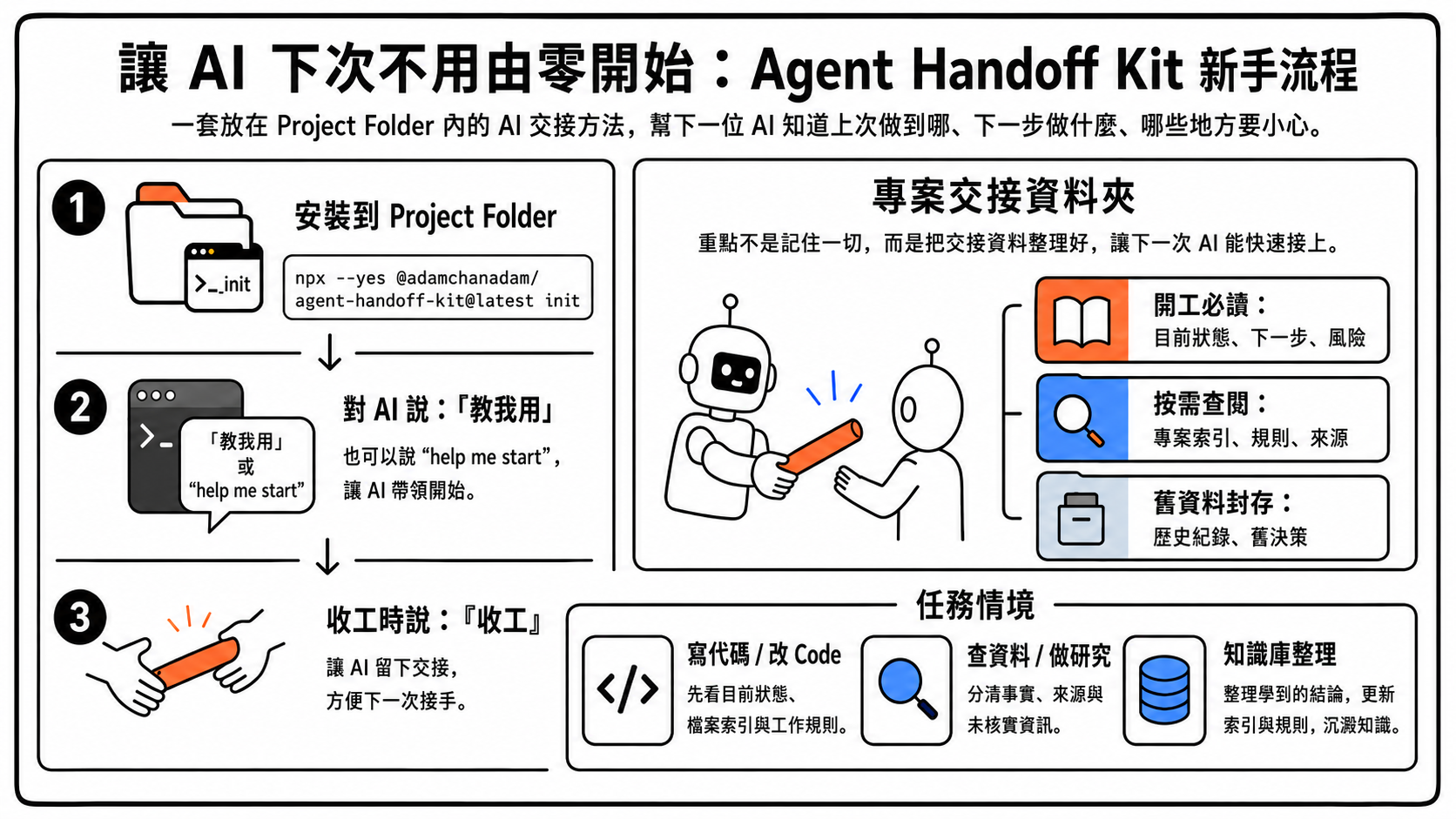
這張圖是給第一次使用的人看的流程摘要:先在專案資料夾安裝,然後在能讀寫本機資料夾的 AI 對話貼固定開工句;AI 會打開 `START_NEXT_SESSION_PROMPT.txt` 進入新手引導。完成工作時說「收工」,讓 AI 留下下一次能接上的交接。
|
|
41
|
+
|
|
42
|
+
### 適用工具
|
|
43
|
+
|
|
44
|
+
Agent Handoff Kit 適合能讀寫本機專案資料夾的 agentic AI 工具,例如 Claude Code、OpenAI Codex、Gemini CLI、Google Antigravity,或其他具備本機工作區讀寫能力的工具。
|
|
45
|
+
|
|
46
|
+
它不適合普通 web chat AI,例如沒有本機檔案讀寫能力的 ChatGPT、Claude、Gemini 網頁版。上載檔案或貼上交接內容不能取代本工具需要的本機讀寫能力;這類工具不能可靠維護專案內的交接文件。
|
|
41
47
|
|
|
42
48
|
### 一、安裝
|
|
43
49
|
|
|
@@ -51,7 +57,7 @@ npx --yes @adamchanadam/agent-handoff-kit@latest init
|
|
|
51
57
|
|
|
52
58
|
安裝完成後,終端機會顯示一段 `Work in ...` 文字。請特別留意:那一段不是給終端機的指令,而是要貼到 AI 對話。
|
|
53
59
|
|
|
54
|
-
可用的 AI
|
|
60
|
+
可用的 AI 工具必須能讀寫此資料夾。不同工具對入口檔的支援可能不同;本工具會同時放置 `AGENTS.md`、`CLAUDE.md`、`GEMINI.md`,讓常見工具能找到同一套開工路徑。Google 官方遷移文件說明,Antigravity CLI 會讀工作資料夾內的 `GEMINI.md` 和 `AGENTS.md`;因此 `AGENTS.md` 仍是唯一真源,`GEMINI.md` 只做橋接。
|
|
55
61
|
|
|
56
62
|
> 補充:`--yes` 只是讓 npm 先取得這個工具,避免多問一次安裝確認。真正會建立項目文件的是 `init`;`doctor` 只檢查,不會安裝或改動你的項目文件。
|
|
57
63
|
|
|
@@ -71,22 +77,24 @@ npx --yes @adamchanadam/agent-handoff-kit@latest init
|
|
|
71
77
|
|
|
72
78
|
### 二、開工
|
|
73
79
|
|
|
74
|
-
|
|
80
|
+
打開能讀寫本機專案資料夾的 AI agent,在新對話貼上安裝工具顯示的文字。
|
|
75
81
|
|
|
76
|
-
|
|
82
|
+
**日常開工句(第一次安裝後與之後每次接力都用同一句)**:
|
|
77
83
|
|
|
78
84
|
```text
|
|
79
|
-
Work in <你的專案資料夾>.
|
|
85
|
+
Work in <你的專案資料夾>. Read AGENTS.md first. Then open START_NEXT_SESSION_PROMPT.txt and follow the opening message inside. If START_NEXT_SESSION_PROMPT.txt is missing or seems stale, read dev/SESSION_HANDOFF.md instead. Before changing anything, tell me the current state and your recommended next step.
|
|
80
86
|
```
|
|
81
87
|
|
|
82
|
-
AI
|
|
88
|
+
第一次安裝後,`START_NEXT_SESSION_PROMPT.txt` 內會放新手引導,AI 會帶你選擇使用情境(建構系統 / 研究報告 / 知識庫整理 / 學寫代碼 / 其他),再一步一步陪你做第一個任務。每次收工後,同一個檔案會改成下一次接力需要的真實狀態。你不需要手動打開或複製整份交接內容。
|
|
83
89
|
|
|
84
|
-
|
|
90
|
+
如果 AI 工具已經在正確專案資料夾內,而且會讀 `AGENTS.md`,日常也可以只說:
|
|
85
91
|
|
|
86
92
|
```text
|
|
87
|
-
|
|
93
|
+
Start Agent Handoff
|
|
88
94
|
```
|
|
89
95
|
|
|
96
|
+
中文可說「開工」。若你說的是「某某開工」(例如餐廳開工、項目開工)這類帶其他上下文的話,AI 應先反問你是否指 Agent Handoff Kit 接力,而不是立即啟動交接流程。
|
|
97
|
+
|
|
90
98
|
然後用日常話描述你要完成的任務。AI 應先讀交接文件,說明目前狀態、下一步與風險,再開始工作。
|
|
91
99
|
|
|
92
100
|
### 三、收工
|
|
@@ -100,17 +108,20 @@ Work in <你的專案資料夾>. Read AGENTS.md and follow it. Before changing a
|
|
|
100
108
|
也可以輸入:
|
|
101
109
|
|
|
102
110
|
```text
|
|
111
|
+
Wrap up Agent Handoff
|
|
103
112
|
wrap up
|
|
104
113
|
handoff
|
|
105
114
|
```
|
|
106
115
|
|
|
107
|
-
AI
|
|
116
|
+
若你說的是「某某收工」(例如餐廳收工、今天活動收工)這類帶其他上下文的話,AI 應先反問你是否要執行 Agent Handoff Kit 收工交接,而不是立即改寫交接文件。
|
|
117
|
+
|
|
118
|
+
AI 應更新交接文件,並同步更新下一次開工提示副本:
|
|
108
119
|
|
|
109
120
|
```text
|
|
110
121
|
START_NEXT_SESSION_PROMPT.txt
|
|
111
122
|
```
|
|
112
123
|
|
|
113
|
-
|
|
124
|
+
這個檔案保存下一次真正要讀的開工內容。你下次仍只需貼同一條日常開工句,讓 AI 自己打開這個檔案。真正的權威來源仍是 `dev/SESSION_HANDOFF.md` 裡的「下次開工提示」段。若兩者不同,永遠以 `dev/SESSION_HANDOFF.md` 為準重新產生副本。
|
|
114
125
|
|
|
115
126
|
## 檢查是否安裝完整
|
|
116
127
|
|
|
@@ -122,7 +133,7 @@ npx --yes @adamchanadam/agent-handoff-kit@latest doctor
|
|
|
122
133
|
|
|
123
134
|
看到「檢查通過」代表必要文件與基本結構通過檢查。若 `START_NEXT_SESSION_PROMPT.txt` 落後於 `dev/SESSION_HANDOFF.md`,`doctor` 只會提醒;這個便利副本應在收工 closeout 時由 AI 重新生成,不需要在 session 中途手動更新。
|
|
124
135
|
|
|
125
|
-
`doctor` 只檢查,不會建立或修改項目文件。這個檢查只能確認文件齊不齊、格式是否正常,不代表 AI 已理解你的專案。真正開始工作前,仍應把 `Work in ...`
|
|
136
|
+
`doctor` 只檢查,不會建立或修改項目文件。這個檢查只能確認文件齊不齊、格式是否正常,不代表 AI 已理解你的專案。真正開始工作前,仍應把 `Work in ...` 起步句貼到能讀寫本機資料夾的 AI agent 對話,讓 AI 讀入口文件並說明目前狀態。
|
|
126
137
|
|
|
127
138
|
## 會安裝甚麼
|
|
128
139
|
|
|
@@ -147,7 +158,7 @@ dev/rules/*.md
|
|
|
147
158
|
| `AGENTS.md` | AI 開工時最先讀的入口文件。 |
|
|
148
159
|
| `CLAUDE.md` | 讓 Claude Code 找到同一套入口。 |
|
|
149
160
|
| `GEMINI.md` | 讓 Google Antigravity CLI、Gemini CLI 遷移期或相容入口工具找到同一套入口。Antigravity CLI 會讀 `AGENTS.md` 與 `GEMINI.md`,所以此檔只做橋接,不另寫一套規則。 |
|
|
150
|
-
| `START_NEXT_SESSION_PROMPT.txt` |
|
|
161
|
+
| `START_NEXT_SESSION_PROMPT.txt` | 下一次開工時由 AI 讀取的提示副本;初次安裝時放新手引導,收工後由交接文件自動產生。 |
|
|
151
162
|
| `dev/SESSION_HANDOFF.md` | 保存目前狀態、下一步、風險、驗收結果與下一次開工文字。 |
|
|
152
163
|
| `dev/SESSION_LOG.md` | 保存近期實際做過的事與檢查結果。長期使用後舊條目會自動整理入封存資料夾,主檔保持簡短。日常使用不需要打開本檔,做審計或追溯時才看。 |
|
|
153
164
|
| `dev/PROJECT_INDEX.md` | 記錄專案檔案、必讀資料、外部來源與常用檢查。 |
|
|
@@ -261,7 +272,7 @@ Agent Handoff Kit 可與 [Adam-AI-Instructions](https://github.com/prompt-templa
|
|
|
261
272
|
|
|
262
273
|
## 目前限制
|
|
263
274
|
|
|
264
|
-
- 目前版本為 `v0.3.
|
|
275
|
+
- 目前版本為 `v0.3.18` 候選準備;npm registry `latest` 在正式發布前仍以已發布版本為準。
|
|
265
276
|
- 這是早期可用版本,仍在持續完善中。
|
|
266
277
|
- 升級合併屬窄範圍策略,不是完整的複雜合併工具。
|
|
267
278
|
- `doctor` 能檢查結構,不能代替 AI 對專案內容的理解。
|
|
@@ -47,9 +47,11 @@ const requiredAnchors = [
|
|
|
47
47
|
"dev/SESSION_LOG.md",
|
|
48
48
|
"dev/PROJECT_INDEX.md",
|
|
49
49
|
"dev/RULE_PACKS.md",
|
|
50
|
-
"Agent Handoff Kit v<version>",
|
|
51
|
-
"continuity ready",
|
|
52
|
-
"
|
|
50
|
+
"Agent Handoff Kit v<version>",
|
|
51
|
+
"continuity ready",
|
|
52
|
+
"Start Agent Handoff",
|
|
53
|
+
"Ambiguous startup phrases",
|
|
54
|
+
"Reachable is not the same as ingested",
|
|
53
55
|
"Do not treat unread sources as absent",
|
|
54
56
|
// R-030 v0.3.0+: forces managed-core merge on v0.2.x → v0.3.0 upgrade to propagate
|
|
55
57
|
// startup availability probe + integrations pack reference + credential separation discipline.
|
|
@@ -63,8 +65,10 @@ const requiredAnchors = [
|
|
|
63
65
|
label: "closeout intent and full handoff",
|
|
64
66
|
snippets: [
|
|
65
67
|
"Detect end-of-session or handoff intent",
|
|
66
|
-
"收工",
|
|
67
|
-
"
|
|
68
|
+
"收工",
|
|
69
|
+
"Wrap up Agent Handoff",
|
|
70
|
+
"Ambiguous closeout phrases",
|
|
71
|
+
"wrap up",
|
|
68
72
|
"handoff",
|
|
69
73
|
"Reconcile `dev/SESSION_HANDOFF.md`",
|
|
70
74
|
"Add a concise entry to `dev/SESSION_LOG.md`",
|
|
@@ -498,23 +502,6 @@ async function runInstall(command, root, options, version) {
|
|
|
498
502
|
return;
|
|
499
503
|
}
|
|
500
504
|
|
|
501
|
-
// R-031.3 v0.3.3+: For upgrade scenarios, capture pre-upgrade root template version
|
|
502
|
-
// before the create/merge/inject loops mutate PROJECT_INDEX. This snapshot is later
|
|
503
|
-
// passed to printWhatsnew so the version range narrative reflects the actual user
|
|
504
|
-
// journey (v{pre-upgrade} → v{current CLI}), not the post-inject state which would
|
|
505
|
-
// make printWhatsnew see fromVersion == toVersion and skip the summary entirely.
|
|
506
|
-
let preUpgradeRootVersion = null;
|
|
507
|
-
if (command === "upgrade") {
|
|
508
|
-
try {
|
|
509
|
-
const indexPath = path.join(root, "dev/PROJECT_INDEX.md");
|
|
510
|
-
const text = await readFile(indexPath, "utf8");
|
|
511
|
-
const m = text.match(/\| Agent Handoff Kit template version \| ([\d.]+) \|/);
|
|
512
|
-
if (m) preUpgradeRootVersion = m[1];
|
|
513
|
-
} catch {
|
|
514
|
-
// ignore
|
|
515
|
-
}
|
|
516
|
-
}
|
|
517
|
-
|
|
518
505
|
printPlan(command, root, mode, plan, version, options.dryRun);
|
|
519
506
|
|
|
520
507
|
if (options.dryRun) {
|
|
@@ -619,15 +606,12 @@ async function runInstall(command, root, options, version) {
|
|
|
619
606
|
reportRel: path.relative(root, report)
|
|
620
607
|
});
|
|
621
608
|
|
|
622
|
-
// R-031 v0.3.1+: install vs upgrade narrative split.
|
|
623
|
-
|
|
624
|
-
|
|
625
|
-
|
|
626
|
-
|
|
627
|
-
|
|
628
|
-
} else {
|
|
629
|
-
printInstallNextSteps(root, conflicts.length, mode, skippedCount);
|
|
630
|
-
}
|
|
609
|
+
// R-031 v0.3.1+: install vs upgrade narrative split.
|
|
610
|
+
if (command === "upgrade") {
|
|
611
|
+
printUpgradeNextSteps(root, conflicts.length);
|
|
612
|
+
} else {
|
|
613
|
+
printInstallNextSteps(root, conflicts.length, mode, skippedCount);
|
|
614
|
+
}
|
|
631
615
|
|
|
632
616
|
// R-024 upgrade.done self-check: after substantive upgrade writes, run doctor automatically.
|
|
633
617
|
// The user must see whether the merged state actually reaches a clean health state.
|
|
@@ -793,10 +777,10 @@ async function runDoctor(root, version, options = {}) {
|
|
|
793
777
|
return overallHealthy ? "passed" : "failed";
|
|
794
778
|
}
|
|
795
779
|
|
|
796
|
-
function getFirstUseNextStep(root, lastCloseout) {
|
|
797
|
-
if (lastCloseout.date) return null;
|
|
798
|
-
return
|
|
799
|
-
}
|
|
780
|
+
function getFirstUseNextStep(root, lastCloseout) {
|
|
781
|
+
if (lastCloseout.date) return null;
|
|
782
|
+
return `檢查已通過。下一步不要再留在終端機;打開能讀寫此資料夾的 AI agent,貼上:${startupBootstrapPrompt(root)}`;
|
|
783
|
+
}
|
|
800
784
|
|
|
801
785
|
// R-030 v0.3.0+: Credential leak prevention sweep. Scans dev/PROJECT_INDEX.md,
|
|
802
786
|
// dev/SESSION_HANDOFF.md, dev/SESSION_LOG.md for common credential prefix patterns.
|
|
@@ -2061,20 +2045,22 @@ function printInstallNextSteps(root, conflictCount, mode = "first-install", skip
|
|
|
2061
2045
|
}
|
|
2062
2046
|
console.log("------------------------------------------------------------");
|
|
2063
2047
|
console.log("⚠️ 下面這句不是終端機指令。");
|
|
2064
|
-
console.log("📋
|
|
2065
|
-
console.log("
|
|
2066
|
-
console.log("
|
|
2067
|
-
console.log(
|
|
2068
|
-
console.log(
|
|
2069
|
-
console.log("");
|
|
2070
|
-
console.log("
|
|
2071
|
-
console.log("
|
|
2072
|
-
|
|
2048
|
+
console.log("📋 請打開能讀寫此資料夾的 AI agent,新增對話後貼上:");
|
|
2049
|
+
console.log(" 例如 Claude Code、OpenAI Codex、Gemini CLI、Google Antigravity。");
|
|
2050
|
+
console.log(" 普通 web chat AI 若不能讀寫本機資料夾,並不適合使用本工具。");
|
|
2051
|
+
console.log("------------------------------------------------------------");
|
|
2052
|
+
console.log(startupBootstrapPrompt(root));
|
|
2053
|
+
console.log("------------------------------------------------------------");
|
|
2054
|
+
console.log("");
|
|
2055
|
+
console.log("🚀 AI 會先確認這個資料夾,讀取 START_NEXT_SESSION_PROMPT.txt。第一次安裝後,該檔案會觸發新手引導;收工後,該檔案會承載下一次接力狀態。");
|
|
2056
|
+
console.log(" 之後若 AI 已在正確專案內,可說「Start Agent Handoff」/「開工」或「Wrap up Agent Handoff」/「收工」;「某某開工 / 某某收工」會先確認是否指本工具交接。");
|
|
2057
|
+
console.log("============================================================");
|
|
2058
|
+
}
|
|
2073
2059
|
|
|
2074
2060
|
// R-031 v0.3.1+: Upgrade substantive next-step block. Distinct from install
|
|
2075
2061
|
// (`printInstallNextSteps`) because the user is not first-time; pushing them through
|
|
2076
2062
|
// the onboarding canonical phrase resets context they already have.
|
|
2077
|
-
|
|
2063
|
+
function printUpgradeNextSteps(root, conflictCount) {
|
|
2078
2064
|
console.log("");
|
|
2079
2065
|
console.log("============================================================");
|
|
2080
2066
|
if (conflictCount > 0) {
|
|
@@ -2086,113 +2072,16 @@ async function printUpgradeNextSteps(root, conflictCount, version, preUpgradeRoo
|
|
|
2086
2072
|
console.log("============================================================");
|
|
2087
2073
|
return;
|
|
2088
2074
|
}
|
|
2089
|
-
console.log("✅ 升級完成:Kit 檔案已更新到最新版本");
|
|
2090
|
-
console.log("============================================================");
|
|
2091
|
-
|
|
2092
|
-
|
|
2093
|
-
|
|
2094
|
-
|
|
2095
|
-
|
|
2096
|
-
|
|
2097
|
-
console.log("
|
|
2098
|
-
|
|
2099
|
-
console.log("💡 如想了解本版本新加了甚麼功能,可選用以下開工句(非強制):");
|
|
2100
|
-
console.log("------------------------------------------------------------");
|
|
2101
|
-
console.log(`Work in ${root}. I just upgraded agent-handoff-kit. Brief me on what changed in this version and what I should pay attention to.`);
|
|
2102
|
-
console.log("------------------------------------------------------------");
|
|
2103
|
-
console.log("");
|
|
2104
|
-
console.log("🩺 升級驗收會在下方自動執行 doctor;若全綠即升級完成。");
|
|
2105
|
-
console.log("============================================================");
|
|
2106
|
-
}
|
|
2107
|
-
|
|
2108
|
-
// R-031.2 v0.3.2+: Print whatsnew summaries for the version range crossed by this
|
|
2109
|
-
// upgrade. fromVersion = user root template metadata version (the state before
|
|
2110
|
-
// upgrade; R-016 preserves this row so it still reflects the prior state after
|
|
2111
|
-
// upgrade finishes). toVersion = current CLI version. Range is exclusive-fromVersion
|
|
2112
|
-
// inclusive-toVersion. Limit to first + last when crossing > 3 versions (elide middle).
|
|
2113
|
-
async function printWhatsnew(root, toVersion, fromVersionOverride) {
|
|
2114
|
-
// R-031.3 v0.3.3+: fromVersion sourced from explicit override (pre-upgrade snapshot)
|
|
2115
|
-
// when called from upgrade flow; falls back to reading current PROJECT_INDEX
|
|
2116
|
-
// template version row otherwise.
|
|
2117
|
-
let fromVersion = fromVersionOverride ?? null;
|
|
2118
|
-
if (!fromVersion) {
|
|
2119
|
-
const indexPath = path.join(root, "dev/PROJECT_INDEX.md");
|
|
2120
|
-
try {
|
|
2121
|
-
const text = await readFile(indexPath, "utf8");
|
|
2122
|
-
const m = text.match(/\| Agent Handoff Kit template version \| ([\d.]+) \|/);
|
|
2123
|
-
if (m) fromVersion = m[1];
|
|
2124
|
-
} catch {
|
|
2125
|
-
return;
|
|
2126
|
-
}
|
|
2127
|
-
}
|
|
2128
|
-
if (!fromVersion || !isStableSemver(fromVersion) || compareSemver(fromVersion, toVersion) >= 0) {
|
|
2129
|
-
return;
|
|
2130
|
-
}
|
|
2131
|
-
|
|
2132
|
-
const whatsnewDir = path.join(packageRoot, "docs/whatsnew");
|
|
2133
|
-
let entries = [];
|
|
2134
|
-
try {
|
|
2135
|
-
entries = await readdir(whatsnewDir);
|
|
2136
|
-
} catch {
|
|
2137
|
-
console.log(`💡 本版 release notes:https://github.com/Adamchanadam/agent-handoff-kit/releases/tag/v${toVersion}`);
|
|
2138
|
-
console.log("");
|
|
2139
|
-
return;
|
|
2140
|
-
}
|
|
2141
|
-
|
|
2142
|
-
const relevant = entries
|
|
2143
|
-
.filter((name) => /^v\d+\.\d+\.\d+\.md$/.test(name))
|
|
2144
|
-
.map((name) => name.replace(/^v/, "").replace(/\.md$/, ""))
|
|
2145
|
-
.filter((v) => compareSemver(v, fromVersion) > 0 && compareSemver(v, toVersion) <= 0)
|
|
2146
|
-
.sort((a, b) => compareSemver(a, b));
|
|
2147
|
-
|
|
2148
|
-
if (relevant.length === 0) {
|
|
2149
|
-
console.log(`💡 本版 release notes:https://github.com/Adamchanadam/agent-handoff-kit/releases`);
|
|
2150
|
-
console.log(` (v${fromVersion} → v${toVersion} 跨版本的完整變更見 GitHub Release 全列表)`);
|
|
2151
|
-
console.log("");
|
|
2152
|
-
return;
|
|
2153
|
-
}
|
|
2154
|
-
|
|
2155
|
-
// R-031.3 v0.3.3+: Deep range narrative — if fromVersion considerably older than
|
|
2156
|
-
// the oldest available whatsnew, explicitly tell user this is a multi-version
|
|
2157
|
-
// upgrade where older changelog only lives on GitHub Release (not shipped).
|
|
2158
|
-
// Heuristic: deep range if fromVersion's major < oldest's major, or same major
|
|
2159
|
-
// but minor differs by ≥ 1 (i.e. fromVersion is at least one minor release older
|
|
2160
|
-
// than the oldest available whatsnew).
|
|
2161
|
-
const oldestAvailable = relevant[0];
|
|
2162
|
-
const [fromMajor, fromMinor] = fromVersion.split(".").map((n) => Number.parseInt(n, 10));
|
|
2163
|
-
const [oldMajor, oldMinor] = oldestAvailable.split(".").map((n) => Number.parseInt(n, 10));
|
|
2164
|
-
const isDeepRange = (fromMajor < oldMajor) || (fromMajor === oldMajor && fromMinor < oldMinor);
|
|
2165
|
-
if (isDeepRange) {
|
|
2166
|
-
console.log(`💡 注意:本次升級 v${fromVersion} → v${toVersion} 跨度較大;本工具的版本說明只涵蓋由 v${oldestAvailable} 起的 ${relevant.length} 個版本。較舊版本(v${fromVersion} 至 v${oldestAvailable} 之前)的完整變更見:`);
|
|
2167
|
-
console.log(` https://github.com/Adamchanadam/agent-handoff-kit/releases`);
|
|
2168
|
-
console.log("");
|
|
2169
|
-
}
|
|
2170
|
-
|
|
2171
|
-
console.log(`📰 本次升級涵蓋 ${relevant.length} 個版本的版本說明(${isDeepRange ? `由 v${oldestAvailable} 起` : `v${fromVersion} → v${toVersion}`}):`);
|
|
2172
|
-
console.log("");
|
|
2173
|
-
|
|
2174
|
-
const toShow = relevant.length <= 3 ? relevant : [relevant[0], relevant[relevant.length - 1]];
|
|
2175
|
-
const elidedCount = relevant.length > 3 ? relevant.length - 2 : 0;
|
|
2176
|
-
|
|
2177
|
-
for (let i = 0; i < toShow.length; i += 1) {
|
|
2178
|
-
const v = toShow[i];
|
|
2179
|
-
const filePath = path.join(whatsnewDir, `v${v}.md`);
|
|
2180
|
-
try {
|
|
2181
|
-
const content = await readFile(filePath, "utf8");
|
|
2182
|
-
console.log(content.trimEnd());
|
|
2183
|
-
console.log("");
|
|
2184
|
-
if (i === 0 && elidedCount > 0) {
|
|
2185
|
-
console.log(` ⋯ 中間 ${elidedCount} 個版本的版本說明略;完整列表見 https://github.com/Adamchanadam/agent-handoff-kit/releases ⋯`);
|
|
2186
|
-
console.log("");
|
|
2187
|
-
}
|
|
2188
|
-
} catch {
|
|
2189
|
-
console.log(`(v${v} release notes 檔缺失,見 https://github.com/Adamchanadam/agent-handoff-kit/releases/tag/v${v})`);
|
|
2190
|
-
console.log("");
|
|
2191
|
-
}
|
|
2192
|
-
}
|
|
2193
|
-
console.log("------------------------------------------------------------");
|
|
2194
|
-
console.log("");
|
|
2195
|
-
}
|
|
2075
|
+
console.log("✅ 升級完成:Kit 檔案已更新到最新版本");
|
|
2076
|
+
console.log("============================================================");
|
|
2077
|
+
console.log("📋 如你正在進行中的工作對話已熟悉 Agent Handoff Kit,繼續使用原本的開工方式即可,無需重新做新手引導。");
|
|
2078
|
+
console.log("");
|
|
2079
|
+
console.log("💡 版本詳情不在升級流程內展開;如需要,可稍後查看 GitHub Release:");
|
|
2080
|
+
console.log(" https://github.com/Adamchanadam/agent-handoff-kit/releases/latest");
|
|
2081
|
+
console.log("");
|
|
2082
|
+
console.log("🩺 升級驗收會在下方自動執行 doctor;若全綠即升級完成。");
|
|
2083
|
+
console.log("============================================================");
|
|
2084
|
+
}
|
|
2196
2085
|
|
|
2197
2086
|
// R-031 v0.3.1+: Upgrade no-op short-circuit. When the user runs upgrade on a root
|
|
2198
2087
|
// already at latest version (skip all / create 0 / merge 0 / conflict 0), print a
|
|
@@ -2260,14 +2149,18 @@ Commands:
|
|
|
2260
2149
|
🔄 已裝過:先用 upgrade --dry-run 預演,再決定是否正式升級。
|
|
2261
2150
|
🩺 不確定狀態:用 doctor 檢查;doctor 只檢查,不會改檔。
|
|
2262
2151
|
|
|
2263
|
-
安裝之後:
|
|
2264
|
-
不要把顯示出來的 "Work in ..." 文字輸入終端機。
|
|
2265
|
-
|
|
2266
|
-
|
|
2267
|
-
|
|
2268
|
-
|
|
2269
|
-
|
|
2270
|
-
|
|
2152
|
+
安裝之後:
|
|
2153
|
+
不要把顯示出來的 "Work in ..." 文字輸入終端機。
|
|
2154
|
+
請打開能讀寫此資料夾的 AI agent,新增對話後貼上那句起步句。
|
|
2155
|
+
例如 Claude Code、OpenAI Codex、Gemini CLI、Google Antigravity。
|
|
2156
|
+
普通 web chat AI 若不能讀寫本機資料夾,並不適合使用本工具。
|
|
2157
|
+
AI 會讀取 START_NEXT_SESSION_PROMPT.txt;第一次安裝後該檔案會啟動新手引導,
|
|
2158
|
+
收工後該檔案會承載下一次接力狀態。
|
|
2159
|
+
AI 已在正確專案內時,可用「Start Agent Handoff」/「開工」開始接力,
|
|
2160
|
+
用「Wrap up Agent Handoff」/「收工」保存交接;「某某開工 / 某某收工」
|
|
2161
|
+
會先確認是否指本工具交接。
|
|
2162
|
+
|
|
2163
|
+
終端機範例:
|
|
2271
2164
|
npx --yes @adamchanadam/agent-handoff-kit@latest init
|
|
2272
2165
|
npx --yes @adamchanadam/agent-handoff-kit@latest doctor
|
|
2273
2166
|
npx --yes @adamchanadam/agent-handoff-kit@latest upgrade --dry-run
|
|
@@ -2282,6 +2175,10 @@ Commands:
|
|
|
2282
2175
|
"Need to install" 提示。真正會建立項目文件的是 init;doctor 只檢查。
|
|
2283
2176
|
`);
|
|
2284
2177
|
console.log(`📦 版本:v${version}`);
|
|
2285
|
-
console.log(`🛠️ 模式:help ready`);
|
|
2286
|
-
console.log(`🚀 下一步:新項目先執行 init;舊項目先執行 upgrade --dry-run;只想檢查才執行 doctor。`);
|
|
2287
|
-
}
|
|
2178
|
+
console.log(`🛠️ 模式:help ready`);
|
|
2179
|
+
console.log(`🚀 下一步:新項目先執行 init;舊項目先執行 upgrade --dry-run;只想檢查才執行 doctor。`);
|
|
2180
|
+
}
|
|
2181
|
+
|
|
2182
|
+
function startupBootstrapPrompt(root) {
|
|
2183
|
+
return `Work in ${root}. Read AGENTS.md first. Then open START_NEXT_SESSION_PROMPT.txt and follow the opening message inside. If START_NEXT_SESSION_PROMPT.txt is missing or seems stale, read dev/SESSION_HANDOFF.md instead. Before changing anything, tell me the current state and your recommended next step.`;
|
|
2184
|
+
}
|
package/package.json
CHANGED
|
@@ -1,17 +1,16 @@
|
|
|
1
1
|
{
|
|
2
2
|
"name": "@adamchanadam/agent-handoff-kit",
|
|
3
|
-
"version": "0.3.
|
|
3
|
+
"version": "0.3.18",
|
|
4
4
|
"description": "Lightweight agent harness for project memory, handoff, and multi-session continuity.",
|
|
5
5
|
"type": "module",
|
|
6
6
|
"bin": {
|
|
7
7
|
"agent-handoff-kit": "bin/agent-handoff-kit.mjs"
|
|
8
8
|
},
|
|
9
9
|
"files": [
|
|
10
|
-
"bin/",
|
|
11
|
-
"runtime-core/",
|
|
12
|
-
"packs/",
|
|
13
|
-
"
|
|
14
|
-
"README.md",
|
|
10
|
+
"bin/",
|
|
11
|
+
"runtime-core/",
|
|
12
|
+
"packs/",
|
|
13
|
+
"README.md",
|
|
15
14
|
"LICENSE"
|
|
16
15
|
],
|
|
17
16
|
"scripts": {
|
|
@@ -15,9 +15,13 @@ Then classify the user's task and read only the required rule pack(s). State whi
|
|
|
15
15
|
|
|
16
16
|
Before classifying the task, detect first-time-user signals (R-029): if the user's first message in this session is short, vague, or contains onboarding signal keywords (e.g. "新手", "I'm new", "教我用", "help me start", "first time", "我剛安裝", "點開始", "show me how", "agent handoff kit 可幫我做甚麼", "我想做 [type] project", "點用", "能力"), or if the session is a fresh installation (HANDOFF Active Objective empty + Session count 1), load `dev/rules/onboarding.md` proactively BEFORE doing the regular task loop. The onboarding pack surfaces the AI's role and offers Scenario A-F selection (instead of immediately diving into task execution). Onboarding is a transient pack: after the user completes their first-task walk-through, unload it and load the regular scenario pack (coding / research / writing / knowledge / etc) for ongoing work.
|
|
17
17
|
|
|
18
|
-
If the user did not paste the previous opening message but the current project root is clear, read `AGENTS.md` first as fallback entry, then use this read order. If the root is unclear or mismatched, stop and ask for the intended project root before reading or editing project state.
|
|
19
|
-
|
|
20
|
-
|
|
18
|
+
If the user did not paste the previous opening message but the current project root is clear, read `AGENTS.md` first as fallback entry, then use this read order. If the root is unclear or mismatched, stop and ask for the intended project root before reading or editing project state.
|
|
19
|
+
|
|
20
|
+
Detect clear startup / handoff-start intent in natural language, such as "開工", "Start Agent Handoff", "開始接力", or "continue handoff". When that intent is clear and the current project root is clear, open `START_NEXT_SESSION_PROMPT.txt` and follow the opening message inside. If `START_NEXT_SESSION_PROMPT.txt` is missing or seems stale, read `dev/SESSION_HANDOFF.md` instead. Before changing anything, tell the user the current state and your recommended next step.
|
|
21
|
+
|
|
22
|
+
Ambiguous startup phrases need one concise confirmation question before treating them as Agent Handoff Kit startup. In particular, if the user says "<something> 開工", "<something> start", or similar wording that may refer to a real-world shift, event, project phase, or another context, ask whether they mean to start Agent Handoff Kit continuity for this project.
|
|
23
|
+
|
|
24
|
+
If a required file is missing, create the smallest useful version only after confirming the target project root.
|
|
21
25
|
|
|
22
26
|
Before acting on a non-trivial task, identify required local source-of-truth files and external sources from the handoff, project index, user request, and sync registry. Read them or mark them blocked. Reachable is not the same as ingested. Do not treat unread sources as absent.
|
|
23
27
|
|
|
@@ -79,7 +83,9 @@ Do not claim completion without evidence from checks, inspection, or a clear exp
|
|
|
79
83
|
|
|
80
84
|
## 4. Closeout And Handoff
|
|
81
85
|
|
|
82
|
-
Detect end-of-session or handoff intent in natural language, such as "收工", "wrap up", or "handoff". If intent is ambiguous, ask one concise confirmation question.
|
|
86
|
+
Detect end-of-session or handoff intent in natural language, such as "收工", "Wrap up Agent Handoff", "closeout", "wrap up", or "handoff". If intent is ambiguous, ask one concise confirmation question.
|
|
87
|
+
|
|
88
|
+
Ambiguous closeout phrases need one concise confirmation question before full closeout. In particular, if the user says "<something> 收工", "<something> close", or similar wording that may refer to a real-world shift, event, project phase, or another context, ask whether they mean to wrap up Agent Handoff Kit and write the project handoff.
|
|
83
89
|
|
|
84
90
|
At full closeout:
|
|
85
91
|
|
|
@@ -91,8 +97,8 @@ At full closeout:
|
|
|
91
97
|
6. Complete the `State Reconciliation Check`: it must state when reconciliation happened, which state sections were rewritten or confirmed current, whether stale snapshots remain, whether completed / pending / risk / opening-message lifecycle conflicts were resolved, and whether the opening message matches current state. In the same step, run the handoff lifecycle consistency check before declaring handoff ready: compare `Completed This Session`, `Validation / QC`, `Next Priorities`, `Risks / Blockers`, and `Next Session Opening Message`. A completed or verified item must not remain as an unresolved next priority, active risk, or startup instruction unless it is explicitly reclassified as monitor-only, follow-up scope, blocked, or reopened with the missing evidence or trigger condition stated.
|
|
92
98
|
7. Run the handoff sufficiency check: the next AI should be able to continue from `AGENTS.md`, `dev/SESSION_HANDOFF.md`, `dev/PROJECT_INDEX.md`, and needed rule packs without searching old log history.
|
|
93
99
|
8. If either check fails, fix `dev/SESSION_HANDOFF.md` first; do not push current-state responsibility into `dev/SESSION_LOG.md`.
|
|
94
|
-
9. Regenerate `START_NEXT_SESSION_PROMPT.txt` from the fenced opening message in `dev/SESSION_HANDOFF.md`, then read it back or run the project's prompt mirror check before declaring closeout ready. `dev/SESSION_HANDOFF.md` is authoritative; `START_NEXT_SESSION_PROMPT.txt` is
|
|
95
|
-
10. Show a short closeout card, then provide the
|
|
100
|
+
9. Regenerate `START_NEXT_SESSION_PROMPT.txt` from the fenced opening message in `dev/SESSION_HANDOFF.md`, then read it back or run the project's prompt mirror check before declaring closeout ready. `dev/SESSION_HANDOFF.md` is authoritative; `START_NEXT_SESSION_PROMPT.txt` is the stateful startup prompt that the next local agent must read. During an active session, do not regenerate it just to silence `doctor`; normal `doctor` may warn about drift, but closeout must make the copy match before handoff is declared ready.
|
|
101
|
+
10. Show a short closeout card, then provide the stable bootstrap sentence for the next local-agent session in a fenced `text` code block: `Work in <project root>. Read AGENTS.md first. Then open START_NEXT_SESSION_PROMPT.txt and follow the opening message inside. If START_NEXT_SESSION_PROMPT.txt is missing or seems stale, read dev/SESSION_HANDOFF.md instead. Before changing anything, tell me the current state and your recommended next step.` Do not compose a separate stateful final-response prompt; the final response points to the persisted prompt file, not a third source of truth.
|
|
96
102
|
11. Advance the SESSION_LOG N-rule (R-010 SESSION_LOG handoff-role discipline). After prepending the new closeout entry, count `## YYYY-MM-DD` H2 entries in `dev/SESSION_LOG.md`. Any entry now at position N ≥ 11 (oldest end) must be moved into `dev/SESSION_LOG_archive/archive_<batch>_<low_date>_to_<high_date>.md` with raw content preserved. Maintain `dev/SESSION_LOG_archive/INDEX.md` (master index of all archive batches; create on first archive). Entries at N=4–10 whose core facts are already absorbed into HANDOFF / PROJECT_INDEX / requirements / decision records collapse to a short-index line using structural anchors, not line numbers. Entries with unique narrative not yet absorbed must first be ported into the relevant durable source, then collapsed. This is mandatory; do not skip. Handoff capability rests on `dev/SESSION_HANDOFF.md`; `dev/SESSION_LOG.md` is trace-back / audit trail and does not carry handoff responsibility.
|
|
97
103
|
|
|
98
104
|
12. Maintain `dev/PROJECT_DECISIONS.md` per R-028 project narrative discipline. Each closeout must run the following checks with equal mechanical rigor as the SESSION_LOG N-rule (step 11):
|
|
@@ -21,7 +21,7 @@ Purpose: give a stateless AI a compact map of the project before it reads or edi
|
|
|
21
21
|
| `AGENTS.md` | primary Agent Handoff Kit entry and startup contract | session startup |
|
|
22
22
|
| `CLAUDE.md` | Claude Code bridge to the same startup path | Claude Code startup |
|
|
23
23
|
| `GEMINI.md` | Google Antigravity CLI / Gemini CLI migration bridge to the same startup path | Antigravity / Gemini startup |
|
|
24
|
-
| `START_NEXT_SESSION_PROMPT.txt` | auto-generated
|
|
24
|
+
| `START_NEXT_SESSION_PROMPT.txt` | auto-generated stateful startup prompt for the next local-agent session; `dev/SESSION_HANDOFF.md` remains authoritative | next session startup |
|
|
25
25
|
| `src/` | application source | coding task |
|
|
26
26
|
| `tests/` | tests | coding/QC |
|
|
27
27
|
| `docs/` | user or product docs | doc/public behavior change |
|
|
@@ -123,7 +123,7 @@ Record this at closeout so the next AI can detect wrong-root or workspace drift.
|
|
|
123
123
|
| UI behavior | TBD | build + visual/manual check |
|
|
124
124
|
| Data model | TBD | migration/checks |
|
|
125
125
|
| Governance behavior | `AGENTS.md`, `dev/*` | doc sync registry |
|
|
126
|
-
| Closeout/startup contract | `AGENTS.md`, `START_NEXT_SESSION_PROMPT.txt`, `dev/SESSION_HANDOFF.md`, `dev/SESSION_LOG.md`, `dev/PROJECT_INDEX.md` | opening message present + workspace identity current + prompt
|
|
126
|
+
| Closeout/startup contract | `AGENTS.md`, `START_NEXT_SESSION_PROMPT.txt`, `dev/SESSION_HANDOFF.md`, `dev/SESSION_LOG.md`, `dev/PROJECT_INDEX.md` | opening message present + workspace identity current + prompt file regenerated from handoff at closeout |
|
|
127
127
|
|
|
128
128
|
## External Services
|
|
129
129
|
|
|
@@ -133,9 +133,9 @@ Continuity rule: this file carries current state and next action. `dev/SESSION_L
|
|
|
133
133
|
<!-- ack:section:next-session-opening-message -->
|
|
134
134
|
## Next Session Opening Message
|
|
135
135
|
|
|
136
|
-
This fenced block is the authoritative startup prompt. At closeout, regenerate `START_NEXT_SESSION_PROMPT.txt` from this block. If the two differ, trust this block and rewrite the convenience copy.
|
|
136
|
+
This fenced block is the authoritative startup prompt. At closeout, regenerate `START_NEXT_SESSION_PROMPT.txt` from this block. If the two differ, trust this block and rewrite the convenience copy. User-facing closeout output may show the stable bootstrap sentence that tells the next agent to read this file; do not hand-write a separate stateful prompt in the final response.
|
|
137
137
|
|
|
138
|
-
📋 Next session: copy and paste the whole block below
|
|
138
|
+
📋 Next session: copy and paste the whole block below
|
|
139
139
|
|
|
140
140
|
```text
|
|
141
141
|
Work in <absolute project root>.
|
|
@@ -149,7 +149,9 @@ Read in order:
|
|
|
149
149
|
|
|
150
150
|
Read dev/DOC_SYNC_REGISTRY.md before file changes or closeout.
|
|
151
151
|
|
|
152
|
-
If this root does not match the expected project root, stop and ask for confirmation.
|
|
153
|
-
|
|
154
|
-
|
|
155
|
-
|
|
152
|
+
If this root does not match the expected project root, stop and ask for confirmation.
|
|
153
|
+
|
|
154
|
+
This is the first startup after installing Agent Handoff Kit. Load the onboarding guidance from dev/RULE_PACKS.md when appropriate. Help me choose the right working scenario, then guide me through the first task step by step.
|
|
155
|
+
|
|
156
|
+
Before changing anything, tell me the current state and your recommended next step.
|
|
157
|
+
```
|
|
@@ -43,6 +43,8 @@ Read dev/DOC_SYNC_REGISTRY.md before file changes or closeout.
|
|
|
43
43
|
|
|
44
44
|
If this root does not match the expected project root, stop and ask for confirmation.
|
|
45
45
|
|
|
46
|
-
|
|
46
|
+
This is the first startup after installing Agent Handoff Kit. Load the onboarding guidance from dev/RULE_PACKS.md when appropriate. Help me choose the right working scenario, then guide me through the first task step by step.
|
|
47
|
+
|
|
48
|
+
Before changing anything, tell me the current state and your recommended next step.
|
|
47
49
|
```
|
|
48
50
|
````
|
|
@@ -11,4 +11,6 @@ Read dev/DOC_SYNC_REGISTRY.md before file changes or closeout.
|
|
|
11
11
|
|
|
12
12
|
If this root does not match the expected project root, stop and ask for confirmation.
|
|
13
13
|
|
|
14
|
-
|
|
14
|
+
This is the first startup after installing Agent Handoff Kit. Load the onboarding guidance from dev/RULE_PACKS.md when appropriate. Help me choose the right working scenario, then guide me through the first task step by step.
|
|
15
|
+
|
|
16
|
+
Before changing anything, tell me the current state and your recommended next step.
|
package/docs/whatsnew/v0.3.1.md
DELETED
package/docs/whatsnew/v0.3.10.md
DELETED
|
@@ -1,19 +0,0 @@
|
|
|
1
|
-
# v0.3.10
|
|
2
|
-
|
|
3
|
-
## 本版新加了甚麼
|
|
4
|
-
|
|
5
|
-
改善第一次安裝後的實際使用流程。終端機完成安裝後,提示會更清楚地把「終端機動作」與「AI 對話下一步」分開;新手引導會用 5 步幫用戶選情境、問背景、收斂第一個小任務,再等用戶確認後才開始正式工作。
|
|
6
|
-
|
|
7
|
-
## 對你已有檔案的影響
|
|
8
|
-
|
|
9
|
-
本版會保留既有項目內容。升級時若發現 `CLAUDE.md` 被 AI 改成一份很長的規則文件,工具會把它恢復為短橋接檔,避免 Claude Code 把橋接檔當成第二套規則來源。`GEMINI.md` 也同步說明 Antigravity CLI 與 Gemini CLI 遷移期的入口關係。
|
|
10
|
-
|
|
11
|
-
## 建議下一步
|
|
12
|
-
|
|
13
|
-
升級前可先預演:
|
|
14
|
-
|
|
15
|
-
```bash
|
|
16
|
-
npx --yes @adamchanadam/agent-handoff-kit@latest upgrade --dry-run
|
|
17
|
-
```
|
|
18
|
-
|
|
19
|
-
確認沒有衝突後再升級。升級完成後,如你是第一次使用這個項目,請把工具顯示的完整起步句貼到 AI 對話,而不是留在終端機繼續操作;舊項目升級用戶則照原本開工方式繼續即可。
|
package/docs/whatsnew/v0.3.11.md
DELETED
|
@@ -1,19 +0,0 @@
|
|
|
1
|
-
# v0.3.11
|
|
2
|
-
|
|
3
|
-
## 本版新加了甚麼
|
|
4
|
-
|
|
5
|
-
本版把 v0.3.10 發佈後留下的用戶旅程檢查補成長期守門。重點不是增加新功能,而是把已驗證的首次安裝、升級、衝突停手與公開文件一致性,轉成每次發佈前都會跑的檢查。
|
|
6
|
-
|
|
7
|
-
## 對你已有檔案的影響
|
|
8
|
-
|
|
9
|
-
既有項目不用重裝。升級時若沒有需要合併的內容,工具不會假裝完成一件大事;若遇到不能安全判斷的衝突,會清楚停手並提示先處理衝突。舊版本升上來時,工具也會保留既有資料與本地規則。
|
|
10
|
-
|
|
11
|
-
## 建議下一步
|
|
12
|
-
|
|
13
|
-
升級前可先預演:
|
|
14
|
-
|
|
15
|
-
```bash
|
|
16
|
-
npx --yes @adamchanadam/agent-handoff-kit@latest upgrade --dry-run
|
|
17
|
-
```
|
|
18
|
-
|
|
19
|
-
如果預演沒有 conflict,再執行正式升級。升級後可用 `doctor` 檢查項目是否完整;第一次使用的新項目,仍按安裝後顯示的起步句進入 AI 對話。
|
package/docs/whatsnew/v0.3.12.md
DELETED
|
@@ -1,19 +0,0 @@
|
|
|
1
|
-
# v0.3.12
|
|
2
|
-
|
|
3
|
-
## 本版新加了甚麼
|
|
4
|
-
|
|
5
|
-
本版修正 `doctor` 對下次開工提示便利副本的判斷。`dev/SESSION_HANDOFF.md` 仍是權威;`START_NEXT_SESSION_PROMPT.txt` 只是給你下次開工複製用的副本,應在收工 closeout 時重新產生。
|
|
6
|
-
|
|
7
|
-
## 對你已有檔案的影響
|
|
8
|
-
|
|
9
|
-
既有項目不用重裝。若你在一個 session 中途更新了 handoff,但還未收工,`doctor` 不會再因便利副本暫時落後而判定項目失敗。它會提醒你:完成任務後請 AI 執行 closeout,屆時再重生便利副本。
|
|
10
|
-
|
|
11
|
-
## 建議下一步
|
|
12
|
-
|
|
13
|
-
升級前可先預演:
|
|
14
|
-
|
|
15
|
-
```bash
|
|
16
|
-
npx --yes @adamchanadam/agent-handoff-kit@latest upgrade --dry-run
|
|
17
|
-
```
|
|
18
|
-
|
|
19
|
-
如果預演沒有 conflict,再執行正式升級。升級後可用 `doctor` 檢查;若只有便利副本提醒,繼續工作即可,收工時再讓 AI 保存交接。
|
package/docs/whatsnew/v0.3.13.md
DELETED
|
@@ -1,23 +0,0 @@
|
|
|
1
|
-
# v0.3.13
|
|
2
|
-
|
|
3
|
-
## 本版新加了甚麼
|
|
4
|
-
|
|
5
|
-
本版修正升級後自動檢查失敗時的下一步提示。若 `upgrade` 已經執行,但自動 `doctor` 發現某個保留檔案真的缺少必要段落,CLI 會列出缺失檔案、檢查名稱與缺少文字,並給出交給 AI 非破壞性修補的步驟;不再只叫新手回頭跑 `upgrade --dry-run`。
|
|
6
|
-
|
|
7
|
-
同時,本版把可重用操作程序的歸位規則收斂到既有 `agent-governance` pack:長期操作方法應進入相關 rule pack 或已登記 reference,不應只寫入 handoff / log 當作完成。
|
|
8
|
-
|
|
9
|
-
## 對你已有檔案的影響
|
|
10
|
-
|
|
11
|
-
既有項目不用重裝。`START_NEXT_SESSION_PROMPT.txt` 仍只是 closeout 便利副本;若它只是落後於 `dev/SESSION_HANDOFF.md`,普通 `doctor` 只會提醒,不會把項目判定為失敗。
|
|
12
|
-
|
|
13
|
-
若升級後看到 anchor 缺失,代表某個保留檔案缺少 Kit 需要的固定段落。工具不會覆寫你的內容;你應把完整 `doctor` 輸出交給 AI,請它按缺失文字補回對應段落。
|
|
14
|
-
|
|
15
|
-
## 建議下一步
|
|
16
|
-
|
|
17
|
-
升級前可先預演:
|
|
18
|
-
|
|
19
|
-
```bash
|
|
20
|
-
npx --yes @adamchanadam/agent-handoff-kit@latest upgrade --dry-run
|
|
21
|
-
```
|
|
22
|
-
|
|
23
|
-
如果預演沒有 conflict,再執行正式升級。正式升級後若自動檢查失敗,請按 CLI 顯示的「怎樣修」步驟交給 AI 修補;不要把 `upgrade --dry-run` 當成修補動作。
|
package/docs/whatsnew/v0.3.14.md
DELETED
|
@@ -1,29 +0,0 @@
|
|
|
1
|
-
# v0.3.14
|
|
2
|
-
|
|
3
|
-
## 本版新加了甚麼
|
|
4
|
-
|
|
5
|
-
本版修正舊版項目跨版本升級時的交接狀態誤判。部分由很早期版本升級的項目,`upgrade` 會補入新的 lifecycle 欄位;舊工具曾把欄位填成 `TBD`,然後同一次升級後自動 `doctor` 又把這個 `TBD` 判定為失敗。
|
|
6
|
-
|
|
7
|
-
現在升級工具會把這類欄位明確標記為「由升級重新分類,下一次 closeout 再核對」,避免工具自己寫入一個會被自己拒絕的值。
|
|
8
|
-
|
|
9
|
-
同時,本版把 rules / packs 路由與可重用程序入庫範圍加入發佈前全面檢,確認自然語言任務能導向相應 pack,而不是隨意新建治理文件或只寫在 handoff / log。
|
|
10
|
-
|
|
11
|
-
另外,本版把 `START_NEXT_SESSION_PROMPT.txt` 與 handoff opening message 的比對方法收斂到固定檢查器。檢查器會先錨定真正的下一次開工訊息,再正規化 CRLF / LF 換行符,避免只因換行風格不同就誤報內容不一致。
|
|
12
|
-
|
|
13
|
-
## 對你已有檔案的影響
|
|
14
|
-
|
|
15
|
-
既有項目不用重裝。若你是由舊版 Kit 升級,工具可能會在 `dev/SESSION_HANDOFF.md` 補入 lifecycle consistency 欄位;這是為了讓下一次 closeout 能核對「已完成的事是否仍被帶成未解待辦」。
|
|
16
|
-
|
|
17
|
-
工具仍會保留既有交接內容,不會用新版模板覆寫你的工作紀錄。若 `doctor` 指出其他真實缺失,仍應把完整輸出交給 AI 非破壞性修補。
|
|
18
|
-
|
|
19
|
-
若只出現 prompt convenience copy 的換行符差異,這不是內容損壞;正常 `doctor` 不會因此阻擋你繼續工作。
|
|
20
|
-
|
|
21
|
-
## 建議下一步
|
|
22
|
-
|
|
23
|
-
已安裝舊版的項目可先預演:
|
|
24
|
-
|
|
25
|
-
```bash
|
|
26
|
-
npx --yes @adamchanadam/agent-handoff-kit@latest upgrade --dry-run
|
|
27
|
-
```
|
|
28
|
-
|
|
29
|
-
如果預演沒有 conflict,再執行正式升級。升級後若自動 `doctor` 通過,即可繼續使用;若仍有缺失,請把完整檢查輸出交給 AI 修補,不要用重裝覆寫既有內容。
|
package/docs/whatsnew/v0.3.15.md
DELETED
|
@@ -1,27 +0,0 @@
|
|
|
1
|
-
# v0.3.15
|
|
2
|
-
|
|
3
|
-
## 本版新加了甚麼
|
|
4
|
-
|
|
5
|
-
本版修正一個真實舊項目升級後仍會被自動檢查擋住的情況。
|
|
6
|
-
|
|
7
|
-
如果項目已經有新版 lifecycle 欄位,但欄位值仍是舊模板留下的 TBD,而 `Completed This Session` 或 `Validation / QC` 已經有實際內容,舊版升級流程可能只更新版本 metadata,沒有修正這個舊 placeholder。結果是工具先顯示升級完成,隨後同一次自動 `doctor` 又判定 handoff lifecycle consistency 缺失。
|
|
8
|
-
|
|
9
|
-
現在 upgrade 會在確認項目記錄版本落後於目前 CLI 時,安全地把這類舊 placeholder 重新分類為 upgrade migration 狀態,並保留原有交接內容。這令升級後自動檢查能通過,同時仍要求下一次 closeout 正常核對已完成工作、下一步和風險是否一致。
|
|
10
|
-
|
|
11
|
-
本版同時把這個真實路徑加入發佈前自動場景檢查,作為 `qa:release` scenario 3c;未來候選版本若再出現相同組合,會在 publish 前被擋下。
|
|
12
|
-
|
|
13
|
-
## 對你已有檔案的影響
|
|
14
|
-
|
|
15
|
-
既有項目不用重裝。若你的項目本來已經有 lifecycle 欄位,但欄位仍是 TBD,upgrade 可能會把該欄位改成 `Reclassified at upgrade` 說明。這是工具對舊模板狀態的安全遷移,不會覆寫你的 Completed、Validation、Next Priorities 或其他工作紀錄。
|
|
16
|
-
|
|
17
|
-
若 handoff 本身真的仍有完成事項與待辦事項互相矛盾,下一次 closeout 仍應由 AI 正常整理;本版只處理舊 placeholder 造成的升級自撞,不把 AI 對專案內容的判斷交給 installer 猜測。
|
|
18
|
-
|
|
19
|
-
## 建議下一步
|
|
20
|
-
|
|
21
|
-
已安裝舊版的項目可先預演:
|
|
22
|
-
|
|
23
|
-
```bash
|
|
24
|
-
npx --yes @adamchanadam/agent-handoff-kit@latest upgrade --dry-run
|
|
25
|
-
```
|
|
26
|
-
|
|
27
|
-
如果預演沒有 conflict,再執行正式升級。升級後若自動 doctor 通過,即可繼續使用;若仍有缺失,請把完整檢查輸出交給 AI 修補,不要用重裝覆寫既有內容。
|
package/docs/whatsnew/v0.3.16.md
DELETED
|
@@ -1,25 +0,0 @@
|
|
|
1
|
-
# v0.3.16
|
|
2
|
-
|
|
3
|
-
## 本版新加了甚麼
|
|
4
|
-
|
|
5
|
-
本版修正收工交接流程中一個容易漏過的同步坑:AI 可能只在對話表面顯示下一次開工提示,卻沒有先把同一份內容寫回 `START_NEXT_SESSION_PROMPT.txt`。
|
|
6
|
-
|
|
7
|
-
現在核心收工規則改為先從 `dev/SESSION_HANDOFF.md` 的權威 opening message 重生 `START_NEXT_SESSION_PROMPT.txt`,再讀回這份便利副本,最後才把讀回內容貼給使用者。這樣 handoff、便利副本、final response 不會變成三份各自手寫的提示。
|
|
8
|
-
|
|
9
|
-
本版同時把這條收工次序加入發佈前驗收與舊核心升級驗收。若未來 runtime core 退回「先表面輸出、後重生 prompt」的舊次序,`qa:release` 或 `qa:upgrade` 會在 publish 前擋下。
|
|
10
|
-
|
|
11
|
-
## 對你已有檔案的影響
|
|
12
|
-
|
|
13
|
-
既有項目不用重裝。升級後,`AGENTS.md` 的 closeout contract 會帶入新的 read-back discipline;本地既有規則仍會保留。
|
|
14
|
-
|
|
15
|
-
`START_NEXT_SESSION_PROMPT.txt` 仍只是下次開工方便複製的副本,權威內容仍在 `dev/SESSION_HANDOFF.md`。session 進行中若便利副本落後,普通 `doctor` 仍只會提醒;真正要求一致的是 full closeout 完成前。
|
|
16
|
-
|
|
17
|
-
## 建議下一步
|
|
18
|
-
|
|
19
|
-
已安裝舊版的項目可先預演:
|
|
20
|
-
|
|
21
|
-
```bash
|
|
22
|
-
npx --yes @adamchanadam/agent-handoff-kit@latest upgrade --dry-run
|
|
23
|
-
```
|
|
24
|
-
|
|
25
|
-
如果預演沒有 conflict,再執行正式升級。之後請在每次完成工作時直接叫 AI「收工」,讓它更新 handoff、重生 `START_NEXT_SESSION_PROMPT.txt`,並把同一份讀回內容交給你下次開工使用。
|
package/docs/whatsnew/v0.3.2.md
DELETED
|
@@ -1,13 +0,0 @@
|
|
|
1
|
-
# v0.3.2
|
|
2
|
-
|
|
3
|
-
## 本版新加了甚麼
|
|
4
|
-
|
|
5
|
-
`doctor` 和 `init` 會顯示「項目狀態速覽」,包括工具版本、項目記錄版本、npm 最新版本、上次收工時間,以及項目首次安裝距今多久。`upgrade` 完成後也會直接顯示本版重點,讓使用者不必再另外查找更新說明。
|
|
6
|
-
|
|
7
|
-
## 對你已有檔案的影響
|
|
8
|
-
|
|
9
|
-
本版只改善工具提示與狀態顯示,不會改動既有項目內容,也不會改變已安裝的 Kit 文件結構。
|
|
10
|
-
|
|
11
|
-
## 建議下一步
|
|
12
|
-
|
|
13
|
-
執行 `doctor` 檢查項目健康,並留意輸出中的「項目狀態速覽」。
|
package/docs/whatsnew/v0.3.3.md
DELETED
|
@@ -1,13 +0,0 @@
|
|
|
1
|
-
# v0.3.3
|
|
2
|
-
|
|
3
|
-
## 本版新加了甚麼
|
|
4
|
-
|
|
5
|
-
修正升級後的版本提示矛盾。完成 `upgrade` 後,`doctor` 不應再說項目版本落後於目前工具版本。若使用者從較舊版本直接升級到本版,工具也會提示這次跨度較大,並引導使用者查看 GitHub Release 的完整歷史說明。
|
|
6
|
-
|
|
7
|
-
## 對你已有檔案的影響
|
|
8
|
-
|
|
9
|
-
本版不會改動使用者填寫的項目內容。`upgrade` 後,`dev/PROJECT_INDEX.md` 內的「Agent Handoff Kit template version」資料列會更新為目前版本;其他由使用者填寫的資料列會保留。
|
|
10
|
-
|
|
11
|
-
## 建議下一步
|
|
12
|
-
|
|
13
|
-
執行 `doctor` 檢查項目健康即可。
|
package/docs/whatsnew/v0.3.4.md
DELETED
|
@@ -1,17 +0,0 @@
|
|
|
1
|
-
# v0.3.4
|
|
2
|
-
|
|
3
|
-
## 本版新加了甚麼
|
|
4
|
-
|
|
5
|
-
本版修補升級後版本敘事不一致的問題。既有專案執行 `upgrade` 後,`dev/PROJECT_INDEX.md` 內的「Agent Handoff Kit template version」資料列會在合併完成後再更新為目前 CLI 版本,避免先更新、後又被舊合併結果覆蓋。
|
|
6
|
-
|
|
7
|
-
升級工具也會辨認「只有版本資料列過期」的情況。即使沒有新增檔案、沒有合併檔案、沒有衝突,只要這一列仍是舊版本,就不會誤報「已經是最新版本,沒有檔案需要建立或合併」。
|
|
8
|
-
|
|
9
|
-
## 對你已有檔案的影響
|
|
10
|
-
|
|
11
|
-
本版只會更新 `dev/PROJECT_INDEX.md` 的 template version metadata。這一列屬工具維護的模板資料,不是你填寫的項目內容。你在 External Sources、Fact Base、Workspace Identity 等表格中填過的內容仍會保留。
|
|
12
|
-
|
|
13
|
-
升級紀錄也新增 metadata section,會寫明這次是否更新了版本資料列,方便日後追溯。
|
|
14
|
-
|
|
15
|
-
## 建議下一步
|
|
16
|
-
|
|
17
|
-
執行 `upgrade` 後再執行 `doctor`。若 `doctor` 顯示 `status: passed`,並且項目狀態速覽不再提示 root 落後 CLI,即代表這次熱修已生效。
|
package/docs/whatsnew/v0.3.5.md
DELETED
|
@@ -1,20 +0,0 @@
|
|
|
1
|
-
# v0.3.5
|
|
2
|
-
|
|
3
|
-
## 本版新加了甚麼
|
|
4
|
-
|
|
5
|
-
- `upgrade` 補齊 `dev/RULE_PACKS.md` 時會保留用戶自訂 rows,不再用整份模板覆寫。
|
|
6
|
-
- 如 `dev/RULE_PACKS.md` 的 routing table 表頭已被改動,工具會回報衝突並停手,不會猜測合併。
|
|
7
|
-
- `doctor` 明確說明自己只檢查、不修改;版本不齊時會先建議 `upgrade --dry-run`。
|
|
8
|
-
- `init` / `upgrade` / `doctor` 的提示文字更清楚,方便非技術新手分清 Terminal 檢查與 AI 對話下一步。
|
|
9
|
-
|
|
10
|
-
## 對你已有檔案的影響
|
|
11
|
-
|
|
12
|
-
- 既有用戶內容應保留。
|
|
13
|
-
- `dev/RULE_PACKS.md` 只會補 Kit 需要的 routing rows;你自己新增的任務路由 rows 應保留。
|
|
14
|
-
- 如果你手動改過 routing table 表頭,升級可能會停在衝突狀態,等你或 AI 判斷怎樣合併。
|
|
15
|
-
|
|
16
|
-
## 建議下一步
|
|
17
|
-
|
|
18
|
-
- 已安裝舊版的專案,先執行 `npx @adamchanadam/agent-handoff-kit@latest upgrade --dry-run`。
|
|
19
|
-
- 預演結果沒有衝突後,再執行 `npx @adamchanadam/agent-handoff-kit@latest upgrade`。
|
|
20
|
-
- 升級後執行 `npx @adamchanadam/agent-handoff-kit@latest doctor`,確認狀態通過。
|
package/docs/whatsnew/v0.3.6.md
DELETED
|
@@ -1,19 +0,0 @@
|
|
|
1
|
-
# v0.3.6
|
|
2
|
-
|
|
3
|
-
## 本版新加了甚麼
|
|
4
|
-
|
|
5
|
-
- `doctor` 新增交接生命週期一致性檢查:已完成或已驗證的事項,不應又以未解待辦、風險或下一次開工指令交給下一輪 AI。
|
|
6
|
-
- `dev/SESSION_HANDOFF.md` 的 `State Reconciliation Check` 新增一個欄位,要求 closeout 時明確確認完成/待辦/風險/開工訊息之間沒有矛盾,或已清楚重新分類。
|
|
7
|
-
- 發佈級 QA 新增反例驗收,覆蓋「`doctor` / `upgrade` 已完成,但 opening message 又要求下一輪重新調查」這類交接漂移。
|
|
8
|
-
|
|
9
|
-
## 對你已有檔案的影響
|
|
10
|
-
|
|
11
|
-
- 既有用戶內容應保留。
|
|
12
|
-
- 升級後,`dev/SESSION_HANDOFF.md` 會補上新的交接對賬欄位。
|
|
13
|
-
- 若舊 handoff 同時寫着某件事已完成、又把同一件事列為未解調查,`doctor` 會提示先修 handoff,不會把這種矛盾視為健康狀態。
|
|
14
|
-
|
|
15
|
-
## 建議下一步
|
|
16
|
-
|
|
17
|
-
- 已安裝舊版的專案,先執行 `npx @adamchanadam/agent-handoff-kit@latest upgrade --dry-run`。
|
|
18
|
-
- 預演結果沒有衝突後,再執行 `npx @adamchanadam/agent-handoff-kit@latest upgrade`。
|
|
19
|
-
- 升級後執行 `npx @adamchanadam/agent-handoff-kit@latest doctor`,確認交接狀態與下一步一致。
|
package/docs/whatsnew/v0.3.7.md
DELETED
|
@@ -1,19 +0,0 @@
|
|
|
1
|
-
# v0.3.7
|
|
2
|
-
|
|
3
|
-
## 本版新加了甚麼
|
|
4
|
-
|
|
5
|
-
修正舊項目執行 `doctor` 時容易誤會的 `npx` 路徑說明。官方示範統一改用 `npx --yes @adamchanadam/agent-handoff-kit@latest ...`,讓 npm 先取得執行工具的提示不再被誤解成 `doctor` 正在安裝或修改項目。
|
|
6
|
-
|
|
7
|
-
## 對你已有檔案的影響
|
|
8
|
-
|
|
9
|
-
本版不改動已安裝項目的交接文件結構。`doctor` 仍只做檢查,不會建立或修改項目文件。README、CLI help、新手介紹頁與操作指南會更清楚分開兩件事:項目內的 Kit 文件,以及電腦用來執行命令的 npm 工具。
|
|
10
|
-
|
|
11
|
-
## 建議下一步
|
|
12
|
-
|
|
13
|
-
日常檢查請使用:
|
|
14
|
-
|
|
15
|
-
```bash
|
|
16
|
-
npx --yes @adamchanadam/agent-handoff-kit@latest doctor
|
|
17
|
-
```
|
|
18
|
-
|
|
19
|
-
如你已經有舊版 Kit 文件,先跑 `upgrade --dry-run` 預覽,再決定是否正式升級。
|
package/docs/whatsnew/v0.3.8.md
DELETED
|
@@ -1,19 +0,0 @@
|
|
|
1
|
-
# v0.3.8
|
|
2
|
-
|
|
3
|
-
## 本版新加了甚麼
|
|
4
|
-
|
|
5
|
-
修正舊項目升級時的狀態提示:如果 Kit 檔案已是最新版,但交接文件仍有待核對的 closeout 欄位,`upgrade` 不再說可以繼續日常使用,而會提示先請 AI 修正交接狀態。
|
|
6
|
-
|
|
7
|
-
## 對你已有檔案的影響
|
|
8
|
-
|
|
9
|
-
本版不會自動覆寫你的 handoff 內容,也不會替你假裝已完成 closeout。`doctor` 會繼續指出需要修的交接結構;`upgrade` 只負責把「檔案已最新」與「交接狀態仍需核對」分清楚。
|
|
10
|
-
|
|
11
|
-
## 建議下一步
|
|
12
|
-
|
|
13
|
-
升級後如看到交接狀態提示,請執行:
|
|
14
|
-
|
|
15
|
-
```bash
|
|
16
|
-
npx --yes @adamchanadam/agent-handoff-kit@latest doctor
|
|
17
|
-
```
|
|
18
|
-
|
|
19
|
-
然後把輸出貼給 AI,請它先做 closeout 狀態核對,不要重裝或覆寫項目文件。
|
package/docs/whatsnew/v0.3.9.md
DELETED
|
@@ -1,19 +0,0 @@
|
|
|
1
|
-
# v0.3.9
|
|
2
|
-
|
|
3
|
-
## 本版新加了甚麼
|
|
4
|
-
|
|
5
|
-
修正交接狀態檢查的一個誤判:如果 handoff 已明確寫出「已解決」,但同一句同時提到仍有下一步要做,`doctor` 不應把它當成未完成。
|
|
6
|
-
|
|
7
|
-
## 對你已有檔案的影響
|
|
8
|
-
|
|
9
|
-
本版不會覆寫你的 handoff 內容。它只令 `doctor` 更準確:真正未收口的交接仍會被指出;已明確收口但保留後續待辦的文字,不應再被誤殺。
|
|
10
|
-
|
|
11
|
-
## 建議下一步
|
|
12
|
-
|
|
13
|
-
升級後照常執行:
|
|
14
|
-
|
|
15
|
-
```bash
|
|
16
|
-
npx --yes @adamchanadam/agent-handoff-kit@latest doctor
|
|
17
|
-
```
|
|
18
|
-
|
|
19
|
-
如果 `doctor` 通過,就可以繼續日常使用。如果它指出 handoff 需要修補,請把輸出貼給 AI,先修交接狀態,不要重裝覆蓋項目文件。
|