@ada-support/embed2 1.0.39 → 1.0.40
This diff represents the content of publicly available package versions that have been released to one of the supported registries. The information contained in this diff is provided for informational purposes only and reflects changes between package versions as they appear in their respective public registries.
- package/README.md +15 -151
- package/dist/npm-entry/index.js +6 -6
- package/package.json +1 -1
package/README.md
CHANGED
|
@@ -1,164 +1,28 @@
|
|
|
1
1
|
# Embed 2
|
|
2
2
|
|
|
3
|
-
Embed 2
|
|
3
|
+
Embed 2 allows clients to setup Ada Web Chat in their web application. For further information on how to use Embed, check out our [docs repo](https://adasupport.github.io/documentation/#embed2).
|
|
4
4
|
|
|
5
|
-
##
|
|
6
|
-
|
|
7
|
-
These instructions will get Embed 2 up and running on your local machine for development and testing purposes. See deployment for notes on how to deploy the project on a live system.
|
|
8
|
-
|
|
9
|
-
### 1. Start Embed 2
|
|
10
|
-
Run this command:
|
|
5
|
+
## 1. Installation
|
|
6
|
+
NPM:
|
|
11
7
|
```
|
|
12
|
-
|
|
8
|
+
npm install @ada-support/embed2
|
|
13
9
|
```
|
|
14
|
-
|
|
15
|
-
|
|
16
|
-
### 2. Open the example page
|
|
17
|
-
🎉 Head over to http://test.localhost:9001/example/. You should now be good to go! 🎉
|
|
18
|
-
|
|
19
|
-
Instead of `test`, you can also use a different handle to use a different local bot instead.
|
|
20
|
-
|
|
21
|
-
If you are new to Embed 2, the next step will be to familiarize yourself with its architecture. You can find `README.md`s in each of the major directories that will explain how it works.
|
|
22
|
-
|
|
23
|
-
You can also test different configuration options in `example/index.html`.
|
|
24
|
-
|
|
25
|
-
Finally, it is highly recommend that you install the following plugins (or equivalent) into your text editor / IDE:
|
|
26
|
-
- [ESLint](https://marketplace.visualstudio.com/items?itemName=dbaeumer.vscode-eslint)
|
|
27
|
-
- [Better Comments](https://marketplace.visualstudio.com/items?itemName=aaron-bond.better-comments)
|
|
28
|
-
|
|
29
|
-
## Tooling
|
|
30
|
-
|
|
31
|
-
### Linting and Type Checking
|
|
32
|
-
|
|
33
|
-
You can check for ESLint violations and type errors by running:
|
|
34
|
-
|
|
10
|
+
Yarn:
|
|
35
11
|
```
|
|
36
|
-
yarn
|
|
12
|
+
yarn add @ada-support/embed2
|
|
37
13
|
```
|
|
14
|
+
This will install the Embed 2 package and it's dependencies.
|
|
38
15
|
|
|
39
|
-
This will also run automatically during CI.
|
|
40
|
-
|
|
41
|
-
### Sentry
|
|
42
|
-
|
|
43
|
-
If you want to run Sentry locally, you will need to set the value for the Sentry DSN in your .env file. Create and open your .env file:
|
|
44
16
|
|
|
17
|
+
## 2. Usage
|
|
18
|
+
First, import Embed 2 into your App:
|
|
45
19
|
```
|
|
46
|
-
|
|
47
|
-
vim .env
|
|
20
|
+
import adaEmbed from "@ada-support/embed2";
|
|
48
21
|
```
|
|
49
|
-
|
|
50
|
-
Find the Sentry DSN for the Embed 2 project at https://docs.sentry.io/error-reporting/configuration/?platform=browser and selecting "Embed" from the dropdown menu above the code snippet. Copy this value (it should be a string that looks like a URL) to the .env file.
|
|
51
|
-
|
|
52
|
-
### Checking Bundle Size
|
|
53
|
-
|
|
54
|
-
Embed 2 is the entry to Ada's web chat, and is downloaded more than any other Ada script. As such, maintaining a small bundle size is extremely important. We do this by leveraging the browser cache, and using lightweight modules. Additionally, separate `modern` and `legacy` bundles are generated, so the majority of users who use new browser versions do not need to fetch superfluous polyfills.
|
|
55
|
-
|
|
56
|
-
Bundle size should be checked periodically. You can check the bundle size by running:
|
|
57
|
-
|
|
22
|
+
Second, place the code below to start Embed 2 when the DOM is ready:
|
|
58
23
|
```
|
|
59
|
-
|
|
24
|
+
adaEmbed.start({
|
|
25
|
+
handle: "bot-handle",
|
|
26
|
+
});
|
|
60
27
|
```
|
|
61
|
-
|
|
62
|
-
and
|
|
63
|
-
|
|
64
|
-
```
|
|
65
|
-
yarn bundle-report:legacy
|
|
66
|
-
```
|
|
67
|
-
|
|
68
|
-
You will notice that many tabs are opened when running this command. Because Embed 2 is split between many sub-applications (representing framed components), a bundle analyzer is run for each application. The total bundle size is equal to sum of bundle sizes, plus external dependencies.
|
|
69
|
-
|
|
70
|
-
## Connecting to an external bot
|
|
71
|
-
In certain scenarios it can be useful to run Embed 2 locally, but connect to a bot that exists on one of our external environments (`production`, `staging`, `dev`, `dev2`). To achieve this follow the steps below.
|
|
72
|
-
1. open example/index.html and modify the `domain` parameter in the settings dictionary to match the environment the external bot exists on, should be one of `ada-dev`, `ada-dev2`, `ada-stage`, `ada` for dev, dev2, stage, or production respectively.
|
|
73
|
-
2. open src/common/helpers/url/index.ts and modify the `getURL` function to return early after constructing the `prodURL`
|
|
74
|
-
```javascript
|
|
75
|
-
export function getURL({
|
|
76
|
-
...
|
|
77
|
-
const prodUrl = `https://${handle}${clusterString}.${domainString}.support/${name}/${routeString}${questionSym}${queryString}`;
|
|
78
|
-
return prodURL
|
|
79
|
-
})
|
|
80
|
-
```
|
|
81
|
-
After starting Embed 2, access the example page by entering `http://<bot-handle>.localhost:9000` and replace <bot-handle> with the bot handle as it exists on the external environment.
|
|
82
|
-
## Testing
|
|
83
|
-
|
|
84
|
-
### Unit testing
|
|
85
|
-
|
|
86
|
-
Unit testing is done with Karma and Jasmine. Tests can be run on a local Chrome browser with:
|
|
87
|
-
|
|
88
|
-
```
|
|
89
|
-
yarn test
|
|
90
|
-
```
|
|
91
|
-
|
|
92
|
-
### End-to-end testing
|
|
93
|
-
|
|
94
|
-
#### TestCafe
|
|
95
|
-
|
|
96
|
-
TestCafe can run E2E tests on real browsers via LambdaTest. These tests will run automatically during the CI pipeline, but can also be run locally.
|
|
97
|
-
|
|
98
|
-
To run locally, you will first need to add `LT_USERNAME` and `LT_ACCESS_KEY` to your `.env` file. You can find your username and access key in the LambdaTest dashboard. If you have not used LambdaTest before, follow this setup guide [here](https://www.notion.so/adasupport/Cross-Browser-Testing-e141ba6682c0476ca96d329b53fc0bb2).
|
|
99
|
-
|
|
100
|
-
|
|
101
|
-
Once you have added valid keys, you can now run TestCafe with:
|
|
102
|
-
|
|
103
|
-
```
|
|
104
|
-
yarn ci-testcafe
|
|
105
|
-
```
|
|
106
|
-
|
|
107
|
-
Note that this is the same command that runs during CI, and will make requests against the production API. If you would like to run against your local API, you can run:
|
|
108
|
-
|
|
109
|
-
```
|
|
110
|
-
yarn tc
|
|
111
|
-
```
|
|
112
|
-
|
|
113
|
-
#### Cypress
|
|
114
|
-
|
|
115
|
-
Cypress E2E tests can be run using:
|
|
116
|
-
|
|
117
|
-
```
|
|
118
|
-
yarn ci-cypress
|
|
119
|
-
```
|
|
120
|
-
|
|
121
|
-
## Deployment
|
|
122
|
-
|
|
123
|
-
### Steps to Deploy
|
|
124
|
-
|
|
125
|
-
Follow instructions listed on [this notion page](https://www.notion.so/adasupport/Embed-2-deployment-runbook-fb81e8a28cb14ef1a607059914fb875a)
|
|
126
|
-
|
|
127
|
-
Deployment of the static script is handled automatically by CircleCI when merging a branch into `master`. Once merged, two script will be added to the Ada CDN:
|
|
128
|
-
|
|
129
|
-
```
|
|
130
|
-
https://static.ada.support/embed2.<VERSION>.js
|
|
131
|
-
```
|
|
132
|
-
|
|
133
|
-
#### Example
|
|
134
|
-
```
|
|
135
|
-
https://static.ada.support/embed2.1.0.35.js
|
|
136
|
-
```
|
|
137
|
-
|
|
138
|
-
Once static script is created, production deployment will be "held" until approved by an Embed 2 admin. To approve the deploy, open the CircleCI job in question, and click on "Approve Job". You can read more about manual approval [here](https://circleci.com/docs/2.0/workflows/#holding-a-workflow-for-a-manual-approval).
|
|
139
|
-
|
|
140
|
-
Deploying production will create the versionless script
|
|
141
|
-
|
|
142
|
-
```
|
|
143
|
-
https://static.ada.support/embed2.js
|
|
144
|
-
```
|
|
145
|
-
|
|
146
|
-
Deploying to other cluster will create a script in following format.
|
|
147
|
-
|
|
148
|
-
```
|
|
149
|
-
https://static.ada.support/embed2.<CLUSTER>.js
|
|
150
|
-
```
|
|
151
|
-
|
|
152
|
-
If you require access to the [Embed Procuction Deploys](https://github.com/orgs/AdaSupport/teams/embed-production-deploys) team (needed for production deployment), please reach out to an Engineering admin.
|
|
153
|
-
|
|
154
|
-
## Versioning
|
|
155
|
-
We use [SemVer](http://semver.org/) for versioning. For the versions available, see the [releases on this repository](https://github.com/AdaSupport/embed-frames/releases).
|
|
156
|
-
|
|
157
|
-
## Architecture
|
|
158
|
-
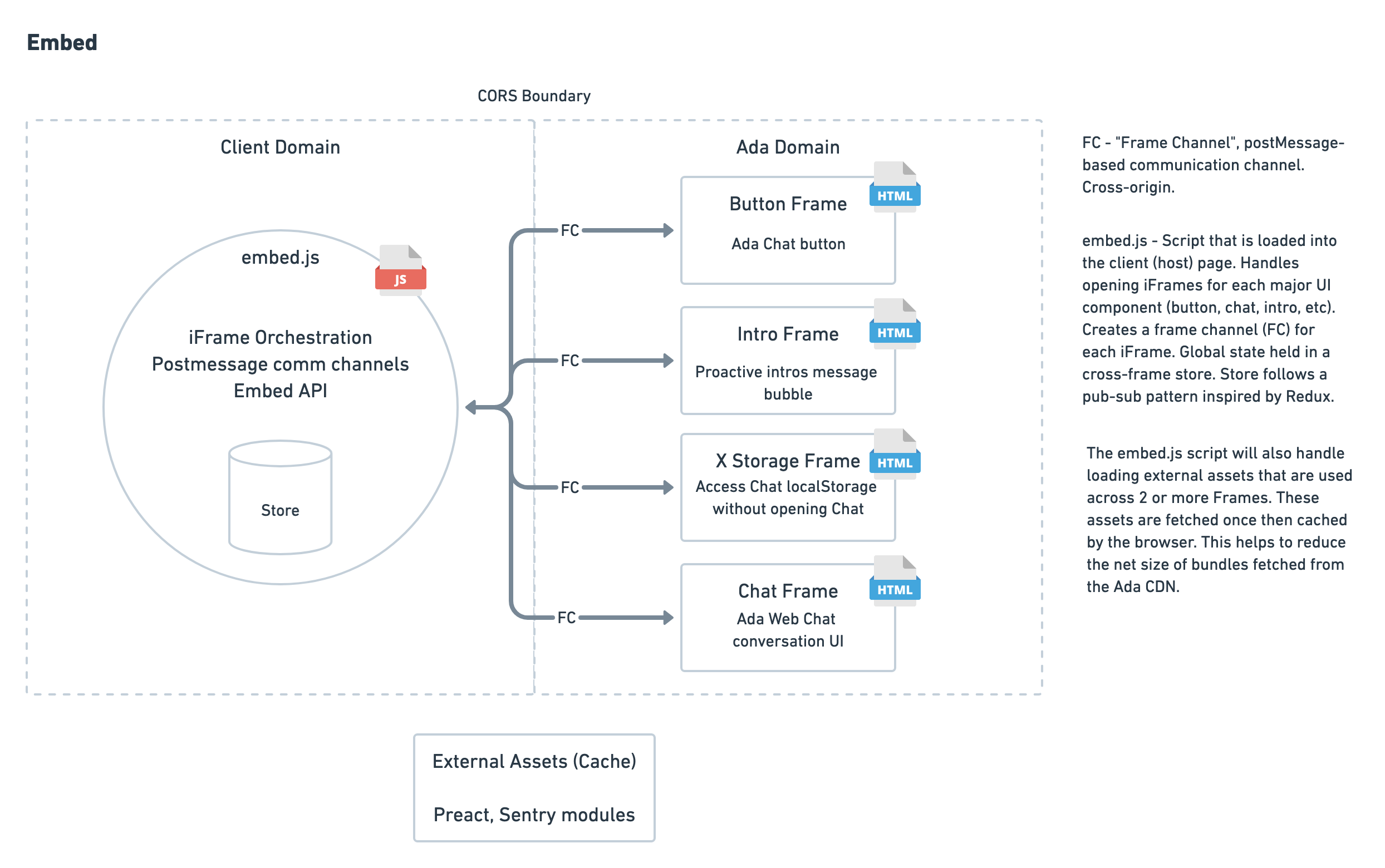
|
|
159
|
-
|
|
160
|
-
Loom explanation: <https://www.loom.com/share/22f7b0060b3f46c8b3781afb1aae4b89>
|
|
161
|
-
|
|
162
|
-
|
|
163
|
-
## Gotchas
|
|
164
|
-
There are artifical timeouts in the application that may cause you not to see any errors with what you are working on. The longest timeout is 60000ms (60s). Please ensure you shorten this locally when you are testing your work. You can adjust this here: `src/common/constants/events.ts`
|
|
28
|
+
In the example above the `handle` key is a part of `AdaSettings`. To learn more about other settings, consult the [API reference](https://adasupport.github.io/documentation/#api-reference).
|
package/dist/npm-entry/index.js
CHANGED
|
@@ -8495,7 +8495,7 @@ var client = new error_tracker_BrowserClient({
|
|
|
8495
8495
|
return event;
|
|
8496
8496
|
},
|
|
8497
8497
|
environment: "production",
|
|
8498
|
-
release: "
|
|
8498
|
+
release: "f19ff23c3540dea5849b9545cf7188b0bf11bf6e",
|
|
8499
8499
|
sampleRate: 0.25,
|
|
8500
8500
|
autoSessionTracking: false,
|
|
8501
8501
|
// Integrations don't seem to work with Sentry: https://github.com/getsentry/sentry-javascript/issues/2541
|
|
@@ -9179,7 +9179,7 @@ function getEmbedURL(_ref) {
|
|
|
9179
9179
|
polyfillVersionString = "legacy";
|
|
9180
9180
|
}
|
|
9181
9181
|
|
|
9182
|
-
return concat_default()(_context5 = concat_default()(_context6 = concat_default()(_context7 = "".concat(host, "/embed/")).call(_context7, polyfillVersionString, "/")).call(_context6, frameName, "/")).call(_context5, "
|
|
9182
|
+
return concat_default()(_context5 = concat_default()(_context6 = concat_default()(_context7 = "".concat(host, "/embed/")).call(_context7, polyfillVersionString, "/")).call(_context6, frameName, "/")).call(_context5, "f19ff23", "/index.html");
|
|
9183
9183
|
}
|
|
9184
9184
|
/**
|
|
9185
9185
|
* Generate the Chat / API URL
|
|
@@ -13879,7 +13879,7 @@ window.__AdaEmbedConstructor = Embed;
|
|
|
13879
13879
|
/* harmony export */ });
|
|
13880
13880
|
var isModern = new RegExp("((CPU[ +]OS|iPhone[ +]OS|CPU[ +]iPhone|CPU IPhone OS)[ +]+(14|(1[5-9]|[2-9]\\d|\\d{3,}))[_.]\\d+(?:[_.]\\d+)?)|((Chromium|Chrome)\\/(92|(9[3-9]|\\d{3,}))\\.\\d+(?:\\.\\d+)?)|(Version\\/(14|(1[5-9]|[2-9]\\d|\\d{3,}))\\.\\d+(?:\\.\\d+)? Safari\\/)|(Firefox\\/(91|(9[2-9]|\\d{3,}))\\.\\d+\\.\\d+)|(Firefox\\/(91|(9[2-9]|\\d{3,}))\\.\\d+(pre|[ab]\\d+[a-z]*)?)").test(navigator.userAgent);
|
|
13881
13881
|
var isProduction = "production" === "production";
|
|
13882
|
-
var embed2Version = "
|
|
13882
|
+
var embed2Version = "f19ff23";
|
|
13883
13883
|
|
|
13884
13884
|
/***/ }),
|
|
13885
13885
|
|
|
@@ -23660,7 +23660,7 @@ function _loadEmbed() {
|
|
|
23660
23660
|
polyfillVersionString = "legacy";
|
|
23661
23661
|
}
|
|
23662
23662
|
|
|
23663
|
-
embedScriptSource = concat_default()(_context16 = concat_default()(_context17 = "".concat(host, "/embed/")).call(_context17, polyfillVersionString, "/client/")).call(_context16, "
|
|
23663
|
+
embedScriptSource = concat_default()(_context16 = concat_default()(_context17 = "".concat(host, "/embed/")).call(_context17, polyfillVersionString, "/client/")).call(_context16, "f19ff23", "/index.js");
|
|
23664
23664
|
}
|
|
23665
23665
|
|
|
23666
23666
|
clientScriptExists = Boolean( true || // The client script is bundled with npm module
|
|
@@ -23787,10 +23787,10 @@ function createEmbedObject() {
|
|
|
23787
23787
|
handle: adaSettings.handle,
|
|
23788
23788
|
embedVersion: 2,
|
|
23789
23789
|
embedSettings: adaSettings,
|
|
23790
|
-
version: "1.0.
|
|
23790
|
+
version: "1.0.40",
|
|
23791
23791
|
isNpm: true,
|
|
23792
23792
|
hostPage: window.location.href,
|
|
23793
|
-
commitHash: "
|
|
23793
|
+
commitHash: "f19ff23"
|
|
23794
23794
|
}, {
|
|
23795
23795
|
sampleRate: 0.01 // 1% of logs will go through
|
|
23796
23796
|
|