@acedatacloud/sdk 2026.1011.0 → 2026.1012.0
This diff represents the content of publicly available package versions that have been released to one of the supported registries. The information contained in this diff is provided for informational purposes only and reflects changes between package versions as they appear in their respective public registries.
- package/README.md +17 -1
- package/package.json +1 -1
package/README.md
CHANGED
|
@@ -1,9 +1,25 @@
|
|
|
1
1
|
# AceDataCloud TypeScript SDK
|
|
2
2
|
|
|
3
|
-
Official TypeScript/Node.js client for the [AceDataCloud API](https://platform.acedata.cloud).
|
|
3
|
+
Official TypeScript/Node.js client for the [AceDataCloud API](https://platform.acedata.cloud?utm_source=opensource&utm_medium=referral&utm_campaign=evergreen&utm_content=sdk_typescript_readme_platform).
|
|
4
4
|
|
|
5
5
|
Requires Node.js 18+ (uses native `fetch`).
|
|
6
6
|
|
|
7
|
+
## Get your Ace Data Cloud API key
|
|
8
|
+
|
|
9
|
+
1. Open [Ace Data Cloud → Applications](https://platform.acedata.cloud/console/applications?utm_source=opensource&utm_medium=referral&utm_campaign=evergreen&utm_content=sdk_typescript_readme_api_key). Sign in, or register an account first.
|
|
10
|
+
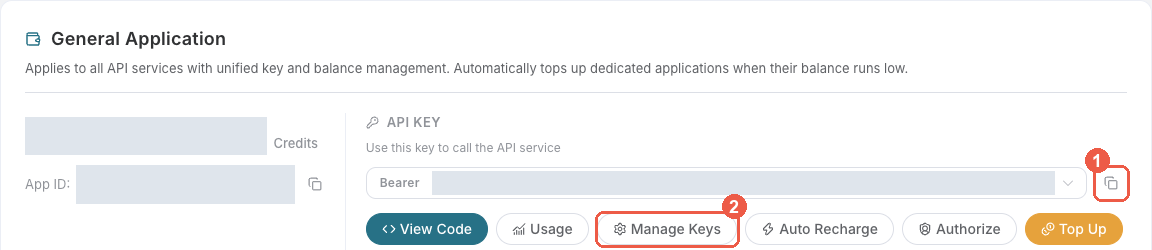
2. Find **General application**. If it has not been created, choose **Initialize General Application**. A general key can use the services available to your account; a dedicated application's key is limited to its service. Check the required service/model access and [current pricing](https://platform.acedata.cloud/models?utm_source=opensource&utm_medium=referral&utm_campaign=evergreen&utm_content=sdk_typescript_readme_pricing).
|
|
11
|
+
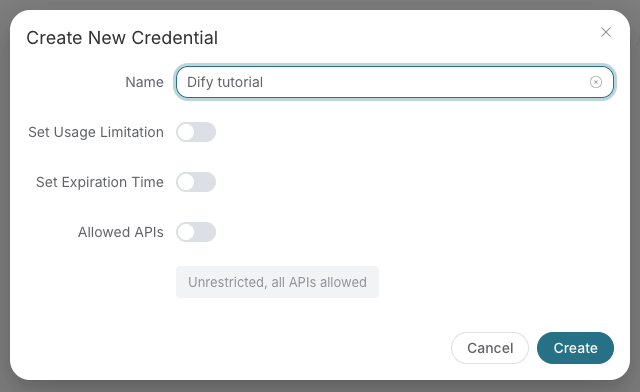
3. Copy the **API Key** from the application card, or open **Keys / Manage Keys → Create** to create a separate key for this integration. Give it a recognizable name so you can revoke or rotate it independently.
|
|
12
|
+
4. When creating a key, review **Expiration Time**, **Set Usage Limitation**, and **Allowed APIs**. Enable only the restrictions you need, allow the operations you will call, then click **Create** and copy the token from the key list. Task lookup does not grant permission to submit a generation. Confirm the application's balance can cover your first request; any trial allowance is whatever your account currently displays.
|
|
13
|
+
5. Copy only the token value, without quotation marks, spaces, or `Bearer `. An API Key / API Token field expects this raw value; only a manually configured HTTP `Authorization` header needs the `Bearer ` prefix. A `platform-...` account-management token cannot replace a generation API key.
|
|
14
|
+
|
|
15
|
+
|
|
16
|
+
|
|
17
|
+
|
|
18
|
+
|
|
19
|
+
Save the key in the client's credential store or the environment variable shown below. Never put it in a prompt, shared workflow, screenshot, or Git commit. If authentication fails, check the full copied value, application/service access, expiration, usage limit, and balance before creating another key.
|
|
20
|
+
|
|
21
|
+
Use this application key for API requests. SDK account-management methods require the separate credential described in their management documentation; do not interchange it with the API key. The optional x402 payment flow below is a separate way to pay for supported requests.
|
|
22
|
+
|
|
7
23
|
## Installation
|
|
8
24
|
|
|
9
25
|
```bash
|