@acedatacloud/openclaw-provider 2026.10.3 → 2026.10.12
This diff represents the content of publicly available package versions that have been released to one of the supported registries. The information contained in this diff is provided for informational purposes only and reflects changes between package versions as they appear in their respective public registries.
- package/README.md +20 -6
- package/package.json +1 -1
package/README.md
CHANGED
|
@@ -9,6 +9,20 @@ The package is vendor maintained and is not bundled with OpenClaw. Security
|
|
|
9
9
|
audit results are shown on the listing; an official publisher badge is a separate
|
|
10
10
|
review and has not been granted.
|
|
11
11
|
|
|
12
|
+
## Get your Ace Data Cloud API key
|
|
13
|
+
|
|
14
|
+
1. Open [Ace Data Cloud → Applications](https://platform.acedata.cloud/console/applications?utm_source=opensource&utm_medium=referral&utm_campaign=evergreen&utm_content=openclawprovider_readme_api_key). Sign in, or register an account first.
|
|
15
|
+
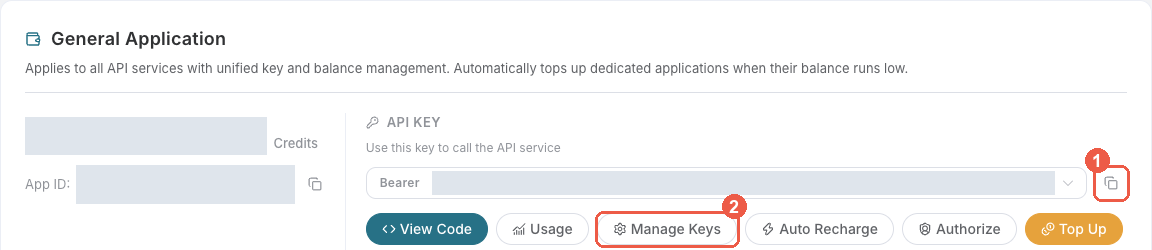
2. Find **General application**. If it has not been created, choose **Initialize General Application**. A general key can use the services available to your account; a dedicated application's key is limited to its service. Check the required service/model access and [current pricing](https://platform.acedata.cloud/models?utm_source=opensource&utm_medium=referral&utm_campaign=evergreen&utm_content=openclawprovider_readme_pricing).
|
|
16
|
+
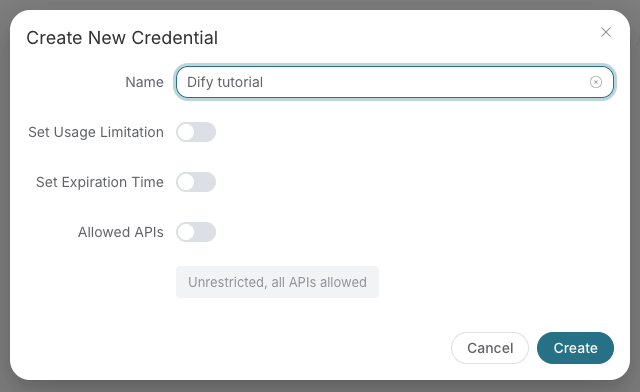
3. Copy the **API Key** from the application card, or open **Keys / Manage Keys → Create** to create a separate key for this integration. Give it a recognizable name so you can revoke or rotate it independently.
|
|
17
|
+
4. When creating a key, review **Expiration Time**, **Set Usage Limitation**, and **Allowed APIs**. Enable only the restrictions you need, allow the operations you will call, then click **Create** and copy the token from the key list. Task lookup does not grant permission to submit a generation. Confirm the application's balance can cover your first request; any trial allowance is whatever your account currently displays.
|
|
18
|
+
5. Copy only the token value, without quotation marks, spaces, or `Bearer `. An API Key / API Token field expects this raw value; only a manually configured HTTP `Authorization` header needs the `Bearer ` prefix. A `platform-...` account-management token cannot replace a generation API key.
|
|
19
|
+
|
|
20
|
+
|
|
21
|
+
|
|
22
|
+
|
|
23
|
+
|
|
24
|
+
Save the key in the client's credential store or the environment variable shown below. Never put it in a prompt, shared workflow, screenshot, or Git commit. If authentication fails, check the full copied value, application/service access, expiration, usage limit, and balance before creating another key.
|
|
25
|
+
|
|
12
26
|
## Setup
|
|
13
27
|
|
|
14
28
|
Install from ClawHub and enter an API key through the onboarding prompt:
|
|
@@ -19,26 +33,26 @@ openclaw onboard --auth-choice acedatacloud-api-key
|
|
|
19
33
|
```
|
|
20
34
|
|
|
21
35
|
Review OpenClaw's source/capability prompts before accepting installation. To pin
|
|
22
|
-
an exact release, append `@2026.10.
|
|
36
|
+
an exact release, append `@2026.10.12` to the ClawHub package spec. The same package
|
|
23
37
|
is distributed on [npm](https://www.npmjs.com/package/@acedatacloud/openclaw-provider)
|
|
24
38
|
and as a `.tgz` on [GitHub Releases](https://github.com/AceDataCloud/OpenClawProvider/releases).
|
|
25
|
-
|
|
39
|
+
Follow the [API key steps above](#get-your-ace-data-cloud-api-key) before onboarding.
|
|
26
40
|
The default model is `acedatacloud/gpt-4.1-mini`.
|
|
27
41
|
|
|
28
42
|
The chat catalog covers 90 public models across OpenAI, Claude, Gemini, Grok,
|
|
29
43
|
DeepSeek, Kimi, and GLM. Each model uses its own supported Chat Completions,
|
|
30
44
|
Responses, or Messages route, input capabilities, reasoning controls, and prices.
|
|
31
|
-
See [model support and cost estimates](https://github.com/AceDataCloud/OpenClawProvider/blob/v2026.10.
|
|
45
|
+
See [model support and cost estimates](https://github.com/AceDataCloud/OpenClawProvider/blob/v2026.10.12/docs/model-catalog.md). No automatic
|
|
32
46
|
fallback changes the chosen model.
|
|
33
47
|
|
|
34
48
|
Native media providers cover Nano Banana, GPT Image, Seedream, Flux, Qwen Image,
|
|
35
49
|
Midjourney, Seedance, Veo, Kling, Grok Video, Happy Horse, MiniMax H3, Wan, Suno
|
|
36
50
|
and Fish Audio. 97 optional tools across 17 services expose advanced editing,
|
|
37
51
|
voice/persona management, face transformation, search and task retrieval.
|
|
38
|
-
See [capability and tool reference](https://github.com/AceDataCloud/OpenClawProvider/blob/v2026.10.
|
|
39
|
-
[official-contract architecture decision](https://github.com/AceDataCloud/OpenClawProvider/blob/v2026.10.
|
|
52
|
+
See [capability and tool reference](https://github.com/AceDataCloud/OpenClawProvider/blob/v2026.10.12/docs/capabilities.md) and the
|
|
53
|
+
[official-contract architecture decision](https://github.com/AceDataCloud/OpenClawProvider/blob/v2026.10.12/docs/architecture.md).
|
|
40
54
|
|
|
41
|
-
[Setup and validation cookbook](https://github.com/AceDataCloud/OpenClawProvider/blob/v2026.10.
|
|
55
|
+
[Setup and validation cookbook](https://github.com/AceDataCloud/OpenClawProvider/blob/v2026.10.12/docs/cookbook.md) includes environment-key setup,
|
|
42
56
|
model selection, and optional web search.
|
|
43
57
|
|
|
44
58
|
For a native image after setup:
|
package/package.json
CHANGED