@accodev/pullywog 0.9.0 → 1.0.0
This diff represents the content of publicly available package versions that have been released to one of the supported registries. The information contained in this diff is provided for informational purposes only and reflects changes between package versions as they appear in their respective public registries.
- package/README.md +61 -39
- package/package.json +1 -1
package/README.md
CHANGED
|
@@ -1,25 +1,30 @@
|
|
|
1
1
|
# pullywog
|
|
2
2
|
|
|
3
|
+
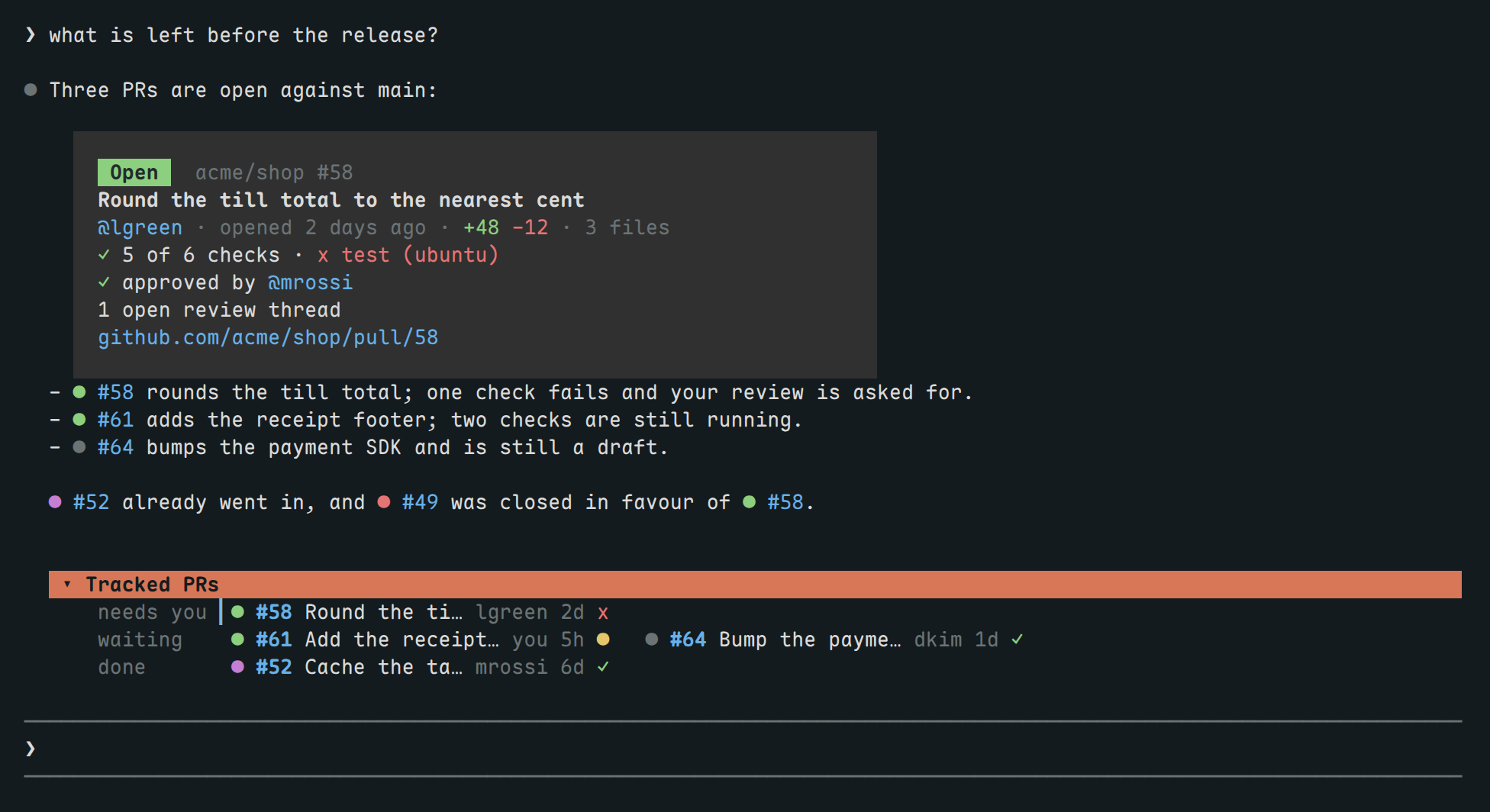
pullywog turns GitHub pull request and issue references in your agent's replies into live chips. It works in Claude Code and in Pi.
|
|
4
|
+
|
|
3
5
|
|
|
4
6
|
|
|
5
|
-
|
|
7
|
+
## How it works
|
|
6
8
|
|
|
7
|
-
|
|
9
|
+
Every `#1234`, `owner/repo#1234` or GitHub link in a reply gets a dot in the state's color: green open, gray draft, purple merged, red closed. In Claude Code, so do the numbers in a table column headed `#`, `PR` or `Issue`.
|
|
8
10
|
|
|
9
|
-
|
|
11
|
+
Hover a reference to open its card. The card shows the state, title, author, size, checks, reviews and open threads, and Ctrl+click opens any link in it.
|
|
10
12
|
|
|
11
|
-
|
|
13
|
+
The details come from one `gh api graphql` call per repo, cached for 60 seconds.
|
|
12
14
|
|
|
13
|
-
|
|
15
|
+
## Tracking PRs
|
|
14
16
|
|
|
15
|
-
|
|
16
|
-
|
|
17
|
-
|
|
18
|
-
|
|
17
|
+
A plain click on a reference tracks it in a band above the prompt. The band sorts tracked PRs into three groups:
|
|
18
|
+
|
|
19
|
+
- needs you: your review is asked for, or your own PR fails its checks or got changes requested
|
|
20
|
+
- waiting: open, with nothing for you to do yet
|
|
21
|
+
- done: merged or closed
|
|
19
22
|
|
|
20
|
-
|
|
23
|
+
Sessions in the same GitHub repo share one list, worktrees included.
|
|
21
24
|
|
|
22
|
-
|
|
25
|
+

|
|
26
|
+
|
|
27
|
+
To act on a PR, move to the band with its focus key, pick a chip with ↑ ↓, and press one of these keys:
|
|
23
28
|
|
|
24
29
|
| Key | Effect |
|
|
25
30
|
|---|---|
|
|
@@ -27,75 +32,92 @@ A click on a key under the chips runs it. For the keyboard, press the band focus
|
|
|
27
32
|
| `r` | Opens the PR to request changes, which need a comment. |
|
|
28
33
|
| `f` | Re-runs the failed checks. |
|
|
29
34
|
| `o` | Opens the PR or issue on GitHub. |
|
|
30
|
-
| `c` | Copies the link as rich text
|
|
35
|
+
| `c` | Copies the link as rich text for chats such as Teams. |
|
|
31
36
|
| `x` | Stops tracking it. |
|
|
32
37
|
|
|
33
|
-
|
|
38
|
+
In Claude Code the focus key is Ctrl+X, then Tab, unless `abovePrompt:focus` is bound to another key in `~/.claude/keybindings.json`. In Pi it is Alt+A. Esc goes back to the prompt.
|
|
39
|
+
|
|
40
|
+
A click on the orange bar folds the band.
|
|
41
|
+
|
|
42
|
+
## The card
|
|
43
|
+
|
|
44
|
+
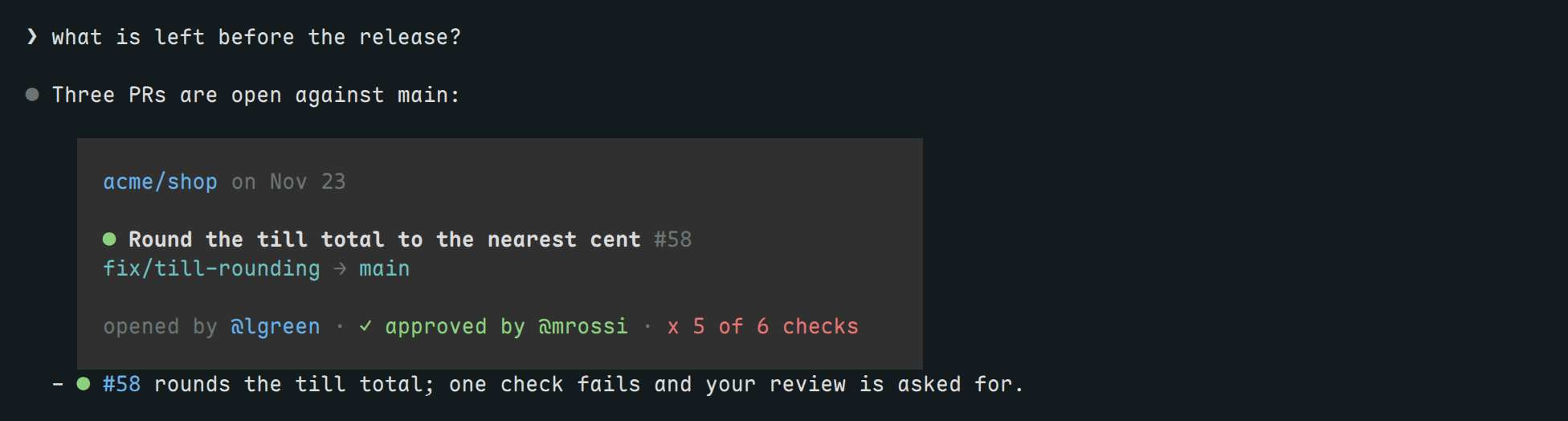
`cardStyle` picks one of two layouts. `card` is the full card shown at the top. `github` follows GitHub's own hover card, with the branches and a footer for the review and the checks.
|
|
45
|
+
|
|
46
|
+
|
|
47
|
+
|
|
48
|
+
## Install
|
|
49
|
+
|
|
50
|
+
pullywog needs the GitHub CLI, `gh`, signed in to an account that can read the repos.
|
|
34
51
|
|
|
35
|
-
|
|
52
|
+
### Claude Code
|
|
36
53
|
|
|
37
54
|
```sh
|
|
38
|
-
claude plugin
|
|
39
|
-
claude plugin
|
|
55
|
+
claude plugin marketplace add accodev/pullywog
|
|
56
|
+
claude plugin install pullywog@pullywog
|
|
40
57
|
```
|
|
41
58
|
|
|
42
|
-
|
|
59
|
+
Run `/reload-plugins` to load it. It needs Claude Code 2.1.327 or later.
|
|
43
60
|
|
|
44
|
-
|
|
61
|
+
The cards need fullscreen rendering: run `/tui fullscreen` once. Without it the dots still show, but cards do not open.
|
|
62
|
+
|
|
63
|
+
### Pi
|
|
45
64
|
|
|
46
65
|
```sh
|
|
47
66
|
pi install npm:@accodev/pullywog
|
|
48
67
|
```
|
|
49
68
|
|
|
50
|
-
Run `/reload`
|
|
69
|
+
Run `/reload` to load it. In Pi's fullscreen mode it works as in Claude Code.
|
|
70
|
+
|
|
71
|
+
Pi's regular mode, tmux, Zellij and Screen send no mouse events. There the dots still show, and these commands replace the clicks:
|
|
51
72
|
|
|
52
73
|
| Command or key | Effect |
|
|
53
74
|
|---|---|
|
|
54
|
-
| `/track #1234` | Tracks a PR
|
|
75
|
+
| `/track #1234` | Tracks a PR. With no argument it lists this session's references. |
|
|
55
76
|
| `/untrack #1234` | Stops tracking it. |
|
|
56
|
-
| `Alt+A` | Moves to the band
|
|
57
|
-
|
|
58
|
-
Bare numbers in a table column headed `#`, `PR` or `Issue` get no dot in Pi. Pi has no orange theme key, so the bar takes the theme's accent color. The Pi extension keeps its tracked lists in `~/.pi/agent/pullywog.json`, apart from Claude Code's. Pi's `settings.json` takes the options below under a `pullywog` key, for example `"pullywog": { "cardStyle": "github" }`.
|
|
77
|
+
| `Alt+A` | Moves to the band, where the keys above work. |
|
|
59
78
|
|
|
60
79
|
## Settings
|
|
61
80
|
|
|
62
|
-
|
|
81
|
+
| Option | Default | Effect |
|
|
82
|
+
|---|---|---|
|
|
83
|
+
| `cardStyle` | `card` | `card` or `github`, as shown above. |
|
|
84
|
+
| `trackedBand` | `true` | Shows the band of tracked PRs. |
|
|
85
|
+
| `bandPerRow` | `3` | Tracked PRs in a row of a group, 1 to 6. |
|
|
86
|
+
| `shareTracked` | `true` | One list per repo. Off, each session keeps its own. |
|
|
87
|
+
|
|
88
|
+
In Claude Code, set them in `/plugin`, or from the shell:
|
|
63
89
|
|
|
64
90
|
```sh
|
|
65
91
|
echo '{"cardStyle": "github"}' | claude plugin configure pullywog@pullywog --values-stdin
|
|
66
92
|
```
|
|
67
93
|
|
|
68
|
-
|
|
69
|
-
|---|---|---|
|
|
70
|
-
| `cardStyle` | `card` | `card` draws the full card: state, title, author, size, checks, reviews and threads. `github` follows GitHub's own hover card: repo and date, state with title and number, branches, then the review and checks. |
|
|
71
|
-
| `trackedBand` | `true` | Shows the band of tracked PRs above the prompt. Off, a click on a reference does nothing. |
|
|
72
|
-
| `bandPerRow` | `3` | Tracked PRs in a row of a group, 1 to 6. |
|
|
73
|
-
| `shareTracked` | `true` | Gives the sessions of one GitHub repo, or of one folder outside git, one tracked list. Off, each session keeps its own. |
|
|
94
|
+
In Pi, put them under a `pullywog` key in `settings.json`, for example `"pullywog": { "cardStyle": "github" }`.
|
|
74
95
|
|
|
75
96
|
## Development
|
|
76
97
|
|
|
98
|
+
The checks that CI runs on every push and pull request:
|
|
99
|
+
|
|
77
100
|
```sh
|
|
78
101
|
claude plugin validate .
|
|
79
102
|
claude plugin test .
|
|
80
|
-
```
|
|
81
|
-
|
|
82
|
-
```sh
|
|
83
103
|
npm ci
|
|
84
104
|
npm run typecheck:pi
|
|
85
105
|
npm run test:pi
|
|
86
106
|
```
|
|
87
107
|
|
|
88
|
-
|
|
108
|
+
The end-to-end tests drive real Claude Code and Pi sessions in a terminal. A fake model writes the replies, so they need no API key:
|
|
89
109
|
|
|
90
110
|
```sh
|
|
91
|
-
|
|
111
|
+
uv run --no-project --with pyte --with pywinpty python -I scripts/e2e.py
|
|
112
|
+
uv run --no-project --with pyte --with pywinpty python -I scripts/pi-e2e.py
|
|
92
113
|
```
|
|
93
114
|
|
|
94
|
-
|
|
115
|
+
On Linux and macOS, use `ptyprocess` in place of `pywinpty`. CI runs both on every pull request that touches `hooks/` or `pi/`.
|
|
116
|
+
|
|
117
|
+
The README images come from `scripts/screenshots.mjs`, which draws them on made-up repos and people:
|
|
95
118
|
|
|
96
119
|
```sh
|
|
97
|
-
|
|
98
|
-
uv run --no-project --with pywinpty --with pyte python -I scripts/pi-e2e.py <folder of a GitHub repo>
|
|
120
|
+
node --experimental-strip-types scripts/screenshots.mjs out
|
|
99
121
|
```
|
|
100
122
|
|
|
101
|
-
|
|
123
|
+
The design notes are in `docs/handover.md`, the repo rules in `AGENTS.md`.
|