@2bad/bitrix 3.0.0-beta.0 → 3.0.0
This diff represents the content of publicly available package versions that have been released to one of the supported registries. The information contained in this diff is provided for informational purposes only and reflects changes between package versions as they appear in their respective public registries.
- package/README.md +93 -186
- package/build/bin.d.ts +1 -0
- package/build/bin.js +160 -0
- package/build/client-Bk76ySik.js +769 -0
- package/build/index.d.ts +2881 -0
- package/build/index.js +1 -0
- package/package.json +43 -64
- package/build/bitrix.d.ts +0 -65
- package/build/bitrix.js +0 -55
- package/build/client/hooks/addAccessToken.d.ts +0 -6
- package/build/client/hooks/addAccessToken.js +0 -9
- package/build/client/index.d.ts +0 -15
- package/build/client/index.js +0 -53
- package/build/client/methods/batch.d.ts +0 -40
- package/build/client/methods/batch.js +0 -75
- package/build/client/methods/call.d.ts +0 -17
- package/build/client/methods/call.js +0 -27
- package/build/client/methods/list.d.ts +0 -30
- package/build/client/methods/list.js +0 -58
- package/build/commands.d.ts +0 -10
- package/build/commands.js +0 -1
- package/build/methods.d.ts +0 -92
- package/build/methods.js +0 -38
- package/build/payloads.d.ts +0 -40
- package/build/payloads.js +0 -1
- package/build/services/common.d.ts +0 -22
- package/build/services/common.js +0 -2
- package/build/services/companies/entities.d.ts +0 -54
- package/build/services/companies/entities.js +0 -1
- package/build/services/companies/index.d.ts +0 -15
- package/build/services/companies/index.js +0 -17
- package/build/services/companies/methods.d.ts +0 -44
- package/build/services/companies/methods.js +0 -1
- package/build/services/contacts/entities.d.ts +0 -45
- package/build/services/contacts/entities.js +0 -1
- package/build/services/contacts/index.d.ts +0 -15
- package/build/services/contacts/index.js +0 -17
- package/build/services/contacts/methods.d.ts +0 -44
- package/build/services/contacts/methods.js +0 -1
- package/build/services/currencies/entities.d.ts +0 -15
- package/build/services/currencies/entities.js +0 -1
- package/build/services/deals/entities.d.ts +0 -43
- package/build/services/deals/entities.js +0 -1
- package/build/services/deals/index.d.ts +0 -15
- package/build/services/deals/index.js +0 -17
- package/build/services/deals/methods.d.ts +0 -44
- package/build/services/deals/methods.js +0 -1
- package/build/services/leads/entities.d.ts +0 -49
- package/build/services/leads/entities.js +0 -1
- package/build/services/leads/index.d.ts +0 -15
- package/build/services/leads/index.js +0 -17
- package/build/services/leads/methods.d.ts +0 -44
- package/build/services/leads/methods.js +0 -1
- package/build/services/statuses/entities.d.ts +0 -16
- package/build/services/statuses/entities.js +0 -1
- package/build/services/statuses/index.d.ts +0 -14
- package/build/services/statuses/index.js +0 -19
- package/build/services/statuses/methods.d.ts +0 -51
- package/build/services/statuses/methods.js +0 -1
- package/build/services/users/entities.d.ts +0 -40
- package/build/services/users/entities.js +0 -1
- package/build/services/users/index.d.ts +0 -9
- package/build/services/users/index.js +0 -7
- package/build/services/users/methods.d.ts +0 -17
- package/build/services/users/methods.js +0 -1
- package/build/utils/Diff.d.ts +0 -1
- package/build/utils/Diff.js +0 -7
- package/build/utils/ExtractValue.d.ts +0 -6
- package/build/utils/ExtractValue.js +0 -5
- package/build/utils/isArray.d.ts +0 -2
- package/build/utils/isArray.js +0 -2
package/README.md
CHANGED
|
@@ -1,213 +1,120 @@
|
|
|
1
|
-
|
|
2
|
-
|
|
3
|
-
# Bitrix24 REST API client that doesn't suck
|
|
1
|
+
# @2bad/bitrix
|
|
4
2
|
|
|
5
3
|
[](https://www.npmjs.com/package/@2bad/bitrix)
|
|
6
4
|
[](https://www.npmjs.com/package/@2bad/bitrix)
|
|
7
5
|
[](https://codecov.io/gh/2BAD/bitrix)
|
|
8
6
|
[](https://github.com/2BAD/bitrix/actions/workflows/build.yml)
|
|
9
|
-
[](https://github.com/2BAD/bitrix/search?l=typescript)
|
|
10
|
-
|
|
11
|
-
- 🔥 No bullshit
|
|
12
|
-
- ✨ Expressive API
|
|
13
|
-
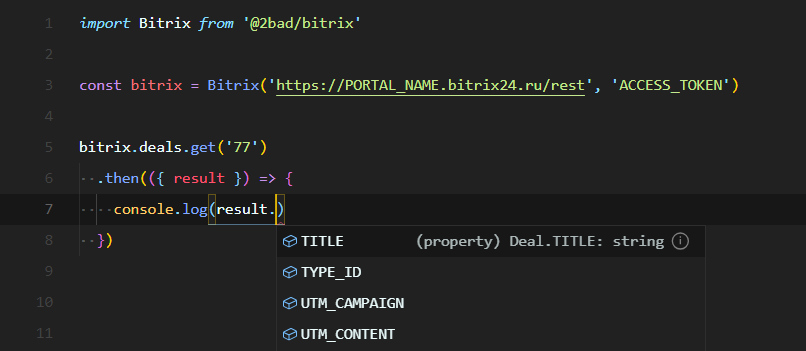
- 💪 Strongly typed methods and requests results with TypeScript
|
|
14
|
-
- 🚀 Handles records batching and rate limiting for you
|
|
15
|
-
- ❤️ Promise-based
|
|
16
|
-
|
|
17
|
-
|
|
18
|
-
|
|
19
|
-
### Install
|
|
20
|
-
|
|
21
|
-
```shell
|
|
22
|
-
npm install @2bad/bitrix
|
|
23
|
-
```
|
|
24
|
-
|
|
25
|
-
### Usage
|
|
26
|
-
|
|
27
|
-
Init client with Bitrix API endpoint and access token and use the client to ease your Bitrix pain:
|
|
28
|
-
|
|
29
|
-
```typescript
|
|
30
|
-
import Bitrix from '@2bad/bitrix'
|
|
31
|
-
// or for ESM
|
|
32
|
-
import { Bitrix } from '@2bad/bitrix'
|
|
33
|
-
|
|
34
|
-
const bitrix = Bitrix('https://PORTAL_NAME.bitrix24.ru/rest', 'ACCESS_TOKEN')
|
|
35
|
-
|
|
36
|
-
// Get deal
|
|
37
|
-
bitrix.deals.get('77')
|
|
38
|
-
.then(({ result }) => {
|
|
39
|
-
// Get typed payload
|
|
40
|
-
const { TITLE } = result // string
|
|
41
|
-
console.log(TITLE)
|
|
42
|
-
})
|
|
43
|
-
.catch(console.error)
|
|
44
|
-
|
|
45
|
-
// Get all deals
|
|
46
|
-
bitrix.deals.list({ select: ["*", "UF_*"] })
|
|
47
|
-
.then(({ result }) => {
|
|
48
|
-
const titles = result.map((e) => e.TITLE)
|
|
49
|
-
console.log(titles)
|
|
50
|
-
})
|
|
51
|
-
.catch(console.error)
|
|
52
|
-
```
|
|
53
|
-
|
|
54
|
-
### Authentication
|
|
55
|
-
|
|
56
|
-
Before you'll be able to use Bitrix REST API, you need to authenticate.
|
|
57
|
-
|
|
58
|
-
There are two ways to do that:
|
|
59
|
-
|
|
60
|
-
1. **A harder, but proper way** — create a Bitrix application and then authenticate with an OAuth.
|
|
61
|
-
|
|
62
|
-
Authentication with an OAuth requires some additional steps and that's up to you to deal with it using a lambda function, some server or a Postman.
|
|
63
|
-
|
|
64
|
-
That will yield an access token. Use it to init the client:
|
|
65
|
-
|
|
66
|
-
```typescript
|
|
67
|
-
const bitrix = Bitrix('https://PORTAL_NAME.bitrix24.ru/rest', 'ACCESS_TOKEN')
|
|
68
|
-
```
|
|
69
|
-
|
|
70
|
-
Note, that access token lives only 30 minutes and should be refreshed periodically with provided by OAuth refresh token, which in turn lives 1 month.
|
|
71
|
-
|
|
72
|
-
2. **An easier way** — create a Bitrix inbound webhook with required permissions.
|
|
73
|
-
|
|
74
|
-
It will instantly give you an endpoint with a token inside of it. No additional authentication or access tokens required to use it:
|
|
75
|
-
|
|
76
|
-
```typescript
|
|
77
|
-
const bitrix = Bitrix('https://PORTAL_NAME.bitrix24.ru/rest/1/WEBHOOK_TOKEN')
|
|
78
|
-
```
|
|
79
|
-
|
|
80
|
-
That endpoint lives indefinitely. Rejoice and hope that it won't backfire on you.
|
|
81
|
-
|
|
82
|
-
### API
|
|
83
7
|
|
|
84
|
-
|
|
85
|
-
- [`call()`](docs/methods.md#call)
|
|
86
|
-
- [`list()`](docs/methods.md#list)
|
|
87
|
-
- [`batch()`](docs/methods.md#batch)
|
|
88
|
-
- CRM
|
|
89
|
-
- [Company](docs/services/companies.md)
|
|
90
|
-
- [Contact](docs/services/contacts.md)
|
|
91
|
-
- [Currency](docs/services/currencies.md)
|
|
92
|
-
- [Deal](docs/services/deals.md)
|
|
93
|
-
- [Lead](docs/services/leads.md)
|
|
94
|
-
- [Status](docs/services/statuses.md)
|
|
95
|
-
- [User](docs/services/users.md)
|
|
8
|
+
Bitrix24 REST API client for TypeScript with zero runtime dependencies.
|
|
96
9
|
|
|
97
|
-
|
|
10
|
+
## Why
|
|
98
11
|
|
|
99
|
-
|
|
12
|
+
Bitrix24 ships half-finished APIs to production and leaves you to find out how they actually work. Every module has its own field names, error formats and paging rules. The documentation is incomplete, out of date or wrong, a good part of the behavior isn't documented at all, and support won't help you. Every integration turns into reverse engineering, fixing one broken assumption at a time.
|
|
100
13
|
|
|
101
|
-
|
|
14
|
+
We did that work so you don't have to. This client takes whatever Bitrix throws at it and gives you something you can actually build on.
|
|
102
15
|
|
|
103
|
-
|
|
16
|
+
## What you get
|
|
104
17
|
|
|
105
|
-
|
|
18
|
+
- No bullshit
|
|
19
|
+
- Expressive API
|
|
20
|
+
- Strongly typed, including the custom fields of your portal
|
|
21
|
+
- Handles batching, rate limits and retries for you
|
|
22
|
+
- Zero dependencies, runs anywhere `fetch` does
|
|
106
23
|
|
|
107
|
-
|
|
24
|
+
## Install
|
|
108
25
|
|
|
109
|
-
|
|
110
|
-
|
|
111
|
-
3. **Services** — each [service](docs/services/README.md) provides an expressive interface to work with a specific group of Bitrix REST API operations. In essence, they do orchestrate generic client methods and parameters to get proper results.
|
|
112
|
-
4. **Bitrix client** — a top-level [provider](source/bitrix.ts) of generic method and services. An effortless way to deal with Bitrix REST API by using an intuitive API, which takes care of all underlying complexity.
|
|
113
|
-
|
|
114
|
-
### FAQ
|
|
115
|
-
|
|
116
|
-
> Is it finished?
|
|
117
|
-
|
|
118
|
-
The core is ready and stable. It can be used to arbitrary invoke any Bitrix REST API methods.
|
|
119
|
-
|
|
120
|
-
However, not all Bitrix REST API methods are exposed as convenient client services yet \(the ones like `bitrix.deals.list()`\).
|
|
121
|
-
|
|
122
|
-
If you need specific service, add one by making a Pull Request, following the structure of already existing [services](source/services/README.md) and ["Adding new methods"](./#adding-new-methods) instructions.
|
|
123
|
-
|
|
124
|
-
> I'm not a Typed Language Master Race user. Can I use it with a regular JavaScript?
|
|
125
|
-
|
|
126
|
-
Sure. Just install and import it as any other NPM module. But The Type Police is already on the way for you.
|
|
127
|
-
|
|
128
|
-
Note that this library wasn't designed with regular JavaScript in mind, so it doesn't make unnecessary dynamic checks. Don't be too persistent in passing on wrong parameters — it might yield unexpected results. After all, TypeScript is a recommended way to use it.
|
|
129
|
-
|
|
130
|
-
> Should I check payloads `error` properties for errors?
|
|
131
|
-
|
|
132
|
-
You shouldn't. Catch rejections instead, as the library will reject if there are any errors in a payload.
|
|
133
|
-
|
|
134
|
-
> List method does not return user fields!
|
|
135
|
-
|
|
136
|
-
Bitrix API doesn't do that by default. Use wildcards in `select` param to force inclusion of user fields:
|
|
137
|
-
|
|
138
|
-
```typescript
|
|
139
|
-
bitrix.deals.list({ select: ['*', 'UF_*'] })
|
|
26
|
+
```sh
|
|
27
|
+
npm install @2bad/bitrix
|
|
140
28
|
```
|
|
141
29
|
|
|
142
|
-
|
|
30
|
+
ESM only. Requires Node.js 26 or later.
|
|
143
31
|
|
|
144
|
-
|
|
32
|
+
## Quick start
|
|
145
33
|
|
|
146
|
-
```
|
|
147
|
-
|
|
148
|
-
.then(({ result }) => {
|
|
149
|
-
// known property of type `string`
|
|
150
|
-
const title = result.TITLE
|
|
151
|
-
|
|
152
|
-
// unknown property of type `string`
|
|
153
|
-
const someData = result.UF_23232323
|
|
154
|
-
|
|
155
|
-
console.log(title, someData)
|
|
156
|
-
})
|
|
157
|
-
```
|
|
34
|
+
```ts
|
|
35
|
+
import { createClient } from '@2bad/bitrix'
|
|
158
36
|
|
|
159
|
-
|
|
37
|
+
const bitrix = createClient({ url: 'https://portal.bitrix24.com/rest/1/WEBHOOK_TOKEN' })
|
|
160
38
|
|
|
161
|
-
|
|
39
|
+
const deal = await bitrix.deals.get(77)
|
|
40
|
+
console.log(deal.TITLE, deal.STAGE_ID) // Pump delivery C2:WON
|
|
162
41
|
|
|
163
|
-
|
|
164
|
-
bitrix.call('some.new.get' as any, { ID: '77' } as any)
|
|
165
|
-
.then((payload) => payload as GetPayload<NewPayload>)
|
|
166
|
-
|
|
167
|
-
bitrix.list('some.new.list' as any, { select: ["TITLE"] })
|
|
168
|
-
.then((payload) => payload as ListPayload<NewPayload>)
|
|
42
|
+
const open = await bitrix.deals.list({ filter: { CLOSED: 'N' }, select: ['ID', 'TITLE'] })
|
|
169
43
|
```
|
|
170
44
|
|
|
171
|
-
|
|
172
|
-
|
|
173
|
-
|
|
174
|
-
|
|
175
|
-
|
|
176
|
-
|
|
177
|
-
|
|
178
|
-
|
|
179
|
-
|
|
45
|
+
## Examples
|
|
46
|
+
|
|
47
|
+
- [Connecting](examples/connecting.md): webhooks, OAuth, rate limits, logging and custom `fetch`
|
|
48
|
+
- [Services](examples/services.md): deals, leads, contacts, companies, activities, smart processes, linked contacts, products, statuses, currencies and users
|
|
49
|
+
- [Lists](examples/lists.md): pagination modes, changes since the last sync and progress
|
|
50
|
+
- [Batch and bulk writes](examples/batch.md): many commands per request, `createMany`, `updateMany`, `deleteMany`
|
|
51
|
+
- [Types](examples/types.md): user field types from your portal and typing other methods
|
|
52
|
+
- [Errors](examples/errors.md): `BitrixError`, retries and cancellation
|
|
53
|
+
- [Migrating from 2.x](examples/migrating.md)
|
|
54
|
+
|
|
55
|
+
## API
|
|
56
|
+
|
|
57
|
+
```ts
|
|
58
|
+
function createClient(options: ClientOptions): Client
|
|
59
|
+
|
|
60
|
+
type Client = {
|
|
61
|
+
call(method, params?, options?: { raw?; signal? }): Promise<Result> // the whole response with { raw: true }
|
|
62
|
+
list(method, params?, options?: PaginateOptions): Promise<Row[]>
|
|
63
|
+
paginate(method, params?, options?: PaginateOptions): AsyncGenerator<Row>
|
|
64
|
+
batch(commands, options?: { halt?; signal? }): Promise<{ results; errors }>
|
|
65
|
+
|
|
66
|
+
activities: CrmService<Activity>
|
|
67
|
+
companies: CrmService<Company> & { contacts: Links }
|
|
68
|
+
contacts: CrmService<Contact> & { companies: Links }
|
|
69
|
+
currencies: CurrenciesService
|
|
70
|
+
deals: CrmService<Deal> & { productRows: ProductRows; contacts: Links }
|
|
71
|
+
items(entityTypeId): ItemsService // smart processes and other crm.item.* types
|
|
72
|
+
leads: CrmService<Lead> & { productRows: ProductRows; contacts: Links }
|
|
73
|
+
products: ProductsService
|
|
74
|
+
statuses: StatusesService
|
|
75
|
+
users: UsersService
|
|
76
|
+
}
|
|
77
|
+
|
|
78
|
+
type CrmService<Entity> = {
|
|
79
|
+
fields(): Promise<Fields>
|
|
80
|
+
get(id): Promise<Entity>
|
|
81
|
+
list(params?, options?: PaginateOptions): Promise<Entity[]> // rows typed by params.select
|
|
82
|
+
paginate(params?, options?: PaginateOptions): AsyncGenerator<Entity>
|
|
83
|
+
changedSince(since: Date | string, params?, options?): AsyncGenerator<Entity> // oldest change first
|
|
84
|
+
create(fields, params?): Promise<number>
|
|
85
|
+
update(id, fields, params?): Promise<boolean>
|
|
86
|
+
delete(id): Promise<boolean>
|
|
87
|
+
createMany(items, params?): Promise<BulkResult<number>>
|
|
88
|
+
updateMany(items: { id; fields }[], params?): Promise<BulkResult<boolean>>
|
|
89
|
+
deleteMany(ids): Promise<BulkResult<boolean>>
|
|
90
|
+
}
|
|
91
|
+
|
|
92
|
+
type ProductRows = { get(id): Promise<ProductRow[]>; set(id, rows): Promise<boolean> }
|
|
93
|
+
type Links = { get(id); set(id, links); add(id, link); delete(id, linkedId); clear(id) }
|
|
94
|
+
type ItemsService = { fields(); get(id); list(params?); paginate(params?); changedSince(since, params?); create(fields); update(id, fields); delete(id) }
|
|
95
|
+
type ProductsService = { fields(iblockId); get(id); list(params); paginate(params); create(fields); update(id, fields); delete(id) }
|
|
96
|
+
type StatusesService = { fields(); get(id); list(params?); create(fields); update(id, fields); delete(id, { forced? }) }
|
|
97
|
+
type CurrenciesService = { fields(); get(code); list(params?); create(fields); update(code, fields); delete(code); base(); setBase(code) }
|
|
98
|
+
type UsersService = { fields(); current(); get(id); list(params?); paginate(params?) }
|
|
99
|
+
|
|
100
|
+
type PaginateOptions = {
|
|
101
|
+
mode?: 'cursor' | 'offset' | 'modified' // cursor by default, modified needs since
|
|
102
|
+
since?: Date | string
|
|
103
|
+
modifiedField?: string // DATE_MODIFY by default
|
|
104
|
+
idField?: string // ID by default
|
|
105
|
+
signal?: AbortSignal
|
|
106
|
+
onProgress?: (progress: { read: number; total?: number }) => void
|
|
107
|
+
}
|
|
108
|
+
|
|
109
|
+
type BulkResult<R> = { results: (R | undefined)[]; errors: (BitrixError | undefined)[] } // in input order
|
|
180
110
|
```
|
|
181
111
|
|
|
182
|
-
|
|
112
|
+
```sh
|
|
113
|
+
bitrix-types [--url <rest url>] [--out <file>] [--entities deal,lead,contact,company]
|
|
114
|
+
```
|
|
183
115
|
|
|
184
|
-
|
|
116
|
+
Every error is a `BitrixError` with `code`, `description`, `method` and `status`.
|
|
185
117
|
|
|
186
|
-
|
|
187
|
-
const bitrix = Bitrix('https://PORTAL_NAME.bitrix24.ru/rest', 'ACCESS_TOKEN', {https: { rejectUnauthorized: false }})
|
|
188
|
-
```
|
|
118
|
+
## License
|
|
189
119
|
|
|
190
|
-
|
|
191
|
-
|
|
192
|
-
- `npm test` — run all tests and collect full coverage report
|
|
193
|
-
- `npm run test:unit` — run unit tests and collect coverage report
|
|
194
|
-
- `npm run test:integration` — run integration tests and collect coverage report
|
|
195
|
-
- `npm run test:watch` — watch for changes and run all tests
|
|
196
|
-
- `npm run test:unit:watch` — watch for changes and run unit tests
|
|
197
|
-
- `npm run test:integration:watch` — watch for changes and run integration tests
|
|
198
|
-
- `npm run build` — build the library for the release
|
|
199
|
-
|
|
200
|
-
#### Adding new methods
|
|
201
|
-
|
|
202
|
-
Proper method parameters and payload types handling requires some routine when adding any new method. Hopefully, we can do it better in future, but for now follow those steps:
|
|
203
|
-
|
|
204
|
-
1. Add new method into the [`Method`](source/methods.ts) enum.
|
|
205
|
-
2. Add it into the [`LISTABLE_METHODS`](source/methods.ts) array if it is listable \(paginated\). Not everything that lists is listable, so check it.
|
|
206
|
-
3. Add or update related [service](source/services/README.md):
|
|
207
|
-
1. Put exposed by the service public methods into the `index.ts` file. Ensure that you're properly mapping service method arguments to `call` or `list` params.
|
|
208
|
-
2. Add related entities into the `entities.ts`.
|
|
209
|
-
3. Add interface describing service methods into the `methods.ts`. Test and check method payload type to be sure you've described it correctly!
|
|
210
|
-
4. Extend [`Methods`](source/methods.ts) interface with the added service-specific interface. That way the client will know how to resolve parameters and payload types for the added method.
|
|
211
|
-
5. Add tests into the `index.unit.test.ts`.
|
|
212
|
-
4. Re-export service public types like Entities in the [bitrix.ts](source/bitrix.ts) to make them available to the end-users.
|
|
213
|
-
5. Document addition in the [docs](docs/README.md).
|
|
120
|
+
MIT
|
package/build/bin.d.ts
ADDED
|
@@ -0,0 +1 @@
|
|
|
1
|
+
export {}
|
package/build/bin.js
ADDED
|
@@ -0,0 +1,160 @@
|
|
|
1
|
+
#!/usr/bin/env node
|
|
2
|
+
import { t as createClient } from "./client-Bk76ySik.js";
|
|
3
|
+
import { writeFile } from "node:fs/promises";
|
|
4
|
+
import { parseArgs } from "node:util";
|
|
5
|
+
// source/user-fields.ts
|
|
6
|
+
const USER_FIELD_ENTITIES = {
|
|
7
|
+
deal: "DealUserFields",
|
|
8
|
+
lead: "LeadUserFields",
|
|
9
|
+
contact: "ContactUserFields",
|
|
10
|
+
company: "CompanyUserFields"
|
|
11
|
+
};
|
|
12
|
+
const STRING_TYPES = /* @__PURE__ */ new Set([
|
|
13
|
+
"string",
|
|
14
|
+
"url",
|
|
15
|
+
"address",
|
|
16
|
+
"money",
|
|
17
|
+
"date",
|
|
18
|
+
"datetime",
|
|
19
|
+
"employee",
|
|
20
|
+
"crm",
|
|
21
|
+
"crm_status",
|
|
22
|
+
"iblock_element",
|
|
23
|
+
"iblock_section"
|
|
24
|
+
]);
|
|
25
|
+
/**
|
|
26
|
+
* Value type as Bitrix returns it in `get` and `list`: enumerations as item ids, strings in single fields
|
|
27
|
+
* and numbers in multiple ones, multiple fields as arrays or `false` when empty
|
|
28
|
+
* @param field field description from `crm.<entity>.fields`
|
|
29
|
+
*/
|
|
30
|
+
const valueType = (field) => {
|
|
31
|
+
const multiple = field.isMultiple;
|
|
32
|
+
const items = field.items ?? [];
|
|
33
|
+
const single = (() => {
|
|
34
|
+
if (field.type === "enumeration" && items.length > 0) return items.map(({ ID }) => multiple ? String(Number(ID)) : `'${ID.replaceAll("'", "\\'")}'`).join(" | ");
|
|
35
|
+
if (field.type === "boolean") return `'0' | '1'`;
|
|
36
|
+
if (field.type === "integer" || field.type === "double") return "number | string";
|
|
37
|
+
if (field.type === "file") return "UserFieldFile";
|
|
38
|
+
if (field.type === "enumeration" || STRING_TYPES.has(field.type)) return "string";
|
|
39
|
+
return "unknown";
|
|
40
|
+
})();
|
|
41
|
+
const usesFile = field.type === "file";
|
|
42
|
+
if (single === "unknown") return {
|
|
43
|
+
type: single,
|
|
44
|
+
usesFile
|
|
45
|
+
};
|
|
46
|
+
return multiple ? {
|
|
47
|
+
type: `ReadonlyArray<${single}> | false`,
|
|
48
|
+
usesFile
|
|
49
|
+
} : {
|
|
50
|
+
type: `${single} | null`,
|
|
51
|
+
usesFile
|
|
52
|
+
};
|
|
53
|
+
};
|
|
54
|
+
const comment = (field, indent) => {
|
|
55
|
+
const lines = [field.formLabel || field.listLabel || field.title, ...(field.items ?? []).map(({ ID, VALUE }) => `- ${ID}: ${VALUE}`)].map((line) => line.replaceAll(/\s+/g, " ").trim().replaceAll("*/", "*\\/"));
|
|
56
|
+
return lines.length === 1 ? `${indent}/** ${lines[0]} */` : [
|
|
57
|
+
`${indent}/**`,
|
|
58
|
+
...lines.map((line) => `${indent} * ${line}`),
|
|
59
|
+
`${indent} */`
|
|
60
|
+
].join("\n");
|
|
61
|
+
};
|
|
62
|
+
/**
|
|
63
|
+
* Renders a declaration file that augments the client entity types with the user fields of a portal
|
|
64
|
+
* @param fields `crm.<entity>.fields` results by entity
|
|
65
|
+
* @param origin portal origin for the header, without any token
|
|
66
|
+
*/
|
|
67
|
+
const renderUserFields = (fields, origin) => {
|
|
68
|
+
let usesFile = false;
|
|
69
|
+
const interfaces = Object.entries(USER_FIELD_ENTITIES).flatMap(([entity, name]) => {
|
|
70
|
+
const entityFields = fields[entity];
|
|
71
|
+
if (!entityFields) return [];
|
|
72
|
+
const members = Object.entries(entityFields).filter(([key]) => key.startsWith("UF_")).toSorted(([a], [b]) => a.localeCompare(b)).map(([key, field]) => {
|
|
73
|
+
const value = valueType(field);
|
|
74
|
+
usesFile ||= value.usesFile;
|
|
75
|
+
return `${comment(field, " ")}\n readonly ${key}: ${value.type}`;
|
|
76
|
+
});
|
|
77
|
+
return [members.length === 0 ? ` interface ${name} {}` : ` interface ${name} {\n${members.join("\n")}\n }`];
|
|
78
|
+
});
|
|
79
|
+
return [
|
|
80
|
+
`// Generated by bitrix-types from ${origin}. Run it again instead of editing this file.`,
|
|
81
|
+
...usesFile ? [`import type { UserFieldFile } from '@2bad/bitrix'`] : [],
|
|
82
|
+
"",
|
|
83
|
+
`declare module '@2bad/bitrix' {`,
|
|
84
|
+
interfaces.join("\n\n"),
|
|
85
|
+
"}",
|
|
86
|
+
"",
|
|
87
|
+
"export {}",
|
|
88
|
+
""
|
|
89
|
+
].join("\n");
|
|
90
|
+
};
|
|
91
|
+
// source/cli.ts
|
|
92
|
+
const USAGE = `Usage: bitrix-types [--url <rest url>] [--out <file>] [--entities deal,lead,contact,company]
|
|
93
|
+
|
|
94
|
+
Writes TypeScript declarations for the user fields of a Bitrix24 portal to stdout or --out.
|
|
95
|
+
The url can also come from BITRIX_URL, an OAuth access token from BITRIX_TOKEN.`;
|
|
96
|
+
const isEntity = (entity) => Object.hasOwn(USER_FIELD_ENTITIES, entity);
|
|
97
|
+
/**
|
|
98
|
+
* Runs `bitrix-types` and resolves with the exit code
|
|
99
|
+
* @param args command line arguments without the node binary and script
|
|
100
|
+
* @param env environment variables
|
|
101
|
+
* @param io output streams, file writer and an optional fetch
|
|
102
|
+
*/
|
|
103
|
+
const run = async (args, env, io) => {
|
|
104
|
+
const fail = (message) => {
|
|
105
|
+
io.stderr(`${message}\n`);
|
|
106
|
+
return 1;
|
|
107
|
+
};
|
|
108
|
+
let values;
|
|
109
|
+
try {
|
|
110
|
+
({values} = parseArgs({
|
|
111
|
+
args: [...args],
|
|
112
|
+
options: {
|
|
113
|
+
url: { type: "string" },
|
|
114
|
+
out: { type: "string" },
|
|
115
|
+
entities: { type: "string" },
|
|
116
|
+
help: {
|
|
117
|
+
type: "boolean",
|
|
118
|
+
short: "h"
|
|
119
|
+
}
|
|
120
|
+
}
|
|
121
|
+
}));
|
|
122
|
+
} catch (error) {
|
|
123
|
+
return fail(`${error.message}\n\n${USAGE}`);
|
|
124
|
+
}
|
|
125
|
+
if (values.help) {
|
|
126
|
+
io.stdout(`${USAGE}\n`);
|
|
127
|
+
return 0;
|
|
128
|
+
}
|
|
129
|
+
const url = values.url ?? env["BITRIX_URL"];
|
|
130
|
+
if (!url) return fail(`Missing the portal url\n\n${USAGE}`);
|
|
131
|
+
const entities = values.entities?.split(",").map((entity) => entity.trim()) ?? Object.keys(USER_FIELD_ENTITIES);
|
|
132
|
+
const unknown = entities.filter((entity) => !isEntity(entity));
|
|
133
|
+
if (unknown.length > 0) return fail(`Unknown entities: ${unknown.join(", ")}\n\n${USAGE}`);
|
|
134
|
+
const token = env["BITRIX_TOKEN"];
|
|
135
|
+
try {
|
|
136
|
+
const { results, errors } = await createClient({
|
|
137
|
+
url,
|
|
138
|
+
...token && { auth: token },
|
|
139
|
+
...io.fetch && { fetch: io.fetch }
|
|
140
|
+
}).batch(Object.fromEntries(entities.map((entity) => [entity, { method: `crm.${entity}.fields` }])));
|
|
141
|
+
const failed = Object.values(errors).filter((error) => error !== void 0);
|
|
142
|
+
if (failed.length > 0) return fail(failed.map((error) => error.message).join("\n"));
|
|
143
|
+
const output = renderUserFields(results, new URL(url).origin);
|
|
144
|
+
if (values.out === void 0) io.stdout(output);
|
|
145
|
+
else {
|
|
146
|
+
await io.writeFile(values.out, output);
|
|
147
|
+
io.stderr(`Wrote user field types for ${entities.join(", ")} to ${values.out}\n`);
|
|
148
|
+
}
|
|
149
|
+
return 0;
|
|
150
|
+
} catch (error) {
|
|
151
|
+
return fail(error.message);
|
|
152
|
+
}
|
|
153
|
+
};
|
|
154
|
+
// source/bin.ts
|
|
155
|
+
process.exitCode = await run(process.argv.slice(2), process.env, {
|
|
156
|
+
stdout: (text) => process.stdout.write(text),
|
|
157
|
+
stderr: (text) => process.stderr.write(text),
|
|
158
|
+
writeFile
|
|
159
|
+
});
|
|
160
|
+
export {};
|