widget_list 1.3.7 → 2.0.1
This diff represents the content of publicly available package versions that have been released to one of the supported registries. The information contained in this diff is provided for informational purposes only and reflects changes between package versions as they appear in their respective public registries.
- checksums.yaml +5 -13
- data/README.md +143 -696
- data/app/views/widget_list/administration/_button_row.html.erb +2 -2
- data/app/views/widget_list/administration/_field_row.html.erb +2 -2
- data/app/views/widget_list/administration/_output.html.erb +89 -55
- data/checkin_gem.sh +10 -10
- data/docs/legacy-readme.md +757 -0
- data/docs/screenshots/admin1.jpg +0 -0
- data/docs/screenshots/admin2.jpg +0 -0
- data/docs/screenshots/admin3.jpg +0 -0
- data/docs/screenshots/admin4.jpg +0 -0
- data/docs/screenshots/admin5.png +0 -0
- data/docs/screenshots/admin6.png +0 -0
- data/docs/screenshots/filtered.png +0 -0
- data/docs/screenshots/main.png +0 -0
- data/docs/screenshots/ransack1.png +0 -0
- data/docs/screenshots/ransack2.png +0 -0
- data/docs/screenshots/ransack3.png +0 -0
- data/docs/screenshots/search.png +0 -0
- data/docs/screenshots/theme_blue_sky_basin.png +0 -0
- data/docs/widget-list-demo-thumbnail.png +0 -0
- data/lib/extensions/action_controller_base.rb +22 -29
- data/lib/widget_list/engine.rb +1 -4
- data/lib/widget_list/railtie.rb +10 -33
- data/lib/widget_list/request_context.rb +5 -0
- data/lib/widget_list/sequel.rb +17 -41
- data/lib/widget_list/utils.rb +7 -7
- data/lib/widget_list/version.rb +1 -1
- data/lib/widget_list/widgets.rb +1 -2
- data/lib/widget_list.rb +267 -269
- data/publish_gem.sh +14 -35
- data/vendor/assets/stylesheets/{widget_list.css → widget_list.css.erb} +21 -21
- data/vendor/assets/stylesheets/{widgets.css → widgets.css.erb} +9 -9
- data/widget_list.gemspec +8 -10
- metadata +58 -32
data/README.md
CHANGED
|
@@ -1,757 +1,204 @@
|
|
|
1
|
-
#
|
|
2
|
-
====================
|
|
3
|
-
****
|
|
1
|
+
# widget_list
|
|
4
2
|
|
|
5
|
-
|
|
3
|
+
`widget_list` renders sortable, searchable Rails data grids with Ajax paging and CSV export. Version 2.0.0 has been exercised with **Rails 8.1.4**, **Ruby 3.4.11**, **Sequel 5.109.0**, **Ransack 5.0.2**, and SQLite. The restored administration console is in the 2.0.1 source on `main`; publish 2.0.1 before installing it from RubyGems. Rails 8.1 requires Ruby 3.2 or newer. The Rails 3 era guide remains in [docs/legacy-readme.md](docs/legacy-readme.md) for reference.
|
|
6
4
|
|
|
7
|
-
|
|
5
|
+
The runnable [widget_list_example_rails8](https://github.com/davidrenne/widget_list_example_rails8/) contains both a Sequel SQL list and a Ransack/Active Record list. Its README and single commit diff show every caller change needed in a fresh Rails 8 app.
|
|
8
6
|
|
|
9
|
-
|
|
7
|
+
## Video demo
|
|
10
8
|
|
|
9
|
+
[](https://www.youtube.com/watch?v=A6mZa8Ge2Rk)
|
|
11
10
|
|
|
12
|
-
|
|
11
|
+
This video shows the original 1.x interface. For the Rails 8 integration, use the current example app below.
|
|
13
12
|
|
|
14
|
-
##
|
|
13
|
+
## Add it to a Rails 8 app
|
|
15
14
|
|
|
16
|
-
|
|
17
|
-
|
|
18
|
-
http://youtu.be/K4pe4ESIbc0
|
|
19
|
-
|
|
20
|
-
https://docs.google.com/presentation/d/1gnybf8f7afRM8w5UjTMoV82-0S5HftPewn4pAuIybk8/edit?usp=sharing
|
|
21
|
-
|
|
22
|
-
|
|
23
|
-
****
|
|
24
|
-
|
|
25
|
-
## Introduction
|
|
26
|
-
|
|
27
|
-
****
|
|
28
|
-
|
|
29
|
-
This is my first gem ever! It is an exciting gem because it is being used in production by a fortune 500 company. Please use and give me feedback/issues/pull requests.
|
|
30
|
-
|
|
31
|
-
****
|
|
32
|
-
|
|
33
|
-
## Summary
|
|
34
|
-
|
|
35
|
-
****
|
|
36
|
-
|
|
37
|
-
I feel like there are not very good lists in ruby/rails and/or dont care to find any because nothing will compare to widget_list's implementation.
|
|
38
|
-
|
|
39
|
-
In rails you have will_paginate and other ones like it using the ActiveRecord approach, but widget_list adds some awesome treats to standard boring pagers:
|
|
40
|
-
|
|
41
|
-
* A sleek ajaxified list
|
|
42
|
-
* Full Blown configuration administration tool
|
|
43
|
-
* Supports *ALL Databases (Haven't tested everything yet though, I am sure there are tweaks for each DB). mysql, postgres, oracle and sqllite tested (basic example)
|
|
44
|
-
* Full sorting ASC/DESC and paging/limits of list via ajax
|
|
45
|
-
* Easily add row level buttons for each row
|
|
46
|
-
* Custom tags to pass to be replaced by actual data from each column/value
|
|
47
|
-
* Automatic wildcard search support as well as CSV numeric parsing of when to perform a LIKE search or an IN statement on the primary keys
|
|
48
|
-
* Column mappings and names
|
|
49
|
-
* Drill down link helper functions to allow user to click and filter the list by the particular record value
|
|
50
|
-
* Checkboxes for each row for custom selection and mass actions
|
|
51
|
-
* Session rememberance for each list/view of what was last sorted, which page the person was on, the limit and search filters
|
|
52
|
-
* Ability to set a custom HTML arrow which draws a hidden DIV intended for someone to put custom widgets inside of to pass new filters to the list before it executes
|
|
53
|
-
* Buttons for each row and areas on the bottom of the grid where you can add "Action buttons"
|
|
54
|
-
* Export visible data as CSV
|
|
55
|
-
* Grouping/Predefined report filter feature
|
|
56
|
-
* Either use a custom advanced searching form you build, or use the ransack dependency to build out a powerful filtering mechanism on the DOWN ARROW form users click. (See screenshots below)
|
|
57
|
-
* Granular control over site-wide list parameter defaults using [A WidgetList Helper][1] or by simply copying the desired partial from the gem's app/views/widget_list/list_partials into your app/views/widget_list/list_partials and modifying the template for your "site-wide template" and outer list shells
|
|
58
|
-
** Support for theme plugins such as [The Blue Sky Basin Theme][2]
|
|
59
|
-
|
|
60
|
-
****
|
|
61
|
-
|
|
62
|
-
## Screenshots
|
|
63
|
-
|
|
64
|
-
****
|
|
65
|
-
|
|
66
|
-
### Main Example Loaded:
|
|
67
|
-
|
|
68
|
-
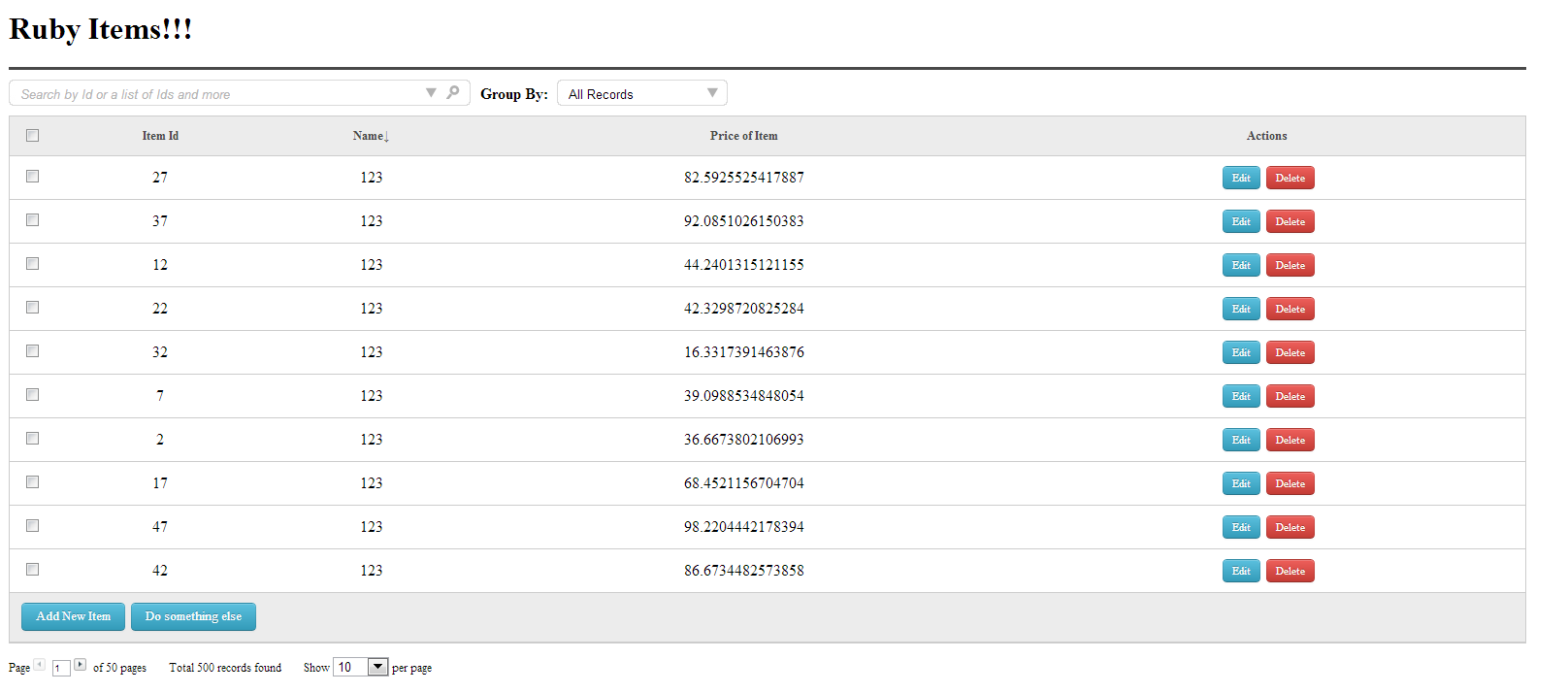
|
|
69
|
-
|
|
70
|
-
###Filter Drop Downs:
|
|
71
|
-
|
|
72
|
-
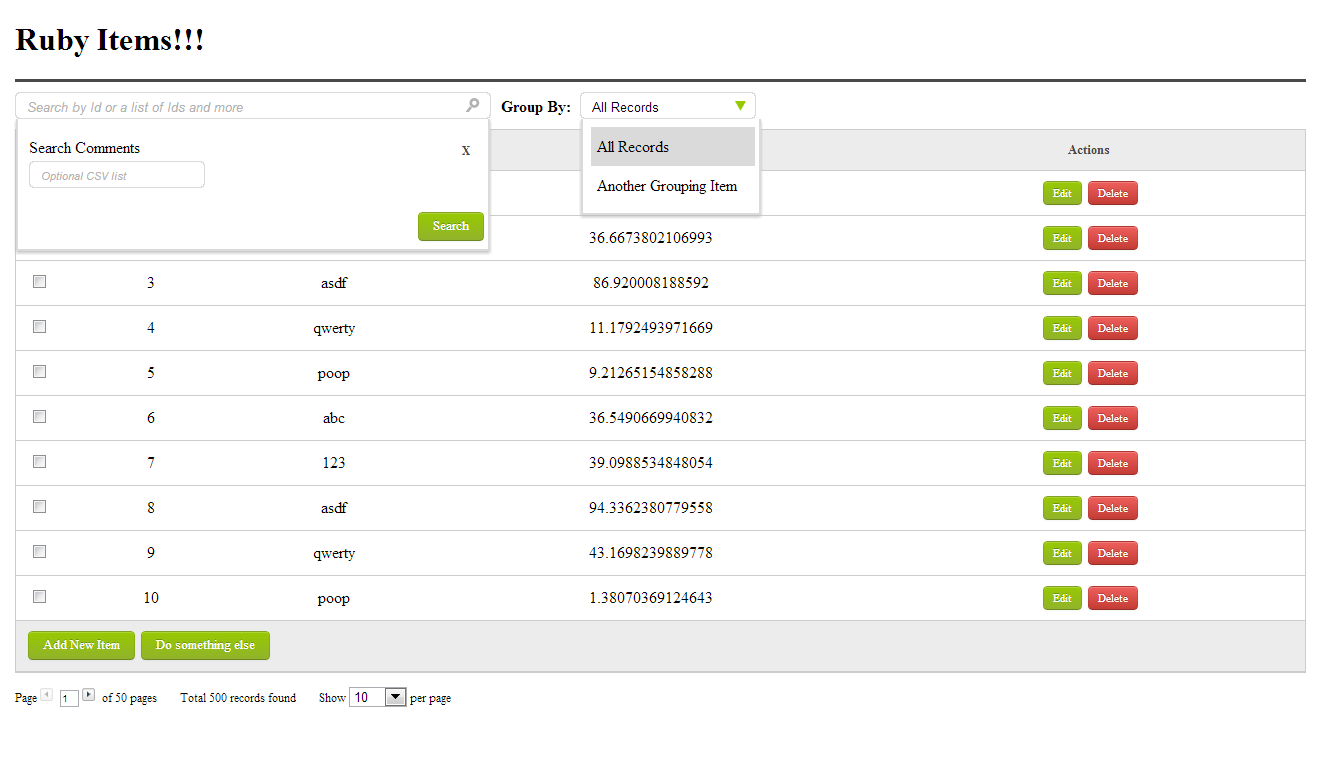
|
|
73
|
-
|
|
74
|
-
###Searching a row (with wild card search):
|
|
75
|
-
|
|
76
|
-
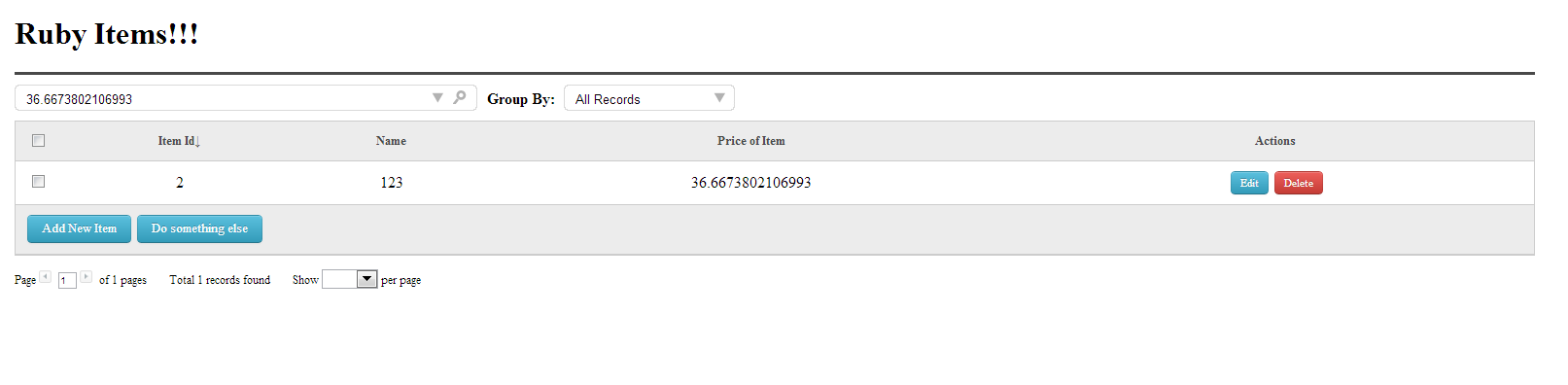
|
|
77
|
-
|
|
78
|
-
###Searching "name=asdf_18" (With ActiveRecord and Ransack hook):
|
|
79
|
-
|
|
80
|
-
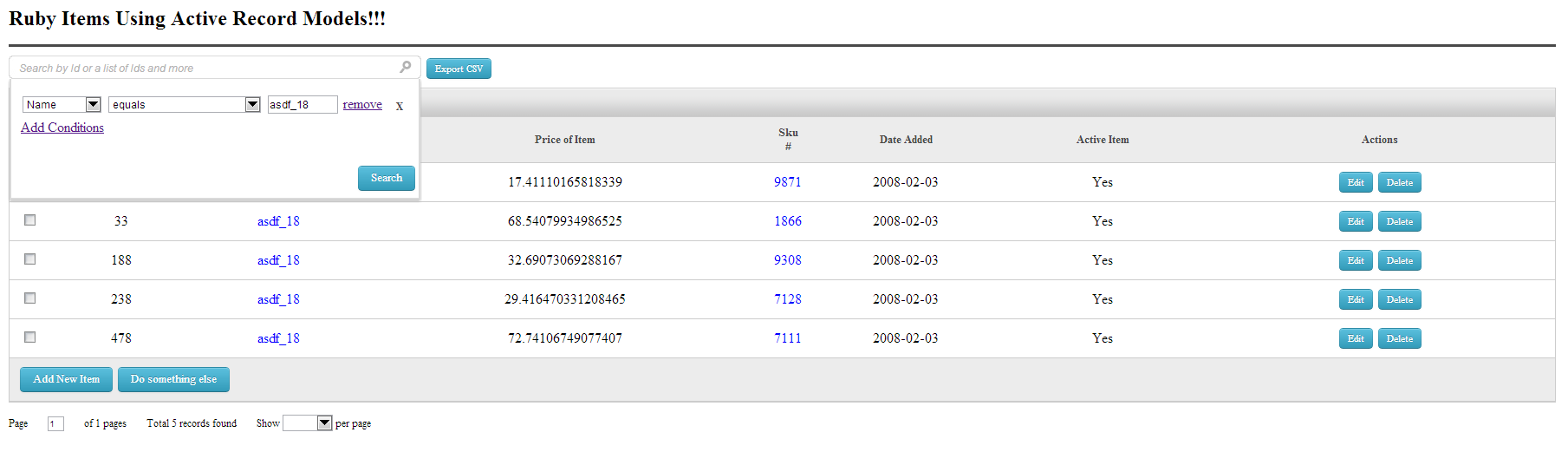
|
|
81
|
-
|
|
82
|
-
###Searching "name=asdf_18" and "sku<9000"(With ActiveRecord and Ransack hook):
|
|
83
|
-
|
|
84
|
-
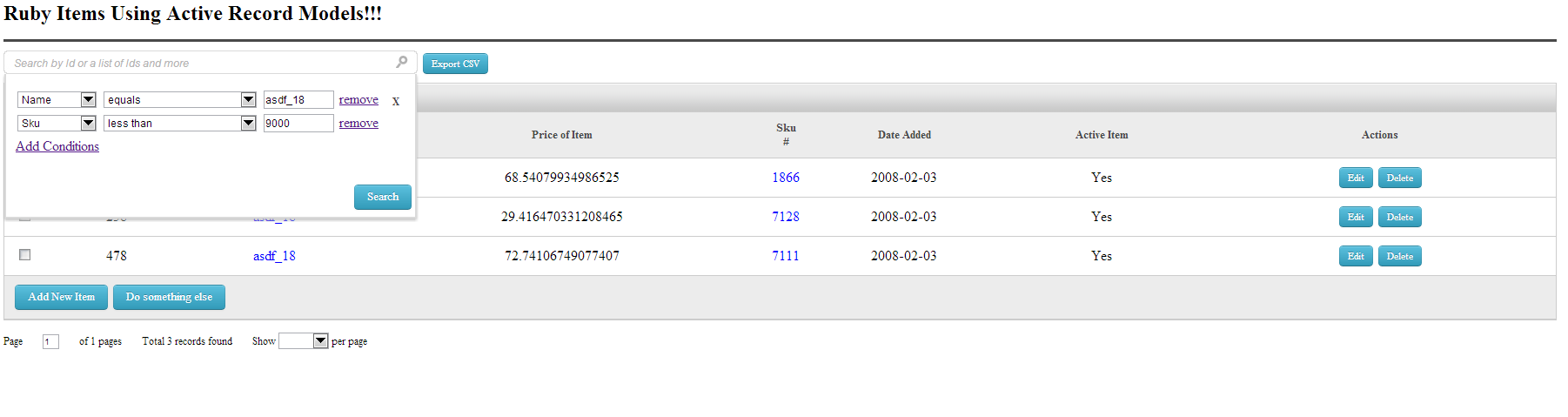
|
|
85
|
-
|
|
86
|
-
###Searching "name=asdf_18" and "sku < 9000" and "price > 67" (With ActiveRecord and Ransack hook):
|
|
87
|
-
|
|
88
|
-
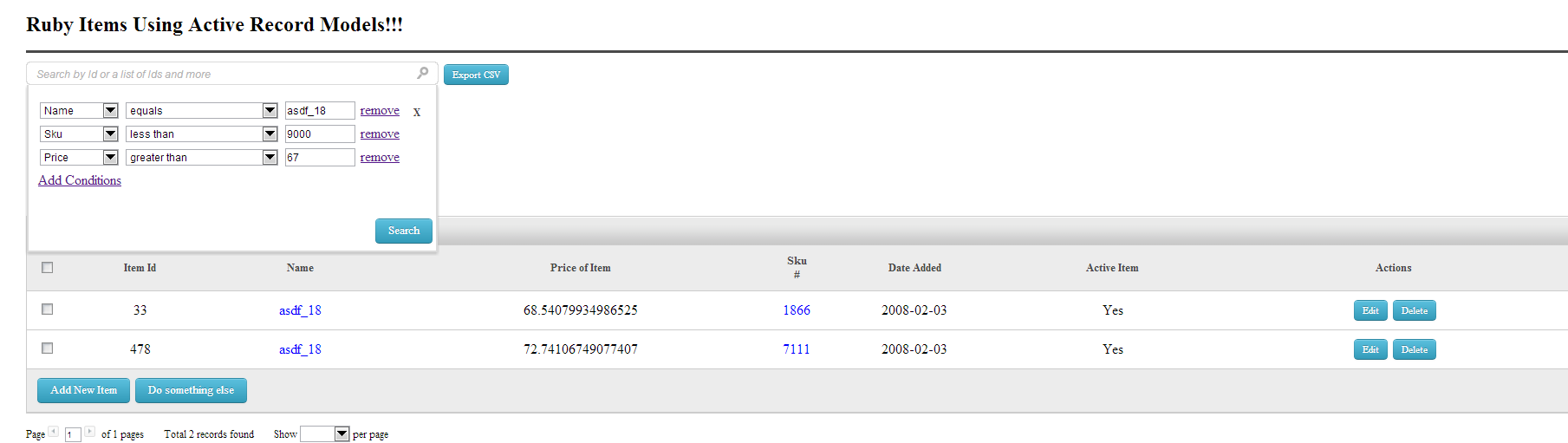
|
|
89
|
-
|
|
90
|
-
###Theme plugins/gem support ([The Blue Sky Basin Theme][2]):
|
|
91
|
-
|
|
92
|
-
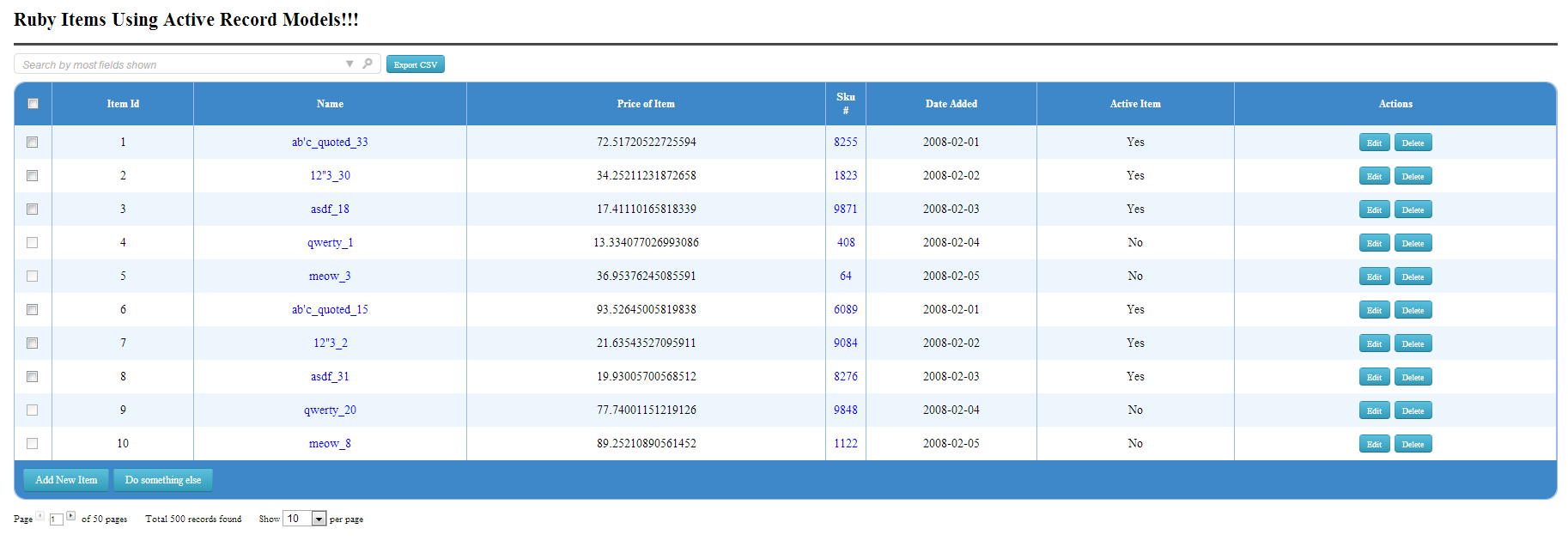
|
|
93
|
-
|
|
94
|
-
****
|
|
95
|
-
|
|
96
|
-
## Administration Tool
|
|
97
|
-
|
|
98
|
-
****
|
|
99
|
-
|
|
100
|
-
In order to use this tool please paste your @output into your view
|
|
15
|
+
`widget_list` uses jQuery and Sprockets assets. In your Gemfile:
|
|
101
16
|
|
|
102
17
|
```ruby
|
|
103
|
-
|
|
104
|
-
|
|
105
|
-
|
|
106
|
-
```
|
|
18
|
+
gem 'sprockets-rails'
|
|
19
|
+
gem 'jquery-rails'
|
|
20
|
+
gem 'widget_list', '~> 2.0'
|
|
21
|
+
```
|
|
107
22
|
|
|
108
|
-
|
|
23
|
+
Run `bundle install`. Add `app/assets/config/manifest.js`:
|
|
109
24
|
|
|
110
|
-
```
|
|
111
|
-
|
|
112
|
-
|
|
25
|
+
```javascript
|
|
26
|
+
//= link_tree ../images
|
|
27
|
+
//= link_directory ../stylesheets .css
|
|
28
|
+
//= link_directory ../javascripts .js
|
|
29
|
+
//= link widget_list.css
|
|
30
|
+
//= link widgets.css
|
|
31
|
+
//= link widget_list.js
|
|
113
32
|
```
|
|
114
33
|
|
|
115
|
-
|
|
116
|
-
|
|
117
|
-
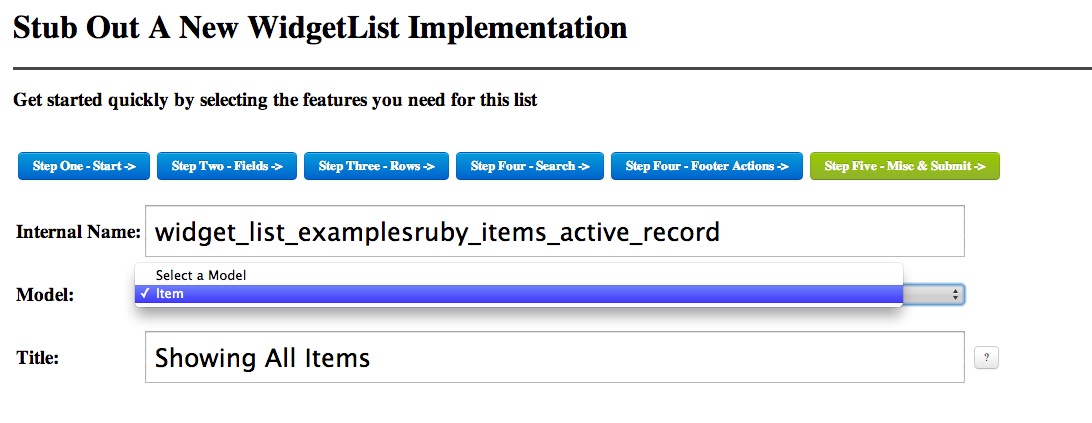
|
|
34
|
+
Add `app/assets/javascripts/application.js`:
|
|
118
35
|
|
|
119
|
-
|
|
36
|
+
```javascript
|
|
37
|
+
//= require jquery
|
|
38
|
+
//= require jquery_ujs
|
|
39
|
+
//= require widget_list
|
|
40
|
+
```
|
|
120
41
|
|
|
121
|
-
|
|
42
|
+
Load the assets in the application layout's `<head>`:
|
|
122
43
|
|
|
123
|
-
|
|
44
|
+
```erb
|
|
45
|
+
<%= csrf_meta_tags %>
|
|
46
|
+
<%= stylesheet_link_tag 'application', 'widget_list', 'widgets' %>
|
|
47
|
+
<%= javascript_include_tag 'application' %>
|
|
48
|
+
```
|
|
124
49
|
|
|
125
|
-
|
|
50
|
+
Load this script in the layout's `<head>` without `defer`: the administration wizard's inline script needs jQuery as it is parsed. The gem resolves its image URLs through Sprockets when compiling CSS. No manual image copy or static middleware is needed. An app using the default Rails 8 Propshaft pipeline should replace `propshaft` with `sprockets-rails` for this integration. Run `bin/rails assets:precompile` to check production assets.
|
|
126
51
|
|
|
127
|
-
|
|
52
|
+
## Choose a database source
|
|
128
53
|
|
|
129
|
-
|
|
54
|
+
**Active Record only:** `config/widget-list.yml` is optional. The gem uses the current Rails environment's Active Record connection as its primary source. Pass an `ActiveRecord::Relation` as `list['view']`.
|
|
130
55
|
|
|
131
|
-
|
|
56
|
+
**Sequel SQL and Active Record together:** create `config/widget-list.yml` with the Sequel URI as `primary` and the Rails database environment name as `secondary`:
|
|
132
57
|
|
|
133
|
-
|
|
58
|
+
```yaml
|
|
59
|
+
development:
|
|
60
|
+
:primary: sqlite://<%= Rails.root.join('storage/development.sqlite3') %>
|
|
61
|
+
:secondary: development
|
|
62
|
+
:api_mode: false
|
|
63
|
+
test:
|
|
64
|
+
:primary: sqlite://<%= Rails.root.join('storage/test.sqlite3') %>
|
|
65
|
+
:secondary: test
|
|
66
|
+
:api_mode: false
|
|
67
|
+
```
|
|
134
68
|
|
|
135
|
-
|
|
69
|
+
Set `list['database']` to `'primary'` for a SQL table or view name, or `'secondary'` for an Active Record relation. Use the corresponding database file from your app's `config/database.yml`. Only SQLite was exercised during this upgrade; the older examples for PostgreSQL, Oracle, and MongoDB have not been reverified.
|
|
136
70
|
|
|
137
|
-
|
|
71
|
+
## Render a list
|
|
138
72
|
|
|
139
|
-
|
|
73
|
+
The controller must answer GET for the first page and POST for the gem's Ajax controls. For example:
|
|
140
74
|
|
|
141
75
|
```ruby
|
|
142
|
-
|
|
143
|
-
|
|
144
|
-
|
|
145
|
-
|
|
146
|
-
|
|
147
|
-
|
|
148
|
-
|
|
149
|
-
|
|
150
|
-
|
|
76
|
+
# config/routes.rb
|
|
77
|
+
match '/items', to: 'items#index', via: [:get, :post]
|
|
78
|
+
|
|
79
|
+
# app/controllers/items_controller.rb
|
|
80
|
+
class ItemsController < ApplicationController
|
|
81
|
+
def index
|
|
82
|
+
list = WidgetList::List.init_config
|
|
83
|
+
list['name'] = 'items'
|
|
84
|
+
list['database'] = 'primary' # omit for the default Active Record source
|
|
85
|
+
list['view'] = 'items' # use Item.all for Active Record
|
|
86
|
+
list['fields'] = { 'id' => 'ID', 'name' => 'Name', 'sku' => 'SKU' }
|
|
87
|
+
list['searchIdCol'] = ['id', 'sku']
|
|
88
|
+
list['rowLimit'] = 10
|
|
89
|
+
|
|
90
|
+
type, output = WidgetList::List.build_list(list)
|
|
91
|
+
case type
|
|
92
|
+
when 'html' then @output = output
|
|
93
|
+
when 'json' then render json: JSON.parse(output)
|
|
94
|
+
when 'export' then send_data output, filename: 'items.csv', type: 'text/csv'
|
|
95
|
+
end
|
|
96
|
+
end
|
|
97
|
+
end
|
|
151
98
|
```
|
|
152
99
|
|
|
153
|
-
|
|
154
|
-
|
|
155
|
-
## Usage/Examples
|
|
156
|
-
|
|
157
|
-
****
|
|
158
|
-
|
|
159
|
-
You can either follow the below instructions or take a look at the changes here https://github.com/davidrenne/widget_list_example/commit/e4e8ab54edcf8bc4538b1850ee762c13bc6f5316
|
|
160
|
-
|
|
161
|
-
I recommend if you use widget_list in production that you use config.consider_all_requests_local = true as errors will be handled but the base lists will still draw.
|
|
162
|
-
|
|
163
|
-
|
|
164
|
-
****
|
|
165
|
-
|
|
166
|
-
## Feature Configurations
|
|
167
|
-
|
|
168
|
-
****
|
|
169
|
-
|
|
170
|
-
widget_list features and configurations primarily work by a single large hash passed to the constructor with the features you need for the given request which changes how the list is displayed or filtered.
|
|
171
|
-
|
|
172
|
-
`name` - The unique name/id's of all the pieces that make up your widget list `default=([*('A'..'Z'),*('0'..'9')]-%w(0 1 I O)).sample(16).join`
|
|
173
|
-
|
|
174
|
-
`database` - You can pass which DB connection you would like to use for each list. Only two values/db connections are supported ('primary' or 'secondary') `default='primary'`
|
|
175
|
-
|
|
176
|
-
`title` - This adds an H1 title and horizontal rule on top of your list `default=''`
|
|
177
|
-
|
|
178
|
-
`listDescription` - This adds a grey header box. It is useful for describing the main query `default=''`
|
|
179
|
-
|
|
180
|
-
`pageId` - Base path for requests (typically you never need to change this) `default=$_SERVER['SCRIPT_NAME'] + $_SERVER['PATH_INFO']`
|
|
181
|
-
|
|
182
|
-
`view` - A sub-select query to your database (ALWAYS ALIASED) `default=''`
|
|
183
|
-
|
|
184
|
-
`data` - A "sequel" formatted resultset like would be returned from _select() method. Instead of running a SQL query, you can pass an array to populate the list `default={}`
|
|
185
|
-
|
|
186
|
-
`colClass` - Your custom td class for all td's `default=''`
|
|
187
|
-
|
|
188
|
-
`colAlign` - td align attribute for all td's `default=''`
|
|
189
|
-
|
|
190
|
-
`fields` - The visible fields shown in the current list. KEY=column name VALUE= displayed column header `default={}`
|
|
191
|
-
|
|
192
|
-
`fieldsHidden` - The non-visible fields in the current list. Typically used when you wish to search on this column, but the main column is a drilldown or some HTML value that isnt easily searchable. VALUE=column name `default=[]`
|
|
193
|
-
|
|
194
|
-
`bindVars` - bindVars that are passed to _select() sequel extension I wrote. Which will replace "?" in your query with the associated bindVar `default=[]`
|
|
195
|
-
|
|
196
|
-
`bindVarsLegacy` - A Hash whose KEYS ARE CAPITALIZED and whose value is the replacement string. Inside the "view" you would use :MY_KEY as the template to be replaced `default={}`
|
|
197
|
-
|
|
198
|
-
`links` - Turn text based record value into a link. KEY=column name VALUE=hash of link Config. Links should most likely pass ['tags']['field_name'] = 'get_var_name' (would yeild get_var_name=1234 for that field value 1234). You can pass ['tags']['onclick'] if you dont want to call ButtonLinkPost which will redirect to the URL built. If you pass ['onclick']['tags'], each field passed will be passed as a parameter for the function you designate `default={}`
|
|
199
|
-
|
|
200
|
-
`buttons` - Buttons to generate for each row. KEY=column name VALUE=Hash of widget_button attributes `default={}`
|
|
201
|
-
|
|
202
|
-
`inputs` - widget_check is the only one supported so far. (See examples) `default={}`
|
|
203
|
-
|
|
204
|
-
`filter` - << "xxx = 123" would be the syntax to add a new filter array. (See examples) `default=[]`
|
|
205
|
-
|
|
206
|
-
`groupBy` - The column name or CSV of names to group by. (See examples) `default=[]`
|
|
207
|
-
|
|
208
|
-
`rowStart` - Which page the list should start at `default=0`
|
|
209
|
-
|
|
210
|
-
`rowLimit` - How many rows per page? `default=10`
|
|
211
|
-
|
|
212
|
-
`orderBy` - Default order by "column_name DIRECTION" `default=''`
|
|
213
|
-
|
|
214
|
-
`allowHTML` - Strip HTML from view or not `default=true`
|
|
215
|
-
|
|
216
|
-
`strlength` - Strip HTML from view or not `default=true`
|
|
217
|
-
|
|
218
|
-
`searchClear` - Clear the list's search session `default=false`
|
|
100
|
+
In `app/views/items/index.html.erb`, render `<%= raw @output %>`. Only use trusted values in custom HTML fields and SQL fragments. The gem builds markup and SQL from list configuration.
|
|
219
101
|
|
|
220
|
-
|
|
102
|
+
For Ransack filtering, allowlist searchable model columns and pass both the search object and its relation:
|
|
221
103
|
|
|
222
|
-
`showPagination` - Show pagination HTML `default=true`
|
|
223
|
-
|
|
224
|
-
`searchSession` - Remember and restore the last search performed `default=true`
|
|
225
|
-
|
|
226
|
-
`carryOverRequests` - will allow you to post custom things from request to all sort/paging URLS for each ajax. Takes an array of GETVARS which will be passed to each request `default=['switch_grouping']`
|
|
227
|
-
|
|
228
|
-
`customFooter` - Add buttons or HTML at bottom area of list inside the grey box `default=''`
|
|
229
|
-
|
|
230
|
-
`customHeader` - Add buttons or HTML at top area of list above all headers (such as TABS to delineate Summary/Details) `default=''`
|
|
231
|
-
|
|
232
|
-
`ajaxFunctionAll` - Custom javascript called asychronously during each click of each event someone interacts with on the list `default=''`
|
|
233
|
-
|
|
234
|
-
`ajaxFunction` - Mostly an internal setting `default='ListJumpMin'`
|
|
235
|
-
|
|
236
|
-
`showSearch` - Show top search bar `default=true`
|
|
237
|
-
|
|
238
|
-
`searchOnkeyup` - Search on key up event `default=''`
|
|
239
|
-
|
|
240
|
-
`searchOnclick` - Search on click event `default=''`
|
|
241
|
-
|
|
242
|
-
`searchIdCol` - By default `id` column is here because typically if you call your PK's id and are auto-increment and numeric. This can also take in an array of numeric fields so that users can search CSV's of numbers and get back matches `default='id'`
|
|
243
|
-
|
|
244
|
-
`searchTitle` - Set a title for the search input `default= 'Search by Id or a list of Ids and more'`
|
|
245
|
-
|
|
246
|
-
`searchFieldsIn` - White list of fields to include in a alpha-numeric based like '%%' search `default={}`
|
|
247
|
-
|
|
248
|
-
`searchFieldsOut` - Black list of fields to exclude in a alpha-numeric based search `default={'id'=>true}`
|
|
249
|
-
|
|
250
|
-
`showExport` - Allow users to export current list view as CSV `default=true`
|
|
251
|
-
|
|
252
|
-
`exportButtonTitle` - Title of button `default='Export CSV'`
|
|
253
|
-
|
|
254
|
-
`groupByItems` - Custom drop down's created by passing an array of modes. Best suited to group by the data `default=[]`
|
|
255
|
-
|
|
256
|
-
`groupBySelected` - Initially selected grouping - defaults to first in list if not. Please pass the string value of the "groupByItem" `default=false`
|
|
257
|
-
|
|
258
|
-
`groupByLabel` - Label describing select box `default='Group By'`
|
|
259
|
-
|
|
260
|
-
`groupByClick` - Function to call as a custom function for each click on an item `default=''`
|
|
261
|
-
|
|
262
|
-
`groupByClickDefault` - Default group by handler inside widget_list.js `default="ListChangeGrouping('<!--NAME-->', this);"`
|
|
263
|
-
|
|
264
|
-
`listSearchForm` - Allows you to pass a custom form for the ARROW drop down for advanced searching `default=''`
|
|
265
|
-
|
|
266
|
-
`ransackSearch` - If you pass ModelName.search(params[:q]) ransack will show up in your advanced search `default=false`
|
|
267
|
-
|
|
268
|
-
`cornerRadius` - Either int number of pixels for radius corners. Or '14px' or whatever you want. `default=15`
|
|
269
|
-
|
|
270
|
-
`columnStyle` - Column styles. KEY=column name VALUE= the inline style applied `default={}`
|
|
271
|
-
|
|
272
|
-
`columnClass` - Column class. KEY=column name VALUE= the class name `default={}`
|
|
273
|
-
|
|
274
|
-
`columnPopupTitle` - Column title as you hover over. KEY=column name VALUE=Popup text `default={}`
|
|
275
|
-
|
|
276
|
-
`columnWidth` - Column widths. KEY=column name VALUE= '100px' `default={}`
|
|
277
|
-
|
|
278
|
-
`columnNoSort` - Dont allow sorting on these columns (By default all visible columns have a sort link built). KEY=column name VALUE=column name `default={}`
|
|
279
|
-
|
|
280
|
-
`borderedColumns` - Add a right border to each column. `default=false`
|
|
281
|
-
|
|
282
|
-
`borderedRows` - Style the border of each row. `default=false`
|
|
283
|
-
|
|
284
|
-
`borderRowStyle` - Border style of each row. `default='1px solid #CCCCCC'`
|
|
285
|
-
|
|
286
|
-
`borderHeadFoot` - Style the border of header (bottom) and footer (top). `default=false`
|
|
287
|
-
|
|
288
|
-
`headFootBorderStyle` - Border style of header (bottom) and footer (top). `default='1px solid #CCCCCC'`
|
|
289
|
-
|
|
290
|
-
`borderColumnStyle` - Style of row if you use this above feature. `default='1px solid #CCCCCC'`
|
|
291
|
-
|
|
292
|
-
`bordersEverywhere?` - If true, use borderEverywhere for all four borders you can pass separately `default=false`
|
|
293
|
-
|
|
294
|
-
`borderEverywhere` - The catch all style of borders for headers, rows, outer table border and columns. `default='1px solid #CCCCCC'`
|
|
295
|
-
|
|
296
|
-
`defaultButtonClass` - As you have seen in many screenshots, there are several buttons. This controls the innerClass of those drawn from the list. See lib/widget_list/widgets.rb `default='info'`
|
|
297
|
-
|
|
298
|
-
`useBoxShadow` - Show shadow or not on list `default=true`
|
|
299
|
-
|
|
300
|
-
`shadowInset` - Number or string with '11Px' for an 11PX Inset `default=10`
|
|
301
|
-
|
|
302
|
-
`shadowSpread` - Number or string with '11Px' for an 11PX spread `default=20`
|
|
303
|
-
|
|
304
|
-
`shadowColor` - Color of bottom right shadow `default='shadowColor'`
|
|
305
|
-
|
|
306
|
-
`rowClass` - Class added to all rows `default=''`
|
|
307
|
-
|
|
308
|
-
`rowFontColor` - Font color of all data rows that dont have a rowStylesByStatus color: passed to it `default='black'`
|
|
309
|
-
|
|
310
|
-
`rowColorByStatus` - {'rowColorByStatus' =>
|
|
311
|
-
{'active'=>
|
|
312
|
-
{'No' => '#EBEBEB' }
|
|
313
|
-
}
|
|
314
|
-
}
|
|
315
|
-
Color a row based on the value of the column.
|
|
316
|
-
`default={}`
|
|
317
|
-
|
|
318
|
-
`rowStylesByStatus` - {'rowStylesByStatus' =>
|
|
319
|
-
{'active'=>
|
|
320
|
-
{'No' => 'font-style:italic;color:red;' }
|
|
321
|
-
}
|
|
322
|
-
}
|
|
323
|
-
Style a row based on the value of the column.
|
|
324
|
-
`default={}`
|
|
325
|
-
|
|
326
|
-
`rowOffsets` - Color for each row and offset `default=['FFFFFF','FFFFFF']`
|
|
327
|
-
|
|
328
|
-
`noDataMessage` - Message to show when no data is found `default='Currently no data.'`
|
|
329
|
-
|
|
330
|
-
`useSort` - Allow sorting on list `default=true`
|
|
331
|
-
|
|
332
|
-
`headerClass` - Class of each individual header column `default={}`
|
|
333
|
-
|
|
334
|
-
`fieldFunction` - A way to wrap or inject columns or SQL formatting in place of your columns `default={}`
|
|
335
|
-
|
|
336
|
-
`template` - Pass in a custom template for outer shell `default=''`
|
|
337
|
-
|
|
338
|
-
`templateFilter` - Instead of widget list building your search box. Pass your own HTML `default=''`
|
|
339
|
-
|
|
340
|
-
`storeSessionChecks` - See http://stackoverflow.com/questions/1928204/marshal-data-too-short for configuring larger session storage which checkboxes would eat up if you had this set to true `default=false`
|
|
341
|
-
|
|
342
|
-
`totalRow` - Add in your numeric or dollar amount fields you want to sum or average for the bottom record list_parms['totalRow']['my_field'] = true `default={}`
|
|
343
|
-
|
|
344
|
-
`totalRowFirstCol` - A string to display what the row is showing `default='<strong>Total:</strong>'`
|
|
345
|
-
|
|
346
|
-
`totalRowMethod` - Allows you to pass 'average' to define which columns should average the sum list_parms['totalRowPrefix']['my_field'] = 'average'. There is only support for average right now `default={}`
|
|
347
|
-
|
|
348
|
-
`totalRowPrefix` - The prefix will be automatically generated based off the value such as $ for a dollar amount would be injected without this configuration. But this allows you to pass whatever you want displayed for the bottom summary row list_parms['totalRowPrefix']['my_field'] = true `default={}`
|
|
349
|
-
|
|
350
|
-
`totalRowSuffix` - The suffix will be automatically generated based off the value at the end of the last row. But this allows you to pass whatever you want displayed for the bottom summary row list_parms['totalRowSuffix']['my_field'] = true `default={}`
|
|
351
|
-
|
|
352
|
-
`totalRowSeparator` - Your decimal for the formatted number (if any is shown) `default='.'`
|
|
353
|
-
|
|
354
|
-
`totalRowDelimiter` - Your "comma" for the formatted number (if any is shown) `default=','`
|
|
355
|
-
|
|
356
|
-
`totalRowDefault` - For any columns such as strings which cannot be summed or added into a summary this value will be the place holder for that TD. `default='N/A'`
|
|
357
|
-
|
|
358
|
-
`columnHooks` - Todo `default={}`
|
|
359
|
-
|
|
360
|
-
`rowHooks` - Todo `default={}`
|
|
361
|
-
|
|
362
|
-
|
|
363
|
-
### #1 - Add widget_list CSS and JS to your application css and js
|
|
364
|
-
|
|
365
|
-
Change application.css to:
|
|
366
104
|
```ruby
|
|
367
|
-
|
|
368
|
-
|
|
105
|
+
class Item < ApplicationRecord
|
|
106
|
+
def self.ransackable_attributes(_auth_object = nil)
|
|
107
|
+
%w[id name sku]
|
|
108
|
+
end
|
|
109
|
+
end
|
|
110
|
+
|
|
111
|
+
search = Item.ransack(params[:q])
|
|
112
|
+
list['database'] = 'secondary' # omit if Active Record is primary
|
|
113
|
+
list['ransackSearch'] = search
|
|
114
|
+
list['view'] = search.result
|
|
369
115
|
```
|
|
370
116
|
|
|
371
|
-
|
|
117
|
+
A standard GET URL such as `/items?q[name_cont]=Apple` applies the filter. The gem also renders its advanced Ransack form from `ransackSearch`.
|
|
372
118
|
|
|
373
|
-
|
|
374
|
-
//= require widget_list
|
|
375
|
-
```
|
|
119
|
+
## Try the example
|
|
376
120
|
|
|
377
|
-
|
|
121
|
+
The example installs the published 2.0.0 gem from RubyGems. Clone and run it anywhere:
|
|
378
122
|
|
|
379
|
-
```
|
|
380
|
-
|
|
123
|
+
```sh
|
|
124
|
+
git clone https://github.com/davidrenne/widget_list_example_rails8.git
|
|
125
|
+
cd widget_list_example_rails8
|
|
126
|
+
bundle install
|
|
127
|
+
bin/rails db:prepare
|
|
128
|
+
bin/rails db:seed
|
|
129
|
+
bin/rails test
|
|
130
|
+
bin/rails server
|
|
381
131
|
```
|
|
382
132
|
|
|
383
|
-
|
|
133
|
+
Open `http://127.0.0.1:3000/` for Sequel or `/ransack` for Active Record. Search SKU `1001`, change pages, export CSV, or open the filter arrow and set **Name contains Apple**.
|
|
384
134
|
|
|
385
|
-
|
|
135
|
+
## Administration console
|
|
386
136
|
|
|
387
|
-
|
|
137
|
+
The original administration wizard is restored in the [Rails 8 migration example](https://github.com/davidrenne/widget_list_example). Open `/administration` there to choose an Active Record model and fields, configure sorting, search, row buttons and export, preview the list, then generate starter controller code. Hidden fields, field functions, grouping fields, and the drill-down value column use dropdowns populated from the selected model's table columns. The drill-down display column remains editable for custom expressions. The example routes the wizard only in development and test. It uses the sibling `widget_list` checkout, so the console fixes require the 2.0.1 source until that version is published.
|
|
388
138
|
|
|
389
|
-
|
|
390
|
-
|
|
391
|
-
rails generate controller WidgetListExamples ruby_items
|
|
139
|
+
To add the wizard to your own app, first complete the asset setup above. Then add a GET/POST route, a controller action, and a view:
|
|
392
140
|
|
|
393
|
-
Then modify app/views/widget_list_examples/ruby_items.html.erb and add
|
|
394
141
|
```ruby
|
|
395
|
-
|
|
396
|
-
|
|
397
|
-
|
|
398
|
-
|
|
399
|
-
|
|
400
|
-
|
|
401
|
-
|
|
142
|
+
# config/routes.rb
|
|
143
|
+
if Rails.env.development? || Rails.env.test?
|
|
144
|
+
match '/administration', to: 'widget_list_examples#administration',
|
|
145
|
+
via: [:get, :post], as: :administration
|
|
146
|
+
end
|
|
147
|
+
|
|
148
|
+
# app/controllers/widget_list_examples_controller.rb
|
|
149
|
+
class WidgetListExamplesController < ApplicationController
|
|
150
|
+
def administration
|
|
151
|
+
@output = WidgetList.go!
|
|
152
|
+
render json: JSON.parse(@output) if params.key?(:ajax)
|
|
153
|
+
end
|
|
154
|
+
end
|
|
402
155
|
```
|
|
403
|
-
Ensure that sessions are loaded into active record because widget_list keeps track of several settings on each list for each session
|
|
404
|
-
```ruby
|
|
405
|
-
config.session_store :active_record_store
|
|
406
|
-
```
|
|
407
|
-
Add the example shown below to app/controllers/widget_list_examples_controller.rb#ruby_items
|
|
408
|
-
|
|
409
|
-
Go To http://localhost:3000/widget_list_examples/ruby_items
|
|
410
|
-
|
|
411
|
-
****
|
|
412
156
|
|
|
413
|
-
|
|
157
|
+
```erb
|
|
158
|
+
<%# app/views/widget_list_examples/administration.html.erb %>
|
|
159
|
+
<div style="margin: 50px"><%= raw @output %></div>
|
|
414
160
|
|
|
415
|
-
|
|
416
|
-
|
|
417
|
-
```ruby
|
|
418
|
-
#
|
|
419
|
-
# Load Sample "items" Data. Comment out in your first time executing a widgetlist to create the items table
|
|
420
|
-
#
|
|
421
|
-
=begin
|
|
422
|
-
begin
|
|
423
|
-
WidgetList::List.get_sequel.create_table :items do
|
|
424
|
-
primary_key :id
|
|
425
|
-
String :name
|
|
426
|
-
Float :price
|
|
427
|
-
Fixnum :sku
|
|
428
|
-
String :active
|
|
429
|
-
Date :date_added
|
|
430
|
-
end
|
|
431
|
-
items = WidgetList::List.get_sequel[:items]
|
|
432
|
-
100.times {
|
|
433
|
-
items.insert(:name => 'ab\'c_quoted_' + rand(35).to_s, :price => rand * 100, :date_added => '2008-02-01', :sku => rand(9999), :active => 'Yes')
|
|
434
|
-
items.insert(:name => '12"3_' + rand(35).to_s, :price => rand * 100, :date_added => '2008-02-02', :sku => rand(9999), :active => 'Yes')
|
|
435
|
-
items.insert(:name => 'asdf_' + rand(35).to_s, :price => rand * 100, :date_added => '2008-02-03', :sku => rand(9999), :active => 'Yes')
|
|
436
|
-
items.insert(:name => 'qwerty_' + rand(35).to_s, :price => rand * 100, :date_added => '2008-02-04', :sku => rand(9999), :active => 'No')
|
|
437
|
-
items.insert(:name => 'meow_' + rand(35).to_s, :price => rand * 100, :date_added => '2008-02-05', :sku => rand(9999), :active => 'No')
|
|
438
|
-
}
|
|
439
|
-
rescue Exception => e
|
|
440
|
-
#
|
|
441
|
-
# Table already exists
|
|
442
|
-
#
|
|
443
|
-
logger.info "Test table in items already exists? " + e.to_s
|
|
444
|
-
end
|
|
445
|
-
=end
|
|
446
|
-
|
|
447
|
-
begin
|
|
448
|
-
|
|
449
|
-
list_parms = WidgetList::List::init_config()
|
|
450
|
-
|
|
451
|
-
#
|
|
452
|
-
# Give it a name, some SQL to feed widget_list and set a noDataMessage
|
|
453
|
-
#
|
|
454
|
-
list_parms['name'] = 'ruby_items_yum'
|
|
455
|
-
|
|
456
|
-
#
|
|
457
|
-
# Handle Dynamic Filters
|
|
458
|
-
#
|
|
459
|
-
groupBy = WidgetList::List::get_group_by_selection(list_parms)
|
|
460
|
-
|
|
461
|
-
case groupBy
|
|
462
|
-
when 'Item Name'
|
|
463
|
-
groupByFilter = 'item'
|
|
464
|
-
countSQL = 'COUNT(1) as cnt,'
|
|
465
|
-
groupBySQL = 'GROUP BY name'
|
|
466
|
-
groupByDesc = ' (Grouped By Name)'
|
|
467
|
-
when 'Sku Number'
|
|
468
|
-
groupByFilter = 'sku'
|
|
469
|
-
countSQL = 'COUNT(1) as cnt,'
|
|
470
|
-
groupBySQL = 'GROUP BY sku'
|
|
471
|
-
groupByDesc = ' (Grouped By Sku Number)'
|
|
472
|
-
else
|
|
473
|
-
groupByFilter = 'none'
|
|
474
|
-
countSQL = ''
|
|
475
|
-
groupBySQL = ''
|
|
476
|
-
groupByDesc = ''
|
|
477
|
-
end
|
|
478
|
-
|
|
479
|
-
list_parms['filter'] = []
|
|
480
|
-
list_parms['bindVars'] = []
|
|
481
|
-
drillDown, filterValue = WidgetList::List::get_filter_and_drilldown(list_parms['name'])
|
|
482
|
-
|
|
483
|
-
case drillDown
|
|
484
|
-
when 'filter_by_name'
|
|
485
|
-
list_parms['filter'] << " name = ? "
|
|
486
|
-
list_parms['bindVars'] << filterValue
|
|
487
|
-
list_parms['listDescription'] = WidgetList::List::drill_down_back(list_parms['name']) + ' Filtered by Name (' + filterValue + ')' + groupByDesc
|
|
488
|
-
when 'filter_by_sku'
|
|
489
|
-
list_parms['filter'] << " sku = ? "
|
|
490
|
-
list_parms['bindVars'] << filterValue
|
|
491
|
-
list_parms['listDescription'] = WidgetList::List::drill_down_back(list_parms['name']) + ' Filtered by SKU (' + filterValue + ')' + groupByDesc
|
|
492
|
-
else
|
|
493
|
-
list_parms['listDescription'] = ''
|
|
494
|
-
list_parms['listDescription'] = WidgetList::List::drill_down_back(list_parms['name']) if !groupByDesc.empty?
|
|
495
|
-
list_parms['listDescription'] += 'Showing All Ruby Items' + groupByDesc
|
|
496
|
-
end
|
|
497
|
-
|
|
498
|
-
# put <%= @output %> inside your view for initial load nothing to do here other than any custom concatenation of multiple lists
|
|
499
|
-
#
|
|
500
|
-
# Setup your first widget_list
|
|
501
|
-
#
|
|
502
|
-
|
|
503
|
-
button_column_name = 'actions'
|
|
504
|
-
|
|
505
|
-
#
|
|
506
|
-
# customFooter will add buttons to the bottom of the list.
|
|
507
|
-
#
|
|
508
|
-
|
|
509
|
-
list_parms['customFooter'] = WidgetList::Widgets::widget_button('Add New Item', {'page' => '/add/'} ) + WidgetList::Widgets::widget_button('Do something else', {'page' => '/else/'} )
|
|
510
|
-
|
|
511
|
-
#
|
|
512
|
-
# Give some SQL to feed widget_list and set a noDataMessage
|
|
513
|
-
#
|
|
514
|
-
list_parms['searchIdCol'] = ['id','sku']
|
|
515
|
-
|
|
516
|
-
#
|
|
517
|
-
# Because sku_linked column is being used and the raw SKU is hidden, we need to make this available for searching via fields_hidden
|
|
518
|
-
#
|
|
519
|
-
list_parms['fieldsHidden'] = ['sku']
|
|
520
|
-
|
|
521
|
-
drill_downs = []
|
|
522
|
-
|
|
523
|
-
drill_downs << WidgetList::List::build_drill_down( :list_id => list_parms['name'],
|
|
524
|
-
:drill_down_name => 'filter_by_name',
|
|
525
|
-
:data_to_pass_from_view => 'a.name',
|
|
526
|
-
:column_to_show => 'a.name',
|
|
527
|
-
:column_alias => 'name_linked'
|
|
528
|
-
)
|
|
529
|
-
|
|
530
|
-
drill_downs << WidgetList::List::build_drill_down(
|
|
531
|
-
:list_id => list_parms['name'],
|
|
532
|
-
:drill_down_name => 'filter_by_sku',
|
|
533
|
-
:data_to_pass_from_view => 'a.sku',
|
|
534
|
-
:column_to_show => 'a.sku',
|
|
535
|
-
:column_alias => 'sku_linked'
|
|
536
|
-
)
|
|
537
|
-
|
|
538
|
-
list_parms['view'] = '(
|
|
539
|
-
SELECT
|
|
540
|
-
' + countSQL + '
|
|
541
|
-
' + drill_downs.join(' , ') + ',
|
|
542
|
-
\'\' AS checkbox,
|
|
543
|
-
a.id AS id,
|
|
544
|
-
a.active AS active,
|
|
545
|
-
a.name AS name,
|
|
546
|
-
a.sku AS sku,
|
|
547
|
-
a.price AS price,
|
|
548
|
-
a.date_added AS date_added
|
|
549
|
-
FROM
|
|
550
|
-
items a
|
|
551
|
-
' + groupBySQL + '
|
|
552
|
-
) a'
|
|
553
|
-
|
|
554
|
-
#
|
|
555
|
-
# Map out the visible fields
|
|
556
|
-
#
|
|
557
|
-
list_parms['fields'] = {}
|
|
558
|
-
list_parms['fields']['checkbox'] = 'checkbox_header'
|
|
559
|
-
list_parms['fields']['cnt'] = 'Total Items In Group' if groupByFilter != 'none'
|
|
560
|
-
list_parms['fields']['id'] = 'Item Id' if groupByFilter == 'none'
|
|
561
|
-
list_parms['fields']['name_linked'] = 'Name' if groupByFilter == 'none' or groupByFilter == 'item'
|
|
562
|
-
list_parms['fields']['price'] = 'Price of Item' if groupByFilter == 'none'
|
|
563
|
-
list_parms['fields']['sku_linked'] = 'Sku #' if groupByFilter == 'none' or groupByFilter == 'sku'
|
|
564
|
-
list_parms['fields']['date_added'] = 'Date Added' if groupByFilter == 'none'
|
|
565
|
-
list_parms['fields']['active'] = 'Active Item' if groupByFilter == 'none'
|
|
566
|
-
list_parms['fields'][button_column_name] = button_column_name.capitalize if groupByFilter == 'none'
|
|
567
|
-
|
|
568
|
-
|
|
569
|
-
list_parms['noDataMessage'] = 'No Ruby Items Found'
|
|
570
|
-
list_parms['title'] = 'Ruby Items Using Sequel!!!'
|
|
571
|
-
|
|
572
|
-
#
|
|
573
|
-
# Create small button array and pass to the buttons key
|
|
574
|
-
#
|
|
575
|
-
|
|
576
|
-
mini_buttons = {}
|
|
577
|
-
mini_buttons['button_edit'] = {'page' => '/edit',
|
|
578
|
-
'text' => 'Edit',
|
|
579
|
-
'function' => 'Redirect',
|
|
580
|
-
#pass tags to pull from each column when building the URL
|
|
581
|
-
'tags' => {'my_key_name' => 'name','value_from_database'=>'price'}}
|
|
582
|
-
|
|
583
|
-
mini_buttons['button_delete'] = {'page' => '/delete',
|
|
584
|
-
'text' => 'Delete',
|
|
585
|
-
'function' => 'alert',
|
|
586
|
-
'innerClass' => 'danger'}
|
|
587
|
-
list_parms['buttons'] = {button_column_name => mini_buttons}
|
|
588
|
-
list_parms['fieldFunction'] = {
|
|
589
|
-
button_column_name => "''",
|
|
590
|
-
'date_added' => ['postgres','oracle'].include?(WidgetList::List::get_db_type) ? "TO_CHAR(date_added, 'MM/DD/YYYY')" : "date_added"
|
|
591
|
-
}
|
|
592
|
-
|
|
593
|
-
list_parms['groupByItems'] = ['All Records', 'Item Name', 'Sku Number']
|
|
594
|
-
|
|
595
|
-
|
|
596
|
-
#
|
|
597
|
-
# Setup a custom field for checkboxes stored into the session and reloaded when refresh occurs
|
|
598
|
-
#
|
|
599
|
-
list_parms = WidgetList::List.checkbox_helper(list_parms,'id')
|
|
600
|
-
|
|
601
|
-
#
|
|
602
|
-
# Generate a template for the DOWN ARROW for CUSTOM FILTER
|
|
603
|
-
#
|
|
604
|
-
input = {}
|
|
605
|
-
|
|
606
|
-
input['id'] = 'comments'
|
|
607
|
-
input['name'] = 'comments'
|
|
608
|
-
input['width'] = '170'
|
|
609
|
-
input['max_length'] = '500'
|
|
610
|
-
input['input_class'] = 'info-input'
|
|
611
|
-
input['title'] = 'Optional CSV list'
|
|
612
|
-
|
|
613
|
-
button_search = {}
|
|
614
|
-
button_search['onclick'] = "alert('This would search, but is not coded. That is for you to do')"
|
|
615
|
-
|
|
616
|
-
list_parms['listSearchForm'] = WidgetList::Utils::fill( {
|
|
617
|
-
'<!--BUTTON_SEARCH-->' => WidgetList::Widgets::widget_button('Search', button_search),
|
|
618
|
-
'<!--COMMENTS-->' => WidgetList::Widgets::widget_input(input),
|
|
619
|
-
'<!--BUTTON_CLOSE-->' => "HideAdvancedSearch(this)" } ,
|
|
620
|
-
'
|
|
621
|
-
<div id="advanced-search-container">
|
|
622
|
-
<div class="widget-search-drilldown-close" onclick="<!--BUTTON_CLOSE-->">X</div>
|
|
623
|
-
<ul class="advanced-search-container-inline" id="search_columns">
|
|
624
|
-
<li>
|
|
625
|
-
<div>Search Comments</div>
|
|
626
|
-
<!--COMMENTS-->
|
|
627
|
-
</li>
|
|
628
|
-
</ul>
|
|
629
|
-
<br/>
|
|
630
|
-
<div style="text-align:right;width:100%;height:30px;" class="advanced-search-container-buttons"><!--BUTTON_RESET--><!--BUTTON_SEARCH--></div>
|
|
631
|
-
</div>'
|
|
632
|
-
# or to keep HTML out of controller render_to_string(:partial => 'partials/form_xxx')
|
|
633
|
-
)
|
|
634
|
-
|
|
635
|
-
#
|
|
636
|
-
# Control widths of special fields
|
|
637
|
-
#
|
|
638
|
-
|
|
639
|
-
list_parms['columnWidth'] = {
|
|
640
|
-
'date_added'=>'200px',
|
|
641
|
-
'sku_linked'=>'20px',
|
|
642
|
-
}
|
|
643
|
-
|
|
644
|
-
#
|
|
645
|
-
# If certain statuses of records are shown, visualize
|
|
646
|
-
#
|
|
647
|
-
|
|
648
|
-
list_parms.deep_merge!({'rowStylesByStatus' =>
|
|
649
|
-
{'active'=>
|
|
650
|
-
{'Yes' => '' }
|
|
651
|
-
}
|
|
652
|
-
})
|
|
653
|
-
list_parms.deep_merge!({'rowStylesByStatus' =>
|
|
654
|
-
{'active'=>
|
|
655
|
-
{'No' => 'font-style:italic;color:red;' }
|
|
656
|
-
}
|
|
657
|
-
})
|
|
658
|
-
|
|
659
|
-
list_parms.deep_merge!({'rowColorByStatus' =>
|
|
660
|
-
{'active'=>
|
|
661
|
-
{'Yes' => '' }
|
|
662
|
-
}
|
|
663
|
-
})
|
|
664
|
-
list_parms.deep_merge!({'rowColorByStatus' =>
|
|
665
|
-
{'active'=>
|
|
666
|
-
{'No' => '#EBEBEB' }
|
|
667
|
-
}
|
|
668
|
-
})
|
|
669
|
-
|
|
670
|
-
|
|
671
|
-
list_parms['columnPopupTitle'] = {}
|
|
672
|
-
list_parms['columnPopupTitle']['checkbox'] = 'Select any record'
|
|
673
|
-
list_parms['columnPopupTitle']['cnt'] = 'Total Count'
|
|
674
|
-
list_parms['columnPopupTitle']['id'] = 'The primary key of the item'
|
|
675
|
-
list_parms['columnPopupTitle']['name_linked'] = 'Name (Click to drill down)'
|
|
676
|
-
list_parms['columnPopupTitle']['price'] = 'Price of item (not formatted)'
|
|
677
|
-
list_parms['columnPopupTitle']['sku_linked'] = 'Sku # (Click to drill down)'
|
|
678
|
-
list_parms['columnPopupTitle']['date_added'] = 'The date the item was added to the database'
|
|
679
|
-
list_parms['columnPopupTitle']['active'] = 'Is the item active?'
|
|
680
|
-
|
|
681
|
-
output_type, output = WidgetList::List.build_list(list_parms)
|
|
682
|
-
|
|
683
|
-
case output_type
|
|
684
|
-
when 'html'
|
|
685
|
-
# put <%= @output %> inside your view for initial load nothing to do here other than any custom concatenation of multiple lists
|
|
686
|
-
@output = output
|
|
687
|
-
when 'json'
|
|
688
|
-
return render :inline => output
|
|
689
|
-
when 'export'
|
|
690
|
-
send_data(output, :filename => list_parms['name'] + '.csv')
|
|
691
|
-
return
|
|
692
|
-
end
|
|
693
|
-
|
|
694
|
-
rescue Exception => e
|
|
695
|
-
|
|
696
|
-
Rails.logger.info e.to_s + "\n\n" + $!.backtrace.join("\n\n")
|
|
697
|
-
|
|
698
|
-
#really this block is just to catch initial ruby errors in setting up your list_parms
|
|
699
|
-
#I suggest taking out this rescue when going to production
|
|
700
|
-
output_type, output = WidgetList::List.build_list(list_parms)
|
|
701
|
-
|
|
702
|
-
case output_type
|
|
703
|
-
when 'html'
|
|
704
|
-
@output = output
|
|
705
|
-
when 'json'
|
|
706
|
-
return render :inline => output
|
|
707
|
-
when 'export'
|
|
708
|
-
send_data(output, :filename => list_parms['name'] + '.csv')
|
|
709
|
-
return
|
|
710
|
-
end
|
|
711
|
-
|
|
712
|
-
end
|
|
161
|
+
<%# Link from a page in development %>
|
|
162
|
+
<%= link_to 'Administration Console', administration_path if Rails.env.development? %>
|
|
713
163
|
```
|
|
714
164
|
|
|
715
|
-
|
|
716
|
-
|
|
717
|
-
## Contributing
|
|
718
|
-
|
|
719
|
-
****
|
|
165
|
+
If `config/widget-list.yml` points `primary` at Sequel and `secondary` at Active Record, leave **Primary Connection?** unchecked when selecting a model. The wizard now defaults to that choice. Ransack requires the model's `ransackable_attributes` allowlist shown above. The generated action needs a GET/POST route and a view that renders `@output`, just like a hand-written list. Review the generated fields, links and controller code before using it. The wizard writes draft configuration to `config/widget-list-administration.json` and saved configurations to `config/widget-list-administration-all.json`; the example ignores both files in Git. Keep the route accessible only to trusted developers: the preview evaluates generated Ruby and the wizard writes files.
|
|
720
166
|
|
|
721
|
-
|
|
722
|
-
2. Create your feature branch (`git checkout -b my-new-feature`)
|
|
723
|
-
3. Commit your changes (`git commit -am 'Add some feature'`)
|
|
724
|
-
4. Push to the branch (`git push origin my-new-feature`)
|
|
725
|
-
5. Create new Pull Request
|
|
167
|
+
These are the original screenshots from the Rails 3 era. The Rails 8 wizard uses the same steps, while its generated code and preview have been updated for Rails 8 and Ransack 5.
|
|
726
168
|
|
|
169
|
+
| Start with a model | Configure search and export |
|
|
170
|
+
| --- | --- |
|
|
171
|
+
|  |  |
|
|
727
172
|
|
|
728
|
-
|
|
729
|
-
|
|
173
|
+
| Select fields | Configure row buttons |
|
|
174
|
+
| --- | --- |
|
|
175
|
+
|  |  |
|
|
730
176
|
|
|
731
|
-
|
|
177
|
+
| Preview the list | Generate controller code |
|
|
178
|
+
| --- | --- |
|
|
179
|
+
|  |  |
|
|
732
180
|
|
|
181
|
+
<details>
|
|
182
|
+
<summary>More original widget_list screenshots</summary>
|
|
733
183
|
|
|
734
|
-
|
|
735
|
-
|
|
184
|
+

|
|
185
|
+

|
|
186
|
+

|
|
187
|
+

|
|
188
|
+

|
|
189
|
+

|
|
190
|
+

|
|
736
191
|
|
|
737
|
-
|
|
192
|
+
</details>
|
|
738
193
|
|
|
739
|
-
|
|
740
|
-
-------
|
|
194
|
+
## Release
|
|
741
195
|
|
|
742
|
-
|
|
196
|
+
Version 2.0.0 is published; the administration console fixes are prepared as 2.0.1 on `main` and have not been published. The RubyGems page takes its short summary and longer description from `gem.summary` and `gem.description` in [widget_list.gemspec](widget_list.gemspec). To change them in a future release, bump `WidgetList::VERSION` in `lib/widget_list/version.rb` and publish a new version; published versions cannot be overwritten.
|
|
743
197
|
|
|
744
|
-
|
|
745
|
-
you may not use this file except in compliance with the License.
|
|
746
|
-
You may obtain a copy of the License at
|
|
198
|
+
`./checkin_gem.sh` validates and builds the gem, and runs the sibling local-source Rails 8 example tests when present. Review and commit your changes on `main`. Sign in to the command-line publisher with `gem signin` if needed, using an API key with the `push_rubygem` scope. A RubyGems website session does not sign in the `gem` command. Then run `./publish_gem.sh`; it checks that the tree is clean, builds the package, and pushes it to RubyGems.org. RubyGems may prompt for MFA in the terminal or open a browser for WebAuthn. No credential is stored in these scripts. Publishing is a separate, intentional step from committing.
|
|
747
199
|
|
|
748
|
-
|
|
200
|
+
See [RubyGems publishing](https://guides.rubygems.org/publishing/) and [MFA setup](https://guides.rubygems.org/setting-up-otp-mfa/) for account setup.
|
|
749
201
|
|
|
750
|
-
|
|
751
|
-
distributed under the License is distributed on an "AS IS" BASIS,
|
|
752
|
-
WITHOUT WARRANTIES OR CONDITIONS OF ANY KIND, either express or implied.
|
|
753
|
-
See the License for the specific language governing permissions and
|
|
754
|
-
limitations under the License.
|
|
202
|
+
## Upgrade notes
|
|
755
203
|
|
|
756
|
-
|
|
757
|
-
[2]: https://github.com/davidrenne/widget_list_theme_blue_sky_basin
|
|
204
|
+
The migration replaced Rails 3 callbacks and asset middleware, Ruby's removed `URI.decode`, unsafe SQL `eval`, and process-wide request globals. Ransack 5 requires explicit `ransackable_attributes` in each searchable model. The Rails 8 examples verify the list, Ajax search, pagination, advanced Ransack filtering, CSV export, and asset compilation. The migration example also exercises the administration wizard, its preview, and generated code. Non-SQLite adapters remain unverified.
|