testcentricity_apps 4.0.14 → 4.1.0
This diff represents the content of publicly available package versions that have been released to one of the supported registries. The information contained in this diff is provided for informational purposes only and reflects changes between package versions as they appear in their respective public registries.
- checksums.yaml +4 -4
- data/CHANGELOG.md +22 -13
- data/LICENSE.md +1 -1
- data/README.md +375 -248
- data/lib/testcentricity_apps/app_core/appium_connect_helper.rb +59 -71
- data/lib/testcentricity_apps/app_core/screen_object.rb +58 -12
- data/lib/testcentricity_apps/app_core/screen_objects_helper.rb +29 -15
- data/lib/testcentricity_apps/app_core/screen_section.rb +63 -20
- data/lib/testcentricity_apps/app_elements/alert.rb +8 -8
- data/lib/testcentricity_apps/app_elements/app_element.rb +39 -9
- data/lib/testcentricity_apps/app_elements/list.rb +4 -4
- data/lib/testcentricity_apps/app_elements/menu.rb +2 -2
- data/lib/testcentricity_apps/app_elements/menubar.rb +0 -22
- data/lib/testcentricity_apps/app_elements/selectlist.rb +5 -5
- data/lib/testcentricity_apps/app_elements/switch.rb +1 -1
- data/lib/testcentricity_apps/app_elements/table.rb +397 -0
- data/lib/testcentricity_apps/data_objects/data_objects_helper.rb +3 -7
- data/lib/testcentricity_apps/data_objects/environment.rb +2 -54
- data/lib/testcentricity_apps/exception_queue_helper.rb +9 -10
- data/lib/testcentricity_apps/utility_helpers.rb +1 -0
- data/lib/testcentricity_apps/version.rb +1 -1
- data/lib/testcentricity_apps.rb +1 -0
- metadata +23 -22
data/README.md
CHANGED
|
@@ -15,12 +15,12 @@ or locally or cloud hosted iOS and Android real devices or simulators.
|
|
|
15
15
|
The TestCentricity™ For Apps gem supports automated testing of MacOS desktop apps and native iOS and Android apps running
|
|
16
16
|
on the following mobile test targets:
|
|
17
17
|
* locally hosted MacOS desktop apps (using Appium 2.x, the Mac2 driver, and XCode on macOS)
|
|
18
|
-
* locally hosted iOS device simulators or physical iOS devices (using Appium, the XCUItest driver, and XCode on macOS)
|
|
19
|
-
* locally hosted Android devices or Android Studio virtual device emulators (using Appium, the UIAutomator2 driver, and Android Studio)
|
|
18
|
+
* locally hosted iOS device simulators or physical iOS devices (using Appium 2.x, the XCUItest driver, and XCode on macOS)
|
|
19
|
+
* locally hosted Android devices or Android Studio virtual device emulators (using Appium 2.x, the UIAutomator2 driver, and Android Studio)
|
|
20
20
|
* cloud hosted iOS or Android physical devices and simulators from the following service:
|
|
21
|
-
|
|
22
|
-
|
|
23
|
-
|
|
21
|
+
* [Browserstack](https://www.browserstack.com/list-of-browsers-and-platforms/app_automate)
|
|
22
|
+
* [Sauce Labs](https://saucelabs.com/platform/mobile-testing)
|
|
23
|
+
* [TestingBot](https://testingbot.com/mobile/realdevicetesting)
|
|
24
24
|
|
|
25
25
|
|
|
26
26
|
## What's New
|
|
@@ -29,14 +29,14 @@ A complete history of bug fixes and new features can be found in the [CHANGELOG]
|
|
|
29
29
|
|
|
30
30
|
The RubyDocs for this gem can be found [here](https://www.rubydoc.info/gems/testcentricity_apps/).
|
|
31
31
|
|
|
32
|
-
|
|
32
|
+
Three example projects that demonstrates the implementation of a screen object model framework using TestCentricity™ For Apps
|
|
33
33
|
and Cucumber can be found at the following:
|
|
34
|
-
|
|
35
|
-
|
|
34
|
+
* [tc_mac_calculator_demo](https://github.com/TestCentricity/tc_mac_calculator_demo)
|
|
35
|
+
* [tc_mobile_react_native_demo](https://github.com/TestCentricity/tc_mobile_react_native_demo)
|
|
36
|
+
* [tc_mobile_wdio_demo](https://github.com/TestCentricity/tc_mobile_wdio_demo)
|
|
36
37
|
|
|
37
|
-
Refer to [this wiki page](https://github.com/TestCentricity/testcentricity_apps/wiki/XCUItest-driver-bug-impacts-iOS-dialogs-managed-by-com.apple.springboard) for
|
|
38
|
-
|
|
39
|
-
verify iOS system level modal dialogs.
|
|
38
|
+
Refer to [this wiki page](https://github.com/TestCentricity/testcentricity_apps/wiki/XCUItest-driver-bug-impacts-iOS-dialogs-managed-by-com.apple.springboard) for information on a bug with the latest versions of the XCUItest driver that affects Appium's
|
|
39
|
+
ability to interact with and verify iOS system level modal dialogs.
|
|
40
40
|
|
|
41
41
|
|
|
42
42
|
### Which gem should I use?
|
|
@@ -54,7 +54,7 @@ verify iOS system level modal dialogs.
|
|
|
54
54
|
|
|
55
55
|
## Installation
|
|
56
56
|
|
|
57
|
-
TestCentricity For Apps requires Ruby 3.
|
|
57
|
+
TestCentricity For Apps requires Ruby 3.1.0 or later. To install the TestCentricity For Apps gem, add this line to your
|
|
58
58
|
automation project's `Gemfile`:
|
|
59
59
|
|
|
60
60
|
gem 'testcentricity_apps'
|
|
@@ -109,33 +109,33 @@ Your `ScreenObject` class definitions should be contained within individual `.rb
|
|
|
109
109
|
folder of your test automation project, where `<platform>` is typically `mac`, `ios`, or `android`. For each screen in your app,
|
|
110
110
|
you will typically have to define a `ScreenObject` for each platform version of your app.
|
|
111
111
|
|
|
112
|
-
|
|
113
|
-
├── config
|
|
114
|
-
├── features
|
|
115
|
-
│ ├── step_definitions
|
|
116
|
-
│ ├── support
|
|
117
|
-
│ │ ├── android
|
|
118
|
-
| | | └── screens
|
|
119
|
-
│ │ ├── ios
|
|
120
|
-
| | | └── screens
|
|
121
|
-
│ │ ├── mac
|
|
122
|
-
| | | └── screens
|
|
123
|
-
│ │ ├── env.rb
|
|
124
|
-
│ │ └── hooks.rb
|
|
125
|
-
├── Gemfile
|
|
126
|
-
└── README.md
|
|
112
|
+
📁 my_automation_project
|
|
113
|
+
├── 📁 config
|
|
114
|
+
├── 📁 features
|
|
115
|
+
│ ├── 📁 step_definitions
|
|
116
|
+
│ ├── 📁 support
|
|
117
|
+
│ │ ├── 📁 android
|
|
118
|
+
| | | └── 📁 screens
|
|
119
|
+
│ │ ├── 📁 ios
|
|
120
|
+
| | | └── 📁 screens
|
|
121
|
+
│ │ ├── 📁 mac
|
|
122
|
+
| | | └── 📁 screens
|
|
123
|
+
│ │ ├── 📄 env.rb
|
|
124
|
+
│ │ └── 📄 hooks.rb
|
|
125
|
+
├── 📄 Gemfile
|
|
126
|
+
└── 📄 README.md
|
|
127
127
|
|
|
128
128
|
|
|
129
129
|
You define a new `ScreenObject` as shown below:
|
|
130
130
|
```ruby
|
|
131
131
|
class LoginScreen < TestCentricity::ScreenObject
|
|
132
132
|
end
|
|
133
|
-
|
|
134
|
-
|
|
133
|
+
|
|
134
|
+
|
|
135
135
|
class ProductsScreen < TestCentricity::ScreenObject
|
|
136
136
|
end
|
|
137
|
-
|
|
138
|
-
|
|
137
|
+
|
|
138
|
+
|
|
139
139
|
class CheckoutAddressScreen < TestCentricity::ScreenObject
|
|
140
140
|
end
|
|
141
141
|
```
|
|
@@ -168,15 +168,15 @@ You define your screen's **Traits** as shown below:
|
|
|
168
168
|
trait(:screen_locator) { { accessibility_id: 'login screen' } }
|
|
169
169
|
trait(:deep_link) { 'mydemoapprn://login' }
|
|
170
170
|
end
|
|
171
|
-
|
|
172
|
-
|
|
171
|
+
|
|
172
|
+
|
|
173
173
|
class ProductsScreen < TestCentricity::ScreenObject
|
|
174
174
|
trait(:screen_name) { 'Products' }
|
|
175
175
|
trait(:screen_locator) { { accessibility_id: 'products screen' } }
|
|
176
176
|
trait(:deep_link) { 'mydemoapprn://store-overview' }
|
|
177
177
|
end
|
|
178
|
-
|
|
179
|
-
|
|
178
|
+
|
|
179
|
+
|
|
180
180
|
class CheckoutAddressScreen < TestCentricity::ScreenObject
|
|
181
181
|
trait(:screen_name) { 'Checkout - Address' }
|
|
182
182
|
trait(:screen_locator) { { accessibility_id: 'checkout address screen' } }
|
|
@@ -193,7 +193,7 @@ buttons, etc. **UI Elements** are added to your `ScreenObject` class definition
|
|
|
193
193
|
trait(:screen_name) { 'Login' }
|
|
194
194
|
trait(:screen_locator) { { accessibility_id: 'login screen' } }
|
|
195
195
|
trait(:deep_link) { 'mydemoapprn://login' }
|
|
196
|
-
|
|
196
|
+
|
|
197
197
|
# Login screen UI elements
|
|
198
198
|
labels username_label: { accessibility_id: 'Username'},
|
|
199
199
|
password_label: { xpath: '(//XCUIElementTypeStaticText[@name="Password"])[1]'},
|
|
@@ -210,7 +210,7 @@ buttons, etc. **UI Elements** are added to your `ScreenObject` class definition
|
|
|
210
210
|
trait(:screen_name) { 'Checkout - Address' }
|
|
211
211
|
trait(:screen_locator) { { accessibility_id: 'checkout address screen' } }
|
|
212
212
|
trait(:deep_link) { 'mydemoapprn://checkout-address' }
|
|
213
|
-
|
|
213
|
+
|
|
214
214
|
# Checkout Address screen UI elements
|
|
215
215
|
textfields fullname_field: { accessibility_id: 'Full Name* input field' },
|
|
216
216
|
address1_field: { accessibility_id: 'Address Line 1* input field' },
|
|
@@ -233,7 +233,7 @@ class definition for interacting with the UI to hide implementation details, as
|
|
|
233
233
|
trait(:screen_name) { 'Login' }
|
|
234
234
|
trait(:screen_locator) { { accessibility_id: 'login screen' } }
|
|
235
235
|
trait(:deep_link) { 'mydemoapprn://login' }
|
|
236
|
-
|
|
236
|
+
|
|
237
237
|
# Login screen UI elements
|
|
238
238
|
labels username_label: { accessibility_id: 'Username'},
|
|
239
239
|
password_label: { xpath: '(//XCUIElementTypeStaticText[@name="Password"])[1]'},
|
|
@@ -243,7 +243,7 @@ class definition for interacting with the UI to hide implementation details, as
|
|
|
243
243
|
textfields username_field: { accessibility_id: 'Username input field' },
|
|
244
244
|
password_field: { accessibility_id: 'Password input field' }
|
|
245
245
|
button :login_button, { accessibility_id: 'Login button' }
|
|
246
|
-
|
|
246
|
+
|
|
247
247
|
def verify_screen_ui
|
|
248
248
|
ui = {
|
|
249
249
|
header_label => { visible: true, caption: 'Login' },
|
|
@@ -255,7 +255,7 @@ class definition for interacting with the UI to hide implementation details, as
|
|
|
255
255
|
}
|
|
256
256
|
verify_ui_states(ui)
|
|
257
257
|
end
|
|
258
|
-
|
|
258
|
+
|
|
259
259
|
def login(username, password)
|
|
260
260
|
fields = {
|
|
261
261
|
username_field => username,
|
|
@@ -264,7 +264,7 @@ class definition for interacting with the UI to hide implementation details, as
|
|
|
264
264
|
populate_data_fields(fields)
|
|
265
265
|
login_button.tap
|
|
266
266
|
end
|
|
267
|
-
|
|
267
|
+
|
|
268
268
|
def verify_entry_error(reason)
|
|
269
269
|
ui = case reason.gsub(/\s+/, '_').downcase.to_sym
|
|
270
270
|
when :invalid_password, :invalid_user
|
|
@@ -325,7 +325,7 @@ object. A `ScreenSection` may contain other `ScreenSection` objects.
|
|
|
325
325
|
|
|
326
326
|
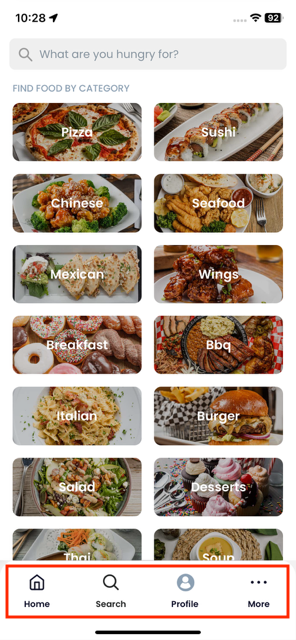
Below is an example of a footer navigation bar feature that is common to multiple screen -
|
|
327
327
|
|
|
328
|
-
|
|
329
329
|
|
|
330
330
|
|
|
331
331
|
### Defining a ScreenSection
|
|
@@ -334,24 +334,24 @@ Your `ScreenSection` class definitions should be contained within individual `.r
|
|
|
334
334
|
folder of your test automation project, where `<platform>` is typically `mac`, `ios`, or `android`. For each screen section in your
|
|
335
335
|
app, you will typically have to define a `ScreenSection` for each platform version of your app.
|
|
336
336
|
|
|
337
|
-
|
|
338
|
-
├── config
|
|
339
|
-
├── features
|
|
340
|
-
│ ├── step_definitions
|
|
341
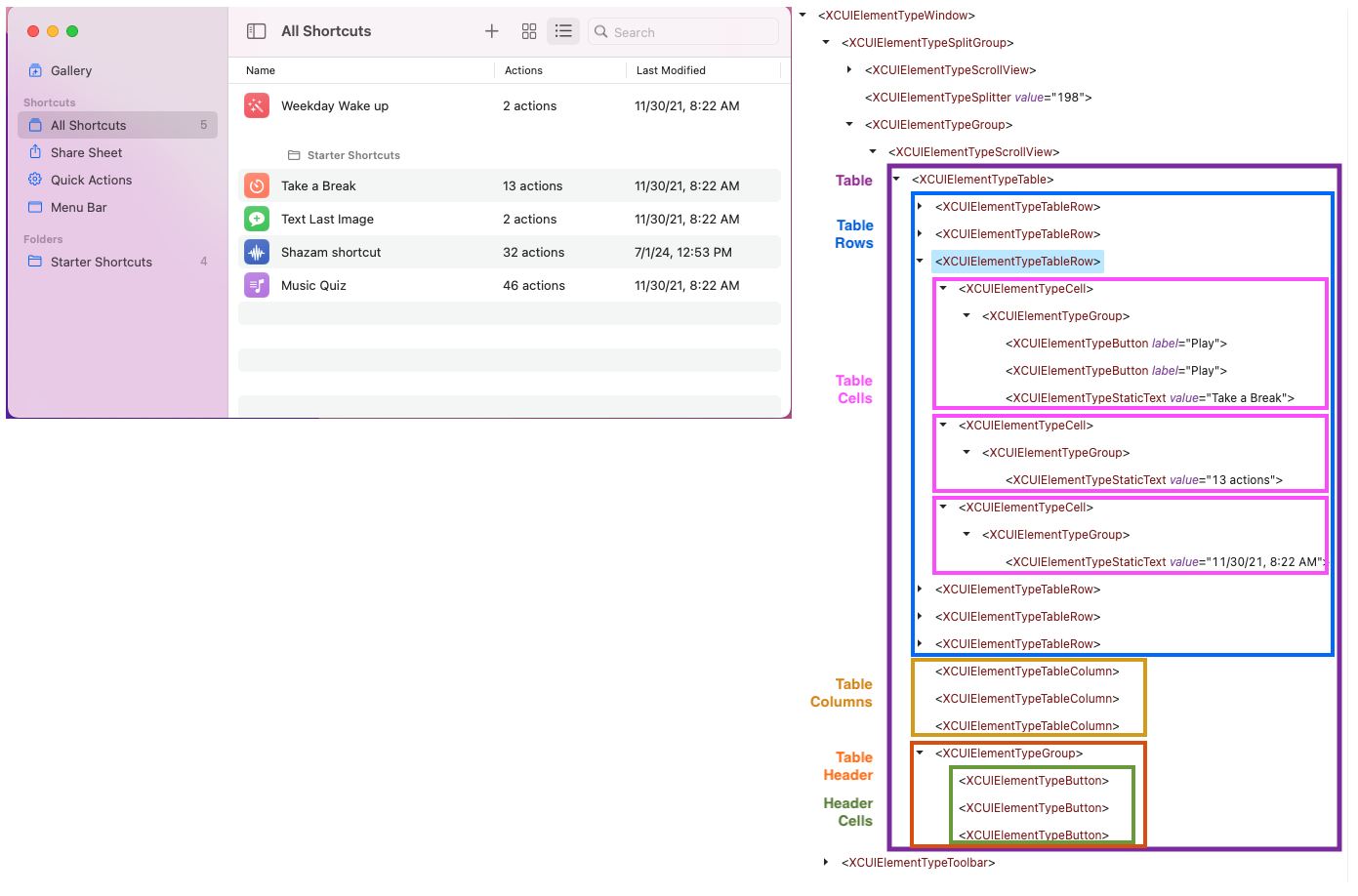
|
-
│ ├── support
|
|
342
|
-
│ │ ├── android
|
|
343
|
-
| | | ├── screens
|
|
344
|
-
| | | └── sections
|
|
345
|
-
│ │ ├── ios
|
|
346
|
-
| | | ├── screens
|
|
347
|
-
| | | └── sections
|
|
337
|
+
📁 my_automation_project
|
|
338
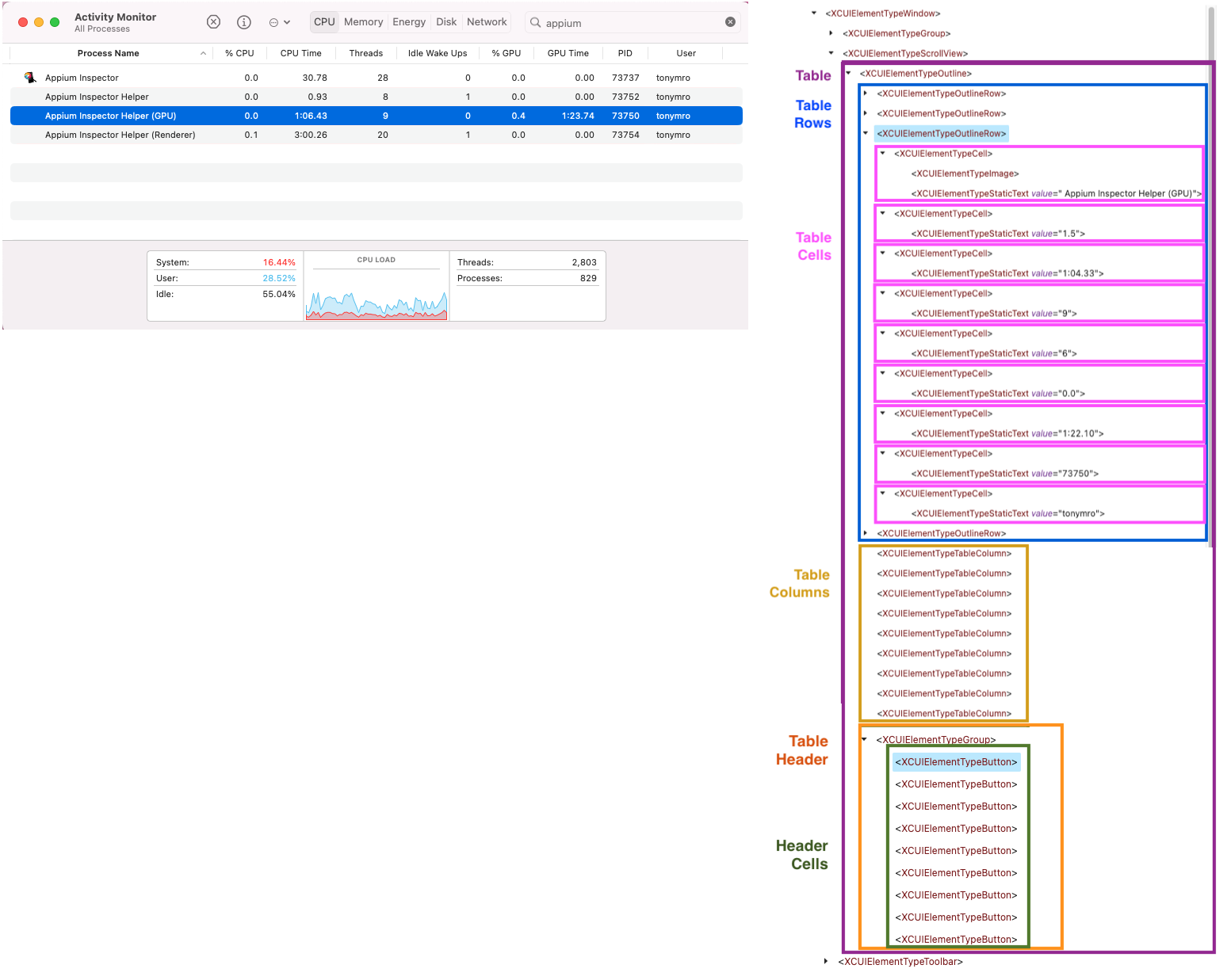
|
+
├── 📁 config
|
|
339
|
+
├── 📁 features
|
|
340
|
+
│ ├── 📁 step_definitions
|
|
341
|
+
│ ├── 📁 support
|
|
342
|
+
│ │ ├── 📁 android
|
|
343
|
+
| | | ├── 📁 screens
|
|
344
|
+
| | | └── 📁 sections
|
|
345
|
+
│ │ ├── 📁 ios
|
|
346
|
+
| | | ├── 📁 screens
|
|
347
|
+
| | | └── 📁 sections
|
|
348
348
|
│ │ ├── mac
|
|
349
|
-
| | | ├── screens
|
|
350
|
-
| | | └── sections
|
|
351
|
-
│ │ ├── env.rb
|
|
352
|
-
│ │ └── hooks.rb
|
|
353
|
-
├── Gemfile
|
|
354
|
-
└── README.md
|
|
349
|
+
| | | ├── 📁 screens
|
|
350
|
+
| | | └── 📁 sections
|
|
351
|
+
│ │ ├── 📄 env.rb
|
|
352
|
+
│ │ └── 📄 hooks.rb
|
|
353
|
+
├── 📄 Gemfile
|
|
354
|
+
└── 📄 README.md
|
|
355
355
|
|
|
356
356
|
|
|
357
357
|
You define a new `ScreenSection` as shown below:
|
|
@@ -381,7 +381,7 @@ Elements** are added to your `ScreenSection` class definition as shown below:
|
|
|
381
381
|
class NavMenu < TestCentricity::ScreenSection
|
|
382
382
|
trait(:section_name) { 'Nav Menu' }
|
|
383
383
|
trait(:section_locator) { { xpath: '//XCUIElementTypeScrollView' } }
|
|
384
|
-
|
|
384
|
+
|
|
385
385
|
# Nav Menu UI elements
|
|
386
386
|
buttons close_button: { accessibility_id: 'close menu' },
|
|
387
387
|
webview_button: { accessibility_id: 'menu item webview' },
|
|
@@ -406,7 +406,7 @@ You can add methods to your `ScreenSection` class definition, as shown below:
|
|
|
406
406
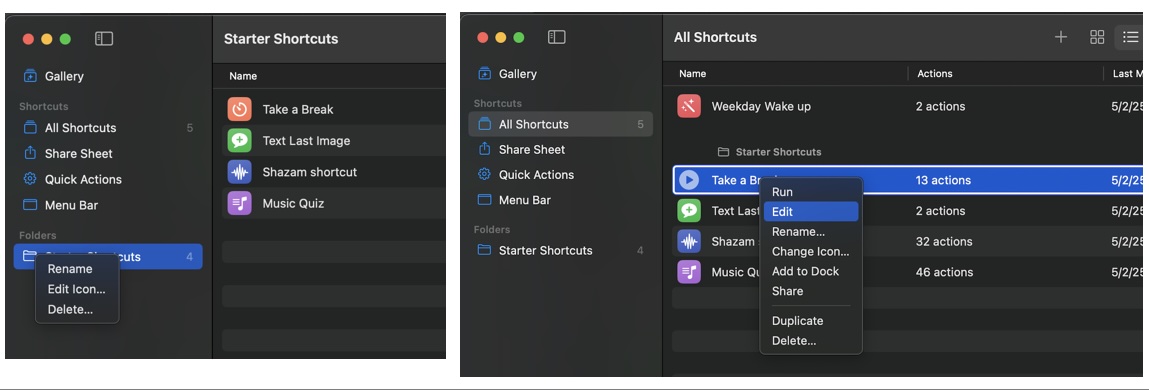
|
class NavMenu < TestCentricity::ScreenSection
|
|
407
407
|
trait(:section_name) { 'Nav Menu' }
|
|
408
408
|
trait(:section_locator) { { xpath: '//XCUIElementTypeScrollView' } }
|
|
409
|
-
|
|
409
|
+
|
|
410
410
|
# Nav Menu UI elements
|
|
411
411
|
buttons close_button: { accessibility_id: 'close menu' },
|
|
412
412
|
webview_button: { accessibility_id: 'menu item webview' },
|
|
@@ -421,36 +421,36 @@ You can add methods to your `ScreenSection` class definition, as shown below:
|
|
|
421
421
|
log_out_button: { accessibility_id: 'menu item log out' },
|
|
422
422
|
api_calls_button: { accessibility_id: 'menu item api calls' },
|
|
423
423
|
sauce_video_button: { accessibility_id: 'menu item sauce bot video' }
|
|
424
|
-
|
|
424
|
+
|
|
425
425
|
def verify_ui
|
|
426
426
|
ui = {
|
|
427
|
-
|
|
428
|
-
|
|
429
|
-
|
|
430
|
-
|
|
431
|
-
|
|
432
|
-
|
|
433
|
-
|
|
434
|
-
|
|
435
|
-
|
|
436
|
-
|
|
437
|
-
|
|
438
|
-
|
|
439
|
-
|
|
440
|
-
|
|
427
|
+
self => { visible: true },
|
|
428
|
+
close_button => { visible: true, enabled: true },
|
|
429
|
+
webview_button => { visible: true, enabled: true, caption: 'Webview' },
|
|
430
|
+
qr_code_button => { visible: true, enabled: true, caption: 'QR Code Scanner' },
|
|
431
|
+
geo_location_button => { visible: true, enabled: true, caption: 'Geo Location' },
|
|
432
|
+
drawing_button => { visible: true, enabled: true, caption: 'Drawing' },
|
|
433
|
+
report_a_bug_button => { visible: true, enabled: true, caption: 'Report A Bug' },
|
|
434
|
+
about_button => { visible: true, enabled: true, caption: 'About' },
|
|
435
|
+
reset_app_button => { visible: true, enabled: true, caption: 'Reset App State' },
|
|
436
|
+
biometrics_button => { visible: true, enabled: true, caption: 'FaceID' },
|
|
437
|
+
log_in_button => { visible: true, enabled: true, caption: 'Log In' },
|
|
438
|
+
log_out_button => { visible: true, enabled: true, caption: 'Log Out' },
|
|
439
|
+
api_calls_button => { visible: true, enabled: true, caption: 'Api Calls' },
|
|
440
|
+
sauce_video_button => { visible: true, enabled: true, caption: 'Sauce Bot Video' }
|
|
441
441
|
}
|
|
442
442
|
verify_ui_states(ui)
|
|
443
443
|
end
|
|
444
|
-
|
|
444
|
+
|
|
445
445
|
def close
|
|
446
446
|
close_button.click
|
|
447
447
|
self.wait_until_hidden(3)
|
|
448
448
|
end
|
|
449
|
-
|
|
449
|
+
|
|
450
450
|
def verify_closed
|
|
451
451
|
ui = {
|
|
452
|
-
|
|
453
|
-
|
|
452
|
+
self => { visible: true },
|
|
453
|
+
close_button => { visible: false }
|
|
454
454
|
}
|
|
455
455
|
verify_ui_states(ui)
|
|
456
456
|
end
|
|
@@ -525,6 +525,9 @@ Supported `AppUIElement` elementTypes and their declarations have the following
|
|
|
525
525
|
switch :switch_name, { locator_strategy: locator_identifier }
|
|
526
526
|
element :element_name, { locator_strategy: locator_identifier }
|
|
527
527
|
alert :alert_name, { locator_strategy: locator_identifier }
|
|
528
|
+
menu :menu_name, { locator_strategy: locator_identifier }
|
|
529
|
+
menubar :menubar_name, { locator_strategy: locator_identifier }
|
|
530
|
+
table :table_name, { locator_strategy: locator_identifier }
|
|
528
531
|
end
|
|
529
532
|
```
|
|
530
533
|
*Multiple element declarations:*
|
|
@@ -551,6 +554,8 @@ Supported `AppUIElement` elementTypes and their declarations have the following
|
|
|
551
554
|
image_X_name: { locator_strategy: locator_identifier }
|
|
552
555
|
alerts alert_1_name: { locator_strategy: locator_identifier },
|
|
553
556
|
alert_X_name: { locator_strategy: locator_identifier }
|
|
557
|
+
tables table_1_name: { locator_strategy: locator_identifier },
|
|
558
|
+
table_X_name: { locator_strategy: locator_identifier }
|
|
554
559
|
end
|
|
555
560
|
```
|
|
556
561
|
Refer to the Class List documentation for the `ScreenObject` and `ScreenSection` classes for details on the class methods
|
|
@@ -649,11 +654,11 @@ properties of multiple UI elements on a `ScreenObject` or `ScreenSection`. The `
|
|
|
649
654
|
containing key/hash pairs of UI elements and their properties or attributes to be verified.
|
|
650
655
|
```ruby
|
|
651
656
|
ui = {
|
|
652
|
-
|
|
653
|
-
|
|
654
|
-
|
|
655
|
-
|
|
656
|
-
|
|
657
|
+
object1 => { property: expected_state },
|
|
658
|
+
object2 => { property1: expected_state, property2: expected_state },
|
|
659
|
+
object3 => { property: expected_state }
|
|
660
|
+
}
|
|
661
|
+
verify_ui_states(ui)
|
|
657
662
|
```
|
|
658
663
|
The `verify_ui_states` method automatically scrolls UI elements that are expected to be visible into view. Auto-scrolling
|
|
659
664
|
only occurs on the vertical axis (down, then up). Setting the `auto_scroll` parameter to `false` prevents automatic scrolling
|
|
@@ -712,6 +717,15 @@ The `verify_ui_states` method supports the following property/state pairs:
|
|
|
712
717
|
:itemcount Integer
|
|
713
718
|
:item_data Array of Hash
|
|
714
719
|
|
|
720
|
+
**Tables**
|
|
721
|
+
|
|
722
|
+
:rowcount Integer
|
|
723
|
+
:columncount Integer
|
|
724
|
+
:columnheaders Array of String
|
|
725
|
+
:cell Hash
|
|
726
|
+
:row Hash
|
|
727
|
+
:column Hash
|
|
728
|
+
|
|
715
729
|
#### Comparison States
|
|
716
730
|
|
|
717
731
|
The `verify_ui_states` method supports comparison states using property/comparison state pairs:
|
|
@@ -748,42 +762,42 @@ The `verify_ui_states` method also supports I18n string translations using prope
|
|
|
748
762
|
The example below depicts the usage of the `verify_ui_states` method to verify that the captions for navigation menu items
|
|
749
763
|
are correctly translated.
|
|
750
764
|
|
|
751
|
-

|
|
752
766
|
```ruby
|
|
753
767
|
def verify_menu
|
|
754
768
|
ui = {
|
|
755
|
-
|
|
756
|
-
|
|
757
|
-
|
|
758
|
-
|
|
759
|
-
|
|
760
|
-
|
|
761
|
-
|
|
762
|
-
|
|
763
|
-
|
|
764
|
-
|
|
765
|
-
|
|
766
|
-
|
|
767
|
-
|
|
768
|
-
|
|
769
|
-
|
|
770
|
-
|
|
771
|
-
|
|
772
|
-
|
|
773
|
-
|
|
774
|
-
|
|
775
|
-
|
|
776
|
-
|
|
777
|
-
|
|
778
|
-
|
|
779
|
-
|
|
780
|
-
|
|
781
|
-
|
|
782
|
-
|
|
783
|
-
|
|
784
|
-
|
|
785
|
-
|
|
786
|
-
|
|
769
|
+
menu_title => {
|
|
770
|
+
visible: true,
|
|
771
|
+
caption: { translate: 'NavMenu.title' }
|
|
772
|
+
},
|
|
773
|
+
recipes_item => {
|
|
774
|
+
visible: true,
|
|
775
|
+
caption: { translate: 'NavMenu.recipes' }
|
|
776
|
+
},
|
|
777
|
+
browser_item => {
|
|
778
|
+
visible: true,
|
|
779
|
+
caption: { translate: 'NavMenu.browser' }
|
|
780
|
+
},
|
|
781
|
+
groceries_item => {
|
|
782
|
+
visible: true,
|
|
783
|
+
caption: { translate: 'NavMenu.groceries' }
|
|
784
|
+
},
|
|
785
|
+
pantry_item => {
|
|
786
|
+
visible: true,
|
|
787
|
+
caption: { translate: 'NavMenu.pantry' }
|
|
788
|
+
},
|
|
789
|
+
meals_item => {
|
|
790
|
+
visible: true,
|
|
791
|
+
caption: { translate: 'NavMenu.meals' }
|
|
792
|
+
},
|
|
793
|
+
menus_item => {
|
|
794
|
+
visible: true,
|
|
795
|
+
caption: { translate: 'NavMenu.menus' }
|
|
796
|
+
},
|
|
797
|
+
settings_item => {
|
|
798
|
+
visible: true,
|
|
799
|
+
caption: { translate: 'NavMenu.settings' }
|
|
800
|
+
}
|
|
787
801
|
}
|
|
788
802
|
verify_ui_states(ui)
|
|
789
803
|
end
|
|
@@ -837,9 +851,10 @@ Each supported language/locale combination has a corresponding `.yml` file. I18n
|
|
|
837
851
|
| Language (Country) | File name |
|
|
838
852
|
|-----------------------|-----------|
|
|
839
853
|
| English | en.yml |
|
|
854
|
+
| English (Australia) | en-AU.yml |
|
|
840
855
|
| English (Canada) | en-CA.yml |
|
|
841
|
-
| French (Canada) | fr-CA.yml |
|
|
842
856
|
| French | fr.yml |
|
|
857
|
+
| French (Canada) | fr-CA.yml |
|
|
843
858
|
| Spanish | es.yml |
|
|
844
859
|
| German | de.yml |
|
|
845
860
|
| Portuguese (Brazil) | pt-BR.yml |
|
|
@@ -847,19 +862,23 @@ Each supported language/locale combination has a corresponding `.yml` file. I18n
|
|
|
847
862
|
|
|
848
863
|
Baseline translation strings are stored in `.yml` files in the `config/locales/` folder.
|
|
849
864
|
|
|
850
|
-
|
|
851
|
-
├── config
|
|
852
|
-
│ ├── locales
|
|
853
|
-
│ │ ├── en.yml
|
|
854
|
-
│ │ ├──
|
|
855
|
-
│ │ ├──
|
|
856
|
-
│ │ ├──
|
|
857
|
-
│ │
|
|
858
|
-
│ ├──
|
|
859
|
-
│
|
|
860
|
-
|
|
861
|
-
├──
|
|
862
|
-
└──
|
|
865
|
+
📁 my_automation_project/
|
|
866
|
+
├── 📁 config/
|
|
867
|
+
│ ├── 📁 locales/
|
|
868
|
+
│ │ ├── 📄 en.yml
|
|
869
|
+
│ │ ├── 📄 en-AU.yml
|
|
870
|
+
│ │ ├── 📄 es.yml
|
|
871
|
+
│ │ ├── 📄 de.yml
|
|
872
|
+
│ │ ├── 📄 fr.yml
|
|
873
|
+
│ │ ├── 📄 fr-CA.yml
|
|
874
|
+
│ │ ├── 📄 pt-BR.yml
|
|
875
|
+
│ │ └── 📄 pt-PT.yml
|
|
876
|
+
│ ├── 📁 test_data/
|
|
877
|
+
│ └── 📄 cucumber.yml
|
|
878
|
+
├── 📁 downloads/
|
|
879
|
+
├── 📁 features/
|
|
880
|
+
├── 📄 Gemfile
|
|
881
|
+
└── 📄 README.md
|
|
863
882
|
|
|
864
883
|
|
|
865
884
|
### Working With Custom AppUIElements
|
|
@@ -871,13 +890,13 @@ be different for iOS vs. Android mobile platforms. Below is an example of the ve
|
|
|
871
890
|
for a cross-platform application implemented using React Native (iOS version on the left, Android version on the right).
|
|
872
891
|
Each ListView contains 30 items:
|
|
873
892
|
|
|
874
|
-

|
|
875
894
|
|
|
876
895
|
While the iOS and Android ListViews appear to be identical in the app, performing an inspection of each application's GUI
|
|
877
896
|
using Appium Inspector reveals differences in the object hierarchy as depicted below (iOS version on left, Android version
|
|
878
897
|
on the right):
|
|
879
898
|
|
|
880
|
-

|
|
881
900
|
|
|
882
901
|
The inspection of the ListView object hierarchy reveals that for the iOS version of the app, list items are made up of
|
|
883
902
|
`XCUIElementTypeOther` objects, and that for the Android version of the app, list items are made up of `android.view.ViewGroup`
|
|
@@ -904,10 +923,10 @@ iOS Cloud List `ScreenObject`
|
|
|
904
923
|
class CloudListScreen < TestCentricity::ScreenObject
|
|
905
924
|
trait(:screen_name) { 'Cloud List' }
|
|
906
925
|
trait(:screen_locator) { { class_chain: '**/XCUIElementTypeWindow/XCUIElementTypeOther/XCUIElementTypeOther/XCUIElementTypeOther' } }
|
|
907
|
-
|
|
926
|
+
|
|
908
927
|
# Cloud List screen UI elements
|
|
909
928
|
list :cloud_list, { class_chain: '**/XCUIElementTypeScrollView/XCUIElementTypeOther' }
|
|
910
|
-
|
|
929
|
+
|
|
911
930
|
def initialize
|
|
912
931
|
super
|
|
913
932
|
# define the list item element for the Cloud list object
|
|
@@ -922,10 +941,10 @@ Android CloudListScreen `ScreenObject`
|
|
|
922
941
|
class CloudListScreen < TestCentricity::ScreenObject
|
|
923
942
|
trait(:screen_name) { 'Cloud List' }
|
|
924
943
|
trait(:screen_locator) { { xpath: '//android.widget.FrameLayout[@resource-id="android:id/content"]/android.view.ViewGroup' } }
|
|
925
|
-
|
|
944
|
+
|
|
926
945
|
# Cloud List screen UI elements
|
|
927
946
|
list :cloud_list, { xpath: '//android.widget.ScrollView/android.view.ViewGroup' }
|
|
928
|
-
|
|
947
|
+
|
|
929
948
|
def initialize
|
|
930
949
|
super
|
|
931
950
|
# define the list item element for the Cloud list object
|
|
@@ -941,13 +960,13 @@ Android CloudListScreen `ScreenObject`
|
|
|
941
960
|
Below is an example of a horizontal scrolling "Carousel" style ListView implementations on the Swipe screen of a cross-platform
|
|
942
961
|
application. Each ListView contains 6 list items.
|
|
943
962
|
|
|
944
|
-

|
|
945
964
|
|
|
946
965
|
While the iOS and Android ListViews appear to be identical in the app, performing an inspection of each application's GUI
|
|
947
966
|
using Appium Inspector reveals differences in the object hierarchy as depicted below (iOS version on left, Android version
|
|
948
967
|
on the right):
|
|
949
968
|
|
|
950
|
-

|
|
951
970
|
|
|
952
971
|
As in the previous example for the vertical scrolling ListView, the inspection of the Carousel ListView object hierarchy
|
|
953
972
|
reveals that for the iOS version of the app, list items are again made up of `XCUIElementTypeOther` objects, and that for
|
|
@@ -965,10 +984,10 @@ iOS Swipe `ScreenObject`
|
|
|
965
984
|
class SwipeScreen < TestCentricity::ScreenObject
|
|
966
985
|
trait(:screen_name) { 'Swipe' }
|
|
967
986
|
trait(:screen_locator) { { accessibility_id: 'Swipe-screen' } }
|
|
968
|
-
|
|
987
|
+
|
|
969
988
|
# Swipe screen UI elements
|
|
970
989
|
list :carousel_list, { accessibility_id: 'Carousel' }
|
|
971
|
-
|
|
990
|
+
|
|
972
991
|
def initialize
|
|
973
992
|
super
|
|
974
993
|
# define the list item element for the Carousel list object
|
|
@@ -986,10 +1005,10 @@ Android Swipe `ScreenObject`
|
|
|
986
1005
|
class SwipeScreen < TestCentricity::ScreenObject
|
|
987
1006
|
trait(:screen_name) { 'Swipe' }
|
|
988
1007
|
trait(:screen_locator) { { accessibility_id: 'Swipe-screen' } }
|
|
989
|
-
|
|
1008
|
+
|
|
990
1009
|
# Swipe screen UI elements
|
|
991
1010
|
list :carousel_list, { accessibility_id: 'Carousel' }
|
|
992
|
-
|
|
1011
|
+
|
|
993
1012
|
def initialize
|
|
994
1013
|
super
|
|
995
1014
|
# define the list item element for the Carousel list object
|
|
@@ -999,7 +1018,7 @@ Android Swipe `ScreenObject`
|
|
|
999
1018
|
}
|
|
1000
1019
|
carousel_list.define_list_elements(list_spec)
|
|
1001
1020
|
end
|
|
1002
|
-
|
|
1021
|
+
end
|
|
1003
1022
|
```
|
|
1004
1023
|
|
|
1005
1024
|
|
|
@@ -1008,12 +1027,12 @@ Android Swipe `ScreenObject`
|
|
|
1008
1027
|
Below is an example of a PickerWheel (iOS) and Popup (Android) style ListView implementations on the Form Components screen
|
|
1009
1028
|
of a cross-platform application.
|
|
1010
1029
|
|
|
1011
|
-

|
|
1012
1031
|
|
|
1013
1032
|
Performing an inspection of each application's GUI using Appium Inspector reveals differences in the object hierarchy as
|
|
1014
1033
|
depicted below (iOS version on left, Android version on the right):
|
|
1015
1034
|
|
|
1016
|
-

|
|
1017
1036
|
|
|
1018
1037
|
The inspection of the PickerWheel and Popup ListView object hierarchies reveals that for the iOS version of the app, list
|
|
1019
1038
|
items are again made up of `XCUIElementTypeOther` objects, and that for the Android version of the app, list items are made
|
|
@@ -1037,10 +1056,10 @@ Android FormScreen `ScreenObject`
|
|
|
1037
1056
|
class FormScreen < TestCentricity::ScreenObject
|
|
1038
1057
|
trait(:screen_name) { 'Form' }
|
|
1039
1058
|
trait(:screen_locator) { { accessibility_id: 'Forms-screen' } }
|
|
1040
|
-
|
|
1059
|
+
|
|
1041
1060
|
# Form screen UI elements
|
|
1042
1061
|
list :drop_down_menu, { id: 'com.wdiodemoapp:id/select_dialog_listview' }
|
|
1043
|
-
|
|
1062
|
+
|
|
1044
1063
|
def initialize
|
|
1045
1064
|
super
|
|
1046
1065
|
# define the list item element for the drop-down list object
|
|
@@ -1050,6 +1069,100 @@ Android FormScreen `ScreenObject`
|
|
|
1050
1069
|
end
|
|
1051
1070
|
```
|
|
1052
1071
|
|
|
1072
|
+
#### Table AppUIElements
|
|
1073
|
+
|
|
1074
|
+
The basic iOS or MacOS `AppTable` element is typically composed of the parent `XCUIElementTypeTable` object, containing
|
|
1075
|
+
one or more rows (`XCUIElementTypeTableRow`), and containing one or more columns (`XCUIElementTypeTableColumn`). Tables
|
|
1076
|
+
can also include an optional header (`XCUIElementTypeGroup`) containing one or more header cells (`XCUIElementTypeButton`).
|
|
1077
|
+
|
|
1078
|
+
Table cells are typically embedded in each parent row object, and are implemented using a parent `XCUIElementTypeCell`
|
|
1079
|
+
with a child `XCUIElementTypeStaticText` object that provides access to the text content of the table cell.
|
|
1080
|
+
|
|
1081
|
+
As such, when an iOS or MacOS `AppTable` element is instantiated in a `ScreenObject` or `ScreenSection`, the table's component
|
|
1082
|
+
objects and their locator strategies are defined as follows:
|
|
1083
|
+
```ruby
|
|
1084
|
+
{
|
|
1085
|
+
table_row: { class: 'XCUIElementTypeTableRow' },
|
|
1086
|
+
table_column: { class: 'XCUIElementTypeTableColumn' },
|
|
1087
|
+
table_cell: { class_chain: '**/XCUIElementTypeCell/XCUIElementTypeStaticText' },
|
|
1088
|
+
table_header: { class: 'XCUIElementTypeGroup' },
|
|
1089
|
+
table_header_cell: { class: 'XCUIElementTypeButton' }
|
|
1090
|
+
}
|
|
1091
|
+
```
|
|
1092
|
+
|
|
1093
|
+
An example of this table implementation in the MacOS Shortcuts app, and its object hierarchy as viewed by Appium Inspector,
|
|
1094
|
+
is depicted below:
|
|
1095
|
+
|
|
1096
|
+
|
|
1097
|
+
|
|
1098
|
+
The above table object hierarchy for the Shortcuts table shows that access to the text content of the table's cells will
|
|
1099
|
+
fail using the typical implementation of `XCUIElementTypeCell/XCUIElementTypeStaticText` cell objects. This is due to the
|
|
1100
|
+
presence of an `XCUIElementTypeGroup` object between the `XCUIElementTypeCell` parent object and the `XCUIElementTypeStaticText`
|
|
1101
|
+
cell text caption object.
|
|
1102
|
+
|
|
1103
|
+
The `AppTable.define_table_elements` method provides a means of specifying the various elements that make up the key
|
|
1104
|
+
components of an `AppTable` object, or for overriding the default component locator strategy. The method accepts a hash
|
|
1105
|
+
of table component designators (key) and a locator strategy (value) for identifying the component in the `AppTable` object
|
|
1106
|
+
hierarchy.
|
|
1107
|
+
|
|
1108
|
+
Valid table component designators are:
|
|
1109
|
+
* `table_row:`
|
|
1110
|
+
* `table_column:`
|
|
1111
|
+
* `table_cell:`
|
|
1112
|
+
* `table_header:`
|
|
1113
|
+
* `table_header_cell:`
|
|
1114
|
+
|
|
1115
|
+
Valid component `locator_strategy` are:
|
|
1116
|
+
* `class:`
|
|
1117
|
+
* `xpath:`
|
|
1118
|
+
* `predicate:` (MacOS and iOS only)
|
|
1119
|
+
* `class_chain:` (MacOS and iOS only)
|
|
1120
|
+
|
|
1121
|
+
If you were developing automated tests for the MacOS Shortcuts app, your `ShortcutsAppScreen` screen object's `initialize`
|
|
1122
|
+
method would use the `AppTable.define_table_elements` method to define the locator strategy for the `table_cell` component.
|
|
1123
|
+
```ruby
|
|
1124
|
+
class ShortcutsAppScreen < TestCentricity::ScreenObject
|
|
1125
|
+
trait(:screen_name) { 'Shortcuts' }
|
|
1126
|
+
trait(:screen_locator) { { class_chain: '**/XCUIElementTypeWindow' } }
|
|
1127
|
+
|
|
1128
|
+
# Shortcuts screen UI elements
|
|
1129
|
+
tables sidebar_table: { predicate: 'identifier == "library.sidebar"' },
|
|
1130
|
+
view_table: { predicate: 'identifier == "view.library.table"' }
|
|
1131
|
+
|
|
1132
|
+
def initialize
|
|
1133
|
+
super
|
|
1134
|
+
# define the cell element for the Shortcuts table object
|
|
1135
|
+
table_spec = { table_cell: { class_chain: '**/XCUIElementTypeCell/XCUIElementTypeGroup/XCUIElementTypeStaticText' } }
|
|
1136
|
+
view_table.define_table_elements(table_spec)
|
|
1137
|
+
end
|
|
1138
|
+
end
|
|
1139
|
+
```
|
|
1140
|
+
|
|
1141
|
+
Another `AppTable` implementation using elements other than the default `AppTable` components can be found in the MacOS
|
|
1142
|
+
Activity Monitor app (see below). An inspection of the Activity Monitor's table object hierarchy for the app reveals that
|
|
1143
|
+
it is an `XCUIElementTypeOutline` object comprised of `XCUIElementTypeOutlineRow` elements representing the table's rows.
|
|
1144
|
+
|
|
1145
|
+
|
|
1146
|
+
|
|
1147
|
+
The `ActivityMonitorScreen` screen object's `initialize` method in the code snippet below demonstrates the use of the
|
|
1148
|
+
`AppTable.define_table_elements` method to define the locator strategy for the `table_row` component.
|
|
1149
|
+
```ruby
|
|
1150
|
+
class ActivityMonitorScreen < TestCentricity::ScreenObject
|
|
1151
|
+
trait(:screen_name) { 'Activity Monitor' }
|
|
1152
|
+
trait(:screen_locator) { { class_chain: '**/XCUIElementTypeWindow' } }
|
|
1153
|
+
|
|
1154
|
+
# Shortcuts screen UI elements
|
|
1155
|
+
table :process_table, { class_chain: '**/XCUIElementTypeScrollView/XCUIElementTypeOutline' }
|
|
1156
|
+
|
|
1157
|
+
def initialize
|
|
1158
|
+
super
|
|
1159
|
+
# define the row element for the Activity Monitor table object
|
|
1160
|
+
table_spec = { table_row: { class: 'XCUIElementTypeOutlineRow' } }
|
|
1161
|
+
process_table.define_table_elements(table_spec)
|
|
1162
|
+
end
|
|
1163
|
+
end
|
|
1164
|
+
```
|
|
1165
|
+
|
|
1053
1166
|
|
|
1054
1167
|
---
|
|
1055
1168
|
## MacOS Application Menu Bar and Menus
|
|
@@ -1076,6 +1189,20 @@ You define a new `MenuBar` as shown below:
|
|
|
1076
1189
|
end
|
|
1077
1190
|
```
|
|
1078
1191
|
|
|
1192
|
+
### Adding a MenuBar to your App's Primary ScreenObject
|
|
1193
|
+
|
|
1194
|
+
You add a `MenuBar` to your app's primary `ScreenObject` as shown below:
|
|
1195
|
+
```ruby
|
|
1196
|
+
class CalculatorAppScreen < TestCentricity::ScreenObject
|
|
1197
|
+
# Calculator App screen UI elements
|
|
1198
|
+
menubar :calc_menu_bar, CalculatorMenuBar
|
|
1199
|
+
end
|
|
1200
|
+
```
|
|
1201
|
+
Once your `ScreenObject` has been instantiated, you can call its `MenuBar` methods as shown below:
|
|
1202
|
+
```ruby
|
|
1203
|
+
num_menus = calculator_screen.calc_menu_bar.get_item_count
|
|
1204
|
+
```
|
|
1205
|
+
|
|
1079
1206
|
### Adding Menus to your MenuBar
|
|
1080
1207
|
|
|
1081
1208
|
A `MenuBar` is typically made up of one or more `Menu` objects, which are added to your `MenuBar` class definition as shown
|
|
@@ -1093,7 +1220,7 @@ below:
|
|
|
1093
1220
|
speech_menu: { class_chain: '**/XCUIElementTypeMenuBarItem[7]' },
|
|
1094
1221
|
window_menu: { class_chain: '**/XCUIElementTypeMenuBarItem[8]' },
|
|
1095
1222
|
help_menu: { class_chain: '**/XCUIElementTypeMenuBarItem[9]' }
|
|
1096
|
-
|
|
1223
|
+
end
|
|
1097
1224
|
```
|
|
1098
1225
|
|
|
1099
1226
|
### Adding Methods to your MenuBar
|
|
@@ -1112,7 +1239,7 @@ You can add methods to your `MenuBar` class definition, as shown below:
|
|
|
1112
1239
|
speech_menu: { class_chain: '**/XCUIElementTypeMenuBarItem[7]' },
|
|
1113
1240
|
window_menu: { class_chain: '**/XCUIElementTypeMenuBarItem[8]' },
|
|
1114
1241
|
help_menu: { class_chain: '**/XCUIElementTypeMenuBarItem[9]' }
|
|
1115
|
-
|
|
1242
|
+
|
|
1116
1243
|
def choose_menu_item(menu, item, method = :mouse)
|
|
1117
1244
|
menu_map = {
|
|
1118
1245
|
calc: calc_menu,
|
|
@@ -1129,7 +1256,7 @@ You can add methods to your `MenuBar` class definition, as shown below:
|
|
|
1129
1256
|
raise "#{menu} is not a supported menu" if menu_obj.nil?
|
|
1130
1257
|
menu_obj.choose_menu_item(item, method)
|
|
1131
1258
|
end
|
|
1132
|
-
|
|
1259
|
+
|
|
1133
1260
|
def verify_menu_bar
|
|
1134
1261
|
ui = {
|
|
1135
1262
|
self => {
|
|
@@ -1180,11 +1307,11 @@ the `initialize` method of your app's `MenuBar` control.
|
|
|
1180
1307
|
The code snippet below demonstrate the use of the `AppMenu.define_menu_elements` method in the `CalculatorMenuBar` object's
|
|
1181
1308
|
`initialize` method to define the keyboard shortcut mapping for 4 of the menu items in the **View** menu and 1 of the menu
|
|
1182
1309
|
items in the **Window** menu of the MacOS Calculator app. Keyboard shortcuts are assigned to the **View** menu items by
|
|
1183
|
-
index (menu items 1,2,3, and 7) and to the **Window** menu by menu item caption (menu item *Show Paper Tape*).
|
|
1310
|
+
index (menu items 1, 2, 3, and 7) and to the **Window** menu by menu item caption (menu item *Show Paper Tape*).
|
|
1184
1311
|
|
|
1185
1312
|
```ruby
|
|
1186
1313
|
class CalculatorMenuBar < TestCentricity::MenuBar
|
|
1187
|
-
|
|
1314
|
+
|
|
1188
1315
|
def initialize(name, parent, locator, context)
|
|
1189
1316
|
super
|
|
1190
1317
|
# define key map for View menu
|
|
@@ -1218,19 +1345,26 @@ key. TestCentricity and XCTest defines the following possible bitmasks for modif
|
|
|
1218
1345
|
```
|
|
1219
1346
|
Refer to [this page](https://github.com/appium/appium-mac2-driver?tab=readme-ov-file#macos-keys) for more information on MacOS keyboard `modifierFlags`.
|
|
1220
1347
|
|
|
1221
|
-
### Adding
|
|
1348
|
+
### Adding Popup Menus to your ScreenObject or ScreenSection
|
|
1222
1349
|
|
|
1223
|
-
|
|
1350
|
+
A MocOS desktop app may have one or more popup menus that can appear on a `ScreenObject` or `ScreenSection`. Below is an
|
|
1351
|
+
example of two different popup menus that can be invoked on the MacOS Shortcuts app - one on sidebar list items, and the
|
|
1352
|
+
other on Shortcuts table items.
|
|
1353
|
+
|
|
1354
|
+
|
|
1355
|
+
|
|
1356
|
+
It is typically not necessary to define more than one popup menu object in your `ScreenObject` or `ScreenSection` class
|
|
1357
|
+
definition, even if there are multiple popups that can be interacted with. Since only one popup can be visible at a time,
|
|
1358
|
+
you only need to define a single popup menu object.
|
|
1359
|
+
|
|
1360
|
+
Popup menus are added to your `ScreenObject` or `ScreenSection` class definition as shown below:
|
|
1224
1361
|
```ruby
|
|
1225
|
-
class
|
|
1226
|
-
#
|
|
1227
|
-
|
|
1362
|
+
class ShortcutsAppScreen < TestCentricity::ScreenObject
|
|
1363
|
+
# Shortcuts App screen UI elements
|
|
1364
|
+
menu :popup_menu, { class_chain: '**/XCUIElementTypeTable/XCUIElementTypeMenu' }
|
|
1365
|
+
menubar :shortcuts_menu_bar, ShortcutsMenuBar
|
|
1228
1366
|
end
|
|
1229
1367
|
```
|
|
1230
|
-
Once your `ScreenObject` has been instantiated, you can call its `MenuBar` methods as shown below:
|
|
1231
|
-
```ruby
|
|
1232
|
-
num_menus = calculator_screen.calc_menu_bar.get_item_count
|
|
1233
|
-
```
|
|
1234
1368
|
|
|
1235
1369
|
|
|
1236
1370
|
---
|
|
@@ -1286,7 +1420,7 @@ scenario is displayed below:
|
|
|
1286
1420
|
Given I am on the Products screen
|
|
1287
1421
|
When I tap the <screen_name> navigation menu item
|
|
1288
1422
|
Then I expect the <screen_name> screen to be correctly displayed
|
|
1289
|
-
|
|
1423
|
+
|
|
1290
1424
|
Examples:
|
|
1291
1425
|
|screen_name |
|
|
1292
1426
|
|Registration |
|
|
@@ -1489,13 +1623,13 @@ Refer to [**Section 10.4 (Using Configuration Specific Profiles in `cucumber.yml
|
|
|
1489
1623
|
##### Local iOS Simulators or Physical Devices using the `options` Hash
|
|
1490
1624
|
|
|
1491
1625
|
When using the `options` hash, the following options and capabilities must be specified:
|
|
1492
|
-
|
|
1493
|
-
|
|
1494
|
-
|
|
1495
|
-
|
|
1496
|
-
|
|
1497
|
-
|
|
1498
|
-
|
|
1626
|
+
- `driver:` must be set to `:appium`
|
|
1627
|
+
- `device_type:` must be set to `:tablet` or `:phone`
|
|
1628
|
+
- `platformName:` must be set to `ios` in the `capabilities:` hash
|
|
1629
|
+
- `'appium:automationName':` must be set to `xcuitest` in the `capabilities:` hash
|
|
1630
|
+
- `'appium:platformVersion':` must be set to the version of iOS on the simulator or physical device
|
|
1631
|
+
- `'appium:deviceName':` must be set to the name of the iOS simulator or physical device
|
|
1632
|
+
- `'appium:app'`: must be set to path where iOS app can be accessed and loaded
|
|
1499
1633
|
|
|
1500
1634
|
```ruby
|
|
1501
1635
|
options = {
|
|
@@ -1524,21 +1658,21 @@ Below is an example of an `options` hash for specifying a connection to a locall
|
|
|
1524
1658
|
simulator. The `options` hash includes options for specifying the driver name, global driver scope, and setting the simulated
|
|
1525
1659
|
device orientation to portrait mode.
|
|
1526
1660
|
```ruby
|
|
1527
|
-
|
|
1528
|
-
|
|
1529
|
-
|
|
1530
|
-
|
|
1531
|
-
|
|
1532
|
-
|
|
1533
|
-
|
|
1534
|
-
|
|
1535
|
-
|
|
1536
|
-
|
|
1537
|
-
|
|
1538
|
-
|
|
1539
|
-
}
|
|
1661
|
+
options = {
|
|
1662
|
+
driver: :appium,
|
|
1663
|
+
device_type: :tablet,
|
|
1664
|
+
driver_name: :my_custom_ipad_driver,
|
|
1665
|
+
global_driver: true,
|
|
1666
|
+
capabilities: {
|
|
1667
|
+
platformName: :ios,
|
|
1668
|
+
'appium:platformVersion': '15.4',
|
|
1669
|
+
'appium:deviceName': 'iPad Pro (12.9-inch) (5th generation)',
|
|
1670
|
+
'appium:automationName': 'XCUITest',
|
|
1671
|
+
'appium:orientation': 'PORTRAIT',
|
|
1672
|
+
'appium:app': Environ.current.ios_app_path
|
|
1540
1673
|
}
|
|
1541
|
-
|
|
1674
|
+
}
|
|
1675
|
+
AppiumConnect.initialize_appium(options)
|
|
1542
1676
|
```
|
|
1543
1677
|
|
|
1544
1678
|
#### Connecting to Locally Hosted Android Simulators or Physical Devices
|
|
@@ -1576,13 +1710,13 @@ Refer to [**Section 10.4 (Using Configuration Specific Profiles in `cucumber.yml
|
|
|
1576
1710
|
##### Local Android Simulators or Physical Devices using the `options` Hash
|
|
1577
1711
|
|
|
1578
1712
|
When using the `options` hash, the following options and capabilities must be specified:
|
|
1579
|
-
|
|
1580
|
-
|
|
1581
|
-
|
|
1582
|
-
|
|
1583
|
-
|
|
1584
|
-
|
|
1585
|
-
|
|
1713
|
+
- `driver:` must be set to `:appium`
|
|
1714
|
+
- `device_type:` must be set to `:tablet` or `:phone`
|
|
1715
|
+
- `platformName:` must be set to `Android` in the `capabilities:` hash
|
|
1716
|
+
- `'appium:automationName':` must be set to `UiAutomator2` in the `capabilities:` hash
|
|
1717
|
+
- `'appium:platformVersion':` must be set to the version of Android on the simulator or physical device
|
|
1718
|
+
- `'appium:deviceName':` must be set to the Android Virtual Device ID
|
|
1719
|
+
- `'appium:app'`: must be set to path where Android `.apk` file can be accessed and loaded
|
|
1586
1720
|
|
|
1587
1721
|
```ruby
|
|
1588
1722
|
options = {
|
|
@@ -1605,7 +1739,7 @@ When using the `options` hash, the following options and capabilities must be sp
|
|
|
1605
1739
|
>
|
|
1606
1740
|
> ℹ️ If an `endpoint:` is not specified in the `options` hash, then the default remote endpoint URL of ``http://127.0.0.1:4723/wd/hub``
|
|
1607
1741
|
will be used.
|
|
1608
|
-
>
|
|
1742
|
+
>
|
|
1609
1743
|
> ℹ️ If `global_driver:` is not specified in the `options` hash, then the driver will be initialized without global scope.
|
|
1610
1744
|
|
|
1611
1745
|
|
|
@@ -1644,7 +1778,7 @@ tests, place the code shown below in your `hooks.rb` file.
|
|
|
1644
1778
|
$server.start
|
|
1645
1779
|
end
|
|
1646
1780
|
end
|
|
1647
|
-
|
|
1781
|
+
|
|
1648
1782
|
AfterAll do
|
|
1649
1783
|
# close Appium driver
|
|
1650
1784
|
TestCentricity::AppiumConnect.quit_driver
|
|
@@ -1681,7 +1815,7 @@ body of an example group:
|
|
|
1681
1815
|
$server = TestCentricity::AppiumServer.new
|
|
1682
1816
|
$server.start
|
|
1683
1817
|
end
|
|
1684
|
-
|
|
1818
|
+
|
|
1685
1819
|
after(:context) do
|
|
1686
1820
|
# terminate Appium Server after all of the examples in this group
|
|
1687
1821
|
$server.stop if Environ.driver == :appium && $server.running?
|
|
@@ -1708,9 +1842,9 @@ devices. BrowserStack uses only real physical devices - simulators are not avail
|
|
|
1708
1842
|
|
|
1709
1843
|
Refer to the following pages for information on uploading your iOS `.ipa` or Android `.apk` app files to the BrowserStack
|
|
1710
1844
|
servers:
|
|
1711
|
-
|
|
1712
|
-
|
|
1713
|
-
|
|
1845
|
+
- [Upload apps from filesystem](https://www.browserstack.com/docs/app-automate/appium/upload-app-from-filesystem)
|
|
1846
|
+
- [Upload apps using public URL](https://www.browserstack.com/docs/app-automate/appium/upload-app-using-public-url)
|
|
1847
|
+
- [Define custom ID for app](https://www.browserstack.com/docs/app-automate/appium/upload-app-define-custom-id)
|
|
1714
1848
|
|
|
1715
1849
|
The preferred method of uploading an app to BrowserStack is to define a custom test ID for your apps to avoid having to
|
|
1716
1850
|
modify your test configuration data with a new `app_url` after every app upload. Use the same custom test ID every time
|
|
@@ -1754,13 +1888,13 @@ Refer to [**Section 10.4 (Using Configuration Specific Profiles in `cucumber.yml
|
|
|
1754
1888
|
##### BrowserStack Mobile Devices using the `options` Hash
|
|
1755
1889
|
|
|
1756
1890
|
When using the `options` hash, the following options and capabilities must be specified:
|
|
1757
|
-
|
|
1758
|
-
|
|
1759
|
-
|
|
1760
|
-
|
|
1761
|
-
|
|
1762
|
-
|
|
1763
|
-
|
|
1891
|
+
- `driver:` must be set to `:browserstack`
|
|
1892
|
+
- `device_type:` must be set to `:tablet` or `:phone`
|
|
1893
|
+
- `platformName:` must be set to `ios` or `android` in the `capabilities:` hash
|
|
1894
|
+
- `'appium:automationName':` must be set to to `XCUITest` for iOS or `UiAutomator2` for Android in the `capabilities:` hash
|
|
1895
|
+
- `'appium:platformVersion':` must be set to the version of iOS on the simulator or physical device
|
|
1896
|
+
- `'appium:deviceName':` must be set to the name of the iOS simulator or physical device
|
|
1897
|
+
- `'appium:app'`: must be set to URL or custom test ID of uploaded iOS `.ipa` or Android `.apk` file
|
|
1764
1898
|
|
|
1765
1899
|
```ruby
|
|
1766
1900
|
options = {
|
|
@@ -1962,7 +2096,7 @@ Refer to the following pages for information on uploading your iOS `.ipa` or `.a
|
|
|
1962
2096
|
Sauce Labs servers:
|
|
1963
2097
|
- [Mobile App Storage](https://docs.saucelabs.com/mobile-apps/app-storage/)
|
|
1964
2098
|
|
|
1965
|
-
The TestCentricity For Apps gem does not currently support automatic upload of app files to Sauce Labs servers. Uploading
|
|
2099
|
+
The TestCentricity For Apps gem does not currently support automatic upload of app files to Sauce Labs servers. Uploading
|
|
1966
2100
|
will have to be performed manually or via your CI workflow. If you have not specified a custom test ID for your apps, your
|
|
1967
2101
|
tests will most likely fail as a new `app_url` will be generated, and you will have to update your test configuration data
|
|
1968
2102
|
to use the new `app_url`. If you have specified a custom test ID for your apps, your tests should be able to run without
|
|
@@ -2041,16 +2175,16 @@ on other cloud hosting services that are currently not supported. You must call
|
|
|
2041
2175
|
with an `options` hash - Environment Variables cannot be used to specify a user-defined custom Appium driver instance.
|
|
2042
2176
|
|
|
2043
2177
|
Prior to calling the `AppiumConnect.initialize_appium` method, you must set the following `Environ` attributes:
|
|
2044
|
-
|
|
2045
|
-
|
|
2046
|
-
|
|
2047
|
-
|
|
2048
|
-
|
|
2178
|
+
- `Environ.platform` set to `:mobile`
|
|
2179
|
+
- `Environ.device_os` to either `:ios` or `:android`
|
|
2180
|
+
- `Environ.device` to either `:simulator` or `:device`, dependent on whether the target mobile platform is a real device
|
|
2181
|
+
or simulator.
|
|
2182
|
+
- `Environ.device_name` set to device name specified by hosting service
|
|
2049
2183
|
|
|
2050
2184
|
The following options and capabilities must be specified:
|
|
2051
|
-
|
|
2052
|
-
|
|
2053
|
-
|
|
2185
|
+
- `driver:` must be set to `:custom`
|
|
2186
|
+
- `device_type:` must be set to `:tablet` or `:phone`
|
|
2187
|
+
- `endpoint:` must be set to the endpoint URL configuration specified by the hosting service
|
|
2054
2188
|
|
|
2055
2189
|
All other required capabilities specified by the hosting service configuration documentation should be included in the
|
|
2056
2190
|
`capabilities:` hash.
|
|
@@ -2091,11 +2225,9 @@ and authorization code for the cloud service(s) that you intend to connect with.
|
|
|
2091
2225
|
> ⚠️ Cloud service credentials should not be stored as text in your `cucumber.yml` file where it can be exposed by anyone
|
|
2092
2226
|
with access to your version control system.
|
|
2093
2227
|
|
|
2094
|
-
|
|
2095
2228
|
#==============
|
|
2096
2229
|
# conditionally load Screen Object implementations based on which target platform we're running on
|
|
2097
2230
|
#==============
|
|
2098
|
-
|
|
2099
2231
|
ios: PLATFORM=ios --tags @ios -r features/support/ios -e features/support/android
|
|
2100
2232
|
android: PLATFORM=android --tags @android -r features/support/android -e features/support/ios
|
|
2101
2233
|
|
|
@@ -2103,7 +2235,6 @@ with access to your version control system.
|
|
|
2103
2235
|
#==============
|
|
2104
2236
|
# profiles for mobile device screen orientation
|
|
2105
2237
|
#==============
|
|
2106
|
-
|
|
2107
2238
|
landscape: ORIENTATION=landscape
|
|
2108
2239
|
portrait: ORIENTATION=portrait
|
|
2109
2240
|
|
|
@@ -2120,7 +2251,6 @@ with access to your version control system.
|
|
|
2120
2251
|
# profiles for native iOS apps hosted within XCode iOS simulators
|
|
2121
2252
|
# NOTE: Requires installation of XCode, iOS version specific target simulators, and Appium
|
|
2122
2253
|
#==============
|
|
2123
|
-
|
|
2124
2254
|
appium_ios: DRIVER=appium --profile ios AUTOMATION_ENGINE=XCUITest APP_PLATFORM_NAME="iOS" NEW_COMMAND_TIMEOUT="30" <%= mobile %>
|
|
2125
2255
|
app_ios_14: --profile appium_ios APP_VERSION="14.5"
|
|
2126
2256
|
app_ios_15: --profile appium_ios APP_VERSION="15.4"
|
|
@@ -2135,7 +2265,6 @@ with access to your version control system.
|
|
|
2135
2265
|
# profiles for native Android apps hosted within Android Studio Android Virtual Device emulators
|
|
2136
2266
|
# NOTE: Requires installation of Android Studio, Android version specific virtual device simulators, and Appium
|
|
2137
2267
|
#==============
|
|
2138
|
-
|
|
2139
2268
|
appium_android: DRIVER=appium --profile android AUTOMATION_ENGINE=UiAutomator2 APP_PLATFORM_NAME="Android" <%= mobile %>
|
|
2140
2269
|
app_android_12: --profile appium_android APP_VERSION="12.0"
|
|
2141
2270
|
pixel_5_api31_sim: --profile app_android_12 DEVICE_TYPE=phone APP_DEVICE="Pixel_5_API_31"
|
|
@@ -2146,7 +2275,6 @@ with access to your version control system.
|
|
|
2146
2275
|
# WARNING: Credentials should not be stored as text in your cucumber.yml file where it can be exposed by anyone with access
|
|
2147
2276
|
# to your version control system
|
|
2148
2277
|
#==============
|
|
2149
|
-
|
|
2150
2278
|
browserstack: DRIVER=browserstack BS_USERNAME="<INSERT USER NAME HERE>" BS_AUTHKEY="<INSERT PASSWORD HERE>" TEST_CONTEXT="TestCentricity"
|
|
2151
2279
|
|
|
2152
2280
|
# BrowserStack iOS real device native app profiles
|
|
@@ -2165,7 +2293,6 @@ with access to your version control system.
|
|
|
2165
2293
|
# WARNING: Credentials should not be stored as text in your cucumber.yml file where it can be exposed by anyone with access
|
|
2166
2294
|
# to your version control system
|
|
2167
2295
|
#==============
|
|
2168
|
-
|
|
2169
2296
|
saucelabs: DRIVER=saucelabs SL_USERNAME="<INSERT USER NAME HERE>" SL_AUTHKEY="<INSERT PASSWORD HERE>" DATA_CENTER="us-west-1" AUTOMATE_PROJECT="TestCentricity - SauceLabs"
|
|
2170
2297
|
|
|
2171
2298
|
# SauceLabs iOS real device native app profiles
|
|
@@ -2183,7 +2310,6 @@ with access to your version control system.
|
|
|
2183
2310
|
# WARNING: Credentials should not be stored as text in your cucumber.yml file where it can be exposed by anyone with access
|
|
2184
2311
|
# to your version control system
|
|
2185
2312
|
#==============
|
|
2186
|
-
|
|
2187
2313
|
testingbot: DRIVER=testingbot TB_USERNAME="<INSERT USER NAME HERE>" TB_AUTHKEY="<INSERT PASSWORD HERE>" AUTOMATE_PROJECT="TestCentricity - TestingBot"
|
|
2188
2314
|
|
|
2189
2315
|
# TestingBot iOS real device native app profiles
|
|
@@ -2232,31 +2358,32 @@ in the `/features/support/<platform>/screens` folders, organized in functional a
|
|
|
2232
2358
|
`ScreenSection` class definitions should be stored in the `/features/support/<platform>/sections` folder, where `<platform>`
|
|
2233
2359
|
is typically `mac`, `ios`, or `android`.
|
|
2234
2360
|
|
|
2235
|
-
|
|
2236
|
-
├── config
|
|
2237
|
-
│ ├── locales
|
|
2238
|
-
│ ├── test_data
|
|
2239
|
-
│ └── cucumber.yml
|
|
2240
|
-
├──
|
|
2241
|
-
|
|
2242
|
-
│ ├──
|
|
2243
|
-
│
|
|
2244
|
-
|
|
2245
|
-
| | |
|
|
2246
|
-
|
|
2247
|
-
|
|
2248
|
-
| | |
|
|
2249
|
-
|
|
2250
|
-
|
|
2251
|
-
| | |
|
|
2252
|
-
|
|
2253
|
-
|
|
2254
|
-
| | |
|
|
2255
|
-
|
|
2256
|
-
│ │ ├──
|
|
2257
|
-
│ │
|
|
2258
|
-
|
|
2259
|
-
|
|
2361
|
+
📁 my_automation_project/
|
|
2362
|
+
├── 📁 config/
|
|
2363
|
+
│ ├── 📁 locales/
|
|
2364
|
+
│ ├── 📁 test_data/
|
|
2365
|
+
│ └── 📄 cucumber.yml
|
|
2366
|
+
├── 📁 downloads/
|
|
2367
|
+
├── 📁 features/
|
|
2368
|
+
│ ├── 📁 step_definitions/
|
|
2369
|
+
│ ├── 📁 support
|
|
2370
|
+
│ │ ├── 📁 android
|
|
2371
|
+
| | | ├── 📁 screens
|
|
2372
|
+
| | | └── 📁 sections
|
|
2373
|
+
│ │ ├── 📁 ios
|
|
2374
|
+
| | | ├── 📁 screens
|
|
2375
|
+
| | | └── 📁 sections
|
|
2376
|
+
│ │ ├── 📁 mac
|
|
2377
|
+
| | | ├── 📁 screens
|
|
2378
|
+
| | | └── 📁 sections
|
|
2379
|
+
│ │ ├── 📁 shared_components
|
|
2380
|
+
| | | ├── 📁 screens
|
|
2381
|
+
| | | └── 📁 sections
|
|
2382
|
+
│ │ ├── 📄 env.rb
|
|
2383
|
+
│ │ ├── 📄 hooks.rb
|
|
2384
|
+
│ │ └── 📄 world_screens.rb
|
|
2385
|
+
├── 📄 Gemfile
|
|
2386
|
+
└── 📄 README.md
|
|
2260
2387
|
|
|
2261
2388
|
|
|
2262
2389
|
---
|
|
@@ -2268,7 +2395,7 @@ is typically `mac`, `ios`, or `android`.
|
|
|
2268
2395
|
---
|
|
2269
2396
|
## Copyright and License
|
|
2270
2397
|
|
|
2271
|
-
All TestCentricity™ Frameworks are Copyright (c) 2014-
|
|
2398
|
+
All TestCentricity™ Frameworks are Copyright (c) 2014-2025, A.J. Mrozinski.
|
|
2272
2399
|
All rights reserved.
|
|
2273
2400
|
|
|
2274
2401
|
Redistribution and use in source and binary forms, with or without
|