tencentcloud-sdk-ess 3.0.980 → 3.0.981
This diff represents the content of publicly available package versions that have been released to one of the supported registries. The information contained in this diff is provided for informational purposes only and reflects changes between package versions as they appear in their respective public registries.
- checksums.yaml +4 -4
- data/lib/VERSION +1 -1
- data/lib/v20201111/client.rb +1 -1
- data/lib/v20201111/models.rb +3 -7
- metadata +2 -2
checksums.yaml
CHANGED
|
@@ -1,7 +1,7 @@
|
|
|
1
1
|
---
|
|
2
2
|
SHA1:
|
|
3
|
-
metadata.gz:
|
|
4
|
-
data.tar.gz:
|
|
3
|
+
metadata.gz: 3cd27acf2c18b1c9764f42c58f7f70b19c68d9e8
|
|
4
|
+
data.tar.gz: feeb3410753da0eac3bdc4a85e65177544d525ad
|
|
5
5
|
SHA512:
|
|
6
|
-
metadata.gz:
|
|
7
|
-
data.tar.gz:
|
|
6
|
+
metadata.gz: f1e60ee5ed93be1698cf490f9f34d9d4f8f1bd8afd0c8cbb1242f8beeced2b50496d39a034fb5ea651fe6151aa35d73e5acb1846e887a33ce975f7c6926ccd32
|
|
7
|
+
data.tar.gz: 7b5cb98a0c331696dbaeeb2647ef2d4d90855d6b4b8dfec1db3bcf9a5003a039c0531065a793794d8e6ac87cde727db024c97652e57f9cf16205a18b490dffb9
|
data/lib/VERSION
CHANGED
|
@@ -1 +1 @@
|
|
|
1
|
-
3.0.
|
|
1
|
+
3.0.981
|
data/lib/v20201111/client.rb
CHANGED
|
@@ -294,7 +294,7 @@ module TencentCloud
|
|
|
294
294
|
|
|
295
295
|
# 注:
|
|
296
296
|
|
|
297
|
-
# 1.
|
|
297
|
+
# 1. 此接口需要 <font color="red"><b>购买单独的实名套餐包</b></font>方可调用,如有需求请联系对接人员评估
|
|
298
298
|
|
|
299
299
|
# 2. 如果生成的链接是APP链接,跳转到小程序的实现,参考微信官方文档(分为<a href="https://developers.weixin.qq.com/miniprogram/dev/api/navigate/wx.navigateToMiniProgram.html">全屏</a>、<a href="https://developers.weixin.qq.com/miniprogram/dev/framework/open-ability/openEmbeddedMiniProgram.html">半屏</a>两种方式),如何配置也可以请参考: <a href="https://qian.tencent.com/developers/company/openwxminiprogram">跳转电子签小程序配置</a>
|
|
300
300
|
|
data/lib/v20201111/models.rb
CHANGED
|
@@ -749,7 +749,7 @@ module TencentCloud
|
|
|
749
749
|
# <li>**7**: 还没有预发起</li>
|
|
750
750
|
# <li>**8**: 等待填写</li>
|
|
751
751
|
# <li>**9**: 部分填写 </li>
|
|
752
|
-
# <li>**10**:
|
|
752
|
+
# <li>**10**: 拒签</li>
|
|
753
753
|
# <li>**11**: 已解除</li>
|
|
754
754
|
# </ul>
|
|
755
755
|
# @type Status: Integer
|
|
@@ -3089,11 +3089,10 @@ module TencentCloud
|
|
|
3089
3089
|
|
|
3090
3090
|
# <ul><li>**EvidenceStatusExecuting**: 出证任务在执行中</li>
|
|
3091
3091
|
# <li>**EvidenceStatusSuccess**: 出证任务执行成功</li>
|
|
3092
|
-
# <li>**EvidenceStatusFailed** :
|
|
3092
|
+
# <li>**EvidenceStatusFailed** : 出证任务执行失败</li></ul>
|
|
3093
3093
|
# @type Status: String
|
|
3094
3094
|
# @param ReportUrl: 此字段已经废除,不再使用.
|
|
3095
3095
|
# 出证的PDF下载地址请调用DescribeChannelFlowEvidenceReport接口获取
|
|
3096
|
-
# 注意:此字段可能返回 null,表示取不到有效值。
|
|
3097
3096
|
# @type ReportUrl: String
|
|
3098
3097
|
# @param RequestId: 唯一请求 ID,由服务端生成,每次请求都会返回(若请求因其他原因未能抵达服务端,则该次请求不会获得 RequestId)。定位问题时需要提供该次请求的 RequestId。
|
|
3099
3098
|
# @type RequestId: String
|
|
@@ -7586,7 +7585,7 @@ module TencentCloud
|
|
|
7586
7585
|
|
|
7587
7586
|
# <ul><li>**EvidenceStatusExecuting**: 出证任务在执行中</li>
|
|
7588
7587
|
# <li>**EvidenceStatusSuccess**: 出证任务执行成功</li>
|
|
7589
|
-
# <li>**EvidenceStatusFailed** :
|
|
7588
|
+
# <li>**EvidenceStatusFailed** : 出证任务执行失败</li></ul>
|
|
7590
7589
|
# @type Status: String
|
|
7591
7590
|
# @param RequestId: 唯一请求 ID,由服务端生成,每次请求都会返回(若请求因其他原因未能抵达服务端,则该次请求不会获得 RequestId)。定位问题时需要提供该次请求的 RequestId。
|
|
7592
7591
|
# @type RequestId: String
|
|
@@ -9964,7 +9963,6 @@ module TencentCloud
|
|
|
9964
9963
|
# 可登录腾讯电子签控制台,在 "模板"->"模板中心"->"列表展示设置"选中模板 ID 中查看某个模板的TemplateId(在页面中展示为模板ID)。
|
|
9965
9964
|
# @type TemplateId: String
|
|
9966
9965
|
# @param FlowType: 签署流程的类型(如销售合同/入职合同等),最大长度200个字符
|
|
9967
|
-
# 示例值:劳务合同
|
|
9968
9966
|
# @type FlowType: String
|
|
9969
9967
|
# @param FlowDescription: 签署流程描述,最大长度1000个字符
|
|
9970
9968
|
# @type FlowDescription: String
|
|
@@ -10000,7 +9998,6 @@ module TencentCloud
|
|
|
10000
9998
|
# 示例值:true
|
|
10001
9999
|
# @type NeedSignReview: Boolean
|
|
10002
10000
|
# @param AutoSignScene: 个人自动签场景。发起自动签署时,需设置对应自动签署场景,目前仅支持场景:处方单-E_PRESCRIPTION_AUTO_SIGN
|
|
10003
|
-
# 示例值:E_PRESCRIPTION_AUTO_SIGN
|
|
10004
10001
|
# @type AutoSignScene: String
|
|
10005
10002
|
# @param FlowDisplayType: 在短信通知、填写、签署流程中,若标题、按钮、合同详情等地方存在“合同”字样时,可根据此配置指定文案,可选文案如下: <ul><li> <b>0</b> :合同(默认值)</li> <li> <b>1</b> :文件</li> <li> <b>2</b> :协议</li></ul>效果如下: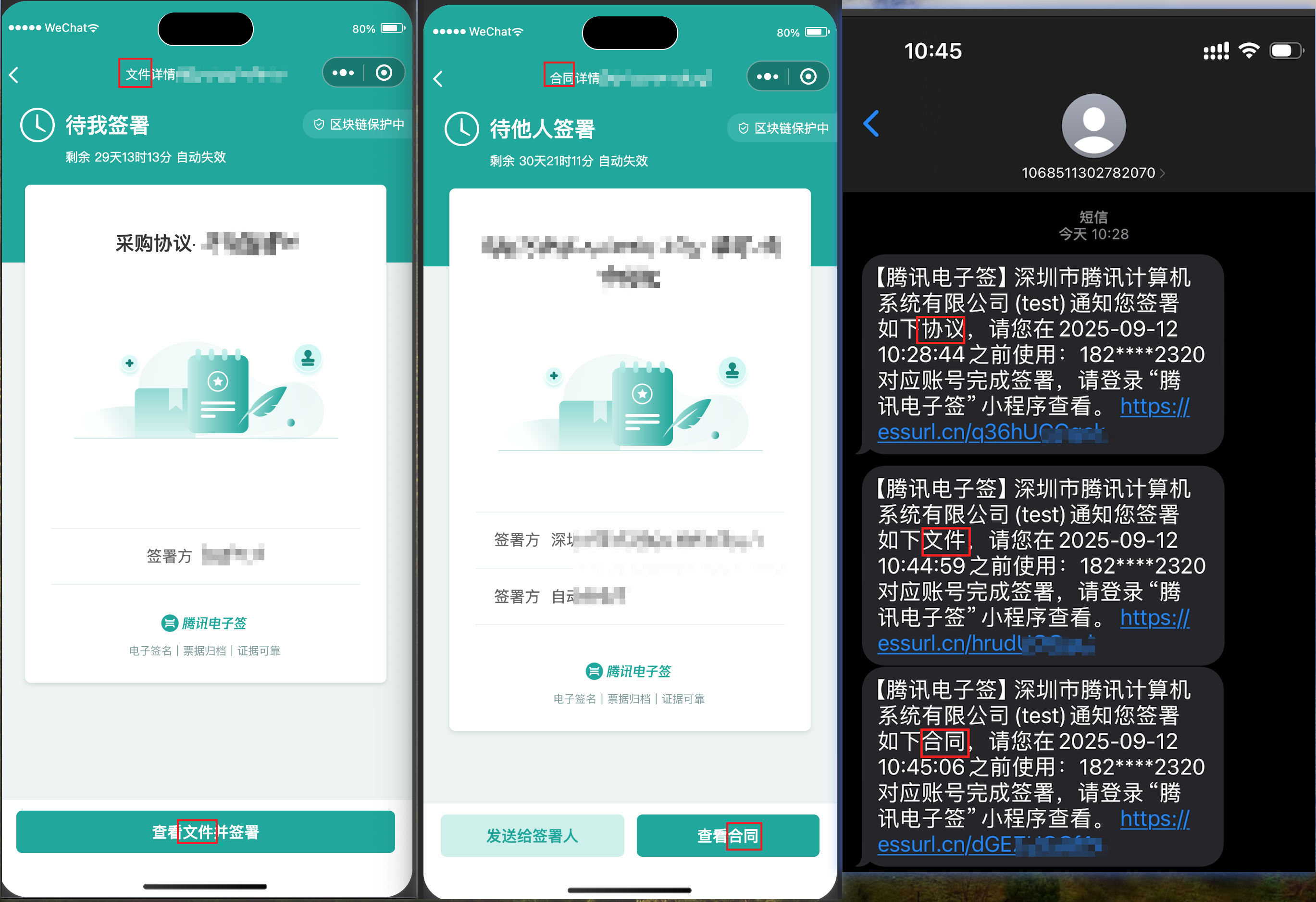
|
|
10006
10003
|
# @type FlowDisplayType: Integer
|
|
@@ -12620,7 +12617,6 @@ module TencentCloud
|
|
|
12620
12617
|
# 可登录腾讯电子签控制台,在 "更多能力"->"组织管理" 中查看某位员工的UserId(在页面中展示为用户ID)。
|
|
12621
12618
|
# @type UserId: String
|
|
12622
12619
|
# @param Url: H5端员工实名链接
|
|
12623
|
-
|
|
12624
12620
|
# 只有入参 InvitationNotifyType = H5的时候才会进行返回。
|
|
12625
12621
|
# @type Url: String
|
|
12626
12622
|
|
metadata
CHANGED
|
@@ -1,14 +1,14 @@
|
|
|
1
1
|
--- !ruby/object:Gem::Specification
|
|
2
2
|
name: tencentcloud-sdk-ess
|
|
3
3
|
version: !ruby/object:Gem::Version
|
|
4
|
-
version: 3.0.
|
|
4
|
+
version: 3.0.981
|
|
5
5
|
platform: ruby
|
|
6
6
|
authors:
|
|
7
7
|
- Tencent Cloud
|
|
8
8
|
autorequire:
|
|
9
9
|
bindir: bin
|
|
10
10
|
cert_chain: []
|
|
11
|
-
date: 2025-01-
|
|
11
|
+
date: 2025-01-13 00:00:00.000000000 Z
|
|
12
12
|
dependencies:
|
|
13
13
|
- !ruby/object:Gem::Dependency
|
|
14
14
|
name: tencentcloud-sdk-common
|