ru.Bee 2.6.5 → 2.7.0
This diff represents the content of publicly available package versions that have been released to one of the supported registries. The information contained in this diff is provided for informational purposes only and reflects changes between package versions as they appear in their respective public registries.
- checksums.yaml +4 -4
- data/LICENSE +1 -1
- data/lib/rubee/cli/bee.rb +689 -0
- data/lib/rubee/cli/bee_knowledge.json +1 -0
- data/lib/rubee/cli/command.rb +2 -0
- data/lib/rubee.rb +1 -1
- data/readme.md +570 -657
- metadata +3 -1
data/readme.md
CHANGED
|
@@ -5,25 +5,25 @@
|
|
|
5
5
|

|
|
6
6
|

|
|
7
7
|
|
|
8
|
-
<img width="363" height="131" alt="
|
|
8
|
+
<img width="363" height="131" alt="ru.Bee logo" src="https://github.com/user-attachments/assets/f6f07b88-f58d-4f36-a857-a293e613269e" />
|
|
9
9
|
|
|
10
|
-
ru.Bee is a Ruby-based web framework designed to streamline the development of modular monolith web applications.
|
|
11
|
-
Under the hood, it leverages the power of Ruby and Rack backed by Puma, offering a clean, efficient, and flexible architecture.
|
|
12
|
-
It offers a structured approach to building scalable, maintainable, and React-ready projects,
|
|
10
|
+
ru.Bee is a Ruby-based web framework designed to streamline the development of modular monolith web applications.
|
|
11
|
+
Under the hood, it leverages the power of Ruby and Rack backed by Puma, offering a clean, efficient, and flexible architecture.
|
|
12
|
+
It offers a structured approach to building scalable, maintainable, and React-ready projects,
|
|
13
13
|
making it an ideal choice for developers seeking a balance between monolithic simplicity and modular flexibility.
|
|
14
14
|
|
|
15
|
-
Want to get a quick API server up and
|
|
15
|
+
Want to get a quick API server up and running? You can do it in no time!
|
|
16
16
|
<br />
|
|
17
17
|
[](https://www.youtube.com/watch?v=ko7H70s7qq0)
|
|
18
18
|
|
|
19
|
-
Starting from ru.Bee 2.0.0, ru.Bee supports
|
|
19
|
+
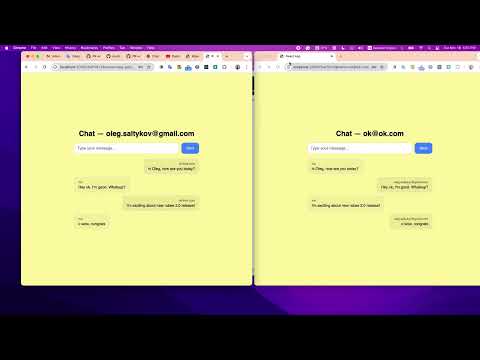
Starting from ru.Bee 2.0.0, ru.Bee supports WebSocket, which allows you to build real-time applications with ease.
|
|
20
20
|
<br />
|
|
21
21
|
[](https://www.youtube.com/watch?v=gp8IheKBNm4)
|
|
22
22
|
|
|
23
23
|
## Production ready
|
|
24
24
|
|
|
25
|
-
Take a look
|
|
26
|
-
Want to explore how it built? https://github.com/nucleom42/rubee-site
|
|
25
|
+
Take a look at the ru.Bee demo site with full documentation: https://rubee.dedyn.io/
|
|
26
|
+
Want to explore how it was built? https://github.com/nucleom42/rubee-site
|
|
27
27
|
|
|
28
28
|
## Stress tested
|
|
29
29
|
|
|
@@ -39,31 +39,33 @@ Requests/sec: 323.78
|
|
|
39
39
|
Transfer/sec: 140.07KB
|
|
40
40
|
```
|
|
41
41
|
|
|
42
|
-
|
|
42
|
+
Short output explanation:
|
|
43
|
+
|
|
43
44
|
- Requests/sec: ~324
|
|
44
45
|
- Average latency: ~305 ms
|
|
45
46
|
- Total requests handled: 9,721
|
|
46
|
-
- Hardware: Raspberry Pi 5(8
|
|
47
|
+
- Hardware: Raspberry Pi 5 (8 GB) — single board computer
|
|
47
48
|
- Server: ru.Bee app hosted via Nginx + HTTPS
|
|
48
49
|
|
|
49
|
-
This
|
|
50
|
+
This demonstrates ru.Bee's efficient architecture and suitability for lightweight deployments — even on low-power hardware.
|
|
50
51
|
|
|
51
52
|
## Comparison
|
|
52
|
-
|
|
53
|
+
|
|
54
|
+
Here is a short web frameworks comparison built with Ruby, so you can evaluate your choice with ru.Bee.
|
|
53
55
|
|
|
54
56
|
**Disclaimer:**
|
|
55
|
-
The comparison is based on
|
|
57
|
+
The comparison is based on generic and subjective information available on the internet and is not a real benchmark. It is aimed at giving you a general idea of the differences between the frameworks and is not intended as a direct comparison.
|
|
56
58
|
|
|
57
59
|
| Feature / Framework | **ru.Bee** | Rails | Sinatra | Hanami | Padrino | Grape |
|
|
58
60
|
|---------------------|-----------|-------|---------|--------|---------|-------|
|
|
59
61
|
| **React readiness** | Built-in React integration (route generator can scaffold React components that fetch data via controllers) | React via webpacker/importmap, but indirect | No direct React support | Can integrate React | Can integrate via JS pipelines | API-focused, no React support |
|
|
60
62
|
| **Routing style** | Explicit, file-based routes with clear JSON/HTML handling | DSL, routes often implicit inside controllers | Explicit DSL, inline in code | Declarative DSL | Rails-like DSL | API-oriented DSL |
|
|
61
|
-
| **Modularity** | Lightweight core, pluggable projects | One project by default, but can be extended with
|
|
63
|
+
| **Modularity** | Lightweight core, pluggable projects | One project by default, but can be extended with respective gem | Very modular (small DSL) | Designed for modularity | Semi-modular, still Rails-like | Modular (mount APIs) |
|
|
62
64
|
| **Startup / Load speed** | Very fast (minimal boot time, designed for modern Ruby) | Not very fast, especially on large apps | Very fast | Medium (slower than Sinatra, faster than Rails) | Similar to Rails (heavier) | Fast |
|
|
63
|
-
| **Ecosystem** |
|
|
65
|
+
| **Ecosystem** | Early-stage, focused on modern simplicity, but easily expandable via Bundler | Huge ecosystem, gems, community | Large ecosystem, many gems work | Small, growing | Small, less active | Small, niche |
|
|
64
66
|
| **Learning curve** | Simple, explicit, minimal DSL | Steep (lots of conventions & magic) | Very low (DSL fits in one file) | Medium, more concepts (repositories, entities) | Similar to Rails, easier in parts | Low (API-only) |
|
|
65
67
|
| **Customizability** | High (explicit over implicit, hooks & generators) | Limited without monkey-patching | Very high (you control flow) | High, modular architecture | Medium | High (designed for APIs) |
|
|
66
|
-
| **Target use case** | Modern full-stack apps with React frontends or APIs
|
|
68
|
+
| **Target use case** | Modern full-stack apps with React frontends or APIs; well-suited if you prefer modular monolith over microservices | Large, full-stack, mature apps | Small apps, microservices | Modular apps, DDD | Rails-like but modular | APIs & microservices |
|
|
67
69
|
| **Early adopters support** | Personal early adopters support via fast extending and fixing | Not available | Not known | Not known | Not known | Not known |
|
|
68
70
|
|
|
69
71
|
## Content
|
|
@@ -75,33 +77,33 @@ The comparison is based on a very generic and subjective information open in the
|
|
|
75
77
|
- [Routing](#routing)
|
|
76
78
|
- [Database](#database)
|
|
77
79
|
- [Views](#views)
|
|
78
|
-
- [
|
|
80
|
+
- [Object hooks](#object-hooks)
|
|
79
81
|
- [Validations](#validations)
|
|
80
|
-
- [JWT based
|
|
81
|
-
- [
|
|
82
|
-
- [
|
|
82
|
+
- [JWT based authentication](#jwt-based-authentication)
|
|
83
|
+
- [OAuth authentication](#oauth-authentication)
|
|
84
|
+
- [ru.Bee commands](#rubee-commands)
|
|
83
85
|
- [Generate commands](#generate-commands)
|
|
84
86
|
- [Migration commands](#migration-commands)
|
|
85
|
-
- [
|
|
87
|
+
- [ru.Bee console](#rubee-console)
|
|
86
88
|
- [Rubee::Support](#rubee-support)
|
|
87
89
|
- [Testing](#testing)
|
|
88
90
|
- [Background jobs](#background-jobs)
|
|
89
|
-
- [Modular](#
|
|
91
|
+
- [Modular application](#modular-application)
|
|
90
92
|
- [Logger](#logger)
|
|
91
|
-
- [
|
|
93
|
+
- [WebSocket](#websocket)
|
|
94
|
+
- [Bee assistant](#bee-assistant)
|
|
92
95
|
|
|
93
|
-
You can read
|
|
96
|
+
You can read the full docs on the demo site: [rubee.dedyn.io](https://rubee.dedyn.io/)
|
|
94
97
|
|
|
95
98
|
## Features
|
|
96
99
|
|
|
97
100
|
Lightweight – A minimal footprint focused on serving Ruby applications efficiently.
|
|
98
101
|
<br>
|
|
99
|
-
Modular – A modular approach to application development. Build modular monolith app with ease by attaching
|
|
100
|
-
as many subprojects as you need.
|
|
102
|
+
Modular – A modular approach to application development. Build a modular monolith app with ease by attaching as many subprojects as you need.
|
|
101
103
|
<br>
|
|
102
104
|
Contract-driven – Define your API contracts in a simple, declarative way, then generate all the boilerplate you need.
|
|
103
105
|
<br>
|
|
104
|
-
Fast – Optimized for speed, providing quick responses.
|
|
106
|
+
Fast – Optimized for speed, providing quick responses.
|
|
105
107
|
<br>
|
|
106
108
|
Rack-powered – Built on Rack. The full Rack API is available for easy integration.
|
|
107
109
|
<br>
|
|
@@ -127,7 +129,7 @@ Console – Start an interactive console and reload on the fly.
|
|
|
127
129
|
<br>
|
|
128
130
|
Background Jobs – Schedule and process background jobs using your preferred async stack.
|
|
129
131
|
<br>
|
|
130
|
-
|
|
132
|
+
WebSocket – Serve and handle WebSocket connections.
|
|
131
133
|
<br>
|
|
132
134
|
Logger – Use any logger you want.
|
|
133
135
|
|
|
@@ -145,44 +147,39 @@ rubee project my_project
|
|
|
145
147
|
cd my_project
|
|
146
148
|
```
|
|
147
149
|
|
|
148
|
-
[Back to content](#content)
|
|
149
|
-
|
|
150
150
|
3. Install dependencies
|
|
151
151
|
|
|
152
|
-
|
|
153
|
-
Make sure:
|
|
154
|
-
**Ruby** language (3.1 or higher, 3.4.1 recommended) is installed
|
|
155
|
-
**Bundler** is installed
|
|
152
|
+
Prerequisites: make sure **Ruby** (3.1 or higher, 3.4.1 recommended) and **Bundler** are installed.
|
|
156
153
|
|
|
157
154
|
```bash
|
|
158
155
|
bundle install
|
|
159
156
|
```
|
|
160
157
|
|
|
161
|
-
4. Run ru.Bee server. Default port is 7000
|
|
158
|
+
4. Run the ru.Bee server. Default port is 7000.
|
|
162
159
|
```bash
|
|
163
160
|
rubee start # or rubee start_dev for development
|
|
164
161
|
|
|
165
|
-
#
|
|
162
|
+
# Starting from version 1.8.0, you can also start the server with the yjit compiler for a speed boost.
|
|
166
163
|
rubee start --jit=yjit
|
|
167
|
-
#
|
|
164
|
+
# This option is available for the dev environment too.
|
|
168
165
|
rubee start_dev --jit=yjit
|
|
169
166
|
```
|
|
170
167
|
|
|
171
168
|
5. Open your browser and go to http://localhost:7000
|
|
172
169
|
|
|
173
170
|
## Run tests
|
|
171
|
+
|
|
174
172
|
```bash
|
|
175
173
|
rubee test
|
|
176
|
-
# or
|
|
174
|
+
# or specify a specific test file
|
|
177
175
|
rubee test models/user_model_test.rb
|
|
178
|
-
#
|
|
176
|
+
# or run a specific line in the test file
|
|
179
177
|
rubee test models/user_model_test.rb --line=12
|
|
180
178
|
```
|
|
181
|
-
[Back to content](#content)
|
|
182
179
|
|
|
183
180
|
## Draw contract
|
|
184
181
|
|
|
185
|
-
1. Add the routes to
|
|
182
|
+
1. Add the routes to `routes.rb`
|
|
186
183
|
```ruby
|
|
187
184
|
Rubee::Router.draw do |router|
|
|
188
185
|
...
|
|
@@ -201,28 +198,28 @@ rubee test models/user_model_test.rb --line=12
|
|
|
201
198
|
end
|
|
202
199
|
```
|
|
203
200
|
|
|
204
|
-
2.
|
|
201
|
+
2. Generate the files
|
|
205
202
|
```bash
|
|
206
|
-
|
|
203
|
+
rubee generate get /apples
|
|
207
204
|
```
|
|
208
|
-
This will generate the following files
|
|
205
|
+
This will generate the following files:
|
|
209
206
|
```bash
|
|
210
|
-
|
|
211
|
-
|
|
212
|
-
|
|
213
|
-
|
|
207
|
+
./app/controllers/apples_controller.rb # Controller with respective action
|
|
208
|
+
./app/views/apples_index.erb # ERB view rendered by the controller
|
|
209
|
+
./app/models/apple.rb # Model that acts as ORM
|
|
210
|
+
./db/create_apples.rb # Database migration file for the respective table
|
|
214
211
|
```
|
|
215
212
|
|
|
216
|
-
3. Run the initial
|
|
213
|
+
3. Run the initial database migration
|
|
217
214
|
```bash
|
|
218
|
-
|
|
215
|
+
rubee db run:all
|
|
219
216
|
```
|
|
220
217
|
|
|
221
|
-
4. Fill the generated files with the logic you need and run the server again
|
|
218
|
+
4. Fill the generated files with the logic you need and run the server again.
|
|
222
219
|
|
|
223
|
-
5. You can find full snapshot of the schema in the STRUCTURE constant or in the db/
|
|
220
|
+
5. You can find a full snapshot of the schema in the `STRUCTURE` constant or in the `db/structure.rb` file.
|
|
224
221
|
|
|
225
|
-
6.
|
|
222
|
+
6. Print the latest schema from the `STRUCTURE` constant via the CLI
|
|
226
223
|
```bash
|
|
227
224
|
-> rubee db schema
|
|
228
225
|
--- users
|
|
@@ -232,7 +229,7 @@ This will generate the following files
|
|
|
232
229
|
|
|
233
230
|
--- accounts
|
|
234
231
|
- id, (PK), type (INTEGER)
|
|
235
|
-
-
|
|
232
|
+
- address, type (varchar(255))
|
|
236
233
|
- user_id, type (INTEGER)
|
|
237
234
|
|
|
238
235
|
--- posts
|
|
@@ -245,7 +242,8 @@ This will generate the following files
|
|
|
245
242
|
- text, type (varchar(255))
|
|
246
243
|
- user_id, type (INTEGER)
|
|
247
244
|
```
|
|
248
|
-
|
|
245
|
+
|
|
246
|
+
7. Print the schema for a specific table
|
|
249
247
|
```bash
|
|
250
248
|
-> rubee db schema posts
|
|
251
249
|
--- posts
|
|
@@ -259,149 +257,145 @@ This will generate the following files
|
|
|
259
257
|
- comment_id → comments() on delete no_action on update no_action
|
|
260
258
|
- user_id → users() on delete no_action on update no_action
|
|
261
259
|
```
|
|
262
|
-
|
|
260
|
+
|
|
261
|
+
8. Dropping all tables can be handy during development. Be careful and make sure you pass the desired environment.
|
|
263
262
|
```bash
|
|
264
263
|
RACK_ENV=test rubee db drop_tables
|
|
265
|
-
These tables
|
|
264
|
+
These tables have been dropped for the test env:
|
|
266
265
|
[:companies, :company_clients, :services]
|
|
267
266
|
```
|
|
268
267
|
|
|
269
268
|
[Back to content](#content)
|
|
270
269
|
|
|
271
270
|
## Model
|
|
272
|
-
|
|
273
|
-
in the
|
|
274
|
-
Here
|
|
271
|
+
|
|
272
|
+
A model in ru.Bee is a simple Ruby object that can be serialized in the view in whatever form is required (e.g. JSON).
|
|
273
|
+
Here is a simple example of rendering JSON from an in-memory object:
|
|
275
274
|
|
|
276
275
|
```ruby
|
|
277
|
-
|
|
276
|
+
# ApplesController
|
|
278
277
|
|
|
279
|
-
|
|
280
|
-
|
|
281
|
-
|
|
282
|
-
|
|
278
|
+
def show
|
|
279
|
+
# In-memory example
|
|
280
|
+
apples = [Apple.new(colour: 'red', weight: '1lb'), Apple.new(colour: 'green', weight: '1lb')]
|
|
281
|
+
apple = apples.find { |apple| apple.colour = params[:colour] }
|
|
283
282
|
|
|
284
|
-
|
|
285
|
-
|
|
283
|
+
response_with object: apple, type: :json
|
|
284
|
+
end
|
|
286
285
|
```
|
|
287
286
|
|
|
288
|
-
|
|
287
|
+
Make sure the `Serializable` module is included in the target class:
|
|
289
288
|
```ruby
|
|
290
|
-
|
|
291
|
-
|
|
292
|
-
|
|
293
|
-
|
|
289
|
+
class Apple
|
|
290
|
+
include Serializable
|
|
291
|
+
attr_accessor :id, :colour, :weight
|
|
292
|
+
end
|
|
294
293
|
```
|
|
295
294
|
|
|
296
|
-
|
|
297
|
-
|
|
298
|
-
|
|
299
|
-
|
|
300
|
-
|
|
301
|
-
end
|
|
295
|
+
You can also turn it into an ORM object by extending `Rubee::SequelObject`, which is already serializable and charged with hooks:
|
|
296
|
+
```ruby
|
|
297
|
+
class Apple < Rubee::SequelObject
|
|
298
|
+
attr_accessor :id, :colour, :weight
|
|
299
|
+
end
|
|
302
300
|
```
|
|
303
301
|
|
|
304
|
-
|
|
302
|
+
In the controller, query your target object directly:
|
|
305
303
|
```ruby
|
|
306
|
-
|
|
304
|
+
# ApplesController
|
|
307
305
|
|
|
308
|
-
|
|
309
|
-
|
|
306
|
+
def show
|
|
307
|
+
apple = Apple.where(colour: params[:colour])&.last
|
|
310
308
|
|
|
311
|
-
|
|
312
|
-
|
|
313
|
-
|
|
314
|
-
|
|
315
|
-
end
|
|
309
|
+
if apple
|
|
310
|
+
response_with object: apple, type: :json
|
|
311
|
+
else
|
|
312
|
+
response_with object: { error: "apple with colour #{params[:colour]} not found" }, status: 422, type: :json
|
|
316
313
|
end
|
|
314
|
+
end
|
|
317
315
|
```
|
|
318
316
|
|
|
319
317
|
[Back to content](#content)
|
|
320
318
|
|
|
321
|
-
|
|
319
|
+
### Rubee::SequelObject base methods
|
|
322
320
|
|
|
323
|
-
Initiate new record in memory
|
|
324
|
-
```
|
|
321
|
+
Initiate a new record in memory
|
|
322
|
+
```ruby
|
|
325
323
|
irb(main):015> user = User.new(email: "llo@ok.com", password: 543)
|
|
326
324
|
=> #<User:0x000000010cda23b8 @email="llo@ok.com", @password=543>
|
|
327
325
|
```
|
|
328
326
|
|
|
329
|
-
Save record
|
|
330
|
-
```
|
|
331
|
-
=> #<User:0x000000010cda23b8 @email="llo@ok.com", @password=543, @created="2025-09-28 22:03:07.011332 -0400", @updated="2025-09-28 22:03:07.011332 -0400">
|
|
327
|
+
Save a record to the database
|
|
328
|
+
```ruby
|
|
332
329
|
irb(main):018> user.save
|
|
333
330
|
=> true
|
|
334
331
|
```
|
|
335
332
|
|
|
336
|
-
Update record with new value
|
|
337
|
-
```
|
|
333
|
+
Update a record with a new value
|
|
334
|
+
```ruby
|
|
338
335
|
irb(main):019> user.update(email: "update@email.com")
|
|
339
|
-
=> #<User:0x000000010c39b298 @email="update@email.com", @id=3, @password="543" @created="2025-09-28 22:03:07.011332 -0400", @updated="2025-09-28 22:03:07.011332 -0400">
|
|
336
|
+
=> #<User:0x000000010c39b298 @email="update@email.com", @id=3, @password="543", @created="2025-09-28 22:03:07.011332 -0400", @updated="2025-09-28 22:03:07.011332 -0400">
|
|
340
337
|
```
|
|
341
338
|
|
|
342
|
-
Check whether
|
|
343
|
-
```
|
|
344
|
-
irb(main):015> user = User.new(email: "llo@ok.com", password: 543)
|
|
345
|
-
=> #<User:0x000000010cda23b8 @email="llo@ok.com", @password=543>
|
|
339
|
+
Check whether a record has been persisted
|
|
340
|
+
```ruby
|
|
346
341
|
irb(main):016> user.persisted?
|
|
347
342
|
=> false
|
|
348
343
|
```
|
|
349
344
|
|
|
350
|
-
Get
|
|
351
|
-
```
|
|
345
|
+
Get a record from the database and reload it
|
|
346
|
+
```ruby
|
|
352
347
|
irb(main):011> user = User.last
|
|
353
|
-
=> #<User:0x000000010ccea178 @email="ok23@ok.com", @id=2, @password="123",
|
|
348
|
+
=> #<User:0x000000010ccea178 @email="ok23@ok.com", @id=2, @password="123", ...>
|
|
354
349
|
irb(main):012> user.email = "new@ok.com"
|
|
355
350
|
=> "new@ok.com"
|
|
356
|
-
irb(main):013> user
|
|
357
|
-
=> #<User:0x000000010ccea178 @email="new@ok.com", @id=2, @password="123", @created="2025-09-28 22:03:07.011332 -0400", @updated="2025-09-28 22:03:07.011332 -0400">
|
|
358
351
|
irb(main):014> user.reload
|
|
359
|
-
=> #<User:0x000000010c488548 @email="ok23@ok.com", @id=2, @password="123",
|
|
352
|
+
=> #<User:0x000000010c488548 @email="ok23@ok.com", @id=2, @password="123", ...> # unpersisted data refreshed from db
|
|
360
353
|
```
|
|
361
354
|
|
|
362
|
-
Assign attributes without
|
|
363
|
-
```
|
|
355
|
+
Assign attributes without persisting to the database
|
|
356
|
+
```ruby
|
|
364
357
|
irb(main):008> User.last.assign_attributes(email: "bb@ok.com")
|
|
365
|
-
=> {"id" => 2, "email" => "ok23@ok.com", "password" => "123"
|
|
358
|
+
=> {"id" => 2, "email" => "ok23@ok.com", "password" => "123"}
|
|
366
359
|
```
|
|
367
360
|
|
|
368
|
-
Get all records scoped by field
|
|
369
|
-
```
|
|
361
|
+
Get all records scoped by a field
|
|
362
|
+
```ruby
|
|
370
363
|
irb(main):005> User.where(email: "ok23@ok.com")
|
|
371
364
|
=> [#<User:0x000000010cfaa5c0 @email="ok23@ok.com", @id=2, @password="123">]
|
|
372
365
|
```
|
|
373
366
|
|
|
374
|
-
Get all
|
|
375
|
-
```
|
|
367
|
+
Get all records
|
|
368
|
+
```ruby
|
|
376
369
|
irb(main):001> User.all
|
|
377
|
-
=> [#<User:0x000000010c239a30 @email="ok@ok.com", @id=1, @password="password",
|
|
370
|
+
=> [#<User:0x000000010c239a30 @email="ok@ok.com", @id=1, @password="password", ...>]
|
|
378
371
|
```
|
|
372
|
+
|
|
379
373
|
Find by id
|
|
380
|
-
```
|
|
374
|
+
```ruby
|
|
381
375
|
irb(main):002> user = User.find 1
|
|
382
|
-
=> #<User:0x000000010c2f7cd8 @email="ok@ok.com", @id=1, @password="password",
|
|
376
|
+
=> #<User:0x000000010c2f7cd8 @email="ok@ok.com", @id=1, @password="password", ...>
|
|
383
377
|
```
|
|
384
378
|
|
|
385
|
-
Get last record
|
|
386
|
-
```
|
|
379
|
+
Get the last record
|
|
380
|
+
```ruby
|
|
387
381
|
irb(main):003> User.last
|
|
388
|
-
=> #<User:0x000000010c2f7cd8 @email="ok@ok.com", @id=1, @password="password",
|
|
382
|
+
=> #<User:0x000000010c2f7cd8 @email="ok@ok.com", @id=1, @password="password", ...>
|
|
389
383
|
```
|
|
390
384
|
|
|
391
|
-
Create new
|
|
392
|
-
```
|
|
385
|
+
Create a new persisted record
|
|
386
|
+
```ruby
|
|
393
387
|
irb(main):004> User.create(email: "ok23@ok.com", password: 123)
|
|
394
|
-
=> #<User:0x000000010c393818 @email="ok23@ok.com", @id=2, @password=123,
|
|
388
|
+
=> #<User:0x000000010c393818 @email="ok23@ok.com", @id=2, @password=123, ...>
|
|
395
389
|
```
|
|
396
390
|
|
|
397
|
-
Destroy record and all related records
|
|
398
|
-
```
|
|
391
|
+
Destroy a record and all related records
|
|
392
|
+
```ruby
|
|
399
393
|
irb(main):021> user.destroy(cascade: true)
|
|
400
394
|
=> 1
|
|
401
395
|
```
|
|
402
396
|
|
|
403
|
-
Find record in the
|
|
404
|
-
```
|
|
397
|
+
Find a record in the database or initialize a new instance for subsequent persistence
|
|
398
|
+
```ruby
|
|
405
399
|
irb(main):020> user = User.find_or_new(email: "ok23@ok.com")
|
|
406
400
|
=> #<User:0x000000010cfaa5c0 @email="ok23@ok.com", @id=2, @password="123">
|
|
407
401
|
irb(main):021> user.persisted?
|
|
@@ -413,15 +407,15 @@ irb(main):023> user.persisted?
|
|
|
413
407
|
```
|
|
414
408
|
|
|
415
409
|
Destroy all records one by one
|
|
416
|
-
```
|
|
410
|
+
```ruby
|
|
417
411
|
irb(main):022> User.destroy_all
|
|
418
|
-
=> [#<User
|
|
412
|
+
=> [#<User ...>, #<User ...>]
|
|
419
413
|
irb(main):023> User.all
|
|
420
414
|
=> []
|
|
421
415
|
```
|
|
422
416
|
|
|
423
|
-
Use complex
|
|
424
|
-
```
|
|
417
|
+
Use complex query chains and serialize results back to ru.Bee objects in a single query:
|
|
418
|
+
```ruby
|
|
425
419
|
# user model
|
|
426
420
|
class User < Rubee::SequelObject
|
|
427
421
|
attr_accessor :id, :email, :password, :created, :updated
|
|
@@ -442,54 +436,40 @@ class Post < Rubee::SequelObject
|
|
|
442
436
|
end
|
|
443
437
|
```
|
|
444
438
|
|
|
445
|
-
```
|
|
446
|
-
irb(main):001> comment = Comment.new(text: "test")
|
|
447
|
-
irb(main):002> comment.save
|
|
448
|
-
irb(main):003> user = User.new(email: "ok-test@test.com", password: "123")
|
|
449
|
-
irb(main):004> user.save
|
|
450
|
-
irb(main):005> post = Post.new(user_id: user.id, comment_id: comment.id)
|
|
451
|
-
irb(main):006> post.save
|
|
452
|
-
=> true
|
|
453
|
-
irb(main):007> comment
|
|
454
|
-
=> #<Comment:0x000000012281a650 @id=21, @text="test", @created=2025-09-28 22:03:07.011332 -0400, @updated=2025-09-28 22:03:07.011332 -0400>
|
|
439
|
+
```ruby
|
|
455
440
|
irb(main):008> result = Comment.dataset.join(:posts, comment_id: :id)
|
|
456
441
|
irb(main):009> .where(comment_id: Comment.where(text: "test").last.id)
|
|
457
442
|
irb(main):010> .then { |dataset| Comment.serialize(dataset) }
|
|
458
|
-
=> [#<Comment:0x0000000121889998 @id=30, @text="test", @user_id=702,
|
|
443
|
+
=> [#<Comment:0x0000000121889998 @id=30, @text="test", @user_id=702, ...>]
|
|
459
444
|
```
|
|
460
|
-
This is recommended when you want to run one query and serialize it back to ru.Bee object only once.
|
|
461
|
-
So it may safe some resources.
|
|
462
445
|
|
|
463
|
-
Since version 2.6.0 Rubee::SequelObject supports
|
|
446
|
+
Since version 2.6.0, `Rubee::SequelObject` supports chained queries. Supported methods: `where`, `order`, `limit`, `offset`, `all`, `owns_many`, `owns_one`, `join`, `paginate`.
|
|
447
|
+
|
|
464
448
|
```ruby
|
|
465
449
|
irb(main):001> Comment.where(text: "test").where(user_id: 1)
|
|
466
|
-
=> [#<Comment:0x0000000121889998 @id=30, @text="test", @user_id=702,
|
|
450
|
+
=> [#<Comment:0x0000000121889998 @id=30, @text="test", @user_id=702, ...>]
|
|
467
451
|
```
|
|
468
|
-
It will run only one query tho.
|
|
469
|
-
Supported methods: where, order, limit, offset, all, owns_many, owns_one, join, paginate
|
|
470
452
|
|
|
471
|
-
|
|
453
|
+
A `paginate` method is also available:
|
|
472
454
|
```ruby
|
|
473
455
|
irb(main):001> comments = Comment.all.paginate(page: 1, per_page: 3)
|
|
474
|
-
[#<Comment:0x0000000121889998 @id=30, @text="test", @user_id=702, @created=2025-09-28 22:03:07.011332 -0400, @updated=2025-09-28 22:03:07.011332 -0400>,
|
|
475
|
-
#<Comment:0x0000000121889998 @id=30, @text="test", @user_id=702, @created=2025-09-28 22:03:07.011332 -0400, @updated=2025-09-28 22:03:07.011332 -0400>,
|
|
476
|
-
#<Comment:0x0000000121889998 @id=30, @text="test", @user_id=702, @created=2025-09-28 22:03:07.011332 -0400, @updated=2025-09-28 22:03:07.011332 -0400>]
|
|
477
456
|
|
|
478
457
|
irb(main):001> comments.pagination_meta
|
|
479
458
|
=> {:current_page=>1, :per_page=>3, :total_count=>10, :first_page=>true, :last_page=>false, :prev=>nil, :next=>2}
|
|
480
459
|
```
|
|
460
|
+
|
|
481
461
|
[Back to content](#content)
|
|
482
462
|
|
|
483
463
|
## Database
|
|
484
464
|
|
|
485
|
-
ru.Bee supports Postgres and
|
|
486
|
-
database supported by Sequel gem.
|
|
465
|
+
ru.Bee supports Postgres and SQLite databases fully and can potentially be used with any database supported by the Sequel gem.
|
|
487
466
|
|
|
488
|
-
When
|
|
467
|
+
When using SQLite, include `sqlite3` in your Gemfile:
|
|
489
468
|
```ruby
|
|
490
469
|
gem 'sqlite3'
|
|
491
470
|
```
|
|
492
|
-
|
|
471
|
+
|
|
472
|
+
Define your database URLs for each environment in `config/base_configuration.rb`:
|
|
493
473
|
```ruby
|
|
494
474
|
Rubee::Configuration.setup(env = :development) do |config|
|
|
495
475
|
config.database_url = { url: 'sqlite://db/development.db', env: }
|
|
@@ -504,11 +484,12 @@ Rubee::Configuration.setup(env = :production) do |config|
|
|
|
504
484
|
...
|
|
505
485
|
end
|
|
506
486
|
```
|
|
507
|
-
|
|
487
|
+
|
|
488
|
+
For PostgreSQL, include the `pg` gem and configure the URLs:
|
|
508
489
|
```ruby
|
|
509
490
|
gem 'pg'
|
|
510
491
|
```
|
|
511
|
-
|
|
492
|
+
|
|
512
493
|
```ruby
|
|
513
494
|
Rubee::Configuration.setup(env = :development) do |config|
|
|
514
495
|
config.database_url = { url: "postgres://postgres@localhost:5432/development", env: }
|
|
@@ -523,68 +504,70 @@ Rubee::Configuration.setup(env = :production) do |config|
|
|
|
523
504
|
...
|
|
524
505
|
end
|
|
525
506
|
```
|
|
526
|
-
|
|
507
|
+
|
|
508
|
+
Before starting the server or running the test suite, ensure your database is initialized:
|
|
527
509
|
```bash
|
|
528
|
-
rubee db init
|
|
529
|
-
RACK_ENV=test rubee db run:all
|
|
530
|
-
RACK_ENV=development rubee db run:all #
|
|
510
|
+
rubee db init # ensures your database is created for each environment
|
|
511
|
+
RACK_ENV=test rubee db run:all # runs all migrations for the test environment
|
|
512
|
+
RACK_ENV=development rubee db run:all # runs all migrations for the development environment
|
|
531
513
|
```
|
|
532
514
|
|
|
533
515
|
[Back to content](#content)
|
|
534
516
|
|
|
535
|
-
|
|
536
|
-
|
|
537
|
-
|
|
517
|
+
### SQLite production ready
|
|
518
|
+
|
|
519
|
+
Starting from version 1.9.0, the main issue with SQLite — write database locking — is resolved.
|
|
520
|
+
You can tune the retry configuration parameters as needed:
|
|
538
521
|
|
|
539
522
|
```ruby
|
|
540
|
-
|
|
541
|
-
|
|
542
|
-
|
|
543
|
-
|
|
523
|
+
## configure database write retries
|
|
524
|
+
config.db_max_retries = { env:, value: 3 } # set to 0 to disable, or increase if needed
|
|
525
|
+
config.db_retry_delay = { env:, value: 0.1 }
|
|
526
|
+
config.db_busy_timeout = { env:, value: 1000 } # busy timeout in milliseconds before raising an error
|
|
544
527
|
```
|
|
545
528
|
|
|
546
|
-
For ru.Bee model
|
|
547
|
-
if you want to do it with Sequel dataset you need to do it yourself:
|
|
529
|
+
For ru.Bee model `create` and `update` methods, retries are added automatically. To use retries with a Sequel dataset directly:
|
|
548
530
|
|
|
549
531
|
```ruby
|
|
550
|
-
|
|
532
|
+
Rubee::DBTools.with_retry { User.dataset.insert(email: "test@ok.com", password: "123") }
|
|
551
533
|
```
|
|
534
|
+
|
|
552
535
|
[Back to content](#content)
|
|
553
536
|
|
|
554
537
|
## Routing
|
|
555
|
-
|
|
556
|
-
|
|
557
|
-
|
|
538
|
+
|
|
539
|
+
ru.Bee uses explicit routes. In `routes.rb` you can define routes for any of the main HTTP methods.
|
|
540
|
+
You can also include matched parameters denoted by `{ }` in the route path, e.g. `/path/to/{a_key}/somewhere`.
|
|
558
541
|
|
|
559
542
|
### Routing methods
|
|
560
|
-
|
|
543
|
+
|
|
544
|
+
```ruby
|
|
561
545
|
Rubee::Router.draw do |router|
|
|
562
|
-
router.get
|
|
563
|
-
router.post
|
|
564
|
-
router.patch
|
|
565
|
-
router.put
|
|
566
|
-
router.delete
|
|
567
|
-
router.head
|
|
568
|
-
router.connect '/posts',
|
|
569
|
-
router.options '/posts',
|
|
570
|
-
router.trace
|
|
546
|
+
router.get '/posts', to: 'posts#index'
|
|
547
|
+
router.post '/posts', to: 'posts#create'
|
|
548
|
+
router.patch '/posts/{id}', to: 'posts#update'
|
|
549
|
+
router.put '/posts/{id}', to: 'posts#update'
|
|
550
|
+
router.delete '/posts/{id}', to: 'posts#delete'
|
|
551
|
+
router.head '/posts', to: 'posts#index'
|
|
552
|
+
router.connect '/posts', to: 'posts#index'
|
|
553
|
+
router.options '/posts', to: 'posts#index'
|
|
554
|
+
router.trace '/posts', to: 'posts#index'
|
|
571
555
|
end
|
|
572
556
|
```
|
|
573
557
|
|
|
574
|
-
|
|
558
|
+
Every route follows this structure:
|
|
575
559
|
```ruby
|
|
576
560
|
route.{http_method} {path}, to: "{controller}#{action}",
|
|
577
|
-
model { ...optional }, namespace { ...optional }, react { ...optional }
|
|
561
|
+
model: { ...optional }, namespace: { ...optional }, react: { ...optional }
|
|
578
562
|
```
|
|
579
563
|
|
|
580
|
-
### Defining
|
|
581
|
-
|
|
582
|
-
|
|
564
|
+
### Defining model attributes in routes
|
|
565
|
+
|
|
566
|
+
One of ru.Bee's unique traits is defining models for generation directly in the routes:
|
|
583
567
|
|
|
584
568
|
```ruby
|
|
585
569
|
Rubee::Router.draw do |router|
|
|
586
570
|
...
|
|
587
|
-
# draw the contract
|
|
588
571
|
router.get "/apples", to: "apples#index",
|
|
589
572
|
model: {
|
|
590
573
|
name: "apple",
|
|
@@ -599,139 +582,105 @@ Rubee::Router.draw do |router|
|
|
|
599
582
|
end
|
|
600
583
|
```
|
|
601
584
|
|
|
602
|
-
|
|
603
|
-
|
|
604
|
-
``` ruby
|
|
585
|
+
Other supported attribute types via Sequel:
|
|
586
|
+
```ruby
|
|
605
587
|
[
|
|
606
|
-
{ name: 'id',
|
|
607
|
-
{ name: 'name',
|
|
608
|
-
{ name: 'description',
|
|
609
|
-
{ name: '
|
|
610
|
-
{ name: 'created',
|
|
611
|
-
{ name: 'modified',
|
|
612
|
-
{ name: 'exists',
|
|
613
|
-
{ name: 'active',
|
|
614
|
-
{ name: 'hash',
|
|
615
|
-
{ name: 'price',
|
|
616
|
-
{ name: 'item_id',
|
|
617
|
-
{ name: 'item_id_index',
|
|
618
|
-
{ name: 'item_id_unique',
|
|
588
|
+
{ name: 'id', type: :primary },
|
|
589
|
+
{ name: 'name', type: :string },
|
|
590
|
+
{ name: 'description', type: :text },
|
|
591
|
+
{ name: 'quantity', type: :integer },
|
|
592
|
+
{ name: 'created', type: :date },
|
|
593
|
+
{ name: 'modified', type: :datetime },
|
|
594
|
+
{ name: 'exists', type: :time },
|
|
595
|
+
{ name: 'active', type: :boolean },
|
|
596
|
+
{ name: 'hash', type: :bigint },
|
|
597
|
+
{ name: 'price', type: :decimal },
|
|
598
|
+
{ name: 'item_id', type: :foreign_key },
|
|
599
|
+
{ name: 'item_id_index', type: :index },
|
|
600
|
+
{ name: 'item_id_unique', type: :unique }
|
|
619
601
|
]
|
|
620
602
|
```
|
|
621
|
-
Every attribute can have a set of options passed based on their related \
|
|
622
|
-
[Sequel schema definition](https://github.com/jeremyevans/sequel/blob/master/doc/schema_modification.rdoc).
|
|
623
603
|
|
|
624
|
-
|
|
604
|
+
Every attribute can carry options based on the [Sequel schema definition](https://github.com/jeremyevans/sequel/blob/master/doc/schema_modification.rdoc). For example:
|
|
605
|
+
|
|
625
606
|
```ruby
|
|
626
|
-
{name: 'key', type: :string, options: { size: 50, fixed: true } }
|
|
607
|
+
{ name: 'key', type: :string, options: { size: 50, fixed: true } }
|
|
627
608
|
```
|
|
628
609
|
|
|
629
|
-
Gets translated to
|
|
630
|
-
```
|
|
631
|
-
|
|
610
|
+
Gets translated to:
|
|
611
|
+
```ruby
|
|
612
|
+
String :key, size: 50, fixed: true
|
|
632
613
|
```
|
|
633
614
|
|
|
634
615
|
### Generation from routes
|
|
635
|
-
As long as you have a `{ model: 'something' }` passed to your given route, \
|
|
636
|
-
you can use it to generate your initial model files. If only a `path` and a `to:` are defined will only generate \
|
|
637
|
-
a controller and a corresponding view.
|
|
638
616
|
|
|
639
|
-
|
|
640
|
-
```ruby
|
|
641
|
-
rubee generate get /apples # or rubee gen get /apples
|
|
642
|
-
```
|
|
617
|
+
As long as a route has a `model:` key, you can use it to generate initial model files. If only `path` and `to:` are defined, only a controller and view will be generated.
|
|
643
618
|
|
|
644
|
-
|
|
645
|
-
|
|
646
|
-
rubee generate patch /apples/{id}
|
|
619
|
+
```bash
|
|
620
|
+
rubee generate get /apples # or: rubee gen get /apples
|
|
621
|
+
rubee generate patch /apples/{id} # or: rubee gen patch /apples/{id}
|
|
647
622
|
```
|
|
648
623
|
|
|
649
|
-
Example:
|
|
624
|
+
**Example 1** — route without a model:
|
|
650
625
|
```ruby
|
|
651
|
-
|
|
652
|
-
...
|
|
653
|
-
# draw the contract
|
|
654
|
-
router.get "/apples", to: "apples#index"
|
|
655
|
-
end
|
|
626
|
+
router.get "/apples", to: "apples#index"
|
|
656
627
|
```
|
|
657
|
-
|
|
628
|
+
Generates:
|
|
658
629
|
```bash
|
|
659
|
-
./app/controllers/apples_controller.rb
|
|
660
|
-
./app/views/apples_index.erb
|
|
630
|
+
./app/controllers/apples_controller.rb
|
|
631
|
+
./app/views/apples_index.erb
|
|
661
632
|
```
|
|
662
633
|
|
|
663
|
-
Example 2:
|
|
634
|
+
**Example 2** — route with a model name only:
|
|
664
635
|
```ruby
|
|
665
|
-
|
|
666
|
-
...
|
|
667
|
-
# draw the contract
|
|
668
|
-
router.get "/apples", to: "apples#index", model: { name: 'apple' }
|
|
669
|
-
end
|
|
636
|
+
router.get "/apples", to: "apples#index", model: { name: 'apple' }
|
|
670
637
|
```
|
|
671
|
-
|
|
672
|
-
Will generate:
|
|
638
|
+
Generates:
|
|
673
639
|
```bash
|
|
674
|
-
./app/controllers/apples_controller.rb
|
|
675
|
-
./app/views/apples_index.erb
|
|
676
|
-
./app/models/apple.rb
|
|
677
|
-
./db/create_apples.rb
|
|
640
|
+
./app/controllers/apples_controller.rb
|
|
641
|
+
./app/views/apples_index.erb
|
|
642
|
+
./app/models/apple.rb
|
|
643
|
+
./db/create_apples.rb
|
|
678
644
|
```
|
|
679
645
|
|
|
680
|
-
Example 3:
|
|
646
|
+
**Example 3** — route with full model attributes:
|
|
681
647
|
```ruby
|
|
682
|
-
|
|
683
|
-
|
|
684
|
-
|
|
685
|
-
|
|
686
|
-
|
|
687
|
-
name: '
|
|
688
|
-
|
|
689
|
-
|
|
690
|
-
|
|
691
|
-
|
|
692
|
-
|
|
693
|
-
|
|
694
|
-
|
|
695
|
-
}
|
|
696
|
-
end
|
|
697
|
-
```
|
|
698
|
-
|
|
699
|
-
Will generate:
|
|
648
|
+
router.get "/apples", to: "apples#index",
|
|
649
|
+
model: {
|
|
650
|
+
name: 'apple',
|
|
651
|
+
attributes: [
|
|
652
|
+
{ name: 'id', type: :primary },
|
|
653
|
+
{ name: 'colour', type: :string },
|
|
654
|
+
{ name: 'weight', type: :integer },
|
|
655
|
+
{ name: 'created', type: :datetime },
|
|
656
|
+
{ name: 'updated', type: :datetime },
|
|
657
|
+
]
|
|
658
|
+
}
|
|
659
|
+
```
|
|
660
|
+
Generates:
|
|
700
661
|
```bash
|
|
701
|
-
./app/controllers/apples_controller.rb
|
|
702
|
-
./app/models/apple.rb
|
|
703
|
-
./app/views/apples_index.erb
|
|
704
|
-
./db/create_apples.rb
|
|
662
|
+
./app/controllers/apples_controller.rb
|
|
663
|
+
./app/models/apple.rb
|
|
664
|
+
./app/views/apples_index.erb
|
|
665
|
+
./db/create_apples.rb
|
|
705
666
|
```
|
|
706
667
|
|
|
668
|
+
### Modular application
|
|
707
669
|
|
|
708
|
-
|
|
709
|
-
|
|
710
|
-
You can also use ru.Bee to create modular applications.\
|
|
711
|
-
And attach as many subprojects you need.
|
|
712
|
-
Main philosophy of attach functinality is to keep the main project clean and easy to maintain. It will still\
|
|
713
|
-
share data with the main app. So where to define a border between the main app and subprojects is up to developer.
|
|
714
|
-
Howerver by attching new subproject you will get a new folder and files configured and namespaced respectively.
|
|
715
|
-
|
|
716
|
-
So if you need to extend your main app with a separate project, you can do it easily in ruBEE.
|
|
717
|
-
1. Attach new subrpoject
|
|
670
|
+
ru.Bee supports modular applications — attach as many subprojects as you need. Each subproject gets its own folder, MVC setup, routes, and namespacing, while still sharing data with the main app.
|
|
718
671
|
|
|
672
|
+
1. Attach a new subproject
|
|
719
673
|
```bash
|
|
720
674
|
rubee attach admin
|
|
721
675
|
```
|
|
722
|
-
This will create a dedicated folder in the project root called admin and all the MVC setup, route and configuraion \
|
|
723
|
-
files will be created there.
|
|
724
676
|
|
|
725
677
|
2. Add routes
|
|
726
|
-
|
|
727
678
|
```ruby
|
|
728
679
|
# admin_routes.rb
|
|
729
680
|
Rubee::Router.draw do |router|
|
|
730
|
-
|
|
731
|
-
# draw the contract
|
|
732
|
-
router.get '/admin/cabages', to: 'cabages#index',
|
|
681
|
+
router.get '/admin/cabbages', to: 'cabbages#index',
|
|
733
682
|
model: {
|
|
734
|
-
name: '
|
|
683
|
+
name: 'cabbage',
|
|
735
684
|
attributes: [
|
|
736
685
|
{ name: 'id', type: :primary },
|
|
737
686
|
{ name: 'name', type: :string },
|
|
@@ -739,59 +688,51 @@ Rubee::Router.draw do |router|
|
|
|
739
688
|
{ name: 'updated', type: :datetime },
|
|
740
689
|
]
|
|
741
690
|
},
|
|
742
|
-
namespace: :admin
|
|
691
|
+
namespace: :admin # mandatory for namespacing support
|
|
743
692
|
end
|
|
744
693
|
```
|
|
745
694
|
|
|
746
|
-
3. Run
|
|
747
|
-
|
|
695
|
+
3. Run the generate command
|
|
748
696
|
```bash
|
|
749
|
-
rubee gen get /admin/
|
|
697
|
+
rubee gen get /admin/cabbages app:admin
|
|
750
698
|
```
|
|
751
|
-
|
|
752
|
-
This will generate the bolierplate files:
|
|
753
|
-
|
|
699
|
+
Generates:
|
|
754
700
|
```bash
|
|
755
|
-
./admin/controllers/
|
|
756
|
-
./admin/views/
|
|
757
|
-
./admin/models/
|
|
758
|
-
./db/
|
|
701
|
+
./admin/controllers/cabbages_controller.rb
|
|
702
|
+
./admin/views/cabbages_index.erb
|
|
703
|
+
./admin/models/cabbage.rb
|
|
704
|
+
./db/create_cabbages.rb
|
|
759
705
|
```
|
|
760
706
|
|
|
761
|
-
4.
|
|
762
|
-
|
|
707
|
+
4. Run the migration
|
|
763
708
|
```bash
|
|
764
|
-
rubee db run:
|
|
709
|
+
rubee db run:create_cabbages
|
|
765
710
|
```
|
|
766
711
|
|
|
767
|
-
5. Fill the
|
|
768
|
-
|
|
712
|
+
5. Fill the controller with content
|
|
769
713
|
```ruby
|
|
770
|
-
# ./admin/controllers/
|
|
771
|
-
class Admin::
|
|
714
|
+
# ./admin/controllers/cabbages_controller.rb
|
|
715
|
+
class Admin::CabbagesController < Rubee::BaseController
|
|
772
716
|
def index
|
|
773
|
-
response_with object:
|
|
717
|
+
response_with object: Cabbage.all, type: :json
|
|
774
718
|
end
|
|
775
719
|
end
|
|
776
720
|
```
|
|
777
721
|
|
|
778
|
-
6. Run the
|
|
779
|
-
|
|
722
|
+
6. Run the server
|
|
780
723
|
```bash
|
|
781
|
-
rubee start
|
|
724
|
+
rubee start # or rubee start_dev for development
|
|
782
725
|
```
|
|
783
726
|
|
|
784
727
|
[Back to content](#content)
|
|
785
728
|
|
|
786
729
|
## Views
|
|
787
|
-
View in ru.Bee is just a plain html/erb/react file that can be rendered from the controller.
|
|
788
730
|
|
|
789
|
-
|
|
731
|
+
A view in ru.Bee is a plain HTML, ERB, or React file rendered from the controller.
|
|
790
732
|
|
|
791
|
-
|
|
733
|
+
### Templates with ERB
|
|
792
734
|
|
|
793
|
-
layout.erb is the parent template
|
|
794
|
-
Feel free to include you custom css and js files in the this file.
|
|
735
|
+
`layout.erb` is the parent template rendered first; child templates are rendered inside it. Feel free to include custom CSS and JS files there.
|
|
795
736
|
|
|
796
737
|
```ruby
|
|
797
738
|
# app/controllers/welcome_controller.rb
|
|
@@ -804,80 +745,67 @@ end
|
|
|
804
745
|
```
|
|
805
746
|
|
|
806
747
|
```erb
|
|
807
|
-
|
|
748
|
+
<%# app/views/welcome_header.erb %>
|
|
808
749
|
|
|
809
750
|
<h1>All set up and running!</h1>
|
|
810
751
|
```
|
|
811
752
|
|
|
812
753
|
```erb
|
|
813
|
-
|
|
754
|
+
<%# app/views/welcome_show.erb %>
|
|
814
755
|
|
|
815
756
|
<div class="container">
|
|
816
|
-
<%= render_template :welcome_header %>
|
|
817
|
-
<p><%= locals[:object][:message] %></p>
|
|
757
|
+
<%= render_template :welcome_header %> <%# attach an ERB partial with render_template %>
|
|
758
|
+
<p><%= locals[:object][:message] %></p> <%# display the object passed from the controller %>
|
|
818
759
|
</div>
|
|
819
760
|
```
|
|
820
761
|
|
|
821
|
-
|
|
822
|
-
|
|
823
|
-
React is supported out of the box in the rubee view.
|
|
824
|
-
Make react as a view representation layer is easy.
|
|
762
|
+
### React as a view
|
|
825
763
|
|
|
826
|
-
|
|
764
|
+
React is supported out of the box as a view layer in ru.Bee.
|
|
827
765
|
|
|
828
|
-
|
|
766
|
+
Prerequisites: Node and NPM are required.
|
|
829
767
|
|
|
768
|
+
1. After creating your project and bundling, install React dependencies:
|
|
830
769
|
```bash
|
|
831
|
-
rubee react prepare
|
|
770
|
+
rubee react prepare
|
|
832
771
|
```
|
|
833
772
|
|
|
834
|
-
2.
|
|
835
|
-
|
|
773
|
+
2. Configure React in `config/base_configuration.rb`:
|
|
836
774
|
```ruby
|
|
837
|
-
# config/base_configuration/rb
|
|
838
775
|
Rubee::Configuration.setup(env = :development) do |config|
|
|
839
776
|
config.database_url = { url: 'sqlite://db/development.db', env: }
|
|
840
777
|
|
|
841
|
-
#
|
|
778
|
+
# register React as a view
|
|
842
779
|
config.react = { on: true, env: }
|
|
843
780
|
end
|
|
844
781
|
```
|
|
845
782
|
|
|
846
|
-
3. Start server
|
|
847
|
-
|
|
783
|
+
3. Start the server:
|
|
848
784
|
```bash
|
|
849
785
|
rubee start
|
|
850
|
-
#
|
|
851
|
-
# You can change it by
|
|
852
|
-
|
|
786
|
+
# Default port is 7000. To change it:
|
|
853
787
|
rubee start --port=3000
|
|
854
788
|
```
|
|
855
789
|
|
|
856
|
-
|
|
857
|
-
|
|
858
|
-
4. You will see the react app running in the browser.
|
|
790
|
+
4. Open your browser and navigate to http://localhost:3000/home.
|
|
859
791
|
|
|
860
|
-
5. For development
|
|
861
|
-
So that will ensure all cahnges applying instantly.
|
|
792
|
+
5. For development, run `rubee start_dev` in one terminal and `rubee react watch` in another. Changes apply instantly.
|
|
862
793
|
|
|
863
|
-
6.
|
|
864
|
-
|
|
865
|
-
7. Do not forget to rebuild react app in production by running `rubee react build`. This is unnecessary in development,
|
|
866
|
-
when you use `rubee react watch` tho. So it does rebuild automatically.
|
|
794
|
+
6. In production, rebuild the React app with `rubee react build`. Not needed in development when using `rubee react watch`.
|
|
867
795
|
|
|
796
|
+
7. Generate a React view from a route by specifying the view name:
|
|
868
797
|
```ruby
|
|
869
798
|
# config/routes.rb
|
|
870
799
|
Rubee::Router.draw do |router|
|
|
871
|
-
router.get('/', to: 'welcome#show')
|
|
800
|
+
router.get('/', to: 'welcome#show')
|
|
872
801
|
|
|
873
802
|
router.get('/api/users', to: 'user#index', react: { view_name: 'users.tsx' })
|
|
874
|
-
#
|
|
875
|
-
#
|
|
803
|
+
# Note: /api/users is the backend endpoint.
|
|
804
|
+
# To render /app/views/users.tsx, update the React routes as shown below.
|
|
876
805
|
end
|
|
877
806
|
```
|
|
878
807
|
|
|
879
|
-
|
|
880
|
-
|
|
808
|
+
8. Add logic to the generated API controller:
|
|
881
809
|
```ruby
|
|
882
810
|
# app/controllers/api/user_controller.rb
|
|
883
811
|
class Api::UserController < Rubee::BaseController
|
|
@@ -886,8 +814,8 @@ class Api::UserController < Rubee::BaseController
|
|
|
886
814
|
end
|
|
887
815
|
end
|
|
888
816
|
```
|
|
889
|
-
8. Register path in react routes
|
|
890
817
|
|
|
818
|
+
9. Register the path in React routes:
|
|
891
819
|
```javascript
|
|
892
820
|
// app/views/app.tsx
|
|
893
821
|
<Router>
|
|
@@ -897,10 +825,10 @@ end
|
|
|
897
825
|
</Routes>
|
|
898
826
|
</Router>
|
|
899
827
|
```
|
|
900
|
-
9. Fetch data from the backend in the users.tsx react component and display it in the browser http://localhost:3000/users
|
|
901
828
|
|
|
829
|
+
10. Fetch data from the backend in the component:
|
|
902
830
|
```javascript
|
|
903
|
-
|
|
831
|
+
// app/views/users.tsx
|
|
904
832
|
import { useState, useEffect } from 'react';
|
|
905
833
|
|
|
906
834
|
function Users() {
|
|
@@ -923,22 +851,20 @@ function Users() {
|
|
|
923
851
|
</div>
|
|
924
852
|
);
|
|
925
853
|
}
|
|
926
|
-
|
|
927
854
|
```
|
|
855
|
+
|
|
928
856
|
[Back to content](#content)
|
|
929
857
|
|
|
930
858
|
## Object hooks
|
|
931
859
|
|
|
932
|
-
|
|
933
|
-
that can be executed before, after and around a specific method execution.
|
|
860
|
+
By including the `Hookable` module, any Ruby object can be charged with hooks — logic that executes before, after, or around a specific method call.
|
|
934
861
|
|
|
935
|
-
|
|
862
|
+
`BaseController` is Hookable by default:
|
|
936
863
|
```ruby
|
|
937
|
-
# base conrteoller is hopokable by Default
|
|
938
864
|
class ApplesController < Rubee::BaseController
|
|
939
|
-
before :index, :print_hello
|
|
940
|
-
after
|
|
941
|
-
after
|
|
865
|
+
before :index, :print_hello # use an instance method as a handler
|
|
866
|
+
after :index, -> { puts "after index" }, if: -> { true } # or use a lambda
|
|
867
|
+
after :index, -> { puts "after index2" }, unless: -> { false } # if/unless guards accept a method or lambda
|
|
942
868
|
around :index, :log
|
|
943
869
|
|
|
944
870
|
def index
|
|
@@ -950,18 +876,17 @@ class ApplesController < Rubee::BaseController
|
|
|
950
876
|
end
|
|
951
877
|
|
|
952
878
|
def log
|
|
953
|
-
puts "before log
|
|
879
|
+
puts "before log around"
|
|
954
880
|
res = yield
|
|
955
881
|
puts "after log around"
|
|
956
882
|
res
|
|
957
883
|
end
|
|
958
|
-
...
|
|
959
884
|
end
|
|
960
885
|
```
|
|
961
|
-
Then, in the server logs we could see next execution stack
|
|
962
886
|
|
|
887
|
+
The server logs will show the following execution stack:
|
|
963
888
|
```bash
|
|
964
|
-
before log
|
|
889
|
+
before log around
|
|
965
890
|
hello!
|
|
966
891
|
after index
|
|
967
892
|
after index2
|
|
@@ -969,12 +894,11 @@ after log around
|
|
|
969
894
|
127.0.0.1 - - [17/Feb/2025:11:42:14 -0500] "GET /apples HTTP/1.1" 401 - 0.0359
|
|
970
895
|
```
|
|
971
896
|
|
|
972
|
-
Starting from
|
|
973
|
-
|
|
897
|
+
Starting from version 1.11, hooks can also be pinned to class methods:
|
|
974
898
|
```ruby
|
|
975
899
|
class AnyClass
|
|
976
900
|
include Rubee::Hookable
|
|
977
|
-
before :print_world, :print_hello, class_methods: true
|
|
901
|
+
before :print_world, :print_hello, class_methods: true
|
|
978
902
|
|
|
979
903
|
class << self
|
|
980
904
|
def print_world
|
|
@@ -987,6 +911,8 @@ class AnyClass
|
|
|
987
911
|
end
|
|
988
912
|
end
|
|
989
913
|
```
|
|
914
|
+
|
|
915
|
+
Output:
|
|
990
916
|
```bash
|
|
991
917
|
hello!
|
|
992
918
|
world!
|
|
@@ -996,8 +922,9 @@ world!
|
|
|
996
922
|
|
|
997
923
|
## Validations
|
|
998
924
|
|
|
999
|
-
|
|
1000
|
-
|
|
925
|
+
Any class can be charged with validations by including the `Validatable` module.
|
|
926
|
+
ru.Bee models are validatable by default — no need to include it explicitly.
|
|
927
|
+
|
|
1001
928
|
```ruby
|
|
1002
929
|
class Foo
|
|
1003
930
|
include Rubee::Validatable
|
|
@@ -1013,51 +940,32 @@ class Foo
|
|
|
1013
940
|
attribute(:name).required.type(String).condition(->{ name.length > 2 })
|
|
1014
941
|
|
|
1015
942
|
attribute(:age)
|
|
1016
|
-
.required('Age is a
|
|
1017
|
-
.type(Integer, error_message: 'Must be an
|
|
1018
|
-
.condition(->{ age > 18 }, fancy_error: 'You must be at least 18 years old
|
|
943
|
+
.required('Age is a mandatory field')
|
|
944
|
+
.type(Integer, error_message: 'Must be an integer!')
|
|
945
|
+
.condition(->{ age > 18 }, fancy_error: 'You must be at least 18 years old!')
|
|
1019
946
|
end
|
|
1020
947
|
end
|
|
1021
948
|
```
|
|
1022
|
-
|
|
949
|
+
|
|
1023
950
|
```bash
|
|
1024
|
-
|
|
1025
|
-
|
|
1026
|
-
|
|
1027
|
-
|
|
1028
|
-
|
|
1029
|
-
#<Foo:0x000000010ce61c40
|
|
1030
|
-
@__validation_state=#<Rubee::Validatable::State:0x000000010ce61bc8 @errors={age: {fancy_error: "You must be at least 18 years old, dude!"}}, @valid=false>,
|
|
1031
|
-
@age=1,
|
|
1032
|
-
@name="Test">
|
|
1033
|
-
irb(main):043> Foo.new("Test", nil)
|
|
1034
|
-
=>
|
|
1035
|
-
#<Foo:0x000000010c46f200
|
|
1036
|
-
@__validation_state=#<Rubee::Validatable::State:0x000000010c46f070 @errors={age: {message: "Age is a manadatory field"}}, @valid=false>,
|
|
1037
|
-
@age=nil,
|
|
1038
|
-
@name="Test">
|
|
1039
|
-
irb(main):044> Foo.new("Te", 20)
|
|
1040
|
-
=>
|
|
1041
|
-
#<Foo:0x000000010cfe9270
|
|
1042
|
-
@__validation_state=#<Rubee::Validatable::State:0x000000010cfe91f8 @errors={name: {message: "condition is not met"}}, @valid=false>,
|
|
1043
|
-
@age=20,
|
|
1044
|
-
@name="Te">
|
|
1045
|
-
irb(main):045> foo = Foo.new("Joe", "wrong")
|
|
1046
|
-
=>
|
|
1047
|
-
#<Foo:0x000000010d32eb38
|
|
1048
|
-
...
|
|
1049
|
-
irb(main):046> foo.valid?
|
|
951
|
+
irb(main):041> Foo.new("Test", 20).valid?
|
|
952
|
+
=> true
|
|
953
|
+
irb(main):042> Foo.new("Test", 1).errors
|
|
954
|
+
=> {age: {fancy_error: "You must be at least 18 years old!"}}
|
|
955
|
+
irb(main):046> Foo.new("Joe", "wrong").valid?
|
|
1050
956
|
=> false
|
|
1051
|
-
irb(main):047>
|
|
1052
|
-
=> {age: {error_message: "Must be an
|
|
957
|
+
irb(main):047> Foo.new("Joe", "wrong").errors
|
|
958
|
+
=> {age: {error_message: "Must be an integer!"}}
|
|
1053
959
|
```
|
|
1054
|
-
|
|
960
|
+
|
|
961
|
+
Model example with persistence guards:
|
|
1055
962
|
```ruby
|
|
1056
963
|
class User < Rubee::SequelObject
|
|
1057
964
|
attr_accessor :id, :email, :password, :created
|
|
1058
965
|
|
|
1059
|
-
validate_after_setters
|
|
1060
|
-
validate_before_persist!
|
|
966
|
+
validate_after_setters # runs validation after each setter
|
|
967
|
+
validate_before_persist! # validates and raises an error if invalid before saving
|
|
968
|
+
|
|
1061
969
|
validate do
|
|
1062
970
|
attribute(:email).required
|
|
1063
971
|
.condition(
|
|
@@ -1066,117 +974,86 @@ class User < Rubee::SequelObject
|
|
|
1066
974
|
end
|
|
1067
975
|
end
|
|
1068
976
|
```
|
|
977
|
+
|
|
1069
978
|
```bash
|
|
1070
|
-
irb(main):074> user = User.new(email: "wrong", password: 123)
|
|
1071
|
-
=>
|
|
1072
|
-
#<User:0x000000010d2c3e78
|
|
1073
|
-
...
|
|
1074
|
-
irb(main):075> user.valid?
|
|
1075
|
-
=> false
|
|
1076
|
-
irb(main):076> user.errors
|
|
1077
|
-
=> {email: {error: "Wrong email format"}}
|
|
1078
979
|
irb(main):077> user.save
|
|
1079
|
-
=>{email: {error: "Wrong email format"}} (Rubee::Validatable::Error)
|
|
980
|
+
=> {email: {error: "Wrong email format"}} (Rubee::Validatable::Error)
|
|
1080
981
|
irb(main):078> user.email = "ok@ok.com"
|
|
1081
|
-
=> "ok@ok.com"
|
|
1082
|
-
irb(main):079> user.valid?
|
|
1083
|
-
=> true
|
|
1084
982
|
irb(main):080> user.save
|
|
1085
983
|
=> true
|
|
1086
|
-
|
|
1087
|
-
|
|
1088
|
-
|
|
1089
|
-
|
|
1090
|
-
|
|
1091
|
-
@email="ok@ok.com",
|
|
1092
|
-
@id=2260,
|
|
1093
|
-
@password=123,
|
|
1094
|
-
@updated=2025-11-30 17:18:52.254206 -0500>
|
|
1095
|
-
```
|
|
1096
|
-
If you want to apply validation_before_persist! and validation_after_setters globally,
|
|
1097
|
-
add init/sequle_object_preloader.rb(you can chose any name)
|
|
1098
|
-
file withing set up those methods
|
|
1099
|
-
for Rubee::SequelObject parent class by adding:
|
|
1100
|
-
```
|
|
1101
|
-
Rubee::SequelObject.validate_befor_persist!
|
|
984
|
+
```
|
|
985
|
+
|
|
986
|
+
To apply `validate_before_persist!` and `validate_after_setters` globally, add an initializer such as `init/sequel_object_preloader.rb`:
|
|
987
|
+
```ruby
|
|
988
|
+
Rubee::SequelObject.validate_before_persist!
|
|
1102
989
|
Rubee::SequelObject.validate_after_setters
|
|
1103
990
|
```
|
|
1104
|
-
|
|
991
|
+
|
|
1105
992
|
[Back to content](#content)
|
|
1106
993
|
|
|
1107
994
|
## Rubee support
|
|
1108
995
|
|
|
1109
|
-
|
|
1110
|
-
You can add them to your project globally by setting up it in configuration.
|
|
996
|
+
An optional set of useful methods can be added to base Ruby classes globally via configuration:
|
|
1111
997
|
|
|
1112
998
|
```ruby
|
|
1113
|
-
#
|
|
999
|
+
# Include all support methods
|
|
1114
1000
|
Rubee::Configuration.setup do |config|
|
|
1115
1001
|
config.rubee_support = { all: true }
|
|
1116
1002
|
end
|
|
1117
1003
|
|
|
1118
|
-
#
|
|
1004
|
+
# Include only methods for a specific class
|
|
1119
1005
|
Rubee::Configuration.setup do |config|
|
|
1120
1006
|
config.rubee_support = { classes: [Rubee::Support::String] }
|
|
1121
|
-
# So only String will be charged with support methods
|
|
1122
1007
|
end
|
|
1123
1008
|
```
|
|
1124
|
-
Here are list of additionl APIs extended for:
|
|
1125
1009
|
|
|
1126
|
-
|
|
1127
|
-
# By adding to configuration Rubee::Suport::Hash class or just applying all, Hash will tollerate string or symbol keys.
|
|
1128
|
-
{one: 1}[:one] # => 1
|
|
1129
|
-
{one: 1}["one"] # => 1
|
|
1130
|
-
```
|
|
1010
|
+
Available extensions:
|
|
1131
1011
|
|
|
1132
|
-
# By adding to configuration Rubee::Support::String or just applying all, String will be enriched with handy helper methods.
|
|
1133
1012
|
```ruby
|
|
1134
|
-
|
|
1135
|
-
|
|
1136
|
-
"
|
|
1137
|
-
|
|
1138
|
-
|
|
1139
|
-
|
|
1013
|
+
# Hash — tolerates string or symbol keys interchangeably
|
|
1014
|
+
{one: 1}[:one] # => 1
|
|
1015
|
+
{one: 1}["one"] # => 1
|
|
1016
|
+
|
|
1017
|
+
# Hash — deep digging
|
|
1018
|
+
{one: {two: 2}}.deep_dig(:two) # => 2
|
|
1140
1019
|
```
|
|
1141
1020
|
|
|
1142
1021
|
```ruby
|
|
1143
|
-
|
|
1022
|
+
# String — enriched with helper methods
|
|
1023
|
+
"test".pluralize # => "tests"
|
|
1024
|
+
"test".singularize # => "test"
|
|
1025
|
+
"test".camelize # => "Test"
|
|
1026
|
+
"TestMe".snakeize # => "test_me"
|
|
1027
|
+
"test".singular? # => true
|
|
1028
|
+
"test".plural? # => false
|
|
1144
1029
|
```
|
|
1145
1030
|
|
|
1146
1031
|
[Back to content](#content)
|
|
1147
1032
|
|
|
1033
|
+
## JWT based authentication
|
|
1148
1034
|
|
|
1035
|
+
Include the `AuthTokenable` module in your controller and authenticate any action you need.
|
|
1149
1036
|
|
|
1150
|
-
|
|
1151
|
-
|
|
1152
|
-
Charge you rpoject with token based authentification system and customize it for your needs.
|
|
1153
|
-
include AuthTokenable module to your controller and authentificate any action you need.
|
|
1154
|
-
|
|
1155
|
-
Make sure you have initiated User model which is a part of the logic.
|
|
1037
|
+
First, initialize the User model:
|
|
1156
1038
|
```bash
|
|
1157
1039
|
rubee db run:create_users
|
|
1158
1040
|
```
|
|
1159
|
-
This will create table users and initiate first user with demo credentials.
|
|
1160
|
-
email: "ok@ok.com", password: "password"
|
|
1161
|
-
Feel free to customize it in the /db/create_users.rb file before running migration.
|
|
1162
|
-
Please note user model is default but are free to use any model you need. See more examples below.
|
|
1163
1041
|
|
|
1164
|
-
|
|
1042
|
+
This creates the `users` table and seeds it with demo credentials — email `ok@ok.com`, password `password`. Customize `/db/create_users.rb` before running the migration if needed.
|
|
1043
|
+
|
|
1165
1044
|
```ruby
|
|
1166
1045
|
class UsersController < Rubee::BaseController
|
|
1167
1046
|
include Rubee::AuthTokenable
|
|
1168
|
-
#
|
|
1169
|
-
auth_methods :index # unless the user is authentificated it will return unauthentificated
|
|
1047
|
+
auth_methods :index # unauthenticated requests to these actions will be rejected
|
|
1170
1048
|
|
|
1171
|
-
# GET /users/login
|
|
1049
|
+
# GET /users/login
|
|
1172
1050
|
def edit
|
|
1173
1051
|
response_with
|
|
1174
1052
|
end
|
|
1175
1053
|
|
|
1176
|
-
# POST /users/login
|
|
1054
|
+
# POST /users/login
|
|
1177
1055
|
def login
|
|
1178
|
-
if
|
|
1179
|
-
# Redirect to restricted area, make sure headers: @token_header is passed
|
|
1056
|
+
if authenticate! # initializes @token_header
|
|
1180
1057
|
response_with type: :redirect, to: "/users", headers: @token_header
|
|
1181
1058
|
else
|
|
1182
1059
|
@error = "Wrong email or password"
|
|
@@ -1184,92 +1061,57 @@ class UsersController < Rubee::BaseController
|
|
|
1184
1061
|
end
|
|
1185
1062
|
end
|
|
1186
1063
|
|
|
1187
|
-
# POST /
|
|
1064
|
+
# POST /users/logout
|
|
1188
1065
|
def logout
|
|
1189
|
-
|
|
1190
|
-
# Make sure @zeroed_token_header is paRssed within headers options
|
|
1066
|
+
unauthenticate!
|
|
1191
1067
|
response_with type: :redirect, to: "/users/login", headers: @zeroed_token_header
|
|
1192
1068
|
end
|
|
1193
1069
|
|
|
1194
|
-
# GET /users (restricted
|
|
1070
|
+
# GET /users (restricted)
|
|
1195
1071
|
def index
|
|
1196
1072
|
response_with object: User.all, type: :json
|
|
1197
1073
|
end
|
|
1198
1074
|
end
|
|
1199
1075
|
```
|
|
1200
|
-
|
|
1076
|
+
|
|
1077
|
+
Set a `JWT_KEY` at startup for security:
|
|
1201
1078
|
```bash
|
|
1202
1079
|
JWT_KEY=SDJwer0wer23j rubee start
|
|
1203
1080
|
```
|
|
1204
|
-
User is a default model for validation but using it is not a mandatory. You can use any model you need by
|
|
1205
|
-
passing arguments to authentificate! and unauthentificate! methods.
|
|
1206
1081
|
|
|
1082
|
+
To use a custom model instead of the default `User`, pass arguments to `authenticate!` and `unauthenticate!`:
|
|
1207
1083
|
```ruby
|
|
1208
|
-
|
|
1209
|
-
|
|
1084
|
+
if authenticate! user_model: Client, login: :name, password: :digest_password
|
|
1085
|
+
response_with type: :redirect, to: "/clients", headers: @token_header
|
|
1210
1086
|
end
|
|
1211
|
-
|
|
1212
|
-
class ClientController < Rubee::BaseController
|
|
1213
|
-
include Rubee::AuthTokenable
|
|
1214
|
-
# List methods you want to restrict
|
|
1215
|
-
auth_methods :index
|
|
1216
|
-
|
|
1217
|
-
# GET /clinets/login (login form page)
|
|
1218
|
-
def edit
|
|
1219
|
-
response_with
|
|
1220
|
-
end
|
|
1221
|
-
|
|
1222
|
-
# POST /clients/login (login logic)
|
|
1223
|
-
def login
|
|
1224
|
-
if authentificate! user_model: Client, login: :name, password: :digest_password
|
|
1225
|
-
response_with type: :redirect, to: "/clinets", headers: @token_header
|
|
1226
|
-
else
|
|
1227
|
-
@error = "Wrong login or password"
|
|
1228
|
-
response_with render_view: "clinets_edit"
|
|
1229
|
-
end
|
|
1230
|
-
end
|
|
1231
|
-
|
|
1232
|
-
# POST /clinets/logout
|
|
1233
|
-
def logout
|
|
1234
|
-
unauthentificate! user_model: Client, login: :name, password: :digest_password
|
|
1235
|
-
response_with type: :redirect, to: "/clients/login", headers: @zeroed_token_header
|
|
1236
|
-
end
|
|
1237
|
-
|
|
1238
|
-
# GET /clinets (restricted endpoint)
|
|
1239
|
-
def index
|
|
1240
|
-
response_with object: Client.all, type: :json
|
|
1241
|
-
end
|
|
1242
|
-
end
|
|
1243
|
-
|
|
1244
1087
|
```
|
|
1245
1088
|
|
|
1246
1089
|
[Back to content](#content)
|
|
1247
1090
|
|
|
1248
|
-
## OAuth
|
|
1249
|
-
|
|
1250
|
-
|
|
1091
|
+
## OAuth authentication
|
|
1092
|
+
|
|
1093
|
+
To plug in OAuth 2.0 authentication, add the `oauth2` gem to your Gemfile:
|
|
1251
1094
|
```bash
|
|
1252
1095
|
gem 'oauth2'
|
|
1253
1096
|
```
|
|
1254
|
-
|
|
1097
|
+
|
|
1098
|
+
Use the following as a starting point:
|
|
1255
1099
|
```ruby
|
|
1256
1100
|
class UsersController < Rubee::BaseController
|
|
1257
1101
|
include Rubee::AuthTokenable
|
|
1258
1102
|
|
|
1259
|
-
REDIRECT_URI
|
|
1260
|
-
CLIENT_ID
|
|
1103
|
+
REDIRECT_URI = 'https://mysite.com/users/oauth_callback'
|
|
1104
|
+
CLIENT_ID = ENV['GOOGLE_CLIENT_ID']
|
|
1261
1105
|
CLIENT_SECRET = ENV['GOOGLE_CLIENT_SECRET']
|
|
1262
1106
|
|
|
1263
|
-
# GET /login
|
|
1107
|
+
# GET /login
|
|
1264
1108
|
def edit
|
|
1265
1109
|
response_with
|
|
1266
1110
|
end
|
|
1267
1111
|
|
|
1268
|
-
# POST /users/login
|
|
1112
|
+
# POST /users/login
|
|
1269
1113
|
def login
|
|
1270
|
-
|
|
1271
|
-
if authentificate! # AuthTokenable method that init @token_header
|
|
1272
|
-
Rubee::Logger.info(message: "Successful login for user #{@authentificated_user.email}")
|
|
1114
|
+
if authenticate!
|
|
1273
1115
|
response_with(type: :redirect, to: "/sections", headers: @token_header)
|
|
1274
1116
|
else
|
|
1275
1117
|
@error = "Wrong email or password"
|
|
@@ -1277,8 +1119,8 @@ class UsersController < Rubee::BaseController
|
|
|
1277
1119
|
end
|
|
1278
1120
|
end
|
|
1279
1121
|
|
|
1280
|
-
# GET /users/
|
|
1281
|
-
def
|
|
1122
|
+
# GET /users/oauth_login
|
|
1123
|
+
def oauth_login
|
|
1282
1124
|
response_with(
|
|
1283
1125
|
type: :redirect,
|
|
1284
1126
|
to: auth_client.auth_code.authorize_url(
|
|
@@ -1288,40 +1130,35 @@ class UsersController < Rubee::BaseController
|
|
|
1288
1130
|
)
|
|
1289
1131
|
end
|
|
1290
1132
|
|
|
1291
|
-
# GET /users/
|
|
1292
|
-
def
|
|
1293
|
-
code
|
|
1294
|
-
token
|
|
1133
|
+
# GET /users/oauth_callback
|
|
1134
|
+
def oauth_callback
|
|
1135
|
+
code = params[:code]
|
|
1136
|
+
token = auth_client.auth_code.get_token(code, redirect_uri: REDIRECT_URI)
|
|
1295
1137
|
user_info = JSON.parse(token.get('https://www.googleapis.com/oauth2/v1/userinfo?alt=json').body)
|
|
1296
|
-
Rubee::Logger.debug(object: user_info, method: "outh_callback", class: "UsersController")
|
|
1297
1138
|
|
|
1298
1139
|
user = User.where(email: user_info['email'])&.last
|
|
1299
|
-
unless user
|
|
1300
|
-
raise "User with email #{user_info['email']} not found"
|
|
1301
|
-
end
|
|
1140
|
+
raise "User with email #{user_info['email']} not found" unless user
|
|
1302
1141
|
|
|
1303
|
-
params[:email]
|
|
1142
|
+
params[:email] = user_info['email']
|
|
1304
1143
|
params[:password] = user.password
|
|
1305
1144
|
|
|
1306
|
-
if
|
|
1307
|
-
Rubee::Logger.info(message: "Successful Outh login for user #{@authentificated_user.email}")
|
|
1145
|
+
if authenticate!
|
|
1308
1146
|
response_with(type: :redirect, to: "/sections", headers: @token_header)
|
|
1309
1147
|
else
|
|
1310
1148
|
@error = "Something went wrong"
|
|
1311
1149
|
response_with(render_view: "users_edit")
|
|
1312
1150
|
end
|
|
1313
|
-
rescue OAuth2::Error
|
|
1151
|
+
rescue OAuth2::Error
|
|
1314
1152
|
@error = "OAuth login failed"
|
|
1315
1153
|
response_with(render_view: "users_edit")
|
|
1316
|
-
rescue StandardError
|
|
1154
|
+
rescue StandardError
|
|
1317
1155
|
@error = "Something went wrong"
|
|
1318
1156
|
response_with(render_view: "users_edit")
|
|
1319
1157
|
end
|
|
1320
1158
|
|
|
1321
|
-
# POST /users/logout
|
|
1159
|
+
# POST /users/logout
|
|
1322
1160
|
def logout
|
|
1323
|
-
|
|
1324
|
-
# Make sure @zeroed_token_header is paRssed within headers options
|
|
1161
|
+
unauthenticate!
|
|
1325
1162
|
response_with(type: :redirect, to: "/login", headers: @zeroed_token_header)
|
|
1326
1163
|
end
|
|
1327
1164
|
|
|
@@ -1331,9 +1168,9 @@ class UsersController < Rubee::BaseController
|
|
|
1331
1168
|
@client ||= OAuth2::Client.new(
|
|
1332
1169
|
CLIENT_ID,
|
|
1333
1170
|
CLIENT_SECRET,
|
|
1334
|
-
site:
|
|
1171
|
+
site: 'https://accounts.google.com',
|
|
1335
1172
|
authorize_url: '/o/oauth2/auth',
|
|
1336
|
-
token_url:
|
|
1173
|
+
token_url: 'https://oauth2.googleapis.com/token'
|
|
1337
1174
|
)
|
|
1338
1175
|
end
|
|
1339
1176
|
end
|
|
@@ -1342,76 +1179,83 @@ end
|
|
|
1342
1179
|
[Back to content](#content)
|
|
1343
1180
|
|
|
1344
1181
|
## ru.Bee commands
|
|
1182
|
+
|
|
1345
1183
|
```bash
|
|
1346
|
-
rubee start
|
|
1347
|
-
rubee start_dev
|
|
1348
|
-
rubee react prepare
|
|
1349
|
-
rubee react watch
|
|
1350
|
-
rubee stop
|
|
1351
|
-
rubee restart
|
|
1184
|
+
rubee start # start the server
|
|
1185
|
+
rubee start_dev # start the server in dev mode, restarting on file changes
|
|
1186
|
+
rubee react prepare # install React dependencies
|
|
1187
|
+
rubee react watch # React dev mode, use together with start_dev
|
|
1188
|
+
rubee stop # stop the server
|
|
1189
|
+
rubee restart # restart the server
|
|
1352
1190
|
```
|
|
1353
1191
|
|
|
1354
1192
|
## Generate commands
|
|
1193
|
+
|
|
1355
1194
|
```bash
|
|
1356
|
-
rubee generate get /apples
|
|
1195
|
+
rubee generate get /apples # generate controller, view, model, and migration if set in routes
|
|
1196
|
+
rubee gen get /apples # shorthand alias
|
|
1357
1197
|
```
|
|
1358
1198
|
|
|
1359
|
-
##
|
|
1199
|
+
## Migration commands
|
|
1200
|
+
|
|
1360
1201
|
```bash
|
|
1361
|
-
rubee db run:all
|
|
1362
|
-
rubee db run:create_apples
|
|
1363
|
-
rubee db structure
|
|
1202
|
+
rubee db run:all # run all migrations
|
|
1203
|
+
rubee db run:create_apples # run a specific migration file from /db
|
|
1204
|
+
rubee db structure # generate a migration file for the database structure
|
|
1364
1205
|
```
|
|
1365
1206
|
|
|
1366
1207
|
## ru.Bee console
|
|
1208
|
+
|
|
1367
1209
|
```bash
|
|
1368
|
-
rubee console
|
|
1369
|
-
#
|
|
1210
|
+
rubee console # start the interactive console
|
|
1211
|
+
# type 'reload' inside the console to pick up the latest changes
|
|
1370
1212
|
```
|
|
1371
1213
|
|
|
1372
|
-
|
|
1214
|
+
To run any ru.Bee command in a specific environment, prefix with the env variable:
|
|
1373
1215
|
```bash
|
|
1374
|
-
|
|
1375
|
-
rubee test auth_tokenable_test.rb # run specific tests
|
|
1216
|
+
RACK_ENV=test rubee console
|
|
1376
1217
|
```
|
|
1377
1218
|
|
|
1378
|
-
|
|
1379
|
-
|
|
1380
|
-
|
|
1381
|
-
If you want to run any ru.Bee command within a specific ENV make sure you added it before a command.
|
|
1382
|
-
For instance if you want to run console in test environment you need to run the following command
|
|
1219
|
+
## Testing
|
|
1383
1220
|
|
|
1384
1221
|
```bash
|
|
1385
|
-
|
|
1222
|
+
rubee test # run all tests
|
|
1223
|
+
rubee test auth_tokenable_test.rb # run a specific test file
|
|
1224
|
+
rubee test models/user_model_test.rb --line=12 # run a specific line
|
|
1386
1225
|
```
|
|
1387
1226
|
|
|
1227
|
+
[Back to content](#content)
|
|
1228
|
+
|
|
1388
1229
|
## Background jobs
|
|
1389
|
-
Set your background job engine with ease!
|
|
1390
1230
|
|
|
1391
1231
|
### Sidekiq engine
|
|
1392
|
-
|
|
1232
|
+
|
|
1233
|
+
1. Add Sidekiq to your Gemfile
|
|
1393
1234
|
```bash
|
|
1394
1235
|
gem 'sidekiq'
|
|
1395
1236
|
```
|
|
1396
|
-
|
|
1237
|
+
|
|
1238
|
+
2. Configure the adapter for the desired environment
|
|
1397
1239
|
```ruby
|
|
1398
1240
|
# config/base_configuration.rb
|
|
1399
|
-
|
|
1400
|
-
|
|
1401
|
-
config.database_url = { url: "sqlite://db/development.db", env: }
|
|
1241
|
+
Rubee::Configuration.setup(env = :development) do |config|
|
|
1242
|
+
config.database_url = { url: "sqlite://db/development.db", env: }
|
|
1402
1243
|
config.async_adapter = { async_adapter: SidekiqAsync, env: }
|
|
1403
1244
|
end
|
|
1404
1245
|
```
|
|
1405
|
-
|
|
1246
|
+
|
|
1247
|
+
3. Install dependencies
|
|
1406
1248
|
```bash
|
|
1407
1249
|
bundle install
|
|
1408
1250
|
```
|
|
1409
|
-
|
|
1251
|
+
|
|
1252
|
+
4. Start Redis
|
|
1410
1253
|
```bash
|
|
1411
1254
|
redis-server
|
|
1412
1255
|
```
|
|
1413
|
-
|
|
1414
|
-
|
|
1256
|
+
|
|
1257
|
+
5. Add a Sidekiq configuration file
|
|
1258
|
+
```yaml
|
|
1415
1259
|
# config/sidekiq.yml
|
|
1416
1260
|
|
|
1417
1261
|
development:
|
|
@@ -1422,12 +1266,13 @@ development:
|
|
|
1422
1266
|
low:
|
|
1423
1267
|
high:
|
|
1424
1268
|
```
|
|
1425
|
-
|
|
1269
|
+
|
|
1270
|
+
6. Create a Sidekiq worker
|
|
1426
1271
|
```ruby
|
|
1427
1272
|
# app/async/test_async_runner.rb
|
|
1428
1273
|
require_relative 'extensions/asyncable' unless defined? Asyncable
|
|
1429
1274
|
|
|
1430
|
-
class
|
|
1275
|
+
class TestAsyncRunner
|
|
1431
1276
|
include Rubee::Asyncable
|
|
1432
1277
|
include Sidekiq::Worker
|
|
1433
1278
|
|
|
@@ -1438,18 +1283,21 @@ class TestAsyncRunnner
|
|
|
1438
1283
|
end
|
|
1439
1284
|
end
|
|
1440
1285
|
```
|
|
1441
|
-
|
|
1286
|
+
|
|
1287
|
+
7. Use it in your codebase
|
|
1442
1288
|
```ruby
|
|
1443
|
-
|
|
1289
|
+
TestAsyncRunner.new.perform_async(options: { "email" => "new@new.com", "password" => "123" })
|
|
1444
1290
|
```
|
|
1445
1291
|
|
|
1446
|
-
### Default engine
|
|
1447
|
-
|
|
1448
|
-
|
|
1449
|
-
|
|
1292
|
+
### Default engine — ThreadAsync
|
|
1293
|
+
|
|
1294
|
+
The default adapter is `ThreadAsync`. It is not yet recommended for production — use with caution.
|
|
1295
|
+
|
|
1296
|
+
1. Do not define any adapter in `config/base_configuration.rb`; the default `ThreadAsync` will be used.
|
|
1297
|
+
2. Create a worker and process it:
|
|
1450
1298
|
```ruby
|
|
1451
1299
|
# test_async_runner.rb
|
|
1452
|
-
class
|
|
1300
|
+
class TestAsyncRunner
|
|
1453
1301
|
include Rubee::Asyncable
|
|
1454
1302
|
|
|
1455
1303
|
def perform(options)
|
|
@@ -1457,32 +1305,29 @@ class TestAsyncRunnner
|
|
|
1457
1305
|
end
|
|
1458
1306
|
end
|
|
1459
1307
|
|
|
1460
|
-
|
|
1308
|
+
TestAsyncRunner.new.perform_async(options: { "email" => "new@new.com", "password" => "123" })
|
|
1461
1309
|
```
|
|
1462
1310
|
|
|
1463
1311
|
[Back to content](#content)
|
|
1464
1312
|
|
|
1465
|
-
|
|
1466
|
-
|
|
1467
|
-
You can use your own logger by setting it in the /config/base_configuration.rb.
|
|
1313
|
+
## Logger
|
|
1468
1314
|
|
|
1315
|
+
Use your own logger by setting it in `config/base_configuration.rb`:
|
|
1469
1316
|
```ruby
|
|
1470
|
-
|
|
1471
|
-
Rubee::Configuration.setup(env=:development) do |config|
|
|
1317
|
+
Rubee::Configuration.setup(env = :development) do |config|
|
|
1472
1318
|
config.database_url = { url: "sqlite://db/development.db", env: }
|
|
1473
|
-
config.logger
|
|
1319
|
+
config.logger = { logger: MyLogger, env: }
|
|
1474
1320
|
end
|
|
1475
1321
|
```
|
|
1476
1322
|
|
|
1477
|
-
Or
|
|
1478
|
-
Let's consider example with welcome controller and around hook:
|
|
1323
|
+
Or use the built-in logger with its full set of levels:
|
|
1479
1324
|
```ruby
|
|
1480
1325
|
# app/controllers/welcome_controller.rb
|
|
1481
1326
|
class WelcomeController < Rubee::BaseController
|
|
1482
1327
|
around :show, ->(&target_method) do
|
|
1483
1328
|
start = Time.now
|
|
1484
1329
|
Rubee::Logger.warn(message: 'This is a warning message', method: :show, class_name: 'WelcomeController')
|
|
1485
|
-
Rubee::Logger.error(message: 'This is
|
|
1330
|
+
Rubee::Logger.error(message: 'This is an error message', class_name: 'WelcomeController')
|
|
1486
1331
|
Rubee::Logger.critical(message: 'We are on fire!')
|
|
1487
1332
|
target_method.call
|
|
1488
1333
|
Rubee::Logger.info(
|
|
@@ -1498,145 +1343,213 @@ class WelcomeController < Rubee::BaseController
|
|
|
1498
1343
|
end
|
|
1499
1344
|
end
|
|
1500
1345
|
```
|
|
1501
|
-
When you trigger the controller action, the logs will look like this:
|
|
1502
1346
|
|
|
1347
|
+
Output:
|
|
1503
1348
|
```bash
|
|
1504
|
-
[2025-04-26 12:32:33] WARN
|
|
1505
|
-
[2025-04-26 12:32:33] ERROR
|
|
1349
|
+
[2025-04-26 12:32:33] WARN [method: show][class_name: WelcomeController] This is a warning message
|
|
1350
|
+
[2025-04-26 12:32:33] ERROR [class_name: WelcomeController] This is an error message
|
|
1506
1351
|
[2025-04-26 12:32:33] CRITICAL We are on fire!
|
|
1507
|
-
[2025-04-26 12:32:33] INFO
|
|
1508
|
-
[2025-04-26 12:32:33] DEBUG
|
|
1352
|
+
[2025-04-26 12:32:33] INFO [method: show][class_name: WelcomeController] Execution Time: 0.000655 seconds
|
|
1353
|
+
[2025-04-26 12:32:33] DEBUG [method: show][class_name: WelcomeController] #<User:0x000000012c5c63e0 ...>
|
|
1509
1354
|
```
|
|
1510
1355
|
|
|
1511
1356
|
[Back to content](#content)
|
|
1512
1357
|
|
|
1513
|
-
##
|
|
1358
|
+
## WebSocket
|
|
1514
1359
|
|
|
1515
|
-
With ru.Bee 2.0.0 you can use
|
|
1360
|
+
With ru.Bee 2.0.0 you can use WebSocket with ease.
|
|
1516
1361
|
|
|
1517
|
-
|
|
1518
|
-
1. Make sure redis server is installed and running
|
|
1519
|
-
````bash
|
|
1520
|
-
sudo apt-get install -y redis # linux
|
|
1521
|
-
brew install redis # osx
|
|
1522
|
-
````
|
|
1523
|
-
2. Enable websocket and redis to your Gemfile
|
|
1362
|
+
1. Install and start Redis
|
|
1524
1363
|
```bash
|
|
1364
|
+
sudo apt-get install -y redis # Linux
|
|
1365
|
+
brew install redis # macOS
|
|
1366
|
+
```
|
|
1367
|
+
|
|
1368
|
+
2. Add the required gems to your Gemfile
|
|
1369
|
+
```ruby
|
|
1525
1370
|
gem 'ru.Bee'
|
|
1526
1371
|
gem 'redis'
|
|
1527
1372
|
gem 'websocket'
|
|
1528
1373
|
```
|
|
1529
|
-
|
|
1374
|
+
|
|
1375
|
+
3. Add the Redis URL to your configuration, unless it defaults to `127.0.0.1:6379`
|
|
1530
1376
|
```ruby
|
|
1531
1377
|
# config/base_configuration.rb
|
|
1532
|
-
Rubee::Configuration.setup(env
|
|
1533
|
-
|
|
1378
|
+
Rubee::Configuration.setup(env = :development) do |config|
|
|
1379
|
+
...
|
|
1534
1380
|
config.redis_url = { url: "redis://localhost:6378/0", env: }
|
|
1535
1381
|
end
|
|
1536
1382
|
```
|
|
1537
|
-
|
|
1383
|
+
|
|
1384
|
+
4. Add a WebSocket entry route
|
|
1538
1385
|
```ruby
|
|
1539
1386
|
# config/routes.rb
|
|
1540
1387
|
Rubee::Router.draw do |router|
|
|
1541
|
-
|
|
1542
|
-
router.get('/ws', to: 'users#websocket')
|
|
1543
|
-
#
|
|
1388
|
+
...
|
|
1389
|
+
router.get('/ws', to: 'users#websocket')
|
|
1390
|
+
# On the client: const ws = new WebSocket("ws://website/ws");
|
|
1544
1391
|
end
|
|
1545
1392
|
```
|
|
1546
|
-
|
|
1393
|
+
|
|
1394
|
+
5. Make the model pub/sub capable
|
|
1547
1395
|
```ruby
|
|
1548
1396
|
# app/models/user.rb
|
|
1549
1397
|
class User < Rubee::BaseModel
|
|
1550
1398
|
include Rubee::PubSub::Publisher
|
|
1551
1399
|
include Rubee::PubSub::Subscriber
|
|
1552
|
-
|
|
1400
|
+
...
|
|
1553
1401
|
end
|
|
1554
1402
|
```
|
|
1555
|
-
|
|
1403
|
+
|
|
1404
|
+
6. Enable WebSocket in your controller and implement the required methods
|
|
1556
1405
|
```ruby
|
|
1557
1406
|
# app/controllers/users_controller.rb
|
|
1558
1407
|
class UsersController < Rubee::BaseController
|
|
1559
|
-
attach_websocket!
|
|
1560
|
-
|
|
1408
|
+
attach_websocket! # handles WebSocket connections and routes them to publish, subscribe, unsubscribe
|
|
1561
1409
|
|
|
1562
|
-
#
|
|
1563
|
-
# { action: 'subscribe', 'channel': 'default', 'id': '123', 'subscriber': 'User' }
|
|
1564
|
-
# where
|
|
1565
|
-
# - action corresponds to the method name
|
|
1566
|
-
# - channel is the name of the channel
|
|
1567
|
-
# - id is the id of the user
|
|
1568
|
-
# - subscriber is the name of the model
|
|
1410
|
+
# Expected client params: { action: 'subscribe', channel: 'default', id: '123', subscriber: 'User' }
|
|
1569
1411
|
def subscribe
|
|
1570
|
-
channel
|
|
1571
|
-
sender_id = params[:options][:id]
|
|
1572
|
-
io
|
|
1412
|
+
channel = params[:channel]
|
|
1413
|
+
sender_id = params[:options][:id]
|
|
1414
|
+
io = params[:options][:io]
|
|
1573
1415
|
|
|
1574
|
-
User.sub(channel, sender_id, io) do |channel, args|
|
|
1575
|
-
websocket_connections.register(channel, args[:io])
|
|
1416
|
+
User.sub(channel, sender_id, io) do |channel, args|
|
|
1417
|
+
websocket_connections.register(channel, args[:io])
|
|
1576
1418
|
end
|
|
1577
|
-
# return websocket response
|
|
1578
1419
|
response_with(object: { type: 'system', channel: params[:channel], status: :subscribed }, type: :websocket)
|
|
1579
1420
|
rescue StandardError => e
|
|
1580
1421
|
response_with(object: { type: 'system', error: e.message }, type: :websocket)
|
|
1581
1422
|
end
|
|
1582
1423
|
|
|
1583
|
-
#
|
|
1584
|
-
# { action: 'unsubscribe', 'channel': 'default', 'id': '123', 'subscriber': 'User' }
|
|
1585
|
-
# where
|
|
1586
|
-
# - action corresponds to the method name
|
|
1587
|
-
# - channel is the name of the channel
|
|
1588
|
-
# - id is the id of the user
|
|
1589
|
-
# - subscriber is the name of the model
|
|
1424
|
+
# Expected client params: { action: 'unsubscribe', channel: 'default', id: '123', subscriber: 'User' }
|
|
1590
1425
|
def unsubscribe
|
|
1591
|
-
channel
|
|
1426
|
+
channel = params[:channel]
|
|
1592
1427
|
sender_id = params[:options][:id]
|
|
1593
|
-
io
|
|
1428
|
+
io = params[:options][:io]
|
|
1594
1429
|
|
|
1595
1430
|
User.unsub(channel, sender_id, io) do |channel, args|
|
|
1596
1431
|
websocket_connections.remove(channel, args[:io])
|
|
1597
1432
|
end
|
|
1598
|
-
|
|
1599
1433
|
response_with(object: params.merge(type: 'system', status: :unsubscribed), type: :websocket)
|
|
1600
1434
|
rescue StandardError => e
|
|
1601
1435
|
response_with(object: { type: 'system', error: e.message }, type: :websocket)
|
|
1602
1436
|
end
|
|
1603
|
-
|
|
1604
|
-
# { action: 'publish',
|
|
1605
|
-
# where
|
|
1606
|
-
# - action corresponds to the method name
|
|
1607
|
-
# - channel is the name of the channel
|
|
1608
|
-
# - id is the id of the user
|
|
1609
|
-
# - subscriber is the name of the model
|
|
1437
|
+
|
|
1438
|
+
# Expected client params: { action: 'publish', channel: 'default', message: 'Hello', id: '123', subscriber: 'User' }
|
|
1610
1439
|
def publish
|
|
1611
1440
|
args = {}
|
|
1612
1441
|
User.pub(params[:channel], message: params[:message]) do |channel|
|
|
1613
|
-
|
|
1614
|
-
|
|
1615
|
-
args[:
|
|
1616
|
-
args[:sender] = params[:options][:id]
|
|
1442
|
+
user = User.find(params[:options][:id])
|
|
1443
|
+
args[:message] = params[:message]
|
|
1444
|
+
args[:sender] = params[:options][:id]
|
|
1617
1445
|
args[:sender_name] = user.email
|
|
1618
1446
|
websocket_connections.stream(channel, args)
|
|
1619
1447
|
end
|
|
1620
|
-
|
|
1621
1448
|
response_with(object: { type: 'system', message: params[:message], status: :published }, type: :websocket)
|
|
1622
1449
|
rescue StandardError => e
|
|
1623
1450
|
response_with(object: { type: 'system', error: e.message }, type: :websocket)
|
|
1624
1451
|
end
|
|
1625
1452
|
end
|
|
1626
1453
|
```
|
|
1627
|
-
|
|
1454
|
+
|
|
1455
|
+
For a full chat application example, see [rubee-chat](https://github.com/nucleom42/rubee-chat).
|
|
1628
1456
|
|
|
1629
1457
|
[Back to content](#content)
|
|
1458
|
+
|
|
1459
|
+
## Bee assistant
|
|
1460
|
+
|
|
1461
|
+
ru.Bee ships with a built-in CLI assistant called `bee`. It answers questions about the framework directly in your terminal, using a local TF-IDF knowledge base built from the project documentation. Optionally, it routes answers through a local Ollama language model for richer, more conversational responses.
|
|
1462
|
+
|
|
1463
|
+
No external API keys or internet connection are required in the default mode.
|
|
1464
|
+
|
|
1465
|
+
### Building the knowledge base
|
|
1466
|
+
|
|
1467
|
+
Before using the assistant for the first time, generate the knowledge base from the README:
|
|
1468
|
+
|
|
1469
|
+
```bash
|
|
1470
|
+
rubee bee generate # or: rubee bee gen
|
|
1471
|
+
```
|
|
1472
|
+
|
|
1473
|
+
This parses the documentation, computes TF-IDF vectors, and writes a `bee_knowledge.json` file to `lib/rubee/cli/`. Re-run this command any time the documentation is updated.
|
|
1474
|
+
|
|
1475
|
+
### Interactive mode
|
|
1476
|
+
|
|
1477
|
+
Start an interactive session and ask questions conversationally:
|
|
1478
|
+
|
|
1479
|
+
```bash
|
|
1480
|
+
rubee bee
|
|
1481
|
+
```
|
|
1482
|
+
|
|
1483
|
+
```
|
|
1484
|
+
⬡ ⬢ ⬢ ru.Bee — domestic AI assistant
|
|
1485
|
+
──────────────────────────────────────────────
|
|
1486
|
+
Ask me anything about the ru.Bee framework.
|
|
1487
|
+
Type exit to leave • rubee bee generate to retrain.
|
|
1488
|
+
You: How do I run the server?
|
|
1489
|
+
```
|
|
1490
|
+
|
|
1491
|
+
Type `exit`, `quit`, `bye`, or `q` to leave the session.
|
|
1492
|
+
|
|
1493
|
+
### Single-shot mode
|
|
1494
|
+
|
|
1495
|
+
Pass a question directly as a command-line argument to get one answer and exit:
|
|
1496
|
+
|
|
1497
|
+
```bash
|
|
1498
|
+
rubee bee how do hooks work
|
|
1499
|
+
rubee bee what databases are supported
|
|
1500
|
+
rubee bee how do I set up JWT authentication
|
|
1501
|
+
```
|
|
1502
|
+
|
|
1503
|
+
### LLM mode
|
|
1504
|
+
|
|
1505
|
+
If you have [Ollama](https://ollama.com) installed and running locally, enable LLM mode for more detailed answers. The assistant retrieves the most relevant documentation and passes it as context to the model.
|
|
1506
|
+
|
|
1507
|
+
```bash
|
|
1508
|
+
rubee bee --llm # interactive mode, default model (qwen2.5:1.5b)
|
|
1509
|
+
rubee bee --llm=llama3.2 # interactive mode, specific model
|
|
1510
|
+
rubee bee --llm how do hooks work # single-shot LLM answer
|
|
1511
|
+
rubee bee --llm=qwen2.5:0.5b how do I configure WebSocket # single-shot with specific model
|
|
1512
|
+
```
|
|
1513
|
+
|
|
1514
|
+
If the specified model is not available locally, the assistant automatically pulls it from Ollama before answering, displaying a live download progress bar.
|
|
1515
|
+
|
|
1516
|
+
### Environment options
|
|
1517
|
+
|
|
1518
|
+
```bash
|
|
1519
|
+
OLLAMA_URL=http://remote-host:11434 rubee bee --llm # use a custom Ollama endpoint
|
|
1520
|
+
BEE_KNOWLEDGE=/path/to/custom.json rubee bee # use a custom knowledge base file
|
|
1521
|
+
BEE_DEBUG=1 rubee bee --llm # write LLM debug output to /tmp/bee_ollama_debug.txt
|
|
1522
|
+
```
|
|
1523
|
+
|
|
1524
|
+
### Suggestions
|
|
1525
|
+
|
|
1526
|
+
After every answer, the assistant suggests up to five related topics you might want to explore next, along with a link to the full documentation at https://rubee.dedyn.io/.
|
|
1527
|
+
|
|
1528
|
+
### Command reference
|
|
1529
|
+
|
|
1530
|
+
```bash
|
|
1531
|
+
rubee bee generate # build the knowledge base from the README
|
|
1532
|
+
rubee bee gen # alias for generate
|
|
1533
|
+
rubee bee # start interactive mode
|
|
1534
|
+
rubee bee <question> # single-shot answer
|
|
1535
|
+
rubee bee --llm # interactive LLM mode (default model: qwen2.5:1.5b)
|
|
1536
|
+
rubee bee --llm=<model> # interactive LLM mode with a specific Ollama model
|
|
1537
|
+
rubee bee --llm <question> # single-shot LLM answer
|
|
1538
|
+
rubee bee --llm=<model> <question> # single-shot with a specific model
|
|
1539
|
+
```
|
|
1540
|
+
|
|
1541
|
+
[Back to content](#content)
|
|
1542
|
+
|
|
1630
1543
|
### Contributing
|
|
1631
1544
|
|
|
1632
|
-
If you are interested in contributing to ru.Bee,
|
|
1633
|
-
|
|
1634
|
-
|
|
1635
|
-
Have an idea or you wnat to discuss something?
|
|
1636
|
-
Please open a [discussion](https://github.com/nucleom42/rubee/discussions)
|
|
1545
|
+
If you are interested in contributing to ru.Bee, please read the [Contributing](https://github.com/nucleom42/rubee/blob/main/contribution.md) guide.
|
|
1546
|
+
Feel free to open an [issue](https://github.com/nucleom42/rubee/issues) if you spot one.
|
|
1547
|
+
Have an idea or want to discuss something? Open a [discussion](https://github.com/nucleom42/rubee/discussions).
|
|
1637
1548
|
|
|
1638
1549
|
## Roadmap
|
|
1639
|
-
|
|
1550
|
+
|
|
1551
|
+
Please refer to the [Roadmap](https://github.com/nucleom42/rubee/blob/main/roadmap.md).
|
|
1640
1552
|
|
|
1641
1553
|
## License
|
|
1554
|
+
|
|
1642
1555
|
This project is released under the [MIT License](https://github.com/nucleom42/rubee/blob/main/LICENSE).
|