react_on_rails 12.0.1 → 13.0.0
This diff represents the content of publicly available package versions that have been released to one of the supported registries. The information contained in this diff is provided for informational purposes only and reflects changes between package versions as they appear in their respective public registries.
- checksums.yaml +4 -4
- data/.circleci/config.yml +27 -13
- data/.eslintrc +2 -1
- data/.github/ISSUE_TEMPLATE/bug_report.md +23 -0
- data/.github/ISSUE_TEMPLATE/feature_request.md +20 -0
- data/.github/workflows/lint-js-and-ruby.yml +53 -0
- data/.github/workflows/main.yml +178 -0
- data/.github/workflows/package-js-tests.yml +35 -0
- data/.github/workflows/rspec-package-specs.yml +45 -0
- data/.gitignore +0 -3
- data/.prettierignore +2 -0
- data/.prettierrc +0 -3
- data/.rubocop.yml +48 -39
- data/.travis.yml +3 -1
- data/CHANGELOG.md +112 -25
- data/CONTRIBUTING.md +4 -3
- data/Gemfile +1 -33
- data/Gemfile.development_dependencies +52 -0
- data/NEWS.md +14 -4
- data/REACT-ON-RAILS-PRO-LICENSE +1 -1
- data/README.md +42 -324
- data/Rakefile +1 -1
- data/SUMMARY.md +22 -13
- data/docs/{basics → additional-details}/generator-details.md +1 -6
- data/docs/{outdated → additional-details}/manual-installation-overview.md +6 -6
- data/docs/additional-details/recommended-project-structure.md +69 -0
- data/docs/additional-details/upgrade-webpacker-v3-to-v4.md +10 -0
- data/docs/api/javascript-api.md +2 -2
- data/docs/api/redux-store-api.md +3 -3
- data/docs/api/view-helpers-api.md +7 -8
- data/docs/contributor-info/linters.md +5 -6
- data/docs/contributor-info/pull-requests.md +2 -4
- data/docs/contributor-info/releasing.md +1 -1
- data/docs/{basics → deployment}/heroku-deployment.md +16 -5
- data/docs/{basics → guides}/client-vs-server-rendering.md +4 -2
- data/docs/{basics → guides}/configuration.md +65 -31
- data/docs/guides/deployment.md +4 -0
- data/docs/guides/getting-started.md +183 -0
- data/docs/guides/hmr-and-hot-reloading-with-the-webpack-dev-server.md +104 -0
- data/docs/{outdated → guides}/how-react-on-rails-works.md +10 -10
- data/docs/guides/how-to-conditionally-server-render-based-on-device-type.md +39 -0
- data/docs/guides/how-to-use-different-files-for-client-and-server-rendering.md +98 -0
- data/docs/{basics → guides}/installation-into-an-existing-rails-app.md +14 -7
- data/docs/guides/rails-webpacker-react-integration-options.md +182 -0
- data/docs/guides/react-on-rails-overview.md +30 -0
- data/docs/{basics → guides}/react-server-rendering.md +8 -5
- data/docs/{basics → guides}/rspec-configuration.md +11 -11
- data/docs/{tutorial.md → guides/tutorial.md} +46 -50
- data/docs/{basics → guides}/upgrading-react-on-rails.md +56 -18
- data/docs/guides/webpack-configuration.md +42 -0
- data/docs/home.md +23 -0
- data/docs/{outdated → javascript}/code-splitting.md +5 -5
- data/docs/{additional-reading → javascript}/converting-from-custom-webpack-config-to-rails-webpacker-config.md +4 -4
- data/docs/{additional-reading → javascript}/images.md +5 -6
- data/docs/{articles.md → misc/articles.md} +1 -1
- data/docs/misc/doctrine.md +5 -6
- data/docs/outdated/deferred-rendering.md +39 -0
- data/docs/outdated/rails-assets-relative-paths.md +3 -3
- data/docs/outdated/rails-assets.md +8 -8
- data/docs/outdated/rails3.md +2 -2
- data/docs/{additional-reading → rails}/convert-rails-5-api-only-app.md +1 -1
- data/docs/{additional-reading → rails}/rails-engine-integration.md +3 -12
- data/docs/{additional-reading → rails}/turbolinks.md +13 -1
- data/docs/react-on-rails-pro/react-on-rails-pro.md +43 -0
- data/docs/testimonials/testimonials.md +6 -6
- data/lib/generators/react_on_rails/base_generator.rb +64 -12
- data/lib/generators/react_on_rails/dev_tests_generator.rb +1 -1
- data/lib/generators/react_on_rails/generator_helper.rb +4 -0
- data/lib/generators/react_on_rails/templates/.eslintrc +3 -1
- data/lib/generators/react_on_rails/templates/base/base/Procfile.dev +4 -8
- data/lib/generators/react_on_rails/templates/base/base/Procfile.dev-static +9 -0
- data/lib/generators/react_on_rails/templates/base/base/app/javascript/bundles/HelloWorld/components/HelloWorld.jsx +2 -1
- data/lib/generators/react_on_rails/templates/base/base/app/javascript/bundles/HelloWorld/components/HelloWorld.module.css +4 -0
- data/lib/generators/react_on_rails/templates/base/base/app/javascript/bundles/HelloWorld/components/HelloWorldServer.js +5 -0
- data/lib/generators/react_on_rails/templates/base/base/app/javascript/packs/server-bundle.js +8 -0
- data/lib/generators/react_on_rails/templates/base/base/app/views/layouts/hello_world.html.erb +1 -0
- data/lib/generators/react_on_rails/templates/base/base/babel.config.js.tt +32 -0
- data/lib/generators/react_on_rails/templates/base/base/config/initializers/react_on_rails.rb +3 -3
- data/lib/generators/react_on_rails/templates/base/base/config/webpack/clientWebpackConfig.js.tt +17 -0
- data/lib/generators/react_on_rails/templates/base/base/config/webpack/commonWebpackConfig.js.tt +15 -0
- data/lib/generators/react_on_rails/templates/base/base/config/webpack/development.js.tt +25 -0
- data/lib/generators/react_on_rails/templates/base/base/config/webpack/production.js.tt +9 -0
- data/lib/generators/react_on_rails/templates/base/base/config/webpack/serverWebpackConfig.js.tt +117 -0
- data/lib/generators/react_on_rails/templates/base/base/config/webpack/test.js.tt +6 -0
- data/lib/generators/react_on_rails/templates/base/base/config/webpack/webpack.config.js.tt +15 -0
- data/lib/generators/react_on_rails/templates/base/base/config/webpack/webpackConfig.js.tt +36 -0
- data/lib/generators/react_on_rails/templates/base/base/config/webpacker.yml +62 -0
- data/lib/generators/react_on_rails/templates/dev_tests/spec/rails_helper.rb +8 -2
- data/lib/generators/react_on_rails/templates/dev_tests/spec/simplecov_helper.rb +1 -1
- data/lib/generators/react_on_rails/templates/dev_tests/spec/{features → system}/hello_world_spec.rb +2 -2
- data/lib/generators/react_on_rails/templates/redux/base/app/javascript/bundles/HelloWorld/components/HelloWorld.jsx +2 -1
- data/lib/react_on_rails/configuration.rb +42 -41
- data/lib/react_on_rails/git_utils.rb +3 -3
- data/lib/react_on_rails/helper.rb +54 -28
- data/lib/react_on_rails/json_parse_error.rb +1 -1
- data/lib/react_on_rails/locales/base.rb +11 -15
- data/lib/react_on_rails/locales/to_js.rb +0 -4
- data/lib/react_on_rails/locales/to_json.rb +0 -4
- data/lib/react_on_rails/prerender_error.rb +6 -3
- data/lib/react_on_rails/react_component/render_options.rb +30 -7
- data/lib/react_on_rails/server_rendering_js_code.rb +13 -0
- data/lib/react_on_rails/server_rendering_pool/ruby_embedded_java_script.rb +41 -13
- data/lib/react_on_rails/test_helper/webpack_assets_compiler.rb +1 -1
- data/lib/react_on_rails/test_helper/webpack_assets_status_checker.rb +3 -3
- data/lib/react_on_rails/test_helper.rb +4 -2
- data/lib/react_on_rails/utils.rb +24 -4
- data/lib/react_on_rails/version.rb +1 -1
- data/lib/react_on_rails/webpacker_utils.rb +9 -10
- data/lib/tasks/assets.rake +19 -50
- data/lib/tasks/locale.rake +1 -2
- data/package.json +24 -29
- data/rakelib/docker.rake +0 -5
- data/rakelib/example_type.rb +10 -3
- data/rakelib/examples.rake +3 -5
- data/rakelib/lint.rake +3 -9
- data/rakelib/release.rake +35 -15
- data/rakelib/run_rspec.rake +10 -11
- data/rakelib/task_helpers.rb +16 -4
- data/react_on_rails.gemspec +5 -20
- data/yarn.lock +2616 -5190
- metadata +86 -256
- data/.release-it.json +0 -3
- data/docs/additional-reading/upgrade-webpacker-v3-to-v4.md +0 -10
- data/docs/additional-reading/webpack-dev-server.md +0 -15
- data/docs/basics/deployment.md +0 -4
- data/docs/basics/hmr-and-hot-reloading-with-the-webpack-dev-server.md +0 -49
- data/docs/basics/recommended-project-structure.md +0 -77
- data/docs/basics/webpack-configuration.md +0 -50
- data/lib/generators/react_on_rails/templates/base/base/Procfile.dev-hmr +0 -26
- data/ruby-lint.yml +0 -25
- /data/docs/{basics → additional-details}/migrating-from-react-rails.md +0 -0
- /data/docs/{additional-reading → additional-details}/updating-dependencies.md +0 -0
- /data/docs/{additional-reading → deployment}/elastic-beanstalk.md +0 -0
- /data/docs/{basics → guides}/i18n.md +0 -0
- /data/docs/{basics → guides}/minitest-configuration.md +0 -0
- /data/docs/{basics → guides}/render-functions-and-railscontext.md +0 -0
- /data/docs/{additional-reading → javascript}/angular-js-integration-migration.md +0 -0
- /data/docs/{additional-reading → javascript}/asset-pipeline.md +0 -0
- /data/docs/{additional-reading → javascript}/capistrano-deployment.md +0 -0
- /data/docs/{additional-reading → javascript}/credits.md +0 -0
- /data/docs/{additional-reading → javascript}/foreman-issues.md +0 -0
- /data/docs/{additional-reading → javascript}/node-dependencies-and-npm.md +0 -0
- /data/docs/{additional-reading → javascript}/react-and-redux.md +0 -0
- /data/docs/{additional-reading → javascript}/react-helmet.md +0 -0
- /data/docs/{additional-reading → javascript}/react-router.md +0 -0
- /data/docs/{additional-reading → javascript}/server-rendering-tips.md +0 -0
- /data/docs/{additional-reading → javascript}/troubleshooting-when-using-webpacker.md +0 -0
- /data/docs/{additional-reading → javascript}/webpack-v1-notes.md +0 -0
- /data/docs/{additional-reading → javascript}/webpack.md +0 -0
- /data/docs/{coding-style → misc}/style.md +0 -0
- /data/docs/{additional-reading → misc}/tips.md +0 -0
- /data/docs/{additional-reading → rails}/rails_view_rendering_from_inline_javascript.md +0 -0
|
@@ -0,0 +1,42 @@
|
|
|
1
|
+
# Webpack Configuration: custom setup for Webpack or rails/webpacker?
|
|
2
|
+
|
|
3
|
+
## Webpack vs. rails/webpacker
|
|
4
|
+
|
|
5
|
+
[Webpack](https://webpack.js.org) is the JavaScript npm package that prepares all your client-side assets. The Rails asset pipeline used to be the preferable way to prepare client-side assets.
|
|
6
|
+
|
|
7
|
+
[rails/webpacker](https://github.com/rails/webpacker) is the Ruby gem that mainly gives us 2 things:
|
|
8
|
+
|
|
9
|
+
1. View helpers for placing the webpack bundles on your Rails views. React on Rails depends on these view helpers.
|
|
10
|
+
2. A layer of abstraction on top of Webpack customization. The base setup works great for the client side webpack configuration.
|
|
11
|
+
|
|
12
|
+
To get a deeper understanding of `rails/webpacker`, watch [RailsConf 2020 CE - Webpacker, It-Just-Works, But How? by Justin Gordon](https://youtu.be/sJLoOpc5LD8)
|
|
13
|
+
|
|
14
|
+
Per the example repo [shakacode/react_on_rails_tutorial_with_ssr_and_hmr_fast_refresh](https://github.com/shakacode/react_on_rails_tutorial_with_ssr_and_hmr_fast_refresh),
|
|
15
|
+
you should consider keeping your codebase mostly consistent with the defaults for [rails/webpacker](https://github.com/rails/webpacker).
|
|
16
|
+
|
|
17
|
+
# React on Rails
|
|
18
|
+
|
|
19
|
+
Version 9 of React on Rails added support for the rails/webpacker view helpers so that Webpack produced assets would no longer pass through the Rails asset pipeline. As part of this change, React on Rails added a configuration option to support customization of the node_modules directory. This allowed React on Rails to support the rails/webpacker configuration of the Webpack configuration.
|
|
20
|
+
|
|
21
|
+
A key decision in your use React on Rails is whether you go with the rails/webpacker default setup or the traditional React on Rails setup of putting all your client side files under the `/client` directory. While there are technically 2 independent choices involved, the directory structure and the mechanism of Webpack configuration, for simplicity sake we'll assume that these choices go together.
|
|
22
|
+
|
|
23
|
+
## Option 1: Default Generator Setup: rails/webpacker app/javascript
|
|
24
|
+
|
|
25
|
+
Typical rails/webpacker apps have a standard directory structure as documented [here](https://github.com/rails/webpacker/blob/5-x-stable/docs/recommended-project-structure.md). If you follow the steps in the the [basic tutorial](https://www.shakacode.com/react-on-rails/docs/guides/tutorial/), you will see this pattern in action. In order to customize the Webpack configuration, you need to consult with the [rails/webpacker Webpack configuration](https://www.shakacode.com/react-on-rails/docs/javascript/webpack/).
|
|
26
|
+
|
|
27
|
+
The *advantage* of using rails/webpacker to configure Webpack is that there is very little code needed to get started and you don't need to understand really anything about Webpack customization.
|
|
28
|
+
|
|
29
|
+
## Option 2: Traditional React on Rails using the /client directory
|
|
30
|
+
|
|
31
|
+
Until version 9, all React on Rails apps used the `/client` directory for configuring React on Rails in terms of the configuration of Webpack and location of your JavaScript and Webpack files, including the node_modules directory. Version 9 changed the default to `/` for the `node_modules` location using this value in `config/initializers/react_on_rails.rb`: `config.node_modules_location`.
|
|
32
|
+
|
|
33
|
+
You can access values in the `config/webpacker.yml`
|
|
34
|
+
|
|
35
|
+
```js
|
|
36
|
+
const { config, devServer } = require('shakapacker');
|
|
37
|
+
```
|
|
38
|
+
|
|
39
|
+
You will want consider using some of the same values set in these files:
|
|
40
|
+
|
|
41
|
+
* https://github.com/rails/webpacker/blob/master/package/environments/base.js
|
|
42
|
+
* https://github.com/rails/webpacker/blob/master/package/environments/development.js
|
data/docs/home.md
ADDED
|
@@ -0,0 +1,23 @@
|
|
|
1
|
+
# React on Rails
|
|
2
|
+
|
|
3
|
+
## Details
|
|
4
|
+
1. [Overview](https://www.shakacode.com/react-on-rails/docs/guides/react-on-rails-overview/)
|
|
5
|
+
1. [Getting Started](https://www.shakacode.com/react-on-rails/docs/guides/getting-started/)
|
|
6
|
+
1. [How React on Rails Works](https://www.shakacode.com/react-on-rails/docs/guides/how-react-on-rails-works/)
|
|
7
|
+
1. [Webpack Configuration](https://www.shakacode.com/react-on-rails/docs/guides/webpack-configuration/)
|
|
8
|
+
1. [View Helpers API](https://www.shakacode.com/react-on-rails/docs/api/view-helpers-api/)
|
|
9
|
+
1. [Caching and Performance: React on Rails Pro](https://www.shakacode.com/react-on-rails-pro/).
|
|
10
|
+
1. [Deployment](https://www.shakacode.com/react-on-rails/docs/guides/deployment/).
|
|
11
|
+
|
|
12
|
+
## Changes and Upgrades
|
|
13
|
+
1. [CHANGELOG.md](https://github.com/shakacode/react_on_rails/tree/master/CHANGELOG.md)
|
|
14
|
+
2. [Upgrading React on Rails](https://www.shakacode.com/react-on-rails/docs/guides/upgrading-react-on-rails/#upgrading-to-v12).
|
|
15
|
+
|
|
16
|
+
## Example Apps
|
|
17
|
+
1. [spec/dummy](https://github.com/shakacode/react_on_rails/tree/master/spec/dummy) example repo for a simple configuration of webpack via the rails/webpacker gem
|
|
18
|
+
that supports SSR.
|
|
19
|
+
2. Example repo of [React on Rails Tutorial With SSR, HMR fast refresh, and TypeScript](https://github.com/shakacode/react_on_rails_tutorial_with_ssr_and_hmr_fast_refresh) for a new way to setup the creation of your SSR bundle with `rails/webpacker`.
|
|
20
|
+
3. Live, [open source](https://github.com/shakacode/react-webpack-rails-tutorial), example of this gem, see [reactrails.com](http://reactrails.com).
|
|
21
|
+
|
|
22
|
+
# Other Resources
|
|
23
|
+
1. RailsConf 2020 talk: [Webpacker, It-Just-Works, But How?](http://railsconf.com/2020/video/justin-gordon-webpacker-it-just-works-but-how)
|
|
@@ -1,6 +1,6 @@
|
|
|
1
1
|
# Code Splitting (Outdated)
|
|
2
2
|
|
|
3
|
-
_Note: This document is outdated._ Please email [justin@shakacode.com](mailto:justin@shakacode.com)
|
|
3
|
+
_Note: This document is outdated._ Please email [justin@shakacode.com](mailto:justin@shakacode.com)
|
|
4
4
|
if you would be interested in help with code splitting using
|
|
5
5
|
[loadable-components.com](https://loadable-components.com/docs) with React on Rails.
|
|
6
6
|
|
|
@@ -68,7 +68,7 @@ ReactOnRails.register({
|
|
|
68
68
|
RouterApp,
|
|
69
69
|
});
|
|
70
70
|
```
|
|
71
|
-
Note that you should not register a renderer on the server, since there won't be a domNodeId when we're server rendering. Note that the `RouterApp` imported by `serverRegistration.js` is from a different file. For an example of how to set up an app for server rendering, see the [react router docs](
|
|
71
|
+
Note that you should not register a renderer on the server, since there won't be a domNodeId when we're server rendering. Note that the `RouterApp` imported by `serverRegistration.js` is from a different file. For an example of how to set up an app for server rendering, see the [react router docs](https://www.shakacode.com/react-on-rails/docs/javascript/react-router/).
|
|
72
72
|
|
|
73
73
|
#### RouterAppRenderer.jsx
|
|
74
74
|
```jsx
|
|
@@ -117,8 +117,8 @@ There's an implemented example of code splitting in the `spec/dummy` folder of t
|
|
|
117
117
|
|
|
118
118
|
See:
|
|
119
119
|
|
|
120
|
-
- [spec/dummy/client/app/startup/
|
|
121
|
-
- [spec/dummy/client/app/
|
|
120
|
+
- [spec/dummy/client/app/startup/client-bundle.js](https://github.com/shakacode/react_on_rails/tree/master/spec/dummy/client/app/startup/client-bundle.js)
|
|
121
|
+
- [spec/dummy/client/app/packs/server-bundle.js](https://github.com/shakacode/react_on_rails/tree/master/spec/dummy/client/app/packs/server-bundle.js)
|
|
122
122
|
- [spec/dummy/client/app/startup/DeferredRenderAppClient](https://github.com/shakacode/react_on_rails/tree/master/spec/dummy/client/app/startup/DeferredRenderAppClient.jsx)<-- Code splitting implemented here
|
|
123
123
|
- [spec/dummy/client/app/startup/DeferredRenderAppServer.jsx](https://github.com/shakacode/react_on_rails/tree/master/spec/dummy/client/app/startup/DeferredRenderAppServer.jsx)
|
|
124
124
|
- [spec/dummy/client/app/components/DeferredRender.jsx](https://github.com/shakacode/react_on_rails/tree/master/spec/dummy/client/app/components/DeferredRender.jsx)
|
|
@@ -150,7 +150,7 @@ config = {
|
|
|
150
150
|
|
|
151
151
|
This causes Webpack to prepend the code chunk filename with `/assets/` in the request url. The react on rails sets up the webpack config to put webpack bundles in `app/assets/javascripts/webpack`, and modifies `config/initializers/assets.rb` so that rails detects the bundles. This means that when we prepend the request url with `/assets/`, rails will know what webpack is asking for.
|
|
152
152
|
|
|
153
|
-
See [rails
|
|
153
|
+
See [our rails assets documentation](https://www.shakacode.com/react-on-rails/docs/outdated/rails-assets/) to learn more about static assets.
|
|
154
154
|
|
|
155
155
|
If you forget to set the public path, webpack will request the code chunk at `/{filename}`. This will cause the request to be handled by the Rails router, which will send back a 404 response, assuming that you don't have a catch-all route. In your javascript console, you'll get the following error:
|
|
156
156
|
|
|
@@ -1,10 +1,10 @@
|
|
|
1
1
|
# Converting from Custom Webpack Config to Rails Webpacker Config
|
|
2
2
|
|
|
3
|
-
1. Compare your package.json and the dependencies in https://github.com/rails/webpacker/blob/master/package.json
|
|
4
|
-
and avoid any duplicates. We don't want different versions of the same packages.
|
|
3
|
+
1. Compare your package.json and the dependencies in https://github.com/rails/webpacker/blob/master/package.json
|
|
4
|
+
and avoid any duplicates. We don't want different versions of the same packages.
|
|
5
5
|
We want the versions from rails/webpacker unless we specifically want to override them.
|
|
6
6
|
2. Search the rails/webpacker repo for anything you're not sure about in terms of package names.
|
|
7
|
-
3. run `bin/
|
|
7
|
+
3. run `bin/webpacker` and make sure there are zero errors
|
|
8
8
|
4. update webpack plugins and loaders to current or close to current
|
|
9
|
-
5. Make sure that your bin/
|
|
9
|
+
5. Make sure that your bin/webpacker and bin/webpacker match the latest on
|
|
10
10
|
https://github.com/rails/webpacker/tree/master/lib/install/bin
|
|
@@ -1,8 +1,8 @@
|
|
|
1
1
|
# Images
|
|
2
2
|
|
|
3
|
-
1. leading slash necessary on the
|
|
3
|
+
1. leading slash necessary on the
|
|
4
4
|
a. Option name for the file-loader and url-loader (todo reference)
|
|
5
|
-
b. Option publicPath for the output (todo reference)
|
|
5
|
+
b. Option publicPath for the output (todo reference)
|
|
6
6
|
|
|
7
7
|
|
|
8
8
|
|
|
@@ -39,13 +39,13 @@ const assetLoaderRules = [
|
|
|
39
39
|
|
|
40
40
|
|
|
41
41
|
|
|
42
|
-
A full example can be found at [spec/dummy/client/app/components/ImageExample/ImageExample.jsx](
|
|
42
|
+
A full example can be found at [spec/dummy/client/app/components/ImageExample/ImageExample.jsx](https://github.com/shakacode/react_on_rails/tree/master/spec/dummy/client/app/components/ImageExample/ImageExample.jsx)
|
|
43
43
|
|
|
44
|
-
You are free to use images either in image tags or as background images in SCSS files. You can
|
|
44
|
+
You are free to use images either in image tags or as background images in SCSS files. You can
|
|
45
45
|
use a "global" location of /client/app/assets/images or a relative path to your JS or SCSS file, as
|
|
46
46
|
is done with CSS modules.
|
|
47
47
|
|
|
48
|
-
**images** is a defined alias, so "images/foobar.jpg" would point to the file at
|
|
48
|
+
**images** is a defined alias, so "images/foobar.jpg" would point to the file at
|
|
49
49
|
`/client/app/assets/images/foobar.jpg.`
|
|
50
50
|
|
|
51
51
|
```
|
|
@@ -55,4 +55,3 @@ is done with CSS modules.
|
|
|
55
55
|
},
|
|
56
56
|
},
|
|
57
57
|
```
|
|
58
|
-
|
|
@@ -6,7 +6,7 @@
|
|
|
6
6
|
* [Webpacker Lite: Why Fork Webpacker?](https://blog.shakacode.com/webpacker-lite-why-fork-webpacker-f0a7707fac92)
|
|
7
7
|
* [React on Rails, 2000+ 🌟 Stars](https://medium.com/shakacode/react-on-rails-2000-stars-32ff5cfacfbf#.6gmfb2gpy)
|
|
8
8
|
* [The React on Rails Doctrine](https://medium.com/@railsonmaui/the-react-on-rails-doctrine-3c59a778c724)
|
|
9
|
-
* [Simple Tutorial](docs/tutorial
|
|
9
|
+
* [Simple Tutorial](https://www.shakacode.com/react-on-rails/docs/guides/tutorial/).
|
|
10
10
|
|
|
11
11
|
## Videos
|
|
12
12
|
|
data/docs/misc/doctrine.md
CHANGED
|
@@ -4,7 +4,7 @@ By Justin Gordon, January 26, 2016
|
|
|
4
4
|
|
|
5
5
|
This document is an extension and complement to [The Rails Doctrine](http://rubyonrails.org/doctrine/). If you haven't read that document, I suggest you do so first.
|
|
6
6
|
|
|
7
|
-
As stated in the [React on Rails README](
|
|
7
|
+
As stated in the [React on Rails README](https://www.shakacode.com/react-on-rails/docs/), the project objective is to provide an opinionated and optimal framework for integrating **Ruby on Rails** with modern JavaScript tooling and libraries. When considering what goes into **react_on_rails**, we ask ourselves, is the functionality related to the intersection of using Rails and with modern JavaScript? A good example is view helper integration of React components on a Rails view. If the answer is yes, then the functionality belongs right here. In other cases, we're releasing separate npm packages or Ruby gems. For example, we needed an easy way to integrate [Twitter Bootstrap](http://getbootstrap.com/) with Webpack, and we released the [npm bootstrap-loader](https://github.com/shakacode/bootstrap-loader/).
|
|
8
8
|
|
|
9
9
|
Besides the project objective, let's stick with the "Rails Doctrine" and keep the following in mind.
|
|
10
10
|
|
|
@@ -19,15 +19,14 @@ The React on Rails setup provides several key components related to front-end de
|
|
|
19
19
|
6. Happiness for us is actively participating in open source, so we want to be where the action is, which is with the npm libraries on github.com.
|
|
20
20
|
7. You can get set up on React on Rails **FAST** using our application generator.
|
|
21
21
|
8. By placing all client-side development inside of the `/client` directory, pure JavaScript developers can productively do development separate from Rails. Instead of Rails APIs, stub APIs on an express server can provide a simple backend, allowing for rapid iteration of UI prototypes.
|
|
22
|
-
9. Just because we're not relying on the Rails asset pipeline for ES6 conversion does not mean that we're deploying Rails apps in any different way. We still use the asset pipeline to include our Webpack compiled JavaScript. This only requires a few small modifications, as explained in our
|
|
22
|
+
9. Just because we're not relying on the Rails asset pipeline for ES6 conversion does not mean that we're deploying Rails apps in any different way. We still use the asset pipeline to include our Webpack compiled JavaScript. This only requires a few small modifications, as explained in [our heroku deployment documentation](https://www.shakacode.com/react-on-rails/docs/deployment/heroku-deployment/).
|
|
23
23
|
|
|
24
24
|
## Convention over Configuration
|
|
25
25
|
* React on Rails has taken the hard work out of figuring out the JavaScript tooling that works best with Rails. Not only could you spend lots of time researching different tooling, but then you'd have to figure out how to splice it all together. This is where a lot of "JavaScript fatigue" comes from. The following keep the code clean and consistent:
|
|
26
|
-
* [Style Guide](
|
|
27
|
-
* [linters](
|
|
28
|
-
* [Recommended Project Structure](../basics/recommended-project-structure.md)
|
|
26
|
+
* [Style Guide](https://www.shakacode.com/react-on-rails/docs/misc/style/)
|
|
27
|
+
* [linters](https://www.shakacode.com/react-on-rails/docs/contributor-info/linters/)
|
|
29
28
|
|
|
30
|
-
We're big believers in this quote from the Rails Doctrine:
|
|
29
|
+
We're big believers in this quote from the Rails Doctrine:
|
|
31
30
|
|
|
32
31
|
> The same goes even when you understand how all the pieces go together. When there’s an obvious next step for every change, we can scoot through the many parts of an application that is the same or very similar to all the other applications that went before it. A place for everything and everything in its place. Constraints liberate even the most able minds.
|
|
33
32
|
|
|
@@ -0,0 +1,39 @@
|
|
|
1
|
+
# Deferred Rendering
|
|
2
|
+
|
|
3
|
+
Please see [React on Rails Pro](https://www.shakacode.com/react-on-rails-pro/] if you are interested in code splitting using
|
|
4
|
+
[loadable-components.com](https://loadable-components.com/docs) with React on Rails.
|
|
5
|
+
|
|
6
|
+
-----
|
|
7
|
+
|
|
8
|
+
What is code splitting? From the webpack documentation:
|
|
9
|
+
|
|
10
|
+
> For big web apps it’s not efficient to put all code into a single file, especially if some blocks of code are only required under some circumstances. Webpack has a feature to split your codebase into “chunks” which are loaded on demand. Some other bundlers call them “layers”, “rollups”, or “fragments”. This feature is called “code splitting”.
|
|
11
|
+
|
|
12
|
+
## Server Rendering and Code Splitting
|
|
13
|
+
|
|
14
|
+
Let's say you're requesting a page that needs to fetch a code chunk from the server before it's able to render. If you do all your rendering on the client side, you don't have to do anything special. However, if the page is rendered on the server, you'll find that React will spit out the following error:
|
|
15
|
+
|
|
16
|
+
> Warning: React attempted to reuse markup in a container but the checksum was invalid. This generally means that you are using server rendering and the markup generated on the server was not what the client was expecting. React injected new markup to compensate which works but you have lost many of the benefits of server rendering. Instead, figure out why the markup being generated is different on the client or server:
|
|
17
|
+
|
|
18
|
+
> (client) <!-- react-empty: 1 -
|
|
19
|
+
|
|
20
|
+
> (server) <div data-reactroot="
|
|
21
|
+
<!--This comment is here because the comment beginning on line 13 messes up Sublime's markdown parsing-->
|
|
22
|
+
|
|
23
|
+
Different markup is generated on the client than on the server. Why does this happen? When you register a component or Render-Function with `ReactOnRails.register`, React on Rails will by default render the component as soon as the page loads. However, code splitting requires that components render at a later time when the JavaScript chunks have loaded.
|
|
24
|
+
|
|
25
|
+
## Solution
|
|
26
|
+
|
|
27
|
+
To prevent this, you have to wait until the code chunk is fetched before doing the initial render on the client side. To accomplish this, react on rails allows you to register a renderer. This works just like registering a Render-Function, except that the function you pass takes three arguments: `renderer(props, railsContext, domNodeId)`, and is responsible for calling `ReactDOM.render` or `ReactDOM.hydrate` to render the component to the DOM. React on rails will automatically detect when a Render-Function takes three arguments, and will **not** call `ReactDOM.render` or `ReactDOM.hydrate`, instead allowing you to control the initial render yourself. Note, you have to be careful to call `ReactDOM.hydrate` rather than `ReactDOM.render` if you are are server rendering.
|
|
28
|
+
|
|
29
|
+
|
|
30
|
+
## Server vs. Client Code Caveats
|
|
31
|
+
|
|
32
|
+
If you're going to try to do code splitting with server rendered routes, you'll probably need to use seperate route definitions for client and server to prevent code splitting from happening for the server bundle. The server bundle should be one file containing all the JavaScript code. This will require you to have seperate webpack configurations for client and server.
|
|
33
|
+
|
|
34
|
+
Do not attempt to register a renderer function on the server. Instead, register either a Render-Function or a component. If you register a renderer in the server bundle, you'll get an error when react on rails tries to server render the component.
|
|
35
|
+
|
|
36
|
+
|
|
37
|
+
## React on Rails Pro
|
|
38
|
+
[React on Rails Pro](https://www.shakacode.com/react-on-rails-pro/] includes a complete setup using this technique for code splitting using
|
|
39
|
+
[loadable-components.com](https://loadable-components.com/docs) with React on Rails.
|
|
@@ -77,7 +77,7 @@ Note: _You can output these files in the asset pipeline wherever you see fit. My
|
|
|
77
77
|
|
|
78
78
|
Lastly, we will set the publicPath to our file(s). This will be the endpoint on our rails web server that you can visit to reach the asset (if you don't know how this works, read the [intro](#using-webpack-bundled-assets-with-the-rails-asset-pipeline)). If you've been following the previous steps, you know that we set our outputPath for our assets to be absolute at `app/assets/webpack/webpack-assets/`, which your rails app should end up hosting at `/assets/webpack-assets/file-name+hash.ext` when the server is run.
|
|
79
79
|
|
|
80
|
-
Note: _If you're having a hard time figuring out what an asset's path will be on your rails server, simply run `rake assets:precompile` and `cd public/`. The path from there to your file will then be the path/url on your web server to that asset. On top of this, it is also a good idea to check out [this doc](docs/outdated/rails-assets
|
|
80
|
+
Note: _If you're having a hard time figuring out what an asset's path will be on your rails server, simply run `rake assets:precompile` and `cd public/`. The path from there to your file will then be the path/url on your web server to that asset. On top of this, it is also a good idea to check out [this doc](https://www.shakacode.com/react-on-rails/docs/outdated/rails-assets/) to understand how `react_on_rails` allows us to access these files after precompilation, when Rails applies another hash onto the asset._
|
|
81
81
|
|
|
82
82
|
Our publicPath setting will match the path to our outputted assets on our rails web server. Given our assets in this example will be outputted to `/app/assets/webpack/webpack-assets/` and hosted at `/assets/webpack-assets/`, our publicPath would be:
|
|
83
83
|
|
|
@@ -179,7 +179,7 @@ module.exports = {
|
|
|
179
179
|
// The important stuff
|
|
180
180
|
test: /\.(jpg|jpeg|png)(\?.*)?$/, // Load only .jpg .jpeg, and .png files
|
|
181
181
|
use: {
|
|
182
|
-
loader: 'file-loader',
|
|
182
|
+
loader: 'file-loader',
|
|
183
183
|
options: {
|
|
184
184
|
name: '[name][md5:hash].[ext]', // Name of bundled asset
|
|
185
185
|
outputPath: 'webpack-assets/', // Output location for assets. Final: `app/assets/webpack/webpack-assets/`
|
|
@@ -192,4 +192,4 @@ module.exports = {
|
|
|
192
192
|
};
|
|
193
193
|
```
|
|
194
194
|
|
|
195
|
-
If you'd like to understand how react_on_rails handles these bundled assets after asset precompilation and in production mode, check out: [Rails Assets](docs/outdated/rails-assets
|
|
195
|
+
If you'd like to understand how react_on_rails handles these bundled assets after asset precompilation and in production mode, check out: [Rails Assets](https://www.shakacode.com/react-on-rails/docs/outdated/rails-assets/).
|
|
@@ -13,24 +13,24 @@ CSS and fonts for CSS. However, this applies to any file that might be processed
|
|
|
13
13
|
Webpack file loader.
|
|
14
14
|
|
|
15
15
|
## The Problem
|
|
16
|
-
To understand the problem, it helps to read this article:
|
|
16
|
+
To understand the problem, it helps to read this article:
|
|
17
17
|
[What is fingerprinting and why should I care](http://guides.rubyonrails.org/asset_pipeline.html#what-is-fingerprinting-and-why-should-i-care-questionmark)
|
|
18
18
|
Basically, when Rails prepares assets for production deployments, it also adds a digest
|
|
19
|
-
to the file names. E.g., `img1.jpg` becomes `img1-dbu097452jf2v2.jpg`.
|
|
19
|
+
to the file names. E.g., `img1.jpg` becomes `img1-dbu097452jf2v2.jpg`.
|
|
20
20
|
|
|
21
|
-
When compiling its native css Rails transforms all urls and links to digested
|
|
22
|
-
versions, i.e. `background-image: image-url(img1.jpg)` becomes
|
|
23
|
-
`background-image: url(img1-dbu097452jf2v2.jpg)`. However this doesn't happen for js and
|
|
24
|
-
css files compiled by webpack on the client side, because they don't use
|
|
21
|
+
When compiling its native css Rails transforms all urls and links to digested
|
|
22
|
+
versions, i.e. `background-image: image-url(img1.jpg)` becomes
|
|
23
|
+
`background-image: url(img1-dbu097452jf2v2.jpg)`. However this doesn't happen for js and
|
|
24
|
+
css files compiled by webpack on the client side, because they don't use
|
|
25
25
|
`image-url` and `asset-url`. Without some fix, these assets would fail to load.
|
|
26
26
|
|
|
27
|
-
When Webpack's client JavaScript uses images in render methods, e.g. `<img src='...' />` or
|
|
27
|
+
When Webpack's client JavaScript uses images in render methods, e.g. `<img src='...' />` or
|
|
28
28
|
in css, e.g. `background-image: url(...)` The code (such as the CSS) generated by the Webpack
|
|
29
29
|
will have the Webpack digested name (MD5 hash). Since the Webpack generated CSS expects
|
|
30
30
|
just one level of "digesting", this "double-digesting" from Rails will cause such these assets
|
|
31
31
|
fail to load.
|
|
32
32
|
|
|
33
|
-
_If you are interested in learning how to use assets in your React components, read this doc: [Webpack, the Asset Pipeline, and Using Assets w/ React](
|
|
33
|
+
_If you are interested in learning how to use assets in your React components, read this doc: [Webpack, the Asset Pipeline, and Using Assets w/ React](https://www.shakacode.com/react-on-rails/docs/outdated/rails-assets-relative-paths/)_
|
|
34
34
|
|
|
35
35
|
## The Solution: Symlink Original File Names to New File Names
|
|
36
36
|
_Note, this solution was removed in v14. If you're intersted in this symlink solution, please create
|
data/docs/outdated/rails3.md
CHANGED
|
@@ -1,9 +1,9 @@
|
|
|
1
1
|
# Rails 3
|
|
2
2
|
|
|
3
|
-
* Please let us know if you find any issues with Rails 3.
|
|
3
|
+
* Please let us know if you find any issues with Rails 3.
|
|
4
4
|
* Rails 3 is confirmed to work up with versions up to 6.8.x.
|
|
5
5
|
* We are not testing it for new releases. If you find an issue, you will have to submit a PR to get it fixed.
|
|
6
6
|
|
|
7
7
|
## Known Issues
|
|
8
8
|
|
|
9
|
-
1. If you do not skip bootstrap for the generator, you cannot generate a working app, as bootstrap-sass does not
|
|
9
|
+
1. If you do not skip bootstrap for the generator, you cannot generate a working app, as bootstrap-sass does not support Rails 3, or at least the version we're using.
|
|
@@ -16,4 +16,4 @@ Rails will start creating the app and will skip the files you have already creat
|
|
|
16
16
|
3. If it is removeing some of your code then press "n" and add all additions manually
|
|
17
17
|
```
|
|
18
18
|
|
|
19
|
-
3. Run `bundle install` and follow [the instructions for installing into an existing Rails app](
|
|
19
|
+
3. Run `bundle install` and follow [the instructions for installing into an existing Rails app](https://www.shakacode.com/react-on-rails/docs/guides/installation-into-an-existing-rails-app/)
|
|
@@ -14,24 +14,15 @@ s.add_dependency 'react_on_rails', '~> 6'
|
|
|
14
14
|
```ruby
|
|
15
15
|
require "react_on_rails"
|
|
16
16
|
```
|
|
17
|
-
+ In your `lib/tasks/<engine_name>_tasks.rake`:
|
|
18
|
-
```ruby
|
|
19
|
-
Rake.application.remove_task('react_on_rails:assets:compile_environment')
|
|
20
|
-
|
|
21
|
-
task 'react_on_rails:assets:compile_environment' do
|
|
22
|
-
path = File.join(YourEngineName::Engine.root, 'client')
|
|
23
|
-
sh "cd #{path} && #{ReactOnRails.configuration.build_production_command}"
|
|
24
|
-
end
|
|
25
|
-
```
|
|
26
17
|
## In the project including your engine
|
|
27
18
|
|
|
28
19
|
Place `gem 'react_on_rails', '~> 6'` before the gem pointing at your engine in your gemfile.
|
|
29
20
|
|
|
30
|
-
This is necessary because React on Rails attaches itself to the rake assets:precompile task. It then uses a direct path to cd into client, which will not exist in the main app that includes your engine. Since you'll always be precompiling assets in the parent app, this will always fail. The workaround then, is to remove the task and replace it with one that goes into your Engine's root. The reason you have to include the react on rails gem before your engine is so that the `react_on_rails:assets:compile_environment` task is defined by the time your engine gets loaded to remove it.
|
|
31
|
-
|
|
32
21
|
Requiring `react_on_rails` and including the helper will get rid of any issues where react on rails or react_component is undefined.
|
|
33
22
|
|
|
34
|
-
As far as solving the assets issue, `lib/tasks/assets.rake` in `react_on_rails` would somehow have to know that `react_on_rails` was included in an engine, and decide the path accordingly. This might be impossible, especially in the case of multiple engines using `react_on_rails` in a single application.
|
|
23
|
+
As far as solving the assets issue, `lib/tasks/assets.rake` in `react_on_rails` would somehow have to know that `react_on_rails` was included in an engine, and decide the path accordingly. This might be impossible, especially in the case of multiple engines using `react_on_rails` in a single application.
|
|
24
|
+
|
|
25
|
+
Another solution would be to detach this rake task from the `rails assets:precompile` task. This can be done by adding `REACT_ON_RAILS_PRECOMPILE=false` to your environment. If you do so, then react assets will have to be bundled separately from `rails assets:precompile`.
|
|
35
26
|
|
|
36
27
|
# Github Issues
|
|
37
28
|
|
|
@@ -1,4 +1,15 @@
|
|
|
1
|
-
# Turbolinks
|
|
1
|
+
# Turbolinks and Turbo
|
|
2
|
+
|
|
3
|
+
## Updated to support Turbo
|
|
4
|
+
* See [PR 1374](https://github.com/shakacode/react_on_rails/pull/1374).
|
|
5
|
+
* Ability to use with Turbo (@hotwired/turbo), as Turbolinks gets obsolete.
|
|
6
|
+
|
|
7
|
+
To configure turbo the following option can be set:
|
|
8
|
+
`ReactOnRails.setOptions({ turbo: true })`
|
|
9
|
+
|
|
10
|
+
Turbo is not auto-detected like older Turbolinks.
|
|
11
|
+
|
|
12
|
+
*Below docs maybe outdated*
|
|
2
13
|
|
|
3
14
|
* See [Turbolinks on Github](https://github.com/rails/turbolinks)
|
|
4
15
|
* React on Rails currently supports 2.5.x of Turbolinks and 5.0.0 of Turbolinks 5.
|
|
@@ -73,6 +84,7 @@ To turn on tracing of Turbolinks events, put this in your registration file, whe
|
|
|
73
84
|
```js
|
|
74
85
|
ReactOnRails.setOptions({
|
|
75
86
|
traceTurbolinks: true,
|
|
87
|
+
turbo: true,
|
|
76
88
|
});
|
|
77
89
|
```
|
|
78
90
|
|
|
@@ -0,0 +1,43 @@
|
|
|
1
|
+
## React on Rails Pro
|
|
2
|
+
|
|
3
|
+
Support React on Rails development [by becoming a Github sponsor](https://github.com/sponsors/shakacode) and get these benefits:
|
|
4
|
+
|
|
5
|
+
1. 1-hour per month of support via Slack, PR reviews, and Zoom for React on Rails,
|
|
6
|
+
React-Rails, rails/webpacker, ReScript (ReasonML), TypeScript, Rust, etc.
|
|
7
|
+
2. React on Rails Pro Software that extends React on Rails with Node server rendering,
|
|
8
|
+
fragment caching, code-splitting, and other performance enhancements for React on Rails.
|
|
9
|
+
|
|
10
|
+
See the [React on Rails Pro Support Plan](https://www.shakacode.com/react-on-rails-pro/).
|
|
11
|
+
|
|
12
|
+
ShakaCode can also help you with your custom software development needs. We specialize in
|
|
13
|
+
marketplace and e-commerce applications that utilize both Rails and React.
|
|
14
|
+
Because we own [HiChee.com](https://hichee.com), we can leverage that code for your app!
|
|
15
|
+
|
|
16
|
+
Please email Justin Gordon [justin@shakacode.com](mailto:justin@shakacode.com), the
|
|
17
|
+
maintainer of React on Rails, for more information.
|
|
18
|
+
|
|
19
|
+
### Pro: Fragment Caching
|
|
20
|
+
|
|
21
|
+
Fragment caching is a [React on Rails Pro](https://www.shakacode.com/react-on-rails-pro/) feature. Fragment caching is a **HUGE** performance booster for your apps. Use the `cached_react_component` and `cached_react_component_hash`. The API is the same as `react_component` and `react_component_hash`, but for 2 differences:
|
|
22
|
+
|
|
23
|
+
1. The `cache_key` takes the same parameters as any Rails `cache` view helper.
|
|
24
|
+
1. The **props** are passed via a block so that evaluation of the props is not done unless the cache is broken. Suppose you put your props calculation into some method called `some_slow_method_that_returns_props`:
|
|
25
|
+
|
|
26
|
+
```ruby
|
|
27
|
+
<%= cached_react_component("App", cache_key: [@user, @post], prerender: true) do
|
|
28
|
+
some_slow_method_that_returns_props
|
|
29
|
+
end %>
|
|
30
|
+
```
|
|
31
|
+
|
|
32
|
+
Such fragment caching saves CPU work for your web server and greatly reduces the request time. It completely skips the evaluation costs of:
|
|
33
|
+
|
|
34
|
+
1. Database calls to compute the props.
|
|
35
|
+
2. Serialization the props values hash into a JSON string for evaluating JavaScript to server render.
|
|
36
|
+
3. Costs associated with evaluating JavaScript from your Ruby code.
|
|
37
|
+
4. Creating the HTML string containing the props and the server-rendered JavaScript code.
|
|
38
|
+
|
|
39
|
+
Note, even without server rendering (without step 3 above), fragment caching is still effective.
|
|
40
|
+
|
|
41
|
+
### Pro: Integration with Node.js for Server Rendering
|
|
42
|
+
|
|
43
|
+
Default server rendering is done by ExecJS. If you want to use a Node.js server for better performing server rendering, [email justin@shakacode.com](mailto:justin@shakacode.com). ShakaCode has built a premium Node rendering server that is part of [React on Rails Pro](https://www.shakacode.com/react-on-rails-pro).
|
|
@@ -1,17 +1,17 @@
|
|
|
1
1
|
# Testimonials
|
|
2
|
-
# [HVMN Testimonial, Written by Paul Benigeri, October 12, 2018](
|
|
2
|
+
# [HVMN Testimonial, Written by Paul Benigeri, October 12, 2018](https://www.shakacode.com/react-on-rails/docs/testimonials/hvmn/)
|
|
3
3
|
|
|
4
4
|
> The price we paid for the consultation + the React on Rails pro license has already been made back a couple of times from hosting fees alone. The entire process was super hands off, and our core team was able to focus on shipping new feature during that sprint.
|
|
5
5
|
|
|
6
|
-
Full writeup [here](
|
|
6
|
+
Full writeup [here](https://www.shakacode.com/react-on-rails/docs/testimonials/hvmn/).
|
|
7
7
|
|
|
8
8
|
---
|
|
9
9
|
|
|
10
|
-
# [Leora from ResortPass](
|
|
10
|
+
# [Leora from ResortPass](https://www.shakacode.com/react-on-rails/docs/testimonials/resortpass/), December 10, 2018
|
|
11
11
|
|
|
12
|
-
Justin and his team were instrumental in assisting us in setting design foundations and standards for our transition to a react on rails application. Just three months of work with the team at Shaka code and we have a main page of our application server-side rendering at exponentially improved speeds.
|
|
12
|
+
Justin and his team were instrumental in assisting us in setting design foundations and standards for our transition to a react on rails application. Just three months of work with the team at Shaka code and we have a main page of our application server-side rendering at exponentially improved speeds.
|
|
13
13
|
|
|
14
|
-
Full writeup [here](
|
|
14
|
+
Full writeup [here](https://www.shakacode.com/react-on-rails/docs/testimonials/resortpass/).
|
|
15
15
|
|
|
16
16
|
---
|
|
17
17
|
|
|
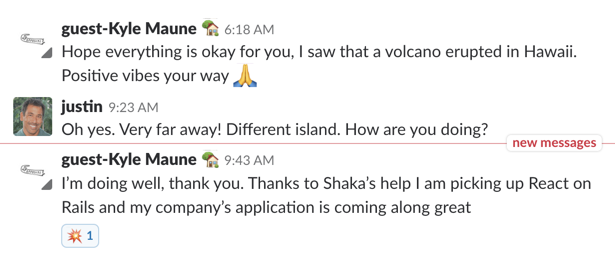
@@ -25,4 +25,4 @@ From Kyle Maune of Cooper Aerial, May 4, 2018
|
|
|
25
25
|
|
|
26
26
|
|
|
27
27
|
|
|
28
|
-
For more testimonials, see [Live Projects](PROJECTS.md) and [Kudos](KUDOS.md).
|
|
28
|
+
For more testimonials, see [Live Projects](https://github.com/shakacode/react_on_rails/tree/master/PROJECTS.md) and [Kudos](https://github.com/shakacode/react_on_rails/tree/master/KUDOS.md).
|
|
@@ -33,7 +33,42 @@ module ReactOnRails
|
|
|
33
33
|
app/views/layouts/hello_world.html.erb
|
|
34
34
|
config/initializers/react_on_rails.rb
|
|
35
35
|
Procfile.dev
|
|
36
|
-
Procfile.dev-
|
|
36
|
+
Procfile.dev-static]
|
|
37
|
+
base_files.each { |file| copy_file("#{base_path}#{file}", file) }
|
|
38
|
+
end
|
|
39
|
+
|
|
40
|
+
def copy_js_bundle_files
|
|
41
|
+
base_path = "base/base/"
|
|
42
|
+
base_files = %w[app/javascript/packs/server-bundle.js
|
|
43
|
+
app/javascript/bundles/HelloWorld/components/HelloWorldServer.js
|
|
44
|
+
app/javascript/bundles/HelloWorld/components/HelloWorld.module.css]
|
|
45
|
+
base_files.each { |file| copy_file("#{base_path}#{file}", file) }
|
|
46
|
+
end
|
|
47
|
+
|
|
48
|
+
def copy_webpack_config
|
|
49
|
+
puts "Adding Webpack config"
|
|
50
|
+
base_path = "base/base"
|
|
51
|
+
base_files = %w[babel.config.js
|
|
52
|
+
config/webpack/clientWebpackConfig.js
|
|
53
|
+
config/webpack/commonWebpackConfig.js
|
|
54
|
+
config/webpack/test.js
|
|
55
|
+
config/webpack/development.js
|
|
56
|
+
config/webpack/production.js
|
|
57
|
+
config/webpack/serverWebpackConfig.js
|
|
58
|
+
config/webpack/webpack.config.js
|
|
59
|
+
config/webpack/webpackConfig.js]
|
|
60
|
+
config = {
|
|
61
|
+
message: "// The source code including full typescript support is available at:"
|
|
62
|
+
}
|
|
63
|
+
base_files.each do |file|
|
|
64
|
+
template("#{base_path}/#{file}.tt", file, config)
|
|
65
|
+
end
|
|
66
|
+
end
|
|
67
|
+
|
|
68
|
+
def copy_webpacker_config
|
|
69
|
+
puts "Adding Webpacker v6 config"
|
|
70
|
+
base_path = "base/base/"
|
|
71
|
+
base_files = %w[config/webpacker.yml]
|
|
37
72
|
base_files.each { |file| copy_file("#{base_path}#{file}", file) }
|
|
38
73
|
end
|
|
39
74
|
|
|
@@ -43,7 +78,24 @@ module ReactOnRails
|
|
|
43
78
|
end
|
|
44
79
|
|
|
45
80
|
def add_yarn_dependencies
|
|
46
|
-
|
|
81
|
+
major_minor_patch_only = /\A\d+\.\d+\.\d+\z/.freeze
|
|
82
|
+
if ReactOnRails::VERSION.match?(major_minor_patch_only)
|
|
83
|
+
run "yarn add react-on-rails@#{ReactOnRails::VERSION} --exact"
|
|
84
|
+
else
|
|
85
|
+
# otherwise add latest
|
|
86
|
+
puts "Adding the lastest react-on-rails NPM module. Double check this is correct in package.json"
|
|
87
|
+
run "yarn add react-on-rails --exact"
|
|
88
|
+
end
|
|
89
|
+
|
|
90
|
+
puts "Adding React dependencies"
|
|
91
|
+
run "yarn add react react-dom @babel/preset-react prop-types babel-plugin-transform-react-remove-prop-types \
|
|
92
|
+
babel-plugin-macros"
|
|
93
|
+
|
|
94
|
+
puts "Adding CSS handlers"
|
|
95
|
+
run "yarn add css-loader css-minimizer-webpack-plugin mini-css-extract-plugin style-loader"
|
|
96
|
+
|
|
97
|
+
puts "Adding dev dependencies"
|
|
98
|
+
run "yarn add -D @pmmmwh/react-refresh-webpack-plugin react-refresh"
|
|
47
99
|
end
|
|
48
100
|
|
|
49
101
|
def append_to_spec_rails_helper
|
|
@@ -86,28 +138,28 @@ module ReactOnRails
|
|
|
86
138
|
|
|
87
139
|
What to do next:
|
|
88
140
|
|
|
89
|
-
- See the documentation on https://github.com/
|
|
141
|
+
- See the documentation on https://github.com/shakacode/shakapacker#webpack-configuration
|
|
90
142
|
for how to customize the default webpack configuration.
|
|
91
143
|
|
|
92
144
|
- Include your webpack assets to your application layout.
|
|
93
145
|
|
|
94
146
|
<%= javascript_pack_tag 'hello-world-bundle' %>
|
|
95
147
|
|
|
96
|
-
- Run `rails s` to start the Rails server
|
|
97
|
-
|
|
98
|
-
- Visit http://localhost:3000/hello_world and see your React On Rails app running!
|
|
148
|
+
- Run `rails s` to start the Rails server.
|
|
99
149
|
|
|
100
|
-
- Run bin/
|
|
150
|
+
- Run bin/webpacker-dev-server to start the Webpack dev server for compilation of Webpack
|
|
101
151
|
assets as soon as you save. This default setup with the dev server does not work
|
|
102
152
|
for server rendering
|
|
103
153
|
|
|
104
|
-
-
|
|
105
|
-
|
|
154
|
+
- Visit http://localhost:3000/hello_world and see your React On Rails app running!
|
|
155
|
+
|
|
156
|
+
- Alternately, run the foreman command to start the rails server and run webpack#{' '}
|
|
157
|
+
in watch mode.
|
|
106
158
|
|
|
107
|
-
foreman start -f Procfile.dev
|
|
159
|
+
foreman start -f Procfile.dev-static
|
|
108
160
|
|
|
109
161
|
- To turn on HMR, edit config/webpacker.yml and set HMR to true. Restart the rails server
|
|
110
|
-
and bin/
|
|
162
|
+
and bin/webpacker-dev-server. Or use Procfile.dev.
|
|
111
163
|
|
|
112
164
|
- To server render, change this line app/views/hello_world/index.html.erb to
|
|
113
165
|
`prerender: true` to see server rendering (right click on page and select "view source").
|
|
@@ -125,7 +177,7 @@ module ReactOnRails
|
|
|
125
177
|
# From https://github.com/rails/rails/blob/4c940b2dbfb457f67c6250b720f63501d74a45fd/railties/lib/rails/generators/rails/app/app_generator.rb
|
|
126
178
|
def app_name
|
|
127
179
|
@app_name ||= (defined_app_const_base? ? defined_app_name : File.basename(destination_root))
|
|
128
|
-
.tr(
|
|
180
|
+
.tr("\\", "").tr(". ", "_")
|
|
129
181
|
end
|
|
130
182
|
|
|
131
183
|
def defined_app_name
|
|
@@ -1,9 +1,5 @@
|
|
|
1
|
+
# Procfile for development using HMR
|
|
1
2
|
# You can run these commands in separate shells
|
|
2
|
-
|
|
3
|
-
|
|
4
|
-
|
|
5
|
-
# When making frequent changes to client side assets, you will prefer building webpack assets
|
|
6
|
-
# upon saving rather than when you refresh your browser page.
|
|
7
|
-
# Note, if using React on Rails localization you will need to run
|
|
8
|
-
# `bundle exec rake react_on_rails:locale` before you run bin/webpack
|
|
9
|
-
client: sh -c 'rm -rf public/packs/* || true && bin/webpack -w'
|
|
3
|
+
rails: bundle exec rails s -p 3000
|
|
4
|
+
wp-client: HMR=true bin/webpacker-dev-server
|
|
5
|
+
wp-server: HMR=true SERVER_BUNDLE_ONLY=yes bin/webpacker --watch
|