react_on_rails 11.0.0 → 11.1.0
This diff represents the content of publicly available package versions that have been released to one of the supported registries. The information contained in this diff is provided for informational purposes only and reflects changes between package versions as they appear in their respective public registries.
- checksums.yaml +5 -5
- data/.rubocop.yml +1 -1
- data/.travis.yml +2 -2
- data/CHANGELOG.md +80 -3
- data/CONTRIBUTING.md +7 -8
- data/{docs/LICENSE.md → LICENSE.md} +1 -1
- data/PROJECTS.md +7 -1
- data/README.md +175 -637
- data/Rakefile +4 -1
- data/SUMMARY.md +39 -26
- data/docs/additional-reading/convert-rails-5-api-only-app.md +19 -0
- data/docs/additional-reading/credits.md +10 -0
- data/docs/additional-reading/rails-assets-relative-paths.md +2 -2
- data/docs/additional-reading/rails-engine-integration.md +7 -0
- data/docs/additional-reading/server-rendering-tips.md +2 -4
- data/docs/additional-reading/webpack.md +2 -2
- data/docs/api/javascript-api.md +21 -1
- data/docs/api/redux-store-api.md +100 -0
- data/docs/api/view-helpers-api.md +130 -0
- data/docs/articles.md +20 -0
- data/docs/basics/client-vs-server-rendering.md +17 -0
- data/docs/basics/configuration.md +39 -5
- data/docs/basics/deployment.md +6 -0
- data/docs/basics/{generator.md → generator-details.md} +4 -7
- data/docs/basics/generator-functions-and-railscontext.md +157 -0
- data/docs/basics/how-react-on-rails-works.md +40 -0
- data/docs/basics/installation-into-an-existing-rails-app.md +64 -0
- data/docs/basics/react-server-rendering.md +27 -0
- data/docs/{additional-reading → basics}/recommended-project-structure.md +26 -4
- data/docs/{additional-reading → basics}/rspec-configuration.md +12 -6
- data/docs/basics/upgrading-react-on-rails.md +3 -3
- data/docs/basics/webpack-configuration.md +29 -0
- data/docs/misc/doctrine.md +1 -1
- data/docs/{additional-reading → misc-pending}/code-splitting.md +8 -2
- data/docs/{basics/installation-overview.md → misc-pending/manual-installation-overview.md} +3 -8
- data/docs/{additional-reading → misc-pending}/rails-assets.md +3 -1
- data/docs/testimonials.md +11 -0
- data/docs/tutorial.md +4 -4
- data/lib/generators/USAGE +1 -1
- data/lib/react_on_rails/configuration.rb +139 -97
- data/lib/react_on_rails/{react_on_rails_helper.rb → helper.rb} +104 -79
- data/lib/react_on_rails/json_parse_error.rb +26 -0
- data/lib/react_on_rails/prerender_error.rb +48 -6
- data/lib/react_on_rails/react_component/render_options.rb +94 -0
- data/lib/react_on_rails/server_rendering_pool/ruby_embedded_java_script.rb +58 -50
- data/lib/react_on_rails/server_rendering_pool.rb +4 -16
- data/lib/react_on_rails/test_helper/webpack_assets_status_checker.rb +10 -6
- data/lib/react_on_rails/test_helper.rb +8 -7
- data/lib/react_on_rails/utils.rb +38 -6
- data/lib/react_on_rails/version.rb +1 -1
- data/lib/react_on_rails/version_syntax_converter.rb +14 -12
- data/lib/react_on_rails/webpacker_utils.rb +11 -8
- data/lib/react_on_rails.rb +4 -2
- data/package.json +3 -2
- data/rakelib/release.rake +1 -1
- data/react_on_rails.gemspec +2 -2
- metadata +32 -21
- data/docs/additional-reading/caching-and-performance.md +0 -4
- data/docs/additional-reading/node-server-rendering.md +0 -5
- data/docs/api/ruby-api.md +0 -8
- data/lib/react_on_rails/react_component/options.rb +0 -64
data/README.md
CHANGED
|
@@ -1,262 +1,161 @@
|
|
|
1
|
-
|
|
1
|
+
# ReactOnRails
|
|
2
2
|
|
|
3
|
-
|
|
3
|
+
[](./LICENSE.md) [](https://travis-ci.org/shakacode/react_on_rails) [](https://app.codeship.com/projects/187011) [](https://badge.fury.io/rb/react_on_rails) [](https://badge.fury.io/js/react-on-rails) [](https://codeclimate.com/github/shakacode/react_on_rails) [](https://coveralls.io/github/shakacode/react_on_rails?branch=master)
|
|
4
4
|
|
|
5
|
-
|
|
6
|
-
Aloha, I'm Justin Gordon the creator and maintainer of React on Rails. I offer a [React on Rails Pro Support Plan](http://www.shakacode.com/work/shakacode-pro-support.pdf), and I can help you with:
|
|
7
|
-
* Optimizing your webpack setup for React on Rails.
|
|
8
|
-
* Upgrading from older React on Rails to newer versions.
|
|
9
|
-
* Better performance client and server side.
|
|
10
|
-
* Migrating from Angular to React.
|
|
11
|
-
* Best practices based on 4 years of React on Rails experience.
|
|
12
|
-
* Early access to the React on Rails Pro Gem and Node code, including:
|
|
13
|
-
* ShakaCode's Node.js rendering server for better performance for server rendering (used now at [egghead.io](https://egghead.io/)).
|
|
14
|
-
* Performance helpers, especially for server rendering
|
|
15
|
-
* Webpack configuration examples
|
|
5
|
+
React on Rails integrates Rails with (server rendering of) Facebook's [React](https://github.com/facebook/react) front-end framework.
|
|
16
6
|
|
|
17
|
-
|
|
7
|
+
Intersted in optimizing your webpack setup for React on Rails including code splitting with react-router v4, webpack v4, and react-loadable? [Contact me](mailto:justin@shakacode.com).
|
|
18
8
|
|
|
19
|
-
|
|
9
|
+
ShakaCode is **[currently looking to hire](http://www.shakacode.com/about/#work-with-us)** like-minded developers that wish to work on our projects, including [Hawaii Chee](https://www.hawaiichee.com). Your main coding interview will be pairing with us on our open source! We're getting into [Reason](https://reasonml.github.io/)!
|
|
20
10
|
|
|
21
|
-
|
|
11
|
+
# Intro
|
|
22
12
|
|
|
23
|
-
|
|
13
|
+
## Project Objective
|
|
24
14
|
|
|
25
|
-
|
|
26
|
-
2. Easy passing of props directly from your Rails view to your React components rather than having your Rails view load and then make a separate request to your API.
|
|
27
|
-
3. Redux and React-Router integration
|
|
28
|
-
4. Localization support
|
|
29
|
-
5. Rspec test helpers to ensure your Webpack bundles are ready for tests
|
|
30
|
-
6. A supportive community
|
|
15
|
+
To provide an opinionated and optimal framework for integrating Ruby on Rails with React via the [**Webpacker**](https://github.com/rails/webpacker) gem.
|
|
31
16
|
|
|
32
|
-
|
|
17
|
+
## Features and Why React on Rails?
|
|
33
18
|
|
|
34
|
-
|
|
35
|
-
First be sure to run `rails -v` and check that you are using Rails 5.1.3 or above. If you are using an older version of Rails, you'll need to install webpacker with React per the instructions [here](https://github.com/rails/webpacker).
|
|
19
|
+
Given that rails/webpacker gem already provides basic React integration, why would you use "React on Rails"? Server rendering, often used for SEO and performance, is not offered by rails/webpacker.
|
|
36
20
|
|
|
37
|
-
|
|
38
|
-
|
|
21
|
+
1. The easy passing of props directly from your Rails view to your React components rather than having your Rails view load and then make a separate 1request to your API.
|
|
22
|
+
1. [Redux](https://github.com/reactjs/redux) and [React Router](https://github.com/reactjs/react-router) integration.
|
|
23
|
+
1. [Internationalization (I18n) and (localization)](https://github.com/shakacode/react_on_rails/blob/master/docs/basics/i18n.md)
|
|
24
|
+
1. [RSpec Test Helpers Configuration](docs/basics/rspec-configuration.md) to ensure your Webpack bundles are ready for tests.
|
|
25
|
+
1. A supportive community. This [web search shows how live public sites are using React on Rails](https://publicwww.com/websites/%22react-on-rails%22++-undeveloped.com/).
|
|
26
|
+
1. [Reason ML Support](https://github.com/shakacode/reason-react-on-rails-example)
|
|
39
27
|
|
|
40
|
-
|
|
41
|
-
2. Add gem version: `gem 'react_on_rails', '11.0.0' # Use the exact gem version to match npm version`
|
|
42
|
-
3. `bundle install`
|
|
43
|
-
4. Commit this to git (or else you cannot run the generator unless you pass the option --ignore-warnings).
|
|
44
|
-
5. Run the generator: `rails generate react_on_rails:install`
|
|
45
|
-
6. Start the app: `rails s`
|
|
46
|
-
7. Visit http://localhost:3000/hello_world
|
|
28
|
+
See the [react-webpack-rails-tutorial](https://github.com/shakacode/react-webpack-rails-tutorial) for an example of a live implementation and code.
|
|
47
29
|
|
|
48
|
-
### Turn on server rendering
|
|
49
30
|
|
|
50
|
-
|
|
51
|
-
2. Refresh the page.
|
|
31
|
+
## React on Rails Pro and ShakaCode Pro Support
|
|
52
32
|
|
|
53
|
-
|
|
33
|
+
React on Rails Pro provides Node server rendering and other performance enhancements for React on Rails. It's live at [egghead.io](https://egghead.io). See the [React on Rails Pro Docs](https://github.com/shakacode/react_on_rails/wiki).
|
|
54
34
|
|
|
55
|
-
|
|
56
|
-
<%= react_component("HelloWorld", props: @hello_world_props, prerender: false) %>
|
|
57
|
-
```
|
|
35
|
+
The [React on Rails Pro Support Plan](http://www.shakacode.com/work/shakacode-pro-support.pdf) can help you with:
|
|
58
36
|
|
|
59
|
-
|
|
37
|
+
* Optimizing your webpack setup to Webpack v4 for React on Rails including code splitting with react-router v4, webpack v4, and react-loadable.
|
|
38
|
+
* Upgrading your app to use the current Webpack setup that skips the Sprockets asset pipeline.
|
|
39
|
+
* Better performance client and server side.
|
|
40
|
+
* Efficiently migrating from [Angular to React](https://www.shakacode.com/services/angular-to-react/).
|
|
41
|
+
* Best practices based on four years of React on Rails experience.
|
|
60
42
|
|
|
61
|
-
|
|
62
|
-
Please [**click to subscribe**](https://app.mailerlite.com/webforms/landing/l1d9x5) to keep in touch with Justin Gordon and [ShakaCode](http://www.shakacode.com/). I intend to send announcements of new releases of React on Rails and of our latest [blog articles](https://blog.shakacode.com) and tutorials. Subscribers will also have access to **exclusive content**, including tips and examples.
|
|
43
|
+
ShakaCode can also help you with your Rails, JavaScript, and React-Native development needs. We build custom web and mobile applications. Because we own [HawaiiChee.com](https://www.hawaiichee.com), we can leverage that code for your app!
|
|
63
44
|
|
|
64
|
-
[
|
|
45
|
+
The article [Why Hire ShakaCode?](https://blog.shakacode.com/can-shakacode-help-you-4a5b1e5a8a63#.jex6tg9w9) provides additional details about our projects.
|
|
65
46
|
|
|
66
|
-
|
|
67
|
-
|
|
68
|
-
* **[@railsonmaui on Twitter](https://twitter.com/railsonmaui)**
|
|
69
|
-
* For a live, [open source](https://github.com/shakacode/react-webpack-rails-tutorial), example of this gem, see [www.reactrails.com](http://www.reactrails.com).
|
|
70
|
-
* See [Projects](PROJECTS.md) using and [KUDOS](./KUDOS.md) for React on Rails. Please submit yours! Please edit either page or [email us](mailto:contact@shakacode.com) and we'll add your info. We also **love stars** as it helps us attract new users and contributors.
|
|
71
|
-
* *See [NEWS.md](NEWS.md) for more notes over time.*
|
|
47
|
+
|
|
48
|
+
Please [email me (Justin Gordon), the creator of React on Rails](mailto:justin@shakacode.com), to see if I can help you or if you want an invite to our private Slack room for ShakaCode.
|
|
72
49
|
|
|
73
|
-
|
|
50
|
+
## Testimonials for Hiring ShakaCode and our "Pro Support"
|
|
51
|
+
|
|
52
|
+
From Kyle Maune of Cooper Aerial, May 4, 2018
|
|
53
|
+
|
|
54
|
+
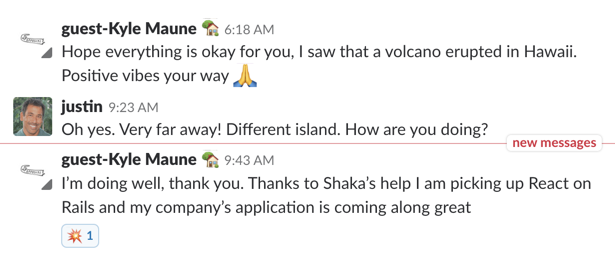
|
|
74
55
|
|
|
75
|
-
# Testimonials
|
|
76
56
|
From Joel Hooks, Co-Founder, Chief Nerd at [egghead.io](https://egghead.io/), January 30, 2017:
|
|
77
57
|
|
|
78
58
|

|
|
79
59
|
|
|
80
60
|
For more testimonials, see [Live Projects](PROJECTS.md) and [Kudos](./KUDOS.md).
|
|
81
61
|
|
|
82
|
-
|
|
83
|
-
|
|
84
|
-
# Articles, Videos, and Podcasts
|
|
85
|
-
|
|
86
|
-
### Articles
|
|
87
|
-
* [Introducing React on Rails v9 with Webpacker Support](https://blog.shakacode.com/introducing-react-on-rails-v9-with-webpacker-support-f2584c6c8fa4) for an overview of the integration of React on Rails with Webpacker.
|
|
88
|
-
* [Webpacker Lite: Why Fork Webpacker?](https://blog.shakacode.com/webpacker-lite-why-fork-webpacker-f0a7707fac92)
|
|
89
|
-
* [React on Rails, 2000+ 🌟 Stars](https://medium.com/shakacode/react-on-rails-2000-stars-32ff5cfacfbf#.6gmfb2gpy)
|
|
90
|
-
* [The React on Rails Doctrine](https://medium.com/@railsonmaui/the-react-on-rails-doctrine-3c59a778c724)
|
|
91
|
-
* [Simple Tutorial](https://github.com/shakacode/react_on_rails/blob/master/docs/tutorial.md).
|
|
92
|
-
|
|
93
|
-
### Videos
|
|
94
|
-
* [Video of running the v9 installer with Webpacker v3](https://youtu.be/M0WUM_XPaII). History, motivations, philosophy, and overview.
|
|
95
|
-
1. [GORUCO 2017: Front-End Sadness to Happiness: The React on Rails Story by Justin Gordon](https://www.youtube.com/watch?v=SGkTvKRPYrk)
|
|
96
|
-
1. [egghead.io: Creating a component with React on Rails](https://egghead.io/lessons/react-creating-a-component-with-react-on-rails)
|
|
97
|
-
1. [egghead.io: Creating a redux component with React on Rails](https://egghead.io/lessons/react-add-redux-state-management-to-a-react-on-rails-project)
|
|
98
|
-
1. [React On Rails Tutorial Series](https://www.youtube.com/playlist?list=PL5VAKH-U1M6dj84BApfUtvBjvF-0-JfEU)
|
|
99
|
-
1. [History and Motivation](https://youtu.be/F4oymbUHvoY)
|
|
100
|
-
1. [Basic Tutorial Walkthrough](https://youtu.be/_bjScw60FBk)
|
|
101
|
-
1. [Code Walkthrough](https://youtu.be/McQ9UM-_ocQ)
|
|
102
|
-
|
|
103
|
-
------
|
|
104
|
-
|
|
105
|
-
# React on Rails
|
|
106
|
-
|
|
107
|
-
**Project Objective**: To provide an opinionated and optimal framework for integrating Ruby on Rails with React via the [**Webpacker**](https://github.com/rails/webpacker) gem.
|
|
108
|
-
|
|
109
|
-
React on Rails integrates Facebook's [React](https://github.com/facebook/react) front-end framework with Rails. React v0.14.x and greater is supported, with server rendering. [Redux](https://github.com/reactjs/redux) and [React-Router](https://github.com/reactjs/react-router) are supported as well, also with server rendering, using **execJS**.
|
|
110
|
-
|
|
111
|
-
The ability to use a standalone Node Rendering server for better performance and tooling is supported for React on Rails Pro. Contact [justin@shakacode.com](mailto:justin@shakacode.com) for more information.
|
|
112
|
-
|
|
113
|
-
## Table of Contents
|
|
114
|
-
|
|
115
|
-
+ [Features](#features)
|
|
116
|
-
+ [Why Webpack?](#why-webpack)
|
|
117
|
-
+ [rails/webpacker or custom setup for Webpack?](#webpack-configuration-custom-setup-for-webpack-or-railswebpacker)
|
|
118
|
-
+ [Getting Started with an existing Rails app](#getting-started-with-an-existing-rails-app)
|
|
119
|
-
- [Installation Overview](#installation-overview)
|
|
120
|
-
- [Initializer Configuration: config/initializers/react_on_rails.rb](#initializer-configuration)
|
|
121
|
-
- [Including your React Component in your Rails Views](#including-your-react-component-in-your-rails-views)
|
|
122
|
-
- [I18n](#i18n)
|
|
123
|
-
- [Convert rails-5 API only app to rails app](#convert-rails-5-api-only-app-to-rails-app)
|
|
124
|
-
- [NPM](#npm)
|
|
125
|
-
- [Webpacker Configuration](#webpacker-configuration)
|
|
126
|
-
+ [How it Works](#how-it-works)
|
|
127
|
-
- [Client-Side Rendering vs. Server-Side Rendering](#client-side-rendering-vs-server-side-rendering)
|
|
128
|
-
- [Building the Bundles](#building-the-bundles)
|
|
129
|
-
- [Rails Context and Generator Functions](#rails-context-and-generator-functions)
|
|
130
|
-
- [Globally Exposing Your React Components](#globally-exposing-your-react-components)
|
|
131
|
-
- [ReactOnRails View Helpers API](#reactonrails-view-helpers-api)
|
|
132
|
-
- [ReactOnRails JavaScript API](#reactonrails-javascript-api)
|
|
133
|
-
- [React-Router](#react-router)
|
|
134
|
-
- [Deployment](#deployment)
|
|
135
|
-
+ [Integration with Node.js for Server Rendering](#integration-with-nodejs-for-server-rendering)
|
|
136
|
-
+ [Additional Documentation](#additional-documentation)
|
|
137
|
-
+ [Contributing](#contributing)
|
|
138
|
-
+ [License](#license)
|
|
139
|
-
+ [Authors](#authors)
|
|
140
|
-
+ [About ShakaCode](#about-shakacode)
|
|
141
|
-
|
|
142
|
-
---
|
|
143
|
-
|
|
144
|
-
## Features
|
|
145
|
-
Like the [react-rails](https://github.com/reactjs/react-rails) gem, React on Rails is capable of server-side rendering with fragment caching and is compatible with [turbolinks](https://github.com/turbolinks/turbolinks). While the initial setup is slightly more involved, it allows for advanced functionality such as:
|
|
146
|
-
|
|
147
|
-
+ [Redux](https://github.com/reactjs/redux)
|
|
148
|
-
+ [Webpack optimization functionality](https://github.com/webpack/docs/wiki/optimization)
|
|
149
|
-
+ [React Router](https://github.com/reactjs/react-router)
|
|
150
|
-
|
|
151
|
-
See the [react-webpack-rails-tutorial](https://github.com/shakacode/react-webpack-rails-tutorial) for an example of a live implementation and code.
|
|
152
|
-
|
|
153
|
-
## Why Webpack?
|
|
154
|
-
|
|
155
|
-
Webpack is used to generate JavaScript and CSS "bundles" directly to your `/public` directory. [webpacker](https://github.com/rails/webpacker) provides view helpers to access the Webpack generated (and fingerprinted) JS and CSS. These files totally skip the Rails asset pipeline. You are responsible for properly processing your Webpack output via the Webpack config files.
|
|
156
|
-
|
|
157
|
-
This usage of webpack fits neatly and simply into existing Rails apps. You can include React components on a Rails view with a simple helper.
|
|
158
|
-
|
|
159
|
-
Compare this to some alternative approaches for SPAs (Single Page Apps) that utilize Webpack and Rails. They will use a separate node server to distribute web pages, JavaScript assets, CSS, etc., and will still use Rails as an API server. A good example of this is our ShakaCode team member Alex's article [
|
|
160
|
-
Universal React with Rails: Part I](https://medium.com/@alexfedoseev/isomorphic-react-with-rails-part-i-440754e82a59).
|
|
161
|
-
|
|
162
|
-
## Webpack Configuration: custom setup for Webpack or rails/webpacker?
|
|
163
|
-
|
|
164
|
-
Version 9 of React on Rails added support for the rails/webpacker view helpers so that Webpack produced assets would no longer pass through the Rails asset pipeline. As part of this change, React on Rails added a configuration option to support customization of the node_modules directory. This allowed React on Rails to support the rails/webpacker configuration of the Webpack configuration.
|
|
165
|
-
|
|
166
|
-
A key decision in your use React on Rails is whether you go with the rails/webpacker default setup or the traditional React on Rails setup of putting all your client side files under the `/client` directory. While there are technically 2 independent choices involved, the directory structure and the mechanism of Webpack configuration, for simplicity sake we'll assume that these choices go together.
|
|
167
|
-
|
|
168
|
-
### Traditional React on Rails using the /client directory
|
|
169
|
-
|
|
170
|
-
Until version 9, all React on Rails apps used the `/client` directory for configuring React on Rails in terms of the configuration of Webpack and location of your JavaScript and Webpack files, including the node_modules directory. Version 9 changed the default to `/` for the `node_modules` location using this value in `config/initializers/react_on_rails.rb`: `config.node_modules_location`.
|
|
171
|
-
|
|
172
|
-
The [ShakaCode Team](http://www.shakacode.com) _recommends_ this approach for projects beyond the simplest cases as it provides the greatest transparency in your webpack and overall client-side setup. The *big advantage* to this is that almost everything within the `/client` directory will apply if you wish to convert your client-side code to a pure Single Page Application that runs without Rails. This allows you to google for how to do something with Webpack configuration and what applies to a non-Rails app will apply just as well to a React on Rails app.
|
|
62
|
+
----
|
|
173
63
|
|
|
174
|
-
|
|
64
|
+
# Docs
|
|
175
65
|
|
|
176
|
-
|
|
66
|
+
**Consider browsing this on our [documentation Gitbook](https://shakacode.gitbooks.io/react-on-rails/content/).**
|
|
177
67
|
|
|
68
|
+
## Prerequisites
|
|
178
69
|
|
|
179
|
-
|
|
70
|
+
React on Rails supports older versions of Rails back to 3.x. Rails/webpacker requires version 4.2+.
|
|
180
71
|
|
|
181
|
-
|
|
72
|
+
## Getting Started
|
|
182
73
|
|
|
183
|
-
|
|
74
|
+
Note, the best way to understand how to use ReactOnRails is to study a few simple examples. You can do a quick demo setup, either on your existing app or on a new Rails app.
|
|
184
75
|
|
|
185
|
-
1.
|
|
186
|
-
2.
|
|
76
|
+
1. Do the quick [tutorial](docs/tutorial.md).
|
|
77
|
+
2. Add React on Rails to an existing Rails app per [the instructions](docs/basics/installation-into-an-existing-rails-app.md).
|
|
78
|
+
3. Look at [spec/dummy](spec/dummy), a simple, no DB example.
|
|
79
|
+
3. Look at [github.com/shakacode/react-webpack-rails-tutorial](https://github.com/shakacode/react-webpack-rails-tutorial); it's a full featured example live at [www.reactrails.com](http://www.reactrails.com).
|
|
187
80
|
|
|
188
|
-
|
|
81
|
+
## Basic Installation
|
|
189
82
|
|
|
190
|
-
|
|
83
|
+
*See also [the instructions for installing into an existing Rails app](docs/basics/installation-into-an-existing-rails-app.md).*
|
|
191
84
|
|
|
192
|
-
|
|
85
|
+
1. Create a new Rails app:
|
|
193
86
|
|
|
87
|
+
``````bash
|
|
88
|
+
$ rails new my-app --webpack=react
|
|
89
|
+
$ cd my-app
|
|
90
|
+
``````
|
|
194
91
|
|
|
195
|
-
|
|
92
|
+
2. Add the `react_on_rails` gem to Gemfile:
|
|
196
93
|
|
|
197
|
-
|
|
94
|
+
```ruby
|
|
95
|
+
gem 'react_on_rails', '11.0.9' # Use the exact gem version to match npm version
|
|
96
|
+
```
|
|
198
97
|
|
|
199
|
-
|
|
200
|
-
1. Add the following to your Gemfile and `bundle install`. We recommend fixing the version of React on Rails, as you will need to keep the exact version in sync with the version in your `client/package.json` file.
|
|
98
|
+
3. Install the `react_on_rails` gem:
|
|
201
99
|
|
|
202
|
-
|
|
203
|
-
|
|
204
|
-
gem "webpacker", "~> 3.0"
|
|
205
|
-
```
|
|
206
|
-
|
|
207
|
-
2. Run the following 2 commands to install Webpacker with React:
|
|
100
|
+
```bash
|
|
101
|
+
$ bundle install
|
|
208
102
|
```
|
|
209
|
-
bundle exec rails webpacker:install
|
|
210
|
-
bundle exec rails webpacker:install:react
|
|
211
103
|
|
|
212
|
-
|
|
104
|
+
4. Commit this to git (or else you cannot run the generator unless you pass the option `--ignore-warnings`).
|
|
213
105
|
|
|
214
|
-
|
|
106
|
+
5. Run the generator:
|
|
215
107
|
|
|
216
|
-
|
|
108
|
+
```bash
|
|
109
|
+
$ rails generate react_on_rails:install
|
|
110
|
+
```
|
|
217
111
|
|
|
218
|
-
|
|
219
|
-
rails generate react_on_rails:install --help
|
|
220
|
-
```
|
|
112
|
+
6. Start the app:
|
|
221
113
|
|
|
222
|
-
|
|
114
|
+
```bash
|
|
115
|
+
$ rails s
|
|
116
|
+
```
|
|
223
117
|
|
|
224
|
-
|
|
225
|
-
rails generate react_on_rails:install
|
|
226
|
-
```
|
|
118
|
+
7. Visit http://localhost:3000/hello_world.
|
|
227
119
|
|
|
228
|
-
|
|
120
|
+
|
|
121
|
+
### Turning on server rendering
|
|
229
122
|
|
|
230
|
-
|
|
123
|
+
With the code from running the React on Rails generator above:
|
|
231
124
|
|
|
232
|
-
|
|
233
|
-
|
|
234
|
-
```
|
|
125
|
+
1. Edit `app/views/hello_world/index.html.erb` and set `prerender` to `true`.
|
|
126
|
+
2. Refresh the page.
|
|
235
127
|
|
|
236
|
-
|
|
128
|
+
Below is the line where you turn server rendering on by setting `prerender` to true:
|
|
237
129
|
|
|
238
|
-
|
|
130
|
+
```erb
|
|
131
|
+
<%= react_component("HelloWorld", props: @hello_world_props, prerender: false) %>
|
|
132
|
+
```
|
|
239
133
|
|
|
240
|
-
|
|
134
|
+
## Basic Usage
|
|
241
135
|
|
|
242
|
-
###
|
|
136
|
+
### Configuration
|
|
243
137
|
|
|
244
|
-
Configure
|
|
138
|
+
* Configure `config/initializers/react_on_rails.rb`. You can adjust some necessary settings and defaults. See file [docs/basics/configuration.md](docs/basics/configuration.md) for documentation of all configuration options.
|
|
139
|
+
* Configure `config/webpacker.yml`. If you used the generator and the default webpacker setup, you don't need to touch this file. If you are customizing your setup, then consult the [spec/dummy/config/webpacker.yml](./spec/dummy/config/webpacker.yml) example
|
|
140
|
+
* Set `compile: false` for all envs
|
|
141
|
+
* Your `public_output_path` must match your Webpack configuration for `output` of your bundles.
|
|
142
|
+
* Only set `cache_manifest` to `true` in your production env.
|
|
245
143
|
|
|
246
|
-
|
|
144
|
+
## Including your React Component on your Rails Views
|
|
247
145
|
|
|
248
|
-
|
|
146
|
+
- React component are rendered via your Rails Views. Here's an ERB sample:
|
|
249
147
|
|
|
250
148
|
```erb
|
|
251
149
|
<%= react_component("HelloWorld", props: @some_props) %>
|
|
252
150
|
```
|
|
253
|
-
|
|
151
|
+
|
|
152
|
+
- **Server-Side Rendering**: Your react component is first rendered into HTML on the server. Use the **prerender** option:
|
|
254
153
|
|
|
255
154
|
```erb
|
|
256
155
|
<%= react_component("HelloWorld", props: @some_props, prerender: true) %>
|
|
257
156
|
```
|
|
258
157
|
|
|
259
|
-
|
|
158
|
+
- The `component_name` parameter is a string matching the name you used to expose your React component globally. So, in the above examples, if you had a React component named "HelloWorld", you would register it with the following lines:
|
|
260
159
|
|
|
261
160
|
```js
|
|
262
161
|
import ReactOnRails from 'react-on-rails';
|
|
@@ -266,516 +165,155 @@ Configure the file `config/initializers/react_on_rails.rb`. You can adjust some
|
|
|
266
165
|
|
|
267
166
|
Exposing your component in this way is how React on Rails is able to reference your component from a Rails view. You can expose as many components as you like, as long as their names do not collide. See below for the details of how you expose your components via the react_on_rails webpack configuration.
|
|
268
167
|
|
|
269
|
-
|
|
168
|
+
- `@some_props` can be either a hash or JSON string. This is an optional argument assuming you do not need to pass any options (if you want to pass options, such as `prerender: true`, but you do not want to pass any properties, simply pass an empty hash `{}`). This will make the data available in your component:
|
|
270
169
|
|
|
271
170
|
```ruby
|
|
272
171
|
# Rails View
|
|
273
172
|
<%= react_component("HelloWorld", props: { name: "Stranger" }) %>
|
|
274
173
|
```
|
|
174
|
+
|
|
175
|
+
- This is what your HelloWorld.js file might contain. The railsContext is always available for any parameters that you _always_ want available for your React components. It has _nothing_ to do with the concept of the [React Context](https://reactjs.org/docs/context.html). See [Generator Functions and the RailsContext](docs/basics/generator-functions-and-railscontext.md) for more details on this topic.
|
|
176
|
+
|
|
177
|
+
```js
|
|
178
|
+
import React from 'react';
|
|
275
179
|
|
|
276
|
-
|
|
277
|
-
|
|
278
|
-
|
|
279
|
-
|
|
280
|
-
|
|
281
|
-
|
|
282
|
-
|
|
283
|
-
|
|
284
|
-
|
|
285
|
-
|
|
286
|
-
|
|
287
|
-
See the [How to add I18n](docs/basics/i18n.md) for a summary of adding I18n.
|
|
288
|
-
|
|
289
|
-
### Convert rails-5 API only app to rails app
|
|
290
|
-
|
|
291
|
-
1. Go to the directory where you created your app
|
|
292
|
-
|
|
293
|
-
```
|
|
294
|
-
rails new your-current-app-name
|
|
295
|
-
```
|
|
296
|
-
|
|
297
|
-
Rails will start creating the app and will skip the files you have already created. If there is some conflict then it will stop and you need to resolve it manually. be careful at this step as it might replace you current code in conflicted files.
|
|
298
|
-
|
|
299
|
-
2. Resolve conflicts
|
|
300
|
-
|
|
301
|
-
```
|
|
302
|
-
1. Press "d" to see the difference
|
|
303
|
-
2. If it is only adding lines then press "y" to continue
|
|
304
|
-
3. If it is removeing some of your code then press "n" and add all additions manually
|
|
305
|
-
```
|
|
306
|
-
|
|
307
|
-
3. Run `bundle install` and follow [Getting started](#getting-started-with-an-existing-rails-app)
|
|
308
|
-
|
|
309
|
-
|
|
310
|
-
### NPM
|
|
311
|
-
All JavaScript in React On Rails is loaded from npm: [react-on-rails](https://www.npmjs.com/package/react-on-rails). To manually install this (you did not use the generator), assuming you have a standard configuration, run this command (assuming you are in the directory where you have your `node_modules`):
|
|
312
|
-
|
|
313
|
-
```bash
|
|
314
|
-
yarn add react-on-rails --exact
|
|
315
|
-
```
|
|
316
|
-
|
|
317
|
-
That will install the latest version and update your package.json. **NOTE:** the `--exact` flag will ensure that you do not have a "~" or "^" for your react-on-rails version in your package.json.
|
|
318
|
-
|
|
319
|
-
### Webpacker Configuration
|
|
320
|
-
|
|
321
|
-
React on Rails users should set configuration value `compile` to false, as React on Rails handles compilation for test and production environments.
|
|
322
|
-
|
|
323
|
-
## How it Works
|
|
324
|
-
The generator installs your webpack files in the `client` folder. Foreman uses webpack to compile your code and output the bundled results to `app/assets/webpack`, which are then loaded by sprockets. These generated bundle files have been added to your `.gitignore` for your convenience.
|
|
325
|
-
|
|
326
|
-
Inside your Rails views, you can now use the `react_component` helper method provided by React on Rails. You can pass props directly to the react component helper. You can also initialize a Redux store with view or controller helper `redux_store` so that the store can be shared amongst multiple React components. See the docs for `redux_store` below and scan the code inside of the [/spec/dummy](https://github.com/shakacode/react_on_rails/tree/master/spec/dummy) sample app.
|
|
327
|
-
|
|
328
|
-
### Client-Side Rendering vs. Server-Side Rendering
|
|
329
|
-
In most cases, you should use the `prerender: false` (default behavior) with the provided helper method to render the React component from your Rails views. In some cases, such as when SEO is vital, or many users will not have JavaScript enabled, you can enable server-rendering by passing `prerender: true` to your helper, or you can simply change the default in `config/initializers/react_on_rails`.
|
|
330
|
-
|
|
331
|
-
Now the server will interpret your JavaScript using [ExecJS](https://github.com/rails/execjs) and pass the resulting HTML to the client. We recommend using [mini_racer](https://github.com/discourse/mini_racer) as ExecJS's runtime. The generator will automatically add it to your Gemfile for you (once we complete [#501](https://github.com/shakacode/react_on_rails/issues/501)).
|
|
332
|
-
|
|
333
|
-
If you open the HTML source of any web page using React on Rails, you'll see the 3 parts of React on Rails rendering:
|
|
334
|
-
|
|
335
|
-
1. A script tag containing the properties of the React component, such as the registered name and any props. A JavaScript function runs after the page loads, using this data to build and initialize your React components.
|
|
336
|
-
2. The wrapper div `<div id="HelloWorld-react-component-0">` specifies the div where to place the React rendering. It encloses the server-rendered HTML for the React component.
|
|
337
|
-
3. Additional JavaScript is placed to console-log any messages, such as server rendering errors. Note: these server side logs can be configured only to be sent to the server logs.
|
|
338
|
-
|
|
339
|
-
**Note**:
|
|
340
|
-
|
|
341
|
-
* If server rendering is not used (prerender: false), then the major difference is that the HTML rendered for the React component only contains the outer div: `<div id="HelloWorld-react-component-0"/>`. The first specification of the React component is just the same.
|
|
342
|
-
|
|
343
|
-
### Building the Bundles
|
|
344
|
-
Each time you change your client code, you will need to re-generate the bundles (the webpack-created JavaScript files included in application.js). The included Foreman `Procfile.dev` will take care of this for you by starting a webpack process with the watch flag. This will watch your JavaScript code files for changes. Simply run `foreman start -f Procfile.dev`.
|
|
345
|
-
|
|
346
|
-
On production deployments that use asset precompilation, such as Heroku deployments, React on Rails, by default, will automatically run webpack to build your JavaScript bundles. You can see the source code for what gets added to your precompilation [here](https://github.com/shakacode/react_on_rails/tree/master/lib/tasks/assets.rake). For more information on this topic, see [the doc on Heroku deployment](./docs/additional-reading/heroku-deployment.md#more-details-on-precompilation-using-webpack-to-create-javascript-assets).
|
|
347
|
-
|
|
348
|
-
If you have used the provided generator, these bundles will automatically be added to your `.gitignore` to prevent extraneous noise from re-generated code in your pull requests. You will want to do this manually if you do not use the provided generator.
|
|
349
|
-
|
|
350
|
-
|
|
351
|
-
### Generator Functions
|
|
352
|
-
You have 2 ways to specify your React components. You can either register the React component directly, or you can create a function that returns a React component. Creating a function has the following benefits:
|
|
353
|
-
|
|
354
|
-
1. You have access to the `railsContext`. See documentation for the railsContext in terms of why you might need it. You **need** a generator function to access the `railsContext`.
|
|
355
|
-
1. You can use the passed-in props to initialize a redux store or set up react-router.
|
|
356
|
-
1. You can return different components depending on what's in the props.
|
|
357
|
-
|
|
358
|
-
ReactOnRails will automatically detect a registered generator function. Thus, there is no difference between registering a React Component versus a "generator function."
|
|
359
|
-
|
|
360
|
-
Another reason to use a generator function is that sometimes in server rendering, specifically with React Router, you need to return the result of calling ReactDOMServer.renderToString(element). You can do this by returning an object with the following shape: { renderedHtml, redirectLocation, error }. Make sure you use this function with `react_component_hash`.
|
|
361
|
-
|
|
362
|
-
For server rendering, if you wish to return multiple HTML strings from a generator function, you may return an Object from your generator function with a single top level property of `renderedHtml`. Inside this Object, place a key called `componentHtml`, along with any other needed keys. An example scenario of this is when you are using side effects libraries like [React Helmet](https://github.com/nfl/react-helmet). Your Ruby code will get this Object as a Hash containing keys componentHtml and any other custom keys that you added:
|
|
363
|
-
{ renderedHtml: { componentHtml, customKey1, customKey2} }
|
|
364
|
-
|
|
365
|
-
### Rails Context and Generator Functions
|
|
366
|
-
When you use a "generator function" to create react components (or renderedHtml on the server), or you used shared redux stores, you get two params passed to your function that creates a React component:
|
|
367
|
-
|
|
368
|
-
1. `props`: Props that you pass in the view helper of either `react_component` or `redux_store`
|
|
369
|
-
2. `railsContext`: Rails contextual information, such as the current pathname. You can customize this in your config file. **Note**: The `railsContext` is not related to the concept of a ["context" for React components](https://facebook.github.io/react/docs/context.html#how-to-use-context).
|
|
370
|
-
|
|
371
|
-
This parameters (`props` and `railsContext`) will be the same regardless of either client or server side rendering, except for the key `serverSide` based on whether or not you are server rendering.
|
|
372
|
-
|
|
373
|
-
While you could manually configure your Rails code to pass the "`railsContext` information" with the rest of your "props", the `railsContext` is a convenience because it's passed consistently to all invocations of generator functions.
|
|
374
|
-
|
|
375
|
-
For example, suppose you create a "generator function" called MyAppComponent.
|
|
376
|
-
|
|
377
|
-
```js
|
|
378
|
-
import React from 'react';
|
|
379
|
-
const MyAppComponent = (props, railsContext) => (
|
|
380
|
-
<div>
|
|
381
|
-
<p>props are: {JSON.stringify(props)}</p>
|
|
382
|
-
<p>railsContext is: {JSON.stringify(railsContext)}
|
|
383
|
-
</p>
|
|
384
|
-
</div>
|
|
385
|
-
);
|
|
386
|
-
export default MyAppComponent;
|
|
387
|
-
```
|
|
388
|
-
|
|
389
|
-
*Note: you will get a React browser console warning if you try to serverRender this since the value of `serverSide` will be different for server rendering.*
|
|
390
|
-
|
|
391
|
-
So if you register your generator function `MyAppComponent`, it will get called like:
|
|
392
|
-
|
|
393
|
-
```js
|
|
394
|
-
reactComponent = MyAppComponent(props, railsContext);
|
|
395
|
-
```
|
|
396
|
-
|
|
397
|
-
and, similarly, any redux store always initialized with 2 parameters:
|
|
398
|
-
|
|
399
|
-
```js
|
|
400
|
-
reduxStore = MyReduxStore(props, railsContext);
|
|
401
|
-
```
|
|
180
|
+
export default (props, railsContext) => {
|
|
181
|
+
return (
|
|
182
|
+
<div>
|
|
183
|
+
Your locale is {railsContext.i18nLocale}.<br/>
|
|
184
|
+
Hello, {props.name}!
|
|
185
|
+
</div>
|
|
186
|
+
);
|
|
187
|
+
};
|
|
188
|
+
```
|
|
189
|
+
|
|
190
|
+
See the [View Helpers API](./docs/api/view-helpers-api.md) for more details on `react_component` and its sibling function `react_component_hash`.
|
|
402
191
|
|
|
403
|
-
|
|
192
|
+
## Fragment Caching
|
|
404
193
|
|
|
405
|
-
|
|
194
|
+
Fragment caching is a [React on Rails Pro](https://github.com/shakacode/react_on_rails/wiki) feature. Fragment caching is a **HUGE** performance booster for your apps. Use the `cached_react_component` and `cached_react_component_hash`. The API is the same as `react_component` and `react_component_hash`, but for 2 differences:
|
|
406
195
|
|
|
407
|
-
The `
|
|
196
|
+
1. The `cache_key` takes the same parameters as any Rails `cache` view helper.
|
|
197
|
+
1. The **props** are passed via a block so that evaluation of the props is not done unless the cache is broken. Suppose you put your props calculation into some method called `some_slow_method_that_returns_props`:
|
|
408
198
|
|
|
409
199
|
```ruby
|
|
410
|
-
|
|
411
|
-
|
|
412
|
-
|
|
413
|
-
href: request.original_url,
|
|
414
|
-
location: "#{uri.path}#{uri.query.present? ? "?#{uri.query}": ""}",
|
|
415
|
-
scheme: uri.scheme, # http
|
|
416
|
-
host: uri.host, # foo.com
|
|
417
|
-
port: uri.port,
|
|
418
|
-
pathname: uri.path, # /posts
|
|
419
|
-
search: uri.query, # id=30&limit=5
|
|
420
|
-
|
|
421
|
-
# Other
|
|
422
|
-
serverSide: boolean # Are we being called on the server or client? Note: if you conditionally
|
|
423
|
-
# render something different on the server than the client, then React will only show the
|
|
424
|
-
# server version!
|
|
425
|
-
}
|
|
426
|
-
```
|
|
427
|
-
|
|
428
|
-
#### Why the railsContext is only passed to generator functions
|
|
429
|
-
There's no reason that the railsContext would ever get passed to your React component unless the value is explicitly put into the props used for rendering. If you create a react component, rather than a generator function, for use by React on Rails, then you get whatever props are passed in from the view helper, which **does not include the Rails Context**. It's trivial to wrap your component in a "generator function" to return a new component that takes both:
|
|
430
|
-
|
|
431
|
-
```js
|
|
432
|
-
import React from 'react';
|
|
433
|
-
import AppComponent from './AppComponent';
|
|
434
|
-
const AppComponentWithRailsContext = (props, railsContext) => (
|
|
435
|
-
<AppComponent {...{...props, railsContext}}/>
|
|
436
|
-
)
|
|
437
|
-
export default AppComponentWithRailsContext;
|
|
438
|
-
```
|
|
439
|
-
|
|
440
|
-
Consider this line in depth:
|
|
441
|
-
|
|
442
|
-
```js
|
|
443
|
-
<AppComponent {...{ ...props, railsContext }}/>
|
|
200
|
+
<%= cached_react_component("App", cache_key: [@user, @post], prerender: true) do
|
|
201
|
+
some_slow_method_that_returns_props
|
|
202
|
+
end %>
|
|
444
203
|
```
|
|
445
204
|
|
|
446
|
-
|
|
447
|
-
|
|
448
|
-
#### Use Cases
|
|
449
|
-
##### Heroku Preboot Considerations
|
|
450
|
-
[Heroku Preboot](https://devcenter.heroku.com/articles/preboot) is a feature on Heroku that allows for faster deploy times. When you promote your staging app to production, Preboot simply switches the production server to point at the staging app's container. This means it can deploy much faster since it doesn't have to rebuild anything. However, this means that if you use the [Define Plugin](https://github.com/webpack/docs/wiki/list-of-plugins#defineplugin) to provide the rails environment to your client code as a variable, that variable will erroneously still have a value of `Staging` instead of `Production`. The `Rails.env` provided at runtime in the railsContext is, however, accurate.
|
|
451
|
-
|
|
452
|
-
##### Needing the current URL path for server rendering
|
|
453
|
-
Suppose you want to display a nav bar with the current navigation link highlighted by the URL. When you server-render the code, your code will need to know the current URL/path. The new `railsContext` has this information. Your application will apply something like an "active" class on the server rendering.
|
|
454
|
-
|
|
455
|
-
##### Configuring different code for server side rendering
|
|
456
|
-
Suppose you want to turn off animation when doing server side rendering. The `serverSide` value is just what you need.
|
|
205
|
+
Such fragment caching saves a ton of CPU work for your web server and greatly reduces the request time. It completely skips the evaluation costs of:
|
|
457
206
|
|
|
458
|
-
|
|
459
|
-
|
|
207
|
+
1. Database calls to compute the props.
|
|
208
|
+
2. Serialization the props values hash into a JSON string for evaluating JavaScript to server render.
|
|
209
|
+
3. Costs associated with evaluating JavaScript from your Ruby code.
|
|
210
|
+
4. Creating the HTML string containing the props and the server-rendered JavaScript code.
|
|
460
211
|
|
|
461
|
-
|
|
462
|
-
|
|
463
|
-
|
|
464
|
-
config.rendering_extension = RenderingExtension
|
|
465
|
-
```
|
|
466
|
-
|
|
467
|
-
Implement it like this above in the same file. Create a class method on the module called `custom_context` that takes the `view_context` for a param.
|
|
212
|
+
Note, even without server rendering (without step 3 above), fragment caching is still effective.
|
|
213
|
+
|
|
214
|
+
## Integration with Node.js for Server Rendering
|
|
468
215
|
|
|
469
|
-
|
|
216
|
+
Default server rendering is done by ExecJS. If you want to use a Node.js server for better performing server rendering, [email justin@shakacode.com](mailto:justin@shakacode.com). ShakaCode has built a premium Node rendering server that is part of [React on Rails Pro](https://github.com/shakacode/react_on_rails/wiki).
|
|
470
217
|
|
|
471
|
-
|
|
472
|
-
module RenderingExtension
|
|
473
|
-
|
|
474
|
-
# Return a Hash that contains custom values from the view context that will get merged with
|
|
475
|
-
# the standard rails_context values and passed to all calls to generator functions used by the
|
|
476
|
-
# react_component and redux_store view helpers
|
|
477
|
-
def self.custom_context(view_context)
|
|
478
|
-
{
|
|
479
|
-
somethingUseful: view_context.session[:something_useful]
|
|
480
|
-
}
|
|
481
|
-
end
|
|
482
|
-
end
|
|
483
|
-
```
|
|
218
|
+
## Globally Exposing Your React Components
|
|
484
219
|
|
|
485
|
-
|
|
220
|
+
For the React on Rails view helper `react_component` to use your React components, you will have to **register** them in your JavaScript code.
|
|
486
221
|
|
|
487
|
-
|
|
488
|
-
Place your JavaScript code inside of the default `app/javascript` folder. Use modules just as you would when using webpack alone. The difference here is that instead of mounting React components directly to an element using `React.render`, you **register your components to ReactOnRails and then mount them with helpers inside of your Rails views**.
|
|
222
|
+
Use modules just as you would when using Webpack and React without Rails. The difference is that instead of mounting React components directly to an element using `React.render`, you **register your components to ReactOnRails and then mount them with helpers inside of your Rails views**.
|
|
489
223
|
|
|
490
224
|
This is how to expose a component to the `react_component` view helper.
|
|
491
225
|
|
|
492
|
-
|
|
226
|
+
```javascript
|
|
493
227
|
// app/javascript/packs/hello-world-bundle.js
|
|
494
228
|
import HelloWorld from '../components/HelloWorld';
|
|
495
229
|
import ReactOnRails from 'react-on-rails';
|
|
496
230
|
ReactOnRails.register({ HelloWorld });
|
|
497
|
-
```
|
|
498
|
-
|
|
499
|
-
#### Different Server-Side Rendering Code (and a Server Specific Bundle)
|
|
500
|
-
|
|
501
|
-
You may want different initialization for your server-rendered components. For example, if you have an animation that runs when a component is displayed, you might need to turn that off when server rendering. However, the `railsContext` will tell you if your JavaScript code is running client side or server side. So code that required a different server bundle previously may no longer require this. Note, check if `window` is defined has a similar effect.
|
|
502
|
-
|
|
503
|
-
If you want different code to run, you'd set up a separate webpack compilation file and you'd specify a different, server side entry file. ex. 'serverHelloWorld.jsx'. Note: you might be initializing HelloWorld with version specialized for server rendering.
|
|
504
|
-
|
|
505
|
-
#### Renderer Functions
|
|
506
|
-
A renderer function is a generator function that accepts three arguments: `(props, railsContext, domNodeId) => { ... }`. Instead of returning a React component, a renderer is responsible for calling `ReactDOM.render` to render a React component into the dom. Why would you want to call `ReactDOM.render` yourself? One possible use case is [code splitting](./docs/additional-reading/code-splitting.md).
|
|
507
|
-
|
|
508
|
-
Renderer functions are not meant to be used on the server since there's no DOM on the server. Instead, use a generator function. Attempting to server render with a renderer function will cause an error.
|
|
509
|
-
|
|
510
|
-
## ReactOnRails View Helpers API
|
|
511
|
-
Once the bundled files have been generated in your `app/assets/webpack` folder and you have registered your components, you will want to render these components on your Rails views using the included helper method, `react_component`.
|
|
512
|
-
|
|
513
|
-
### react_component
|
|
514
|
-
```ruby
|
|
515
|
-
react_component(component_name,
|
|
516
|
-
props: {},
|
|
517
|
-
prerender: nil,
|
|
518
|
-
trace: nil,
|
|
519
|
-
replay_console: nil,
|
|
520
|
-
raise_on_prerender_error: nil,
|
|
521
|
-
id: nil,
|
|
522
|
-
html_options: {})
|
|
523
231
|
```
|
|
524
232
|
|
|
525
|
-
|
|
526
|
-
+ **options:**
|
|
527
|
-
+ **props:** Ruby Hash which contains the properties to pass to the react object, or a JSON string. If you pass a string, we'll escape it for you.
|
|
528
|
-
+ **prerender:** enable server-side rendering of a component. Set to false when debugging!
|
|
529
|
-
+ **id:** Id for the div, will be used to attach the React component. This will get assigned automatically if you do not provide an id. Must be unique.
|
|
530
|
-
+ **html_options:** Any other HTML options get placed on the added div for the component. For example, you can set a class (or inline style) on the outer div so that it behaves like a span, with the styling of `display:inline-block`.
|
|
531
|
-
+ **trace:** set to true to print additional debugging information in the browser. Defaults to true for development, off otherwise. Note: on the client, you will see both the `railsContext` and your props. On the server, you only see the `railsContext` being logged.
|
|
532
|
-
+ **replay_console:** Default is true. False will disable echoing server-rendering logs to the browser. While this can make troubleshooting server rendering difficult, so long as you have the default configuration of `logging_on_server` set to true, you'll still see the errors on the server.
|
|
533
|
-
+ **raise_on_prerender_error:** Default is false. True will throw an error on the server side rendering. Your controller will have to handle the error.
|
|
233
|
+
#### Different Server-Side Rendering Code (and a Server-Specific Bundle)
|
|
534
234
|
|
|
535
|
-
|
|
536
|
-
#### Controller Extension
|
|
537
|
-
Include the module `ReactOnRails::Controller` in your controller, probably in ApplicationController. This will provide the following controller method, which you can call in your controller actions:
|
|
235
|
+
You may want different initialization for your server-rendered components. For example, if you have an animation that runs when a component is displayed, you might need to turn that off when server rendering. However, the `railsContext` will tell you if your JavaScript code is running client side or server side. So code that required a different server bundle previously may no longer require this. Note, checking if `window` is defined has a similar effect.
|
|
538
236
|
|
|
539
|
-
|
|
237
|
+
If you want different code to run, you will set up a separate webpack compilation file and you will specify a different, server side entry file. ex. 'serverHelloWorld.jsx'. Note: you might be initializing HelloWorld with version specialized for server rendering.
|
|
540
238
|
|
|
541
|
-
|
|
542
|
-
1. You'll call `ReactOnRails.registerStore({storeName})` in the same place that you register your components.
|
|
543
|
-
2. In your component definition, you'll call `ReactOnRails.getStore('storeName')` to get the hydrated Redux store to attach to your components.
|
|
544
|
-
+ **props:** Named parameter `props`. ReactOnRails takes care of setting up the hydration of your store with props from the view.
|
|
239
|
+
## Specifying Your React Components: Direct or Generator Functions
|
|
545
240
|
|
|
546
|
-
|
|
241
|
+
You have two ways to specify your React components. You can either register the React component directly, or you can create a function that returns a React component. Creating a function has the following benefits:
|
|
547
242
|
|
|
548
|
-
|
|
549
|
-
|
|
550
|
-
|
|
551
|
-
This method has the same API as the controller extension. **HOWEVER**, we recommend the controller extension instead because the Rails executes the template code in the controller action's view file (`erb`, `haml`, `slim`, etc.) before the layout. So long as you call `redux_store` at the beginning of your action's view file, this will work. However, it's an easy mistake to put this call in the wrong place. Calling `redux_store` in the controller action ensures proper load order, regardless of where you call this in the controller action. Note: you won't know of this subtle ordering issue until you server render and you find that your store is not hydrated properly.
|
|
552
|
-
|
|
553
|
-
`redux_store_hydration_data`
|
|
554
|
-
|
|
555
|
-
Place this view helper (no parameters) at the end of your shared layout so ReactOnRails will render the redux store hydration data. Since we're going to be setting up the stores in the controllers, we need to know where on the view to put the client-side rendering of this hydration data, which is a hidden div with a matching class that contains a data props. For an example, see [spec/dummy/app/views/layouts/application.html.erb](https://github.com/shakacode/react_on_rails/tree/master/spec/dummy/app/views/layouts/application.html.erb).
|
|
556
|
-
|
|
557
|
-
#### Redux Store Notes
|
|
558
|
-
Note: you don't need to initialize your redux store. You can pass the props to your React component in a "generator function." However, consider using the `redux_store` helper for the two following use cases:
|
|
559
|
-
|
|
560
|
-
1. You want to have multiple React components accessing the same store at once.
|
|
561
|
-
2. You want to place the props to hydrate the client side stores at the very end of your HTML so that the browser can render all earlier HTML first. This is particularly useful if your props will be large.
|
|
562
|
-
|
|
563
|
-
### server_render_js
|
|
564
|
-
`server_render_js(js_expression, options = {})`
|
|
565
|
-
|
|
566
|
-
+ js_expression, like 2 + 3, and not a block of js code. If you have more than one line that needs to be executed, wrap it in an [IIFE](https://en.wikipedia.org/wiki/Immediately-invoked_function_expression). JS exceptions will be caught, and console messages will be handled properly
|
|
567
|
-
+ Currently, the only option you may pass is `replay_console` (boolean)
|
|
568
|
-
|
|
569
|
-
This is a helper method that takes any JavaScript expression and returns the output from evaluating it. If you have more than one line that needs to be executed, wrap it in an IIFE. JS exceptions will be caught and console messages handled properly.
|
|
570
|
-
|
|
571
|
-
## Multiple React Components on a Page with One Store
|
|
572
|
-
You may wish to have 2 React components share the same the Redux store. For example, if your navbar is a React component, you may want it to use the same store as your component in the main area of the page. You may even want multiple React components in the main area, which allows for greater modularity. Also, you may want this to work with Turbolinks to minimize reloading the JavaScript. A good example of this would be something like a notifications counter in a header. As each notification is read in the body of the page, you would like to update the header. If both the header and body share the same Redux store, then this is trivial. Otherwise, we have to rely on other solutions, such as the header polling the server to see how many unread notifications exist.
|
|
243
|
+
1. You have access to the `railsContext`. See documentation for the railsContext in terms of why you might need it. You **need** a generator function to access the `railsContext`.
|
|
244
|
+
2. You can use the passed-in props to initialize a redux store or set up react-router.
|
|
245
|
+
3. You can return different components depending on what's in the props.
|
|
573
246
|
|
|
574
|
-
|
|
247
|
+
ReactOnRails will automatically detect a registered generator function. Thus, there is no difference between registering a React Component versus a "generator function."
|
|
575
248
|
|
|
576
|
-
|
|
249
|
+
## react_component_hash for Generator Functions
|
|
577
250
|
|
|
578
|
-
|
|
579
|
-
function appStore(props, railsContext) {
|
|
580
|
-
// Create a hydrated redux store, using props and the railsContext (object with
|
|
581
|
-
// Rails contextual information).
|
|
582
|
-
return myAppStore;
|
|
583
|
-
}
|
|
584
|
-
|
|
585
|
-
ReactOnRails.registerStore({
|
|
586
|
-
appStore
|
|
587
|
-
});
|
|
588
|
-
```
|
|
251
|
+
Another reason to use a generator function is that sometimes in server rendering, specifically with React Router, you need to return the result of calling ReactDOMServer.renderToString(element). You can do this by returning an object with the following shape: { renderedHtml, redirectLocation, error }. Make sure you use this function with `react_component_hash`.
|
|
589
252
|
|
|
590
|
-
|
|
253
|
+
For server rendering, if you wish to return multiple HTML strings from a generator function, you may return an Object from your generator function with a single top level property of `renderedHtml`. Inside this Object, place a key called `componentHtml`, along with any other needed keys. An example scenario of this is when you are using side effects libraries like [React Helmet](https://github.com/nfl/react-helmet). Your Ruby code will get this Object as a Hash containing keys componentHtml and any other custom keys that you added:
|
|
591
254
|
|
|
592
255
|
```js
|
|
593
|
-
|
|
594
|
-
const appStore = ReactOnRails.getStore("appStore");
|
|
595
|
-
return (
|
|
596
|
-
<Provider store={appStore}>
|
|
597
|
-
<CommentsApp />
|
|
598
|
-
</Provider>
|
|
599
|
-
);
|
|
600
|
-
```
|
|
601
|
-
|
|
602
|
-
From your Rails view, you can use the provided helper `redux_store(store_name, props)` to create a fresh version of the store (because it may already exist if you came from visiting a previous page). Note: for this example, since we're initializing this from the main layout, we're using a generic name of `@react_props`. In other words, the Rails controller would set `@react_props` to the properties to hydrate the Redux store.
|
|
603
|
-
|
|
604
|
-
**app/views/layouts/application.html.erb**
|
|
605
|
-
```erb
|
|
606
|
-
...
|
|
607
|
-
<%= redux_store("appStore", props: @react_props) %>;
|
|
608
|
-
<%= react_component("NavbarApp") %>
|
|
609
|
-
yield
|
|
610
|
-
...
|
|
611
|
-
```
|
|
612
|
-
|
|
613
|
-
Components are created as [stateless function(al) components](https://facebook.github.io/react/docs/reusable-components.html#stateless-functions). Since you can pass in initial props via the helper `redux_store`, you do not need to pass any props directly to the component. Instead, the component hydrates by connecting to the store.
|
|
614
|
-
|
|
615
|
-
**_comments.html.erb**
|
|
616
|
-
```erb
|
|
617
|
-
<%= react_component("CommentsApp") %>
|
|
256
|
+
{ renderedHtml: { componentHtml, customKey1, customKey2} }
|
|
618
257
|
```
|
|
619
258
|
|
|
620
|
-
|
|
621
|
-
```erb
|
|
622
|
-
<%= react_component("BlogsApp") %>
|
|
623
|
-
```
|
|
259
|
+
For details on using react_component_hash with react-helmet, see the docs below for the helper API and [docs/additional-reading/react-helmet.md](docs/additional-reading/react-helmet.md).
|
|
624
260
|
|
|
625
|
-
|
|
261
|
+
## Error Handling
|
|
626
262
|
|
|
627
|
-
|
|
628
|
-
|
|
263
|
+
* All errors from ReactOnRails will be of type ReactOnRails::Error.
|
|
264
|
+
* Prerendering (server rendering) errors get context information for HoneyBadger and Sentry for easier debugging.
|
|
629
265
|
|
|
630
|
-
|
|
266
|
+
## I18n
|
|
631
267
|
|
|
632
|
-
|
|
268
|
+
You can enable the i18n functionality with [react-intl](https://github.com/yahoo/react-intl). React on Rails provides an option for automatic conversions of Rails `*.yml` locale files into `*.js` files for `react-intl`. See the [How to add I18n](docs/basics/i18n.md) for a summary of adding I18n.
|
|
633
269
|
|
|
634
|
-
|
|
635
|
-
import ReactOnRails from 'react-on-rails';
|
|
270
|
+
## More Details
|
|
636
271
|
|
|
637
|
-
|
|
638
|
-
csrfToken = ReactOnRails.authenticityToken();
|
|
272
|
+
Browse the links in the [Summary Table of Contents](./SUMMARY.md)
|
|
639
273
|
|
|
640
|
-
|
|
641
|
-
header = ReactOnRails.authenticityHeaders(otherHeader);
|
|
642
|
-
```
|
|
274
|
+
Here are some highly recommended next articles to read:
|
|
643
275
|
|
|
644
|
-
|
|
276
|
+
1. [How React on Rails Works](./docs/basics/how-react-on-rails-works.md)
|
|
277
|
+
1. [Recommended Project Structure](./docs/basics/recommended-project-structure.md)
|
|
278
|
+
1. [Webpack Configuration](./docs/basics/webpack-configuration.md)
|
|
279
|
+
1. [View Helpers API](./docs/view-helpers-api.md)
|
|
280
|
+
1. [Caching and Performance: React on Rails Pro](https://github.com/shakacode/react_on_rails/wiki).
|
|
281
|
+
1. [Deployment](docs/basics/deployment.md).
|
|
645
282
|
|
|
646
|
-
|
|
647
|
-
[React Router](https://github.com/reactjs/react-router) is supported, including server-side rendering! See:
|
|
283
|
+
# Support
|
|
648
284
|
|
|
649
|
-
|
|
650
|
-
1. Examples in [spec/dummy/app/views/react_router](./spec/dummy/app/views/react_router) and follow to the JavaScript code in the [spec/dummy/client/app/startup/ServerRouterApp.jsx](spec/dummy/client/app/startup/ServerRouterApp.jsx).
|
|
651
|
-
1. [Code Splitting docs](./docs/additional-reading/code-splitting.md) for information about how to set up code splitting for server rendered routes.
|
|
285
|
+
## ShakaCode Support
|
|
652
286
|
|
|
653
|
-
|
|
654
|
-
Consider fragment and http caching of pages that contain React on Rails components. See [Caching and Performance](./docs/additional-reading/caching-and-performance.md) for more details.
|
|
287
|
+
Aloha, I'm Justin Gordon the creator and maintainer of React on Rails. I'm supporting my continued dedication to this project by project by offering a React on Rails **Pro Support Plan**. Please [email me](mailto:justin@shakacode.com) to see if I can help you.
|
|
655
288
|
|
|
656
|
-
##
|
|
657
|
-
* React on Rails puts the necessary precompile steps automatically in the rake precompile step. You can, however, disable this by setting certain values to nil in the [config/initializers/react_on_rails.rb](./docs/additional-reading/rspec_configuration.md).
|
|
658
|
-
* `build_production_command`: Set to nil to turn off the precompilation of the js assets.
|
|
659
|
-
* `config.symlink_non_digested_assets_regex`: Default is nil, turning off the setup of non-js assets. This should be nil except when when using Sprockets rather than Webpacker.
|
|
660
|
-
* See the [Heroku Deployment](./docs/additional-reading/heroku-deployment.md) doc for specifics regarding Heroku. The information here should apply to other deployments.
|
|
289
|
+
## Community Resources
|
|
661
290
|
|
|
662
|
-
|
|
291
|
+
Please [**click to subscribe**](https://app.mailerlite.com/webforms/landing/l1d9x5) to keep in touch with Justin Gordon and [ShakaCode](http://www.shakacode.com/). I intend to send announcements of new releases of React on Rails and of our latest [blog articles](https://blog.shakacode.com) and tutorials.
|
|
663
292
|
|
|
664
|
-
|
|
665
|
-
|
|
666
|
-
## Additional Documentation
|
|
667
|
-
**Try out our [Documentation Gitbook](https://shakacode.gitbooks.io/react-on-rails/content/) for improved readability & reference.**
|
|
668
|
-
|
|
669
|
-
+ **Rails**
|
|
670
|
-
+ [Rails Assets](./docs/additional-reading/rails-assets.md)
|
|
671
|
-
+ [Rails Engine Integration](./docs/additional-reading/rails-engine-integration.md)
|
|
672
|
-
+ [Rails View Rendering from Inline JavaScript](./docs/additional-reading/rails_view_rendering_from_inline_javascript.md)
|
|
673
|
-
+ [RSpec Configuration](./docs/additional-reading/rspec-configuration.md)
|
|
674
|
-
+ [Turbolinks](./docs/additional-reading/turbolinks.md)
|
|
675
|
-
|
|
676
|
-
+ **Javascript**
|
|
677
|
-
+ [Node Dependencies, NPM, and Yarn](./docs/additional-reading/node-dependencies-and-npm.md)
|
|
678
|
-
+ [Babel](./docs/additional-reading/babel.md)
|
|
679
|
-
+ [React Router](./docs/additional-reading/react-router.md)
|
|
680
|
-
+ [React & Redux](./docs/additional-reading/react-and-redux.md)
|
|
681
|
-
+ [Webpack](./docs/additional-reading/webpack.md)
|
|
682
|
-
+ [Webpack Configuration](./docs/additional-reading/webpack.md)
|
|
683
|
-
+ [Webpack Cookbook](https://christianalfoni.github.io/react-webpack-cookbook/index.html)
|
|
684
|
-
+ [Developing with the Webpack Dev Server](docs/additional-reading/webpack-dev-server.md)
|
|
685
|
-
+ [Node Server Rendering](./docs/additional-reading/node-server-rendering.md)
|
|
686
|
-
+ [Server Rendering Tips](./docs/additional-reading/server-rendering-tips.md)
|
|
687
|
-
+ [Code Splitting](./docs/additional-reading/code-splitting.md)
|
|
688
|
-
+ [AngularJS Integration and Migration to React on Rails](./docs/additional-reading/angular-js-integration-migration.md)
|
|
689
|
-
+ [Webpack, the Asset Pipeline, and Using Assets w/ React](./docs/additional-reading/rails-assets-relative-paths.md)
|
|
690
|
-
|
|
691
|
-
+ **Development**
|
|
692
|
-
+ [React on Rails Basic Installation Tutorial](./docs/tutorial.md) ([live demo](https://hello-react-on-rails.herokuapp.com))
|
|
693
|
-
+ [Installation Overview](./docs/basics/installation-overview.md)
|
|
694
|
-
+ [Configuration](./docs/basics/configuration.md)
|
|
695
|
-
+ [Migration from react-rails](./docs/basics/migrating-from-react-rails.md)
|
|
696
|
-
+ [Recommended Project Structure](./docs/additional-reading/recommended-project-structure.md)
|
|
697
|
-
+ [Generator Tips](./docs/basics/generator.md)
|
|
698
|
-
+ [Hot Reloading of Assets For Rails Development](./docs/additional-reading/hot-reloading-rails-development.md)
|
|
699
|
-
+ [Heroku Deployment](./docs/additional-reading/heroku-deployment.md)
|
|
700
|
-
+ [Updating Dependencies](./docs/additional-reading/updating-dependencies.md)
|
|
701
|
-
+ [Caching and Performance](./docs/additional-reading/caching-and-performance.md)
|
|
702
|
-
|
|
703
|
-
+ **API**
|
|
704
|
-
+ [JavaScript API](./docs/api/javascript-api.md)
|
|
705
|
-
+ [Ruby API](./docs/api/ruby-api.md)
|
|
706
|
-
+ [Setting up Hot Reloading during Rails Development, API docs](./docs/api/ruby-api-hot-reload-view-helpers.md)
|
|
707
|
-
|
|
708
|
-
+ **Misc**
|
|
709
|
-
+ [Upgrading](./docs/basics/upgrading-react-on-rails.md)
|
|
710
|
-
+ [Tips](./docs/additional-reading/tips.md)
|
|
711
|
-
+ [Changelog](./CHANGELOG.md)
|
|
712
|
-
+ [Projects](./PROJECTS.md)
|
|
713
|
-
+ [Shaka Code Style](./docs/coding-style/style.md)
|
|
714
|
-
+ [React on Rails, Slides](http://www.slideshare.net/justingordon/react-on-rails-v61)
|
|
715
|
-
+ [Code of Conduct](./docs/misc/code_of_conduct.md)
|
|
716
|
-
+ [The React on Rails Doctrine](https://medium.com/@railsonmaui/the-react-on-rails-doctrine-3c59a778c724)
|
|
717
|
-
+ [React on Rails, 2000+ 🌟 Stars](https://medium.com/shakacode/react-on-rails-2000-stars-32ff5cfacfbf#.6gmfb2gpy)
|
|
718
|
-
+ [Generator Testing](./docs/contributor-info/generator-testing.md)
|
|
719
|
-
+ [Linting](./docs/contributor-info/linters.md)
|
|
720
|
-
+ [Releasing](./docs/contributor-info/releasing.md)
|
|
721
|
-
+ **[CONTRIBUTING](CONTRIBUTING.md)**
|
|
722
|
-
|
|
723
|
-
## Demos
|
|
724
|
-
+ [www.reactrails.com](http://www.reactrails.com) with the source at [shakacode/react-webpack-rails-tutorial](https://github.com/shakacode/react-webpack-rails-tutorial/).
|
|
725
|
-
+ [spec app](https://github.com/shakacode/react_on_rails/tree/master/spec/dummy): Great simple examples used for our tests.
|
|
726
|
-
```
|
|
727
|
-
cd spec/dummy
|
|
728
|
-
bundle && yarn
|
|
729
|
-
foreman start
|
|
730
|
-
```
|
|
293
|
+
[](https://app.mailerlite.com/webforms/landing/l1d9x5)
|
|
731
294
|
|
|
732
|
-
|
|
733
|
-
|
|
734
|
-
|
|
735
|
-
|
|
295
|
+
- **Slack Room**: [Contact us](mailto:contact@shakacode.com) for an invite to the ShakaCode Slack room! Let us know if you want to contribute.
|
|
296
|
+
- **[forum.shakacode.com](https://forum.shakacode.com)**: Post your questions
|
|
297
|
+
- **[@railsonmaui on Twitter](https://twitter.com/railsonmaui)**
|
|
298
|
+
- For a live, [open source](https://github.com/shakacode/react-webpack-rails-tutorial), example of this gem, see [www.reactrails.com](http://www.reactrails.com).
|
|
299
|
+
- See [Projects](PROJECTS.md) using and [KUDOS](./KUDOS.md) for React on Rails. Please submit yours! Please edit either page or [email us](mailto:contact@shakacode.com) and we'll add your info. We also **love stars** as it helps us attract new users and contributors.
|
|
300
|
+
- *See [NEWS.md](NEWS.md) for more notes over time.*
|
|
736
301
|
|
|
737
302
|
## Contributing
|
|
738
|
-
Bug reports and pull requests are welcome. This project is intended to be a welcoming space for collaboration, and contributors are expected to adhere to our version of the [Contributor Covenant Code of Conduct](docs/misc/code_of_conduct.md)).
|
|
739
|
-
|
|
740
|
-
See [Contributing](CONTRIBUTING.md) to get started. See [contribution help wanted](https://github.com/shakacode/react_on_rails/labels/contributions%3A%20up%20for%20grabs%21).
|
|
741
303
|
|
|
742
|
-
|
|
743
|
-
The gem is available as open source under the terms of the [MIT License](./docs/LICENSE.md).
|
|
304
|
+
Bug reports and pull requests are welcome. See [Contributing](CONTRIBUTING.md) to get started, and the [list of help wanted issues](https://github.com/shakacode/react_on_rails/labels/contributions%3A%20up%20for%20grabs%21).
|
|
744
305
|
|
|
745
|
-
|
|
746
|
-
[The Shaka Code team!](http://www.shakacode.com/about/)
|
|
306
|
+
# Supporters
|
|
747
307
|
|
|
748
|
-
The
|
|
308
|
+
The following companies support this open source project, and ShakaCode uses their products! Justin writes React on Rails on [RubyMine](https://www.jetbrains.com/ruby/). We use [Scout](https://scoutapp.com/) to monitor the live performance of [HawaiiChee.com](https://www.hawaiichee.com), and we use [BrowserStack](https://www.browserstack.com) to solve problems with oddball browsers.
|
|
749
309
|
|
|
750
|
-
|
|
751
|
-
|
|
752
|
-
The gem was initially inspired by the [react-rails gem](https://github.com/reactjs/react-rails).
|
|
753
|
-
|
|
754
|
-
# Thanks!
|
|
755
|
-
The following companies support open source, and ShakaCode uses their products!
|
|
756
|
-
|
|
757
|
-
* [JetBrains](https://www.jetbrains.com/)
|
|
758
|
-
* [](https://www.browserstack.com)
|
|
310
|
+
[](https://scoutapp.com/)
|
|
311
|
+
[](https://www.browserstack.com)
|
|
759
312
|
|
|
760
313
|
*If you'd like to support React on Rails and have your company listed here, [get in touch](mailto:justin@shakacode.com).*
|
|
761
314
|
|
|
762
|
-
|
|
763
|
-
|
|
764
|
-
## Thank you from Justin Gordon and [ShakaCode](http://www.shakacode.com)
|
|
765
|
-
|
|
766
|
-
Thank you for considering using [React on Rails](https://github.com/shakacode/react_on_rails).
|
|
767
|
-
|
|
768
|
-
We at [ShakaCode](http://www.shakacode.com) are a small, boutique, remote-first application development company. We fund this project by:
|
|
769
|
-
|
|
770
|
-
* Providing priority support and training for anything related to React + Webpack + Rails in our [Pro Support program](http://www.shakacode.com/work/shakacode-pro-support.pdf).
|
|
771
|
-
* Building custom web and mobile (React Native) applications. We typically work with a technical founder or CTO and instantly provide a full development team including designers.
|
|
772
|
-
* Migrating **Angular** + Rails to React + Rails. You can see an example of React on Rails and our work converting Angular to React on Rails at [egghead.io](https://egghead.io/browse/frameworks).
|
|
773
|
-
* Augmenting your team to get your product completed more efficiently and quickly.
|
|
774
|
-
|
|
775
|
-
My article "[Why Hire ShakaCode?](https://blog.shakacode.com/can-shakacode-help-you-4a5b1e5a8a63#.jex6tg9w9)" provides additional details about our projects.
|
|
776
|
-
|
|
777
|
-
If any of this resonates with you, please email me, [justin@shakacode.com](mailto:justin@shakacode.com). I offer a free half-hour project consultation, on anything from React on Rails to any aspect of web or mobile application development for both consumer and enterprise products.
|
|
315
|
+
Aloha and best wishes from Justin and the ShakaCode team!
|
|
778
316
|
|
|
779
|
-
|
|
317
|
+
# License
|
|
780
318
|
|
|
781
|
-
|
|
319
|
+
The gem is available as open source under the terms of the [MIT License](LICENSE.md).
|