playwright-ruby-client 1.60.0 → 1.62.0
This diff represents the content of publicly available package versions that have been released to one of the supported registries. The information contained in this diff is provided for informational purposes only and reflects changes between package versions as they appear in their respective public registries.
- checksums.yaml +4 -4
- data/README.md +12 -17
- data/documentation/docs/api/api_response.md +30 -0
- data/documentation/docs/api/browser_context.md +11 -3
- data/documentation/docs/api/browser_type.md +3 -0
- data/documentation/docs/api/credentials.md +136 -0
- data/documentation/docs/api/element_handle.md +7 -0
- data/documentation/docs/api/frame.md +12 -4
- data/documentation/docs/api/locator.md +29 -0
- data/documentation/docs/api/locator_assertions.md +4 -2
- data/documentation/docs/api/page.md +26 -2
- data/documentation/docs/api/playwright.md +2 -2
- data/documentation/docs/api/touchscreen.md +1 -1
- data/documentation/docs/api/web_storage.md +65 -0
- data/documentation/docs/article/getting_started.md +12 -11
- data/documentation/docs/article/guides/download_playwright_driver.md +11 -32
- data/documentation/docs/article/guides/launch_browser.md +5 -4
- data/documentation/docs/article/guides/playwright_on_alpine_linux.md +6 -5
- data/documentation/docs/article/guides/rails_integration.md +72 -4
- data/documentation/docs/article/guides/rails_integration_with_null_driver.md +4 -3
- data/documentation/docs/article/guides/semi_automation.md +1 -1
- data/documentation/docs/article/guides/use_storage_state.md +1 -1
- data/documentation/docs/include/api_coverage.md +22 -0
- data/documentation/docusaurus.config.js +31 -0
- data/documentation/package.json +3 -0
- data/documentation/yarn.lock +159 -174
- data/lib/playwright/api_response_impl.rb +24 -0
- data/lib/playwright/channel_owners/browser_context.rb +8 -3
- data/lib/playwright/channel_owners/browser_type.rb +2 -1
- data/lib/playwright/channel_owners/element_handle.rb +14 -4
- data/lib/playwright/channel_owners/frame.rb +50 -17
- data/lib/playwright/channel_owners/page.rb +31 -10
- data/lib/playwright/connection.rb +16 -2
- data/lib/playwright/credentials_impl.rb +35 -0
- data/lib/playwright/errors.rb +4 -1
- data/lib/playwright/locator_assertions_impl.rb +14 -1
- data/lib/playwright/locator_impl.rb +28 -5
- data/lib/playwright/locator_utils.rb +9 -1
- data/lib/playwright/screencast.rb +22 -6
- data/lib/playwright/screenshot_utils.rb +24 -0
- data/lib/playwright/test.rb +12 -2
- data/lib/playwright/url_matcher.rb +120 -4
- data/lib/playwright/version.rb +2 -2
- data/lib/playwright/waiter.rb +9 -41
- data/lib/playwright/web_storage_impl.rb +34 -0
- data/lib/playwright.rb +2 -2
- data/lib/playwright_api/api_request_context.rb +6 -6
- data/lib/playwright_api/api_response.rb +21 -0
- data/lib/playwright_api/browser.rb +6 -6
- data/lib/playwright_api/browser_context.rb +27 -18
- data/lib/playwright_api/browser_type.rb +10 -7
- data/lib/playwright_api/cdp_session.rb +6 -6
- data/lib/playwright_api/credentials.rb +124 -0
- data/lib/playwright_api/dialog.rb +6 -6
- data/lib/playwright_api/element_handle.rb +20 -13
- data/lib/playwright_api/frame.rb +36 -28
- data/lib/playwright_api/js_handle.rb +6 -6
- data/lib/playwright_api/locator.rb +37 -11
- data/lib/playwright_api/locator_assertions.rb +6 -4
- data/lib/playwright_api/page.rb +55 -29
- data/lib/playwright_api/playwright.rb +6 -6
- data/lib/playwright_api/request.rb +6 -6
- data/lib/playwright_api/response.rb +6 -6
- data/lib/playwright_api/route.rb +6 -6
- data/lib/playwright_api/touchscreen.rb +1 -1
- data/lib/playwright_api/tracing.rb +6 -6
- data/lib/playwright_api/web_socket.rb +6 -6
- data/lib/playwright_api/web_storage.rb +48 -0
- data/lib/playwright_api/worker.rb +6 -6
- data/playwright.gemspec +5 -0
- data/sig/playwright.rbs +62 -40
- metadata +13 -3
|
@@ -11,7 +11,7 @@ to drive automation:
|
|
|
11
11
|
```ruby
|
|
12
12
|
require 'playwright'
|
|
13
13
|
|
|
14
|
-
Playwright.create(playwright_cli_executable_path: '
|
|
14
|
+
Playwright.create(playwright_cli_executable_path: './node_modules/.bin/playwright-core') do |playwright|
|
|
15
15
|
chromium = playwright.chromium # or "firefox" or "webkit".
|
|
16
16
|
chromium.launch do |browser|
|
|
17
17
|
page = browser.new_page
|
|
@@ -36,7 +36,7 @@ Returns a dictionary of devices to be used with [Browser#new_context](./browser#
|
|
|
36
36
|
```ruby
|
|
37
37
|
require 'playwright'
|
|
38
38
|
|
|
39
|
-
Playwright.create(playwright_cli_executable_path: '
|
|
39
|
+
Playwright.create(playwright_cli_executable_path: './node_modules/.bin/playwright-core') do |playwright|
|
|
40
40
|
iphone = playwright.devices["iPhone 6"]
|
|
41
41
|
playwright.webkit.launch do |browser|
|
|
42
42
|
context = browser.new_context(**iphone)
|
|
@@ -19,4 +19,4 @@ def tap_point(x, y)
|
|
|
19
19
|
|
|
20
20
|
Dispatches a `touchstart` and `touchend` event with a single touch at the position (`x`,`y`).
|
|
21
21
|
|
|
22
|
-
**NOTE**: [
|
|
22
|
+
**NOTE**: [Touchscreen#tap_point](./touchscreen#tap_point) will throw if the `hasTouch` option of the browser context is false.
|
|
@@ -0,0 +1,65 @@
|
|
|
1
|
+
---
|
|
2
|
+
sidebar_position: 10
|
|
3
|
+
---
|
|
4
|
+
|
|
5
|
+
# WebStorage
|
|
6
|
+
|
|
7
|
+
|
|
8
|
+
WebStorage exposes the page's `localStorage` or `sessionStorage` for the current origin via an async,
|
|
9
|
+
[browser-consistent](https://developer.mozilla.org/en-US/docs/Web/API/Storage) API.
|
|
10
|
+
|
|
11
|
+
Instances are accessed through [Page#local_storage](./page#local_storage) and [Page#session_storage](./page#session_storage).
|
|
12
|
+
|
|
13
|
+
```ruby
|
|
14
|
+
page.goto("https://example.com")
|
|
15
|
+
page.local_storage.set_item("token", "abc")
|
|
16
|
+
token = page.local_storage.get_item("token")
|
|
17
|
+
all = page.local_storage.items
|
|
18
|
+
page.local_storage.remove_item("token")
|
|
19
|
+
page.local_storage.clear
|
|
20
|
+
```
|
|
21
|
+
|
|
22
|
+
## items
|
|
23
|
+
|
|
24
|
+
```
|
|
25
|
+
def items
|
|
26
|
+
```
|
|
27
|
+
|
|
28
|
+
|
|
29
|
+
Returns all items in the storage as name/value pairs.
|
|
30
|
+
|
|
31
|
+
## get_item
|
|
32
|
+
|
|
33
|
+
```
|
|
34
|
+
def get_item(name)
|
|
35
|
+
```
|
|
36
|
+
|
|
37
|
+
|
|
38
|
+
Returns the value for the given `name` if present.
|
|
39
|
+
|
|
40
|
+
## set_item
|
|
41
|
+
|
|
42
|
+
```
|
|
43
|
+
def set_item(name, value)
|
|
44
|
+
```
|
|
45
|
+
|
|
46
|
+
|
|
47
|
+
Sets the value for the given `name`. Overwrites any existing value for that name.
|
|
48
|
+
|
|
49
|
+
## remove_item
|
|
50
|
+
|
|
51
|
+
```
|
|
52
|
+
def remove_item(name)
|
|
53
|
+
```
|
|
54
|
+
|
|
55
|
+
|
|
56
|
+
Removes the item with the given `name`. No-op if the item is absent.
|
|
57
|
+
|
|
58
|
+
## clear
|
|
59
|
+
|
|
60
|
+
```
|
|
61
|
+
def clear
|
|
62
|
+
```
|
|
63
|
+
|
|
64
|
+
|
|
65
|
+
Removes all items from the storage.
|
|
@@ -1,5 +1,6 @@
|
|
|
1
1
|
---
|
|
2
2
|
sidebar_position: 0
|
|
3
|
+
description: Install playwright-ruby-client with a compatible Playwright driver and run a first Ruby browser automation script.
|
|
3
4
|
---
|
|
4
5
|
|
|
5
6
|
# Getting started
|
|
@@ -11,15 +12,17 @@ gem 'playwright-ruby-client'
|
|
|
11
12
|
Add the line above and then `bundle install`.
|
|
12
13
|
|
|
13
14
|
|
|
14
|
-
Since `playwright-ruby-client` doesn't include Playwright
|
|
15
|
+
Since `playwright-ruby-client` doesn't include Playwright, **we have to install Node.js and a compatible `playwright-core` version in advance**.
|
|
15
16
|
|
|
16
17
|
```shell
|
|
17
|
-
$
|
|
18
|
+
$ PLAYWRIGHT_CLI_VERSION=$(bundle exec ruby -e 'require "playwright/version"; puts Playwright::COMPATIBLE_PLAYWRIGHT_VERSION')
|
|
19
|
+
$ npm install "playwright-core@$PLAYWRIGHT_CLI_VERSION"
|
|
20
|
+
$ ./node_modules/.bin/playwright-core install
|
|
18
21
|
```
|
|
19
22
|
|
|
20
|
-
|
|
23
|
+
Then set `playwright_cli_executable_path: './node_modules/.bin/playwright-core'` in `Playwright.create`.
|
|
21
24
|
|
|
22
|
-
|
|
25
|
+
See [Install Playwright CLI](./guides/download_playwright_driver) for details.
|
|
23
26
|
|
|
24
27
|
## Enjoy with examples
|
|
25
28
|
|
|
@@ -30,7 +33,7 @@ Navigate pages with `page.goto(url)` and save the screenshot with `page.screensh
|
|
|
30
33
|
```rb {6-7}
|
|
31
34
|
require 'playwright'
|
|
32
35
|
|
|
33
|
-
Playwright.create(playwright_cli_executable_path: '
|
|
36
|
+
Playwright.create(playwright_cli_executable_path: './node_modules/.bin/playwright-core') do |playwright|
|
|
34
37
|
playwright.chromium.launch(headless: false) do |browser|
|
|
35
38
|
page = browser.new_page
|
|
36
39
|
page.goto('https://github.com/YusukeIwaki')
|
|
@@ -52,7 +55,7 @@ Extract data from a site.
|
|
|
52
55
|
```rb {12-14,17-21}
|
|
53
56
|
require 'playwright'
|
|
54
57
|
|
|
55
|
-
Playwright.create(playwright_cli_executable_path: '
|
|
58
|
+
Playwright.create(playwright_cli_executable_path: './node_modules/.bin/playwright-core') do |playwright|
|
|
56
59
|
playwright.chromium.launch(headless: false) do |browser|
|
|
57
60
|
page = browser.new_page
|
|
58
61
|
page.goto('https://github.com/')
|
|
@@ -96,7 +99,7 @@ As an experimental feature, we can automate Chrome for Android.
|
|
|
96
99
|
```rb
|
|
97
100
|
require 'playwright'
|
|
98
101
|
|
|
99
|
-
Playwright.create(playwright_cli_executable_path: '
|
|
102
|
+
Playwright.create(playwright_cli_executable_path: './node_modules/.bin/playwright-core') do |playwright|
|
|
100
103
|
devices = playwright.android.devices
|
|
101
104
|
unless devices.empty?
|
|
102
105
|
device = devices.last
|
|
@@ -130,12 +133,10 @@ end
|
|
|
130
133
|
We have to download android-driver for Playwright in advance.
|
|
131
134
|
|
|
132
135
|
```shell
|
|
133
|
-
$ wget https://github.com/microsoft/playwright/raw/master/bin/android-driver-target.apk -O /
|
|
134
|
-
$ wget https://github.com/microsoft/playwright/raw/master/bin/android-driver.apk -O /
|
|
136
|
+
$ wget https://github.com/microsoft/playwright/raw/master/bin/android-driver-target.apk -O ./node_modules/playwright-core/bin/android-driver-target.apk
|
|
137
|
+
$ wget https://github.com/microsoft/playwright/raw/master/bin/android-driver.apk -O ./node_modules/playwright-core/bin/android-driver.apk
|
|
135
138
|
```
|
|
136
139
|
|
|
137
|
-
(If you downloaded Playwright via npm, replace /path/to/playwright-driver/package/ with ./node_modules/playwright/ above.)
|
|
138
|
-
|
|
139
140
|
```rb
|
|
140
141
|
require 'playwright'
|
|
141
142
|
|
|
@@ -2,15 +2,11 @@
|
|
|
2
2
|
sidebar_position: 1
|
|
3
3
|
---
|
|
4
4
|
|
|
5
|
-
#
|
|
5
|
+
# Install Playwright CLI
|
|
6
6
|
|
|
7
|
-
`playwright-ruby-client` doesn't include Playwright
|
|
7
|
+
`playwright-ruby-client` doesn't include Playwright. Install Node.js and the compatible `playwright-core` npm package in advance, then pass its CLI path to `Playwright.create`.
|
|
8
8
|
|
|
9
|
-
|
|
10
|
-
|
|
11
|
-
- `npx`: suitable for playground use, and not suitable for continuous usage.
|
|
12
|
-
- `npm install`: the best choice for most use cases, with existing Node.js environment.
|
|
13
|
-
- Direct download: maybe a good choice for Docker :whale: integration.
|
|
9
|
+
The npm package version must match `Playwright::COMPATIBLE_PLAYWRIGHT_VERSION`. Using an unversioned `npx playwright` command can install an incompatible version.
|
|
14
10
|
|
|
15
11
|
:::note
|
|
16
12
|
|
|
@@ -21,35 +17,18 @@ Also the article [Playwright on Alpine Linux](./playwright_on_alpine_linux) woul
|
|
|
21
17
|
|
|
22
18
|
:::
|
|
23
19
|
|
|
24
|
-
## Using `npx`
|
|
25
|
-
|
|
26
|
-
```shell
|
|
27
|
-
$ npx playwright install
|
|
28
|
-
```
|
|
29
|
-
|
|
30
|
-
and then set `playwright_cli_executable_path: "npx playwright"` at `Playwright.create`.
|
|
31
|
-
|
|
32
20
|
## Using `npm install`
|
|
33
21
|
|
|
34
|
-
Actually `npx playwright` is a bit slow. We can also use `npm install` to setup.
|
|
35
|
-
|
|
36
|
-
Instead of `npx playwright install`:
|
|
37
|
-
|
|
38
22
|
```shell
|
|
39
|
-
$ export PLAYWRIGHT_CLI_VERSION=$(bundle exec ruby -e 'puts Playwright::COMPATIBLE_PLAYWRIGHT_VERSION
|
|
40
|
-
$ npm install playwright@$PLAYWRIGHT_CLI_VERSION
|
|
41
|
-
$ ./node_modules/.bin/playwright install
|
|
23
|
+
$ export PLAYWRIGHT_CLI_VERSION=$(bundle exec ruby -e 'require "playwright/version"; puts Playwright::COMPATIBLE_PLAYWRIGHT_VERSION')
|
|
24
|
+
$ npm install "playwright-core@$PLAYWRIGHT_CLI_VERSION"
|
|
25
|
+
$ ./node_modules/.bin/playwright-core install
|
|
42
26
|
```
|
|
43
27
|
|
|
44
|
-
|
|
45
|
-
|
|
46
|
-
## Directly download driver without Node.js installation.
|
|
28
|
+
Then use the installed CLI when creating the Ruby client:
|
|
47
29
|
|
|
48
|
-
|
|
49
|
-
|
|
50
|
-
|
|
51
|
-
|
|
52
|
-
$ wget https://playwright.azureedge.net/builds/driver/playwright-$PLAYWRIGHT_CLI_VERSION-linux.zip
|
|
30
|
+
```ruby
|
|
31
|
+
Playwright.create(playwright_cli_executable_path: './node_modules/.bin/playwright-core') do |playwright|
|
|
32
|
+
# ...
|
|
33
|
+
end
|
|
53
34
|
```
|
|
54
|
-
|
|
55
|
-
and then extract it, and set `playwright_cli_executable_path: '/path/to/playwright-$PLAYWRIGHT_CLI_VERSION-linux/node /path/to/playwright-$PLAYWRIGHT_CLI_VERSION-linux/package/cli.js'`
|
|
@@ -1,5 +1,6 @@
|
|
|
1
1
|
---
|
|
2
2
|
sidebar_position: 2
|
|
3
|
+
description: Launch Chromium, Firefox, or WebKit from Ruby and configure browser launch options.
|
|
3
4
|
---
|
|
4
5
|
|
|
5
6
|
# Launch Browser
|
|
@@ -13,7 +14,7 @@ In order to launch browser, it is required to create Playwright session.
|
|
|
13
14
|
In previous examples,
|
|
14
15
|
|
|
15
16
|
```rb
|
|
16
|
-
Playwright.create(playwright_cli_executable_path: '
|
|
17
|
+
Playwright.create(playwright_cli_executable_path: './node_modules/.bin/playwright-core') do |playwright|
|
|
17
18
|
# Play with `playwright` here
|
|
18
19
|
end
|
|
19
20
|
```
|
|
@@ -23,7 +24,7 @@ this is the exact procedure for creating Playwright session. Choose either metho
|
|
|
23
24
|
### Define scoped Playwright session with block
|
|
24
25
|
|
|
25
26
|
```rb
|
|
26
|
-
Playwright.create(playwright_cli_executable_path: '
|
|
27
|
+
Playwright.create(playwright_cli_executable_path: './node_modules/.bin/playwright-core') do |playwright|
|
|
27
28
|
# Play with `playwright` here
|
|
28
29
|
end
|
|
29
30
|
```
|
|
@@ -41,7 +42,7 @@ class SomeClass
|
|
|
41
42
|
|
|
42
43
|
def start_playwright
|
|
43
44
|
# Start Playwright driver (runs `playwright run-driver` internally)
|
|
44
|
-
@playwright_exec = Playwright.create(playwright_cli_executable_path: '
|
|
45
|
+
@playwright_exec = Playwright.create(playwright_cli_executable_path: './node_modules/.bin/playwright-core')
|
|
45
46
|
end
|
|
46
47
|
|
|
47
48
|
def stop_playwright!
|
|
@@ -102,7 +103,7 @@ Use `Browser#new_context` to prepare a new browser window and use `BrowserContex
|
|
|
102
103
|
Also we can use `Browser#new_page` to create a new window and new tab at once.
|
|
103
104
|
|
|
104
105
|
```rb
|
|
105
|
-
Playwright.create(playwright_cli_executable_path: '
|
|
106
|
+
Playwright.create(playwright_cli_executable_path: './node_modules/.bin/playwright-core') do |playwright|
|
|
106
107
|
playwright.chromium.launch(headless: false) do |browser| # Chromium task icon appears.
|
|
107
108
|
context = browser.new_context # Prepare new window.
|
|
108
109
|
page = context.new_page # Open new window and new tab here. (about:blank)
|
|
@@ -35,7 +35,7 @@ Playwright server is running on a container of [official Docker image](https://h
|
|
|
35
35
|
|
|
36
36
|
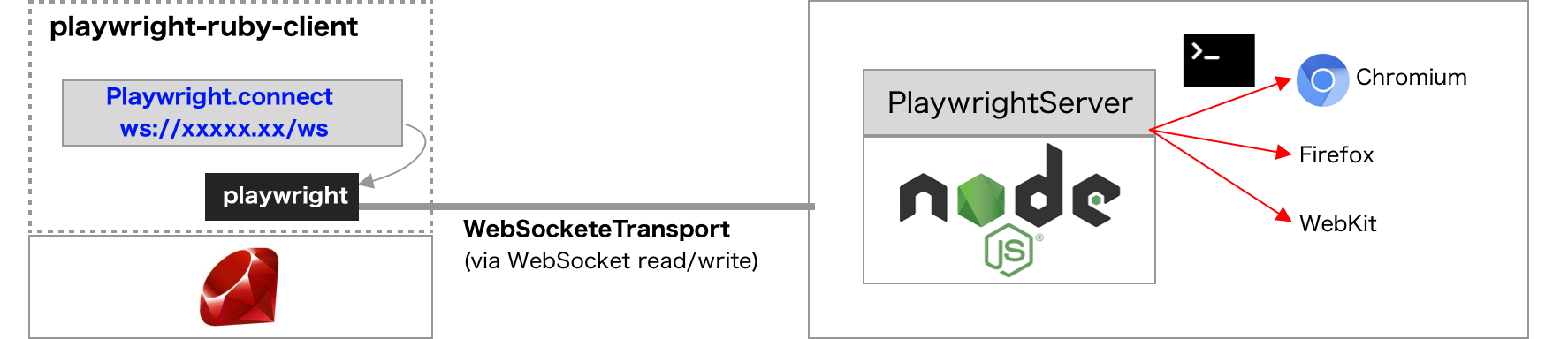
|
|
37
37
|
|
|
38
|
-
- Server can be launched with `
|
|
38
|
+
- Server can be launched with the `playwright-core run-server` CLI command.
|
|
39
39
|
- Client can connect to server with [BrowserType#connect](https://playwright.dev/docs/api/class-browsertype#browser-type-connect). In playwright-ruby-client, `BrowserType#connect` and not implemented yet and use `Playwright#connect_to_browser_server()` instead.
|
|
40
40
|
|
|
41
41
|
### Client code
|
|
@@ -75,7 +75,7 @@ end
|
|
|
75
75
|
|
|
76
76
|
### Server code
|
|
77
77
|
|
|
78
|
-
With the [official Docker image](https://hub.docker.com/_/microsoft-playwright) or in the local development environment with Node.js,
|
|
78
|
+
With the [official Docker image](https://hub.docker.com/_/microsoft-playwright) or in the local development environment with Node.js, install a matching `playwright-core` package and use its local CLI. (`$PORT` is a port number of the server.)
|
|
79
79
|
|
|
80
80
|
If custom Docker image is preferred, build it as follows:
|
|
81
81
|
|
|
@@ -83,10 +83,11 @@ If custom Docker image is preferred, build it as follows:
|
|
|
83
83
|
FROM mcr.microsoft.com/playwright
|
|
84
84
|
|
|
85
85
|
WORKDIR /root
|
|
86
|
-
|
|
86
|
+
ARG PLAYWRIGHT_CORE_VERSION=1.62.1
|
|
87
|
+
RUN npm install "playwright-core@$PLAYWRIGHT_CORE_VERSION" && ./node_modules/.bin/playwright-core install
|
|
87
88
|
|
|
88
89
|
ENV PORT 8888
|
|
89
|
-
CMD ["./node_modules/.bin/playwright", "run-server", "--port", "$PORT", "--path", "/ws"]
|
|
90
|
+
CMD ["./node_modules/.bin/playwright-core", "run-server", "--port", "$PORT", "--path", "/ws"]
|
|
90
91
|
```
|
|
91
92
|
|
|
92
93
|
## Debugging for connection
|
|
@@ -106,7 +107,7 @@ DEBUG=1 bundle exec ruby some-automation-with-playwright.rb
|
|
|
106
107
|
Just set an environment variable `DEBUG=pw:*` or `DEBUG=pw:server`
|
|
107
108
|
|
|
108
109
|
```
|
|
109
|
-
DEBUG=pw:*
|
|
110
|
+
DEBUG=pw:* ./node_modules/.bin/playwright-core run-server --browser chromium
|
|
110
111
|
```
|
|
111
112
|
|
|
112
113
|
See [the official documentation](https://playwright.dev/docs/debug/#verbose-api-logs) for details.
|
|
@@ -45,7 +45,7 @@ If Playwright is running in an independent container, with docker-compose.yaml c
|
|
|
45
45
|
playwright: # this is our PLAYWRIGHT_HOST value
|
|
46
46
|
image: mcr.microsoft.com/playwright:v1.57.0-noble
|
|
47
47
|
command: >
|
|
48
|
-
/bin/sh -c "
|
|
48
|
+
/bin/sh -c "npm install --no-save playwright-core@1.57.0 && ./node_modules/.bin/playwright-core run-server --port 3000 --host 0.0.0.0 --path /ws"
|
|
49
49
|
init: true
|
|
50
50
|
restart: unless-stopped
|
|
51
51
|
```
|
|
@@ -144,8 +144,8 @@ These parameters can be passed into `Capybara::Playwright::Driver.new`
|
|
|
144
144
|
|
|
145
145
|
```ruby
|
|
146
146
|
driver_opts = {
|
|
147
|
-
# `playwright` command path.
|
|
148
|
-
playwright_cli_executable_path: './node_modules/.bin/playwright',
|
|
147
|
+
# `playwright-core` command path.
|
|
148
|
+
playwright_cli_executable_path: './node_modules/.bin/playwright-core',
|
|
149
149
|
|
|
150
150
|
# Use firefox for testing.
|
|
151
151
|
browser_type: :firefox,
|
|
@@ -264,7 +264,7 @@ This example code would attach the trace zip file to Allure report for each test
|
|
|
264
264
|
We can download and show the trace with `playwright show-trace` command.
|
|
265
265
|
|
|
266
266
|
```
|
|
267
|
-
|
|
267
|
+
./node_modules/.bin/playwright-core show-trace ababcdcdefef.zip
|
|
268
268
|
```
|
|
269
269
|
|
|
270
270
|

|
|
@@ -276,3 +276,71 @@ Instead of the easy configuration using `on_save_trace`, we can also use `page.d
|
|
|
276
276
|
- Playwright doesn't allow clicking invisible DOM elements or moving elements. `click` sometimes doesn't work as Selenium does. See the detail in https://playwright.dev/docs/actionability/
|
|
277
277
|
- `current_window.maximize` and `current_window.fullscreen` work only on headful (non-headless) mode, as selenium driver does.
|
|
278
278
|
- `Capybara::Node::Element#drag_to` does not accept `html5` parameter. HTML5 drag and drop is not fully supported in Playwright.
|
|
279
|
+
|
|
280
|
+
#### Selenium migration incompatibilities
|
|
281
|
+
|
|
282
|
+
Some Selenium-backed Capybara behavior depends on WebDriver implementation details or accepts patterns outside Capybara's documented API. `capybara-playwright-driver` does not try to emulate these Selenium-specific behaviors when they conflict with Playwright's actionability, dialog, or rendered text model.
|
|
283
|
+
|
|
284
|
+
##### Modal dialogs must be handled before the action that opens them
|
|
285
|
+
|
|
286
|
+
Use Capybara's block-oriented modal API:
|
|
287
|
+
|
|
288
|
+
```ruby
|
|
289
|
+
accept_alert('message') do
|
|
290
|
+
click_button 'Open alert'
|
|
291
|
+
end
|
|
292
|
+
|
|
293
|
+
accept_confirm('Are you sure?') do
|
|
294
|
+
click_button 'Delete'
|
|
295
|
+
end
|
|
296
|
+
```
|
|
297
|
+
|
|
298
|
+
Selenium-backed Capybara may sometimes handle an already-open modal after the action has returned:
|
|
299
|
+
|
|
300
|
+
```ruby
|
|
301
|
+
click_button 'Delete'
|
|
302
|
+
accept_confirm('Are you sure?')
|
|
303
|
+
```
|
|
304
|
+
|
|
305
|
+
This pattern is not portable to Playwright. In Playwright, the action that opens a JavaScript dialog does not complete until the dialog is handled, so the driver cannot wait for later Ruby code to call `accept_alert`, `accept_confirm`, or another modal helper.
|
|
306
|
+
|
|
307
|
+
Wrap the action that opens the dialog in `accept_alert`, `accept_confirm`, `dismiss_confirm`, `accept_prompt`, or `dismiss_prompt`.
|
|
308
|
+
|
|
309
|
+
##### Clicking a disabled element waits for actionability
|
|
310
|
+
|
|
311
|
+
Selenium-backed Capybara may return from a second click on an already-disabled button without changing the page. Playwright waits for the element to become actionable, then times out. This is expected Playwright behavior, and commonly appears in migration work around double-submit prevention tests.
|
|
312
|
+
|
|
313
|
+
Instead of attempting a second click on a disabled control, assert the disabled state and the expected result:
|
|
314
|
+
|
|
315
|
+
```ruby
|
|
316
|
+
expect(button).to be_disabled
|
|
317
|
+
expect(page).to have_text('submitted')
|
|
318
|
+
```
|
|
319
|
+
|
|
320
|
+
Alternatively, assert the relevant server or client state directly.
|
|
321
|
+
|
|
322
|
+
##### Visible text follows rendered `innerText` behavior
|
|
323
|
+
|
|
324
|
+
When a `<br>` is hidden with CSS, Selenium-backed Capybara may still preserve a newline in text extraction. Playwright follows the browser's rendered `innerText` behavior: a hidden `<br>` does not create a rendered line break.
|
|
325
|
+
|
|
326
|
+
For example:
|
|
327
|
+
|
|
328
|
+
```html
|
|
329
|
+
<p>not submitted.<br class="hidden">click submit.</p>
|
|
330
|
+
```
|
|
331
|
+
|
|
332
|
+
If the `<br>` is hidden with `display: none`, Playwright-style visible text is:
|
|
333
|
+
|
|
334
|
+
```ruby
|
|
335
|
+
"not submitted.click submit."
|
|
336
|
+
```
|
|
337
|
+
|
|
338
|
+
not:
|
|
339
|
+
|
|
340
|
+
```ruby
|
|
341
|
+
"not submitted.\nclick submit."
|
|
342
|
+
```
|
|
343
|
+
|
|
344
|
+
Avoid newline-sensitive expectations around responsive or hidden line break elements, or assert the browser-rendered text that users actually see.
|
|
345
|
+
|
|
346
|
+
These examples are not exhaustive. If you find another Capybara/Selenium migration incompatibility, please open an issue at [capybara-playwright-driver issues](https://github.com/YusukeIwaki/capybara-playwright-driver/issues) with the reproduction HTML and the Ruby/Capybara code that reproduces it.
|
|
@@ -1,5 +1,6 @@
|
|
|
1
1
|
---
|
|
2
2
|
sidebar_position: 4
|
|
3
|
+
description: Use native Playwright APIs in Rails system tests while retaining Capybara only for test server lifecycle management.
|
|
3
4
|
---
|
|
4
5
|
|
|
5
6
|
# Use Capybara without DSL
|
|
@@ -56,7 +57,7 @@ RSpec.configure do |config|
|
|
|
56
57
|
# Rails server is launched here, at the first time of accessing Capybara.current_session.server
|
|
57
58
|
base_url = Capybara.current_session.server.base_url
|
|
58
59
|
|
|
59
|
-
Playwright.create(playwright_cli_executable_path: './node_modules/.bin/playwright') do |playwright|
|
|
60
|
+
Playwright.create(playwright_cli_executable_path: './node_modules/.bin/playwright-core') do |playwright|
|
|
60
61
|
# pass any option for Playwright#launch and Browser#new_page as you prefer.
|
|
61
62
|
playwright.chromium.launch(headless: false) do |browser|
|
|
62
63
|
@playwright_page = browser.new_page(baseURL: base_url)
|
|
@@ -98,7 +99,7 @@ module PlaywrightBrowser
|
|
|
98
99
|
|
|
99
100
|
def start!
|
|
100
101
|
@fiber = Fiber.new do
|
|
101
|
-
Playwright.create(playwright_cli_executable_path: './node_modules/.bin/playwright') do |playwright|
|
|
102
|
+
Playwright.create(playwright_cli_executable_path: './node_modules/.bin/playwright-core') do |playwright|
|
|
102
103
|
playwright.chromium.launch(headless: false) do |browser|
|
|
103
104
|
Fiber.yield(browser)
|
|
104
105
|
end
|
|
@@ -152,7 +153,7 @@ class ApplicationSystemTestCase < ActionDispatch::SystemTestCase
|
|
|
152
153
|
driven_by :null
|
|
153
154
|
|
|
154
155
|
def self.playwright
|
|
155
|
-
@playwright ||= Playwright.create(playwright_cli_executable_path: Rails.root.join("node_modules/.bin/playwright"))
|
|
156
|
+
@playwright ||= Playwright.create(playwright_cli_executable_path: Rails.root.join("node_modules/.bin/playwright-core"))
|
|
156
157
|
end
|
|
157
158
|
|
|
158
159
|
def before_setup
|
|
@@ -54,7 +54,7 @@ We have to enable it for installing Chrome extension, by passing these 3 paramet
|
|
|
54
54
|
require 'playwright'
|
|
55
55
|
require 'pry'
|
|
56
56
|
|
|
57
|
-
Playwright.create(playwright_cli_executable_path: './node_modules/.bin/playwright') do |playwright|
|
|
57
|
+
Playwright.create(playwright_cli_executable_path: './node_modules/.bin/playwright-core') do |playwright|
|
|
58
58
|
launch_params = {
|
|
59
59
|
acceptDownloads: true,
|
|
60
60
|
channel: 'chrome',
|
|
@@ -24,7 +24,7 @@ require 'pry'
|
|
|
24
24
|
|
|
25
25
|
force_login = !File.exist?('github_state.json')
|
|
26
26
|
|
|
27
|
-
Playwright.create(playwright_cli_executable_path: '
|
|
27
|
+
Playwright.create(playwright_cli_executable_path: './node_modules/.bin/playwright-core') do |playwright|
|
|
28
28
|
if force_login
|
|
29
29
|
# Use headful mode for manual operation.
|
|
30
30
|
playwright.chromium.launch(headless: false, channel: 'chrome') do |browser|
|
|
@@ -365,6 +365,8 @@
|
|
|
365
365
|
* ~~wait_for_event~~
|
|
366
366
|
* clock
|
|
367
367
|
* keyboard
|
|
368
|
+
* local_storage
|
|
369
|
+
* session_storage
|
|
368
370
|
* mouse
|
|
369
371
|
* request
|
|
370
372
|
* screencast
|
|
@@ -405,6 +407,7 @@
|
|
|
405
407
|
* expect_page
|
|
406
408
|
* ~~wait_for_event~~
|
|
407
409
|
* clock
|
|
410
|
+
* credentials
|
|
408
411
|
* ~~debugger~~
|
|
409
412
|
* request
|
|
410
413
|
* tracing
|
|
@@ -528,6 +531,7 @@
|
|
|
528
531
|
* type
|
|
529
532
|
* uncheck
|
|
530
533
|
* wait_for
|
|
534
|
+
* wait_for_function
|
|
531
535
|
|
|
532
536
|
## FrameLocator
|
|
533
537
|
|
|
@@ -553,9 +557,12 @@
|
|
|
553
557
|
* headers_array
|
|
554
558
|
* json
|
|
555
559
|
* ok
|
|
560
|
+
* security_details
|
|
561
|
+
* server_addr
|
|
556
562
|
* status
|
|
557
563
|
* status_text
|
|
558
564
|
* text
|
|
565
|
+
* timing
|
|
559
566
|
* url
|
|
560
567
|
|
|
561
568
|
## APIRequestContext
|
|
@@ -638,3 +645,18 @@
|
|
|
638
645
|
* not_to_match_aria_snapshot
|
|
639
646
|
* to_have_title
|
|
640
647
|
* to_have_url
|
|
648
|
+
|
|
649
|
+
## WebStorage
|
|
650
|
+
|
|
651
|
+
* items
|
|
652
|
+
* get_item
|
|
653
|
+
* set_item
|
|
654
|
+
* remove_item
|
|
655
|
+
* clear
|
|
656
|
+
|
|
657
|
+
## Credentials
|
|
658
|
+
|
|
659
|
+
* install
|
|
660
|
+
* create
|
|
661
|
+
* delete
|
|
662
|
+
* get
|
|
@@ -9,6 +9,37 @@ module.exports = {
|
|
|
9
9
|
favicon: 'img/playwright-logo.svg',
|
|
10
10
|
organizationName: 'YusukeIwaki', // Usually your GitHub org/user name.
|
|
11
11
|
projectName: 'playwright-ruby-client', // Usually your repo name.
|
|
12
|
+
plugins: [
|
|
13
|
+
[
|
|
14
|
+
'docusaurus-plugin-llms',
|
|
15
|
+
{
|
|
16
|
+
generateLLMsTxt: true,
|
|
17
|
+
generateLLMsFullTxt: false,
|
|
18
|
+
generateMarkdownFiles: true,
|
|
19
|
+
docsDir: 'docs',
|
|
20
|
+
title: 'playwright-ruby-client',
|
|
21
|
+
description: 'Ruby client for Playwright, including API reference and integration guides.',
|
|
22
|
+
rootContent: `This is a community-maintained Ruby client for Playwright.
|
|
23
|
+
|
|
24
|
+
Important usage notes:
|
|
25
|
+
- The gem does not include Node.js or Playwright. Install the compatible \`playwright-core\` npm package separately and pass \`node_modules/.bin/playwright-core\` to \`Playwright.create\`.
|
|
26
|
+
- Determine the compatible Playwright version from \`Playwright::COMPATIBLE_PLAYWRIGHT_VERSION\`; do not assume the newest npm package is compatible.
|
|
27
|
+
- Use playwright-ruby-client for native Playwright APIs. Use capybara-playwright-driver when compatibility with the Capybara DSL is more important.
|
|
28
|
+
- Prefer the Ruby examples and signatures in this documentation over examples for other Playwright language bindings.`,
|
|
29
|
+
includeOrder: [
|
|
30
|
+
'article/getting_started.md',
|
|
31
|
+
'article/guides/**/*.md',
|
|
32
|
+
'api/playwright.md',
|
|
33
|
+
'api/**/*.md',
|
|
34
|
+
'article/api_coverage.mdx',
|
|
35
|
+
],
|
|
36
|
+
includeUnmatchedLast: true,
|
|
37
|
+
ignoreFiles: ['include/**'],
|
|
38
|
+
excludeImports: true,
|
|
39
|
+
removeDuplicateHeadings: true,
|
|
40
|
+
},
|
|
41
|
+
],
|
|
42
|
+
],
|
|
12
43
|
themeConfig: {
|
|
13
44
|
image: 'img/playwright-ruby-client.png',
|
|
14
45
|
navbar: {
|