playwright-ruby-client 1.14.beta2 → 1.15.beta2
This diff represents the content of publicly available package versions that have been released to one of the supported registries. The information contained in this diff is provided for informational purposes only and reflects changes between package versions as they appear in their respective public registries.
- checksums.yaml +4 -4
- data/README.md +10 -14
- data/documentation/docs/api/accessibility.md +16 -17
- data/documentation/docs/api/browser.md +4 -0
- data/documentation/docs/api/browser_context.md +5 -1
- data/documentation/docs/api/browser_type.md +2 -0
- data/documentation/docs/api/element_handle.md +30 -5
- data/documentation/docs/api/experimental/android.md +15 -2
- data/documentation/docs/api/experimental/android_device.md +2 -0
- data/documentation/docs/api/frame.md +86 -104
- data/documentation/docs/api/locator.md +69 -40
- data/documentation/docs/api/mouse.md +3 -4
- data/documentation/docs/api/page.md +38 -7
- data/documentation/docs/api/request.md +42 -20
- data/documentation/docs/api/response.md +18 -1
- data/documentation/docs/api/selectors.md +29 -3
- data/documentation/docs/api/tracing.md +51 -16
- data/documentation/docs/api/worker.md +12 -11
- data/documentation/docs/article/getting_started.md +10 -1
- data/documentation/docs/article/guides/download_playwright_driver.md +9 -0
- data/documentation/docs/article/guides/inspector.md +1 -1
- data/documentation/docs/article/guides/playwright_on_alpine_linux.md +56 -3
- data/documentation/docs/article/guides/rails_integration.md +4 -2
- data/documentation/docs/article/guides/rails_integration_with_null_driver.md +86 -0
- data/documentation/docs/article/guides/recording_video.md +1 -1
- data/documentation/docs/article/guides/semi_automation.md +2 -2
- data/documentation/docs/article/guides/use_storage_state.md +78 -0
- data/documentation/docs/include/api_coverage.md +11 -0
- data/documentation/docusaurus.config.js +1 -0
- data/documentation/package.json +2 -2
- data/documentation/src/pages/index.js +0 -1
- data/documentation/static/img/playwright-ruby-client.png +0 -0
- data/documentation/yarn.lock +625 -549
- data/lib/playwright/channel.rb +36 -2
- data/lib/playwright/channel_owners/artifact.rb +6 -2
- data/lib/playwright/channel_owners/browser.rb +4 -0
- data/lib/playwright/channel_owners/browser_context.rb +21 -14
- data/lib/playwright/channel_owners/browser_type.rb +0 -1
- data/lib/playwright/channel_owners/element_handle.rb +10 -2
- data/lib/playwright/channel_owners/frame.rb +8 -0
- data/lib/playwright/channel_owners/page.rb +20 -4
- data/lib/playwright/channel_owners/playwright.rb +9 -0
- data/lib/playwright/channel_owners/request.rb +46 -25
- data/lib/playwright/channel_owners/response.rb +41 -5
- data/lib/playwright/connection.rb +8 -11
- data/lib/playwright/http_headers.rb +9 -4
- data/lib/playwright/locator_impl.rb +11 -3
- data/lib/playwright/{route_handler_entry.rb → route_handler.rb} +30 -2
- data/lib/playwright/tracing_impl.rb +18 -7
- data/lib/playwright/transport.rb +2 -0
- data/lib/playwright/utils.rb +8 -1
- data/lib/playwright/version.rb +2 -2
- data/lib/playwright/web_socket_transport.rb +2 -0
- data/lib/playwright.rb +45 -5
- data/lib/playwright_api/android.rb +21 -8
- data/lib/playwright_api/android_device.rb +11 -9
- data/lib/playwright_api/browser.rb +12 -8
- data/lib/playwright_api/browser_context.rb +12 -8
- data/lib/playwright_api/browser_type.rb +9 -7
- data/lib/playwright_api/cdp_session.rb +6 -6
- data/lib/playwright_api/console_message.rb +6 -6
- data/lib/playwright_api/dialog.rb +6 -6
- data/lib/playwright_api/element_handle.rb +31 -8
- data/lib/playwright_api/frame.rb +35 -12
- data/lib/playwright_api/js_handle.rb +6 -6
- data/lib/playwright_api/locator.rb +41 -2
- data/lib/playwright_api/page.rb +43 -15
- data/lib/playwright_api/playwright.rb +6 -6
- data/lib/playwright_api/request.rb +29 -7
- data/lib/playwright_api/response.rb +23 -7
- data/lib/playwright_api/route.rb +6 -6
- data/lib/playwright_api/selectors.rb +38 -7
- data/lib/playwright_api/tracing.rb +33 -4
- data/lib/playwright_api/web_socket.rb +6 -6
- data/lib/playwright_api/worker.rb +8 -8
- metadata +7 -4
|
@@ -15,9 +15,35 @@ def register(name, contentScript: nil, path: nil, script: nil)
|
|
|
15
15
|
|
|
16
16
|
An example of registering selector engine that queries elements based on a tag name:
|
|
17
17
|
|
|
18
|
-
```
|
|
19
|
-
|
|
20
|
-
|
|
18
|
+
```ruby
|
|
19
|
+
tag_selector = <<~JAVASCRIPT
|
|
20
|
+
{
|
|
21
|
+
// Returns the first element matching given selector in the root's subtree.
|
|
22
|
+
query(root, selector) {
|
|
23
|
+
return root.querySelector(selector);
|
|
24
|
+
},
|
|
25
|
+
// Returns all elements matching given selector in the root's subtree.
|
|
26
|
+
queryAll(root, selector) {
|
|
27
|
+
return Array.from(root.querySelectorAll(selector));
|
|
28
|
+
}
|
|
29
|
+
}
|
|
30
|
+
JAVASCRIPT
|
|
31
|
+
|
|
32
|
+
# Register the engine. Selectors will be prefixed with "tag=".
|
|
33
|
+
playwright.selectors.register("tag", script: tag_selector)
|
|
34
|
+
playwright.chromium.launch do |browser|
|
|
35
|
+
page = browser.new_page()
|
|
36
|
+
page.content = '<div><button>Click me</button></div>'
|
|
37
|
+
|
|
38
|
+
# Use the selector prefixed with its name.
|
|
39
|
+
button = page.query_selector('tag=button')
|
|
40
|
+
# Combine it with other selector engines.
|
|
41
|
+
page.click('tag=div >> text="Click me"')
|
|
42
|
+
|
|
43
|
+
# Can use it in any methods supporting selectors.
|
|
44
|
+
button_count = page.eval_on_selector_all('tag=button', 'buttons => buttons.length')
|
|
45
|
+
button_count # => 1
|
|
46
|
+
end
|
|
21
47
|
```
|
|
22
48
|
|
|
23
49
|
|
|
@@ -4,18 +4,18 @@ sidebar_position: 10
|
|
|
4
4
|
|
|
5
5
|
# Tracing
|
|
6
6
|
|
|
7
|
-
API for collecting and saving Playwright traces. Playwright traces can be opened
|
|
8
|
-
Playwright script runs.
|
|
9
|
-
|
|
10
|
-
Start
|
|
11
|
-
|
|
12
|
-
```
|
|
13
|
-
browser
|
|
14
|
-
context
|
|
15
|
-
context.
|
|
16
|
-
page.goto(
|
|
17
|
-
context.tracing.stop(path
|
|
18
|
-
|
|
7
|
+
API for collecting and saving Playwright traces. Playwright traces can be opened in [Trace Viewer](https://playwright.dev/python/docs/trace-viewer)
|
|
8
|
+
after Playwright script runs.
|
|
9
|
+
|
|
10
|
+
Start recording a trace before performing actions. At the end, stop tracing and save it to a file.
|
|
11
|
+
|
|
12
|
+
```ruby
|
|
13
|
+
browser.new_context do |context|
|
|
14
|
+
context.tracing.start(screenshots: true, snapshots: true)
|
|
15
|
+
page = context.new_page
|
|
16
|
+
page.goto('https://playwright.dev')
|
|
17
|
+
context.tracing.stop(path: 'trace.zip')
|
|
18
|
+
end
|
|
19
19
|
```
|
|
20
20
|
|
|
21
21
|
|
|
@@ -28,12 +28,39 @@ def start(name: nil, screenshots: nil, snapshots: nil)
|
|
|
28
28
|
|
|
29
29
|
Start tracing.
|
|
30
30
|
|
|
31
|
-
```
|
|
32
|
-
context.tracing.start(name
|
|
31
|
+
```ruby
|
|
32
|
+
context.tracing.start(name: 'trace', screenshots: true, snapshots: true)
|
|
33
|
+
page = context.new_page
|
|
34
|
+
page.goto('https://playwright.dev')
|
|
35
|
+
context.tracing.stop(path: 'trace.zip')
|
|
36
|
+
```
|
|
37
|
+
|
|
38
|
+
|
|
39
|
+
|
|
40
|
+
## start_chunk
|
|
41
|
+
|
|
42
|
+
```
|
|
43
|
+
def start_chunk
|
|
44
|
+
```
|
|
45
|
+
|
|
46
|
+
Start a new trace chunk. If you'd like to record multiple traces on the same [BrowserContext](./browser_context), use
|
|
47
|
+
[Tracing#start](./tracing#start) once, and then create multiple trace chunks with [Tracing#start_chunk](./tracing#start_chunk) and
|
|
48
|
+
[Tracing#stop_chunk](./tracing#stop_chunk).
|
|
49
|
+
|
|
50
|
+
```ruby
|
|
51
|
+
context.tracing.start(name: "trace", screenshots: true, snapshots: true)
|
|
52
|
+
page = context.new_page
|
|
33
53
|
page.goto("https://playwright.dev")
|
|
34
|
-
context.tracing.stop()
|
|
35
|
-
context.tracing.stop(path = "trace.zip")
|
|
36
54
|
|
|
55
|
+
context.tracing.start_chunk
|
|
56
|
+
page.click("text=Get Started")
|
|
57
|
+
# Everything between start_chunk and stop_chunk will be recorded in the trace.
|
|
58
|
+
context.tracing.stop_chunk(path: "trace1.zip")
|
|
59
|
+
|
|
60
|
+
context.tracing.start_chunk
|
|
61
|
+
page.goto("http://example.com")
|
|
62
|
+
# Save a second trace file with different actions.
|
|
63
|
+
context.tracing.stop_chunk(path: "trace2.zip")
|
|
37
64
|
```
|
|
38
65
|
|
|
39
66
|
|
|
@@ -45,3 +72,11 @@ def stop(path: nil)
|
|
|
45
72
|
```
|
|
46
73
|
|
|
47
74
|
Stop tracing.
|
|
75
|
+
|
|
76
|
+
## stop_chunk
|
|
77
|
+
|
|
78
|
+
```
|
|
79
|
+
def stop_chunk(path: nil)
|
|
80
|
+
```
|
|
81
|
+
|
|
82
|
+
Stop the trace chunk. See [Tracing#start_chunk](./tracing#start_chunk) for more details about multiple trace chunks.
|
|
@@ -8,17 +8,18 @@ The Worker class represents a [WebWorker](https://developer.mozilla.org/en-US/do
|
|
|
8
8
|
event is emitted on the page object to signal a worker creation. `close` event is emitted on the worker object when the
|
|
9
9
|
worker is gone.
|
|
10
10
|
|
|
11
|
-
```
|
|
12
|
-
def handle_worker(worker)
|
|
13
|
-
|
|
14
|
-
|
|
15
|
-
|
|
16
|
-
|
|
17
|
-
|
|
18
|
-
|
|
19
|
-
|
|
20
|
-
|
|
21
|
-
|
|
11
|
+
```ruby
|
|
12
|
+
def handle_worker(worker)
|
|
13
|
+
puts "worker created: #{worker.url}"
|
|
14
|
+
worker.once("close", -> (w) { puts "worker destroyed: #{w.url}" })
|
|
15
|
+
end
|
|
16
|
+
|
|
17
|
+
page.on('worker', method(:handle_worker))
|
|
18
|
+
|
|
19
|
+
puts "current workers:"
|
|
20
|
+
page.workers.each do |worker|
|
|
21
|
+
puts " #{worker.url}"
|
|
22
|
+
end
|
|
22
23
|
```
|
|
23
24
|
|
|
24
25
|
|
|
@@ -4,7 +4,14 @@ sidebar_position: 0
|
|
|
4
4
|
|
|
5
5
|
# Getting started
|
|
6
6
|
|
|
7
|
-
|
|
7
|
+
```
|
|
8
|
+
gem 'playwright-ruby-client'
|
|
9
|
+
```
|
|
10
|
+
|
|
11
|
+
Add the line above and then `bundle install`.
|
|
12
|
+
|
|
13
|
+
|
|
14
|
+
Since `playwright-ruby-client` doesn't include Playwright driver nor its downloader, **we have to install Playwright in advance**
|
|
8
15
|
|
|
9
16
|
```shell
|
|
10
17
|
$ npx playwright install
|
|
@@ -12,6 +19,8 @@ $ npx playwright install
|
|
|
12
19
|
|
|
13
20
|
and then set `playwright_cli_executable_path: "npx playwright"` into `Playwright.create`.
|
|
14
21
|
|
|
22
|
+
Other methods of installation is also available. See the detail in [Download Playwright driver](./guides/download_playwright_driver)
|
|
23
|
+
|
|
15
24
|
## Enjoy with examples
|
|
16
25
|
|
|
17
26
|
### Capture a site
|
|
@@ -12,6 +12,15 @@ Choose any of the three ways as you prefer to download the driver:
|
|
|
12
12
|
* `npm install`: the best choice for most use cases, with existing Node.js environment.
|
|
13
13
|
* Direct download: maybe a good choice for Docker :whale: integration.
|
|
14
14
|
|
|
15
|
+
:::note
|
|
16
|
+
|
|
17
|
+
Also the article [Playwright on Alpine Linux](./playwright_on_alpine_linux) would be helpful if you plan to
|
|
18
|
+
|
|
19
|
+
* Build a browser server/container like Selenium Grid
|
|
20
|
+
* Run automation scripts on Alpine Linux
|
|
21
|
+
|
|
22
|
+
:::
|
|
23
|
+
|
|
15
24
|
## Using `npx`
|
|
16
25
|
|
|
17
26
|
```shell
|
|
@@ -1,5 +1,5 @@
|
|
|
1
1
|
---
|
|
2
|
-
sidebar_position:
|
|
2
|
+
sidebar_position: 40
|
|
3
3
|
---
|
|
4
4
|
|
|
5
5
|
# Playwright on Alpine Linux
|
|
@@ -33,7 +33,23 @@ Playwright server is running on a container of [official Docker image](https://h
|
|
|
33
33
|
|
|
34
34
|
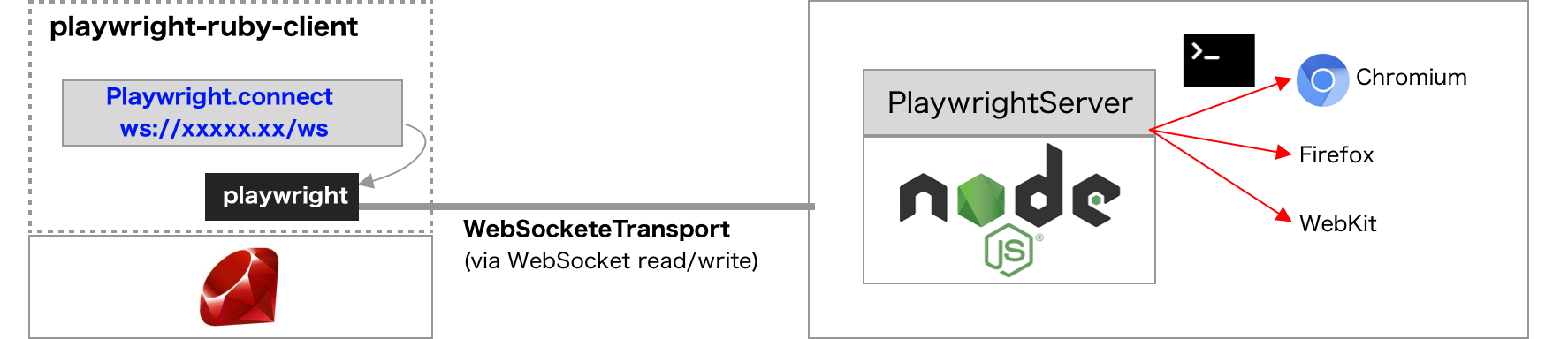
|
|
35
35
|
|
|
36
|
-
|
|
36
|
+
### Playwright Server v.s. Browser Server
|
|
37
|
+
|
|
38
|
+
Playwright provides two kind of methods to share the browser environments for clients.
|
|
39
|
+
|
|
40
|
+
When you want to share only one browser environment, Browser server is suitable. This feature is officially supported in Playwright.
|
|
41
|
+
|
|
42
|
+
* Server can be launched with [BrowserType#launchServer](https://playwright.dev/docs/api/class-browsertype#browser-type-launch-server) instead of `BrowserType#launch`.
|
|
43
|
+
* Client can connect to server with [BrowserType#connect](https://playwright.dev/docs/api/class-browsertype#browser-type-connect). In playwright-ruby-client, `BrowserType#connect` and not implemented yet and use `Playwright#connect_to_browser_server()` instead.
|
|
44
|
+
|
|
45
|
+
Another method is sharing all browser environment. This method is very simple, but not an official feature, and can be changed in future.
|
|
46
|
+
|
|
47
|
+
* Server can be launched with `playwright run-server` (CLI command).
|
|
48
|
+
* Client can connect to server with `Playwright.connect_to_playwright_server` instead of `Playwright.create`
|
|
49
|
+
|
|
50
|
+
## Playwright server/client
|
|
51
|
+
|
|
52
|
+
### Client code
|
|
37
53
|
|
|
38
54
|
Many example uses `Playwright#create`, which internally uses Pipe (stdin/stdout) transport for Playwright-protocol messaging. Instead, **just use `Playwright#connect_to_playwright_server(endpoint)`** for WebSocket transport.
|
|
39
55
|
|
|
@@ -51,7 +67,7 @@ end
|
|
|
51
67
|
|
|
52
68
|
`wss://example.com:8888/ws` is an example of endpoint URL of the Playwright server. In local development environment, it is typically `"ws://127.0.0.1:#{port}/ws"`.
|
|
53
69
|
|
|
54
|
-
|
|
70
|
+
### Server code
|
|
55
71
|
|
|
56
72
|
With the [official Docker image](https://hub.docker.com/_/microsoft-playwright) or in the local development environment with Node.js, just execute `npx playwright install && npx playwright run-server $PORT`. (`$PORT` is a port number of the server)
|
|
57
73
|
|
|
@@ -67,6 +83,43 @@ ENV PORT 8888
|
|
|
67
83
|
CMD ["./node_modules/.bin/playwright", "run-server", "$PORT"]
|
|
68
84
|
```
|
|
69
85
|
|
|
86
|
+
## Browser server/client
|
|
87
|
+
|
|
88
|
+
### Client code
|
|
89
|
+
|
|
90
|
+
Use `Playwright#connect_to_playwright_server` and pass the WebSocket URL for browser server.
|
|
91
|
+
Note that this method requires a block with `Browser`, not `Playwright` or `BrowserType`.
|
|
92
|
+
|
|
93
|
+
```ruby
|
|
94
|
+
Playwright.connect_to_playwright_server(ws_url) do |browser|
|
|
95
|
+
page = browser.new_page
|
|
96
|
+
page.goto(...)
|
|
97
|
+
...
|
|
98
|
+
end
|
|
99
|
+
```
|
|
100
|
+
|
|
101
|
+
### Server code
|
|
102
|
+
|
|
103
|
+
For instant use, `npx playwright launch-server chromium` generates a WebSocket endpoint URL with a random path.
|
|
104
|
+
|
|
105
|
+
More customization can be done by implementing JavaScript server like below:
|
|
106
|
+
|
|
107
|
+
```js
|
|
108
|
+
const playwright = require('playwright')
|
|
109
|
+
|
|
110
|
+
option = {
|
|
111
|
+
channel: 'chrome-canary',
|
|
112
|
+
headless: false,
|
|
113
|
+
port: 8080,
|
|
114
|
+
wsPath: 'ws',
|
|
115
|
+
}
|
|
116
|
+
playwright.chromium.launchServer(option).then((server) => { console.log(server.wsEndpoint()) })
|
|
117
|
+
```
|
|
118
|
+
|
|
119
|
+
`port` and `wsPath` would be useful for generating static WebSocket endpoint URL.
|
|
120
|
+
Other available options for `BrowserType#launchServer` can be found here:
|
|
121
|
+
https://playwright.dev/docs/api/class-browsertype#browser-type-launch-server
|
|
122
|
+
|
|
70
123
|
## Debugging for connection
|
|
71
124
|
|
|
72
125
|
The client and server are really quiet. This chapter shows how to check if the communication on the WebSocket works well or not.
|
|
@@ -2,9 +2,11 @@
|
|
|
2
2
|
sidebar_position: 3
|
|
3
3
|
---
|
|
4
4
|
|
|
5
|
-
#
|
|
5
|
+
# Capybara driver for Ruby on Rails application
|
|
6
6
|
|
|
7
|
-
`playwright-ruby-client` is a client library just for browser automation
|
|
7
|
+
`playwright-ruby-client` is a client library just for browser automation, while Rails uses [Capybara](https://github.com/teamcapybara/capybara) for system testing.
|
|
8
|
+
|
|
9
|
+
`capybara-playwright-driver` provides a [Capybara](https://github.com/teamcapybara/capybara) driver based on playwright-ruby-client and makes it easy to integrate into Ruby on Rails applications.
|
|
8
10
|
|
|
9
11
|
## Installation
|
|
10
12
|
|
|
@@ -0,0 +1,86 @@
|
|
|
1
|
+
---
|
|
2
|
+
sidebar_position: 4
|
|
3
|
+
---
|
|
4
|
+
|
|
5
|
+
# Use Capybara without DSL
|
|
6
|
+
|
|
7
|
+
:::note
|
|
8
|
+
|
|
9
|
+
This article shows advanced-level configuration of Capybara and RSpec for more accurate automation/testing.
|
|
10
|
+
If you want to just integrate Playwright into Rails application, refer the basic [configuration guide](./rails_integration)
|
|
11
|
+
:::
|
|
12
|
+
|
|
13
|
+
## Background
|
|
14
|
+
|
|
15
|
+
[capybara-playwright-driver](./rails_integration) is easy to configure and migrate from Selenium or another Capybara driver, however it is a little **inaccurate** and would sometimes cause 'flaky test' problem originated from the internal implementation of Capybara DSL.
|
|
16
|
+
|
|
17
|
+
Also **we cannot use most of useful Playwright features in Capybara driver**, such as auto-waiting, various kind of selectors, and some users would want to use Playwright features as it is without Capybara DSL.
|
|
18
|
+
|
|
19
|
+
This article shows how to use playwright-ruby-client without Capybara DSL in Rails and RSpec.
|
|
20
|
+
|
|
21
|
+
## Configure Capybara driver just for launching Rails server
|
|
22
|
+
|
|
23
|
+
Capybara prepares the test server only when the configured driver returns true on `needs_server?` method. So we have to implement minimum driver like this:
|
|
24
|
+
|
|
25
|
+
```ruby {5-7} title=spec/support/capybara_null_driver.rb
|
|
26
|
+
RSpec.configure do |config|
|
|
27
|
+
require 'capybara'
|
|
28
|
+
|
|
29
|
+
class CapybaraNullDriver < Capybara::Driver::Base
|
|
30
|
+
def needs_server?
|
|
31
|
+
true
|
|
32
|
+
end
|
|
33
|
+
end
|
|
34
|
+
|
|
35
|
+
Capybara.register_driver(:null) { CapybaraNullDriver.new }
|
|
36
|
+
|
|
37
|
+
...
|
|
38
|
+
end
|
|
39
|
+
```
|
|
40
|
+
|
|
41
|
+
## Launch browser on each test
|
|
42
|
+
|
|
43
|
+
Now Capybara DSL is unavailable with CapybaraNullDriver, we have to manually launch browsers using playwright-ruby-client.
|
|
44
|
+
|
|
45
|
+
```rb
|
|
46
|
+
RSpec.configure do |config|
|
|
47
|
+
require 'capybara'
|
|
48
|
+
|
|
49
|
+
...
|
|
50
|
+
|
|
51
|
+
require 'playwright'
|
|
52
|
+
|
|
53
|
+
config.around(driver: :null) do |example|
|
|
54
|
+
Capybara.current_driver = :null
|
|
55
|
+
|
|
56
|
+
# Rails server is launched here, at the first time of accessing Capybara.current_session.server
|
|
57
|
+
base_url = Capybara.current_session.server.base_url
|
|
58
|
+
|
|
59
|
+
Playwright.create(playwright_cli_executable_path: './node_modules/.bin/playwright') do |playwright|
|
|
60
|
+
# pass any option for Playwright#launch and Browser#new_page as you prefer.
|
|
61
|
+
playwright.chromium.launch(headless: false) do |browser|
|
|
62
|
+
@playwright_page = browser.new_page(baseURL: base_url)
|
|
63
|
+
example.run
|
|
64
|
+
end
|
|
65
|
+
end
|
|
66
|
+
end
|
|
67
|
+
end
|
|
68
|
+
```
|
|
69
|
+
|
|
70
|
+
With the configuration above, we can describe system-test codes with native Playwright methods like below:
|
|
71
|
+
|
|
72
|
+
```rb
|
|
73
|
+
require 'rails_helper'
|
|
74
|
+
|
|
75
|
+
describe 'example', driver: :null do
|
|
76
|
+
let!(:user) { FactoryBot.create(:user) }
|
|
77
|
+
let(:page) { @playwright_page }
|
|
78
|
+
|
|
79
|
+
it 'can browse' do
|
|
80
|
+
page.goto("/tests/#{user.id}")
|
|
81
|
+
page.wait_for_selector('input').type('hoge')
|
|
82
|
+
page.keyboard.press('Enter')
|
|
83
|
+
expect(page.text_content('#content')).to include('hoge')
|
|
84
|
+
end
|
|
85
|
+
end
|
|
86
|
+
```
|
|
@@ -1,5 +1,5 @@
|
|
|
1
1
|
---
|
|
2
|
-
sidebar_position:
|
|
2
|
+
sidebar_position: 20
|
|
3
3
|
---
|
|
4
4
|
|
|
5
5
|
# Semi-automation
|
|
@@ -10,7 +10,7 @@ This allow us to intermediate into automation, for example
|
|
|
10
10
|
* Authenticate with OAuth2 manually before automation
|
|
11
11
|
* Testing a page after some chrome extensions are installed manually
|
|
12
12
|
|
|
13
|
-
Keep in mind repeatedly that persistent browser context is NOT RECOMMENDED for most cases because it would bring many side effects.
|
|
13
|
+
Keep in mind repeatedly that persistent browser context is NOT RECOMMENDED for most cases because it would bring many side effects. Consider [reusing cookie and local storage](./use_storage_state) when you just want to keep authenticated across browser contexts.
|
|
14
14
|
|
|
15
15
|
## Pause automation for manual operation
|
|
16
16
|
|
|
@@ -0,0 +1,78 @@
|
|
|
1
|
+
---
|
|
2
|
+
sidebar_position: 21
|
|
3
|
+
---
|
|
4
|
+
|
|
5
|
+
# Reuse Cookie and LocalStorage
|
|
6
|
+
|
|
7
|
+
In most cases, authentication state is stored in cookie or local storage. When we just want to keep authenticated, it is a good solution to dump/load 'storage state' (= Cookie + LocalStorage).
|
|
8
|
+
https://playwright.dev/docs/next/auth#reuse-authentication-state
|
|
9
|
+
|
|
10
|
+
* Dump storage state using [BrowserContext#storage_state](/docs/api/browser_context#storage_state) with `path: /path/to/state.json`
|
|
11
|
+
* Load storage state by specifying the parameter `storageState: /path/to/state.json` into [Browser#new_context](/docs/api/browser#new_context) or [Browser#new_page](/docs/api/browser#new_page)
|
|
12
|
+
|
|
13
|
+
## Example
|
|
14
|
+
|
|
15
|
+
Generally in browser automation, it is very difficult to bypass 2FA or reCAPTCHA in login screen. In such cases, we would consider
|
|
16
|
+
|
|
17
|
+
* Authenticate manually by hand
|
|
18
|
+
* Resume automation with the authentication result
|
|
19
|
+
|
|
20
|
+
|
|
21
|
+
```ruby {16,21}
|
|
22
|
+
require 'playwright'
|
|
23
|
+
require 'pry'
|
|
24
|
+
|
|
25
|
+
force_login = !File.exist?('github_state.json')
|
|
26
|
+
|
|
27
|
+
Playwright.create(playwright_cli_executable_path: 'npx playwright') do |playwright|
|
|
28
|
+
if force_login
|
|
29
|
+
# Use headful mode for manual operation.
|
|
30
|
+
playwright.chromium.launch(headless: false, channel: 'chrome') do |browser|
|
|
31
|
+
page = browser.new_page
|
|
32
|
+
page.goto('https://github.com/login')
|
|
33
|
+
|
|
34
|
+
# Login manually.
|
|
35
|
+
binding.pry
|
|
36
|
+
|
|
37
|
+
page.context.storage_state(path: 'github_state.json')
|
|
38
|
+
end
|
|
39
|
+
end
|
|
40
|
+
|
|
41
|
+
playwright.chromium.launch do |browser|
|
|
42
|
+
page = browser.new_page(storageState: 'github_state.json')
|
|
43
|
+
page.goto('https://github.com/notifications')
|
|
44
|
+
page.screenshot(path: 'github_notification.png')
|
|
45
|
+
end
|
|
46
|
+
end
|
|
47
|
+
```
|
|
48
|
+
|
|
49
|
+
When we execute this script at the first time (without github_state.json), login screen is shown:
|
|
50
|
+
|
|
51
|
+
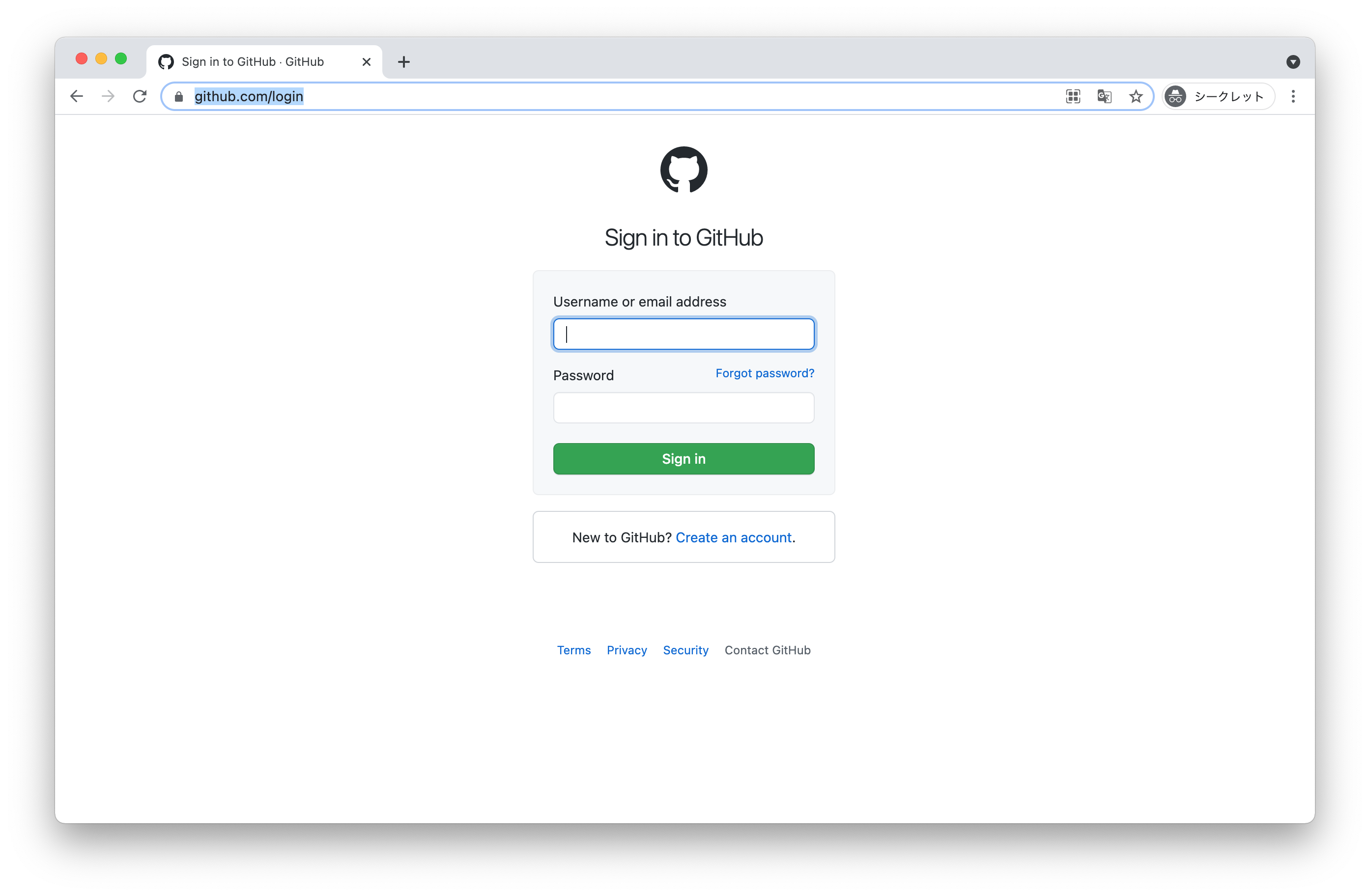
|
|
52
|
+
|
|
53
|
+
and input credentials manually:
|
|
54
|
+
|
|
55
|
+
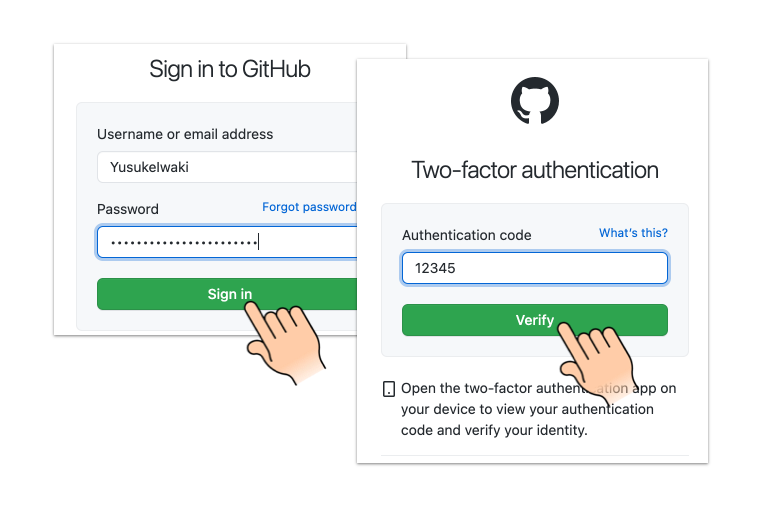
|
|
56
|
+
|
|
57
|
+
and hit `exit` in Pry console.
|
|
58
|
+
|
|
59
|
+
```
|
|
60
|
+
|
|
61
|
+
9:
|
|
62
|
+
10: # Login manually. Hit `exit` in Pry console after authenticated.
|
|
63
|
+
11: require 'pry'
|
|
64
|
+
12: binding.pry
|
|
65
|
+
13:
|
|
66
|
+
=> 14: page.context.storage_state(path: 'github_state.json')
|
|
67
|
+
15: end if force_login
|
|
68
|
+
16:
|
|
69
|
+
17: playwright.chromium.launch do |browser|
|
|
70
|
+
18: page = browser.new_page(storageState: 'github_state.json')
|
|
71
|
+
19: page.goto('https://github.com/notifications')
|
|
72
|
+
|
|
73
|
+
[1] pry(main)> exit
|
|
74
|
+
```
|
|
75
|
+
|
|
76
|
+
then we can enjoy automation with keeping authenticated. Login screen is never shown until github_state.json is deleted :)
|
|
77
|
+
|
|
78
|
+
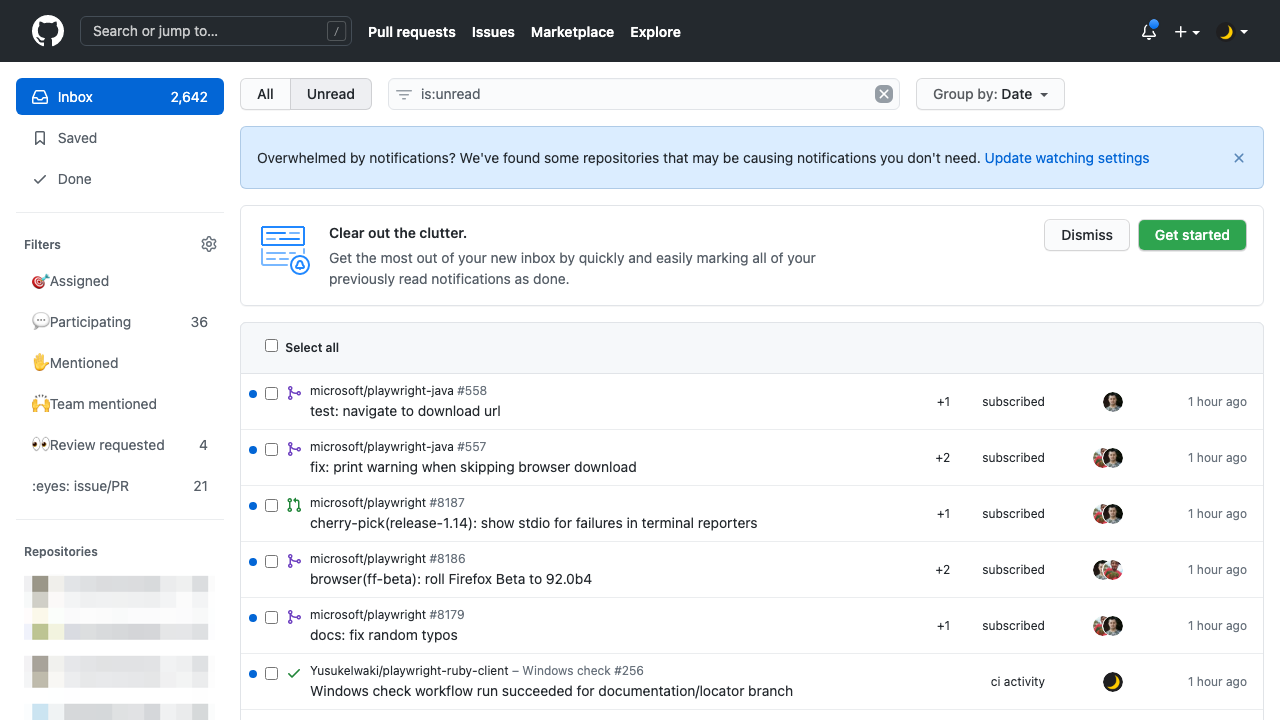
|