llm.rb 4.11.1 → 4.13.0
This diff represents the content of publicly available package versions that have been released to one of the supported registries. The information contained in this diff is provided for informational purposes only and reflects changes between package versions as they appear in their respective public registries.
- checksums.yaml +4 -4
- data/CHANGELOG.md +70 -0
- data/README.md +124 -695
- data/lib/llm/context.rb +2 -2
- data/lib/llm/function/task.rb +7 -1
- data/lib/llm/function.rb +14 -3
- data/lib/llm/mcp/error.rb +31 -1
- data/lib/llm/mcp/rpc.rb +8 -3
- data/lib/llm/mcp/transport/http.rb +2 -1
- data/lib/llm/mcp/transport/stdio.rb +1 -0
- data/lib/llm/mcp.rb +43 -1
- data/lib/llm/provider.rb +3 -4
- data/lib/llm/providers/anthropic/request_adapter/completion.rb +8 -1
- data/lib/llm/providers/anthropic/response_adapter/completion.rb +7 -2
- data/lib/llm/providers/anthropic/stream_parser.rb +1 -1
- data/lib/llm/providers/anthropic/utils.rb +23 -0
- data/lib/llm/providers/anthropic.rb +11 -0
- data/lib/llm/providers/openai/request_adapter/respond.rb +11 -5
- data/lib/llm/providers/openai/response_adapter/responds.rb +13 -1
- data/lib/llm/providers/openai/responses/stream_parser.rb +31 -0
- data/lib/llm/stream/queue.rb +15 -2
- data/lib/llm/stream.rb +24 -10
- data/lib/llm/version.rb +1 -1
- data/llm.gemspec +17 -39
- metadata +17 -36
data/README.md
CHANGED
|
@@ -4,121 +4,148 @@
|
|
|
4
4
|
<p align="center">
|
|
5
5
|
<a href="https://0x1eef.github.io/x/llm.rb?rebuild=1"><img src="https://img.shields.io/badge/docs-0x1eef.github.io-blue.svg" alt="RubyDoc"></a>
|
|
6
6
|
<a href="https://opensource.org/license/0bsd"><img src="https://img.shields.io/badge/License-0BSD-orange.svg?" alt="License"></a>
|
|
7
|
-
<a href="https://github.com/llmrb/llm.rb/tags"><img src="https://img.shields.io/badge/version-4.
|
|
7
|
+
<a href="https://github.com/llmrb/llm.rb/tags"><img src="https://img.shields.io/badge/version-4.13.0-green.svg?" alt="Version"></a>
|
|
8
8
|
</p>
|
|
9
9
|
|
|
10
10
|
## About
|
|
11
11
|
|
|
12
|
-
llm.rb is a
|
|
13
|
-
|
|
14
|
-
|
|
15
|
-
|
|
16
|
-
|
|
17
|
-
|
|
18
|
-
|
|
19
|
-
|
|
20
|
-
|
|
21
|
-
|
|
22
|
-
|
|
23
|
-
|
|
24
|
-
|
|
25
|
-
|
|
26
|
-
|
|
27
|
-
|
|
28
|
-
|
|
29
|
-
|
|
30
|
-
|
|
31
|
-
|
|
32
|
-
|
|
33
|
-
|
|
34
|
-
|
|
35
|
-
|
|
36
|
-
|
|
37
|
-
|
|
38
|
-
|
|
39
|
-
|
|
40
|
-
|
|
41
|
-
|
|
42
|
-
|
|
43
|
-
|
|
44
|
-
|
|
45
|
-
|
|
46
|
-
|
|
47
|
-
|
|
48
|
-
|
|
49
|
-
-
|
|
50
|
-
|
|
51
|
-
|
|
52
|
-
|
|
53
|
-
|
|
54
|
-
|
|
55
|
-
|
|
56
|
-
|
|
57
|
-
|
|
58
|
-
|
|
59
|
-
|
|
60
|
-
|
|
61
|
-
|
|
62
|
-
|
|
63
|
-
|
|
64
|
-
|
|
65
|
-
|
|
66
|
-
|
|
67
|
-
|
|
68
|
-
|
|
69
|
-
|
|
70
|
-
|
|
71
|
-
|
|
72
|
-
|
|
73
|
-
|
|
74
|
-
- **
|
|
75
|
-
|
|
76
|
-
|
|
77
|
-
- **
|
|
78
|
-
|
|
79
|
-
- **
|
|
12
|
+
llm.rb is a runtime for building AI systems that integrate directly with your
|
|
13
|
+
application. It is not just an API wrapper. It provides a unified execution
|
|
14
|
+
model for providers, tools, MCP servers, streaming, schemas, files, and
|
|
15
|
+
state.
|
|
16
|
+
|
|
17
|
+
It is built for engineers who want control over how these systems run. llm.rb
|
|
18
|
+
stays close to Ruby, runs on the standard library by default, loads optional
|
|
19
|
+
pieces only when needed, and remains easy to extend. It also works well in
|
|
20
|
+
Rails or ActiveRecord applications, where a small wrapper around context
|
|
21
|
+
persistence is enough to save and restore long-lived conversation state across
|
|
22
|
+
requests, jobs, or retries.
|
|
23
|
+
|
|
24
|
+
Most LLM libraries stop at request/response APIs. Building real systems means
|
|
25
|
+
stitching together streaming, tools, state, persistence, and external
|
|
26
|
+
services by hand. llm.rb provides a single execution model for all of these,
|
|
27
|
+
so they compose naturally instead of becoming separate subsystems.
|
|
28
|
+
|
|
29
|
+
## Architecture
|
|
30
|
+
|
|
31
|
+
```
|
|
32
|
+
External MCP Internal MCP OpenAPI / REST
|
|
33
|
+
│ │ │
|
|
34
|
+
└────────── Tools / MCP Layer ───────┘
|
|
35
|
+
│
|
|
36
|
+
llm.rb Contexts
|
|
37
|
+
│
|
|
38
|
+
LLM Providers
|
|
39
|
+
(OpenAI, Anthropic, etc.)
|
|
40
|
+
│
|
|
41
|
+
Your Application
|
|
42
|
+
```
|
|
43
|
+
|
|
44
|
+
## Core Concept
|
|
45
|
+
|
|
46
|
+
`LLM::Context` is the execution boundary in llm.rb.
|
|
47
|
+
|
|
48
|
+
It holds:
|
|
49
|
+
- message history
|
|
50
|
+
- tool state
|
|
51
|
+
- schemas
|
|
52
|
+
- streaming configuration
|
|
53
|
+
- usage and cost tracking
|
|
54
|
+
|
|
55
|
+
Instead of switching abstractions for each feature, everything builds on the
|
|
56
|
+
same context object.
|
|
57
|
+
|
|
58
|
+
## Differentiators
|
|
59
|
+
|
|
60
|
+
### Execution Model
|
|
61
|
+
|
|
62
|
+
- **A system layer, not just an API wrapper**
|
|
63
|
+
Put providers, tools, MCP servers, and application APIs behind one runtime
|
|
64
|
+
model instead of stitching them together by hand.
|
|
65
|
+
- **Contexts are central**
|
|
66
|
+
Keep history, tools, schema, usage, persistence, and execution state in one
|
|
67
|
+
place instead of spreading them across your app.
|
|
68
|
+
- **Contexts can be serialized**
|
|
69
|
+
Save and restore live state for jobs, databases, retries, or long-running
|
|
70
|
+
workflows.
|
|
71
|
+
|
|
72
|
+
### Runtime Behavior
|
|
73
|
+
|
|
74
|
+
- **Streaming and tool execution work together**
|
|
75
|
+
Start tool work while output is still streaming so you can hide latency
|
|
76
|
+
instead of waiting for turns to finish.
|
|
77
|
+
- **Concurrency is a first-class feature**
|
|
78
|
+
Use threads, fibers, or async tasks without rewriting your tool layer.
|
|
79
|
+
- **Advanced workloads are built in, not bolted on**
|
|
80
|
+
Streaming, concurrent tool execution, persistence, tracing, and MCP support
|
|
81
|
+
all fit the same runtime model.
|
|
82
|
+
|
|
83
|
+
### Integration
|
|
84
|
+
|
|
85
|
+
- **MCP is built in**
|
|
86
|
+
Connect to MCP servers over stdio or HTTP without bolting on a separate
|
|
87
|
+
integration stack.
|
|
88
|
+
- **Tools are explicit**
|
|
89
|
+
Run local tools, provider-native tools, and MCP tools through the same path
|
|
90
|
+
with fewer special cases.
|
|
91
|
+
- **Providers are normalized, not flattened**
|
|
92
|
+
Share one API surface across providers without losing access to provider-
|
|
93
|
+
specific capabilities where they matter.
|
|
94
|
+
- **Local model metadata is included**
|
|
95
|
+
Model capabilities, pricing, and limits are available locally without extra
|
|
96
|
+
API calls.
|
|
97
|
+
|
|
98
|
+
### Design Philosophy
|
|
99
|
+
|
|
100
|
+
- **Runs on the stdlib**
|
|
101
|
+
Start with Ruby's standard library and add extra dependencies only when you
|
|
102
|
+
need them.
|
|
103
|
+
- **It is highly pluggable**
|
|
104
|
+
Add tools, swap providers, change JSON backends, plug in tracing, or layer
|
|
105
|
+
internal APIs and MCP servers into the same execution path.
|
|
106
|
+
- **It scales from scripts to long-lived systems**
|
|
107
|
+
The same primitives work for one-off scripts, background jobs, and more
|
|
108
|
+
demanding application workloads with streaming, persistence, and tracing.
|
|
109
|
+
- **Thread boundaries are clear**
|
|
110
|
+
Providers are shareable. Contexts are stateful and should stay thread-local.
|
|
80
111
|
|
|
81
112
|
## Capabilities
|
|
82
113
|
|
|
83
|
-
llm.rb provides a complete set of primitives for building LLM-powered systems:
|
|
84
|
-
|
|
85
114
|
- **Chat & Contexts** — stateless and stateful interactions with persistence
|
|
86
|
-
- **
|
|
87
|
-
- **
|
|
88
|
-
- **Tool Calling** —
|
|
89
|
-
- **Run Tools While Streaming** —
|
|
115
|
+
- **Context Serialization** — save and restore state across processes or time
|
|
116
|
+
- **Streaming** — visible output, reasoning output, tool-call events
|
|
117
|
+
- **Tool Calling** — class-based tools and closure-based functions
|
|
118
|
+
- **Run Tools While Streaming** — overlap model output with tool latency
|
|
90
119
|
- **Concurrent Execution** — threads, async tasks, and fibers
|
|
91
|
-
- **Agents** — reusable
|
|
92
|
-
- **Structured Outputs** — JSON
|
|
93
|
-
- **
|
|
120
|
+
- **Agents** — reusable assistants with tool auto-execution
|
|
121
|
+
- **Structured Outputs** — JSON Schema-based responses
|
|
122
|
+
- **Responses API** — stateful response workflows where providers support them
|
|
123
|
+
- **MCP Support** — stdio and HTTP MCP clients with prompt and tool support
|
|
94
124
|
- **Multimodal Inputs** — text, images, audio, documents, URLs
|
|
95
|
-
- **Audio** —
|
|
125
|
+
- **Audio** — speech generation, transcription, translation
|
|
96
126
|
- **Images** — generation and editing
|
|
97
127
|
- **Files API** — upload and reference files in prompts
|
|
98
128
|
- **Embeddings** — vector generation for search and RAG
|
|
99
|
-
- **Vector Stores** —
|
|
100
|
-
- **Cost Tracking** —
|
|
129
|
+
- **Vector Stores** — retrieval workflows
|
|
130
|
+
- **Cost Tracking** — local cost estimation without extra API calls
|
|
101
131
|
- **Observability** — tracing, logging, telemetry
|
|
102
132
|
- **Model Registry** — local metadata for capabilities, limits, pricing
|
|
133
|
+
- **Persistent HTTP** — optional connection pooling for providers and MCP
|
|
103
134
|
|
|
104
|
-
##
|
|
105
|
-
|
|
106
|
-
#### Simple Streaming
|
|
135
|
+
## Installation
|
|
107
136
|
|
|
108
|
-
|
|
109
|
-
|
|
110
|
-
|
|
137
|
+
```bash
|
|
138
|
+
gem install llm.rb
|
|
139
|
+
```
|
|
111
140
|
|
|
112
|
-
|
|
113
|
-
[`LLM::Stream`](lib/llm/stream.rb). See [Advanced Streaming](#advanced-streaming)
|
|
114
|
-
for a structured callback-based example:
|
|
141
|
+
## Example
|
|
115
142
|
|
|
116
143
|
```ruby
|
|
117
|
-
#!/usr/bin/env ruby
|
|
118
144
|
require "llm"
|
|
119
145
|
|
|
120
146
|
llm = LLM.openai(key: ENV["KEY"])
|
|
121
147
|
ctx = LLM::Context.new(llm, stream: $stdout)
|
|
148
|
+
|
|
122
149
|
loop do
|
|
123
150
|
print "> "
|
|
124
151
|
ctx.talk(STDIN.gets || break)
|
|
@@ -126,611 +153,13 @@ loop do
|
|
|
126
153
|
end
|
|
127
154
|
```
|
|
128
155
|
|
|
129
|
-
|
|
130
|
-
|
|
131
|
-
The `LLM::Schema` system lets you define JSON schemas for structured outputs.
|
|
132
|
-
Schemas can be defined as classes with `property` declarations or built
|
|
133
|
-
programmatically using a fluent interface. When you pass a schema to a context,
|
|
134
|
-
llm.rb adapts it into the provider's structured-output format when that
|
|
135
|
-
provider supports one. The `content!` method then parses the assistant's JSON
|
|
136
|
-
response into a Ruby object:
|
|
137
|
-
|
|
138
|
-
```ruby
|
|
139
|
-
#!/usr/bin/env ruby
|
|
140
|
-
require "llm"
|
|
141
|
-
require "pp"
|
|
142
|
-
|
|
143
|
-
class Report < LLM::Schema
|
|
144
|
-
property :category, Enum["performance", "security", "outage"], "Report category", required: true
|
|
145
|
-
property :summary, String, "Short summary", required: true
|
|
146
|
-
property :impact, OneOf[String, Integer], "Primary impact, as text or a count", required: true
|
|
147
|
-
property :services, Array[String], "Impacted services", required: true
|
|
148
|
-
property :timestamp, String, "When it happened", optional: true
|
|
149
|
-
end
|
|
150
|
-
|
|
151
|
-
llm = LLM.openai(key: ENV["KEY"])
|
|
152
|
-
ctx = LLM::Context.new(llm, schema: Report)
|
|
153
|
-
res = ctx.talk("Structure this report: 'Database latency spiked at 10:42 UTC, causing 5% request timeouts for 12 minutes.'")
|
|
154
|
-
pp res.content!
|
|
155
|
-
|
|
156
|
-
# {
|
|
157
|
-
# "category" => "performance",
|
|
158
|
-
# "summary" => "Database latency spiked, causing 5% request timeouts for 12 minutes.",
|
|
159
|
-
# "impact" => "5% request timeouts",
|
|
160
|
-
# "services" => ["Database"],
|
|
161
|
-
# "timestamp" => "2024-06-05T10:42:00Z"
|
|
162
|
-
# }
|
|
163
|
-
```
|
|
164
|
-
|
|
165
|
-
#### Tool Calling
|
|
166
|
-
|
|
167
|
-
Tools in llm.rb can be defined as classes inheriting from `LLM::Tool` or as
|
|
168
|
-
closures using `LLM.function`. When the LLM requests a tool call, the context
|
|
169
|
-
stores `Function` objects in `ctx.functions`. The `call()` method executes all
|
|
170
|
-
pending functions and returns their results to the LLM. Tools describe
|
|
171
|
-
structured parameters with JSON Schema and adapt those definitions to each
|
|
172
|
-
provider's tool-calling format (OpenAI, Anthropic, Google, etc.):
|
|
173
|
-
|
|
174
|
-
```ruby
|
|
175
|
-
#!/usr/bin/env ruby
|
|
176
|
-
require "llm"
|
|
177
|
-
|
|
178
|
-
class System < LLM::Tool
|
|
179
|
-
name "system"
|
|
180
|
-
description "Run a shell command"
|
|
181
|
-
param :command, String, "Command to execute", required: true
|
|
182
|
-
|
|
183
|
-
def call(command:)
|
|
184
|
-
{success: system(command)}
|
|
185
|
-
end
|
|
186
|
-
end
|
|
187
|
-
|
|
188
|
-
llm = LLM.openai(key: ENV["KEY"])
|
|
189
|
-
ctx = LLM::Context.new(llm, stream: $stdout, tools: [System])
|
|
190
|
-
ctx.talk("Run `date`.")
|
|
191
|
-
ctx.talk(ctx.call(:functions)) while ctx.functions.any?
|
|
192
|
-
```
|
|
193
|
-
|
|
194
|
-
#### Concurrent Tools
|
|
195
|
-
|
|
196
|
-
llm.rb provides explicit concurrency control for tool execution. The
|
|
197
|
-
`wait(:thread)` method spawns each pending function in its own thread and waits
|
|
198
|
-
for all to complete. You can also use `:fiber` for cooperative multitasking or
|
|
199
|
-
`:task` for async/await patterns (requires the `async` gem). The context
|
|
200
|
-
automatically collects all results and reports them back to the LLM in a
|
|
201
|
-
single turn, maintaining conversation flow while parallelizing independent
|
|
202
|
-
operations:
|
|
203
|
-
|
|
204
|
-
```ruby
|
|
205
|
-
#!/usr/bin/env ruby
|
|
206
|
-
require "llm"
|
|
207
|
-
|
|
208
|
-
llm = LLM.openai(key: ENV["KEY"])
|
|
209
|
-
ctx = LLM::Context.new(llm, stream: $stdout, tools: [FetchWeather, FetchNews, FetchStock])
|
|
210
|
-
|
|
211
|
-
# Execute multiple independent tools concurrently
|
|
212
|
-
ctx.talk("Summarize the weather, headlines, and stock price.")
|
|
213
|
-
ctx.talk(ctx.wait(:thread)) while ctx.functions.any?
|
|
214
|
-
```
|
|
215
|
-
|
|
216
|
-
#### Advanced Streaming
|
|
217
|
-
|
|
218
|
-
llm.rb also supports the [`LLM::Stream`](lib/llm/stream.rb) interface for
|
|
219
|
-
structured streaming events:
|
|
220
|
-
|
|
221
|
-
- `on_content` for visible assistant output
|
|
222
|
-
- `on_reasoning_content` for separate reasoning output
|
|
223
|
-
- `on_tool_call` for streamed tool-call notifications
|
|
224
|
-
|
|
225
|
-
Subclass [`LLM::Stream`](lib/llm/stream.rb) when you want features like
|
|
226
|
-
`queue` and `wait`, or implement the same methods on your own object. Keep these
|
|
227
|
-
callbacks fast: they run inline with the parser.
|
|
228
|
-
|
|
229
|
-
`on_tool_call` lets tools start before the model finishes its turn, for
|
|
230
|
-
example with `tool.spawn(:thread)`, `tool.spawn(:fiber)`, or
|
|
231
|
-
`tool.spawn(:task)`. That can overlap tool latency with streaming output and
|
|
232
|
-
gives you a first-class place to observe and instrument tool-call execution as
|
|
233
|
-
it unfolds.
|
|
234
|
-
|
|
235
|
-
If a stream cannot resolve a tool, `error` is an `LLM::Function::Return` that
|
|
236
|
-
communicates the failure back to the LLM. That lets the tool-call path recover
|
|
237
|
-
and keeps the session alive. It also leaves control in the callback: it can
|
|
238
|
-
send `error`, spawn the tool when `error == nil`, or handle the situation
|
|
239
|
-
however it sees fit.
|
|
240
|
-
|
|
241
|
-
In normal use this should be rare, since `on_tool_call` is usually called with
|
|
242
|
-
a resolved tool and `error == nil`. To resolve a tool call, the tool must be
|
|
243
|
-
found in `LLM::Function.registry`. That covers `LLM::Tool` subclasses,
|
|
244
|
-
including MCP tools, but not `LLM.function` closures, which are excluded
|
|
245
|
-
because they may be bound to local state:
|
|
246
|
-
|
|
247
|
-
```ruby
|
|
248
|
-
#!/usr/bin/env ruby
|
|
249
|
-
require "llm"
|
|
250
|
-
# Assume `System < LLM::Tool` is already defined.
|
|
251
|
-
|
|
252
|
-
class Stream < LLM::Stream
|
|
253
|
-
attr_reader :content, :reasoning_content
|
|
254
|
-
|
|
255
|
-
def initialize
|
|
256
|
-
@content = +""
|
|
257
|
-
@reasoning_content = +""
|
|
258
|
-
end
|
|
259
|
-
|
|
260
|
-
def on_content(content)
|
|
261
|
-
@content << content
|
|
262
|
-
print content
|
|
263
|
-
end
|
|
264
|
-
|
|
265
|
-
def on_reasoning_content(content)
|
|
266
|
-
@reasoning_content << content
|
|
267
|
-
end
|
|
268
|
-
|
|
269
|
-
def on_tool_call(tool, error)
|
|
270
|
-
queue << (error || tool.spawn(:thread))
|
|
271
|
-
end
|
|
272
|
-
end
|
|
273
|
-
|
|
274
|
-
llm = LLM.openai(key: ENV["KEY"])
|
|
275
|
-
ctx = LLM::Context.new(llm, stream: Stream.new, tools: [System])
|
|
276
|
-
|
|
277
|
-
ctx.talk("Run `date` and `uname -a`.")
|
|
278
|
-
while ctx.functions.any?
|
|
279
|
-
ctx.talk(ctx.wait(:thread))
|
|
280
|
-
end
|
|
281
|
-
```
|
|
282
|
-
|
|
283
|
-
#### MCP
|
|
284
|
-
|
|
285
|
-
llm.rb integrates with the Model Context Protocol (MCP) to dynamically discover
|
|
286
|
-
and use tools from external servers. This example starts a filesystem MCP
|
|
287
|
-
server over stdio and makes its tools available to a context, enabling the LLM
|
|
288
|
-
to interact with the local file system through a standardized interface.
|
|
289
|
-
Use `LLM::MCP.stdio` or `LLM::MCP.http` when you want to make the transport
|
|
290
|
-
explicit. Like `LLM::Context`, an MCP client is stateful and should remain
|
|
291
|
-
isolated to a single thread:
|
|
292
|
-
|
|
293
|
-
```ruby
|
|
294
|
-
#!/usr/bin/env ruby
|
|
295
|
-
require "llm"
|
|
296
|
-
|
|
297
|
-
llm = LLM.openai(key: ENV["KEY"])
|
|
298
|
-
mcp = LLM::MCP.stdio(argv: ["npx", "-y", "@modelcontextprotocol/server-filesystem", Dir.pwd])
|
|
299
|
-
|
|
300
|
-
begin
|
|
301
|
-
mcp.start
|
|
302
|
-
ctx = LLM::Context.new(llm, stream: $stdout, tools: mcp.tools)
|
|
303
|
-
ctx.talk("List the directories in this project.")
|
|
304
|
-
ctx.talk(ctx.call(:functions)) while ctx.functions.any?
|
|
305
|
-
ensure
|
|
306
|
-
mcp.stop
|
|
307
|
-
end
|
|
308
|
-
```
|
|
309
|
-
|
|
310
|
-
You can also connect to an MCP server over HTTP. This is useful when the
|
|
311
|
-
server already runs remotely and exposes MCP through a URL instead of a local
|
|
312
|
-
process. If you expect repeated tool calls, use `persist!` to reuse a
|
|
313
|
-
process-wide HTTP connection pool. This requires the optional
|
|
314
|
-
`net-http-persistent` gem:
|
|
315
|
-
|
|
316
|
-
```ruby
|
|
317
|
-
#!/usr/bin/env ruby
|
|
318
|
-
require "llm"
|
|
319
|
-
|
|
320
|
-
llm = LLM.openai(key: ENV["KEY"])
|
|
321
|
-
mcp = LLM::MCP.http(
|
|
322
|
-
url: "https://api.githubcopilot.com/mcp/",
|
|
323
|
-
headers: {"Authorization" => "Bearer #{ENV.fetch("GITHUB_PAT")}"}
|
|
324
|
-
).persist!
|
|
325
|
-
|
|
326
|
-
begin
|
|
327
|
-
mcp.start
|
|
328
|
-
ctx = LLM::Context.new(llm, stream: $stdout, tools: mcp.tools)
|
|
329
|
-
ctx.talk("List the available GitHub MCP toolsets.")
|
|
330
|
-
ctx.talk(ctx.call(:functions)) while ctx.functions.any?
|
|
331
|
-
ensure
|
|
332
|
-
mcp.stop
|
|
333
|
-
end
|
|
334
|
-
```
|
|
335
|
-
|
|
336
|
-
## Providers
|
|
337
|
-
|
|
338
|
-
llm.rb supports multiple LLM providers with a unified API.
|
|
339
|
-
All providers share the same context, tool, and concurrency interfaces, making
|
|
340
|
-
it easy to switch between cloud and local models:
|
|
341
|
-
|
|
342
|
-
- **OpenAI** (`LLM.openai`)
|
|
343
|
-
- **Anthropic** (`LLM.anthropic`)
|
|
344
|
-
- **Google** (`LLM.google`)
|
|
345
|
-
- **DeepSeek** (`LLM.deepseek`)
|
|
346
|
-
- **xAI** (`LLM.xai`)
|
|
347
|
-
- **zAI** (`LLM.zai`)
|
|
348
|
-
- **Ollama** (`LLM.ollama`)
|
|
349
|
-
- **Llama.cpp** (`LLM.llamacpp`)
|
|
350
|
-
|
|
351
|
-
## Production
|
|
352
|
-
|
|
353
|
-
#### Ready for production
|
|
354
|
-
|
|
355
|
-
llm.rb is designed for production use from the ground up:
|
|
156
|
+
## Resources
|
|
356
157
|
|
|
357
|
-
-
|
|
358
|
-
|
|
359
|
-
-
|
|
360
|
-
|
|
361
|
-
-
|
|
362
|
-
- **Performance** - Swap JSON adapters and enable HTTP connection pooling
|
|
363
|
-
- **Error handling** - Structured errors, not unpredictable exceptions
|
|
364
|
-
|
|
365
|
-
#### Tracing
|
|
366
|
-
|
|
367
|
-
llm.rb includes built-in tracers for local logging, OpenTelemetry, and
|
|
368
|
-
LangSmith. Assign a tracer to a provider and all context requests and tool
|
|
369
|
-
calls made through that provider will be instrumented. Tracers are local to
|
|
370
|
-
the current fiber, so the same provider can use different tracers in different
|
|
371
|
-
concurrent tasks without interfering with each other.
|
|
372
|
-
|
|
373
|
-
Use the logger tracer when you want structured logs through Ruby's standard
|
|
374
|
-
library:
|
|
375
|
-
|
|
376
|
-
```ruby
|
|
377
|
-
#!/usr/bin/env ruby
|
|
378
|
-
require "llm"
|
|
379
|
-
|
|
380
|
-
llm = LLM.openai(key: ENV["KEY"])
|
|
381
|
-
llm.tracer = LLM::Tracer::Logger.new(llm, io: $stdout)
|
|
382
|
-
|
|
383
|
-
ctx = LLM::Context.new(llm)
|
|
384
|
-
ctx.talk("Hello")
|
|
385
|
-
```
|
|
386
|
-
|
|
387
|
-
Use the telemetry tracer when you want OpenTelemetry spans. This requires the
|
|
388
|
-
`opentelemetry-sdk` gem, and exporters such as OTLP can be added separately:
|
|
389
|
-
|
|
390
|
-
```ruby
|
|
391
|
-
#!/usr/bin/env ruby
|
|
392
|
-
require "llm"
|
|
393
|
-
|
|
394
|
-
llm = LLM.openai(key: ENV["KEY"])
|
|
395
|
-
llm.tracer = LLM::Tracer::Telemetry.new(llm)
|
|
396
|
-
|
|
397
|
-
ctx = LLM::Context.new(llm)
|
|
398
|
-
ctx.talk("Hello")
|
|
399
|
-
pp llm.tracer.spans
|
|
400
|
-
```
|
|
401
|
-
|
|
402
|
-
Use the LangSmith tracer when you want LangSmith-compatible metadata and trace
|
|
403
|
-
grouping on top of the telemetry tracer:
|
|
404
|
-
|
|
405
|
-
```ruby
|
|
406
|
-
#!/usr/bin/env ruby
|
|
407
|
-
require "llm"
|
|
408
|
-
|
|
409
|
-
llm = LLM.openai(key: ENV["KEY"])
|
|
410
|
-
llm.tracer = LLM::Tracer::Langsmith.new(
|
|
411
|
-
llm,
|
|
412
|
-
metadata: {env: "dev"},
|
|
413
|
-
tags: ["chatbot"]
|
|
414
|
-
)
|
|
415
|
-
|
|
416
|
-
ctx = LLM::Context.new(llm)
|
|
417
|
-
ctx.talk("Hello")
|
|
418
|
-
```
|
|
419
|
-
|
|
420
|
-
#### Thread Safety
|
|
421
|
-
|
|
422
|
-
llm.rb uses Ruby's `Monitor` class to ensure thread safety at the provider
|
|
423
|
-
level, allowing you to share a single provider instance across multiple threads
|
|
424
|
-
while maintaining state isolation through thread-local contexts. This design
|
|
425
|
-
enables efficient resource sharing while preventing race conditions in
|
|
426
|
-
concurrent applications:
|
|
427
|
-
|
|
428
|
-
```ruby
|
|
429
|
-
#!/usr/bin/env ruby
|
|
430
|
-
require "llm"
|
|
431
|
-
|
|
432
|
-
# Thread-safe providers - create once, use everywhere
|
|
433
|
-
llm = LLM.openai(key: ENV["KEY"])
|
|
434
|
-
|
|
435
|
-
# Each thread should have its own context for state isolation
|
|
436
|
-
Thread.new do
|
|
437
|
-
ctx = LLM::Context.new(llm) # Thread-local context
|
|
438
|
-
ctx.talk("Hello from thread 1")
|
|
439
|
-
end
|
|
440
|
-
|
|
441
|
-
Thread.new do
|
|
442
|
-
ctx = LLM::Context.new(llm) # Thread-local context
|
|
443
|
-
ctx.talk("Hello from thread 2")
|
|
444
|
-
end
|
|
445
|
-
```
|
|
446
|
-
|
|
447
|
-
#### Performance Tuning
|
|
448
|
-
|
|
449
|
-
llm.rb's JSON adapter system lets you swap JSON libraries for better
|
|
450
|
-
performance in high-throughput applications. The library supports stdlib JSON,
|
|
451
|
-
Oj, and Yajl, with Oj typically offering the best performance. Additionally,
|
|
452
|
-
you can enable HTTP connection pooling using the optional `net-http-persistent`
|
|
453
|
-
gem to reduce connection overhead in production environments:
|
|
454
|
-
|
|
455
|
-
```ruby
|
|
456
|
-
#!/usr/bin/env ruby
|
|
457
|
-
require "llm"
|
|
458
|
-
|
|
459
|
-
# Swap JSON libraries for better performance
|
|
460
|
-
LLM.json = :oj # Use Oj for faster JSON parsing
|
|
461
|
-
|
|
462
|
-
# Enable HTTP connection pooling for high-throughput applications
|
|
463
|
-
llm = LLM.openai(key: ENV["KEY"]).persist! # Uses net-http-persistent when available
|
|
464
|
-
```
|
|
465
|
-
|
|
466
|
-
#### Model Registry
|
|
467
|
-
|
|
468
|
-
llm.rb includes a local model registry that provides metadata about model
|
|
469
|
-
capabilities, pricing, and limits without requiring API calls. The registry is
|
|
470
|
-
shipped with the gem and sourced from https://models.dev, giving you access to
|
|
471
|
-
up-to-date information about context windows, token costs, and supported
|
|
472
|
-
modalities for each provider:
|
|
473
|
-
|
|
474
|
-
```ruby
|
|
475
|
-
#!/usr/bin/env ruby
|
|
476
|
-
require "llm"
|
|
477
|
-
|
|
478
|
-
# Access model metadata, capabilities, and pricing
|
|
479
|
-
registry = LLM.registry_for(:openai)
|
|
480
|
-
model_info = registry.limit(model: "gpt-4.1")
|
|
481
|
-
puts "Context window: #{model_info.context} tokens"
|
|
482
|
-
puts "Cost: $#{model_info.cost.input}/1M input tokens"
|
|
483
|
-
```
|
|
484
|
-
|
|
485
|
-
## More Examples
|
|
486
|
-
|
|
487
|
-
#### Responses API
|
|
488
|
-
|
|
489
|
-
llm.rb also supports OpenAI's Responses API through `LLM::Context` with
|
|
490
|
-
`mode: :responses`. The important switch is `store:`. With `store: false`, the
|
|
491
|
-
Responses API stays stateless while still using the Responses endpoint, which
|
|
492
|
-
is useful for models or features that are only available through the Responses
|
|
493
|
-
API. With `store: true`, OpenAI can keep
|
|
494
|
-
response state server-side and reduce how much conversation state needs to be
|
|
495
|
-
sent on each turn:
|
|
496
|
-
|
|
497
|
-
```ruby
|
|
498
|
-
#!/usr/bin/env ruby
|
|
499
|
-
require "llm"
|
|
500
|
-
|
|
501
|
-
llm = LLM.openai(key: ENV["KEY"])
|
|
502
|
-
ctx = LLM::Context.new(llm, mode: :responses, store: false)
|
|
503
|
-
|
|
504
|
-
ctx.talk("Your task is to answer the user's questions", role: :developer)
|
|
505
|
-
res = ctx.talk("What is the capital of France?")
|
|
506
|
-
puts res.content
|
|
507
|
-
```
|
|
508
|
-
|
|
509
|
-
#### Context Persistence: Vanilla
|
|
510
|
-
|
|
511
|
-
Contexts can be serialized and restored across process boundaries. A context
|
|
512
|
-
can be serialized to JSON and stored on disk, in a database, in a job queue,
|
|
513
|
-
or anywhere else your application needs to persist state:
|
|
514
|
-
|
|
515
|
-
```ruby
|
|
516
|
-
#!/usr/bin/env ruby
|
|
517
|
-
require "llm"
|
|
518
|
-
|
|
519
|
-
llm = LLM.openai(key: ENV["KEY"])
|
|
520
|
-
ctx = LLM::Context.new(llm)
|
|
521
|
-
ctx.talk("Hello")
|
|
522
|
-
ctx.talk("Remember that my favorite language is Ruby")
|
|
523
|
-
|
|
524
|
-
# Serialize to a string when you want to store the context yourself,
|
|
525
|
-
# for example in a database row or job payload.
|
|
526
|
-
payload = ctx.to_json
|
|
527
|
-
|
|
528
|
-
restored = LLM::Context.new(llm)
|
|
529
|
-
restored.restore(string: payload)
|
|
530
|
-
res = restored.talk("What is my favorite language?")
|
|
531
|
-
puts res.content
|
|
532
|
-
|
|
533
|
-
# You can also persist the same state to a file:
|
|
534
|
-
ctx.save(path: "context.json")
|
|
535
|
-
restored = LLM::Context.new(llm)
|
|
536
|
-
restored.restore(path: "context.json")
|
|
537
|
-
```
|
|
538
|
-
|
|
539
|
-
#### Context Persistence: ActiveRecord (Rails)
|
|
540
|
-
|
|
541
|
-
In a Rails application, you can also wrap persisted context state in an
|
|
542
|
-
ActiveRecord model. A minimal schema would include a `snapshot` column for the
|
|
543
|
-
serialized context payload (`jsonb` is recommended) and a `provider` column
|
|
544
|
-
for the provider name:
|
|
545
|
-
|
|
546
|
-
```ruby
|
|
547
|
-
create_table :contexts do |t|
|
|
548
|
-
t.jsonb :snapshot
|
|
549
|
-
t.string :provider, null: false
|
|
550
|
-
t.timestamps
|
|
551
|
-
end
|
|
552
|
-
```
|
|
553
|
-
|
|
554
|
-
For example:
|
|
555
|
-
|
|
556
|
-
```ruby
|
|
557
|
-
class Context < ApplicationRecord
|
|
558
|
-
def talk(...)
|
|
559
|
-
ctx.talk(...).tap { flush }
|
|
560
|
-
end
|
|
561
|
-
|
|
562
|
-
def wait(...)
|
|
563
|
-
ctx.wait(...).tap { flush }
|
|
564
|
-
end
|
|
565
|
-
|
|
566
|
-
def messages
|
|
567
|
-
ctx.messages
|
|
568
|
-
end
|
|
569
|
-
|
|
570
|
-
def model
|
|
571
|
-
ctx.model
|
|
572
|
-
end
|
|
573
|
-
|
|
574
|
-
def flush
|
|
575
|
-
update_column(:snapshot, ctx.to_json)
|
|
576
|
-
end
|
|
577
|
-
|
|
578
|
-
private
|
|
579
|
-
|
|
580
|
-
def ctx
|
|
581
|
-
@ctx ||= begin
|
|
582
|
-
ctx = LLM::Context.new(llm)
|
|
583
|
-
ctx.restore(string: snapshot) if snapshot
|
|
584
|
-
ctx
|
|
585
|
-
end
|
|
586
|
-
end
|
|
587
|
-
|
|
588
|
-
def llm
|
|
589
|
-
LLM.method(provider).call(key: ENV.fetch(key))
|
|
590
|
-
end
|
|
591
|
-
|
|
592
|
-
def key
|
|
593
|
-
"#{provider.upcase}_KEY"
|
|
594
|
-
end
|
|
595
|
-
end
|
|
596
|
-
```
|
|
597
|
-
|
|
598
|
-
#### Agents
|
|
599
|
-
|
|
600
|
-
Agents in llm.rb are reusable, preconfigured assistants that automatically
|
|
601
|
-
execute tool calls and maintain conversation state. Unlike contexts which
|
|
602
|
-
require manual tool execution, agents automatically handle the tool call loop,
|
|
603
|
-
making them ideal for autonomous workflows where you want the LLM to
|
|
604
|
-
independently use available tools to accomplish tasks:
|
|
605
|
-
|
|
606
|
-
```ruby
|
|
607
|
-
#!/usr/bin/env ruby
|
|
608
|
-
require "llm"
|
|
609
|
-
|
|
610
|
-
class SystemAdmin < LLM::Agent
|
|
611
|
-
model "gpt-4.1"
|
|
612
|
-
instructions "You are a Linux system admin"
|
|
613
|
-
tools Shell
|
|
614
|
-
schema Result
|
|
615
|
-
end
|
|
616
|
-
|
|
617
|
-
llm = LLM.openai(key: ENV["KEY"])
|
|
618
|
-
agent = SystemAdmin.new(llm)
|
|
619
|
-
res = agent.talk("Run 'date'")
|
|
620
|
-
```
|
|
621
|
-
|
|
622
|
-
#### Cost Tracking
|
|
623
|
-
|
|
624
|
-
llm.rb provides built-in cost estimation that works without making additional
|
|
625
|
-
API calls. The cost tracking system uses the local model registry to calculate
|
|
626
|
-
estimated costs based on token usage, giving you visibility into spending
|
|
627
|
-
before bills arrive. This is particularly useful for monitoring usage in
|
|
628
|
-
production applications and setting budget alerts:
|
|
629
|
-
|
|
630
|
-
```ruby
|
|
631
|
-
#!/usr/bin/env ruby
|
|
632
|
-
require "llm"
|
|
633
|
-
|
|
634
|
-
llm = LLM.openai(key: ENV["KEY"])
|
|
635
|
-
ctx = LLM::Context.new(llm)
|
|
636
|
-
ctx.talk "Hello"
|
|
637
|
-
puts "Estimated cost so far: $#{ctx.cost}"
|
|
638
|
-
ctx.talk "Tell me a joke"
|
|
639
|
-
puts "Estimated cost so far: $#{ctx.cost}"
|
|
640
|
-
```
|
|
641
|
-
|
|
642
|
-
#### Multimodal Prompts
|
|
643
|
-
|
|
644
|
-
Contexts provide helpers for composing multimodal prompts from URLs, local
|
|
645
|
-
files, and provider-managed remote files. These tagged objects let providers
|
|
646
|
-
adapt the input into the format they expect:
|
|
647
|
-
|
|
648
|
-
```ruby
|
|
649
|
-
#!/usr/bin/env ruby
|
|
650
|
-
require "llm"
|
|
651
|
-
|
|
652
|
-
llm = LLM.openai(key: ENV["KEY"])
|
|
653
|
-
ctx = LLM::Context.new(llm)
|
|
654
|
-
|
|
655
|
-
res = ctx.talk ["Describe this image", ctx.image_url("https://example.com/cat.jpg")]
|
|
656
|
-
puts res.content
|
|
657
|
-
```
|
|
658
|
-
|
|
659
|
-
#### Audio Generation
|
|
660
|
-
|
|
661
|
-
llm.rb supports OpenAI's audio API for text-to-speech generation, allowing you
|
|
662
|
-
to create speech from text with configurable voices and output formats. The
|
|
663
|
-
audio API returns binary audio data that can be streamed directly to files or
|
|
664
|
-
other IO objects, enabling integration with multimedia applications:
|
|
665
|
-
|
|
666
|
-
```ruby
|
|
667
|
-
#!/usr/bin/env ruby
|
|
668
|
-
require "llm"
|
|
669
|
-
|
|
670
|
-
llm = LLM.openai(key: ENV["KEY"])
|
|
671
|
-
res = llm.audio.create_speech(input: "Hello world")
|
|
672
|
-
IO.copy_stream res.audio, File.join(Dir.home, "hello.mp3")
|
|
673
|
-
```
|
|
674
|
-
|
|
675
|
-
#### Image Generation
|
|
676
|
-
|
|
677
|
-
llm.rb provides access to OpenAI's DALL-E image generation API through a
|
|
678
|
-
unified interface. The API supports multiple response formats including
|
|
679
|
-
base64-encoded images and temporary URLs, with automatic handling of binary
|
|
680
|
-
data streaming for efficient file operations:
|
|
681
|
-
|
|
682
|
-
```ruby
|
|
683
|
-
#!/usr/bin/env ruby
|
|
684
|
-
require "llm"
|
|
685
|
-
|
|
686
|
-
llm = LLM.openai(key: ENV["KEY"])
|
|
687
|
-
res = llm.images.create(prompt: "a dog on a rocket to the moon")
|
|
688
|
-
IO.copy_stream res.images[0], File.join(Dir.home, "dogonrocket.png")
|
|
689
|
-
```
|
|
690
|
-
|
|
691
|
-
#### Embeddings
|
|
692
|
-
|
|
693
|
-
llm.rb's embedding API generates vector representations of text for semantic
|
|
694
|
-
search and retrieval-augmented generation (RAG) workflows. The API supports
|
|
695
|
-
batch processing of multiple inputs and returns normalized vectors suitable for
|
|
696
|
-
vector similarity operations, with consistent dimensionality across providers:
|
|
697
|
-
|
|
698
|
-
```ruby
|
|
699
|
-
#!/usr/bin/env ruby
|
|
700
|
-
require "llm"
|
|
701
|
-
|
|
702
|
-
llm = LLM.openai(key: ENV["KEY"])
|
|
703
|
-
res = llm.embed(["programming is fun", "ruby is a programming language", "sushi is art"])
|
|
704
|
-
puts res.class
|
|
705
|
-
puts res.embeddings.size
|
|
706
|
-
puts res.embeddings[0].size
|
|
707
|
-
|
|
708
|
-
# LLM::Response
|
|
709
|
-
# 3
|
|
710
|
-
# 1536
|
|
711
|
-
```
|
|
712
|
-
|
|
713
|
-
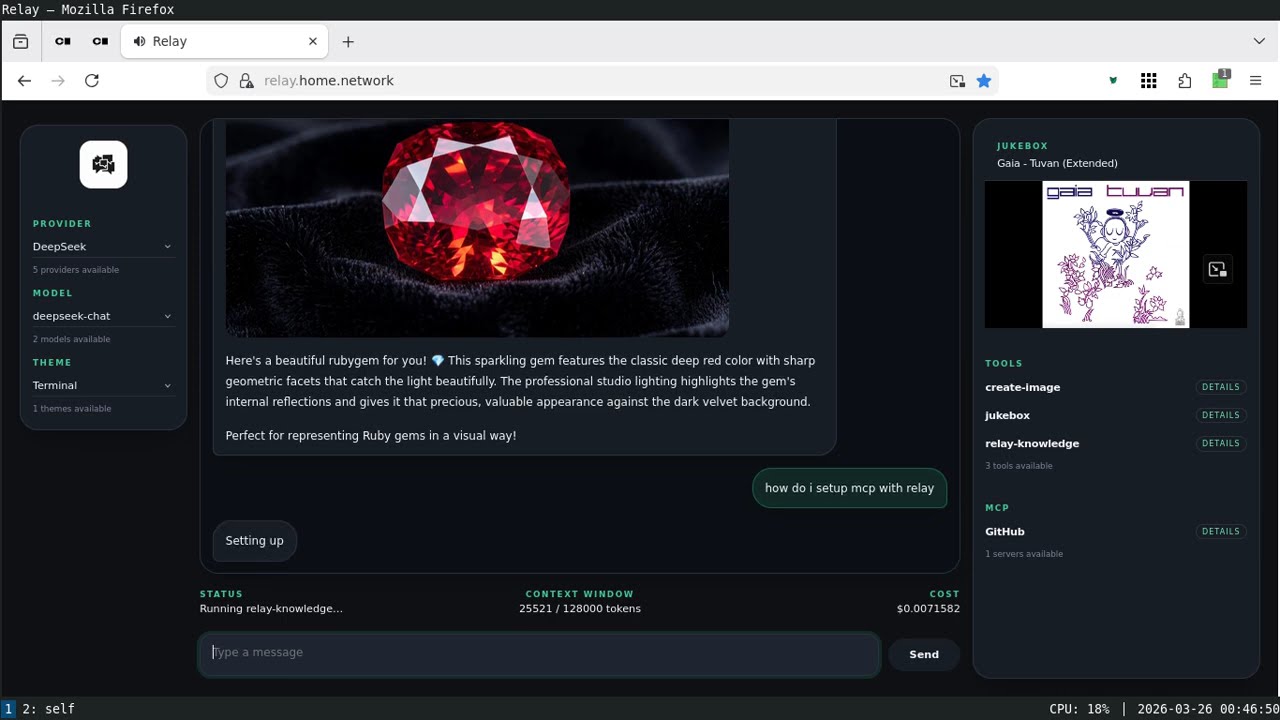
## Real-World Example: Relay
|
|
714
|
-
|
|
715
|
-
See how these pieces come together in a complete application architecture with
|
|
716
|
-
[Relay](https://github.com/llmrb/relay), a production-ready LLM application
|
|
717
|
-
built on llm.rb that demonstrates:
|
|
718
|
-
|
|
719
|
-
- Context management across requests
|
|
720
|
-
- Tool composition and execution
|
|
721
|
-
- Concurrent workflows
|
|
722
|
-
- Cost tracking and observability
|
|
723
|
-
- Production deployment patterns
|
|
724
|
-
|
|
725
|
-
Watch the screencast:
|
|
726
|
-
|
|
727
|
-
[](https://www.youtube.com/watch?v=x1K4wMeO_QA)
|
|
728
|
-
|
|
729
|
-
## Installation
|
|
730
|
-
|
|
731
|
-
```bash
|
|
732
|
-
gem install llm.rb
|
|
733
|
-
```
|
|
158
|
+
- [deepdive](https://0x1eef.github.io/x/llm.rb/file.deepdive.html) is the
|
|
159
|
+
examples guide.
|
|
160
|
+
- [_examples/relay](./_examples/relay) shows a real application built on top
|
|
161
|
+
of llm.rb.
|
|
162
|
+
- [doc site](https://0x1eef.github.io/x/llm.rb?rebuild=1) has the API docs.
|
|
734
163
|
|
|
735
164
|
## License
|
|
736
165
|
|