glimmer-dsl-web 0.2.3 → 0.2.5
This diff represents the content of publicly available package versions that have been released to one of the supported registries. The information contained in this diff is provided for informational purposes only and reflects changes between package versions as they appear in their respective public registries.
- checksums.yaml +4 -4
- data/CHANGELOG.md +13 -0
- data/README.md +328 -105
- data/VERSION +1 -1
- data/glimmer-dsl-web.gemspec +27 -20
- data/lib/glimmer/web/component.rb +11 -4
- data/lib/glimmer-dsl-web/ext/kernel.rb +44 -0
- data/lib/glimmer-dsl-web/samples/hello/hello_component.rb +2 -2
- data/lib/glimmer-dsl-web/samples/hello/hello_form.rb +2 -0
- data/lib/glimmer-dsl-web/samples/hello/hello_form_mvp/models/contact.rb +1 -0
- data/lib/glimmer-dsl-web/samples/hello/hello_form_mvp/presenters/hello_form_mvp_presenter.rb +25 -0
- data/lib/glimmer-dsl-web/samples/hello/hello_form_mvp/views/contact_form.rb +46 -0
- data/lib/glimmer-dsl-web/samples/hello/hello_form_mvp/views/contact_table.rb +42 -0
- data/lib/glimmer-dsl-web/samples/hello/hello_form_mvp.rb +51 -0
- data/lib/glimmer-dsl-web/samples/hello/hello_observer.rb +7 -21
- data/lib/glimmer-dsl-web/samples/hello/hello_observer_data_binding.rb +57 -0
- data/lib/glimmer-dsl-web.rb +1 -0
- metadata +25 -15
data/README.md
CHANGED
|
@@ -1,15 +1,32 @@
|
|
|
1
|
-
# [<img src="https://raw.githubusercontent.com/AndyObtiva/glimmer/master/images/glimmer-logo-hi-res.png" height=85 />](https://github.com/AndyObtiva/glimmer) Glimmer DSL for Web 0.2.
|
|
2
|
-
## Ruby in the Browser Web
|
|
1
|
+
# [<img src="https://raw.githubusercontent.com/AndyObtiva/glimmer/master/images/glimmer-logo-hi-res.png" height=85 />](https://github.com/AndyObtiva/glimmer) Glimmer DSL for Web 0.2.5 (Beta)
|
|
2
|
+
## Ruby in the Browser Web Frontend Framework
|
|
3
|
+
### Finally, Ruby Developer Productivity, Happiness, and Fun in the Frontend!!!
|
|
3
4
|
[](http://badge.fury.io/rb/glimmer-dsl-web)
|
|
4
5
|
[](https://gitter.im/AndyObtiva/glimmer?utm_source=badge&utm_medium=badge&utm_campaign=pr-badge&utm_content=badge)
|
|
5
6
|
|
|
6
7
|
**(Based on Original [Glimmer](https://github.com/AndyObtiva/glimmer) Library Handling World’s Ruby GUI Needs Since 2007. Beware of Imitators!)**
|
|
7
8
|
|
|
8
|
-
|
|
9
|
+
**(Talk Videos: [Intro to Ruby in the Browser](https://youtu.be/4AdcfbI6A4c?si=MmxOrkhIXTDHQoYi) & [Frontend Ruby with Glimmer DSL for Web](https://youtu.be/rIZ-ILUv9ME?si=raygUXVPd_7ypWuE))**
|
|
10
|
+
|
|
11
|
+
You can finally have Ruby developer happiness and productivity in the Frontend! No more wasting time splitting your resources across multiple languages, using badly engineered, over-engineered, or premature-optimization-obsessed JavaScript libraries, fighting JavaScript build issues (e.g. webpack), or rewriting Ruby Backend code in Frontend JavaScript. With [Ruby in the Browser](https://www.youtube.com/watch?v=4AdcfbI6A4c), you can have an exponential jump in development productivity (2x or higher), time-to-release (1/2 or less time), cost (1/2 or cheaper), and maintainability (~50% the code that is simpler and more readable) over JavaScript libraries like React, Angular, Ember, Vue, and Svelte, while being able to reuse Backend Ruby code as is in the Frontend for faster interactions when needed. [Ruby in the Browser](https://www.youtube.com/watch?v=4AdcfbI6A4c) finally fulfills every highly-productive Rubyist's dream by bringing Ruby productivity fun to Frontend Development, the same productivity fun you had for years and decades in Backend Development.
|
|
12
|
+
|
|
13
|
+
[Glimmer](https://github.com/AndyObtiva/glimmer) DSL for Web enables building Web Frontends using [Ruby in the Browser](https://www.youtube.com/watch?v=4AdcfbI6A4c), as per [Matz's recommendation in his RubyConf 2022 keynote speech to replace JavaScript with Ruby](https://youtu.be/knutsgHTrfQ?t=789). It supports Rails' principle of the One Person Framework by not requiring any extra developers with JavaScript expertise, yet enabling Ruby (Backend) Software Engineers to develop the Frontend with Ruby code that is better than any JavaScript code produced by JS developers. It aims at providing the simplest, most intuitive, most straight-forward, and most productive frontend framework in existence. The framework follows the Ruby way (with [DSLs](https://martinfowler.com/books/dsl.html) and [TIMTOWTDI](https://en.wiktionary.org/wiki/TMTOWTDI#English)) and the Rails way ([Convention over Configuration](https://rubyonrails.org/doctrine)) in building Isomorphic Ruby on Rails Applications. It provides a Ruby [HTML DSL](#usage), which uniquely enables writing both structure code and logic code in one language. It supports both Unidirectional (One-Way) [Data-Binding](#hello-data-binding) (using `<=`) and Bidirectional (Two-Way) [Data-Binding](#hello-data-binding) (using `<=>`). Dynamic rendering (and re-rendering) of HTML content is also supported via [Content Data-Binding](#hello-content-data-binding). Modular design is supported with [Glimmer Web Components](#hello-component). And, a Ruby CSS DSL is supported with the included [Glimmer DSL for CSS](https://github.com/AndyObtiva/glimmer-dsl-css). Many [samples](#samples) are demonstrated in the [Rails sample app](https://github.com/AndyObtiva/sample-glimmer-dsl-web-rails7-app) (there is a very minimal [Standalone [No Rails] static site sample app](https://github.com/Largo/glimmer-dsl-web-standalone-demo) too). You can finally live in pure Rubyland on the Web in both the frontend and backend with [Glimmer DSL for Web](https://rubygems.org/gems/glimmer-dsl-web)!
|
|
14
|
+
|
|
15
|
+
[Glimmer DSL for Web](https://rubygems.org/gems/glimmer-dsl-web) aims to be a very simple Ruby-based drop-in replacement for your existing JavaScript Frontend library (e.g. React, Angular, Vue, Ember, Svelte) or your JavaScript Frontend layer in general. It does not change how your Frontend interacts with the Backend, meaning you can continue to write Rails Backend API endpoints as needed and make Ajax HTTP requests or read data embedded in elements, but from [Ruby in the Browser](https://www.youtube.com/watch?v=4AdcfbI6A4c). Whatever is possible in JavaScript is possible when using Glimmer DSL for Web as it integrates with any existing JavaScript library. The [Rails sample app](https://github.com/AndyObtiva/sample-glimmer-dsl-web-rails7-app) demonstrates how to [make Ajax HTTP calls](https://github.com/AndyObtiva/sample-glimmer-dsl-web-rails7-app/blob/master/app/assets/opal/sample_selector/models/sample_selector_presenter.rb) and how to [integrate with a JavaScript library](https://github.com/AndyObtiva/sample-glimmer-dsl-web-rails7-app/blob/master/app/views/layouts/application.html.erb) (highlightjs) that performs [code syntax highlighting](https://github.com/AndyObtiva/sample-glimmer-dsl-web-rails7-app/blob/master/app/assets/opal/sample_selector.rb).
|
|
16
|
+
|
|
17
|
+
After looking through the [samples](#samples) below, read the [FAQ (Frequently Asked Questions)](#faq) to learn more about how Glimmer DSL for Web compares to other approaches/libraries like Hotwire (Turbo), Phlex, ViewComponent, Angular, Vue, React, Svelte, and other JS frameworks.
|
|
18
|
+
|
|
19
|
+
Anyone not considering this kind of technology in 2024 is like someone stuck in the dark ages riding horse carriage (e.g. JavaScript developers using frameworks like React) despite flying cars having been invented already and providing exponential jumps in productivity (way more than small linear jumps provided by some JavaScript libraries). Obviously, those who do make this jump will end up winning their work over from customers and beating the competition while delivering the best Frontend value possible to customers.
|
|
20
|
+
|
|
21
|
+
(Attention Software Engineers, Bloggers, and Contributors: Please use Glimmer DSL for Web in web projects, blog about it, and submit a PR with your article, project, and/or open-source-repo added to the README. Also, I give everyone permission to present this project at their local Ruby user group, local Software Engineering meetup, or Software Conferences outside of North America (e.g. Europe). I am willing to present at Software Conferences in North America and Japan (the birthplace of Ruby) only. If you want to have this project presented elsewhere, like in Europe or South America, feel free to prepare and give your own presentations of the project, and if needed, hit me up for help on the [Glimmer Gitter chat](https://gitter.im/AndyObtiva/glimmer?utm_source=badge&utm_medium=badge&utm_campaign=pr-badge&utm_content=badge))
|
|
9
22
|
|
|
10
23
|
**Hello, World! Sample**
|
|
11
24
|
|
|
12
|
-
Glimmer
|
|
25
|
+
(Note: in real app development, we build [Glimmer Web Components](#hello-component), but this sample is just introducing basic building blocks towards building [components](#hello-component))
|
|
26
|
+
|
|
27
|
+
[lib/glimmer-dsl-web/samples/hello/hello_world.rb](/lib/glimmer-dsl-web/samples/hello/hello_world.rb)
|
|
28
|
+
|
|
29
|
+
Glimmer HTML DSL Ruby code in the frontend:
|
|
13
30
|
|
|
14
31
|
```ruby
|
|
15
32
|
require 'glimmer-dsl-web'
|
|
@@ -37,9 +54,13 @@ You can also mount the `div` elsewhere by passing the `parent: parent_css_select
|
|
|
37
54
|
|
|
38
55
|
**Hello, Button!**
|
|
39
56
|
|
|
57
|
+
(Note: in real app development, we build [Glimmer Web Components](#hello-component), but this sample is just introducing basic building blocks towards building [components](#hello-component))
|
|
58
|
+
|
|
40
59
|
Event listeners can be setup on any element using the same event names used in HTML (e.g. `onclick`) while passing in a standard Ruby block to handle behavior. `$$` gives access to JS global scope from Ruby to invoke functions like `alert`.
|
|
41
60
|
|
|
42
|
-
|
|
61
|
+
[lib/glimmer-dsl-web/samples/hello/hello_button.rb](/lib/glimmer-dsl-web/samples/hello/hello_button.rb)
|
|
62
|
+
|
|
63
|
+
Glimmer HTML DSL Ruby code in the frontend:
|
|
43
64
|
|
|
44
65
|
```ruby
|
|
45
66
|
require 'glimmer-dsl-web'
|
|
@@ -71,9 +92,13 @@ Screenshot:
|
|
|
71
92
|
|
|
72
93
|
**Hello, Form!**
|
|
73
94
|
|
|
74
|
-
|
|
95
|
+
(Note: in real app development, we build [Glimmer Web Components](#hello-component), but this sample is just introducing basic building blocks towards building [components](#hello-component))
|
|
96
|
+
|
|
97
|
+
[Glimmer DSL for Web](https://rubygems.org/gems/glimmer-dsl-web) gives access to all Web Browser built-in features like HTML form validations, input focus, events, and element functions from a very terse and productive Ruby HTML DSL. Also, you can apply CSS styles by including directly in Ruby code as a string, using [Glimmer DSL for CSS](https://github.com/AndyObtiva/glimmer-dsl-css), or managing CSS completely separately using something like [SCSS](https://sass-lang.com/). The CSS techniques could be combined as well, like by managing common reusable CSS styles separately in SCSS, but adding component specific CSS styles in Ruby when it is more convenient.
|
|
75
98
|
|
|
76
|
-
|
|
99
|
+
[lib/glimmer-dsl-web/samples/hello/hello_form.rb](/lib/glimmer-dsl-web/samples/hello/hello_form.rb)
|
|
100
|
+
|
|
101
|
+
Glimmer HTML DSL Ruby code in the frontend:
|
|
77
102
|
|
|
78
103
|
```ruby
|
|
79
104
|
require 'glimmer-dsl-web'
|
|
@@ -227,9 +252,13 @@ Screenshot:
|
|
|
227
252
|
|
|
228
253
|
**Hello, Data-Binding!**
|
|
229
254
|
|
|
255
|
+
(Note: in real app development, we build [Glimmer Web Components](#hello-component), but this sample is just introducing basic building blocks towards building [components](#hello-component))
|
|
256
|
+
|
|
230
257
|
[Glimmer DSL for Web](https://rubygems.org/gems/glimmer-dsl-web) intuitively supports both Unidirectional (One-Way) Data-Binding via the `<=` operator and Bidirectional (Two-Way) Data-Binding via the `<=>` operator, incredibly simplifying how to sync View properties with Model attributes with the simplest code to reason about.
|
|
231
258
|
|
|
232
|
-
|
|
259
|
+
[lib/glimmer-dsl-web/samples/hello/hello_data_binding.rb](/lib/glimmer-dsl-web/samples/hello/hello_data_binding.rb)
|
|
260
|
+
|
|
261
|
+
Glimmer HTML DSL Ruby code in the frontend:
|
|
233
262
|
|
|
234
263
|
```ruby
|
|
235
264
|
require 'glimmer-dsl-web'
|
|
@@ -344,11 +373,15 @@ Screenshot:
|
|
|
344
373
|
|
|
345
374
|
**Hello, Content Data-Binding!**
|
|
346
375
|
|
|
376
|
+
(Note: in real app development, we build [Glimmer Web Components](#hello-component), but this sample is just introducing basic building blocks towards building [components](#hello-component))
|
|
377
|
+
|
|
347
378
|
If you need to regenerate HTML element content dynamically, you can use Content Data-Binding to effortlessly
|
|
348
379
|
rebuild HTML elements based on changes in a Model attribute that provides the source data.
|
|
349
380
|
In this example, we generate multiple address forms based on the number of addresses the user has.
|
|
350
381
|
|
|
351
|
-
|
|
382
|
+
[lib/glimmer-dsl-web/samples/hello/hello_content_data_binding.rb](/lib/glimmer-dsl-web/samples/hello/hello_content_data_binding.rb)
|
|
383
|
+
|
|
384
|
+
Glimmer HTML DSL Ruby code in the frontend:
|
|
352
385
|
|
|
353
386
|
```ruby
|
|
354
387
|
require 'glimmer-dsl-web'
|
|
@@ -479,15 +512,17 @@ Screenshot:
|
|
|
479
512
|
|
|
480
513
|
You can define Glimmer web components (View components) to reuse visual concepts to your heart's content,
|
|
481
514
|
by simply defining a class with `include Glimmer::Web::Component` and encasing the reusable markup inside
|
|
482
|
-
a `markup {...}` block. Glimmer web components automatically extend the Glimmer
|
|
515
|
+
a `markup {...}` block. Glimmer web components automatically extend the Glimmer HTML DSL with new keywords
|
|
483
516
|
that match the underscored versions of the component class names (e.g. an `OrderSummary` class yields
|
|
484
|
-
the `order_summary` keyword for reusing that component within the Glimmer
|
|
485
|
-
You may insert a Glimmer component anywhere into a Rails View using `glimmer_component(component_path, *args)`
|
|
517
|
+
the `order_summary` keyword for reusing that component within the Glimmer HTML DSL).
|
|
518
|
+
You may insert a Glimmer component anywhere into a Rails View using `glimmer_component(component_path, *args)`
|
|
486
519
|
Rails helper (more about it in [Hello, glimmer_component Rails Helper!](#hello-glimmer_component-rails-helper)).
|
|
487
520
|
Below, we define an `AddressForm` component that generates an `address_form` keyword, and then we
|
|
488
521
|
reuse it twice inside an `AddressPage` component displaying a Shipping Address and a Billing Address.
|
|
489
522
|
|
|
490
|
-
|
|
523
|
+
[lib/glimmer-dsl-web/samples/hello/hello_component.rb](/lib/glimmer-dsl-web/samples/hello/hello_component.rb)
|
|
524
|
+
|
|
525
|
+
Glimmer HTML DSL Ruby code in the frontend:
|
|
491
526
|
|
|
492
527
|
```ruby
|
|
493
528
|
require 'glimmer-dsl-web'
|
|
@@ -567,9 +602,9 @@ end
|
|
|
567
602
|
# AddressForm Glimmer Web Component (View component)
|
|
568
603
|
#
|
|
569
604
|
# Including Glimmer::Web::Component makes this class a View component and automatically
|
|
570
|
-
# generates a new Glimmer
|
|
605
|
+
# generates a new Glimmer HTML DSL keyword that matches the lowercase underscored version
|
|
571
606
|
# of the name of the class. AddressForm generates address_form keyword, which can be used
|
|
572
|
-
# elsewhere in Glimmer
|
|
607
|
+
# elsewhere in Glimmer HTML DSL code as done inside AddressPage below.
|
|
573
608
|
class AddressForm
|
|
574
609
|
include Glimmer::Web::Component
|
|
575
610
|
|
|
@@ -702,6 +737,8 @@ You may insert a Glimmer component anywhere into a Rails View using
|
|
|
702
737
|
`glimmer_component(component_path, *args)` Rails helper. Add `include GlimmerHelper` to `ApplicationHelper`
|
|
703
738
|
or another Rails helper, and use `<%= glimmer_component("path/to/component", *args) %>` in Views.
|
|
704
739
|
|
|
740
|
+
[lib/glimmer-dsl-web/samples/hello/hello_glimmer_component_helper/address_form.rb](/lib/glimmer-dsl-web/samples/hello/hello_glimmer_component_helper/address_form.rb)
|
|
741
|
+
|
|
705
742
|
Rails `ApplicationHelper` setup code:
|
|
706
743
|
|
|
707
744
|
```ruby
|
|
@@ -736,7 +773,7 @@ Rails View code:
|
|
|
736
773
|
</div>
|
|
737
774
|
```
|
|
738
775
|
|
|
739
|
-
Glimmer
|
|
776
|
+
Glimmer HTML DSL Ruby code in the frontend (`app/assets/opal/address_form.rb`):
|
|
740
777
|
|
|
741
778
|
```ruby
|
|
742
779
|
require 'glimmer-dsl-web'
|
|
@@ -901,9 +938,9 @@ Screenshot:
|
|
|
901
938
|
|
|
902
939
|
**Hello, Paragraph!**
|
|
903
940
|
|
|
904
|
-
To facilitate building formatted textual paragraphs in Ruby, thanks to [Glimmer](https://github.com/AndyObtiva/glimmer#dsl-engine), the most advanced DSL engine in Ruby, the Glimmer
|
|
941
|
+
To facilitate building formatted textual paragraphs in Ruby, thanks to [Glimmer](https://github.com/AndyObtiva/glimmer#dsl-engine), the most advanced DSL engine in Ruby, the Glimmer HTML DSL is advanced enough to intelligently behave differently under different situations, like when using HTML formatting elements: `<br>`, `<strong>`, `<em>`, `<br>`, `<i>`, `<sub>`, `<sup>`, `<del>`, `<ins>`, `<small>`, `<mark>`
|
|
905
942
|
|
|
906
|
-
Instead of returning Ruby objects that are nested as children within their parent, the Glimmer
|
|
943
|
+
Instead of returning Ruby objects that are nested as children within their parent, the Glimmer HTML DSL returns `String` objects directly that can be concatenated to or embedded within other `String` objects via interpolation.
|
|
907
944
|
|
|
908
945
|
This enables writing code like:
|
|
909
946
|
|
|
@@ -931,9 +968,11 @@ it returns a `String` to enable code like this:
|
|
|
931
968
|
|
|
932
969
|
`p {"#{span('Yesterday, ', style: 'text-decoration: underline;')}Robert suggested adding a new #{em('feature', class: 'very-emphasized')} to our software product.#{br}}`
|
|
933
970
|
|
|
934
|
-
In any case, below is a full example leveraging the Glimmer
|
|
971
|
+
In any case, below is a full example leveraging the Glimmer HTML DSL alternative approach when utilizing formatting elements underneath a paragraph.
|
|
972
|
+
|
|
973
|
+
[lib/glimmer-dsl-web/samples/hello/hello_paragraph.rb](/lib/glimmer-dsl-web/samples/hello/hello_paragraph.rb)
|
|
935
974
|
|
|
936
|
-
Glimmer
|
|
975
|
+
Glimmer HTML DSL Ruby code in the frontend:
|
|
937
976
|
|
|
938
977
|
```ruby
|
|
939
978
|
require 'glimmer-dsl-web'
|
|
@@ -994,7 +1033,9 @@ Screenshot:
|
|
|
994
1033
|
|
|
995
1034
|
[Glimmer DSL for Web](https://rubygems.org/gems/glimmer-dsl-web) provides the `observe(model, attribute) { ... }` keyword to employ the [Observer Design Pattern](https://en.wikipedia.org/wiki/Observer_pattern) as per [MVC](https://en.wikipedia.org/wiki/Model%E2%80%93view%E2%80%93controller) (Model View Controller), enabling Views to observe Models and update themselves in response to changes. If the `observe` keyword is used from inside a [Component](#hello-component), when the Component is removed or its top-level element is removed, the observer is automatically cleaned up. The need for such explicit observers is significantly diminished by the availablility of the more advanced Unidirectional [Data-Binding](#hello-data-binding) Support and Bidirectional [Data-Binding](#hello-data-binding) Support.
|
|
996
1035
|
|
|
997
|
-
|
|
1036
|
+
[lib/glimmer-dsl-web/samples/hello/hello_observer.rb](/lib/glimmer-dsl-web/samples/hello/hello_observer.rb)
|
|
1037
|
+
|
|
1038
|
+
Glimmer HTML DSL Ruby code in the frontend:
|
|
998
1039
|
|
|
999
1040
|
```ruby
|
|
1000
1041
|
require 'glimmer-dsl-web'
|
|
@@ -1017,48 +1058,81 @@ class HelloObserver
|
|
|
1017
1058
|
after_render do
|
|
1018
1059
|
@number_input.value = @number_holder.number
|
|
1019
1060
|
@range_input.value = @number_holder.number
|
|
1020
|
-
|
|
1021
|
-
#
|
|
1022
|
-
#
|
|
1061
|
+
|
|
1062
|
+
# Observe Model attribute @number_holder.number for changes and update View elements.
|
|
1063
|
+
# Observer is automatically cleaned up when `remove` method is called on rendered
|
|
1064
|
+
# HelloObserver web component or its top-level markup element (div)
|
|
1023
1065
|
observe(@number_holder, :number) do
|
|
1024
1066
|
number_string = @number_holder.number.to_s
|
|
1025
1067
|
@number_input.value = number_string unless @number_input.value == number_string
|
|
1026
1068
|
@range_input.value = number_string unless @range_input.value == number_string
|
|
1027
1069
|
end
|
|
1028
|
-
# Bidirectional Data-Binding does the same thing automatically
|
|
1029
|
-
# Just disable the observe block above as well as the oninput listeners below
|
|
1030
|
-
# and enable the `value <=> [@number_holder, :number]` lines to try the data-binding version
|
|
1031
|
-
# Learn more about Bidirectional and Unidirectional Data-Binding in hello_data_binding.rb
|
|
1070
|
+
# Bidirectional Data-Binding does the same thing automatically as per alternative sample: Hello, Observer (Data-Binding)!
|
|
1032
1071
|
end
|
|
1033
1072
|
|
|
1034
1073
|
markup {
|
|
1035
1074
|
div {
|
|
1036
1075
|
div {
|
|
1037
1076
|
@number_input = input(type: 'number', min: 0, max: 100) {
|
|
1038
|
-
# oninput listener updates Model attribute @number_holder.number
|
|
1077
|
+
# oninput listener (observer) updates Model attribute @number_holder.number
|
|
1039
1078
|
oninput do
|
|
1040
1079
|
@number_holder.number = @number_input.value.to_i
|
|
1041
1080
|
end
|
|
1042
|
-
|
|
1043
|
-
# Bidirectional Data-Binding simplifies the implementation significantly
|
|
1044
|
-
# by enabling the following line and disabling oninput listeners as well
|
|
1045
|
-
# as the after_body observe block observer
|
|
1046
|
-
# Learn more about Bidirectional and Unidirectional Data-Binding in hello_data_binding.rb
|
|
1047
|
-
# value <=> [@number_holder, :number]
|
|
1048
1081
|
}
|
|
1049
1082
|
}
|
|
1050
1083
|
div {
|
|
1051
1084
|
@range_input = input(type: 'range', min: 0, max: 100) {
|
|
1052
|
-
# oninput listener updates Model attribute @number_holder.number
|
|
1085
|
+
# oninput listener (observer) updates Model attribute @number_holder.number
|
|
1053
1086
|
oninput do
|
|
1054
1087
|
@number_holder.number = @range_input.value.to_i
|
|
1055
1088
|
end
|
|
1056
|
-
|
|
1057
|
-
|
|
1058
|
-
|
|
1059
|
-
|
|
1060
|
-
|
|
1061
|
-
|
|
1089
|
+
}
|
|
1090
|
+
}
|
|
1091
|
+
}
|
|
1092
|
+
}
|
|
1093
|
+
end
|
|
1094
|
+
```
|
|
1095
|
+
|
|
1096
|
+
Screenshot:
|
|
1097
|
+
|
|
1098
|
+

|
|
1099
|
+
|
|
1100
|
+
**Hello, Observer (Data-Binding)!**
|
|
1101
|
+
|
|
1102
|
+
This is the data-binding edition of Hello, Observer!, which uses the `<=>` operator to perform bidirectional data-binding between a View property and a Model attribute, thus yield a lot less code that is declarative and is the most minimal code possible to express the requirements.
|
|
1103
|
+
|
|
1104
|
+
[lib/glimmer-dsl-web/samples/hello/hello_observer_data_binding.rb](/lib/glimmer-dsl-web/samples/hello/hello_observer_data_binding.rb)
|
|
1105
|
+
|
|
1106
|
+
Glimmer HTML DSL Ruby code in the frontend:
|
|
1107
|
+
|
|
1108
|
+
```ruby
|
|
1109
|
+
require 'glimmer-dsl-web'
|
|
1110
|
+
|
|
1111
|
+
class NumberHolder
|
|
1112
|
+
attr_accessor :number
|
|
1113
|
+
|
|
1114
|
+
def initialize
|
|
1115
|
+
self.number = 50
|
|
1116
|
+
end
|
|
1117
|
+
end
|
|
1118
|
+
|
|
1119
|
+
class HelloObserver
|
|
1120
|
+
include Glimmer::Web::Component
|
|
1121
|
+
|
|
1122
|
+
before_render do
|
|
1123
|
+
@number_holder = NumberHolder.new
|
|
1124
|
+
end
|
|
1125
|
+
|
|
1126
|
+
markup {
|
|
1127
|
+
div {
|
|
1128
|
+
div {
|
|
1129
|
+
input(type: 'number', min: 0, max: 100) {
|
|
1130
|
+
value <=> [@number_holder, :number]
|
|
1131
|
+
}
|
|
1132
|
+
}
|
|
1133
|
+
div {
|
|
1134
|
+
input(type: 'range', min: 0, max: 100) {
|
|
1135
|
+
value <=> [@number_holder, :number]
|
|
1062
1136
|
}
|
|
1063
1137
|
}
|
|
1064
1138
|
}
|
|
@@ -1074,7 +1148,7 @@ Screenshot:
|
|
|
1074
1148
|
|
|
1075
1149
|

|
|
1076
1150
|
|
|
1077
|
-
To get started, [Setup](#setup) Ruby gem, read [Usage](#usage) instructions, and check out more [Samples](#samples).
|
|
1151
|
+
To get started, [Setup](#setup) Ruby gem, read [Usage](#usage) instructions, and check out more [Samples](#samples) (including playing around with a [Rails sample app](https://github.com/AndyObtiva/sample-glimmer-dsl-web-rails7-app)).
|
|
1078
1152
|
|
|
1079
1153
|
--
|
|
1080
1154
|
|
|
@@ -1089,6 +1163,9 @@ Learn more about the differences between various [Glimmer](https://github.com/An
|
|
|
1089
1163
|
- [Glimmer DSL for Web](#)
|
|
1090
1164
|
- [Prerequisites](#prerequisites)
|
|
1091
1165
|
- [Setup](#setup)
|
|
1166
|
+
- [Rails 7](#rails-7)
|
|
1167
|
+
- [Rails 6](#rails-6)
|
|
1168
|
+
- [Standalone (No Rails)](#standalone-no-rails)
|
|
1092
1169
|
- [Usage](#usage)
|
|
1093
1170
|
- [Supported Glimmer DSL Keywords](#supported-glimmer-dsl-keywords)
|
|
1094
1171
|
- [Coming from Glimmer DSL for Opal](#coming-from-glimmer-dsl-for-opal)
|
|
@@ -1097,7 +1174,9 @@ Learn more about the differences between various [Glimmer](https://github.com/An
|
|
|
1097
1174
|
- [Hello, World!](#hello-world)
|
|
1098
1175
|
- [Hello, Button!](#hello-button)
|
|
1099
1176
|
- [Hello, Form!](#hello-form)
|
|
1177
|
+
- [Hello, Form (MVP)!](#hello-form-mvp)
|
|
1100
1178
|
- [Hello, Observer!](#hello-observer)
|
|
1179
|
+
- [Hello, Observer (Data-Binding)!](#hello-observer)
|
|
1101
1180
|
- [Hello, Data-Binding!](#hello-data-binding)
|
|
1102
1181
|
- [Hello, Content Data-Binding!](#hello-content-data-binding)
|
|
1103
1182
|
- [Hello, Component!](#hello-content-data-binding)
|
|
@@ -1126,11 +1205,13 @@ Learn more about the differences between various [Glimmer](https://github.com/An
|
|
|
1126
1205
|
|
|
1127
1206
|
## Setup
|
|
1128
1207
|
|
|
1208
|
+
You can setup Glimmer DSL for Web in [Rails 7](#rails-7), [Rails 6](#rails-6), or [Standalone (No Rails)](#standalone-no-rails).
|
|
1209
|
+
|
|
1129
1210
|
(NOTE: Keep in mind this is a Beta. If you run into issues, try to go back to a [previous revision](https://rubygems.org/gems/glimmer-dsl-web/versions). Also, there is a slight chance any issues you encounter are fixed in master or some other branch that you could check out instead)
|
|
1130
1211
|
|
|
1131
1212
|
### Rails 7
|
|
1132
1213
|
|
|
1133
|
-
Please follow
|
|
1214
|
+
Please follow these steps to setup.
|
|
1134
1215
|
|
|
1135
1216
|
Install a Rails 7 gem:
|
|
1136
1217
|
|
|
@@ -1147,7 +1228,7 @@ rails new glimmer_app_server
|
|
|
1147
1228
|
Add the following to `Gemfile`:
|
|
1148
1229
|
|
|
1149
1230
|
```
|
|
1150
|
-
gem 'glimmer-dsl-web', '~> 0.2.
|
|
1231
|
+
gem 'glimmer-dsl-web', '~> 0.2.5'
|
|
1151
1232
|
```
|
|
1152
1233
|
|
|
1153
1234
|
Run:
|
|
@@ -1164,7 +1245,7 @@ Follow [opal-rails](https://github.com/opal/opal-rails) instructions, basically
|
|
|
1164
1245
|
bin/rails g opal:install
|
|
1165
1246
|
```
|
|
1166
1247
|
|
|
1167
|
-
To enable the `glimmer-dsl-web`
|
|
1248
|
+
To enable the `glimmer-dsl-web` gem in the frontend, edit `config/initializers/assets.rb` and add the following at the bottom:
|
|
1168
1249
|
|
|
1169
1250
|
```ruby
|
|
1170
1251
|
Opal.use_gem 'glimmer-dsl-web'
|
|
@@ -1220,7 +1301,7 @@ Edit and replace `app/assets/opal/opal_application.rb` content with code below (
|
|
|
1220
1301
|
```ruby
|
|
1221
1302
|
require 'glimmer-dsl-web' # brings opal and other dependencies automatically
|
|
1222
1303
|
|
|
1223
|
-
# Add more require-statements or Glimmer
|
|
1304
|
+
# Add more require-statements or Glimmer HTML DSL code
|
|
1224
1305
|
```
|
|
1225
1306
|
|
|
1226
1307
|
```ruby
|
|
@@ -1229,7 +1310,7 @@ require 'glimmer-dsl-web'
|
|
|
1229
1310
|
require 'glimmer-dsl-web/samples/hello/hello_world.rb'
|
|
1230
1311
|
```
|
|
1231
1312
|
|
|
1232
|
-
If the `<body></body>` element (where the Glimmer
|
|
1313
|
+
If the `<body></body>` element (where the Glimmer HTML DSL adds elements by default) is not available when the JS file is loading, you need to put the code inside a `Document.ready? do; end` (but, it is recommended that you load the JS file after the parent element like `<body></body>` is in the page already for faster performance, which is guaranteed automatically by using `glimmer_component`, mentioned in details below):
|
|
1233
1314
|
|
|
1234
1315
|
```ruby
|
|
1235
1316
|
require 'glimmer-dsl-web'
|
|
@@ -1241,7 +1322,7 @@ end
|
|
|
1241
1322
|
|
|
1242
1323
|
Example to confirm setup is working:
|
|
1243
1324
|
|
|
1244
|
-
Glimmer
|
|
1325
|
+
Glimmer HTML DSL Ruby code in the frontend:
|
|
1245
1326
|
|
|
1246
1327
|
```ruby
|
|
1247
1328
|
require 'glimmer-dsl-web'
|
|
@@ -1292,7 +1373,7 @@ HTML:
|
|
|
1292
1373
|
...
|
|
1293
1374
|
```
|
|
1294
1375
|
|
|
1295
|
-
Glimmer
|
|
1376
|
+
Glimmer HTML DSL Ruby code in the frontend:
|
|
1296
1377
|
|
|
1297
1378
|
```ruby
|
|
1298
1379
|
require 'glimmer-dsl-web'
|
|
@@ -1349,7 +1430,7 @@ Next, read [Usage](#usage) instructions, and check out [Samples](#samples).
|
|
|
1349
1430
|
|
|
1350
1431
|
### Rails 6
|
|
1351
1432
|
|
|
1352
|
-
Please follow
|
|
1433
|
+
Please follow these steps to setup.
|
|
1353
1434
|
|
|
1354
1435
|
Install a Rails 6 gem:
|
|
1355
1436
|
|
|
@@ -1372,7 +1453,7 @@ Disable the `webpacker` gem line in `Gemfile`:
|
|
|
1372
1453
|
Add the following to `Gemfile`:
|
|
1373
1454
|
|
|
1374
1455
|
```ruby
|
|
1375
|
-
gem 'glimmer-dsl-web', '~> 0.2.
|
|
1456
|
+
gem 'glimmer-dsl-web', '~> 0.2.5'
|
|
1376
1457
|
```
|
|
1377
1458
|
|
|
1378
1459
|
Run:
|
|
@@ -1389,7 +1470,7 @@ Follow [opal-rails](https://github.com/opal/opal-rails) instructions, basically
|
|
|
1389
1470
|
bin/rails g opal:install
|
|
1390
1471
|
```
|
|
1391
1472
|
|
|
1392
|
-
To enable the `glimmer-dsl-web`
|
|
1473
|
+
To enable the `glimmer-dsl-web` gem in the frontend, edit `config/initializers/assets.rb` and add the following at the bottom:
|
|
1393
1474
|
|
|
1394
1475
|
```ruby
|
|
1395
1476
|
Opal.use_gem 'glimmer-dsl-web'
|
|
@@ -1451,7 +1532,7 @@ Edit and replace `app/assets/opal/opal_application.rb` content with code below (
|
|
|
1451
1532
|
```ruby
|
|
1452
1533
|
require 'glimmer-dsl-web' # brings opal and other dependencies automatically
|
|
1453
1534
|
|
|
1454
|
-
# Add more require-statements or Glimmer
|
|
1535
|
+
# Add more require-statements or Glimmer HTML DSL code
|
|
1455
1536
|
```
|
|
1456
1537
|
|
|
1457
1538
|
Example to confirm setup is working:
|
|
@@ -1465,7 +1546,7 @@ Initial HTML Markup:
|
|
|
1465
1546
|
...
|
|
1466
1547
|
```
|
|
1467
1548
|
|
|
1468
|
-
Glimmer
|
|
1549
|
+
Glimmer HTML DSL Ruby code in the frontend:
|
|
1469
1550
|
|
|
1470
1551
|
```ruby
|
|
1471
1552
|
require 'glimmer-dsl-web'
|
|
@@ -1533,9 +1614,15 @@ Otherwise, if you still cannot setup successfully (even with the help of the sam
|
|
|
1533
1614
|
|
|
1534
1615
|
Next, read [Usage](#usage) instructions, and check out [Samples](#samples).
|
|
1535
1616
|
|
|
1617
|
+
### Standalone (No Rails)
|
|
1618
|
+
|
|
1619
|
+
Andreas Idogawa-Wildi ([@Largo](https://github.com/Largo)) created a project that demonstrates how to use Glimmer DSL for Web standalone (without Rails):
|
|
1620
|
+
|
|
1621
|
+
[https://github.com/Largo/glimmer-dsl-web-standalone-demo](https://github.com/Largo/glimmer-dsl-web-standalone-demo)
|
|
1622
|
+
|
|
1536
1623
|
## Usage
|
|
1537
1624
|
|
|
1538
|
-
Glimmer DSL for Web offers a
|
|
1625
|
+
Glimmer DSL for Web offers a HTML DSL ([Graphical User Interface](https://en.wikipedia.org/wiki/Graphical_user_interface) [Domain Specific Language](https://en.wikipedia.org/wiki/Domain-specific_language)) for building HTML Web User Interfaces declaratively in Ruby.
|
|
1539
1626
|
|
|
1540
1627
|
1- **Keywords (HTML Elements)**
|
|
1541
1628
|
|
|
@@ -1551,7 +1638,7 @@ Also, if the element has a little bit of text content that can fit in one line,
|
|
|
1551
1638
|
|
|
1552
1639
|
3- **Content Block (Properties + Listeners + Nested Elements + Text Content)**
|
|
1553
1640
|
|
|
1554
|
-
Element methods can accept a Ruby content block. It intentionally has a `{...}` style even as a multi-line block to indicate that the code is declarative
|
|
1641
|
+
Element methods can accept a Ruby content block. It intentionally has a `{...}` style even as a multi-line block to indicate that the code is declarative HTML DSL structure code (intentionally breaking away from Ruby imperative code conventions given this is a declarative HTML DSL ([Domain Specific Language](https://en.wikipedia.org/wiki/Domain-specific_language)), meaning a different language that has its own conventions, embedded within Ruby).
|
|
1555
1642
|
|
|
1556
1643
|
You can nest HTML element properties under an element like:
|
|
1557
1644
|
|
|
@@ -1571,7 +1658,7 @@ button('Add') {
|
|
|
1571
1658
|
}
|
|
1572
1659
|
```
|
|
1573
1660
|
|
|
1574
|
-
Given that listener code is imperative, it uses a `do; end` style for Ruby blocks to separate it from declarative
|
|
1661
|
+
Given that listener code is imperative, it uses a `do; end` style for Ruby blocks to separate it from declarative HTML DSL structure code and enable quicker readability of the code.
|
|
1575
1662
|
|
|
1576
1663
|
You can nest other HTML elements under an HTML element the same way you do so in HTML, like:
|
|
1577
1664
|
|
|
@@ -1617,19 +1704,23 @@ Next, check out [Samples](#samples).
|
|
|
1617
1704
|
|
|
1618
1705
|
## Coming from Glimmer DSL for Opal
|
|
1619
1706
|
|
|
1620
|
-
This project is inspired by [Glimmer DSL for Opal](https://github.com/AndyObtiva/glimmer-dsl-opal) and is similar in enabling
|
|
1707
|
+
This project is inspired by [Glimmer DSL for Opal](https://github.com/AndyObtiva/glimmer-dsl-opal) and is similar in enabling Web Frontend development with Ruby. [Glimmer DSL for Web](https://rubygems.org/gems/glimmer-dsl-web) mainly differs from Glimmer DSL for Opal by adopting a DSL that follows web-like HTML syntax in Ruby to facilitate leveraging existing HTML/CSS/JS skills instead of adopting a desktop HTML DSL that is webified. As a result, applications written in Glimmer DSL for Opal are not compatible with Glimmer DSL for Web.
|
|
1621
1708
|
|
|
1622
1709
|
## Samples
|
|
1623
1710
|
|
|
1624
|
-
This external
|
|
1711
|
+
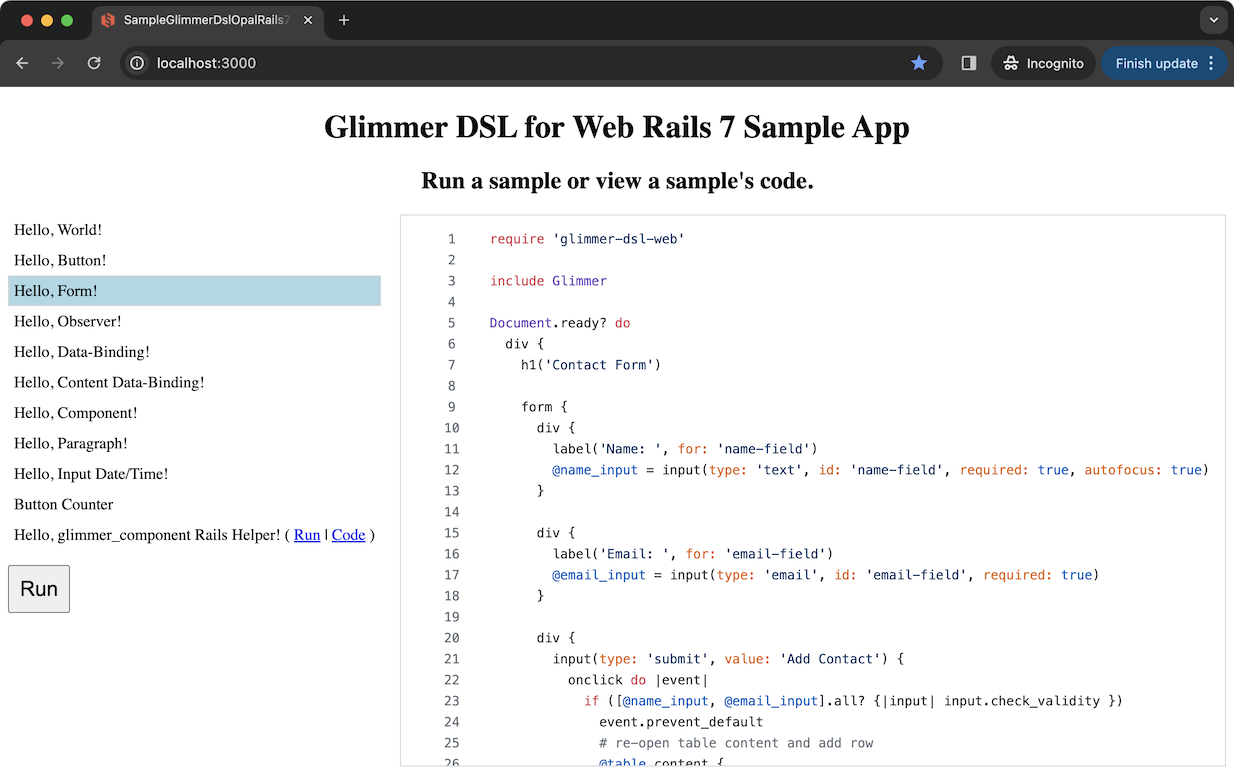
This external Sample Selector app is built using Rails and Glimmer DSL for Web, including all the samples mentioned below configured inside a Rails [Opal](https://opalrb.com/) web app with all the prerequisites ready to go for convenience (there is a very minimal [Standalone [No Rails] static site sample app](https://github.com/Largo/glimmer-dsl-web-standalone-demo) too):
|
|
1625
1712
|
|
|
1626
1713
|
https://github.com/AndyObtiva/sample-glimmer-dsl-web-rails7-app
|
|
1627
1714
|
|
|
1715
|
+
|
|
1716
|
+
|
|
1628
1717
|
### Hello Samples
|
|
1629
1718
|
|
|
1630
1719
|
#### Hello, World!
|
|
1631
1720
|
|
|
1632
|
-
|
|
1721
|
+
[lib/glimmer-dsl-web/samples/hello/hello_world.rb](/lib/glimmer-dsl-web/samples/hello/hello_world.rb)
|
|
1722
|
+
|
|
1723
|
+
Glimmer HTML DSL Ruby code in the frontend:
|
|
1633
1724
|
|
|
1634
1725
|
```ruby
|
|
1635
1726
|
require 'glimmer-dsl-web'
|
|
@@ -1681,7 +1772,9 @@ You can also mount the `div` elsewhere by passing the `parent: parent_css_select
|
|
|
1681
1772
|
|
|
1682
1773
|
Event listeners can be setup on any element using the same event names used in HTML (e.g. `onclick`) while passing in a standard Ruby block to handle behavior. `$$` gives access to JS global scope from Ruby to invoke functions like `alert`.
|
|
1683
1774
|
|
|
1684
|
-
|
|
1775
|
+
[lib/glimmer-dsl-web/samples/hello/hello_button.rb](/lib/glimmer-dsl-web/samples/hello/hello_button.rb)
|
|
1776
|
+
|
|
1777
|
+
Glimmer HTML DSL Ruby code in the frontend:
|
|
1685
1778
|
|
|
1686
1779
|
```ruby
|
|
1687
1780
|
require 'glimmer-dsl-web'
|
|
@@ -1713,9 +1806,11 @@ Screenshot:
|
|
|
1713
1806
|
|
|
1714
1807
|
#### Hello, Form!
|
|
1715
1808
|
|
|
1716
|
-
[Glimmer DSL for Web](https://rubygems.org/gems/glimmer-dsl-web) gives access to all Web Browser built-in features like HTML form validations, input focus, events, and element functions from a very terse and productive Ruby
|
|
1809
|
+
[Glimmer DSL for Web](https://rubygems.org/gems/glimmer-dsl-web) gives access to all Web Browser built-in features like HTML form validations, input focus, events, and element functions from a very terse and productive Ruby HTML DSL. Also, you can apply CSS styles by including directly in Ruby code as a string, using [Glimmer DSL for CSS](https://github.com/AndyObtiva/glimmer-dsl-css), or managing CSS completely separately using something like [SCSS](https://sass-lang.com/). The CSS techniques could be combined as well, like by managing common reusable CSS styles separately in SCSS, but adding component specific CSS styles in Ruby when it is more convenient.
|
|
1810
|
+
|
|
1811
|
+
[lib/glimmer-dsl-web/samples/hello/hello_form.rb](/lib/glimmer-dsl-web/samples/hello/hello_form.rb)
|
|
1717
1812
|
|
|
1718
|
-
Glimmer
|
|
1813
|
+
Glimmer HTML DSL Ruby code in the frontend:
|
|
1719
1814
|
|
|
1720
1815
|
```ruby
|
|
1721
1816
|
require 'glimmer-dsl-web'
|
|
@@ -1867,11 +1962,64 @@ Screenshot:
|
|
|
1867
1962
|
|
|
1868
1963
|

|
|
1869
1964
|
|
|
1965
|
+
#### Hello, Form (MVP)!
|
|
1966
|
+
|
|
1967
|
+
This is the MVP (Model-View-Presenter) edition of Hello, Form! leveraging Glimmer Web Components and the MVP Architectural Pattern.
|
|
1968
|
+
|
|
1969
|
+
Main file:
|
|
1970
|
+
|
|
1971
|
+
[lib/glimmer-dsl-web/samples/hello/hello_form_mvp.rb](/lib/glimmer-dsl-web/samples/hello/hello_form_mvp.rb)
|
|
1972
|
+
|
|
1973
|
+
Other files:
|
|
1974
|
+
|
|
1975
|
+
[lib/glimmer-dsl-web/samples/hello/hello_form_mvp](/lib/glimmer-dsl-web/samples/hello/hello_form_mvp)
|
|
1976
|
+
|
|
1977
|
+
Glimmer HTML DSL Ruby code in the frontend:
|
|
1978
|
+
|
|
1979
|
+
```ruby
|
|
1980
|
+
require 'glimmer-dsl-web'
|
|
1981
|
+
|
|
1982
|
+
require_relative 'hello_form_mvp/presenters/hello_form_mvp_presenter'
|
|
1983
|
+
|
|
1984
|
+
require_relative 'hello_form_mvp/views/contact_form'
|
|
1985
|
+
require_relative 'hello_form_mvp/views/contact_table'
|
|
1986
|
+
|
|
1987
|
+
class HelloFormMvp
|
|
1988
|
+
include Glimmer::Web::Component
|
|
1989
|
+
|
|
1990
|
+
before_render do
|
|
1991
|
+
@presenter = HelloFormMvpPresenter.new
|
|
1992
|
+
end
|
|
1993
|
+
|
|
1994
|
+
markup {
|
|
1995
|
+
div {
|
|
1996
|
+
h1('Contact Form')
|
|
1997
|
+
|
|
1998
|
+
contact_form(presenter: @presenter)
|
|
1999
|
+
|
|
2000
|
+
h1('Contacts Table')
|
|
2001
|
+
|
|
2002
|
+
contact_table(presenter: @presenter)
|
|
2003
|
+
}
|
|
2004
|
+
}
|
|
2005
|
+
end
|
|
2006
|
+
|
|
2007
|
+
Document.ready? do
|
|
2008
|
+
HelloFormMvp.render
|
|
2009
|
+
end
|
|
2010
|
+
```
|
|
2011
|
+
|
|
2012
|
+
Screenshot:
|
|
2013
|
+
|
|
2014
|
+

|
|
2015
|
+
|
|
1870
2016
|
#### Hello, Observer!
|
|
1871
2017
|
|
|
1872
2018
|
[Glimmer DSL for Web](https://rubygems.org/gems/glimmer-dsl-web) provides the `observe(model, attribute) { ... }` keyword to employ the [Observer Design Pattern](https://en.wikipedia.org/wiki/Observer_pattern) as per [MVC](https://en.wikipedia.org/wiki/Model%E2%80%93view%E2%80%93controller) (Model View Controller), enabling Views to observe Models and update themselves in response to changes. If the `observe` keyword is used from inside a [Component](#hello-component), when the Component is removed or its top-level element is removed, the observer is automatically cleaned up. The need for such explicit observers is significantly diminished by the availablility of the more advanced Unidirectional [Data-Binding](#hello-data-binding) Support and Bidirectional [Data-Binding](#hello-data-binding) Support.
|
|
1873
2019
|
|
|
1874
|
-
|
|
2020
|
+
[lib/glimmer-dsl-web/samples/hello/hello_observer.rb](/lib/glimmer-dsl-web/samples/hello/hello_observer.rb)
|
|
2021
|
+
|
|
2022
|
+
Glimmer HTML DSL Ruby code in the frontend:
|
|
1875
2023
|
|
|
1876
2024
|
```ruby
|
|
1877
2025
|
require 'glimmer-dsl-web'
|
|
@@ -1894,48 +2042,85 @@ class HelloObserver
|
|
|
1894
2042
|
after_render do
|
|
1895
2043
|
@number_input.value = @number_holder.number
|
|
1896
2044
|
@range_input.value = @number_holder.number
|
|
1897
|
-
|
|
1898
|
-
#
|
|
1899
|
-
#
|
|
2045
|
+
|
|
2046
|
+
# Observe Model attribute @number_holder.number for changes and update View elements.
|
|
2047
|
+
# Observer is automatically cleaned up when `remove` method is called on rendered
|
|
2048
|
+
# HelloObserver web component or its top-level markup element (div)
|
|
1900
2049
|
observe(@number_holder, :number) do
|
|
1901
2050
|
number_string = @number_holder.number.to_s
|
|
1902
2051
|
@number_input.value = number_string unless @number_input.value == number_string
|
|
1903
2052
|
@range_input.value = number_string unless @range_input.value == number_string
|
|
1904
2053
|
end
|
|
1905
|
-
# Bidirectional Data-Binding does the same thing automatically
|
|
1906
|
-
# Just disable the observe block above as well as the oninput listeners below
|
|
1907
|
-
# and enable the `value <=> [@number_holder, :number]` lines to try the data-binding version
|
|
1908
|
-
# Learn more about Bidirectional and Unidirectional Data-Binding in hello_data_binding.rb
|
|
2054
|
+
# Bidirectional Data-Binding does the same thing automatically as per alternative sample: Hello, Observer (Data-Binding)!
|
|
1909
2055
|
end
|
|
1910
2056
|
|
|
1911
2057
|
markup {
|
|
1912
2058
|
div {
|
|
1913
2059
|
div {
|
|
1914
2060
|
@number_input = input(type: 'number', min: 0, max: 100) {
|
|
1915
|
-
# oninput listener updates Model attribute @number_holder.number
|
|
2061
|
+
# oninput listener (observer) updates Model attribute @number_holder.number
|
|
1916
2062
|
oninput do
|
|
1917
2063
|
@number_holder.number = @number_input.value.to_i
|
|
1918
2064
|
end
|
|
1919
|
-
|
|
1920
|
-
# Bidirectional Data-Binding simplifies the implementation significantly
|
|
1921
|
-
# by enabling the following line and disabling oninput listeners as well
|
|
1922
|
-
# as the after_body observe block observer
|
|
1923
|
-
# Learn more about Bidirectional and Unidirectional Data-Binding in hello_data_binding.rb
|
|
1924
|
-
# value <=> [@number_holder, :number]
|
|
1925
2065
|
}
|
|
1926
2066
|
}
|
|
1927
2067
|
div {
|
|
1928
2068
|
@range_input = input(type: 'range', min: 0, max: 100) {
|
|
1929
|
-
# oninput listener updates Model attribute @number_holder.number
|
|
2069
|
+
# oninput listener (observer) updates Model attribute @number_holder.number
|
|
1930
2070
|
oninput do
|
|
1931
2071
|
@number_holder.number = @range_input.value.to_i
|
|
1932
2072
|
end
|
|
1933
|
-
|
|
1934
|
-
|
|
1935
|
-
|
|
1936
|
-
|
|
1937
|
-
|
|
1938
|
-
|
|
2073
|
+
}
|
|
2074
|
+
}
|
|
2075
|
+
}
|
|
2076
|
+
}
|
|
2077
|
+
end
|
|
2078
|
+
|
|
2079
|
+
Document.ready? do
|
|
2080
|
+
HelloObserver.render
|
|
2081
|
+
end
|
|
2082
|
+
```
|
|
2083
|
+
|
|
2084
|
+
Screenshot:
|
|
2085
|
+
|
|
2086
|
+

|
|
2087
|
+
|
|
2088
|
+
#### Hello, Observer (Data-Binding)!
|
|
2089
|
+
|
|
2090
|
+
This is the data-binding edition of Hello, Observer!, which uses the `<=>` operator to perform bidirectional data-binding between a View property and a Model attribute, thus yield a lot less code that is declarative and is the most minimal code possible to express the requirements.
|
|
2091
|
+
|
|
2092
|
+
[lib/glimmer-dsl-web/samples/hello/hello_observer_data_binding.rb](/lib/glimmer-dsl-web/samples/hello/hello_observer_data_binding.rb)
|
|
2093
|
+
|
|
2094
|
+
Glimmer HTML DSL Ruby code in the frontend:
|
|
2095
|
+
|
|
2096
|
+
```ruby
|
|
2097
|
+
require 'glimmer-dsl-web'
|
|
2098
|
+
|
|
2099
|
+
class NumberHolder
|
|
2100
|
+
attr_accessor :number
|
|
2101
|
+
|
|
2102
|
+
def initialize
|
|
2103
|
+
self.number = 50
|
|
2104
|
+
end
|
|
2105
|
+
end
|
|
2106
|
+
|
|
2107
|
+
class HelloObserver
|
|
2108
|
+
include Glimmer::Web::Component
|
|
2109
|
+
|
|
2110
|
+
before_render do
|
|
2111
|
+
@number_holder = NumberHolder.new
|
|
2112
|
+
end
|
|
2113
|
+
|
|
2114
|
+
markup {
|
|
2115
|
+
div {
|
|
2116
|
+
div {
|
|
2117
|
+
input(type: 'number', min: 0, max: 100) {
|
|
2118
|
+
value <=> [@number_holder, :number]
|
|
2119
|
+
}
|
|
2120
|
+
}
|
|
2121
|
+
div {
|
|
2122
|
+
input(type: 'range', min: 0, max: 100) {
|
|
2123
|
+
value <=> [@number_holder, :number]
|
|
1939
2124
|
}
|
|
1940
2125
|
}
|
|
1941
2126
|
}
|
|
@@ -1955,7 +2140,9 @@ Screenshot:
|
|
|
1955
2140
|
|
|
1956
2141
|
[Glimmer DSL for Web](https://rubygems.org/gems/glimmer-dsl-web) intuitively supports both Unidirectional (One-Way) Data-Binding via the `<=` operator and Bidirectional (Two-Way) Data-Binding via the `<=>` operator, incredibly simplifying how to sync View properties with Model attributes with the simplest code to reason about.
|
|
1957
2142
|
|
|
1958
|
-
|
|
2143
|
+
[lib/glimmer-dsl-web/samples/hello/hello_data_binding.rb](/lib/glimmer-dsl-web/samples/hello/hello_data_binding.rb)
|
|
2144
|
+
|
|
2145
|
+
Glimmer HTML DSL Ruby code in the frontend:
|
|
1959
2146
|
|
|
1960
2147
|
```ruby
|
|
1961
2148
|
require 'glimmer-dsl-web'
|
|
@@ -2128,7 +2315,9 @@ If you need to regenerate HTML element content dynamically, you can use Content
|
|
|
2128
2315
|
rebuild HTML elements based on changes in a Model attribute that provides the source data.
|
|
2129
2316
|
In this example, we generate multiple address forms based on the number of addresses the user has.
|
|
2130
2317
|
|
|
2131
|
-
|
|
2318
|
+
[lib/glimmer-dsl-web/samples/hello/hello_content_data_binding.rb](/lib/glimmer-dsl-web/samples/hello/hello_content_data_binding.rb)
|
|
2319
|
+
|
|
2320
|
+
Glimmer HTML DSL Ruby code in the frontend:
|
|
2132
2321
|
|
|
2133
2322
|
```ruby
|
|
2134
2323
|
require 'glimmer-dsl-web'
|
|
@@ -2259,15 +2448,17 @@ Screenshot:
|
|
|
2259
2448
|
|
|
2260
2449
|
You can define Glimmer web components (View components) to reuse visual concepts to your heart's content,
|
|
2261
2450
|
by simply defining a class with `include Glimmer::Web::Component` and encasing the reusable markup inside
|
|
2262
|
-
a `markup {...}` block. Glimmer web components automatically extend the Glimmer
|
|
2451
|
+
a `markup {...}` block. Glimmer web components automatically extend the Glimmer HTML DSL with new keywords
|
|
2263
2452
|
that match the underscored versions of the component class names (e.g. an `OrderSummary` class yields
|
|
2264
|
-
the `order_summary` keyword for reusing that component within the Glimmer
|
|
2265
|
-
You may insert a Glimmer component anywhere into a Rails View using `glimmer_component(component_path, *args)`
|
|
2453
|
+
the `order_summary` keyword for reusing that component within the Glimmer HTML DSL).
|
|
2454
|
+
You may insert a Glimmer component anywhere into a Rails View using `glimmer_component(component_path, *args)`
|
|
2266
2455
|
Rails helper (more about it in [Hello, glimmer_component Rails Helper!](#hello-glimmer_component-rails-helper)).
|
|
2267
2456
|
Below, we define an `AddressForm` component that generates an `address_form` keyword, and then we
|
|
2268
2457
|
reuse it twice inside an `AddressPage` component displaying a Shipping Address and a Billing Address.
|
|
2269
2458
|
|
|
2270
|
-
|
|
2459
|
+
[lib/glimmer-dsl-web/samples/hello/hello_component.rb](/lib/glimmer-dsl-web/samples/hello/hello_component.rb)
|
|
2460
|
+
|
|
2461
|
+
Glimmer HTML DSL Ruby code in the frontend:
|
|
2271
2462
|
|
|
2272
2463
|
```ruby
|
|
2273
2464
|
require 'glimmer-dsl-web'
|
|
@@ -2347,9 +2538,9 @@ end
|
|
|
2347
2538
|
# AddressForm Glimmer Web Component (View component)
|
|
2348
2539
|
#
|
|
2349
2540
|
# Including Glimmer::Web::Component makes this class a View component and automatically
|
|
2350
|
-
# generates a new Glimmer
|
|
2541
|
+
# generates a new Glimmer HTML DSL keyword that matches the lowercase underscored version
|
|
2351
2542
|
# of the name of the class. AddressForm generates address_form keyword, which can be used
|
|
2352
|
-
# elsewhere in Glimmer
|
|
2543
|
+
# elsewhere in Glimmer HTML DSL code as done inside AddressPage below.
|
|
2353
2544
|
class AddressForm
|
|
2354
2545
|
include Glimmer::Web::Component
|
|
2355
2546
|
|
|
@@ -2482,6 +2673,8 @@ You may insert a Glimmer component anywhere into a Rails View using
|
|
|
2482
2673
|
`glimmer_component(component_path, *args)` Rails helper. Add `include GlimmerHelper` to `ApplicationHelper`
|
|
2483
2674
|
or another Rails helper, and use `<%= glimmer_component("path/to/component", *args) %>` in Views.
|
|
2484
2675
|
|
|
2676
|
+
[lib/glimmer-dsl-web/samples/hello/hello_glimmer_component_helper/address_form.rb](/lib/glimmer-dsl-web/samples/hello/hello_glimmer_component_helper/address_form.rb)
|
|
2677
|
+
|
|
2485
2678
|
Rails `ApplicationHelper` setup code:
|
|
2486
2679
|
|
|
2487
2680
|
```ruby
|
|
@@ -2516,7 +2709,7 @@ Rails View code:
|
|
|
2516
2709
|
</div>
|
|
2517
2710
|
```
|
|
2518
2711
|
|
|
2519
|
-
Glimmer
|
|
2712
|
+
Glimmer HTML DSL Ruby code in the frontend (`app/assets/opal/address_form.rb`):
|
|
2520
2713
|
|
|
2521
2714
|
```ruby
|
|
2522
2715
|
require 'glimmer-dsl-web'
|
|
@@ -2681,9 +2874,9 @@ Screenshot:
|
|
|
2681
2874
|
|
|
2682
2875
|
#### Hello, Paragraph!
|
|
2683
2876
|
|
|
2684
|
-
To facilitate building formatted textual paragraphs in Ruby, thanks to [Glimmer](https://github.com/AndyObtiva/glimmer#dsl-engine), the most advanced DSL engine in Ruby, the Glimmer
|
|
2877
|
+
To facilitate building formatted textual paragraphs in Ruby, thanks to [Glimmer](https://github.com/AndyObtiva/glimmer#dsl-engine), the most advanced DSL engine in Ruby, the Glimmer HTML DSL is advanced enough to intelligently behave differently under different situations, like when using HTML formatting elements: `<br>`, `<strong>`, `<em>`, `<br>`, `<i>`, `<sub>`, `<sup>`, `<del>`, `<ins>`, `<small>`, `<mark>`
|
|
2685
2878
|
|
|
2686
|
-
Instead of returning Ruby objects that are nested as children within their parent, the Glimmer
|
|
2879
|
+
Instead of returning Ruby objects that are nested as children within their parent, the Glimmer HTML DSL returns `String` objects directly that can be concatenated to or embedded within other `String` objects via interpolation.
|
|
2687
2880
|
|
|
2688
2881
|
This enables writing code like:
|
|
2689
2882
|
|
|
@@ -2711,9 +2904,11 @@ it returns a `String` to enable code like this:
|
|
|
2711
2904
|
|
|
2712
2905
|
`p {"#{span('Yesterday, ', style: 'text-decoration: underline;')}Robert suggested adding a new #{em('feature', class: 'very-emphasized')} to our software product.#{br}}`
|
|
2713
2906
|
|
|
2714
|
-
In any case, below is a full example leveraging the Glimmer
|
|
2907
|
+
In any case, below is a full example leveraging the Glimmer HTML DSL alternative approach when utilizing formatting elements underneath a paragraph.
|
|
2715
2908
|
|
|
2716
|
-
|
|
2909
|
+
[lib/glimmer-dsl-web/samples/hello/hello_paragraph.rb](/lib/glimmer-dsl-web/samples/hello/hello_paragraph.rb)
|
|
2910
|
+
|
|
2911
|
+
Glimmer HTML DSL Ruby code in the frontend:
|
|
2717
2912
|
|
|
2718
2913
|
```ruby
|
|
2719
2914
|
require 'glimmer-dsl-web'
|
|
@@ -2774,7 +2969,9 @@ Screenshot:
|
|
|
2774
2969
|
|
|
2775
2970
|
#### Hello, Input (Date/Time)!
|
|
2776
2971
|
|
|
2777
|
-
|
|
2972
|
+
[lib/glimmer-dsl-web/samples/hello/hello_input_date_time.rb](/lib/glimmer-dsl-web/samples/hello/hello_input_date_time.rb)
|
|
2973
|
+
|
|
2974
|
+
Glimmer HTML DSL Ruby code in the frontend:
|
|
2778
2975
|
|
|
2779
2976
|
```ruby
|
|
2780
2977
|
require 'glimmer-dsl-web'
|
|
@@ -2879,7 +3076,9 @@ Screenshot:
|
|
|
2879
3076
|
|
|
2880
3077
|
#### Button Counter
|
|
2881
3078
|
|
|
2882
|
-
|
|
3079
|
+
[lib/glimmer-dsl-web/samples/regular/button_counter.rb](/lib/glimmer-dsl-web/samples/regular/button_counter.rb)
|
|
3080
|
+
|
|
3081
|
+
Glimmer HTML DSL Ruby code in the frontend demonstrating MVC + Glimmer Web Components (Views) + Data-Binding:
|
|
2883
3082
|
|
|
2884
3083
|
```ruby
|
|
2885
3084
|
require 'glimmer-dsl-web'
|
|
@@ -2958,7 +3157,7 @@ Screenshot:
|
|
|
2958
3157
|
|
|
2959
3158
|
- The Ruby Way (including TIMTOWTDI: There Is More Than One Way To Do It)
|
|
2960
3159
|
- The Rails Way Convention over Configuration via smart defaults and automation of low-level details
|
|
2961
|
-
- Requiring the least amount of
|
|
3160
|
+
- Requiring the least amount of code possible to build highly interactive web pages
|
|
2962
3161
|
- Declarative syntax that visually maps to the DOM (Document Object Model) hierarchy
|
|
2963
3162
|
- Ability to mix declarative and imperative code conveniently in one language
|
|
2964
3163
|
- Computers serve Software Engineers (not Software Engineers serve Computers)
|
|
@@ -2981,11 +3180,35 @@ Learn more by reading the [GPG](https://github.com/AndyObtiva/glimmer/blob/maste
|
|
|
2981
3180
|
|
|
2982
3181
|
## Help
|
|
2983
3182
|
|
|
3183
|
+
### FAQ
|
|
3184
|
+
|
|
3185
|
+
F.A.Q. (Frequently Asked Questions):
|
|
3186
|
+
|
|
3187
|
+
**How does Glimmer DSL for Web compare to Rails Hotwire (Turbo)?**
|
|
3188
|
+
|
|
3189
|
+
Glimmer DSL for Web is a Frontend library, meaning it replaces the JavaScript layer in a web application (e.g. Rails app) with Ruby code. On the other hand, Rails Hotwire (Turbo) is mostly a Backend-driven technology that enables automatically replacing HTML DOM elements with HTML markup sent over the wire from a Rails Backend. So, the two technologies are mostly orthogonal, but can be used in the same Rails web application, albeit exclusively on separate web pages at the moment. In the future, we might explore supporting the ability to combine both technologies in the same pages, but until then, use on separate pages. Glimmer DSL for Web can handle any sort of Frontend interactions even without making HTTP calls to the Backend, so it can implement more use-cases than Hotwire. Using Glimmer DSL for Web with Rails API end-points is simpler than using Hotwire overall. That is because Glimmer Content Data-Binding is a simpler version of Turbo Frames that does not require worrying about setting and using element IDs (as that is handled automatically) and that operates at a more correct abstraction level for how we think about View component updates in relation to Model changes (we make updates at the Model layer, and they automatically get reflected in the View through data-binding). Also, Glimmer DSL for Web supports Glimmer Web Components, which enable better division of View code with higher readability than ERB. It is true that Hotwire is an improvement over using JavaScript frameworks like React when there is not much logic beyond updating elements with Server-Side rendered HTML. And, Glimmer DSL for Web is the next big advancement that brings a big improvement over the Hotwire approach.
|
|
3190
|
+
|
|
3191
|
+
**How does Glimmer DSL for Web compare to Phlex or ViewComponent?**
|
|
3192
|
+
|
|
3193
|
+
Glimmer DSL for Web is a Frontend library, meaning it replaces the JavaScript layer in a web application (e.g. Rails app) with Ruby code while providing its own View-layer component support using [`Glimmer::Web::Component`](#hello-component). On the other hand, Phlex and ViewComponent are Backend View-layer component libraries, so they serve 100% orthogonal needs, and can be used side by side with Glimmer DSL for Web if needed (e.g. Phlex components can consist of Backend HTML elements + Glimmer components that are rendered in the Frontend). That said, Phlex came out years after previous Glimmer libraries like Glimmer DSL for SWT, and Phlex's component system is very similar to Glimmer's component system in Glimmer DSL for SWT (perhaps inspired by it unconsciously or consciously). So, if you like Phlex in the Backend, you'll love Glimmer DSL for Web in the Frontend.
|
|
3194
|
+
|
|
3195
|
+
**How does Glimmer DSL for Web compare to Angular, React, Vue, Svelte, or other JS frameworks?**
|
|
3196
|
+
|
|
3197
|
+
Without delving into details, Glimmer DSL for Web is meant to be a Ruby-based drop-in replacement for Angular, React, Vue, Svelte, and other JS frameworks. Additionally, it enables writing both structure code and logic code in the same language (Ruby), greatly simplifying maintainability and improving productivity by eliminating multi-language dissonance and friction that drags down productivity as there is no need anymore to think in multiple languages unnecessarily, use XML based solutions (e.g. JSX), or use templating solutions (e.g. Mustache). Lastly, Glimmer DSL for Web supports familiar Software Engineering architectural patterns like Model-View-Controller and Model-View-Presenter, enabling Software Engineers to write the lightest and simplest code possible for building Web frontends in Ruby, with the best separation of concerns. Software Engineers can finally become happy Ruby developers by writing Ruby code in the Frontend too now in addition to the Backend.
|
|
3198
|
+
|
|
3199
|
+
**How do I have a Glimmer Web Component re-render in a similar way to how React components re-render?**
|
|
3200
|
+
|
|
3201
|
+
[Content Data-Binding](#hello-content-data-binding) supports re-rendering dynamic parts of a Glimmer Web Component (or the full component if all of it is dynamic). Glimmer DSL for Web simplifies Frontend Development significantly over React by not re-rendering everything if not needed (regardless of use of Virtual DOM) yet only re-rendering the parts of a component that do change dynamically. As a result, Software Engineers do not have to worry about the ripple effect of full re-renders or the possibility of breaking some parts of a page when making small changes to a single component in a hierarchy of page components. And, if only an element property changes, [Content Data-Binding](#hello-content-data-binding) is not even needed. It is much simpler to rely on simple [Property Data-Binding](#hello-data-binding) in that case. This makes reasoning about Glimmer DSL for Web Ruby code a lot simpler than reasoning about React component JavaScript code.
|
|
3202
|
+
|
|
3203
|
+
**How do I reuse React components from Glimmer DSL for Web?**
|
|
3204
|
+
|
|
3205
|
+
In the future, support for HTML Web Components will be added, and that will enable reuse of React components by using a library that converts them to HTML Web Components first like [react-to-web-component](https://github.com/bitovi/react-to-web-component) or [react-webcomponent](https://github.com/adobe/react-webcomponent).
|
|
3206
|
+
|
|
2984
3207
|
### Issues
|
|
2985
3208
|
|
|
2986
|
-
You may submit [issues](https://github.com/AndyObtiva/glimmer-dsl-web
|
|
3209
|
+
You may submit [issues](https://github.com/AndyObtiva/glimmer-dsl-web/issues) on [GitHub](https://github.com/AndyObtiva/glimmer-dsl-web/issues).
|
|
2987
3210
|
|
|
2988
|
-
[Click here to submit an issue.](https://github.com/AndyObtiva/glimmer-dsl-web
|
|
3211
|
+
[Click here to submit an issue.](https://github.com/AndyObtiva/glimmer-dsl-web/issues)
|
|
2989
3212
|
|
|
2990
3213
|
### Chat
|
|
2991
3214
|
|
|
@@ -3009,7 +3232,7 @@ These features have been suggested. You might see them in a future version of Gl
|
|
|
3009
3232
|
|
|
3010
3233
|
* [Andy Maleh](https://github.com/AndyObtiva) (Founder)
|
|
3011
3234
|
|
|
3012
|
-
[Click here to view contributor commits.](https://github.com/AndyObtiva/glimmer-dsl-web
|
|
3235
|
+
[Click here to view contributor commits.](https://github.com/AndyObtiva/glimmer-dsl-web/graphs/contributors)
|
|
3013
3236
|
|
|
3014
3237
|
## License
|
|
3015
3238
|
|