doing 2.0.20 → 2.0.21
This diff represents the content of publicly available package versions that have been released to one of the supported registries. The information contained in this diff is provided for informational purposes only and reflects changes between package versions as they appear in their respective public registries.
- checksums.yaml +4 -4
- data/CHANGELOG.md +6 -0
- data/Gemfile.lock +1 -1
- data/README.md +1 -1
- data/doing.rdoc +1 -1
- data/lib/doing/version.rb +1 -1
- data/lib/helpers/fzf/.goreleaser.yml +119 -0
- data/lib/helpers/fzf/.rubocop.yml +28 -0
- data/lib/helpers/fzf/ADVANCED.md +565 -0
- data/lib/helpers/fzf/BUILD.md +49 -0
- data/lib/helpers/fzf/CHANGELOG.md +1193 -0
- data/lib/helpers/fzf/Dockerfile +11 -0
- data/lib/helpers/fzf/LICENSE +21 -0
- data/lib/helpers/fzf/Makefile +166 -0
- data/lib/helpers/fzf/README-VIM.md +486 -0
- data/lib/helpers/fzf/README.md +712 -0
- data/lib/helpers/fzf/bin/fzf-tmux +233 -0
- data/lib/helpers/fzf/doc/fzf.txt +512 -0
- data/lib/helpers/fzf/go.mod +17 -0
- data/lib/helpers/fzf/go.sum +31 -0
- data/lib/helpers/fzf/install +382 -0
- data/lib/helpers/fzf/install.ps1 +65 -0
- data/lib/helpers/fzf/main.go +14 -0
- data/lib/helpers/fzf/man/man1/fzf-tmux.1 +68 -0
- data/lib/helpers/fzf/man/man1/fzf.1 +1001 -0
- data/lib/helpers/fzf/plugin/fzf.vim +1048 -0
- data/lib/helpers/fzf/shell/completion.bash +381 -0
- data/lib/helpers/fzf/shell/completion.zsh +329 -0
- data/lib/helpers/fzf/shell/key-bindings.bash +96 -0
- data/lib/helpers/fzf/shell/key-bindings.fish +172 -0
- data/lib/helpers/fzf/shell/key-bindings.zsh +114 -0
- data/lib/helpers/fzf/src/LICENSE +21 -0
- data/lib/helpers/fzf/src/algo/algo.go +884 -0
- data/lib/helpers/fzf/src/algo/algo_test.go +197 -0
- data/lib/helpers/fzf/src/algo/normalize.go +492 -0
- data/lib/helpers/fzf/src/ansi.go +409 -0
- data/lib/helpers/fzf/src/ansi_test.go +427 -0
- data/lib/helpers/fzf/src/cache.go +81 -0
- data/lib/helpers/fzf/src/cache_test.go +39 -0
- data/lib/helpers/fzf/src/chunklist.go +89 -0
- data/lib/helpers/fzf/src/chunklist_test.go +80 -0
- data/lib/helpers/fzf/src/constants.go +85 -0
- data/lib/helpers/fzf/src/core.go +351 -0
- data/lib/helpers/fzf/src/history.go +96 -0
- data/lib/helpers/fzf/src/history_test.go +68 -0
- data/lib/helpers/fzf/src/item.go +44 -0
- data/lib/helpers/fzf/src/item_test.go +23 -0
- data/lib/helpers/fzf/src/matcher.go +235 -0
- data/lib/helpers/fzf/src/merger.go +120 -0
- data/lib/helpers/fzf/src/merger_test.go +88 -0
- data/lib/helpers/fzf/src/options.go +1691 -0
- data/lib/helpers/fzf/src/options_test.go +457 -0
- data/lib/helpers/fzf/src/pattern.go +425 -0
- data/lib/helpers/fzf/src/pattern_test.go +209 -0
- data/lib/helpers/fzf/src/protector/protector.go +8 -0
- data/lib/helpers/fzf/src/protector/protector_openbsd.go +10 -0
- data/lib/helpers/fzf/src/reader.go +201 -0
- data/lib/helpers/fzf/src/reader_test.go +63 -0
- data/lib/helpers/fzf/src/result.go +243 -0
- data/lib/helpers/fzf/src/result_others.go +16 -0
- data/lib/helpers/fzf/src/result_test.go +159 -0
- data/lib/helpers/fzf/src/result_x86.go +16 -0
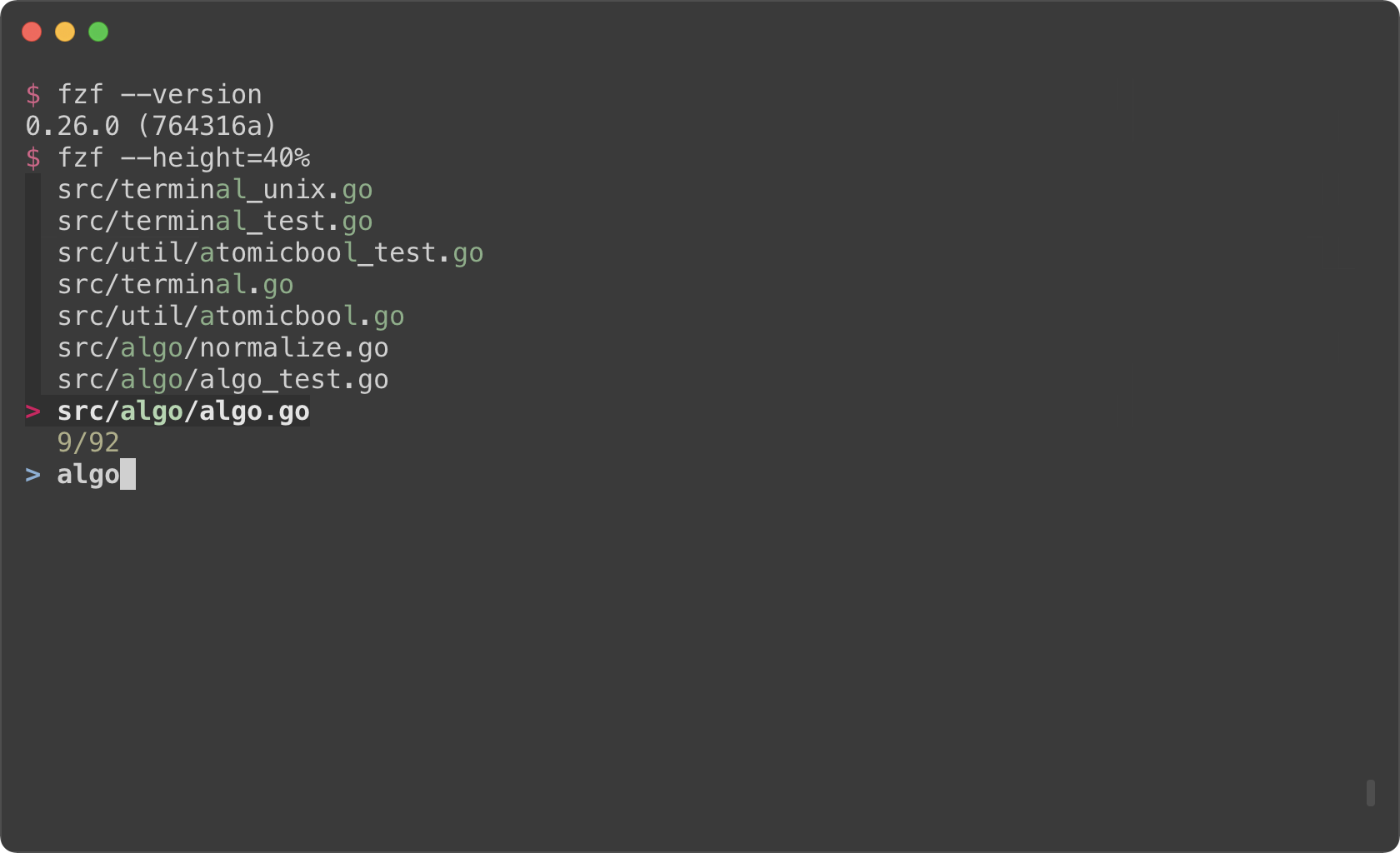
- data/lib/helpers/fzf/src/terminal.go +2832 -0
- data/lib/helpers/fzf/src/terminal_test.go +638 -0
- data/lib/helpers/fzf/src/terminal_unix.go +26 -0
- data/lib/helpers/fzf/src/terminal_windows.go +45 -0
- data/lib/helpers/fzf/src/tokenizer.go +253 -0
- data/lib/helpers/fzf/src/tokenizer_test.go +112 -0
- data/lib/helpers/fzf/src/tui/dummy.go +46 -0
- data/lib/helpers/fzf/src/tui/light.go +987 -0
- data/lib/helpers/fzf/src/tui/light_unix.go +110 -0
- data/lib/helpers/fzf/src/tui/light_windows.go +145 -0
- data/lib/helpers/fzf/src/tui/tcell.go +721 -0
- data/lib/helpers/fzf/src/tui/tcell_test.go +392 -0
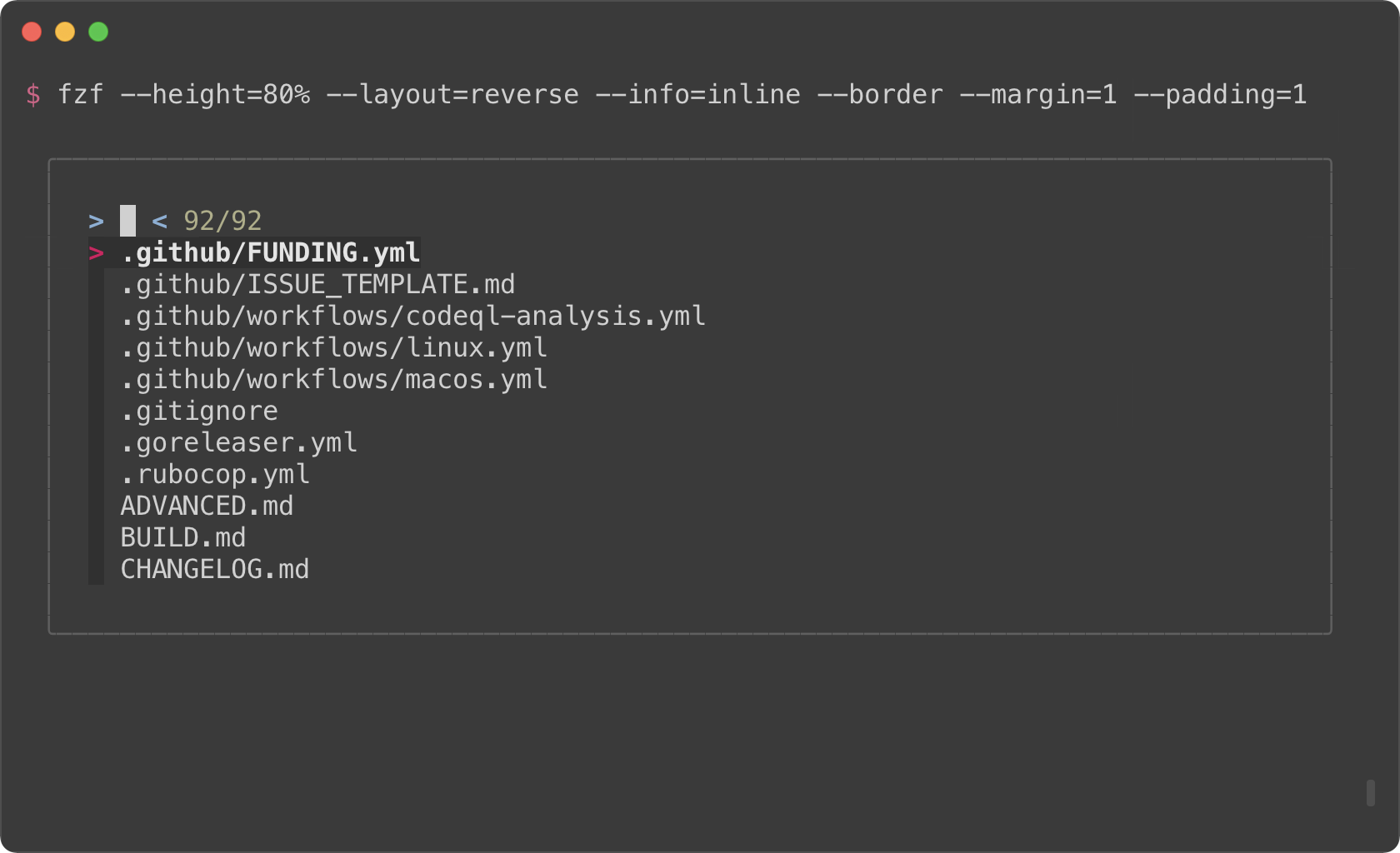
- data/lib/helpers/fzf/src/tui/ttyname_unix.go +47 -0
- data/lib/helpers/fzf/src/tui/ttyname_windows.go +14 -0
- data/lib/helpers/fzf/src/tui/tui.go +625 -0
- data/lib/helpers/fzf/src/tui/tui_test.go +20 -0
- data/lib/helpers/fzf/src/util/atomicbool.go +34 -0
- data/lib/helpers/fzf/src/util/atomicbool_test.go +17 -0
- data/lib/helpers/fzf/src/util/chars.go +198 -0
- data/lib/helpers/fzf/src/util/chars_test.go +46 -0
- data/lib/helpers/fzf/src/util/eventbox.go +96 -0
- data/lib/helpers/fzf/src/util/eventbox_test.go +61 -0
- data/lib/helpers/fzf/src/util/slab.go +12 -0
- data/lib/helpers/fzf/src/util/util.go +138 -0
- data/lib/helpers/fzf/src/util/util_test.go +40 -0
- data/lib/helpers/fzf/src/util/util_unix.go +47 -0
- data/lib/helpers/fzf/src/util/util_windows.go +83 -0
- data/lib/helpers/fzf/test/fzf.vader +175 -0
- data/lib/helpers/fzf/test/test_go.rb +2626 -0
- data/lib/helpers/fzf/uninstall +117 -0
- metadata +87 -1
|
@@ -0,0 +1,565 @@
|
|
|
1
|
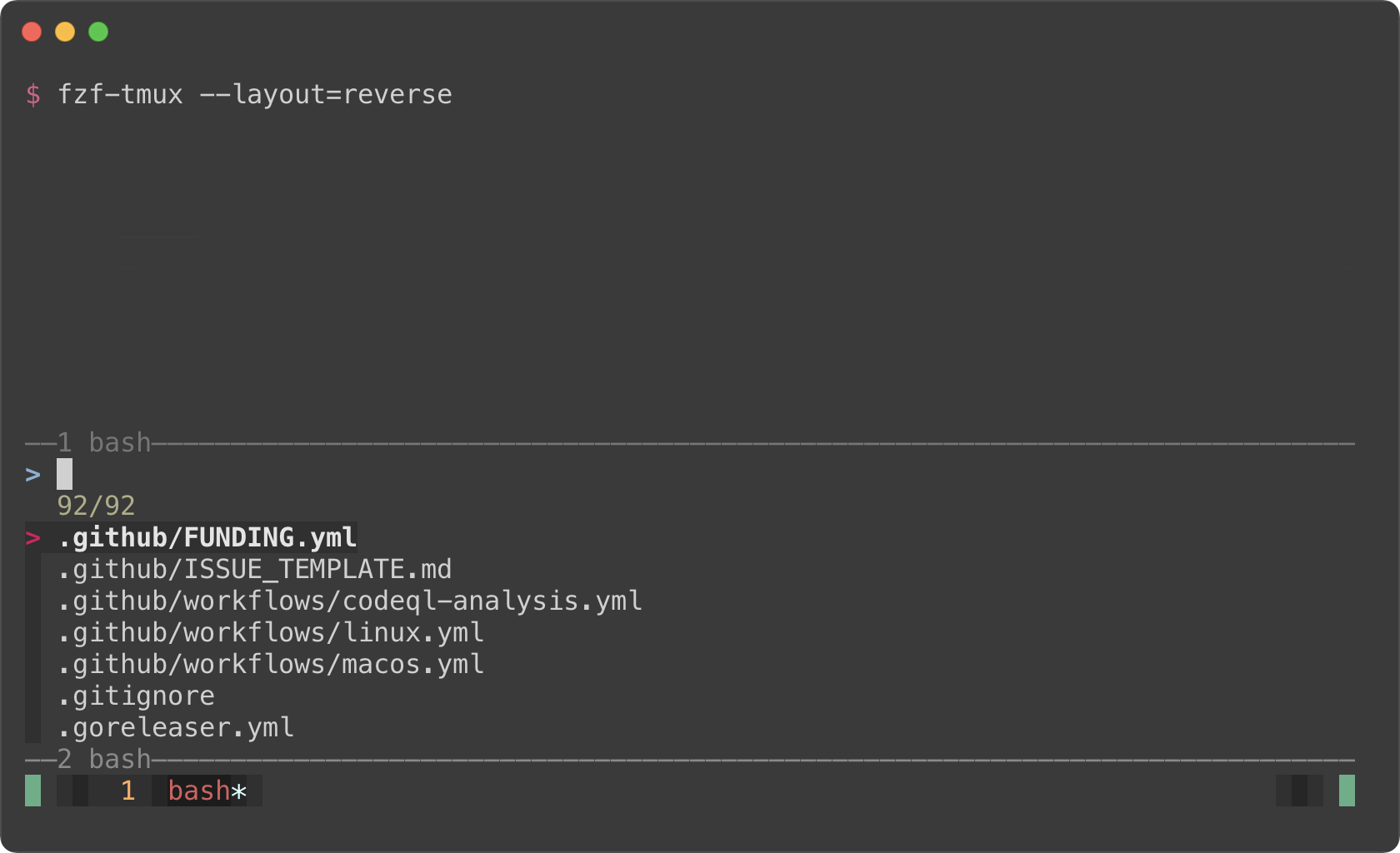
+
Advanced fzf examples
|
|
2
|
+
======================
|
|
3
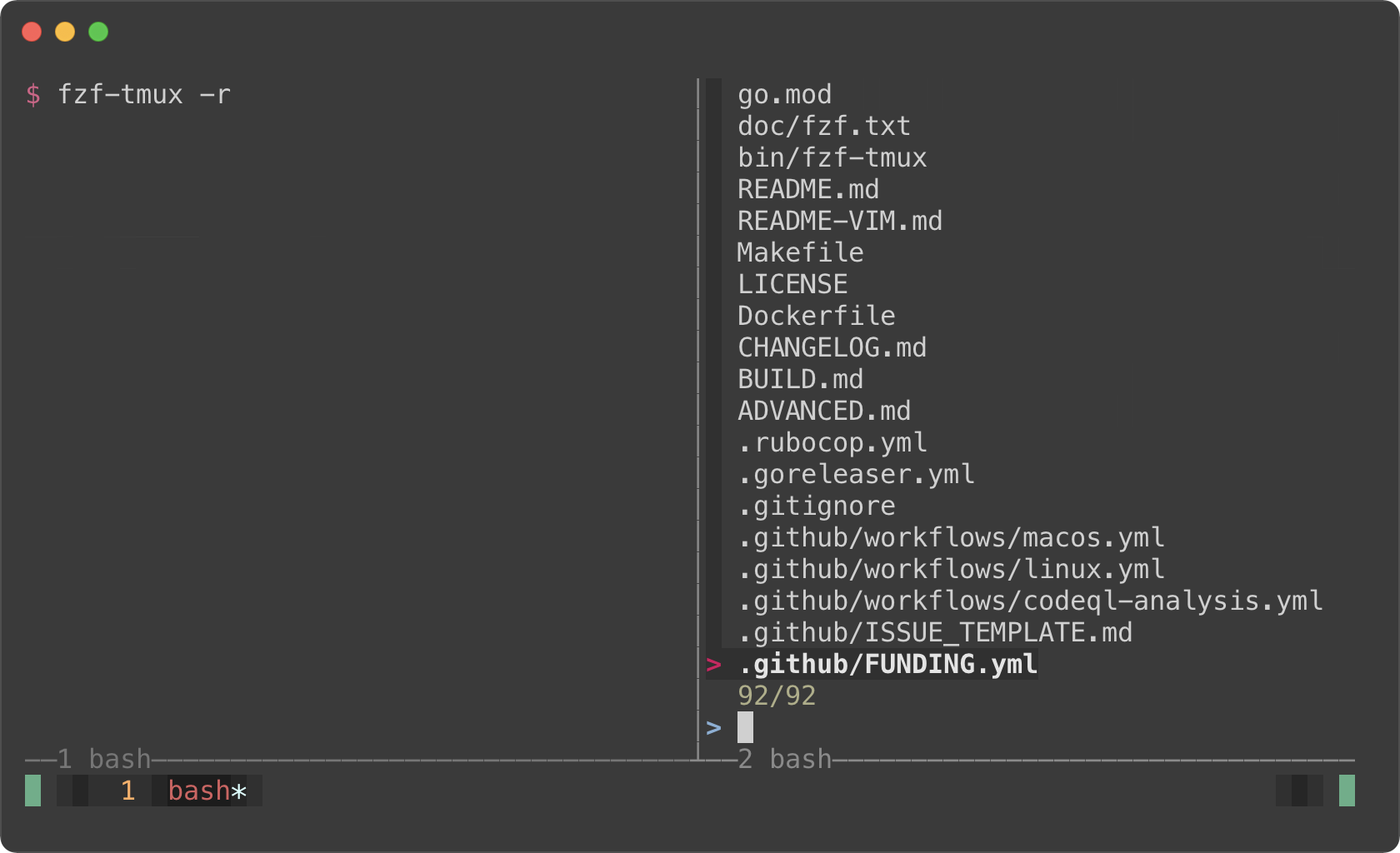
|
+
|
|
4
|
+
*(Last update: 2021/05/22)*
|
|
5
|
+
|
|
6
|
+
<!-- vim-markdown-toc GFM -->
|
|
7
|
+
|
|
8
|
+
* [Introduction](#introduction)
|
|
9
|
+
* [Screen Layout](#screen-layout)
|
|
10
|
+
* [`--height`](#--height)
|
|
11
|
+
* [`fzf-tmux`](#fzf-tmux)
|
|
12
|
+
* [Popup window support](#popup-window-support)
|
|
13
|
+
* [Dynamic reloading of the list](#dynamic-reloading-of-the-list)
|
|
14
|
+
* [Updating the list of processes by pressing CTRL-R](#updating-the-list-of-processes-by-pressing-ctrl-r)
|
|
15
|
+
* [Toggling between data sources](#toggling-between-data-sources)
|
|
16
|
+
* [Ripgrep integration](#ripgrep-integration)
|
|
17
|
+
* [Using fzf as the secondary filter](#using-fzf-as-the-secondary-filter)
|
|
18
|
+
* [Using fzf as interative Ripgrep launcher](#using-fzf-as-interative-ripgrep-launcher)
|
|
19
|
+
* [Switching to fzf-only search mode](#switching-to-fzf-only-search-mode)
|
|
20
|
+
* [Log tailing](#log-tailing)
|
|
21
|
+
* [Key bindings for git objects](#key-bindings-for-git-objects)
|
|
22
|
+
* [Files listed in `git status`](#files-listed-in-git-status)
|
|
23
|
+
* [Branches](#branches)
|
|
24
|
+
* [Commit hashes](#commit-hashes)
|
|
25
|
+
* [Color themes](#color-themes)
|
|
26
|
+
* [Generating fzf color theme from Vim color schemes](#generating-fzf-color-theme-from-vim-color-schemes)
|
|
27
|
+
|
|
28
|
+
<!-- vim-markdown-toc -->
|
|
29
|
+
|
|
30
|
+
Introduction
|
|
31
|
+
------------
|
|
32
|
+
|
|
33
|
+
fzf is an interactive [Unix filter][filter] program that is designed to be
|
|
34
|
+
used with other Unix tools. It reads a list of items from the standard input,
|
|
35
|
+
allows you to select a subset of the items, and prints the selected ones to
|
|
36
|
+
the standard output. You can think of it as an interactive version of *grep*,
|
|
37
|
+
and it's already useful even if you don't know any of its options.
|
|
38
|
+
|
|
39
|
+
```sh
|
|
40
|
+
# 1. ps: Feed the list of processes to fzf
|
|
41
|
+
# 2. fzf: Interactively select a process using fuzzy matching algorithm
|
|
42
|
+
# 3. awk: Take the PID from the selected line
|
|
43
|
+
# 3. kill: Kill the process with the PID
|
|
44
|
+
ps -ef | fzf | awk '{print $2}' | xargs kill -9
|
|
45
|
+
```
|
|
46
|
+
|
|
47
|
+
[filter]: https://en.wikipedia.org/wiki/Filter_(software)
|
|
48
|
+
|
|
49
|
+
While the above example succinctly summarizes the fundamental concept of fzf,
|
|
50
|
+
you can build much more sophisticated interactive workflows using fzf once you
|
|
51
|
+
learn its wide variety of features.
|
|
52
|
+
|
|
53
|
+
- To see the full list of options and features, see `man fzf`
|
|
54
|
+
- To see the latest additions, see [CHANGELOG.md](CHANGELOG.md)
|
|
55
|
+
|
|
56
|
+
This document will guide you through some examples that will familiarize you
|
|
57
|
+
with the advanced features of fzf.
|
|
58
|
+
|
|
59
|
+
Screen Layout
|
|
60
|
+
-------------
|
|
61
|
+
|
|
62
|
+
### `--height`
|
|
63
|
+
|
|
64
|
+
fzf by default opens in fullscreen mode, but it's not always desirable.
|
|
65
|
+
Oftentimes, you want to see the current context of the terminal while using
|
|
66
|
+
fzf. `--height` is an option for opening fzf below the cursor in
|
|
67
|
+
non-fullscreen mode so you can still see the previous commands and their
|
|
68
|
+
results above it.
|
|
69
|
+
|
|
70
|
+
```sh
|
|
71
|
+
fzf --height=40%
|
|
72
|
+
```
|
|
73
|
+
|
|
74
|
+
|
|
75
|
+
|
|
76
|
+
You might also want to experiment with other layout options such as
|
|
77
|
+
`--layout=reverse`, `--info=inline`, `--border`, `--margin`, etc.
|
|
78
|
+
|
|
79
|
+
```sh
|
|
80
|
+
fzf --height=40% --layout=reverse
|
|
81
|
+
fzf --height=40% --layout=reverse --info=inline
|
|
82
|
+
fzf --height=40% --layout=reverse --info=inline --border
|
|
83
|
+
fzf --height=40% --layout=reverse --info=inline --border --margin=1
|
|
84
|
+
fzf --height=40% --layout=reverse --info=inline --border --margin=1 --padding=1
|
|
85
|
+
```
|
|
86
|
+
|
|
87
|
+
|
|
88
|
+
|
|
89
|
+
*(See `Layout` section of the man page to see the full list of options)*
|
|
90
|
+
|
|
91
|
+
But you definitely don't want to repeat `--height=40% --layout=reverse
|
|
92
|
+
--info=inline --border --margin=1 --padding=1` every time you use fzf. You
|
|
93
|
+
could write a wrapper script or shell alias, but there is an easier option.
|
|
94
|
+
Define `$FZF_DEFAULT_OPTS` like so:
|
|
95
|
+
|
|
96
|
+
```sh
|
|
97
|
+
export FZF_DEFAULT_OPTS="--height=40% --layout=reverse --info=inline --border --margin=1 --padding=1"
|
|
98
|
+
```
|
|
99
|
+
|
|
100
|
+
### `fzf-tmux`
|
|
101
|
+
|
|
102
|
+
Before fzf had `--height` option, we would open fzf in a tmux split pane not
|
|
103
|
+
to take up the whole screen. This is done using `fzf-tmux` script.
|
|
104
|
+
|
|
105
|
+
```sh
|
|
106
|
+
# Open fzf on a tmux split pane below the current pane.
|
|
107
|
+
# Takes the same set of options.
|
|
108
|
+
fzf-tmux --layout=reverse
|
|
109
|
+
```
|
|
110
|
+
|
|
111
|
+
|
|
112
|
+
|
|
113
|
+
The limitation of `fzf-tmux` is that it only works when you're on tmux unlike
|
|
114
|
+
`--height` option. But the advantage of it is that it's more flexible.
|
|
115
|
+
(See `man fzf-tmux` for available options.)
|
|
116
|
+
|
|
117
|
+
```sh
|
|
118
|
+
# On the right (50%)
|
|
119
|
+
fzf-tmux -r
|
|
120
|
+
|
|
121
|
+
# On the left (30%)
|
|
122
|
+
fzf-tmux -l30%
|
|
123
|
+
|
|
124
|
+
# Above the cursor
|
|
125
|
+
fzf-tmux -u30%
|
|
126
|
+
```
|
|
127
|
+
|
|
128
|
+
|
|
129
|
+
|
|
130
|
+
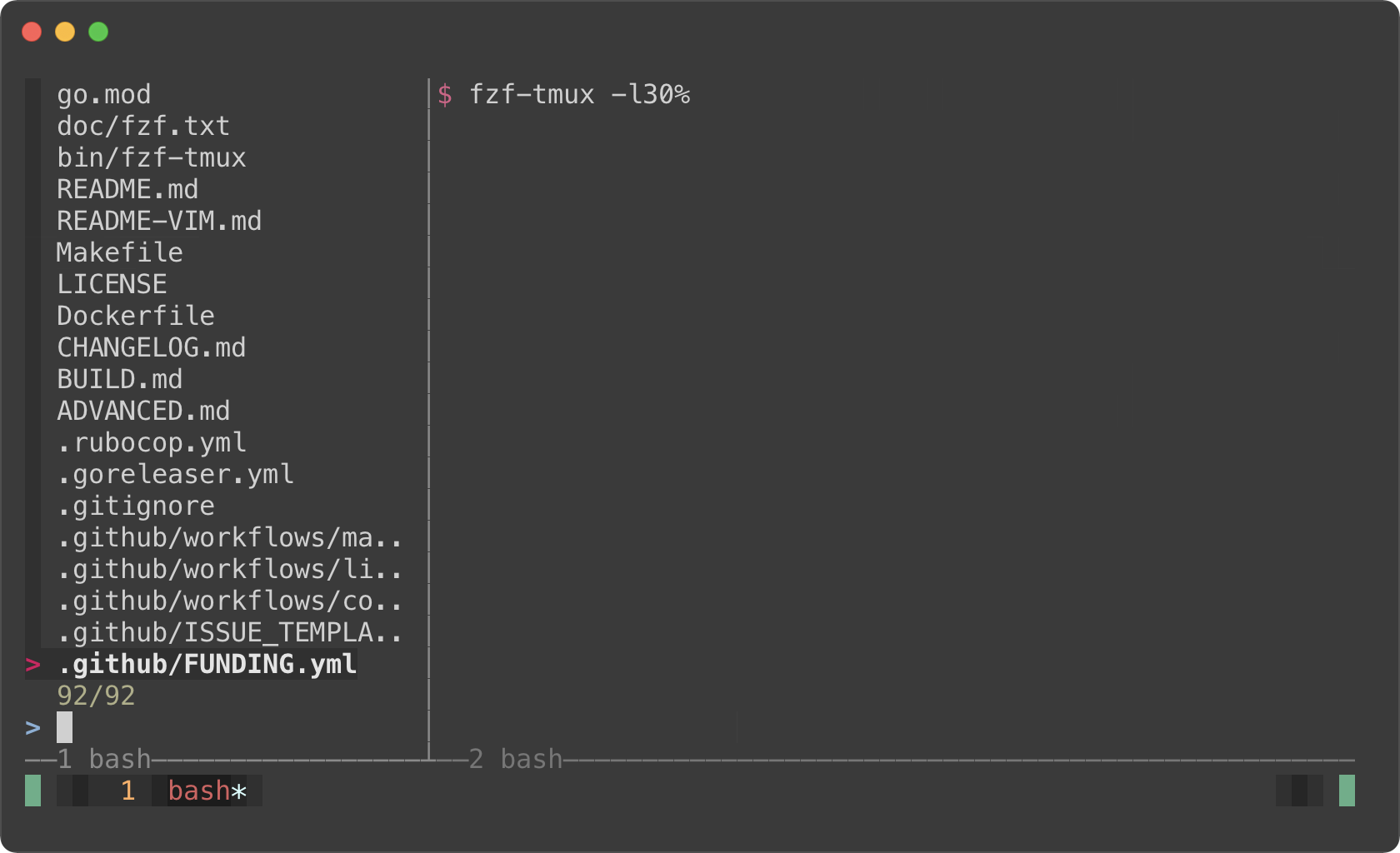
|
|
131
|
+
|
|
132
|
+
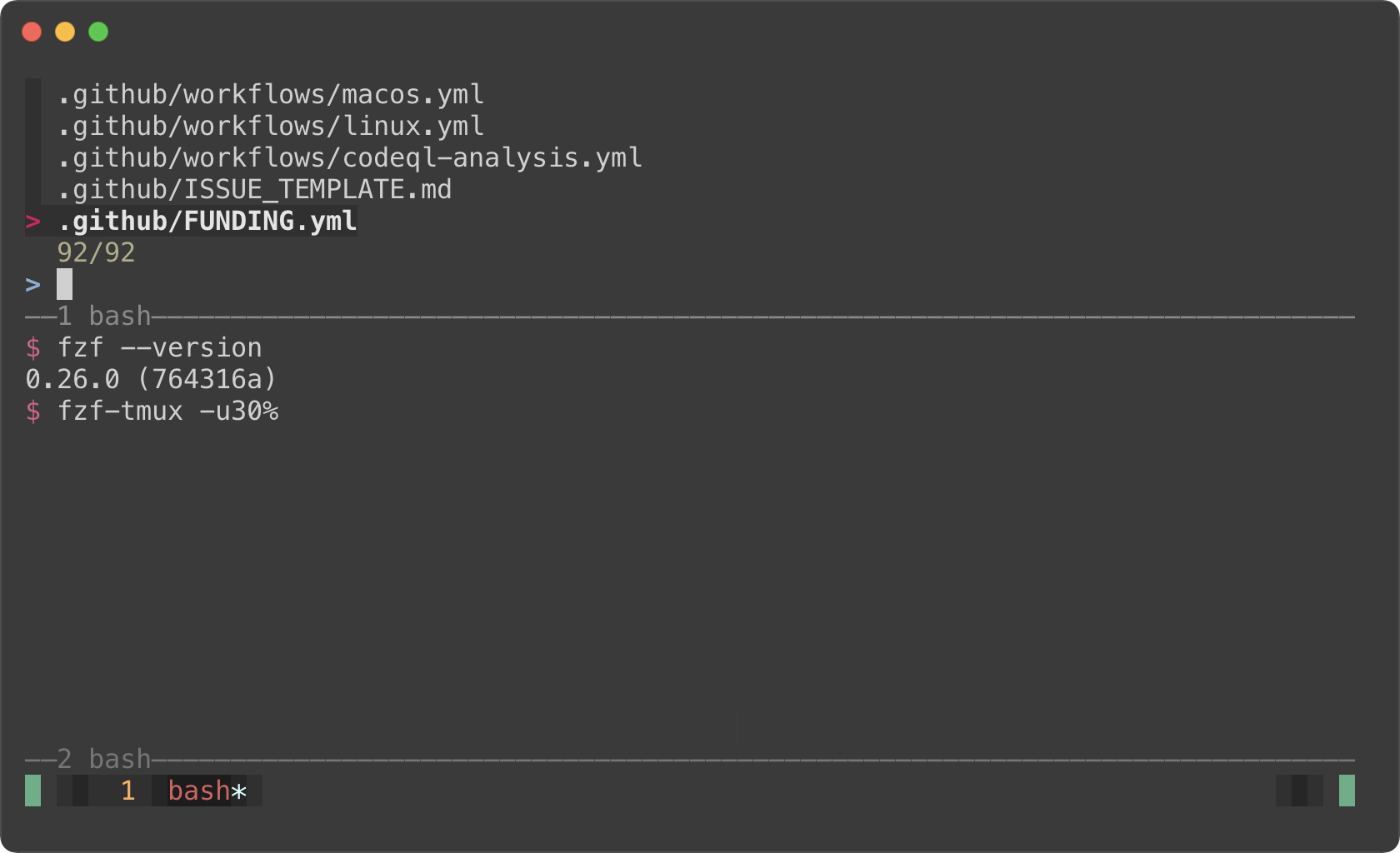
|
|
133
|
+
|
|
134
|
+
#### Popup window support
|
|
135
|
+
|
|
136
|
+
But here's the really cool part; tmux 3.2 added support for popup windows. So
|
|
137
|
+
you can open fzf in a popup window, which is quite useful if you frequently
|
|
138
|
+
use split panes.
|
|
139
|
+
|
|
140
|
+
```sh
|
|
141
|
+
# Open tmux in a tmux popup window (default size: 50% of the screen)
|
|
142
|
+
fzf-tmux -p
|
|
143
|
+
|
|
144
|
+
# 80% width, 60% height
|
|
145
|
+
fzf-tmux -p 80%,60%
|
|
146
|
+
```
|
|
147
|
+
|
|
148
|
+
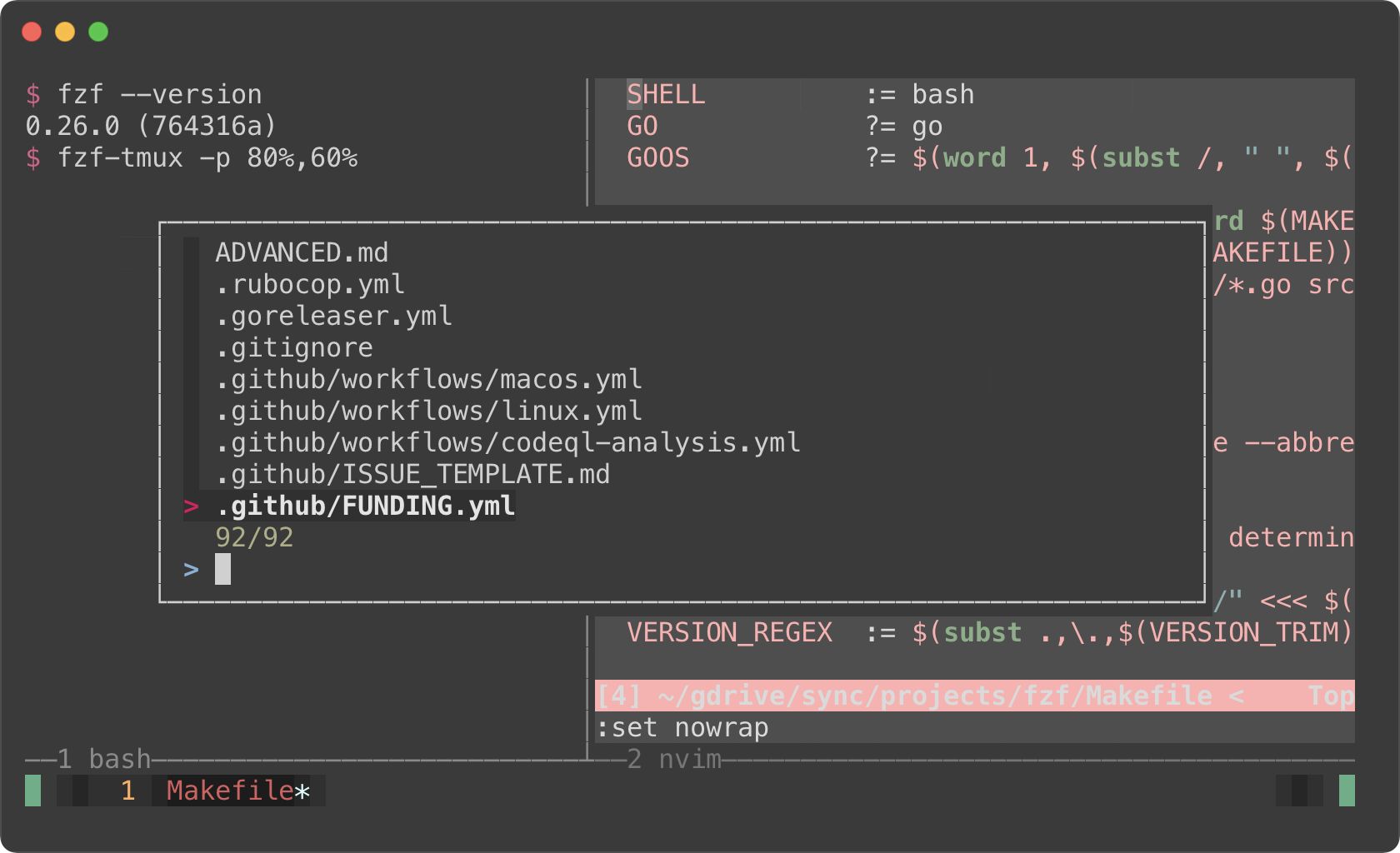
|
|
149
|
+
|
|
150
|
+
> You might also want to check out my tmux plugins which support this popup
|
|
151
|
+
> window layout.
|
|
152
|
+
>
|
|
153
|
+
> - https://github.com/junegunn/tmux-fzf-url
|
|
154
|
+
> - https://github.com/junegunn/tmux-fzf-maccy
|
|
155
|
+
|
|
156
|
+
Dynamic reloading of the list
|
|
157
|
+
-----------------------------
|
|
158
|
+
|
|
159
|
+
fzf can dynamically update the candidate list using an arbitrary program with
|
|
160
|
+
`reload` bindings (The design document for `reload` can be found
|
|
161
|
+
[here][reload]).
|
|
162
|
+
|
|
163
|
+
[reload]: https://github.com/junegunn/fzf/issues/1750
|
|
164
|
+
|
|
165
|
+
### Updating the list of processes by pressing CTRL-R
|
|
166
|
+
|
|
167
|
+
This example shows how you can set up a binding for dynamically updating the
|
|
168
|
+
list without restarting fzf.
|
|
169
|
+
|
|
170
|
+
```sh
|
|
171
|
+
(date; ps -ef) |
|
|
172
|
+
fzf --bind='ctrl-r:reload(date; ps -ef)' \
|
|
173
|
+
--header=$'Press CTRL-R to reload\n\n' --header-lines=2 \
|
|
174
|
+
--preview='echo {}' --preview-window=down,3,wrap \
|
|
175
|
+
--layout=reverse --height=80% | awk '{print $2}' | xargs kill -9
|
|
176
|
+
```
|
|
177
|
+
|
|
178
|
+
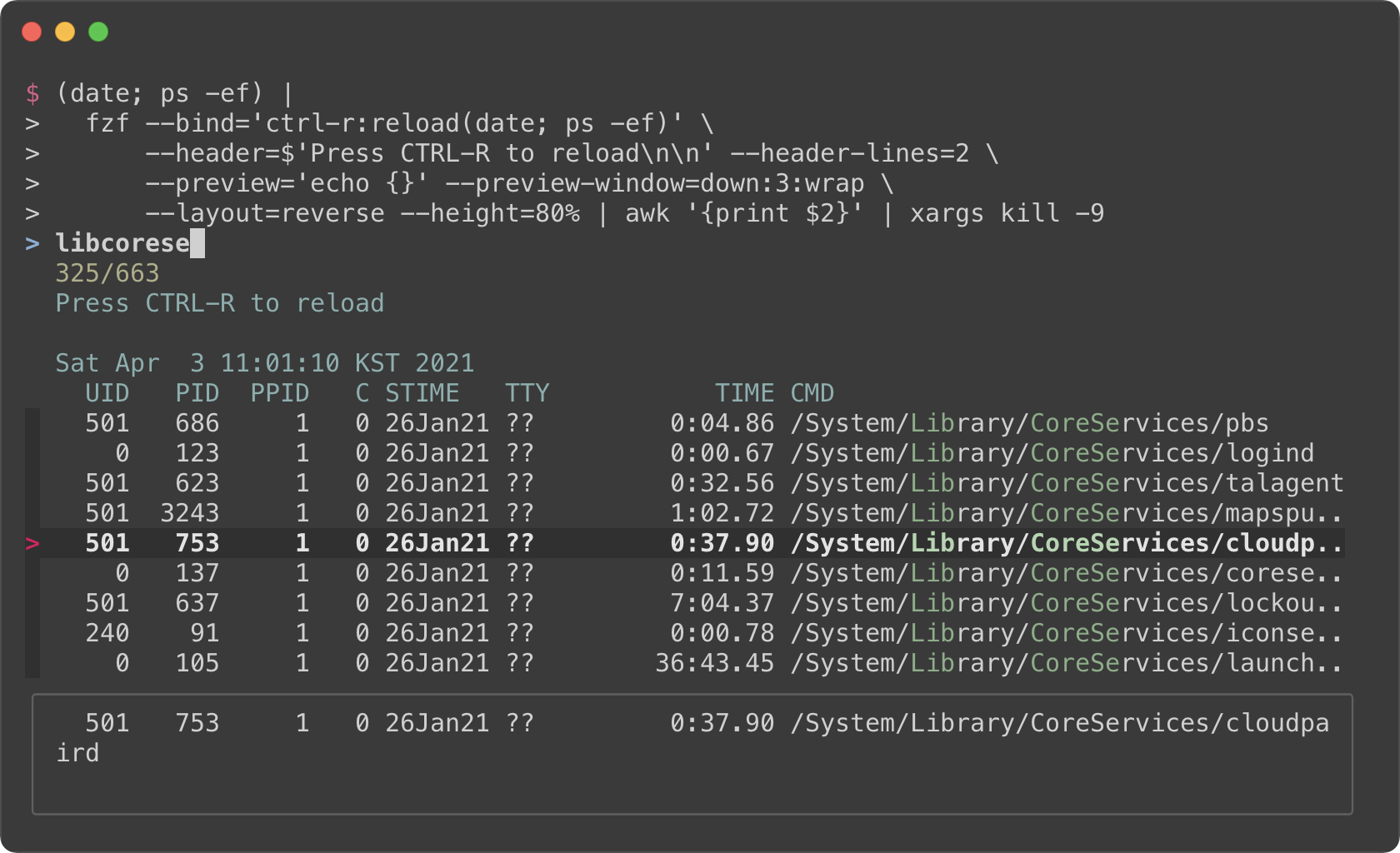
|
|
179
|
+
|
|
180
|
+
- The initial command is `(date; ps -ef)`. It prints the current date and
|
|
181
|
+
time, and the list of the processes.
|
|
182
|
+
- With `--header` option, you can show any message as the fixed header.
|
|
183
|
+
- To disallow selecting the first two lines (`date` and `ps` header), we use
|
|
184
|
+
`--header-lines=2` option.
|
|
185
|
+
- `--bind='ctrl-r:reload(date; ps -ef)'` binds CTRL-R to `reload` action that
|
|
186
|
+
runs `date; ps -ef`, so we can update the list of the processes by pressing
|
|
187
|
+
CTRL-R.
|
|
188
|
+
- We use simple `echo {}` preview option, so we can see the entire line on the
|
|
189
|
+
preview window below even if it's too long
|
|
190
|
+
|
|
191
|
+
### Toggling between data sources
|
|
192
|
+
|
|
193
|
+
You're not limited to just one reload binding. Set up multiple bindings so
|
|
194
|
+
you can switch between data sources.
|
|
195
|
+
|
|
196
|
+
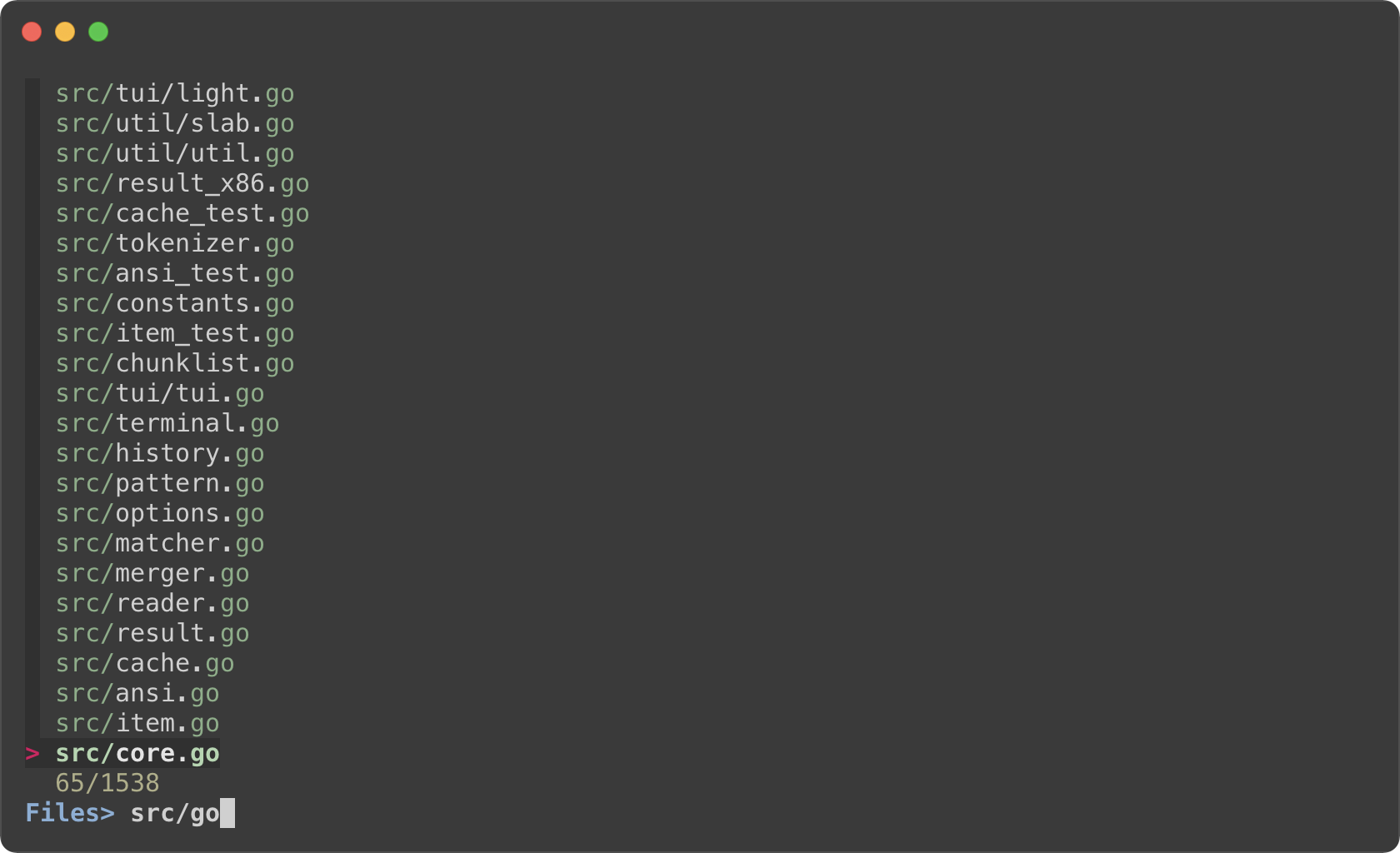
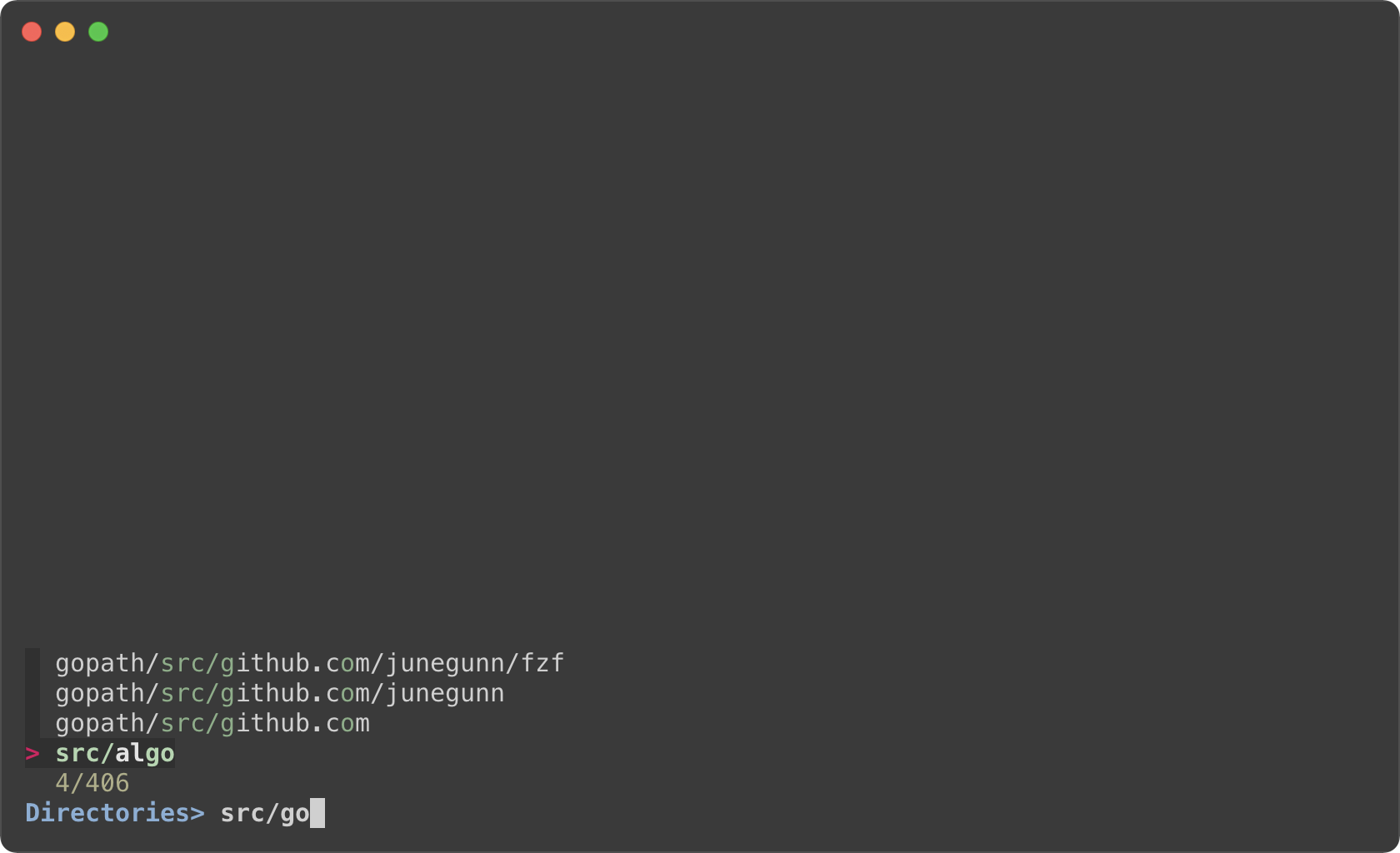
```sh
|
|
197
|
+
find * | fzf --prompt 'All> ' \
|
|
198
|
+
--header 'CTRL-D: Directories / CTRL-F: Files' \
|
|
199
|
+
--bind 'ctrl-d:change-prompt(Directories> )+reload(find * -type d)' \
|
|
200
|
+
--bind 'ctrl-f:change-prompt(Files> )+reload(find * -type f)'
|
|
201
|
+
```
|
|
202
|
+
|
|
203
|
+
|
|
204
|
+
|
|
205
|
+
|
|
206
|
+
|
|
207
|
+
Ripgrep integration
|
|
208
|
+
-------------------
|
|
209
|
+
|
|
210
|
+
### Using fzf as the secondary filter
|
|
211
|
+
|
|
212
|
+
* Requires [bat][bat]
|
|
213
|
+
* Requires [Ripgrep][rg]
|
|
214
|
+
|
|
215
|
+
[bat]: https://github.com/sharkdp/bat
|
|
216
|
+
[rg]: https://github.com/BurntSushi/ripgrep
|
|
217
|
+
|
|
218
|
+
fzf is pretty fast for filtering a list that you will rarely have to think
|
|
219
|
+
about its performance. But it is not the right tool for searching for text
|
|
220
|
+
inside many large files, and in that case you should definitely use something
|
|
221
|
+
like [Ripgrep][rg].
|
|
222
|
+
|
|
223
|
+
In the next example, Ripgrep is the primary filter that searches for the given
|
|
224
|
+
text in files, and fzf is used as the secondary fuzzy filter that adds
|
|
225
|
+
interactivity to the workflow. And we use [bat][bat] to show the matching line in
|
|
226
|
+
the preview window.
|
|
227
|
+
|
|
228
|
+
This is a bash script and it will not run as expected on other non-compliant
|
|
229
|
+
shells. To avoid the compatibility issue, let's save this snippet as a script
|
|
230
|
+
file called `rfv`.
|
|
231
|
+
|
|
232
|
+
```bash
|
|
233
|
+
#!/usr/bin/env bash
|
|
234
|
+
|
|
235
|
+
# 1. Search for text in files using Ripgrep
|
|
236
|
+
# 2. Interactively narrow down the list using fzf
|
|
237
|
+
# 3. Open the file in Vim
|
|
238
|
+
IFS=: read -ra selected < <(
|
|
239
|
+
rg --color=always --line-number --no-heading --smart-case "${*:-}" |
|
|
240
|
+
fzf --ansi \
|
|
241
|
+
--color "hl:-1:underline,hl+:-1:underline:reverse" \
|
|
242
|
+
--delimiter : \
|
|
243
|
+
--preview 'bat --color=always {1} --highlight-line {2}' \
|
|
244
|
+
--preview-window 'up,60%,border-bottom,+{2}+3/3,~3'
|
|
245
|
+
)
|
|
246
|
+
[ -n "${selected[0]}" ] && vim "${selected[0]}" "+${selected[1]}"
|
|
247
|
+
```
|
|
248
|
+
|
|
249
|
+
And run it with an initial query string.
|
|
250
|
+
|
|
251
|
+
```sh
|
|
252
|
+
# Make the script executable
|
|
253
|
+
chmod +x rfv
|
|
254
|
+
|
|
255
|
+
# Run it with the initial query "algo"
|
|
256
|
+
./rfv algo
|
|
257
|
+
```
|
|
258
|
+
|
|
259
|
+
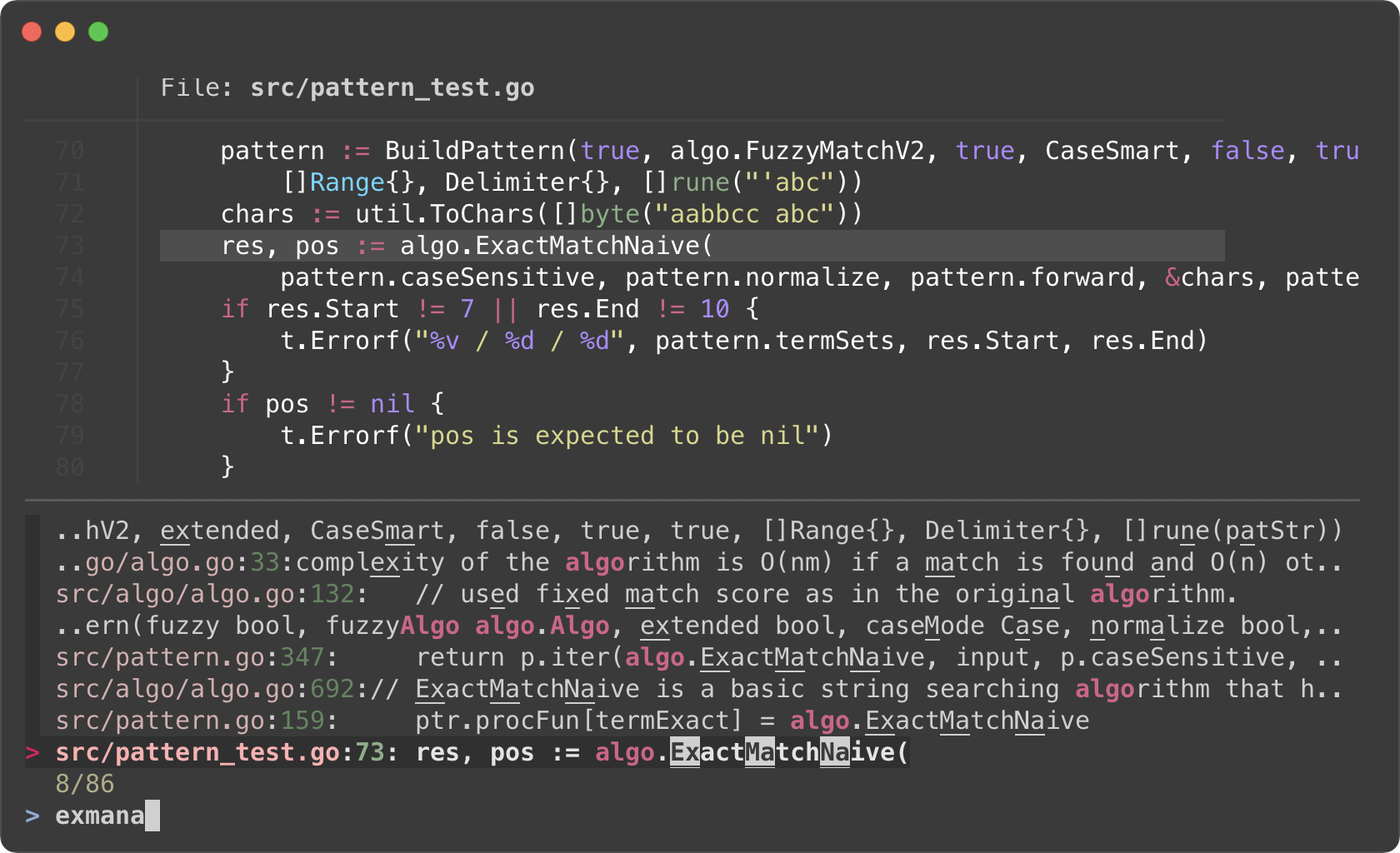
> Ripgrep will perform the initial search and list all the lines that contain
|
|
260
|
+
`algo`. Then we further narrow down the list on fzf.
|
|
261
|
+
|
|
262
|
+
|
|
263
|
+
|
|
264
|
+
I know it's a lot to digest, let's try to break down the code.
|
|
265
|
+
|
|
266
|
+
- Ripgrep prints the matching lines in the following format
|
|
267
|
+
```
|
|
268
|
+
man/man1/fzf.1:54:.BI "--algo=" TYPE
|
|
269
|
+
man/man1/fzf.1:55:Fuzzy matching algorithm (default: v2)
|
|
270
|
+
man/man1/fzf.1:58:.BR v2 " Optimal scoring algorithm (quality)"
|
|
271
|
+
src/pattern_test.go:7: "github.com/junegunn/fzf/src/algo"
|
|
272
|
+
```
|
|
273
|
+
The first token delimited by `:` is the file path, and the second token is
|
|
274
|
+
the line number of the matching line. They respectively correspond to `{1}`
|
|
275
|
+
and `{2}` in the preview command.
|
|
276
|
+
- `--preview 'bat --color=always {1} --highlight-line {2}'`
|
|
277
|
+
- As we run `rg` with `--color=always` option, we should tell fzf to parse
|
|
278
|
+
ANSI color codes in the input by setting `--ansi`.
|
|
279
|
+
- We customize how fzf colors various text elements using `--color` option.
|
|
280
|
+
`-1` tells fzf to keep the original color from the input. See `man fzf` for
|
|
281
|
+
available color options.
|
|
282
|
+
- The value of `--preview-window` option consists of 5 components delimited
|
|
283
|
+
by `,`
|
|
284
|
+
1. `up` — Position of the preview window
|
|
285
|
+
1. `60%` — Size of the preview window
|
|
286
|
+
1. `border-bottom` — Preview window border only on the bottom side
|
|
287
|
+
1. `+{2}+3/3` — Scroll offset of the preview contents
|
|
288
|
+
1. `~3` — Fixed header
|
|
289
|
+
- Let's break down the latter two. We want to display the bat output in the
|
|
290
|
+
preview window with a certain scroll offset so that the matching line is
|
|
291
|
+
positioned near the center of the preview window.
|
|
292
|
+
- `+{2}` — The base offset is extracted from the second token
|
|
293
|
+
- `+3` — We add 3 lines to the base offset to compensate for the header
|
|
294
|
+
part of `bat` output
|
|
295
|
+
- ```
|
|
296
|
+
───────┬──────────────────────────────────────────────────────────
|
|
297
|
+
│ File: CHANGELOG.md
|
|
298
|
+
───────┼──────────────────────────────────────────────────────────
|
|
299
|
+
1 │ CHANGELOG
|
|
300
|
+
2 │ =========
|
|
301
|
+
3 │
|
|
302
|
+
4 │ 0.26.0
|
|
303
|
+
5 │ ------
|
|
304
|
+
```
|
|
305
|
+
- `/3` adjusts the offset so that the matching line is shown at a third
|
|
306
|
+
position in the window
|
|
307
|
+
- `~3` makes the top three lines fixed header so that they are always
|
|
308
|
+
visible regardless of the scroll offset
|
|
309
|
+
- Once we selected a line, we open the file with `vim` (`vim
|
|
310
|
+
"${selected[0]}"`) and move the cursor to the line (`+${selected[1]}`).
|
|
311
|
+
|
|
312
|
+
### Using fzf as interative Ripgrep launcher
|
|
313
|
+
|
|
314
|
+
We have learned that we can bind `reload` action to a key (e.g.
|
|
315
|
+
`--bind=ctrl-r:execute(ps -ef)`). In the next example, we are going to **bind
|
|
316
|
+
`reload` action to `change` event** so that whenever the user *changes* the
|
|
317
|
+
query string on fzf, `reload` action is triggered.
|
|
318
|
+
|
|
319
|
+
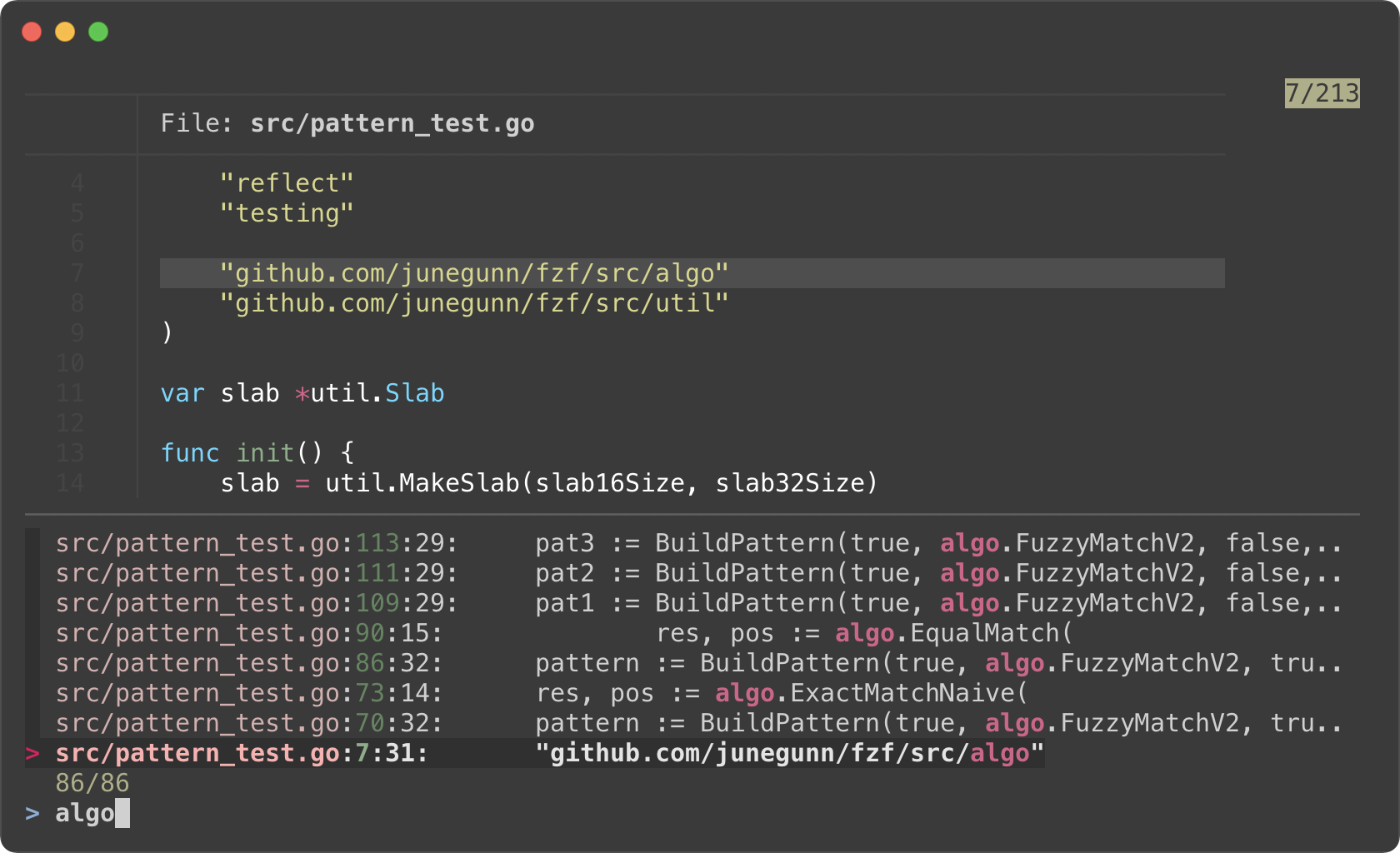
Here is a variation of the above `rfv` script. fzf will restart Ripgrep every
|
|
320
|
+
time the user updates the query string on fzf. Searching and filtering is
|
|
321
|
+
completely done by Ripgrep, and fzf merely provides the interactive interface.
|
|
322
|
+
So we lose the "fuzziness", but the performance will be better on larger
|
|
323
|
+
projects, and it will free up memory as you narrow down the results.
|
|
324
|
+
|
|
325
|
+
```bash
|
|
326
|
+
#!/usr/bin/env bash
|
|
327
|
+
|
|
328
|
+
# 1. Search for text in files using Ripgrep
|
|
329
|
+
# 2. Interactively restart Ripgrep with reload action
|
|
330
|
+
# 3. Open the file in Vim
|
|
331
|
+
RG_PREFIX="rg --column --line-number --no-heading --color=always --smart-case "
|
|
332
|
+
INITIAL_QUERY="${*:-}"
|
|
333
|
+
IFS=: read -ra selected < <(
|
|
334
|
+
FZF_DEFAULT_COMMAND="$RG_PREFIX $(printf %q "$INITIAL_QUERY")" \
|
|
335
|
+
fzf --ansi \
|
|
336
|
+
--disabled --query "$INITIAL_QUERY" \
|
|
337
|
+
--bind "change:reload:sleep 0.1; $RG_PREFIX {q} || true" \
|
|
338
|
+
--delimiter : \
|
|
339
|
+
--preview 'bat --color=always {1} --highlight-line {2}' \
|
|
340
|
+
--preview-window 'up,60%,border-bottom,+{2}+3/3,~3'
|
|
341
|
+
)
|
|
342
|
+
[ -n "${selected[0]}" ] && vim "${selected[0]}" "+${selected[1]}"
|
|
343
|
+
```
|
|
344
|
+
|
|
345
|
+
|
|
346
|
+
|
|
347
|
+
- Instead of starting fzf in `rg ... | fzf` form, we start fzf without an
|
|
348
|
+
explicit input, but with a custom `FZF_DEFAULT_COMMAND` variable. This way
|
|
349
|
+
fzf can kill the initial Ripgrep process it starts with the initial query.
|
|
350
|
+
Otherwise, the initial Ripgrep process will keep consuming system resources
|
|
351
|
+
even after `reload` is triggered.
|
|
352
|
+
- Filtering is no longer a responsibility of fzf; hence `--disabled`
|
|
353
|
+
- `{q}` in the reload command evaluates to the query string on fzf prompt.
|
|
354
|
+
- `sleep 0.1` in the reload command is for "debouncing". This small delay will
|
|
355
|
+
reduce the number of intermediate Ripgrep processes while we're typing in
|
|
356
|
+
a query.
|
|
357
|
+
|
|
358
|
+
### Switching to fzf-only search mode
|
|
359
|
+
|
|
360
|
+
*(Requires fzf 0.27.1 or above)*
|
|
361
|
+
|
|
362
|
+
In the previous example, we lost fuzzy matching capability as we completely
|
|
363
|
+
delegated search functionality to Ripgrep. But we can dynamically switch to
|
|
364
|
+
fzf-only search mode by *"unbinding"* `reload` action from `change` event.
|
|
365
|
+
|
|
366
|
+
```sh
|
|
367
|
+
#!/usr/bin/env bash
|
|
368
|
+
|
|
369
|
+
# Two-phase filtering with Ripgrep and fzf
|
|
370
|
+
#
|
|
371
|
+
# 1. Search for text in files using Ripgrep
|
|
372
|
+
# 2. Interactively restart Ripgrep with reload action
|
|
373
|
+
# * Press alt-enter to switch to fzf-only filtering
|
|
374
|
+
# 3. Open the file in Vim
|
|
375
|
+
RG_PREFIX="rg --column --line-number --no-heading --color=always --smart-case "
|
|
376
|
+
INITIAL_QUERY="${*:-}"
|
|
377
|
+
IFS=: read -ra selected < <(
|
|
378
|
+
FZF_DEFAULT_COMMAND="$RG_PREFIX $(printf %q "$INITIAL_QUERY")" \
|
|
379
|
+
fzf --ansi \
|
|
380
|
+
--color "hl:-1:underline,hl+:-1:underline:reverse" \
|
|
381
|
+
--disabled --query "$INITIAL_QUERY" \
|
|
382
|
+
--bind "change:reload:sleep 0.1; $RG_PREFIX {q} || true" \
|
|
383
|
+
--bind "alt-enter:unbind(change,alt-enter)+change-prompt(2. fzf> )+enable-search+clear-query" \
|
|
384
|
+
--prompt '1. ripgrep> ' \
|
|
385
|
+
--delimiter : \
|
|
386
|
+
--preview 'bat --color=always {1} --highlight-line {2}' \
|
|
387
|
+
--preview-window 'up,60%,border-bottom,+{2}+3/3,~3'
|
|
388
|
+
)
|
|
389
|
+
[ -n "${selected[0]}" ] && vim "${selected[0]}" "+${selected[1]}"
|
|
390
|
+
```
|
|
391
|
+
|
|
392
|
+
* Phase 1. Filtering with Ripgrep
|
|
393
|
+
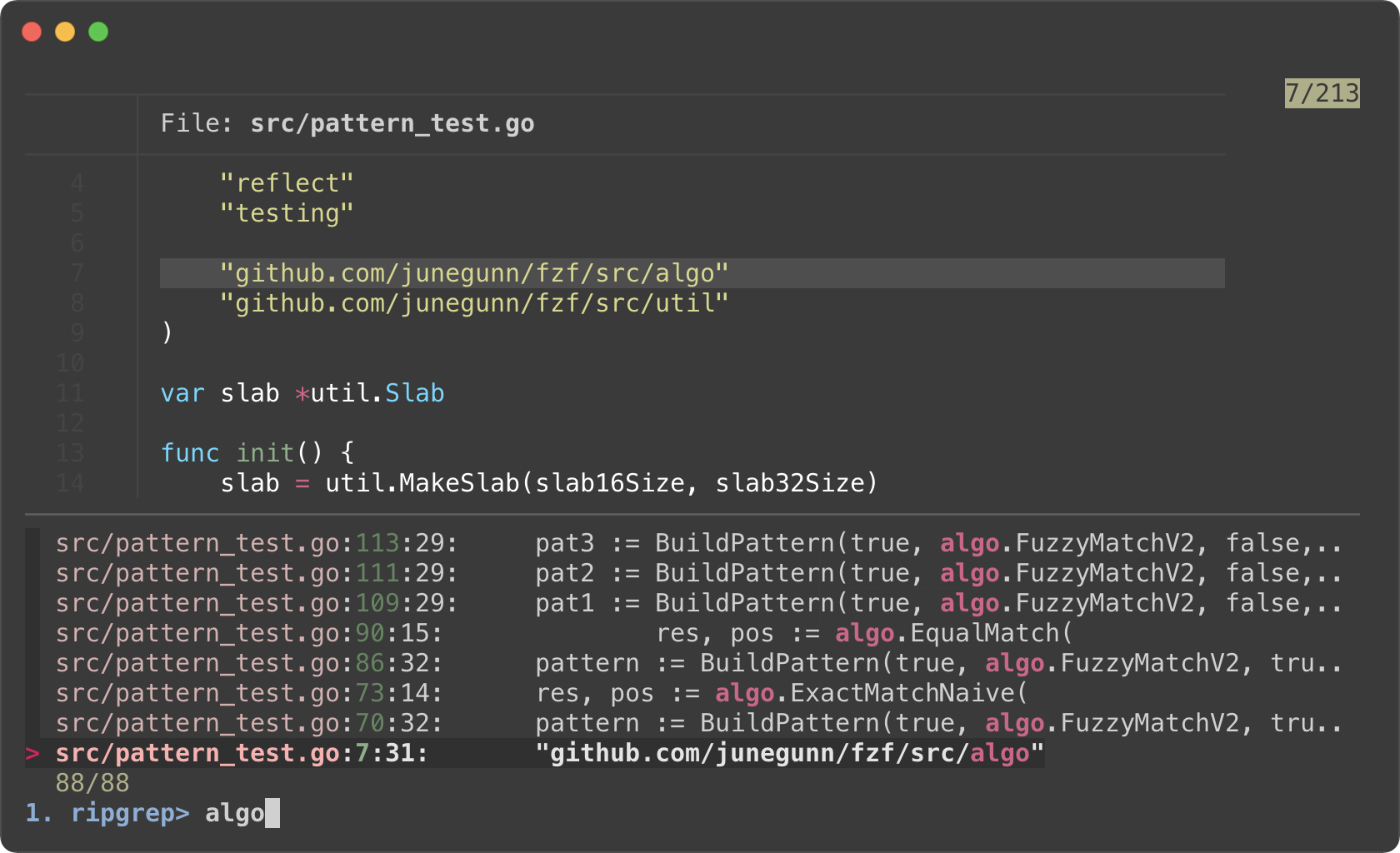
|
|
394
|
+
* Phase 2. Filtering with fzf
|
|
395
|
+
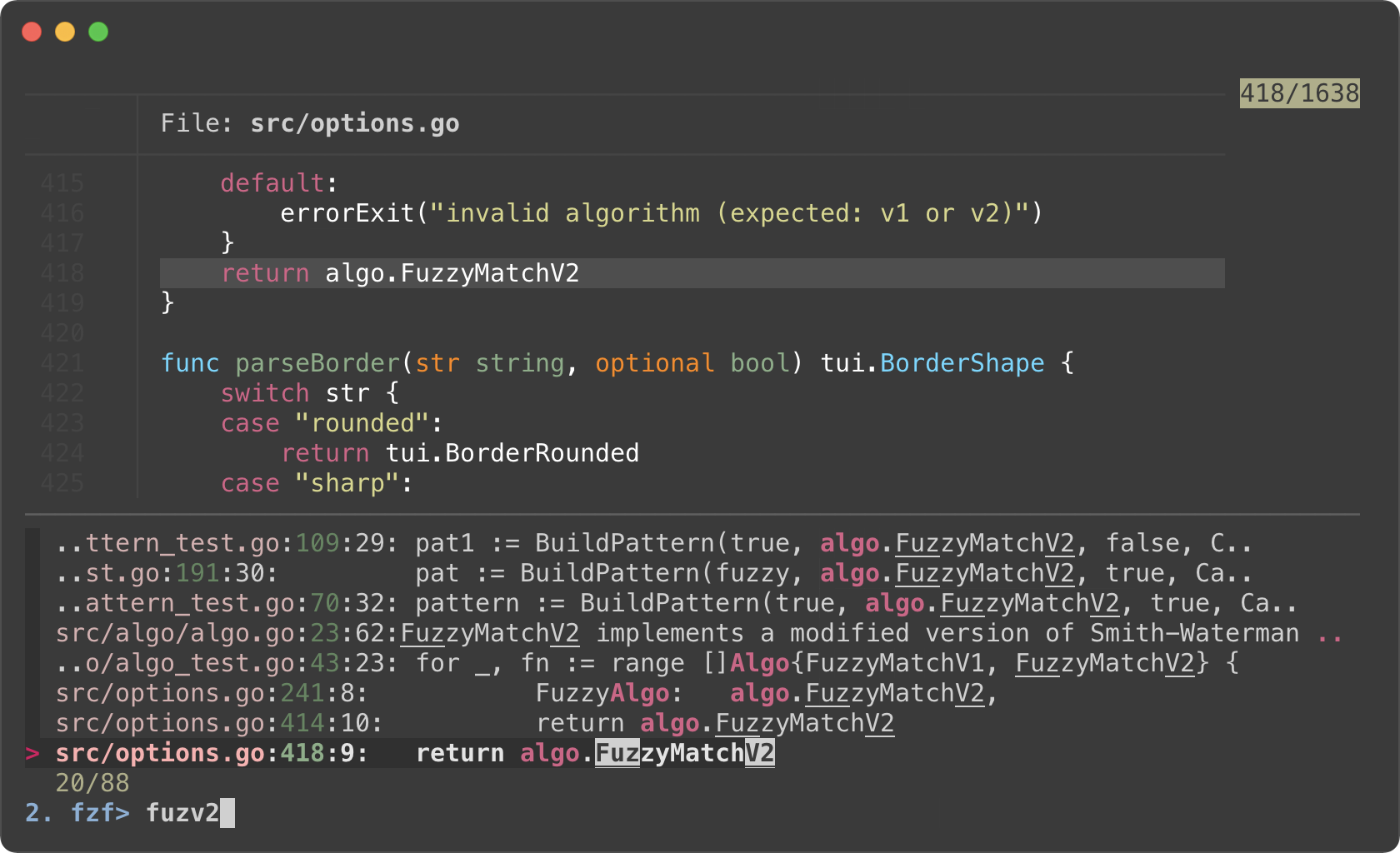
|
|
396
|
+
|
|
397
|
+
- We added `--prompt` option to show that fzf is initially running in "Ripgrep
|
|
398
|
+
launcher mode".
|
|
399
|
+
- We added `alt-enter` binding that
|
|
400
|
+
1. unbinds `change` event, so Ripgrep is no longer restarted on key press
|
|
401
|
+
2. changes the prompt to `2. fzf>`
|
|
402
|
+
3. enables search functionality of fzf
|
|
403
|
+
4. clears the current query string that was used to start Ripgrep process
|
|
404
|
+
5. and unbinds `alt-enter` itself as this is a one-off event
|
|
405
|
+
- We reverted `--color` option for customizing how the matching chunks are
|
|
406
|
+
displayed in the second phase
|
|
407
|
+
|
|
408
|
+
Log tailing
|
|
409
|
+
-----------
|
|
410
|
+
|
|
411
|
+
fzf can run long-running preview commands and render partial results before
|
|
412
|
+
completion. And when you specify `follow` flag in `--preview-window` option,
|
|
413
|
+
fzf will "`tail -f`" the result, automatically scrolling to the bottom.
|
|
414
|
+
|
|
415
|
+
```bash
|
|
416
|
+
# With "follow", preview window will automatically scroll to the bottom.
|
|
417
|
+
# "\033[2J" is an ANSI escape sequence for clearing the screen.
|
|
418
|
+
# When fzf reads this code it clears the previous preview contents.
|
|
419
|
+
fzf --preview-window follow --preview 'for i in $(seq 100000); do
|
|
420
|
+
echo "$i"
|
|
421
|
+
sleep 0.01
|
|
422
|
+
(( i % 300 == 0 )) && printf "\033[2J"
|
|
423
|
+
done'
|
|
424
|
+
```
|
|
425
|
+
|
|
426
|
+
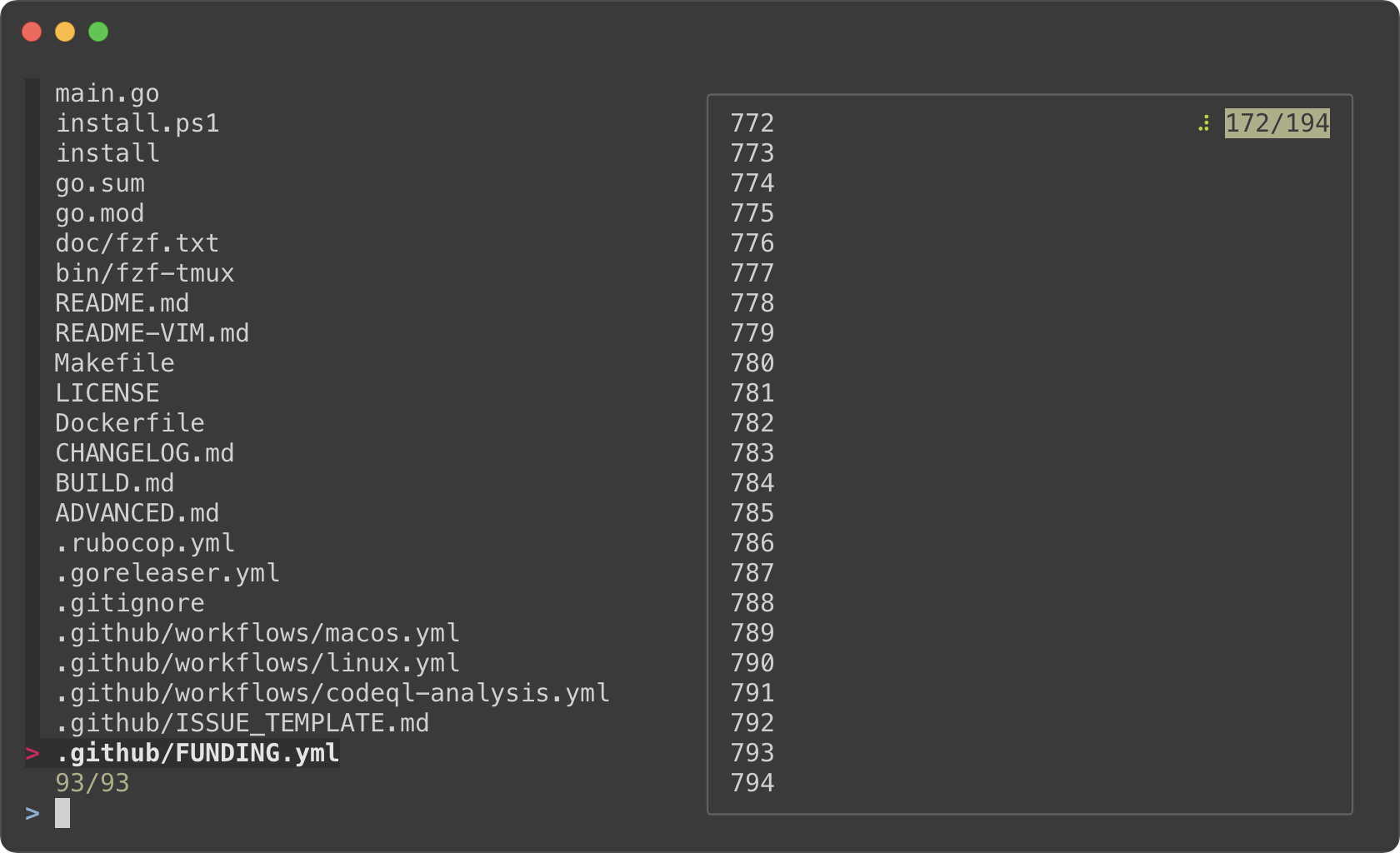
|
|
427
|
+
|
|
428
|
+
Admittedly, that was a silly example. Here's a practical one for browsing
|
|
429
|
+
Kubernetes pods.
|
|
430
|
+
|
|
431
|
+
```bash
|
|
432
|
+
#!/usr/bin/env bash
|
|
433
|
+
|
|
434
|
+
read -ra tokens < <(
|
|
435
|
+
kubectl get pods --all-namespaces |
|
|
436
|
+
fzf --info=inline --layout=reverse --header-lines=1 --border \
|
|
437
|
+
--prompt "$(kubectl config current-context | sed 's/-context$//')> " \
|
|
438
|
+
--header $'Press CTRL-O to open log in editor\n\n' \
|
|
439
|
+
--bind ctrl-/:toggle-preview \
|
|
440
|
+
--bind 'ctrl-o:execute:${EDITOR:-vim} <(kubectl logs --namespace {1} {2}) > /dev/tty' \
|
|
441
|
+
--preview-window up,follow \
|
|
442
|
+
--preview 'kubectl logs --follow --tail=100000 --namespace {1} {2}' "$@"
|
|
443
|
+
)
|
|
444
|
+
[ ${#tokens} -gt 1 ] &&
|
|
445
|
+
kubectl exec -it --namespace "${tokens[0]}" "${tokens[1]}" -- bash
|
|
446
|
+
```
|
|
447
|
+
|
|
448
|
+
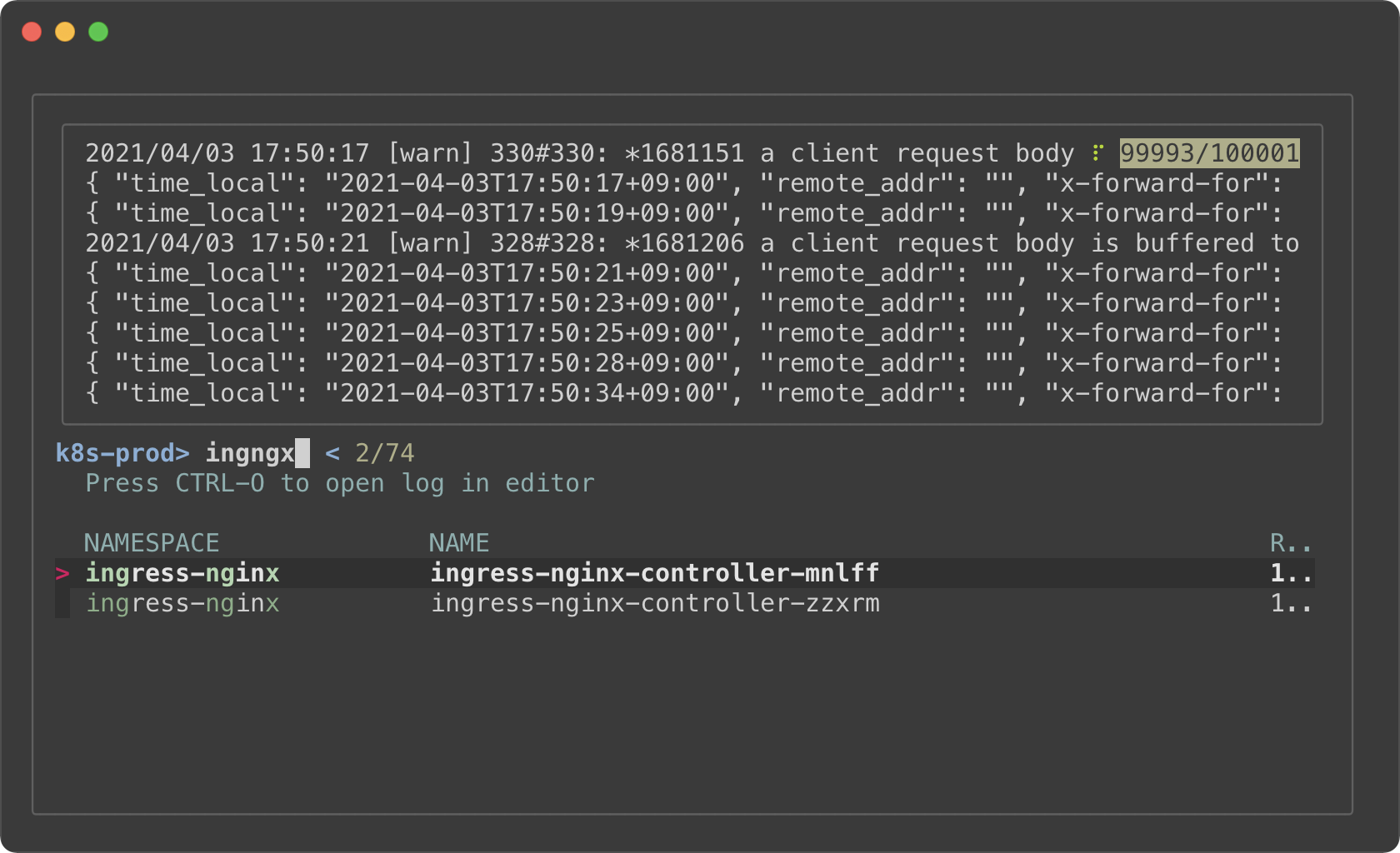
|
|
449
|
+
|
|
450
|
+
- The preview window will *"log tail"* the pod
|
|
451
|
+
- Holding on to a large amount of log will consume a lot of memory. So we
|
|
452
|
+
limited the initial log amount with `--tail=100000`.
|
|
453
|
+
- With `execute` binding, you can press CTRL-O to open the log in your editor
|
|
454
|
+
without leaving fzf
|
|
455
|
+
- Select a pod (with an enter key) to `kubectl exec` into it
|
|
456
|
+
|
|
457
|
+
Key bindings for git objects
|
|
458
|
+
----------------------------
|
|
459
|
+
|
|
460
|
+
I have [blogged](https://junegunn.kr/2016/07/fzf-git) about my fzf+git key
|
|
461
|
+
bindings a few years ago. I'm going to show them here again, because they are
|
|
462
|
+
seriously useful.
|
|
463
|
+
|
|
464
|
+
### Files listed in `git status`
|
|
465
|
+
|
|
466
|
+
<kbd>CTRL-G</kbd><kbd>CTRL-F</kbd>
|
|
467
|
+
|
|
468
|
+
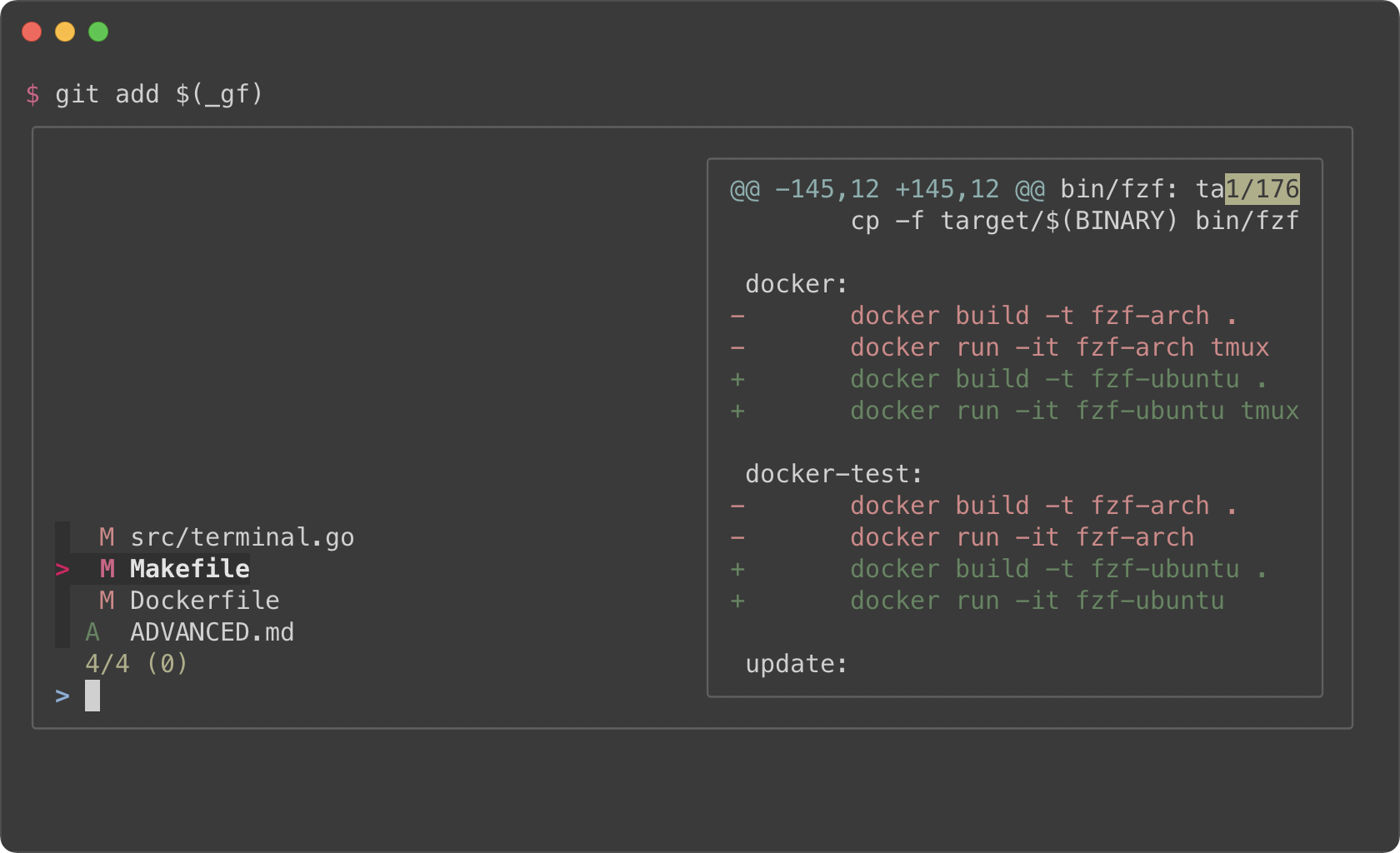
|
|
469
|
+
|
|
470
|
+
### Branches
|
|
471
|
+
|
|
472
|
+
<kbd>CTRL-G</kbd><kbd>CTRL-B</kbd>
|
|
473
|
+
|
|
474
|
+
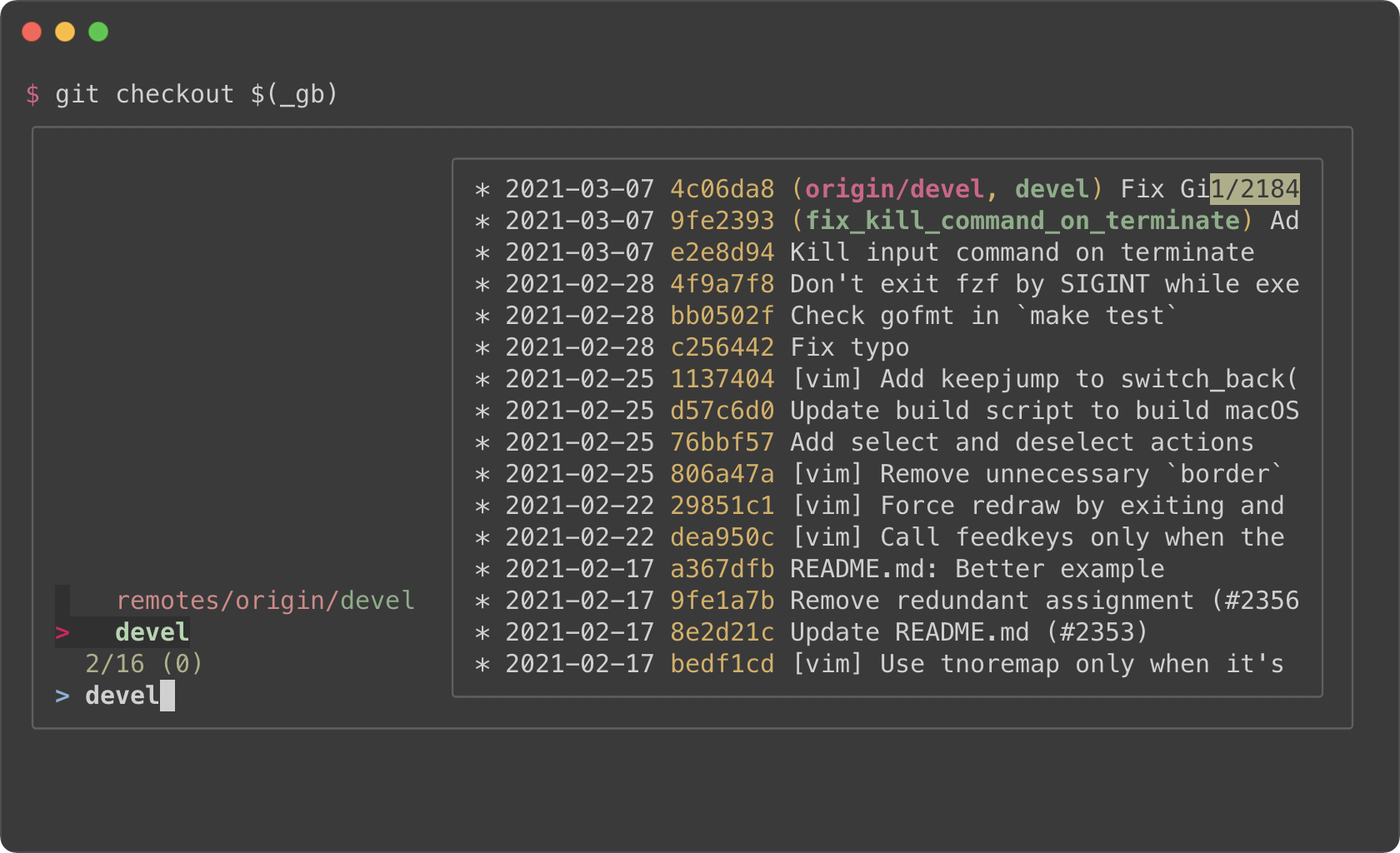
|
|
475
|
+
|
|
476
|
+
### Commit hashes
|
|
477
|
+
|
|
478
|
+
<kbd>CTRL-G</kbd><kbd>CTRL-H</kbd>
|
|
479
|
+
|
|
480
|
+
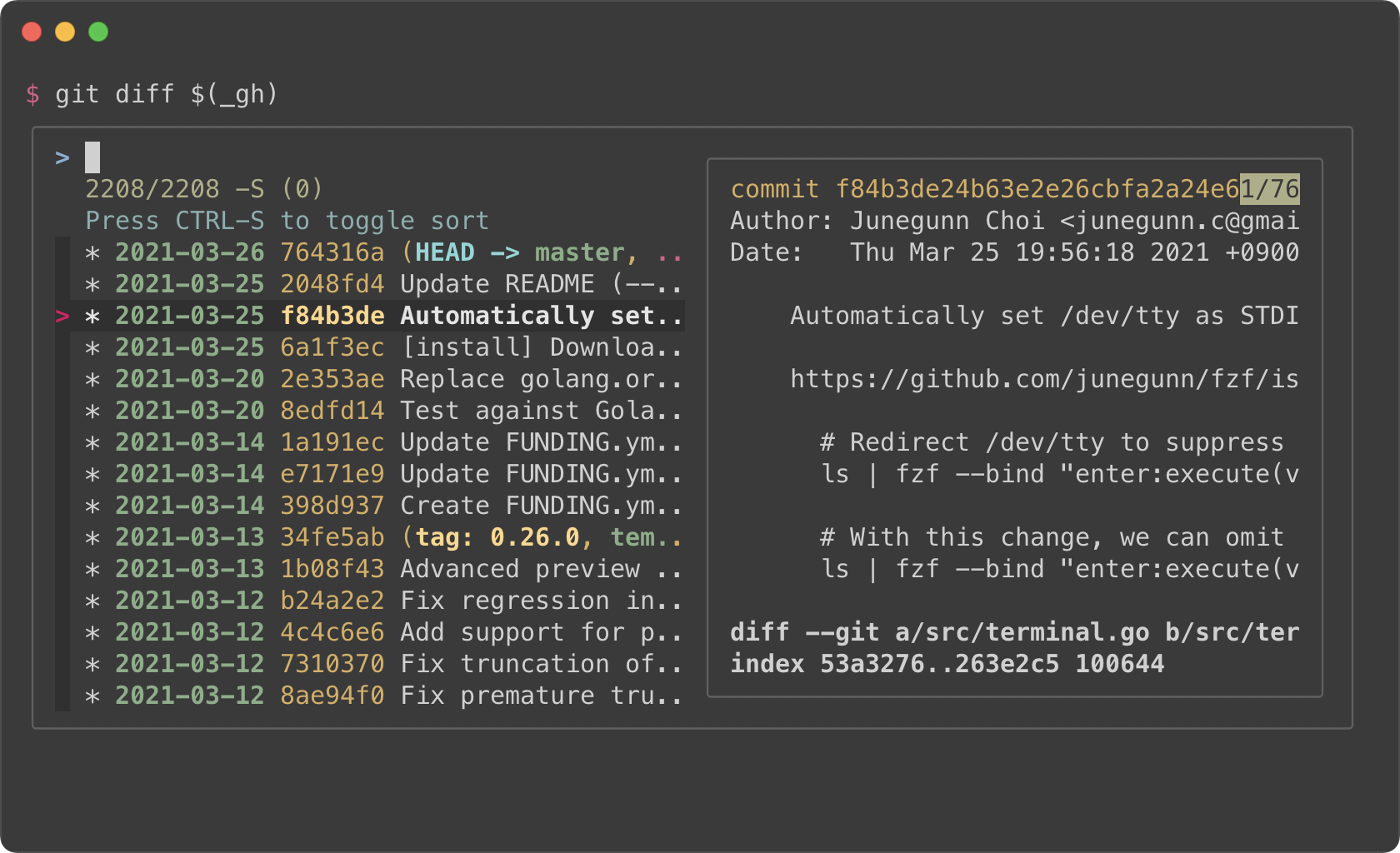
|
|
481
|
+
|
|
482
|
+
|
|
483
|
+
The full source code can be found [here](https://gist.github.com/junegunn/8b572b8d4b5eddd8b85e5f4d40f17236).
|
|
484
|
+
|
|
485
|
+
Color themes
|
|
486
|
+
------------
|
|
487
|
+
|
|
488
|
+
You can customize how fzf colors the text elements with `--color` option. Here
|
|
489
|
+
are a few color themes. Note that you need a terminal emulator that can
|
|
490
|
+
display 24-bit colors.
|
|
491
|
+
|
|
492
|
+
```sh
|
|
493
|
+
# junegunn/seoul256.vim (dark)
|
|
494
|
+
export FZF_DEFAULT_OPTS='--color=bg+:#3F3F3F,bg:#4B4B4B,border:#6B6B6B,spinner:#98BC99,hl:#719872,fg:#D9D9D9,header:#719872,info:#BDBB72,pointer:#E12672,marker:#E17899,fg+:#D9D9D9,preview-bg:#3F3F3F,prompt:#98BEDE,hl+:#98BC99'
|
|
495
|
+
```
|
|
496
|
+
|
|
497
|
+
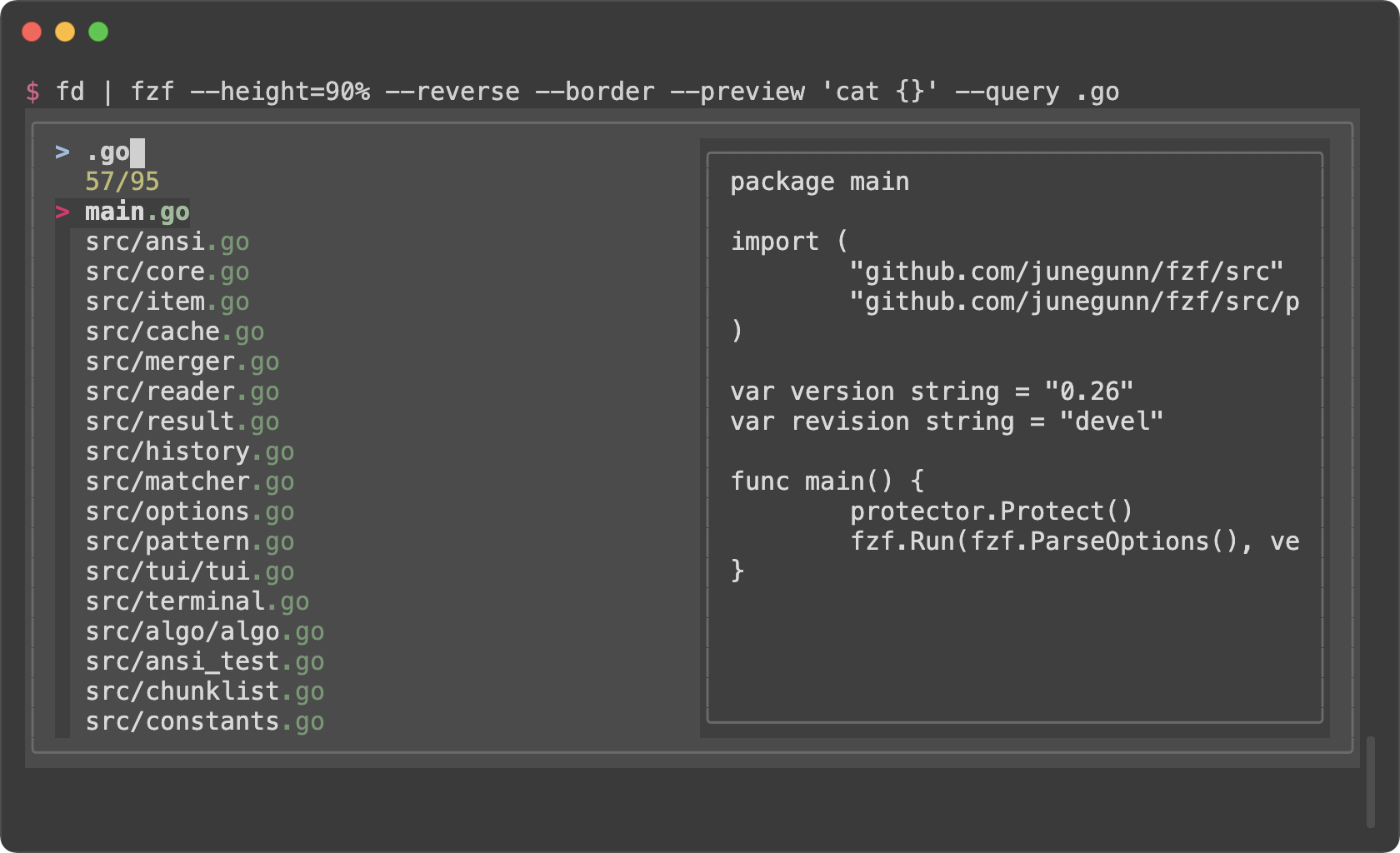
|
|
498
|
+
|
|
499
|
+
```sh
|
|
500
|
+
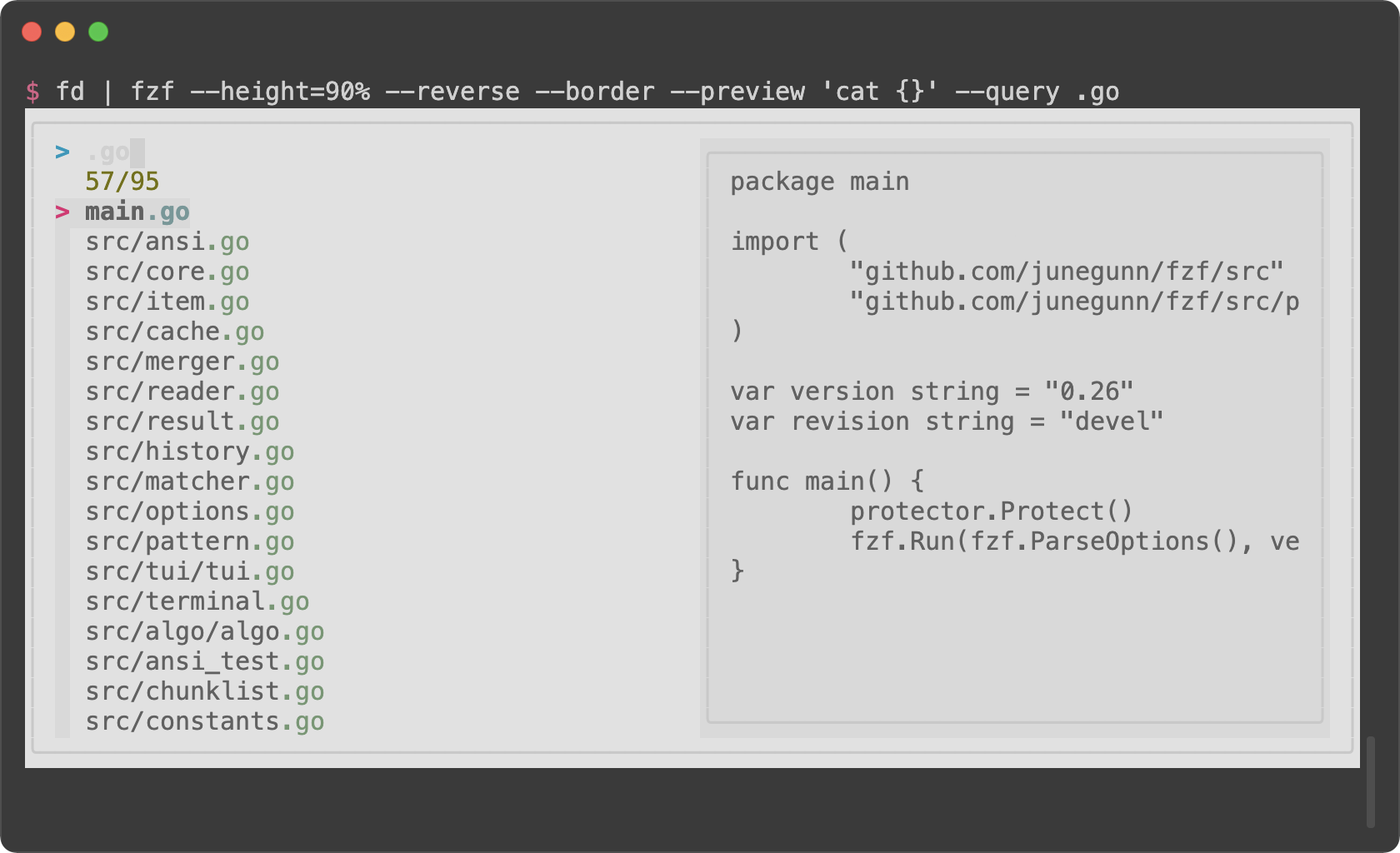
# junegunn/seoul256.vim (light)
|
|
501
|
+
export FZF_DEFAULT_OPTS='--color=bg+:#D9D9D9,bg:#E1E1E1,border:#C8C8C8,spinner:#719899,hl:#719872,fg:#616161,header:#719872,info:#727100,pointer:#E12672,marker:#E17899,fg+:#616161,preview-bg:#D9D9D9,prompt:#0099BD,hl+:#719899'
|
|
502
|
+
```
|
|
503
|
+
|
|
504
|
+
|
|
505
|
+
|
|
506
|
+
```sh
|
|
507
|
+
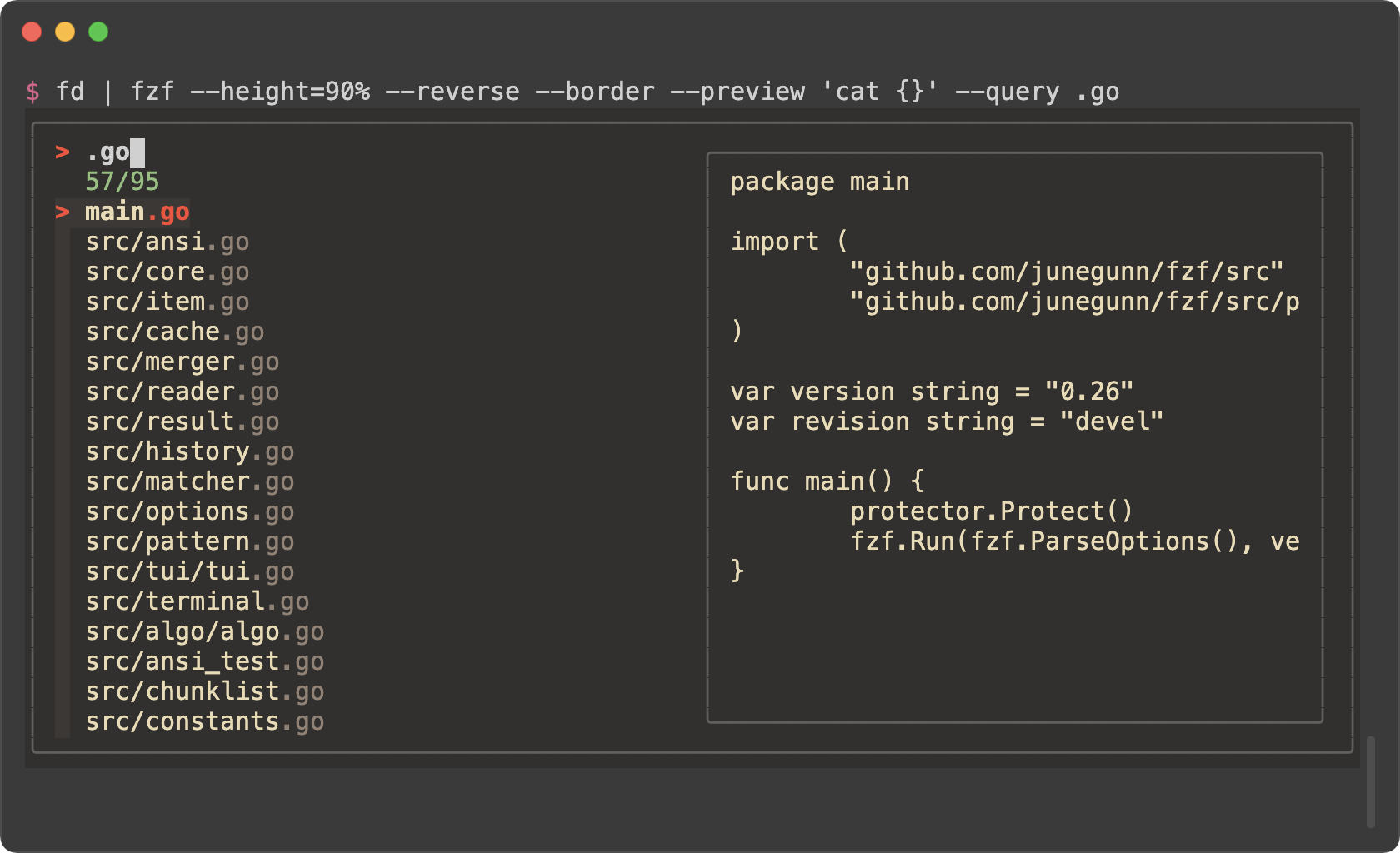
# morhetz/gruvbox
|
|
508
|
+
export FZF_DEFAULT_OPTS='--color=bg+:#3c3836,bg:#32302f,spinner:#fb4934,hl:#928374,fg:#ebdbb2,header:#928374,info:#8ec07c,pointer:#fb4934,marker:#fb4934,fg+:#ebdbb2,prompt:#fb4934,hl+:#fb4934'
|
|
509
|
+
```
|
|
510
|
+
|
|
511
|
+
|
|
512
|
+
|
|
513
|
+
```sh
|
|
514
|
+
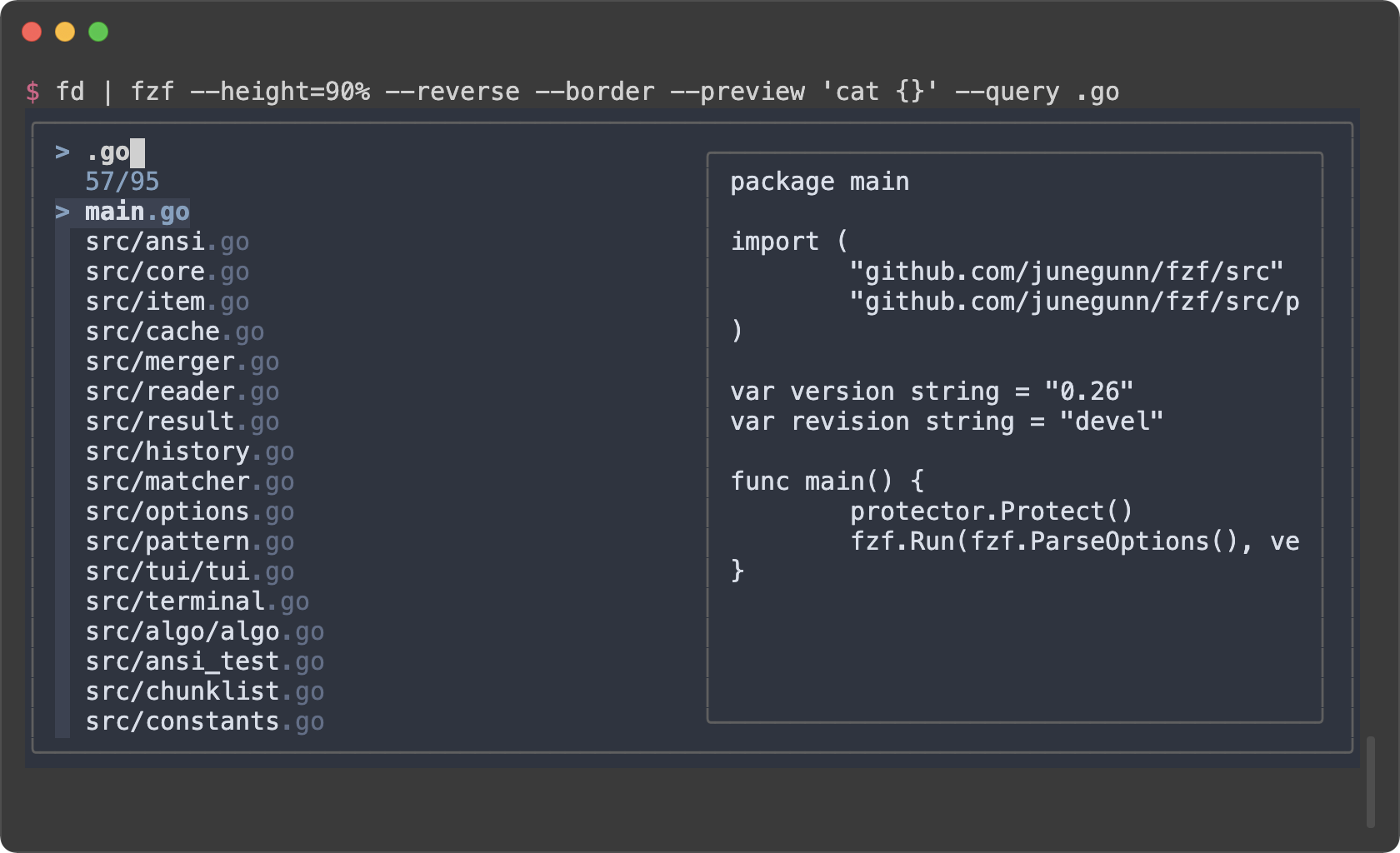
# arcticicestudio/nord-vim
|
|
515
|
+
export FZF_DEFAULT_OPTS='--color=bg+:#3B4252,bg:#2E3440,spinner:#81A1C1,hl:#616E88,fg:#D8DEE9,header:#616E88,info:#81A1C1,pointer:#81A1C1,marker:#81A1C1,fg+:#D8DEE9,prompt:#81A1C1,hl+:#81A1C1'
|
|
516
|
+
```
|
|
517
|
+
|
|
518
|
+
|
|
519
|
+
|
|
520
|
+
```sh
|
|
521
|
+
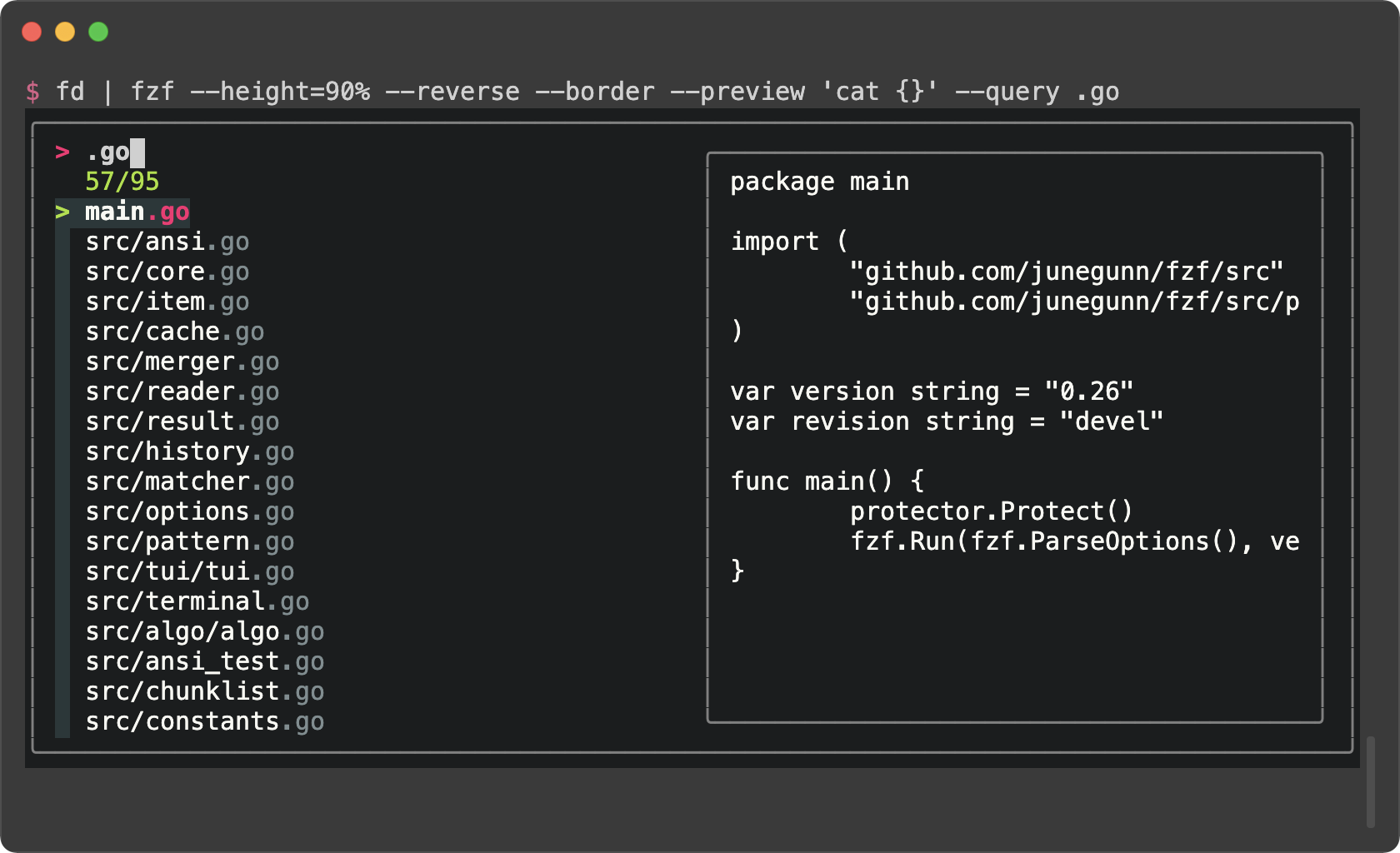
# tomasr/molokai
|
|
522
|
+
export FZF_DEFAULT_OPTS='--color=bg+:#293739,bg:#1B1D1E,border:#808080,spinner:#E6DB74,hl:#7E8E91,fg:#F8F8F2,header:#7E8E91,info:#A6E22E,pointer:#A6E22E,marker:#F92672,fg+:#F8F8F2,prompt:#F92672,hl+:#F92672'
|
|
523
|
+
```
|
|
524
|
+
|
|
525
|
+
|
|
526
|
+
|
|
527
|
+
### Generating fzf color theme from Vim color schemes
|
|
528
|
+
|
|
529
|
+
The Vim plugin of fzf can generate `--color` option from the current color
|
|
530
|
+
scheme according to `g:fzf_colors` variable. You can find the detailed
|
|
531
|
+
explanation [here](https://github.com/junegunn/fzf/blob/master/README-VIM.md#explanation-of-gfzf_colors).
|
|
532
|
+
|
|
533
|
+
Here is an example. Add this to your Vim configuration file.
|
|
534
|
+
|
|
535
|
+
```vim
|
|
536
|
+
let g:fzf_colors =
|
|
537
|
+
\ { 'fg': ['fg', 'Normal'],
|
|
538
|
+
\ 'bg': ['bg', 'Normal'],
|
|
539
|
+
\ 'preview-bg': ['bg', 'NormalFloat'],
|
|
540
|
+
\ 'hl': ['fg', 'Comment'],
|
|
541
|
+
\ 'fg+': ['fg', 'CursorLine', 'CursorColumn', 'Normal'],
|
|
542
|
+
\ 'bg+': ['bg', 'CursorLine', 'CursorColumn'],
|
|
543
|
+
\ 'hl+': ['fg', 'Statement'],
|
|
544
|
+
\ 'info': ['fg', 'PreProc'],
|
|
545
|
+
\ 'border': ['fg', 'Ignore'],
|
|
546
|
+
\ 'prompt': ['fg', 'Conditional'],
|
|
547
|
+
\ 'pointer': ['fg', 'Exception'],
|
|
548
|
+
\ 'marker': ['fg', 'Keyword'],
|
|
549
|
+
\ 'spinner': ['fg', 'Label'],
|
|
550
|
+
\ 'header': ['fg', 'Comment'] }
|
|
551
|
+
```
|
|
552
|
+
|
|
553
|
+
Then you can see how the `--color` option is generated by printing the result
|
|
554
|
+
of `fzf#wrap()`.
|
|
555
|
+
|
|
556
|
+
```vim
|
|
557
|
+
:echo fzf#wrap()
|
|
558
|
+
```
|
|
559
|
+
|
|
560
|
+
Use this command to append `export FZF_DEFAULT_OPTS="..."` line to the end of
|
|
561
|
+
the current file.
|
|
562
|
+
|
|
563
|
+
```vim
|
|
564
|
+
:call append('$', printf('export FZF_DEFAULT_OPTS="%s"', matchstr(fzf#wrap().options, "--color[^']*")))
|
|
565
|
+
```
|
|
@@ -0,0 +1,49 @@
|
|
|
1
|
+
Building fzf
|
|
2
|
+
============
|
|
3
|
+
|
|
4
|
+
Build instructions
|
|
5
|
+
------------------
|
|
6
|
+
|
|
7
|
+
### Prerequisites
|
|
8
|
+
|
|
9
|
+
- Go 1.13 or above
|
|
10
|
+
|
|
11
|
+
### Using Makefile
|
|
12
|
+
|
|
13
|
+
```sh
|
|
14
|
+
# Build fzf binary for your platform in target
|
|
15
|
+
make
|
|
16
|
+
|
|
17
|
+
# Build fzf binary and copy it to bin directory
|
|
18
|
+
make install
|
|
19
|
+
|
|
20
|
+
# Build fzf binaries and archives for all platforms using goreleaser
|
|
21
|
+
make build
|
|
22
|
+
|
|
23
|
+
# Publish GitHub release
|
|
24
|
+
make release
|
|
25
|
+
```
|
|
26
|
+
|
|
27
|
+
> :warning: Makefile uses git commands to determine the version and the
|
|
28
|
+
> revision information for `fzf --version`. So if you're building fzf from an
|
|
29
|
+
> environment where its git information is not available, you have to manually
|
|
30
|
+
> set `$FZF_VERSION` and `$FZF_REVISION`.
|
|
31
|
+
>
|
|
32
|
+
> e.g. `FZF_VERSION=0.24.0 FZF_REVISION=tarball make`
|
|
33
|
+
|
|
34
|
+
Third-party libraries used
|
|
35
|
+
--------------------------
|
|
36
|
+
|
|
37
|
+
- [mattn/go-runewidth](https://github.com/mattn/go-runewidth)
|
|
38
|
+
- Licensed under [MIT](http://mattn.mit-license.org)
|
|
39
|
+
- [mattn/go-shellwords](https://github.com/mattn/go-shellwords)
|
|
40
|
+
- Licensed under [MIT](http://mattn.mit-license.org)
|
|
41
|
+
- [mattn/go-isatty](https://github.com/mattn/go-isatty)
|
|
42
|
+
- Licensed under [MIT](http://mattn.mit-license.org)
|
|
43
|
+
- [tcell](https://github.com/gdamore/tcell)
|
|
44
|
+
- Licensed under [Apache License 2.0](https://github.com/gdamore/tcell/blob/master/LICENSE)
|
|
45
|
+
|
|
46
|
+
License
|
|
47
|
+
-------
|
|
48
|
+
|
|
49
|
+
[MIT](LICENSE)
|