claude_hooks 1.1.0 → 1.2.0
This diff represents the content of publicly available package versions that have been released to one of the supported registries. The information contained in this diff is provided for informational purposes only and reflects changes between package versions as they appear in their respective public registries.
- checksums.yaml +4 -4
- data/.agents/skills/ci-monitoring/SKILL.md +103 -0
- data/.agents/skills/run-tests/SKILL.md +45 -0
- data/.claude/settings.local.json +21 -0
- data/AGENTS.md +46 -0
- data/CHANGELOG.md +43 -0
- data/README.md +156 -21
- data/docs/API/COMMON.md +7 -1
- data/docs/API/CONFIG_CHANGE.md +39 -0
- data/docs/API/CWD_CHANGED.md +34 -0
- data/docs/API/ELICITATION.md +44 -0
- data/docs/API/ELICITATION_RESULT.md +43 -0
- data/docs/API/FILE_CHANGED.md +37 -0
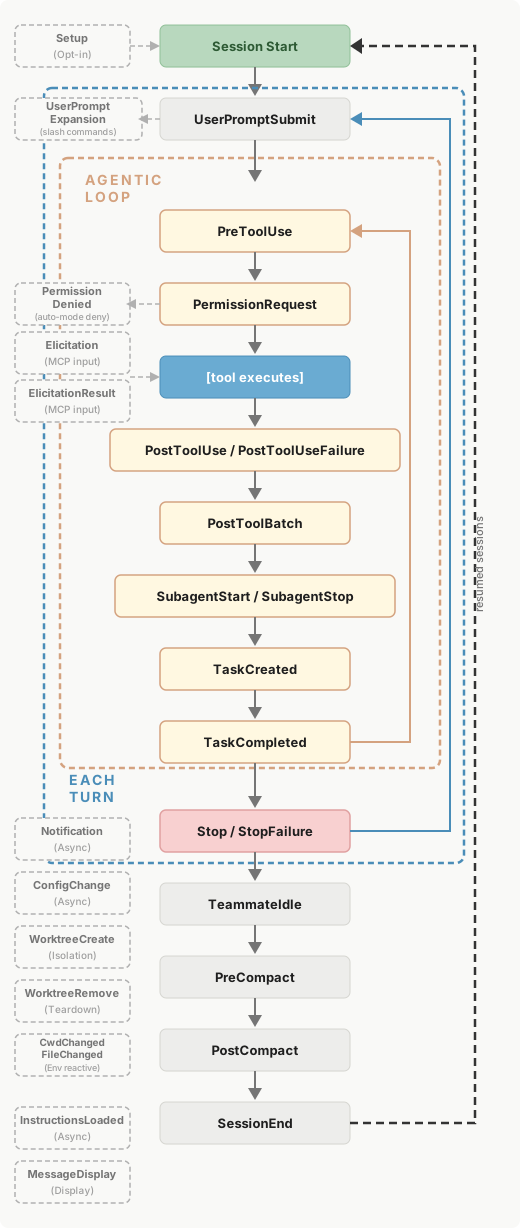
- data/docs/API/INSTRUCTIONS_LOADED.md +30 -0
- data/docs/API/MESSAGE_DISPLAY.md +38 -0
- data/docs/API/PERMISSION_DENIED.md +37 -0
- data/docs/API/PERMISSION_REQUEST.md +11 -8
- data/docs/API/POST_COMPACT.md +30 -0
- data/docs/API/POST_TOOL_BATCH.md +39 -0
- data/docs/API/POST_TOOL_USE_FAILURE.md +31 -0
- data/docs/API/PRE_COMPACT.md +10 -2
- data/docs/API/PRE_TOOL_USE.md +5 -1
- data/docs/API/SETUP.md +37 -0
- data/docs/API/STOP_FAILURE.md +19 -0
- data/docs/API/SUBAGENT_START.md +40 -0
- data/docs/API/TASK_COMPLETED.md +43 -0
- data/docs/API/TASK_CREATED.md +43 -0
- data/docs/API/TEAMMATE_IDLE.md +40 -0
- data/docs/API/USER_PROMPT_EXPANSION.md +43 -0
- data/docs/API/WORKTREE_CREATE.md +39 -0
- data/docs/API/WORKTREE_REMOVE.md +33 -0
- data/docs/PROMPT_BASED_HOOKS.md +386 -0
- data/docs/external/claude-hooks-reference.md +2406 -854
- data/docs/mitts/ideabox.md +12 -0
- data/docs/mitts/prd.md +417 -0
- data/docs/mitts/setup.md +303 -0
- data/docs/mitts/task.md +44 -0
- data/lib/claude_hooks/base.rb +25 -0
- data/lib/claude_hooks/config_change.rb +28 -0
- data/lib/claude_hooks/cwd_changed.rb +28 -0
- data/lib/claude_hooks/elicitation.rb +61 -0
- data/lib/claude_hooks/elicitation_result.rb +57 -0
- data/lib/claude_hooks/file_changed.rb +41 -0
- data/lib/claude_hooks/instructions_loaded.rb +23 -0
- data/lib/claude_hooks/message_display.rb +58 -0
- data/lib/claude_hooks/output/base.rb +46 -1
- data/lib/claude_hooks/output/config_change.rb +47 -0
- data/lib/claude_hooks/output/cwd_changed.rb +42 -0
- data/lib/claude_hooks/output/elicitation.rb +67 -0
- data/lib/claude_hooks/output/elicitation_result.rb +63 -0
- data/lib/claude_hooks/output/file_changed.rb +42 -0
- data/lib/claude_hooks/output/instructions_loaded.rb +19 -0
- data/lib/claude_hooks/output/message_display.rb +49 -0
- data/lib/claude_hooks/output/permission_denied.rb +42 -0
- data/lib/claude_hooks/output/permission_request.rb +50 -25
- data/lib/claude_hooks/output/post_compact.rb +18 -0
- data/lib/claude_hooks/output/post_tool_batch.rb +51 -0
- data/lib/claude_hooks/output/post_tool_use.rb +12 -0
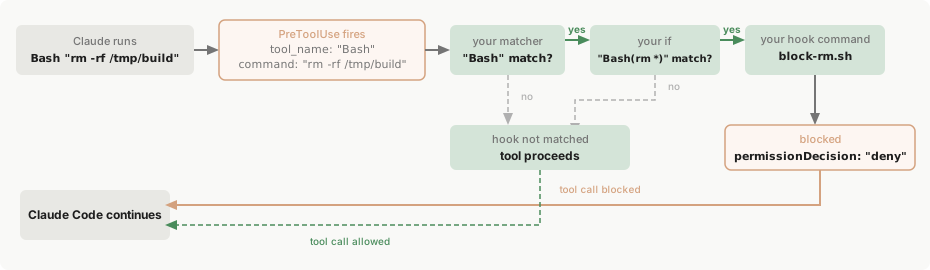
- data/lib/claude_hooks/output/post_tool_use_failure.rb +42 -0
- data/lib/claude_hooks/output/pre_compact.rb +34 -3
- data/lib/claude_hooks/output/pre_tool_use.rb +8 -2
- data/lib/claude_hooks/output/session_start.rb +30 -8
- data/lib/claude_hooks/output/setup.rb +42 -0
- data/lib/claude_hooks/output/stop.rb +15 -0
- data/lib/claude_hooks/output/stop_failure.rb +19 -0
- data/lib/claude_hooks/output/subagent_start.rb +42 -0
- data/lib/claude_hooks/output/task_completed.rb +18 -0
- data/lib/claude_hooks/output/task_created.rb +18 -0
- data/lib/claude_hooks/output/teammate_idle.rb +18 -0
- data/lib/claude_hooks/output/user_prompt_expansion.rb +51 -0
- data/lib/claude_hooks/output/worktree_create.rb +60 -0
- data/lib/claude_hooks/output/worktree_remove.rb +19 -0
- data/lib/claude_hooks/permission_denied.rb +41 -0
- data/lib/claude_hooks/permission_request.rb +16 -9
- data/lib/claude_hooks/post_compact.rb +23 -0
- data/lib/claude_hooks/post_tool_batch.rb +59 -0
- data/lib/claude_hooks/post_tool_use.rb +10 -0
- data/lib/claude_hooks/post_tool_use_failure.rb +45 -0
- data/lib/claude_hooks/pre_compact.rb +7 -0
- data/lib/claude_hooks/pre_tool_use.rb +20 -2
- data/lib/claude_hooks/session_start.rb +28 -0
- data/lib/claude_hooks/setup.rb +25 -0
- data/lib/claude_hooks/stop.rb +17 -0
- data/lib/claude_hooks/stop_failure.rb +27 -0
- data/lib/claude_hooks/subagent_start.rb +23 -0
- data/lib/claude_hooks/subagent_stop.rb +5 -1
- data/lib/claude_hooks/task_completed.rb +35 -0
- data/lib/claude_hooks/task_created.rb +35 -0
- data/lib/claude_hooks/teammate_idle.rb +23 -0
- data/lib/claude_hooks/user_prompt_expansion.rb +45 -0
- data/lib/claude_hooks/version.rb +1 -1
- data/lib/claude_hooks/worktree_create.rb +27 -0
- data/lib/claude_hooks/worktree_remove.rb +19 -0
- data/lib/claude_hooks.rb +40 -0
- metadata +71 -2
|
@@ -1,121 +1,76 @@
|
|
|
1
|
-
|
|
1
|
+
> ## Documentation Index
|
|
2
|
+
>
|
|
3
|
+
> Fetch the complete documentation index at: [/docs/llms.txt](https://code.claude.com/docs/llms.txt)
|
|
4
|
+
>
|
|
5
|
+
> Use this file to discover all available pages before exploring further.
|
|
2
6
|
|
|
3
|
-
[
|
|
4
|
-
|
|
5
|
-

|
|
6
|
-
|
|
7
|
-
English
|
|
8
|
-
|
|
9
|
-
Search...
|
|
10
|
-
|
|
11
|
-
Ctrl K
|
|
12
|
-
|
|
13
|
-
Search...
|
|
14
|
-
|
|
15
|
-
Navigation
|
|
16
|
-
|
|
17
|
-
Reference
|
|
18
|
-
|
|
19
|
-
Hooks reference
|
|
20
|
-
|
|
21
|
-
[Getting started](https://code.claude.com/docs/en/overview) [Build with Claude Code](https://code.claude.com/docs/en/sub-agents) [Deployment](https://code.claude.com/docs/en/third-party-integrations) [Administration](https://code.claude.com/docs/en/setup) [Configuration](https://code.claude.com/docs/en/settings) [Reference](https://code.claude.com/docs/en/cli-reference) [Resources](https://code.claude.com/docs/en/legal-and-compliance)
|
|
22
|
-
|
|
23
|
-
On this page
|
|
24
|
-
|
|
25
|
-
- [Configuration](https://code.claude.com/docs/en/hooks#configuration)
|
|
26
|
-
- [Structure](https://code.claude.com/docs/en/hooks#structure)
|
|
27
|
-
- [Project-Specific Hook Scripts](https://code.claude.com/docs/en/hooks#project-specific-hook-scripts)
|
|
28
|
-
- [Plugin hooks](https://code.claude.com/docs/en/hooks#plugin-hooks)
|
|
29
|
-
- [Prompt-Based Hooks](https://code.claude.com/docs/en/hooks#prompt-based-hooks)
|
|
30
|
-
- [How prompt-based hooks work](https://code.claude.com/docs/en/hooks#how-prompt-based-hooks-work)
|
|
31
|
-
- [Configuration](https://code.claude.com/docs/en/hooks#configuration-2)
|
|
32
|
-
- [Response schema](https://code.claude.com/docs/en/hooks#response-schema)
|
|
33
|
-
- [Supported hook events](https://code.claude.com/docs/en/hooks#supported-hook-events)
|
|
34
|
-
- [Example: Intelligent Stop hook](https://code.claude.com/docs/en/hooks#example%3A-intelligent-stop-hook)
|
|
35
|
-
- [Example: SubagentStop with custom logic](https://code.claude.com/docs/en/hooks#example%3A-subagentstop-with-custom-logic)
|
|
36
|
-
- [Comparison with bash command hooks](https://code.claude.com/docs/en/hooks#comparison-with-bash-command-hooks)
|
|
37
|
-
- [Best practices](https://code.claude.com/docs/en/hooks#best-practices)
|
|
38
|
-
- [Hook Events](https://code.claude.com/docs/en/hooks#hook-events)
|
|
39
|
-
- [PreToolUse](https://code.claude.com/docs/en/hooks#pretooluse)
|
|
40
|
-
- [PermissionRequest](https://code.claude.com/docs/en/hooks#permissionrequest)
|
|
41
|
-
- [PostToolUse](https://code.claude.com/docs/en/hooks#posttooluse)
|
|
42
|
-
- [Notification](https://code.claude.com/docs/en/hooks#notification)
|
|
43
|
-
- [UserPromptSubmit](https://code.claude.com/docs/en/hooks#userpromptsubmit)
|
|
44
|
-
- [Stop](https://code.claude.com/docs/en/hooks#stop)
|
|
45
|
-
- [SubagentStop](https://code.claude.com/docs/en/hooks#subagentstop)
|
|
46
|
-
- [PreCompact](https://code.claude.com/docs/en/hooks#precompact)
|
|
47
|
-
- [SessionStart](https://code.claude.com/docs/en/hooks#sessionstart)
|
|
48
|
-
- [Persisting environment variables](https://code.claude.com/docs/en/hooks#persisting-environment-variables)
|
|
49
|
-
- [SessionEnd](https://code.claude.com/docs/en/hooks#sessionend)
|
|
50
|
-
- [Hook Input](https://code.claude.com/docs/en/hooks#hook-input)
|
|
51
|
-
- [PreToolUse Input](https://code.claude.com/docs/en/hooks#pretooluse-input)
|
|
52
|
-
- [PostToolUse Input](https://code.claude.com/docs/en/hooks#posttooluse-input)
|
|
53
|
-
- [Notification Input](https://code.claude.com/docs/en/hooks#notification-input)
|
|
54
|
-
- [UserPromptSubmit Input](https://code.claude.com/docs/en/hooks#userpromptsubmit-input)
|
|
55
|
-
- [Stop and SubagentStop Input](https://code.claude.com/docs/en/hooks#stop-and-subagentstop-input)
|
|
56
|
-
- [PreCompact Input](https://code.claude.com/docs/en/hooks#precompact-input)
|
|
57
|
-
- [SessionStart Input](https://code.claude.com/docs/en/hooks#sessionstart-input)
|
|
58
|
-
- [SessionEnd Input](https://code.claude.com/docs/en/hooks#sessionend-input)
|
|
59
|
-
- [Hook Output](https://code.claude.com/docs/en/hooks#hook-output)
|
|
60
|
-
- [Simple: Exit Code](https://code.claude.com/docs/en/hooks#simple%3A-exit-code)
|
|
61
|
-
- [Exit Code 2 Behavior](https://code.claude.com/docs/en/hooks#exit-code-2-behavior)
|
|
62
|
-
- [Advanced: JSON Output](https://code.claude.com/docs/en/hooks#advanced%3A-json-output)
|
|
63
|
-
- [Common JSON Fields](https://code.claude.com/docs/en/hooks#common-json-fields)
|
|
64
|
-
- [PreToolUse Decision Control](https://code.claude.com/docs/en/hooks#pretooluse-decision-control)
|
|
65
|
-
- [PermissionRequest Decision Control](https://code.claude.com/docs/en/hooks#permissionrequest-decision-control)
|
|
66
|
-
- [PostToolUse Decision Control](https://code.claude.com/docs/en/hooks#posttooluse-decision-control)
|
|
67
|
-
- [UserPromptSubmit Decision Control](https://code.claude.com/docs/en/hooks#userpromptsubmit-decision-control)
|
|
68
|
-
- [Stop/SubagentStop Decision Control](https://code.claude.com/docs/en/hooks#stop%2Fsubagentstop-decision-control)
|
|
69
|
-
- [SessionStart Decision Control](https://code.claude.com/docs/en/hooks#sessionstart-decision-control)
|
|
70
|
-
- [SessionEnd Decision Control](https://code.claude.com/docs/en/hooks#sessionend-decision-control)
|
|
71
|
-
- [Exit Code Example: Bash Command Validation](https://code.claude.com/docs/en/hooks#exit-code-example%3A-bash-command-validation)
|
|
72
|
-
- [JSON Output Example: UserPromptSubmit to Add Context and Validation](https://code.claude.com/docs/en/hooks#json-output-example%3A-userpromptsubmit-to-add-context-and-validation)
|
|
73
|
-
- [JSON Output Example: PreToolUse with Approval](https://code.claude.com/docs/en/hooks#json-output-example%3A-pretooluse-with-approval)
|
|
74
|
-
- [Working with MCP Tools](https://code.claude.com/docs/en/hooks#working-with-mcp-tools)
|
|
75
|
-
- [MCP Tool Naming](https://code.claude.com/docs/en/hooks#mcp-tool-naming)
|
|
76
|
-
- [Configuring Hooks for MCP Tools](https://code.claude.com/docs/en/hooks#configuring-hooks-for-mcp-tools)
|
|
77
|
-
- [Examples](https://code.claude.com/docs/en/hooks#examples)
|
|
78
|
-
- [Security Considerations](https://code.claude.com/docs/en/hooks#security-considerations)
|
|
79
|
-
- [Disclaimer](https://code.claude.com/docs/en/hooks#disclaimer)
|
|
80
|
-
- [Security Best Practices](https://code.claude.com/docs/en/hooks#security-best-practices)
|
|
81
|
-
- [Configuration Safety](https://code.claude.com/docs/en/hooks#configuration-safety)
|
|
82
|
-
- [Hook Execution Details](https://code.claude.com/docs/en/hooks#hook-execution-details)
|
|
83
|
-
- [Debugging](https://code.claude.com/docs/en/hooks#debugging)
|
|
84
|
-
- [Basic Troubleshooting](https://code.claude.com/docs/en/hooks#basic-troubleshooting)
|
|
85
|
-
- [Advanced Debugging](https://code.claude.com/docs/en/hooks#advanced-debugging)
|
|
86
|
-
- [Debug Output Example](https://code.claude.com/docs/en/hooks#debug-output-example)
|
|
87
|
-
|
|
88
|
-
For a quickstart guide with examples, see [Get started with Claude Code hooks](https://code.claude.com/docs/en/hooks-guide).
|
|
7
|
+
[Skip to main content](https://code.claude.com/docs/en/hooks#content-area)
|
|
89
8
|
|
|
90
|
-
|
|
9
|
+
For a quickstart guide with examples, see [Automate actions with hooks](https://code.claude.com/docs/en/hooks-guide).
|
|
91
10
|
|
|
92
|
-
Claude Code hooks
|
|
11
|
+
Hooks are user-defined shell commands, HTTP endpoints, or LLM prompts that execute automatically at specific points in Claude Code’s lifecycle. Use this reference to look up event schemas, configuration options, JSON input/output formats, and advanced features like async hooks, HTTP hooks, and MCP tool hooks. If you’re setting up hooks for the first time, start with the [guide](https://code.claude.com/docs/en/hooks-guide) instead.
|
|
93
12
|
|
|
94
|
-
|
|
95
|
-
- `.claude/settings.json` \- Project settings
|
|
96
|
-
- `.claude/settings.local.json` \- Local project settings (not committed)
|
|
97
|
-
- Enterprise managed policy settings
|
|
13
|
+
## [](https://code.claude.com/docs/en/hooks\#hook-lifecycle) Hook lifecycle
|
|
98
14
|
|
|
99
|
-
|
|
15
|
+
Hooks fire at specific points during a Claude Code session. When an event fires and a matcher matches, Claude Code passes JSON context about the event to your hook handler. For command hooks, input arrives on stdin. For HTTP hooks, it arrives as the POST request body. Your handler can then inspect the input, take action, and optionally return a decision.Events fall into three cadences:
|
|
100
16
|
|
|
101
|
-
|
|
17
|
+
- once per session: `SessionStart` and `SessionEnd`
|
|
18
|
+
- once per turn: `UserPromptSubmit`, `Stop`, and `StopFailure`
|
|
19
|
+
- on every tool call inside the agentic loop: `PreToolUse` and `PostToolUse`
|
|
102
20
|
|
|
103
|
-
|
|
21
|
+
|
|
104
22
|
|
|
105
|
-
|
|
23
|
+
The table below summarizes when each event fires. The [Hook events](https://code.claude.com/docs/en/hooks#hook-events) section documents the full input schema and decision control options for each one.
|
|
106
24
|
|
|
107
|
-
|
|
25
|
+
| Event | When it fires |
|
|
26
|
+
| --- | --- |
|
|
27
|
+
| `SessionStart` | When a session begins or resumes |
|
|
28
|
+
| `Setup` | When you start Claude Code with `--init-only`, or with `--init` or `--maintenance` in `-p` mode. For one-time preparation in CI or scripts |
|
|
29
|
+
| `UserPromptSubmit` | When you submit a prompt, before Claude processes it |
|
|
30
|
+
| `UserPromptExpansion` | When a user-typed command expands into a prompt, before it reaches Claude. Can block the expansion |
|
|
31
|
+
| `PreToolUse` | Before a tool call executes. Can block it |
|
|
32
|
+
| `PermissionRequest` | When a permission dialog appears |
|
|
33
|
+
| `PermissionDenied` | When a tool call is denied by the auto mode classifier. Return `{retry: true}` to tell the model it may retry the denied tool call |
|
|
34
|
+
| `PostToolUse` | After a tool call succeeds |
|
|
35
|
+
| `PostToolUseFailure` | After a tool call fails |
|
|
36
|
+
| `PostToolBatch` | After a full batch of parallel tool calls resolves, before the next model call |
|
|
37
|
+
| `Notification` | When Claude Code sends a notification |
|
|
38
|
+
| `MessageDisplay` | While assistant message text is displayed |
|
|
39
|
+
| `SubagentStart` | When a subagent is spawned |
|
|
40
|
+
| `SubagentStop` | When a subagent finishes |
|
|
41
|
+
| `TaskCreated` | When a task is being created via `TaskCreate` |
|
|
42
|
+
| `TaskCompleted` | When a task is being marked as completed |
|
|
43
|
+
| `Stop` | When Claude finishes responding |
|
|
44
|
+
| `StopFailure` | When the turn ends due to an API error. Output and exit code are ignored |
|
|
45
|
+
| `TeammateIdle` | When an [agent team](https://code.claude.com/docs/en/agent-teams) teammate is about to go idle |
|
|
46
|
+
| `InstructionsLoaded` | When a CLAUDE.md or `.claude/rules/*.md` file is loaded into context. Fires at session start and when files are lazily loaded during a session |
|
|
47
|
+
| `ConfigChange` | When a configuration file changes during a session |
|
|
48
|
+
| `CwdChanged` | When the working directory changes, for example when Claude executes a `cd` command. Useful for reactive environment management with tools like direnv |
|
|
49
|
+
| `FileChanged` | When a watched file changes on disk. The `matcher` field specifies which filenames to watch |
|
|
50
|
+
| `WorktreeCreate` | When a worktree is being created via `--worktree` or `isolation: "worktree"`. Replaces default git behavior |
|
|
51
|
+
| `WorktreeRemove` | When a worktree is being removed, either at session exit or when a subagent finishes |
|
|
52
|
+
| `PreCompact` | Before context compaction |
|
|
53
|
+
| `PostCompact` | After context compaction completes |
|
|
54
|
+
| `Elicitation` | When an MCP server requests user input during a tool call |
|
|
55
|
+
| `ElicitationResult` | After a user responds to an MCP elicitation, before the response is sent back to the server |
|
|
56
|
+
| `SessionEnd` | When a session terminates |
|
|
57
|
+
|
|
58
|
+
### [](https://code.claude.com/docs/en/hooks\#how-a-hook-resolves) How a hook resolves
|
|
59
|
+
|
|
60
|
+
To see how these pieces fit together, consider this `PreToolUse` hook that blocks destructive shell commands. The `matcher` narrows to Bash tool calls and the `if` condition narrows further to Bash subcommands matching `rm *`, so `block-rm.sh` only spawns when both filters match:
|
|
108
61
|
|
|
109
62
|
```
|
|
110
63
|
{
|
|
111
64
|
"hooks": {
|
|
112
|
-
"
|
|
65
|
+
"PreToolUse": [\
|
|
113
66
|
{\
|
|
114
|
-
"matcher": "
|
|
67
|
+
"matcher": "Bash",\
|
|
115
68
|
"hooks": [\
|
|
116
69
|
{\
|
|
117
70
|
"type": "command",\
|
|
118
|
-
"
|
|
71
|
+
"if": "Bash(rm *)",\
|
|
72
|
+
"command": "${CLAUDE_PROJECT_DIR}/.claude/hooks/block-rm.sh",\
|
|
73
|
+
"args": []\
|
|
119
74
|
}\
|
|
120
75
|
]\
|
|
121
76
|
}\
|
|
@@ -124,64 +79,159 @@ Ask AI
|
|
|
124
79
|
}
|
|
125
80
|
```
|
|
126
81
|
|
|
127
|
-
|
|
128
|
-
|
|
82
|
+
The script reads the JSON input from stdin, extracts the command, and returns a `permissionDecision` of `"deny"` if it contains `rm -rf`:
|
|
83
|
+
|
|
84
|
+
```
|
|
85
|
+
#!/bin/bash
|
|
86
|
+
# .claude/hooks/block-rm.sh
|
|
87
|
+
COMMAND=$(jq -r '.tool_input.command')
|
|
88
|
+
|
|
89
|
+
if echo "$COMMAND" | grep -q 'rm -rf'; then
|
|
90
|
+
jq -n '{
|
|
91
|
+
hookSpecificOutput: {
|
|
92
|
+
hookEventName: "PreToolUse",
|
|
93
|
+
permissionDecision: "deny",
|
|
94
|
+
permissionDecisionReason: "Destructive command blocked by hook"
|
|
95
|
+
}
|
|
96
|
+
}'
|
|
97
|
+
else
|
|
98
|
+
exit 0 # no decision; normal permission flow applies
|
|
99
|
+
fi
|
|
100
|
+
```
|
|
101
|
+
|
|
102
|
+
Now suppose Claude Code decides to run `Bash "rm -rf /tmp/build"`. Here’s what happens:
|
|
103
|
+
|
|
104
|
+
|
|
105
|
+
|
|
106
|
+
1
|
|
107
|
+
|
|
108
|
+
[Navigate to header](https://code.claude.com/docs/en/hooks#)
|
|
109
|
+
|
|
110
|
+
Event fires
|
|
111
|
+
|
|
112
|
+
The `PreToolUse` event fires. Claude Code sends the tool input as JSON on stdin to the hook:
|
|
113
|
+
|
|
114
|
+
```
|
|
115
|
+
{ "tool_name": "Bash", "tool_input": { "command": "rm -rf /tmp/build" }, ... }
|
|
116
|
+
```
|
|
117
|
+
|
|
118
|
+
2
|
|
119
|
+
|
|
120
|
+
[Navigate to header](https://code.claude.com/docs/en/hooks#)
|
|
121
|
+
|
|
122
|
+
Matcher checks
|
|
123
|
+
|
|
124
|
+
The matcher `"Bash"` matches the tool name, so this hook group activates. If you omit the matcher or use `"*"`, the group activates on every occurrence of the event.
|
|
129
125
|
|
|
130
|
-
|
|
131
|
-
- Supports regex: `Edit|Write` or `Notebook.*`
|
|
132
|
-
- Use `*` to match all tools. You can also use empty string (`""`) or leave
|
|
133
|
-
`matcher` blank.
|
|
134
|
-
- **hooks**: Array of hooks to execute when the pattern matches
|
|
126
|
+
3
|
|
135
127
|
|
|
136
|
-
|
|
137
|
-
- `command`: (For `type: "command"`) The bash command to execute (can use `$CLAUDE_PROJECT_DIR` environment variable)
|
|
138
|
-
- `prompt`: (For `type: "prompt"`) The prompt to send to the LLM for evaluation
|
|
139
|
-
- `timeout`: (Optional) How long a hook should run, in seconds, before canceling that specific hook
|
|
128
|
+
[Navigate to header](https://code.claude.com/docs/en/hooks#)
|
|
140
129
|
|
|
141
|
-
|
|
142
|
-
that don’t use matchers, you can omit the matcher field:
|
|
130
|
+
If condition checks
|
|
143
131
|
|
|
144
|
-
|
|
132
|
+
The `if` condition `"Bash(rm *)"` matches because `rm -rf /tmp/build` is a subcommand matching `rm *`, so this handler spawns. If the command had been `npm test`, the `if` check would fail and `block-rm.sh` would never run, avoiding the process spawn overhead. The `if` field is optional; without it, every handler in the matched group runs.
|
|
145
133
|
|
|
146
|
-
|
|
134
|
+
4
|
|
135
|
+
|
|
136
|
+
[Navigate to header](https://code.claude.com/docs/en/hooks#)
|
|
137
|
+
|
|
138
|
+
Hook handler runs
|
|
139
|
+
|
|
140
|
+
The script inspects the full command and finds `rm -rf`, so it prints a decision to stdout:
|
|
147
141
|
|
|
148
142
|
```
|
|
149
143
|
{
|
|
150
|
-
"
|
|
151
|
-
"
|
|
152
|
-
|
|
153
|
-
|
|
154
|
-
{\
|
|
155
|
-
"type": "command",\
|
|
156
|
-
"command": "/path/to/prompt-validator.py"\
|
|
157
|
-
}\
|
|
158
|
-
]\
|
|
159
|
-
}\
|
|
160
|
-
]
|
|
144
|
+
"hookSpecificOutput": {
|
|
145
|
+
"hookEventName": "PreToolUse",
|
|
146
|
+
"permissionDecision": "deny",
|
|
147
|
+
"permissionDecisionReason": "Destructive command blocked by hook"
|
|
161
148
|
}
|
|
162
149
|
}
|
|
163
150
|
```
|
|
164
151
|
|
|
165
|
-
|
|
152
|
+
If the command had been a safer `rm` variant like `rm file.txt`, the script would hit `exit 0` instead. Exit code 0 with no output means the hook has no decision to report, so the tool call continues through the normal [permission flow](https://code.claude.com/docs/en/permissions). The hook can deny the call, but staying silent doesn’t approve it.
|
|
153
|
+
|
|
154
|
+
5
|
|
155
|
+
|
|
156
|
+
[Navigate to header](https://code.claude.com/docs/en/hooks#)
|
|
157
|
+
|
|
158
|
+
Claude Code acts on the result
|
|
159
|
+
|
|
160
|
+
Claude Code reads the JSON decision, blocks the tool call, and shows Claude the reason.
|
|
161
|
+
|
|
162
|
+
The [Configuration](https://code.claude.com/docs/en/hooks#configuration) section below documents the full schema, and each [hook event](https://code.claude.com/docs/en/hooks#hook-events) section documents what input your command receives and what output it can return.
|
|
163
|
+
|
|
164
|
+
## [](https://code.claude.com/docs/en/hooks\#configuration) Configuration
|
|
165
|
+
|
|
166
|
+
Hooks are defined in JSON settings files. The configuration has three levels of nesting:
|
|
167
|
+
|
|
168
|
+
1. Choose a [hook event](https://code.claude.com/docs/en/hooks#hook-events) to respond to, like `PreToolUse` or `Stop`
|
|
169
|
+
2. Add a [matcher group](https://code.claude.com/docs/en/hooks#matcher-patterns) to filter when it fires, like “only for the Bash tool”
|
|
170
|
+
3. Define one or more [hook handlers](https://code.claude.com/docs/en/hooks#hook-handler-fields) to run when matched
|
|
171
|
+
|
|
172
|
+
See [How a hook resolves](https://code.claude.com/docs/en/hooks#how-a-hook-resolves) above for a complete walkthrough with an annotated example.
|
|
166
173
|
|
|
167
|
-
|
|
168
|
-
Claude Code spawns the hook command) to reference scripts stored in your project,
|
|
169
|
-
ensuring they work regardless of Claude’s current directory:
|
|
174
|
+
This page uses specific terms for each level: **hook event** for the lifecycle point, **matcher group** for the filter, and **hook handler** for the shell command, HTTP endpoint, MCP tool, prompt, or agent that runs. “Hook” on its own refers to the general feature.
|
|
170
175
|
|
|
171
|
-
|
|
176
|
+
### [](https://code.claude.com/docs/en/hooks\#hook-locations) Hook locations
|
|
172
177
|
|
|
173
|
-
|
|
178
|
+
Where you define a hook determines its scope:
|
|
179
|
+
|
|
180
|
+
| Location | Scope | Shareable |
|
|
181
|
+
| --- | --- | --- |
|
|
182
|
+
| `~/.claude/settings.json` | All your projects | No, local to your machine |
|
|
183
|
+
| `.claude/settings.json` | Single project | Yes, can be committed to the repo |
|
|
184
|
+
| `.claude/settings.local.json` | Single project | No, gitignored when Claude Code creates it |
|
|
185
|
+
| Managed policy settings | Organization-wide | Yes, admin-controlled |
|
|
186
|
+
| [Plugin](https://code.claude.com/docs/en/plugins)`hooks/hooks.json` | When plugin is enabled | Yes, bundled with the plugin |
|
|
187
|
+
| [Skill](https://code.claude.com/docs/en/skills) or [agent](https://code.claude.com/docs/en/sub-agents) frontmatter | While the component is active | Yes, defined in the component file |
|
|
188
|
+
|
|
189
|
+
For details on settings file resolution, see [settings](https://code.claude.com/docs/en/settings).Enterprise administrators can use `allowManagedHooksOnly` to block user, project, and plugin hooks. Hooks from plugins force-enabled in managed settings `enabledPlugins` are exempt, so administrators can distribute vetted hooks through an organization marketplace. See [Hook configuration](https://code.claude.com/docs/en/settings#hook-configuration).
|
|
190
|
+
|
|
191
|
+
### [](https://code.claude.com/docs/en/hooks\#matcher-patterns) Matcher patterns
|
|
192
|
+
|
|
193
|
+
The `matcher` field filters when hooks fire. How a matcher is evaluated depends on the characters it contains:
|
|
194
|
+
|
|
195
|
+
| Matcher value | Evaluated as | Example |
|
|
196
|
+
| --- | --- | --- |
|
|
197
|
+
| `"*"`, `""`, or omitted | Match all | fires on every occurrence of the event |
|
|
198
|
+
| Only letters, digits, `_`, `-`, spaces, `,`, and `|` | Exact string, or list of exact strings separated by `|` or `,` with optional surrounding whitespace | `Bash` matches only the Bash tool; `Edit|Write` and `Edit, Write` each match either tool exactly; `code-reviewer` matches only that agent type |
|
|
199
|
+
| Contains any other character | JavaScript regular expression, unanchored | `^Notebook` matches any tool whose name starts with `Notebook`; `mcp__memory__.*` matches every tool from the `memory` server |
|
|
200
|
+
|
|
201
|
+
A matcher on the regular-expression path is tested with JavaScript’s `RegExp.prototype.test`, which succeeds on a match anywhere in the value. `Edit.*` matches both `Edit` and `NotebookEdit`; wrap the pattern in `^` and `$`, as in `^Edit$`, when you need a whole-string match.Comma separators and the surrounding whitespace tolerance require Claude Code v2.1.191 or later.Hyphens in the exact-match set require Claude Code v2.1.195 or later. On earlier versions a hyphenated name like `code-reviewer` is evaluated as an unanchored regular expression, so it also fires for `senior-code-reviewer`; anchor it as `^code-reviewer$` on those versions to match only that name.`FileChanged` and `StopFailure` use a narrower exact-match set of letters, digits, `_`, and `|` only. A hyphen, space, or comma in a matcher for those two events keeps it on the regular-expression path, and only `|` separates alternatives. Every other event with matcher support in the table that follows accepts `|` or `,`.The `FileChanged` event doesn’t follow these rules when building its watch list. See [FileChanged](https://code.claude.com/docs/en/hooks#filechanged).Each event type matches on a different field:
|
|
202
|
+
|
|
203
|
+
| Event | What the matcher filters | Example matcher values |
|
|
204
|
+
| --- | --- | --- |
|
|
205
|
+
| `PreToolUse`, `PostToolUse`, `PostToolUseFailure`, `PermissionRequest`, `PermissionDenied` | tool name | `Bash`, `Edit|Write`, `mcp__.*` |
|
|
206
|
+
| `SessionStart` | how the session started | `startup`, `resume`, `clear`, `compact` |
|
|
207
|
+
| `Setup` | which CLI flag triggered setup | `init`, `maintenance` |
|
|
208
|
+
| `SessionEnd` | why the session ended | `clear`, `resume`, `logout`, `prompt_input_exit`, `bypass_permissions_disabled`, `other` |
|
|
209
|
+
| `Notification` | notification type | `permission_prompt`, `idle_prompt`, `auth_success`, `elicitation_dialog`, `elicitation_complete`, `elicitation_response`, `agent_needs_input`, `agent_completed` |
|
|
210
|
+
| `SubagentStart` | agent type | `general-purpose`, `Explore`, `Plan`, custom agent names, or plugin-scoped names like `^my-plugin:reviewer$` |
|
|
211
|
+
| `PreCompact`, `PostCompact` | what triggered compaction | `manual`, `auto` |
|
|
212
|
+
| `SubagentStop` | agent type | same values as `SubagentStart` |
|
|
213
|
+
| `ConfigChange` | configuration source | `user_settings`, `project_settings`, `local_settings`, `policy_settings`, `skills` |
|
|
214
|
+
| `CwdChanged` | no matcher support | always fires on every directory change |
|
|
215
|
+
| `FileChanged` | literal filenames to watch (see [FileChanged](https://code.claude.com/docs/en/hooks#filechanged)) | `.envrc|.env` |
|
|
216
|
+
| `StopFailure` | error type | `rate_limit`, `overloaded`, `authentication_failed`, `oauth_org_not_allowed`, `billing_error`, `invalid_request`, `model_not_found`, `server_error`, `max_output_tokens`, `unknown` |
|
|
217
|
+
| `InstructionsLoaded` | load reason | `session_start`, `nested_traversal`, `path_glob_match`, `include`, `compact` |
|
|
218
|
+
| `UserPromptExpansion` | command name | your skill or command names |
|
|
219
|
+
| `Elicitation` | MCP server name | your configured MCP server names |
|
|
220
|
+
| `ElicitationResult` | MCP server name | same values as `Elicitation` |
|
|
221
|
+
| `UserPromptSubmit`, `PostToolBatch`, `Stop`, `TeammateIdle`, `TaskCreated`, `TaskCompleted`, `WorktreeCreate`, `WorktreeRemove`, `MessageDisplay` | no matcher support | always fires on every occurrence |
|
|
222
|
+
|
|
223
|
+
The matcher runs against a field from the [JSON input](https://code.claude.com/docs/en/hooks#hook-input-and-output) that Claude Code sends to your hook on stdin. For tool events, that field is `tool_name`. Each [hook event](https://code.claude.com/docs/en/hooks#hook-events) section lists the full set of matcher values and the input schema for that event.This example runs a linting script only when Claude writes or edits a file:
|
|
174
224
|
|
|
175
225
|
```
|
|
176
226
|
{
|
|
177
227
|
"hooks": {
|
|
178
228
|
"PostToolUse": [\
|
|
179
229
|
{\
|
|
180
|
-
"matcher": "Write
|
|
230
|
+
"matcher": "Edit|Write",\
|
|
181
231
|
"hooks": [\
|
|
182
232
|
{\
|
|
183
233
|
"type": "command",\
|
|
184
|
-
"command": "
|
|
234
|
+
"command": "/path/to/lint-check.sh"\
|
|
185
235
|
}\
|
|
186
236
|
]\
|
|
187
237
|
}\
|
|
@@ -190,33 +240,43 @@ Ask AI
|
|
|
190
240
|
}
|
|
191
241
|
```
|
|
192
242
|
|
|
193
|
-
|
|
243
|
+
`UserPromptSubmit`, `PostToolBatch`, `Stop`, `TeammateIdle`, `TaskCreated`, `TaskCompleted`, `WorktreeCreate`, `WorktreeRemove`, `MessageDisplay`, and `CwdChanged` don’t support matchers and always fire on every occurrence. If you add a `matcher` field to these events, it is silently ignored.For tool events, you can filter more narrowly by setting the [`if` field](https://code.claude.com/docs/en/hooks#common-fields) on individual hook handlers. `if` uses [permission rule syntax](https://code.claude.com/docs/en/permissions) to match against the tool name and arguments together, so `"Bash(git *)"` runs when any subcommand of the Bash input matches `git *` and `"Edit(*.ts)"` runs only for TypeScript files.
|
|
244
|
+
|
|
245
|
+
#### [](https://code.claude.com/docs/en/hooks\#match-mcp-tools) Match MCP tools
|
|
194
246
|
|
|
195
|
-
[
|
|
247
|
+
[MCP](https://code.claude.com/docs/en/mcp) server tools appear as regular tools in tool events (`PreToolUse`, `PostToolUse`, `PostToolUseFailure`, `PermissionRequest`, `PermissionDenied`), so you can match them the same way you match any other tool name.MCP tools follow the naming pattern `mcp__<server>__<tool>`, for example:
|
|
196
248
|
|
|
197
|
-
-
|
|
198
|
-
-
|
|
199
|
-
-
|
|
200
|
-
- Plugin hooks use the `${CLAUDE_PLUGIN_ROOT}` environment variable to reference plugin files
|
|
249
|
+
- `mcp__memory__create_entities`: Memory server’s create entities tool
|
|
250
|
+
- `mcp__filesystem__read_file`: Filesystem server’s read file tool
|
|
251
|
+
- `mcp__github__search_repositories`: GitHub server’s search tool
|
|
201
252
|
|
|
202
|
-
|
|
253
|
+
To match every tool from a server, append `.*` to the server prefix. The `.*` is required: a matcher like `mcp__memory` or `mcp__brave-search` contains only exact-match characters, so it is compared as an exact string and matches no tool.
|
|
203
254
|
|
|
204
|
-
|
|
255
|
+
- `mcp__memory__.*` matches all tools from the `memory` server
|
|
256
|
+
- `mcp__brave-search__.*` matches all tools from a server whose name contains a hyphen
|
|
257
|
+
- `mcp__.*__write.*` matches any tool whose name starts with `write` from any server
|
|
205
258
|
|
|
206
|
-
|
|
259
|
+
Hyphens in the exact-match set require Claude Code v2.1.195 or later. On earlier versions a bare hyphenated prefix like `mcp__brave-search` is evaluated as an unanchored regular expression and matches every tool from that server. The `mcp__brave-search__.*` form works on every version.Tools from a [plugin-bundled MCP server](https://code.claude.com/docs/en/mcp#plugin-provided-mcp-servers) use a scoped server segment that includes the plugin name: `mcp__plugin_<plugin-name>_<server-name>__<tool>`. A matcher written against the bare server key never fires for these tools. For a plugin named `my-plugin` that bundles a server under the key `db`, a `query` tool appears as `mcp__plugin_my-plugin_db__query`, so the matcher for every tool from that server is `mcp__plugin_my-plugin_db__.*`. Use the same scoped tool name in a handler’s [`if` field](https://code.claude.com/docs/en/hooks#common-fields). See [Plugin-provided MCP servers](https://code.claude.com/docs/en/mcp#plugin-provided-mcp-servers) for how the scoped name is built.This example logs all memory server operations and validates write operations from any MCP server:
|
|
207
260
|
|
|
208
261
|
```
|
|
209
262
|
{
|
|
210
|
-
"description": "Automatic code formatting",
|
|
211
263
|
"hooks": {
|
|
212
|
-
"
|
|
264
|
+
"PreToolUse": [\
|
|
213
265
|
{\
|
|
214
|
-
"matcher": "
|
|
266
|
+
"matcher": "mcp__memory__.*",\
|
|
215
267
|
"hooks": [\
|
|
216
268
|
{\
|
|
217
269
|
"type": "command",\
|
|
218
|
-
"command": "
|
|
219
|
-
|
|
270
|
+
"command": "echo 'Memory operation initiated' >> ~/mcp-operations.log"\
|
|
271
|
+
}\
|
|
272
|
+
]\
|
|
273
|
+
},\
|
|
274
|
+
{\
|
|
275
|
+
"matcher": "mcp__.*__write.*",\
|
|
276
|
+
"hooks": [\
|
|
277
|
+
{\
|
|
278
|
+
"type": "command",\
|
|
279
|
+
"command": "/home/user/scripts/validate-mcp-write.py"\
|
|
220
280
|
}\
|
|
221
281
|
]\
|
|
222
282
|
}\
|
|
@@ -225,114 +285,110 @@ Ask AI
|
|
|
225
285
|
}
|
|
226
286
|
```
|
|
227
287
|
|
|
228
|
-
|
|
229
|
-
|
|
230
|
-
Plugin hooks run alongside your custom hooks. If multiple hooks match an event, they all execute in parallel.
|
|
231
|
-
|
|
232
|
-
**Environment variables for plugins**:
|
|
233
|
-
|
|
234
|
-
- `${CLAUDE_PLUGIN_ROOT}`: Absolute path to the plugin directory
|
|
235
|
-
- `${CLAUDE_PROJECT_DIR}`: Project root directory (same as for project hooks)
|
|
236
|
-
- All standard environment variables are available
|
|
288
|
+
### [](https://code.claude.com/docs/en/hooks\#hook-handler-fields) Hook handler fields
|
|
237
289
|
|
|
238
|
-
|
|
239
|
-
|
|
240
|
-
## [](https://code.claude.com/docs/en/hooks\#prompt-based-hooks) Prompt-Based Hooks
|
|
290
|
+
Each object in the inner `hooks` array is a hook handler: the shell command, HTTP endpoint, MCP tool, LLM prompt, or agent that runs when the matcher matches. There are five types:
|
|
241
291
|
|
|
242
|
-
|
|
292
|
+
- **[Command hooks](https://code.claude.com/docs/en/hooks#command-hook-fields)** (`type: "command"`): run a shell command. Your script receives the event’s [JSON input](https://code.claude.com/docs/en/hooks#hook-input-and-output) on stdin and communicates results back through exit codes and stdout.
|
|
293
|
+
- **[HTTP hooks](https://code.claude.com/docs/en/hooks#http-hook-fields)** (`type: "http"`): send the event’s JSON input as an HTTP POST request to a URL. The endpoint communicates results back through the response body using the same [JSON output format](https://code.claude.com/docs/en/hooks#json-output) as command hooks.
|
|
294
|
+
- **[MCP tool hooks](https://code.claude.com/docs/en/hooks#mcp-tool-hook-fields)** (`type: "mcp_tool"`): call a tool on an already-connected [MCP server](https://code.claude.com/docs/en/mcp). The tool’s text output is treated like command-hook stdout.
|
|
295
|
+
- **[Prompt hooks](https://code.claude.com/docs/en/hooks#prompt-and-agent-hook-fields)** (`type: "prompt"`): send a prompt to a Claude model for single-turn evaluation. The model returns a yes/no decision as JSON. See [Prompt-based hooks](https://code.claude.com/docs/en/hooks#prompt-based-hooks).
|
|
296
|
+
- **[Agent hooks](https://code.claude.com/docs/en/hooks#prompt-and-agent-hook-fields)** (`type: "agent"`): spawn a subagent that can use tools like Read, Grep, and Glob to verify conditions before returning a decision. Agent hooks are experimental and may change. See [Agent-based hooks](https://code.claude.com/docs/en/hooks#agent-based-hooks).
|
|
243
297
|
|
|
244
|
-
|
|
298
|
+
All matching hooks run in parallel, and identical handlers are deduplicated automatically. Command hooks are deduplicated by command string and `args`, and HTTP hooks are deduplicated by URL.Handlers run in the current directory with Claude Code’s environment. The `$CLAUDE_CODE_REMOTE` environment variable is set to `"true"` in remote web environments and not set in the local CLI. As of v2.1.199, [`$CLAUDE_CODE_BRIDGE_SESSION_ID`](https://code.claude.com/docs/en/env-vars) is set to the [Remote Control](https://code.claude.com/docs/en/remote-control) session ID while the local session has an active Remote Control connection.
|
|
245
299
|
|
|
246
|
-
|
|
300
|
+
#### [](https://code.claude.com/docs/en/hooks\#common-fields) Common fields
|
|
247
301
|
|
|
248
|
-
|
|
249
|
-
2. The LLM responds with structured JSON containing a decision
|
|
250
|
-
3. Claude Code processes the decision automatically
|
|
302
|
+
These fields apply to all hook types:
|
|
251
303
|
|
|
252
|
-
|
|
304
|
+
| Field | Required | Description |
|
|
305
|
+
| --- | --- | --- |
|
|
306
|
+
| `type` | yes | `"command"`, `"http"`, `"mcp_tool"`, `"prompt"`, or `"agent"` |
|
|
307
|
+
| `if` | no | Permission rule syntax to filter when this hook runs, such as `"Bash(git *)"` or `"Edit(*.ts)"`. The hook command only runs if the tool call matches the pattern. See the [Bash matching table](https://code.claude.com/docs/en/hooks#bash-if-matching) below for how Bash patterns evaluate against subcommands, `$()`, and backticks. Only evaluated on tool events: `PreToolUse`, `PostToolUse`, `PostToolUseFailure`, `PermissionRequest`, and `PermissionDenied`. On other events, a hook with `if` set never runs. Uses the same syntax as [permission rules](https://code.claude.com/docs/en/permissions) |
|
|
308
|
+
| `timeout` | no | Seconds before canceling. Defaults: 600 for `command`, `http`, and `mcp_tool`; 30 for `prompt`; 60 for `agent`. [`UserPromptSubmit`](https://code.claude.com/docs/en/hooks#userpromptsubmit) lowers the `command`, `http`, and `mcp_tool` default to 30, and [`MessageDisplay`](https://code.claude.com/docs/en/hooks#messagedisplay) lowers it to 10 |
|
|
309
|
+
| `statusMessage` | no | Custom spinner message displayed while the hook runs |
|
|
310
|
+
| `once` | no | If `true`, runs once per session then is removed. Only honored for hooks declared in [skill frontmatter](https://code.claude.com/docs/en/hooks#hooks-in-skills-and-agents); ignored in settings files and agent frontmatter |
|
|
253
311
|
|
|
254
|
-
|
|
312
|
+
The `if` field holds exactly one permission rule. There is no `&&`, `||`, or list syntax for combining rules; to apply multiple conditions, define a separate hook handler for each.For Bash patterns, whether your hook command runs depends on the shape of the pattern and the Bash command Claude is invoking. Leading `VAR=value` assignments are stripped before matching.
|
|
255
313
|
|
|
256
|
-
|
|
314
|
+
| `if` pattern | Bash command | Hook runs? | Why |
|
|
315
|
+
| --- | --- | --- | --- |
|
|
316
|
+
| `Bash(git *)` | `FOO=bar git push` | yes | leading assignments are stripped; `git push` matches |
|
|
317
|
+
| `Bash(git *)` | `npm test && git push` | yes | each subcommand is checked; `git push` matches |
|
|
318
|
+
| `Bash(rm *)` | `echo $(rm -rf /)` | yes | commands inside `$()` and backticks are checked; `rm -rf /` matches |
|
|
319
|
+
| `Bash(rm *)` | `echo $(date)` | no | no subcommand matches `rm *` |
|
|
320
|
+
| `Bash(git push *)` | `echo $(date)` | yes | patterns that specify more than the command name run the hook anyway on `$()`, backticks, or `$VAR` |
|
|
257
321
|
|
|
258
|
-
|
|
259
|
-
{
|
|
260
|
-
"hooks": {
|
|
261
|
-
"Stop": [\
|
|
262
|
-
{\
|
|
263
|
-
"hooks": [\
|
|
264
|
-
{\
|
|
265
|
-
"type": "prompt",\
|
|
266
|
-
"prompt": "Evaluate if Claude should stop: $ARGUMENTS. Check if all tasks are complete."\
|
|
267
|
-
}\
|
|
268
|
-
]\
|
|
269
|
-
}\
|
|
270
|
-
]
|
|
271
|
-
}
|
|
272
|
-
}
|
|
273
|
-
```
|
|
322
|
+
The filter also fails open, running your hook regardless of pattern, when the Bash command can’t be parsed. Because the `if` filter is best-effort, use the [permission system](https://code.claude.com/docs/en/permissions) rather than a hook to enforce a hard allow or deny.
|
|
274
323
|
|
|
275
|
-
|
|
324
|
+
#### [](https://code.claude.com/docs/en/hooks\#command-hook-fields) Command hook fields
|
|
276
325
|
|
|
277
|
-
-
|
|
278
|
-
- `prompt`: The prompt text to send to the LLM
|
|
326
|
+
In addition to the [common fields](https://code.claude.com/docs/en/hooks#common-fields), command hooks accept these fields:
|
|
279
327
|
|
|
280
|
-
|
|
281
|
-
|
|
282
|
-
|
|
328
|
+
| Field | Required | Description |
|
|
329
|
+
| --- | --- | --- |
|
|
330
|
+
| `command` | yes | Shell command to execute. With `args`, the executable to spawn directly. See [Exec form and shell form](https://code.claude.com/docs/en/hooks#exec-form-and-shell-form) |
|
|
331
|
+
| `args` | no | Argument list. When present, `command` is resolved as an executable and spawned directly with `args` as the argument vector, with no shell involved. See [Exec form and shell form](https://code.claude.com/docs/en/hooks#exec-form-and-shell-form) |
|
|
332
|
+
| `async` | no | If `true`, runs in the background without blocking. See [Run hooks in the background](https://code.claude.com/docs/en/hooks#run-hooks-in-the-background) |
|
|
333
|
+
| `asyncRewake` | no | If `true`, runs in the background and wakes Claude on exit code 2. Implies `async`. The hook’s stderr, or stdout if stderr is empty, is shown to Claude as a system reminder so it can react to a long-running background failure |
|
|
334
|
+
| `shell` | no | Shell to use for this hook. Accepts `"bash"` or `"powershell"`. Defaults to `"bash"`, or to `"powershell"` on Windows when Git Bash isn’t installed. Setting `"powershell"` runs the command via PowerShell on Windows. Does not require `CLAUDE_CODE_USE_POWERSHELL_TOOL` since hooks spawn PowerShell directly. Ignored when `args` is set |
|
|
283
335
|
|
|
284
|
-
|
|
336
|
+
##### Exec form and shell form
|
|
285
337
|
|
|
286
|
-
|
|
338
|
+
A command hook runs as exec form when `args` is set, and shell form when `args` is omitted. Set `args` whenever the hook references a [path placeholder](https://code.claude.com/docs/en/hooks#reference-scripts-by-path), since each element is passed as one argument with no quoting. Omit `args` when you need shell features like pipes or `&&`, or when neither concern applies.**Exec form** runs when `args` is present. Claude Code resolves `command` as an executable on `PATH` and spawns it directly with `args` as the argument vector. There is no shell, so each `args` element is one argument exactly as written, and path placeholders like `${CLAUDE_PLUGIN_ROOT}` are substituted into `command` and into each `args` element as plain strings. Special characters such as apostrophes, `$`, and backticks pass through verbatim because there is no shell to interpret them. No shell tokenization happens on any platform.**Shell form** runs when `args` is absent. The `command` string is passed to a shell: `sh -c` on macOS and Linux, Git Bash on Windows, or PowerShell when Git Bash isn’t installed. Set the `shell` field to choose explicitly. The shell tokenizes the string, expands variables, and interprets pipes, `&&`, redirects, and globs.
|
|
287
339
|
|
|
288
|
-
|
|
340
|
+
On Windows, exec form requires `command` to resolve to a real executable such as a `.exe`. The `.cmd` and `.bat` shims that npm, npx, eslint, and other tools install in `node_modules/.bin` are not executables and can’t be spawned without a shell. To run them in exec form, invoke the underlying script with `node` directly, for example `"command": "node", "args": ["${CLAUDE_PLUGIN_ROOT}/node_modules/eslint/bin/eslint.js"]`. The `node` plus script-path pattern works on every platform because `node.exe` is a real binary. To run a `.cmd` or `.bat` shim by name, use shell form.
|
|
289
341
|
|
|
290
|
-
|
|
342
|
+
This example runs a Node script bundled with a plugin. Exec form passes the resolved script path as one argument with no quoting:
|
|
291
343
|
|
|
292
344
|
```
|
|
293
345
|
{
|
|
294
|
-
"
|
|
295
|
-
"
|
|
296
|
-
"
|
|
297
|
-
"stopReason": "Message shown to user", // Optional: custom stop message
|
|
298
|
-
"systemMessage": "Warning or context" // Optional: shown to user
|
|
346
|
+
"type": "command",
|
|
347
|
+
"command": "node",
|
|
348
|
+
"args": ["${CLAUDE_PLUGIN_ROOT}/scripts/format.js", "--fix"]
|
|
299
349
|
}
|
|
300
350
|
```
|
|
301
351
|
|
|
302
|
-
|
|
352
|
+
The equivalent shell form needs quoting to handle paths with spaces or special characters:
|
|
303
353
|
|
|
304
|
-
|
|
305
|
-
|
|
306
|
-
|
|
307
|
-
|
|
308
|
-
|
|
354
|
+
```
|
|
355
|
+
{
|
|
356
|
+
"type": "command",
|
|
357
|
+
"command": "node \"${CLAUDE_PLUGIN_ROOT}\"/scripts/format.js --fix"
|
|
358
|
+
}
|
|
359
|
+
```
|
|
309
360
|
|
|
310
|
-
|
|
361
|
+
Both forms support the same [path placeholders](https://code.claude.com/docs/en/hooks#reference-scripts-by-path), and both export them as the environment variables `CLAUDE_PROJECT_DIR`, `CLAUDE_PLUGIN_ROOT`, and `CLAUDE_PLUGIN_DATA` on the spawned process, so a script can read `process.env.CLAUDE_PLUGIN_ROOT` regardless of how it was launched. Plugin hooks additionally substitute `${user_config.*}` values; see [User configuration](https://code.claude.com/docs/en/plugins-reference#user-configuration).
|
|
311
362
|
|
|
312
|
-
|
|
363
|
+
In exec form, `command` is the executable name or path only. If `command` is a bare name with no path separator and contains whitespace alongside `args`, Claude Code logs a warning because the spawn will fail: there is no executable named `node script.js`. Move the extra tokens into `args`. Absolute paths with spaces, such as `C:\Program Files\nodejs\node.exe`, are a single valid executable and don’t trigger the warning.
|
|
313
364
|
|
|
314
|
-
-
|
|
315
|
-
- **SubagentStop**: Evaluate if a subagent has completed its task
|
|
316
|
-
- **UserPromptSubmit**: Validate user prompts with LLM assistance
|
|
317
|
-
- **PreToolUse**: Make context-aware permission decisions
|
|
318
|
-
- **PermissionRequest**: Intelligently allow or deny permission dialogs
|
|
365
|
+
#### [](https://code.claude.com/docs/en/hooks\#http-hook-fields) HTTP hook fields
|
|
319
366
|
|
|
320
|
-
|
|
367
|
+
In addition to the [common fields](https://code.claude.com/docs/en/hooks#common-fields), HTTP hooks accept these fields:
|
|
321
368
|
|
|
322
|
-
|
|
369
|
+
| Field | Required | Description |
|
|
370
|
+
| --- | --- | --- |
|
|
371
|
+
| `url` | yes | URL to send the POST request to |
|
|
372
|
+
| `headers` | no | Additional HTTP headers as key-value pairs. Values support environment variable interpolation using `$VAR_NAME` or `${VAR_NAME}` syntax. Only variables listed in `allowedEnvVars` are resolved |
|
|
373
|
+
| `allowedEnvVars` | no | List of environment variable names that may be interpolated into header values. References to unlisted variables are replaced with empty strings. Required for any env var interpolation to work |
|
|
323
374
|
|
|
324
|
-
|
|
375
|
+
Claude Code sends the hook’s [JSON input](https://code.claude.com/docs/en/hooks#hook-input-and-output) as the POST request body with `Content-Type: application/json`. The response body uses the same [JSON output format](https://code.claude.com/docs/en/hooks#json-output) as command hooks.Error handling differs from command hooks: non-2xx responses, connection failures, and timeouts all produce non-blocking errors that allow execution to continue. To block a tool call or deny a permission, return a 2xx response with a JSON body containing `decision: "block"` or a `hookSpecificOutput` with `permissionDecision: "deny"`.This example sends `PreToolUse` events to a local validation service, authenticating with a token from the `MY_TOKEN` environment variable:
|
|
325
376
|
|
|
326
377
|
```
|
|
327
378
|
{
|
|
328
379
|
"hooks": {
|
|
329
|
-
"
|
|
380
|
+
"PreToolUse": [\
|
|
330
381
|
{\
|
|
382
|
+
"matcher": "Bash",\
|
|
331
383
|
"hooks": [\
|
|
332
384
|
{\
|
|
333
|
-
"type": "
|
|
334
|
-
"
|
|
335
|
-
"timeout": 30
|
|
385
|
+
"type": "http",\
|
|
386
|
+
"url": "http://localhost:8080/hooks/pre-tool-use",\
|
|
387
|
+
"timeout": 30,\
|
|
388
|
+
"headers": {\
|
|
389
|
+
"Authorization": "Bearer $MY_TOKEN"\
|
|
390
|
+
},\
|
|
391
|
+
"allowedEnvVars": ["MY_TOKEN"]\
|
|
336
392
|
}\
|
|
337
393
|
]\
|
|
338
394
|
}\
|
|
@@ -341,21 +397,30 @@ Ask AI
|
|
|
341
397
|
}
|
|
342
398
|
```
|
|
343
399
|
|
|
344
|
-
|
|
400
|
+
#### [](https://code.claude.com/docs/en/hooks\#mcp-tool-hook-fields) MCP tool hook fields
|
|
345
401
|
|
|
346
|
-
|
|
402
|
+
In addition to the [common fields](https://code.claude.com/docs/en/hooks#common-fields), MCP tool hooks accept these fields:
|
|
403
|
+
|
|
404
|
+
| Field | Required | Description |
|
|
405
|
+
| --- | --- | --- |
|
|
406
|
+
| `server` | yes | Name of a configured MCP server. For a [plugin-bundled server](https://code.claude.com/docs/en/mcp#plugin-provided-mcp-servers), this is the scoped name `plugin:<plugin-name>:<server-name>`, such as `plugin:my-plugin:db`, not the bare server key. The server must already be connected; the hook never triggers an OAuth or connection flow |
|
|
407
|
+
| `tool` | yes | Name of the tool to call on that server |
|
|
408
|
+
| `input` | no | Arguments passed to the tool. String values support `${path}` substitution from the hook’s [JSON input](https://code.claude.com/docs/en/hooks#hook-input-and-output), such as `"${tool_input.file_path}"` |
|
|
347
409
|
|
|
348
|
-
|
|
410
|
+
The tool’s text content is treated like command-hook stdout: if it parses as valid [JSON output](https://code.claude.com/docs/en/hooks#json-output) it is processed as a decision, otherwise it is shown as plain text. If the named server is not connected, or the tool returns `isError: true`, the hook produces a non-blocking error and execution continues.MCP tool hooks are available on every hook event once Claude Code has connected to your MCP servers. `SessionStart` and `Setup` typically fire before servers finish connecting, so hooks on those events should expect the “not connected” error on first run.This example calls the `security_scan` tool on the `my_server` MCP server after each `Write` or `Edit`, passing the edited file’s path:
|
|
349
411
|
|
|
350
412
|
```
|
|
351
413
|
{
|
|
352
414
|
"hooks": {
|
|
353
|
-
"
|
|
415
|
+
"PostToolUse": [\
|
|
354
416
|
{\
|
|
417
|
+
"matcher": "Write|Edit",\
|
|
355
418
|
"hooks": [\
|
|
356
419
|
{\
|
|
357
|
-
"type": "
|
|
358
|
-
"
|
|
420
|
+
"type": "mcp_tool",\
|
|
421
|
+
"server": "my_server",\
|
|
422
|
+
"tool": "security_scan",\
|
|
423
|
+
"input": { "file_path": "${tool_input.file_path}" }\
|
|
359
424
|
}\
|
|
360
425
|
]\
|
|
361
426
|
}\
|
|
@@ -364,87 +429,66 @@ Ask AI
|
|
|
364
429
|
}
|
|
365
430
|
```
|
|
366
431
|
|
|
367
|
-
|
|
368
|
-
|
|
369
|
-
| Feature | Bash Command Hooks | Prompt-Based Hooks |
|
|
370
|
-
| --- | --- | --- |
|
|
371
|
-
| **Execution** | Runs bash script | Queries LLM |
|
|
372
|
-
| **Decision logic** | You implement in code | LLM evaluates context |
|
|
373
|
-
| **Setup complexity** | Requires script file | Configure prompt |
|
|
374
|
-
| **Context awareness** | Limited to script logic | Natural language understanding |
|
|
375
|
-
| **Performance** | Fast (local execution) | Slower (API call) |
|
|
376
|
-
| **Use case** | Deterministic rules | Context-aware decisions |
|
|
377
|
-
|
|
378
|
-
### [](https://code.claude.com/docs/en/hooks\#best-practices) Best practices
|
|
379
|
-
|
|
380
|
-
- **Be specific in prompts**: Clearly state what you want the LLM to evaluate
|
|
381
|
-
- **Include decision criteria**: List the factors the LLM should consider
|
|
382
|
-
- **Test your prompts**: Verify the LLM makes correct decisions for your use cases
|
|
383
|
-
- **Set appropriate timeouts**: Default is 30 seconds, adjust if needed
|
|
384
|
-
- **Use for complex decisions**: Bash hooks are better for simple, deterministic rules
|
|
385
|
-
|
|
386
|
-
See the [plugin components reference](https://code.claude.com/docs/en/plugins-reference#hooks) for details on creating plugin hooks.
|
|
387
|
-
|
|
388
|
-
## [](https://code.claude.com/docs/en/hooks\#hook-events) Hook Events
|
|
389
|
-
|
|
390
|
-
### [](https://code.claude.com/docs/en/hooks\#pretooluse) PreToolUse
|
|
391
|
-
|
|
392
|
-
Runs after Claude creates tool parameters and before processing the tool call.**Common matchers:**
|
|
393
|
-
|
|
394
|
-
- `Task` \- Subagent tasks (see [subagents documentation](https://code.claude.com/docs/en/sub-agents))
|
|
395
|
-
- `Bash` \- Shell commands
|
|
396
|
-
- `Glob` \- File pattern matching
|
|
397
|
-
- `Grep` \- Content search
|
|
398
|
-
- `Read` \- File reading
|
|
399
|
-
- `Edit` \- File editing
|
|
400
|
-
- `Write` \- File writing
|
|
401
|
-
- `WebFetch`, `WebSearch` \- Web operations
|
|
432
|
+
#### [](https://code.claude.com/docs/en/hooks\#prompt-and-agent-hook-fields) Prompt and agent hook fields
|
|
402
433
|
|
|
403
|
-
|
|
404
|
-
|
|
405
|
-
### [](https://code.claude.com/docs/en/hooks\#permissionrequest) PermissionRequest
|
|
434
|
+
In addition to the [common fields](https://code.claude.com/docs/en/hooks#common-fields), prompt and agent hooks accept these fields:
|
|
406
435
|
|
|
407
|
-
|
|
408
|
-
|
|
436
|
+
| Field | Required | Description |
|
|
437
|
+
| --- | --- | --- |
|
|
438
|
+
| `prompt` | yes | Prompt text to send to the model. Use `$ARGUMENTS` as a placeholder for the hook input JSON. Escape with a backslash to include literal text: `\$1.00` renders as `$1.00` |
|
|
439
|
+
| `model` | no | Model to use for evaluation. Defaults to a fast model |
|
|
409
440
|
|
|
410
|
-
### [](https://code.claude.com/docs/en/hooks\#
|
|
441
|
+
### [](https://code.claude.com/docs/en/hooks\#reference-scripts-by-path) Reference scripts by path
|
|
411
442
|
|
|
412
|
-
|
|
443
|
+
Use these placeholders to reference hook scripts relative to the project or plugin root, regardless of the working directory when the hook runs:
|
|
413
444
|
|
|
414
|
-
|
|
445
|
+
- `${CLAUDE_PROJECT_DIR}`: the project root. Claude Code also sets this variable in the environment of [stdio MCP servers](https://code.claude.com/docs/en/mcp#option-3-add-a-local-stdio-server) and plugin LSP servers.
|
|
446
|
+
- `${CLAUDE_PLUGIN_ROOT}`: the plugin’s installation directory, for scripts bundled with a [plugin](https://code.claude.com/docs/en/plugins). Changes on each plugin update.
|
|
447
|
+
- `${CLAUDE_PLUGIN_DATA}`: the plugin’s [persistent data directory](https://code.claude.com/docs/en/plugins-reference#persistent-data-directory), for dependencies and state that should survive plugin updates.
|
|
415
448
|
|
|
416
|
-
|
|
449
|
+
Prefer [exec form](https://code.claude.com/docs/en/hooks#exec-form-and-shell-form) for any hook that references a path placeholder. Exec form passes each `args` element as one argument with no shell tokenization, so paths with spaces or special characters need no quoting. In shell form, wrap each placeholder in double quotes.
|
|
417
450
|
|
|
418
|
-
-
|
|
419
|
-
- `idle_prompt` \- When Claude is waiting for user input (after 60+ seconds of idle time)
|
|
420
|
-
- `auth_success` \- Authentication success notifications
|
|
421
|
-
- `elicitation_dialog` \- When Claude Code needs input for MCP tool elicitation
|
|
451
|
+
- Project scripts
|
|
422
452
|
|
|
423
|
-
|
|
453
|
+
- Plugin scripts
|
|
424
454
|
|
|
425
|
-
Copy
|
|
426
455
|
|
|
427
|
-
|
|
456
|
+
This example uses `${CLAUDE_PROJECT_DIR}` to run a style checker from the project’s `.claude/hooks/` directory after any `Write` or `Edit` tool call:
|
|
428
457
|
|
|
429
458
|
```
|
|
430
459
|
{
|
|
431
460
|
"hooks": {
|
|
432
|
-
"
|
|
461
|
+
"PostToolUse": [\
|
|
433
462
|
{\
|
|
434
|
-
"matcher": "
|
|
463
|
+
"matcher": "Write|Edit",\
|
|
435
464
|
"hooks": [\
|
|
436
465
|
{\
|
|
437
466
|
"type": "command",\
|
|
438
|
-
"command": "/
|
|
467
|
+
"command": "${CLAUDE_PROJECT_DIR}/.claude/hooks/check-style.sh",\
|
|
468
|
+
"args": []\
|
|
439
469
|
}\
|
|
440
470
|
]\
|
|
441
|
-
}
|
|
471
|
+
}\
|
|
472
|
+
]
|
|
473
|
+
}
|
|
474
|
+
}
|
|
475
|
+
```
|
|
476
|
+
|
|
477
|
+
Define plugin hooks in `hooks/hooks.json` with an optional top-level `description` field. When a plugin is enabled, its hooks merge with your user and project hooks.This example runs a formatting script bundled with the plugin:
|
|
478
|
+
|
|
479
|
+
```
|
|
480
|
+
{
|
|
481
|
+
"description": "Automatic code formatting",
|
|
482
|
+
"hooks": {
|
|
483
|
+
"PostToolUse": [\
|
|
442
484
|
{\
|
|
443
|
-
"matcher": "
|
|
485
|
+
"matcher": "Write|Edit",\
|
|
444
486
|
"hooks": [\
|
|
445
487
|
{\
|
|
446
488
|
"type": "command",\
|
|
447
|
-
"command": "/
|
|
489
|
+
"command": "${CLAUDE_PLUGIN_ROOT}/scripts/format.sh",\
|
|
490
|
+
"args": [],\
|
|
491
|
+
"timeout": 30\
|
|
448
492
|
}\
|
|
449
493
|
]\
|
|
450
494
|
}\
|
|
@@ -453,851 +497,2355 @@ Ask AI
|
|
|
453
497
|
}
|
|
454
498
|
```
|
|
455
499
|
|
|
456
|
-
|
|
500
|
+
See the [plugin components reference](https://code.claude.com/docs/en/plugins-reference#hooks) for details on creating plugin hooks.
|
|
457
501
|
|
|
458
|
-
|
|
459
|
-
to add additional context based on the prompt/conversation, validate prompts, or
|
|
460
|
-
block certain types of prompts.
|
|
502
|
+
### [](https://code.claude.com/docs/en/hooks\#hooks-in-skills-and-agents) Hooks in skills and agents
|
|
461
503
|
|
|
462
|
-
|
|
504
|
+
In addition to settings files and plugins, hooks can be defined directly in [skills](https://code.claude.com/docs/en/skills) and [subagents](https://code.claude.com/docs/en/sub-agents) using frontmatter. These hooks are scoped to the component’s lifecycle and only run when that component is active.All hook events are supported. For subagents, `Stop` hooks are automatically converted to `SubagentStop` since that is the event that fires when a subagent completes.Hooks use the same configuration format as settings-based hooks but are scoped to the component’s lifetime and cleaned up when it finishes.This skill defines a `PreToolUse` hook that runs a security validation script before each `Bash` command:
|
|
463
505
|
|
|
464
|
-
|
|
465
|
-
|
|
506
|
+
```
|
|
507
|
+
---
|
|
508
|
+
name: secure-operations
|
|
509
|
+
description: Perform operations with security checks
|
|
510
|
+
hooks:
|
|
511
|
+
PreToolUse:
|
|
512
|
+
- matcher: "Bash"
|
|
513
|
+
hooks:
|
|
514
|
+
- type: command
|
|
515
|
+
command: "./scripts/security-check.sh"
|
|
516
|
+
---
|
|
517
|
+
```
|
|
466
518
|
|
|
467
|
-
|
|
519
|
+
Agents use the same format in their YAML frontmatter.
|
|
468
520
|
|
|
469
|
-
|
|
521
|
+
### [](https://code.claude.com/docs/en/hooks\#the-/hooks-menu) The `/hooks` menu
|
|
470
522
|
|
|
471
|
-
|
|
523
|
+
Type `/hooks` in Claude Code to open a read-only browser for your configured hooks. The menu shows every hook event with a count of configured hooks, lets you drill into matchers, and shows the full details of each hook handler. Use it to verify configuration, check which settings file a hook came from, or inspect a hook’s command, prompt, or URL.The menu displays all five hook types: `command`, `prompt`, `agent`, `http`, and `mcp_tool`. Each hook is labeled with a `[type]` prefix and a source indicating where it was defined:
|
|
472
524
|
|
|
473
|
-
|
|
525
|
+
- `User`: from `~/.claude/settings.json`
|
|
526
|
+
- `Project`: from `.claude/settings.json`
|
|
527
|
+
- `Local`: from `.claude/settings.local.json`
|
|
528
|
+
- `Plugin`: from a plugin’s `hooks/hooks.json`
|
|
529
|
+
- `Session`: registered in memory for the current session
|
|
530
|
+
- `Built-in`: registered internally by Claude Code
|
|
474
531
|
|
|
475
|
-
-
|
|
476
|
-
- `auto` \- Invoked from auto-compact (due to full context window)
|
|
532
|
+
Selecting a hook opens a detail view showing its event, matcher, type, source file, and the full command, prompt, or URL. The menu is read-only: to add, modify, or remove hooks, edit the settings JSON directly or ask Claude to make the change.
|
|
477
533
|
|
|
478
|
-
### [](https://code.claude.com/docs/en/hooks\#
|
|
534
|
+
### [](https://code.claude.com/docs/en/hooks\#disable-or-remove-hooks) Disable or remove hooks
|
|
479
535
|
|
|
480
|
-
|
|
481
|
-
currently does start a new session under the hood). Useful for loading in
|
|
482
|
-
development context like existing issues or recent changes to your codebase, installing dependencies, or setting up environment variables.**Matchers:**
|
|
536
|
+
To remove a hook, delete its entry from the settings JSON file.To temporarily disable all hooks without removing them, set `"disableAllHooks": true` in your settings file. There is no way to disable an individual hook while keeping it in the configuration.The `disableAllHooks` setting respects the managed settings hierarchy. If an administrator has configured hooks through managed policy settings, `disableAllHooks` set in user, project, or local settings can’t disable those managed hooks. Only `disableAllHooks` set at the managed settings level can disable managed hooks.Direct edits to hooks in settings files are normally picked up automatically by the file watcher.
|
|
483
537
|
|
|
484
|
-
-
|
|
485
|
-
- `resume` \- Invoked from `--resume`, `--continue`, or `/resume`
|
|
486
|
-
- `clear` \- Invoked from `/clear`
|
|
487
|
-
- `compact` \- Invoked from auto or manual compact.
|
|
538
|
+
## [](https://code.claude.com/docs/en/hooks\#hook-input-and-output) Hook input and output
|
|
488
539
|
|
|
489
|
-
|
|
540
|
+
Command hooks receive JSON data via stdin and communicate results through exit codes, stdout, and stderr. HTTP hooks receive the same JSON as the POST request body and communicate results through the HTTP response body. This section covers fields and behavior common to all events. Each event’s section under [Hook events](https://code.claude.com/docs/en/hooks#hook-events) includes its specific input schema and decision control options.On macOS and Linux, command hooks run in their own session without a controlling terminal as of v2.1.139. The hook process and any child processes can’t open `/dev/tty` or send escape sequences directly to the Claude Code interface. Windows has no `/dev/tty`. To surface a message to the user on any platform, return [`systemMessage`](https://code.claude.com/docs/en/hooks#json-output) in JSON output. To trigger a desktop notification, set a window title, or ring the bell, return [`terminalSequence`](https://code.claude.com/docs/en/hooks#emit-terminal-notifications) instead.
|
|
490
541
|
|
|
491
|
-
|
|
542
|
+
### [](https://code.claude.com/docs/en/hooks\#common-input-fields) Common input fields
|
|
492
543
|
|
|
493
|
-
|
|
544
|
+
Hook events receive these fields as JSON, in addition to event-specific fields documented in each [hook event](https://code.claude.com/docs/en/hooks#hook-events) section. For command hooks, this JSON arrives via stdin. For HTTP hooks, it arrives as the POST request body.
|
|
494
545
|
|
|
495
|
-
|
|
546
|
+
| Field | Description |
|
|
547
|
+
| --- | --- |
|
|
548
|
+
| `session_id` | Current session identifier |
|
|
549
|
+
| `prompt_id` | UUID identifying the user prompt currently being processed. Matches the [`prompt.id` attribute on OpenTelemetry events](https://code.claude.com/docs/en/monitoring-usage#event-correlation-attributes), so you can correlate hook output with telemetry for a single prompt. Absent until the first user input. Requires Claude Code v2.1.196 or later |
|
|
550
|
+
| `transcript_path` | Path to conversation JSON. The transcript file is written asynchronously and may lag the in-memory conversation, so it may not yet include the current turn’s most recent messages when a hook fires. Hooks that need the final assistant text of the current turn should use `last_assistant_message` on [Stop](https://code.claude.com/docs/en/hooks#stop) and [SubagentStop](https://code.claude.com/docs/en/hooks#subagentstop) instead of reading the transcript |
|
|
551
|
+
| `cwd` | Current working directory when the hook is invoked |
|
|
552
|
+
| `permission_mode` | Current [permission mode](https://code.claude.com/docs/en/permissions#permission-modes): `"default"`, `"plan"`, `"acceptEdits"`, `"auto"`, `"dontAsk"`, or `"bypassPermissions"`. The mode labeled **Manual** arrives as `"default"`, never as `"manual"`, so scripts that match `"default"` keep working. Not all events receive this field. Check the JSON example in each [hook event](https://code.claude.com/docs/en/hooks#hook-events) section |
|
|
553
|
+
| `effort` | Object with a `level` field holding the active [effort level](https://code.claude.com/docs/en/model-config#adjust-effort-level) for the turn: `"low"`, `"medium"`, `"high"`, `"xhigh"`, or `"max"`. If the requested model effort exceeds what the current model supports, this is the downgraded level the model actually used. Ultracode is not a distinct level and reports as `"xhigh"`. The object matches the [status line](https://code.claude.com/docs/en/statusline#available-data)`effort` field. Present for events that fire within a tool-use context, such as `PreToolUse`, `PostToolUse`, `Stop`, and `SubagentStop`, when the current model supports the effort parameter. The level is also available to hook commands and the Bash tool as the `$CLAUDE_EFFORT` environment variable. |
|
|
554
|
+
| `hook_event_name` | Name of the event that fired |
|
|
496
555
|
|
|
497
|
-
|
|
498
|
-
#!/bin/bash
|
|
556
|
+
When running with `--agent` or inside a subagent, two additional fields are included:
|
|
499
557
|
|
|
500
|
-
|
|
501
|
-
|
|
502
|
-
|
|
503
|
-
|
|
504
|
-
fi
|
|
558
|
+
| Field | Description |
|
|
559
|
+
| --- | --- |
|
|
560
|
+
| `agent_id` | Unique identifier for the subagent. Present only when the hook fires inside a subagent call. Use this to distinguish subagent hook calls from main-thread calls. |
|
|
561
|
+
| `agent_type` | Agent name (for example, `"Explore"` or `"security-reviewer"`). Present when the session uses `--agent` or the hook fires inside a subagent. For subagents, the subagent’s type takes precedence over the session’s `--agent` value. For [custom subagents](https://code.claude.com/docs/en/sub-agents), this is the `name` field from the agent’s frontmatter, not the filename. For subagents shipped by a [plugin](https://code.claude.com/docs/en/plugins), this is the plugin-scoped identifier such as `my-plugin:reviewer`, not the bare frontmatter name. See [SubagentStart](https://code.claude.com/docs/en/hooks#subagentstart) for how to write a matcher against a plugin-scoped name. |
|
|
505
562
|
|
|
506
|
-
|
|
563
|
+
Only [`SessionStart`](https://code.claude.com/docs/en/hooks#sessionstart) hooks can receive a `model` field, and it is not guaranteed to be present. There is no `$CLAUDE_MODEL` environment variable. A hook process inherits the parent environment, so it can read `$ANTHROPIC_MODEL` if you set it in your shell, but that value doesn’t change when you switch models with `/model` during a session.For example, a `PreToolUse` hook for a Bash command receives this on stdin:
|
|
564
|
+
|
|
565
|
+
```
|
|
566
|
+
{
|
|
567
|
+
"session_id": "abc123",
|
|
568
|
+
"prompt_id": "550e8400-e29b-41d4-a716-446655440000",
|
|
569
|
+
"transcript_path": "/home/user/.claude/projects/.../transcript.jsonl",
|
|
570
|
+
"cwd": "/home/user/my-project",
|
|
571
|
+
"permission_mode": "default",
|
|
572
|
+
"hook_event_name": "PreToolUse",
|
|
573
|
+
"tool_name": "Bash",
|
|
574
|
+
"tool_input": {
|
|
575
|
+
"command": "npm test"
|
|
576
|
+
}
|
|
577
|
+
}
|
|
507
578
|
```
|
|
508
579
|
|
|
509
|
-
|
|
580
|
+
The `tool_name` and `tool_input` fields are event-specific. Each [hook event](https://code.claude.com/docs/en/hooks#hook-events) section documents the additional fields for that event.
|
|
510
581
|
|
|
511
|
-
|
|
582
|
+
### [](https://code.claude.com/docs/en/hooks\#exit-code-output) Exit code output
|
|
512
583
|
|
|
513
|
-
|
|
584
|
+
The exit code from your hook command tells Claude Code whether the action should proceed, be blocked, or be ignored.**Exit 0** means success. Claude Code parses stdout for [JSON output fields](https://code.claude.com/docs/en/hooks#json-output). JSON output is only processed on exit 0. For most events, stdout is written to the debug log but not shown in the transcript. The exceptions are `UserPromptSubmit`, `UserPromptExpansion`, and `SessionStart`, where stdout is added as context that Claude can see and act on.**Exit 2** means a blocking error. Claude Code ignores stdout and any JSON in it. Instead, stderr text is fed back to Claude as an error message. The effect depends on the event: `PreToolUse` blocks the tool call, `UserPromptSubmit` rejects the prompt, and so on. See [exit code 2 behavior](https://code.claude.com/docs/en/hooks#exit-code-2-behavior-per-event) for the full list.**Any other exit code** is a non-blocking error for most hook events. The transcript shows a `<hook name> hook error` notice followed by the first line of stderr, so you can identify the cause without `--debug`. Execution continues and the full stderr is written to the debug log.For example, a hook command script that blocks dangerous Bash commands:
|
|
514
585
|
|
|
515
586
|
```
|
|
516
587
|
#!/bin/bash
|
|
588
|
+
# Reads JSON input from stdin, checks the command
|
|
589
|
+
command=$(jq -r '.tool_input.command' < /dev/stdin)
|
|
517
590
|
|
|
518
|
-
|
|
519
|
-
|
|
520
|
-
#
|
|
521
|
-
source ~/.nvm/nvm.sh
|
|
522
|
-
nvm use 20
|
|
523
|
-
|
|
524
|
-
if [ -n "$CLAUDE_ENV_FILE" ]; then
|
|
525
|
-
ENV_AFTER=$(export -p | sort)
|
|
526
|
-
comm -13 <(echo "$ENV_BEFORE") <(echo "$ENV_AFTER") >> "$CLAUDE_ENV_FILE"
|
|
591
|
+
if [[ "$command" == rm* ]]; then
|
|
592
|
+
echo "Blocked: rm commands are not allowed" >&2
|
|
593
|
+
exit 2 # Blocking error: tool call is prevented
|
|
527
594
|
fi
|
|
528
595
|
|
|
529
|
-
exit 0
|
|
596
|
+
exit 0 # No decision: the normal permission flow applies
|
|
530
597
|
```
|
|
531
598
|
|
|
532
|
-
|
|
599
|
+
For most hook events, only exit code 2 blocks the action. Claude Code treats exit code 1 as a non-blocking error and proceeds with the action, even though 1 is the conventional Unix failure code. If your hook is meant to enforce a policy, use `exit 2`. The exception is `WorktreeCreate`, where any non-zero exit code aborts worktree creation.
|
|
533
600
|
|
|
534
|
-
|
|
601
|
+
#### [](https://code.claude.com/docs/en/hooks\#exit-code-2-behavior-per-event) Exit code 2 behavior per event
|
|
535
602
|
|
|
536
|
-
|
|
603
|
+
Exit code 2 is the way a hook signals “stop, don’t do this.” The effect depends on the event, because some events represent actions that can be blocked (like a tool call that hasn’t happened yet) and others represent things that already happened or can’t be prevented.
|
|
537
604
|
|
|
538
|
-
|
|
539
|
-
|
|
605
|
+
| Hook event | Can block? | What happens on exit 2 |
|
|
606
|
+
| --- | --- | --- |
|
|
607
|
+
| `PreToolUse` | Yes | Blocks the tool call |
|
|
608
|
+
| `PermissionRequest` | Yes | Denies the permission |
|
|
609
|
+
| `UserPromptSubmit` | Yes | Blocks prompt processing and erases the prompt |
|
|
610
|
+
| `UserPromptExpansion` | Yes | Blocks the expansion |
|
|
611
|
+
| `Stop` | Yes | Prevents Claude from stopping, continues the conversation |
|
|
612
|
+
| `SubagentStop` | Yes | Prevents the subagent from stopping |
|
|
613
|
+
| `TeammateIdle` | Yes | Prevents the teammate from going idle, so it continues working |
|
|
614
|
+
| `TaskCreated` | Yes | Rolls back the task creation |
|
|
615
|
+
| `TaskCompleted` | Yes | Prevents the task from being marked as completed |
|
|
616
|
+
| `ConfigChange` | Yes | Blocks the configuration change from taking effect (except `policy_settings`) |
|
|
617
|
+
| `StopFailure` | No | Output and exit code are ignored |
|
|
618
|
+
| `PostToolUse` | No | Shows stderr to Claude; the tool already ran |
|
|
619
|
+
| `PostToolUseFailure` | No | Shows stderr to Claude; the tool already failed |
|
|
620
|
+
| `PostToolBatch` | Yes | Stops the agentic loop before the next model call |
|
|
621
|
+
| `PermissionDenied` | No | Exit code and stderr are ignored because the denial already occurred. Use JSON `hookSpecificOutput.retry: true` to tell the model it may retry |
|
|
622
|
+
| `Notification` | No | Shows stderr to user only |
|
|
623
|
+
| `SubagentStart` | No | Shows stderr to user only |
|
|
624
|
+
| `SessionStart` | No | Shows stderr to user only |
|
|
625
|
+
| `Setup` | No | Shows stderr to user only |
|
|
626
|
+
| `SessionEnd` | No | Shows stderr to user only |
|
|
627
|
+
| `CwdChanged` | No | Shows stderr to user only |
|
|
628
|
+
| `FileChanged` | No | Shows stderr to user only |
|
|
629
|
+
| `PreCompact` | Yes | Blocks compaction |
|
|
630
|
+
| `PostCompact` | No | Shows stderr to user only |
|
|
631
|
+
| `Elicitation` | Yes | Denies the elicitation |
|
|
632
|
+
| `ElicitationResult` | Yes | Blocks the response (action becomes decline) |
|
|
633
|
+
| `WorktreeCreate` | Yes | Any non-zero exit code causes worktree creation to fail |
|
|
634
|
+
| `WorktreeRemove` | No | Failures are logged in debug mode only |
|
|
635
|
+
| `InstructionsLoaded` | No | Exit code is ignored |
|
|
636
|
+
| `MessageDisplay` | No | The original text is displayed |
|
|
637
|
+
|
|
638
|
+
For `SessionStart`, `Setup`, and `SubagentStart`, the exit code 2 stderr renders in the transcript as a `<hook name> hook error` notice, the same way a [non-blocking error](https://code.claude.com/docs/en/hooks#exit-code-output) does. Claude doesn’t see it, and the session or subagent proceeds. For `SubagentStart`, the notice appears in the subagent’s own transcript, not in the parent conversation.As of Claude Code v2.1.199, `SessionStart`, `Setup`, and `SubagentStart` show exit code 2 stderr in the transcript. Earlier versions wrote it to the debug log only.
|
|
639
|
+
|
|
640
|
+
### [](https://code.claude.com/docs/en/hooks\#http-response-handling) HTTP response handling
|
|
641
|
+
|
|
642
|
+
HTTP hooks use HTTP status codes and response bodies instead of exit codes and stdout:
|
|
643
|
+
|
|
644
|
+
- **2xx with an empty body**: success, equivalent to exit code 0 with no output
|
|
645
|
+
- **2xx with a plain text body**: success, the text is added as context
|
|
646
|
+
- **2xx with a JSON body**: success, parsed using the same [JSON output](https://code.claude.com/docs/en/hooks#json-output) schema as command hooks
|
|
647
|
+
- **Non-2xx status**: non-blocking error, execution continues
|
|
648
|
+
- **Connection failure or timeout**: non-blocking error, execution continues
|
|
649
|
+
|
|
650
|
+
Unlike command hooks, HTTP hooks can’t signal a blocking error through status codes alone. To block a tool call or deny a permission, return a 2xx response with a JSON body containing the appropriate decision fields.
|
|
651
|
+
|
|
652
|
+
### [](https://code.claude.com/docs/en/hooks\#json-output) JSON output
|
|
653
|
+
|
|
654
|
+
Exit codes only let you block or stay silent, but JSON output gives you finer-grained control. Instead of exiting with code 2 to block, exit 0 and print a JSON object to stdout. Claude Code reads specific fields from that JSON to control behavior, including [decision control](https://code.claude.com/docs/en/hooks#decision-control) for blocking, allowing, or escalating to the user.
|
|
655
|
+
|
|
656
|
+
You must choose one approach per hook, not both: either use exit codes alone for signaling, or exit 0 and print JSON for structured control. Claude Code only processes JSON on exit 0. If you exit 2, any JSON is ignored.
|
|
657
|
+
|
|
658
|
+
Your hook’s stdout must contain only the JSON object. If your shell profile prints text on startup, it can interfere with JSON parsing. See [JSON validation failed](https://code.claude.com/docs/en/hooks-guide#json-validation-failed) in the troubleshooting guide.Hook output strings, including `additionalContext`, `systemMessage`, and plain stdout, are capped at 10,000 characters. Output that exceeds this limit is saved to a file and replaced with a preview and file path, the same way large tool results are handled.The JSON object supports three kinds of fields:
|
|
659
|
+
|
|
660
|
+
- **Universal fields** like `continue` work across all events. These are listed in the table below.
|
|
661
|
+
- **Top-level `decision` and `reason`** are used by some events to block or provide feedback.
|
|
662
|
+
- **`hookSpecificOutput`** is a nested object for events that need richer control. It requires a `hookEventName` field set to the event name.
|
|
663
|
+
|
|
664
|
+
| Field | Default | Description |
|
|
665
|
+
| --- | --- | --- |
|
|
666
|
+
| `continue` | `true` | If `false`, Claude stops processing entirely after the hook runs. Takes precedence over any event-specific decision fields |
|
|
667
|
+
| `stopReason` | none | Message shown to the user when `continue` is `false`. Not shown to Claude |
|
|
668
|
+
| `suppressOutput` | `false` | If `true`, hides the hook’s stdout from the transcript. Stdout still appears in the debug log |
|
|
669
|
+
| `systemMessage` | none | Warning message shown to the user |
|
|
670
|
+
| `terminalSequence` | none | A terminal escape sequence for Claude Code to emit on your behalf, such as a desktop notification, window title, or bell. Restricted to OSC `0`/`1`/`2`/`9`/`99`/`777` and BEL. If the value contains anything outside the allowlist, the field is ignored. Use this instead of writing to `/dev/tty`, which is unavailable to hooks |
|
|
540
671
|
|
|
541
|
-
|
|
542
|
-
|
|
543
|
-
|
|
544
|
-
|
|
672
|
+
To stop Claude entirely regardless of event type:
|
|
673
|
+
|
|
674
|
+
```
|
|
675
|
+
{ "continue": false, "stopReason": "Build failed, fix errors before continuing" }
|
|
676
|
+
```
|
|
545
677
|
|
|
546
|
-
|
|
678
|
+
#### [](https://code.claude.com/docs/en/hooks\#emit-terminal-notifications) Emit terminal notifications
|
|
547
679
|
|
|
548
|
-
Hooks
|
|
549
|
-
event-specific data:
|
|
680
|
+
The `terminalSequence` field requires Claude Code v2.1.141 or later.Hooks run without a controlling terminal, so writing escape sequences directly to `/dev/tty` fails. Instead, return the escape sequence in the `terminalSequence` field and Claude Code emits it for you through its own terminal write path. This is race-free, works inside tmux and GNU screen, and works on Windows where there is no `/dev/tty`.The field accepts a string of one or more allowlisted escape sequences:
|
|
550
681
|
|
|
551
|
-
|
|
682
|
+
- OSC `0`, `1`, `2`: window and icon titles
|
|
683
|
+
- OSC `9`: iTerm2, ConEmu, Windows Terminal, and WezTerm notifications, including `9;4` taskbar progress
|
|
684
|
+
- OSC `99`: Kitty notifications
|
|
685
|
+
- OSC `777`: urxvt, Ghostty, and Warp notifications
|
|
686
|
+
- Bare BEL
|
|
552
687
|
|
|
553
|
-
|
|
688
|
+
Sequences may be terminated with BEL or with ST. Anything outside the allowlist, including CSI cursor and color sequences, OSC palette sequences, OSC 8 hyperlinks, OSC 52 clipboard writes, and OSC 1337, is rejected and the field is ignored.The example below fires a desktop notification from a `Notification` hook. The escape sequence is built with `printf` octal escapes so the control bytes never appear on the shell command line, and `jq -n --arg` builds the JSON output so quotes, backslashes, and newlines in the notification message are escaped correctly:
|
|
554
689
|
|
|
555
690
|
```
|
|
556
|
-
|
|
557
|
-
|
|
558
|
-
|
|
559
|
-
|
|
560
|
-
|
|
561
|
-
|
|
562
|
-
|
|
563
|
-
// Event-specific fields
|
|
564
|
-
hook_event_name: string
|
|
565
|
-
...
|
|
566
|
-
}
|
|
691
|
+
#!/bin/bash
|
|
692
|
+
# Notification hook: ping the desktop when Claude Code needs attention.
|
|
693
|
+
input=$(cat)
|
|
694
|
+
title="Claude Code"
|
|
695
|
+
body=$(jq -r '.message // "Needs your attention"' <<<"$input")
|
|
696
|
+
seq=$(printf '\033]777;notify;%s;%s\007' "$title" "$body")
|
|
697
|
+
jq -nc --arg seq "$seq" '{terminalSequence: $seq}'
|
|
567
698
|
```
|
|
568
699
|
|
|
569
|
-
|
|
700
|
+
The `{ "terminalSequence": "..." }` shape is the same from any shell or language. On Windows, build the escape string in PowerShell or a script and emit the same JSON object.
|
|
570
701
|
|
|
571
|
-
|
|
702
|
+
`terminalSequence` is the supported replacement for hooks that previously wrote escape sequences directly to `/dev/tty`. The allowlist is restricted to sequences that can’t move the cursor or alter colors, so a hook can never corrupt an on-screen prompt.
|
|
572
703
|
|
|
573
|
-
|
|
704
|
+
#### [](https://code.claude.com/docs/en/hooks\#add-context-for-claude) Add context for Claude
|
|
574
705
|
|
|
575
|
-
|
|
706
|
+
The `additionalContext` field passes a string from your hook into Claude’s context window. Claude Code wraps the string in a system reminder and inserts it into the conversation at the point where the hook fired. Claude reads the reminder on the next model request, but it doesn’t appear as a chat message in the interface.Return `additionalContext` inside `hookSpecificOutput` alongside the event name:
|
|
576
707
|
|
|
577
708
|
```
|
|
578
709
|
{
|
|
579
|
-
"
|
|
580
|
-
|
|
581
|
-
|
|
582
|
-
|
|
583
|
-
"hook_event_name": "PreToolUse",
|
|
584
|
-
"tool_name": "Write",
|
|
585
|
-
"tool_input": {
|
|
586
|
-
"file_path": "/path/to/file.txt",
|
|
587
|
-
"content": "file content"
|
|
588
|
-
},
|
|
589
|
-
"tool_use_id": "toolu_01ABC123..."
|
|
710
|
+
"hookSpecificOutput": {
|
|
711
|
+
"hookEventName": "PostToolUse",
|
|
712
|
+
"additionalContext": "This file is generated. Edit src/schema.ts and run `bun generate` instead."
|
|
713
|
+
}
|
|
590
714
|
}
|
|
591
715
|
```
|
|
592
716
|
|
|
593
|
-
|
|
717
|
+
Where the reminder appears depends on the event:
|
|
594
718
|
|
|
595
|
-
|
|
719
|
+
- [SessionStart](https://code.claude.com/docs/en/hooks#sessionstart), [Setup](https://code.claude.com/docs/en/hooks#setup), and [SubagentStart](https://code.claude.com/docs/en/hooks#subagentstart): at the start of the conversation, before the first prompt
|
|
720
|
+
- [UserPromptSubmit](https://code.claude.com/docs/en/hooks#userpromptsubmit) and [UserPromptExpansion](https://code.claude.com/docs/en/hooks#userpromptexpansion): alongside the submitted prompt
|
|
721
|
+
- [PreToolUse](https://code.claude.com/docs/en/hooks#pretooluse), [PostToolUse](https://code.claude.com/docs/en/hooks#posttooluse), [PostToolUseFailure](https://code.claude.com/docs/en/hooks#posttoolusefailure), and [PostToolBatch](https://code.claude.com/docs/en/hooks#posttoolbatch): next to the tool result
|
|
722
|
+
- [Stop](https://code.claude.com/docs/en/hooks#stop) and [SubagentStop](https://code.claude.com/docs/en/hooks#subagentstop): at the end of the turn. The conversation continues so Claude can act on the feedback. See [Stop decision control](https://code.claude.com/docs/en/hooks#stop-decision-control)
|
|
596
723
|
|
|
597
|
-
|
|
724
|
+
When several hooks return `additionalContext` for the same event, Claude receives all of the values. If a value exceeds 10,000 characters, Claude Code writes the full text to a file in the session directory and passes Claude the file path with a short preview instead.Use `additionalContext` for information Claude should know about the current state of your environment or the operation that just ran:
|
|
598
725
|
|
|
599
|
-
|
|
726
|
+
- **Environment state**: the current branch, deployment target, or active feature flags
|
|
727
|
+
- **Conditional project rules**: which test command applies to the file just edited, which directories are read-only in this worktree
|
|
728
|
+
- **External data**: open issues assigned to you, recent CI results, content fetched from an internal service
|
|
600
729
|
|
|
601
|
-
|
|
602
|
-
{
|
|
603
|
-
"session_id": "abc123",
|
|
604
|
-
"transcript_path": "/Users/.../.claude/projects/.../00893aaf-19fa-41d2-8238-13269b9b3ca0.jsonl",
|
|
605
|
-
"cwd": "/Users/...",
|
|
606
|
-
"permission_mode": "default",
|
|
607
|
-
"hook_event_name": "PostToolUse",
|
|
608
|
-
"tool_name": "Write",
|
|
609
|
-
"tool_input": {
|
|
610
|
-
"file_path": "/path/to/file.txt",
|
|
611
|
-
"content": "file content"
|
|
612
|
-
},
|
|
613
|
-
"tool_response": {
|
|
614
|
-
"filePath": "/path/to/file.txt",
|
|
615
|
-
"success": true
|
|
616
|
-
},
|
|
617
|
-
"tool_use_id": "toolu_01ABC123..."
|
|
618
|
-
}
|
|
619
|
-
```
|
|
730
|
+
For instructions that never change, prefer [CLAUDE.md](https://code.claude.com/docs/en/memory). It loads without running a script and is the standard place for static project conventions.Write the text as factual statements rather than imperative system instructions. Phrasing such as “The deployment target is production” or “This repo uses `bun test`” reads as project information. Text framed as out-of-band system commands can trigger Claude’s prompt-injection defenses, which causes Claude to surface the text to you instead of treating it as context.Once injected, the text is saved in the session transcript. For mid-session events like `PostToolUse` or `UserPromptSubmit`, resuming with `--continue` or `--resume` replays the saved text rather than re-running the hook for past turns, so values like timestamps or commit SHAs become stale on resume. `SessionStart` hooks run again on resume with `source` set to `"resume"`, so they can refresh their context.
|
|
620
731
|
|
|
621
|
-
|
|
732
|
+
#### [](https://code.claude.com/docs/en/hooks\#decision-control) Decision control
|
|
622
733
|
|
|
623
|
-
|
|
734
|
+
Not every event supports blocking or controlling behavior through JSON. The events that do each use a different set of fields to express that decision. Use this table as a quick reference before writing a hook:
|
|
624
735
|
|
|
625
|
-
|
|
736
|
+
| Events | Decision pattern | Key fields |
|
|
737
|
+
| --- | --- | --- |
|
|
738
|
+
| UserPromptSubmit, UserPromptExpansion, PostToolUse, PostToolUseFailure, PostToolBatch, Stop, SubagentStop, ConfigChange, PreCompact | Top-level `decision` | `decision: "block"`, `reason`. Stop and SubagentStop also accept `hookSpecificOutput.additionalContext` for [non-error feedback that continues the conversation](https://code.claude.com/docs/en/hooks#stop-decision-control) |
|
|
739
|
+
| TeammateIdle, TaskCreated, TaskCompleted | Exit code or `continue: false` | Exit code 2 blocks the action with stderr feedback. JSON `{"continue": false, "stopReason": "..."}` also stops the teammate entirely, matching `Stop` hook behavior |
|
|
740
|
+
| PreToolUse | `hookSpecificOutput` | `permissionDecision` (allow/deny/ask/defer), `permissionDecisionReason` |
|
|
741
|
+
| PermissionRequest | `hookSpecificOutput` | `decision.behavior` (allow/deny) |
|
|
742
|
+
| PermissionDenied | `hookSpecificOutput` | `retry: true` tells the model it may retry the denied tool call |
|
|
743
|
+
| WorktreeCreate | path return | Command hook prints path on stdout; HTTP hook returns `hookSpecificOutput.worktreePath`. Hook failure or missing path fails creation |
|
|
744
|
+
| Elicitation | `hookSpecificOutput` | `action` (accept/decline/cancel), `content` (form field values for accept) |
|
|
745
|
+
| ElicitationResult | `hookSpecificOutput` | `action` (accept/decline/cancel), `content` (form field values override) |
|
|
746
|
+
| MessageDisplay | `hookSpecificOutput` | `displayContent` replaces the displayed text on screen. Display-only: the transcript and what Claude sees keep the original |
|
|
747
|
+
| SessionStart, Setup, SubagentStart | Context only | `hookSpecificOutput.additionalContext` adds context for Claude. SessionStart also accepts [`initialUserMessage`, `watchPaths`, `sessionTitle`, and `reloadSkills`](https://code.claude.com/docs/en/hooks#sessionstart-decision-control). No blocking or decision control |
|
|
748
|
+
| WorktreeRemove, Notification, SessionEnd, PostCompact, InstructionsLoaded, StopFailure, CwdChanged, FileChanged | None | No decision control. Used for side effects like logging or cleanup |
|
|
626
749
|
|
|
627
|
-
|
|
628
|
-
|
|
629
|
-
|
|
630
|
-
|
|
631
|
-
|
|
632
|
-
|
|
633
|
-
"hook_event_name": "Notification",
|
|
634
|
-
"message": "Claude needs your permission to use Bash",
|
|
635
|
-
"notification_type": "permission_prompt"
|
|
636
|
-
}
|
|
637
|
-
```
|
|
750
|
+
A few events can also rewrite content rather than only allow or block it:
|
|
751
|
+
|
|
752
|
+
- `PreToolUse`: `updatedInput` directly under `hookSpecificOutput` replaces a tool’s arguments before it runs. See [PreToolUse decision control](https://code.claude.com/docs/en/hooks#pretooluse-decision-control)
|
|
753
|
+
- `PermissionRequest`: `updatedInput` inside the `decision` object. See [PermissionRequest decision control](https://code.claude.com/docs/en/hooks#permissionrequest-decision-control)
|
|
754
|
+
- `PostToolUse`: `updatedToolOutput` replaces the tool’s result. See [PostToolUse decision control](https://code.claude.com/docs/en/hooks#posttooluse-decision-control)
|
|
755
|
+
- `UserPromptSubmit`: can’t replace the prompt; it only injects `additionalContext` alongside it
|
|
638
756
|
|
|
639
|
-
|
|
757
|
+
For redaction or transformation use cases, intercept at `PreToolUse` for outbound tool inputs and `PostToolUse` for inbound tool results.Here are examples of each pattern in action:
|
|
640
758
|
|
|
641
|
-
|
|
759
|
+
- Top-level decision
|
|
642
760
|
|
|
643
|
-
|
|
761
|
+
- PreToolUse
|
|
762
|
+
|
|
763
|
+
- PermissionRequest
|
|
764
|
+
|
|
765
|
+
|
|
766
|
+
Used by `UserPromptSubmit`, `UserPromptExpansion`, `PostToolUse`, `PostToolUseFailure`, `PostToolBatch`, `Stop`, `SubagentStop`, `ConfigChange`, and `PreCompact`. The only value is `"block"`. To allow the action to proceed, omit `decision` from your JSON, or exit 0 without any JSON at all:
|
|
644
767
|
|
|
645
768
|
```
|
|
646
769
|
{
|
|
647
|
-
"
|
|
648
|
-
"
|
|
649
|
-
"cwd": "/Users/...",
|
|
650
|
-
"permission_mode": "default",
|
|
651
|
-
"hook_event_name": "UserPromptSubmit",
|
|
652
|
-
"prompt": "Write a function to calculate the factorial of a number"
|
|
770
|
+
"decision": "block",
|
|
771
|
+
"reason": "Test suite must pass before proceeding"
|
|
653
772
|
}
|
|
654
773
|
```
|
|
655
774
|
|
|
656
|
-
|
|
657
|
-
|
|
658
|
-
`stop_hook_active` is true when Claude Code is already continuing as a result of
|
|
659
|
-
a stop hook. Check this value or process the transcript to prevent Claude Code
|
|
660
|
-
from running indefinitely.
|
|
775
|
+
Uses `hookSpecificOutput` for richer control: allow, deny, or escalate to the user. You can also modify tool input before it runs or inject additional context for Claude. See [PreToolUse decision control](https://code.claude.com/docs/en/hooks#pretooluse-decision-control) for the full set of options.
|
|
661
776
|
|
|
662
|
-
|
|
777
|
+
```
|
|
778
|
+
{
|
|
779
|
+
"hookSpecificOutput": {
|
|
780
|
+
"hookEventName": "PreToolUse",
|
|
781
|
+
"permissionDecision": "deny",
|
|
782
|
+
"permissionDecisionReason": "Database writes are not allowed"
|
|
783
|
+
}
|
|
784
|
+
}
|
|
785
|
+
```
|
|
663
786
|
|
|
664
|
-
|
|
787
|
+
Uses `hookSpecificOutput` to allow or deny a permission request on behalf of the user. When allowing, you can also modify the tool’s input or apply permission rules so the user isn’t prompted again. See [PermissionRequest decision control](https://code.claude.com/docs/en/hooks#permissionrequest-decision-control) for the full set of options.
|
|
665
788
|
|
|
666
789
|
```
|
|
667
790
|
{
|
|
668
|
-
"
|
|
669
|
-
|
|
670
|
-
|
|
671
|
-
|
|
672
|
-
|
|
791
|
+
"hookSpecificOutput": {
|
|
792
|
+
"hookEventName": "PermissionRequest",
|
|
793
|
+
"decision": {
|
|
794
|
+
"behavior": "allow",
|
|
795
|
+
"updatedInput": {
|
|
796
|
+
"command": "npm run lint"
|
|
797
|
+
}
|
|
798
|
+
}
|
|
799
|
+
}
|
|
673
800
|
}
|
|
674
801
|
```
|
|
675
802
|
|
|
676
|
-
|
|
803
|
+
For extended examples including Bash command validation, prompt filtering, and auto-approval scripts, see [What you can automate](https://code.claude.com/docs/en/hooks-guide#what-you-can-automate) in the guide and the [Bash command validator reference implementation](https://github.com/anthropics/claude-code/blob/main/examples/hooks/bash_command_validator_example.py).
|
|
804
|
+
|
|
805
|
+
## [](https://code.claude.com/docs/en/hooks\#hook-events) Hook events
|
|
806
|
+
|
|
807
|
+
Each event corresponds to a point in Claude Code’s lifecycle where hooks can run. The sections below are ordered to match the lifecycle: from session setup through the agentic loop to session end. Each section describes when the event fires, what matchers it supports, the JSON input it receives, and how to control behavior through output.
|
|
808
|
+
|
|
809
|
+
### [](https://code.claude.com/docs/en/hooks\#sessionstart) SessionStart
|
|
810
|
+
|
|
811
|
+
Runs when Claude Code starts a new session or resumes an existing session. Useful for loading development context like existing issues or recent changes to your codebase, or setting up environment variables. For static context that doesn’t require a script, use [CLAUDE.md](https://code.claude.com/docs/en/memory) instead.SessionStart runs on every session, so keep these hooks fast. Only `type: "command"` and `type: "mcp_tool"` hooks are supported.The matcher value corresponds to how the session was initiated:
|
|
812
|
+
|
|
813
|
+
| Matcher | When it fires |
|
|
814
|
+
| --- | --- |
|
|
815
|
+
| `startup` | New session |
|
|
816
|
+
| `resume` | `--resume`, `--continue`, or `/resume` |
|
|
817
|
+
| `clear` | `/clear` |
|
|
818
|
+
| `compact` | Auto or manual compaction |
|
|
677
819
|
|
|
678
|
-
|
|
679
|
-
`/compact`. For `auto`, `custom_instructions` is empty.
|
|
820
|
+
#### [](https://code.claude.com/docs/en/hooks\#sessionstart-input) SessionStart input
|
|
680
821
|
|
|
681
|
-
|
|
822
|
+
In addition to the [common input fields](https://code.claude.com/docs/en/hooks#common-input-fields), SessionStart hooks receive `source` and optionally `model`, `agent_type`, and `session_title`:
|
|
682
823
|
|
|
683
|
-
|
|
824
|
+
| Field | Description |
|
|
825
|
+
| --- | --- |
|
|
826
|
+
| `source` | How the session started: `"startup"` for new sessions, `"resume"` for resumed sessions, `"clear"` after `/clear`, or `"compact"` after compaction |
|
|
827
|
+
| `model` | The active model identifier. It can be omitted, for example after `/clear` or when a session is restored through conversation recovery, so check for the field before reading it |
|
|
828
|
+
| `agent_type` | The agent name, present when you start Claude Code with `claude --agent <name>` |
|
|
829
|
+
| `session_title` | The current session title if one is already set, for example via `--name` or `/rename`. A hook that emits `sessionTitle` can check `session_title` first to avoid overwriting a title the user set explicitly |
|
|
684
830
|
|
|
685
831
|
```
|
|
686
832
|
{
|
|
687
833
|
"session_id": "abc123",
|
|
688
|
-
"transcript_path": "
|
|
689
|
-
"
|
|
690
|
-
"hook_event_name": "
|
|
691
|
-
"
|
|
692
|
-
"
|
|
834
|
+
"transcript_path": "/Users/.../.claude/projects/.../00893aaf-19fa-41d2-8238-13269b9b3ca0.jsonl",
|
|
835
|
+
"cwd": "/Users/...",
|
|
836
|
+
"hook_event_name": "SessionStart",
|
|
837
|
+
"source": "startup",
|
|
838
|
+
"model": "claude-sonnet-5"
|
|
693
839
|
}
|
|
694
840
|
```
|
|
695
841
|
|
|
696
|
-
|
|
842
|
+
#### [](https://code.claude.com/docs/en/hooks\#sessionstart-decision-control) SessionStart decision control
|
|
697
843
|
|
|
698
|
-
|
|
844
|
+
Any text your hook script prints to stdout is added as context for Claude. In addition to the [JSON output fields](https://code.claude.com/docs/en/hooks#json-output) available to all hooks, you can return these event-specific fields:
|
|
699
845
|
|
|
700
|
-
|
|
846
|
+
| Field | Description |
|
|
847
|
+
| --- | --- |
|
|
848
|
+
| `additionalContext` | String added to Claude’s context at the start of the conversation, before the first prompt. See [Add context for Claude](https://code.claude.com/docs/en/hooks#add-context-for-claude) for how the text is delivered and what to put in it |
|
|
849
|
+
| `initialUserMessage` | String used as the first user message of the session. Applies in [non-interactive mode](https://code.claude.com/docs/en/headless) with the `-p` flag, where it becomes the first turn even if no prompt is provided. If a prompt is provided, it follows as the next turn. Unlike `additionalContext`, which attaches to an existing turn, this creates the turn |
|
|
850
|
+
| `sessionTitle` | Sets the session title, with the same effect as `/rename`. Use to name sessions automatically from the launch folder, git branch, or worktree name. Applies only when `source` is `"startup"` or `"resume"`; ignored on `"clear"` and `"compact"` |
|
|
851
|
+
| `watchPaths` | Array of absolute paths to watch for [FileChanged](https://code.claude.com/docs/en/hooks#filechanged) events during this session |
|
|
852
|
+
| `reloadSkills` | Boolean. When `true`, Claude Code re-scans the [skill](https://code.claude.com/docs/en/skills) and command directories after the SessionStart hooks complete, so skills the hook installed are available in the same session, starting with the first prompt |
|
|
701
853
|
|
|
702
854
|
```
|
|
703
855
|
{
|
|
704
|
-
"
|
|
705
|
-
|
|
706
|
-
|
|
707
|
-
|
|
708
|
-
|
|
856
|
+
"hookSpecificOutput": {
|
|
857
|
+
"hookEventName": "SessionStart",
|
|
858
|
+
"additionalContext": "Current branch: feat/auth-refactor\nUncommitted changes: src/auth.ts, src/login.tsx\nActive issue: #4211 Migrate to OAuth2",
|
|
859
|
+
"sessionTitle": "auth-refactor"
|
|
860
|
+
}
|
|
709
861
|
}
|
|
710
862
|
```
|
|
711
863
|
|
|
712
|
-
|
|
864
|
+
Since plain stdout already reaches Claude for this event, a hook that only loads context can print to stdout directly without building JSON. Use the JSON form when you need to combine context with other fields such as `suppressOutput` or `sessionTitle`.Use `reloadSkills` when a SessionStart hook installs or updates skills. Skill discovery normally runs before SessionStart hooks finish, so files the hook writes into `~/.claude/skills/` or `.claude/skills/` would otherwise only appear in the next session. This example syncs a shared skills repository and requests the re-scan:
|
|
713
865
|
|
|
714
|
-
|
|
866
|
+
```
|
|
867
|
+
#!/bin/bash
|
|
715
868
|
|
|
716
|
-
|
|
869
|
+
git -C ~/.claude/skills/team-skills pull --quiet 2>/dev/null || \
|
|
870
|
+
git clone --quiet https://git.example.com/your-org/team-skills.git ~/.claude/skills/team-skills
|
|
717
871
|
|
|
872
|
+
echo '{"hookSpecificOutput": {"hookEventName": "SessionStart", "reloadSkills": true}}'
|
|
718
873
|
```
|
|
719
|
-
|
|
720
|
-
|
|
721
|
-
|
|
722
|
-
|
|
723
|
-
|
|
724
|
-
"hook_event_name": "SessionEnd",
|
|
725
|
-
"reason": "exit"
|
|
726
|
-
}
|
|
874
|
+
|
|
875
|
+
#### [](https://code.claude.com/docs/en/hooks\#persist-environment-variables) Persist environment variables
|
|
876
|
+
|
|
877
|
+
SessionStart hooks have access to the `CLAUDE_ENV_FILE` environment variable, which provides a file path where you can persist environment variables for subsequent Bash commands.To set individual environment variables, write `export` statements to `CLAUDE_ENV_FILE`. Use append (`>>`) to preserve variables set by other hooks:
|
|
878
|
+
|
|
727
879
|
```
|
|
880
|
+
#!/bin/bash
|
|
881
|
+
|
|
882
|
+
if [ -n "$CLAUDE_ENV_FILE" ]; then
|
|
883
|
+
echo 'export NODE_ENV=production' >> "$CLAUDE_ENV_FILE"
|
|
884
|
+
echo 'export DEBUG_LOG=true' >> "$CLAUDE_ENV_FILE"
|
|
885
|
+
echo 'export PATH="$PATH:./node_modules/.bin"' >> "$CLAUDE_ENV_FILE"
|
|
886
|
+
fi
|
|
728
887
|
|
|
729
|
-
|
|
888
|
+
exit 0
|
|
889
|
+
```
|
|
730
890
|
|
|
731
|
-
|
|
732
|
-
communicates whether to block and any feedback that should be shown to Claude
|
|
733
|
-
and the user.
|
|
891
|
+
To capture all environment changes from setup commands, compare the exported variables before and after:
|
|
734
892
|
|
|
735
|
-
|
|
893
|
+
```
|
|
894
|
+
#!/bin/bash
|
|
736
895
|
|
|
737
|
-
|
|
896
|
+
ENV_BEFORE=$(export -p | sort)
|
|
738
897
|
|
|
739
|
-
|
|
740
|
-
|
|
741
|
-
|
|
742
|
-
(see [Advanced: JSON Output](https://code.claude.com/docs/en/hooks#advanced-json-output)).
|
|
743
|
-
- **Exit code 2**: Blocking error. Only `stderr` is used as the error message
|
|
744
|
-
and fed back to Claude. The format is `[command]: {stderr}`. JSON in `stdout`
|
|
745
|
-
is **not** processed for exit code 2. See per-hook-event behavior below.
|
|
746
|
-
- **Other exit codes**: Non-blocking error. `stderr` is shown to the user in verbose mode (ctrl+o) with
|
|
747
|
-
format `Failed with non-blocking status code: {stderr}`. If `stderr` is empty,
|
|
748
|
-
it shows `No stderr output`. Execution continues.
|
|
898
|
+
# Run your setup commands that modify the environment
|
|
899
|
+
source ~/.nvm/nvm.sh
|
|
900
|
+
nvm use 20
|
|
749
901
|
|
|
750
|
-
|
|
751
|
-
|
|
902
|
+
if [ -n "$CLAUDE_ENV_FILE" ]; then
|
|
903
|
+
ENV_AFTER=$(export -p | sort)
|
|
904
|
+
comm -13 <(echo "$ENV_BEFORE") <(echo "$ENV_AFTER") >> "$CLAUDE_ENV_FILE"
|
|
905
|
+
fi
|
|
752
906
|
|
|
753
|
-
|
|
907
|
+
exit 0
|
|
908
|
+
```
|
|
754
909
|
|
|
755
|
-
|
|
756
|
-
| --- | --- |
|
|
757
|
-
| `PreToolUse` | Blocks the tool call, shows stderr to Claude |
|
|
758
|
-
| `PermissionRequest` | Denies the permission, shows stderr to Claude |
|
|
759
|
-
| `PostToolUse` | Shows stderr to Claude (tool already ran) |
|
|
760
|
-
| `Notification` | N/A, shows stderr to user only |
|
|
761
|
-
| `UserPromptSubmit` | Blocks prompt processing, erases prompt, shows stderr to user only |
|
|
762
|
-
| `Stop` | Blocks stoppage, shows stderr to Claude |
|
|
763
|
-
| `SubagentStop` | Blocks stoppage, shows stderr to Claude subagent |
|
|
764
|
-
| `PreCompact` | N/A, shows stderr to user only |
|
|
765
|
-
| `SessionStart` | N/A, shows stderr to user only |
|
|
766
|
-
| `SessionEnd` | N/A, shows stderr to user only |
|
|
910
|
+
Any variables written to this file will be available in all subsequent Bash commands that Claude Code executes during the session.
|
|
767
911
|
|
|
768
|
-
|
|
912
|
+
`CLAUDE_ENV_FILE` is available for SessionStart, [Setup](https://code.claude.com/docs/en/hooks#setup), [CwdChanged](https://code.claude.com/docs/en/hooks#cwdchanged), and [FileChanged](https://code.claude.com/docs/en/hooks#filechanged) hooks. Other hook types don’t have access to this variable.
|
|
769
913
|
|
|
770
|
-
|
|
914
|
+
### [](https://code.claude.com/docs/en/hooks\#setup) Setup
|
|
771
915
|
|
|
772
|
-
|
|
773
|
-
exits with code 2 (blocking error), `stderr` text is used directly—any JSON in `stdout`
|
|
774
|
-
is ignored. For other non-zero exit codes, only `stderr` is shown to the user in verbose mode (ctrl+o).
|
|
916
|
+
Fires only when you launch Claude Code with `--init-only`, or with `--init` or `--maintenance` in [non-interactive mode](https://code.claude.com/docs/en/headless) with the `-p` flag. It doesn’t fire on normal startup. Use it for one-time dependency installation or scheduled cleanup that you trigger explicitly from CI or scripts, separate from normal session startup. For per-session initialization, use [SessionStart](https://code.claude.com/docs/en/hooks#sessionstart) instead.The matcher value corresponds to the CLI flag that triggered the hook:
|
|
775
917
|
|
|
776
|
-
|
|
918
|
+
| Matcher | When it fires |
|
|
919
|
+
| --- | --- |
|
|
920
|
+
| `init` | `claude --init-only` or `claude -p --init` |
|
|
921
|
+
| `maintenance` | `claude -p --maintenance` |
|
|
777
922
|
|
|
778
|
-
|
|
923
|
+
`--init-only` runs Setup hooks and `SessionStart` hooks with the `startup` matcher, then exits without starting a conversation. `--init` and `--maintenance` fire Setup hooks only when combined with `-p`; in an interactive session those two flags don’t currently fire Setup hooks.Because Setup doesn’t fire on every launch, a plugin that needs a dependency installed can’t rely on Setup alone. The practical pattern is to check for the dependency on first use and install on miss, for example a hook or skill that tests for `${CLAUDE_PLUGIN_DATA}/node_modules` and runs `npm install` if absent. See the [persistent data directory](https://code.claude.com/docs/en/plugins-reference#persistent-data-directory) for where to store installed dependencies.
|
|
779
924
|
|
|
780
|
-
|
|
925
|
+
#### [](https://code.claude.com/docs/en/hooks\#setup-input) Setup input
|
|
781
926
|
|
|
782
|
-
|
|
927
|
+
In addition to the [common input fields](https://code.claude.com/docs/en/hooks#common-input-fields), Setup hooks receive a `trigger` field set to either `"init"` or `"maintenance"`:
|
|
783
928
|
|
|
784
929
|
```
|
|
785
930
|
{
|
|
786
|
-
"
|
|
787
|
-
"
|
|
788
|
-
|
|
789
|
-
"
|
|
790
|
-
"
|
|
931
|
+
"session_id": "abc123",
|
|
932
|
+
"transcript_path": "/Users/.../.claude/projects/.../00893aaf-19fa-41d2-8238-13269b9b3ca0.jsonl",
|
|
933
|
+
"cwd": "/Users/...",
|
|
934
|
+
"hook_event_name": "Setup",
|
|
935
|
+
"trigger": "init"
|
|
791
936
|
}
|
|
792
937
|
```
|
|
793
938
|
|
|
794
|
-
|
|
939
|
+
#### [](https://code.claude.com/docs/en/hooks\#setup-decision-control) Setup decision control
|
|
795
940
|
|
|
796
|
-
-
|
|
797
|
-
only blocks a specific tool call and provides automatic feedback to Claude.
|
|
798
|
-
- For `PostToolUse`, this is different from `"decision": "block"`, which
|
|
799
|
-
provides automated feedback to Claude.
|
|
800
|
-
- For `UserPromptSubmit`, this prevents the prompt from being processed.
|
|
801
|
-
- For `Stop` and `SubagentStop`, this takes precedence over any
|
|
802
|
-
`"decision": "block"` output.
|
|
803
|
-
- In all cases, `"continue" = false` takes precedence over any
|
|
804
|
-
`"decision": "block"` output.
|
|
941
|
+
Setup hooks can’t block. Any non-zero exit code, including 2, surfaces stderr to the user as a `<hook name> hook error` notice, and execution continues. In [non-interactive mode](https://code.claude.com/docs/en/headless), hook output appears only when you launch with `--verbose`.To pass information into Claude’s context, return `additionalContext` in JSON output; plain stdout is written to the debug log only. In addition to the [JSON output fields](https://code.claude.com/docs/en/hooks#json-output) available to all hooks, you can return these event-specific fields:
|
|
805
942
|
|
|
806
|
-
|
|
807
|
-
|
|
943
|
+
| Field | Description |
|
|
944
|
+
| --- | --- |
|
|
945
|
+
| `additionalContext` | String added to Claude’s context. Multiple hooks’ values are concatenated |
|
|
808
946
|
|
|
809
|
-
|
|
947
|
+
```
|
|
948
|
+
{
|
|
949
|
+
"hookSpecificOutput": {
|
|
950
|
+
"hookEventName": "Setup",
|
|
951
|
+
"additionalContext": "Dependencies installed: node_modules, .venv"
|
|
952
|
+
}
|
|
953
|
+
}
|
|
954
|
+
```
|
|
810
955
|
|
|
811
|
-
`
|
|
956
|
+
Setup hooks have access to `CLAUDE_ENV_FILE`. Variables written to that file persist into subsequent Bash commands for the session, just as in [SessionStart hooks](https://code.claude.com/docs/en/hooks#persist-environment-variables). Only `type: "command"` and `type: "mcp_tool"` hooks are supported.
|
|
812
957
|
|
|
813
|
-
|
|
814
|
-
to the user but not to Claude.
|
|
815
|
-
- `"deny"` prevents the tool call from executing. `permissionDecisionReason` is
|
|
816
|
-
shown to Claude.
|
|
817
|
-
- `"ask"` asks the user to confirm the tool call in the UI.
|
|
818
|
-
`permissionDecisionReason` is shown to the user but not to Claude.
|
|
958
|
+
### [](https://code.claude.com/docs/en/hooks\#instructionsloaded) InstructionsLoaded
|
|
819
959
|
|
|
820
|
-
|
|
960
|
+
Fires when a `CLAUDE.md` or `.claude/rules/*.md` file is loaded into context. This event fires at session start for eagerly-loaded files and again later when files are lazily loaded, for example when Claude accesses a subdirectory that contains a nested `CLAUDE.md` or when conditional rules with `paths:` frontmatter match. The hook doesn’t support blocking or decision control. It runs asynchronously for observability purposes.The matcher runs against `load_reason`. For example, use `"matcher": "session_start"` to fire only for files loaded at session start, or `"matcher": "path_glob_match|nested_traversal"` to fire only for lazy loads.
|
|
821
961
|
|
|
822
|
-
-
|
|
823
|
-
- This is most useful with `"permissionDecision": "allow"` to modify and approve tool calls.
|
|
962
|
+
#### [](https://code.claude.com/docs/en/hooks\#instructionsloaded-input) InstructionsLoaded input
|
|
824
963
|
|
|
825
|
-
|
|
964
|
+
In addition to the [common input fields](https://code.claude.com/docs/en/hooks#common-input-fields), InstructionsLoaded hooks receive these fields:
|
|
826
965
|
|
|
827
|
-
|
|
966
|
+
| Field | Description |
|
|
967
|
+
| --- | --- |
|
|
968
|
+
| `file_path` | Absolute path to the instruction file that was loaded |
|
|
969
|
+
| `memory_type` | Scope of the file: `"User"`, `"Project"`, `"Local"`, or `"Managed"` |
|
|
970
|
+
| `load_reason` | Why the file was loaded: `"session_start"`, `"nested_traversal"`, `"path_glob_match"`, `"include"`, or `"compact"`. The `"compact"` value fires when instruction files are re-loaded after a compaction event |
|
|
971
|
+
| `globs` | Path glob patterns from the file’s `paths:` frontmatter, if any. Present only for `path_glob_match` loads |
|
|
972
|
+
| `trigger_file_path` | Path to the file whose access triggered this load, for lazy loads |
|
|
973
|
+
| `parent_file_path` | Path to the parent instruction file that included this one, for `include` loads |
|
|
828
974
|
|
|
829
975
|
```
|
|
830
976
|
{
|
|
831
|
-
"
|
|
832
|
-
|
|
833
|
-
|
|
834
|
-
|
|
835
|
-
|
|
836
|
-
|
|
837
|
-
|
|
838
|
-
}
|
|
977
|
+
"session_id": "abc123",
|
|
978
|
+
"transcript_path": "/Users/.../.claude/projects/.../transcript.jsonl",
|
|
979
|
+
"cwd": "/Users/my-project",
|
|
980
|
+
"hook_event_name": "InstructionsLoaded",
|
|
981
|
+
"file_path": "/Users/my-project/CLAUDE.md",
|
|
982
|
+
"memory_type": "Project",
|
|
983
|
+
"load_reason": "session_start"
|
|
839
984
|
}
|
|
840
985
|
```
|
|
841
986
|
|
|
842
|
-
|
|
843
|
-
Use `hookSpecificOutput.permissionDecision` and
|
|
844
|
-
`hookSpecificOutput.permissionDecisionReason` instead. The deprecated fields
|
|
845
|
-
`"approve"` and `"block"` map to `"allow"` and `"deny"` respectively.
|
|
987
|
+
#### [](https://code.claude.com/docs/en/hooks\#instructionsloaded-decision-control) InstructionsLoaded decision control
|
|
846
988
|
|
|
847
|
-
|
|
989
|
+
InstructionsLoaded hooks have no decision control. They can’t block or modify instruction loading. Use this event for audit logging, compliance tracking, or observability.
|
|
848
990
|
|
|
849
|
-
|
|
991
|
+
### [](https://code.claude.com/docs/en/hooks\#userpromptsubmit) UserPromptSubmit
|
|
850
992
|
|
|
851
|
-
|
|
852
|
-
|
|
993
|
+
Runs when the user submits a prompt, before Claude processes it. This allows you
|
|
994
|
+
to add additional context based on the prompt/conversation, validate prompts, or
|
|
995
|
+
block certain types of prompts.`UserPromptSubmit` hooks have a default timeout of 30 seconds for `command`, `http`, and `mcp_tool` types, shorter than the 600-second default for those types on most other events. Because this hook runs before every prompt and blocks model processing until it completes, a stuck hook stalls the session. If your hook needs more time, set the `timeout` field in the hook entry.A `UserPromptSubmit` hook that reaches its timeout is canceled and its output, including any `additionalContext`, is discarded. The prompt still reaches Claude without that context. As of v2.1.196, the transcript shows a notice naming the hook, the timeout that fired, and that the output was discarded. Earlier versions cancel the hook with no notice.
|
|
853
996
|
|
|
854
|
-
|
|
997
|
+
#### [](https://code.claude.com/docs/en/hooks\#userpromptsubmit-input) UserPromptSubmit input
|
|
855
998
|
|
|
856
|
-
|
|
999
|
+
In addition to the [common input fields](https://code.claude.com/docs/en/hooks#common-input-fields), UserPromptSubmit hooks receive the `prompt` field containing the text the user submitted.
|
|
857
1000
|
|
|
858
1001
|
```
|
|
859
1002
|
{
|
|
860
|
-
"
|
|
861
|
-
|
|
862
|
-
|
|
863
|
-
|
|
864
|
-
|
|
865
|
-
|
|
866
|
-
}
|
|
867
|
-
}
|
|
868
|
-
}
|
|
1003
|
+
"session_id": "abc123",
|
|
1004
|
+
"transcript_path": "/Users/.../.claude/projects/.../00893aaf-19fa-41d2-8238-13269b9b3ca0.jsonl",
|
|
1005
|
+
"cwd": "/Users/...",
|
|
1006
|
+
"permission_mode": "default",
|
|
1007
|
+
"hook_event_name": "UserPromptSubmit",
|
|
1008
|
+
"prompt": "Write a function to calculate the factorial of a number"
|
|
869
1009
|
}
|
|
870
1010
|
```
|
|
871
1011
|
|
|
872
|
-
#### [](https://code.claude.com/docs/en/hooks\#
|
|
1012
|
+
#### [](https://code.claude.com/docs/en/hooks\#userpromptsubmit-decision-control) UserPromptSubmit decision control
|
|
873
1013
|
|
|
874
|
-
`
|
|
1014
|
+
`UserPromptSubmit` hooks can control whether a user prompt is processed and add context. All [JSON output fields](https://code.claude.com/docs/en/hooks#json-output) are available.There are two ways to add context to the conversation on exit code 0:
|
|
875
1015
|
|
|
876
|
-
-
|
|
877
|
-
- `
|
|
878
|
-
- `"hookSpecificOutput.additionalContext"` adds context for Claude to consider.
|
|
1016
|
+
- **Plain text stdout**: any non-JSON text written to stdout is added as context
|
|
1017
|
+
- **JSON with `additionalContext`**: use the JSON format below for more control. The `additionalContext` field is added as context
|
|
879
1018
|
|
|
880
|
-
|
|
1019
|
+
Plain stdout is shown as hook output in the transcript. The `additionalContext` value is injected as a system reminder that Claude reads without a visible transcript entry.To block a prompt, return a JSON object with `decision` set to `"block"`:
|
|
881
1020
|
|
|
882
|
-
|
|
1021
|
+
| Field | Description |
|
|
1022
|
+
| --- | --- |
|
|
1023
|
+
| `decision` | `"block"` prevents the prompt from being processed and erases it from context. Omit to allow the prompt to proceed |
|
|
1024
|
+
| `reason` | Shown to the user when `decision` is `"block"`. Not added to context |
|
|
1025
|
+
| `additionalContext` | String added to Claude’s context alongside the submitted prompt. See [Add context for Claude](https://code.claude.com/docs/en/hooks#add-context-for-claude) |
|
|
1026
|
+
| `sessionTitle` | Sets the session title. Use to name sessions automatically based on the prompt content |
|
|
1027
|
+
| `suppressOriginalPrompt` | If `true` when `decision` is `"block"`, omits the original prompt text from the block message shown to the user |
|
|
883
1028
|
|
|
884
1029
|
```
|
|
885
1030
|
{
|
|
886
|
-
"decision": "block"
|
|
1031
|
+
"decision": "block",
|
|
887
1032
|
"reason": "Explanation for decision",
|
|
888
1033
|
"hookSpecificOutput": {
|
|
889
|
-
"hookEventName": "
|
|
890
|
-
"additionalContext": "
|
|
1034
|
+
"hookEventName": "UserPromptSubmit",
|
|
1035
|
+
"additionalContext": "My additional context here",
|
|
1036
|
+
"sessionTitle": "My session title"
|
|
891
1037
|
}
|
|
892
1038
|
}
|
|
893
1039
|
```
|
|
894
1040
|
|
|
895
|
-
|
|
1041
|
+
### [](https://code.claude.com/docs/en/hooks\#userpromptexpansion) UserPromptExpansion
|
|
1042
|
+
|
|
1043
|
+
Runs when a user-typed command expands into a prompt before reaching Claude. Use this to block specific commands from direct invocation, inject context for a particular skill, or log which commands users invoke. For example, a hook matching `deploy` can block `/deploy` unless an approval file is present, or a hook matching a review skill can append the team’s review checklist as `additionalContext`.This event covers the path `PreToolUse` doesn’t: a `PreToolUse` hook matching the `Skill` tool fires only when Claude calls the tool, but typing `/skillname` directly bypasses `PreToolUse`. `UserPromptExpansion` fires on that direct path.Matches on `command_name`. Leave the matcher empty to fire on every prompt-type command.
|
|
896
1044
|
|
|
897
|
-
|
|
898
|
-
There are two ways to add context to the conversation:
|
|
1045
|
+
#### [](https://code.claude.com/docs/en/hooks\#userpromptexpansion-input) UserPromptExpansion input
|
|
899
1046
|
|
|
900
|
-
|
|
901
|
-
as context. This is the easiest way to inject information.
|
|
902
|
-
2. **JSON with `additionalContext`** (structured): Use the JSON format below for
|
|
903
|
-
more control. The `additionalContext` field is added as context.
|
|
1047
|
+
In addition to the [common input fields](https://code.claude.com/docs/en/hooks#common-input-fields), UserPromptExpansion hooks receive `expansion_type`, `command_name`, `command_args`, `command_source`, and the original `prompt` string. The `expansion_type` field is `slash_command` for skill and custom commands, or `mcp_prompt` for MCP server prompts.
|
|
904
1048
|
|
|
905
|
-
|
|
906
|
-
|
|
1049
|
+
```
|
|
1050
|
+
{
|
|
1051
|
+
"session_id": "abc123",
|
|
1052
|
+
"transcript_path": "/Users/.../00893aaf.jsonl",
|
|
1053
|
+
"cwd": "/Users/...",
|
|
1054
|
+
"permission_mode": "default",
|
|
1055
|
+
"hook_event_name": "UserPromptExpansion",
|
|
1056
|
+
"expansion_type": "slash_command",
|
|
1057
|
+
"command_name": "example-skill",
|
|
1058
|
+
"command_args": "arg1 arg2",
|
|
1059
|
+
"command_source": "plugin",
|
|
1060
|
+
"prompt": "/example-skill arg1 arg2"
|
|
1061
|
+
}
|
|
1062
|
+
```
|
|
907
1063
|
|
|
908
|
-
-
|
|
909
|
-
prompt is erased from context. `"reason"` is shown to the user but not added
|
|
910
|
-
to context.
|
|
911
|
-
- `"decision": undefined` (or omitted) allows the prompt to proceed normally.
|
|
1064
|
+
#### [](https://code.claude.com/docs/en/hooks\#userpromptexpansion-decision-control) UserPromptExpansion decision control
|
|
912
1065
|
|
|
913
|
-
|
|
1066
|
+
`UserPromptExpansion` hooks can block the expansion or add context. All [JSON output fields](https://code.claude.com/docs/en/hooks#json-output) are available.
|
|
914
1067
|
|
|
915
|
-
|
|
1068
|
+
| Field | Description |
|
|
1069
|
+
| --- | --- |
|
|
1070
|
+
| `decision` | `"block"` prevents the command from expanding. Omit to allow it to proceed |
|
|
1071
|
+
| `reason` | Shown to the user when `decision` is `"block"` |
|
|
1072
|
+
| `additionalContext` | String added to Claude’s context alongside the expanded prompt. See [Add context for Claude](https://code.claude.com/docs/en/hooks#add-context-for-claude) |
|
|
916
1073
|
|
|
917
1074
|
```
|
|
918
1075
|
{
|
|
919
|
-
"decision": "block"
|
|
920
|
-
"reason": "
|
|
1076
|
+
"decision": "block",
|
|
1077
|
+
"reason": "This slash command is not available",
|
|
921
1078
|
"hookSpecificOutput": {
|
|
922
|
-
"hookEventName": "
|
|
923
|
-
"additionalContext": "
|
|
1079
|
+
"hookEventName": "UserPromptExpansion",
|
|
1080
|
+
"additionalContext": "Additional context for this expansion"
|
|
924
1081
|
}
|
|
925
1082
|
}
|
|
926
1083
|
```
|
|
927
1084
|
|
|
928
|
-
|
|
929
|
-
block prompts or want more structured control.
|
|
1085
|
+
### [](https://code.claude.com/docs/en/hooks\#messagedisplay) MessageDisplay
|
|
930
1086
|
|
|
931
|
-
|
|
1087
|
+
Runs while an assistant message streams to the screen. Claude Code displays the message in increments: each time a batch of newly completed lines is ready to render, the hook runs once with those lines and Claude Code renders the hook’s replacement text in their place. A long message produces several calls; a short message may produce only one.Use MessageDisplay to:
|
|
932
1088
|
|
|
933
|
-
|
|
1089
|
+
- strip markdown for a minimal display
|
|
1090
|
+
- transform the text an Agent SDK application shows its users
|
|
1091
|
+
- redact API keys or internal hostnames from Claude’s responses
|
|
934
1092
|
|
|
935
|
-
|
|
936
|
-
to know how to proceed.
|
|
937
|
-
- `undefined` allows Claude to stop. `reason` is ignored.
|
|
1093
|
+
Claude Code holds each batch until your hook returns, so keep the hook fast. If the hook fails or times out, Claude Code displays the original text. The default timeout for this event is 10 seconds; if your hook needs more time, set the `timeout` field in the hook entry.MessageDisplay is display-only: the replacement text changes only what is rendered on screen. The transcript and what Claude sees keep the original text, so Claude never sees the replacement, and verbose mode shows the original. The hook receives assistant message text only, so tool results and the text you type render unchanged.MessageDisplay doesn’t support matchers and fires for every assistant message that streams text; messages with no text, such as tool-call-only responses, don’t trigger it.In non-interactive runs, including Agent SDK queries and `claude -p`, MessageDisplay runs once per assistant message instead of once per batch of lines. The single call arrives after the message completes and carries the full message text: `index` is `0`, `final` is `true`, and `delta` holds the entire message. A hook that collects the `delta` text for each message receives the same total text in both modes.
|
|
938
1094
|
|
|
939
|
-
|
|
1095
|
+
#### [](https://code.claude.com/docs/en/hooks\#messagedisplay-input) MessageDisplay input
|
|
940
1096
|
|
|
941
|
-
|
|
1097
|
+
In addition to the [common input fields](https://code.claude.com/docs/en/hooks#common-input-fields), MessageDisplay hooks receive identifiers for the turn and message, the position of this call within the message, and the new text in `delta`. Batch boundaries depend on how the text streams, so use `index` and `final` to track progress through a message rather than expecting lines to be grouped a particular way.
|
|
1098
|
+
|
|
1099
|
+
| Field | Description |
|
|
1100
|
+
| --- | --- |
|
|
1101
|
+
| `turn_id` | UUID of the current turn |
|
|
1102
|
+
| `message_id` | UUID of the assistant message being displayed. Stable across every batch of the same message. This is not the API `msg_…` id, so it can’t be correlated with transcript message ids |
|
|
1103
|
+
| `index` | Zero-based index of this batch within the message |
|
|
1104
|
+
| `final` | `true` on the message’s last batch. Each message has exactly one final batch |
|
|
1105
|
+
| `delta` | The newly completed lines since the prior batch, terminating newlines included. Always whole lines, except the final batch which may end mid-line. In interactive runs, the final batch’s delta is empty when the message ends on a newline, so treat `final`, not a non-empty delta, as the end-of-message signal. In Agent SDK and `claude -p` runs, the single call carries the entire message |
|
|
942
1106
|
|
|
943
1107
|
```
|
|
944
1108
|
{
|
|
945
|
-
"
|
|
946
|
-
"
|
|
1109
|
+
"session_id": "abc123",
|
|
1110
|
+
"transcript_path": "/Users/.../.claude/projects/.../transcript.jsonl",
|
|
1111
|
+
"cwd": "/Users/my-project",
|
|
1112
|
+
"hook_event_name": "MessageDisplay",
|
|
1113
|
+
"turn_id": "0c9e6a2f-7d41-4f4e-9a15-3f4f7c2b8d10",
|
|
1114
|
+
"message_id": "5b2a9c8e-1f63-4d8a-b7c4-9e0d2a6f1c3b",
|
|
1115
|
+
"index": 0,
|
|
1116
|
+
"final": false,
|
|
1117
|
+
"delta": "Here is the plan:\n"
|
|
947
1118
|
}
|
|
948
1119
|
```
|
|
949
1120
|
|
|
950
|
-
#### [](https://code.claude.com/docs/en/hooks\#
|
|
1121
|
+
#### [](https://code.claude.com/docs/en/hooks\#messagedisplay-output) MessageDisplay output
|
|
1122
|
+
|
|
1123
|
+
In addition to the [JSON output fields](https://code.claude.com/docs/en/hooks#json-output) available to all hooks, MessageDisplay hooks can return `displayContent` to replace the delta on screen:
|
|
1124
|
+
|
|
1125
|
+
| Field | Description |
|
|
1126
|
+
| --- | --- |
|
|
1127
|
+
| `displayContent` | Text displayed in place of the delta. Omit it to display the original |
|
|
1128
|
+
|
|
1129
|
+
MessageDisplay hooks have no decision control. They can’t block the message or change what is stored in the transcript or sent to Claude.This example strips markdown formatting from Claude’s responses for a plain-text display. The script reads each batch from stdin, removes bold markers and inline code backticks from `delta`, and returns the result as `displayContent`.
|
|
951
1130
|
|
|
952
|
-
|
|
1131
|
+
- macOS/Linux
|
|
953
1132
|
|
|
954
|
-
-
|
|
955
|
-
- Multiple hooks’ `additionalContext` values are concatenated.
|
|
1133
|
+
- Windows (PowerShell)
|
|
956
1134
|
|
|
957
|
-
Copy
|
|
958
1135
|
|
|
959
|
-
|
|
1136
|
+
Register a command hook for the event in your settings file:
|
|
960
1137
|
|
|
961
1138
|
```
|
|
962
1139
|
{
|
|
963
|
-
"
|
|
964
|
-
"
|
|
965
|
-
|
|
1140
|
+
"hooks": {
|
|
1141
|
+
"MessageDisplay": [\
|
|
1142
|
+
{\
|
|
1143
|
+
"hooks": [\
|
|
1144
|
+
{\
|
|
1145
|
+
"type": "command",\
|
|
1146
|
+
"command": "${CLAUDE_PROJECT_DIR}/.claude/hooks/plain-display.sh",\
|
|
1147
|
+
"args": []\
|
|
1148
|
+
}\
|
|
1149
|
+
]\
|
|
1150
|
+
}\
|
|
1151
|
+
]
|
|
966
1152
|
}
|
|
967
1153
|
}
|
|
968
1154
|
```
|
|
969
1155
|
|
|
970
|
-
|
|
971
|
-
|
|
972
|
-
`SessionEnd` hooks run when a session ends. They cannot block session termination
|
|
973
|
-
but can perform cleanup tasks.
|
|
1156
|
+
Save this script to `.claude/hooks/plain-display.sh` in your project and make it executable with `chmod +x`:
|
|
974
1157
|
|
|
975
|
-
|
|
1158
|
+
```
|
|
1159
|
+
#!/bin/bash
|
|
1160
|
+
jq '{hookSpecificOutput: {hookEventName: "MessageDisplay", displayContent: (.delta | gsub("\\*\\*"; "") | gsub("`"; ""))}}'
|
|
1161
|
+
```
|
|
976
1162
|
|
|
977
|
-
|
|
1163
|
+
The script needs `jq` on your `PATH`.
|
|
978
1164
|
|
|
979
|
-
|
|
1165
|
+
Register a command hook that runs the script through PowerShell:
|
|
980
1166
|
|
|
981
1167
|
```
|
|
982
|
-
|
|
983
|
-
|
|
984
|
-
|
|
985
|
-
|
|
1168
|
+
{
|
|
1169
|
+
"hooks": {
|
|
1170
|
+
"MessageDisplay": [\
|
|
1171
|
+
{\
|
|
1172
|
+
"hooks": [\
|
|
1173
|
+
{\
|
|
1174
|
+
"type": "command",\
|
|
1175
|
+
"command": "powershell.exe",\
|
|
1176
|
+
"args": [\
|
|
1177
|
+
"-NoProfile",\
|
|
1178
|
+
"-ExecutionPolicy",\
|
|
1179
|
+
"Bypass",\
|
|
1180
|
+
"-File",\
|
|
1181
|
+
"${CLAUDE_PROJECT_DIR}/.claude/hooks/plain-display.ps1"\
|
|
1182
|
+
]\
|
|
1183
|
+
}\
|
|
1184
|
+
]\
|
|
1185
|
+
}\
|
|
1186
|
+
]
|
|
1187
|
+
}
|
|
1188
|
+
}
|
|
1189
|
+
```
|
|
986
1190
|
|
|
987
|
-
|
|
988
|
-
VALIDATION_RULES = [\
|
|
989
|
-
(\
|
|
990
|
-
r"\bgrep\b(?!.*\|)",\
|
|
991
|
-
"Use 'rg' (ripgrep) instead of 'grep' for better performance and features",\
|
|
992
|
-
),\
|
|
993
|
-
(\
|
|
994
|
-
r"\bfind\s+\S+\s+-name\b",\
|
|
995
|
-
"Use 'rg --files | rg pattern' or 'rg --files -g pattern' instead of 'find -name' for better performance",\
|
|
996
|
-
),\
|
|
997
|
-
]
|
|
1191
|
+
The `-NoProfile` flag skips loading your PowerShell profile so the hook starts fast, and `-ExecutionPolicy Bypass` lets PowerShell run the local script file.Save this script to `.claude/hooks/plain-display.ps1` in your project:
|
|
998
1192
|
|
|
999
|
-
|
|
1000
|
-
|
|
1001
|
-
|
|
1002
|
-
|
|
1003
|
-
|
|
1004
|
-
|
|
1193
|
+
```
|
|
1194
|
+
$batch = [Console]::In.ReadToEnd() | ConvertFrom-Json
|
|
1195
|
+
$text = $batch.delta -replace '\*\*', '' -replace '`', ''
|
|
1196
|
+
@{
|
|
1197
|
+
hookSpecificOutput = @{
|
|
1198
|
+
hookEventName = "MessageDisplay"
|
|
1199
|
+
displayContent = $text
|
|
1200
|
+
}
|
|
1201
|
+
} | ConvertTo-Json
|
|
1202
|
+
```
|
|
1005
1203
|
|
|
1006
|
-
|
|
1007
|
-
input_data = json.load(sys.stdin)
|
|
1008
|
-
except json.JSONDecodeError as e:
|
|
1009
|
-
print(f"Error: Invalid JSON input: {e}", file=sys.stderr)
|
|
1010
|
-
sys.exit(1)
|
|
1204
|
+
Batches with no markdown pass through unchanged. If the script fails, for example because `jq` is missing, Claude Code displays the original text and notes the failure only in [debug output](https://code.claude.com/docs/en/hooks#debug-hooks), not in the session.
|
|
1011
1205
|
|
|
1012
|
-
|
|
1013
|
-
tool_input = input_data.get("tool_input", {})
|
|
1014
|
-
command = tool_input.get("command", "")
|
|
1206
|
+
### [](https://code.claude.com/docs/en/hooks\#pretooluse) PreToolUse
|
|
1015
1207
|
|
|
1016
|
-
|
|
1017
|
-
sys.exit(1)
|
|
1208
|
+
Runs after Claude creates tool parameters and before processing the tool call. Matches on tool name: `Bash`, `Edit`, `Write`, `Read`, `Glob`, `Grep`, `Agent`, `WebFetch`, `WebSearch`, `AskUserQuestion`, `ExitPlanMode`, and any [MCP tool names](https://code.claude.com/docs/en/hooks#match-mcp-tools).
|
|
1018
1209
|
|
|
1019
|
-
#
|
|
1020
|
-
issues = validate_command(command)
|
|
1210
|
+
PreToolUse runs only when Claude calls a tool. Files you [reference with `@` in your prompt](https://code.claude.com/docs/en/common-workflows#reference-files-and-directories) are added without any tool call: Claude Code inserts their contents while building the prompt, so no PreToolUse hook fires for them, including hooks matching `Read`. To block specific paths from `@` references, use a [`Read` deny rule](https://code.claude.com/docs/en/permissions#read-and-edit) instead.
|
|
1021
1211
|
|
|
1022
|
-
|
|
1023
|
-
for message in issues:
|
|
1024
|
-
print(f"• {message}", file=sys.stderr)
|
|
1025
|
-
# Exit code 2 blocks tool call and shows stderr to Claude
|
|
1026
|
-
sys.exit(2)
|
|
1027
|
-
```
|
|
1212
|
+
Use [PreToolUse decision control](https://code.claude.com/docs/en/hooks#pretooluse-decision-control) to allow, deny, ask, or defer the tool call.
|
|
1028
1213
|
|
|
1029
|
-
#### [](https://code.claude.com/docs/en/hooks\#
|
|
1214
|
+
#### [](https://code.claude.com/docs/en/hooks\#pretooluse-input) PreToolUse input
|
|
1030
1215
|
|
|
1031
|
-
|
|
1216
|
+
In addition to the [common input fields](https://code.claude.com/docs/en/hooks#common-input-fields), PreToolUse hooks receive `tool_name`, `tool_input`, and `tool_use_id`. The `tool_input` fields depend on the tool:
|
|
1032
1217
|
|
|
1033
|
-
|
|
1034
|
-
- **JSON output** with exit code 0: Use `"decision": "block"` to reject prompts,
|
|
1035
|
-
or `additionalContext` for structured context injection
|
|
1218
|
+
##### Bash
|
|
1036
1219
|
|
|
1037
|
-
|
|
1038
|
-
JSON (with a custom reason), use `"decision": "block"` with exit code 0.
|
|
1220
|
+
Executes shell commands.
|
|
1039
1221
|
|
|
1040
|
-
|
|
1222
|
+
| Field | Type | Example | Description |
|
|
1223
|
+
| --- | --- | --- | --- |
|
|
1224
|
+
| `command` | string | `"npm test"` | The shell command to execute |
|
|
1225
|
+
| `description` | string | `"Run test suite"` | Optional description of what the command does |
|
|
1226
|
+
| `timeout` | number | `120000` | Optional timeout in milliseconds |
|
|
1227
|
+
| `run_in_background` | boolean | `false` | Whether to run the command in background |
|
|
1041
1228
|
|
|
1042
|
-
|
|
1229
|
+
##### Write
|
|
1043
1230
|
|
|
1044
|
-
|
|
1045
|
-
#!/usr/bin/env python3
|
|
1046
|
-
import json
|
|
1047
|
-
import sys
|
|
1048
|
-
import re
|
|
1049
|
-
import datetime
|
|
1231
|
+
Creates or overwrites a file.
|
|
1050
1232
|
|
|
1051
|
-
|
|
1052
|
-
|
|
1053
|
-
|
|
1054
|
-
|
|
1055
|
-
print(f"Error: Invalid JSON input: {e}", file=sys.stderr)
|
|
1056
|
-
sys.exit(1)
|
|
1233
|
+
| Field | Type | Example | Description |
|
|
1234
|
+
| --- | --- | --- | --- |
|
|
1235
|
+
| `file_path` | string | `"/path/to/file.txt"` | Absolute path to the file to write |
|
|
1236
|
+
| `content` | string | `"file content"` | Content to write to the file |
|
|
1057
1237
|
|
|
1058
|
-
|
|
1238
|
+
##### Edit
|
|
1059
1239
|
|
|
1060
|
-
|
|
1061
|
-
sensitive_patterns = [\
|
|
1062
|
-
(r"(?i)\b(password|secret|key|token)\s*[:=]", "Prompt contains potential secrets"),\
|
|
1063
|
-
]
|
|
1240
|
+
Replaces a string in an existing file.
|
|
1064
1241
|
|
|
1065
|
-
|
|
1066
|
-
|
|
1067
|
-
|
|
1068
|
-
|
|
1069
|
-
|
|
1070
|
-
|
|
1071
|
-
}
|
|
1072
|
-
print(json.dumps(output))
|
|
1073
|
-
sys.exit(0)
|
|
1242
|
+
| Field | Type | Example | Description |
|
|
1243
|
+
| --- | --- | --- | --- |
|
|
1244
|
+
| `file_path` | string | `"/path/to/file.txt"` | Absolute path to the file to edit |
|
|
1245
|
+
| `old_string` | string | `"original text"` | Text to find and replace |
|
|
1246
|
+
| `new_string` | string | `"replacement text"` | Replacement text |
|
|
1247
|
+
| `replace_all` | boolean | `false` | Whether to replace all occurrences |
|
|
1074
1248
|
|
|
1075
|
-
|
|
1076
|
-
context = f"Current time: {datetime.datetime.now()}"
|
|
1077
|
-
print(context)
|
|
1078
|
-
|
|
1079
|
-
"""
|
|
1080
|
-
The following is also equivalent:
|
|
1081
|
-
print(json.dumps({
|
|
1082
|
-
"hookSpecificOutput": {
|
|
1083
|
-
"hookEventName": "UserPromptSubmit",
|
|
1084
|
-
"additionalContext": context,
|
|
1085
|
-
},
|
|
1086
|
-
}))
|
|
1087
|
-
"""
|
|
1249
|
+
##### Read
|
|
1088
1250
|
|
|
1089
|
-
|
|
1090
|
-
sys.exit(0)
|
|
1091
|
-
```
|
|
1251
|
+
Reads file contents.
|
|
1092
1252
|
|
|
1093
|
-
|
|
1253
|
+
| Field | Type | Example | Description |
|
|
1254
|
+
| --- | --- | --- | --- |
|
|
1255
|
+
| `file_path` | string | `"/path/to/file.txt"` | Absolute path to the file to read |
|
|
1256
|
+
| `offset` | number | `10` | Optional line number to start reading from |
|
|
1257
|
+
| `limit` | number | `50` | Optional number of lines to read |
|
|
1094
1258
|
|
|
1095
|
-
|
|
1259
|
+
##### Glob
|
|
1096
1260
|
|
|
1097
|
-
|
|
1261
|
+
Finds files matching a glob pattern.
|
|
1098
1262
|
|
|
1099
|
-
|
|
1100
|
-
|
|
1101
|
-
|
|
1102
|
-
|
|
1263
|
+
| Field | Type | Example | Description |
|
|
1264
|
+
| --- | --- | --- | --- |
|
|
1265
|
+
| `pattern` | string | `"**/*.ts"` | Glob pattern to match files against |
|
|
1266
|
+
| `path` | string | `"/path/to/dir"` | Optional directory to search in. Defaults to current working directory |
|
|
1103
1267
|
|
|
1104
|
-
|
|
1105
|
-
try:
|
|
1106
|
-
input_data = json.load(sys.stdin)
|
|
1107
|
-
except json.JSONDecodeError as e:
|
|
1108
|
-
print(f"Error: Invalid JSON input: {e}", file=sys.stderr)
|
|
1109
|
-
sys.exit(1)
|
|
1268
|
+
##### Grep
|
|
1110
1269
|
|
|
1111
|
-
|
|
1112
|
-
tool_input = input_data.get("tool_input", {})
|
|
1270
|
+
Searches file contents with regular expressions.
|
|
1113
1271
|
|
|
1114
|
-
|
|
1115
|
-
|
|
1116
|
-
|
|
1117
|
-
|
|
1118
|
-
|
|
1119
|
-
|
|
1120
|
-
|
|
1121
|
-
|
|
1122
|
-
"suppressOutput": True # Don't show in verbose mode
|
|
1123
|
-
}
|
|
1124
|
-
print(json.dumps(output))
|
|
1125
|
-
sys.exit(0)
|
|
1272
|
+
| Field | Type | Example | Description |
|
|
1273
|
+
| --- | --- | --- | --- |
|
|
1274
|
+
| `pattern` | string | `"TODO.*fix"` | Regular expression pattern to search for |
|
|
1275
|
+
| `path` | string | `"/path/to/dir"` | Optional file or directory to search in |
|
|
1276
|
+
| `glob` | string | `"*.ts"` | Optional glob pattern to filter files |
|
|
1277
|
+
| `output_mode` | string | `"content"` | `"content"`, `"files_with_matches"`, or `"count"`. Defaults to `"files_with_matches"` |
|
|
1278
|
+
| `-i` | boolean | `true` | Case insensitive search |
|
|
1279
|
+
| `multiline` | boolean | `false` | Enable multiline matching |
|
|
1126
1280
|
|
|
1127
|
-
|
|
1128
|
-
sys.exit(0)
|
|
1129
|
-
```
|
|
1281
|
+
##### WebFetch
|
|
1130
1282
|
|
|
1131
|
-
|
|
1283
|
+
Fetches and processes web content.
|
|
1132
1284
|
|
|
1133
|
-
|
|
1134
|
-
|
|
1135
|
-
|
|
1136
|
-
|
|
1285
|
+
| Field | Type | Example | Description |
|
|
1286
|
+
| --- | --- | --- | --- |
|
|
1287
|
+
| `url` | string | `"https://example.com/api"` | URL to fetch content from |
|
|
1288
|
+
| `prompt` | string | `"Extract the API endpoints"` | Prompt to run on the fetched content |
|
|
1137
1289
|
|
|
1138
|
-
|
|
1290
|
+
##### WebSearch
|
|
1139
1291
|
|
|
1140
|
-
|
|
1292
|
+
Searches the web.
|
|
1141
1293
|
|
|
1142
|
-
|
|
1143
|
-
|
|
1144
|
-
|
|
1294
|
+
| Field | Type | Example | Description |
|
|
1295
|
+
| --- | --- | --- | --- |
|
|
1296
|
+
| `query` | string | `"react hooks best practices"` | Search query |
|
|
1297
|
+
| `allowed_domains` | array | `["docs.example.com"]` | Optional: only include results from these domains |
|
|
1298
|
+
| `blocked_domains` | array | `["spam.example.com"]` | Optional: exclude results from these domains |
|
|
1145
1299
|
|
|
1146
|
-
|
|
1300
|
+
##### Agent
|
|
1147
1301
|
|
|
1148
|
-
|
|
1302
|
+
Spawns a [subagent](https://code.claude.com/docs/en/sub-agents).
|
|
1149
1303
|
|
|
1150
|
-
|
|
1304
|
+
| Field | Type | Example | Description |
|
|
1305
|
+
| --- | --- | --- | --- |
|
|
1306
|
+
| `prompt` | string | `"Find all API endpoints"` | The task for the agent to perform |
|
|
1307
|
+
| `description` | string | `"Find API endpoints"` | Short description of the task |
|
|
1308
|
+
| `subagent_type` | string | `"Explore"` | Type of specialized agent to use |
|
|
1309
|
+
| `model` | string | `"sonnet"` | Optional model alias to override the default |
|
|
1151
1310
|
|
|
1152
|
-
|
|
1311
|
+
In `PostToolUse`, `tool_response` for a completed Agent call carries the subagent’s final text along with usage telemetry. Read these fields to record per-subagent cost from a hook:
|
|
1153
1312
|
|
|
1154
|
-
|
|
1155
|
-
|
|
1156
|
-
|
|
1157
|
-
|
|
1158
|
-
|
|
1159
|
-
|
|
1160
|
-
|
|
1161
|
-
|
|
1162
|
-
|
|
1163
|
-
|
|
1164
|
-
}\
|
|
1165
|
-
]\
|
|
1166
|
-
},\
|
|
1167
|
-
{\
|
|
1168
|
-
"matcher": "mcp__.*__write.*",\
|
|
1169
|
-
"hooks": [\
|
|
1170
|
-
{\
|
|
1171
|
-
"type": "command",\
|
|
1172
|
-
"command": "/home/user/scripts/validate-mcp-write.py"\
|
|
1173
|
-
}\
|
|
1174
|
-
]\
|
|
1175
|
-
}\
|
|
1176
|
-
]
|
|
1177
|
-
}
|
|
1178
|
-
}
|
|
1179
|
-
```
|
|
1313
|
+
| Field | Type | Example | Description |
|
|
1314
|
+
| --- | --- | --- | --- |
|
|
1315
|
+
| `status` | string | `"completed"` | `"completed"` for foreground subagents, `"async_launched"` for background subagents. As of v2.1.198, subagents run in the background by default, so an omitted `run_in_background` also produces `"async_launched"` |
|
|
1316
|
+
| `agentId` | string | `"a4d2c8f1e0b3a297"` | Identifier for the subagent run |
|
|
1317
|
+
| `content` | array | `[{"type": "text", "text": "Found 12 endpoints..."}]` | The subagent’s final text blocks |
|
|
1318
|
+
| `resolvedModel` | string | `"claude-sonnet-4-5"` | Model the subagent ran on, which may differ from the requested model. Requires Claude Code v2.1.174 or later |
|
|
1319
|
+
| `totalTokens` | number | `12450` | Total tokens billed across the subagent’s turns |
|
|
1320
|
+
| `totalDurationMs` | number | `48211` | Wall-clock duration of the subagent run |
|
|
1321
|
+
| `totalToolUseCount` | number | `7` | Count of tool calls the subagent made |
|
|
1322
|
+
| `usage` | object | `{"input_tokens": 8320, ...}` | Per-type token breakdown: `input_tokens`, `output_tokens`, `cache_creation_input_tokens`, `cache_read_input_tokens` |
|
|
1180
1323
|
|
|
1181
|
-
|
|
1324
|
+
For background subagents, the tool returns immediately after launching, so `tool_response` carries no usage fields. It has `status: "async_launched"`, `agentId`, `description`, `prompt`, `outputFile`, and `resolvedModel`.The `resolvedModel` field names the model the subagent actually runs on, which can differ from the `model` value in `tool_input`, such as when `availableModels` or another override applies. It requires Claude Code v2.1.174 or later.
|
|
1182
1325
|
|
|
1183
|
-
|
|
1326
|
+
##### AskUserQuestion
|
|
1184
1327
|
|
|
1185
|
-
|
|
1328
|
+
Asks the user one to four multiple-choice questions.
|
|
1186
1329
|
|
|
1187
|
-
|
|
1330
|
+
| Field | Type | Example | Description |
|
|
1331
|
+
| --- | --- | --- | --- |
|
|
1332
|
+
| `questions` | array | `[{"question": "Which framework?", "header": "Framework", "options": [{"label": "React"}], "multiSelect": false}]` | Questions to present, each with a `question` string, short `header`, `options` array, and optional `multiSelect` flag |
|
|
1333
|
+
| `answers` | object | `{"Which framework?": "React"}` | Optional. Maps question text to the selected option label. Multi-select answers join labels with commas. Claude doesn’t set this field; supply it via `updatedInput` to answer programmatically |
|
|
1188
1334
|
|
|
1189
|
-
|
|
1190
|
-
your system automatically. By using hooks, you acknowledge that:
|
|
1335
|
+
##### ExitPlanMode
|
|
1191
1336
|
|
|
1192
|
-
-
|
|
1193
|
-
- Hooks can modify, delete, or access any files your user account can access
|
|
1194
|
-
- Malicious or poorly written hooks can cause data loss or system damage
|
|
1195
|
-
- Anthropic provides no warranty and assumes no liability for any damages
|
|
1196
|
-
resulting from hook usage
|
|
1197
|
-
- You should thoroughly test hooks in a safe environment before production use
|
|
1337
|
+
Presents a plan and asks the user to approve it before Claude leaves [plan mode](https://code.claude.com/docs/en/permission-modes#analyze-before-you-edit-with-plan-mode). Claude writes the plan to a file on disk before calling the tool, so the literal `tool_input` from the model is typically empty. Claude Code injects the plan content and file path before passing the input to hooks.
|
|
1198
1338
|
|
|
1199
|
-
|
|
1200
|
-
|
|
1339
|
+
| Field | Type | Example | Description |
|
|
1340
|
+
| --- | --- | --- | --- |
|
|
1341
|
+
| `plan` | string | `"## Refactor auth\n1. Extract..."` | Plan content in Markdown. Injected from the plan file on disk |
|
|
1342
|
+
| `planFilePath` | string | `"/Users/.../plans/refactor-auth.md"` | Path to the plan file. Injected |
|
|
1343
|
+
| `allowedPrompts` | array | `[{"tool": "Bash", "prompt": "run tests"}]` | Deprecated. Claude Code accepts the field but ignores it. Before v2.1.205, it carried prompt-based permissions Claude requested to implement the plan |
|
|
1201
1344
|
|
|
1202
|
-
|
|
1345
|
+
In `PostToolUse`, `tool_response` is an object with `plan` and `filePath` fields holding the approved plan, plus internal status flags. Read `tool_response.plan` for the plan content rather than re-reading the file from disk.
|
|
1203
1346
|
|
|
1204
|
-
|
|
1347
|
+
#### [](https://code.claude.com/docs/en/hooks\#pretooluse-decision-control) PreToolUse decision control
|
|
1205
1348
|
|
|
1206
|
-
|
|
1207
|
-
2. **Always quote shell variables** \- Use `"$VAR"` not `$VAR`
|
|
1208
|
-
3. **Block path traversal** \- Check for `..` in file paths
|
|
1209
|
-
4. **Use absolute paths** \- Specify full paths for scripts (use
|
|
1210
|
-
“$CLAUDE\_PROJECT\_DIR” for the project path)
|
|
1211
|
-
5. **Skip sensitive files** \- Avoid `.env`, `.git/`, keys, etc.
|
|
1349
|
+
`PreToolUse` hooks can control whether a tool call proceeds. Unlike other hooks that use a top-level `decision` field, PreToolUse returns its decision inside a `hookSpecificOutput` object. This gives it richer control: four outcomes (allow, deny, ask, or defer) plus the ability to modify tool input before execution.
|
|
1212
1350
|
|
|
1213
|
-
|
|
1351
|
+
| Field | Description |
|
|
1352
|
+
| --- | --- |
|
|
1353
|
+
| `permissionDecision` | `"allow"` skips the permission prompt, except for [tools that require user interaction](https://code.claude.com/docs/en/hooks#pretooluse-decision-control). `"deny"` prevents the tool call. `"ask"` prompts the user to confirm. `"defer"` exits gracefully so the tool can be resumed later. [Deny and ask rules](https://code.claude.com/docs/en/permissions#manage-permissions) are still evaluated regardless of what the hook returns |
|
|
1354
|
+
| `permissionDecisionReason` | For `"allow"` and `"ask"`, shown to the user but not Claude. For `"deny"`, shown to Claude. For `"defer"`, ignored |
|
|
1355
|
+
| `updatedInput` | Modifies the tool’s input parameters before execution. Replaces the entire input object, so include unchanged fields alongside modified ones. Combine with `"allow"` to auto-approve, or `"ask"` to show the modified input to the user. For `"defer"`, ignored |
|
|
1356
|
+
| `additionalContext` | String added to Claude’s context alongside the tool result. Ignored when `permissionDecision` is `"defer"`. See [Add context for Claude](https://code.claude.com/docs/en/hooks#add-context-for-claude) |
|
|
1214
1357
|
|
|
1215
|
-
|
|
1216
|
-
Code:
|
|
1358
|
+
When multiple PreToolUse hooks return different decisions, precedence is `deny` \> `defer` \> `ask` \> `allow`.When a hook returns `"ask"`, the permission prompt displayed to the user includes a label identifying where the hook came from: for example, `[User]`, `[Project]`, `[Plugin]`, or `[Local]`. This helps users understand which configuration source is requesting confirmation.
|
|
1217
1359
|
|
|
1218
|
-
|
|
1219
|
-
|
|
1220
|
-
|
|
1221
|
-
|
|
1360
|
+
```
|
|
1361
|
+
{
|
|
1362
|
+
"hookSpecificOutput": {
|
|
1363
|
+
"hookEventName": "PreToolUse",
|
|
1364
|
+
"permissionDecision": "allow",
|
|
1365
|
+
"permissionDecisionReason": "My reason here",
|
|
1366
|
+
"updatedInput": {
|
|
1367
|
+
"field_to_modify": "new value"
|
|
1368
|
+
},
|
|
1369
|
+
"additionalContext": "Current environment: production. Proceed with caution."
|
|
1370
|
+
}
|
|
1371
|
+
}
|
|
1372
|
+
```
|
|
1222
1373
|
|
|
1223
|
-
|
|
1374
|
+
`AskUserQuestion` and `ExitPlanMode` require user interaction and normally block in [non-interactive mode](https://code.claude.com/docs/en/headless) with the `-p` flag. Returning `permissionDecision: "allow"` together with `updatedInput` satisfies that requirement: the hook reads the tool’s input from stdin, collects the answer through your own UI, and returns it in `updatedInput` so the tool runs without prompting. Returning `"allow"` alone is not sufficient for these tools. For `AskUserQuestion`, echo back the original `questions` array and add an [`answers`](https://code.claude.com/docs/en/hooks#askuserquestion) object mapping each question’s text to the chosen answer.As of v2.1.199, an MCP tool whose server marks it with [`_meta["anthropic/requiresUserInteraction"]`](https://code.claude.com/docs/en/mcp#require-approval-for-a-specific-tool) is stricter: a hook can’t skip its approval prompt with `"allow"`, with or without `updatedInput`, because Claude Code can’t confirm the hook collected the interaction the tool needs.
|
|
1224
1375
|
|
|
1225
|
-
|
|
1376
|
+
PreToolUse previously used top-level `decision` and `reason` fields, but these are deprecated for this event. Use `hookSpecificOutput.permissionDecision` and `hookSpecificOutput.permissionDecisionReason` instead. The deprecated values `"approve"` and `"block"` map to `"allow"` and `"deny"` respectively. Other events like PostToolUse and Stop continue to use top-level `decision` and `reason` as their current format.
|
|
1226
1377
|
|
|
1227
|
-
|
|
1378
|
+
#### [](https://code.claude.com/docs/en/hooks\#defer-a-tool-call-for-later) Defer a tool call for later
|
|
1228
1379
|
|
|
1229
|
-
|
|
1230
|
-
- **Parallelization**: All matching hooks run in parallel
|
|
1231
|
-
- **Deduplication**: Multiple identical hook commands are deduplicated automatically
|
|
1232
|
-
- **Environment**: Runs in current directory with Claude Code’s environment
|
|
1380
|
+
`"defer"` is for integrations that run `claude -p` as a subprocess and read its JSON output, such as an Agent SDK app or a custom UI built on top of Claude Code. It lets that calling process pause Claude at a tool call, collect input through its own interface, and resume where it left off. Claude Code honors this value only in [non-interactive mode](https://code.claude.com/docs/en/headless) with the `-p` flag. In interactive sessions it logs a warning and ignores the hook result.
|
|
1233
1381
|
|
|
1234
|
-
|
|
1235
|
-
absolute path to the project root directory (where Claude Code was started)
|
|
1236
|
-
- The `CLAUDE_CODE_REMOTE` environment variable indicates whether the hook is running in a remote (web) environment (`"true"`) or local CLI environment (not set or empty). Use this to run different logic based on execution context.
|
|
1237
|
-
- **Input**: JSON via stdin
|
|
1238
|
-
- **Output**:
|
|
1382
|
+
The `defer` value requires Claude Code v2.1.89 or later. Earlier versions don’t recognize it and the tool proceeds through the normal permission flow.
|
|
1239
1383
|
|
|
1240
|
-
|
|
1241
|
-
- Notification/SessionEnd: Logged to debug only (`--debug`)
|
|
1242
|
-
- UserPromptSubmit/SessionStart: stdout added as context for Claude
|
|
1384
|
+
The `AskUserQuestion` tool is the typical case: Claude wants to ask the user something, but there is no terminal to answer in. The round trip works like this:
|
|
1243
1385
|
|
|
1244
|
-
|
|
1386
|
+
1. Claude calls `AskUserQuestion`. The `PreToolUse` hook fires.
|
|
1387
|
+
2. The hook returns `permissionDecision: "defer"`. The tool doesn’t execute. The process exits with `stop_reason: "tool_deferred"` and the pending tool call preserved in the transcript.
|
|
1388
|
+
3. The calling process reads `deferred_tool_use` from the SDK result, surfaces the question in its own UI, and waits for an answer.
|
|
1389
|
+
4. The calling process runs `claude -p --resume <session-id>`. The same tool call fires `PreToolUse` again.
|
|
1390
|
+
5. The hook returns `permissionDecision: "allow"` with the answer in `updatedInput`. The tool executes and Claude continues.
|
|
1245
1391
|
|
|
1246
|
-
|
|
1392
|
+
The `deferred_tool_use` field carries the tool’s `id`, `name`, and `input`. The `input` is the parameters Claude generated for the tool call, captured before execution:
|
|
1247
1393
|
|
|
1248
|
-
|
|
1394
|
+
```
|
|
1395
|
+
{
|
|
1396
|
+
"type": "result",
|
|
1397
|
+
"subtype": "success",
|
|
1398
|
+
"stop_reason": "tool_deferred",
|
|
1399
|
+
"session_id": "abc123",
|
|
1400
|
+
"deferred_tool_use": {
|
|
1401
|
+
"id": "toolu_01abc",
|
|
1402
|
+
"name": "AskUserQuestion",
|
|
1403
|
+
"input": { "questions": [{ "question": "Which framework?", "header": "Framework", "options": [{"label": "React"}, {"label": "Vue"}], "multiSelect": false }] }
|
|
1404
|
+
}
|
|
1405
|
+
}
|
|
1406
|
+
```
|
|
1249
1407
|
|
|
1250
|
-
|
|
1251
|
-
2. **Verify syntax** \- Ensure your JSON settings are valid
|
|
1252
|
-
3. **Test commands** \- Run hook commands manually first
|
|
1253
|
-
4. **Check permissions** \- Make sure scripts are executable
|
|
1254
|
-
5. **Review logs** \- Use `claude --debug` to see hook execution details
|
|
1408
|
+
There is no timeout or retry limit. The session remains on disk until you resume it, subject to the [`cleanupPeriodDays`](https://code.claude.com/docs/en/settings#available-settings) retention sweep that deletes session files after 30 days by default. If the answer is not ready when you resume, the hook can return `"defer"` again and the process exits the same way. The calling process controls when to break the loop by eventually returning `"allow"` or `"deny"` from the hook.`"defer"` only works when Claude makes a single tool call in the turn. If Claude makes several tool calls at once, `"defer"` is ignored with a warning and the tool proceeds through the normal permission flow. The constraint exists because resume can only re-run one tool: there is no way to defer one call from a batch without leaving the others unresolved.If the deferred tool is no longer available when you resume, the process exits with `stop_reason: "tool_deferred_unavailable"` and `is_error: true` before the hook fires. This happens when an MCP server that provided the tool is not connected for the resumed session. The `deferred_tool_use` payload is still included so you can identify which tool went missing.
|
|
1255
1409
|
|
|
1256
|
-
|
|
1410
|
+
`--resume` restores the permission mode that was active when the tool was deferred, so you don’t need to pass `--permission-mode` again. The exceptions are `plan` and `bypassPermissions`, which are never carried over. Passing `--permission-mode` explicitly on resume overrides the restored value.
|
|
1257
1411
|
|
|
1258
|
-
|
|
1259
|
-
- **Wrong matcher** \- Check tool names match exactly (case-sensitive)
|
|
1260
|
-
- **Command not found** \- Use full paths for scripts
|
|
1412
|
+
### [](https://code.claude.com/docs/en/hooks\#permissionrequest) PermissionRequest
|
|
1261
1413
|
|
|
1262
|
-
|
|
1414
|
+
Runs when the user is shown a permission dialog.
|
|
1415
|
+
Use [PermissionRequest decision control](https://code.claude.com/docs/en/hooks#permissionrequest-decision-control) to allow or deny on behalf of the user.Matches on tool name, same values as PreToolUse.
|
|
1263
1416
|
|
|
1264
|
-
|
|
1417
|
+
#### [](https://code.claude.com/docs/en/hooks\#permissionrequest-input) PermissionRequest input
|
|
1265
1418
|
|
|
1266
|
-
|
|
1267
|
-
execution
|
|
1268
|
-
2. **Validate JSON schemas** \- Test hook input/output with external tools
|
|
1269
|
-
3. **Check environment variables** \- Verify Claude Code’s environment is correct
|
|
1270
|
-
4. **Test edge cases** \- Try hooks with unusual file paths or inputs
|
|
1271
|
-
5. **Monitor system resources** \- Check for resource exhaustion during hook
|
|
1272
|
-
execution
|
|
1273
|
-
6. **Use structured logging** \- Implement logging in your hook scripts
|
|
1419
|
+
PermissionRequest hooks receive `tool_name` and `tool_input` fields like PreToolUse hooks, but without `tool_use_id`. An optional `permission_suggestions` array contains the “always allow” options the user would normally see in the permission dialog. The difference is when the hook fires: PermissionRequest hooks run when a permission dialog is about to be shown to the user, while PreToolUse hooks run before tool execution regardless of permission status.
|
|
1274
1420
|
|
|
1275
|
-
|
|
1421
|
+
```
|
|
1422
|
+
{
|
|
1423
|
+
"session_id": "abc123",
|
|
1424
|
+
"transcript_path": "/Users/.../.claude/projects/.../00893aaf-19fa-41d2-8238-13269b9b3ca0.jsonl",
|
|
1425
|
+
"cwd": "/Users/...",
|
|
1426
|
+
"permission_mode": "default",
|
|
1427
|
+
"hook_event_name": "PermissionRequest",
|
|
1428
|
+
"tool_name": "Bash",
|
|
1429
|
+
"tool_input": {
|
|
1430
|
+
"command": "rm -rf node_modules",
|
|
1431
|
+
"description": "Remove node_modules directory"
|
|
1432
|
+
},
|
|
1433
|
+
"permission_suggestions": [\
|
|
1434
|
+
{\
|
|
1435
|
+
"type": "addRules",\
|
|
1436
|
+
"rules": [{ "toolName": "Bash", "ruleContent": "rm -rf node_modules" }],\
|
|
1437
|
+
"behavior": "allow",\
|
|
1438
|
+
"destination": "localSettings"\
|
|
1439
|
+
}\
|
|
1440
|
+
]
|
|
1441
|
+
}
|
|
1442
|
+
```
|
|
1276
1443
|
|
|
1277
|
-
|
|
1444
|
+
#### [](https://code.claude.com/docs/en/hooks\#permissionrequest-decision-control) PermissionRequest decision control
|
|
1278
1445
|
|
|
1279
|
-
|
|
1446
|
+
`PermissionRequest` hooks can allow or deny permission requests. In addition to the [JSON output fields](https://code.claude.com/docs/en/hooks#json-output) available to all hooks, your hook script can return a `decision` object with these event-specific fields:
|
|
1280
1447
|
|
|
1281
|
-
|
|
1448
|
+
| Field | Description |
|
|
1449
|
+
| --- | --- |
|
|
1450
|
+
| `behavior` | `"allow"` grants the permission, `"deny"` denies it. [Deny and ask rules](https://code.claude.com/docs/en/permissions#manage-permissions) are still evaluated, so a hook returning `"allow"` doesn’t override a matching deny rule |
|
|
1451
|
+
| `updatedInput` | For `"allow"` only: modifies the tool’s input parameters before execution. Replaces the entire input object, so include unchanged fields alongside modified ones. The modified input is re-evaluated against deny and ask rules |
|
|
1452
|
+
| `updatedPermissions` | For `"allow"` only: array of [permission update entries](https://code.claude.com/docs/en/hooks#permission-update-entries) to apply, such as adding an allow rule or changing the session permission mode |
|
|
1453
|
+
| `message` | For `"deny"` only: tells Claude why the permission was denied |
|
|
1454
|
+
| `interrupt` | For `"deny"` only: if `true`, stops Claude |
|
|
1282
1455
|
|
|
1283
1456
|
```
|
|
1284
|
-
|
|
1285
|
-
|
|
1286
|
-
|
|
1287
|
-
|
|
1288
|
-
|
|
1289
|
-
|
|
1290
|
-
|
|
1457
|
+
{
|
|
1458
|
+
"hookSpecificOutput": {
|
|
1459
|
+
"hookEventName": "PermissionRequest",
|
|
1460
|
+
"decision": {
|
|
1461
|
+
"behavior": "allow",
|
|
1462
|
+
"updatedInput": {
|
|
1463
|
+
"command": "npm run lint"
|
|
1464
|
+
}
|
|
1465
|
+
}
|
|
1466
|
+
}
|
|
1467
|
+
}
|
|
1291
1468
|
```
|
|
1292
1469
|
|
|
1293
|
-
|
|
1470
|
+
#### [](https://code.claude.com/docs/en/hooks\#permission-update-entries) Permission update entries
|
|
1294
1471
|
|
|
1295
|
-
-
|
|
1296
|
-
- Command being executed
|
|
1297
|
-
- Success/failure status
|
|
1298
|
-
- Output or error messages
|
|
1472
|
+
The `updatedPermissions` output field and the [`permission_suggestions` input field](https://code.claude.com/docs/en/hooks#permissionrequest-input) both use the same array of entry objects. Each entry has a `type` that determines its other fields, and a `destination` that controls where the change is written.
|
|
1299
1473
|
|
|
1300
|
-
|
|
1474
|
+
| `type` | Fields | Effect |
|
|
1475
|
+
| --- | --- | --- |
|
|
1476
|
+
| `addRules` | `rules`, `behavior`, `destination` | Adds permission rules. `rules` is an array of `{toolName, ruleContent?}` objects. Omit `ruleContent` to match the whole tool. `behavior` is `"allow"`, `"deny"`, or `"ask"` |
|
|
1477
|
+
| `replaceRules` | `rules`, `behavior`, `destination` | Replaces all rules of the given `behavior` at the `destination` with the provided `rules` |
|
|
1478
|
+
| `removeRules` | `rules`, `behavior`, `destination` | Removes matching rules of the given `behavior` |
|
|
1479
|
+
| `setMode` | `mode`, `destination` | Changes the permission mode. Valid modes are `default`, `auto`, `acceptEdits`, `dontAsk`, `bypassPermissions`, `plan`, and `manual` as an alias for `default`. The `manual` alias requires Claude Code v2.1.200 or later |
|
|
1480
|
+
| `addDirectories` | `directories`, `destination` | Adds working directories. `directories` is an array of path strings |
|
|
1481
|
+
| `removeDirectories` | `directories`, `destination` | Removes working directories |
|
|
1482
|
+
|
|
1483
|
+
`setMode` with `bypassPermissions` only takes effect if the session was launched with bypass mode already available: `--dangerously-skip-permissions`, `--permission-mode bypassPermissions`, `--allow-dangerously-skip-permissions`, or `permissions.defaultMode: "bypassPermissions"` in settings, and the mode is not disabled by [`permissions.disableBypassPermissionsMode`](https://code.claude.com/docs/en/permissions#managed-settings). Otherwise the update is a no-op. `bypassPermissions` is never persisted as `defaultMode` regardless of `destination`.
|
|
1484
|
+
|
|
1485
|
+
The `destination` field on every entry determines whether the change stays in memory or persists to a settings file.
|
|
1486
|
+
|
|
1487
|
+
| `destination` | Writes to |
|
|
1488
|
+
| --- | --- |
|
|
1489
|
+
| `session` | in-memory only, discarded when the session ends |
|
|
1490
|
+
| `localSettings` | `.claude/settings.local.json` |
|
|
1491
|
+
| `projectSettings` | `.claude/settings.json` |
|
|
1492
|
+
| `userSettings` | `~/.claude/settings.json` |
|
|
1493
|
+
|
|
1494
|
+
A hook can echo one of the `permission_suggestions` it received as its own `updatedPermissions` output, which is equivalent to the user selecting that “always allow” option in the dialog.
|
|
1495
|
+
|
|
1496
|
+
### [](https://code.claude.com/docs/en/hooks\#posttooluse) PostToolUse
|
|
1497
|
+
|
|
1498
|
+
Runs immediately after a tool completes successfully.Matches on tool name, same values as PreToolUse.
|
|
1499
|
+
|
|
1500
|
+
#### [](https://code.claude.com/docs/en/hooks\#posttooluse-input) PostToolUse input
|
|
1501
|
+
|
|
1502
|
+
`PostToolUse` hooks fire after a tool has already executed successfully. The input includes both `tool_input`, the arguments sent to the tool, and `tool_response`, the result it returned. The exact schema for both depends on the tool.
|
|
1503
|
+
|
|
1504
|
+
```
|
|
1505
|
+
{
|
|
1506
|
+
"session_id": "abc123",
|
|
1507
|
+
"transcript_path": "/Users/.../.claude/projects/.../00893aaf-19fa-41d2-8238-13269b9b3ca0.jsonl",
|
|
1508
|
+
"cwd": "/Users/...",
|
|
1509
|
+
"permission_mode": "default",
|
|
1510
|
+
"hook_event_name": "PostToolUse",
|
|
1511
|
+
"tool_name": "Write",
|
|
1512
|
+
"tool_input": {
|
|
1513
|
+
"file_path": "/path/to/file.txt",
|
|
1514
|
+
"content": "file content"
|
|
1515
|
+
},
|
|
1516
|
+
"tool_response": {
|
|
1517
|
+
"filePath": "/path/to/file.txt",
|
|
1518
|
+
"success": true
|
|
1519
|
+
},
|
|
1520
|
+
"tool_use_id": "toolu_01ABC123...",
|
|
1521
|
+
"duration_ms": 12
|
|
1522
|
+
}
|
|
1523
|
+
```
|
|
1524
|
+
|
|
1525
|
+
| Field | Description |
|
|
1526
|
+
| --- | --- |
|
|
1527
|
+
| `duration_ms` | Optional. Tool execution time in milliseconds. Excludes time spent in permission prompts and PreToolUse hooks |
|
|
1528
|
+
|
|
1529
|
+
#### [](https://code.claude.com/docs/en/hooks\#posttooluse-decision-control) PostToolUse decision control
|
|
1530
|
+
|
|
1531
|
+
`PostToolUse` hooks can provide feedback to Claude after tool execution. In addition to the [JSON output fields](https://code.claude.com/docs/en/hooks#json-output) available to all hooks, your hook script can return these event-specific fields:
|
|
1532
|
+
|
|
1533
|
+
| Field | Description |
|
|
1534
|
+
| --- | --- |
|
|
1535
|
+
| `decision` | `"block"` adds the `reason` next to the tool result. Claude still sees the original output; to replace it, use `updatedToolOutput` |
|
|
1536
|
+
| `reason` | Explanation shown to Claude when `decision` is `"block"` |
|
|
1537
|
+
| `additionalContext` | String added to Claude’s context alongside the tool result. See [Add context for Claude](https://code.claude.com/docs/en/hooks#add-context-for-claude) |
|
|
1538
|
+
| `updatedToolOutput` | Replaces the tool’s output with the provided value before it is sent to Claude. The value must match the tool’s output shape |
|
|
1539
|
+
| `updatedMCPToolOutput` | Replaces the output for [MCP tools](https://code.claude.com/docs/en/hooks#match-mcp-tools) only. Prefer `updatedToolOutput`, which works for all tools |
|
|
1540
|
+
|
|
1541
|
+
The example below replaces the output of a `Bash` call. The replacement value matches the `Bash` tool’s output shape:
|
|
1542
|
+
|
|
1543
|
+
```
|
|
1544
|
+
{
|
|
1545
|
+
"hookSpecificOutput": {
|
|
1546
|
+
"hookEventName": "PostToolUse",
|
|
1547
|
+
"additionalContext": "Additional information for Claude",
|
|
1548
|
+
"updatedToolOutput": {
|
|
1549
|
+
"stdout": "[redacted]",
|
|
1550
|
+
"stderr": "",
|
|
1551
|
+
"interrupted": false,
|
|
1552
|
+
"isImage": false
|
|
1553
|
+
}
|
|
1554
|
+
}
|
|
1555
|
+
}
|
|
1556
|
+
```
|
|
1557
|
+
|
|
1558
|
+
`updatedToolOutput` only changes what Claude sees. The tool has already run by the time the hook fires, so any files written, commands executed, or network requests sent have already taken effect. Telemetry such as OpenTelemetry tool spans and analytics events also captures the original output before the hook runs. To prevent or modify a tool call before it runs, use a [PreToolUse](https://code.claude.com/docs/en/hooks#pretooluse) hook instead.The replacement value must match the tool’s output shape. Built-in tools return structured objects rather than plain strings. For example, `Bash` returns an object with `stdout`, `stderr`, `interrupted`, and `isImage` fields. For built-in tools, a value that doesn’t match the tool’s output schema is ignored and the original output is used. MCP tool output is passed through without schema validation. Stripping error details that Claude needs can cause it to proceed on a false assumption.
|
|
1559
|
+
|
|
1560
|
+
### [](https://code.claude.com/docs/en/hooks\#posttoolusefailure) PostToolUseFailure
|
|
1561
|
+
|
|
1562
|
+
Runs when a tool execution fails. This event fires for tool calls that throw errors or return failure results. Use this to log failures, send alerts, or provide corrective feedback to Claude.Matches on tool name, same values as PreToolUse.
|
|
1563
|
+
|
|
1564
|
+
#### [](https://code.claude.com/docs/en/hooks\#posttoolusefailure-input) PostToolUseFailure input
|
|
1565
|
+
|
|
1566
|
+
PostToolUseFailure hooks receive the same `tool_name` and `tool_input` fields as PostToolUse, along with error information as top-level fields:
|
|
1567
|
+
|
|
1568
|
+
```
|
|
1569
|
+
{
|
|
1570
|
+
"session_id": "abc123",
|
|
1571
|
+
"transcript_path": "/Users/.../.claude/projects/.../00893aaf-19fa-41d2-8238-13269b9b3ca0.jsonl",
|
|
1572
|
+
"cwd": "/Users/...",
|
|
1573
|
+
"permission_mode": "default",
|
|
1574
|
+
"hook_event_name": "PostToolUseFailure",
|
|
1575
|
+
"tool_name": "Bash",
|
|
1576
|
+
"tool_input": {
|
|
1577
|
+
"command": "npm test",
|
|
1578
|
+
"description": "Run test suite"
|
|
1579
|
+
},
|
|
1580
|
+
"tool_use_id": "toolu_01ABC123...",
|
|
1581
|
+
"error": "Command exited with non-zero status code 1",
|
|
1582
|
+
"is_interrupt": false,
|
|
1583
|
+
"duration_ms": 4187
|
|
1584
|
+
}
|
|
1585
|
+
```
|
|
1586
|
+
|
|
1587
|
+
| Field | Description |
|
|
1588
|
+
| --- | --- |
|
|
1589
|
+
| `error` | String describing what went wrong |
|
|
1590
|
+
| `is_interrupt` | Optional boolean indicating whether the failure was caused by user interruption |
|
|
1591
|
+
| `duration_ms` | Optional. Tool execution time in milliseconds. Excludes time spent in permission prompts and PreToolUse hooks |
|
|
1592
|
+
|
|
1593
|
+
#### [](https://code.claude.com/docs/en/hooks\#posttoolusefailure-decision-control) PostToolUseFailure decision control
|
|
1594
|
+
|
|
1595
|
+
`PostToolUseFailure` hooks can provide context to Claude after a tool failure. In addition to the [JSON output fields](https://code.claude.com/docs/en/hooks#json-output) available to all hooks, your hook script can return these event-specific fields:
|
|
1596
|
+
|
|
1597
|
+
| Field | Description |
|
|
1598
|
+
| --- | --- |
|
|
1599
|
+
| `additionalContext` | String added to Claude’s context alongside the error. See [Add context for Claude](https://code.claude.com/docs/en/hooks#add-context-for-claude) |
|
|
1600
|
+
|
|
1601
|
+
```
|
|
1602
|
+
{
|
|
1603
|
+
"hookSpecificOutput": {
|
|
1604
|
+
"hookEventName": "PostToolUseFailure",
|
|
1605
|
+
"additionalContext": "Additional information about the failure for Claude"
|
|
1606
|
+
}
|
|
1607
|
+
}
|
|
1608
|
+
```
|
|
1609
|
+
|
|
1610
|
+
### [](https://code.claude.com/docs/en/hooks\#posttoolbatch) PostToolBatch
|
|
1611
|
+
|
|
1612
|
+
Runs once after every tool call in a batch has resolved, before Claude Code sends the next request to the model. `PostToolUse` fires once per tool, which means it fires concurrently when Claude makes parallel tool calls. `PostToolBatch` fires exactly once with the full batch, so it is the right place to inject context that depends on the set of tools that ran rather than on any single tool. There is no matcher for this event.
|
|
1613
|
+
|
|
1614
|
+
#### [](https://code.claude.com/docs/en/hooks\#posttoolbatch-input) PostToolBatch input
|
|
1615
|
+
|
|
1616
|
+
In addition to the [common input fields](https://code.claude.com/docs/en/hooks#common-input-fields), PostToolBatch hooks receive `tool_calls`, an array describing every tool call in the batch:
|
|
1617
|
+
|
|
1618
|
+
```
|
|
1619
|
+
{
|
|
1620
|
+
"session_id": "abc123",
|
|
1621
|
+
"transcript_path": "/Users/.../.claude/projects/.../00893aaf-19fa-41d2-8238-13269b9b3ca0.jsonl",
|
|
1622
|
+
"cwd": "/Users/...",
|
|
1623
|
+
"permission_mode": "default",
|
|
1624
|
+
"hook_event_name": "PostToolBatch",
|
|
1625
|
+
"tool_calls": [\
|
|
1626
|
+
{\
|
|
1627
|
+
"tool_name": "Read",\
|
|
1628
|
+
"tool_input": {"file_path": "/.../ledger/accounts.py"},\
|
|
1629
|
+
"tool_use_id": "toolu_01...",\
|
|
1630
|
+
"tool_response": " 1\tfrom __future__ import annotations\n 2\t..."\
|
|
1631
|
+
},\
|
|
1632
|
+
{\
|
|
1633
|
+
"tool_name": "Read",\
|
|
1634
|
+
"tool_input": {"file_path": "/.../ledger/transactions.py"},\
|
|
1635
|
+
"tool_use_id": "toolu_02...",\
|
|
1636
|
+
"tool_response": " 1\tfrom __future__ import annotations\n 2\t..."\
|
|
1637
|
+
}\
|
|
1638
|
+
]
|
|
1639
|
+
}
|
|
1640
|
+
```
|
|
1641
|
+
|
|
1642
|
+
`tool_response` contains the same content the model receives in the corresponding `tool_result` block. The value is a serialized string or content-block array, exactly as the tool emitted it. For `Read`, that means line-number-prefixed text rather than raw file contents. Responses can be large, so parse only the fields you need.
|
|
1643
|
+
|
|
1644
|
+
The `tool_response` shape differs from `PostToolUse`’s. `PostToolUse` passes the tool’s structured `Output` object, such as `{filePath: "...", success: true}` for `Write`; `PostToolBatch` passes the serialized `tool_result` content the model sees.
|
|
1645
|
+
|
|
1646
|
+
#### [](https://code.claude.com/docs/en/hooks\#posttoolbatch-decision-control) PostToolBatch decision control
|
|
1647
|
+
|
|
1648
|
+
`PostToolBatch` hooks can inject context for Claude. In addition to the [JSON output fields](https://code.claude.com/docs/en/hooks#json-output) available to all hooks, your hook script can return these event-specific fields:
|
|
1649
|
+
|
|
1650
|
+
| Field | Description |
|
|
1651
|
+
| --- | --- |
|
|
1652
|
+
| `additionalContext` | Context string injected once before the next model call. See [Add context for Claude](https://code.claude.com/docs/en/hooks#add-context-for-claude) for delivery details, what to put in it, and how resumed sessions handle past values |
|
|
1653
|
+
|
|
1654
|
+
```
|
|
1655
|
+
{
|
|
1656
|
+
"hookSpecificOutput": {
|
|
1657
|
+
"hookEventName": "PostToolBatch",
|
|
1658
|
+
"additionalContext": "These files are part of the ledger module. Run pytest before marking the task complete."
|
|
1659
|
+
}
|
|
1660
|
+
}
|
|
1661
|
+
```
|
|
1662
|
+
|
|
1663
|
+
Returning `decision: "block"` or `continue: false` stops the agentic loop before the next model call.
|
|
1664
|
+
|
|
1665
|
+
### [](https://code.claude.com/docs/en/hooks\#permissiondenied) PermissionDenied
|
|
1666
|
+
|
|
1667
|
+
Runs when the [auto mode](https://code.claude.com/docs/en/permission-modes#eliminate-prompts-with-auto-mode) classifier denies a tool call. This hook only fires in auto mode: it doesn’t run when you manually deny a permission dialog, when a `PreToolUse` hook blocks a call, or when a `deny` rule matches. Use it to log classifier denials, adjust configuration, or tell the model it may retry the tool call.Matches on tool name, same values as PreToolUse.
|
|
1668
|
+
|
|
1669
|
+
#### [](https://code.claude.com/docs/en/hooks\#permissiondenied-input) PermissionDenied input
|
|
1670
|
+
|
|
1671
|
+
In addition to the [common input fields](https://code.claude.com/docs/en/hooks#common-input-fields), PermissionDenied hooks receive `tool_name`, `tool_input`, `tool_use_id`, and `reason`.
|
|
1672
|
+
|
|
1673
|
+
```
|
|
1674
|
+
{
|
|
1675
|
+
"session_id": "abc123",
|
|
1676
|
+
"transcript_path": "/Users/.../.claude/projects/.../00893aaf-19fa-41d2-8238-13269b9b3ca0.jsonl",
|
|
1677
|
+
"cwd": "/Users/...",
|
|
1678
|
+
"permission_mode": "auto",
|
|
1679
|
+
"hook_event_name": "PermissionDenied",
|
|
1680
|
+
"tool_name": "Bash",
|
|
1681
|
+
"tool_input": {
|
|
1682
|
+
"command": "rm -rf /tmp/build",
|
|
1683
|
+
"description": "Clean build directory"
|
|
1684
|
+
},
|
|
1685
|
+
"tool_use_id": "toolu_01ABC123...",
|
|
1686
|
+
"reason": "Auto mode denied: command targets a path outside the project"
|
|
1687
|
+
}
|
|
1688
|
+
```
|
|
1689
|
+
|
|
1690
|
+
| Field | Description |
|
|
1691
|
+
| --- | --- |
|
|
1692
|
+
| `reason` | The classifier’s explanation for why the tool call was denied |
|
|
1693
|
+
|
|
1694
|
+
#### [](https://code.claude.com/docs/en/hooks\#permissiondenied-decision-control) PermissionDenied decision control
|
|
1695
|
+
|
|
1696
|
+
PermissionDenied hooks can tell the model it may retry the denied tool call. Return a JSON object with `hookSpecificOutput.retry` set to `true`:
|
|
1697
|
+
|
|
1698
|
+
```
|
|
1699
|
+
{
|
|
1700
|
+
"hookSpecificOutput": {
|
|
1701
|
+
"hookEventName": "PermissionDenied",
|
|
1702
|
+
"retry": true
|
|
1703
|
+
}
|
|
1704
|
+
}
|
|
1705
|
+
```
|
|
1706
|
+
|
|
1707
|
+
When `retry` is `true`, Claude Code adds a message to the conversation telling the model it may retry the tool call. The denial itself is not reversed. If your hook doesn’t return JSON, or returns `retry: false`, the denial stands and the model receives the original rejection message.
|
|
1708
|
+
|
|
1709
|
+
### [](https://code.claude.com/docs/en/hooks\#notification) Notification
|
|
1710
|
+
|
|
1711
|
+
Runs when Claude Code sends notifications. Matches on notification type. Omit the matcher to run hooks for all notification types.
|
|
1712
|
+
|
|
1713
|
+
| Matcher | When it fires |
|
|
1714
|
+
| --- | --- |
|
|
1715
|
+
| `permission_prompt` | Claude needs you to approve a tool use |
|
|
1716
|
+
| `idle_prompt` | Claude is done and waiting for your next prompt |
|
|
1717
|
+
| `auth_success` | Authentication completes |
|
|
1718
|
+
| `elicitation_dialog` | An MCP server opens an elicitation form |
|
|
1719
|
+
| `elicitation_complete` | An MCP elicitation form is submitted or dismissed |
|
|
1720
|
+
| `elicitation_response` | An MCP elicitation response is sent back to the server |
|
|
1721
|
+
| `agent_needs_input` | A background session starts waiting on your input. Fires only while [agent view](https://code.claude.com/docs/en/agent-view) is open in a terminal |
|
|
1722
|
+
| `agent_completed` | A background session finishes or fails. Fires only while [agent view](https://code.claude.com/docs/en/agent-view) is open in a terminal |
|
|
1723
|
+
|
|
1724
|
+
The `agent_needs_input` and `agent_completed` types require Claude Code v2.1.198 or later.Use separate matchers to run different handlers depending on the notification type. This configuration triggers a permission-specific alert script when Claude needs permission approval and a different notification when Claude has been idle:
|
|
1725
|
+
|
|
1726
|
+
```
|
|
1727
|
+
{
|
|
1728
|
+
"hooks": {
|
|
1729
|
+
"Notification": [\
|
|
1730
|
+
{\
|
|
1731
|
+
"matcher": "permission_prompt",\
|
|
1732
|
+
"hooks": [\
|
|
1733
|
+
{\
|
|
1734
|
+
"type": "command",\
|
|
1735
|
+
"command": "/path/to/permission-alert.sh"\
|
|
1736
|
+
}\
|
|
1737
|
+
]\
|
|
1738
|
+
},\
|
|
1739
|
+
{\
|
|
1740
|
+
"matcher": "idle_prompt",\
|
|
1741
|
+
"hooks": [\
|
|
1742
|
+
{\
|
|
1743
|
+
"type": "command",\
|
|
1744
|
+
"command": "/path/to/idle-notification.sh"\
|
|
1745
|
+
}\
|
|
1746
|
+
]\
|
|
1747
|
+
}\
|
|
1748
|
+
]
|
|
1749
|
+
}
|
|
1750
|
+
}
|
|
1751
|
+
```
|
|
1752
|
+
|
|
1753
|
+
#### [](https://code.claude.com/docs/en/hooks\#notification-input) Notification input
|
|
1754
|
+
|
|
1755
|
+
In addition to the [common input fields](https://code.claude.com/docs/en/hooks#common-input-fields), Notification hooks receive `message` with the notification text, an optional `title`, and `notification_type` indicating which type fired.
|
|
1756
|
+
|
|
1757
|
+
```
|
|
1758
|
+
{
|
|
1759
|
+
"session_id": "abc123",
|
|
1760
|
+
"transcript_path": "/Users/.../.claude/projects/.../00893aaf-19fa-41d2-8238-13269b9b3ca0.jsonl",
|
|
1761
|
+
"cwd": "/Users/...",
|
|
1762
|
+
"hook_event_name": "Notification",
|
|
1763
|
+
"message": "Claude needs your permission",
|
|
1764
|
+
"title": "Permission needed",
|
|
1765
|
+
"notification_type": "permission_prompt"
|
|
1766
|
+
}
|
|
1767
|
+
```
|
|
1768
|
+
|
|
1769
|
+
Notification hooks can’t block or modify notifications. They are intended for side effects such as forwarding the notification to an external service. The [common JSON output fields](https://code.claude.com/docs/en/hooks#json-output) such as `systemMessage` apply.
|
|
1770
|
+
|
|
1771
|
+
### [](https://code.claude.com/docs/en/hooks\#subagentstart) SubagentStart
|
|
1772
|
+
|
|
1773
|
+
Runs when a Claude Code subagent is spawned via the Agent tool. Supports matchers to filter by agent type name. For built-in agents, this is the agent name like `general-purpose`, `Explore`, or `Plan`. For [custom subagents](https://code.claude.com/docs/en/sub-agents), this is the `name` field from the agent’s frontmatter, not the filename.For subagents shipped by a [plugin](https://code.claude.com/docs/en/plugins), the agent type is the plugin-scoped identifier such as `my-plugin:reviewer`, not the bare frontmatter name. The colon places a plugin-scoped name on the regular-expression path, so anchor the matcher with `^` and `$` for an exact match: `^my-plugin:reviewer$`.
|
|
1774
|
+
|
|
1775
|
+
#### [](https://code.claude.com/docs/en/hooks\#subagentstart-input) SubagentStart input
|
|
1776
|
+
|
|
1777
|
+
In addition to the [common input fields](https://code.claude.com/docs/en/hooks#common-input-fields), SubagentStart hooks receive `agent_id` with the unique identifier for the subagent and `agent_type` with the agent name that the matcher filters on.
|
|
1778
|
+
|
|
1779
|
+
```
|
|
1780
|
+
{
|
|
1781
|
+
"session_id": "abc123",
|
|
1782
|
+
"transcript_path": "/Users/.../.claude/projects/.../00893aaf-19fa-41d2-8238-13269b9b3ca0.jsonl",
|
|
1783
|
+
"cwd": "/Users/...",
|
|
1784
|
+
"hook_event_name": "SubagentStart",
|
|
1785
|
+
"agent_id": "agent-abc123",
|
|
1786
|
+
"agent_type": "Explore"
|
|
1787
|
+
}
|
|
1788
|
+
```
|
|
1789
|
+
|
|
1790
|
+
SubagentStart hooks can’t block subagent creation, but they can inject context into the subagent. In addition to the [JSON output fields](https://code.claude.com/docs/en/hooks#json-output) available to all hooks, you can return:
|
|
1791
|
+
|
|
1792
|
+
| Field | Description |
|
|
1793
|
+
| --- | --- |
|
|
1794
|
+
| `additionalContext` | String added to the subagent’s context at the start of its conversation, before its first prompt. See [Add context for Claude](https://code.claude.com/docs/en/hooks#add-context-for-claude) |
|
|
1795
|
+
|
|
1796
|
+
```
|
|
1797
|
+
{
|
|
1798
|
+
"hookSpecificOutput": {
|
|
1799
|
+
"hookEventName": "SubagentStart",
|
|
1800
|
+
"additionalContext": "Follow security guidelines for this task"
|
|
1801
|
+
}
|
|
1802
|
+
}
|
|
1803
|
+
```
|
|
1804
|
+
|
|
1805
|
+
### [](https://code.claude.com/docs/en/hooks\#subagentstop) SubagentStop
|
|
1806
|
+
|
|
1807
|
+
Runs when a Claude Code subagent has finished responding. Matches on agent type, same values as SubagentStart.
|
|
1808
|
+
|
|
1809
|
+
#### [](https://code.claude.com/docs/en/hooks\#subagentstop-input) SubagentStop input
|
|
1810
|
+
|
|
1811
|
+
In addition to the [common input fields](https://code.claude.com/docs/en/hooks#common-input-fields), SubagentStop hooks receive `stop_hook_active`, `agent_id`, `agent_type`, `agent_transcript_path`, and `last_assistant_message`. The `agent_type` field is the value used for matcher filtering. The `transcript_path` is the main session’s transcript, while `agent_transcript_path` is the subagent’s own transcript stored in a nested `subagents/` folder. The `last_assistant_message` field contains the text content of the subagent’s final response, so hooks can access it without parsing the transcript file.SubagentStop hooks also receive the `background_tasks` and `session_crons` arrays described under [Stop input](https://code.claude.com/docs/en/hooks#stop-input), available in Claude Code v2.1.145 or later. Both arrays are scoped to the parent session, not the subagent.
|
|
1812
|
+
|
|
1813
|
+
```
|
|
1814
|
+
{
|
|
1815
|
+
"session_id": "abc123",
|
|
1816
|
+
"transcript_path": "~/.claude/projects/.../abc123.jsonl",
|
|
1817
|
+
"cwd": "/Users/...",
|
|
1818
|
+
"permission_mode": "default",
|
|
1819
|
+
"hook_event_name": "SubagentStop",
|
|
1820
|
+
"stop_hook_active": false,
|
|
1821
|
+
"agent_id": "def456",
|
|
1822
|
+
"agent_type": "Explore",
|
|
1823
|
+
"agent_transcript_path": "~/.claude/projects/.../abc123/subagents/agent-def456.jsonl",
|
|
1824
|
+
"last_assistant_message": "Analysis complete. Found 3 potential issues...",
|
|
1825
|
+
"background_tasks": [],
|
|
1826
|
+
"session_crons": []
|
|
1827
|
+
}
|
|
1828
|
+
```
|
|
1829
|
+
|
|
1830
|
+
SubagentStop hooks use the same decision control format as [Stop hooks](https://code.claude.com/docs/en/hooks#stop-decision-control), including `hookSpecificOutput.additionalContext` with `hookEventName` set to `"SubagentStop"`, for non-error feedback that keeps the subagent running. Returning `decision: "block"` with a `reason` keeps the subagent running and delivers `reason` to the subagent as its next instruction. To inject context into the parent session after a subagent returns, use a [`PostToolUse`](https://code.claude.com/docs/en/hooks#posttooluse) hook on the `Agent` tool instead.
|
|
1831
|
+
|
|
1832
|
+
### [](https://code.claude.com/docs/en/hooks\#taskcreated) TaskCreated
|
|
1833
|
+
|
|
1834
|
+
Runs when a task is being created via the `TaskCreate` tool. Use this to enforce naming conventions, require task descriptions, or prevent certain tasks from being created.When a `TaskCreated` hook exits with code 2, the task is not created and the stderr message is fed back to the model as feedback. To stop the teammate entirely instead of re-running it, return JSON with `{"continue": false, "stopReason": "..."}`. TaskCreated hooks don’t support matchers and fire on every occurrence.
|
|
1835
|
+
|
|
1836
|
+
#### [](https://code.claude.com/docs/en/hooks\#taskcreated-input) TaskCreated input
|
|
1837
|
+
|
|
1838
|
+
In addition to the [common input fields](https://code.claude.com/docs/en/hooks#common-input-fields), TaskCreated hooks receive `task_id`, `task_subject`, and optionally `task_description`, `teammate_name`, and `team_name`.
|
|
1839
|
+
|
|
1840
|
+
```
|
|
1841
|
+
{
|
|
1842
|
+
"session_id": "abc123",
|
|
1843
|
+
"transcript_path": "/Users/.../.claude/projects/.../00893aaf-19fa-41d2-8238-13269b9b3ca0.jsonl",
|
|
1844
|
+
"cwd": "/Users/...",
|
|
1845
|
+
"permission_mode": "default",
|
|
1846
|
+
"hook_event_name": "TaskCreated",
|
|
1847
|
+
"task_id": "task-001",
|
|
1848
|
+
"task_subject": "Implement user authentication",
|
|
1849
|
+
"task_description": "Add login and signup endpoints",
|
|
1850
|
+
"teammate_name": "implementer",
|
|
1851
|
+
"team_name": "session-a1b2c3d4"
|
|
1852
|
+
}
|
|
1853
|
+
```
|
|
1854
|
+
|
|
1855
|
+
| Field | Description |
|
|
1856
|
+
| --- | --- |
|
|
1857
|
+
| `task_id` | Identifier of the task being created |
|
|
1858
|
+
| `task_subject` | Title of the task |
|
|
1859
|
+
| `task_description` | Detailed description of the task. May be absent |
|
|
1860
|
+
| `teammate_name` | Name of the teammate creating the task. May be absent |
|
|
1861
|
+
| `team_name` | Deprecated. Session-derived team name; will be removed in a future release |
|
|
1862
|
+
|
|
1863
|
+
#### [](https://code.claude.com/docs/en/hooks\#taskcreated-decision-control) TaskCreated decision control
|
|
1864
|
+
|
|
1865
|
+
TaskCreated hooks support two ways to control task creation:
|
|
1866
|
+
|
|
1867
|
+
- **Exit code 2**: the task is not created and the stderr message is fed back to the model as feedback.
|
|
1868
|
+
- **JSON `{"continue": false, "stopReason": "..."}`**: stops the teammate entirely, matching `Stop` hook behavior. The `stopReason` is shown to the user.
|
|
1869
|
+
|
|
1870
|
+
This example blocks tasks whose subjects don’t follow the required format:
|
|
1871
|
+
|
|
1872
|
+
```
|
|
1873
|
+
#!/bin/bash
|
|
1874
|
+
INPUT=$(cat)
|
|
1875
|
+
TASK_SUBJECT=$(echo "$INPUT" | jq -r '.task_subject')
|
|
1876
|
+
|
|
1877
|
+
if [[ ! "$TASK_SUBJECT" =~ ^\[TICKET-[0-9]+\] ]]; then
|
|
1878
|
+
echo "Task subject must start with a ticket number, e.g. '[TICKET-123] Add feature'" >&2
|
|
1879
|
+
exit 2
|
|
1880
|
+
fi
|
|
1881
|
+
|
|
1882
|
+
exit 0
|
|
1883
|
+
```
|
|
1884
|
+
|
|
1885
|
+
### [](https://code.claude.com/docs/en/hooks\#taskcompleted) TaskCompleted
|
|
1886
|
+
|
|
1887
|
+
Runs when a task is being marked as completed. This fires in two situations: when any agent explicitly marks a task as completed through the TaskUpdate tool, or when an [agent team](https://code.claude.com/docs/en/agent-teams) teammate finishes its turn with in-progress tasks. Use this to enforce completion criteria like passing tests or lint checks before a task can close.When a `TaskCompleted` hook exits with code 2, the task is not marked as completed and the stderr message is fed back to the model as feedback. To stop the teammate entirely instead of re-running it, return JSON with `{"continue": false, "stopReason": "..."}`. TaskCompleted hooks don’t support matchers and fire on every occurrence.
|
|
1888
|
+
|
|
1889
|
+
#### [](https://code.claude.com/docs/en/hooks\#taskcompleted-input) TaskCompleted input
|
|
1890
|
+
|
|
1891
|
+
In addition to the [common input fields](https://code.claude.com/docs/en/hooks#common-input-fields), TaskCompleted hooks receive `task_id`, `task_subject`, and optionally `task_description`, `teammate_name`, and `team_name`.
|
|
1892
|
+
|
|
1893
|
+
```
|
|
1894
|
+
{
|
|
1895
|
+
"session_id": "abc123",
|
|
1896
|
+
"transcript_path": "/Users/.../.claude/projects/.../00893aaf-19fa-41d2-8238-13269b9b3ca0.jsonl",
|
|
1897
|
+
"cwd": "/Users/...",
|
|
1898
|
+
"permission_mode": "default",
|
|
1899
|
+
"hook_event_name": "TaskCompleted",
|
|
1900
|
+
"task_id": "task-001",
|
|
1901
|
+
"task_subject": "Implement user authentication",
|
|
1902
|
+
"task_description": "Add login and signup endpoints",
|
|
1903
|
+
"teammate_name": "implementer",
|
|
1904
|
+
"team_name": "session-a1b2c3d4"
|
|
1905
|
+
}
|
|
1906
|
+
```
|
|
1907
|
+
|
|
1908
|
+
| Field | Description |
|
|
1909
|
+
| --- | --- |
|
|
1910
|
+
| `task_id` | Identifier of the task being completed |
|
|
1911
|
+
| `task_subject` | Title of the task |
|
|
1912
|
+
| `task_description` | Detailed description of the task. May be absent |
|
|
1913
|
+
| `teammate_name` | Name of the teammate completing the task. May be absent |
|
|
1914
|
+
| `team_name` | Deprecated. Session-derived team name; will be removed in a future release |
|
|
1915
|
+
|
|
1916
|
+
#### [](https://code.claude.com/docs/en/hooks\#taskcompleted-decision-control) TaskCompleted decision control
|
|
1917
|
+
|
|
1918
|
+
TaskCompleted hooks support two ways to control task completion:
|
|
1919
|
+
|
|
1920
|
+
- **Exit code 2**: the task is not marked as completed and the stderr message is fed back to the model as feedback.
|
|
1921
|
+
- **JSON `{"continue": false, "stopReason": "..."}`**: stops the teammate entirely, matching `Stop` hook behavior. The `stopReason` is shown to the user.
|
|
1922
|
+
|
|
1923
|
+
This example runs tests and blocks task completion if they fail:
|
|
1924
|
+
|
|
1925
|
+
```
|
|
1926
|
+
#!/bin/bash
|
|
1927
|
+
INPUT=$(cat)
|
|
1928
|
+
TASK_SUBJECT=$(echo "$INPUT" | jq -r '.task_subject')
|
|
1929
|
+
|
|
1930
|
+
# Run the test suite
|
|
1931
|
+
if ! npm test 2>&1; then
|
|
1932
|
+
echo "Tests not passing. Fix failing tests before completing: $TASK_SUBJECT" >&2
|
|
1933
|
+
exit 2
|
|
1934
|
+
fi
|
|
1935
|
+
|
|
1936
|
+
exit 0
|
|
1937
|
+
```
|
|
1938
|
+
|
|
1939
|
+
### [](https://code.claude.com/docs/en/hooks\#stop) Stop
|
|
1940
|
+
|
|
1941
|
+
Runs when the main Claude Code agent has finished responding. Does not run if
|
|
1942
|
+
the stoppage occurred due to a user interrupt. API errors fire
|
|
1943
|
+
[StopFailure](https://code.claude.com/docs/en/hooks#stopfailure) instead.
|
|
1944
|
+
|
|
1945
|
+
The [`/goal`](https://code.claude.com/docs/en/goal) command is a built-in shortcut for a session-scoped prompt-based Stop hook. Use it when you want Claude to keep working until a condition holds without writing hook configuration.
|
|
1946
|
+
|
|
1947
|
+
#### [](https://code.claude.com/docs/en/hooks\#stop-input) Stop input
|
|
1948
|
+
|
|
1949
|
+
In addition to the [common input fields](https://code.claude.com/docs/en/hooks#common-input-fields), Stop hooks receive `stop_hook_active`, `last_assistant_message`, `background_tasks`, and `session_crons`. The `stop_hook_active` field is `true` when Claude Code is already continuing as a result of a stop hook. Check this value or process the transcript to avoid blocking on a condition that will never resolve. Claude Code overrides the hook and ends the turn after 8 consecutive blocks.The `last_assistant_message` field contains the text content of Claude’s final response, so hooks can access it without parsing the transcript file. For hooks that act on the just-completed turn, such as read-aloud or notification hooks, use this field rather than reading `transcript_path`: the transcript file isn’t guaranteed to include the final message at Stop time on all versions.The `background_tasks` and `session_crons` arrays, available in Claude Code v2.1.145 or later, let hooks distinguish “session is done” from “session is paused waiting for background work to wake it back up”. Both arrays are present when the task registry is reachable and are empty when nothing is in flight or scheduled.Each entry in `background_tasks` describes one in-flight task and uses these fields:
|
|
1950
|
+
|
|
1951
|
+
| Field | Description |
|
|
1952
|
+
| --- | --- |
|
|
1953
|
+
| `id` | Task identifier |
|
|
1954
|
+
| `type` | Friendly task-type label such as `shell`, `subagent`, `monitor`, `workflow`, `teammate`, `cloud session`, or `MCP task`. Each label identifies which Claude Code feature created the task. Falls back to the raw discriminant for unrecognized types |
|
|
1955
|
+
| `status` | Current task status |
|
|
1956
|
+
| `description` | Free-text description, capped at 1000 characters with an in-string `… [+N chars]` marker when clipped |
|
|
1957
|
+
| `command` | Shell command line, capped at 1000 characters. Present only for `shell` tasks |
|
|
1958
|
+
| `agent_type` | Subagent type name. Present only for `subagent` tasks |
|
|
1959
|
+
| `server` | MCP server name. Present only for `monitor` and `MCP task` tasks |
|
|
1960
|
+
| `tool` | MCP tool name. Present only for `monitor` and `MCP task` tasks |
|
|
1961
|
+
| `name` | Workflow name. Present only for `workflow` tasks |
|
|
1962
|
+
|
|
1963
|
+
Each entry in `session_crons` describes one session-scoped scheduled wakeup, sourced from `CronCreate`, `ScheduleWakeup`, and `/loop`:
|
|
1964
|
+
|
|
1965
|
+
| Field | Description |
|
|
1966
|
+
| --- | --- |
|
|
1967
|
+
| `id` | Cron task identifier |
|
|
1968
|
+
| `schedule` | Cron expression, for example `0 9 * * 1-5` |
|
|
1969
|
+
| `recurring` | `false` for one-shot wakeups whose schedule encodes a single fire time, `true` for tasks that re-fire on every match |
|
|
1970
|
+
| `prompt` | Prompt submitted when the cron fires, capped at 1000 characters with the same `… [+N chars]` marker |
|
|
1971
|
+
|
|
1972
|
+
This example shows a Stop input with one in-flight shell task and one recurring cron:
|
|
1973
|
+
|
|
1974
|
+
```
|
|
1975
|
+
{
|
|
1976
|
+
"session_id": "abc123",
|
|
1977
|
+
"transcript_path": "~/.claude/projects/.../00893aaf-19fa-41d2-8238-13269b9b3ca0.jsonl",
|
|
1978
|
+
"cwd": "/Users/...",
|
|
1979
|
+
"permission_mode": "default",
|
|
1980
|
+
"hook_event_name": "Stop",
|
|
1981
|
+
"stop_hook_active": true,
|
|
1982
|
+
"last_assistant_message": "I've completed the refactoring. Here's a summary...",
|
|
1983
|
+
"background_tasks": [\
|
|
1984
|
+
{\
|
|
1985
|
+
"id": "task-001",\
|
|
1986
|
+
"type": "shell",\
|
|
1987
|
+
"status": "running",\
|
|
1988
|
+
"description": "tail logs",\
|
|
1989
|
+
"command": "tail -f /var/log/syslog"\
|
|
1990
|
+
}\
|
|
1991
|
+
],
|
|
1992
|
+
"session_crons": [\
|
|
1993
|
+
{\
|
|
1994
|
+
"id": "cron-001",\
|
|
1995
|
+
"schedule": "0 9 * * 1-5",\
|
|
1996
|
+
"recurring": true,\
|
|
1997
|
+
"prompt": "check the build"\
|
|
1998
|
+
}\
|
|
1999
|
+
]
|
|
2000
|
+
}
|
|
2001
|
+
```
|
|
2002
|
+
|
|
2003
|
+
#### [](https://code.claude.com/docs/en/hooks\#stop-decision-control) Stop decision control
|
|
2004
|
+
|
|
2005
|
+
`Stop` and `SubagentStop` hooks can control whether Claude continues. In addition to the [JSON output fields](https://code.claude.com/docs/en/hooks#json-output) available to all hooks, your hook script can return these event-specific fields:
|
|
2006
|
+
|
|
2007
|
+
| Field | Description |
|
|
2008
|
+
| --- | --- |
|
|
2009
|
+
| `decision` | `"block"` prevents Claude from stopping. Omit to allow Claude to stop |
|
|
2010
|
+
| `reason` | Required when `decision` is `"block"`. Tells Claude why it should continue |
|
|
2011
|
+
| `hookSpecificOutput.additionalContext` | Non-error feedback for Claude. The conversation continues so Claude can act on it, but unlike `decision: "block"` it is shown in the transcript as hook feedback rather than a hook error |
|
|
2012
|
+
|
|
2013
|
+
```
|
|
2014
|
+
{
|
|
2015
|
+
"decision": "block",
|
|
2016
|
+
"reason": "Must be provided when Claude is blocked from stopping"
|
|
2017
|
+
}
|
|
2018
|
+
```
|
|
2019
|
+
|
|
2020
|
+
Use `additionalContext` when the hook is working as designed and giving Claude guidance, such as “run the test suite before finishing”. It keeps the conversation going through the same loop protections as `decision: "block"`, namely the `stop_hook_active` input and the 8-consecutive-continuation cap, but the transcript labels it `Stop hook feedback` and no hook error notification is shown:
|
|
2021
|
+
|
|
2022
|
+
```
|
|
2023
|
+
{
|
|
2024
|
+
"hookSpecificOutput": {
|
|
2025
|
+
"hookEventName": "Stop",
|
|
2026
|
+
"additionalContext": "Please run the test suite before finishing"
|
|
2027
|
+
}
|
|
2028
|
+
}
|
|
2029
|
+
```
|
|
2030
|
+
|
|
2031
|
+
### [](https://code.claude.com/docs/en/hooks\#stopfailure) StopFailure
|
|
2032
|
+
|
|
2033
|
+
Runs instead of [Stop](https://code.claude.com/docs/en/hooks#stop) when the turn ends due to an API error. Output and exit code are ignored. Use this to log failures, send alerts, or take recovery actions when Claude can’t complete a response due to rate limits, authentication problems, or other API errors.
|
|
2034
|
+
|
|
2035
|
+
#### [](https://code.claude.com/docs/en/hooks\#stopfailure-input) StopFailure input
|
|
2036
|
+
|
|
2037
|
+
In addition to the [common input fields](https://code.claude.com/docs/en/hooks#common-input-fields), StopFailure hooks receive `error`, optional `error_details`, and optional `last_assistant_message`. The `error` field identifies the error type and is used for matcher filtering.
|
|
2038
|
+
|
|
2039
|
+
| Field | Description |
|
|
2040
|
+
| --- | --- |
|
|
2041
|
+
| `error` | Error type: `rate_limit`, `overloaded`, `authentication_failed`, `oauth_org_not_allowed`, `billing_error`, `invalid_request`, `model_not_found`, `server_error`, `max_output_tokens`, or `unknown` |
|
|
2042
|
+
| `error_details` | Additional details about the error, when available |
|
|
2043
|
+
| `last_assistant_message` | The rendered error text shown in the conversation. Unlike `Stop` and `SubagentStop`, where this field holds Claude’s conversational output, for `StopFailure` it contains the API error string itself, such as `"API Error: Rate limit reached"` |
|
|
2044
|
+
|
|
2045
|
+
```
|
|
2046
|
+
{
|
|
2047
|
+
"session_id": "abc123",
|
|
2048
|
+
"transcript_path": "/Users/.../.claude/projects/.../00893aaf-19fa-41d2-8238-13269b9b3ca0.jsonl",
|
|
2049
|
+
"cwd": "/Users/...",
|
|
2050
|
+
"hook_event_name": "StopFailure",
|
|
2051
|
+
"error": "rate_limit",
|
|
2052
|
+
"error_details": "429 Too Many Requests",
|
|
2053
|
+
"last_assistant_message": "API Error: Rate limit reached"
|
|
2054
|
+
}
|
|
2055
|
+
```
|
|
2056
|
+
|
|
2057
|
+
StopFailure hooks have no decision control. They run for notification and logging purposes only.
|
|
2058
|
+
|
|
2059
|
+
### [](https://code.claude.com/docs/en/hooks\#teammateidle) TeammateIdle
|
|
2060
|
+
|
|
2061
|
+
Runs when an [agent team](https://code.claude.com/docs/en/agent-teams) teammate is about to go idle after finishing its turn. Use this to enforce quality gates before a teammate stops working, such as requiring passing lint checks or verifying that output files exist.When a `TeammateIdle` hook exits with code 2, the teammate receives the stderr message as feedback and continues working instead of going idle. To stop the teammate entirely instead of re-running it, return JSON with `{"continue": false, "stopReason": "..."}`. TeammateIdle hooks don’t support matchers and fire on every occurrence.
|
|
2062
|
+
|
|
2063
|
+
#### [](https://code.claude.com/docs/en/hooks\#teammateidle-input) TeammateIdle input
|
|
2064
|
+
|
|
2065
|
+
In addition to the [common input fields](https://code.claude.com/docs/en/hooks#common-input-fields), TeammateIdle hooks receive `teammate_name` and `team_name`.
|
|
2066
|
+
|
|
2067
|
+
```
|
|
2068
|
+
{
|
|
2069
|
+
"session_id": "abc123",
|
|
2070
|
+
"transcript_path": "/Users/.../.claude/projects/.../00893aaf-19fa-41d2-8238-13269b9b3ca0.jsonl",
|
|
2071
|
+
"cwd": "/Users/...",
|
|
2072
|
+
"permission_mode": "default",
|
|
2073
|
+
"hook_event_name": "TeammateIdle",
|
|
2074
|
+
"teammate_name": "researcher",
|
|
2075
|
+
"team_name": "session-a1b2c3d4"
|
|
2076
|
+
}
|
|
2077
|
+
```
|
|
2078
|
+
|
|
2079
|
+
| Field | Description |
|
|
2080
|
+
| --- | --- |
|
|
2081
|
+
| `teammate_name` | Name of the teammate that is about to go idle |
|
|
2082
|
+
| `team_name` | Deprecated. Session-derived team name; will be removed in a future release |
|
|
2083
|
+
|
|
2084
|
+
#### [](https://code.claude.com/docs/en/hooks\#teammateidle-decision-control) TeammateIdle decision control
|
|
2085
|
+
|
|
2086
|
+
TeammateIdle hooks support two ways to control teammate behavior:
|
|
2087
|
+
|
|
2088
|
+
- **Exit code 2**: the teammate receives the stderr message as feedback and continues working instead of going idle.
|
|
2089
|
+
- **JSON `{"continue": false, "stopReason": "..."}`**: stops the teammate entirely, matching `Stop` hook behavior. The `stopReason` is shown to the user.
|
|
2090
|
+
|
|
2091
|
+
This example checks that a build artifact exists before allowing a teammate to go idle:
|
|
2092
|
+
|
|
2093
|
+
```
|
|
2094
|
+
#!/bin/bash
|
|
2095
|
+
|
|
2096
|
+
if [ ! -f "./dist/output.js" ]; then
|
|
2097
|
+
echo "Build artifact missing. Run the build before stopping." >&2
|
|
2098
|
+
exit 2
|
|
2099
|
+
fi
|
|
2100
|
+
|
|
2101
|
+
exit 0
|
|
2102
|
+
```
|
|
2103
|
+
|
|
2104
|
+
### [](https://code.claude.com/docs/en/hooks\#configchange) ConfigChange
|
|
2105
|
+
|
|
2106
|
+
Runs when a configuration file changes during a session. Use this to audit settings changes, enforce security policies, or block unauthorized modifications to configuration files.ConfigChange hooks fire for changes to settings files, managed policy settings, and skill files. The `source` field in the input tells you which type of configuration changed, and the optional `file_path` field provides the path to the changed file.The matcher filters on the configuration source:
|
|
2107
|
+
|
|
2108
|
+
| Matcher | When it fires |
|
|
2109
|
+
| --- | --- |
|
|
2110
|
+
| `user_settings` | `~/.claude/settings.json` changes |
|
|
2111
|
+
| `project_settings` | `.claude/settings.json` changes |
|
|
2112
|
+
| `local_settings` | `.claude/settings.local.json` changes |
|
|
2113
|
+
| `policy_settings` | Managed policy settings change |
|
|
2114
|
+
| `skills` | A skill file in `.claude/skills/` changes |
|
|
2115
|
+
|
|
2116
|
+
This example logs all configuration changes for security auditing:
|
|
2117
|
+
|
|
2118
|
+
```
|
|
2119
|
+
{
|
|
2120
|
+
"hooks": {
|
|
2121
|
+
"ConfigChange": [\
|
|
2122
|
+
{\
|
|
2123
|
+
"hooks": [\
|
|
2124
|
+
{\
|
|
2125
|
+
"type": "command",\
|
|
2126
|
+
"command": "${CLAUDE_PROJECT_DIR}/.claude/hooks/audit-config-change.sh",\
|
|
2127
|
+
"args": []\
|
|
2128
|
+
}\
|
|
2129
|
+
]\
|
|
2130
|
+
}\
|
|
2131
|
+
]
|
|
2132
|
+
}
|
|
2133
|
+
}
|
|
2134
|
+
```
|
|
2135
|
+
|
|
2136
|
+
#### [](https://code.claude.com/docs/en/hooks\#configchange-input) ConfigChange input
|
|
2137
|
+
|
|
2138
|
+
In addition to the [common input fields](https://code.claude.com/docs/en/hooks#common-input-fields), ConfigChange hooks receive `source` and optionally `file_path`. The `source` field indicates which configuration type changed, and `file_path` provides the path to the specific file that was modified.
|
|
2139
|
+
|
|
2140
|
+
```
|
|
2141
|
+
{
|
|
2142
|
+
"session_id": "abc123",
|
|
2143
|
+
"transcript_path": "/Users/.../.claude/projects/.../00893aaf-19fa-41d2-8238-13269b9b3ca0.jsonl",
|
|
2144
|
+
"cwd": "/Users/...",
|
|
2145
|
+
"hook_event_name": "ConfigChange",
|
|
2146
|
+
"source": "project_settings",
|
|
2147
|
+
"file_path": "/Users/.../my-project/.claude/settings.json"
|
|
2148
|
+
}
|
|
2149
|
+
```
|
|
2150
|
+
|
|
2151
|
+
#### [](https://code.claude.com/docs/en/hooks\#configchange-decision-control) ConfigChange decision control
|
|
2152
|
+
|
|
2153
|
+
ConfigChange hooks can block configuration changes from taking effect. Use exit code 2 or a JSON `decision` to prevent the change. When blocked, the new settings are not applied to the running session.
|
|
2154
|
+
|
|
2155
|
+
| Field | Description |
|
|
2156
|
+
| --- | --- |
|
|
2157
|
+
| `decision` | `"block"` prevents the configuration change from being applied. Omit to allow the change |
|
|
2158
|
+
| `reason` | Explanation shown to the user when `decision` is `"block"` |
|
|
2159
|
+
|
|
2160
|
+
```
|
|
2161
|
+
{
|
|
2162
|
+
"decision": "block",
|
|
2163
|
+
"reason": "Configuration changes to project settings require admin approval"
|
|
2164
|
+
}
|
|
2165
|
+
```
|
|
2166
|
+
|
|
2167
|
+
`policy_settings` changes can’t be blocked. Hooks still fire for `policy_settings` sources, so you can use them for audit logging, but any blocking decision is ignored. This ensures enterprise-managed settings always take effect.
|
|
2168
|
+
|
|
2169
|
+
### [](https://code.claude.com/docs/en/hooks\#cwdchanged) CwdChanged
|
|
2170
|
+
|
|
2171
|
+
Runs when the working directory changes during a session, for example when Claude executes a `cd` command. Use this to react to directory changes: reload environment variables, activate project-specific toolchains, or run setup scripts automatically. Pairs with [FileChanged](https://code.claude.com/docs/en/hooks#filechanged) for tools like [direnv](https://direnv.net/) that manage per-directory environment.CwdChanged hooks have access to `CLAUDE_ENV_FILE`. Variables written to that file persist into subsequent Bash commands for the session, just as in [SessionStart hooks](https://code.claude.com/docs/en/hooks#persist-environment-variables).CwdChanged doesn’t support matchers and fires on every directory change.
|
|
2172
|
+
|
|
2173
|
+
#### [](https://code.claude.com/docs/en/hooks\#cwdchanged-input) CwdChanged input
|
|
2174
|
+
|
|
2175
|
+
In addition to the [common input fields](https://code.claude.com/docs/en/hooks#common-input-fields), CwdChanged hooks receive `old_cwd` and `new_cwd`.
|
|
2176
|
+
|
|
2177
|
+
```
|
|
2178
|
+
{
|
|
2179
|
+
"session_id": "abc123",
|
|
2180
|
+
"transcript_path": "/Users/.../.claude/projects/.../transcript.jsonl",
|
|
2181
|
+
"cwd": "/Users/my-project/src",
|
|
2182
|
+
"hook_event_name": "CwdChanged",
|
|
2183
|
+
"old_cwd": "/Users/my-project",
|
|
2184
|
+
"new_cwd": "/Users/my-project/src"
|
|
2185
|
+
}
|
|
2186
|
+
```
|
|
2187
|
+
|
|
2188
|
+
#### [](https://code.claude.com/docs/en/hooks\#cwdchanged-output) CwdChanged output
|
|
2189
|
+
|
|
2190
|
+
In addition to the [JSON output fields](https://code.claude.com/docs/en/hooks#json-output) available to all hooks, CwdChanged hooks can return `watchPaths` to dynamically set which file paths [FileChanged](https://code.claude.com/docs/en/hooks#filechanged) watches:
|
|
2191
|
+
|
|
2192
|
+
| Field | Description |
|
|
2193
|
+
| --- | --- |
|
|
2194
|
+
| `watchPaths` | Array of absolute paths. Replaces the current dynamic watch list. Paths from your `matcher` configuration are always watched. Returning an empty array clears the dynamic list, which is typical when entering a new directory |
|
|
2195
|
+
|
|
2196
|
+
CwdChanged hooks have no decision control. They can’t block the directory change.
|
|
2197
|
+
|
|
2198
|
+
### [](https://code.claude.com/docs/en/hooks\#filechanged) FileChanged
|
|
2199
|
+
|
|
2200
|
+
Runs when a watched file changes on disk. Useful for reloading environment variables when project configuration files are modified.The `matcher` for this event serves two roles:
|
|
2201
|
+
|
|
2202
|
+
- **Build the watch list**: the value is split on `|` and each segment is registered as a literal filename in the working directory, so `".envrc|.env"` watches exactly those two files. Regex patterns are not useful here: a value like `^\.env` would watch a file literally named `^\.env`.
|
|
2203
|
+
- **Filter which hooks run**: when a watched file changes, the same value filters which hook groups run using the standard [matcher rules](https://code.claude.com/docs/en/hooks#matcher-patterns) against the changed file’s basename.
|
|
2204
|
+
|
|
2205
|
+
FileChanged hooks have access to `CLAUDE_ENV_FILE`. Variables written to that file persist into subsequent Bash commands for the session, just as in [SessionStart hooks](https://code.claude.com/docs/en/hooks#persist-environment-variables).
|
|
2206
|
+
|
|
2207
|
+
#### [](https://code.claude.com/docs/en/hooks\#filechanged-input) FileChanged input
|
|
2208
|
+
|
|
2209
|
+
In addition to the [common input fields](https://code.claude.com/docs/en/hooks#common-input-fields), FileChanged hooks receive `file_path` and `event`.
|
|
2210
|
+
|
|
2211
|
+
| Field | Description |
|
|
2212
|
+
| --- | --- |
|
|
2213
|
+
| `file_path` | Absolute path to the file that changed |
|
|
2214
|
+
| `event` | What happened: `"change"` for a modified file, `"add"` for a created file, or `"unlink"` for a deleted file |
|
|
2215
|
+
|
|
2216
|
+
```
|
|
2217
|
+
{
|
|
2218
|
+
"session_id": "abc123",
|
|
2219
|
+
"transcript_path": "/Users/.../.claude/projects/.../transcript.jsonl",
|
|
2220
|
+
"cwd": "/Users/my-project",
|
|
2221
|
+
"hook_event_name": "FileChanged",
|
|
2222
|
+
"file_path": "/Users/my-project/.envrc",
|
|
2223
|
+
"event": "change"
|
|
2224
|
+
}
|
|
2225
|
+
```
|
|
2226
|
+
|
|
2227
|
+
#### [](https://code.claude.com/docs/en/hooks\#filechanged-output) FileChanged output
|
|
2228
|
+
|
|
2229
|
+
In addition to the [JSON output fields](https://code.claude.com/docs/en/hooks#json-output) available to all hooks, FileChanged hooks can return `watchPaths` to dynamically update which file paths are watched:
|
|
2230
|
+
|
|
2231
|
+
| Field | Description |
|
|
2232
|
+
| --- | --- |
|
|
2233
|
+
| `watchPaths` | Array of absolute paths. Replaces the current dynamic watch list. Paths from your `matcher` configuration are always watched. Use this when your hook script discovers additional files to watch based on the changed file |
|
|
2234
|
+
|
|
2235
|
+
FileChanged hooks have no decision control. They can’t block the file change from occurring.
|
|
2236
|
+
|
|
2237
|
+
### [](https://code.claude.com/docs/en/hooks\#worktreecreate) WorktreeCreate
|
|
2238
|
+
|
|
2239
|
+
Runs when a worktree is being created, either from `claude --worktree` or from a [subagent using `isolation: "worktree"`](https://code.claude.com/docs/en/sub-agents#choose-the-subagent-scope). By default Claude Code creates the isolated working copy with `git worktree`. Configuring a WorktreeCreate hook replaces that default git behavior, letting you use a different version control system like SVN, Perforce, or Mercurial.Because the hook replaces the default behavior entirely, [`.worktreeinclude`](https://code.claude.com/docs/en/worktrees#copy-gitignored-files-into-worktrees) is not processed. If you need to copy local configuration files like `.env` into the new worktree, do it inside your hook script.The hook must return the path to the created worktree directory. Claude Code uses this path as the working directory for the isolated session. See [WorktreeCreate output](https://code.claude.com/docs/en/hooks#worktreecreate-output) for how each hook type returns the path.This example creates an SVN working copy and prints the path for Claude Code to use. Replace the repository URL with your own:
|
|
2240
|
+
|
|
2241
|
+
```
|
|
2242
|
+
{
|
|
2243
|
+
"hooks": {
|
|
2244
|
+
"WorktreeCreate": [\
|
|
2245
|
+
{\
|
|
2246
|
+
"hooks": [\
|
|
2247
|
+
{\
|
|
2248
|
+
"type": "command",\
|
|
2249
|
+
"command": "bash -c 'NAME=$(jq -r .name); DIR=\"$HOME/.claude/worktrees/$NAME\"; svn checkout https://svn.example.com/repo/trunk \"$DIR\" >&2 && echo \"$DIR\"'"\
|
|
2250
|
+
}\
|
|
2251
|
+
]\
|
|
2252
|
+
}\
|
|
2253
|
+
]
|
|
2254
|
+
}
|
|
2255
|
+
}
|
|
2256
|
+
```
|
|
2257
|
+
|
|
2258
|
+
The hook reads the worktree `name` from the JSON input on stdin, checks out a fresh copy into a new directory, and prints the directory path. The `echo` on the last line is what Claude Code reads as the worktree path. Redirect any other output to stderr so it doesn’t interfere with the path.
|
|
2259
|
+
|
|
2260
|
+
#### [](https://code.claude.com/docs/en/hooks\#worktreecreate-input) WorktreeCreate input
|
|
2261
|
+
|
|
2262
|
+
In addition to the [common input fields](https://code.claude.com/docs/en/hooks#common-input-fields), WorktreeCreate hooks receive the `name` field. This is a slug identifier for the new worktree, either specified by the user or auto-generated, for example `bold-oak-a3f2`.
|
|
2263
|
+
|
|
2264
|
+
```
|
|
2265
|
+
{
|
|
2266
|
+
"session_id": "abc123",
|
|
2267
|
+
"transcript_path": "/Users/.../.claude/projects/.../00893aaf-19fa-41d2-8238-13269b9b3ca0.jsonl",
|
|
2268
|
+
"cwd": "/Users/...",
|
|
2269
|
+
"hook_event_name": "WorktreeCreate",
|
|
2270
|
+
"name": "feature-auth"
|
|
2271
|
+
}
|
|
2272
|
+
```
|
|
2273
|
+
|
|
2274
|
+
#### [](https://code.claude.com/docs/en/hooks\#worktreecreate-output) WorktreeCreate output
|
|
2275
|
+
|
|
2276
|
+
WorktreeCreate hooks don’t use the standard allow/block decision model. Instead, the hook’s success or failure determines the outcome. The hook must return the path to the created worktree directory:
|
|
2277
|
+
|
|
2278
|
+
- **Command hooks** (`type: "command"`): print the path as the last non-empty line of stdout. Claude Code strips ANSI escape codes before reading that line, so shell startup banners printed before your `echo` are ignored. Redirect any other hook output to stderr.
|
|
2279
|
+
- **HTTP hooks** (`type: "http"`): return `{ "hookSpecificOutput": { "hookEventName": "WorktreeCreate", "worktreePath": "/absolute/path" } }` in the response body.
|
|
2280
|
+
|
|
2281
|
+
If the hook fails or produces no path, worktree creation fails with an error.Claude Code resolves a relative path against the directory the hook ran in. If the resulting path isn’t a directory Claude Code can enter, the session prints an error naming the path and exits with code 1. Before v2.1.205, a relative path or a path that didn’t exist on disk crashed the session at startup, and with `-p` it stalled for about 30 seconds before exiting with code 0.
|
|
2282
|
+
|
|
2283
|
+
### [](https://code.claude.com/docs/en/hooks\#worktreeremove) WorktreeRemove
|
|
2284
|
+
|
|
2285
|
+
Runs when a worktree is being removed, either when you exit a `--worktree` session and choose to remove it, or when a subagent with `isolation: "worktree"` finishes. This is the cleanup counterpart to [WorktreeCreate](https://code.claude.com/docs/en/hooks#worktreecreate).For git-based worktrees, Claude Code handles cleanup automatically with `git worktree remove`. If you configured a WorktreeCreate hook for a non-git version control system, pair it with a WorktreeRemove hook to handle cleanup. Without one, the worktree directory is left on disk.Claude Code passes the path returned by WorktreeCreate as `worktree_path` in the hook input. This example reads that path and removes the directory:
|
|
2286
|
+
|
|
2287
|
+
```
|
|
2288
|
+
{
|
|
2289
|
+
"hooks": {
|
|
2290
|
+
"WorktreeRemove": [\
|
|
2291
|
+
{\
|
|
2292
|
+
"hooks": [\
|
|
2293
|
+
{\
|
|
2294
|
+
"type": "command",\
|
|
2295
|
+
"command": "bash -c 'jq -r .worktree_path | xargs rm -rf'"\
|
|
2296
|
+
}\
|
|
2297
|
+
]\
|
|
2298
|
+
}\
|
|
2299
|
+
]
|
|
2300
|
+
}
|
|
2301
|
+
}
|
|
2302
|
+
```
|
|
2303
|
+
|
|
2304
|
+
#### [](https://code.claude.com/docs/en/hooks\#worktreeremove-input) WorktreeRemove input
|
|
2305
|
+
|
|
2306
|
+
In addition to the [common input fields](https://code.claude.com/docs/en/hooks#common-input-fields), WorktreeRemove hooks receive the `worktree_path` field, which is the absolute path to the worktree being removed.
|
|
2307
|
+
|
|
2308
|
+
```
|
|
2309
|
+
{
|
|
2310
|
+
"session_id": "abc123",
|
|
2311
|
+
"transcript_path": "/Users/.../.claude/projects/.../00893aaf-19fa-41d2-8238-13269b9b3ca0.jsonl",
|
|
2312
|
+
"cwd": "/Users/...",
|
|
2313
|
+
"hook_event_name": "WorktreeRemove",
|
|
2314
|
+
"worktree_path": "/Users/.../my-project/.claude/worktrees/feature-auth"
|
|
2315
|
+
}
|
|
2316
|
+
```
|
|
2317
|
+
|
|
2318
|
+
WorktreeRemove hooks have no decision control. They can’t block worktree removal but can perform cleanup tasks like removing version control state or archiving changes. Hook failures are logged in debug mode only.
|
|
2319
|
+
|
|
2320
|
+
### [](https://code.claude.com/docs/en/hooks\#precompact) PreCompact
|
|
2321
|
+
|
|
2322
|
+
Runs before Claude Code is about to run a compact operation.The matcher value indicates whether compaction was triggered manually or automatically:
|
|
2323
|
+
|
|
2324
|
+
| Matcher | When it fires |
|
|
2325
|
+
| --- | --- |
|
|
2326
|
+
| `manual` | `/compact` |
|
|
2327
|
+
| `auto` | Auto-compact when the context window is full |
|
|
2328
|
+
|
|
2329
|
+
Exit with code 2 to block compaction. For a manual `/compact`, the stderr message is shown to the user. You can also block by returning JSON with `"decision": "block"`.Blocking automatic compaction has different effects depending on when it fires. If compaction was triggered proactively before the context limit, Claude Code skips it and the conversation continues uncompacted. If compaction was triggered to recover from a context-limit error already returned by the API, the underlying error surfaces and the current request fails.
|
|
2330
|
+
|
|
2331
|
+
#### [](https://code.claude.com/docs/en/hooks\#precompact-input) PreCompact input
|
|
2332
|
+
|
|
2333
|
+
In addition to the [common input fields](https://code.claude.com/docs/en/hooks#common-input-fields), PreCompact hooks receive `trigger` and `custom_instructions`. For `manual`, `custom_instructions` contains what the user passes into `/compact`. For `auto`, `custom_instructions` is empty.
|
|
2334
|
+
|
|
2335
|
+
```
|
|
2336
|
+
{
|
|
2337
|
+
"session_id": "abc123",
|
|
2338
|
+
"transcript_path": "/Users/.../.claude/projects/.../00893aaf-19fa-41d2-8238-13269b9b3ca0.jsonl",
|
|
2339
|
+
"cwd": "/Users/...",
|
|
2340
|
+
"hook_event_name": "PreCompact",
|
|
2341
|
+
"trigger": "manual",
|
|
2342
|
+
"custom_instructions": ""
|
|
2343
|
+
}
|
|
2344
|
+
```
|
|
2345
|
+
|
|
2346
|
+
### [](https://code.claude.com/docs/en/hooks\#postcompact) PostCompact
|
|
2347
|
+
|
|
2348
|
+
Runs after Claude Code completes a compact operation. Use this event to react to the new compacted state, for example to log the generated summary or update external state.The same matcher values apply as for `PreCompact`:
|
|
2349
|
+
|
|
2350
|
+
| Matcher | When it fires |
|
|
2351
|
+
| --- | --- |
|
|
2352
|
+
| `manual` | After `/compact` |
|
|
2353
|
+
| `auto` | After auto-compact when the context window is full |
|
|
2354
|
+
|
|
2355
|
+
#### [](https://code.claude.com/docs/en/hooks\#postcompact-input) PostCompact input
|
|
2356
|
+
|
|
2357
|
+
In addition to the [common input fields](https://code.claude.com/docs/en/hooks#common-input-fields), PostCompact hooks receive `trigger` and `compact_summary`. The `compact_summary` field contains the conversation summary generated by the compact operation.
|
|
2358
|
+
|
|
2359
|
+
```
|
|
2360
|
+
{
|
|
2361
|
+
"session_id": "abc123",
|
|
2362
|
+
"transcript_path": "/Users/.../.claude/projects/.../00893aaf-19fa-41d2-8238-13269b9b3ca0.jsonl",
|
|
2363
|
+
"cwd": "/Users/...",
|
|
2364
|
+
"hook_event_name": "PostCompact",
|
|
2365
|
+
"trigger": "manual",
|
|
2366
|
+
"compact_summary": "Summary of the compacted conversation..."
|
|
2367
|
+
}
|
|
2368
|
+
```
|
|
2369
|
+
|
|
2370
|
+
PostCompact hooks have no decision control. They can’t affect the compaction result but can perform follow-up tasks.
|
|
2371
|
+
|
|
2372
|
+
### [](https://code.claude.com/docs/en/hooks\#sessionend) SessionEnd
|
|
2373
|
+
|
|
2374
|
+
Runs when a Claude Code session ends. Useful for cleanup tasks, logging session
|
|
2375
|
+
statistics, or saving session state. Supports matchers to filter by exit reason.The `reason` field in the hook input indicates why the session ended:
|
|
2376
|
+
|
|
2377
|
+
| Reason | Description |
|
|
2378
|
+
| --- | --- |
|
|
2379
|
+
| `clear` | Session cleared with `/clear` command |
|
|
2380
|
+
| `resume` | Session switched via interactive `/resume` |
|
|
2381
|
+
| `logout` | User logged out |
|
|
2382
|
+
| `prompt_input_exit` | User exited while prompt input was visible |
|
|
2383
|
+
| `bypass_permissions_disabled` | Bypass permissions mode was disabled |
|
|
2384
|
+
| `other` | Other exit reasons |
|
|
2385
|
+
|
|
2386
|
+
#### [](https://code.claude.com/docs/en/hooks\#sessionend-input) SessionEnd input
|
|
2387
|
+
|
|
2388
|
+
In addition to the [common input fields](https://code.claude.com/docs/en/hooks#common-input-fields), SessionEnd hooks receive a `reason` field indicating why the session ended. See the [reason table](https://code.claude.com/docs/en/hooks#sessionend) above for all values.
|
|
2389
|
+
|
|
2390
|
+
```
|
|
2391
|
+
{
|
|
2392
|
+
"session_id": "abc123",
|
|
2393
|
+
"transcript_path": "/Users/.../.claude/projects/.../00893aaf-19fa-41d2-8238-13269b9b3ca0.jsonl",
|
|
2394
|
+
"cwd": "/Users/...",
|
|
2395
|
+
"hook_event_name": "SessionEnd",
|
|
2396
|
+
"reason": "other"
|
|
2397
|
+
}
|
|
2398
|
+
```
|
|
2399
|
+
|
|
2400
|
+
SessionEnd hooks have no decision control. They can’t block session termination but can perform cleanup tasks.SessionEnd hooks have a default timeout of 1.5 seconds. This applies to session exit, `/clear`, and switching sessions via interactive `/resume`. If a hook needs more time, set a per-hook `timeout` in the hook configuration. The overall budget is automatically raised to the highest per-hook timeout configured in settings files, up to 60 seconds. Timeouts set on plugin-provided hooks don’t raise the budget. To override the budget explicitly, set the `CLAUDE_CODE_SESSIONEND_HOOKS_TIMEOUT_MS` environment variable in milliseconds.
|
|
2401
|
+
|
|
2402
|
+
```
|
|
2403
|
+
CLAUDE_CODE_SESSIONEND_HOOKS_TIMEOUT_MS=5000 claude
|
|
2404
|
+
```
|
|
2405
|
+
|
|
2406
|
+
### [](https://code.claude.com/docs/en/hooks\#elicitation) Elicitation
|
|
2407
|
+
|
|
2408
|
+
Runs when an MCP server requests user input mid-task. By default, Claude Code shows an interactive dialog for the user to respond. Hooks can intercept this request and respond programmatically, skipping the dialog entirely.The matcher field matches against the MCP server name.
|
|
2409
|
+
|
|
2410
|
+
#### [](https://code.claude.com/docs/en/hooks\#elicitation-input) Elicitation input
|
|
2411
|
+
|
|
2412
|
+
In addition to the [common input fields](https://code.claude.com/docs/en/hooks#common-input-fields), Elicitation hooks receive `mcp_server_name`, `message`, and optional `mode`, `url`, `elicitation_id`, and `requested_schema` fields.For form-mode elicitation, the most common case:
|
|
2413
|
+
|
|
2414
|
+
```
|
|
2415
|
+
{
|
|
2416
|
+
"session_id": "abc123",
|
|
2417
|
+
"transcript_path": "/Users/.../.claude/projects/.../00893aaf-19fa-41d2-8238-13269b9b3ca0.jsonl",
|
|
2418
|
+
"cwd": "/Users/...",
|
|
2419
|
+
"permission_mode": "default",
|
|
2420
|
+
"hook_event_name": "Elicitation",
|
|
2421
|
+
"mcp_server_name": "my-mcp-server",
|
|
2422
|
+
"message": "Please provide your credentials",
|
|
2423
|
+
"mode": "form",
|
|
2424
|
+
"requested_schema": {
|
|
2425
|
+
"type": "object",
|
|
2426
|
+
"properties": {
|
|
2427
|
+
"username": { "type": "string", "title": "Username" }
|
|
2428
|
+
}
|
|
2429
|
+
}
|
|
2430
|
+
}
|
|
2431
|
+
```
|
|
2432
|
+
|
|
2433
|
+
For URL-mode elicitation, used for browser-based authentication:
|
|
2434
|
+
|
|
2435
|
+
```
|
|
2436
|
+
{
|
|
2437
|
+
"session_id": "abc123",
|
|
2438
|
+
"transcript_path": "/Users/.../.claude/projects/.../00893aaf-19fa-41d2-8238-13269b9b3ca0.jsonl",
|
|
2439
|
+
"cwd": "/Users/...",
|
|
2440
|
+
"permission_mode": "default",
|
|
2441
|
+
"hook_event_name": "Elicitation",
|
|
2442
|
+
"mcp_server_name": "my-mcp-server",
|
|
2443
|
+
"message": "Please authenticate",
|
|
2444
|
+
"mode": "url",
|
|
2445
|
+
"url": "https://auth.example.com/login"
|
|
2446
|
+
}
|
|
2447
|
+
```
|
|
2448
|
+
|
|
2449
|
+
#### [](https://code.claude.com/docs/en/hooks\#elicitation-output) Elicitation output
|
|
2450
|
+
|
|
2451
|
+
To respond programmatically without showing the dialog, return a JSON object with `hookSpecificOutput`:
|
|
2452
|
+
|
|
2453
|
+
```
|
|
2454
|
+
{
|
|
2455
|
+
"hookSpecificOutput": {
|
|
2456
|
+
"hookEventName": "Elicitation",
|
|
2457
|
+
"action": "accept",
|
|
2458
|
+
"content": {
|
|
2459
|
+
"username": "alice"
|
|
2460
|
+
}
|
|
2461
|
+
}
|
|
2462
|
+
}
|
|
2463
|
+
```
|
|
2464
|
+
|
|
2465
|
+
| Field | Values | Description |
|
|
2466
|
+
| --- | --- | --- |
|
|
2467
|
+
| `action` | `accept`, `decline`, `cancel` | Whether to accept, decline, or cancel the request |
|
|
2468
|
+
| `content` | object | Form field values to submit. Only used when `action` is `accept` |
|
|
2469
|
+
|
|
2470
|
+
Exit code 2 denies the elicitation and shows stderr to the user.
|
|
2471
|
+
|
|
2472
|
+
### [](https://code.claude.com/docs/en/hooks\#elicitationresult) ElicitationResult
|
|
2473
|
+
|
|
2474
|
+
Runs after a user responds to an MCP elicitation. Hooks can observe, modify, or block the response before it is sent back to the MCP server.The matcher field matches against the MCP server name.
|
|
2475
|
+
|
|
2476
|
+
#### [](https://code.claude.com/docs/en/hooks\#elicitationresult-input) ElicitationResult input
|
|
2477
|
+
|
|
2478
|
+
In addition to the [common input fields](https://code.claude.com/docs/en/hooks#common-input-fields), ElicitationResult hooks receive `mcp_server_name`, `action`, and optional `mode`, `elicitation_id`, and `content` fields.
|
|
2479
|
+
|
|
2480
|
+
```
|
|
2481
|
+
{
|
|
2482
|
+
"session_id": "abc123",
|
|
2483
|
+
"transcript_path": "/Users/.../.claude/projects/.../00893aaf-19fa-41d2-8238-13269b9b3ca0.jsonl",
|
|
2484
|
+
"cwd": "/Users/...",
|
|
2485
|
+
"permission_mode": "default",
|
|
2486
|
+
"hook_event_name": "ElicitationResult",
|
|
2487
|
+
"mcp_server_name": "my-mcp-server",
|
|
2488
|
+
"action": "accept",
|
|
2489
|
+
"content": { "username": "alice" },
|
|
2490
|
+
"mode": "form",
|
|
2491
|
+
"elicitation_id": "elicit-123"
|
|
2492
|
+
}
|
|
2493
|
+
```
|
|
2494
|
+
|
|
2495
|
+
#### [](https://code.claude.com/docs/en/hooks\#elicitationresult-output) ElicitationResult output
|
|
2496
|
+
|
|
2497
|
+
To override the user’s response, return a JSON object with `hookSpecificOutput`:
|
|
2498
|
+
|
|
2499
|
+
```
|
|
2500
|
+
{
|
|
2501
|
+
"hookSpecificOutput": {
|
|
2502
|
+
"hookEventName": "ElicitationResult",
|
|
2503
|
+
"action": "decline",
|
|
2504
|
+
"content": {}
|
|
2505
|
+
}
|
|
2506
|
+
}
|
|
2507
|
+
```
|
|
2508
|
+
|
|
2509
|
+
| Field | Values | Description |
|
|
2510
|
+
| --- | --- | --- |
|
|
2511
|
+
| `action` | `accept`, `decline`, `cancel` | Overrides the user’s action |
|
|
2512
|
+
| `content` | object | Overrides form field values. Only meaningful when `action` is `accept` |
|
|
2513
|
+
|
|
2514
|
+
Exit code 2 blocks the response, changing the effective action to `decline`.
|
|
2515
|
+
|
|
2516
|
+
## [](https://code.claude.com/docs/en/hooks\#prompt-based-hooks) Prompt-based hooks
|
|
2517
|
+
|
|
2518
|
+
In addition to command, HTTP, and MCP tool hooks, Claude Code supports prompt-based hooks (`type: "prompt"`) that use an LLM to evaluate whether to allow or block an action, and agent hooks (`type: "agent"`) that spawn an agentic verifier with tool access. Not all events support every hook type.Events that support all five hook types (`command`, `http`, `mcp_tool`, `prompt`, and `agent`):
|
|
2519
|
+
|
|
2520
|
+
- `PermissionDenied`
|
|
2521
|
+
- `PermissionRequest`
|
|
2522
|
+
- `PostToolBatch`
|
|
2523
|
+
- `PostToolUse`
|
|
2524
|
+
- `PostToolUseFailure`
|
|
2525
|
+
- `PreToolUse`
|
|
2526
|
+
- `Stop`
|
|
2527
|
+
- `SubagentStop`
|
|
2528
|
+
- `TaskCompleted`
|
|
2529
|
+
- `TaskCreated`
|
|
2530
|
+
- `TeammateIdle`
|
|
2531
|
+
- `UserPromptExpansion`
|
|
2532
|
+
- `UserPromptSubmit`
|
|
2533
|
+
|
|
2534
|
+
Events that support `command`, `http`, and `mcp_tool` hooks but not `prompt` or `agent`:
|
|
2535
|
+
|
|
2536
|
+
- `ConfigChange`
|
|
2537
|
+
- `CwdChanged`
|
|
2538
|
+
- `Elicitation`
|
|
2539
|
+
- `ElicitationResult`
|
|
2540
|
+
- `FileChanged`
|
|
2541
|
+
- `InstructionsLoaded`
|
|
2542
|
+
- `Notification`
|
|
2543
|
+
- `PostCompact`
|
|
2544
|
+
- `PreCompact`
|
|
2545
|
+
- `SessionEnd`
|
|
2546
|
+
- `StopFailure`
|
|
2547
|
+
- `SubagentStart`
|
|
2548
|
+
- `WorktreeCreate`
|
|
2549
|
+
- `WorktreeRemove`
|
|
2550
|
+
|
|
2551
|
+
`SessionStart` and `Setup` support `command` and `mcp_tool` hooks. They don’t support `http`, `prompt`, or `agent` hooks.
|
|
2552
|
+
|
|
2553
|
+
### [](https://code.claude.com/docs/en/hooks\#how-prompt-based-hooks-work) How prompt-based hooks work
|
|
2554
|
+
|
|
2555
|
+
Instead of executing a Bash command, prompt-based hooks:
|
|
2556
|
+
|
|
2557
|
+
1. Send the hook input and your prompt to a Claude model, Haiku by default
|
|
2558
|
+
2. The LLM responds with structured JSON containing a decision
|
|
2559
|
+
3. Claude Code processes the decision automatically
|
|
2560
|
+
|
|
2561
|
+
### [](https://code.claude.com/docs/en/hooks\#prompt-hook-configuration) Prompt hook configuration
|
|
2562
|
+
|
|
2563
|
+
Set `type` to `"prompt"` and provide a `prompt` string instead of a `command`. Use the `$ARGUMENTS` placeholder to inject the hook’s JSON input data into your prompt text. Claude Code sends the combined prompt and input to a fast Claude model, which returns a JSON decision.This `Stop` hook asks the LLM to evaluate whether all tasks are complete before allowing Claude to finish:
|
|
2564
|
+
|
|
2565
|
+
```
|
|
2566
|
+
{
|
|
2567
|
+
"hooks": {
|
|
2568
|
+
"Stop": [\
|
|
2569
|
+
{\
|
|
2570
|
+
"hooks": [\
|
|
2571
|
+
{\
|
|
2572
|
+
"type": "prompt",\
|
|
2573
|
+
"prompt": "Evaluate if Claude should stop: $ARGUMENTS. Check if all tasks are complete."\
|
|
2574
|
+
}\
|
|
2575
|
+
]\
|
|
2576
|
+
}\
|
|
2577
|
+
]
|
|
2578
|
+
}
|
|
2579
|
+
}
|
|
2580
|
+
```
|
|
2581
|
+
|
|
2582
|
+
| Field | Required | Description |
|
|
2583
|
+
| --- | --- | --- |
|
|
2584
|
+
| `type` | yes | Must be `"prompt"` |
|
|
2585
|
+
| `prompt` | yes | The prompt text to send to the LLM. Use `$ARGUMENTS` as a placeholder for the hook input JSON. If `$ARGUMENTS` is not present, input JSON is appended to the prompt |
|
|
2586
|
+
| `model` | no | Model to use for evaluation. Defaults to a fast model |
|
|
2587
|
+
| `timeout` | no | Timeout in seconds. Default: 30 |
|
|
2588
|
+
| `continueOnBlock` | no | When the prompt returns `ok: false`, feed the reason back to Claude and continue the turn instead of stopping. Default: `false`. Implemented as `continue: true` on the resulting `decision: "block"`. See [Response schema](https://code.claude.com/docs/en/hooks#response-schema) for per-event behavior |
|
|
2589
|
+
|
|
2590
|
+
### [](https://code.claude.com/docs/en/hooks\#response-schema) Response schema
|
|
2591
|
+
|
|
2592
|
+
The LLM must respond with JSON containing:
|
|
2593
|
+
|
|
2594
|
+
```
|
|
2595
|
+
{
|
|
2596
|
+
"ok": true | false,
|
|
2597
|
+
"reason": "Explanation for the decision"
|
|
2598
|
+
}
|
|
2599
|
+
```
|
|
2600
|
+
|
|
2601
|
+
| Field | Description |
|
|
2602
|
+
| --- | --- |
|
|
2603
|
+
| `ok` | `true` to allow. `false` produces a `decision: "block"`. See the per-event behavior below |
|
|
2604
|
+
| `reason` | Required when `ok` is `false`. Used as the block reason |
|
|
2605
|
+
|
|
2606
|
+
What happens on `ok: false` depends on the event:
|
|
2607
|
+
|
|
2608
|
+
- `Stop` and `SubagentStop`: the reason is fed back to Claude as its next instruction and the turn continues
|
|
2609
|
+
- `PreToolUse`: the tool call is denied and the reason is returned to Claude as the tool error, equivalent to a command hook’s `permissionDecision: "deny"`
|
|
2610
|
+
- `PostToolUse`: by default the turn ends and the reason appears in the chat as a warning line. Set `continueOnBlock: true` to feed the reason back to Claude and continue the turn instead
|
|
2611
|
+
- `PostToolBatch`, `UserPromptSubmit`, and `UserPromptExpansion`: the turn ends and the reason appears as a warning line. These events end the turn on `decision: "block"` regardless of `continue`
|
|
2612
|
+
- `PostToolUseFailure`, `TaskCreated`, and `TaskCompleted`: the reason is returned to Claude as a tool error, similar to `PreToolUse`
|
|
2613
|
+
- `TeammateIdle`: by default the teammate stops and the reason appears as a warning line. Set `continueOnBlock: true` to feed the reason back to the teammate and keep it working instead
|
|
2614
|
+
- `PermissionRequest`: `ok: false` has no effect. To deny an approval from a hook, use a [command hook](https://code.claude.com/docs/en/hooks#command-hook-fields) returning `hookSpecificOutput.decision.behavior: "deny"`
|
|
2615
|
+
- `PermissionDenied`: `ok: false` has no effect because the denial already happened. The only output this event reads is `hookSpecificOutput.retry`, which prompt and agent hooks can’t set. They run on this event, but their output is discarded. Use a [command hook](https://code.claude.com/docs/en/hooks#command-hook-fields) to return `retry`
|
|
2616
|
+
|
|
2617
|
+
If you need finer control on any event, use a [command hook](https://code.claude.com/docs/en/hooks#command-hook-fields) with the per-event fields described in [Decision control](https://code.claude.com/docs/en/hooks#decision-control).
|
|
2618
|
+
|
|
2619
|
+
### [](https://code.claude.com/docs/en/hooks\#check-multiple-conditions-before-stopping) Check multiple conditions before stopping
|
|
2620
|
+
|
|
2621
|
+
This `Stop` hook uses a detailed prompt to check three conditions before allowing Claude to stop. `SubagentStop` hooks use the same format to evaluate whether a [subagent](https://code.claude.com/docs/en/sub-agents) should stop. If `"ok"` is `false`, Claude continues working with the provided reason as its next instruction:
|
|
2622
|
+
|
|
2623
|
+
```
|
|
2624
|
+
{
|
|
2625
|
+
"hooks": {
|
|
2626
|
+
"Stop": [\
|
|
2627
|
+
{\
|
|
2628
|
+
"hooks": [\
|
|
2629
|
+
{\
|
|
2630
|
+
"type": "prompt",\
|
|
2631
|
+
"prompt": "You are evaluating whether Claude should stop working. Context: $ARGUMENTS\n\nAnalyze the conversation and determine if:\n1. All user-requested tasks are complete\n2. Any errors need to be addressed\n3. Follow-up work is needed\n\nRespond with JSON: {\"ok\": true} to allow stopping, or {\"ok\": false, \"reason\": \"your explanation\"} to continue working.",\
|
|
2632
|
+
"timeout": 30\
|
|
2633
|
+
}\
|
|
2634
|
+
]\
|
|
2635
|
+
}\
|
|
2636
|
+
]
|
|
2637
|
+
}
|
|
2638
|
+
}
|
|
2639
|
+
```
|
|
2640
|
+
|
|
2641
|
+
## [](https://code.claude.com/docs/en/hooks\#agent-based-hooks) Agent-based hooks
|
|
2642
|
+
|
|
2643
|
+
Agent hooks are experimental. Behavior and configuration may change in future releases. For production workflows, prefer [command hooks](https://code.claude.com/docs/en/hooks#command-hook-fields).
|
|
2644
|
+
|
|
2645
|
+
Agent-based hooks (`type: "agent"`) are like prompt-based hooks but with multi-turn tool access. Instead of a single LLM call, an agent hook spawns a subagent that can read files, search code, and inspect the codebase to verify conditions. Agent hooks support the same events as prompt-based hooks.
|
|
2646
|
+
|
|
2647
|
+
### [](https://code.claude.com/docs/en/hooks\#how-agent-hooks-work) How agent hooks work
|
|
2648
|
+
|
|
2649
|
+
When an agent hook fires:
|
|
2650
|
+
|
|
2651
|
+
1. Claude Code spawns a subagent with your prompt and the hook’s JSON input
|
|
2652
|
+
2. The subagent can use tools like Read, Grep, and Glob to investigate
|
|
2653
|
+
3. After up to 50 turns, the subagent returns a structured `{ "ok": true/false }` decision
|
|
2654
|
+
4. Claude Code processes the decision the same way as a prompt hook
|
|
2655
|
+
|
|
2656
|
+
Agent hooks are useful when verification requires inspecting actual files or test output, not just evaluating the hook input data alone.
|
|
2657
|
+
|
|
2658
|
+
### [](https://code.claude.com/docs/en/hooks\#agent-hook-configuration) Agent hook configuration
|
|
2659
|
+
|
|
2660
|
+
Set `type` to `"agent"` and provide a `prompt` string. The configuration fields are the same as [prompt hooks](https://code.claude.com/docs/en/hooks#prompt-hook-configuration), with a longer default timeout:
|
|
2661
|
+
|
|
2662
|
+
| Field | Required | Description |
|
|
2663
|
+
| --- | --- | --- |
|
|
2664
|
+
| `type` | yes | Must be `"agent"` |
|
|
2665
|
+
| `prompt` | yes | Prompt describing what to verify. Use `$ARGUMENTS` as a placeholder for the hook input JSON |
|
|
2666
|
+
| `model` | no | Model to use. Defaults to a fast model |
|
|
2667
|
+
| `timeout` | no | Timeout in seconds. Default: 60 |
|
|
2668
|
+
|
|
2669
|
+
The response schema is the same as prompt hooks: `{ "ok": true }` to allow or `{ "ok": false, "reason": "..." }` to block.This `Stop` hook verifies that all unit tests pass before allowing Claude to finish:
|
|
2670
|
+
|
|
2671
|
+
```
|
|
2672
|
+
{
|
|
2673
|
+
"hooks": {
|
|
2674
|
+
"Stop": [\
|
|
2675
|
+
{\
|
|
2676
|
+
"hooks": [\
|
|
2677
|
+
{\
|
|
2678
|
+
"type": "agent",\
|
|
2679
|
+
"prompt": "Verify that all unit tests pass. Run the test suite and check the results. $ARGUMENTS",\
|
|
2680
|
+
"timeout": 120\
|
|
2681
|
+
}\
|
|
2682
|
+
]\
|
|
2683
|
+
}\
|
|
2684
|
+
]
|
|
2685
|
+
}
|
|
2686
|
+
}
|
|
2687
|
+
```
|
|
2688
|
+
|
|
2689
|
+
## [](https://code.claude.com/docs/en/hooks\#run-hooks-in-the-background) Run hooks in the background
|
|
2690
|
+
|
|
2691
|
+
By default, hooks block Claude’s execution until they complete. For long-running tasks like deployments, test suites, or external API calls, set `"async": true` to run the hook in the background while Claude continues working. Async hooks can’t block or control Claude’s behavior: response fields like `decision`, `permissionDecision`, and `continue` have no effect, because the action they would have controlled has already completed.
|
|
2692
|
+
|
|
2693
|
+
### [](https://code.claude.com/docs/en/hooks\#configure-an-async-hook) Configure an async hook
|
|
2694
|
+
|
|
2695
|
+
Add `"async": true` to a command hook’s configuration to run it in the background without blocking Claude. This field is only available on `type: "command"` hooks.This hook runs a test script after every `Write` tool call. Claude continues working immediately while `run-tests.sh` executes for up to 120 seconds. When the script finishes, its output is delivered on the next conversation turn:
|
|
2696
|
+
|
|
2697
|
+
```
|
|
2698
|
+
{
|
|
2699
|
+
"hooks": {
|
|
2700
|
+
"PostToolUse": [\
|
|
2701
|
+
{\
|
|
2702
|
+
"matcher": "Write",\
|
|
2703
|
+
"hooks": [\
|
|
2704
|
+
{\
|
|
2705
|
+
"type": "command",\
|
|
2706
|
+
"command": "/path/to/run-tests.sh",\
|
|
2707
|
+
"async": true,\
|
|
2708
|
+
"timeout": 120\
|
|
2709
|
+
}\
|
|
2710
|
+
]\
|
|
2711
|
+
}\
|
|
2712
|
+
]
|
|
2713
|
+
}
|
|
2714
|
+
}
|
|
2715
|
+
```
|
|
2716
|
+
|
|
2717
|
+
The `timeout` field sets the maximum time in seconds for the background process. If not specified, async hooks use the same 10-minute default as sync hooks.
|
|
2718
|
+
|
|
2719
|
+
### [](https://code.claude.com/docs/en/hooks\#how-async-hooks-execute) How async hooks execute
|
|
2720
|
+
|
|
2721
|
+
When an async hook fires, Claude Code starts the hook process and immediately continues without waiting for it to finish. The hook receives the same JSON input via stdin as a synchronous hook.After the background process exits, if the hook produced a JSON response with an `additionalContext` field, that content is delivered to Claude as context on the next conversation turn. A `systemMessage` field is shown to you, not to Claude.Claude Code validates that JSON response against the same [output schema](https://code.claude.com/docs/en/hooks#json-output) as synchronous hooks, and drops any field whose value has the wrong type, such as a `systemMessage` that isn’t a string, instead of delivering it. Run with `--debug` to see a warning naming each dropped field. Before v2.1.202, malformed JSON output from an async hook could crash the session, and the crash recurred each time the session was resumed.Async hook completion notifications are suppressed by default. To see them, enable verbose mode with `Ctrl+O` or start Claude Code with `--verbose`.
|
|
2722
|
+
|
|
2723
|
+
### [](https://code.claude.com/docs/en/hooks\#run-tests-after-file-changes) Run tests after file changes
|
|
2724
|
+
|
|
2725
|
+
This hook starts a test suite in the background whenever Claude writes a file, then reports the results back to Claude when the tests finish. Save this script to `.claude/hooks/run-tests-async.sh` in your project and make it executable with `chmod +x`:
|
|
2726
|
+
|
|
2727
|
+
```
|
|
2728
|
+
#!/bin/bash
|
|
2729
|
+
# run-tests-async.sh
|
|
2730
|
+
|
|
2731
|
+
# Read hook input from stdin
|
|
2732
|
+
INPUT=$(cat)
|
|
2733
|
+
FILE_PATH=$(echo "$INPUT" | jq -r '.tool_input.file_path // empty')
|
|
2734
|
+
|
|
2735
|
+
# Only run tests for source files
|
|
2736
|
+
if [[ "$FILE_PATH" != *.ts && "$FILE_PATH" != *.js ]]; then
|
|
2737
|
+
exit 0
|
|
2738
|
+
fi
|
|
2739
|
+
|
|
2740
|
+
# Run tests and report results to Claude via additionalContext
|
|
2741
|
+
RESULT=$(npm test 2>&1)
|
|
2742
|
+
EXIT_CODE=$?
|
|
2743
|
+
|
|
2744
|
+
if [ $EXIT_CODE -eq 0 ]; then
|
|
2745
|
+
MSG="Tests passed after editing $FILE_PATH"
|
|
2746
|
+
else
|
|
2747
|
+
MSG="Tests failed after editing $FILE_PATH: $RESULT"
|
|
2748
|
+
fi
|
|
2749
|
+
jq -nc --arg msg "$MSG" '{hookSpecificOutput: {hookEventName: "PostToolUse", additionalContext: $msg}}'
|
|
2750
|
+
```
|
|
2751
|
+
|
|
2752
|
+
Then add this configuration to `.claude/settings.json` in your project root. The `async: true` flag lets Claude keep working while tests run:
|
|
2753
|
+
|
|
2754
|
+
```
|
|
2755
|
+
{
|
|
2756
|
+
"hooks": {
|
|
2757
|
+
"PostToolUse": [\
|
|
2758
|
+
{\
|
|
2759
|
+
"matcher": "Write|Edit",\
|
|
2760
|
+
"hooks": [\
|
|
2761
|
+
{\
|
|
2762
|
+
"type": "command",\
|
|
2763
|
+
"command": "${CLAUDE_PROJECT_DIR}/.claude/hooks/run-tests-async.sh",\
|
|
2764
|
+
"args": [],\
|
|
2765
|
+
"async": true,\
|
|
2766
|
+
"timeout": 300\
|
|
2767
|
+
}\
|
|
2768
|
+
]\
|
|
2769
|
+
}\
|
|
2770
|
+
]
|
|
2771
|
+
}
|
|
2772
|
+
}
|
|
2773
|
+
```
|
|
2774
|
+
|
|
2775
|
+
### [](https://code.claude.com/docs/en/hooks\#limitations) Limitations
|
|
2776
|
+
|
|
2777
|
+
Async hooks have several constraints compared to synchronous hooks:
|
|
2778
|
+
|
|
2779
|
+
- Only `type: "command"` hooks support `async`. Prompt-based hooks can’t run asynchronously.
|
|
2780
|
+
- Async hooks can’t block tool calls or return decisions. By the time the hook completes, the triggering action has already proceeded.
|
|
2781
|
+
- Hook output is delivered on the next conversation turn. If the session is idle, the response waits until the next user interaction. Exception: an `asyncRewake` hook that exits with code 2 wakes Claude immediately even when the session is idle.
|
|
2782
|
+
- Each execution creates a separate background process. There is no deduplication across multiple firings of the same async hook.
|
|
2783
|
+
|
|
2784
|
+
## [](https://code.claude.com/docs/en/hooks\#security-considerations) Security considerations
|
|
2785
|
+
|
|
2786
|
+
### [](https://code.claude.com/docs/en/hooks\#disclaimer) Disclaimer
|
|
2787
|
+
|
|
2788
|
+
Command hooks run with your system user’s full permissions.
|
|
2789
|
+
|
|
2790
|
+
Command hooks execute shell commands with your full user permissions. They can modify, delete, or access any files your user account can access. Review and test all hook commands before adding them to your configuration.
|
|
2791
|
+
|
|
2792
|
+
### [](https://code.claude.com/docs/en/hooks\#security-best-practices) Security best practices
|
|
2793
|
+
|
|
2794
|
+
Keep these practices in mind when writing hooks:
|
|
2795
|
+
|
|
2796
|
+
- **Validate and sanitize inputs**: never trust input data blindly
|
|
2797
|
+
- **Always quote shell variables**: use `"$VAR"` not `$VAR`
|
|
2798
|
+
- **Block path traversal**: check for `..` in file paths
|
|
2799
|
+
- **Use absolute paths**: specify full paths for scripts. In exec form, use `${CLAUDE_PROJECT_DIR}` and the path needs no quoting. In shell form, wrap it in double quotes
|
|
2800
|
+
- **Skip sensitive files**: avoid `.env`, `.git/`, keys, etc.
|
|
2801
|
+
|
|
2802
|
+
## [](https://code.claude.com/docs/en/hooks\#windows-powershell-tool) Windows PowerShell tool
|
|
2803
|
+
|
|
2804
|
+
On Windows, you can run individual hooks in PowerShell by setting `"shell": "powershell"` on a command hook. Hooks spawn PowerShell directly, so this works regardless of whether `CLAUDE_CODE_USE_POWERSHELL_TOOL` is set. Claude Code auto-detects `pwsh.exe`, the PowerShell 7 and later executable, and falls back to `powershell.exe` for Windows PowerShell 5.1.
|
|
2805
|
+
|
|
2806
|
+
```
|
|
2807
|
+
{
|
|
2808
|
+
"hooks": {
|
|
2809
|
+
"PostToolUse": [\
|
|
2810
|
+
{\
|
|
2811
|
+
"matcher": "Write",\
|
|
2812
|
+
"hooks": [\
|
|
2813
|
+
{\
|
|
2814
|
+
"type": "command",\
|
|
2815
|
+
"shell": "powershell",\
|
|
2816
|
+
"command": "Write-Host 'File written'"\
|
|
2817
|
+
}\
|
|
2818
|
+
]\
|
|
2819
|
+
}\
|
|
2820
|
+
]
|
|
2821
|
+
}
|
|
2822
|
+
}
|
|
2823
|
+
```
|
|
2824
|
+
|
|
2825
|
+
To reference the project root from a PowerShell shell-form command, write `${CLAUDE_PROJECT_DIR}` or `$env:CLAUDE_PROJECT_DIR`. As of v2.1.198, Claude Code rewrites the `${CLAUDE_PROJECT_DIR}`, `${CLAUDE_PLUGIN_ROOT}`, and `${CLAUDE_PLUGIN_DATA}` placeholders in a PowerShell shell-form command to PowerShell’s `${env:NAME}` form, whether the hook is defined in `settings.json`, a plugin, or a skill. PowerShell then resolves the value from the exported environment after parsing, so the placeholder works inside double-quoted strings but not inside single-quoted strings, where PowerShell never expands variables.Before v2.1.198, this rewrite applied only to plugin hooks. On earlier versions, a `settings.json` hook needs the `$env:` form or [exec form](https://code.claude.com/docs/en/hooks#exec-form-and-shell-form), where `${CLAUDE_PROJECT_DIR}` is substituted in each `args` element regardless of where the hook is defined.Don’t write the bare `$CLAUDE_PROJECT_DIR` spelling in a PowerShell hook. PowerShell parses it as an undefined local variable and resolves it to `$null`, which leaves the script path without its project-root prefix. Claude Code doesn’t rewrite that form; it logs a warning in the [debug log](https://code.claude.com/docs/en/hooks#debug-hooks) instead.The example below shows a `settings.json` hook that runs a project script with the `$env:` form, which works on every version:
|
|
2826
|
+
|
|
2827
|
+
```
|
|
2828
|
+
{
|
|
2829
|
+
"type": "command",
|
|
2830
|
+
"shell": "powershell",
|
|
2831
|
+
"command": "& \"$env:CLAUDE_PROJECT_DIR\\.claude\\hooks\\check.ps1\""
|
|
2832
|
+
}
|
|
2833
|
+
```
|
|
2834
|
+
|
|
2835
|
+
## [](https://code.claude.com/docs/en/hooks\#debug-hooks) Debug hooks
|
|
2836
|
+
|
|
2837
|
+
Hook execution details, including which hooks matched, their exit codes, and full stdout and stderr, are written to the debug log file. Start Claude Code with `claude --debug-file <path>` to write the log to a known location, or run `claude --debug` and read the log at `~/.claude/debug/<session-id>.txt`. The `--debug` flag doesn’t print to the terminal.
|
|
2838
|
+
|
|
2839
|
+
```
|
|
2840
|
+
[DEBUG] Executing hooks for PostToolUse:Write
|
|
2841
|
+
[DEBUG] Found 1 hook commands to execute
|
|
2842
|
+
[DEBUG] Executing hook command: <Your command> with timeout 600000ms
|
|
2843
|
+
[DEBUG] Hook command completed with status 0: <Your stdout>
|
|
2844
|
+
```
|
|
2845
|
+
|
|
2846
|
+
For more granular hook matching details, set `CLAUDE_CODE_DEBUG_LOG_LEVEL=verbose` to see additional log lines such as hook matcher counts and query matching.For troubleshooting common issues like hooks not firing, Stop hooks that keep blocking, or configuration errors, see [Limitations and troubleshooting](https://code.claude.com/docs/en/hooks-guide#limitations-and-troubleshooting) in the guide. For a broader diagnostic walkthrough covering `/context`, `/doctor`, and settings precedence, see [Debug your config](https://code.claude.com/docs/en/debug-your-config).
|
|
2847
|
+
|
|
2848
|
+
Was this page helpful?
|
|
1301
2849
|
|
|
1302
2850
|
YesNo
|
|
1303
2851
|
|
|
@@ -1307,4 +2855,8 @@ Ctrl+I
|
|
|
1307
2855
|
|
|
1308
2856
|
Assistant
|
|
1309
2857
|
|
|
1310
|
-
Responses are generated using AI and may contain mistakes.
|
|
2858
|
+
Responses are generated using AI and may contain mistakes.
|
|
2859
|
+
|
|
2860
|
+
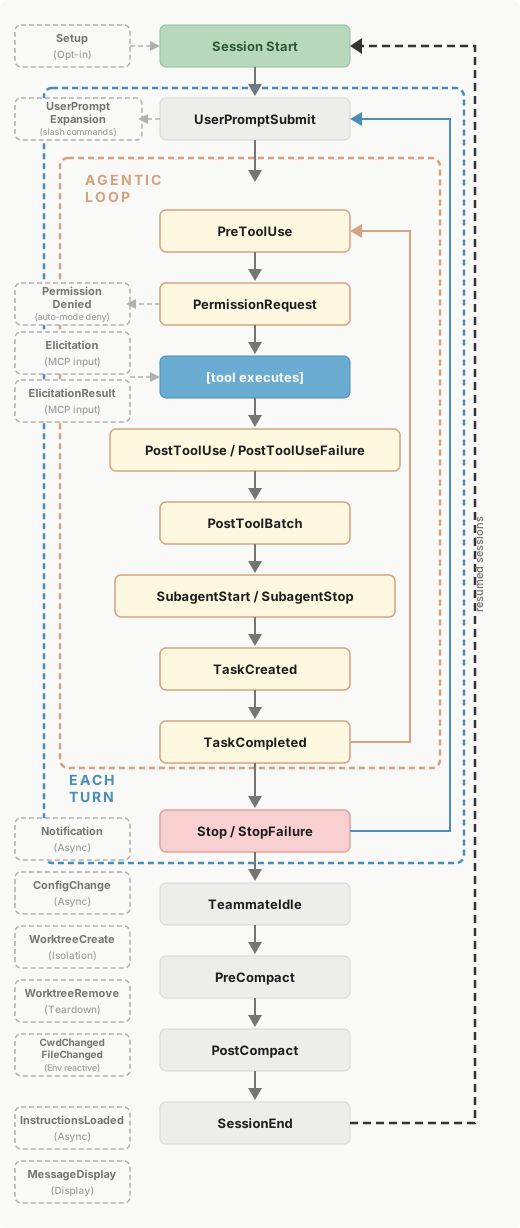
|
|
2861
|
+
|
|
2862
|
+
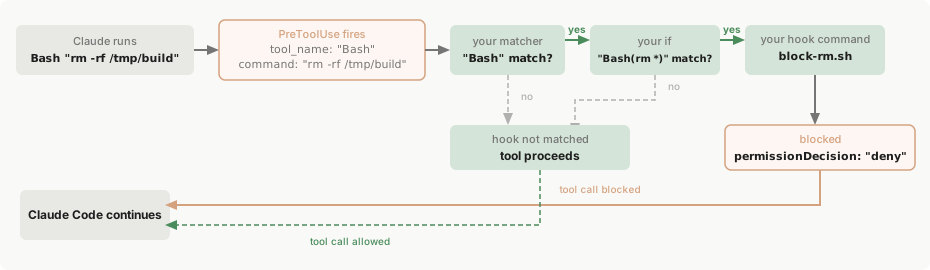
|