activitysmith 1.10.0 → 1.11.0
This diff represents the content of publicly available package versions that have been released to one of the supported registries. The information contained in this diff is provided for informational purposes only and reflects changes between package versions as they appear in their respective public registries.
- checksums.yaml +4 -4
- data/README.md +239 -236
- data/generated/activitysmith_openapi/configuration.rb +7 -0
- data/generated/activitysmith_openapi/models/app_icon_badge_count_update_error.rb +386 -0
- data/generated/activitysmith_openapi/models/app_icon_badge_count_update_response.rb +33 -11
- data/generated/activitysmith_openapi/models/live_activity_end_request.rb +63 -1
- data/generated/activitysmith_openapi/models/live_activity_limit_error.rb +25 -5
- data/generated/activitysmith_openapi/models/live_activity_start_request.rb +32 -1
- data/generated/activitysmith_openapi/models/live_activity_stream_delete_request.rb +44 -1
- data/generated/activitysmith_openapi/models/live_activity_stream_request.rb +32 -1
- data/generated/activitysmith_openapi/models/live_activity_update_request.rb +63 -1
- data/generated/activitysmith_openapi/models/metadata_value.rb +106 -0
- data/generated/activitysmith_openapi/models/push_notification_action.rb +1 -1
- data/generated/activitysmith_openapi/models/push_notification_request.rb +45 -5
- data/generated/activitysmith_openapi/models/update_app_icon_badge_count422_response.rb +105 -0
- data/generated/activitysmith_openapi/version.rb +1 -1
- data/generated/activitysmith_openapi.rb +3 -0
- data/generated/openapi-source.json +6 -0
- data/lib/activitysmith/live_activities.rb +6 -6
- data/lib/activitysmith/version.rb +1 -1
- metadata +6 -2
data/README.md
CHANGED
|
@@ -1,51 +1,35 @@
|
|
|
1
1
|
# ActivitySmith Ruby SDK
|
|
2
2
|
|
|
3
|
-
|
|
4
|
-
|
|
5
|
-
## Documentation
|
|
6
|
-
|
|
7
|
-
See [API reference](https://activitysmith.com/docs/api-reference/introduction).
|
|
8
|
-
|
|
9
|
-
## Table of Contents
|
|
10
|
-
|
|
11
|
-
- [Installation](#installation)
|
|
12
|
-
- [Setup](#setup)
|
|
13
|
-
- [Push Notifications](#push-notifications)
|
|
14
|
-
- [Send a Push Notification](#send-a-push-notification)
|
|
15
|
-
- [Rich Push Notifications with Media](#rich-push-notifications-with-media)
|
|
16
|
-
- [Actionable Push Notifications](#actionable-push-notifications)
|
|
17
|
-
- [Live Activities](#live-activities)
|
|
18
|
-
- [Start & Update Live Activity](#start--update-live-activity)
|
|
19
|
-
- [End Live Activity](#end-live-activity)
|
|
20
|
-
- [Live Activity Action](#live-activity-action)
|
|
21
|
-
- [Icons and Badges](#icons-and-badges)
|
|
22
|
-
- [Live Activity Colors](#live-activity-colors)
|
|
23
|
-
- [Widgets](#widgets)
|
|
24
|
-
- [App Icon Badge Count](#app-icon-badge-count)
|
|
25
|
-
- [Channels](#channels)
|
|
26
|
-
- [Tags](#tags)
|
|
3
|
+
[Documentation](https://activitysmith.com/docs/sdks/ruby)
|
|
27
4
|
|
|
28
5
|
## Installation
|
|
29
6
|
|
|
30
|
-
|
|
7
|
+
Install the ActivitySmith Ruby SDK with RubyGems:
|
|
8
|
+
|
|
9
|
+
```bash
|
|
31
10
|
gem install activitysmith
|
|
32
11
|
```
|
|
33
12
|
|
|
34
|
-
##
|
|
13
|
+
## Quickstart
|
|
14
|
+
|
|
15
|
+
1. [Create an API key](https://activitysmith.com/app/keys)
|
|
16
|
+
2. Set `ACTIVITYSMITH_API_KEY` or pass it directly to `ActivitySmith::Client`.
|
|
35
17
|
|
|
36
18
|
```ruby
|
|
37
19
|
require "activitysmith"
|
|
38
20
|
|
|
39
|
-
activitysmith = ActivitySmith::Client.new(
|
|
21
|
+
activitysmith = ActivitySmith::Client.new(
|
|
22
|
+
api_key: ENV["ACTIVITYSMITH_API_KEY"]
|
|
23
|
+
)
|
|
40
24
|
```
|
|
41
25
|
|
|
42
26
|
## Push Notifications
|
|
43
27
|
|
|
44
28
|
### Send a Push Notification
|
|
45
29
|
|
|
46
|
-
|
|
47
|
-
|
|
48
|
-
|
|
30
|
+
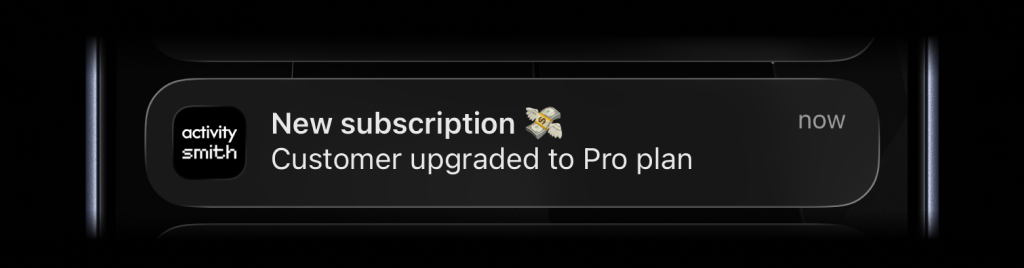
Send an immediate notification for a completed task or event.
|
|
31
|
+
|
|
32
|
+
|
|
49
33
|
|
|
50
34
|
```ruby
|
|
51
35
|
activitysmith.notifications.send(
|
|
@@ -58,26 +42,21 @@ activitysmith.notifications.send(
|
|
|
58
42
|
|
|
59
43
|
### Rich Push Notifications with Media
|
|
60
44
|
|
|
61
|
-
|
|
62
|
-
<img src="https://cdn.activitysmith.com/features/rich-push-notification-with-image.png" alt="Rich push notification with image" width="680" />
|
|
63
|
-
</p>
|
|
45
|
+
|
|
64
46
|
|
|
65
47
|
```ruby
|
|
66
48
|
activitysmith.notifications.send(
|
|
67
49
|
{
|
|
68
50
|
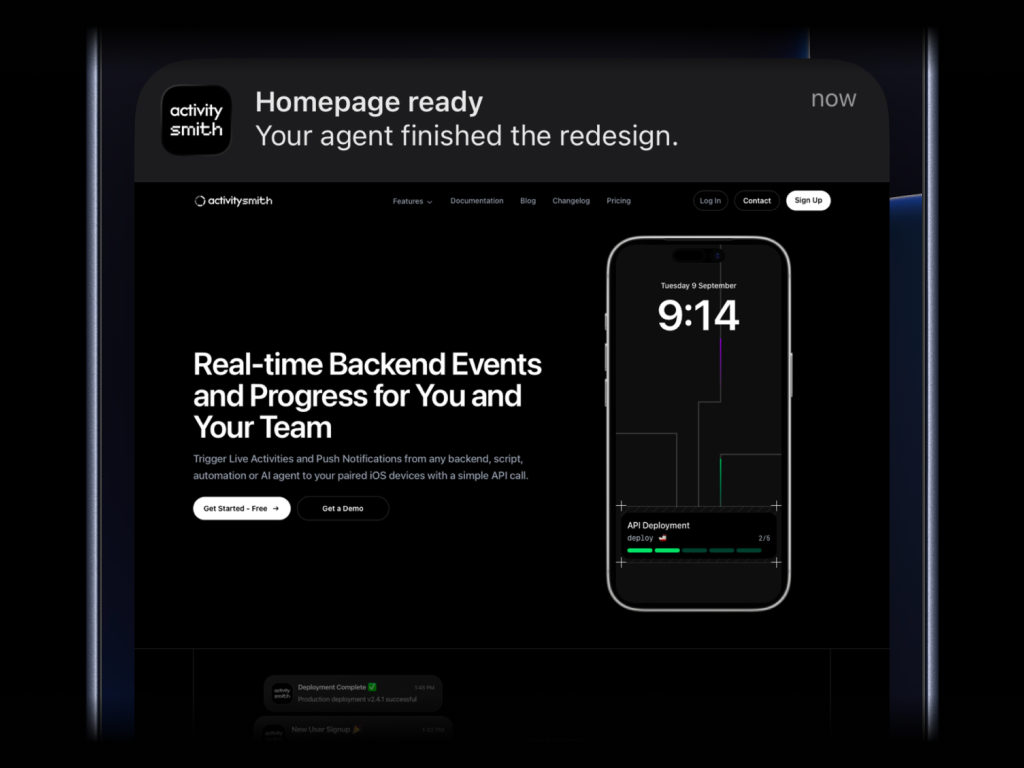
title: "Homepage ready",
|
|
69
51
|
message: "Your agent finished the redesign.",
|
|
70
|
-
media: "https://cdn.example.com/output/homepage-v2.png"
|
|
71
|
-
redirection: "https://github.com/acme/web/pull/482"
|
|
52
|
+
media: "https://cdn.example.com/output/homepage-v2.png"
|
|
72
53
|
}
|
|
73
54
|
)
|
|
74
55
|
```
|
|
75
56
|
|
|
76
|
-
|
|
57
|
+
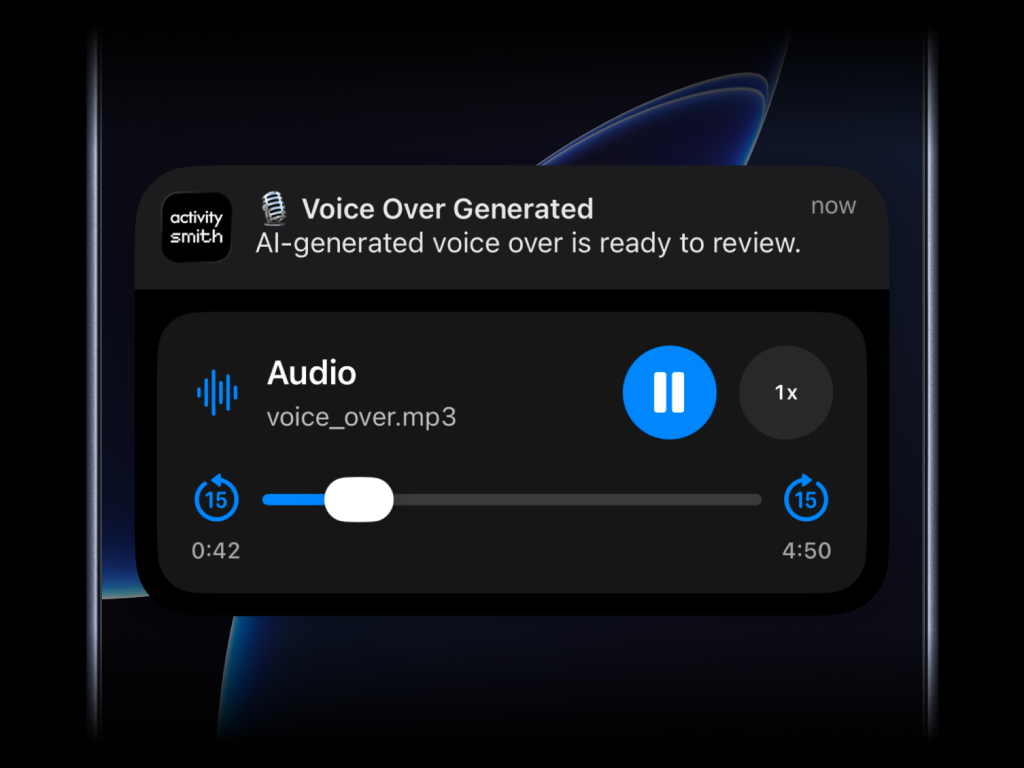
Attach images, videos, or audio to your Push Notifications. Press and hold the notification to preview the media.
|
|
77
58
|
|
|
78
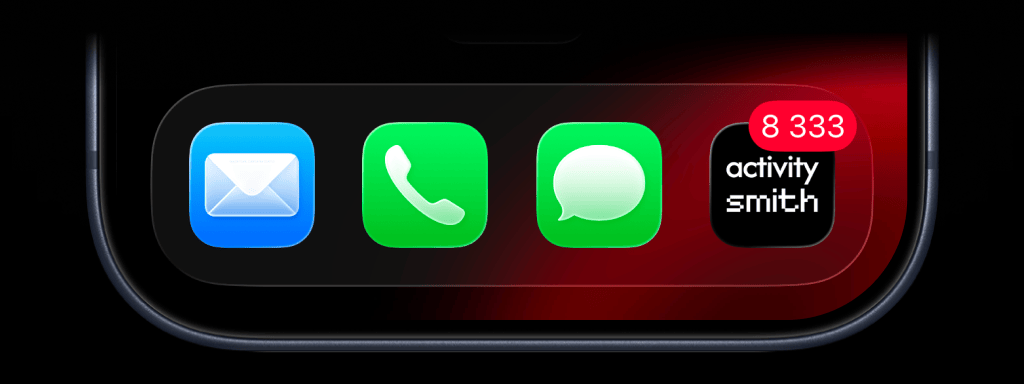
|
-
|
|
79
|
-
<img src="https://cdn.activitysmith.com/features/rich-push-notification-with-audio.png" alt="Rich push notification with audio" width="680" />
|
|
80
|
-
</p>
|
|
59
|
+
|
|
81
60
|
|
|
82
61
|
What will work:
|
|
83
62
|
|
|
@@ -86,24 +65,54 @@ What will work:
|
|
|
86
65
|
- direct video file URL: `.mp4`, `.mov`, etc.
|
|
87
66
|
- URL that responds with a proper media `Content-Type`, even if the path has no extension
|
|
88
67
|
|
|
68
|
+
`media` cannot be combined with `actions`.
|
|
69
|
+
|
|
70
|
+
### Push Notifications with Redirection
|
|
71
|
+
|
|
72
|
+
Open a web page, run an iOS Shortcut, or open an app when someone taps the notification. `redirection` supports:
|
|
73
|
+
|
|
74
|
+
- **HTTP/HTTPS:** Web pages, e.g. `https://example.com`
|
|
75
|
+
- **Shortcuts:** Run Jarvis with `shortcuts://run-shortcut?name=Jarvis` <!-- full-width -->
|
|
76
|
+
- **App deep links:** Installed apps or specific content within them
|
|
77
|
+
- **Spotify:** A track, e.g. `spotify:track:6rqhFgbbKwnb9MLmUQDhG6`
|
|
78
|
+
- **Termius:** `termius://` to open the app
|
|
79
|
+
- **Claude:** `claude://code` to open the Code tab
|
|
80
|
+
- **ChatGPT:** `chatgpt://` to open the app <!-- Verify ChatGPT URL scheme on iOS before publishing -->
|
|
81
|
+
|
|
82
|
+
```ruby
|
|
83
|
+
activitysmith.notifications.send(
|
|
84
|
+
{
|
|
85
|
+
title: "Homepage ready",
|
|
86
|
+
message: "Your agent finished the redesign.",
|
|
87
|
+
redirection: "https://github.com/acme/web/pull/482"
|
|
88
|
+
}
|
|
89
|
+
)
|
|
90
|
+
```
|
|
91
|
+
|
|
89
92
|
### Actionable Push Notifications
|
|
90
93
|
|
|
91
|
-
|
|
92
|
-
|
|
93
|
-
|
|
94
|
+
|
|
95
|
+
|
|
96
|
+
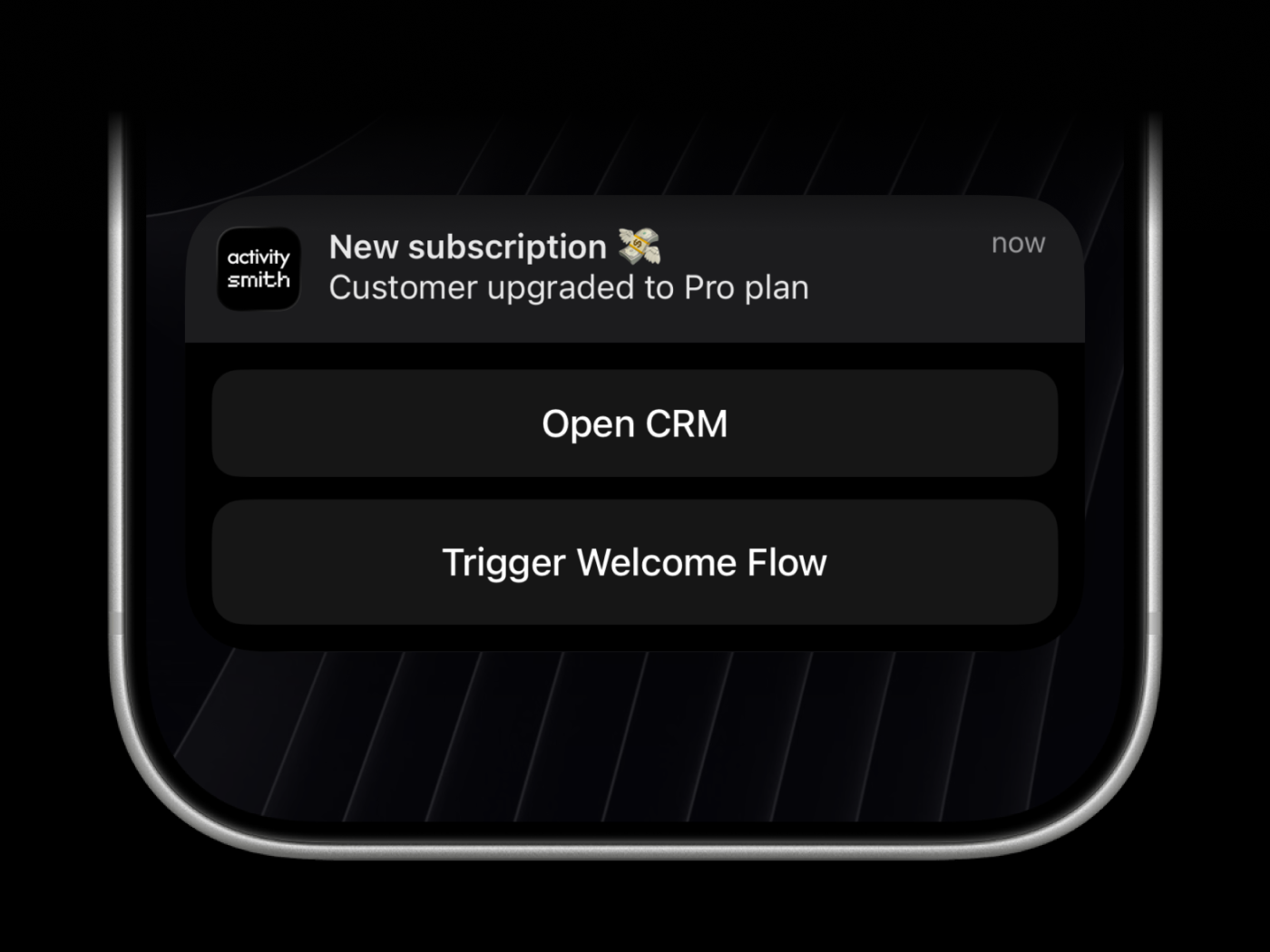
`open_url` actions open a web page, run an iOS Shortcut, or open an app when someone taps the button. Supported links:
|
|
94
97
|
|
|
95
|
-
|
|
96
|
-
|
|
98
|
+
- **HTTP/HTTPS:** Web pages, e.g. `https://example.com`
|
|
99
|
+
- **Shortcuts:** Run Jarvis with `shortcuts://run-shortcut?name=Jarvis` <!-- full-width -->
|
|
100
|
+
- **App deep links:** Installed apps or specific content within them
|
|
101
|
+
- **Spotify:** A track, e.g. `spotify:track:6rqhFgbbKwnb9MLmUQDhG6`
|
|
102
|
+
- **Termius:** `termius://` to open the app
|
|
103
|
+
- **Claude:** `claude://code` to open the Code tab
|
|
104
|
+
- **ChatGPT:** `chatgpt://` to open the app <!-- Verify ChatGPT URL scheme on iOS before publishing -->
|
|
105
|
+
|
|
106
|
+
Webhooks are executed by the ActivitySmith backend and must use HTTPS.
|
|
97
107
|
|
|
98
108
|
```ruby
|
|
99
109
|
activitysmith.notifications.send(
|
|
100
110
|
{
|
|
101
111
|
title: "New subscription 💸",
|
|
102
112
|
message: "Customer upgraded to Pro plan",
|
|
103
|
-
|
|
104
|
-
actions: [ # Optional (max 4)
|
|
113
|
+
actions: [
|
|
105
114
|
{
|
|
106
|
-
title: "Open CRM
|
|
115
|
+
title: "Open CRM",
|
|
107
116
|
type: "open_url",
|
|
108
117
|
url: "https://crm.example.com/customers/cus_9f3a1d"
|
|
109
118
|
},
|
|
@@ -129,14 +138,31 @@ activitysmith.notifications.send(
|
|
|
129
138
|
|
|
130
139
|
## Live Activities
|
|
131
140
|
|
|
132
|
-
|
|
141
|
+
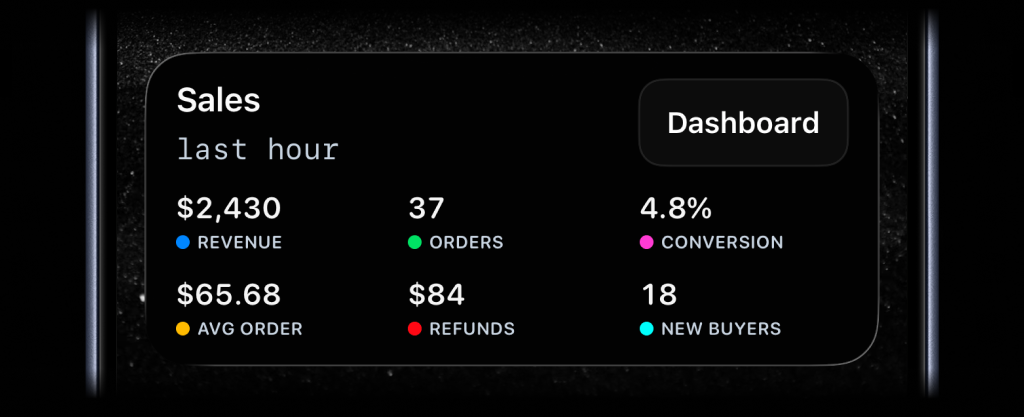
Choose the Live Activity type that matches what you want to show:
|
|
142
|
+
|
|
143
|
+
|
|
144
|
+
|
|
145
|
+
**Stats**: Show up to 8 labeled values on your Lock Screen, from revenue and orders to uptime and conversion.
|
|
146
|
+
|
|
147
|
+
|
|
148
|
+
|
|
149
|
+
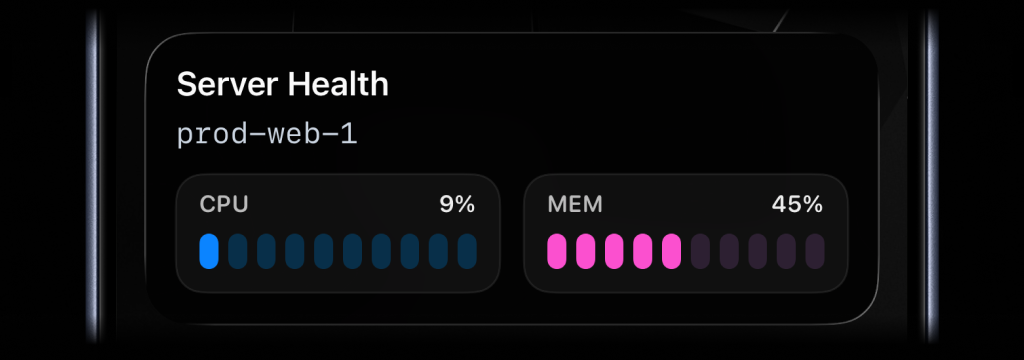
**Metrics**: Track two related values with segmented bars, such as CPU and memory.
|
|
150
|
+
|
|
151
|
+
|
|
133
152
|
|
|
134
|
-
|
|
135
|
-
|
|
136
|
-
|
|
137
|
-
|
|
138
|
-
|
|
139
|
-
|
|
153
|
+
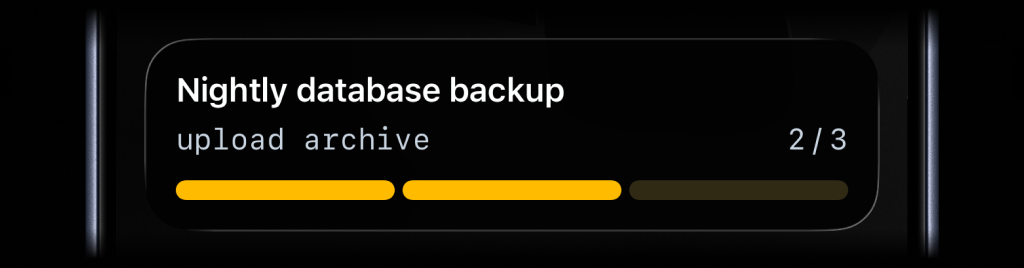
**Segmented Progress**: Show progress through a known set of steps, like build, test, deploy, and verify.
|
|
154
|
+
|
|
155
|
+
|
|
156
|
+
|
|
157
|
+
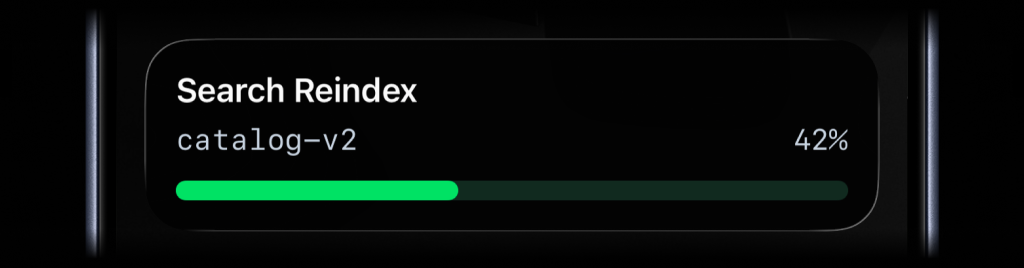
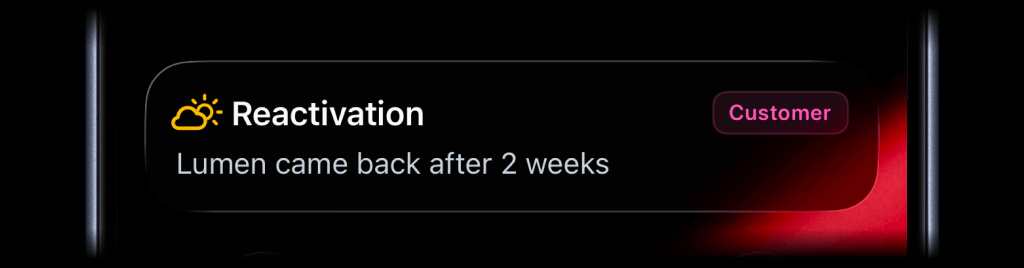
**Progress**: Show percentage progress for jobs that move continuously toward completion.
|
|
158
|
+
|
|
159
|
+
|
|
160
|
+
|
|
161
|
+
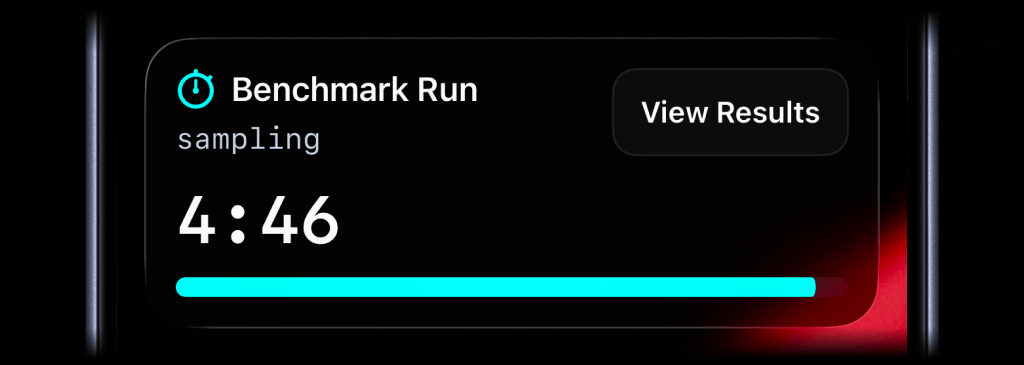
**Alert**: Show status updates with a clear message, badge, and icon. When you add an action button, `color` controls the button tint.
|
|
162
|
+
|
|
163
|
+
|
|
164
|
+
|
|
165
|
+
**Timer**: Count down from a duration, or count up from 00:00 while a job runs.
|
|
140
166
|
|
|
141
167
|
### Start & Update Live Activity
|
|
142
168
|
|
|
@@ -144,13 +170,7 @@ Use a stable `stream_key` to identify the metric, job, deployment, or system you
|
|
|
144
170
|
|
|
145
171
|
#### Stats
|
|
146
172
|
|
|
147
|
-
|
|
148
|
-
<img
|
|
149
|
-
src="https://cdn.activitysmith.com/features/stats-live-activity.png"
|
|
150
|
-
alt="Stats Live Activity stream example"
|
|
151
|
-
width="680"
|
|
152
|
-
/>
|
|
153
|
-
</p>
|
|
173
|
+

|
|
154
174
|
|
|
155
175
|
```ruby
|
|
156
176
|
activitysmith.live_activities.stream(
|
|
@@ -175,13 +195,7 @@ activitysmith.live_activities.stream(
|
|
|
175
195
|
|
|
176
196
|
#### Metrics
|
|
177
197
|
|
|
178
|
-
|
|
179
|
-
<img
|
|
180
|
-
src="https://cdn.activitysmith.com/features/metrics-live-activity-start.png"
|
|
181
|
-
alt="Metrics Live Activity stream example"
|
|
182
|
-
width="680"
|
|
183
|
-
/>
|
|
184
|
-
</p>
|
|
198
|
+

|
|
185
199
|
|
|
186
200
|
```ruby
|
|
187
201
|
activitysmith.live_activities.stream(
|
|
@@ -202,13 +216,7 @@ activitysmith.live_activities.stream(
|
|
|
202
216
|
|
|
203
217
|
#### Segmented Progress
|
|
204
218
|
|
|
205
|
-
|
|
206
|
-
<img
|
|
207
|
-
src="https://cdn.activitysmith.com/features/update-live-activity.png"
|
|
208
|
-
alt="Segmented Progress Live Activity stream example"
|
|
209
|
-
width="680"
|
|
210
|
-
/>
|
|
211
|
-
</p>
|
|
219
|
+

|
|
212
220
|
|
|
213
221
|
```ruby
|
|
214
222
|
activitysmith.live_activities.stream(
|
|
@@ -227,13 +235,7 @@ activitysmith.live_activities.stream(
|
|
|
227
235
|
|
|
228
236
|
#### Progress
|
|
229
237
|
|
|
230
|
-
|
|
231
|
-
<img
|
|
232
|
-
src="https://cdn.activitysmith.com/features/progress-live-activity.png"
|
|
233
|
-
alt="Progress Live Activity stream example"
|
|
234
|
-
width="680"
|
|
235
|
-
/>
|
|
236
|
-
</p>
|
|
238
|
+

|
|
237
239
|
|
|
238
240
|
```ruby
|
|
239
241
|
activitysmith.live_activities.stream(
|
|
@@ -251,13 +253,7 @@ activitysmith.live_activities.stream(
|
|
|
251
253
|
|
|
252
254
|
#### Alert
|
|
253
255
|
|
|
254
|
-
|
|
255
|
-
<img
|
|
256
|
-
src="https://cdn.activitysmith.com/features/alert-live-activity.png"
|
|
257
|
-
alt="Alert Live Activity stream example"
|
|
258
|
-
width="680"
|
|
259
|
-
/>
|
|
260
|
-
</p>
|
|
256
|
+

|
|
261
257
|
|
|
262
258
|
```ruby
|
|
263
259
|
activitysmith.live_activities.stream(
|
|
@@ -276,13 +272,7 @@ activitysmith.live_activities.stream(
|
|
|
276
272
|
|
|
277
273
|
#### Timer
|
|
278
274
|
|
|
279
|
-
|
|
280
|
-
<img
|
|
281
|
-
src="https://cdn.activitysmith.com/features/timer-live-activity.png"
|
|
282
|
-
alt="Timer Live Activity showing a benchmark run countdown"
|
|
283
|
-
width="680"
|
|
284
|
-
/>
|
|
285
|
-
</p>
|
|
275
|
+

|
|
286
276
|
|
|
287
277
|
```ruby
|
|
288
278
|
activitysmith.live_activities.stream(
|
|
@@ -305,7 +295,7 @@ To start at 00:00 and count up, set `counts_down: false` and leave out `duration
|
|
|
305
295
|
|
|
306
296
|
### End Live Activity
|
|
307
297
|
|
|
308
|
-
Call `end_stream(...)` with the same `stream_key` to dismiss the Live Activity. You can include final values before it is removed.
|
|
298
|
+
Call `end_stream(...)` with the same `stream_key` to dismiss the Live Activity. You can include final values before it is removed. Set `auto_dismiss_seconds` to dismiss it after a delay in seconds, or `auto_dismiss_minutes` for minutes. Use `0` for immediate dismissal. Seconds take precedence if both are set.
|
|
309
299
|
|
|
310
300
|
```ruby
|
|
311
301
|
activitysmith.live_activities.end_stream(
|
|
@@ -319,30 +309,89 @@ activitysmith.live_activities.end_stream(
|
|
|
319
309
|
{ label: "CPU", value: 7, unit: "%" },
|
|
320
310
|
{ label: "MEM", value: 38, unit: "%" }
|
|
321
311
|
],
|
|
322
|
-
|
|
312
|
+
auto_dismiss_seconds: 30
|
|
323
313
|
}
|
|
324
314
|
}
|
|
325
315
|
)
|
|
326
316
|
```
|
|
327
317
|
|
|
318
|
+
### Icons and Badges
|
|
319
|
+
|
|
320
|
+
Add more context to Live Activities with icons and badges.
|
|
321
|
+
|
|
322
|
+
#### Icon
|
|
323
|
+
|
|
324
|
+
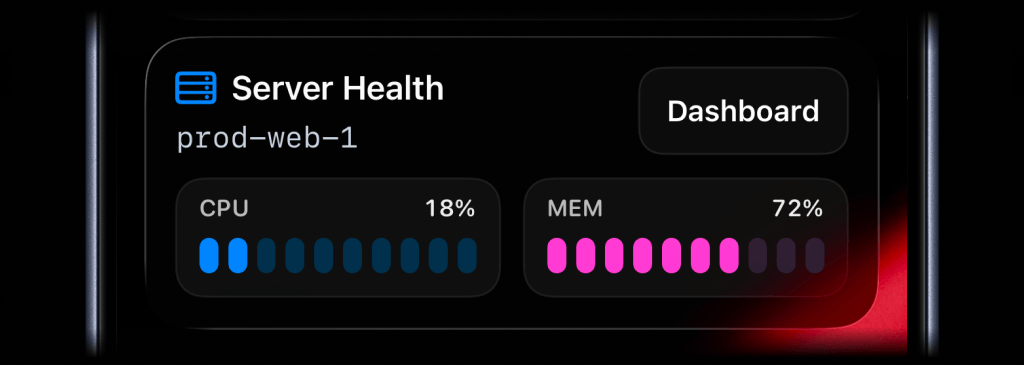
Supported Live Activity types: `stats`, `metrics`, `progress`, `segmented_progress`, `alert`, and `timer`.
|
|
325
|
+
|
|
326
|
+
|
|
327
|
+
|
|
328
|
+
```ruby
|
|
329
|
+
activitysmith.live_activities.stream(
|
|
330
|
+
"prod-web-1",
|
|
331
|
+
{
|
|
332
|
+
content_state: ActivitySmith::LiveActivities.content_state(
|
|
333
|
+
title: "Server Health",
|
|
334
|
+
subtitle: "prod-web-1",
|
|
335
|
+
type: "metrics",
|
|
336
|
+
icon: ActivitySmith::LiveActivities.alert_icon("server.rack", color: "blue"),
|
|
337
|
+
metrics: [
|
|
338
|
+
{ label: "CPU", value: 18, unit: "%" },
|
|
339
|
+
{ label: "MEM", value: 42, unit: "%" }
|
|
340
|
+
]
|
|
341
|
+
)
|
|
342
|
+
}
|
|
343
|
+
)
|
|
344
|
+
```
|
|
345
|
+
|
|
346
|
+
The `icon` symbol value is an Apple SF Symbol name. Browse the catalog with one of these tools:
|
|
347
|
+
|
|
348
|
+
- [ActivitySmith app](https://apps.apple.com/us/app/activitysmith/id6752254835) - Open Settings -> SF Symbols to browse 45 hand-picked icons ready to use
|
|
349
|
+
- [SF Symbols](https://developer.apple.com/sf-symbols/) - Apple's official macOS app
|
|
350
|
+
- [Interactful](https://apps.apple.com/app/interactful/id1528095640) - free third-party iOS app listing all SF Symbols under Foundations -> Iconography
|
|
351
|
+
|
|
352
|
+
#### Badge
|
|
353
|
+
|
|
354
|
+
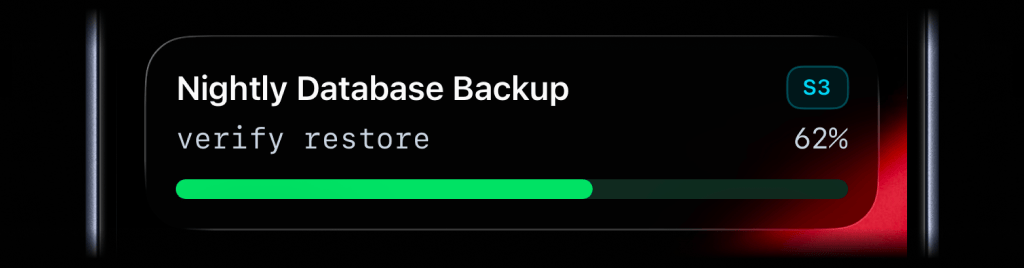
Badges are supported by `alert`, `progress`, and `segmented_progress` Live Activities.
|
|
355
|
+
|
|
356
|
+
|
|
357
|
+
|
|
358
|
+
```ruby
|
|
359
|
+
activitysmith.live_activities.stream(
|
|
360
|
+
"nightly-database-backup",
|
|
361
|
+
{
|
|
362
|
+
content_state: ActivitySmith::LiveActivities.content_state(
|
|
363
|
+
title: "Nightly Database Backup",
|
|
364
|
+
subtitle: "verify restore",
|
|
365
|
+
type: "progress",
|
|
366
|
+
badge: ActivitySmith::LiveActivities.alert_badge("S3", color: "cyan"),
|
|
367
|
+
percentage: 62
|
|
368
|
+
)
|
|
369
|
+
}
|
|
370
|
+
)
|
|
371
|
+
```
|
|
372
|
+
|
|
373
|
+
### Live Activity Colors
|
|
374
|
+
|
|
375
|
+
Choose from these colors for the Live Activity accent, including progress bars and action buttons, or apply them to an individual icon or badge:
|
|
376
|
+
|
|
377
|
+
`lime`, `green`, `cyan`, `blue`, `purple`, `magenta`, `red`, `orange`, `yellow`, `gray`
|
|
378
|
+
|
|
328
379
|
### Live Activity Action
|
|
329
380
|
|
|
330
|
-
Live
|
|
381
|
+
|
|
331
382
|
|
|
332
|
-
|
|
333
|
-
- `open_url` with a `shortcuts://` URL: run an Apple Shortcut, for example to open an app.
|
|
334
|
-
- `webhook`: trigger a backend GET/POST workflow.
|
|
383
|
+
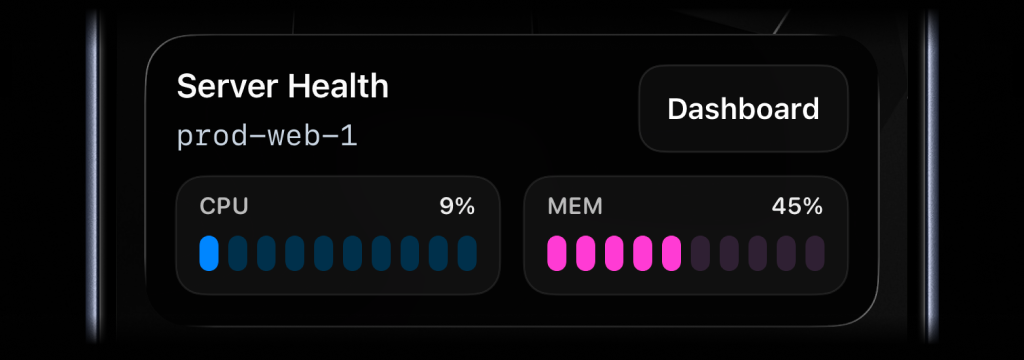
Live Activities can include an action button.
|
|
335
384
|
|
|
336
|
-
|
|
337
|
-
|
|
338
|
-
src="https://cdn.activitysmith.com/features/metrics-live-activity-action.png"
|
|
339
|
-
alt="Live Activity with action button"
|
|
340
|
-
width="680"
|
|
341
|
-
/>
|
|
342
|
-
</p>
|
|
385
|
+
- `open_url`: Open a web page or run an iOS Shortcut
|
|
386
|
+
- `webhook`: Trigger a backend GET/POST workflow
|
|
343
387
|
|
|
344
388
|
#### Open URL action
|
|
345
389
|
|
|
390
|
+
Open a web page or run an iOS Shortcut when someone taps the button. Supported links:
|
|
391
|
+
|
|
392
|
+
- **HTTP/HTTPS:** Web pages, e.g. `https://example.com`
|
|
393
|
+
- **Shortcuts:** Run Jarvis with `shortcuts://run-shortcut?name=Jarvis` <!-- full-width -->
|
|
394
|
+
|
|
346
395
|
```ruby
|
|
347
396
|
activitysmith.live_activities.stream(
|
|
348
397
|
"prod-web-1",
|
|
@@ -359,7 +408,7 @@ activitysmith.live_activities.stream(
|
|
|
359
408
|
action: {
|
|
360
409
|
title: "Dashboard",
|
|
361
410
|
type: "open_url",
|
|
362
|
-
url: "https://
|
|
411
|
+
url: "https://status.example.com/servers/prod-web-1"
|
|
363
412
|
}
|
|
364
413
|
}
|
|
365
414
|
)
|
|
@@ -369,14 +418,16 @@ activitysmith.live_activities.stream(
|
|
|
369
418
|
|
|
370
419
|
```ruby
|
|
371
420
|
activitysmith.live_activities.stream(
|
|
372
|
-
"
|
|
421
|
+
"prod-web-1",
|
|
373
422
|
{
|
|
374
423
|
content_state: {
|
|
375
|
-
title: "
|
|
376
|
-
subtitle: "
|
|
377
|
-
type: "
|
|
378
|
-
|
|
379
|
-
|
|
424
|
+
title: "Server Health",
|
|
425
|
+
subtitle: "prod-web-1",
|
|
426
|
+
type: "metrics",
|
|
427
|
+
metrics: [
|
|
428
|
+
{ label: "CPU", value: 76, unit: "%" },
|
|
429
|
+
{ label: "MEM", value: 52, unit: "%" }
|
|
430
|
+
]
|
|
380
431
|
},
|
|
381
432
|
action: {
|
|
382
433
|
title: "Chat with Jarvis",
|
|
@@ -416,13 +467,7 @@ activitysmith.live_activities.stream(
|
|
|
416
467
|
|
|
417
468
|
#### Secondary action
|
|
418
469
|
|
|
419
|
-
|
|
420
|
-
<img
|
|
421
|
-
src="https://cdn.activitysmith.com/features/live-activity-secondary-action.png"
|
|
422
|
-
alt="Alert Live Activity with primary and secondary action buttons"
|
|
423
|
-
width="680"
|
|
424
|
-
/>
|
|
425
|
-
</p>
|
|
470
|
+
|
|
426
471
|
|
|
427
472
|
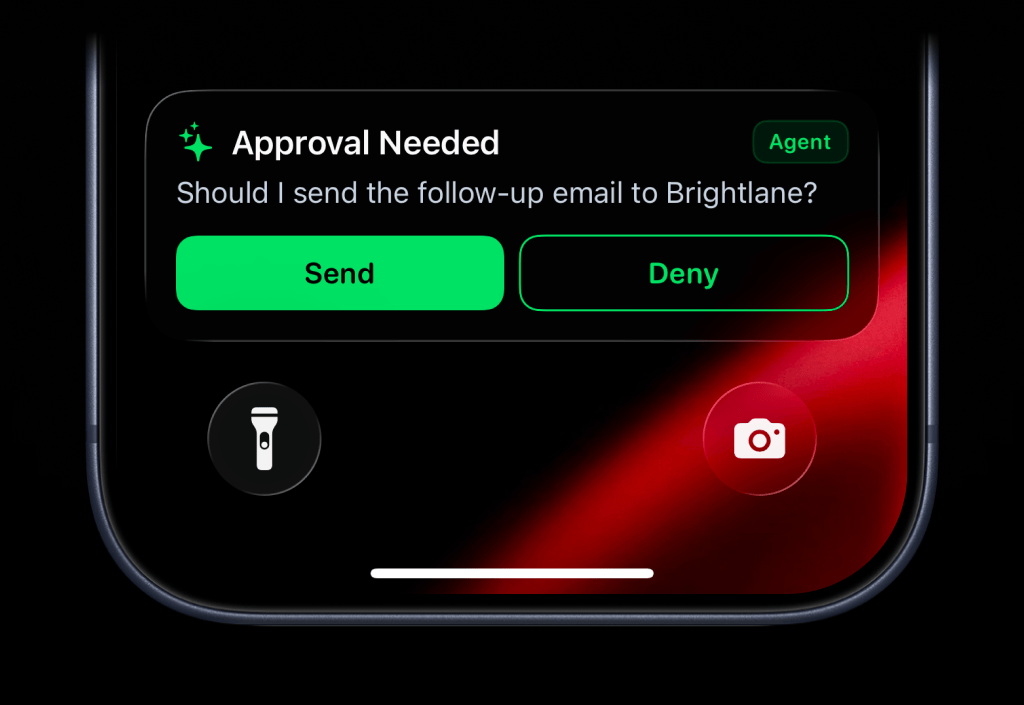
Use `secondary_action` when you want a second button beside the primary `action`.
|
|
428
473
|
|
|
@@ -464,90 +509,15 @@ activitysmith.live_activities.stream(
|
|
|
464
509
|
)
|
|
465
510
|
```
|
|
466
511
|
|
|
467
|
-
|
|
468
|
-
|
|
469
|
-
Add more context to Live Activities with icons and badges.
|
|
470
|
-
|
|
471
|
-
#### Icon
|
|
472
|
-
|
|
473
|
-
Supported Live Activity types: `stats`, `metrics`, `progress`, `segmented_progress`, `alert`, and `timer`.
|
|
474
|
-
|
|
475
|
-
<p align="center">
|
|
476
|
-
<img
|
|
477
|
-
src="https://cdn.activitysmith.com/features/metrics-live-activity-with-icon.png"
|
|
478
|
-
alt="Metrics Live Activity with an SF Symbol icon on the iPhone Lock Screen"
|
|
479
|
-
width="680"
|
|
480
|
-
/>
|
|
481
|
-
</p>
|
|
482
|
-
|
|
483
|
-
```ruby
|
|
484
|
-
activitysmith.live_activities.stream(
|
|
485
|
-
"prod-web-1",
|
|
486
|
-
{
|
|
487
|
-
content_state: ActivitySmith::LiveActivities.content_state(
|
|
488
|
-
title: "Server Health",
|
|
489
|
-
subtitle: "prod-web-1",
|
|
490
|
-
type: "metrics",
|
|
491
|
-
icon: ActivitySmith::LiveActivities.alert_icon("server.rack", color: "blue"),
|
|
492
|
-
metrics: [
|
|
493
|
-
{ label: "CPU", value: 18, unit: "%" },
|
|
494
|
-
{ label: "MEM", value: 42, unit: "%" }
|
|
495
|
-
]
|
|
496
|
-
)
|
|
497
|
-
}
|
|
498
|
-
)
|
|
499
|
-
```
|
|
500
|
-
|
|
501
|
-
The `icon` symbol value is an Apple SF Symbol name. Browse the catalog with one of these tools:
|
|
502
|
-
|
|
503
|
-
- [ActivitySmith app](https://apps.apple.com/us/app/activitysmith/id6752254835) - Open Settings -> SF Symbols to browse 45 hand-picked icons ready to use
|
|
504
|
-
- [SF Symbols](https://developer.apple.com/sf-symbols/) - Apple's official macOS app
|
|
505
|
-
- [Interactful](https://apps.apple.com/app/interactful/id1528095640) - free third-party iOS app listing all SF Symbols under Foundations -> Iconography
|
|
506
|
-
|
|
507
|
-
#### Badge
|
|
508
|
-
|
|
509
|
-
Badges are supported by `alert`, `progress`, and `segmented_progress` Live Activities.
|
|
510
|
-
|
|
511
|
-
<p align="center">
|
|
512
|
-
<img
|
|
513
|
-
src="https://cdn.activitysmith.com/features/progress-live-activity-with-badge.png"
|
|
514
|
-
alt="Progress Live Activity with a badge on the iPhone Lock Screen"
|
|
515
|
-
width="680"
|
|
516
|
-
/>
|
|
517
|
-
</p>
|
|
518
|
-
|
|
519
|
-
```ruby
|
|
520
|
-
activitysmith.live_activities.stream(
|
|
521
|
-
"nightly-database-backup",
|
|
522
|
-
{
|
|
523
|
-
content_state: ActivitySmith::LiveActivities.content_state(
|
|
524
|
-
title: "Nightly Database Backup",
|
|
525
|
-
subtitle: "verify restore",
|
|
526
|
-
type: "progress",
|
|
527
|
-
badge: ActivitySmith::LiveActivities.alert_badge("S3", color: "cyan"),
|
|
528
|
-
percentage: 62
|
|
529
|
-
)
|
|
530
|
-
}
|
|
531
|
-
)
|
|
532
|
-
```
|
|
512
|
+
## Lock Screen Widgets
|
|
533
513
|
|
|
534
|
-
|
|
535
|
-
|
|
536
|
-
Choose from these colors for the Live Activity accent, including progress bars and action buttons, or apply them to an individual icon or badge:
|
|
514
|
+
|
|
537
515
|
|
|
538
|
-
|
|
516
|
+
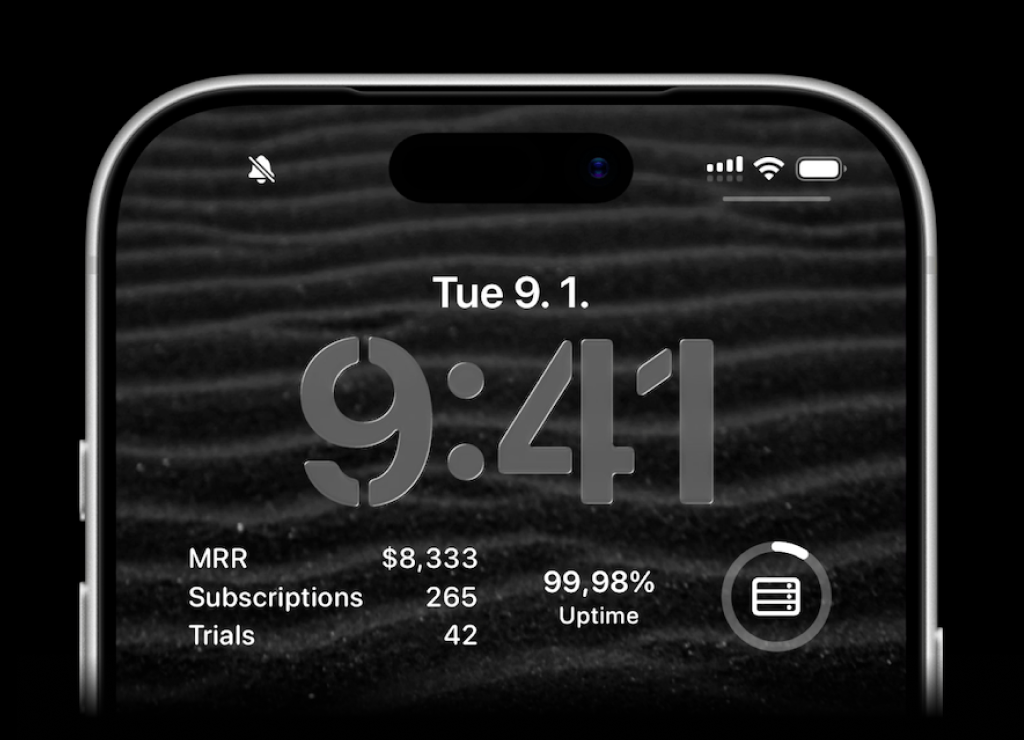
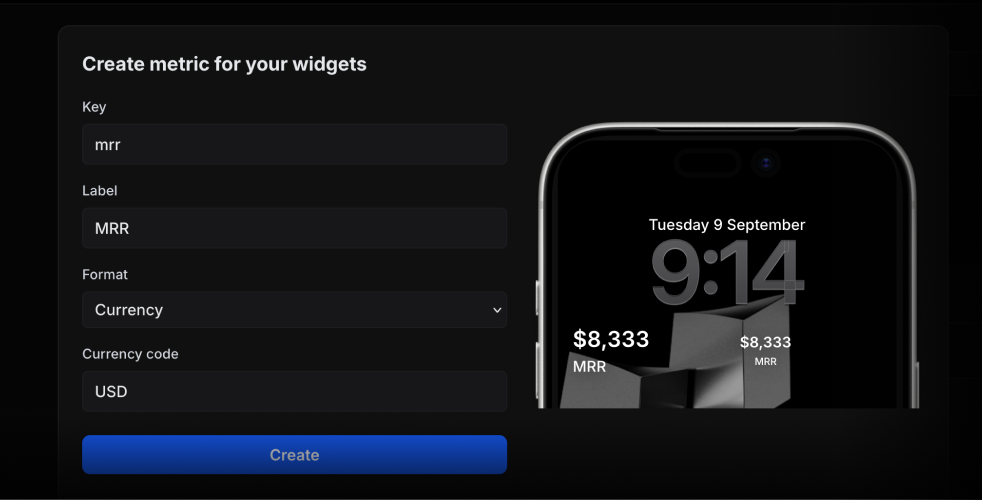
ActivitySmith lets you display any value on your Lock Screen with widgets - SaaS metrics, revenue, signups, uptime, habits, or anything else you want to track. Create a metric in the [web app](https://activitysmith.com/app/widgets), then update the metric value using our API, add a widget to your lock screen and it will fetch the latest update automatically.
|
|
539
517
|
|
|
540
|
-
|
|
518
|
+
|
|
541
519
|
|
|
542
|
-
|
|
543
|
-
<img src="https://cdn.activitysmith.com/features/lock-screen-widgets.png" alt="Lock screen widgets" width="680" />
|
|
544
|
-
</p>
|
|
545
|
-
|
|
546
|
-
ActivitySmith lets you display any value on your Lock Screen with widgets - SaaS metrics, revenue, signups, uptime, habits, or anything else you want to track. Create a metric in the <a href="https://activitysmith.com/app/widgets" target="_blank" rel="noopener noreferrer">web app</a>, then update the metric value using our API, add a widget to your lock screen and it will fetch the latest update automatically.
|
|
547
|
-
|
|
548
|
-
<p align="center">
|
|
549
|
-
<img src="https://cdn.activitysmith.com/features/create-widget-metric.png" alt="Create widget metric" width="680" />
|
|
550
|
-
</p>
|
|
520
|
+
Use the metric key to update its value.
|
|
551
521
|
|
|
552
522
|
```ruby
|
|
553
523
|
activitysmith.metrics.update("deploy.success_rate", 99.9)
|
|
@@ -561,92 +531,125 @@ activitysmith.metrics.update("prod.status", "healthy")
|
|
|
561
531
|
|
|
562
532
|
## App Icon Badge Count
|
|
563
533
|
|
|
564
|
-
|
|
565
|
-
<img src="https://cdn.activitysmith.com/features/badge-count.png" alt="ActivitySmith app icon with an App Icon Badge Count" width="680" />
|
|
566
|
-
</p>
|
|
534
|
+
|
|
567
535
|
|
|
568
536
|
Show the number you care about on your ActivitySmith app icon. Track MRR, a customer count, a stock price, or any other value you want to keep in view.
|
|
569
537
|
|
|
570
|
-
Set or update the badge value
|
|
538
|
+
### Set or update the badge value
|
|
571
539
|
|
|
572
540
|
```ruby
|
|
573
541
|
activitysmith.badge_count(8333)
|
|
574
542
|
```
|
|
575
543
|
|
|
576
|
-
|
|
544
|
+
### Clear the badge
|
|
545
|
+
|
|
546
|
+
Pass `0` to clear the badge.
|
|
577
547
|
|
|
578
548
|
```ruby
|
|
579
549
|
activitysmith.badge_count(0)
|
|
580
550
|
```
|
|
581
551
|
|
|
582
|
-
##
|
|
583
|
-
|
|
584
|
-
Use `channels` to target specific team members or devices
|
|
552
|
+
## Metadata
|
|
585
553
|
|
|
586
|
-
|
|
554
|
+
Metadata adds extra information to Push Notification and Live Activity details in ActivitySmith. It does not appear in the notification or Live Activity on your device.
|
|
587
555
|
|
|
588
556
|
```ruby
|
|
589
557
|
activitysmith.notifications.send(
|
|
590
|
-
|
|
591
|
-
|
|
592
|
-
|
|
593
|
-
|
|
558
|
+
title: "New subscription 💸",
|
|
559
|
+
message: "Customer upgraded to Pro plan",
|
|
560
|
+
metadata: {
|
|
561
|
+
customer_id: "382",
|
|
562
|
+
plan: "Pro",
|
|
563
|
+
amount: 29,
|
|
564
|
+
trial: false,
|
|
565
|
+
}
|
|
566
|
+
)
|
|
567
|
+
|
|
568
|
+
activitysmith.live_activities.stream(
|
|
569
|
+
"customer-import",
|
|
570
|
+
content_state: {
|
|
571
|
+
title: "Customer Import",
|
|
572
|
+
type: "progress",
|
|
573
|
+
percentage: 60,
|
|
574
|
+
},
|
|
575
|
+
metadata: {
|
|
576
|
+
job_id: "import-382",
|
|
577
|
+
records: 1200,
|
|
594
578
|
}
|
|
595
579
|
)
|
|
596
580
|
```
|
|
597
581
|
|
|
598
|
-
|
|
582
|
+
Values can be strings, numbers, or booleans. Metadata supports up to 50 entries and 16 KB of JSON, with keys up to 100 characters and strings up to 4,000 characters. Nested objects, arrays, and null values are not supported.
|
|
583
|
+
|
|
584
|
+
## Tags
|
|
585
|
+
|
|
586
|
+
Use `tags` to organize and filter your Push Notification and Live Activity history. Tags are created automatically when you first use them.
|
|
599
587
|
|
|
600
588
|
```ruby
|
|
601
|
-
activitysmith.
|
|
589
|
+
activitysmith.notifications.send(
|
|
602
590
|
{
|
|
603
|
-
|
|
604
|
-
|
|
605
|
-
|
|
606
|
-
type: "progress",
|
|
607
|
-
percentage: 62
|
|
608
|
-
},
|
|
609
|
-
channels: ["sales", "customer-success"]
|
|
591
|
+
title: "New subscription 💸",
|
|
592
|
+
message: "Customer upgraded to Pro plan",
|
|
593
|
+
tags: ["user:382", "billing"]
|
|
610
594
|
}
|
|
611
595
|
)
|
|
612
596
|
```
|
|
613
597
|
|
|
614
|
-
|
|
598
|
+
On Live Activity stream updates and legacy `update` or `end` calls, omit `tags` to keep existing Tags, supply a list to replace them, or pass `tags: []` to clear them.
|
|
615
599
|
|
|
616
600
|
```ruby
|
|
617
|
-
activitysmith.
|
|
601
|
+
activitysmith.live_activities.update(
|
|
602
|
+
activity_id: "YOUR_ACTIVITY_ID",
|
|
603
|
+
content_state: { title: "Customer Import", percentage: 60 },
|
|
604
|
+
tags: []
|
|
605
|
+
)
|
|
618
606
|
```
|
|
619
607
|
|
|
620
|
-
##
|
|
608
|
+
## Channels
|
|
621
609
|
|
|
622
|
-
Use `
|
|
610
|
+
Use `channels` to target specific team members or devices when sending Push Notifications, Live Activities, or App Icon Badge Count updates. Omit it for account-wide delivery.
|
|
623
611
|
|
|
624
612
|
```ruby
|
|
625
613
|
activitysmith.notifications.send(
|
|
626
614
|
{
|
|
627
615
|
title: "New subscription 💸",
|
|
628
616
|
message: "Customer upgraded to Pro plan",
|
|
629
|
-
|
|
617
|
+
channels: ["sales", "customer-success"]
|
|
630
618
|
}
|
|
631
619
|
)
|
|
620
|
+
|
|
621
|
+
activitysmith.live_activities.stream(
|
|
622
|
+
"nightly-backup",
|
|
623
|
+
{
|
|
624
|
+
channels: ["ios-builds"],
|
|
625
|
+
content_state: {
|
|
626
|
+
title: "Nightly database backup",
|
|
627
|
+
number_of_steps: 3,
|
|
628
|
+
current_step: 1,
|
|
629
|
+
type: "segmented_progress"
|
|
630
|
+
}
|
|
631
|
+
}
|
|
632
|
+
)
|
|
633
|
+
|
|
634
|
+
activitysmith.badge_count(3, channels: ["sales", "customer-success"])
|
|
632
635
|
```
|
|
633
636
|
|
|
634
637
|
## Error Handling
|
|
635
638
|
|
|
639
|
+
Handle API errors with `begin/rescue` around SDK calls:
|
|
640
|
+
|
|
636
641
|
```ruby
|
|
637
642
|
begin
|
|
638
643
|
activitysmith.notifications.send(
|
|
639
|
-
{ title: "
|
|
644
|
+
{ title: "Hello" }
|
|
640
645
|
)
|
|
641
646
|
rescue OpenapiClient::ApiError => err
|
|
642
647
|
puts "Request failed: #{err.code} #{err.message}"
|
|
643
648
|
end
|
|
644
649
|
```
|
|
645
650
|
|
|
646
|
-
##
|
|
647
|
-
|
|
648
|
-
- Ruby 3.0+
|
|
651
|
+
## Additional Resources
|
|
649
652
|
|
|
650
|
-
|
|
653
|
+
### [RubyGems Package](https://rubygems.org/gems/activitysmith)
|
|
651
654
|
|
|
652
|
-
|
|
655
|
+
Install the ActivitySmith Ruby SDK from RubyGems
|