active_admin_filters_visibility 1.2.0 → 2.0.0
This diff represents the content of publicly available package versions that have been released to one of the supported registries. The information contained in this diff is provided for informational purposes only and reflects changes between package versions as they appear in their respective public registries.
- checksums.yaml +4 -4
- data/README.md +123 -100
- data/app/assets/stylesheets/active_admin_filters_visibility.css +132 -0
- data/app/javascript/active_admin_filters_visibility.js +310 -0
- data/config/importmap.rb +3 -0
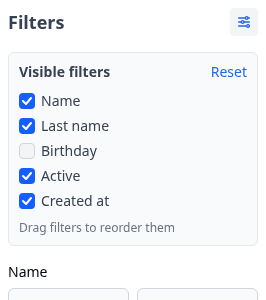
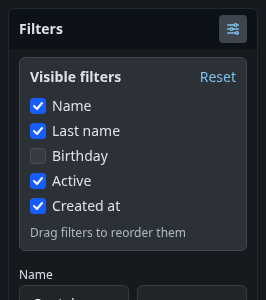
- data/lib/active_admin_filters_visibility/version.rb +1 -1
- data/lib/active_admin_filters_visibility.rb +20 -0
- metadata +17 -18
- data/Gemfile +0 -3
- data/Rakefile +0 -1
- data/active_admin_filters_visibility.gemspec +0 -20
- data/app/assets/javascripts/active_admin_filters_visibility.js +0 -517
- data/screen/example_aa_filters_ordering.gif +0 -0
- data/screen/example_aa_filters_visibility.gif +0 -0
checksums.yaml
CHANGED
|
@@ -1,7 +1,7 @@
|
|
|
1
1
|
---
|
|
2
2
|
SHA256:
|
|
3
|
-
metadata.gz:
|
|
4
|
-
data.tar.gz:
|
|
3
|
+
metadata.gz: ef2f0a0b40aeab41223bab4bdbf833331ff90dd8a42be7594cc40a671f7d7933
|
|
4
|
+
data.tar.gz: 0d301b7a25542654538e829dc4ef5876b4a1d8b1e6bf591c5fdd610f3559883d
|
|
5
5
|
SHA512:
|
|
6
|
-
metadata.gz:
|
|
7
|
-
data.tar.gz:
|
|
6
|
+
metadata.gz: 7fd066e68a3ec246acc07d945ca2b408120951310e4c649619e3e54582059d88bfd6c3b405d98cd8c6c2aa0be83eecb39a64c9c0a61859406d13e4d435d321b7
|
|
7
|
+
data.tar.gz: c003498a330c464ff2fe298c8befa69a2ec24abc0ab12263a08fd8b8241aa4241491da30df5bed273ec491534a1455bd8b5682b6371fe03b5da8310d27689c5a
|
data/README.md
CHANGED
|
@@ -1,145 +1,168 @@
|
|
|
1
|
+
[](https://badge.fury.io/rb/active_admin_filters_visibility)
|
|
2
|
+
[](https://badge.fury.io/js/@activeadmin-plugins%2Factive_admin_filters_visibility)
|
|
3
|
+

|
|
4
|
+
|
|
1
5
|
# ActiveAdminFiltersVisibility
|
|
2
6
|
|
|
3
|
-
ActiveAdmin
|
|
4
|
-
Useful when page has many filters, but admin user needs only some of them.
|
|
5
|
-
Every filter saves its state using browser's LocalStorage.
|
|
7
|
+
Lets an admin hide filters in the ActiveAdmin filters sidebar, and optionally reorder them. Useful when a page has many filters and each admin needs only some of them. The choice is saved per page in the browser's localStorage.
|
|
6
8
|
|
|
7
|
-
|
|
10
|
+
|
|
8
11
|
|
|
9
|
-
|
|
12
|
+
Version 2 supports ActiveAdmin 4 only. For ActiveAdmin 3, use version 1.x. See [Upgrading from 1.x](#upgrading-from-1x).
|
|
10
13
|
|
|
11
|
-
|
|
14
|
+
It works with stock ActiveAdmin 4 and with [active_admin_theme](https://github.com/activeadmin-plugins/active_admin_theme) 4, which wraps the filters sidebar in a panel: the toggle goes into the panel header.
|
|
12
15
|
|
|
13
16
|
## Install
|
|
14
17
|
|
|
15
|
-
In Gemfile add
|
|
16
|
-
|
|
17
18
|
```ruby
|
|
18
|
-
|
|
19
|
+
gem 'active_admin_filters_visibility'
|
|
19
20
|
```
|
|
20
21
|
|
|
21
|
-
|
|
22
|
-
```
|
|
23
|
-
app/assets/javascript/active_admin.coffee
|
|
24
|
-
```
|
|
22
|
+
### JavaScript
|
|
25
23
|
|
|
26
|
-
|
|
24
|
+
The gem pins the `active_admin_filters_visibility` module into `ActiveAdmin.importmap`, the import map ActiveAdmin pages render. ActiveAdmin pages then need to import it. Pick the route that matches your app:
|
|
27
25
|
|
|
28
|
-
|
|
29
|
-
|
|
30
|
-
|
|
26
|
+
- **ActiveAdmin with the `javascript_modules` setting** ([activeadmin/activeadmin#9148](https://github.com/activeadmin/activeadmin/pull/9148)): nothing to do. The gem adds itself to that setting.
|
|
27
|
+
- **active_admin_theme 4**: add the module to the theme's list in an initializer:
|
|
28
|
+
|
|
29
|
+
```ruby
|
|
30
|
+
ActiveAdminTheme.javascripts += %w[active_admin_filters_visibility]
|
|
31
|
+
```
|
|
31
32
|
|
|
32
|
-
and
|
|
33
|
+
- **Otherwise**: copy `app/views/active_admin/_html_head.html.erb` from ActiveAdmin into your app and add this line after `javascript_importmap_tags`:
|
|
33
34
|
|
|
34
|
-
```
|
|
35
|
-
|
|
36
|
-
|
|
37
|
-
|
|
35
|
+
```erb
|
|
36
|
+
<%= javascript_import_module_tag "active_admin_filters_visibility" %>
|
|
37
|
+
```
|
|
38
|
+
|
|
39
|
+
**jsbundling hosts** install the npm package and import it from the ActiveAdmin entry file:
|
|
40
|
+
|
|
41
|
+
```sh
|
|
42
|
+
npm install @activeadmin-plugins/active_admin_filters_visibility
|
|
38
43
|
```
|
|
39
44
|
|
|
40
|
-
|
|
45
|
+
```javascript
|
|
46
|
+
import "@activeadmin-plugins/active_admin_filters_visibility"
|
|
47
|
+
```
|
|
41
48
|
|
|
42
|
-
|
|
43
|
-
|
|
49
|
+
The module sets itself up on `#filters_sidebar_section` when the page loads.
|
|
50
|
+
|
|
51
|
+
### CSS
|
|
52
|
+
|
|
53
|
+
The styles are plain CSS. Import them into the Tailwind entry file that builds ActiveAdmin's stylesheet (usually `app/assets/stylesheets/active_admin.css`), after `@import "tailwindcss"`.
|
|
54
|
+
|
|
55
|
+
From the npm package:
|
|
56
|
+
|
|
57
|
+
```css
|
|
58
|
+
@import "@activeadmin-plugins/active_admin_filters_visibility/css";
|
|
44
59
|
```
|
|
45
60
|
|
|
46
|
-
|
|
47
|
-
Default is:
|
|
61
|
+
Or from the installed gem. Its path differs between machines, so write it into a gitignored file before each CSS build instead of committing it:
|
|
48
62
|
|
|
49
|
-
```
|
|
50
|
-
|
|
51
|
-
sidebarUniqId: function() {
|
|
52
|
-
return window.location.pathname;
|
|
53
|
-
},
|
|
54
|
-
icon: '☶',
|
|
55
|
-
iconClass: '',
|
|
56
|
-
iconStyle: '',
|
|
57
|
-
skipDefaultCss: false,
|
|
58
|
-
title: 'Visibility:',
|
|
59
|
-
ordering: false,
|
|
60
|
-
orderHint: 'Drag&Drop to reorder filters',
|
|
61
|
-
resetButtonTitle: 'Reset'
|
|
62
|
-
}
|
|
63
|
+
```sh
|
|
64
|
+
echo "@import \"$(bundle show active_admin_filters_visibility)/app/assets/stylesheets/active_admin_filters_visibility.css\";" > app/assets/stylesheets/active_admin_filters_visibility.generated.css
|
|
63
65
|
```
|
|
64
66
|
|
|
65
|
-
|
|
66
|
-
|
|
67
|
+
```css
|
|
68
|
+
@import "./active_admin_filters_visibility.generated.css";
|
|
69
|
+
```
|
|
67
70
|
|
|
68
|
-
|
|
69
|
-
In case you want to use custom CSS, default styling can be ignored:
|
|
70
|
-
set ```skipDefaultCss``` to ```true```
|
|
71
|
+
Dark mode follows the `.dark` class on `<html>`, as ActiveAdmin 4 does. With active_admin_theme the colors follow the theme's `--aat-*` custom properties.
|
|
71
72
|
|
|
73
|
+
## Configuration
|
|
72
74
|
|
|
73
|
-
|
|
75
|
+
Change `defaults` from a module that ActiveAdmin pages import. The plugin sets itself up on `DOMContentLoaded`, after every module has run, so the new values apply:
|
|
74
76
|
|
|
75
|
-
|
|
77
|
+
```javascript
|
|
78
|
+
import { defaults } from "active_admin_filters_visibility"
|
|
76
79
|
|
|
80
|
+
defaults.ordering = true
|
|
81
|
+
defaults.title = "Filtres visibles"
|
|
82
|
+
```
|
|
77
83
|
|
|
78
|
-
|
|
79
|
-
|
|
84
|
+
| Option | Default | Description |
|
|
85
|
+
| --- | --- | --- |
|
|
86
|
+
| `autoInit` | `true` | Set up the filters sidebar on page load. Set to `false` to call `setup()` yourself. |
|
|
87
|
+
| `selector` | `"#filters_sidebar_section"` | The sidebar section to set up on page load. |
|
|
88
|
+
| `storageKey` | `() => window.location.pathname` | The key the state is saved under. One key per page by default. |
|
|
89
|
+
| `ordering` | `false` | Let admins reorder filters by drag and drop, or with Alt+Up and Alt+Down on a focused filter. |
|
|
90
|
+
| `icon` | sliders SVG | HTML for the toggle button. |
|
|
91
|
+
| `buttonLabel` | `"Choose visible filters"` | The toggle's `aria-label` and tooltip. |
|
|
92
|
+
| `title` | `"Visible filters"` | The panel title. |
|
|
93
|
+
| `resetLabel` | `"Reset"` | The reset button text. |
|
|
94
|
+
| `orderHint` | `"Drag filters, or press Alt+Up or Alt+Down on one, to reorder them"` | The hint shown when ordering is on. |
|
|
80
95
|
|
|
96
|
+
To set up a section by hand, pass options for that call only:
|
|
81
97
|
|
|
82
|
-
|
|
98
|
+
```javascript
|
|
99
|
+
import { defaults, setup } from "active_admin_filters_visibility"
|
|
100
|
+
|
|
101
|
+
defaults.autoInit = false
|
|
102
|
+
document.addEventListener("DOMContentLoaded", () => {
|
|
103
|
+
setup(document.getElementById("filters_sidebar_section"), { ordering: true })
|
|
104
|
+
})
|
|
105
|
+
```
|
|
106
|
+
|
|
107
|
+
### Filters with a value stay visible
|
|
83
108
|
|
|
84
|
-
|
|
85
|
-
This was made for preventing unpredictable filtering: for example when user came to page by some link with predefined filtering params.
|
|
86
|
-
All default filters types(string, numeric, date range, etc.) are implemented.
|
|
87
|
-
But if you have some specific filter, you need to add custom handler.
|
|
109
|
+
A hidden filter that has a value when the page loads stays visible, for example when an admin follows a link with filter params. Otherwise the list would be filtered by something the admin cannot see.
|
|
88
110
|
|
|
89
|
-
|
|
90
|
-
And you want to consider "1" as default value and allow hiding it.
|
|
91
|
-
In this case you should add uniq class to wrapper.
|
|
111
|
+
The plugin detects a value by the filter's type, which is a class on the filter wrapper (`select`, `string`, `date_range`, ...). Select and boolean filters count a selected option with a value. Every other type counts a filled text field or a checked box. To change that for one filter, give its wrapper a class and register a detector for it. A detector you register wins over the built-in ones, whatever the class order:
|
|
92
112
|
|
|
93
113
|
```ruby
|
|
94
|
-
filter :id, wrapper_html: { class: '
|
|
114
|
+
filter :id, wrapper_html: { class: 'customized-id' }
|
|
95
115
|
```
|
|
96
116
|
|
|
97
117
|
```javascript
|
|
98
|
-
|
|
99
|
-
// elWrapper is jQuery element "div.filter_form_field.filter_customized_id"
|
|
100
|
-
// if not "1" then consider this filter as active, and return TRUE to prevent hiding
|
|
101
|
-
$.fn.activeAdminFiltersVisibility.registerFilterType('customized_id', function(elWrapper) {
|
|
102
|
-
var inputValue = elWrapper.find('input').val();
|
|
103
|
-
return inputValue != '1';
|
|
104
|
-
});
|
|
105
|
-
```
|
|
118
|
+
import { registerFilterType } from "active_admin_filters_visibility"
|
|
106
119
|
|
|
120
|
+
// Return true when the filter has a value. "1" counts as empty here.
|
|
121
|
+
registerFilterType("customized-id", (wrapper) => {
|
|
122
|
+
const value = wrapper.querySelector("input:not([type=hidden])").value
|
|
123
|
+
return value !== "" && value !== "1"
|
|
124
|
+
})
|
|
125
|
+
```
|
|
107
126
|
|
|
108
127
|
### Saving state
|
|
109
128
|
|
|
110
|
-
|
|
111
|
-
If you need to save this in cookies or user profile, you should write your own implementation - rewrite "$.fn.activeAdminFiltersVisibility.storage".
|
|
112
|
-
For example:
|
|
129
|
+
The state is saved in localStorage under `active_admin_filters_visibility:<storageKey>`, as JSON: `{"hidden": ["q_name_input"], "order": [...]}`. Filters are identified by the id of their wrapper (`q_<attribute>_input`). To save it elsewhere, replace the `storage` methods:
|
|
113
130
|
|
|
114
131
|
```javascript
|
|
115
|
-
|
|
116
|
-
|
|
117
|
-
|
|
118
|
-
|
|
119
|
-
|
|
120
|
-
|
|
121
|
-
|
|
122
|
-
|
|
123
|
-
|
|
124
|
-
|
|
125
|
-
|
|
126
|
-
|
|
127
|
-
|
|
128
|
-
|
|
129
|
-
|
|
130
|
-
|
|
131
|
-
|
|
132
|
-
|
|
133
|
-
|
|
134
|
-
|
|
135
|
-
|
|
136
|
-
|
|
137
|
-
|
|
138
|
-
|
|
139
|
-
|
|
140
|
-
|
|
141
|
-
|
|
142
|
-
|
|
143
|
-
|
|
144
|
-
|
|
132
|
+
import { storage } from "active_admin_filters_visibility"
|
|
133
|
+
|
|
134
|
+
storage.load = (key) => myStore.read(key) || {}
|
|
135
|
+
storage.save = (key, state) => myStore.write(key, state)
|
|
136
|
+
storage.clear = (key) => myStore.delete(key)
|
|
137
|
+
```
|
|
138
|
+
|
|
139
|
+
### Test hooks
|
|
140
|
+
|
|
141
|
+
The markup the plugin adds carries `data-*` attributes, so tests do not depend on CSS classes:
|
|
142
|
+
|
|
143
|
+
- `data-filters-visibility` on the sidebar section once it is set up.
|
|
144
|
+
- `data-filters-visibility-header` on the header that holds the toggle.
|
|
145
|
+
- `data-filters-visibility-toggle` on the toggle button. It also has `aria-expanded`, and `data-filters-visibility-active` while any filter is hidden.
|
|
146
|
+
- `data-filters-visibility-panel` on the panel.
|
|
147
|
+
- `data-filters-visibility-item="<wrapper id>"` on each row and `data-filters-visibility-checkbox="<wrapper id>"` on its checkbox.
|
|
148
|
+
- `data-filters-visibility-reset` on the reset button.
|
|
149
|
+
- `data-filters-visibility-hidden` on a hidden filter wrapper.
|
|
150
|
+
|
|
151
|
+
## Upgrading from 1.x
|
|
152
|
+
|
|
153
|
+
- ActiveAdmin 4 only. ActiveAdmin 3 apps stay on 1.x.
|
|
154
|
+
- No jQuery and no Sprockets. The asset is an ES module loaded through ActiveAdmin's import map or the npm package, and it sets itself up: remove the `$('#filters_sidebar_section').activeAdminFiltersVisibility()` call.
|
|
155
|
+
- Options moved from the jQuery call to `defaults`. `iconClass`, `iconStyle` and `skipDefaultCss` are gone: style the toggle with CSS, or leave the stylesheet out. `sidebarUniqId` is now `storageKey`. `$.fn.activeAdminFiltersVisibility.registerFilterType` and `.storage` are now the `registerFilterType` export and the `storage` object.
|
|
156
|
+
- The styles are a stylesheet you import into the ActiveAdmin Tailwind build. They are no longer injected at runtime.
|
|
157
|
+
- Saved state uses a new key and format, and identifies filters by wrapper id instead of label text. Hidden filters and custom orders saved by 1.x are not carried over.
|
|
158
|
+
- Reset is always shown and no longer reloads the page.
|
|
159
|
+
- Filter type detectors are keyed by any class on the wrapper, such as Formtastic's type (`select`) or a class you set, instead of a `filter_<type>` class.
|
|
160
|
+
|
|
161
|
+
## Development
|
|
162
|
+
|
|
163
|
+
```sh
|
|
164
|
+
bundle exec rspec
|
|
165
|
+
BUNDLE_GEMFILE=gemfiles/active_admin_theme.gemfile bundle exec rspec
|
|
145
166
|
```
|
|
167
|
+
|
|
168
|
+
The second run uses active_admin_theme from git. Set `ACTIVE_ADMIN_THEME_PATH` to use a local checkout. The specs build the dummy app's stylesheet with the standalone Tailwind CLI from `tailwindcss-ruby`.
|
|
@@ -0,0 +1,132 @@
|
|
|
1
|
+
/*
|
|
2
|
+
* Styles for active_admin_filters_visibility. Plain CSS: import it into the
|
|
3
|
+
* ActiveAdmin Tailwind entry file after `@import "tailwindcss"`.
|
|
4
|
+
*
|
|
5
|
+
* Colors are custom properties. They follow active_admin_theme's `--aat-*`
|
|
6
|
+
* colors when the theme is present and fall back to ActiveAdmin 4's grays.
|
|
7
|
+
* Dark mode keys on the `.dark` class, as ActiveAdmin 4 does.
|
|
8
|
+
*/
|
|
9
|
+
|
|
10
|
+
.filters-visibility-header,
|
|
11
|
+
.filters-visibility-panel {
|
|
12
|
+
--filters-visibility-text: var(--aat-text, #374151);
|
|
13
|
+
--filters-visibility-muted: var(--aat-text-muted, #6b7280);
|
|
14
|
+
--filters-visibility-border: var(--aat-border, #e5e7eb);
|
|
15
|
+
--filters-visibility-surface: var(--aat-surface-2, #f9fafb);
|
|
16
|
+
--filters-visibility-hover: var(--aat-surface-hover, #f3f4f6);
|
|
17
|
+
--filters-visibility-accent: var(--aat-link, #2563eb);
|
|
18
|
+
}
|
|
19
|
+
|
|
20
|
+
:where(.dark, .dark *):is(.filters-visibility-header, .filters-visibility-panel) {
|
|
21
|
+
--filters-visibility-text: var(--aat-text, #e5e7eb);
|
|
22
|
+
--filters-visibility-muted: var(--aat-text-muted, #9ca3af);
|
|
23
|
+
--filters-visibility-border: var(--aat-border, #374151);
|
|
24
|
+
--filters-visibility-surface: var(--aat-surface-2, #1f2937);
|
|
25
|
+
--filters-visibility-hover: var(--aat-surface-hover, #374151);
|
|
26
|
+
--filters-visibility-accent: var(--aat-link, #60a5fa);
|
|
27
|
+
}
|
|
28
|
+
|
|
29
|
+
.filters-visibility-header {
|
|
30
|
+
display: flex;
|
|
31
|
+
align-items: center;
|
|
32
|
+
justify-content: space-between;
|
|
33
|
+
gap: 0.5rem;
|
|
34
|
+
}
|
|
35
|
+
|
|
36
|
+
.filters-visibility-toggle {
|
|
37
|
+
display: inline-flex;
|
|
38
|
+
flex: none;
|
|
39
|
+
align-items: center;
|
|
40
|
+
justify-content: center;
|
|
41
|
+
width: 1.75rem;
|
|
42
|
+
height: 1.75rem;
|
|
43
|
+
padding: 0;
|
|
44
|
+
border: 0;
|
|
45
|
+
border-radius: 0.25rem;
|
|
46
|
+
background: transparent;
|
|
47
|
+
color: var(--filters-visibility-muted);
|
|
48
|
+
font: inherit;
|
|
49
|
+
cursor: pointer;
|
|
50
|
+
}
|
|
51
|
+
|
|
52
|
+
.filters-visibility-toggle:hover,
|
|
53
|
+
.filters-visibility-toggle[aria-expanded="true"] {
|
|
54
|
+
background-color: var(--filters-visibility-hover);
|
|
55
|
+
color: var(--filters-visibility-text);
|
|
56
|
+
}
|
|
57
|
+
|
|
58
|
+
.filters-visibility-toggle:focus-visible {
|
|
59
|
+
outline: 2px solid var(--filters-visibility-accent);
|
|
60
|
+
outline-offset: 1px;
|
|
61
|
+
}
|
|
62
|
+
|
|
63
|
+
/* Some filters are hidden. */
|
|
64
|
+
.filters-visibility-toggle-active,
|
|
65
|
+
.filters-visibility-toggle-active:hover {
|
|
66
|
+
color: var(--filters-visibility-accent);
|
|
67
|
+
}
|
|
68
|
+
|
|
69
|
+
.filters-visibility-panel {
|
|
70
|
+
margin-bottom: 1rem;
|
|
71
|
+
padding: 0.5rem 0.625rem;
|
|
72
|
+
border: 1px solid var(--filters-visibility-border);
|
|
73
|
+
border-radius: 0.375rem;
|
|
74
|
+
background-color: var(--filters-visibility-surface);
|
|
75
|
+
color: var(--filters-visibility-text);
|
|
76
|
+
font-size: 0.875rem;
|
|
77
|
+
font-weight: normal;
|
|
78
|
+
}
|
|
79
|
+
|
|
80
|
+
.filters-visibility-panel[hidden],
|
|
81
|
+
.filters-form-field[data-filters-visibility-hidden] {
|
|
82
|
+
display: none;
|
|
83
|
+
}
|
|
84
|
+
|
|
85
|
+
.filters-visibility-panel-header {
|
|
86
|
+
display: flex;
|
|
87
|
+
align-items: center;
|
|
88
|
+
justify-content: space-between;
|
|
89
|
+
gap: 0.5rem;
|
|
90
|
+
margin-bottom: 0.375rem;
|
|
91
|
+
}
|
|
92
|
+
|
|
93
|
+
.filters-visibility-reset {
|
|
94
|
+
padding: 0;
|
|
95
|
+
border: 0;
|
|
96
|
+
background: transparent;
|
|
97
|
+
color: var(--filters-visibility-accent);
|
|
98
|
+
font: inherit;
|
|
99
|
+
cursor: pointer;
|
|
100
|
+
}
|
|
101
|
+
|
|
102
|
+
.filters-visibility-reset:hover {
|
|
103
|
+
text-decoration: underline;
|
|
104
|
+
}
|
|
105
|
+
|
|
106
|
+
.filters-visibility-list {
|
|
107
|
+
margin: 0;
|
|
108
|
+
padding: 0;
|
|
109
|
+
list-style: none;
|
|
110
|
+
}
|
|
111
|
+
|
|
112
|
+
.filters-visibility-item label {
|
|
113
|
+
display: flex;
|
|
114
|
+
align-items: center;
|
|
115
|
+
gap: 0.375rem;
|
|
116
|
+
padding: 0.125rem 0;
|
|
117
|
+
cursor: pointer;
|
|
118
|
+
}
|
|
119
|
+
|
|
120
|
+
.filters-visibility-item[draggable="true"] label {
|
|
121
|
+
cursor: grab;
|
|
122
|
+
}
|
|
123
|
+
|
|
124
|
+
.filters-visibility-item[data-filters-visibility-dragging] {
|
|
125
|
+
opacity: 0.5;
|
|
126
|
+
}
|
|
127
|
+
|
|
128
|
+
.filters-visibility-hint {
|
|
129
|
+
margin: 0.375rem 0 0;
|
|
130
|
+
color: var(--filters-visibility-muted);
|
|
131
|
+
font-size: 0.75rem;
|
|
132
|
+
}
|