zic-player 0.1.0__tar.gz
This diff represents the content of publicly available package versions that have been released to one of the supported registries. The information contained in this diff is provided for informational purposes only and reflects changes between package versions as they appear in their respective public registries.
- zic_player-0.1.0/LICENSE +21 -0
- zic_player-0.1.0/PKG-INFO +353 -0
- zic_player-0.1.0/README.md +317 -0
- zic_player-0.1.0/pyproject.toml +85 -0
- zic_player-0.1.0/setup.cfg +4 -0
- zic_player-0.1.0/src/zic/__init__.py +0 -0
- zic_player-0.1.0/src/zic/api.py +1082 -0
- zic_player-0.1.0/src/zic/app.py +513 -0
- zic_player-0.1.0/src/zic/config.py +161 -0
- zic_player-0.1.0/src/zic/dialogs/__init__.py +0 -0
- zic_player-0.1.0/src/zic/dialogs/album_info_dialog.py +174 -0
- zic_player-0.1.0/src/zic/dialogs/first_launch_dialog.py +138 -0
- zic_player-0.1.0/src/zic/dialogs/metadata_dialog.py +215 -0
- zic_player-0.1.0/src/zic/dialogs/song_info_dialog.py +113 -0
- zic_player-0.1.0/src/zic/dialogs/task_dialog.py +338 -0
- zic_player-0.1.0/src/zic/ingestor/__init__.py +0 -0
- zic_player-0.1.0/src/zic/ingestor/discogs_secret.py +42 -0
- zic_player-0.1.0/src/zic/ingestor/genres.py +171 -0
- zic_player-0.1.0/src/zic/ingestor/ingest.py +1023 -0
- zic_player-0.1.0/src/zic/ingestor/progress.py +296 -0
- zic_player-0.1.0/src/zic/logging.py +42 -0
- zic_player-0.1.0/src/zic/main.py +178 -0
- zic_player-0.1.0/src/zic/models/__init__.py +0 -0
- zic_player-0.1.0/src/zic/models/album.py +29 -0
- zic_player-0.1.0/src/zic/models/artist.py +8 -0
- zic_player-0.1.0/src/zic/models/genre.py +13 -0
- zic_player-0.1.0/src/zic/models/playlist.py +66 -0
- zic_player-0.1.0/src/zic/models/song.py +54 -0
- zic_player-0.1.0/src/zic/resources/__init__.py +6 -0
- zic_player-0.1.0/src/zic/resources/icons/artist.png +0 -0
- zic_player-0.1.0/src/zic/resources/icons/burger-bar.png +0 -0
- zic_player-0.1.0/src/zic/resources/icons/close.png +0 -0
- zic_player-0.1.0/src/zic/resources/icons/dislike.png +0 -0
- zic_player-0.1.0/src/zic/resources/icons/down-arrow.png +0 -0
- zic_player-0.1.0/src/zic/resources/icons/filter.png +0 -0
- zic_player-0.1.0/src/zic/resources/icons/folder.png +0 -0
- zic_player-0.1.0/src/zic/resources/icons/info.png +0 -0
- zic_player-0.1.0/src/zic/resources/icons/like.png +0 -0
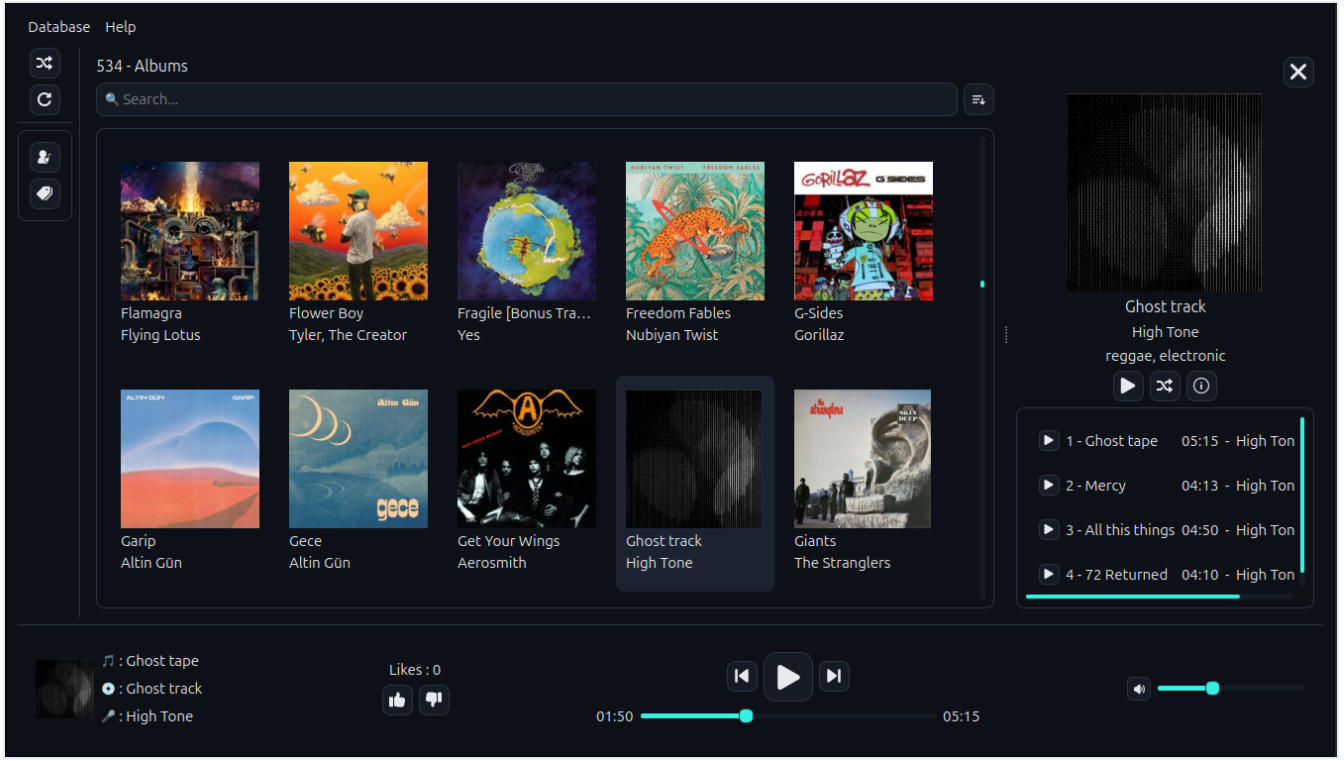
- zic_player-0.1.0/src/zic/resources/icons/music.png +0 -0
- zic_player-0.1.0/src/zic/resources/icons/mute.png +0 -0
- zic_player-0.1.0/src/zic/resources/icons/next.png +0 -0
- zic_player-0.1.0/src/zic/resources/icons/pause.png +0 -0
- zic_player-0.1.0/src/zic/resources/icons/play.png +0 -0
- zic_player-0.1.0/src/zic/resources/icons/previous.png +0 -0
- zic_player-0.1.0/src/zic/resources/icons/refresh-arrow.png +0 -0
- zic_player-0.1.0/src/zic/resources/icons/shuffle.png +0 -0
- zic_player-0.1.0/src/zic/resources/icons/sort-up.png +0 -0
- zic_player-0.1.0/src/zic/resources/icons/sort.png +0 -0
- zic_player-0.1.0/src/zic/resources/icons/tag.png +0 -0
- zic_player-0.1.0/src/zic/resources/icons/up-arrow.png +0 -0
- zic_player-0.1.0/src/zic/resources/icons/volume.png +0 -0
- zic_player-0.1.0/src/zic/resources/icons/zic.ico +0 -0
- zic_player-0.1.0/src/zic/resources/icons/zic.png +0 -0
- zic_player-0.1.0/src/zic/resources/style/style.qss +307 -0
- zic_player-0.1.0/src/zic/schema.sql +140 -0
- zic_player-0.1.0/src/zic/utils/__init__.py +0 -0
- zic_player-0.1.0/src/zic/utils/db_utils.py +68 -0
- zic_player-0.1.0/src/zic/utils/formatting.py +41 -0
- zic_player-0.1.0/src/zic/utils/instance_lock.py +60 -0
- zic_player-0.1.0/src/zic/utils/qt_utils.py +139 -0
- zic_player-0.1.0/src/zic/utils/query_builder.py +31 -0
- zic_player-0.1.0/src/zic/utils/release.py +28 -0
- zic_player-0.1.0/src/zic/utils/tags.py +78 -0
- zic_player-0.1.0/src/zic/utils/text.py +89 -0
- zic_player-0.1.0/src/zic/widgets/__init__.py +0 -0
- zic_player-0.1.0/src/zic/widgets/album_explorer.py +913 -0
- zic_player-0.1.0/src/zic/widgets/album_view.py +333 -0
- zic_player-0.1.0/src/zic/widgets/artists_filter_widget.py +41 -0
- zic_player-0.1.0/src/zic/widgets/cover_thumbnail.py +77 -0
- zic_player-0.1.0/src/zic/widgets/dyn_label.py +14 -0
- zic_player-0.1.0/src/zic/widgets/filter_list_widget.py +170 -0
- zic_player-0.1.0/src/zic/widgets/genres_filter_widget.py +41 -0
- zic_player-0.1.0/src/zic/widgets/path_selector.py +81 -0
- zic_player-0.1.0/src/zic/widgets/player_widget.py +630 -0
- zic_player-0.1.0/src/zic/widgets/rules.py +17 -0
- zic_player-0.1.0/src/zic/widgets/search_popup.py +211 -0
- zic_player-0.1.0/src/zic/widgets/sound_wave.py +83 -0
- zic_player-0.1.0/src/zic/widgets/strong_menu.py +7 -0
- zic_player-0.1.0/src/zic/widgets/toggle_switch.py +107 -0
- zic_player-0.1.0/src/zic/widgets/url_label.py +29 -0
- zic_player-0.1.0/src/zic_player.egg-info/PKG-INFO +353 -0
- zic_player-0.1.0/src/zic_player.egg-info/SOURCES.txt +84 -0
- zic_player-0.1.0/src/zic_player.egg-info/dependency_links.txt +1 -0
- zic_player-0.1.0/src/zic_player.egg-info/entry_points.txt +2 -0
- zic_player-0.1.0/src/zic_player.egg-info/requires.txt +12 -0
- zic_player-0.1.0/src/zic_player.egg-info/top_level.txt +1 -0
zic_player-0.1.0/LICENSE
ADDED
|
@@ -0,0 +1,21 @@
|
|
|
1
|
+
MIT License
|
|
2
|
+
|
|
3
|
+
Copyright (c) 2026 MF_ZOOL
|
|
4
|
+
|
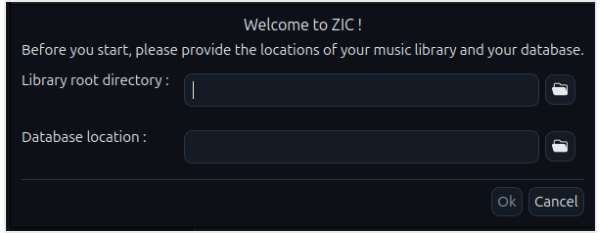
|
5
|
+
Permission is hereby granted, free of charge, to any person obtaining a copy
|
|
6
|
+
of this software and associated documentation files (the "Software"), to deal
|
|
7
|
+
in the Software without restriction, including without limitation the rights
|
|
8
|
+
to use, copy, modify, merge, publish, distribute, sublicense, and/or sell
|
|
9
|
+
copies of the Software, and to permit persons to whom the Software is
|
|
10
|
+
furnished to do so, subject to the following conditions:
|
|
11
|
+
|
|
12
|
+
The above copyright notice and this permission notice shall be included in all
|
|
13
|
+
copies or substantial portions of the Software.
|
|
14
|
+
|
|
15
|
+
THE SOFTWARE IS PROVIDED "AS IS", WITHOUT WARRANTY OF ANY KIND, EXPRESS OR
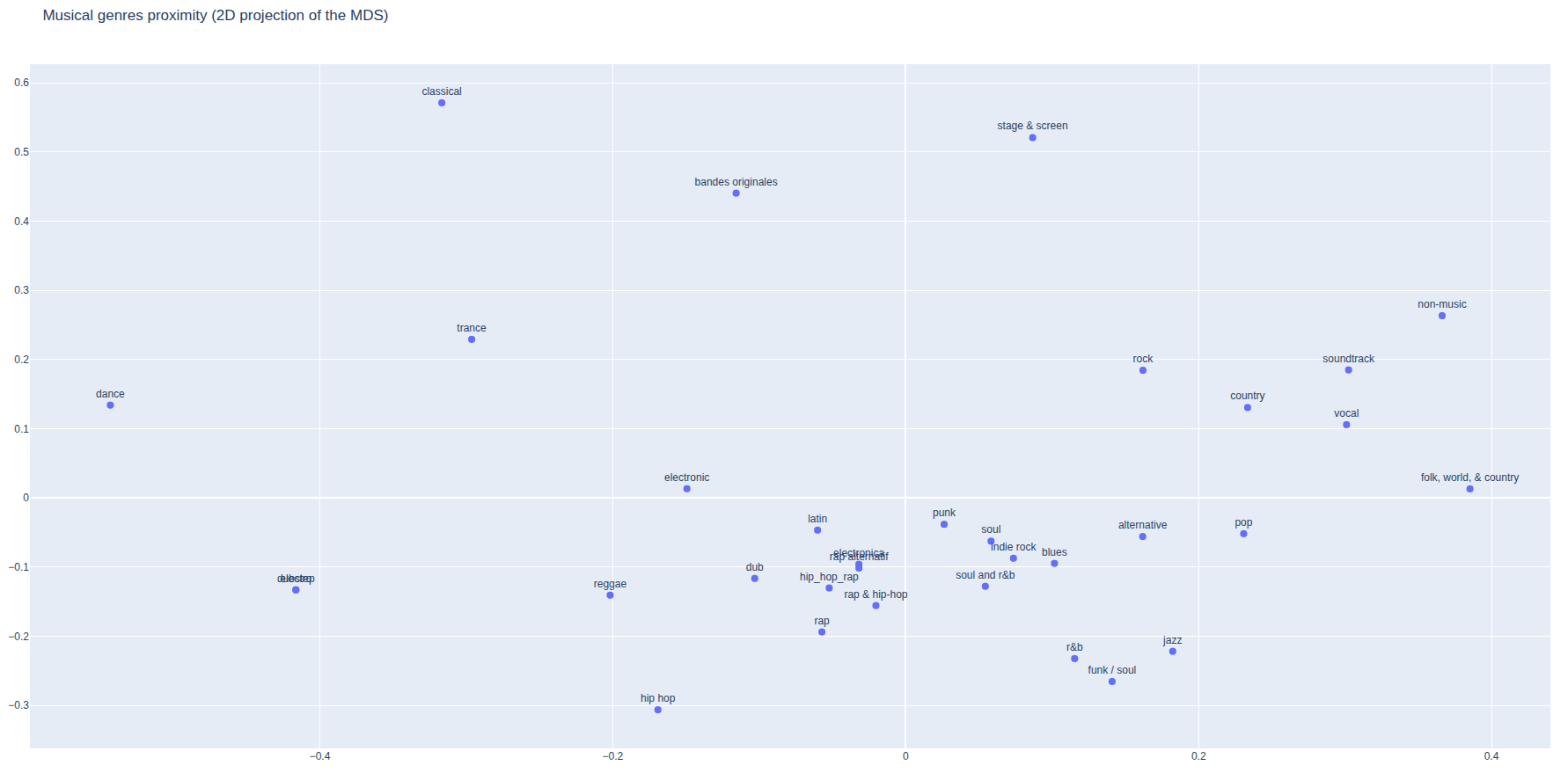
|
|
16
|
+
IMPLIED, INCLUDING BUT NOT LIMITED TO THE WARRANTIES OF MERCHANTABILITY,
|
|
17
|
+
FITNESS FOR A PARTICULAR PURPOSE AND NONINFRINGEMENT. IN NO EVENT SHALL THE
|
|
18
|
+
AUTHORS OR COPYRIGHT HOLDERS BE LIABLE FOR ANY CLAIM, DAMAGES OR OTHER
|
|
19
|
+
LIABILITY, WHETHER IN AN ACTION OF CONTRACT, TORT OR OTHERWISE, ARISING FROM,
|
|
20
|
+
OUT OF OR IN CONNECTION WITH THE SOFTWARE OR THE USE OR OTHER DEALINGS IN THE
|
|
21
|
+
SOFTWARE.
|
|
@@ -0,0 +1,353 @@
|
|
|
1
|
+
Metadata-Version: 2.4
|
|
2
|
+
Name: zic-player
|
|
3
|
+
Version: 0.1.0
|
|
4
|
+
Summary: A local-library desktop music player with album/genre browsing and genre-aware smart playlists.
|
|
5
|
+
Author: MF_ZOOL
|
|
6
|
+
License-Expression: MIT
|
|
7
|
+
Project-URL: Homepage, https://github.com/zool-rig/zic
|
|
8
|
+
Project-URL: Repository, https://github.com/zool-rig/zic
|
|
9
|
+
Project-URL: Issues, https://github.com/zool-rig/zic/issues
|
|
10
|
+
Keywords: release-date:2026-10-04,music,music-player,audio,mp3,m4a,playlist,smart-playlist,pyside6,qt
|
|
11
|
+
Classifier: Development Status :: 4 - Beta
|
|
12
|
+
Classifier: Environment :: X11 Applications :: Qt
|
|
13
|
+
Classifier: Intended Audience :: End Users/Desktop
|
|
14
|
+
Classifier: Operating System :: OS Independent
|
|
15
|
+
Classifier: Programming Language :: Python :: 3
|
|
16
|
+
Classifier: Programming Language :: Python :: 3 :: Only
|
|
17
|
+
Classifier: Programming Language :: Python :: 3.13
|
|
18
|
+
Classifier: Topic :: Multimedia :: Sound/Audio :: Players
|
|
19
|
+
Classifier: Topic :: Multimedia :: Sound/Audio :: Players :: MP3
|
|
20
|
+
Requires-Python: >=3.13
|
|
21
|
+
Description-Content-Type: text/markdown
|
|
22
|
+
License-File: LICENSE
|
|
23
|
+
Requires-Dist: appdirs>=1.4.4
|
|
24
|
+
Requires-Dist: pyside6>=6.11.2
|
|
25
|
+
Requires-Dist: toml>=0.10.2
|
|
26
|
+
Requires-Dist: mutagen>=1.48.1
|
|
27
|
+
Requires-Dist: numpy>=2.5.2
|
|
28
|
+
Requires-Dist: pillow>=12.3.0
|
|
29
|
+
Requires-Dist: click>=8.5.0
|
|
30
|
+
Requires-Dist: requests>=2.34.2
|
|
31
|
+
Requires-Dist: secret-type>=0.3.0
|
|
32
|
+
Requires-Dist: plotly>=7.1.0
|
|
33
|
+
Requires-Dist: pandas>=3.0.6
|
|
34
|
+
Requires-Dist: rich>=15.0.0
|
|
35
|
+
Dynamic: license-file
|
|
36
|
+
|
|
37
|
+
<div align=center>
|
|
38
|
+
<img src="https://raw.githubusercontent.com/zool-rig/zic/v0.1.0/images/zic.png" width=128 alt=logo>
|
|
39
|
+
<h1>ZIC</h1>
|
|
40
|
+
<p>A local-library desktop music player with album/genre browsing and genre-aware smart playlists.</p>
|
|
41
|
+
|
|
42
|
+
[](https://github.com/zool-rig/zic/actions/workflows/ci.yml)
|
|
43
|
+

|
|
44
|
+

|
|
45
|
+

|
|
46
|
+

|
|
47
|
+

|
|
48
|
+

|
|
49
|
+
|
|
50
|
+
|
|
51
|
+
</div>
|
|
52
|
+
|
|
53
|
+
|
|
54
|
+
## Features
|
|
55
|
+
|
|
56
|
+
- **Smart playlists that never run dry** : an album flows into the rest of the artist's discography, then into albums of *near* genres, then into a random selection (see [Smart playlists](#smart-playlists))
|
|
57
|
+
- **Mood-following shuffle** : the random playlist learns from what you listen to the end, and resets as soon as you skip (see [Mood](#mood))
|
|
58
|
+
- **Genre intelligence** : genre proximity is computed from your own library's co-occurrence patterns, not a fixed taxonomy (see [Genre Intelligence](#genre-intelligence))
|
|
59
|
+
- **Global search** : find artists, albums, genres and songs as you type, forgiving accents, word order and small typos
|
|
60
|
+
- **Metadata editing** : fix song and album info from the app, optionally written back to your files' tags
|
|
61
|
+
- Play local MP3/M4A music files, browse your albums, artists and genres
|
|
62
|
+
- Automatic metadata enrichment and covers with the Discogs API
|
|
63
|
+
- Library scans with live progress, in the terminal and in the app, that follow moved files and drop deleted ones
|
|
64
|
+
- Likes and plays history
|
|
65
|
+
|
|
66
|
+
## Prerequisites
|
|
67
|
+
|
|
68
|
+
- Python 3.13+
|
|
69
|
+
- **Audio codecs** : ZIC relies on Qt Multimedia to play MP3/M4A files, which in turn relies on system-level codecs (via FFmpeg on most platforms). If you get no sound with no error, install FFmpeg for your OS:
|
|
70
|
+
|
|
71
|
+
| OS | Command |
|
|
72
|
+
| - | - |
|
|
73
|
+
| Linux (Debian/Ubuntu) | `sudo apt install ffmpeg` |
|
|
74
|
+
| Linux (Arch) | `sudo pacman -S ffmpeg` |
|
|
75
|
+
| macOS (Homebrew) | `brew install ffmpeg` (maybe no action needed) |
|
|
76
|
+
| Windows | Usually bundled with Qt Multimedia, no action needed |
|
|
77
|
+
|
|
78
|
+
## Installation
|
|
79
|
+
|
|
80
|
+
### With `uv` (Recommended)
|
|
81
|
+
|
|
82
|
+
[uv](https://docs.astral.sh/uv/getting-started/installation/) is a faster and more convenient package manager than `pip`
|
|
83
|
+
|
|
84
|
+
```bash
|
|
85
|
+
# cd where you want to create the virtual env
|
|
86
|
+
uv venv zic-venv
|
|
87
|
+
|
|
88
|
+
source zic-venv/bin/activate # Linux/macOS
|
|
89
|
+
# zic-venv\Scripts\activate # Windows
|
|
90
|
+
|
|
91
|
+
uv pip install zic-player
|
|
92
|
+
```
|
|
93
|
+
|
|
94
|
+
### Quick install
|
|
95
|
+
|
|
96
|
+
```bash
|
|
97
|
+
pip install zic-player
|
|
98
|
+
```
|
|
99
|
+
|
|
100
|
+
The package is named `zic-player` on PyPI; the app itself is launched with `zic`.
|
|
101
|
+
|
|
102
|
+
## Getting started
|
|
103
|
+
|
|
104
|
+
### Import your library
|
|
105
|
+
|
|
106
|
+
```bash
|
|
107
|
+
zic ingest /path/to/your/library
|
|
108
|
+
```
|
|
109
|
+
|
|
110
|
+
### First launch
|
|
111
|
+
|
|
112
|
+
```bash
|
|
113
|
+
zic
|
|
114
|
+
```
|
|
115
|
+
|
|
116
|
+
The first time you launch ZIC, a welcome dialog will ask you to register where your MP3/M4A library and your database are located.
|
|
117
|
+
|
|
118
|
+
|
|
119
|
+
|
|
120
|
+
### Keep your library up to date
|
|
121
|
+
|
|
122
|
+
Use **Database > Check for new songs** in the app (or run `zic ingest` again). Only new and modified files are read, and a progress dialog shows the files left, the elapsed time and an estimate of the remaining time. Music keeps playing meanwhile, and the library can't be edited until the scan is over.
|
|
123
|
+
|
|
124
|
+
A scan also keeps the library in sync with your folders:
|
|
125
|
+
|
|
126
|
+
- **moved or renamed files** are recognized by their content and keep their plays and likes (as long as the file itself wasn't modified on the way)
|
|
127
|
+
- **deleted files** are removed from the library, along with the albums they leave empty
|
|
128
|
+
- if no audio file is found at all (e.g. an external drive that isn't mounted), nothing is removed
|
|
129
|
+
|
|
130
|
+
**Database > Full rescan** re-reads every file, e.g. after re-tagging files with another tool.
|
|
131
|
+
|
|
132
|
+
From the terminal, `zic ingest` shows the same progress in a live text interface, then a summary.
|
|
133
|
+
|
|
134
|
+
## Smart playlists
|
|
135
|
+
|
|
136
|
+
Whatever you start, ZIC keeps the music going with songs that make sense, instead of stopping at the end of an album or jumping to anything:
|
|
137
|
+
|
|
138
|
+
1. **The album** you started, in order (or shuffled, or from the song you picked)
|
|
139
|
+
2. **The rest of the artist's discography**
|
|
140
|
+
3. **Albums of near genres** : the album's genres and their closest neighbors in your [genre space](#genre-intelligence)
|
|
141
|
+
4. **A random selection**, which follows your current [mood](#mood)
|
|
142
|
+
|
|
143
|
+
Each step only kicks in when the previous one is exhausted, and songs already played in the playlist aren't picked again.
|
|
144
|
+
|
|
145
|
+
### Mood
|
|
146
|
+
|
|
147
|
+
The shuffle button starts a fully random playlist. Then, ZIC listens to how you listen:
|
|
148
|
+
|
|
149
|
+
- **Listening to a song to the end** sets the mood : the song's genres, extended to their near genres. The next songs are picked within that mood.
|
|
150
|
+
- **Skipping a song** resets the mood : the next pick is fully random again, until a song catches you.
|
|
151
|
+
|
|
152
|
+
The playlist drifts along with you: let a song play and you get more of its kind; skip and you're off somewhere else. The mood also drives the random step of the other playlists. When no song matches the mood anymore, ZIC falls back to a fully random pick.
|
|
153
|
+
|
|
154
|
+
> [!TIP]
|
|
155
|
+
> The mood relies on genre proximity: [compute genre positions](#computing-positions) once your library is imported.
|
|
156
|
+
|
|
157
|
+
## Search
|
|
158
|
+
|
|
159
|
+
The search bar of the album explorer finds **artists, albums, genres and songs** as you type, grouped by kind. It ignores case, accents and punctuation (`beyonce` finds *Beyoncé*), word order, and tolerates small typos in artist, album and genre names (`daft pnuk` finds *Daft Punk*).
|
|
160
|
+
|
|
161
|
+
- **An artist or a genre** filters the explorer
|
|
162
|
+
- **An album** opens it
|
|
163
|
+
- **A song** opens its album with the song highlighted
|
|
164
|
+
|
|
165
|
+
Use the arrow keys and Enter to pick a result. Pressing Enter without picking one filters the album explorer by the typed text.
|
|
166
|
+
|
|
167
|
+
## Editing metadata
|
|
168
|
+
|
|
169
|
+
The info buttons of the album view open a dialog for the album or for a song, showing its details (file, format, bitrate, plays, likes, dates...) and letting you edit:
|
|
170
|
+
|
|
171
|
+
- **Songs** : title, artist, track and disc numbers. A song can also be **hidden** from the library; hidden songs are listed in their album's info, where they can be shown again.
|
|
172
|
+
- **Albums** : name, album artist, year and genres. Giving an album the name and artist of another one merges them.
|
|
173
|
+
|
|
174
|
+
> [!IMPORTANT]
|
|
175
|
+
> By default, edits are also **written to the tags of your audio files**: they're kept on rescans and seen by other music players. You can turn this off in the dialog (the choice is remembered): your files are then left untouched, but a full rescan, or any change to a file, brings back the file's own tags.
|
|
176
|
+
|
|
177
|
+
## Genre Intelligence
|
|
178
|
+
|
|
179
|
+
Most music apps treat genres as a flat, external taxonomy. ZIC does something different: it computes how *your* genres relate to each other based on how they actually co-occur across your own albums.
|
|
180
|
+
|
|
181
|
+
### How it works
|
|
182
|
+
|
|
183
|
+
1. **Co-occurrence analysis** — ZIC looks at which genre tags appear together on the same albums in your library.
|
|
184
|
+
2. **Positive PMI (Pointwise Mutual Information)** — rather than raw counts (which would let generic tags like "rock" dominate purely through volume), ZIC measures how much more often two genres co-occur than pure chance would predict, with discounting to avoid overweighting rare pairs.
|
|
185
|
+
3. **Classical MDS (Multidimensional Scaling)** — the resulting similarity scores are projected into a compact set of coordinates per genre, positioning genres close together when they tend to appear side by side in your collection, and far apart when they don't.
|
|
186
|
+
|
|
187
|
+
These positions power the **genre-aware [smart playlists](#smart-playlists)** (finding "near genres" when an album and its artist's discography are exhausted) and the **[mood](#mood)**, and can be visualized directly.
|
|
188
|
+
|
|
189
|
+
### Computing positions
|
|
190
|
+
|
|
191
|
+
Run this after importing your library, and again whenever you've ingested enough new albums that genre relationships might have shifted:
|
|
192
|
+
|
|
193
|
+
```bash
|
|
194
|
+
zic genres compute ~/Music/.db
|
|
195
|
+
```
|
|
196
|
+
|
|
197
|
+
### Visualizing genre space
|
|
198
|
+
|
|
199
|
+
See how your own genres cluster together, in an interactive 2D plot opened in your browser:
|
|
200
|
+
|
|
201
|
+
```bash
|
|
202
|
+
zic genres vis ~/Music/.db
|
|
203
|
+
```
|
|
204
|
+
|
|
205
|
+
|
|
206
|
+
|
|
207
|
+
>[!NOTE]
|
|
208
|
+
>These visualizations are in 2D, so they are partial representations of the real space which is in 8 dimensions
|
|
209
|
+
|
|
210
|
+
## Configuration
|
|
211
|
+
|
|
212
|
+
### App config
|
|
213
|
+
|
|
214
|
+
A toml file containing the library directory and database locations
|
|
215
|
+
|
|
216
|
+
| OS | Location |
|
|
217
|
+
| - | - |
|
|
218
|
+
| Linux | ~/.config/Zic/app_config.toml |
|
|
219
|
+
| Windows | %LOCALAPPDATA%\Zic\app_config.toml |
|
|
220
|
+
| Mac Os | ~/Library/Application Support/Zic/app_config.toml |
|
|
221
|
+
|
|
222
|
+
### User Config
|
|
223
|
+
|
|
224
|
+
When closed, ZIC saves your preferences (volume, sorting, hotkeys, whether edits are written to your files...) in a json file
|
|
225
|
+
|
|
226
|
+
| OS | Location |
|
|
227
|
+
| - | - |
|
|
228
|
+
| Linux | ~/.local/share/Zic/user_config.json |
|
|
229
|
+
| Windows | %LOCALAPPDATA%\Zic\user_config.json |
|
|
230
|
+
| Mac Os | ~/Library/Application Support/Zic/user_config.json |
|
|
231
|
+
|
|
232
|
+
### Ingestor environment variables
|
|
233
|
+
|
|
234
|
+
While running the ingestor, you can specify your Discogs API credentials with the following environment variables : `ZIC_INGESTOR_DISCOGS_KEY` and `ZIC_INGESTOR_DISCOGS_TOKEN`
|
|
235
|
+
|
|
236
|
+
### Hotkeys
|
|
237
|
+
|
|
238
|
+
| Key | Action |
|
|
239
|
+
| - | - |
|
|
240
|
+
| Space | Toggle play/pause |
|
|
241
|
+
| m | Mute |
|
|
242
|
+
| n | Next song |
|
|
243
|
+
| p | Previous song |
|
|
244
|
+
| F5 | Reload library |
|
|
245
|
+
| s | Shuffle playlist |
|
|
246
|
+
| Right arrow | Advance playback (5s) |
|
|
247
|
+
| Left arrow | Rewind playback (5s) |
|
|
248
|
+
| + | Volume up |
|
|
249
|
+
| - | Volume down |
|
|
250
|
+
| l | Like current song |
|
|
251
|
+
| d | Dislike current song |
|
|
252
|
+
|
|
253
|
+
## CLI Reference
|
|
254
|
+
|
|
255
|
+
```bash
|
|
256
|
+
❯ zic --help
|
|
257
|
+
Usage: zic [OPTIONS] [COMMAND] [ARGS]...
|
|
258
|
+
|
|
259
|
+
A local-library desktop music player with album/genre browsing and genre-
|
|
260
|
+
aware smart playlists.
|
|
261
|
+
|
|
262
|
+
Options:
|
|
263
|
+
-V Show the current version of ZIC
|
|
264
|
+
--help Show this message and exit.
|
|
265
|
+
|
|
266
|
+
Commands:
|
|
267
|
+
genres Manage genre proximity positions used to build genre-aware...
|
|
268
|
+
ingest Ingests an audio library (mp3/m4a) into a SQLite database.
|
|
269
|
+
|
|
270
|
+
Run the GUI : zic
|
|
271
|
+
```
|
|
272
|
+
|
|
273
|
+
```bash
|
|
274
|
+
❯ zic ingest --help
|
|
275
|
+
Usage: zic ingest [OPTIONS] FOLDER
|
|
276
|
+
|
|
277
|
+
Ingests an audio library (mp3/m4a) into a SQLite database.
|
|
278
|
+
|
|
279
|
+
Positional arguments:
|
|
280
|
+
FOLDER Root folder of the library to scan
|
|
281
|
+
|
|
282
|
+
Options:
|
|
283
|
+
--db PATH Path to the SQLite database, default to
|
|
284
|
+
'$FOLDER/.db'
|
|
285
|
+
--rescan Force re-parsing of every file, even unchanged
|
|
286
|
+
ones
|
|
287
|
+
-k, --discogs-key TEXT A Discogs Auth key
|
|
288
|
+
-t, --discogs-token TEXT A Discogs Auth token
|
|
289
|
+
--help Show this message and exit.
|
|
290
|
+
```
|
|
291
|
+
|
|
292
|
+
```bash
|
|
293
|
+
❯ zic genres --help
|
|
294
|
+
Commands:
|
|
295
|
+
compute Computes proximity positions for every genre in the library.
|
|
296
|
+
vis Opens an interactive 2D plot of the computed genre positions.
|
|
297
|
+
```
|
|
298
|
+
|
|
299
|
+
## Contributing
|
|
300
|
+
|
|
301
|
+
Contributions are welcome !
|
|
302
|
+
|
|
303
|
+
### Installation
|
|
304
|
+
|
|
305
|
+
1. Clone this repository
|
|
306
|
+
2. cd into `zic`
|
|
307
|
+
3. Create a venv
|
|
308
|
+
|
|
309
|
+
```bash
|
|
310
|
+
uv venv
|
|
311
|
+
source .venv/bin/activate # Linux/macOS
|
|
312
|
+
# .venv\Scripts\activate # Windows
|
|
313
|
+
```
|
|
314
|
+
|
|
315
|
+
4. Install zic as editable package
|
|
316
|
+
|
|
317
|
+
```bash
|
|
318
|
+
uv pip install -e .
|
|
319
|
+
```
|
|
320
|
+
|
|
321
|
+
### Debug
|
|
322
|
+
|
|
323
|
+
You can set the `ZIC_DEVEL=1` env var to activate the debug level of logging.
|
|
324
|
+
|
|
325
|
+
### Run tests and checks
|
|
326
|
+
|
|
327
|
+
`uv sync` installs the development tools (pytest, ruff) along with ZIC. The same checks run on every push and pull request to `main` (see [.github/workflows/ci.yml](https://github.com/zool-rig/zic/blob/v0.1.0/.github/workflows/ci.yml)):
|
|
328
|
+
|
|
329
|
+
```bash
|
|
330
|
+
uv run ruff check src tests # lint
|
|
331
|
+
uv run ruff format --check src tests # formatting (`ruff format src tests` to fix it)
|
|
332
|
+
uv run pytest # tests
|
|
333
|
+
```
|
|
334
|
+
|
|
335
|
+
### Releasing
|
|
336
|
+
|
|
337
|
+
1. In `pyproject.toml`, bump `version` and set the `release-date:` keyword to the release day (it's shown in the About dialog), then merge to `main`.
|
|
338
|
+
2. Tag the merged commit and push the tag:
|
|
339
|
+
|
|
340
|
+
```bash
|
|
341
|
+
git tag v0.2.0
|
|
342
|
+
git push origin v0.2.0
|
|
343
|
+
```
|
|
344
|
+
|
|
345
|
+
The [release workflow](https://github.com/zool-rig/zic/blob/v0.1.0/.github/workflows/release.yml) then runs the CI again, checks that the tag matches the version and that the release date is today, builds the package, publishes it to PyPI (once approved in the `pypi` environment) and creates the GitHub release.
|
|
346
|
+
|
|
347
|
+
### Database schema
|
|
348
|
+
|
|
349
|
+
The database is a cache of your library, rebuilt from your files: after a change to `schema.sql`, delete the database and run `zic ingest` again. Plays, likes, hidden songs and library-only edits live in the database only and are lost when it's deleted.
|
|
350
|
+
|
|
351
|
+
## License
|
|
352
|
+
|
|
353
|
+
See [LICENSE](https://github.com/zool-rig/zic/blob/v0.1.0/LICENSE).
|
|
@@ -0,0 +1,317 @@
|
|
|
1
|
+
<div align=center>
|
|
2
|
+
<img src="https://raw.githubusercontent.com/zool-rig/zic/v0.1.0/images/zic.png" width=128 alt=logo>
|
|
3
|
+
<h1>ZIC</h1>
|
|
4
|
+
<p>A local-library desktop music player with album/genre browsing and genre-aware smart playlists.</p>
|
|
5
|
+
|
|
6
|
+
[](https://github.com/zool-rig/zic/actions/workflows/ci.yml)
|
|
7
|
+

|
|
8
|
+

|
|
9
|
+

|
|
10
|
+

|
|
11
|
+

|
|
12
|
+

|
|
13
|
+
|
|
14
|
+

|
|
15
|
+
</div>
|
|
16
|
+
|
|
17
|
+
|
|
18
|
+
## Features
|
|
19
|
+
|
|
20
|
+
- **Smart playlists that never run dry** : an album flows into the rest of the artist's discography, then into albums of *near* genres, then into a random selection (see [Smart playlists](#smart-playlists))
|
|
21
|
+
- **Mood-following shuffle** : the random playlist learns from what you listen to the end, and resets as soon as you skip (see [Mood](#mood))
|
|
22
|
+
- **Genre intelligence** : genre proximity is computed from your own library's co-occurrence patterns, not a fixed taxonomy (see [Genre Intelligence](#genre-intelligence))
|
|
23
|
+
- **Global search** : find artists, albums, genres and songs as you type, forgiving accents, word order and small typos
|
|
24
|
+
- **Metadata editing** : fix song and album info from the app, optionally written back to your files' tags
|
|
25
|
+
- Play local MP3/M4A music files, browse your albums, artists and genres
|
|
26
|
+
- Automatic metadata enrichment and covers with the Discogs API
|
|
27
|
+
- Library scans with live progress, in the terminal and in the app, that follow moved files and drop deleted ones
|
|
28
|
+
- Likes and plays history
|
|
29
|
+
|
|
30
|
+
## Prerequisites
|
|
31
|
+
|
|
32
|
+
- Python 3.13+
|
|
33
|
+
- **Audio codecs** : ZIC relies on Qt Multimedia to play MP3/M4A files, which in turn relies on system-level codecs (via FFmpeg on most platforms). If you get no sound with no error, install FFmpeg for your OS:
|
|
34
|
+
|
|
35
|
+
| OS | Command |
|
|
36
|
+
| - | - |
|
|
37
|
+
| Linux (Debian/Ubuntu) | `sudo apt install ffmpeg` |
|
|
38
|
+
| Linux (Arch) | `sudo pacman -S ffmpeg` |
|
|
39
|
+
| macOS (Homebrew) | `brew install ffmpeg` (maybe no action needed) |
|
|
40
|
+
| Windows | Usually bundled with Qt Multimedia, no action needed |
|
|
41
|
+
|
|
42
|
+
## Installation
|
|
43
|
+
|
|
44
|
+
### With `uv` (Recommended)
|
|
45
|
+
|
|
46
|
+
[uv](https://docs.astral.sh/uv/getting-started/installation/) is a faster and more convenient package manager than `pip`
|
|
47
|
+
|
|
48
|
+
```bash
|
|
49
|
+
# cd where you want to create the virtual env
|
|
50
|
+
uv venv zic-venv
|
|
51
|
+
|
|
52
|
+
source zic-venv/bin/activate # Linux/macOS
|
|
53
|
+
# zic-venv\Scripts\activate # Windows
|
|
54
|
+
|
|
55
|
+
uv pip install zic-player
|
|
56
|
+
```
|
|
57
|
+
|
|
58
|
+
### Quick install
|
|
59
|
+
|
|
60
|
+
```bash
|
|
61
|
+
pip install zic-player
|
|
62
|
+
```
|
|
63
|
+
|
|
64
|
+
The package is named `zic-player` on PyPI; the app itself is launched with `zic`.
|
|
65
|
+
|
|
66
|
+
## Getting started
|
|
67
|
+
|
|
68
|
+
### Import your library
|
|
69
|
+
|
|
70
|
+
```bash
|
|
71
|
+
zic ingest /path/to/your/library
|
|
72
|
+
```
|
|
73
|
+
|
|
74
|
+
### First launch
|
|
75
|
+
|
|
76
|
+
```bash
|
|
77
|
+
zic
|
|
78
|
+
```
|
|
79
|
+
|
|
80
|
+
The first time you launch ZIC, a welcome dialog will ask you to register where your MP3/M4A library and your database are located.
|
|
81
|
+
|
|
82
|
+

|
|
83
|
+
|
|
84
|
+
### Keep your library up to date
|
|
85
|
+
|
|
86
|
+
Use **Database > Check for new songs** in the app (or run `zic ingest` again). Only new and modified files are read, and a progress dialog shows the files left, the elapsed time and an estimate of the remaining time. Music keeps playing meanwhile, and the library can't be edited until the scan is over.
|
|
87
|
+
|
|
88
|
+
A scan also keeps the library in sync with your folders:
|
|
89
|
+
|
|
90
|
+
- **moved or renamed files** are recognized by their content and keep their plays and likes (as long as the file itself wasn't modified on the way)
|
|
91
|
+
- **deleted files** are removed from the library, along with the albums they leave empty
|
|
92
|
+
- if no audio file is found at all (e.g. an external drive that isn't mounted), nothing is removed
|
|
93
|
+
|
|
94
|
+
**Database > Full rescan** re-reads every file, e.g. after re-tagging files with another tool.
|
|
95
|
+
|
|
96
|
+
From the terminal, `zic ingest` shows the same progress in a live text interface, then a summary.
|
|
97
|
+
|
|
98
|
+
## Smart playlists
|
|
99
|
+
|
|
100
|
+
Whatever you start, ZIC keeps the music going with songs that make sense, instead of stopping at the end of an album or jumping to anything:
|
|
101
|
+
|
|
102
|
+
1. **The album** you started, in order (or shuffled, or from the song you picked)
|
|
103
|
+
2. **The rest of the artist's discography**
|
|
104
|
+
3. **Albums of near genres** : the album's genres and their closest neighbors in your [genre space](#genre-intelligence)
|
|
105
|
+
4. **A random selection**, which follows your current [mood](#mood)
|
|
106
|
+
|
|
107
|
+
Each step only kicks in when the previous one is exhausted, and songs already played in the playlist aren't picked again.
|
|
108
|
+
|
|
109
|
+
### Mood
|
|
110
|
+
|
|
111
|
+
The shuffle button starts a fully random playlist. Then, ZIC listens to how you listen:
|
|
112
|
+
|
|
113
|
+
- **Listening to a song to the end** sets the mood : the song's genres, extended to their near genres. The next songs are picked within that mood.
|
|
114
|
+
- **Skipping a song** resets the mood : the next pick is fully random again, until a song catches you.
|
|
115
|
+
|
|
116
|
+
The playlist drifts along with you: let a song play and you get more of its kind; skip and you're off somewhere else. The mood also drives the random step of the other playlists. When no song matches the mood anymore, ZIC falls back to a fully random pick.
|
|
117
|
+
|
|
118
|
+
> [!TIP]
|
|
119
|
+
> The mood relies on genre proximity: [compute genre positions](#computing-positions) once your library is imported.
|
|
120
|
+
|
|
121
|
+
## Search
|
|
122
|
+
|
|
123
|
+
The search bar of the album explorer finds **artists, albums, genres and songs** as you type, grouped by kind. It ignores case, accents and punctuation (`beyonce` finds *Beyoncé*), word order, and tolerates small typos in artist, album and genre names (`daft pnuk` finds *Daft Punk*).
|
|
124
|
+
|
|
125
|
+
- **An artist or a genre** filters the explorer
|
|
126
|
+
- **An album** opens it
|
|
127
|
+
- **A song** opens its album with the song highlighted
|
|
128
|
+
|
|
129
|
+
Use the arrow keys and Enter to pick a result. Pressing Enter without picking one filters the album explorer by the typed text.
|
|
130
|
+
|
|
131
|
+
## Editing metadata
|
|
132
|
+
|
|
133
|
+
The info buttons of the album view open a dialog for the album or for a song, showing its details (file, format, bitrate, plays, likes, dates...) and letting you edit:
|
|
134
|
+
|
|
135
|
+
- **Songs** : title, artist, track and disc numbers. A song can also be **hidden** from the library; hidden songs are listed in their album's info, where they can be shown again.
|
|
136
|
+
- **Albums** : name, album artist, year and genres. Giving an album the name and artist of another one merges them.
|
|
137
|
+
|
|
138
|
+
> [!IMPORTANT]
|
|
139
|
+
> By default, edits are also **written to the tags of your audio files**: they're kept on rescans and seen by other music players. You can turn this off in the dialog (the choice is remembered): your files are then left untouched, but a full rescan, or any change to a file, brings back the file's own tags.
|
|
140
|
+
|
|
141
|
+
## Genre Intelligence
|
|
142
|
+
|
|
143
|
+
Most music apps treat genres as a flat, external taxonomy. ZIC does something different: it computes how *your* genres relate to each other based on how they actually co-occur across your own albums.
|
|
144
|
+
|
|
145
|
+
### How it works
|
|
146
|
+
|
|
147
|
+
1. **Co-occurrence analysis** — ZIC looks at which genre tags appear together on the same albums in your library.
|
|
148
|
+
2. **Positive PMI (Pointwise Mutual Information)** — rather than raw counts (which would let generic tags like "rock" dominate purely through volume), ZIC measures how much more often two genres co-occur than pure chance would predict, with discounting to avoid overweighting rare pairs.
|
|
149
|
+
3. **Classical MDS (Multidimensional Scaling)** — the resulting similarity scores are projected into a compact set of coordinates per genre, positioning genres close together when they tend to appear side by side in your collection, and far apart when they don't.
|
|
150
|
+
|
|
151
|
+
These positions power the **genre-aware [smart playlists](#smart-playlists)** (finding "near genres" when an album and its artist's discography are exhausted) and the **[mood](#mood)**, and can be visualized directly.
|
|
152
|
+
|
|
153
|
+
### Computing positions
|
|
154
|
+
|
|
155
|
+
Run this after importing your library, and again whenever you've ingested enough new albums that genre relationships might have shifted:
|
|
156
|
+
|
|
157
|
+
```bash
|
|
158
|
+
zic genres compute ~/Music/.db
|
|
159
|
+
```
|
|
160
|
+
|
|
161
|
+
### Visualizing genre space
|
|
162
|
+
|
|
163
|
+
See how your own genres cluster together, in an interactive 2D plot opened in your browser:
|
|
164
|
+
|
|
165
|
+
```bash
|
|
166
|
+
zic genres vis ~/Music/.db
|
|
167
|
+
```
|
|
168
|
+
|
|
169
|
+

|
|
170
|
+
|
|
171
|
+
>[!NOTE]
|
|
172
|
+
>These visualizations are in 2D, so they are partial representations of the real space which is in 8 dimensions
|
|
173
|
+
|
|
174
|
+
## Configuration
|
|
175
|
+
|
|
176
|
+
### App config
|
|
177
|
+
|
|
178
|
+
A toml file containing the library directory and database locations
|
|
179
|
+
|
|
180
|
+
| OS | Location |
|
|
181
|
+
| - | - |
|
|
182
|
+
| Linux | ~/.config/Zic/app_config.toml |
|
|
183
|
+
| Windows | %LOCALAPPDATA%\Zic\app_config.toml |
|
|
184
|
+
| Mac Os | ~/Library/Application Support/Zic/app_config.toml |
|
|
185
|
+
|
|
186
|
+
### User Config
|
|
187
|
+
|
|
188
|
+
When closed, ZIC saves your preferences (volume, sorting, hotkeys, whether edits are written to your files...) in a json file
|
|
189
|
+
|
|
190
|
+
| OS | Location |
|
|
191
|
+
| - | - |
|
|
192
|
+
| Linux | ~/.local/share/Zic/user_config.json |
|
|
193
|
+
| Windows | %LOCALAPPDATA%\Zic\user_config.json |
|
|
194
|
+
| Mac Os | ~/Library/Application Support/Zic/user_config.json |
|
|
195
|
+
|
|
196
|
+
### Ingestor environment variables
|
|
197
|
+
|
|
198
|
+
While running the ingestor, you can specify your Discogs API credentials with the following environment variables : `ZIC_INGESTOR_DISCOGS_KEY` and `ZIC_INGESTOR_DISCOGS_TOKEN`
|
|
199
|
+
|
|
200
|
+
### Hotkeys
|
|
201
|
+
|
|
202
|
+
| Key | Action |
|
|
203
|
+
| - | - |
|
|
204
|
+
| Space | Toggle play/pause |
|
|
205
|
+
| m | Mute |
|
|
206
|
+
| n | Next song |
|
|
207
|
+
| p | Previous song |
|
|
208
|
+
| F5 | Reload library |
|
|
209
|
+
| s | Shuffle playlist |
|
|
210
|
+
| Right arrow | Advance playback (5s) |
|
|
211
|
+
| Left arrow | Rewind playback (5s) |
|
|
212
|
+
| + | Volume up |
|
|
213
|
+
| - | Volume down |
|
|
214
|
+
| l | Like current song |
|
|
215
|
+
| d | Dislike current song |
|
|
216
|
+
|
|
217
|
+
## CLI Reference
|
|
218
|
+
|
|
219
|
+
```bash
|
|
220
|
+
❯ zic --help
|
|
221
|
+
Usage: zic [OPTIONS] [COMMAND] [ARGS]...
|
|
222
|
+
|
|
223
|
+
A local-library desktop music player with album/genre browsing and genre-
|
|
224
|
+
aware smart playlists.
|
|
225
|
+
|
|
226
|
+
Options:
|
|
227
|
+
-V Show the current version of ZIC
|
|
228
|
+
--help Show this message and exit.
|
|
229
|
+
|
|
230
|
+
Commands:
|
|
231
|
+
genres Manage genre proximity positions used to build genre-aware...
|
|
232
|
+
ingest Ingests an audio library (mp3/m4a) into a SQLite database.
|
|
233
|
+
|
|
234
|
+
Run the GUI : zic
|
|
235
|
+
```
|
|
236
|
+
|
|
237
|
+
```bash
|
|
238
|
+
❯ zic ingest --help
|
|
239
|
+
Usage: zic ingest [OPTIONS] FOLDER
|
|
240
|
+
|
|
241
|
+
Ingests an audio library (mp3/m4a) into a SQLite database.
|
|
242
|
+
|
|
243
|
+
Positional arguments:
|
|
244
|
+
FOLDER Root folder of the library to scan
|
|
245
|
+
|
|
246
|
+
Options:
|
|
247
|
+
--db PATH Path to the SQLite database, default to
|
|
248
|
+
'$FOLDER/.db'
|
|
249
|
+
--rescan Force re-parsing of every file, even unchanged
|
|
250
|
+
ones
|
|
251
|
+
-k, --discogs-key TEXT A Discogs Auth key
|
|
252
|
+
-t, --discogs-token TEXT A Discogs Auth token
|
|
253
|
+
--help Show this message and exit.
|
|
254
|
+
```
|
|
255
|
+
|
|
256
|
+
```bash
|
|
257
|
+
❯ zic genres --help
|
|
258
|
+
Commands:
|
|
259
|
+
compute Computes proximity positions for every genre in the library.
|
|
260
|
+
vis Opens an interactive 2D plot of the computed genre positions.
|
|
261
|
+
```
|
|
262
|
+
|
|
263
|
+
## Contributing
|
|
264
|
+
|
|
265
|
+
Contributions are welcome !
|
|
266
|
+
|
|
267
|
+
### Installation
|
|
268
|
+
|
|
269
|
+
1. Clone this repository
|
|
270
|
+
2. cd into `zic`
|
|
271
|
+
3. Create a venv
|
|
272
|
+
|
|
273
|
+
```bash
|
|
274
|
+
uv venv
|
|
275
|
+
source .venv/bin/activate # Linux/macOS
|
|
276
|
+
# .venv\Scripts\activate # Windows
|
|
277
|
+
```
|
|
278
|
+
|
|
279
|
+
4. Install zic as editable package
|
|
280
|
+
|
|
281
|
+
```bash
|
|
282
|
+
uv pip install -e .
|
|
283
|
+
```
|
|
284
|
+
|
|
285
|
+
### Debug
|
|
286
|
+
|
|
287
|
+
You can set the `ZIC_DEVEL=1` env var to activate the debug level of logging.
|
|
288
|
+
|
|
289
|
+
### Run tests and checks
|
|
290
|
+
|
|
291
|
+
`uv sync` installs the development tools (pytest, ruff) along with ZIC. The same checks run on every push and pull request to `main` (see [.github/workflows/ci.yml](https://github.com/zool-rig/zic/blob/v0.1.0/.github/workflows/ci.yml)):
|
|
292
|
+
|
|
293
|
+
```bash
|
|
294
|
+
uv run ruff check src tests # lint
|
|
295
|
+
uv run ruff format --check src tests # formatting (`ruff format src tests` to fix it)
|
|
296
|
+
uv run pytest # tests
|
|
297
|
+
```
|
|
298
|
+
|
|
299
|
+
### Releasing
|
|
300
|
+
|
|
301
|
+
1. In `pyproject.toml`, bump `version` and set the `release-date:` keyword to the release day (it's shown in the About dialog), then merge to `main`.
|
|
302
|
+
2. Tag the merged commit and push the tag:
|
|
303
|
+
|
|
304
|
+
```bash
|
|
305
|
+
git tag v0.2.0
|
|
306
|
+
git push origin v0.2.0
|
|
307
|
+
```
|
|
308
|
+
|
|
309
|
+
The [release workflow](https://github.com/zool-rig/zic/blob/v0.1.0/.github/workflows/release.yml) then runs the CI again, checks that the tag matches the version and that the release date is today, builds the package, publishes it to PyPI (once approved in the `pypi` environment) and creates the GitHub release.
|
|
310
|
+
|
|
311
|
+
### Database schema
|
|
312
|
+
|
|
313
|
+
The database is a cache of your library, rebuilt from your files: after a change to `schema.sql`, delete the database and run `zic ingest` again. Plays, likes, hidden songs and library-only edits live in the database only and are lost when it's deleted.
|
|
314
|
+
|
|
315
|
+
## License
|
|
316
|
+
|
|
317
|
+
See [LICENSE](https://github.com/zool-rig/zic/blob/v0.1.0/LICENSE).
|