windows-mcp 0.5.7__tar.gz → 0.5.9__tar.gz
This diff represents the content of publicly available package versions that have been released to one of the supported registries. The information contained in this diff is provided for informational purposes only and reflects changes between package versions as they appear in their respective public registries.
- windows_mcp-0.5.9/.github/FUNDING.yml +15 -0
- {windows_mcp-0.5.7 → windows_mcp-0.5.9}/.mcpbignore +3 -1
- {windows_mcp-0.5.7 → windows_mcp-0.5.9}/PKG-INFO +30 -24
- {windows_mcp-0.5.7 → windows_mcp-0.5.9}/README.md +26 -15
- {windows_mcp-0.5.7 → windows_mcp-0.5.9}/SECURITY.md +32 -21
- windows_mcp-0.5.9/assets/logo.png +0 -0
- {windows_mcp-0.5.7 → windows_mcp-0.5.9}/manifest.json +110 -110
- {windows_mcp-0.5.7 → windows_mcp-0.5.9}/pyproject.toml +4 -9
- {windows_mcp-0.5.7 → windows_mcp-0.5.9}/src/windows_mcp/__main__.py +69 -82
- {windows_mcp-0.5.7 → windows_mcp-0.5.9}/src/windows_mcp/analytics.py +170 -171
- {windows_mcp-0.5.7 → windows_mcp-0.5.9}/src/windows_mcp/desktop/config.py +20 -20
- {windows_mcp-0.5.7 → windows_mcp-0.5.9}/src/windows_mcp/desktop/service.py +279 -99
- {windows_mcp-0.5.7 → windows_mcp-0.5.9}/src/windows_mcp/desktop/views.py +59 -57
- windows_mcp-0.5.9/src/windows_mcp/tree/cache_utils.py +126 -0
- {windows_mcp-0.5.7 → windows_mcp-0.5.9}/src/windows_mcp/tree/config.py +75 -50
- windows_mcp-0.5.9/src/windows_mcp/tree/service.py +543 -0
- {windows_mcp-0.5.7 → windows_mcp-0.5.9}/src/windows_mcp/tree/utils.py +21 -21
- {windows_mcp-0.5.7 → windows_mcp-0.5.9}/src/windows_mcp/tree/views.py +51 -25
- windows_mcp-0.5.9/src/windows_mcp/uia/__init__.py +4 -0
- windows_mcp-0.5.9/src/windows_mcp/uia/controls.py +4790 -0
- windows_mcp-0.5.9/src/windows_mcp/uia/core.py +3278 -0
- windows_mcp-0.5.9/src/windows_mcp/uia/enums.py +1963 -0
- windows_mcp-0.5.9/src/windows_mcp/uia/events.py +83 -0
- windows_mcp-0.5.9/src/windows_mcp/uia/patterns.py +2106 -0
- windows_mcp-0.5.9/src/windows_mcp/vdm/__init__.py +1 -0
- windows_mcp-0.5.9/src/windows_mcp/vdm/core.py +490 -0
- windows_mcp-0.5.9/src/windows_mcp/watchdog/__init__.py +1 -0
- windows_mcp-0.5.9/src/windows_mcp/watchdog/event_handlers.py +55 -0
- windows_mcp-0.5.9/src/windows_mcp/watchdog/service.py +199 -0
- windows_mcp-0.5.9/uv.lock +1660 -0
- windows_mcp-0.5.7/assets/logo.png +0 -0
- windows_mcp-0.5.7/src/windows_mcp/tree/service.py +0 -467
- windows_mcp-0.5.7/uv.lock +0 -1533
- {windows_mcp-0.5.7 → windows_mcp-0.5.9}/.gitignore +0 -0
- {windows_mcp-0.5.7 → windows_mcp-0.5.9}/.python-version +0 -0
- {windows_mcp-0.5.7 → windows_mcp-0.5.9}/CONTRIBUTING.md +0 -0
- {windows_mcp-0.5.7 → windows_mcp-0.5.9}/LICENSE.md +0 -0
- {windows_mcp-0.5.7 → windows_mcp-0.5.9}/assets/demo1.mov +0 -0
- {windows_mcp-0.5.7 → windows_mcp-0.5.9}/assets/demo2.mov +0 -0
- {windows_mcp-0.5.7 → windows_mcp-0.5.9}/assets/screenshots/screenshot_1.png +0 -0
- {windows_mcp-0.5.7 → windows_mcp-0.5.9}/assets/screenshots/screenshot_2.png +0 -0
- {windows_mcp-0.5.7 → windows_mcp-0.5.9}/assets/screenshots/screenshot_3.png +0 -0
- {windows_mcp-0.5.7 → windows_mcp-0.5.9}/server.json +0 -0
- {windows_mcp-0.5.7 → windows_mcp-0.5.9}/src/windows_mcp/__init__.py +0 -0
- {windows_mcp-0.5.7 → windows_mcp-0.5.9}/src/windows_mcp/desktop/__init__.py +0 -0
- {windows_mcp-0.5.7 → windows_mcp-0.5.9}/src/windows_mcp/tree/__init__.py +0 -0
|
@@ -0,0 +1,15 @@
|
|
|
1
|
+
# These are supported funding model platforms
|
|
2
|
+
|
|
3
|
+
github: # Replace with up to 4 GitHub Sponsors-enabled usernames e.g., [user1, user2]
|
|
4
|
+
patreon: # Replace with a single Patreon username
|
|
5
|
+
open_collective: # Replace with a single Open Collective username
|
|
6
|
+
ko_fi: # Replace with a single Ko-fi username
|
|
7
|
+
tidelift: # Replace with a single Tidelift platform-name/package-name e.g., npm/babel
|
|
8
|
+
community_bridge: # Replace with a single Community Bridge project-name e.g., cloud-foundry
|
|
9
|
+
liberapay: # Replace with a single Liberapay username
|
|
10
|
+
issuehunt: # Replace with a single IssueHunt username
|
|
11
|
+
lfx_crowdfunding: # Replace with a single LFX Crowdfunding project-name e.g., cloud-foundry
|
|
12
|
+
polar: # Replace with a single Polar username
|
|
13
|
+
buy_me_a_coffee: jeogeoalukf
|
|
14
|
+
thanks_dev: gh/jeomon
|
|
15
|
+
custom: # Replace with up to 4 custom sponsorship URLs e.g., ['link1', 'link2']
|
|
@@ -1,6 +1,6 @@
|
|
|
1
1
|
Metadata-Version: 2.4
|
|
2
2
|
Name: windows-mcp
|
|
3
|
-
Version: 0.5.
|
|
3
|
+
Version: 0.5.9
|
|
4
4
|
Summary: Lightweight MCP Server for interacting with Windows Operating System.
|
|
5
5
|
Project-URL: homepage, https://github.com/CursorTouch
|
|
6
6
|
Author-email: Jeomon George <jeogeoalukka@gmail.com>
|
|
@@ -29,24 +29,19 @@ License-File: LICENSE.md
|
|
|
29
29
|
Keywords: ai,ai agent,desktop,mcp,windows
|
|
30
30
|
Requires-Python: >=3.13
|
|
31
31
|
Requires-Dist: click>=8.2.1
|
|
32
|
-
Requires-Dist:
|
|
32
|
+
Requires-Dist: comtypes>=1.4.15
|
|
33
|
+
Requires-Dist: fastmcp>=2.14.2
|
|
33
34
|
Requires-Dist: fuzzywuzzy>=0.18.0
|
|
34
|
-
Requires-Dist: humancursor>=1.1.5
|
|
35
|
-
Requires-Dist: ipykernel>=6.30.0
|
|
36
|
-
Requires-Dist: live-inspect>=0.1.2
|
|
37
35
|
Requires-Dist: markdownify>=1.1.0
|
|
38
|
-
Requires-Dist: pdfplumber>=0.11.7
|
|
39
36
|
Requires-Dist: pillow>=11.2.1
|
|
40
37
|
Requires-Dist: posthog>=7.4.0
|
|
41
38
|
Requires-Dist: psutil>=7.0.0
|
|
42
39
|
Requires-Dist: pyautogui>=0.9.54
|
|
43
|
-
Requires-Dist: pygetwindow>=0.0.9
|
|
44
40
|
Requires-Dist: python-dotenv>=1.1.0
|
|
45
41
|
Requires-Dist: python-levenshtein>=0.27.1
|
|
46
|
-
Requires-Dist:
|
|
42
|
+
Requires-Dist: pywin32>=311
|
|
47
43
|
Requires-Dist: requests>=2.32.3
|
|
48
44
|
Requires-Dist: tabulate>=0.9.0
|
|
49
|
-
Requires-Dist: uiautomation>=2.0.24
|
|
50
45
|
Requires-Dist: uuid7>=0.1.0
|
|
51
46
|
Description-Content-Type: text/markdown
|
|
52
47
|
|
|
@@ -78,7 +73,8 @@ Description-Content-Type: text/markdown
|
|
|
78
73
|
mcp-name: io.github.CursorTouch/Windows-MCP
|
|
79
74
|
|
|
80
75
|
## Updates
|
|
81
|
-
- Windows-MCP
|
|
76
|
+
- Windows-MCP reached 1M+ Users in [Claude Desktop Extensiosn](https://claude.ai/directory).
|
|
77
|
+
- Windows-MCP is now available on [PyPI](https://pypi.org/project/windows-mcp/) (thus supports `uvx windows-mcp`)
|
|
82
78
|
- Windows-MCP is added to [MCP Registry](https://github.com/modelcontextprotocol/registry)
|
|
83
79
|
- Try out 🪟[Windows-Use](https://github.com/CursorTouch/Windows-Use)!!, an agent built using Windows-MCP.
|
|
84
80
|
- Windows-MCP is now featured as Desktop Extension in `Claude Desktop`.
|
|
@@ -114,13 +110,15 @@ mcp-name: io.github.CursorTouch/Windows-MCP
|
|
|
114
110
|
Easily adapt or extend tools to suit your unique automation or AI integration needs.
|
|
115
111
|
|
|
116
112
|
- **Real-Time Interaction**
|
|
117
|
-
Typical latency between actions (e.g., from one mouse click to the next) ranges from **0.
|
|
113
|
+
Typical latency between actions (e.g., from one mouse click to the next) ranges from **0.4 to 1.2 secs**, and may slightly vary based on the number of active applications and system load, also the inferencing speed of the llm.
|
|
118
114
|
|
|
119
115
|
- **DOM Mode for Browser Automation**
|
|
120
116
|
Special `use_dom=True` mode for State-Tool that focuses exclusively on web page content, filtering out browser UI elements for cleaner, more efficient web automation.
|
|
121
117
|
|
|
122
118
|
## 🛠️Installation
|
|
123
119
|
|
|
120
|
+
**Note:** When you install this MCP server for the first time it may take a minute or two because of installing the dependencies in `pyproject.toml`. In the first run the server may timeout ignore it and restart it.
|
|
121
|
+
|
|
124
122
|
### Prerequisites
|
|
125
123
|
|
|
126
124
|
- Python 3.13+
|
|
@@ -346,17 +344,17 @@ args=[
|
|
|
346
344
|
|
|
347
345
|
MCP Client can access the following tools to interact with Windows:
|
|
348
346
|
|
|
349
|
-
- `Click
|
|
350
|
-
- `Type
|
|
351
|
-
- `Scroll
|
|
352
|
-
- `Drag
|
|
353
|
-
- `Move
|
|
354
|
-
- `Shortcut
|
|
355
|
-
- `Wait
|
|
356
|
-
- `
|
|
357
|
-
- `App
|
|
358
|
-
- `Shell
|
|
359
|
-
- `Scrape
|
|
347
|
+
- `Click`: Click on the screen at the given coordinates.
|
|
348
|
+
- `Type`: Type text on an element (optionally clears existing text).
|
|
349
|
+
- `Scroll`: Scroll vertically or horizontally on the window or specific regions.
|
|
350
|
+
- `Drag`: Drag from one point to another.
|
|
351
|
+
- `Move`: Move mouse pointer.
|
|
352
|
+
- `Shortcut`: Press keyboard shortcuts (`Ctrl+c`, `Alt+Tab`, etc).
|
|
353
|
+
- `Wait`: Pause for a defined duration.
|
|
354
|
+
- `Snapshot`: Combined snapshot of default language, browser, active apps and interactive, textual and scrollable elements along with screenshot of the desktop. Supports `use_dom=True` for browser content extraction (web page elements only) and `use_vision=True` for including screenshots.
|
|
355
|
+
- `App`: To launch an application from the start menu, resize or move the window and switch between apps.
|
|
356
|
+
- `Shell`: To execute PowerShell commands.
|
|
357
|
+
- `Scrape`: To scrape the entire webpage for information.
|
|
360
358
|
|
|
361
359
|
## 🤝 Connect with Us
|
|
362
360
|
Stay updated and join our community:
|
|
@@ -369,9 +367,15 @@ Stay updated and join our community:
|
|
|
369
367
|
|
|
370
368
|
[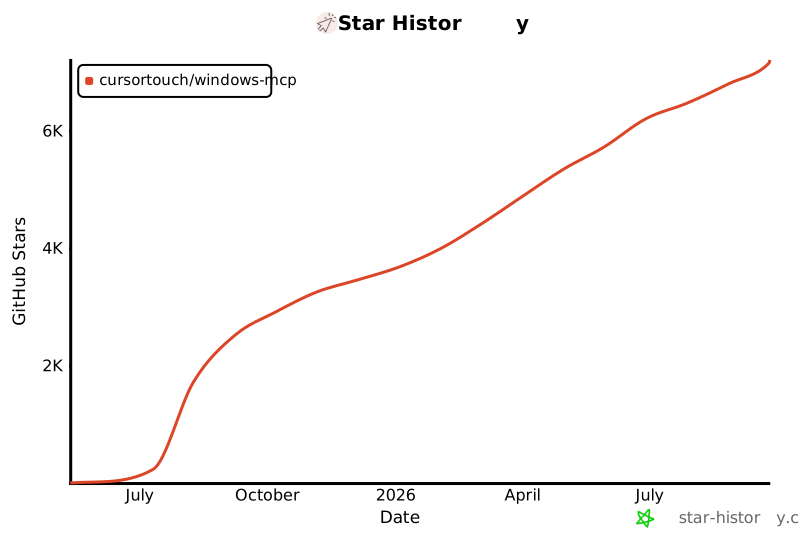](https://www.star-history.com/#CursorTouch/Windows-MCP&Date)
|
|
371
369
|
|
|
372
|
-
##
|
|
370
|
+
## 👥 Contributors
|
|
371
|
+
|
|
372
|
+
Thanks to all the amazing people who have contributed to Windows-MCP! 🎉
|
|
373
373
|
|
|
374
|
-
|
|
374
|
+
<a href="https://github.com/CursorTouch/Windows-MCP/graphs/contributors">
|
|
375
|
+
<img src="https://contrib.rocks/image?repo=CursorTouch/Windows-MCP" />
|
|
376
|
+
</a>
|
|
377
|
+
|
|
378
|
+
We appreciate every contribution, whether it's code, documentation, bug reports, or feature suggestions. Want to contribute? Check out our [Contributing Guidelines](CONTRIBUTING)!
|
|
375
379
|
|
|
376
380
|
## 🔒 Security
|
|
377
381
|
|
|
@@ -407,6 +411,8 @@ To disable telemetry, add the following to your MCP client configuration:
|
|
|
407
411
|
}
|
|
408
412
|
```
|
|
409
413
|
|
|
414
|
+
For detailed information on what data is collected and how it is handled, please refer to the [Telemetry and Data Privacy](SECURITY.md#telemetry-and-data-privacy) section in our Security Policy.
|
|
415
|
+
|
|
410
416
|
## 📝 Limitations
|
|
411
417
|
|
|
412
418
|
- Selecting specific sections of the text in a paragraph, as the MCP is relying on a11y tree. (⌛ Working on it.)
|
|
@@ -26,7 +26,8 @@
|
|
|
26
26
|
mcp-name: io.github.CursorTouch/Windows-MCP
|
|
27
27
|
|
|
28
28
|
## Updates
|
|
29
|
-
- Windows-MCP
|
|
29
|
+
- Windows-MCP reached 1M+ Users in [Claude Desktop Extensiosn](https://claude.ai/directory).
|
|
30
|
+
- Windows-MCP is now available on [PyPI](https://pypi.org/project/windows-mcp/) (thus supports `uvx windows-mcp`)
|
|
30
31
|
- Windows-MCP is added to [MCP Registry](https://github.com/modelcontextprotocol/registry)
|
|
31
32
|
- Try out 🪟[Windows-Use](https://github.com/CursorTouch/Windows-Use)!!, an agent built using Windows-MCP.
|
|
32
33
|
- Windows-MCP is now featured as Desktop Extension in `Claude Desktop`.
|
|
@@ -62,13 +63,15 @@ mcp-name: io.github.CursorTouch/Windows-MCP
|
|
|
62
63
|
Easily adapt or extend tools to suit your unique automation or AI integration needs.
|
|
63
64
|
|
|
64
65
|
- **Real-Time Interaction**
|
|
65
|
-
Typical latency between actions (e.g., from one mouse click to the next) ranges from **0.
|
|
66
|
+
Typical latency between actions (e.g., from one mouse click to the next) ranges from **0.4 to 1.2 secs**, and may slightly vary based on the number of active applications and system load, also the inferencing speed of the llm.
|
|
66
67
|
|
|
67
68
|
- **DOM Mode for Browser Automation**
|
|
68
69
|
Special `use_dom=True` mode for State-Tool that focuses exclusively on web page content, filtering out browser UI elements for cleaner, more efficient web automation.
|
|
69
70
|
|
|
70
71
|
## 🛠️Installation
|
|
71
72
|
|
|
73
|
+
**Note:** When you install this MCP server for the first time it may take a minute or two because of installing the dependencies in `pyproject.toml`. In the first run the server may timeout ignore it and restart it.
|
|
74
|
+
|
|
72
75
|
### Prerequisites
|
|
73
76
|
|
|
74
77
|
- Python 3.13+
|
|
@@ -294,17 +297,17 @@ args=[
|
|
|
294
297
|
|
|
295
298
|
MCP Client can access the following tools to interact with Windows:
|
|
296
299
|
|
|
297
|
-
- `Click
|
|
298
|
-
- `Type
|
|
299
|
-
- `Scroll
|
|
300
|
-
- `Drag
|
|
301
|
-
- `Move
|
|
302
|
-
- `Shortcut
|
|
303
|
-
- `Wait
|
|
304
|
-
- `
|
|
305
|
-
- `App
|
|
306
|
-
- `Shell
|
|
307
|
-
- `Scrape
|
|
300
|
+
- `Click`: Click on the screen at the given coordinates.
|
|
301
|
+
- `Type`: Type text on an element (optionally clears existing text).
|
|
302
|
+
- `Scroll`: Scroll vertically or horizontally on the window or specific regions.
|
|
303
|
+
- `Drag`: Drag from one point to another.
|
|
304
|
+
- `Move`: Move mouse pointer.
|
|
305
|
+
- `Shortcut`: Press keyboard shortcuts (`Ctrl+c`, `Alt+Tab`, etc).
|
|
306
|
+
- `Wait`: Pause for a defined duration.
|
|
307
|
+
- `Snapshot`: Combined snapshot of default language, browser, active apps and interactive, textual and scrollable elements along with screenshot of the desktop. Supports `use_dom=True` for browser content extraction (web page elements only) and `use_vision=True` for including screenshots.
|
|
308
|
+
- `App`: To launch an application from the start menu, resize or move the window and switch between apps.
|
|
309
|
+
- `Shell`: To execute PowerShell commands.
|
|
310
|
+
- `Scrape`: To scrape the entire webpage for information.
|
|
308
311
|
|
|
309
312
|
## 🤝 Connect with Us
|
|
310
313
|
Stay updated and join our community:
|
|
@@ -317,9 +320,15 @@ Stay updated and join our community:
|
|
|
317
320
|
|
|
318
321
|
[](https://www.star-history.com/#CursorTouch/Windows-MCP&Date)
|
|
319
322
|
|
|
320
|
-
##
|
|
323
|
+
## 👥 Contributors
|
|
324
|
+
|
|
325
|
+
Thanks to all the amazing people who have contributed to Windows-MCP! 🎉
|
|
321
326
|
|
|
322
|
-
|
|
327
|
+
<a href="https://github.com/CursorTouch/Windows-MCP/graphs/contributors">
|
|
328
|
+
<img src="https://contrib.rocks/image?repo=CursorTouch/Windows-MCP" />
|
|
329
|
+
</a>
|
|
330
|
+
|
|
331
|
+
We appreciate every contribution, whether it's code, documentation, bug reports, or feature suggestions. Want to contribute? Check out our [Contributing Guidelines](CONTRIBUTING)!
|
|
323
332
|
|
|
324
333
|
## 🔒 Security
|
|
325
334
|
|
|
@@ -355,6 +364,8 @@ To disable telemetry, add the following to your MCP client configuration:
|
|
|
355
364
|
}
|
|
356
365
|
```
|
|
357
366
|
|
|
367
|
+
For detailed information on what data is collected and how it is handled, please refer to the [Telemetry and Data Privacy](SECURITY.md#telemetry-and-data-privacy) section in our Security Policy.
|
|
368
|
+
|
|
358
369
|
## 📝 Limitations
|
|
359
370
|
|
|
360
371
|
- Selecting specific sections of the text in a paragraph, as the MCP is relying on a11y tree. (⌛ Working on it.)
|
|
@@ -74,7 +74,7 @@ If you must use Windows-MCP on a regular system:
|
|
|
74
74
|
2. **Regular Backups**: Maintain frequent, verified backups of all important data
|
|
75
75
|
3. **Network Isolation**: Disconnect from production networks or use firewall rules
|
|
76
76
|
4. **Supervised Operation**: Always monitor the agent's actions in real-time
|
|
77
|
-
5. **Disable High-Risk Tools**: Remove or restrict access to
|
|
77
|
+
5. **Disable High-Risk Tools**: Remove or restrict access to Shell and other destructive tools
|
|
78
78
|
6. **Test First**: Thoroughly test workflows in a safe environment before production use
|
|
79
79
|
|
|
80
80
|
## Security Considerations
|
|
@@ -97,11 +97,11 @@ These tools can make permanent changes to your system:
|
|
|
97
97
|
|
|
98
98
|
| Tool | Risk | Description |
|
|
99
99
|
|------|------|-------------|
|
|
100
|
-
| **
|
|
101
|
-
| **Click
|
|
102
|
-
| **Type
|
|
103
|
-
| **Drag
|
|
104
|
-
| **Shortcut
|
|
100
|
+
| **Shell** | Critical | Can execute arbitrary PowerShell commands, including system modifications, file deletions, and network operations |
|
|
101
|
+
| **Click** | High | Can trigger destructive UI actions (delete confirmations, system dialogs) |
|
|
102
|
+
| **Type** | High | Can overwrite text, potentially destroying data when `clear=True` |
|
|
103
|
+
| **Drag** | High | Can move/reorganize files, potentially overwriting existing files |
|
|
104
|
+
| **Shortcut** | High | Can execute destructive keyboard shortcuts (Ctrl+D delete, Alt+F4 close) |
|
|
105
105
|
|
|
106
106
|
#### **Medium-Risk Tools** (Modifying but Non-Destructive)
|
|
107
107
|
|
|
@@ -109,9 +109,9 @@ These tools modify system state but are generally safe:
|
|
|
109
109
|
|
|
110
110
|
| Tool | Risk | Description |
|
|
111
111
|
|------|------|-------------|
|
|
112
|
-
| **App
|
|
113
|
-
| **Scroll
|
|
114
|
-
| **Move
|
|
112
|
+
| **App** | Medium | Launches/manages applications but doesn't modify data |
|
|
113
|
+
| **Scroll** | Low | Only changes viewport position |
|
|
114
|
+
| **Move** | Low | Only positions mouse cursor |
|
|
115
115
|
|
|
116
116
|
#### **Low-Risk Tools** (Read-Only)
|
|
117
117
|
|
|
@@ -119,9 +119,9 @@ These tools only read information without making changes:
|
|
|
119
119
|
|
|
120
120
|
| Tool | Risk | Description |
|
|
121
121
|
|------|------|-------------|
|
|
122
|
-
| **
|
|
123
|
-
| **Wait
|
|
124
|
-
| **Scrape
|
|
122
|
+
| **Snapshot** | Safe | Only captures desktop state and screenshots |
|
|
123
|
+
| **Wait** | Safe | Only pauses execution |
|
|
124
|
+
| **Scrape** | Safe* | Fetches web content (*may expose browsing activity) |
|
|
125
125
|
|
|
126
126
|
## Best Practices
|
|
127
127
|
|
|
@@ -140,7 +140,7 @@ These tools only read information without making changes:
|
|
|
140
140
|
### 3. **Monitor Tool Usage**
|
|
141
141
|
|
|
142
142
|
- Regularly review logs to understand what actions are being performed
|
|
143
|
-
- Be especially vigilant with high-risk tools (
|
|
143
|
+
- Be especially vigilant with high-risk tools (Shell, Click, etc.)
|
|
144
144
|
- Set up alerts for unexpected or suspicious activity
|
|
145
145
|
|
|
146
146
|
### 4. **Network Security**
|
|
@@ -152,8 +152,8 @@ These tools only read information without making changes:
|
|
|
152
152
|
|
|
153
153
|
### 5. **Data Protection**
|
|
154
154
|
|
|
155
|
-
- Be aware that **
|
|
156
|
-
- **Scrape
|
|
155
|
+
- Be aware that **Snapshot** captures screenshots that may contain sensitive information
|
|
156
|
+
- **Scrape** may fetch content from untrusted websites
|
|
157
157
|
- Avoid using Windows-MCP in environments with highly sensitive data
|
|
158
158
|
- Consider disabling screenshot functionality (`use_vision=False`) when handling confidential information
|
|
159
159
|
|
|
@@ -263,12 +263,23 @@ Windows-MCP does not implement comprehensive audit logging by default. For compl
|
|
|
263
263
|
- Using Windows Event Logging for system-level auditing
|
|
264
264
|
- Monitoring file system and registry changes
|
|
265
265
|
|
|
266
|
-
### Data Privacy
|
|
267
|
-
|
|
268
|
-
- Windows-MCP
|
|
269
|
-
-
|
|
270
|
-
-
|
|
271
|
-
-
|
|
266
|
+
### Telemetry and Data Privacy
|
|
267
|
+
|
|
268
|
+
- Windows-MCP collects anonymous usage data to help improve the MCP server.
|
|
269
|
+
- **We collect:**
|
|
270
|
+
- Tool execution status (success/failure)
|
|
271
|
+
- Execution duration
|
|
272
|
+
- Tool name
|
|
273
|
+
- Client name and version (e.g., Claude Desktop, etc.)
|
|
274
|
+
- Anonymized session IDs
|
|
275
|
+
- **We DO NOT collect:**
|
|
276
|
+
- **Tool arguments** (text typed, coordinates, file paths, etc.)
|
|
277
|
+
- **Tool outputs** (screenshots, commands results, page content, etc.)
|
|
278
|
+
- **Personal Information** (IP addresses are not stored, no user identifiers beyond a random UUID)
|
|
279
|
+
- Telemetry is enabled by default but can be disabled by setting the `ANONYMIZED_TELEMETRY` environment variable to `false` in the MCP server configuration.
|
|
280
|
+
- Windows-MCP processes commands locally on your machine.
|
|
281
|
+
- Screenshots and state captures remain on your local system.
|
|
282
|
+
- Web scraping may expose browsing activity to target websites.
|
|
272
283
|
|
|
273
284
|
## Tool Annotations Reference
|
|
274
285
|
|
|
Binary file
|
|
@@ -1,111 +1,111 @@
|
|
|
1
|
-
{
|
|
2
|
-
"manifest_version": "0.2",
|
|
3
|
-
"name": "Windows-MCP",
|
|
4
|
-
"version": "0.5.
|
|
5
|
-
"description": "MCP Server that enables Claude to interact with Windows OS",
|
|
6
|
-
"long_description": "Windows MCP is an open-source project that enables seamless integration between AI agents and the Windows operating system. Acting as an MCP server bridges the gap between LLMs and the Windows
|
|
7
|
-
"author": {
|
|
8
|
-
"name": "CursorTouch",
|
|
9
|
-
"url": "https://cursortouch.com/"
|
|
10
|
-
},
|
|
11
|
-
"homepage": "https://cursortouch.com/",
|
|
12
|
-
"documentation": "https://github.com/CursorTouch/Windows-MCP",
|
|
13
|
-
"support": "https://github.com/CursorTouch/Windows-MCP",
|
|
14
|
-
"icon": "./assets/logo.png",
|
|
15
|
-
"screenshots": [
|
|
16
|
-
"./assets/screenshots/screenshot_1.png",
|
|
17
|
-
"./assets/screenshots/screenshot_2.png",
|
|
18
|
-
"./assets/screenshots/screenshot_3.png"
|
|
19
|
-
],
|
|
20
|
-
"server": {
|
|
21
|
-
"type": "python",
|
|
22
|
-
"entry_point": "./src/windows_mcp/__main__.py",
|
|
23
|
-
"mcp_config": {
|
|
24
|
-
"command": "uv",
|
|
25
|
-
"args": [
|
|
26
|
-
"--directory",
|
|
27
|
-
"${__dirname}",
|
|
28
|
-
"run",
|
|
29
|
-
"windows-mcp"
|
|
30
|
-
],
|
|
31
|
-
"env": {
|
|
32
|
-
"ANONYMIZED_TELEMETRY": "${user_config.anonymized_telemetry}"
|
|
33
|
-
}
|
|
34
|
-
}
|
|
35
|
-
},
|
|
36
|
-
"user_config": {
|
|
37
|
-
"anonymized_telemetry": {
|
|
38
|
-
"type": "boolean",
|
|
39
|
-
"title": "Anonymized Telemetry",
|
|
40
|
-
"description": "Windows-MCP collects usage data to help improve the MCP server. No personal information,
|
|
41
|
-
"required": false,
|
|
42
|
-
"default": true
|
|
43
|
-
}
|
|
44
|
-
},
|
|
45
|
-
"tools": [
|
|
46
|
-
{
|
|
47
|
-
"name": "App Tool",
|
|
48
|
-
"description": "Manages Windows applications through launch, resize, and window switching operations."
|
|
49
|
-
},
|
|
50
|
-
{
|
|
51
|
-
"name": "Powershell Tool",
|
|
52
|
-
"description": "Execute PowerShell commands and return the output with status code"
|
|
53
|
-
},
|
|
54
|
-
{
|
|
55
|
-
"name": "State Tool",
|
|
56
|
-
"description": "Capture comprehensive desktop state including focused/opened applications, interactive UI elements (buttons, text fields, menus), informative content (text, labels, status), and scrollable areas. Optionally includes visual screenshot when use_vision=True. Essential for understanding current desktop context and available UI interactions."
|
|
57
|
-
},
|
|
58
|
-
{
|
|
59
|
-
"name": "Click Tool",
|
|
60
|
-
"description": "Click on UI elements at specific coordinates. Supports left/right/middle mouse buttons and single/double/triple clicks. Use coordinates from State Tool output."
|
|
61
|
-
},
|
|
62
|
-
{
|
|
63
|
-
"name": "Type Tool",
|
|
64
|
-
"description": "Type text into input fields, text areas, or focused elements. Set clear=True to replace existing text, False to append. Click on target element coordinates first."
|
|
65
|
-
},
|
|
66
|
-
{
|
|
67
|
-
"name": "Scroll Tool",
|
|
68
|
-
"description": "Scroll at specific coordinates or current mouse position. Use wheel_times to control scroll amount (1 wheel = ~3-5 lines). Essential for navigating lists, web pages, and long content."
|
|
69
|
-
},
|
|
70
|
-
{
|
|
71
|
-
"name": "Drag Tool",
|
|
72
|
-
"description": "Drag and drop operation from source coordinates to destination coordinates. Useful for moving files, resizing windows, or drag-and-drop interactions."
|
|
73
|
-
},
|
|
74
|
-
{
|
|
75
|
-
"name": "Move Tool",
|
|
76
|
-
"description": "Move mouse cursor to specific coordinates without clicking. Useful for hovering over elements or positioning cursor before other actions."
|
|
77
|
-
},
|
|
78
|
-
{
|
|
79
|
-
"name": "Shortcut Tool",
|
|
80
|
-
"description": "Execute keyboard shortcuts using key combinations. Pass keys as list (e.g., 'ctrl'+'c' for copy, 'alt'+'tab' for app switching, 'win'+'r' for Run dialog, 'win' is for opening the start menu)."
|
|
81
|
-
},
|
|
82
|
-
{
|
|
83
|
-
"name": "Wait Tool",
|
|
84
|
-
"description": "Pause execution for specified duration in seconds. Useful for waiting for applications to load, animations to complete, or adding delays between actions."
|
|
85
|
-
},
|
|
86
|
-
{
|
|
87
|
-
"name": "Scrape Tool",
|
|
88
|
-
"description": "Fetch content from a URL or the active browser tab. By default (use_dom=False), performs a lightweight HTTP request to the URL and returns markdown content of complete webpage. Note: Some websites may block automated HTTP requests. If this fails, open the page in a browser and retry with use_dom=True to extract visible text from the active tab's DOM within the viewport."
|
|
89
|
-
}
|
|
90
|
-
],
|
|
91
|
-
"compatibility": {
|
|
92
|
-
"platforms": [
|
|
93
|
-
"win32"
|
|
94
|
-
],
|
|
95
|
-
"runtimes": {
|
|
96
|
-
"python": ">=3.13"
|
|
97
|
-
}
|
|
98
|
-
},
|
|
99
|
-
"keywords": [
|
|
100
|
-
"windows",
|
|
101
|
-
"automation",
|
|
102
|
-
"ai",
|
|
103
|
-
"mcp",
|
|
104
|
-
"computer-use"
|
|
105
|
-
],
|
|
106
|
-
"license": "MIT",
|
|
107
|
-
"repository": {
|
|
108
|
-
"type": "git",
|
|
109
|
-
"url": "https://github.com/CursorTouch/Windows-MCP"
|
|
110
|
-
}
|
|
1
|
+
{
|
|
2
|
+
"manifest_version": "0.2",
|
|
3
|
+
"name": "Windows-MCP",
|
|
4
|
+
"version": "0.5.7",
|
|
5
|
+
"description": "MCP Server that enables Claude to interact with Windows OS",
|
|
6
|
+
"long_description": "Windows MCP is an open-source project that enables seamless integration between AI agents and the Windows operating system. Acting as an MCP server, it bridges the gap between large language models (LLMs) and the Windows OS, allowing agents to perform tasks such as **file navigation, application control, UI interaction, QA testing, and more**.\n\n**KEY FEATURES**\n- **Seamless Windows Integration**: Interacts natively with Windows UI elements, opens applications, controls windows, simulates user input, and more.\n- **Use Any LLM (Vision Optional)**: Does not rely on traditional computer vision techniques or fine-tuned models. Works with any LLM, reducing complexity and setup time.\n- **Rich Toolset for UI Automation**: Includes tools for keyboard and mouse control, window management, and capturing window or UI state.\n- **Lightweight & Open-Source**: Minimal dependencies with full source code available under the MIT license.\n- **Customizable & Extendable**: Easily adapt or extend tools to suit custom automation workflows or AI integrations.\n- **Real-Time Interaction**: Typical latency between actions ranges from `0.4` to `1.2` seconds, depending on system load, active applications, and LLM inference speed.\n\n**MINIMUM REQUIREMENTS**\n- Python 3.13 or higher\n- UV Package Manager\nThis MCP server requires UV, a fast Python package manager.\nInstallation:\n`curl -LsSf https://astral.sh/uv/install.sh | sh`\nFor detailed installation instructions, [see the UV documentation](https://github.com/astral-sh/uv)",
|
|
7
|
+
"author": {
|
|
8
|
+
"name": "CursorTouch",
|
|
9
|
+
"url": "https://cursortouch.com/"
|
|
10
|
+
},
|
|
11
|
+
"homepage": "https://cursortouch.com/",
|
|
12
|
+
"documentation": "https://github.com/CursorTouch/Windows-MCP",
|
|
13
|
+
"support": "https://github.com/CursorTouch/Windows-MCP",
|
|
14
|
+
"icon": "./assets/logo.png",
|
|
15
|
+
"screenshots": [
|
|
16
|
+
"./assets/screenshots/screenshot_1.png",
|
|
17
|
+
"./assets/screenshots/screenshot_2.png",
|
|
18
|
+
"./assets/screenshots/screenshot_3.png"
|
|
19
|
+
],
|
|
20
|
+
"server": {
|
|
21
|
+
"type": "python",
|
|
22
|
+
"entry_point": "./src/windows_mcp/__main__.py",
|
|
23
|
+
"mcp_config": {
|
|
24
|
+
"command": "uv",
|
|
25
|
+
"args": [
|
|
26
|
+
"--directory",
|
|
27
|
+
"${__dirname}",
|
|
28
|
+
"run",
|
|
29
|
+
"windows-mcp"
|
|
30
|
+
],
|
|
31
|
+
"env": {
|
|
32
|
+
"ANONYMIZED_TELEMETRY": "${user_config.anonymized_telemetry}"
|
|
33
|
+
}
|
|
34
|
+
}
|
|
35
|
+
},
|
|
36
|
+
"user_config": {
|
|
37
|
+
"anonymized_telemetry": {
|
|
38
|
+
"type": "boolean",
|
|
39
|
+
"title": "Anonymized Telemetry",
|
|
40
|
+
"description": "Windows-MCP collects basic usage data to help improve the MCP server. No personal information, tool arguments, or tool outputs are tracked.",
|
|
41
|
+
"required": false,
|
|
42
|
+
"default": true
|
|
43
|
+
}
|
|
44
|
+
},
|
|
45
|
+
"tools": [
|
|
46
|
+
{
|
|
47
|
+
"name": "App Tool",
|
|
48
|
+
"description": "Manages Windows applications through launch, resize, and window switching operations."
|
|
49
|
+
},
|
|
50
|
+
{
|
|
51
|
+
"name": "Powershell Tool",
|
|
52
|
+
"description": "Execute PowerShell commands and return the output with status code"
|
|
53
|
+
},
|
|
54
|
+
{
|
|
55
|
+
"name": "State Tool",
|
|
56
|
+
"description": "Capture comprehensive desktop state including focused/opened applications, interactive UI elements (buttons, text fields, menus), informative content (text, labels, status), and scrollable areas. Optionally includes visual screenshot when use_vision=True. Essential for understanding current desktop context and available UI interactions."
|
|
57
|
+
},
|
|
58
|
+
{
|
|
59
|
+
"name": "Click Tool",
|
|
60
|
+
"description": "Click on UI elements at specific coordinates. Supports left/right/middle mouse buttons and single/double/triple clicks. Use coordinates from State Tool output."
|
|
61
|
+
},
|
|
62
|
+
{
|
|
63
|
+
"name": "Type Tool",
|
|
64
|
+
"description": "Type text into input fields, text areas, or focused elements. Set clear=True to replace existing text, False to append. Click on target element coordinates first."
|
|
65
|
+
},
|
|
66
|
+
{
|
|
67
|
+
"name": "Scroll Tool",
|
|
68
|
+
"description": "Scroll at specific coordinates or current mouse position. Use wheel_times to control scroll amount (1 wheel = ~3-5 lines). Essential for navigating lists, web pages, and long content."
|
|
69
|
+
},
|
|
70
|
+
{
|
|
71
|
+
"name": "Drag Tool",
|
|
72
|
+
"description": "Drag and drop operation from source coordinates to destination coordinates. Useful for moving files, resizing windows, or drag-and-drop interactions."
|
|
73
|
+
},
|
|
74
|
+
{
|
|
75
|
+
"name": "Move Tool",
|
|
76
|
+
"description": "Move mouse cursor to specific coordinates without clicking. Useful for hovering over elements or positioning cursor before other actions."
|
|
77
|
+
},
|
|
78
|
+
{
|
|
79
|
+
"name": "Shortcut Tool",
|
|
80
|
+
"description": "Execute keyboard shortcuts using key combinations. Pass keys as list (e.g., 'ctrl'+'c' for copy, 'alt'+'tab' for app switching, 'win'+'r' for Run dialog, 'win' is for opening the start menu)."
|
|
81
|
+
},
|
|
82
|
+
{
|
|
83
|
+
"name": "Wait Tool",
|
|
84
|
+
"description": "Pause execution for specified duration in seconds. Useful for waiting for applications to load, animations to complete, or adding delays between actions."
|
|
85
|
+
},
|
|
86
|
+
{
|
|
87
|
+
"name": "Scrape Tool",
|
|
88
|
+
"description": "Fetch content from a URL or the active browser tab. By default (use_dom=False), performs a lightweight HTTP request to the URL and returns markdown content of complete webpage. Note: Some websites may block automated HTTP requests. If this fails, open the page in a browser and retry with use_dom=True to extract visible text from the active tab's DOM within the viewport."
|
|
89
|
+
}
|
|
90
|
+
],
|
|
91
|
+
"compatibility": {
|
|
92
|
+
"platforms": [
|
|
93
|
+
"win32"
|
|
94
|
+
],
|
|
95
|
+
"runtimes": {
|
|
96
|
+
"python": ">=3.13"
|
|
97
|
+
}
|
|
98
|
+
},
|
|
99
|
+
"keywords": [
|
|
100
|
+
"windows",
|
|
101
|
+
"automation",
|
|
102
|
+
"ai",
|
|
103
|
+
"mcp",
|
|
104
|
+
"computer-use"
|
|
105
|
+
],
|
|
106
|
+
"license": "MIT",
|
|
107
|
+
"repository": {
|
|
108
|
+
"type": "git",
|
|
109
|
+
"url": "https://github.com/CursorTouch/Windows-MCP"
|
|
110
|
+
}
|
|
111
111
|
}
|
|
@@ -1,6 +1,6 @@
|
|
|
1
1
|
[project]
|
|
2
2
|
name = "windows-mcp"
|
|
3
|
-
version = "0.5.
|
|
3
|
+
version = "0.5.9"
|
|
4
4
|
description = "Lightweight MCP Server for interacting with Windows Operating System."
|
|
5
5
|
authors = [
|
|
6
6
|
{ name = "Jeomon George", email = "jeogeoalukka@gmail.com" }
|
|
@@ -12,24 +12,19 @@ keywords = ["windows", "mcp", "ai", "desktop","ai agent"]
|
|
|
12
12
|
requires-python = ">=3.13"
|
|
13
13
|
dependencies = [
|
|
14
14
|
"click>=8.2.1",
|
|
15
|
-
"
|
|
15
|
+
"comtypes>=1.4.15",
|
|
16
|
+
"fastmcp>=2.14.2",
|
|
16
17
|
"fuzzywuzzy>=0.18.0",
|
|
17
|
-
"humancursor>=1.1.5",
|
|
18
|
-
"ipykernel>=6.30.0",
|
|
19
|
-
"live-inspect>=0.1.2",
|
|
20
18
|
"markdownify>=1.1.0",
|
|
21
|
-
"pdfplumber>=0.11.7",
|
|
22
19
|
"pillow>=11.2.1",
|
|
23
20
|
"posthog>=7.4.0",
|
|
24
21
|
"psutil>=7.0.0",
|
|
25
22
|
"pyautogui>=0.9.54",
|
|
26
|
-
"pygetwindow>=0.0.9",
|
|
27
23
|
"python-dotenv>=1.1.0",
|
|
28
24
|
"python-levenshtein>=0.27.1",
|
|
29
|
-
"
|
|
25
|
+
"pywin32>=311",
|
|
30
26
|
"requests>=2.32.3",
|
|
31
27
|
"tabulate>=0.9.0",
|
|
32
|
-
"uiautomation>=2.0.24",
|
|
33
28
|
"uuid7>=0.1.0",
|
|
34
29
|
]
|
|
35
30
|
|