wezterm-theme 1.0.0__tar.gz
This diff represents the content of publicly available package versions that have been released to one of the supported registries. The information contained in this diff is provided for informational purposes only and reflects changes between package versions as they appear in their respective public registries.
- wezterm_theme-1.0.0/LICENSE +21 -0
- wezterm_theme-1.0.0/MANIFEST.in +6 -0
- wezterm_theme-1.0.0/PKG-INFO +204 -0
- wezterm_theme-1.0.0/README.md +172 -0
- wezterm_theme-1.0.0/pyproject.toml +65 -0
- wezterm_theme-1.0.0/setup.cfg +4 -0
- wezterm_theme-1.0.0/src/wezterm_theme/__init__.py +4 -0
- wezterm_theme-1.0.0/src/wezterm_theme/__main__.py +6 -0
- wezterm_theme-1.0.0/src/wezterm_theme/assets/studio.html +1508 -0
- wezterm_theme-1.0.0/src/wezterm_theme/cli.py +437 -0
- wezterm_theme-1.0.0/src/wezterm_theme/core.py +921 -0
- wezterm_theme-1.0.0/src/wezterm_theme/fonts.py +448 -0
- wezterm_theme-1.0.0/src/wezterm_theme/paths.py +196 -0
- wezterm_theme-1.0.0/src/wezterm_theme/server.py +303 -0
- wezterm_theme-1.0.0/src/wezterm_theme/themes.py +2088 -0
- wezterm_theme-1.0.0/src/wezterm_theme/tui.py +855 -0
- wezterm_theme-1.0.0/src/wezterm_theme.egg-info/PKG-INFO +204 -0
- wezterm_theme-1.0.0/src/wezterm_theme.egg-info/SOURCES.txt +20 -0
- wezterm_theme-1.0.0/src/wezterm_theme.egg-info/dependency_links.txt +1 -0
- wezterm_theme-1.0.0/src/wezterm_theme.egg-info/entry_points.txt +3 -0
- wezterm_theme-1.0.0/src/wezterm_theme.egg-info/top_level.txt +1 -0
- wezterm_theme-1.0.0/tests/test_wezterm_theme.py +308 -0
|
@@ -0,0 +1,21 @@
|
|
|
1
|
+
MIT License
|
|
2
|
+
|
|
3
|
+
Copyright (c) 2026 Marcus Vinícius Soares
|
|
4
|
+
|
|
5
|
+
Permission is hereby granted, free of charge, to any person obtaining a copy
|
|
6
|
+
of this software and associated documentation files (the "Software"), to deal
|
|
7
|
+
in the Software without restriction, including without limitation the rights
|
|
8
|
+
to use, copy, modify, merge, publish, distribute, sublicense, and/or sell
|
|
9
|
+
copies of the Software, and to permit persons to whom the Software is
|
|
10
|
+
furnished to do so, subject to the following conditions:
|
|
11
|
+
|
|
12
|
+
The above copyright notice and this permission notice shall be included in all
|
|
13
|
+
copies or substantial portions of the Software.
|
|
14
|
+
|
|
15
|
+
THE SOFTWARE IS PROVIDED "AS IS", WITHOUT WARRANTY OF ANY KIND, EXPRESS OR
|
|
16
|
+
IMPLIED, INCLUDING BUT NOT LIMITED TO THE WARRANTIES OF MERCHANTABILITY,
|
|
17
|
+
FITNESS FOR A PARTICULAR PURPOSE AND NONINFRINGEMENT. IN NO EVENT SHALL THE
|
|
18
|
+
AUTHORS OR COPYRIGHT HOLDERS BE LIABLE FOR ANY CLAIM, DAMAGES OR OTHER
|
|
19
|
+
LIABILITY, WHETHER IN AN ACTION OF CONTRACT, TORT OR OTHERWISE, ARISING FROM,
|
|
20
|
+
OUT OF OR IN CONNECTION WITH THE SOFTWARE OR THE USE OR OTHER DEALINGS IN THE
|
|
21
|
+
SOFTWARE.
|
|
@@ -0,0 +1,204 @@
|
|
|
1
|
+
Metadata-Version: 2.4
|
|
2
|
+
Name: wezterm-theme
|
|
3
|
+
Version: 1.0.0
|
|
4
|
+
Summary: Cross-platform interactive Tab Bar Theme Picker (60 themes), Symbol Customizer, and Live Font & Appearance Studio for WezTerm.
|
|
5
|
+
Author: Marcus Vinícius Soares
|
|
6
|
+
License-Expression: MIT
|
|
7
|
+
Project-URL: Homepage, https://github.com/mvsoares/wezterm-studio
|
|
8
|
+
Project-URL: Repository, https://github.com/mvsoares/wezterm-studio
|
|
9
|
+
Project-URL: Issues, https://github.com/mvsoares/wezterm-studio/issues
|
|
10
|
+
Keywords: wezterm,terminal,theme,tabs,fonts,nerd-fonts,tui,customizer,powerline
|
|
11
|
+
Classifier: Development Status :: 5 - Production/Stable
|
|
12
|
+
Classifier: Environment :: Console
|
|
13
|
+
Classifier: Environment :: Web Environment
|
|
14
|
+
Classifier: Intended Audience :: Developers
|
|
15
|
+
Classifier: Intended Audience :: End Users/Desktop
|
|
16
|
+
Classifier: Operating System :: OS Independent
|
|
17
|
+
Classifier: Operating System :: POSIX :: Linux
|
|
18
|
+
Classifier: Operating System :: MacOS
|
|
19
|
+
Classifier: Operating System :: Microsoft :: Windows
|
|
20
|
+
Classifier: Programming Language :: Python :: 3
|
|
21
|
+
Classifier: Programming Language :: Python :: 3 :: Only
|
|
22
|
+
Classifier: Programming Language :: Python :: 3.10
|
|
23
|
+
Classifier: Programming Language :: Python :: 3.11
|
|
24
|
+
Classifier: Programming Language :: Python :: 3.12
|
|
25
|
+
Classifier: Programming Language :: Python :: 3.13
|
|
26
|
+
Classifier: Topic :: Terminals :: Terminal Emulators/X Terminals
|
|
27
|
+
Classifier: Topic :: Utilities
|
|
28
|
+
Requires-Python: >=3.10
|
|
29
|
+
Description-Content-Type: text/markdown
|
|
30
|
+
License-File: LICENSE
|
|
31
|
+
Dynamic: license-file
|
|
32
|
+
|
|
33
|
+
# ✦ WezTerm Studio (`wezterm-theme`)
|
|
34
|
+
|
|
35
|
+
[](https://github.com/mvsoares/wezterm-studio/actions/workflows/ci.yml)
|
|
36
|
+
[](https://github.com/mvsoares/wezterm-studio/releases)
|
|
37
|
+
[](https://www.python.org/)
|
|
38
|
+
[](#cross-platform-compatibility)
|
|
39
|
+
[](https://github.com/mvsoares/wezterm-studio/blob/main/LICENSE)
|
|
40
|
+
|
|
41
|
+
**WezTerm Studio** (`wezterm-theme`) is a unified, cross-platform customizer (**Linux, macOS, and Windows**) for **WezTerm** that hot-reloads tab bar themes, custom symbols, monospace/Nerd Fonts, color schemes, and window appearance in real time — with **zero external dependencies** (100% Python `>= 3.10` standard library).
|
|
42
|
+
|
|
43
|
+
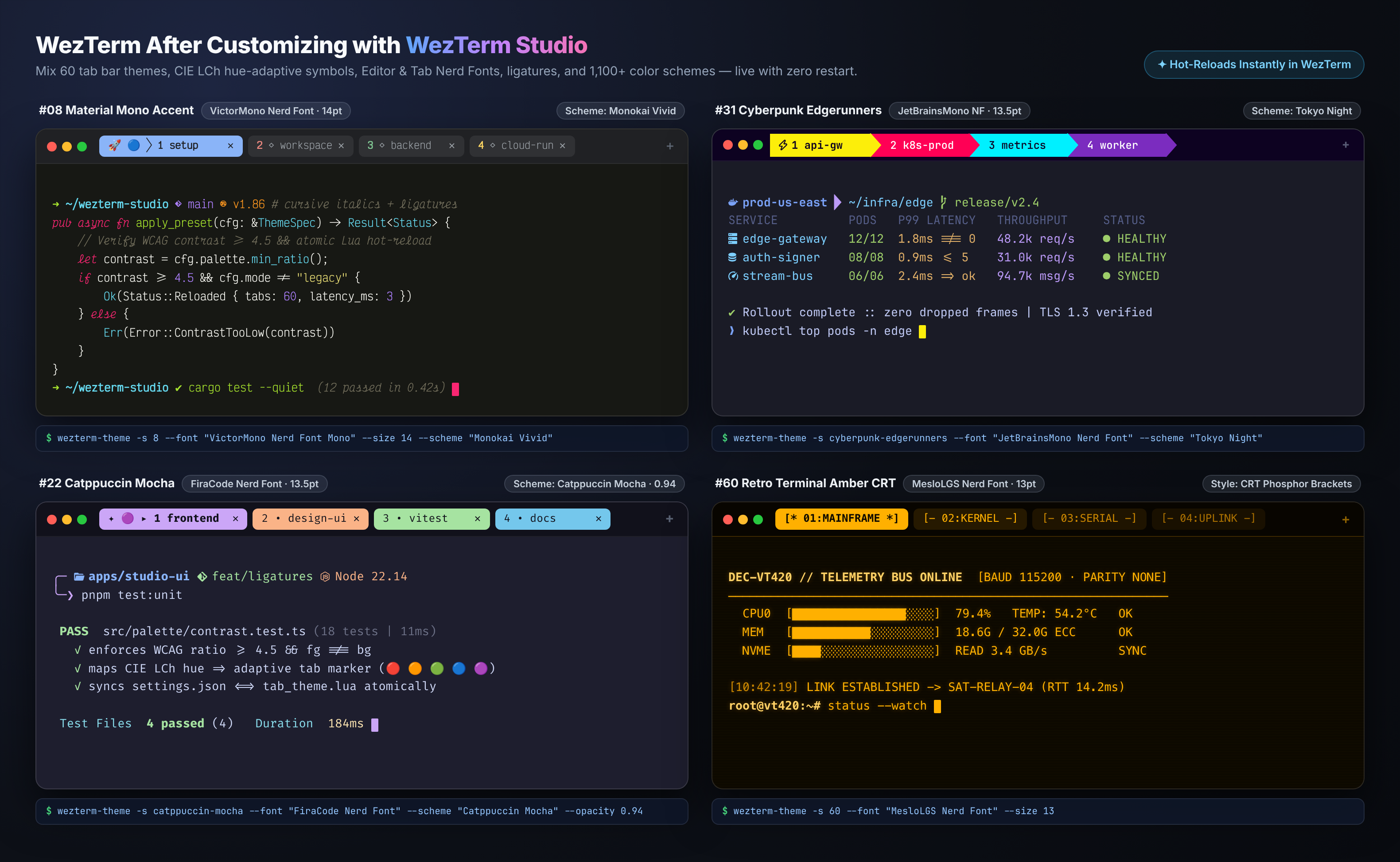
|
|
44
|
+
|
|
45
|
+
It combines a fast **CLI**, an **ANSI TrueColor TUI**, and a **Local Web Studio** into a single package:
|
|
46
|
+
|
|
47
|
+
- 🎨 **60 Tab Bar Themes** across 6 curated categories (*Google & Material*, *Powerline & Geometry*, *Developer Palettes*, *Synth & Cyberpunk*, *Nature & Earth Tones*, and *Minimal, Badges & CRT*) with verified WCAG contrast and configurable fixed tab width (`TAB_TITLE_LEN`).
|
|
48
|
+
- ✦ **Tab Bar Symbol Builder** — mix active tab prefixes, CIE LCh hue-adaptive markers, Powerline/chevron arrows, and inactive tab indicators.
|
|
49
|
+
- 🔤 **Live Font & Nerd Font Picker** — automatically discovers installed monospace and Nerd Fonts via `wezterm ls-fonts`, FontConfig, CoreText, and DirectWrite, with independent family, weight, and size controls for **Editor** and **Tab Bar**.
|
|
50
|
+
- 🖥 **1,100+ Built-in Color Schemes & Window Controls** — search and apply WezTerm color schemes, window opacity, inner padding, decorations, cursor style, line height, and scrollback.
|
|
51
|
+
- 💾 **Instant Backups & Portable JSON Presets** — automatic pre-validation via `wezterm` with rollback protection, timestamped backups, and OS-agnostic JSON presets shareable across Linux, macOS, and Windows.
|
|
52
|
+
|
|
53
|
+
---
|
|
54
|
+
|
|
55
|
+
## ✨ Visual Tour
|
|
56
|
+
|
|
57
|
+
### 1. Tab Bar Styles & Hue-Adaptive Symbols
|
|
58
|
+
Every theme enforces WCAG contrast and uniform character width so tabs never jump as directory names or active processes change. You can keep each theme's native style or layer custom CIE LCh hue-matched symbols on top:
|
|
59
|
+
|
|
60
|
+
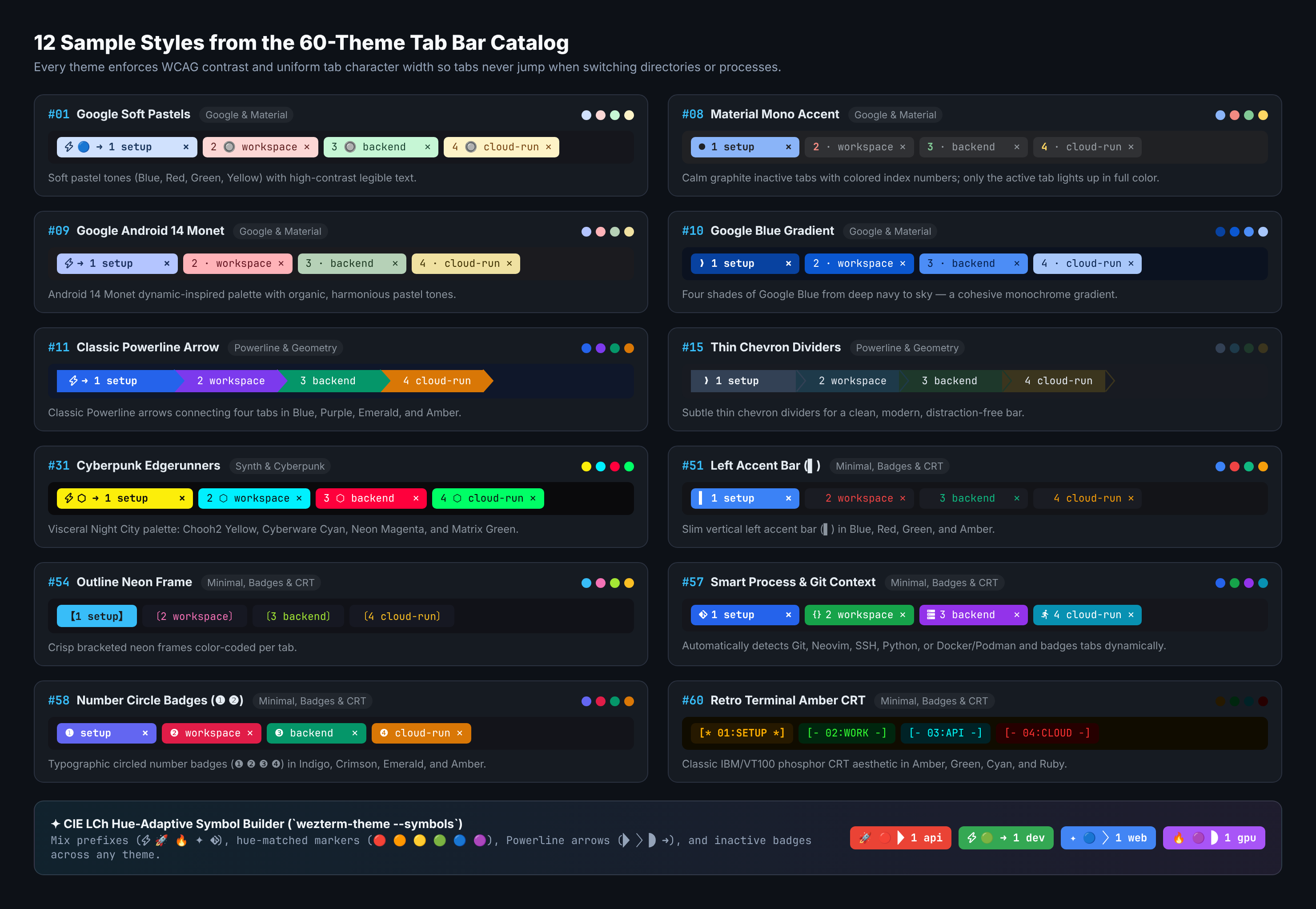
|
|
61
|
+
|
|
62
|
+
### 2. Browser Web Studio — Tab Themes & Symbol Builder (`wezterm-theme web`)
|
|
63
|
+
Interactive live preview of all 60 4-tab bar themes, fixed-width slider, category filters, and 1-click Symbol Builder that hot-reloads WezTerm immediately:
|
|
64
|
+
|
|
65
|
+
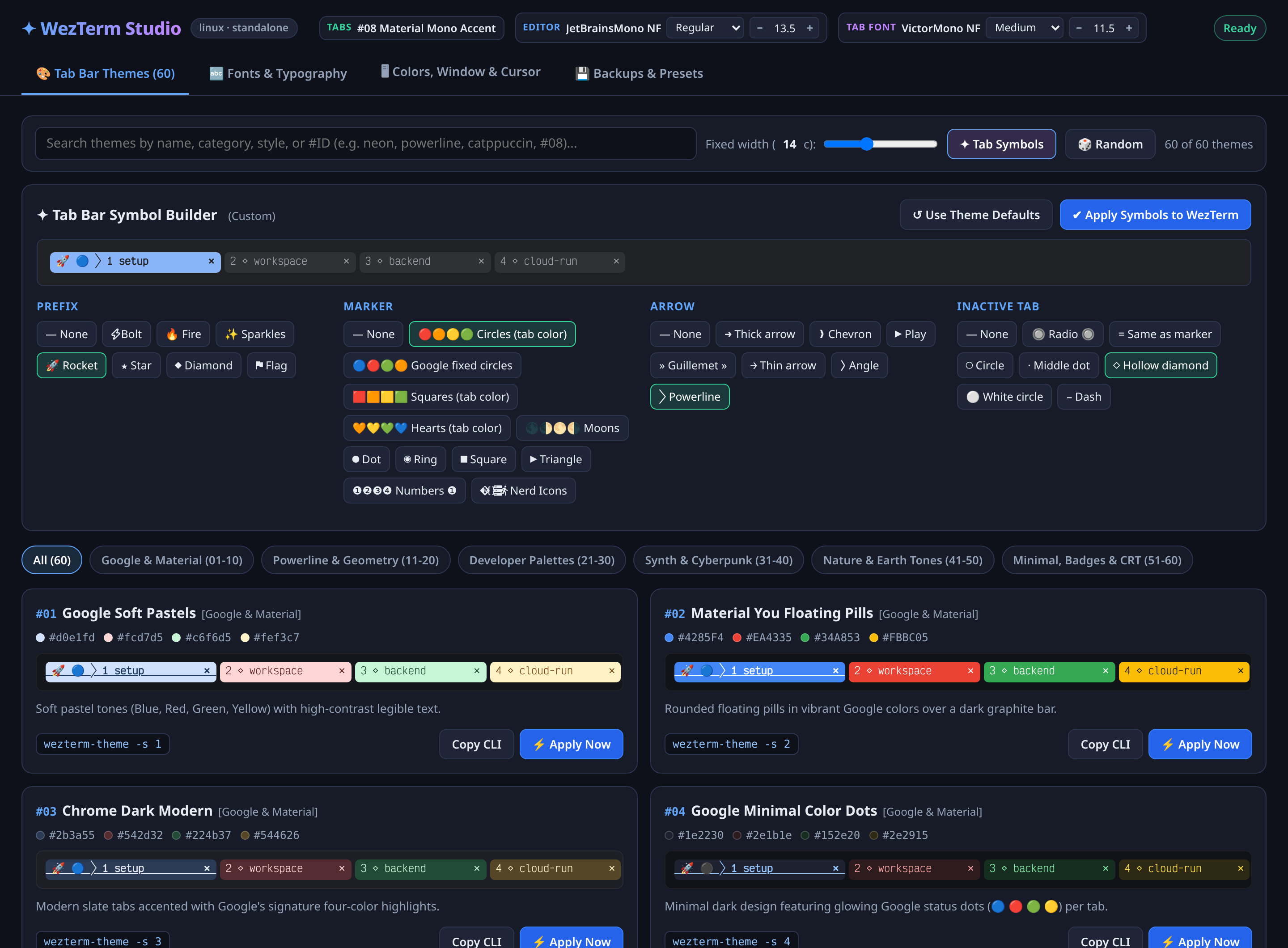
|
|
66
|
+
|
|
67
|
+
### 3. Browser Web Studio — Live Font & Nerd Font Picker
|
|
68
|
+
Renders your actual installed system fonts with programming ligature specimens (`!= === >= =>`), Nerd Font glyph strips, and separate **Apply to Editor** / **Apply to Tabs** actions:
|
|
69
|
+
|
|
70
|
+
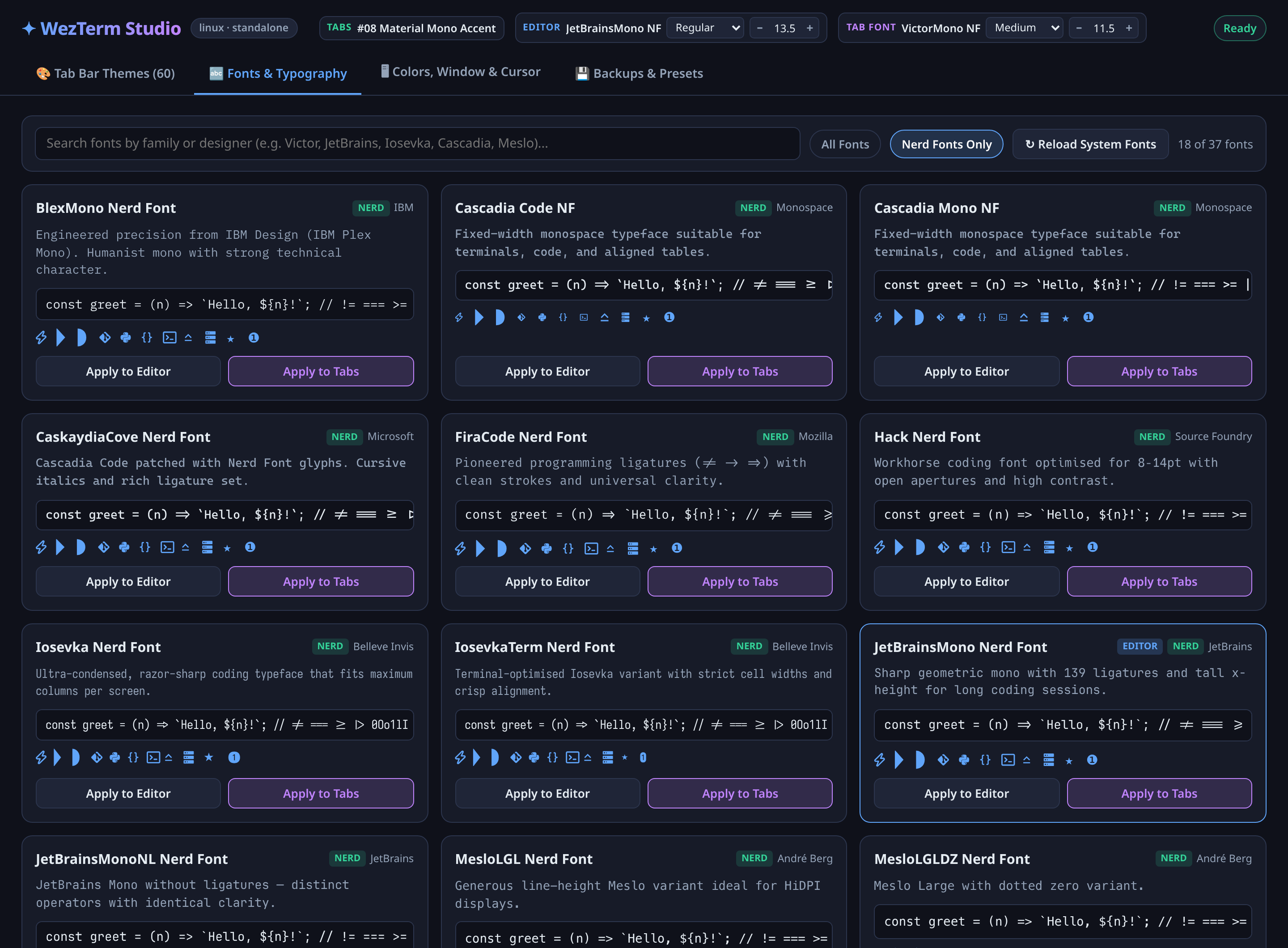
|
|
71
|
+
|
|
72
|
+
### 4. Interactive ANSI TrueColor Terminal Picker (`wezterm-theme`)
|
|
73
|
+
Prefer staying in the terminal or working over SSH? Run `wezterm-theme` with no arguments for the full TrueColor TUI:
|
|
74
|
+
|
|
75
|
+
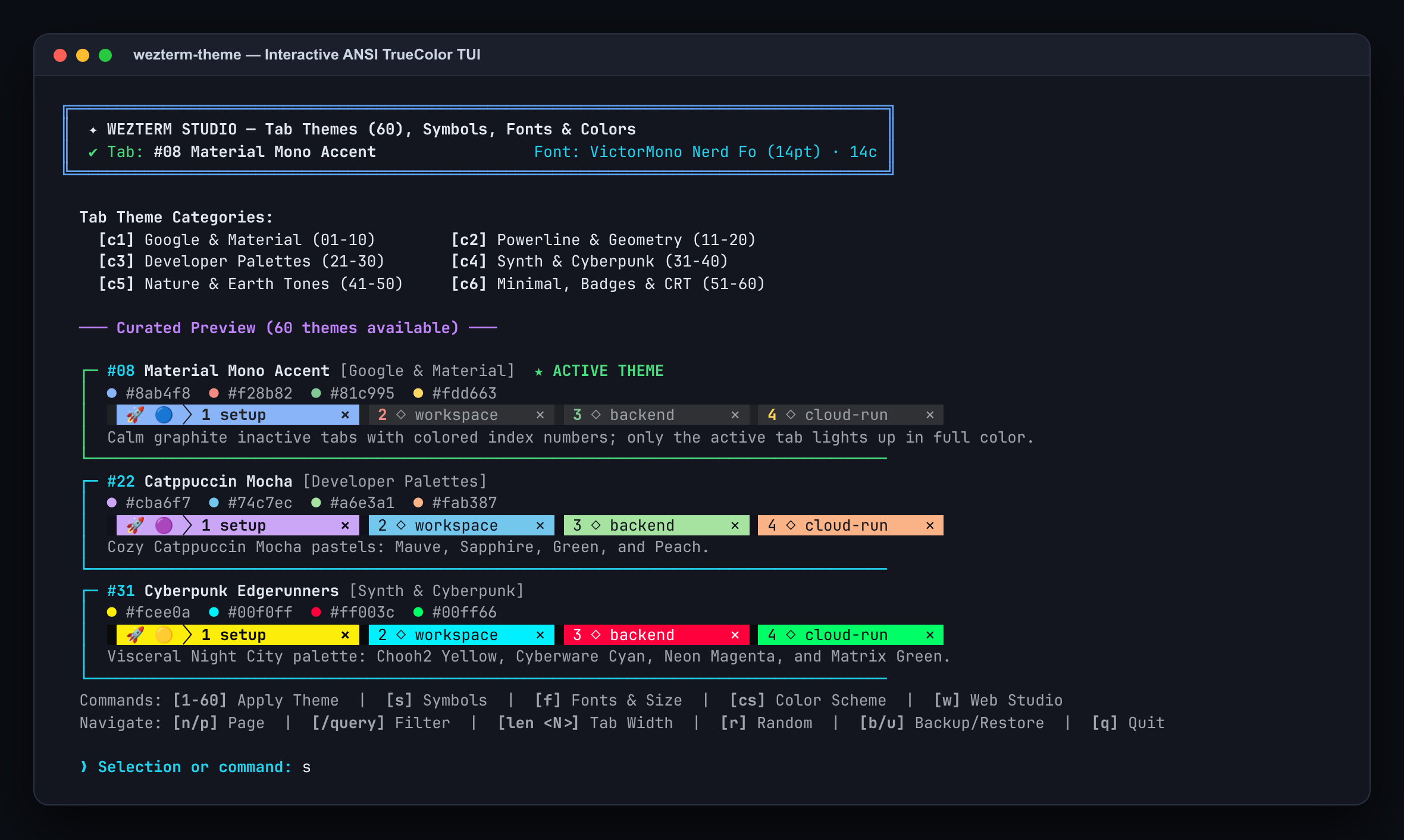
|
|
76
|
+
|
|
77
|
+
---
|
|
78
|
+
|
|
79
|
+
## 📦 Installation
|
|
80
|
+
|
|
81
|
+
### Quick Install (`pipx`, `uv`, or `pip`)
|
|
82
|
+
|
|
83
|
+
```bash
|
|
84
|
+
# Recommended: pipx (from GitHub or PyPI once published)
|
|
85
|
+
pipx install git+https://github.com/mvsoares/wezterm-studio.git
|
|
86
|
+
|
|
87
|
+
# Or via uv (persistent tool install)
|
|
88
|
+
uv tool install git+https://github.com/mvsoares/wezterm-studio.git
|
|
89
|
+
|
|
90
|
+
# Zero-install instant run with uvx
|
|
91
|
+
uvx --from git+https://github.com/mvsoares/wezterm-studio.git wezterm-theme
|
|
92
|
+
|
|
93
|
+
# Or via pip
|
|
94
|
+
pip install --user git+https://github.com/mvsoares/wezterm-studio.git
|
|
95
|
+
```
|
|
96
|
+
|
|
97
|
+
> Once published on PyPI (`wezterm-theme`), you can also run simply `pipx install wezterm-theme` or `uvx wezterm-theme`.
|
|
98
|
+
|
|
99
|
+
### Local Clone / Editable Development Install
|
|
100
|
+
|
|
101
|
+
```bash
|
|
102
|
+
git clone https://github.com/mvsoares/wezterm-studio.git
|
|
103
|
+
cd wezterm-studio
|
|
104
|
+
pipx install -e . --force
|
|
105
|
+
# or: pip install --user -e .
|
|
106
|
+
```
|
|
107
|
+
|
|
108
|
+
Both `wezterm-theme` (primary CLI) and `wezterm-tab-theme` (compatibility alias) are installed onto your `PATH`.
|
|
109
|
+
|
|
110
|
+
---
|
|
111
|
+
|
|
112
|
+
## 🚀 Quick Start
|
|
113
|
+
|
|
114
|
+
### 1. Connect to your `wezterm.lua` (one-time setup)
|
|
115
|
+
|
|
116
|
+
Works out of the box with standard WezTerm configurations on Linux, macOS, and Windows (`~/.config/wezterm/wezterm.lua`, `~/.wezterm.lua`, or `$WEZTERM_CONFIG_FILE`), whether your config uses `wezterm.config_builder()` or returns a plain Lua table:
|
|
117
|
+
|
|
118
|
+
```bash
|
|
119
|
+
wezterm-theme init
|
|
120
|
+
```
|
|
121
|
+
|
|
122
|
+
> **Dual-Mode Support:**
|
|
123
|
+
> - **Standalone Mode (default):** Injects a clean, idempotent `dofile(...)` hook into `wezterm.lua` and manages `wezterm_theme.lua` + `wezterm_theme.json` with atomic writes.
|
|
124
|
+
> - **JSON Loader Mode:** If your config directory already uses a modular `defaults.json` + `settings.json` loader, `wezterm-theme` detects it automatically and synchronizes `settings.json` and `tab_theme.lua` while preserving all your custom keybindings and rules.
|
|
125
|
+
|
|
126
|
+
### 2. Launch the Browser Web Studio (Live Fonts + Tabs + Colors)
|
|
127
|
+
|
|
128
|
+
```bash
|
|
129
|
+
wezterm-theme web
|
|
130
|
+
# or: wezterm-theme -w
|
|
131
|
+
```
|
|
132
|
+
|
|
133
|
+
Opens `http://127.0.0.1:7777` with live rendering of your installed fonts, programming ligatures (`!= === >= =>`), Nerd Font glyph previews, all 60 4-tab theme cards, interactive symbol composer, appearance sliders, and 1-click live application to WezTerm.
|
|
134
|
+
|
|
135
|
+
### 3. Open the Interactive TrueColor Terminal Picker (TUI)
|
|
136
|
+
|
|
137
|
+
```bash
|
|
138
|
+
wezterm-theme
|
|
139
|
+
```
|
|
140
|
+
|
|
141
|
+
Keyboard commands inside the TUI:
|
|
142
|
+
- `[1-60]` — Apply a tab bar theme immediately
|
|
143
|
+
- `[s]` — Open the interactive Tab Bar Symbol Builder
|
|
144
|
+
- `[f]` — Open the interactive Font & Size Picker (Editor + Tab Bar)
|
|
145
|
+
- `[cs]` — Open the Terminal Color Scheme Picker
|
|
146
|
+
- `[w]` — Launch Web Studio in your default browser
|
|
147
|
+
- `[c1]..[c6]` / `[/query]` — Filter by category or search keyword
|
|
148
|
+
- `[len 15]` — Set fixed tab title character width (`4`–`60`)
|
|
149
|
+
- `[r]` — Apply a random theme
|
|
150
|
+
- `[b]` / `[u]` — Create or restore a configuration backup
|
|
151
|
+
- `[q]` — Quit
|
|
152
|
+
|
|
153
|
+
### 4. Direct CLI One-Liners
|
|
154
|
+
|
|
155
|
+
```bash
|
|
156
|
+
# Apply a tab theme by ID or slug + set fixed tab width
|
|
157
|
+
wezterm-theme -s 8 -t 15
|
|
158
|
+
wezterm-theme -s catppuccin-mocha
|
|
159
|
+
|
|
160
|
+
# Set Editor and Tab Bar fonts & sizes
|
|
161
|
+
wezterm-theme --font "JetBrainsMono Nerd Font" --size 13.5 --tab-font "JetBrainsMono Nerd Font" --tab-size 11.5
|
|
162
|
+
|
|
163
|
+
# Set WezTerm color scheme, window opacity, and padding
|
|
164
|
+
wezterm-theme --scheme "Catppuccin Mocha" --opacity 0.95 --padding 10
|
|
165
|
+
|
|
166
|
+
# Inspect installed fonts, theme catalog, active status, or diagnostics
|
|
167
|
+
wezterm-theme fonts --nerd
|
|
168
|
+
wezterm-theme --list
|
|
169
|
+
wezterm-theme --current
|
|
170
|
+
wezterm-theme doctor
|
|
171
|
+
|
|
172
|
+
# Export / import portable presets across machines (Linux / macOS / Windows)
|
|
173
|
+
wezterm-theme export my-setup.json
|
|
174
|
+
wezterm-theme import my-setup.json
|
|
175
|
+
|
|
176
|
+
# Cleanly remove the hook from wezterm.lua
|
|
177
|
+
wezterm-theme uninstall --purge
|
|
178
|
+
```
|
|
179
|
+
|
|
180
|
+
---
|
|
181
|
+
|
|
182
|
+
## 🌍 Cross-Platform Compatibility
|
|
183
|
+
|
|
184
|
+
| Platform | Config Discovery | Font Discovery | TrueColor TUI & UTF-8 |
|
|
185
|
+
| :--- | :--- | :--- | :--- |
|
|
186
|
+
| **Linux / BSD** | `$WEZTERM_CONFIG_FILE`, `$XDG_CONFIG_HOME/wezterm`, `~/.config/wezterm`, `~/.wezterm.lua` | `wezterm ls-fonts` + `fc-list` (native binary or Flatpak `org.wezfurlong.wezterm`) | Native |
|
|
187
|
+
| **macOS** | `$WEZTERM_CONFIG_FILE`, `~/.config/wezterm`, `~/.wezterm.lua` | `wezterm ls-fonts` (`/Applications/WezTerm.app` / Homebrew + CoreText) | Native |
|
|
188
|
+
| **Windows** | `%WEZTERM_CONFIG_FILE%`, `%USERPROFILE%\.config\wezterm`, `%USERPROFILE%\.wezterm.lua` | `wezterm.exe ls-fonts` (Program Files / Scoop / LocalAppData + DirectWrite) | Automatic UTF-8 + Virtual Terminal ANSI mode |
|
|
189
|
+
|
|
190
|
+
---
|
|
191
|
+
|
|
192
|
+
## 🧪 Running Tests
|
|
193
|
+
|
|
194
|
+
All unit and integration tests isolate WezTerm configuration via `WEZTERM_CONFIG_FILE` in temporary directories so your personal `~/.config/wezterm` is never touched:
|
|
195
|
+
|
|
196
|
+
```bash
|
|
197
|
+
python3 -m unittest discover -s tests -v
|
|
198
|
+
```
|
|
199
|
+
|
|
200
|
+
---
|
|
201
|
+
|
|
202
|
+
## 📄 License
|
|
203
|
+
|
|
204
|
+
[MIT License](https://github.com/mvsoares/wezterm-studio/blob/main/LICENSE) © Marcus Vinícius Soares.
|
|
@@ -0,0 +1,172 @@
|
|
|
1
|
+
# ✦ WezTerm Studio (`wezterm-theme`)
|
|
2
|
+
|
|
3
|
+
[](https://github.com/mvsoares/wezterm-studio/actions/workflows/ci.yml)
|
|
4
|
+
[](https://github.com/mvsoares/wezterm-studio/releases)
|
|
5
|
+
[](https://www.python.org/)
|
|
6
|
+
[](#cross-platform-compatibility)
|
|
7
|
+
[](https://github.com/mvsoares/wezterm-studio/blob/main/LICENSE)
|
|
8
|
+
|
|
9
|
+
**WezTerm Studio** (`wezterm-theme`) is a unified, cross-platform customizer (**Linux, macOS, and Windows**) for **WezTerm** that hot-reloads tab bar themes, custom symbols, monospace/Nerd Fonts, color schemes, and window appearance in real time — with **zero external dependencies** (100% Python `>= 3.10` standard library).
|
|
10
|
+
|
|
11
|
+

|
|
12
|
+
|
|
13
|
+
It combines a fast **CLI**, an **ANSI TrueColor TUI**, and a **Local Web Studio** into a single package:
|
|
14
|
+
|
|
15
|
+
- 🎨 **60 Tab Bar Themes** across 6 curated categories (*Google & Material*, *Powerline & Geometry*, *Developer Palettes*, *Synth & Cyberpunk*, *Nature & Earth Tones*, and *Minimal, Badges & CRT*) with verified WCAG contrast and configurable fixed tab width (`TAB_TITLE_LEN`).
|
|
16
|
+
- ✦ **Tab Bar Symbol Builder** — mix active tab prefixes, CIE LCh hue-adaptive markers, Powerline/chevron arrows, and inactive tab indicators.
|
|
17
|
+
- 🔤 **Live Font & Nerd Font Picker** — automatically discovers installed monospace and Nerd Fonts via `wezterm ls-fonts`, FontConfig, CoreText, and DirectWrite, with independent family, weight, and size controls for **Editor** and **Tab Bar**.
|
|
18
|
+
- 🖥 **1,100+ Built-in Color Schemes & Window Controls** — search and apply WezTerm color schemes, window opacity, inner padding, decorations, cursor style, line height, and scrollback.
|
|
19
|
+
- 💾 **Instant Backups & Portable JSON Presets** — automatic pre-validation via `wezterm` with rollback protection, timestamped backups, and OS-agnostic JSON presets shareable across Linux, macOS, and Windows.
|
|
20
|
+
|
|
21
|
+
---
|
|
22
|
+
|
|
23
|
+
## ✨ Visual Tour
|
|
24
|
+
|
|
25
|
+
### 1. Tab Bar Styles & Hue-Adaptive Symbols
|
|
26
|
+
Every theme enforces WCAG contrast and uniform character width so tabs never jump as directory names or active processes change. You can keep each theme's native style or layer custom CIE LCh hue-matched symbols on top:
|
|
27
|
+
|
|
28
|
+

|
|
29
|
+
|
|
30
|
+
### 2. Browser Web Studio — Tab Themes & Symbol Builder (`wezterm-theme web`)
|
|
31
|
+
Interactive live preview of all 60 4-tab bar themes, fixed-width slider, category filters, and 1-click Symbol Builder that hot-reloads WezTerm immediately:
|
|
32
|
+
|
|
33
|
+

|
|
34
|
+
|
|
35
|
+
### 3. Browser Web Studio — Live Font & Nerd Font Picker
|
|
36
|
+
Renders your actual installed system fonts with programming ligature specimens (`!= === >= =>`), Nerd Font glyph strips, and separate **Apply to Editor** / **Apply to Tabs** actions:
|
|
37
|
+
|
|
38
|
+

|
|
39
|
+
|
|
40
|
+
### 4. Interactive ANSI TrueColor Terminal Picker (`wezterm-theme`)
|
|
41
|
+
Prefer staying in the terminal or working over SSH? Run `wezterm-theme` with no arguments for the full TrueColor TUI:
|
|
42
|
+
|
|
43
|
+

|
|
44
|
+
|
|
45
|
+
---
|
|
46
|
+
|
|
47
|
+
## 📦 Installation
|
|
48
|
+
|
|
49
|
+
### Quick Install (`pipx`, `uv`, or `pip`)
|
|
50
|
+
|
|
51
|
+
```bash
|
|
52
|
+
# Recommended: pipx (from GitHub or PyPI once published)
|
|
53
|
+
pipx install git+https://github.com/mvsoares/wezterm-studio.git
|
|
54
|
+
|
|
55
|
+
# Or via uv (persistent tool install)
|
|
56
|
+
uv tool install git+https://github.com/mvsoares/wezterm-studio.git
|
|
57
|
+
|
|
58
|
+
# Zero-install instant run with uvx
|
|
59
|
+
uvx --from git+https://github.com/mvsoares/wezterm-studio.git wezterm-theme
|
|
60
|
+
|
|
61
|
+
# Or via pip
|
|
62
|
+
pip install --user git+https://github.com/mvsoares/wezterm-studio.git
|
|
63
|
+
```
|
|
64
|
+
|
|
65
|
+
> Once published on PyPI (`wezterm-theme`), you can also run simply `pipx install wezterm-theme` or `uvx wezterm-theme`.
|
|
66
|
+
|
|
67
|
+
### Local Clone / Editable Development Install
|
|
68
|
+
|
|
69
|
+
```bash
|
|
70
|
+
git clone https://github.com/mvsoares/wezterm-studio.git
|
|
71
|
+
cd wezterm-studio
|
|
72
|
+
pipx install -e . --force
|
|
73
|
+
# or: pip install --user -e .
|
|
74
|
+
```
|
|
75
|
+
|
|
76
|
+
Both `wezterm-theme` (primary CLI) and `wezterm-tab-theme` (compatibility alias) are installed onto your `PATH`.
|
|
77
|
+
|
|
78
|
+
---
|
|
79
|
+
|
|
80
|
+
## 🚀 Quick Start
|
|
81
|
+
|
|
82
|
+
### 1. Connect to your `wezterm.lua` (one-time setup)
|
|
83
|
+
|
|
84
|
+
Works out of the box with standard WezTerm configurations on Linux, macOS, and Windows (`~/.config/wezterm/wezterm.lua`, `~/.wezterm.lua`, or `$WEZTERM_CONFIG_FILE`), whether your config uses `wezterm.config_builder()` or returns a plain Lua table:
|
|
85
|
+
|
|
86
|
+
```bash
|
|
87
|
+
wezterm-theme init
|
|
88
|
+
```
|
|
89
|
+
|
|
90
|
+
> **Dual-Mode Support:**
|
|
91
|
+
> - **Standalone Mode (default):** Injects a clean, idempotent `dofile(...)` hook into `wezterm.lua` and manages `wezterm_theme.lua` + `wezterm_theme.json` with atomic writes.
|
|
92
|
+
> - **JSON Loader Mode:** If your config directory already uses a modular `defaults.json` + `settings.json` loader, `wezterm-theme` detects it automatically and synchronizes `settings.json` and `tab_theme.lua` while preserving all your custom keybindings and rules.
|
|
93
|
+
|
|
94
|
+
### 2. Launch the Browser Web Studio (Live Fonts + Tabs + Colors)
|
|
95
|
+
|
|
96
|
+
```bash
|
|
97
|
+
wezterm-theme web
|
|
98
|
+
# or: wezterm-theme -w
|
|
99
|
+
```
|
|
100
|
+
|
|
101
|
+
Opens `http://127.0.0.1:7777` with live rendering of your installed fonts, programming ligatures (`!= === >= =>`), Nerd Font glyph previews, all 60 4-tab theme cards, interactive symbol composer, appearance sliders, and 1-click live application to WezTerm.
|
|
102
|
+
|
|
103
|
+
### 3. Open the Interactive TrueColor Terminal Picker (TUI)
|
|
104
|
+
|
|
105
|
+
```bash
|
|
106
|
+
wezterm-theme
|
|
107
|
+
```
|
|
108
|
+
|
|
109
|
+
Keyboard commands inside the TUI:
|
|
110
|
+
- `[1-60]` — Apply a tab bar theme immediately
|
|
111
|
+
- `[s]` — Open the interactive Tab Bar Symbol Builder
|
|
112
|
+
- `[f]` — Open the interactive Font & Size Picker (Editor + Tab Bar)
|
|
113
|
+
- `[cs]` — Open the Terminal Color Scheme Picker
|
|
114
|
+
- `[w]` — Launch Web Studio in your default browser
|
|
115
|
+
- `[c1]..[c6]` / `[/query]` — Filter by category or search keyword
|
|
116
|
+
- `[len 15]` — Set fixed tab title character width (`4`–`60`)
|
|
117
|
+
- `[r]` — Apply a random theme
|
|
118
|
+
- `[b]` / `[u]` — Create or restore a configuration backup
|
|
119
|
+
- `[q]` — Quit
|
|
120
|
+
|
|
121
|
+
### 4. Direct CLI One-Liners
|
|
122
|
+
|
|
123
|
+
```bash
|
|
124
|
+
# Apply a tab theme by ID or slug + set fixed tab width
|
|
125
|
+
wezterm-theme -s 8 -t 15
|
|
126
|
+
wezterm-theme -s catppuccin-mocha
|
|
127
|
+
|
|
128
|
+
# Set Editor and Tab Bar fonts & sizes
|
|
129
|
+
wezterm-theme --font "JetBrainsMono Nerd Font" --size 13.5 --tab-font "JetBrainsMono Nerd Font" --tab-size 11.5
|
|
130
|
+
|
|
131
|
+
# Set WezTerm color scheme, window opacity, and padding
|
|
132
|
+
wezterm-theme --scheme "Catppuccin Mocha" --opacity 0.95 --padding 10
|
|
133
|
+
|
|
134
|
+
# Inspect installed fonts, theme catalog, active status, or diagnostics
|
|
135
|
+
wezterm-theme fonts --nerd
|
|
136
|
+
wezterm-theme --list
|
|
137
|
+
wezterm-theme --current
|
|
138
|
+
wezterm-theme doctor
|
|
139
|
+
|
|
140
|
+
# Export / import portable presets across machines (Linux / macOS / Windows)
|
|
141
|
+
wezterm-theme export my-setup.json
|
|
142
|
+
wezterm-theme import my-setup.json
|
|
143
|
+
|
|
144
|
+
# Cleanly remove the hook from wezterm.lua
|
|
145
|
+
wezterm-theme uninstall --purge
|
|
146
|
+
```
|
|
147
|
+
|
|
148
|
+
---
|
|
149
|
+
|
|
150
|
+
## 🌍 Cross-Platform Compatibility
|
|
151
|
+
|
|
152
|
+
| Platform | Config Discovery | Font Discovery | TrueColor TUI & UTF-8 |
|
|
153
|
+
| :--- | :--- | :--- | :--- |
|
|
154
|
+
| **Linux / BSD** | `$WEZTERM_CONFIG_FILE`, `$XDG_CONFIG_HOME/wezterm`, `~/.config/wezterm`, `~/.wezterm.lua` | `wezterm ls-fonts` + `fc-list` (native binary or Flatpak `org.wezfurlong.wezterm`) | Native |
|
|
155
|
+
| **macOS** | `$WEZTERM_CONFIG_FILE`, `~/.config/wezterm`, `~/.wezterm.lua` | `wezterm ls-fonts` (`/Applications/WezTerm.app` / Homebrew + CoreText) | Native |
|
|
156
|
+
| **Windows** | `%WEZTERM_CONFIG_FILE%`, `%USERPROFILE%\.config\wezterm`, `%USERPROFILE%\.wezterm.lua` | `wezterm.exe ls-fonts` (Program Files / Scoop / LocalAppData + DirectWrite) | Automatic UTF-8 + Virtual Terminal ANSI mode |
|
|
157
|
+
|
|
158
|
+
---
|
|
159
|
+
|
|
160
|
+
## 🧪 Running Tests
|
|
161
|
+
|
|
162
|
+
All unit and integration tests isolate WezTerm configuration via `WEZTERM_CONFIG_FILE` in temporary directories so your personal `~/.config/wezterm` is never touched:
|
|
163
|
+
|
|
164
|
+
```bash
|
|
165
|
+
python3 -m unittest discover -s tests -v
|
|
166
|
+
```
|
|
167
|
+
|
|
168
|
+
---
|
|
169
|
+
|
|
170
|
+
## 📄 License
|
|
171
|
+
|
|
172
|
+
[MIT License](https://github.com/mvsoares/wezterm-studio/blob/main/LICENSE) © Marcus Vinícius Soares.
|
|
@@ -0,0 +1,65 @@
|
|
|
1
|
+
[build-system]
|
|
2
|
+
requires = ["setuptools>=77"]
|
|
3
|
+
build-backend = "setuptools.build_meta"
|
|
4
|
+
|
|
5
|
+
[project]
|
|
6
|
+
name = "wezterm-theme"
|
|
7
|
+
version = "1.0.0"
|
|
8
|
+
description = "Cross-platform interactive Tab Bar Theme Picker (60 themes), Symbol Customizer, and Live Font & Appearance Studio for WezTerm."
|
|
9
|
+
readme = "README.md"
|
|
10
|
+
license = "MIT"
|
|
11
|
+
license-files = ["LICENSE"]
|
|
12
|
+
requires-python = ">=3.10"
|
|
13
|
+
authors = [
|
|
14
|
+
{ name = "Marcus Vinícius Soares" },
|
|
15
|
+
]
|
|
16
|
+
keywords = [
|
|
17
|
+
"wezterm",
|
|
18
|
+
"terminal",
|
|
19
|
+
"theme",
|
|
20
|
+
"tabs",
|
|
21
|
+
"fonts",
|
|
22
|
+
"nerd-fonts",
|
|
23
|
+
"tui",
|
|
24
|
+
"customizer",
|
|
25
|
+
"powerline",
|
|
26
|
+
]
|
|
27
|
+
classifiers = [
|
|
28
|
+
"Development Status :: 5 - Production/Stable",
|
|
29
|
+
"Environment :: Console",
|
|
30
|
+
"Environment :: Web Environment",
|
|
31
|
+
"Intended Audience :: Developers",
|
|
32
|
+
"Intended Audience :: End Users/Desktop",
|
|
33
|
+
"Operating System :: OS Independent",
|
|
34
|
+
"Operating System :: POSIX :: Linux",
|
|
35
|
+
"Operating System :: MacOS",
|
|
36
|
+
"Operating System :: Microsoft :: Windows",
|
|
37
|
+
"Programming Language :: Python :: 3",
|
|
38
|
+
"Programming Language :: Python :: 3 :: Only",
|
|
39
|
+
"Programming Language :: Python :: 3.10",
|
|
40
|
+
"Programming Language :: Python :: 3.11",
|
|
41
|
+
"Programming Language :: Python :: 3.12",
|
|
42
|
+
"Programming Language :: Python :: 3.13",
|
|
43
|
+
"Topic :: Terminals :: Terminal Emulators/X Terminals",
|
|
44
|
+
"Topic :: Utilities",
|
|
45
|
+
]
|
|
46
|
+
dependencies = []
|
|
47
|
+
|
|
48
|
+
[project.urls]
|
|
49
|
+
Homepage = "https://github.com/mvsoares/wezterm-studio"
|
|
50
|
+
Repository = "https://github.com/mvsoares/wezterm-studio"
|
|
51
|
+
Issues = "https://github.com/mvsoares/wezterm-studio/issues"
|
|
52
|
+
|
|
53
|
+
[project.scripts]
|
|
54
|
+
wezterm-theme = "wezterm_theme.cli:main"
|
|
55
|
+
wezterm-tab-theme = "wezterm_theme.cli:main"
|
|
56
|
+
|
|
57
|
+
[tool.setuptools]
|
|
58
|
+
package-dir = {"" = "src"}
|
|
59
|
+
include-package-data = true
|
|
60
|
+
|
|
61
|
+
[tool.setuptools.packages.find]
|
|
62
|
+
where = ["src"]
|
|
63
|
+
|
|
64
|
+
[tool.setuptools.package-data]
|
|
65
|
+
wezterm_theme = ["assets/*.html"]
|