vimol 0.1.2__tar.gz → 0.1.4__tar.gz
This diff represents the content of publicly available package versions that have been released to one of the supported registries. The information contained in this diff is provided for informational purposes only and reflects changes between package versions as they appear in their respective public registries.
- vimol-0.1.4/PKG-INFO +142 -0
- vimol-0.1.4/README.md +106 -0
- {vimol-0.1.2 → vimol-0.1.4}/pyproject.toml +2 -1
- {vimol-0.1.2 → vimol-0.1.4}/src/vimol/__init__.py +7 -2
- vimol-0.1.4/src/vimol/align.py +934 -0
- vimol-0.1.4/src/vimol/app.py +299 -0
- vimol-0.1.4/src/vimol/bonds.py +110 -0
- vimol-0.1.4/src/vimol/cistrans.py +142 -0
- vimol-0.1.4/src/vimol/data/c60.xyz +62 -0
- {vimol-0.1.2 → vimol-0.1.4}/src/vimol/editor.py +8 -0
- vimol-0.1.4/src/vimol/file_browser.py +65 -0
- {vimol-0.1.2 → vimol-0.1.4}/src/vimol/gl_adapter.py +55 -0
- {vimol-0.1.2 → vimol-0.1.4}/src/vimol/gl_render.py +176 -3
- vimol-0.1.4/src/vimol/glyph_font.py +176 -0
- vimol-0.1.4/src/vimol/glyph_mesh.py +311 -0
- vimol-0.1.4/src/vimol/glyph_outlines.py +171 -0
- vimol-0.1.4/src/vimol/glyphs.py +954 -0
- {vimol-0.1.2 → vimol-0.1.4}/src/vimol/input.py +32 -0
- {vimol-0.1.2 → vimol-0.1.4}/src/vimol/kitty.py +13 -0
- {vimol-0.1.2 → vimol-0.1.4}/src/vimol/molecule.py +27 -0
- {vimol-0.1.2 → vimol-0.1.4}/src/vimol/parsers/pdb.py +10 -0
- {vimol-0.1.2 → vimol-0.1.4}/src/vimol/render.py +108 -47
- vimol-0.1.4/src/vimol/render_glyph.py +409 -0
- vimol-0.1.4/src/vimol/residues.py +399 -0
- {vimol-0.1.2 → vimol-0.1.4}/src/vimol/scene.py +50 -1
- vimol-0.1.4/src/vimol/select.py +267 -0
- vimol-0.1.4/src/vimol/structures.py +802 -0
- {vimol-0.1.2 → vimol-0.1.4}/src/vimol/theme.py +3 -2
- {vimol-0.1.2 → vimol-0.1.4}/src/vimol/viewer.py +2243 -128
- {vimol-0.1.2 → vimol-0.1.4}/src/vimol/widget.py +165 -17
- vimol-0.1.4/src/vimol.egg-info/PKG-INFO +142 -0
- {vimol-0.1.2 → vimol-0.1.4}/src/vimol.egg-info/SOURCES.txt +17 -0
- {vimol-0.1.2 → vimol-0.1.4}/src/vimol.egg-info/requires.txt +3 -0
- vimol-0.1.4/tests/test_add_file.py +380 -0
- vimol-0.1.4/tests/test_align.py +1399 -0
- vimol-0.1.4/tests/test_bonds.py +449 -0
- vimol-0.1.4/tests/test_cistrans.py +146 -0
- {vimol-0.1.2 → vimol-0.1.4}/tests/test_editing.py +420 -10
- vimol-0.1.4/tests/test_file_browser.py +84 -0
- vimol-0.1.4/tests/test_glyphs.py +691 -0
- {vimol-0.1.2 → vimol-0.1.4}/tests/test_render_fast.py +33 -8
- {vimol-0.1.2 → vimol-0.1.4}/tests/test_structures.py +56 -0
- {vimol-0.1.2 → vimol-0.1.4}/tests/test_vimol.py +2041 -117
- vimol-0.1.2/PKG-INFO +0 -106
- vimol-0.1.2/README.md +0 -72
- vimol-0.1.2/src/vimol/app.py +0 -268
- vimol-0.1.2/src/vimol/bonds.py +0 -79
- vimol-0.1.2/src/vimol/structures.py +0 -398
- vimol-0.1.2/src/vimol.egg-info/PKG-INFO +0 -106
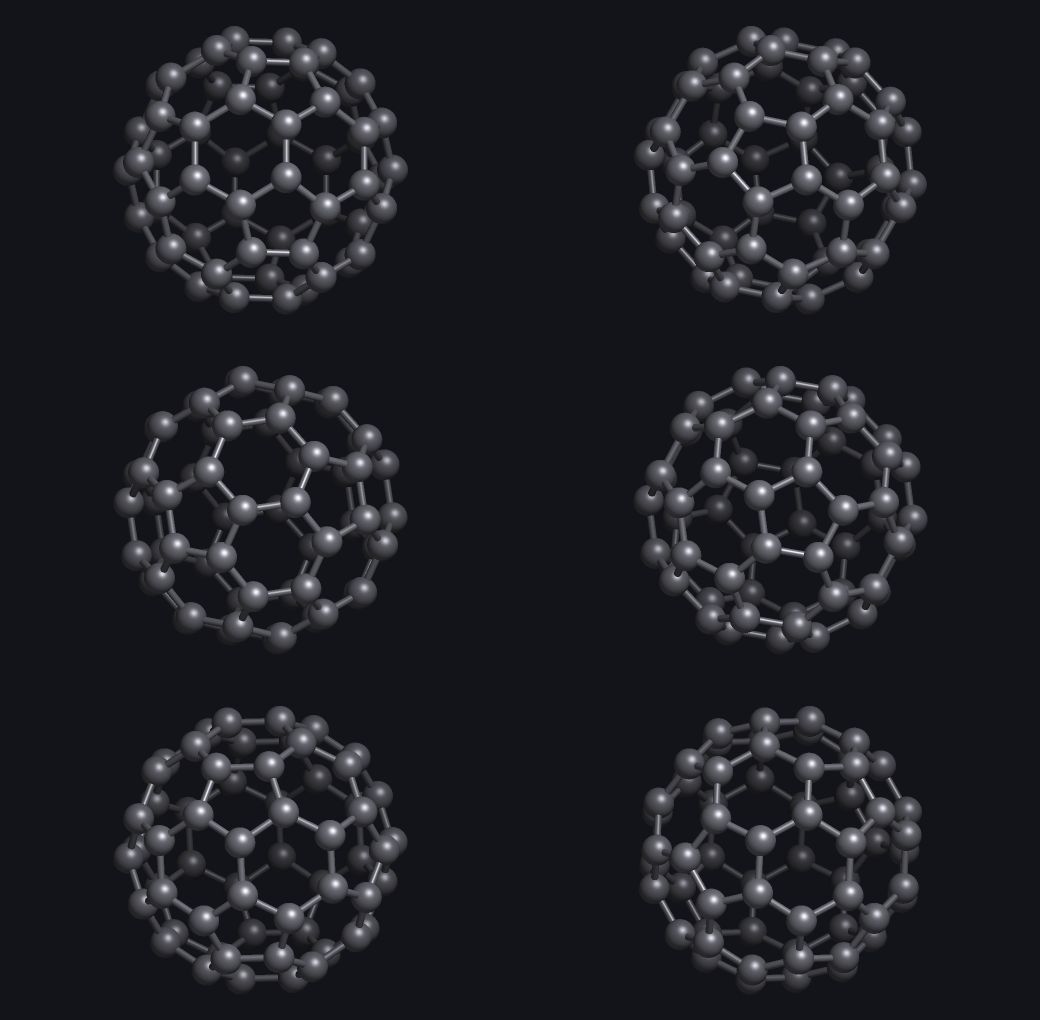
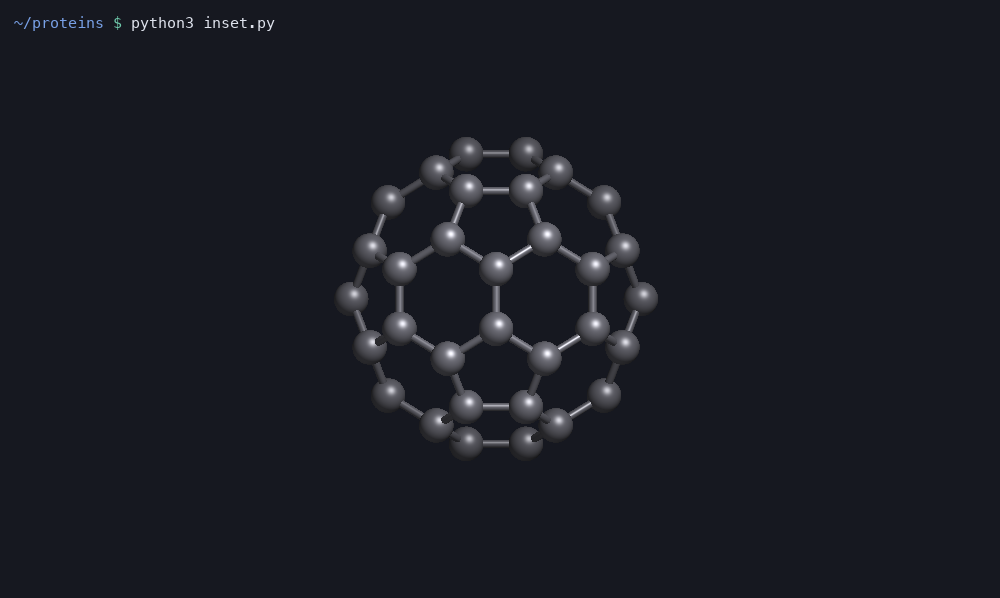
- {vimol-0.1.2 → vimol-0.1.4}/LICENSE +0 -0
- {vimol-0.1.2 → vimol-0.1.4}/setup.cfg +0 -0
- {vimol-0.1.2 → vimol-0.1.4}/src/vimol/__main__.py +0 -0
- {vimol-0.1.2 → vimol-0.1.4}/src/vimol/_render_fast.py +0 -0
- {vimol-0.1.2 → vimol-0.1.4}/src/vimol/arrows.py +0 -0
- {vimol-0.1.2 → vimol-0.1.4}/src/vimol/camera.py +0 -0
- {vimol-0.1.2 → vimol-0.1.4}/src/vimol/elements.py +0 -0
- {vimol-0.1.2 → vimol-0.1.4}/src/vimol/parsers/__init__.py +0 -0
- {vimol-0.1.2 → vimol-0.1.4}/src/vimol/parsers/mol.py +0 -0
- {vimol-0.1.2 → vimol-0.1.4}/src/vimol/parsers/xyz.py +0 -0
- {vimol-0.1.2 → vimol-0.1.4}/src/vimol/periodic_table.py +0 -0
- {vimol-0.1.2 → vimol-0.1.4}/src/vimol/py.typed +0 -0
- {vimol-0.1.2 → vimol-0.1.4}/src/vimol/templates.py +0 -0
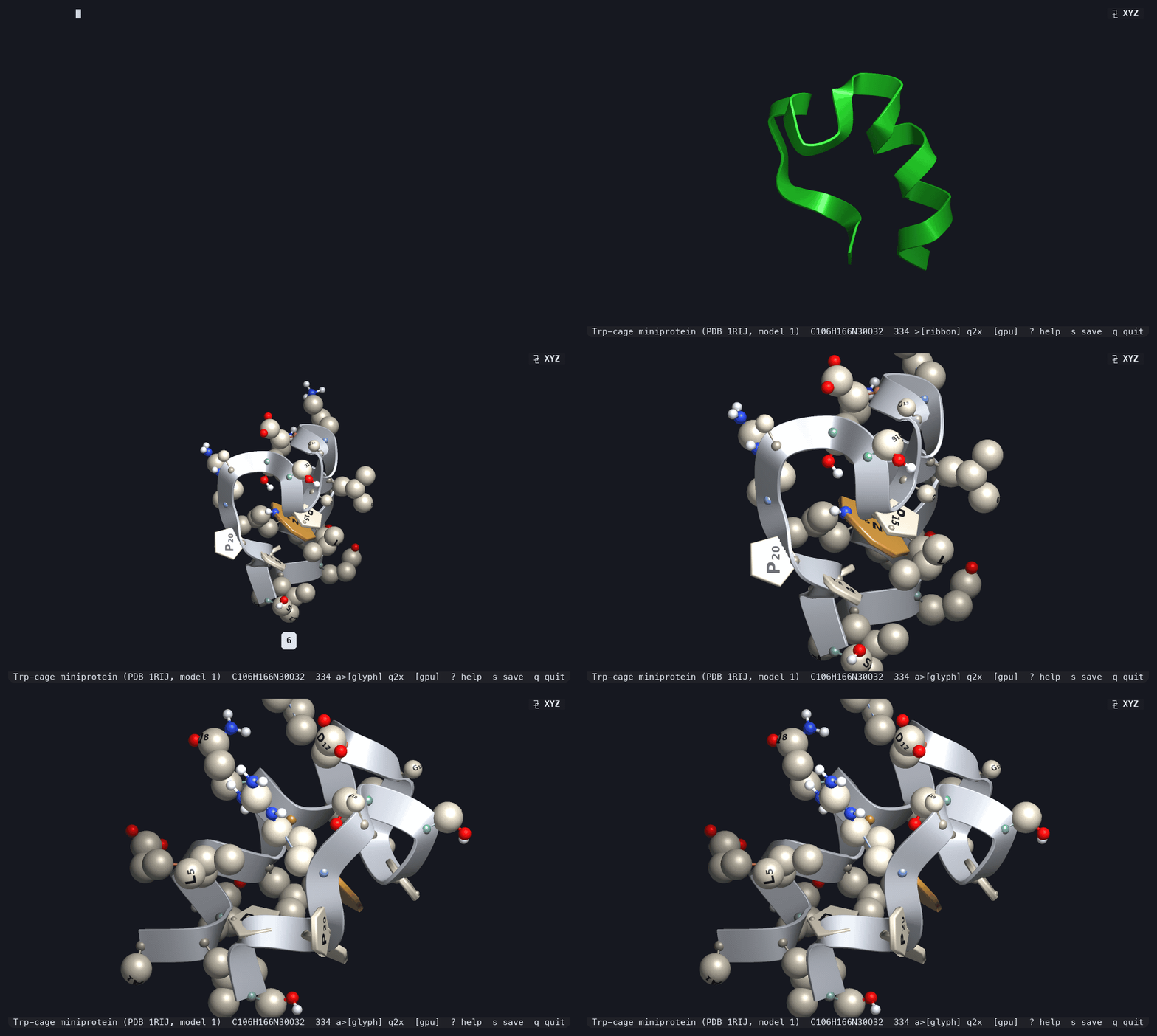
- {vimol-0.1.2 → vimol-0.1.4}/src/vimol.egg-info/dependency_links.txt +0 -0
- {vimol-0.1.2 → vimol-0.1.4}/src/vimol.egg-info/entry_points.txt +0 -0
- {vimol-0.1.2 → vimol-0.1.4}/src/vimol.egg-info/top_level.txt +0 -0
- {vimol-0.1.2 → vimol-0.1.4}/tests/test_gl_render.py +0 -0
- {vimol-0.1.2 → vimol-0.1.4}/tests/test_scene_structures.py +0 -0
vimol-0.1.4/PKG-INFO
ADDED
|
@@ -0,0 +1,142 @@
|
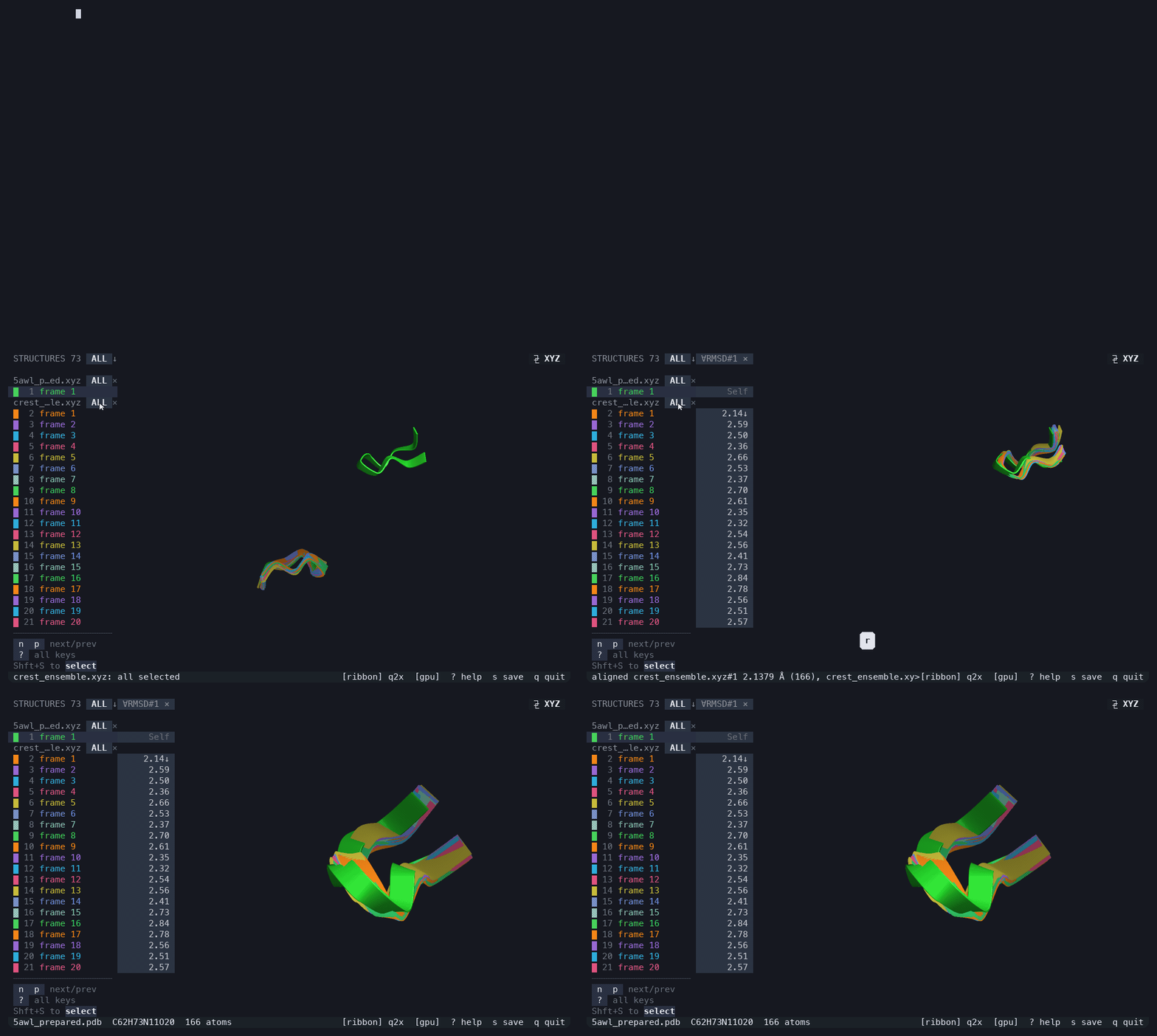
|
|
1
|
+
Metadata-Version: 2.4
|
|
2
|
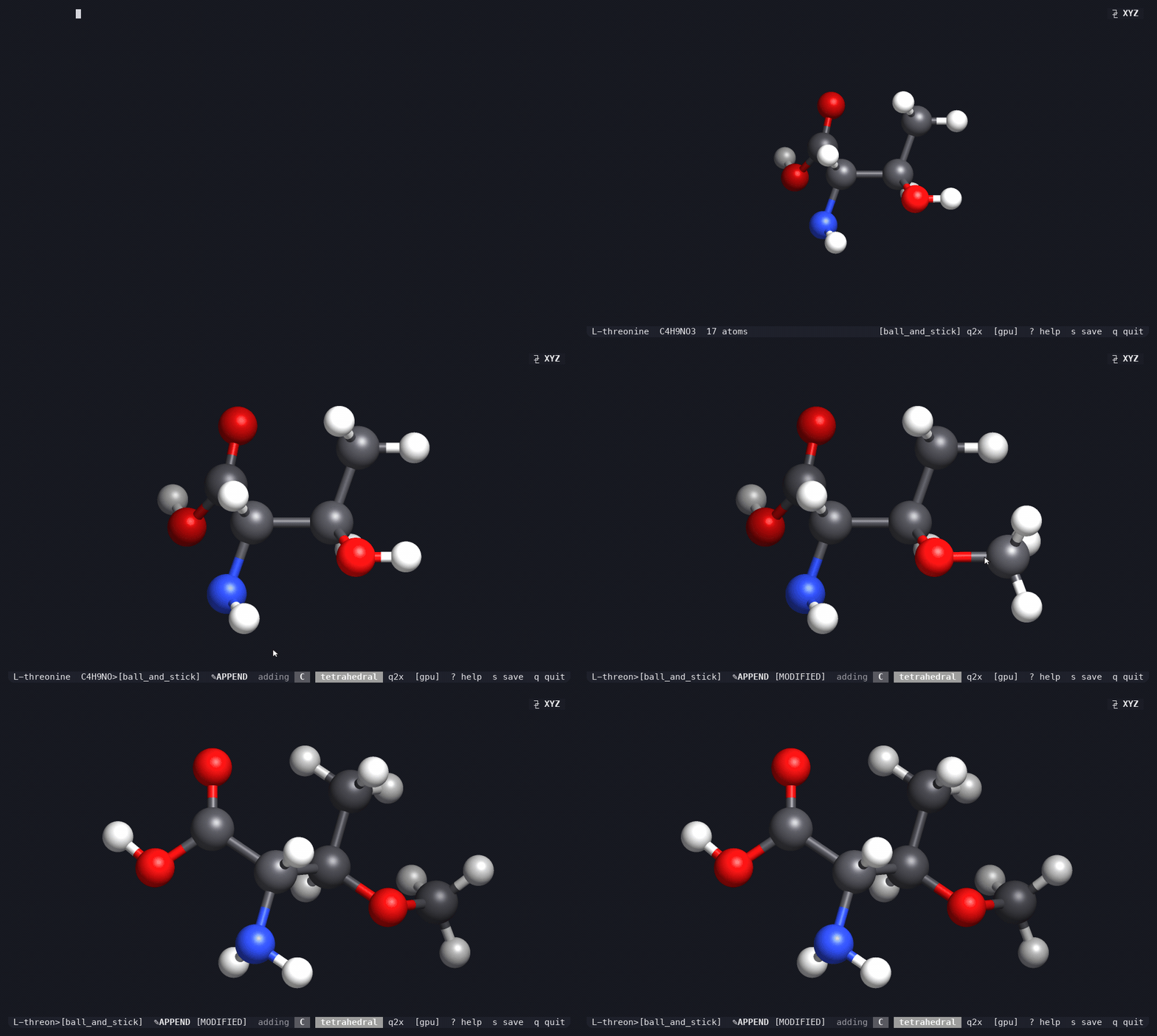
+
Name: vimol
|
|
3
|
+
Version: 0.1.4
|
|
4
|
+
Summary: A terminal molecular viewer and editor using the Kitty graphics protocol
|
|
5
|
+
Author: vimol contributors
|
|
6
|
+
License-Expression: MIT
|
|
7
|
+
Keywords: molecular,viewer,editor,terminal,kitty,chemistry,visualization,xyz,pdb,sdf,cli,tui
|
|
8
|
+
Classifier: Development Status :: 4 - Beta
|
|
9
|
+
Classifier: Environment :: Console
|
|
10
|
+
Classifier: Intended Audience :: Science/Research
|
|
11
|
+
Classifier: Intended Audience :: Developers
|
|
12
|
+
Classifier: Operating System :: OS Independent
|
|
13
|
+
Classifier: Programming Language :: Python :: 3
|
|
14
|
+
Classifier: Programming Language :: Python :: 3 :: Only
|
|
15
|
+
Classifier: Programming Language :: Python :: 3.8
|
|
16
|
+
Classifier: Programming Language :: Python :: 3.9
|
|
17
|
+
Classifier: Programming Language :: Python :: 3.10
|
|
18
|
+
Classifier: Programming Language :: Python :: 3.11
|
|
19
|
+
Classifier: Programming Language :: Python :: 3.12
|
|
20
|
+
Classifier: Programming Language :: Python :: 3.13
|
|
21
|
+
Classifier: Topic :: Scientific/Engineering :: Chemistry
|
|
22
|
+
Classifier: Topic :: Scientific/Engineering :: Visualization
|
|
23
|
+
Classifier: Topic :: Multimedia :: Graphics :: Viewers
|
|
24
|
+
Classifier: Typing :: Typed
|
|
25
|
+
Requires-Python: >=3.8
|
|
26
|
+
Description-Content-Type: text/markdown
|
|
27
|
+
License-File: LICENSE
|
|
28
|
+
Requires-Dist: numpy>=1.20
|
|
29
|
+
Requires-Dist: moderngl>=5.6
|
|
30
|
+
Requires-Dist: numba>=0.59
|
|
31
|
+
Provides-Extra: test
|
|
32
|
+
Requires-Dist: pytest>=7; extra == "test"
|
|
33
|
+
Provides-Extra: align
|
|
34
|
+
Requires-Dist: scipy>=1.4; extra == "align"
|
|
35
|
+
Dynamic: license-file
|
|
36
|
+
|
|
37
|
+
# vimol
|
|
38
|
+
|
|
39
|
+
A molecular viewer and editor that runs **in your terminal**. Open an `.xyz`,
|
|
40
|
+
`.pdb`, `.mol` or `.sdf` file and get a shaded, rotatable, editable 3D
|
|
41
|
+
structure right where you are already working — over SSH, in tmux, beside your
|
|
42
|
+
editor.
|
|
43
|
+
|
|
44
|
+
```bash
|
|
45
|
+
pip install vimol
|
|
46
|
+
vimol molecule.xyz
|
|
47
|
+
```
|
|
48
|
+
|
|
49
|
+
|
|
50
|
+
|
|
51
|
+
That is the C60 bundled with vimol, which `vimol` opens with no arguments.
|
|
52
|
+
Drag to rotate, scroll to zoom, option-drag empty space to pan, hover an atom
|
|
53
|
+
to identify it, `?` for every binding.
|
|
54
|
+
|
|
55
|
+
You need Python 3.8 or newer and a terminal that speaks the
|
|
56
|
+
[Kitty graphics protocol](https://sw.kovidgoyal.net/kitty/graphics-protocol/) —
|
|
57
|
+
**kitty, Ghostty or WezTerm**. Rendering is pure software, with an OpenGL path
|
|
58
|
+
used automatically where a GPU is available. MIT licensed.
|
|
59
|
+
|
|
60
|
+
## Proteins out of bare coordinates
|
|
61
|
+
|
|
62
|
+
|
|
63
|
+
|
|
64
|
+
An `.xyz` file has no residue names, no atom names and no chains. vimol finds
|
|
65
|
+
the backbone anyway, opens the file as a ribbon, and on `6` letters every
|
|
66
|
+
residue onto it. The trp-cage above is PDB 1RIJ stripped to bare coordinates,
|
|
67
|
+
which vimol reads back as `ALQELLGQWLKDGGPSSGRPPPS` — character for character
|
|
68
|
+
the sequence in that entry.
|
|
69
|
+
|
|
70
|
+
## Overlays and RMSD
|
|
71
|
+
|
|
72
|
+
|
|
73
|
+
|
|
74
|
+
Open several files, or a trajectory, and every structure lands in one session,
|
|
75
|
+
overlaid and colour-coded down the left. `r` aligns the whole overlay onto the
|
|
76
|
+
active structure and reports each RMSD in a column beside the list — above, a
|
|
77
|
+
chignolin crystal structure and 72 CREST conformers of it. `R` runs the same
|
|
78
|
+
fit on only the atoms you pick.
|
|
79
|
+
|
|
80
|
+
## Editing
|
|
81
|
+
|
|
82
|
+
|
|
83
|
+
|
|
84
|
+
Editing is on by default. Click a hydrogen to grow a fragment in its place, a
|
|
85
|
+
heavy atom to swap the element, empty space to start something new — one click
|
|
86
|
+
turns threonine into O-methylthreonine. Bonds, deletion, clash cleanup, undo
|
|
87
|
+
and save are a keystroke each.
|
|
88
|
+
|
|
89
|
+
## As a library
|
|
90
|
+
|
|
91
|
+
|
|
92
|
+
|
|
93
|
+
Three lines put a molecule anywhere on the screen:
|
|
94
|
+
|
|
95
|
+
```python
|
|
96
|
+
import os, vimol
|
|
97
|
+
|
|
98
|
+
scene = vimol.Scene(vimol.load("c60.xyz"), 640, 380) # render it off-screen
|
|
99
|
+
scene.style.transparent = True # let the terminal through
|
|
100
|
+
os.write(1, b"\x1b[6;19H" + scene.to_kitty()) # paint at row 6, col 19
|
|
101
|
+
```
|
|
102
|
+
|
|
103
|
+
`scene.render()` hands you the pixels as a numpy array instead and
|
|
104
|
+
`scene.to_png()` writes a file. To let the reader turn the molecule,
|
|
105
|
+
`MoleculeWidget` takes the input events you hand it and leaves the loop to you;
|
|
106
|
+
`examples/embed_demo.py` is a complete host application built that way.
|
|
107
|
+
|
|
108
|
+
## Reference
|
|
109
|
+
|
|
110
|
+
| Key | Does |
|
|
111
|
+
|---|---|
|
|
112
|
+
| Drag / arrows / `hjkl` | rotate |
|
|
113
|
+
| Wheel, `+` `-` | zoom |
|
|
114
|
+
| Right or middle drag | pan |
|
|
115
|
+
| `[` `]` | roll |
|
|
116
|
+
| `1` `2` `3` `4` | ball-and-stick, space-filling, licorice, wireframe |
|
|
117
|
+
| `5` `6` | ribbon, lettered residues (proteins) |
|
|
118
|
+
| `f` `z` | re-fit, reset the view |
|
|
119
|
+
| `m` | measure — click 2, 3 or 4 atoms for distance, angle, dihedral |
|
|
120
|
+
| `a` `x` `c` `u` `s` | append, delete, cleanup clashes, undo, save |
|
|
121
|
+
| `r` `R` | align an overlay, or align on picked atoms |
|
|
122
|
+
| `Shift+S` | ready-made selections: backbone, heavy atoms, ring system |
|
|
123
|
+
| `A` `n` `p` | add a file, next and previous structure |
|
|
124
|
+
| `Tab` | focus the structure list |
|
|
125
|
+
| `d` `g` `t` `ctrl-t` | depth cue, hi-quality, transparent background, theme |
|
|
126
|
+
| `?` `q` | help, quit |
|
|
127
|
+
|
|
128
|
+
```bash
|
|
129
|
+
vimol traj.xyz --spin --style spacefill # spin a trajectory, space-filling
|
|
130
|
+
vimol protein.pdb --style glyph # lettered residues on a ribbon
|
|
131
|
+
vimol a.xyz b.pdb --style ribbon # overlay two proteins
|
|
132
|
+
```
|
|
133
|
+
|
|
134
|
+
Several files always open in ball-and-stick, so pass `--style ribbon` for
|
|
135
|
+
proteins. Also `--backend cpu|gl|auto`, `--theme dark|light|auto`,
|
|
136
|
+
`--rotate YAW PITCH`, `--frame N`, `--background`,
|
|
137
|
+
`--transparent`/`--opaque`, `--atom-scale`, `--bond-radius`,
|
|
138
|
+
`--no-depth-cue`, `--no-bonds`, `--bond-tolerance`, `--list-formats`.
|
|
139
|
+
`pip install vimol[align]` adds scipy, which speeds up subset alignment.
|
|
140
|
+
|
|
141
|
+
The protein, alignment and editing animations are recorded by
|
|
142
|
+
`scripts/record_demos.py`.
|
vimol-0.1.4/README.md
ADDED
|
@@ -0,0 +1,106 @@
|
|
|
1
|
+
# vimol
|
|
2
|
+
|
|
3
|
+
A molecular viewer and editor that runs **in your terminal**. Open an `.xyz`,
|
|
4
|
+
`.pdb`, `.mol` or `.sdf` file and get a shaded, rotatable, editable 3D
|
|
5
|
+
structure right where you are already working — over SSH, in tmux, beside your
|
|
6
|
+
editor.
|
|
7
|
+
|
|
8
|
+
```bash
|
|
9
|
+
pip install vimol
|
|
10
|
+
vimol molecule.xyz
|
|
11
|
+
```
|
|
12
|
+
|
|
13
|
+

|
|
14
|
+
|
|
15
|
+
That is the C60 bundled with vimol, which `vimol` opens with no arguments.
|
|
16
|
+
Drag to rotate, scroll to zoom, option-drag empty space to pan, hover an atom
|
|
17
|
+
to identify it, `?` for every binding.
|
|
18
|
+
|
|
19
|
+
You need Python 3.8 or newer and a terminal that speaks the
|
|
20
|
+
[Kitty graphics protocol](https://sw.kovidgoyal.net/kitty/graphics-protocol/) —
|
|
21
|
+
**kitty, Ghostty or WezTerm**. Rendering is pure software, with an OpenGL path
|
|
22
|
+
used automatically where a GPU is available. MIT licensed.
|
|
23
|
+
|
|
24
|
+
## Proteins out of bare coordinates
|
|
25
|
+
|
|
26
|
+

|
|
27
|
+
|
|
28
|
+
An `.xyz` file has no residue names, no atom names and no chains. vimol finds
|
|
29
|
+
the backbone anyway, opens the file as a ribbon, and on `6` letters every
|
|
30
|
+
residue onto it. The trp-cage above is PDB 1RIJ stripped to bare coordinates,
|
|
31
|
+
which vimol reads back as `ALQELLGQWLKDGGPSSGRPPPS` — character for character
|
|
32
|
+
the sequence in that entry.
|
|
33
|
+
|
|
34
|
+
## Overlays and RMSD
|
|
35
|
+
|
|
36
|
+

|
|
37
|
+
|
|
38
|
+
Open several files, or a trajectory, and every structure lands in one session,
|
|
39
|
+
overlaid and colour-coded down the left. `r` aligns the whole overlay onto the
|
|
40
|
+
active structure and reports each RMSD in a column beside the list — above, a
|
|
41
|
+
chignolin crystal structure and 72 CREST conformers of it. `R` runs the same
|
|
42
|
+
fit on only the atoms you pick.
|
|
43
|
+
|
|
44
|
+
## Editing
|
|
45
|
+
|
|
46
|
+

|
|
47
|
+
|
|
48
|
+
Editing is on by default. Click a hydrogen to grow a fragment in its place, a
|
|
49
|
+
heavy atom to swap the element, empty space to start something new — one click
|
|
50
|
+
turns threonine into O-methylthreonine. Bonds, deletion, clash cleanup, undo
|
|
51
|
+
and save are a keystroke each.
|
|
52
|
+
|
|
53
|
+
## As a library
|
|
54
|
+
|
|
55
|
+

|
|
56
|
+
|
|
57
|
+
Three lines put a molecule anywhere on the screen:
|
|
58
|
+
|
|
59
|
+
```python
|
|
60
|
+
import os, vimol
|
|
61
|
+
|
|
62
|
+
scene = vimol.Scene(vimol.load("c60.xyz"), 640, 380) # render it off-screen
|
|
63
|
+
scene.style.transparent = True # let the terminal through
|
|
64
|
+
os.write(1, b"\x1b[6;19H" + scene.to_kitty()) # paint at row 6, col 19
|
|
65
|
+
```
|
|
66
|
+
|
|
67
|
+
`scene.render()` hands you the pixels as a numpy array instead and
|
|
68
|
+
`scene.to_png()` writes a file. To let the reader turn the molecule,
|
|
69
|
+
`MoleculeWidget` takes the input events you hand it and leaves the loop to you;
|
|
70
|
+
`examples/embed_demo.py` is a complete host application built that way.
|
|
71
|
+
|
|
72
|
+
## Reference
|
|
73
|
+
|
|
74
|
+
| Key | Does |
|
|
75
|
+
|---|---|
|
|
76
|
+
| Drag / arrows / `hjkl` | rotate |
|
|
77
|
+
| Wheel, `+` `-` | zoom |
|
|
78
|
+
| Right or middle drag | pan |
|
|
79
|
+
| `[` `]` | roll |
|
|
80
|
+
| `1` `2` `3` `4` | ball-and-stick, space-filling, licorice, wireframe |
|
|
81
|
+
| `5` `6` | ribbon, lettered residues (proteins) |
|
|
82
|
+
| `f` `z` | re-fit, reset the view |
|
|
83
|
+
| `m` | measure — click 2, 3 or 4 atoms for distance, angle, dihedral |
|
|
84
|
+
| `a` `x` `c` `u` `s` | append, delete, cleanup clashes, undo, save |
|
|
85
|
+
| `r` `R` | align an overlay, or align on picked atoms |
|
|
86
|
+
| `Shift+S` | ready-made selections: backbone, heavy atoms, ring system |
|
|
87
|
+
| `A` `n` `p` | add a file, next and previous structure |
|
|
88
|
+
| `Tab` | focus the structure list |
|
|
89
|
+
| `d` `g` `t` `ctrl-t` | depth cue, hi-quality, transparent background, theme |
|
|
90
|
+
| `?` `q` | help, quit |
|
|
91
|
+
|
|
92
|
+
```bash
|
|
93
|
+
vimol traj.xyz --spin --style spacefill # spin a trajectory, space-filling
|
|
94
|
+
vimol protein.pdb --style glyph # lettered residues on a ribbon
|
|
95
|
+
vimol a.xyz b.pdb --style ribbon # overlay two proteins
|
|
96
|
+
```
|
|
97
|
+
|
|
98
|
+
Several files always open in ball-and-stick, so pass `--style ribbon` for
|
|
99
|
+
proteins. Also `--backend cpu|gl|auto`, `--theme dark|light|auto`,
|
|
100
|
+
`--rotate YAW PITCH`, `--frame N`, `--background`,
|
|
101
|
+
`--transparent`/`--opaque`, `--atom-scale`, `--bond-radius`,
|
|
102
|
+
`--no-depth-cue`, `--no-bonds`, `--bond-tolerance`, `--list-formats`.
|
|
103
|
+
`pip install vimol[align]` adds scipy, which speeds up subset alignment.
|
|
104
|
+
|
|
105
|
+
The protein, alignment and editing animations are recorded by
|
|
106
|
+
`scripts/record_demos.py`.
|
|
@@ -45,6 +45,7 @@ dependencies = ["numpy>=1.20", "moderngl>=5.6", "numba>=0.59"]
|
|
|
45
45
|
|
|
46
46
|
[project.optional-dependencies]
|
|
47
47
|
test = ["pytest>=7"]
|
|
48
|
+
align = ["scipy>=1.4"]
|
|
48
49
|
|
|
49
50
|
[project.scripts]
|
|
50
51
|
vimol = "vimol.app:main"
|
|
@@ -56,4 +57,4 @@ version = { attr = "vimol.__version__" }
|
|
|
56
57
|
where = ["src"]
|
|
57
58
|
|
|
58
59
|
[tool.setuptools.package-data]
|
|
59
|
-
vimol = ["py.typed"]
|
|
60
|
+
vimol = ["py.typed", "data/c60.xyz"]
|
|
@@ -32,14 +32,19 @@ from . import kitty
|
|
|
32
32
|
from . import elements
|
|
33
33
|
from . import templates
|
|
34
34
|
from . import editor
|
|
35
|
+
from . import select
|
|
36
|
+
from .structures import StructureSet, Structure, Transform, AlignmentResult
|
|
37
|
+
from .align import kabsch, superpose, permutation_search, subset_search
|
|
35
38
|
|
|
36
|
-
__version__ = "0.1.
|
|
39
|
+
__version__ = "0.1.4"
|
|
37
40
|
|
|
38
41
|
__all__ = [
|
|
39
42
|
"Molecule", "VectorField", "Camera", "Renderer", "Style", "Scene", "MoleculeWidget",
|
|
40
43
|
"InputDecoder", "MouseEvent", "KeyEvent", "enable_mouse", "disable_mouse",
|
|
41
44
|
"load", "load_all", "loads", "save", "SUPPORTED_EXTENSIONS", "SAVE_EXTENSIONS",
|
|
42
|
-
"perceive_bonds", "ensure_bonds", "kitty", "elements", "templates", "editor",
|
|
45
|
+
"perceive_bonds", "ensure_bonds", "kitty", "elements", "templates", "editor", "select",
|
|
46
|
+
"StructureSet", "Structure", "Transform", "AlignmentResult", "kabsch",
|
|
47
|
+
"superpose", "permutation_search", "subset_search",
|
|
43
48
|
"view", "__version__",
|
|
44
49
|
]
|
|
45
50
|
|