v-ase-gui 0.0.1__tar.gz
This diff represents the content of publicly available package versions that have been released to one of the supported registries. The information contained in this diff is provided for informational purposes only and reflects changes between package versions as they appear in their respective public registries.
- v_ase_gui-0.0.1/LICENSE +21 -0
- v_ase_gui-0.0.1/MANIFEST.in +8 -0
- v_ase_gui-0.0.1/PKG-INFO +474 -0
- v_ase_gui-0.0.1/README.md +439 -0
- v_ase_gui-0.0.1/docs/api.md +57 -0
- v_ase_gui-0.0.1/docs/assets/readme_constraints.png +0 -0
- v_ase_gui-0.0.1/docs/assets/readme_hookean.png +0 -0
- v_ase_gui-0.0.1/docs/assets/readme_overview.png +0 -0
- v_ase_gui-0.0.1/docs/assets/readme_rotate.png +0 -0
- v_ase_gui-0.0.1/docs/current_progress.md +266 -0
- v_ase_gui-0.0.1/docs/features.md +51 -0
- v_ase_gui-0.0.1/docs/index.md +23 -0
- v_ase_gui-0.0.1/docs/shortcuts.md +40 -0
- v_ase_gui-0.0.1/docs/unit_cell_aware_rotate.md +100 -0
- v_ase_gui-0.0.1/examples/basic.py +22 -0
- v_ase_gui-0.0.1/examples/constrained.py +12 -0
- v_ase_gui-0.0.1/examples/pro_demo.py +31 -0
- v_ase_gui-0.0.1/examples/relax.py +11 -0
- v_ase_gui-0.0.1/pyproject.toml +56 -0
- v_ase_gui-0.0.1/requirements.txt +11 -0
- v_ase_gui-0.0.1/scripts/capture_readme_screenshots.py +106 -0
- v_ase_gui-0.0.1/setup.cfg +4 -0
- v_ase_gui-0.0.1/tests/test_api.py +79 -0
- v_ase_gui-0.0.1/tests/test_basic.py +19 -0
- v_ase_gui-0.0.1/tests/test_complete_workflow_showcase.py +219 -0
- v_ase_gui-0.0.1/tests/test_constraints.py +193 -0
- v_ase_gui-0.0.1/tests/test_core_features.py +325 -0
- v_ase_gui-0.0.1/tests/test_frontend_regressions.py +314 -0
- v_ase_gui-0.0.1/tests/test_milestone_2_proof.py +113 -0
- v_ase_gui-0.0.1/tests/test_v_ase_cli.py +73 -0
- v_ase_gui-0.0.1/v_ase/__init__.py +12 -0
- v_ase_gui-0.0.1/v_ase/cli.py +128 -0
- v_ase_gui-0.0.1/v_ase/export.py +373 -0
- v_ase_gui-0.0.1/v_ase/io.py +140 -0
- v_ase_gui-0.0.1/v_ase/relax.py +70 -0
- v_ase_gui-0.0.1/v_ase/serialization.py +165 -0
- v_ase_gui-0.0.1/v_ase/server.py +677 -0
- v_ase_gui-0.0.1/v_ase/session.py +145 -0
- v_ase_gui-0.0.1/v_ase/static/api.js +495 -0
- v_ase_gui-0.0.1/v_ase/static/index.html +320 -0
- v_ase_gui-0.0.1/v_ase/static/main.js +2276 -0
- v_ase_gui-0.0.1/v_ase/static/renderer.js +1406 -0
- v_ase_gui-0.0.1/v_ase/static/selection.js +55 -0
- v_ase_gui-0.0.1/v_ase/static/style.css +1704 -0
- v_ase_gui-0.0.1/v_ase/static/transform.js +131 -0
- v_ase_gui-0.0.1/v_ase/static/vendor/THREE_LICENSE +21 -0
- v_ase_gui-0.0.1/v_ase/static/vendor/three.module.js +53044 -0
- v_ase_gui-0.0.1/v_ase/viewer.py +243 -0
- v_ase_gui-0.0.1/v_ase/visualize.py +10 -0
- v_ase_gui-0.0.1/v_ase/websocket_manager.py +60 -0
- v_ase_gui-0.0.1/v_ase_gui.egg-info/PKG-INFO +474 -0
- v_ase_gui-0.0.1/v_ase_gui.egg-info/SOURCES.txt +54 -0
- v_ase_gui-0.0.1/v_ase_gui.egg-info/dependency_links.txt +1 -0
- v_ase_gui-0.0.1/v_ase_gui.egg-info/entry_points.txt +2 -0
- v_ase_gui-0.0.1/v_ase_gui.egg-info/requires.txt +16 -0
- v_ase_gui-0.0.1/v_ase_gui.egg-info/top_level.txt +1 -0
v_ase_gui-0.0.1/LICENSE
ADDED
|
@@ -0,0 +1,21 @@
|
|
|
1
|
+
MIT License
|
|
2
|
+
|
|
3
|
+
Copyright (c) 2026 v_ase contributors
|
|
4
|
+
|
|
5
|
+
Permission is hereby granted, free of charge, to any person obtaining a copy
|
|
6
|
+
of this software and associated documentation files (the "Software"), to deal
|
|
7
|
+
in the Software without restriction, including without limitation the rights
|
|
8
|
+
to use, copy, modify, merge, publish, distribute, sublicense, and/or sell
|
|
9
|
+
copies of the Software, and to permit persons to whom the Software is
|
|
10
|
+
furnished to do so, subject to the following conditions:
|
|
11
|
+
|
|
12
|
+
The above copyright notice and this permission notice shall be included in all
|
|
13
|
+
copies or substantial portions of the Software.
|
|
14
|
+
|
|
15
|
+
THE SOFTWARE IS PROVIDED "AS IS", WITHOUT WARRANTY OF ANY KIND, EXPRESS OR
|
|
16
|
+
IMPLIED, INCLUDING BUT NOT LIMITED TO THE WARRANTIES OF MERCHANTABILITY,
|
|
17
|
+
FITNESS FOR A PARTICULAR PURPOSE AND NONINFRINGEMENT. IN NO EVENT SHALL THE
|
|
18
|
+
AUTHORS OR COPYRIGHT HOLDERS BE LIABLE FOR ANY CLAIM, DAMAGES OR OTHER
|
|
19
|
+
LIABILITY, WHETHER IN AN ACTION OF CONTRACT, TORT OR OTHERWISE, ARISING FROM,
|
|
20
|
+
OUT OF OR IN CONNECTION WITH THE SOFTWARE OR THE USE OR OTHER DEALINGS IN THE
|
|
21
|
+
SOFTWARE.
|
v_ase_gui-0.0.1/PKG-INFO
ADDED
|
@@ -0,0 +1,474 @@
|
|
|
1
|
+
Metadata-Version: 2.4
|
|
2
|
+
Name: v_ase-gui
|
|
3
|
+
Version: 0.0.1
|
|
4
|
+
Summary: v_ase: a Blender-style browser GUI and editor for ASE Atoms objects.
|
|
5
|
+
Author: v_ase contributors
|
|
6
|
+
License-Expression: MIT
|
|
7
|
+
Keywords: ase,atoms,materials-science,visualization,editor,threejs
|
|
8
|
+
Classifier: Development Status :: 4 - Beta
|
|
9
|
+
Classifier: Intended Audience :: Science/Research
|
|
10
|
+
Classifier: Programming Language :: Python :: 3
|
|
11
|
+
Classifier: Programming Language :: Python :: 3.10
|
|
12
|
+
Classifier: Programming Language :: Python :: 3.11
|
|
13
|
+
Classifier: Programming Language :: Python :: 3.12
|
|
14
|
+
Classifier: Programming Language :: Python :: 3.13
|
|
15
|
+
Classifier: Topic :: Scientific/Engineering :: Chemistry
|
|
16
|
+
Classifier: Topic :: Scientific/Engineering :: Physics
|
|
17
|
+
Requires-Python: >=3.10
|
|
18
|
+
Description-Content-Type: text/markdown
|
|
19
|
+
License-File: LICENSE
|
|
20
|
+
Requires-Dist: ase>=3.23
|
|
21
|
+
Requires-Dist: fastapi>=0.110
|
|
22
|
+
Requires-Dist: uvicorn[standard]>=0.29
|
|
23
|
+
Requires-Dist: numpy>=1.24
|
|
24
|
+
Requires-Dist: ipython>=8
|
|
25
|
+
Requires-Dist: requests>=2.31
|
|
26
|
+
Provides-Extra: dev
|
|
27
|
+
Requires-Dist: pytest>=8; extra == "dev"
|
|
28
|
+
Requires-Dist: playwright>=1.40; extra == "dev"
|
|
29
|
+
Requires-Dist: build>=1.2; extra == "dev"
|
|
30
|
+
Requires-Dist: twine>=5; extra == "dev"
|
|
31
|
+
Provides-Extra: jupyter
|
|
32
|
+
Requires-Dist: notebook>=7; extra == "jupyter"
|
|
33
|
+
Requires-Dist: jupyterlab>=4; extra == "jupyter"
|
|
34
|
+
Dynamic: license-file
|
|
35
|
+
|
|
36
|
+
# v_ase
|
|
37
|
+
|
|
38
|
+
[](https://pypi.python.org/pypi/v_ase-gui/)
|
|
39
|
+
[](https://pypi.python.org/pypi/v_ase-gui/)
|
|
40
|
+
[](LICENSE)
|
|
41
|
+
|
|
42
|
+
`v_ase` is an interactive visualizer/editor for
|
|
43
|
+
[ASE](https://wiki.fysik.dtu.dk/ase/) structures and trajectories. It is built
|
|
44
|
+
for users who want to open a POSCAR/extxyz/traj file, inspect it as a movie when
|
|
45
|
+
it has multiple frames, and manipulate atoms with Blender-like mouse and
|
|
46
|
+
keyboard controls.
|
|
47
|
+
|
|
48
|
+
It is intended to replace:
|
|
49
|
+
|
|
50
|
+
```bash
|
|
51
|
+
ase gui FILE
|
|
52
|
+
```
|
|
53
|
+
|
|
54
|
+
with:
|
|
55
|
+
|
|
56
|
+
```bash
|
|
57
|
+
v_ase gui FILE
|
|
58
|
+
```
|
|
59
|
+
|
|
60
|
+
For example:
|
|
61
|
+
|
|
62
|
+
```bash
|
|
63
|
+
v_ase gui POSCAR
|
|
64
|
+
v_ase gui structure.vasp
|
|
65
|
+
v_ase gui movie.extxyz
|
|
66
|
+
v_ase gui relaxation.traj
|
|
67
|
+
```
|
|
68
|
+
|
|
69
|
+
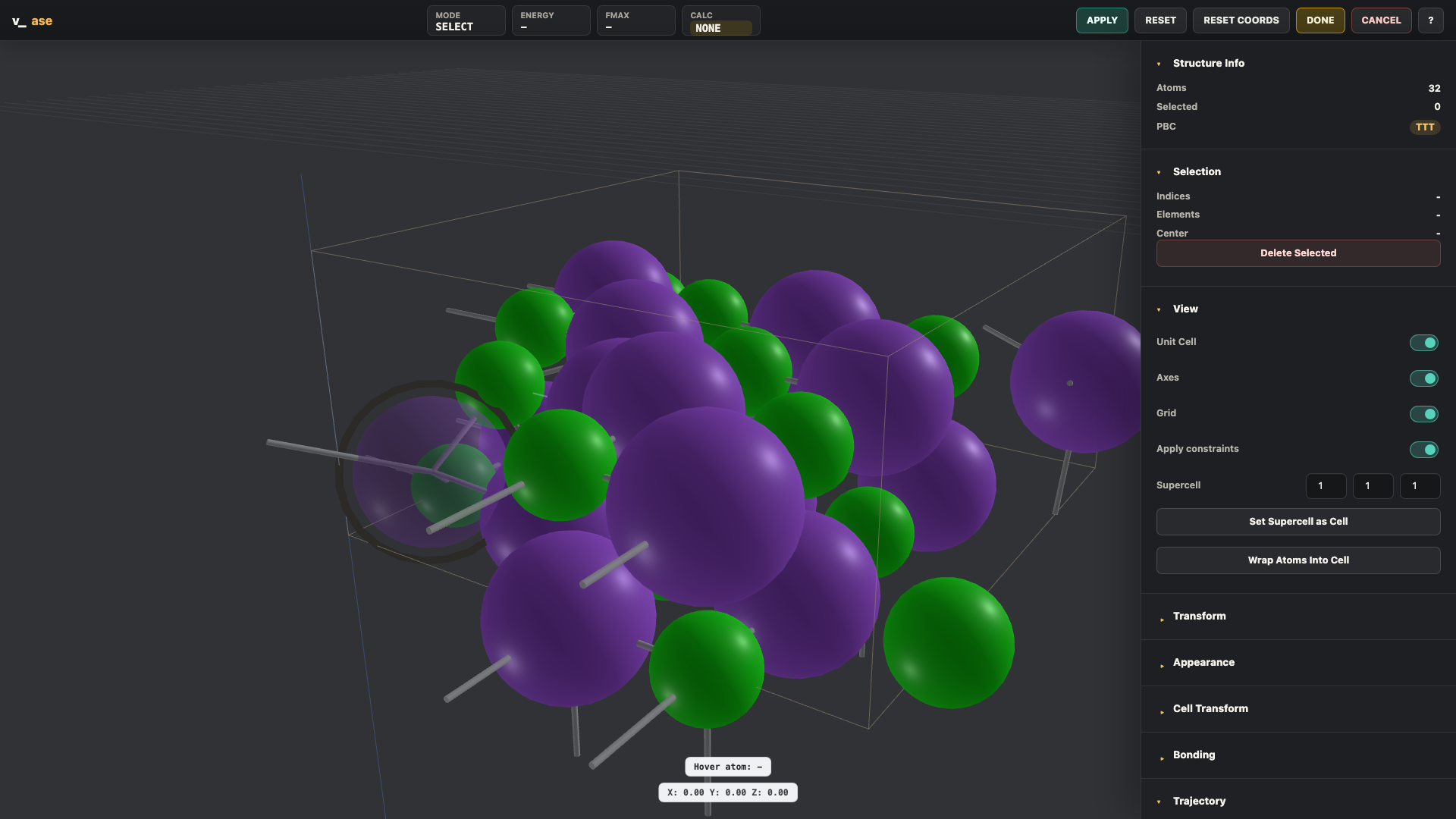
The viewer opens locally in your browser. Middle mouse tumbles the camera,
|
|
70
|
+
left click and box drag select atoms, `G` moves atoms, `R` rotates atoms,
|
|
71
|
+
`X/Y/Z` lock axes, numeric input gives exact transforms, and trajectory files
|
|
72
|
+
show playback controls for frame-by-frame movie inspection.
|
|
73
|
+
|
|
74
|
+
|
|
75
|
+
|
|
76
|
+
## Highlights
|
|
77
|
+
|
|
78
|
+
- `v_ase gui FILE` command-line workflow for structures and trajectories.
|
|
79
|
+
- Python API: `from v_ase.visualize import view`.
|
|
80
|
+
- Blender-style selection, camera control, and transforms: click, box select, `G`, `R`,
|
|
81
|
+
axis locking, numeric input, `Enter`, `Esc`, copy/paste/undo/delete.
|
|
82
|
+
- ASE constraint-aware editing and visualization:
|
|
83
|
+
`FixAtoms`, `FixCartesian`, `FixedLine`, `FixedPlane`, `FixScaled`, and
|
|
84
|
+
`Hookean`.
|
|
85
|
+
- Hookean constraints are visualized as threshold-aware hook/latch springs.
|
|
86
|
+
- Trajectory playback with live frame slider, FPS control, image export, and
|
|
87
|
+
video export.
|
|
88
|
+
- Periodic bonds, element-pair cutoff tables, manual bond pairs, supercell
|
|
89
|
+
preview, `make_supercell(P)` cell transform, and wrap atoms into cell.
|
|
90
|
+
- Custom extxyz atom type labels such as `H_type5` are preserved for GUI type
|
|
91
|
+
settings even when ASE cannot parse them as real elements.
|
|
92
|
+
- Export POSCAR, pickle, PNG image, WebM video, and Blender Python scene script.
|
|
93
|
+
|
|
94
|
+
## Installation
|
|
95
|
+
|
|
96
|
+
### From PyPI
|
|
97
|
+
|
|
98
|
+
```bash
|
|
99
|
+
python -m pip install v_ase-gui
|
|
100
|
+
v_ase gui POSCAR
|
|
101
|
+
```
|
|
102
|
+
|
|
103
|
+
### From GitHub
|
|
104
|
+
|
|
105
|
+
```bash
|
|
106
|
+
git clone https://github.com/lgyEthan/v_ase.git
|
|
107
|
+
cd v_ase
|
|
108
|
+
python -m pip install --upgrade pip
|
|
109
|
+
python -m pip install -r requirements.txt
|
|
110
|
+
python -m pip install -e .
|
|
111
|
+
```
|
|
112
|
+
|
|
113
|
+
No conda and no Node.js are required. Three.js is vendored inside the package.
|
|
114
|
+
|
|
115
|
+
### macOS
|
|
116
|
+
|
|
117
|
+
```bash
|
|
118
|
+
python3 -m venv .venv
|
|
119
|
+
source .venv/bin/activate
|
|
120
|
+
python -m pip install --upgrade pip
|
|
121
|
+
python -m pip install -r requirements.txt
|
|
122
|
+
python -m pip install -e .
|
|
123
|
+
```
|
|
124
|
+
|
|
125
|
+
### Windows PowerShell
|
|
126
|
+
|
|
127
|
+
```powershell
|
|
128
|
+
py -3.11 -m venv .venv
|
|
129
|
+
.\.venv\Scripts\Activate.ps1
|
|
130
|
+
python -m pip install --upgrade pip
|
|
131
|
+
python -m pip install -r requirements.txt
|
|
132
|
+
python -m pip install -e .
|
|
133
|
+
```
|
|
134
|
+
|
|
135
|
+
If activation is blocked:
|
|
136
|
+
|
|
137
|
+
```powershell
|
|
138
|
+
Set-ExecutionPolicy -Scope CurrentUser RemoteSigned
|
|
139
|
+
```
|
|
140
|
+
|
|
141
|
+
### Linux
|
|
142
|
+
|
|
143
|
+
Ubuntu/Debian:
|
|
144
|
+
|
|
145
|
+
```bash
|
|
146
|
+
sudo apt update
|
|
147
|
+
sudo apt install python3 python3-venv python3-pip
|
|
148
|
+
python3 -m venv .venv
|
|
149
|
+
source .venv/bin/activate
|
|
150
|
+
python -m pip install --upgrade pip
|
|
151
|
+
python -m pip install -r requirements.txt
|
|
152
|
+
python -m pip install -e .
|
|
153
|
+
```
|
|
154
|
+
|
|
155
|
+
### Optional Conda
|
|
156
|
+
|
|
157
|
+
```bash
|
|
158
|
+
conda create -n v_ase python=3.11
|
|
159
|
+
conda activate v_ase
|
|
160
|
+
python -m pip install -r requirements.txt
|
|
161
|
+
python -m pip install -e .
|
|
162
|
+
```
|
|
163
|
+
|
|
164
|
+
## Quick Start
|
|
165
|
+
|
|
166
|
+
Open a structure file:
|
|
167
|
+
|
|
168
|
+
```bash
|
|
169
|
+
v_ase gui POSCAR
|
|
170
|
+
v_ase gui structure.vasp
|
|
171
|
+
v_ase gui trajectory.extxyz
|
|
172
|
+
v_ase gui relaxation.traj
|
|
173
|
+
```
|
|
174
|
+
|
|
175
|
+
The direct file form also works:
|
|
176
|
+
|
|
177
|
+
```bash
|
|
178
|
+
v_ase POSCAR
|
|
179
|
+
```
|
|
180
|
+
|
|
181
|
+
Use from Python:
|
|
182
|
+
|
|
183
|
+
```python
|
|
184
|
+
from ase.build import molecule
|
|
185
|
+
from v_ase.visualize import view
|
|
186
|
+
|
|
187
|
+
atoms = molecule("H2O")
|
|
188
|
+
edited = view(atoms)
|
|
189
|
+
print(edited.positions)
|
|
190
|
+
```
|
|
191
|
+
|
|
192
|
+
Useful CLI options:
|
|
193
|
+
|
|
194
|
+
```bash
|
|
195
|
+
v_ase gui structure.vasp --show-bonds
|
|
196
|
+
v_ase gui trajectory.extxyz --index :
|
|
197
|
+
v_ase gui trajectory.extxyz --index -1
|
|
198
|
+
v_ase gui POSCAR --output edited.vasp
|
|
199
|
+
v_ase gui POSCAR --no-block
|
|
200
|
+
```
|
|
201
|
+
|
|
202
|
+
## Case 1: Selection, FixedLine, and FixedPlane
|
|
203
|
+
|
|
204
|
+
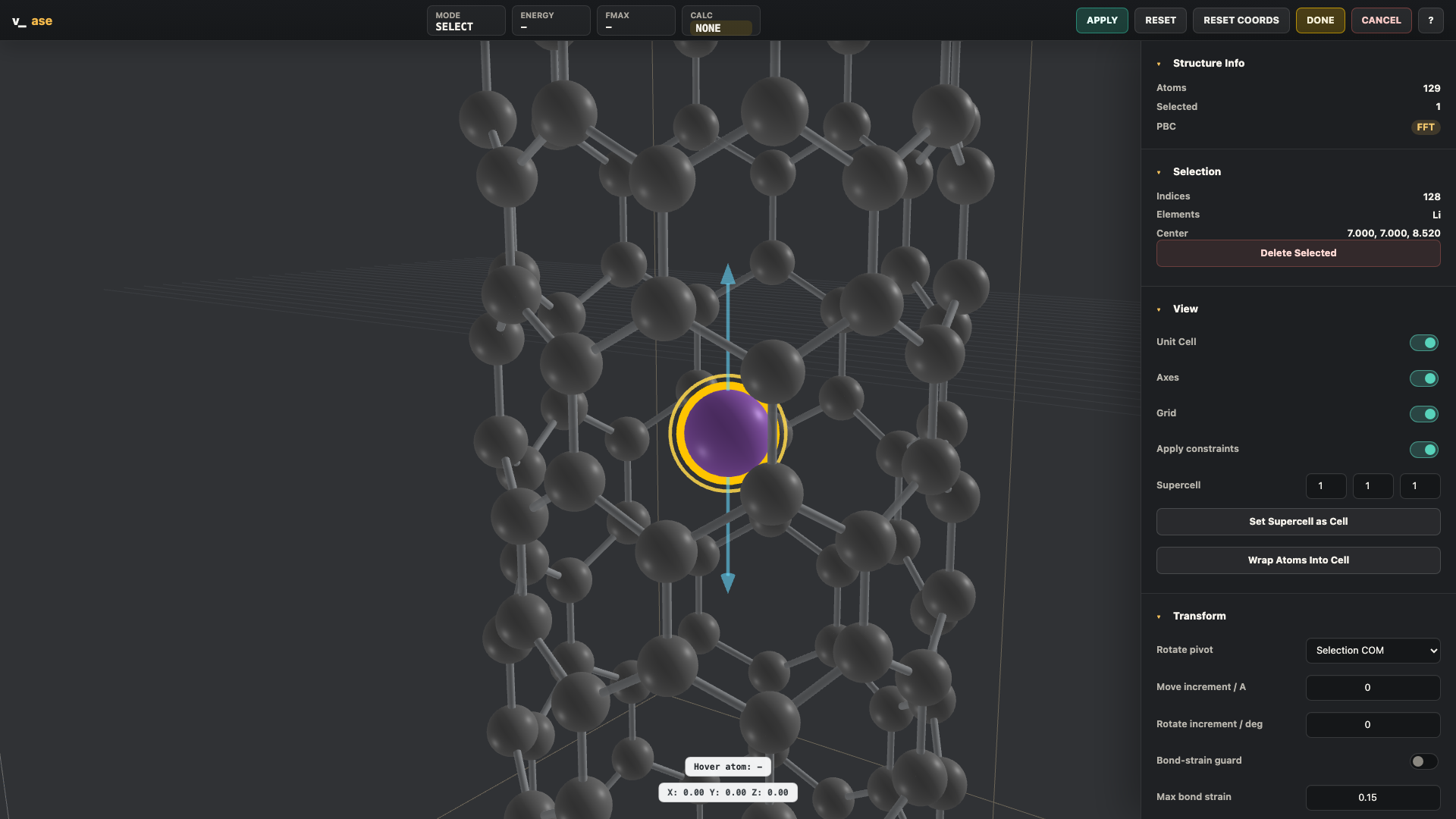
Selected atoms get yellow Blender-style outlines. Fixed atoms are dimmed, and
|
|
205
|
+
selected `FixedLine` / `FixedPlane` atoms show geometric guides so the allowed
|
|
206
|
+
movement is visible before committing coordinates.
|
|
207
|
+
|
|
208
|
+
|
|
209
|
+
|
|
210
|
+
Example:
|
|
211
|
+
|
|
212
|
+
```python
|
|
213
|
+
from ase.build import molecule
|
|
214
|
+
from ase.constraints import FixAtoms, FixedLine, FixedPlane
|
|
215
|
+
from v_ase.visualize import view
|
|
216
|
+
|
|
217
|
+
atoms = molecule("H2O")
|
|
218
|
+
atoms.set_constraint([
|
|
219
|
+
FixAtoms(indices=[0]),
|
|
220
|
+
FixedLine(1, [1, 0, 0]),
|
|
221
|
+
FixedPlane(2, [0, 0, 1]),
|
|
222
|
+
])
|
|
223
|
+
|
|
224
|
+
view(atoms)
|
|
225
|
+
```
|
|
226
|
+
|
|
227
|
+
When `Apply constraints` is enabled, move and rotate previews are projected onto
|
|
228
|
+
the allowed line or plane and the backend commit uses
|
|
229
|
+
`atoms.set_positions(..., apply_constraint=True)`.
|
|
230
|
+
|
|
231
|
+
## Case 2: Hookean Constraints
|
|
232
|
+
|
|
233
|
+
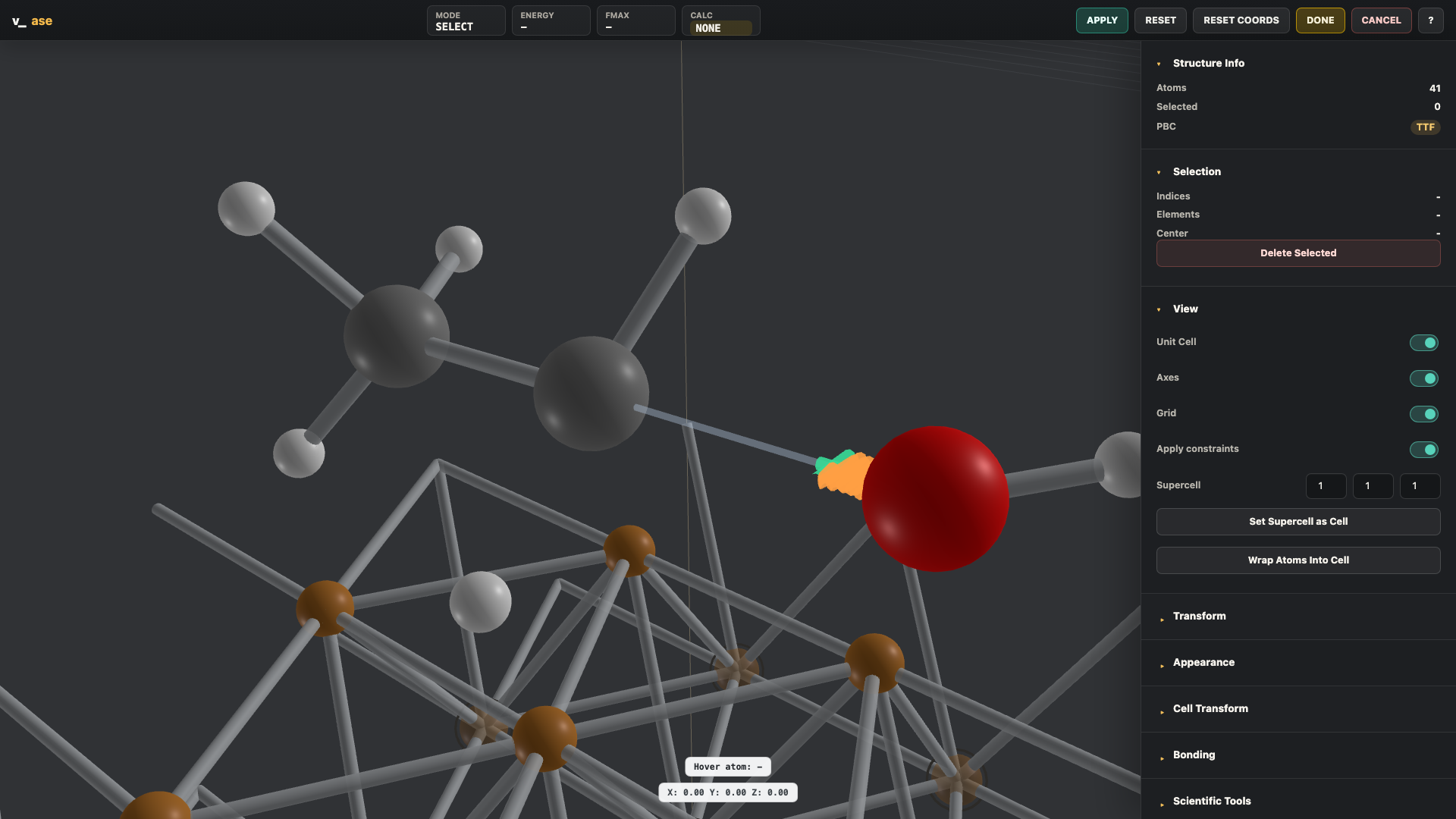
`Hookean` constraints are drawn with physical meaning. The `rt` threshold is
|
|
234
|
+
placed in Angstroms along the constrained direction. Below the threshold the
|
|
235
|
+
spring is inactive and shows slack. Beyond the threshold the latch engages and
|
|
236
|
+
the spring becomes active.
|
|
237
|
+
|
|
238
|
+
|
|
239
|
+
|
|
240
|
+
Example:
|
|
241
|
+
|
|
242
|
+
```python
|
|
243
|
+
from ase.build import molecule
|
|
244
|
+
from ase.constraints import Hookean
|
|
245
|
+
from v_ase.visualize import view
|
|
246
|
+
|
|
247
|
+
atoms = molecule("H2O")
|
|
248
|
+
atoms.set_constraint(Hookean(1, 2, rt=1.8, k=5.0))
|
|
249
|
+
view(atoms)
|
|
250
|
+
```
|
|
251
|
+
|
|
252
|
+
For trajectories, the Hookean graphic updates frame by frame, so inactive,
|
|
253
|
+
near-threshold, and active states can be inspected as a movie.
|
|
254
|
+
|
|
255
|
+
## Case 3: Rotate and Move
|
|
256
|
+
|
|
257
|
+
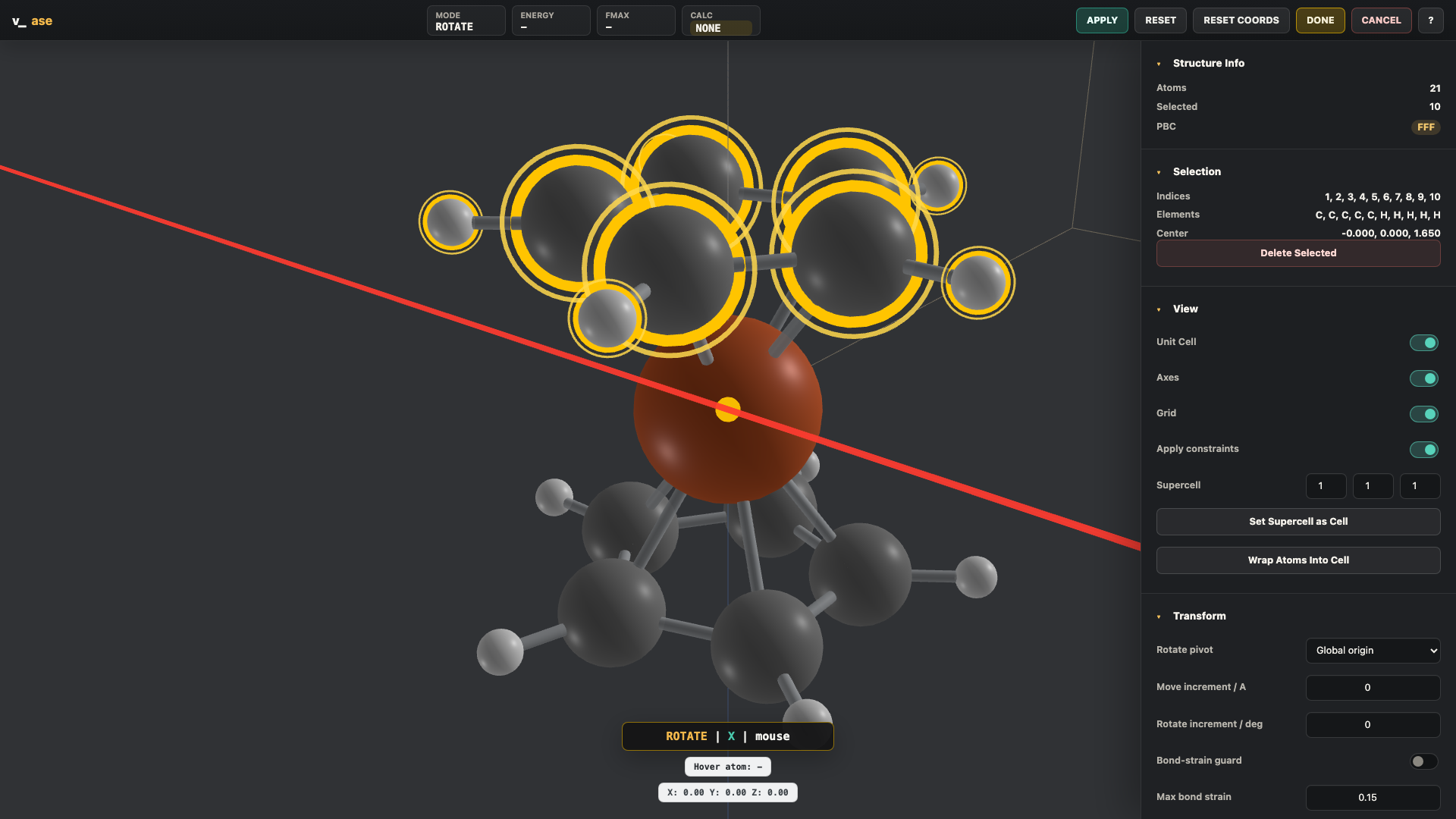
Transforms follow Blender-style keyboard flow:
|
|
258
|
+
|
|
259
|
+
```text
|
|
260
|
+
G X 1.2 Enter
|
|
261
|
+
R Z 30 Enter
|
|
262
|
+
```
|
|
263
|
+
|
|
264
|
+
Supported behavior:
|
|
265
|
+
|
|
266
|
+
- `G`: move selected atoms.
|
|
267
|
+
- `R`: rotate selected atoms.
|
|
268
|
+
- `X`, `Y`, `Z`: lock transform axis in transform mode.
|
|
269
|
+
- Numeric input: exact displacement or angle.
|
|
270
|
+
- Left click or `Enter`: confirm.
|
|
271
|
+
- `Esc`: cancel.
|
|
272
|
+
- Optional move increment in Angstrom.
|
|
273
|
+
- Optional rotate increment in degrees.
|
|
274
|
+
- Rotate pivots: selection center, global origin, or unit-cell center.
|
|
275
|
+
- Optional bond-strain guard for rejecting excessive periodic bond distortion.
|
|
276
|
+
|
|
277
|
+
|
|
278
|
+
|
|
279
|
+
## Case 4: Bonds, Periodicity, and Supercells
|
|
280
|
+
|
|
281
|
+
Bonding can be automatic, element-pair based, or manually specified.
|
|
282
|
+
|
|
283
|
+
- Auto cutoff uses covalent radii and respects periodic minimum-image distances.
|
|
284
|
+
- Element-pair mode exposes pair-specific `rcut` rows.
|
|
285
|
+
- Manual mode accepts pair strings such as `Na-Cl: 3.2` or `0-1, 1-2`.
|
|
286
|
+
- Supercell preview shows repeated atoms and repeated unit-cell lines.
|
|
287
|
+
- `Set Supercell as Cell` converts the preview into real editable atoms.
|
|
288
|
+
- `Cell Transform` accepts a full integer `make_supercell(P)` matrix.
|
|
289
|
+
|
|
290
|
+
For 2D periodic supercell/twist workflows, the cell transform applies:
|
|
291
|
+
|
|
292
|
+
```text
|
|
293
|
+
H' = P H
|
|
294
|
+
```
|
|
295
|
+
|
|
296
|
+
to every trajectory frame. Non-periodic axes are protected from accidental
|
|
297
|
+
mixing, tilting, or repetition.
|
|
298
|
+
|
|
299
|
+
## Case 5: Trajectories
|
|
300
|
+
|
|
301
|
+
Multi-frame `Atoms` lists and ASE-readable trajectory files can be played as a
|
|
302
|
+
movie.
|
|
303
|
+
|
|
304
|
+
```bash
|
|
305
|
+
v_ase gui relaxation.traj
|
|
306
|
+
v_ase gui movie.extxyz --index :
|
|
307
|
+
```
|
|
308
|
+
|
|
309
|
+
Controls:
|
|
310
|
+
|
|
311
|
+
- frame slider updates live while dragging
|
|
312
|
+
- play/pause button
|
|
313
|
+
- `Space`: play or pause
|
|
314
|
+
- FPS control updates immediately while playback is running
|
|
315
|
+
- export image and export video
|
|
316
|
+
|
|
317
|
+
## Case 6: Custom Atom Types in extxyz
|
|
318
|
+
|
|
319
|
+
Some workflows store type labels such as `H_type5`, `O_type2`, or `Si_type1`
|
|
320
|
+
inside the `species` column. ASE itself cannot treat these strings as chemical
|
|
321
|
+
elements, so v_ase reads them as GUI atom types while mapping them internally to
|
|
322
|
+
valid ASE base elements.
|
|
323
|
+
|
|
324
|
+
Example extxyz line:
|
|
325
|
+
|
|
326
|
+
```text
|
|
327
|
+
H_type5 82.30128 7.97802 11.47478
|
|
328
|
+
```
|
|
329
|
+
|
|
330
|
+
In v_ase:
|
|
331
|
+
|
|
332
|
+
- ASE backend uses base element `H`.
|
|
333
|
+
- GUI labels remain `H_type5`.
|
|
334
|
+
- type-specific color variants are generated.
|
|
335
|
+
- Appearance radius controls are grouped by `H_type5`, `O_type2`, etc.
|
|
336
|
+
- Bond cutoff pair tables also use the preserved type labels.
|
|
337
|
+
|
|
338
|
+
## Case 7: Export
|
|
339
|
+
|
|
340
|
+
From the right panel:
|
|
341
|
+
|
|
342
|
+
- `Export POSCAR`
|
|
343
|
+
- `Export Pickle`
|
|
344
|
+
- `Export Blender`
|
|
345
|
+
- `Export Image`
|
|
346
|
+
- `Export Video`
|
|
347
|
+
|
|
348
|
+
Blender export downloads `v_ase_blender_scene.py`:
|
|
349
|
+
|
|
350
|
+
```bash
|
|
351
|
+
blender --python v_ase_blender_scene.py
|
|
352
|
+
```
|
|
353
|
+
|
|
354
|
+
The generated scene keeps atoms and constraint graphics as editable Blender
|
|
355
|
+
objects where practical.
|
|
356
|
+
|
|
357
|
+
## Python API
|
|
358
|
+
|
|
359
|
+
```python
|
|
360
|
+
from v_ase import view_edit, view_file
|
|
361
|
+
|
|
362
|
+
edited_atoms = view_edit(
|
|
363
|
+
atoms,
|
|
364
|
+
notebook=False,
|
|
365
|
+
block=True,
|
|
366
|
+
show_cell=True,
|
|
367
|
+
show_axes=True,
|
|
368
|
+
show_bonds=False,
|
|
369
|
+
respect_constraints=True,
|
|
370
|
+
allow_relax=True,
|
|
371
|
+
return_mode="atoms",
|
|
372
|
+
)
|
|
373
|
+
|
|
374
|
+
view_file("trajectory.extxyz")
|
|
375
|
+
```
|
|
376
|
+
|
|
377
|
+
`return_mode` can be:
|
|
378
|
+
|
|
379
|
+
- `"atoms"`: edited ASE `Atoms`
|
|
380
|
+
- `"positions"`: edited `Nx3` positions array
|
|
381
|
+
- `"none"`: no return value
|
|
382
|
+
|
|
383
|
+
## Controls
|
|
384
|
+
|
|
385
|
+
| Input | Action |
|
|
386
|
+
| --- | --- |
|
|
387
|
+
| Left click | Select atom or confirm transform |
|
|
388
|
+
| Shift + left click | Add/remove selection |
|
|
389
|
+
| Left drag | Box select |
|
|
390
|
+
| Middle drag | Orbit viewport |
|
|
391
|
+
| Shift + middle drag | Pan viewport |
|
|
392
|
+
| Mouse wheel | Zoom |
|
|
393
|
+
| `G` | Move selected atoms |
|
|
394
|
+
| `R` | Rotate selected atoms |
|
|
395
|
+
| `X`, `Y`, `Z` | Align view in select mode, lock axis in transform mode |
|
|
396
|
+
| Number keys | Numeric transform input |
|
|
397
|
+
| `Enter` | Confirm transform |
|
|
398
|
+
| `Esc` | Cancel transform |
|
|
399
|
+
| `Ctrl+C` / `Ctrl+V` | Copy / paste atoms |
|
|
400
|
+
| `Ctrl+Z` / `Ctrl+Shift+Z` | Undo / redo |
|
|
401
|
+
| `Delete` / `Backspace` | Delete selected atoms |
|
|
402
|
+
| `Space` | Play/pause trajectory |
|
|
403
|
+
|
|
404
|
+
## Development
|
|
405
|
+
|
|
406
|
+
Install development tools:
|
|
407
|
+
|
|
408
|
+
```bash
|
|
409
|
+
python -m pip install -r requirements-dev.txt
|
|
410
|
+
```
|
|
411
|
+
|
|
412
|
+
Run tests:
|
|
413
|
+
|
|
414
|
+
```bash
|
|
415
|
+
python -m pytest tests -q
|
|
416
|
+
```
|
|
417
|
+
|
|
418
|
+
Open the all-in-one manual showcase:
|
|
419
|
+
|
|
420
|
+
```bash
|
|
421
|
+
python tests/manual_showcase.py
|
|
422
|
+
```
|
|
423
|
+
|
|
424
|
+
Regenerate README screenshots:
|
|
425
|
+
|
|
426
|
+
```bash
|
|
427
|
+
python scripts/capture_readme_screenshots.py
|
|
428
|
+
```
|
|
429
|
+
|
|
430
|
+
## Build for PyPI
|
|
431
|
+
|
|
432
|
+
Build only:
|
|
433
|
+
|
|
434
|
+
```bash
|
|
435
|
+
python -m pip install -r requirements-dev.txt
|
|
436
|
+
python -m build
|
|
437
|
+
python -m twine check dist/*
|
|
438
|
+
```
|
|
439
|
+
|
|
440
|
+
Upload:
|
|
441
|
+
|
|
442
|
+
```bash
|
|
443
|
+
python -m twine upload dist/*
|
|
444
|
+
```
|
|
445
|
+
|
|
446
|
+
## Versioning
|
|
447
|
+
|
|
448
|
+
The initial public release is `0.0.1`. Patch releases increment the last number:
|
|
449
|
+
`0.0.2`, `0.0.3`, and so on. When code changes, update the version in
|
|
450
|
+
`pyproject.toml`, the fallback version in `v_ase/__init__.py`, and the fallback
|
|
451
|
+
CLI version in `v_ase/cli.py`, then rebuild and push to GitHub before uploading
|
|
452
|
+
to PyPI.
|
|
453
|
+
|
|
454
|
+
## Repository Layout
|
|
455
|
+
|
|
456
|
+
```text
|
|
457
|
+
v_ase/ Python package, CLI, server, and browser UI
|
|
458
|
+
v_ase/static/ Three.js browser application and vendored Three.js
|
|
459
|
+
docs/ Feature notes and README screenshots
|
|
460
|
+
examples/ User examples
|
|
461
|
+
scripts/ Release and documentation helper scripts
|
|
462
|
+
tests/ Unit tests, regression tests, and manual showcase assets
|
|
463
|
+
requirements.txt Runtime dependencies
|
|
464
|
+
requirements-dev.txt Development, test, and build dependencies
|
|
465
|
+
pyproject.toml Packaging metadata
|
|
466
|
+
```
|
|
467
|
+
|
|
468
|
+
## Notes
|
|
469
|
+
|
|
470
|
+
- The local editor server binds to `127.0.0.1`.
|
|
471
|
+
- Relaxation uses the calculator already attached to the `Atoms` object.
|
|
472
|
+
- POSCAR export stores structural data. Pickle export can include the ASE object;
|
|
473
|
+
calculators may not always be pickleable.
|
|
474
|
+
- The bundled browser UI is local-first; no Node.js build step is required.
|