unsaid-video 0.2.0__tar.gz
This diff represents the content of publicly available package versions that have been released to one of the supported registries. The information contained in this diff is provided for informational purposes only and reflects changes between package versions as they appear in their respective public registries.
- unsaid_video-0.2.0/.github/workflows/publish.yml +44 -0
- unsaid_video-0.2.0/.github/workflows/test.yml +21 -0
- unsaid_video-0.2.0/.gitignore +7 -0
- unsaid_video-0.2.0/LICENSE +21 -0
- unsaid_video-0.2.0/PKG-INFO +155 -0
- unsaid_video-0.2.0/README.md +130 -0
- unsaid_video-0.2.0/pyproject.toml +48 -0
- unsaid_video-0.2.0/scripts/make_demo_gif.py +434 -0
- unsaid_video-0.2.0/skills/unsaid/SKILL.md +65 -0
- unsaid_video-0.2.0/src/unsaid/__init__.py +3 -0
- unsaid_video-0.2.0/src/unsaid/__main__.py +5 -0
- unsaid_video-0.2.0/src/unsaid/cli.py +163 -0
- unsaid_video-0.2.0/src/unsaid/cuts.py +175 -0
- unsaid_video-0.2.0/src/unsaid/editor.html +351 -0
- unsaid_video-0.2.0/src/unsaid/editor.py +226 -0
- unsaid_video-0.2.0/src/unsaid/fillers.py +49 -0
- unsaid_video-0.2.0/src/unsaid/render.py +134 -0
- unsaid_video-0.2.0/src/unsaid/script.py +67 -0
- unsaid_video-0.2.0/src/unsaid/transcribe.py +171 -0
- unsaid_video-0.2.0/src/unsaid/transcript.py +93 -0
- unsaid_video-0.2.0/tests/conftest.py +27 -0
- unsaid_video-0.2.0/tests/test_cli.py +14 -0
- unsaid_video-0.2.0/tests/test_cuts.py +135 -0
- unsaid_video-0.2.0/tests/test_editor.py +131 -0
- unsaid_video-0.2.0/tests/test_fillers.py +33 -0
- unsaid_video-0.2.0/tests/test_render.py +70 -0
- unsaid_video-0.2.0/tests/test_script.py +54 -0
- unsaid_video-0.2.0/tests/test_transcribe.py +149 -0
- unsaid_video-0.2.0/tests/test_transcript.py +18 -0
|
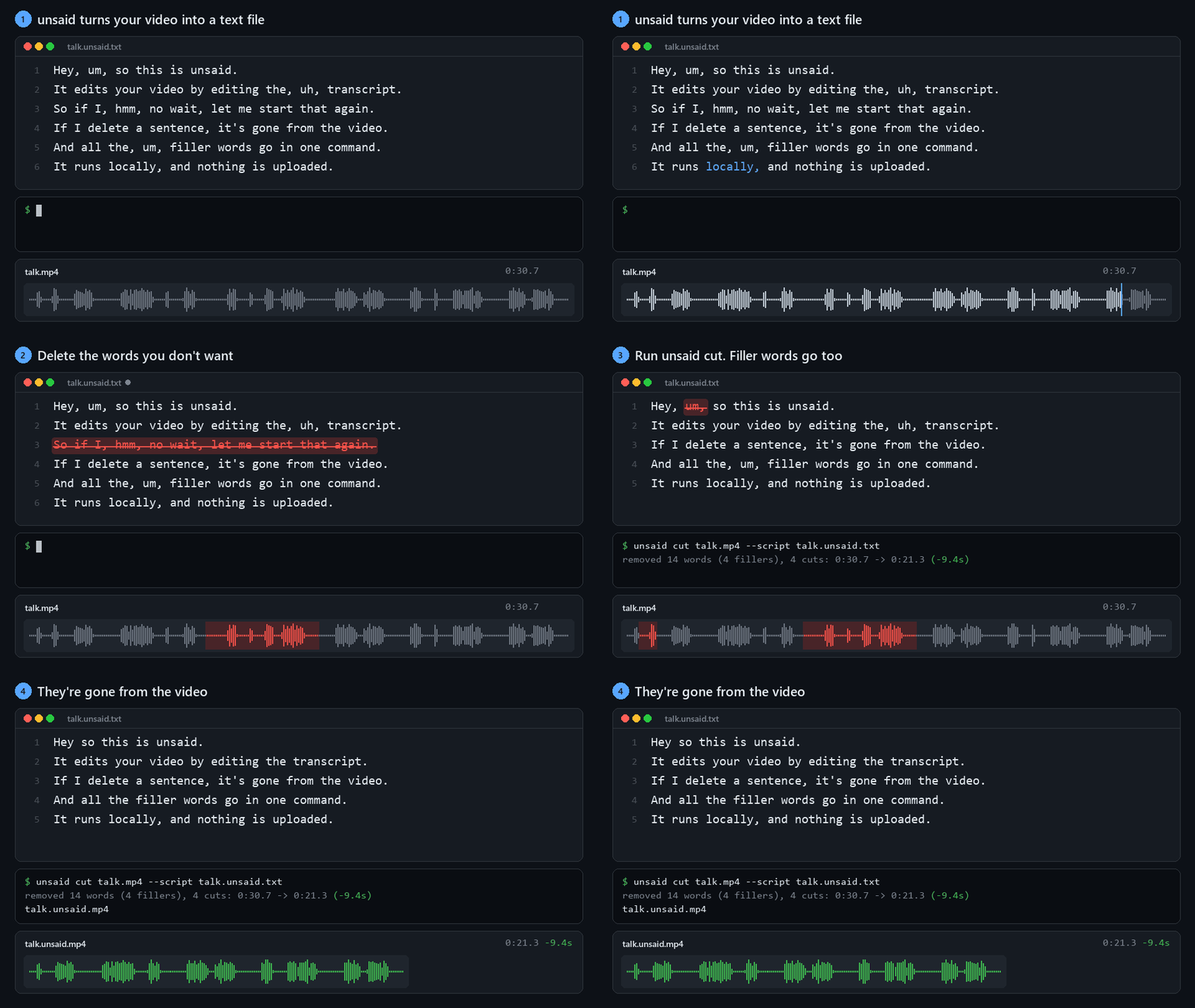
@@ -0,0 +1,44 @@
|
|
|
1
|
+
name: publish
|
|
2
|
+
|
|
3
|
+
# Publishing a GitHub release uploads that version to PyPI as unsaid-video.
|
|
4
|
+
# PyPI trusts this workflow directly (trusted publishing), so there is no API
|
|
5
|
+
# token to store: PyPI's publisher settings name this repository, this file
|
|
6
|
+
# (publish.yml) and the `pypi` environment below.
|
|
7
|
+
|
|
8
|
+
on:
|
|
9
|
+
release:
|
|
10
|
+
types: [published]
|
|
11
|
+
workflow_dispatch:
|
|
12
|
+
|
|
13
|
+
jobs:
|
|
14
|
+
build:
|
|
15
|
+
runs-on: ubuntu-latest
|
|
16
|
+
steps:
|
|
17
|
+
- uses: actions/checkout@v4
|
|
18
|
+
- uses: astral-sh/setup-uv@v6
|
|
19
|
+
with:
|
|
20
|
+
python-version: "3.12"
|
|
21
|
+
- run: uv build
|
|
22
|
+
- name: Test the built wheel, not the checkout
|
|
23
|
+
run: |
|
|
24
|
+
uv venv /tmp/check
|
|
25
|
+
uv pip install --python /tmp/check/bin/python "$(ls dist/*.whl)" pytest
|
|
26
|
+
rm -rf src
|
|
27
|
+
/tmp/check/bin/python -m pytest
|
|
28
|
+
- uses: actions/upload-artifact@v4
|
|
29
|
+
with:
|
|
30
|
+
name: dist
|
|
31
|
+
path: dist/
|
|
32
|
+
|
|
33
|
+
publish:
|
|
34
|
+
needs: build
|
|
35
|
+
runs-on: ubuntu-latest
|
|
36
|
+
environment: pypi
|
|
37
|
+
permissions:
|
|
38
|
+
id-token: write
|
|
39
|
+
steps:
|
|
40
|
+
- uses: actions/download-artifact@v4
|
|
41
|
+
with:
|
|
42
|
+
name: dist
|
|
43
|
+
path: dist/
|
|
44
|
+
- uses: pypa/gh-action-pypi-publish@release/v1
|
|
@@ -0,0 +1,21 @@
|
|
|
1
|
+
name: test
|
|
2
|
+
|
|
3
|
+
on:
|
|
4
|
+
push:
|
|
5
|
+
branches: [main]
|
|
6
|
+
pull_request:
|
|
7
|
+
|
|
8
|
+
jobs:
|
|
9
|
+
test:
|
|
10
|
+
runs-on: ${{ matrix.os }}
|
|
11
|
+
strategy:
|
|
12
|
+
fail-fast: false
|
|
13
|
+
matrix:
|
|
14
|
+
os: [ubuntu-latest, macos-latest, windows-latest]
|
|
15
|
+
python: ["3.10", "3.13"]
|
|
16
|
+
steps:
|
|
17
|
+
- uses: actions/checkout@v4
|
|
18
|
+
- uses: astral-sh/setup-uv@v6
|
|
19
|
+
with:
|
|
20
|
+
python-version: ${{ matrix.python }}
|
|
21
|
+
- run: uv run --extra dev pytest
|
|
@@ -0,0 +1,21 @@
|
|
|
1
|
+
MIT License
|
|
2
|
+
|
|
3
|
+
Copyright (c) 2026 unsaid contributors
|
|
4
|
+
|
|
5
|
+
Permission is hereby granted, free of charge, to any person obtaining a copy
|
|
6
|
+
of this software and associated documentation files (the "Software"), to deal
|
|
7
|
+
in the Software without restriction, including without limitation the rights
|
|
8
|
+
to use, copy, modify, merge, publish, distribute, sublicense, and/or sell
|
|
9
|
+
copies of the Software, and to permit persons to whom the Software is
|
|
10
|
+
furnished to do so, subject to the following conditions:
|
|
11
|
+
|
|
12
|
+
The above copyright notice and this permission notice shall be included in all
|
|
13
|
+
copies or substantial portions of the Software.
|
|
14
|
+
|
|
15
|
+
THE SOFTWARE IS PROVIDED "AS IS", WITHOUT WARRANTY OF ANY KIND, EXPRESS OR
|
|
16
|
+
IMPLIED, INCLUDING BUT NOT LIMITED TO THE WARRANTIES OF MERCHANTABILITY,
|
|
17
|
+
FITNESS FOR A PARTICULAR PURPOSE AND NONINFRINGEMENT. IN NO EVENT SHALL THE
|
|
18
|
+
AUTHORS OR COPYRIGHT HOLDERS BE LIABLE FOR ANY CLAIM, DAMAGES OR OTHER
|
|
19
|
+
LIABILITY, WHETHER IN AN ACTION OF CONTRACT, TORT OR OTHERWISE, ARISING FROM,
|
|
20
|
+
OUT OF OR IN CONNECTION WITH THE SOFTWARE OR THE USE OR OTHER DEALINGS IN THE
|
|
21
|
+
SOFTWARE.
|
|
@@ -0,0 +1,155 @@
|
|
|
1
|
+
Metadata-Version: 2.5
|
|
2
|
+
Name: unsaid-video
|
|
3
|
+
Version: 0.2.0
|
|
4
|
+
Summary: Edit video by editing text. An open-source, local-first Descript alternative.
|
|
5
|
+
Project-URL: Homepage, https://github.com/Necromancervbh/unsaid
|
|
6
|
+
Project-URL: Issues, https://github.com/Necromancervbh/unsaid/issues
|
|
7
|
+
Project-URL: Changelog, https://github.com/Necromancervbh/unsaid/releases
|
|
8
|
+
License-Expression: MIT
|
|
9
|
+
License-File: LICENSE
|
|
10
|
+
Keywords: descript,editing,ffmpeg,podcast,transcript,video,whisper
|
|
11
|
+
Classifier: Development Status :: 3 - Alpha
|
|
12
|
+
Classifier: Environment :: Console
|
|
13
|
+
Classifier: Intended Audience :: End Users/Desktop
|
|
14
|
+
Classifier: Operating System :: OS Independent
|
|
15
|
+
Classifier: Programming Language :: Python :: 3
|
|
16
|
+
Classifier: Topic :: Multimedia :: Sound/Audio :: Speech
|
|
17
|
+
Classifier: Topic :: Multimedia :: Video :: Non-Linear Editor
|
|
18
|
+
Requires-Python: >=3.10
|
|
19
|
+
Requires-Dist: av>=12
|
|
20
|
+
Requires-Dist: faster-whisper>=1.1
|
|
21
|
+
Requires-Dist: imageio-ffmpeg>=0.5
|
|
22
|
+
Provides-Extra: dev
|
|
23
|
+
Requires-Dist: pytest>=8; extra == 'dev'
|
|
24
|
+
Description-Content-Type: text/markdown
|
|
25
|
+
|
|
26
|
+
# unsaid
|
|
27
|
+
|
|
28
|
+
[](https://github.com/Necromancervbh/unsaid/actions/workflows/test.yml)
|
|
29
|
+
|
|
30
|
+
**Edit video by editing text.** unsaid is an open-source, local-first Descript alternative.
|
|
31
|
+
|
|
32
|
+
unsaid transcribes your video on your own machine. You delete words from the transcript and they're gone from the video. Filler words go in one command. No account, no API key, no upload.
|
|
33
|
+
|
|
34
|
+
|
|
35
|
+
|
|
36
|
+
```bash
|
|
37
|
+
unsaid edit talk.mp4 # edit the transcript in your browser, then export
|
|
38
|
+
unsaid cut talk.mp4 # or just remove "um", "uh", "hmm" -> talk.unsaid.mp4
|
|
39
|
+
unsaid cut talk.mp4 --max-pause 0.6 # ...and tighten long pauses
|
|
40
|
+
```
|
|
41
|
+
|
|
42
|
+
## Install
|
|
43
|
+
|
|
44
|
+
```bash
|
|
45
|
+
uv tool install unsaid-video # or: pipx install unsaid-video
|
|
46
|
+
```
|
|
47
|
+
|
|
48
|
+
The package is `unsaid-video` on PyPI; the command it installs is `unsaid`. For the latest from GitHub: `uv tool install git+https://github.com/Necromancervbh/unsaid`.
|
|
49
|
+
|
|
50
|
+
That's all you need. ffmpeg comes bundled through `imageio-ffmpeg`, and if an `ffmpeg` is on your `PATH` it's used instead. The Whisper model downloads on first run. The default `small` model is about 480 MB, and after that unsaid works offline.
|
|
51
|
+
|
|
52
|
+
On a laptop CPU, `small` transcribes about 3-4x faster than real time: a 4-minute interview takes about a minute. Rendering the cut takes seconds. An NVIDIA GPU with CUDA is used automatically when available.
|
|
53
|
+
|
|
54
|
+
## Usage
|
|
55
|
+
|
|
56
|
+
### Edit in your browser
|
|
57
|
+
|
|
58
|
+
```bash
|
|
59
|
+
unsaid edit talk.mp4
|
|
60
|
+
```
|
|
61
|
+
|
|
62
|
+
This opens the transcript next to the video in your browser. Select words and press <kbd>Delete</kbd> to cut them, or press it again to bring them back. Filler words start out cut. Playback skips the cuts, so you hear the edit as you make it, and **Export** renders `talk.unsaid.mp4`.
|
|
63
|
+
|
|
64
|
+
Everything stays on your machine: the editor is a small server on `127.0.0.1` that only serves this one file. Edits save as you go to `talk.unsaid.edit.json`, so you can close the tab and pick up later. Files a browser can't play, like `.mkv` or `.avi`, get a small preview copy, and the export still renders from the original. Use `--port` to pick the port and `--no-browser` to just print the URL.
|
|
65
|
+
|
|
66
|
+
### Remove filler words
|
|
67
|
+
|
|
68
|
+
```bash
|
|
69
|
+
unsaid cut talk.mp4 --dry-run # preview: prints the transcript with [um] cuts marked
|
|
70
|
+
unsaid cut talk.mp4 # render talk.unsaid.mp4
|
|
71
|
+
unsaid cut talk.mp4 --aggressive # also ", like," / ", you know," / ", I mean," when set off by commas
|
|
72
|
+
unsaid cut talk.mp4 --filler okay --filler "sort of" # your own verbal tics
|
|
73
|
+
```
|
|
74
|
+
|
|
75
|
+
### Edit the script
|
|
76
|
+
|
|
77
|
+
```bash
|
|
78
|
+
unsaid transcribe talk.mp4 # writes talk.unsaid.txt, one sentence per line
|
|
79
|
+
# open talk.unsaid.txt, delete the sentences/words you don't want, save
|
|
80
|
+
unsaid cut talk.mp4 --script talk.unsaid.txt
|
|
81
|
+
```
|
|
82
|
+
|
|
83
|
+
Deleted words are cut from the video. Fixing a typo or capitalization in the script doesn't cut anything: unsaid only cuts deletions, and it tells you how many changed words it left alone.
|
|
84
|
+
|
|
85
|
+
### Options
|
|
86
|
+
|
|
87
|
+
| Flag | What it does |
|
|
88
|
+
|---|---|
|
|
89
|
+
| `--model` | Whisper model: `tiny`, `base`, `small` (default), `medium`, `large-v3`, `turbo`, or a local CTranslate2 model path |
|
|
90
|
+
| `--language en` | Skip language auto-detection |
|
|
91
|
+
| `--device cpu\|cuda` | `auto` (the default) uses CUDA when it works and falls back to CPU |
|
|
92
|
+
| `--max-pause S` | Shorten every pause longer than `S` seconds |
|
|
93
|
+
| `--no-fillers` | Only apply `--script` / `--max-pause` |
|
|
94
|
+
| `-o out.mp4` | Output path (default `<input>.unsaid.mp4`, or `.m4a` for audio-only input) |
|
|
95
|
+
| `--crf`, `--preset` | x264 quality and speed |
|
|
96
|
+
|
|
97
|
+
Transcripts are cached next to the input as `<input>.unsaid.json`, so re-cutting with different options is instant. Run `unsaid transcribe --force` to redo one.
|
|
98
|
+
|
|
99
|
+
### Let a coding agent do the edit
|
|
100
|
+
|
|
101
|
+
[`skills/unsaid/SKILL.md`](skills/unsaid/SKILL.md) teaches an agent the unsaid workflow: transcribe, plan the cut, delete lines, dry-run, render. For Claude Code, copy the folder into your skills:
|
|
102
|
+
|
|
103
|
+
```bash
|
|
104
|
+
git clone https://github.com/Necromancervbh/unsaid && cp -r unsaid/skills/unsaid ~/.claude/skills/
|
|
105
|
+
```
|
|
106
|
+
|
|
107
|
+
Then ask: *"cut talk.mp4 down to a 60-second highlight about pricing"*. Other agents (Codex, Cursor, ...) can be pointed at the same file.
|
|
108
|
+
|
|
109
|
+
## How it works
|
|
110
|
+
|
|
111
|
+
1. **Transcribe.** [faster-whisper](https://github.com/SYSTRAN/faster-whisper) runs with word timestamps. Whisper normally "cleans up" disfluencies, so unsaid primes every 30-second window with a prompt full of fillers, which makes it keep them verbatim. Use `--no-verbatim` to turn this off. A voice-activity detector then checks for speech Whisper skipped. Whisper occasionally does, and that speech would otherwise look like a pause.
|
|
112
|
+
2. **Plan cuts.** Cuts only ever land in the silence *between* kept words, and never inside speech Whisper skipped. When a word is removed, the pause left behind is the *shorter* of the two pauses around it, so the edit keeps the speaker's rhythm instead of jamming words together. Whisper's word timestamps can be off by a tenth of a second, so each cut edge then moves into the silence the audio actually shows next to the kept word, which keeps the first and last sounds of words intact.
|
|
113
|
+
3. **Render.** ffmpeg trims and concatenates the kept ranges in one pass. Cut points snap to the video's frame grid, so audio and video stay exactly in sync however many cuts there are, and each audio cut gets an 8 ms fade to avoid clicks.
|
|
114
|
+
|
|
115
|
+
## Development
|
|
116
|
+
|
|
117
|
+
```bash
|
|
118
|
+
uv venv && uv pip install -e ".[dev]"
|
|
119
|
+
.venv/Scripts/python -m pytest # Windows; .venv/bin/python on macOS/Linux
|
|
120
|
+
```
|
|
121
|
+
|
|
122
|
+
The tests render real video through ffmpeg but don't need a Whisper model.
|
|
123
|
+
|
|
124
|
+
The GIF at the top is drawn by `scripts/make_demo_gif.py` from a real `unsaid cut` run: its transcript, cut plan, waveform and output.
|
|
125
|
+
|
|
126
|
+
## Roadmap
|
|
127
|
+
|
|
128
|
+
- [x] Browser editor: `unsaid edit talk.mp4` opens the transcript, and striking text cuts the video live
|
|
129
|
+
- [x] Agent skill: `SKILL.md`, so Claude Code, Codex or Cursor can make the edit ("cut this to a 60-second highlight")
|
|
130
|
+
- [ ] MCP server, for agents that prefer tools to a CLI
|
|
131
|
+
- [ ] Captions: SRT/VTT export retimed to the edit, plus animated burned-in captions for Shorts and Reels
|
|
132
|
+
- [ ] FCPXML/EDL export for Resolve, Premiere and Final Cut
|
|
133
|
+
- [ ] Stutter and repeated-word removal ("I I think")
|
|
134
|
+
- [ ] Overdub with a local voice clone, and "studio sound" cleanup
|
|
135
|
+
|
|
136
|
+
## Tested on real speech
|
|
137
|
+
|
|
138
|
+
Two unscripted English interviews (CC BY, from Wikimedia Commons), with default settings on a laptop CPU:
|
|
139
|
+
|
|
140
|
+
| Clip | Transcribe | Fillers cut | Result | Render |
|
|
141
|
+
|---|---|---|---|---|
|
|
142
|
+
| 4:20 press Q&A, background noise | 85 s | 23 | 4:20.3 → 4:03.2 | 8 s |
|
|
143
|
+
| 3:55 one-on-one interview | 62 s | 15 | 3:54.9 → 3:41.8 | 10 s |
|
|
144
|
+
|
|
145
|
+
To check the cuts, the output files were transcribed again and compared with the words unsaid meant to keep. They matched at 98.6% and 99.2%. Every difference was Whisper hearing a name or a word differently, none of them within two seconds of a cut. Two fillers that Whisper missed the first time stayed in. Audio and video stayed in sync to the frame through every cut.
|
|
146
|
+
|
|
147
|
+
## Known limitations
|
|
148
|
+
|
|
149
|
+
- Filler detection is only as good as Whisper's transcript. It's tuned for English: other languages are transcribed, but Whisper may clean up their fillers.
|
|
150
|
+
- Whisper can mishear words, or make one up. unsaid already drops the short, low-confidence segment Whisper tends to tack onto the end of a recording ("Good.", "Bye."). Delete any other made-up words in the script.
|
|
151
|
+
- Output is always re-encoded (H.264 + AAC) at the source's frame rate.
|
|
152
|
+
|
|
153
|
+
## License
|
|
154
|
+
|
|
155
|
+
MIT
|
|
@@ -0,0 +1,130 @@
|
|
|
1
|
+
# unsaid
|
|
2
|
+
|
|
3
|
+
[](https://github.com/Necromancervbh/unsaid/actions/workflows/test.yml)
|
|
4
|
+
|
|
5
|
+
**Edit video by editing text.** unsaid is an open-source, local-first Descript alternative.
|
|
6
|
+
|
|
7
|
+
unsaid transcribes your video on your own machine. You delete words from the transcript and they're gone from the video. Filler words go in one command. No account, no API key, no upload.
|
|
8
|
+
|
|
9
|
+

|
|
10
|
+
|
|
11
|
+
```bash
|
|
12
|
+
unsaid edit talk.mp4 # edit the transcript in your browser, then export
|
|
13
|
+
unsaid cut talk.mp4 # or just remove "um", "uh", "hmm" -> talk.unsaid.mp4
|
|
14
|
+
unsaid cut talk.mp4 --max-pause 0.6 # ...and tighten long pauses
|
|
15
|
+
```
|
|
16
|
+
|
|
17
|
+
## Install
|
|
18
|
+
|
|
19
|
+
```bash
|
|
20
|
+
uv tool install unsaid-video # or: pipx install unsaid-video
|
|
21
|
+
```
|
|
22
|
+
|
|
23
|
+
The package is `unsaid-video` on PyPI; the command it installs is `unsaid`. For the latest from GitHub: `uv tool install git+https://github.com/Necromancervbh/unsaid`.
|
|
24
|
+
|
|
25
|
+
That's all you need. ffmpeg comes bundled through `imageio-ffmpeg`, and if an `ffmpeg` is on your `PATH` it's used instead. The Whisper model downloads on first run. The default `small` model is about 480 MB, and after that unsaid works offline.
|
|
26
|
+
|
|
27
|
+
On a laptop CPU, `small` transcribes about 3-4x faster than real time: a 4-minute interview takes about a minute. Rendering the cut takes seconds. An NVIDIA GPU with CUDA is used automatically when available.
|
|
28
|
+
|
|
29
|
+
## Usage
|
|
30
|
+
|
|
31
|
+
### Edit in your browser
|
|
32
|
+
|
|
33
|
+
```bash
|
|
34
|
+
unsaid edit talk.mp4
|
|
35
|
+
```
|
|
36
|
+
|
|
37
|
+
This opens the transcript next to the video in your browser. Select words and press <kbd>Delete</kbd> to cut them, or press it again to bring them back. Filler words start out cut. Playback skips the cuts, so you hear the edit as you make it, and **Export** renders `talk.unsaid.mp4`.
|
|
38
|
+
|
|
39
|
+
Everything stays on your machine: the editor is a small server on `127.0.0.1` that only serves this one file. Edits save as you go to `talk.unsaid.edit.json`, so you can close the tab and pick up later. Files a browser can't play, like `.mkv` or `.avi`, get a small preview copy, and the export still renders from the original. Use `--port` to pick the port and `--no-browser` to just print the URL.
|
|
40
|
+
|
|
41
|
+
### Remove filler words
|
|
42
|
+
|
|
43
|
+
```bash
|
|
44
|
+
unsaid cut talk.mp4 --dry-run # preview: prints the transcript with [um] cuts marked
|
|
45
|
+
unsaid cut talk.mp4 # render talk.unsaid.mp4
|
|
46
|
+
unsaid cut talk.mp4 --aggressive # also ", like," / ", you know," / ", I mean," when set off by commas
|
|
47
|
+
unsaid cut talk.mp4 --filler okay --filler "sort of" # your own verbal tics
|
|
48
|
+
```
|
|
49
|
+
|
|
50
|
+
### Edit the script
|
|
51
|
+
|
|
52
|
+
```bash
|
|
53
|
+
unsaid transcribe talk.mp4 # writes talk.unsaid.txt, one sentence per line
|
|
54
|
+
# open talk.unsaid.txt, delete the sentences/words you don't want, save
|
|
55
|
+
unsaid cut talk.mp4 --script talk.unsaid.txt
|
|
56
|
+
```
|
|
57
|
+
|
|
58
|
+
Deleted words are cut from the video. Fixing a typo or capitalization in the script doesn't cut anything: unsaid only cuts deletions, and it tells you how many changed words it left alone.
|
|
59
|
+
|
|
60
|
+
### Options
|
|
61
|
+
|
|
62
|
+
| Flag | What it does |
|
|
63
|
+
|---|---|
|
|
64
|
+
| `--model` | Whisper model: `tiny`, `base`, `small` (default), `medium`, `large-v3`, `turbo`, or a local CTranslate2 model path |
|
|
65
|
+
| `--language en` | Skip language auto-detection |
|
|
66
|
+
| `--device cpu\|cuda` | `auto` (the default) uses CUDA when it works and falls back to CPU |
|
|
67
|
+
| `--max-pause S` | Shorten every pause longer than `S` seconds |
|
|
68
|
+
| `--no-fillers` | Only apply `--script` / `--max-pause` |
|
|
69
|
+
| `-o out.mp4` | Output path (default `<input>.unsaid.mp4`, or `.m4a` for audio-only input) |
|
|
70
|
+
| `--crf`, `--preset` | x264 quality and speed |
|
|
71
|
+
|
|
72
|
+
Transcripts are cached next to the input as `<input>.unsaid.json`, so re-cutting with different options is instant. Run `unsaid transcribe --force` to redo one.
|
|
73
|
+
|
|
74
|
+
### Let a coding agent do the edit
|
|
75
|
+
|
|
76
|
+
[`skills/unsaid/SKILL.md`](skills/unsaid/SKILL.md) teaches an agent the unsaid workflow: transcribe, plan the cut, delete lines, dry-run, render. For Claude Code, copy the folder into your skills:
|
|
77
|
+
|
|
78
|
+
```bash
|
|
79
|
+
git clone https://github.com/Necromancervbh/unsaid && cp -r unsaid/skills/unsaid ~/.claude/skills/
|
|
80
|
+
```
|
|
81
|
+
|
|
82
|
+
Then ask: *"cut talk.mp4 down to a 60-second highlight about pricing"*. Other agents (Codex, Cursor, ...) can be pointed at the same file.
|
|
83
|
+
|
|
84
|
+
## How it works
|
|
85
|
+
|
|
86
|
+
1. **Transcribe.** [faster-whisper](https://github.com/SYSTRAN/faster-whisper) runs with word timestamps. Whisper normally "cleans up" disfluencies, so unsaid primes every 30-second window with a prompt full of fillers, which makes it keep them verbatim. Use `--no-verbatim` to turn this off. A voice-activity detector then checks for speech Whisper skipped. Whisper occasionally does, and that speech would otherwise look like a pause.
|
|
87
|
+
2. **Plan cuts.** Cuts only ever land in the silence *between* kept words, and never inside speech Whisper skipped. When a word is removed, the pause left behind is the *shorter* of the two pauses around it, so the edit keeps the speaker's rhythm instead of jamming words together. Whisper's word timestamps can be off by a tenth of a second, so each cut edge then moves into the silence the audio actually shows next to the kept word, which keeps the first and last sounds of words intact.
|
|
88
|
+
3. **Render.** ffmpeg trims and concatenates the kept ranges in one pass. Cut points snap to the video's frame grid, so audio and video stay exactly in sync however many cuts there are, and each audio cut gets an 8 ms fade to avoid clicks.
|
|
89
|
+
|
|
90
|
+
## Development
|
|
91
|
+
|
|
92
|
+
```bash
|
|
93
|
+
uv venv && uv pip install -e ".[dev]"
|
|
94
|
+
.venv/Scripts/python -m pytest # Windows; .venv/bin/python on macOS/Linux
|
|
95
|
+
```
|
|
96
|
+
|
|
97
|
+
The tests render real video through ffmpeg but don't need a Whisper model.
|
|
98
|
+
|
|
99
|
+
The GIF at the top is drawn by `scripts/make_demo_gif.py` from a real `unsaid cut` run: its transcript, cut plan, waveform and output.
|
|
100
|
+
|
|
101
|
+
## Roadmap
|
|
102
|
+
|
|
103
|
+
- [x] Browser editor: `unsaid edit talk.mp4` opens the transcript, and striking text cuts the video live
|
|
104
|
+
- [x] Agent skill: `SKILL.md`, so Claude Code, Codex or Cursor can make the edit ("cut this to a 60-second highlight")
|
|
105
|
+
- [ ] MCP server, for agents that prefer tools to a CLI
|
|
106
|
+
- [ ] Captions: SRT/VTT export retimed to the edit, plus animated burned-in captions for Shorts and Reels
|
|
107
|
+
- [ ] FCPXML/EDL export for Resolve, Premiere and Final Cut
|
|
108
|
+
- [ ] Stutter and repeated-word removal ("I I think")
|
|
109
|
+
- [ ] Overdub with a local voice clone, and "studio sound" cleanup
|
|
110
|
+
|
|
111
|
+
## Tested on real speech
|
|
112
|
+
|
|
113
|
+
Two unscripted English interviews (CC BY, from Wikimedia Commons), with default settings on a laptop CPU:
|
|
114
|
+
|
|
115
|
+
| Clip | Transcribe | Fillers cut | Result | Render |
|
|
116
|
+
|---|---|---|---|---|
|
|
117
|
+
| 4:20 press Q&A, background noise | 85 s | 23 | 4:20.3 → 4:03.2 | 8 s |
|
|
118
|
+
| 3:55 one-on-one interview | 62 s | 15 | 3:54.9 → 3:41.8 | 10 s |
|
|
119
|
+
|
|
120
|
+
To check the cuts, the output files were transcribed again and compared with the words unsaid meant to keep. They matched at 98.6% and 99.2%. Every difference was Whisper hearing a name or a word differently, none of them within two seconds of a cut. Two fillers that Whisper missed the first time stayed in. Audio and video stayed in sync to the frame through every cut.
|
|
121
|
+
|
|
122
|
+
## Known limitations
|
|
123
|
+
|
|
124
|
+
- Filler detection is only as good as Whisper's transcript. It's tuned for English: other languages are transcribed, but Whisper may clean up their fillers.
|
|
125
|
+
- Whisper can mishear words, or make one up. unsaid already drops the short, low-confidence segment Whisper tends to tack onto the end of a recording ("Good.", "Bye."). Delete any other made-up words in the script.
|
|
126
|
+
- Output is always re-encoded (H.264 + AAC) at the source's frame rate.
|
|
127
|
+
|
|
128
|
+
## License
|
|
129
|
+
|
|
130
|
+
MIT
|
|
@@ -0,0 +1,48 @@
|
|
|
1
|
+
[project]
|
|
2
|
+
# "unsaid" is taken on PyPI by an unrelated project. The command and the
|
|
3
|
+
# import name are still `unsaid`.
|
|
4
|
+
name = "unsaid-video"
|
|
5
|
+
version = "0.2.0"
|
|
6
|
+
description = "Edit video by editing text. An open-source, local-first Descript alternative."
|
|
7
|
+
readme = "README.md"
|
|
8
|
+
license = "MIT"
|
|
9
|
+
requires-python = ">=3.10"
|
|
10
|
+
dependencies = [
|
|
11
|
+
"av>=12",
|
|
12
|
+
"faster-whisper>=1.1",
|
|
13
|
+
"imageio-ffmpeg>=0.5",
|
|
14
|
+
]
|
|
15
|
+
keywords = ["video", "editing", "transcript", "whisper", "descript", "ffmpeg", "podcast"]
|
|
16
|
+
classifiers = [
|
|
17
|
+
"Development Status :: 3 - Alpha",
|
|
18
|
+
"Environment :: Console",
|
|
19
|
+
"Intended Audience :: End Users/Desktop",
|
|
20
|
+
"Operating System :: OS Independent",
|
|
21
|
+
"Programming Language :: Python :: 3",
|
|
22
|
+
"Topic :: Multimedia :: Video :: Non-Linear Editor",
|
|
23
|
+
"Topic :: Multimedia :: Sound/Audio :: Speech",
|
|
24
|
+
]
|
|
25
|
+
|
|
26
|
+
[project.urls]
|
|
27
|
+
Homepage = "https://github.com/Necromancervbh/unsaid"
|
|
28
|
+
Issues = "https://github.com/Necromancervbh/unsaid/issues"
|
|
29
|
+
Changelog = "https://github.com/Necromancervbh/unsaid/releases"
|
|
30
|
+
|
|
31
|
+
[project.optional-dependencies]
|
|
32
|
+
dev = ["pytest>=8"]
|
|
33
|
+
|
|
34
|
+
[project.scripts]
|
|
35
|
+
unsaid = "unsaid.cli:main"
|
|
36
|
+
|
|
37
|
+
[build-system]
|
|
38
|
+
requires = ["hatchling"]
|
|
39
|
+
build-backend = "hatchling.build"
|
|
40
|
+
|
|
41
|
+
[tool.hatch.build.targets.wheel]
|
|
42
|
+
packages = ["src/unsaid"]
|
|
43
|
+
|
|
44
|
+
[tool.hatch.build.targets.sdist]
|
|
45
|
+
exclude = ["docs/demo.gif"]
|
|
46
|
+
|
|
47
|
+
[tool.pytest.ini_options]
|
|
48
|
+
testpaths = ["tests"]
|