ullr-data-cli 1.0.3__tar.gz → 1.0.5__tar.gz
This diff represents the content of publicly available package versions that have been released to one of the supported registries. The information contained in this diff is provided for informational purposes only and reflects changes between package versions as they appear in their respective public registries.
- ullr_data_cli-1.0.5/PKG-INFO +56 -0
- {ullr_data_cli-1.0.3 → ullr_data_cli-1.0.5}/README.md +1 -1
- {ullr_data_cli-1.0.3 → ullr_data_cli-1.0.5}/setup.py +2 -2
- ullr_data_cli-1.0.5/ullr_data_cli.egg-info/PKG-INFO +56 -0
- ullr_data_cli-1.0.3/PKG-INFO +0 -29
- ullr_data_cli-1.0.3/ullr_data_cli.egg-info/PKG-INFO +0 -29
- {ullr_data_cli-1.0.3 → ullr_data_cli-1.0.5}/setup.cfg +0 -0
- {ullr_data_cli-1.0.3 → ullr_data_cli-1.0.5}/ullr/__init__.py +0 -0
- {ullr_data_cli-1.0.3 → ullr_data_cli-1.0.5}/ullr/main.py +0 -0
- {ullr_data_cli-1.0.3 → ullr_data_cli-1.0.5}/ullr_data_cli.egg-info/SOURCES.txt +0 -0
- {ullr_data_cli-1.0.3 → ullr_data_cli-1.0.5}/ullr_data_cli.egg-info/dependency_links.txt +0 -0
- {ullr_data_cli-1.0.3 → ullr_data_cli-1.0.5}/ullr_data_cli.egg-info/entry_points.txt +0 -0
- {ullr_data_cli-1.0.3 → ullr_data_cli-1.0.5}/ullr_data_cli.egg-info/requires.txt +0 -0
- {ullr_data_cli-1.0.3 → ullr_data_cli-1.0.5}/ullr_data_cli.egg-info/top_level.txt +0 -0
|
@@ -0,0 +1,56 @@
|
|
|
1
|
+
Metadata-Version: 2.4
|
|
2
|
+
Name: ullr-data-cli
|
|
3
|
+
Version: 1.0.5
|
|
4
|
+
Summary: A purely native Practice Engine for aspiring Data Analysts to generate and audit datasets
|
|
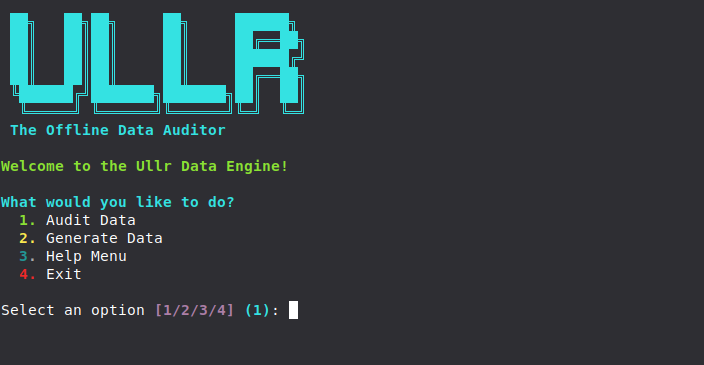
5
|
+
Home-page: https://github.com/jshlydnzl/ullr-data-cli
|
|
6
|
+
Author: jshlydnzl
|
|
7
|
+
Author-email: jshlydnzl@users.noreply.github.com
|
|
8
|
+
Classifier: Programming Language :: Python :: 3
|
|
9
|
+
Classifier: License :: OSI Approved :: MIT License
|
|
10
|
+
Classifier: Operating System :: OS Independent
|
|
11
|
+
Classifier: Intended Audience :: Developers
|
|
12
|
+
Classifier: Topic :: Scientific/Engineering :: Information Analysis
|
|
13
|
+
Requires-Python: >=3.7
|
|
14
|
+
Description-Content-Type: text/markdown
|
|
15
|
+
Requires-Dist: rich
|
|
16
|
+
Requires-Dist: pandas
|
|
17
|
+
Requires-Dist: openpyxl
|
|
18
|
+
Requires-Dist: faker
|
|
19
|
+
Dynamic: author
|
|
20
|
+
Dynamic: author-email
|
|
21
|
+
Dynamic: classifier
|
|
22
|
+
Dynamic: description
|
|
23
|
+
Dynamic: description-content-type
|
|
24
|
+
Dynamic: home-page
|
|
25
|
+
Dynamic: requires-dist
|
|
26
|
+
Dynamic: requires-python
|
|
27
|
+
Dynamic: summary
|
|
28
|
+
|
|
29
|
+
# Ullr Data Engine
|
|
30
|
+
|
|
31
|
+
|
|
32
|
+
|
|
33
|
+
A purely native Practice Engine for aspiring Data Analysts to generate and audit datasets.
|
|
34
|
+
|
|
35
|
+
Ullr is not an automated BI tool that does your job for you. It generates intentionally dirty data, gives you realistic business context, and audits your raw files so you can practice cleaning and analyzing data natively in Excel or SQL.
|
|
36
|
+
|
|
37
|
+
## Installation
|
|
38
|
+
|
|
39
|
+
```bash
|
|
40
|
+
pip install ullr-data-cli
|
|
41
|
+
```
|
|
42
|
+
|
|
43
|
+
## How to Practice Data Analytics with Ullr
|
|
44
|
+
|
|
45
|
+
Ullr is built with a beautiful interactive terminal menu. Just type `ullr` in your terminal to launch the engine and follow these three steps:
|
|
46
|
+
|
|
47
|
+
### Step 1: Generate the Dirty Data
|
|
48
|
+
Launch the interactive menu and select **Generate Data** (Option 2).
|
|
49
|
+
Ullr will ask you to choose from 7 different industries (e.g., E-Commerce, Healthcare, SaaS). It will generate hundreds of rows of intentionally flawed data, and automatically output a **Stakeholder Brief** containing a realistic business scenario and the exact KPIs you need to build.
|
|
50
|
+
|
|
51
|
+
### Step 2: Audit the Damage
|
|
52
|
+
Now that you have your dataset, launch the menu again and select **Audit Data** (Option 1).
|
|
53
|
+
Ullr will auto-detect the datasets in your folder. Select your file, and Ullr will scan it to give you a full forensic report on missing values, hidden blanks, duplicates, and data type errors.
|
|
54
|
+
|
|
55
|
+
### Step 3: Clean and Analyze (Your Job!)
|
|
56
|
+
Now, open the dataset in Excel or SQL. Using Ullr's Stakeholder Brief and Audit Report as your guide, clean the data yourself and build out the requested dashboards. No AI crutches—just pure engineering practice.
|
|
@@ -1,6 +1,6 @@
|
|
|
1
1
|
# Ullr Data Engine
|
|
2
2
|
|
|
3
|
-

|
|
4
4
|
|
|
5
5
|
A purely native Practice Engine for aspiring Data Analysts to generate and audit datasets.
|
|
6
6
|
|
|
@@ -2,11 +2,11 @@ from setuptools import setup, find_packages
|
|
|
2
2
|
|
|
3
3
|
setup(
|
|
4
4
|
name='ullr-data-cli',
|
|
5
|
-
version='1.0.
|
|
5
|
+
version='1.0.5',
|
|
6
6
|
author='jshlydnzl',
|
|
7
7
|
author_email='jshlydnzl@users.noreply.github.com',
|
|
8
8
|
description='A purely native Practice Engine for aspiring Data Analysts to generate and audit datasets',
|
|
9
|
-
long_description='
|
|
9
|
+
long_description=open('README.md').read(),
|
|
10
10
|
long_description_content_type='text/markdown',
|
|
11
11
|
url='https://github.com/jshlydnzl/ullr-data-cli',
|
|
12
12
|
packages=find_packages(),
|
|
@@ -0,0 +1,56 @@
|
|
|
1
|
+
Metadata-Version: 2.4
|
|
2
|
+
Name: ullr-data-cli
|
|
3
|
+
Version: 1.0.5
|
|
4
|
+
Summary: A purely native Practice Engine for aspiring Data Analysts to generate and audit datasets
|
|
5
|
+
Home-page: https://github.com/jshlydnzl/ullr-data-cli
|
|
6
|
+
Author: jshlydnzl
|
|
7
|
+
Author-email: jshlydnzl@users.noreply.github.com
|
|
8
|
+
Classifier: Programming Language :: Python :: 3
|
|
9
|
+
Classifier: License :: OSI Approved :: MIT License
|
|
10
|
+
Classifier: Operating System :: OS Independent
|
|
11
|
+
Classifier: Intended Audience :: Developers
|
|
12
|
+
Classifier: Topic :: Scientific/Engineering :: Information Analysis
|
|
13
|
+
Requires-Python: >=3.7
|
|
14
|
+
Description-Content-Type: text/markdown
|
|
15
|
+
Requires-Dist: rich
|
|
16
|
+
Requires-Dist: pandas
|
|
17
|
+
Requires-Dist: openpyxl
|
|
18
|
+
Requires-Dist: faker
|
|
19
|
+
Dynamic: author
|
|
20
|
+
Dynamic: author-email
|
|
21
|
+
Dynamic: classifier
|
|
22
|
+
Dynamic: description
|
|
23
|
+
Dynamic: description-content-type
|
|
24
|
+
Dynamic: home-page
|
|
25
|
+
Dynamic: requires-dist
|
|
26
|
+
Dynamic: requires-python
|
|
27
|
+
Dynamic: summary
|
|
28
|
+
|
|
29
|
+
# Ullr Data Engine
|
|
30
|
+
|
|
31
|
+

|
|
32
|
+
|
|
33
|
+
A purely native Practice Engine for aspiring Data Analysts to generate and audit datasets.
|
|
34
|
+
|
|
35
|
+
Ullr is not an automated BI tool that does your job for you. It generates intentionally dirty data, gives you realistic business context, and audits your raw files so you can practice cleaning and analyzing data natively in Excel or SQL.
|
|
36
|
+
|
|
37
|
+
## Installation
|
|
38
|
+
|
|
39
|
+
```bash
|
|
40
|
+
pip install ullr-data-cli
|
|
41
|
+
```
|
|
42
|
+
|
|
43
|
+
## How to Practice Data Analytics with Ullr
|
|
44
|
+
|
|
45
|
+
Ullr is built with a beautiful interactive terminal menu. Just type `ullr` in your terminal to launch the engine and follow these three steps:
|
|
46
|
+
|
|
47
|
+
### Step 1: Generate the Dirty Data
|
|
48
|
+
Launch the interactive menu and select **Generate Data** (Option 2).
|
|
49
|
+
Ullr will ask you to choose from 7 different industries (e.g., E-Commerce, Healthcare, SaaS). It will generate hundreds of rows of intentionally flawed data, and automatically output a **Stakeholder Brief** containing a realistic business scenario and the exact KPIs you need to build.
|
|
50
|
+
|
|
51
|
+
### Step 2: Audit the Damage
|
|
52
|
+
Now that you have your dataset, launch the menu again and select **Audit Data** (Option 1).
|
|
53
|
+
Ullr will auto-detect the datasets in your folder. Select your file, and Ullr will scan it to give you a full forensic report on missing values, hidden blanks, duplicates, and data type errors.
|
|
54
|
+
|
|
55
|
+
### Step 3: Clean and Analyze (Your Job!)
|
|
56
|
+
Now, open the dataset in Excel or SQL. Using Ullr's Stakeholder Brief and Audit Report as your guide, clean the data yourself and build out the requested dashboards. No AI crutches—just pure engineering practice.
|
ullr_data_cli-1.0.3/PKG-INFO
DELETED
|
@@ -1,29 +0,0 @@
|
|
|
1
|
-
Metadata-Version: 2.4
|
|
2
|
-
Name: ullr-data-cli
|
|
3
|
-
Version: 1.0.3
|
|
4
|
-
Summary: A purely native Practice Engine for aspiring Data Analysts to generate and audit datasets
|
|
5
|
-
Home-page: https://github.com/jshlydnzl/ullr-data-cli
|
|
6
|
-
Author: jshlydnzl
|
|
7
|
-
Author-email: jshlydnzl@users.noreply.github.com
|
|
8
|
-
Classifier: Programming Language :: Python :: 3
|
|
9
|
-
Classifier: License :: OSI Approved :: MIT License
|
|
10
|
-
Classifier: Operating System :: OS Independent
|
|
11
|
-
Classifier: Intended Audience :: Developers
|
|
12
|
-
Classifier: Topic :: Scientific/Engineering :: Information Analysis
|
|
13
|
-
Requires-Python: >=3.7
|
|
14
|
-
Description-Content-Type: text/markdown
|
|
15
|
-
Requires-Dist: rich
|
|
16
|
-
Requires-Dist: pandas
|
|
17
|
-
Requires-Dist: openpyxl
|
|
18
|
-
Requires-Dist: faker
|
|
19
|
-
Dynamic: author
|
|
20
|
-
Dynamic: author-email
|
|
21
|
-
Dynamic: classifier
|
|
22
|
-
Dynamic: description
|
|
23
|
-
Dynamic: description-content-type
|
|
24
|
-
Dynamic: home-page
|
|
25
|
-
Dynamic: requires-dist
|
|
26
|
-
Dynamic: requires-python
|
|
27
|
-
Dynamic: summary
|
|
28
|
-
|
|
29
|
-
Ullr is a pure Python Data Engine that automatically audits CSV/Excel files for data quality (ghost data, invisible spaces, duplicates) and generates Dynamic Dashboard Blueprints for Excel, Power BI, Tableau, and Looker Studio.
|
|
@@ -1,29 +0,0 @@
|
|
|
1
|
-
Metadata-Version: 2.4
|
|
2
|
-
Name: ullr-data-cli
|
|
3
|
-
Version: 1.0.3
|
|
4
|
-
Summary: A purely native Practice Engine for aspiring Data Analysts to generate and audit datasets
|
|
5
|
-
Home-page: https://github.com/jshlydnzl/ullr-data-cli
|
|
6
|
-
Author: jshlydnzl
|
|
7
|
-
Author-email: jshlydnzl@users.noreply.github.com
|
|
8
|
-
Classifier: Programming Language :: Python :: 3
|
|
9
|
-
Classifier: License :: OSI Approved :: MIT License
|
|
10
|
-
Classifier: Operating System :: OS Independent
|
|
11
|
-
Classifier: Intended Audience :: Developers
|
|
12
|
-
Classifier: Topic :: Scientific/Engineering :: Information Analysis
|
|
13
|
-
Requires-Python: >=3.7
|
|
14
|
-
Description-Content-Type: text/markdown
|
|
15
|
-
Requires-Dist: rich
|
|
16
|
-
Requires-Dist: pandas
|
|
17
|
-
Requires-Dist: openpyxl
|
|
18
|
-
Requires-Dist: faker
|
|
19
|
-
Dynamic: author
|
|
20
|
-
Dynamic: author-email
|
|
21
|
-
Dynamic: classifier
|
|
22
|
-
Dynamic: description
|
|
23
|
-
Dynamic: description-content-type
|
|
24
|
-
Dynamic: home-page
|
|
25
|
-
Dynamic: requires-dist
|
|
26
|
-
Dynamic: requires-python
|
|
27
|
-
Dynamic: summary
|
|
28
|
-
|
|
29
|
-
Ullr is a pure Python Data Engine that automatically audits CSV/Excel files for data quality (ghost data, invisible spaces, duplicates) and generates Dynamic Dashboard Blueprints for Excel, Power BI, Tableau, and Looker Studio.
|
|
File without changes
|
|
File without changes
|
|
File without changes
|
|
File without changes
|
|
File without changes
|
|
File without changes
|
|
File without changes
|
|
File without changes
|