ui-design-workbench-cli 0.6.7__tar.gz → 0.6.10__tar.gz
This diff represents the content of publicly available package versions that have been released to one of the supported registries. The information contained in this diff is provided for informational purposes only and reflects changes between package versions as they appear in their respective public registries.
- ui_design_workbench_cli-0.6.10/PKG-INFO +114 -0
- ui_design_workbench_cli-0.6.10/README.md +95 -0
- {ui_design_workbench_cli-0.6.7 → ui_design_workbench_cli-0.6.10}/pyproject.toml +9 -1
- ui_design_workbench_cli-0.6.10/references/agent-integrations.md +65 -0
- ui_design_workbench_cli-0.6.10/references/agent-integrations.ru.md +65 -0
- ui_design_workbench_cli-0.6.7/references/agent-integrations.md → ui_design_workbench_cli-0.6.10/references/agent-protocol.md +26 -2
- {ui_design_workbench_cli-0.6.7 → ui_design_workbench_cli-0.6.10}/references/fidelity.md +18 -0
- ui_design_workbench_cli-0.6.10/references/getting-started.md +86 -0
- ui_design_workbench_cli-0.6.10/references/getting-started.ru.md +86 -0
- ui_design_workbench_cli-0.6.10/references/troubleshooting.md +60 -0
- ui_design_workbench_cli-0.6.10/references/troubleshooting.ru.md +60 -0
- ui_design_workbench_cli-0.6.10/references/using-preview.md +40 -0
- ui_design_workbench_cli-0.6.10/references/using-preview.ru.md +40 -0
- ui_design_workbench_cli-0.6.10/scripts/compose_instances.py +165 -0
- ui_design_workbench_cli-0.6.10/scripts/compose_resources.py +242 -0
- ui_design_workbench_cli-0.6.10/scripts/compose_syntax.py +36 -0
- {ui_design_workbench_cli-0.6.7 → ui_design_workbench_cli-0.6.10}/scripts/fidelity_adapter_api.py +11 -1
- {ui_design_workbench_cli-0.6.7 → ui_design_workbench_cli-0.6.10}/scripts/fidelity_adapters.py +225 -45
- {ui_design_workbench_cli-0.6.7 → ui_design_workbench_cli-0.6.10}/scripts/fidelity_platform_adapters.py +323 -59
- {ui_design_workbench_cli-0.6.7 → ui_design_workbench_cli-0.6.10}/scripts/layout_model.py +11 -2
- {ui_design_workbench_cli-0.6.7 → ui_design_workbench_cli-0.6.10}/scripts/platform_component_catalog.py +23 -0
- {ui_design_workbench_cli-0.6.7 → ui_design_workbench_cli-0.6.10}/scripts/render_preview.py +7 -5
- {ui_design_workbench_cli-0.6.7 → ui_design_workbench_cli-0.6.10}/scripts/scan_ui.py +1 -0
- {ui_design_workbench_cli-0.6.7 → ui_design_workbench_cli-0.6.10}/scripts/smoke_preview.js +38 -12
- ui_design_workbench_cli-0.6.10/scripts/source_syntax.py +118 -0
- ui_design_workbench_cli-0.6.10/scripts/ui_design_workbench_cli.egg-info/PKG-INFO +114 -0
- {ui_design_workbench_cli-0.6.7 → ui_design_workbench_cli-0.6.10}/scripts/ui_design_workbench_cli.egg-info/SOURCES.txt +12 -0
- {ui_design_workbench_cli-0.6.7 → ui_design_workbench_cli-0.6.10}/scripts/ui_design_workbench_cli.egg-info/top_level.txt +4 -0
- {ui_design_workbench_cli-0.6.7 → ui_design_workbench_cli-0.6.10}/scripts/uidw.py +99 -33
- ui_design_workbench_cli-0.6.7/PKG-INFO +0 -134
- ui_design_workbench_cli-0.6.7/README.md +0 -115
- ui_design_workbench_cli-0.6.7/scripts/ui_design_workbench_cli.egg-info/PKG-INFO +0 -134
- {ui_design_workbench_cli-0.6.7 → ui_design_workbench_cli-0.6.10}/SKILL.md +0 -0
- {ui_design_workbench_cli-0.6.7 → ui_design_workbench_cli-0.6.10}/references/adapter-api.md +0 -0
- {ui_design_workbench_cli-0.6.7 → ui_design_workbench_cli-0.6.10}/references/cache-protocol.md +0 -0
- {ui_design_workbench_cli-0.6.7 → ui_design_workbench_cli-0.6.10}/references/component-catalog.json +0 -0
- {ui_design_workbench_cli-0.6.7 → ui_design_workbench_cli-0.6.10}/references/component-catalog.md +0 -0
- {ui_design_workbench_cli-0.6.7 → ui_design_workbench_cli-0.6.10}/references/component-inventory.json +0 -0
- {ui_design_workbench_cli-0.6.7 → ui_design_workbench_cli-0.6.10}/references/design-modes.md +0 -0
- {ui_design_workbench_cli-0.6.7 → ui_design_workbench_cli-0.6.10}/references/ir-schema.md +0 -0
- {ui_design_workbench_cli-0.6.7 → ui_design_workbench_cli-0.6.10}/references/native-rendering.md +0 -0
- {ui_design_workbench_cli-0.6.7 → ui_design_workbench_cli-0.6.10}/references/platform-profiles.json +0 -0
- {ui_design_workbench_cli-0.6.7 → ui_design_workbench_cli-0.6.10}/references/platform-standards.md +0 -0
- {ui_design_workbench_cli-0.6.7 → ui_design_workbench_cli-0.6.10}/references/platforms.md +0 -0
- {ui_design_workbench_cli-0.6.7 → ui_design_workbench_cli-0.6.10}/references/quality-automation.md +0 -0
- {ui_design_workbench_cli-0.6.7 → ui_design_workbench_cli-0.6.10}/references/review-workflow.md +0 -0
- {ui_design_workbench_cli-0.6.7 → ui_design_workbench_cli-0.6.10}/references/ui-guidance-mode.md +0 -0
- {ui_design_workbench_cli-0.6.7 → ui_design_workbench_cli-0.6.10}/references/ui-policy-schema.md +0 -0
- {ui_design_workbench_cli-0.6.7 → ui_design_workbench_cli-0.6.10}/references/ui-reviewer.md +0 -0
- {ui_design_workbench_cli-0.6.7 → ui_design_workbench_cli-0.6.10}/references/validation.md +0 -0
- {ui_design_workbench_cli-0.6.7 → ui_design_workbench_cli-0.6.10}/references/workbench-ui.md +0 -0
- {ui_design_workbench_cli-0.6.7 → ui_design_workbench_cli-0.6.10}/schemas/native-render-state.schema.json +0 -0
- {ui_design_workbench_cli-0.6.7 → ui_design_workbench_cli-0.6.10}/schemas/ui-agent-job.schema.json +0 -0
- {ui_design_workbench_cli-0.6.7 → ui_design_workbench_cli-0.6.10}/schemas/ui-graph.schema.json +0 -0
- {ui_design_workbench_cli-0.6.7 → ui_design_workbench_cli-0.6.10}/schemas/ui-ir.patch.schema.json +0 -0
- {ui_design_workbench_cli-0.6.7 → ui_design_workbench_cli-0.6.10}/schemas/ui-ir.schema.json +0 -0
- {ui_design_workbench_cli-0.6.7 → ui_design_workbench_cli-0.6.10}/schemas/uidw-config.schema.json +0 -0
- {ui_design_workbench_cli-0.6.7 → ui_design_workbench_cli-0.6.10}/scripts/android_resource_resolver.py +0 -0
- {ui_design_workbench_cli-0.6.7 → ui_design_workbench_cli-0.6.10}/scripts/android_xml_support.py +0 -0
- {ui_design_workbench_cli-0.6.7 → ui_design_workbench_cli-0.6.10}/scripts/apple_resource_resolver.py +0 -0
- {ui_design_workbench_cli-0.6.7 → ui_design_workbench_cli-0.6.10}/scripts/coverage_report.py +0 -0
- {ui_design_workbench_cli-0.6.7 → ui_design_workbench_cli-0.6.10}/scripts/fidelity_core.py +0 -0
- {ui_design_workbench_cli-0.6.7 → ui_design_workbench_cli-0.6.10}/scripts/generate_interaction_matrix.py +0 -0
- {ui_design_workbench_cli-0.6.7 → ui_design_workbench_cli-0.6.10}/scripts/ir_contracts.py +0 -0
- {ui_design_workbench_cli-0.6.7 → ui_design_workbench_cli-0.6.10}/scripts/merge_review_state.py +0 -0
- {ui_design_workbench_cli-0.6.7 → ui_design_workbench_cli-0.6.10}/scripts/native_render_android.py +0 -0
- {ui_design_workbench_cli-0.6.7 → ui_design_workbench_cli-0.6.10}/scripts/native_render_apple.py +0 -0
- {ui_design_workbench_cli-0.6.7 → ui_design_workbench_cli-0.6.10}/scripts/native_render_contracts.py +0 -0
- {ui_design_workbench_cli-0.6.7 → ui_design_workbench_cli-0.6.10}/scripts/native_render_registry.py +0 -0
- {ui_design_workbench_cli-0.6.7 → ui_design_workbench_cli-0.6.10}/scripts/quality_common.py +0 -0
- {ui_design_workbench_cli-0.6.7 → ui_design_workbench_cli-0.6.10}/scripts/scoped_context.py +0 -0
- {ui_design_workbench_cli-0.6.7 → ui_design_workbench_cli-0.6.10}/scripts/ui_design_workbench_cli.egg-info/dependency_links.txt +0 -0
- {ui_design_workbench_cli-0.6.7 → ui_design_workbench_cli-0.6.10}/scripts/ui_design_workbench_cli.egg-info/entry_points.txt +0 -0
- {ui_design_workbench_cli-0.6.7 → ui_design_workbench_cli-0.6.10}/scripts/ui_design_workbench_cli.egg-info/requires.txt +0 -0
- {ui_design_workbench_cli-0.6.7 → ui_design_workbench_cli-0.6.10}/scripts/uidw_mcp.py +0 -0
- {ui_design_workbench_cli-0.6.7 → ui_design_workbench_cli-0.6.10}/scripts/validate_platform_profiles.py +0 -0
- {ui_design_workbench_cli-0.6.7 → ui_design_workbench_cli-0.6.10}/scripts/visual_regression.py +0 -0
- {ui_design_workbench_cli-0.6.7 → ui_design_workbench_cli-0.6.10}/setup.cfg +0 -0
|
@@ -0,0 +1,114 @@
|
|
|
1
|
+
Metadata-Version: 2.4
|
|
2
|
+
Name: ui-design-workbench-cli
|
|
3
|
+
Version: 0.6.10
|
|
4
|
+
Summary: Repository UI indexing, graph, preview, and deterministic review CLI
|
|
5
|
+
Author: Elgreed
|
|
6
|
+
Project-URL: Homepage, https://github.com/Elgreed/ui-design-workbench
|
|
7
|
+
Project-URL: Repository, https://github.com/Elgreed/ui-design-workbench
|
|
8
|
+
Project-URL: Changelog, https://github.com/Elgreed/ui-design-workbench/blob/main/CHANGELOG.md
|
|
9
|
+
Keywords: agent-skills,ui,ux,design-review,code-analysis
|
|
10
|
+
Classifier: Development Status :: 3 - Alpha
|
|
11
|
+
Classifier: Environment :: Console
|
|
12
|
+
Classifier: Intended Audience :: Developers
|
|
13
|
+
Classifier: Programming Language :: Python :: 3
|
|
14
|
+
Classifier: Topic :: Software Development :: Quality Assurance
|
|
15
|
+
Requires-Python: >=3.10
|
|
16
|
+
Description-Content-Type: text/markdown
|
|
17
|
+
Provides-Extra: mcp
|
|
18
|
+
Requires-Dist: mcp<3,>=2; extra == "mcp"
|
|
19
|
+
|
|
20
|
+
# UI Design Workbench
|
|
21
|
+
|
|
22
|
+
[Русская версия](README.ru.md) · [Changelog](CHANGELOG.md)
|
|
23
|
+
|
|
24
|
+
Explore an application's screens and navigation in an interactive HTML preview built from its source code. No application build or launch is needed.
|
|
25
|
+
|
|
26
|
+
Use it to understand a project, inspect supported UI states, or request a separate UI/UX review. Parsing does not execute application logic or guarantee the same pixels as the running application.
|
|
27
|
+
|
|
28
|
+
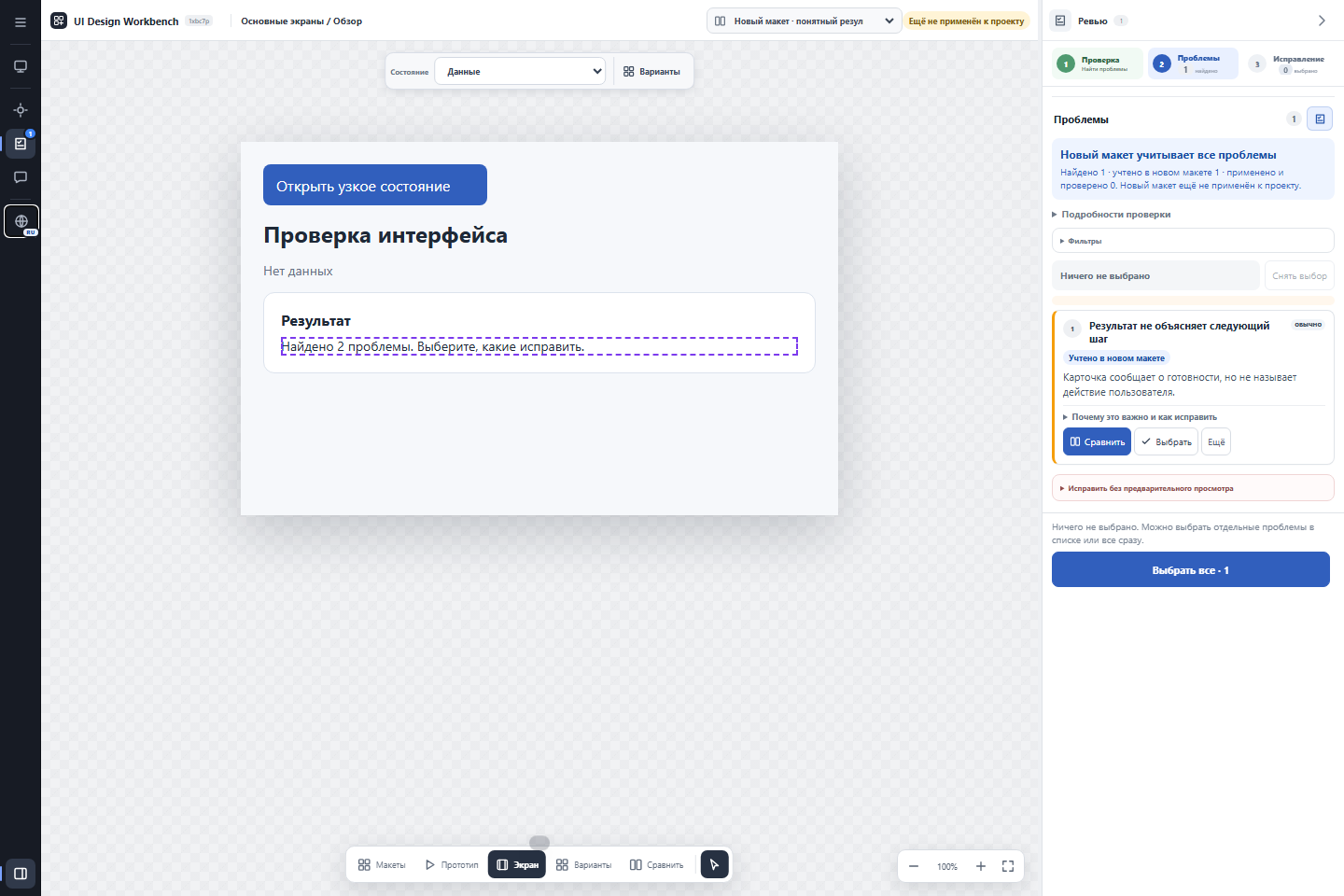
|
|
29
|
+
|
|
30
|
+
*Review view of the bundled demonstration fixture. Findings belong to the separate review workflow.*
|
|
31
|
+
|
|
32
|
+
## Install
|
|
33
|
+
|
|
34
|
+
For source analysis and basic checks, install Python 3.10+ and [pipx](https://pipx.pypa.io/latest/how-to/install-pipx.html), then run:
|
|
35
|
+
|
|
36
|
+
```sh
|
|
37
|
+
pipx install ui-design-workbench-cli
|
|
38
|
+
uidw --version
|
|
39
|
+
uidw doctor
|
|
40
|
+
```
|
|
41
|
+
|
|
42
|
+
`doctor` reports dependencies and cache settings. **Full browser checks additionally need Node.js 22+ and Chrome, Edge or Chromium.** Basic `--level quick` checks do not need them. To view the generated HTML, use a browser.
|
|
43
|
+
|
|
44
|
+
CLI use does not require an agent or MCP. For Codex and other agents, follow [agent setup](references/agent-integrations.md).
|
|
45
|
+
|
|
46
|
+
## First preview
|
|
47
|
+
|
|
48
|
+
Open a terminal in your application's root directory. These commands work in PowerShell and a POSIX shell:
|
|
49
|
+
|
|
50
|
+
```sh
|
|
51
|
+
uidw config setup --detail medium
|
|
52
|
+
uidw workbench --output-dir ../ui-preview --level quick --open
|
|
53
|
+
```
|
|
54
|
+
|
|
55
|
+
This example selects representative preview data (`medium`). Run `uidw config setup` without the option to choose interactively. The first command stores settings; the second writes `../ui-preview/ui-preview.html` and opens it. Check reports are under `../ui-preview/validation/`.
|
|
56
|
+
|
|
57
|
+
Look for `проверка pass` in the CLI output. If checks fail, HTML may still exist as a diagnostic preview: read the reports before treating reconstruction as complete. CLI messages are primarily Russian; the HTML interface supports English and Russian. Add `--lang en` to select English in the preview.
|
|
58
|
+
|
|
59
|
+
For absolute paths, Windows examples, detail levels and recovery steps, see [first run](references/getting-started.md).
|
|
60
|
+
|
|
61
|
+
## Choose the task
|
|
62
|
+
|
|
63
|
+
| Task | Command, from the application root |
|
|
64
|
+
| --- | --- |
|
|
65
|
+
| Explore screens without a UI/UX audit | `uidw workbench --output-dir ../ui-preview --level quick --open` |
|
|
66
|
+
| Include browser checks | `uidw workbench --output-dir ../ui-preview --level full --open` |
|
|
67
|
+
| Request a UI/UX review | `uidw review --output-dir ../ui-review --level full` |
|
|
68
|
+
| Check translation limits | `uidw fidelity report` |
|
|
69
|
+
| Inspect available adapters | `uidw fidelity capabilities` |
|
|
70
|
+
| Diagnose installation | `uidw doctor` |
|
|
71
|
+
|
|
72
|
+
`workbench` and `check` validate reconstruction. `review` requests UI/UX findings. Detail (`low/medium/high`) controls preview content; `--level quick/full` controls validation. No detail level starts a UI/UX audit.
|
|
73
|
+
|
|
74
|
+
See [using the preview](references/using-preview.md), `uidw --help` and `uidw help advanced` for further commands.
|
|
75
|
+
|
|
76
|
+
## Source support and accuracy
|
|
77
|
+
|
|
78
|
+
Each adapter supports a subset of its framework. Evidence below concerns small fixtures, not every platform configuration or application.
|
|
79
|
+
|
|
80
|
+
| Source | Supported examples | Limits and validation evidence |
|
|
81
|
+
| --- | --- | --- |
|
|
82
|
+
| HTML/CSS | Elements, simple selectors, spacing, linked stylesheets | Dynamic scripts and complex CSS limited; plain HTML fixture compared in a browser |
|
|
83
|
+
| React, Vue, Svelte, React Native | Recognized components, literal properties and supported styles | Arbitrary JavaScript not evaluated; source tests, not framework-wide runtime comparisons |
|
|
84
|
+
| Android Compose | Local components, literal themes/resources, preview arguments | Runtime Kotlin and custom drawing limited; selected YaDonor preview compared with Android capture |
|
|
85
|
+
| Android Views XML | Layouts, resources, navigation | Custom views and dynamic bindings limited; source tests |
|
|
86
|
+
| SwiftUI on iOS/macOS | Local views, literal values, ordered layout modifiers | Dynamic branches and some SF Symbols unresolved; source-only tests, no Apple runtime comparison |
|
|
87
|
+
| Storyboard/XIB | Recognized XML views and attributes | Runtime UIKit/AppKit behavior limited; source tests |
|
|
88
|
+
| WPF / WinUI XAML | Grid placement, literal thickness, colors and states | Complex templates/bindings limited; WPF fixture compared through WPF, WinUI not natively verified |
|
|
89
|
+
| Flutter | Nested widgets, literal constructors, insets and text styles | Arbitrary Dart and runtime state limited; fixture compared with the Flutter test engine |
|
|
90
|
+
|
|
91
|
+
Missing values and unsupported constructs are reported as gaps. Fonts, system controls and runtime data can change the result. Optional native Android/Apple discovery never launches an emulator or simulator automatically. See [accuracy details](references/fidelity.md) and [native rendering](references/native-rendering.md).
|
|
92
|
+
|
|
93
|
+
## Files and application source
|
|
94
|
+
|
|
95
|
+
Preview and review leave application source unchanged. Applying an accepted proposal is a separate action. The default cache lives outside the application repository; an explicit output directory receives HTML and reports. Export browser review state before moving the preview or clearing browser storage.
|
|
96
|
+
|
|
97
|
+
## Upgrade
|
|
98
|
+
|
|
99
|
+
For a pipx installation:
|
|
100
|
+
|
|
101
|
+
```sh
|
|
102
|
+
pipx upgrade ui-design-workbench-cli
|
|
103
|
+
uidw --version
|
|
104
|
+
```
|
|
105
|
+
|
|
106
|
+
For a managed skill copy, also run `uidw install-skill codex` (or your agent name) and start a new agent session. Linked development skills and separate MCP environments have different steps: see [agent upgrades](references/agent-integrations.md#upgrade-and-development-links).
|
|
107
|
+
|
|
108
|
+
## Documentation
|
|
109
|
+
|
|
110
|
+
**User guides:** [First run](references/getting-started.md) · [Using the preview](references/using-preview.md) · [Agent setup](references/agent-integrations.md) · [Troubleshooting](references/troubleshooting.md).
|
|
111
|
+
|
|
112
|
+
**Technical references (English):** [Fidelity](references/fidelity.md) · [Native rendering](references/native-rendering.md) · [Cache](references/cache-protocol.md) · [Components](references/component-catalog.md) · [IR schema](references/ir-schema.md) · [Review contract](references/review-workflow.md).
|
|
113
|
+
|
|
114
|
+
Current CLI version: `0.6.10`.
|
|
@@ -0,0 +1,95 @@
|
|
|
1
|
+
# UI Design Workbench
|
|
2
|
+
|
|
3
|
+
[Русская версия](README.ru.md) · [Changelog](CHANGELOG.md)
|
|
4
|
+
|
|
5
|
+
Explore an application's screens and navigation in an interactive HTML preview built from its source code. No application build or launch is needed.
|
|
6
|
+
|
|
7
|
+
Use it to understand a project, inspect supported UI states, or request a separate UI/UX review. Parsing does not execute application logic or guarantee the same pixels as the running application.
|
|
8
|
+
|
|
9
|
+

|
|
10
|
+
|
|
11
|
+
*Review view of the bundled demonstration fixture. Findings belong to the separate review workflow.*
|
|
12
|
+
|
|
13
|
+
## Install
|
|
14
|
+
|
|
15
|
+
For source analysis and basic checks, install Python 3.10+ and [pipx](https://pipx.pypa.io/latest/how-to/install-pipx.html), then run:
|
|
16
|
+
|
|
17
|
+
```sh
|
|
18
|
+
pipx install ui-design-workbench-cli
|
|
19
|
+
uidw --version
|
|
20
|
+
uidw doctor
|
|
21
|
+
```
|
|
22
|
+
|
|
23
|
+
`doctor` reports dependencies and cache settings. **Full browser checks additionally need Node.js 22+ and Chrome, Edge or Chromium.** Basic `--level quick` checks do not need them. To view the generated HTML, use a browser.
|
|
24
|
+
|
|
25
|
+
CLI use does not require an agent or MCP. For Codex and other agents, follow [agent setup](references/agent-integrations.md).
|
|
26
|
+
|
|
27
|
+
## First preview
|
|
28
|
+
|
|
29
|
+
Open a terminal in your application's root directory. These commands work in PowerShell and a POSIX shell:
|
|
30
|
+
|
|
31
|
+
```sh
|
|
32
|
+
uidw config setup --detail medium
|
|
33
|
+
uidw workbench --output-dir ../ui-preview --level quick --open
|
|
34
|
+
```
|
|
35
|
+
|
|
36
|
+
This example selects representative preview data (`medium`). Run `uidw config setup` without the option to choose interactively. The first command stores settings; the second writes `../ui-preview/ui-preview.html` and opens it. Check reports are under `../ui-preview/validation/`.
|
|
37
|
+
|
|
38
|
+
Look for `проверка pass` in the CLI output. If checks fail, HTML may still exist as a diagnostic preview: read the reports before treating reconstruction as complete. CLI messages are primarily Russian; the HTML interface supports English and Russian. Add `--lang en` to select English in the preview.
|
|
39
|
+
|
|
40
|
+
For absolute paths, Windows examples, detail levels and recovery steps, see [first run](references/getting-started.md).
|
|
41
|
+
|
|
42
|
+
## Choose the task
|
|
43
|
+
|
|
44
|
+
| Task | Command, from the application root |
|
|
45
|
+
| --- | --- |
|
|
46
|
+
| Explore screens without a UI/UX audit | `uidw workbench --output-dir ../ui-preview --level quick --open` |
|
|
47
|
+
| Include browser checks | `uidw workbench --output-dir ../ui-preview --level full --open` |
|
|
48
|
+
| Request a UI/UX review | `uidw review --output-dir ../ui-review --level full` |
|
|
49
|
+
| Check translation limits | `uidw fidelity report` |
|
|
50
|
+
| Inspect available adapters | `uidw fidelity capabilities` |
|
|
51
|
+
| Diagnose installation | `uidw doctor` |
|
|
52
|
+
|
|
53
|
+
`workbench` and `check` validate reconstruction. `review` requests UI/UX findings. Detail (`low/medium/high`) controls preview content; `--level quick/full` controls validation. No detail level starts a UI/UX audit.
|
|
54
|
+
|
|
55
|
+
See [using the preview](references/using-preview.md), `uidw --help` and `uidw help advanced` for further commands.
|
|
56
|
+
|
|
57
|
+
## Source support and accuracy
|
|
58
|
+
|
|
59
|
+
Each adapter supports a subset of its framework. Evidence below concerns small fixtures, not every platform configuration or application.
|
|
60
|
+
|
|
61
|
+
| Source | Supported examples | Limits and validation evidence |
|
|
62
|
+
| --- | --- | --- |
|
|
63
|
+
| HTML/CSS | Elements, simple selectors, spacing, linked stylesheets | Dynamic scripts and complex CSS limited; plain HTML fixture compared in a browser |
|
|
64
|
+
| React, Vue, Svelte, React Native | Recognized components, literal properties and supported styles | Arbitrary JavaScript not evaluated; source tests, not framework-wide runtime comparisons |
|
|
65
|
+
| Android Compose | Local components, literal themes/resources, preview arguments | Runtime Kotlin and custom drawing limited; selected YaDonor preview compared with Android capture |
|
|
66
|
+
| Android Views XML | Layouts, resources, navigation | Custom views and dynamic bindings limited; source tests |
|
|
67
|
+
| SwiftUI on iOS/macOS | Local views, literal values, ordered layout modifiers | Dynamic branches and some SF Symbols unresolved; source-only tests, no Apple runtime comparison |
|
|
68
|
+
| Storyboard/XIB | Recognized XML views and attributes | Runtime UIKit/AppKit behavior limited; source tests |
|
|
69
|
+
| WPF / WinUI XAML | Grid placement, literal thickness, colors and states | Complex templates/bindings limited; WPF fixture compared through WPF, WinUI not natively verified |
|
|
70
|
+
| Flutter | Nested widgets, literal constructors, insets and text styles | Arbitrary Dart and runtime state limited; fixture compared with the Flutter test engine |
|
|
71
|
+
|
|
72
|
+
Missing values and unsupported constructs are reported as gaps. Fonts, system controls and runtime data can change the result. Optional native Android/Apple discovery never launches an emulator or simulator automatically. See [accuracy details](references/fidelity.md) and [native rendering](references/native-rendering.md).
|
|
73
|
+
|
|
74
|
+
## Files and application source
|
|
75
|
+
|
|
76
|
+
Preview and review leave application source unchanged. Applying an accepted proposal is a separate action. The default cache lives outside the application repository; an explicit output directory receives HTML and reports. Export browser review state before moving the preview or clearing browser storage.
|
|
77
|
+
|
|
78
|
+
## Upgrade
|
|
79
|
+
|
|
80
|
+
For a pipx installation:
|
|
81
|
+
|
|
82
|
+
```sh
|
|
83
|
+
pipx upgrade ui-design-workbench-cli
|
|
84
|
+
uidw --version
|
|
85
|
+
```
|
|
86
|
+
|
|
87
|
+
For a managed skill copy, also run `uidw install-skill codex` (or your agent name) and start a new agent session. Linked development skills and separate MCP environments have different steps: see [agent upgrades](references/agent-integrations.md#upgrade-and-development-links).
|
|
88
|
+
|
|
89
|
+
## Documentation
|
|
90
|
+
|
|
91
|
+
**User guides:** [First run](references/getting-started.md) · [Using the preview](references/using-preview.md) · [Agent setup](references/agent-integrations.md) · [Troubleshooting](references/troubleshooting.md).
|
|
92
|
+
|
|
93
|
+
**Technical references (English):** [Fidelity](references/fidelity.md) · [Native rendering](references/native-rendering.md) · [Cache](references/cache-protocol.md) · [Components](references/component-catalog.md) · [IR schema](references/ir-schema.md) · [Review contract](references/review-workflow.md).
|
|
94
|
+
|
|
95
|
+
Current CLI version: `0.6.10`.
|
|
@@ -4,7 +4,7 @@ build-backend = "setuptools.build_meta"
|
|
|
4
4
|
|
|
5
5
|
[project]
|
|
6
6
|
name = "ui-design-workbench-cli"
|
|
7
|
-
version = "0.6.
|
|
7
|
+
version = "0.6.10"
|
|
8
8
|
description = "Repository UI indexing, graph, preview, and deterministic review CLI"
|
|
9
9
|
readme = "README.md"
|
|
10
10
|
requires-python = ">=3.10"
|
|
@@ -43,6 +43,10 @@ py-modules = [
|
|
|
43
43
|
"fidelity_core",
|
|
44
44
|
"fidelity_adapter_api",
|
|
45
45
|
"fidelity_adapters",
|
|
46
|
+
"source_syntax",
|
|
47
|
+
"compose_syntax",
|
|
48
|
+
"compose_resources",
|
|
49
|
+
"compose_instances",
|
|
46
50
|
"fidelity_platform_adapters",
|
|
47
51
|
"android_resource_resolver",
|
|
48
52
|
"apple_resource_resolver",
|
|
@@ -68,6 +72,10 @@ py-modules = [
|
|
|
68
72
|
"scripts/coverage_report.py",
|
|
69
73
|
"scripts/fidelity_adapter_api.py",
|
|
70
74
|
"scripts/fidelity_adapters.py",
|
|
75
|
+
"scripts/source_syntax.py",
|
|
76
|
+
"scripts/compose_syntax.py",
|
|
77
|
+
"scripts/compose_resources.py",
|
|
78
|
+
"scripts/compose_instances.py",
|
|
71
79
|
"scripts/fidelity_core.py",
|
|
72
80
|
"scripts/fidelity_platform_adapters.py",
|
|
73
81
|
"scripts/generate_interaction_matrix.py",
|
|
@@ -0,0 +1,65 @@
|
|
|
1
|
+
# Agent setup
|
|
2
|
+
|
|
3
|
+
[Русский](agent-integrations.ru.md) · [First run](getting-started.md) · [Troubleshooting](troubleshooting.md)
|
|
4
|
+
|
|
5
|
+
## Choose skill or MCP
|
|
6
|
+
|
|
7
|
+
A **skill** teaches the agent the workflow; it can use the CLI through shell commands. **MCP** exposes the same core as callable tools. Neither is required for terminal-only use. UIDW does not supply an agent account or model.
|
|
8
|
+
|
|
9
|
+
## Install the skill
|
|
10
|
+
|
|
11
|
+
```sh
|
|
12
|
+
pipx install ui-design-workbench-cli
|
|
13
|
+
uidw install-skill codex
|
|
14
|
+
```
|
|
15
|
+
|
|
16
|
+
If the CLI is already installed, run only the second command. Start a new agent session. For an initial request, provide the application path and ask:
|
|
17
|
+
|
|
18
|
+
> Use UI Design Workbench to show this project's screens from code, without a UI/UX review. Ask me to choose detail if the project is not configured.
|
|
19
|
+
|
|
20
|
+
The installer reports the skill location. If it reports an unmanaged existing directory, follow [troubleshooting](troubleshooting.md); do not delete that directory just to rerun installation.
|
|
21
|
+
|
|
22
|
+
## Optional Codex MCP setup
|
|
23
|
+
|
|
24
|
+
The following example assumes Codex CLI is available and the application is at `C:/Projects/My App`. Substitute your own absolute path; on macOS/Linux, for example `/home/you/projects/my-app`.
|
|
25
|
+
|
|
26
|
+
```sh
|
|
27
|
+
pipx inject ui-design-workbench-cli "mcp>=2,<3"
|
|
28
|
+
codex mcp add ui-design-workbench -- uidw-mcp --repo "C:/Projects/My App"
|
|
29
|
+
codex mcp list
|
|
30
|
+
```
|
|
31
|
+
|
|
32
|
+
If that server name already exists, inspect its configuration before updating it. This is the [official Codex stdio configuration pattern](https://developers.openai.com/codex/mcp/). The equivalent entry in `~/.codex/config.toml` is:
|
|
33
|
+
|
|
34
|
+
```toml
|
|
35
|
+
[mcp_servers.ui-design-workbench]
|
|
36
|
+
command = "uidw-mcp"
|
|
37
|
+
args = ["--repo", "C:/Projects/My App"]
|
|
38
|
+
```
|
|
39
|
+
|
|
40
|
+
Use either method, not duplicate entries. If the desktop app cannot resolve `uidw-mcp`, replace `command` with its absolute executable path. A custom `CODEX_HOME` changes the configuration location.
|
|
41
|
+
|
|
42
|
+
Restart the client or start a fresh session, then ask it to call `ui_project` for the intended repository. Expect a compact project summary or a request to choose detail, followed by a bounded `ui_scope` request when a screen is needed. `codex mcp list` confirms registration, not a successful live tool call. A manually launched stdio server waits for protocol input; it does not print an interactive prompt or open a webpage.
|
|
43
|
+
|
|
44
|
+
## Upgrade and development links
|
|
45
|
+
|
|
46
|
+
For a pipx installation and an installer-managed skill copy:
|
|
47
|
+
|
|
48
|
+
```sh
|
|
49
|
+
pipx upgrade ui-design-workbench-cli
|
|
50
|
+
uidw install-skill codex
|
|
51
|
+
uidw --version
|
|
52
|
+
uidw doctor
|
|
53
|
+
```
|
|
54
|
+
|
|
55
|
+
For an existing pip installation, update with that same Python interpreter: `python -m pip install --upgrade ui-design-workbench-cli`. Do not mix installers for one environment.
|
|
56
|
+
|
|
57
|
+
If MCP points to a separate virtual environment, upgrade the package in that environment too, using its Python executable with `-m pip install --upgrade "ui-design-workbench-cli[mcp]"`. Check its version with `-m uidw --version`. Updating a global CLI does not update another environment. Restart clients holding the previous MCP process.
|
|
58
|
+
|
|
59
|
+
A development symlink/junction points directly to a checkout. Update that checkout and its installed CLI separately; do not overwrite the link with a packaged skill copy. From the checkout, `python scripts/uidw.py --version` checks the source version.
|
|
60
|
+
|
|
61
|
+
## Other agents
|
|
62
|
+
|
|
63
|
+
Replace `codex` with `claude`, `cursor`, `gemini`, `copilot`, `opencode`, `agents` or `all`. `all` installs into every supported location. Other MCP clients can launch `uidw-mcp --repo` with an absolute application path as a local stdio command.
|
|
64
|
+
|
|
65
|
+
Installing a skill and granting source access does not authorize application changes. Preview tasks operate on derived files; source application is a separate action. Model-facing MCP context is visible to the host agent. See the [integration protocol](agent-protocol.md) for discovery paths, bounded context and handoff rules.
|
|
@@ -0,0 +1,65 @@
|
|
|
1
|
+
# Подключение агента
|
|
2
|
+
|
|
3
|
+
[English](agent-integrations.md) · [Первый запуск](getting-started.ru.md) · [Решение проблем](troubleshooting.ru.md)
|
|
4
|
+
|
|
5
|
+
## Навык или MCP
|
|
6
|
+
|
|
7
|
+
**Навык** объясняет агенту порядок работы; агент вызывает CLI через терминал. **MCP** предоставляет тот же механизм в виде инструментов. Для работы только в терминале оба необязательны. UIDW не предоставляет аккаунт агента или модель.
|
|
8
|
+
|
|
9
|
+
## Установка навыка
|
|
10
|
+
|
|
11
|
+
```sh
|
|
12
|
+
pipx install ui-design-workbench-cli
|
|
13
|
+
uidw install-skill codex
|
|
14
|
+
```
|
|
15
|
+
|
|
16
|
+
Если CLI уже установлен, выполните только вторую команду. Начните новую сессию агента. В первом запросе укажите путь приложения и попросите:
|
|
17
|
+
|
|
18
|
+
> Используй UI Design Workbench, чтобы показать экраны этого проекта по коду, без UI/UX-ревью. Если проект ещё не настроен, предложи выбрать детализацию.
|
|
19
|
+
|
|
20
|
+
Установщик показывает путь навыка. Если он сообщает о существующем неуправляемом каталоге, воспользуйтесь [разделом решения проблем](troubleshooting.ru.md); не удаляйте каталог просто ради повторной установки.
|
|
21
|
+
|
|
22
|
+
## Необязательно: подключите MCP к Codex
|
|
23
|
+
|
|
24
|
+
В примере доступен Codex CLI, а приложение находится в `C:/Projects/My App`. Замените путь своим абсолютным путём; на macOS/Linux это может быть `/home/you/projects/my-app`.
|
|
25
|
+
|
|
26
|
+
```sh
|
|
27
|
+
pipx inject ui-design-workbench-cli "mcp>=2,<3"
|
|
28
|
+
codex mcp add ui-design-workbench -- uidw-mcp --repo "C:/Projects/My App"
|
|
29
|
+
codex mcp list
|
|
30
|
+
```
|
|
31
|
+
|
|
32
|
+
Если сервер с таким именем уже существует, сначала проверьте его настройки. Команда соответствует [официальной инструкции Codex для stdio](https://developers.openai.com/codex/mcp/). Эквивалентная запись в `~/.codex/config.toml`:
|
|
33
|
+
|
|
34
|
+
```toml
|
|
35
|
+
[mcp_servers.ui-design-workbench]
|
|
36
|
+
command = "uidw-mcp"
|
|
37
|
+
args = ["--repo", "C:/Projects/My App"]
|
|
38
|
+
```
|
|
39
|
+
|
|
40
|
+
Выберите один способ, не добавляйте дублирующую запись. Если приложение не находит `uidw-mcp`, укажите в `command` абсолютный путь к исполняемому файлу. При заданном `CODEX_HOME` расположение настроек меняется.
|
|
41
|
+
|
|
42
|
+
Перезапустите клиент или начните новую сессию, затем попросите вызвать `ui_project` для нужного репозитория. Ожидается краткая сводка либо предложение выбрать детализацию; для конкретного экрана затем используется `ui_scope`. Команда `codex mcp list` подтверждает регистрацию, но не успешный вызов инструмента. Запущенный вручную stdio-сервер ждёт сообщения протокола: приглашения ввода и веб-страницы у него нет.
|
|
43
|
+
|
|
44
|
+
## Обновление и связь с репозиторием
|
|
45
|
+
|
|
46
|
+
Для установки через pipx и управляемой копии навыка:
|
|
47
|
+
|
|
48
|
+
```sh
|
|
49
|
+
pipx upgrade ui-design-workbench-cli
|
|
50
|
+
uidw install-skill codex
|
|
51
|
+
uidw --version
|
|
52
|
+
uidw doctor
|
|
53
|
+
```
|
|
54
|
+
|
|
55
|
+
Для существующей установки через pip используйте тот же Python: `python -m pip install --upgrade ui-design-workbench-cli`. Не смешивайте установщики в одном окружении.
|
|
56
|
+
|
|
57
|
+
Если MCP использует отдельное виртуальное окружение, обновите пакет и там: вызовите его Python с `-m pip install --upgrade "ui-design-workbench-cli[mcp]"`. Проверьте версию через `-m uidw --version`. Обновление глобального CLI не обновляет другое окружение. Перезапустите клиенты, в которых ещё работает прежний MCP-процесс.
|
|
58
|
+
|
|
59
|
+
Символическая ссылка или junction навыка разработчика указывает прямо на репозиторий. Обновляйте этот репозиторий и установленный CLI отдельно; не заменяйте ссылку копией навыка из пакета. Команда `python scripts/uidw.py --version` из репозитория показывает версию исходников.
|
|
60
|
+
|
|
61
|
+
## Другие агенты
|
|
62
|
+
|
|
63
|
+
Вместо `codex` поддерживаются `claude`, `cursor`, `gemini`, `copilot`, `opencode`, `agents` и `all`. `all` устанавливает навык во все поддерживаемые каталоги. MCP для другого клиента настраивается как локальная stdio-команда `uidw-mcp --repo` с абсолютным путём проекта.
|
|
64
|
+
|
|
65
|
+
Установка навыка и доступ к исходникам не означают разрешение менять приложение. Предпросмотр работает с производными файлами; применение предложения к проекту остаётся отдельным действием. Сведения, переданные через MCP, видны использующему его агенту. Технический контракт и таблица путей: [Agent integration protocol](agent-protocol.md), на английском.
|
|
@@ -1,4 +1,6 @@
|
|
|
1
|
-
# Agent
|
|
1
|
+
# Agent integration protocol
|
|
2
|
+
|
|
3
|
+
For installation and first use, see [agent setup](agent-integrations.md).
|
|
2
4
|
|
|
3
5
|
The repository follows the open Agent Skills layout: one `SKILL.md` plus `scripts/`, `references/`, and optional agent-specific metadata. The core workflow communicates through files and shell commands, not a proprietary API.
|
|
4
6
|
|
|
@@ -28,7 +30,7 @@ For contributor checkouts, `./install.ps1 -Agent all` on Windows or `./install.s
|
|
|
28
30
|
|
|
29
31
|
## Capability contract
|
|
30
32
|
|
|
31
|
-
An agent needs local file read/write access and Python 3.10+. Node.js plus Chromium/Edge is optional but required for headless interaction and geometry diagnostics. The target application, emulator, simulator, bridge server, and internet access are not required.
|
|
33
|
+
An agent needs local file read/write access and Python 3.10+. Node.js 22+ plus Chromium/Edge is optional but required for headless interaction and geometry diagnostics. The target application, emulator, simulator, bridge server, and internet access are not required.
|
|
32
34
|
|
|
33
35
|
The portable handoff is `ui-agent-job.json`. It contains artifact directory, review scope, selected stable finding IDs, screen IDs, active/baseline versions, annotations, allowed output patterns, and `sourceChangeAllowed: false`. It also points to a bounded `ui-agent-context.json` and a sparse `ui-ir.patch.json`; the agent reads the bounded context and returns patch operations instead of loading or replacing the complete IR. Agents must modify only the declared review artifacts and return validation results.
|
|
34
36
|
|
|
@@ -37,3 +39,25 @@ For ordinary source tasks, `uidw init` can opt a project into lightweight UI gui
|
|
|
37
39
|
Codex may opt into `render_preview.py --agent codex`, which enables the official local `codex://new` preparation path. Other agents use copied prompts or the JSON job. Provider-specific adapters are optional presentation conveniences and must not change the IR, cache, review semantics, permissions, or approval boundary.
|
|
38
40
|
|
|
39
41
|
The optional `uidw-mcp` stdio server is a transport facade over the same deterministic CLI core. It exposes compact project discovery, strictly bounded screen/finding context, job preparation, sparse patch application, preview building, and on-demand fidelity explanation. Scoped nodes omit full source expressions by default and expose a stable `scopeHash`; pass it back as `if_none_match` before repeating the same request. MCP is an optional dependency; installing or running the regular CLI must not require it. Configure an agent to launch `uidw-mcp --repo <absolute-project-path>` as a local stdio command; it opens no port and keeps project caches on the local machine. Selected model-facing context is still visible to the host agent and should be treated as derived source data.
|
|
42
|
+
|
|
43
|
+
## CLI automation contract
|
|
44
|
+
|
|
45
|
+
Global `--repo` and `--json` options can appear before or after the command.
|
|
46
|
+
With `--json`, argument, repository and handled command errors are written as a
|
|
47
|
+
single JSON document to stdout; stderr is reserved for non-JSON diagnostics.
|
|
48
|
+
Error documents contain `version: 1`, `status: "error"`, an `error` object with
|
|
49
|
+
`code` and `message`, `exitCode`, and an optional `hint` (null when absent).
|
|
50
|
+
Codes are `invalid_arguments`, `invalid_repository`, and `command_failed`.
|
|
51
|
+
Help and version requests remain plain text.
|
|
52
|
+
|
|
53
|
+
Exit codes: `0` for success (including a prepared job), `2` for invalid arguments
|
|
54
|
+
or repository, `3` for a handled execution error, and `4` for failed checks or
|
|
55
|
+
blocked operations. A diagnostic HTML file can exist even when workbench or
|
|
56
|
+
review exits with `4`; inspect its JSON result and validation reports.
|
|
57
|
+
|
|
58
|
+
`uidw apply` prepares a JSON implementation job for an external agent. The agent
|
|
59
|
+
must execute that job to change application source. `--direct` removes the
|
|
60
|
+
approved-mockup prerequisite when preparing the job.
|
|
61
|
+
|
|
62
|
+
Doctor reports Node.js availability separately from `compatible` (version 22+).
|
|
63
|
+
Full checks require a compatible, verifiable Node.js installation and a browser.
|
|
@@ -10,6 +10,24 @@ Use `uidw fidelity capabilities` for the installed support matrix, `uidw fidelit
|
|
|
10
10
|
|
|
11
11
|
The HTML projection resolves recognized controls through the official-doc-first [platform component catalog](component-catalog.md). Catalog geometry is a render-only fallback: explicit source layout, theme, token, and style evidence always wins, and the source IR is not mutated.
|
|
12
12
|
|
|
13
|
+
Compose translation follows unique local composable declarations, literal parameter defaults and constructor preview fixtures. Simple imported enum `entries.forEach` loops and literal resource getters can supply repeated content. Expansion is limited to six nested components and 2,000 calls per translated source; ambiguity, recursion and exhausted budgets remain explicit gaps. Runtime Kotlin, arbitrary collection transformations, slot forwarding, custom drawing and arbitrary theme providers are not evaluated.
|
|
14
|
+
|
|
15
|
+
Literal project theme values and local font assets are resolved from source. The box model marks automatic text measurement as partial and lets the browser wrap and measure the loaded font, rather than treating average character widths as solved geometry. Browser line boxes and shadows can still differ from native rendering. A partial context does not establish native visual parity.
|
|
16
|
+
|
|
17
|
+
For a user-requested native comparison, use the same authored preview state, locale, font scale and logical viewport. Capture metadata can provide `viewport.safeAreaInsets` in logical pixels for Compose system-bar padding. The following command captures device content after fonts load, excluding workbench chrome. Replace the quoted paths and `SCREEN_ID` with the actual installed skill directory, preview file and screen ID; select a theme ID present in the preview:
|
|
18
|
+
|
|
19
|
+
```sh
|
|
20
|
+
node "<skill-dir>/scripts/smoke_preview.js" "<preview-dir>/ui-preview.html" --capture-device --capture-screen SCREEN_ID --capture-theme light --screenshot screen.png --geometry-output geometry.json
|
|
21
|
+
```
|
|
22
|
+
|
|
23
|
+
This helper needs Node.js 22+ and Chromium/Edge, as described in [first run](getting-started.md). It captures the HTML projection, not a native application. Keep the separate native screenshot, device density, source revision and comparison results with the diagnostic artifact; system-bar icons themselves are outside the source projection.
|
|
24
|
+
|
|
25
|
+
Flutter and SwiftUI use the same balanced source delimiter and literal masking utilities as Compose. Visual parameters are scoped to the current call, excluding child widgets and event handlers. SwiftUI expands unique local View declarations with literal member arguments and represents order-dependent frame/padding/background operations as separate source-backed nodes. Flutter resolves literal constructor defaults, distinguishes TextStyle height factors from widget heights, and propagates SizedBox tight constraints to its child. Expansion is capped at six component levels and 2,000 widget calls. Arbitrary control flow, unavailable SF Symbols and recursive expansion remain gaps.
|
|
26
|
+
|
|
27
|
+
XAML translates four-value Thickness in left/top/right/bottom order, alpha-first colors, explicit grid tracks/cell spans and literal states. WPF Border and TextBlock defaults are distinct from generic card recipes. Resource bindings, control templates, nonliteral grid tracks and more complex platform layout behavior still require separate handling. Web handles the supported simple selectors in CSS cascade order, including importance and linked stylesheet order; unsupported at-rules are reported rather than applied unconditionally.
|
|
28
|
+
|
|
29
|
+
The source fixtures in `fixtures/golden/platform-fidelity` exercise these shared failure patterns. A Flutter engine golden, a WPF RenderTargetBitmap and an original Web page can provide independent runtime evidence for their respective fixture. WPF evidence does not verify WinUI, and Flutter test-engine evidence does not verify every device configuration. SwiftUI iOS/macOS fixture assertions are source-only unless matching Apple runtime captures are supplied. Successful source tests or a small native comparison must never promote unrelated screens or platforms to verified visual parity.
|
|
30
|
+
|
|
13
31
|
Use this contract before creating reviewable IR. The goal is not a visually pleasant approximation; it is a traceable projection of the authored UI.
|
|
14
32
|
|
|
15
33
|
## Evidence bundle per screen
|
|
@@ -0,0 +1,86 @@
|
|
|
1
|
+
# First run
|
|
2
|
+
|
|
3
|
+
[Русский](getting-started.ru.md) · [Preview guide](using-preview.md) · [Troubleshooting](troubleshooting.md)
|
|
4
|
+
|
|
5
|
+
## 1. Install the CLI
|
|
6
|
+
|
|
7
|
+
Install Python 3.10+ and pipx using the [official pipx instructions](https://pipx.pypa.io/latest/how-to/install-pipx.html). If pipx is installed but its commands are not found, run `pipx ensurepath` and open a new terminal.
|
|
8
|
+
|
|
9
|
+
```sh
|
|
10
|
+
pipx install ui-design-workbench-cli
|
|
11
|
+
uidw --version
|
|
12
|
+
uidw doctor
|
|
13
|
+
```
|
|
14
|
+
|
|
15
|
+
A packaged Agent Skill and MCP are optional; see [agent setup](agent-integrations.md). Internet access is needed to download packages. Source scanning and the generated HTML do not require a running application or network access.
|
|
16
|
+
|
|
17
|
+
## 2. Select the application and detail
|
|
18
|
+
|
|
19
|
+
Open a terminal in the application root, then run `uidw config setup`. Or select a level explicitly:
|
|
20
|
+
|
|
21
|
+
```sh
|
|
22
|
+
uidw config setup --detail medium
|
|
23
|
+
```
|
|
24
|
+
|
|
25
|
+
| Detail | Intended preview content |
|
|
26
|
+
| --- | --- |
|
|
27
|
+
| `low` | Basic layout and minimal sample data |
|
|
28
|
+
| `medium` | Representative data, interactions and states |
|
|
29
|
+
| `high` | Expanded data, themes and more validation by default |
|
|
30
|
+
|
|
31
|
+
Detail guides preview preparation; it does not make unsupported runtime expressions executable or repair missing source evidence. Inspect the result for unresolved values. No level starts a UI/UX audit.
|
|
32
|
+
|
|
33
|
+
The first source command creates a cache automatically. Settings are stored per application; `uidw config show` displays them. You do not need to run `init` before each preview.
|
|
34
|
+
|
|
35
|
+
## 3. Build and open
|
|
36
|
+
|
|
37
|
+
From the application root:
|
|
38
|
+
|
|
39
|
+
```sh
|
|
40
|
+
uidw workbench --output-dir ../ui-preview --level quick --open
|
|
41
|
+
```
|
|
42
|
+
|
|
43
|
+
Or use explicit paths. Replace the example application path with your own; keep quotes around paths containing spaces.
|
|
44
|
+
|
|
45
|
+
Windows PowerShell:
|
|
46
|
+
|
|
47
|
+
```powershell
|
|
48
|
+
uidw --repo "C:/Projects/My App" config setup --detail medium
|
|
49
|
+
uidw --repo "C:/Projects/My App" workbench --output-dir "C:/UI previews/My App" --level quick --open
|
|
50
|
+
```
|
|
51
|
+
|
|
52
|
+
macOS/Linux:
|
|
53
|
+
|
|
54
|
+
```sh
|
|
55
|
+
uidw --repo "$HOME/projects/my-app" config setup --detail medium
|
|
56
|
+
uidw --repo "$HOME/projects/my-app" workbench --output-dir "$HOME/ui-previews/my-app" --level quick --open
|
|
57
|
+
```
|
|
58
|
+
|
|
59
|
+
`--repo` selects source input. `--output-dir` selects generated files and is resolved from the terminal's current directory. If omitted, output goes to the project cache. Use a separate result directory for each application.
|
|
60
|
+
|
|
61
|
+
## 4. Read the result
|
|
62
|
+
|
|
63
|
+
| Output | Meaning |
|
|
64
|
+
| --- | --- |
|
|
65
|
+
| `ui-preview.html` | Interactive preview; open this file in a browser |
|
|
66
|
+
| `validation/fidelity-report.json` | Source evidence and missing translation |
|
|
67
|
+
| `validation/ui-coverage.json` | Screen and component coverage |
|
|
68
|
+
| `validation/platform-profile-report.json` | Platform profile checks |
|
|
69
|
+
|
|
70
|
+
The terminal prints the HTML path and `проверка pass` when checks pass. With failed checks it may still write a diagnostic HTML file. An existing file or an open browser is not a successful validation result. Use `uidw fidelity report` and the reports above to investigate; see [troubleshooting](troubleshooting.md).
|
|
71
|
+
|
|
72
|
+
The CLI currently prints primarily Russian messages. Add `--lang en` to `workbench` for English HTML controls. `--json` gives machine-readable command output.
|
|
73
|
+
|
|
74
|
+
## 5. Add full checks when needed
|
|
75
|
+
|
|
76
|
+
`--level quick` validates the model without headless browser automation. `--level full` adds browser checks and requires Node.js 22+ and Chrome, Edge or Chromium:
|
|
77
|
+
|
|
78
|
+
```sh
|
|
79
|
+
node --version
|
|
80
|
+
uidw doctor
|
|
81
|
+
uidw workbench --output-dir ../ui-preview --level full --open
|
|
82
|
+
```
|
|
83
|
+
|
|
84
|
+
The helper uses the built-in [Node.js WebSocket API](https://nodejs.org/download/release/v22.15.0/docs/api/globals.html#websocket). Set `CHROME_PATH` if the browser is outside standard locations. Missing browser tooling makes the full check fail; it does not silently become a quick check.
|
|
85
|
+
|
|
86
|
+
Next: [explore the preview](using-preview.md) or [connect an agent](agent-integrations.md).
|
|
@@ -0,0 +1,86 @@
|
|
|
1
|
+
# Первый запуск
|
|
2
|
+
|
|
3
|
+
[English](getting-started.md) · [Предпросмотр](using-preview.ru.md) · [Решение проблем](troubleshooting.ru.md)
|
|
4
|
+
|
|
5
|
+
## 1. Установите CLI
|
|
6
|
+
|
|
7
|
+
Установите Python 3.10+ и pipx по [официальной инструкции pipx](https://pipx.pypa.io/latest/how-to/install-pipx.html). Если pipx установлен, но команды не находятся, выполните `pipx ensurepath` и откройте новый терминал.
|
|
8
|
+
|
|
9
|
+
```sh
|
|
10
|
+
pipx install ui-design-workbench-cli
|
|
11
|
+
uidw --version
|
|
12
|
+
uidw doctor
|
|
13
|
+
```
|
|
14
|
+
|
|
15
|
+
Навык агента и MCP необязательны: [подключение агента](agent-integrations.ru.md). Интернет нужен для скачивания пакетов. Анализ исходников и готовый HTML не требуют сети или запущенного приложения.
|
|
16
|
+
|
|
17
|
+
## 2. Выберите приложение и детализацию
|
|
18
|
+
|
|
19
|
+
Откройте терминал в корне приложения и выполните `uidw config setup`. Или укажите уровень явно:
|
|
20
|
+
|
|
21
|
+
```sh
|
|
22
|
+
uidw config setup --detail medium
|
|
23
|
+
```
|
|
24
|
+
|
|
25
|
+
| Уровень | Предполагаемое содержимое предпросмотра |
|
|
26
|
+
| --- | --- |
|
|
27
|
+
| `low` | Базовая разметка и минимум примеров данных |
|
|
28
|
+
| `medium` | Репрезентативные данные, взаимодействия и состояния |
|
|
29
|
+
| `high` | Расширенные данные, темы и больше проверок по умолчанию |
|
|
30
|
+
|
|
31
|
+
Детализация задаёт подготовку предпросмотра. Она не исполняет неподдерживаемый код и не восстанавливает отсутствующие исходные значения. Проверяйте, какие данные остались неизвестными. Ни один уровень не запускает UI/UX-аудит.
|
|
32
|
+
|
|
33
|
+
Первая команда анализа автоматически создаёт кеш. Настройки сохраняются для приложения; их показывает `uidw config show`. Вызывать `init` перед каждым предпросмотром не нужно.
|
|
34
|
+
|
|
35
|
+
## 3. Постройте и откройте макет
|
|
36
|
+
|
|
37
|
+
Из корня приложения:
|
|
38
|
+
|
|
39
|
+
```sh
|
|
40
|
+
uidw workbench --output-dir ../ui-preview --level quick --open
|
|
41
|
+
```
|
|
42
|
+
|
|
43
|
+
Либо укажите абсолютные пути. Замените пример пути приложения своим; сохраняйте кавычки вокруг путей с пробелами.
|
|
44
|
+
|
|
45
|
+
Windows PowerShell:
|
|
46
|
+
|
|
47
|
+
```powershell
|
|
48
|
+
uidw --repo "C:/Projects/My App" config setup --detail medium
|
|
49
|
+
uidw --repo "C:/Projects/My App" workbench --output-dir "C:/UI previews/My App" --level quick --open
|
|
50
|
+
```
|
|
51
|
+
|
|
52
|
+
macOS/Linux:
|
|
53
|
+
|
|
54
|
+
```sh
|
|
55
|
+
uidw --repo "$HOME/projects/my-app" config setup --detail medium
|
|
56
|
+
uidw --repo "$HOME/projects/my-app" workbench --output-dir "$HOME/ui-previews/my-app" --level quick --open
|
|
57
|
+
```
|
|
58
|
+
|
|
59
|
+
`--repo` выбирает исходники. `--output-dir` выбирает каталог результатов и отсчитывается от текущего каталога терминала. Без него результат попадает в кеш проекта. Используйте отдельный каталог результата для каждого приложения.
|
|
60
|
+
|
|
61
|
+
## 4. Проверьте результат
|
|
62
|
+
|
|
63
|
+
| Файл | Назначение |
|
|
64
|
+
| --- | --- |
|
|
65
|
+
| `ui-preview.html` | Интерактивный предпросмотр; откройте в браузере |
|
|
66
|
+
| `validation/fidelity-report.json` | Происхождение свойств и пробелы переноса |
|
|
67
|
+
| `validation/ui-coverage.json` | Полнота переноса экранов и компонентов |
|
|
68
|
+
| `validation/platform-profile-report.json` | Проверки платформенного профиля |
|
|
69
|
+
|
|
70
|
+
При успехе терминал показывает путь к HTML и `проверка pass`. При ошибках он тоже может записать диагностический HTML. Наличие файла или открытого браузера не означает успешной проверки. Используйте `uidw fidelity report` и указанные отчёты; подробнее — [решение проблем](troubleshooting.ru.md).
|
|
71
|
+
|
|
72
|
+
CLI преимущественно выводит сообщения на русском. Добавьте `--lang ru` к `workbench`, чтобы выбрать русский язык HTML. Параметр `--json` предназначен для машинной обработки вывода.
|
|
73
|
+
|
|
74
|
+
## 5. При необходимости добавьте полные проверки
|
|
75
|
+
|
|
76
|
+
`--level quick` проверяет модель без автоматизации браузера. `--level full` добавляет браузерные проверки и требует Node.js 22+ и Chrome, Edge или Chromium:
|
|
77
|
+
|
|
78
|
+
```sh
|
|
79
|
+
node --version
|
|
80
|
+
uidw doctor
|
|
81
|
+
uidw workbench --output-dir ../ui-preview --level full --open
|
|
82
|
+
```
|
|
83
|
+
|
|
84
|
+
Помощник использует встроенный [WebSocket API Node.js](https://nodejs.org/download/release/v22.15.0/docs/api/globals.html#websocket). Если браузер установлен нестандартно, задайте `CHROME_PATH`. Отсутствие инструментов приводит к ошибке полной проверки, а не к незаметному переходу на quick.
|
|
85
|
+
|
|
86
|
+
Далее: [работа с предпросмотром](using-preview.ru.md) или [подключение агента](agent-integrations.ru.md).
|