tvcast 0.1.0__tar.gz
This diff represents the content of publicly available package versions that have been released to one of the supported registries. The information contained in this diff is provided for informational purposes only and reflects changes between package versions as they appear in their respective public registries.
- tvcast-0.1.0/.gitignore +5 -0
- tvcast-0.1.0/LICENSE +21 -0
- tvcast-0.1.0/LICENSE-ICONS +44 -0
- tvcast-0.1.0/PKG-INFO +121 -0
- tvcast-0.1.0/README.md +99 -0
- tvcast-0.1.0/docs/how-it-works.md +105 -0
- tvcast-0.1.0/docs/library.md +55 -0
- tvcast-0.1.0/docs/releasing.md +34 -0
- tvcast-0.1.0/docs/troubleshooting.md +17 -0
- tvcast-0.1.0/pyproject.toml +42 -0
- tvcast-0.1.0/tests/__init__.py +0 -0
- tvcast-0.1.0/tests/fixtures/embedded.xml +38 -0
- tvcast-0.1.0/tests/fixtures/gateway.xml +31 -0
- tvcast-0.1.0/tests/fixtures/renderer.xml +29 -0
- tvcast-0.1.0/tests/test_app.py +58 -0
- tvcast-0.1.0/tests/test_cli.py +71 -0
- tvcast-0.1.0/tests/test_discovery.py +147 -0
- tvcast-0.1.0/tests/test_library.py +110 -0
- tvcast-0.1.0/tests/test_queue.py +139 -0
- tvcast-0.1.0/tests/test_samsung.py +89 -0
- tvcast-0.1.0/tests/test_state.py +23 -0
- tvcast-0.1.0/tests/test_tv_replies.py +80 -0
- tvcast-0.1.0/tv +12 -0
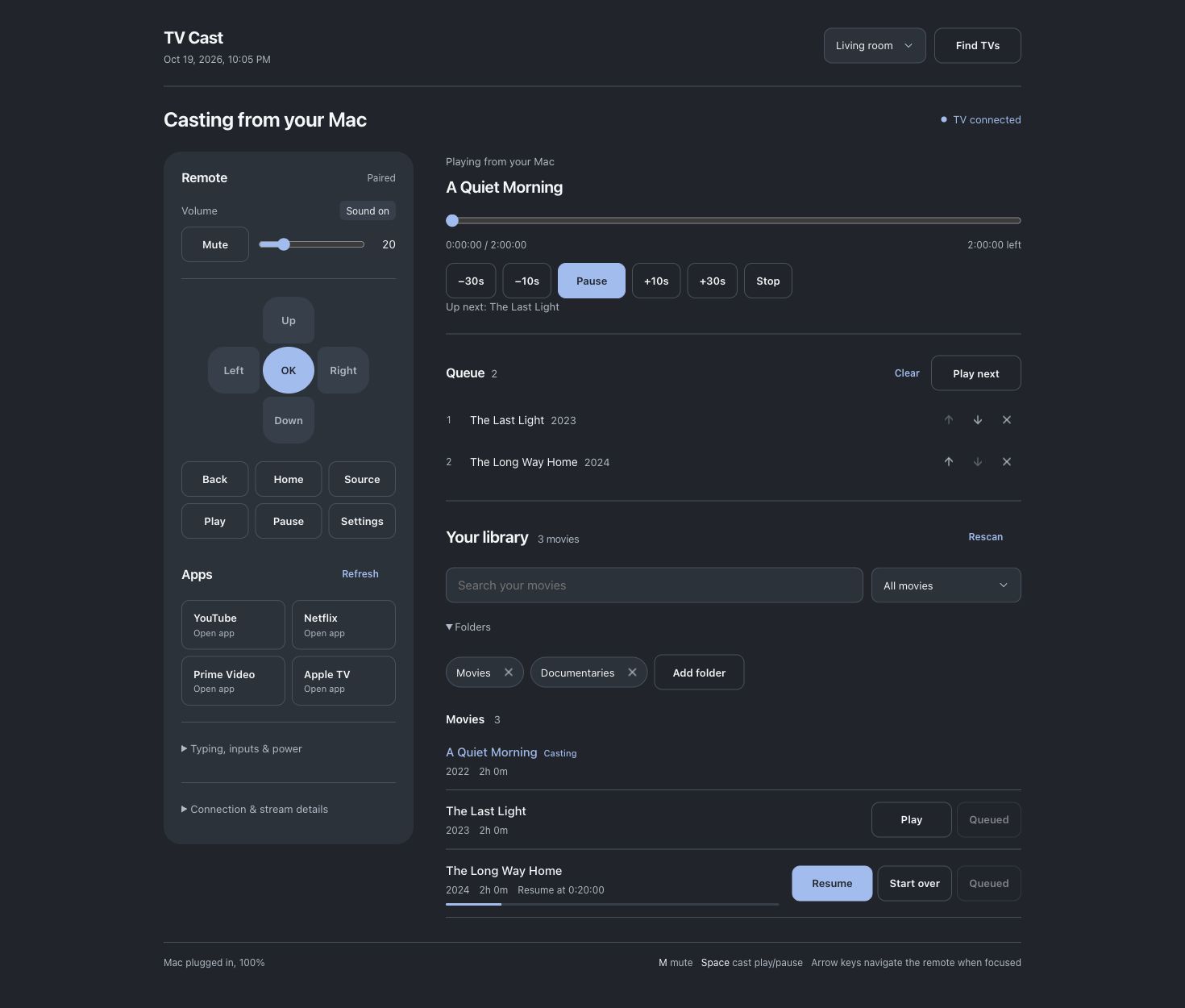
- tvcast-0.1.0/tvcast/__init__.py +3 -0
- tvcast-0.1.0/tvcast/app.py +702 -0
- tvcast-0.1.0/tvcast/cli.py +277 -0
- tvcast-0.1.0/tvcast/discovery.py +137 -0
- tvcast-0.1.0/tvcast/launcher.py +22 -0
- tvcast-0.1.0/tvcast/library.py +188 -0
- tvcast-0.1.0/tvcast/panel.html +694 -0
- tvcast-0.1.0/tvcast/samsung.py +292 -0
- tvcast-0.1.0/tvcast/server.py +204 -0
- tvcast-0.1.0/tvcast/state.py +78 -0
- tvcast-0.1.0/tvcast/upnp.py +159 -0
tvcast-0.1.0/.gitignore
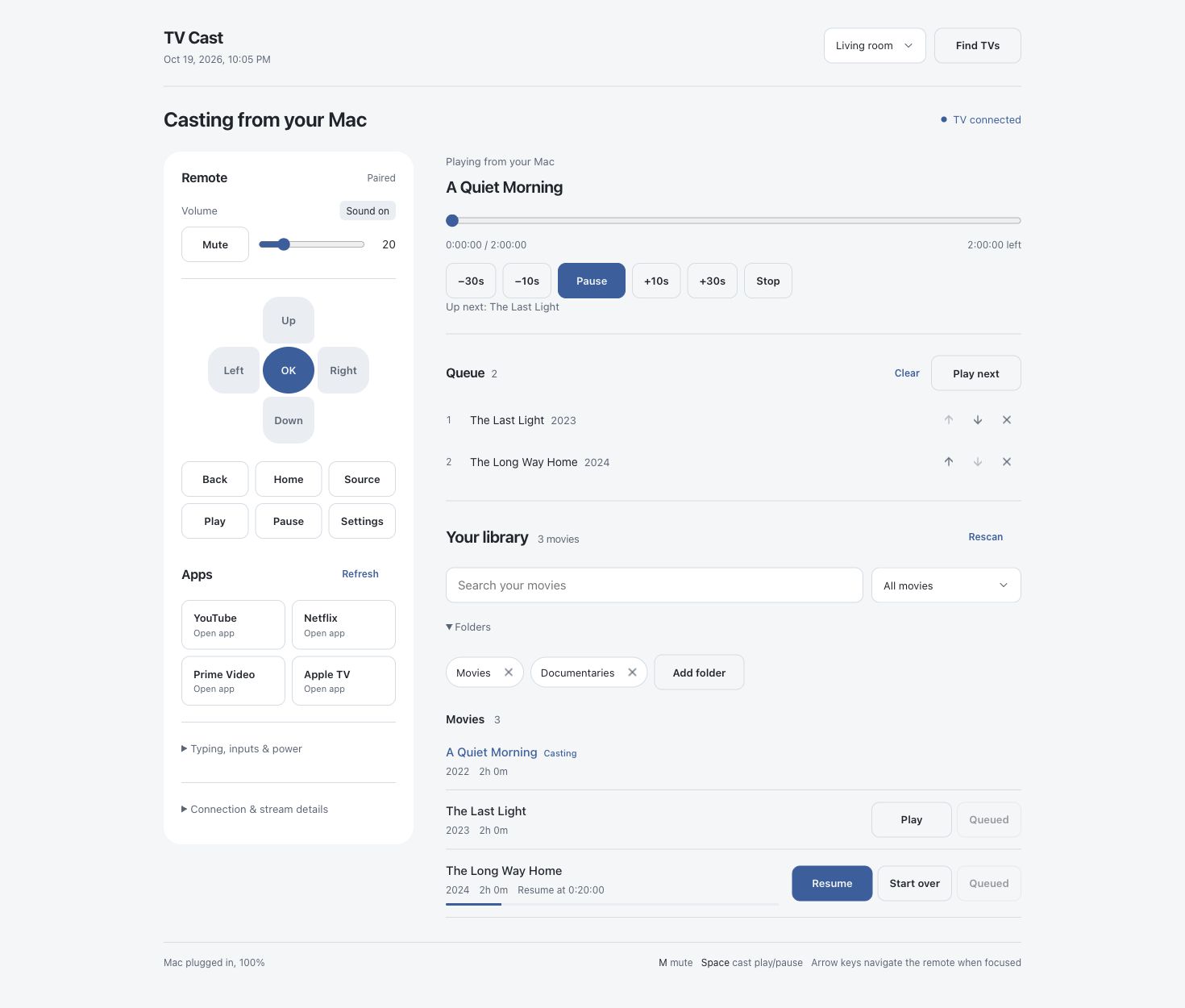
ADDED
tvcast-0.1.0/LICENSE
ADDED
|
@@ -0,0 +1,21 @@
|
|
|
1
|
+
MIT License
|
|
2
|
+
|
|
3
|
+
Copyright (c) 2026 Pushkar
|
|
4
|
+
|
|
5
|
+
Permission is hereby granted, free of charge, to any person obtaining a copy
|
|
6
|
+
of this software and associated documentation files (the "Software"), to deal
|
|
7
|
+
in the Software without restriction, including without limitation the rights
|
|
8
|
+
to use, copy, modify, merge, publish, distribute, sublicense, and/or sell
|
|
9
|
+
copies of the Software, and to permit persons to whom the Software is
|
|
10
|
+
furnished to do so, subject to the following conditions:
|
|
11
|
+
|
|
12
|
+
The above copyright notice and this permission notice shall be included in all
|
|
13
|
+
copies or substantial portions of the Software.
|
|
14
|
+
|
|
15
|
+
THE SOFTWARE IS PROVIDED "AS IS", WITHOUT WARRANTY OF ANY KIND, EXPRESS OR
|
|
16
|
+
IMPLIED, INCLUDING BUT NOT LIMITED TO THE WARRANTIES OF MERCHANTABILITY,
|
|
17
|
+
FITNESS FOR A PARTICULAR PURPOSE AND NONINFRINGEMENT. IN NO EVENT SHALL THE
|
|
18
|
+
AUTHORS OR COPYRIGHT HOLDERS BE LIABLE FOR ANY CLAIM, DAMAGES OR OTHER
|
|
19
|
+
LIABILITY, WHETHER IN AN ACTION OF CONTRACT, TORT OR OTHERWISE, ARISING FROM,
|
|
20
|
+
OUT OF OR IN CONNECTION WITH THE SOFTWARE OR THE USE OR OTHER DEALINGS IN THE
|
|
21
|
+
SOFTWARE.
|
|
@@ -0,0 +1,44 @@
|
|
|
1
|
+
Icons: https://lucide.dev (chevron-down, x, arrow-up, arrow-down)
|
|
2
|
+
ISC License
|
|
3
|
+
|
|
4
|
+
Copyright (c) 2026 Lucide Icons and Contributors
|
|
5
|
+
|
|
6
|
+
Permission to use, copy, modify, and/or distribute this software for any
|
|
7
|
+
purpose with or without fee is hereby granted, provided that the above
|
|
8
|
+
copyright notice and this permission notice appear in all copies.
|
|
9
|
+
|
|
10
|
+
THE SOFTWARE IS PROVIDED "AS IS" AND THE AUTHOR DISCLAIMS ALL WARRANTIES
|
|
11
|
+
WITH REGARD TO THIS SOFTWARE INCLUDING ALL IMPLIED WARRANTIES OF
|
|
12
|
+
MERCHANTABILITY AND FITNESS. IN NO EVENT SHALL THE AUTHOR BE LIABLE FOR
|
|
13
|
+
ANY SPECIAL, DIRECT, INDIRECT, OR CONSEQUENTIAL DAMAGES OR ANY DAMAGES
|
|
14
|
+
WHATSOEVER RESULTING FROM LOSS OF USE, DATA OR PROFITS, WHETHER IN AN
|
|
15
|
+
ACTION OF CONTRACT, NEGLIGENCE OR OTHER TORTIOUS ACTION, ARISING OUT OF
|
|
16
|
+
OR IN CONNECTION WITH THE USE OR PERFORMANCE OF THIS SOFTWARE.
|
|
17
|
+
|
|
18
|
+
---
|
|
19
|
+
|
|
20
|
+
The following Lucide icons are derived from the Feather project:
|
|
21
|
+
|
|
22
|
+
airplay, alert-circle, alert-octagon, alert-triangle, aperture, arrow-down-circle, arrow-down-left, arrow-down-right, arrow-down, arrow-left-circle, arrow-left, arrow-right-circle, arrow-right, arrow-up-circle, arrow-up-left, arrow-up-right, arrow-up, at-sign, calendar, cast, check, chevron-down, chevron-left, chevron-right, chevron-up, chevrons-down, chevrons-left, chevrons-right, chevrons-up, circle, clipboard, clock, code, columns, command, compass, corner-down-left, corner-down-right, corner-left-down, corner-left-up, corner-right-down, corner-right-up, corner-up-left, corner-up-right, crosshair, database, divide-circle, divide-square, dollar-sign, download, external-link, feather, frown, hash, headphones, help-circle, info, italic, key, layout, life-buoy, link-2, link, loader, lock, log-in, log-out, maximize, meh, minimize, minimize-2, minus-circle, minus-square, minus, monitor, moon, more-horizontal, more-vertical, move, music, navigation-2, navigation, octagon, pause-circle, percent, plus-circle, plus-square, plus, power, radio, rss, search, server, share, shopping-bag, sidebar, smartphone, smile, square, table-2, tablet, target, terminal, trash-2, trash, triangle, tv, type, upload, x-circle, x-octagon, x-square, x, zoom-in, zoom-out
|
|
23
|
+
|
|
24
|
+
The MIT License (MIT) (for the icons listed above)
|
|
25
|
+
|
|
26
|
+
Copyright (c) 2013-present Cole Bemis
|
|
27
|
+
|
|
28
|
+
Permission is hereby granted, free of charge, to any person obtaining a copy
|
|
29
|
+
of this software and associated documentation files (the "Software"), to deal
|
|
30
|
+
in the Software without restriction, including without limitation the rights
|
|
31
|
+
to use, copy, modify, merge, publish, distribute, sublicense, and/or sell
|
|
32
|
+
copies of the Software, and to permit persons to whom the Software is
|
|
33
|
+
furnished to do so, subject to the following conditions:
|
|
34
|
+
|
|
35
|
+
The above copyright notice and this permission notice shall be included in all
|
|
36
|
+
copies or substantial portions of the Software.
|
|
37
|
+
|
|
38
|
+
THE SOFTWARE IS PROVIDED "AS IS", WITHOUT WARRANTY OF ANY KIND, EXPRESS OR
|
|
39
|
+
IMPLIED, INCLUDING BUT NOT LIMITED TO THE WARRANTIES OF MERCHANTABILITY,
|
|
40
|
+
FITNESS FOR A PARTICULAR PURPOSE AND NONINFRINGEMENT. IN NO EVENT SHALL THE
|
|
41
|
+
AUTHORS OR COPYRIGHT HOLDERS BE LIABLE FOR ANY CLAIM, DAMAGES OR OTHER
|
|
42
|
+
LIABILITY, WHETHER IN AN ACTION OF CONTRACT, TORT OR OTHERWISE, ARISING FROM,
|
|
43
|
+
OUT OF OR IN CONNECTION WITH THE SOFTWARE OR THE USE OR OTHER DEALINGS IN THE
|
|
44
|
+
SOFTWARE.
|
tvcast-0.1.0/PKG-INFO
ADDED
|
@@ -0,0 +1,121 @@
|
|
|
1
|
+
Metadata-Version: 2.5
|
|
2
|
+
Name: tvcast
|
|
3
|
+
Version: 0.1.0
|
|
4
|
+
Summary: Cast videos from your Mac to DLNA TVs, with a web panel, CLI and Samsung remote.
|
|
5
|
+
Project-URL: Homepage, https://github.com/thepushkarp/tvcast
|
|
6
|
+
Project-URL: Documentation, https://github.com/thepushkarp/tvcast#readme
|
|
7
|
+
Project-URL: Issues, https://github.com/thepushkarp/tvcast/issues
|
|
8
|
+
Project-URL: Source, https://github.com/thepushkarp/tvcast
|
|
9
|
+
Author: Pushkar
|
|
10
|
+
License-Expression: MIT AND ISC
|
|
11
|
+
License-File: LICENSE
|
|
12
|
+
License-File: LICENSE-ICONS
|
|
13
|
+
Keywords: casting,dlna,macos,remote,samsung,tv,upnp,video
|
|
14
|
+
Classifier: Development Status :: 4 - Beta
|
|
15
|
+
Classifier: Environment :: Console
|
|
16
|
+
Classifier: Intended Audience :: End Users/Desktop
|
|
17
|
+
Classifier: Operating System :: MacOS :: MacOS X
|
|
18
|
+
Classifier: Programming Language :: Python :: 3
|
|
19
|
+
Classifier: Topic :: Multimedia :: Video
|
|
20
|
+
Requires-Python: >=3.9
|
|
21
|
+
Description-Content-Type: text/markdown
|
|
22
|
+
|
|
23
|
+
# TV Cast
|
|
24
|
+
|
|
25
|
+
Play the videos on your Mac on any TV in your home. No app on the TV, no cloud, no converting.
|
|
26
|
+
Control it from a web page or the `tv` command. On Samsung TVs it also works as a remote.
|
|
27
|
+
|
|
28
|
+
|
|
29
|
+
|
|
30
|
+
<details>
|
|
31
|
+
<summary>Light theme</summary>
|
|
32
|
+
|
|
33
|
+
|
|
34
|
+
|
|
35
|
+
</details>
|
|
36
|
+
|
|
37
|
+
Screenshots use a demo library and simulated TV.
|
|
38
|
+
|
|
39
|
+
## Quick start
|
|
40
|
+
|
|
41
|
+
Needs macOS with the Command Line Tools (`xcode-select --install`).
|
|
42
|
+
|
|
43
|
+
Install with [uv](https://docs.astral.sh/uv/):
|
|
44
|
+
|
|
45
|
+
```sh
|
|
46
|
+
uv tool install tvcast
|
|
47
|
+
tv install # starts now and at every login
|
|
48
|
+
tv ui # open the control panel
|
|
49
|
+
```
|
|
50
|
+
|
|
51
|
+
`pipx install tvcast` also works. The package has no runtime dependencies.
|
|
52
|
+
Optional: `brew install ffmpeg` so TV Cast can flag videos the TV can't play.
|
|
53
|
+
|
|
54
|
+
<details>
|
|
55
|
+
<summary>Run from source</summary>
|
|
56
|
+
|
|
57
|
+
```sh
|
|
58
|
+
git clone https://github.com/thepushkarp/tvcast.git ~/Projects/tvcast
|
|
59
|
+
cd ~/Projects/tvcast
|
|
60
|
+
./tv install
|
|
61
|
+
./tv ui
|
|
62
|
+
```
|
|
63
|
+
|
|
64
|
+
Keep the checkout outside Documents, Desktop and Downloads; macOS restricts login services
|
|
65
|
+
there. To use `tv` from any folder, symlink it into a directory on your `PATH`.
|
|
66
|
+
|
|
67
|
+
</details>
|
|
68
|
+
|
|
69
|
+
In the panel:
|
|
70
|
+
|
|
71
|
+
1. Turn the TV on and pick it at the top (**Find TVs** if it isn't listed).
|
|
72
|
+
If macOS asks to find devices on your local network, allow it.
|
|
73
|
+
2. Samsung only: **Remote → Pair with TV**, then press Allow on the TV.
|
|
74
|
+
3. Hit **Play** on any movie.
|
|
75
|
+
|
|
76
|
+
The panel shows the TV's volume, mute state and current supported app. Use **Apps** to switch;
|
|
77
|
+
**Open on TV** appears only after the TV confirms it. Search your library or choose
|
|
78
|
+
**Continue watching** to find unfinished movies. Add movies to **Queue** to play them in order.
|
|
79
|
+
|
|
80
|
+
## Everyday commands
|
|
81
|
+
|
|
82
|
+
| Command | What it does |
|
|
83
|
+
|---|---|
|
|
84
|
+
| `tv ui` | open the control panel |
|
|
85
|
+
| `tv open dune` | play a movie, resuming where you left off |
|
|
86
|
+
| `tv open "dune (2021)" --from-start` | pick by year, start from the beginning |
|
|
87
|
+
| `tv pause` · `tv play` · `tv stop` | |
|
|
88
|
+
| `tv seek 1:05:00` | jump to a time |
|
|
89
|
+
| `tv volume 20` · `tv mute on` | |
|
|
90
|
+
| `tv subs on` | subtitles on/off (Samsung) |
|
|
91
|
+
| `tv key home` · `tv key down down enter` | press remote buttons (Samsung) |
|
|
92
|
+
| `tv status` | what's playing, and where |
|
|
93
|
+
| `tv tvs --find` · `tv use 2` | find TVs, switch to another TV |
|
|
94
|
+
|
|
95
|
+
`tv --help` lists everything. To remove TV Cast: `tv uninstall`.
|
|
96
|
+
|
|
97
|
+
## Updates
|
|
98
|
+
|
|
99
|
+
Stop any active cast, then run `uv tool upgrade tvcast` (or `pipx upgrade tvcast`) followed by
|
|
100
|
+
`tv install` to restart the login service with the installed version. `tv --version` shows the
|
|
101
|
+
CLI version. Settings, pairing and playback history stay in Application Support.
|
|
102
|
+
|
|
103
|
+
Before removing the package, run `tv uninstall`, then `uv tool uninstall tvcast` or
|
|
104
|
+
`pipx uninstall tvcast`.
|
|
105
|
+
|
|
106
|
+
## What works on which TV
|
|
107
|
+
|
|
108
|
+
| | Any DLNA TV | Samsung (2016 or newer) |
|
|
109
|
+
|---|---|---|
|
|
110
|
+
| Play, pause, seek, volume, resume | ✓ | ✓ |
|
|
111
|
+
| Subtitles (`.srt`) | if the TV supports them | ✓, with on/off |
|
|
112
|
+
| Remote buttons, apps, typing | – | ✓ |
|
|
113
|
+
|
|
114
|
+
## More
|
|
115
|
+
|
|
116
|
+
- [Your library](https://github.com/thepushkarp/tvcast/blob/main/docs/library.md): folders, subtitles, resume and queue
|
|
117
|
+
- [Troubleshooting](https://github.com/thepushkarp/tvcast/blob/main/docs/troubleshooting.md)
|
|
118
|
+
- [How it works](https://github.com/thepushkarp/tvcast/blob/main/docs/how-it-works.md): for developers
|
|
119
|
+
- [Releasing](https://github.com/thepushkarp/tvcast/blob/main/docs/releasing.md)
|
|
120
|
+
|
|
121
|
+
MIT licensed. Bundled icons retain their [Lucide and Feather notices](https://github.com/thepushkarp/tvcast/blob/main/LICENSE-ICONS).
|
tvcast-0.1.0/README.md
ADDED
|
@@ -0,0 +1,99 @@
|
|
|
1
|
+
# TV Cast
|
|
2
|
+
|
|
3
|
+
Play the videos on your Mac on any TV in your home. No app on the TV, no cloud, no converting.
|
|
4
|
+
Control it from a web page or the `tv` command. On Samsung TVs it also works as a remote.
|
|
5
|
+
|
|
6
|
+

|
|
7
|
+
|
|
8
|
+
<details>
|
|
9
|
+
<summary>Light theme</summary>
|
|
10
|
+
|
|
11
|
+

|
|
12
|
+
|
|
13
|
+
</details>
|
|
14
|
+
|
|
15
|
+
Screenshots use a demo library and simulated TV.
|
|
16
|
+
|
|
17
|
+
## Quick start
|
|
18
|
+
|
|
19
|
+
Needs macOS with the Command Line Tools (`xcode-select --install`).
|
|
20
|
+
|
|
21
|
+
Install with [uv](https://docs.astral.sh/uv/):
|
|
22
|
+
|
|
23
|
+
```sh
|
|
24
|
+
uv tool install tvcast
|
|
25
|
+
tv install # starts now and at every login
|
|
26
|
+
tv ui # open the control panel
|
|
27
|
+
```
|
|
28
|
+
|
|
29
|
+
`pipx install tvcast` also works. The package has no runtime dependencies.
|
|
30
|
+
Optional: `brew install ffmpeg` so TV Cast can flag videos the TV can't play.
|
|
31
|
+
|
|
32
|
+
<details>
|
|
33
|
+
<summary>Run from source</summary>
|
|
34
|
+
|
|
35
|
+
```sh
|
|
36
|
+
git clone https://github.com/thepushkarp/tvcast.git ~/Projects/tvcast
|
|
37
|
+
cd ~/Projects/tvcast
|
|
38
|
+
./tv install
|
|
39
|
+
./tv ui
|
|
40
|
+
```
|
|
41
|
+
|
|
42
|
+
Keep the checkout outside Documents, Desktop and Downloads; macOS restricts login services
|
|
43
|
+
there. To use `tv` from any folder, symlink it into a directory on your `PATH`.
|
|
44
|
+
|
|
45
|
+
</details>
|
|
46
|
+
|
|
47
|
+
In the panel:
|
|
48
|
+
|
|
49
|
+
1. Turn the TV on and pick it at the top (**Find TVs** if it isn't listed).
|
|
50
|
+
If macOS asks to find devices on your local network, allow it.
|
|
51
|
+
2. Samsung only: **Remote → Pair with TV**, then press Allow on the TV.
|
|
52
|
+
3. Hit **Play** on any movie.
|
|
53
|
+
|
|
54
|
+
The panel shows the TV's volume, mute state and current supported app. Use **Apps** to switch;
|
|
55
|
+
**Open on TV** appears only after the TV confirms it. Search your library or choose
|
|
56
|
+
**Continue watching** to find unfinished movies. Add movies to **Queue** to play them in order.
|
|
57
|
+
|
|
58
|
+
## Everyday commands
|
|
59
|
+
|
|
60
|
+
| Command | What it does |
|
|
61
|
+
|---|---|
|
|
62
|
+
| `tv ui` | open the control panel |
|
|
63
|
+
| `tv open dune` | play a movie, resuming where you left off |
|
|
64
|
+
| `tv open "dune (2021)" --from-start` | pick by year, start from the beginning |
|
|
65
|
+
| `tv pause` · `tv play` · `tv stop` | |
|
|
66
|
+
| `tv seek 1:05:00` | jump to a time |
|
|
67
|
+
| `tv volume 20` · `tv mute on` | |
|
|
68
|
+
| `tv subs on` | subtitles on/off (Samsung) |
|
|
69
|
+
| `tv key home` · `tv key down down enter` | press remote buttons (Samsung) |
|
|
70
|
+
| `tv status` | what's playing, and where |
|
|
71
|
+
| `tv tvs --find` · `tv use 2` | find TVs, switch to another TV |
|
|
72
|
+
|
|
73
|
+
`tv --help` lists everything. To remove TV Cast: `tv uninstall`.
|
|
74
|
+
|
|
75
|
+
## Updates
|
|
76
|
+
|
|
77
|
+
Stop any active cast, then run `uv tool upgrade tvcast` (or `pipx upgrade tvcast`) followed by
|
|
78
|
+
`tv install` to restart the login service with the installed version. `tv --version` shows the
|
|
79
|
+
CLI version. Settings, pairing and playback history stay in Application Support.
|
|
80
|
+
|
|
81
|
+
Before removing the package, run `tv uninstall`, then `uv tool uninstall tvcast` or
|
|
82
|
+
`pipx uninstall tvcast`.
|
|
83
|
+
|
|
84
|
+
## What works on which TV
|
|
85
|
+
|
|
86
|
+
| | Any DLNA TV | Samsung (2016 or newer) |
|
|
87
|
+
|---|---|---|
|
|
88
|
+
| Play, pause, seek, volume, resume | ✓ | ✓ |
|
|
89
|
+
| Subtitles (`.srt`) | if the TV supports them | ✓, with on/off |
|
|
90
|
+
| Remote buttons, apps, typing | – | ✓ |
|
|
91
|
+
|
|
92
|
+
## More
|
|
93
|
+
|
|
94
|
+
- [Your library](https://github.com/thepushkarp/tvcast/blob/main/docs/library.md): folders, subtitles, resume and queue
|
|
95
|
+
- [Troubleshooting](https://github.com/thepushkarp/tvcast/blob/main/docs/troubleshooting.md)
|
|
96
|
+
- [How it works](https://github.com/thepushkarp/tvcast/blob/main/docs/how-it-works.md): for developers
|
|
97
|
+
- [Releasing](https://github.com/thepushkarp/tvcast/blob/main/docs/releasing.md)
|
|
98
|
+
|
|
99
|
+
MIT licensed. Bundled icons retain their [Lucide and Feather notices](https://github.com/thepushkarp/tvcast/blob/main/LICENSE-ICONS).
|
|
@@ -0,0 +1,105 @@
|
|
|
1
|
+
# How it works
|
|
2
|
+
|
|
3
|
+
For developers. Details live in the module docstrings and comments; this page is the map.
|
|
4
|
+
|
|
5
|
+
## The big picture
|
|
6
|
+
|
|
7
|
+
```
|
|
8
|
+
tv (terminal) ─┐
|
|
9
|
+
├─ HTTP ─▶ daemon on 127.0.0.1:8766 (login service local.tvcast)
|
|
10
|
+
web panel ─────┘ │
|
|
11
|
+
├─ 1. SSDP search ─────────────▶ any DLNA TV on the network
|
|
12
|
+
├─ 2. UPnP SOAP: play, seek… ──▶ the selected TV
|
|
13
|
+
├◀ 3. the TV downloads the video from the stream server (:8765)
|
|
14
|
+
├─ 4. WebSocket (:8002) ───────▶ Samsung only: keys, typing
|
|
15
|
+
└─ 5. REST (:8001) ───────────▶ Samsung only: app status and launch
|
|
16
|
+
```
|
|
17
|
+
|
|
18
|
+
One daemon owns all state. The panel and the `tv` command are both thin clients of its HTTP API,
|
|
19
|
+
so they never disagree.
|
|
20
|
+
|
|
21
|
+
## Code map
|
|
22
|
+
|
|
23
|
+
| File | Job |
|
|
24
|
+
|---|---|
|
|
25
|
+
| `tv` | Entry script. Adds the repo to `sys.path` and calls `cli.main()`. |
|
|
26
|
+
| `tvcast/launcher.py` | Installed `tv` entry point and login-service bootstrap, using Apple's isolated Python. |
|
|
27
|
+
| `tvcast/cli.py` | The `tv` command: API client, plus `daemon`, `install` and `uninstall`. |
|
|
28
|
+
| `tvcast/app.py` | The daemon: TV selection, playback tracking, resume points, API actions. |
|
|
29
|
+
| `tvcast/server.py` | HTTP handlers: the stream server and the panel API. |
|
|
30
|
+
| `tvcast/discovery.py` | Finds TVs (SSDP) and reads their device descriptions. |
|
|
31
|
+
| `tvcast/upnp.py` | SOAP calls to the TV: play, pause, seek, volume, Samsung subtitles. |
|
|
32
|
+
| `tvcast/samsung.py` | Samsung remote: pairing, keys, typing, apps. |
|
|
33
|
+
| `tvcast/library.py` | Folder scanning, titles, subtitle matching, codec checks. |
|
|
34
|
+
| `tvcast/state.py` | The JSON state file, including the ordered playback queue. |
|
|
35
|
+
| `tvcast/panel.html` | One HTML file, plain JavaScript. Status polls every 2 s (10 s in a background tab); app checks every 15 s. |
|
|
36
|
+
|
|
37
|
+
## Playing a movie
|
|
38
|
+
|
|
39
|
+
```
|
|
40
|
+
open → SetAVTransportURI (video URL + title + subtitles)
|
|
41
|
+
→ Play retried while the TV answers "701: not ready"
|
|
42
|
+
→ Seek to the resume point
|
|
43
|
+
→ subtitles on Samsung only
|
|
44
|
+
then every 2 s: ask the TV where it is; save the position every 10 s
|
|
45
|
+
when it ends: mark progress, then play the next queued movie if there is one
|
|
46
|
+
```
|
|
47
|
+
|
|
48
|
+
TVs are stored by their device ID (UDN), not their IP address, so a new address from the router
|
|
49
|
+
doesn't lose the TV or its pairing.
|
|
50
|
+
|
|
51
|
+
## Things that look odd but are on purpose
|
|
52
|
+
|
|
53
|
+
- **Apple's `/usr/bin/python3` only (3.9, standard library).** The TV connects *to* the Mac to
|
|
54
|
+
download the video, and the macOS firewall lets Apple-signed programs accept that without a
|
|
55
|
+
prompt. A background service can't answer a prompt. The installed CLI re-executes through
|
|
56
|
+
this interpreter; the login service points to the bootstrap inside the installed package.
|
|
57
|
+
- **`-I` and the `sys.path` line in `tv`.** Isolated mode ignores the user's Python environment,
|
|
58
|
+
but it also drops the script's own folder from the import path. The packaged launcher adds
|
|
59
|
+
its installation directory explicitly, so Apple's Python can load it from a uv/pipx environment.
|
|
60
|
+
- **Never restart mid-movie.** The TV gives up when its stream connection drops. `tv install`
|
|
61
|
+
refuses while something plays, and the panel page is read from disk on every load, so UI edits
|
|
62
|
+
need no restart.
|
|
63
|
+
- **Not in Documents, Desktop or Downloads.** macOS silently blocks login services from those
|
|
64
|
+
folders, so `tv install` refuses them.
|
|
65
|
+
- **Retrying Play/Seek on error 701.** TVs load a new video in the background and reject commands
|
|
66
|
+
until ready.
|
|
67
|
+
- **Queue consumption after loading.** Entries leave the queue only after playback loads, so
|
|
68
|
+
failed requests can be retried. A playback lock serializes starts, stops and TV selection with
|
|
69
|
+
the monitor's queue advancement; status and queue edits remain responsive during TV requests.
|
|
70
|
+
- **Samsung extras.** The `CaptionInfo.sec` header and `sec:` tags attach subtitles; other TVs
|
|
71
|
+
ignore them. MKV files go out as `video/x-mkv`. Subtitles need an explicit "enable" after loading.
|
|
72
|
+
- **Remote apps by ID.** Samsung TVs ignore the "list installed apps" request, so known app IDs are
|
|
73
|
+
checked with at most four requests at a time. REST launches use an empty POST, then wait up to
|
|
74
|
+
10 s for `visible: true`; `running` alone can mean a background app. Unconfirmed launches show
|
|
75
|
+
an error. App titles, the current HDMI input and apps outside the known list are not reported.
|
|
76
|
+
|
|
77
|
+
## Security
|
|
78
|
+
|
|
79
|
+
- The panel API listens on 127.0.0.1 only and checks the `Host` header. Commands also need an
|
|
80
|
+
`X-TVCast: 1` header, so other websites can't drive your TV.
|
|
81
|
+
- The stream server only answers the selected TV's IP address.
|
|
82
|
+
- Everything from the network is untrusted. Discovery accepts only `http://` URLs on the device's
|
|
83
|
+
own host, reads at most 1 MB, and rejects XML with a DTD (Apple's Python has no defence
|
|
84
|
+
against XML bombs).
|
|
85
|
+
- Samsung pairing pins the TV's certificate. A paired TV only moves to a new address when its old
|
|
86
|
+
address stops answering, exactly one device claims to be it, and that device presents the
|
|
87
|
+
pinned certificate. A device forwarding to the real TV can't pass the first check, because
|
|
88
|
+
forwarding needs the TV still reachable. Any TV claimed by two addresses at once is ignored.
|
|
89
|
+
- App status and launch use Samsung's unauthenticated REST API on the local network.
|
|
90
|
+
- `state.json` holds the pairing token and is readable only by you.
|
|
91
|
+
|
|
92
|
+
Not protected: anything on your network can pretend to be an *unpaired* TV, and anything holding
|
|
93
|
+
the selected TV's IP address can download library videos. Traffic on the LAN is unencrypted.
|
|
94
|
+
|
|
95
|
+
## Development
|
|
96
|
+
|
|
97
|
+
```sh
|
|
98
|
+
/usr/bin/python3 -m unittest discover -s tests -t . # no TV or network needed
|
|
99
|
+
./tv daemon --port 18765 --panel-port 18766 --state /tmp/tvcast-test.json --library ~/some/videos
|
|
100
|
+
./tv status --panel-port 18766 # talk to that test daemon
|
|
101
|
+
```
|
|
102
|
+
|
|
103
|
+
A test daemon picks the real TV automatically if it's the only one on the network, so don't play
|
|
104
|
+
anything from it unless you mean to. After changing Python code, run `tv install` to restart the
|
|
105
|
+
service.
|
|
@@ -0,0 +1,55 @@
|
|
|
1
|
+
# Your library
|
|
2
|
+
|
|
3
|
+
Videos come from `~/Movies` by default. Manage folder tags under **Folders**; the cross removes
|
|
4
|
+
a folder from the library, without deleting its files.
|
|
5
|
+
Use **Rescan**, reopen the panel or run `tv open` to find new videos. Search by title or year;
|
|
6
|
+
**Continue watching** shows unfinished movies with saved progress.
|
|
7
|
+
|
|
8
|
+
**Skipped Movies/TV — macOS restricted access** means that subfolder could not be read.
|
|
9
|
+
Other folders are still scanned. Keep ordinary video files in a separate readable folder.
|
|
10
|
+
|
|
11
|
+
## Folder layout
|
|
12
|
+
|
|
13
|
+
```
|
|
14
|
+
Movies/
|
|
15
|
+
├── Some Film (2001)/ one video in a folder: the folder name is the title
|
|
16
|
+
│ ├── some.film.2001.1080p.mkv
|
|
17
|
+
│ └── some.film.2001.1080p.srt subtitles: same name as the video
|
|
18
|
+
├── Some Saga/ a folder of movie folders is a collection
|
|
19
|
+
│ ├── Part One (1999)/part.one.mp4
|
|
20
|
+
│ └── Part Two (2002)/part.two.mp4
|
|
21
|
+
└── Another.Film.2010.mp4 a loose file: the file name is the title
|
|
22
|
+
```
|
|
23
|
+
|
|
24
|
+
- **Titles:** dots and `[tags]` are cleaned up, and a year like `(2001)` is pulled out.
|
|
25
|
+
- **Subtitles** (`.srt`): the first match wins:
|
|
26
|
+
1. a file with the video's name;
|
|
27
|
+
2. for a video alone in its folder, the only `.srt` beside it;
|
|
28
|
+
3. for a video alone in its folder, an English one in a `Subs/` folder.
|
|
29
|
+
- **Skipped:** samples, extras folders (Featurettes, Extras, Trailers, …) and hidden files.
|
|
30
|
+
- **File types:** mp4, m4v, mov, mkv, avi, webm, ts, m2ts, mpg, mpeg, wmv.
|
|
31
|
+
|
|
32
|
+
## Resume and queue
|
|
33
|
+
|
|
34
|
+
- A movie resumes a few seconds before where you stopped. Use **Start over** or
|
|
35
|
+
`tv open … --from-start` to begin again.
|
|
36
|
+
- Past 95% counts as watched.
|
|
37
|
+
- **Queue** adds a movie without starting it. Use **Play queue** to start, **Play next** to skip,
|
|
38
|
+
the arrows to reorder, or the cross to remove an entry. **Clear** leaves the current movie playing.
|
|
39
|
+
- The next queued movie starts when the current cast finishes. Stop, TV changes and disconnections
|
|
40
|
+
leave the remaining queue intact. An empty queue ends playback.
|
|
41
|
+
- The queue survives restarts. Unavailable videos stay listed; reconnect their folder and rescan,
|
|
42
|
+
or remove them. Failed playback keeps the entry for retry.
|
|
43
|
+
- The Mac stays awake while a movie plays. Closing the lid still puts it to sleep.
|
|
44
|
+
|
|
45
|
+
## Videos the TV can't play
|
|
46
|
+
|
|
47
|
+
With `ffprobe` installed (`brew install ffmpeg`), each video is checked once. A video the TV likely
|
|
48
|
+
can't decode shows **Try anyway** instead of **Play**.
|
|
49
|
+
|
|
50
|
+
The most common case is DTS or TrueHD audio on Samsung TVs, which plays silent. To fix a file,
|
|
51
|
+
convert just its audio:
|
|
52
|
+
|
|
53
|
+
```sh
|
|
54
|
+
ffmpeg -i in.mkv -map 0:v:0 -map 0:a:0 -c:v copy -c:a ac3 -b:a 640k out.mkv
|
|
55
|
+
```
|
|
@@ -0,0 +1,34 @@
|
|
|
1
|
+
# Releasing
|
|
2
|
+
|
|
3
|
+
The version lives in `tvcast/__init__.py`. Releases contain a wheel and a source distribution;
|
|
4
|
+
both include the web panel and license notices. Runtime dependencies must remain empty because
|
|
5
|
+
the daemon runs with Apple's isolated Python, outside the installer's Python environment.
|
|
6
|
+
|
|
7
|
+
## One-time setup
|
|
8
|
+
|
|
9
|
+
In the PyPI account that will own the project, add a
|
|
10
|
+
[pending Trusted Publisher](https://docs.pypi.org/trusted-publishers/creating-a-project-through-oidc/):
|
|
11
|
+
|
|
12
|
+
| Field | Value |
|
|
13
|
+
|---|---|
|
|
14
|
+
| PyPI project | `tvcast` |
|
|
15
|
+
| GitHub owner | `thepushkarp` |
|
|
16
|
+
| Repository | `tvcast` |
|
|
17
|
+
| Workflow | `release.yml` |
|
|
18
|
+
| Environment | `pypi` |
|
|
19
|
+
|
|
20
|
+
Create the matching GitHub environment under repository Settings → Environments.
|
|
21
|
+
The workflow uses PyPI's Trusted Publishing; no API token belongs in the repository.
|
|
22
|
+
A pending publisher does not reserve the package name.
|
|
23
|
+
|
|
24
|
+
## Each release
|
|
25
|
+
|
|
26
|
+
1. Update `__version__`, run the tests, and merge the release changes after the Package check passes.
|
|
27
|
+
2. Build locally with `uv build` and check metadata with `uvx twine check dist/*`.
|
|
28
|
+
3. Publish a GitHub release from `main` with the matching tag, such as `v0.1.0`.
|
|
29
|
+
4. The Package workflow tests on macOS, builds from the source distribution, smoke-tests an
|
|
30
|
+
installed wheel, and publishes those artifacts to PyPI. It rejects mismatched tags and versions.
|
|
31
|
+
5. Confirm the version on PyPI, then try `uvx --from tvcast==0.1.0 tv --version` from outside the checkout.
|
|
32
|
+
|
|
33
|
+
Only the GitHub release event publishes. Pull requests and pushes to `main` build and test
|
|
34
|
+
without uploading to PyPI. A published version cannot be overwritten; corrections need a new version.
|
|
@@ -0,0 +1,17 @@
|
|
|
1
|
+
# Troubleshooting
|
|
2
|
+
|
|
3
|
+
Log: `~/Library/Logs/tvcast.log` · Settings and resume points: `~/Library/Application Support/tvcast/state.json`
|
|
4
|
+
|
|
5
|
+
| Problem | Fix |
|
|
6
|
+
|---|---|
|
|
7
|
+
| "TV Cast isn't running" | `tv install`, then check the log. |
|
|
8
|
+
| No TV found | Turn the TV on and make sure it's on the same Wi-Fi as the Mac (not a guest network). If you declined macOS's local-network prompt, allow it in **System Settings → Privacy & Security → Local Network**. Turn off any VPN that routes all traffic. Then **Find TVs** again. |
|
|
9
|
+
| Worked before, now the TV doesn't respond | The TV probably has a new address. With the TV fully on, **Find TVs** updates it. |
|
|
10
|
+
| "macOS blocks this service from reading it" | Move the videos out of Documents, Desktop, Downloads or external drives, e.g. into `~/Movies`. |
|
|
11
|
+
| Video plays without sound | The audio is DTS or TrueHD. See [Videos the TV can't play](library.md#videos-the-tv-cant-play). |
|
|
12
|
+
| Subtitles don't show (Samsung) | `tv subs on` again; the TV sometimes says they're on without drawing them. |
|
|
13
|
+
| Remote "refused" | On the TV: **Settings → General → External Device Manager → Device Connection Manager → Device List**, allow TV Cast, then pair again. |
|
|
14
|
+
| App did not confirm it opened | Check the TV for a prompt, then try again. **Refresh** under Apps checks the supported installed apps; an app running in the background is not shown as open. |
|
|
15
|
+
| "Different certificate than when paired" | The TV was reset or updated. Pair again. |
|
|
16
|
+
| `tv install` says "Bootstrap failed: 5" | Run it again. |
|
|
17
|
+
| Video never starts | Check that the macOS firewall isn't set to block all incoming connections. |
|
|
@@ -0,0 +1,42 @@
|
|
|
1
|
+
[build-system]
|
|
2
|
+
requires = ["hatchling>=1.27,<2"]
|
|
3
|
+
build-backend = "hatchling.build"
|
|
4
|
+
|
|
5
|
+
[project]
|
|
6
|
+
name = "tvcast"
|
|
7
|
+
dynamic = ["version"]
|
|
8
|
+
description = "Cast videos from your Mac to DLNA TVs, with a web panel, CLI and Samsung remote."
|
|
9
|
+
readme = "README.md"
|
|
10
|
+
requires-python = ">=3.9"
|
|
11
|
+
license = "MIT AND ISC"
|
|
12
|
+
license-files = ["LICENSE", "LICENSE-ICONS"]
|
|
13
|
+
authors = [{name = "Pushkar"}]
|
|
14
|
+
keywords = ["macos", "dlna", "upnp", "samsung", "tv", "casting", "video", "remote"]
|
|
15
|
+
classifiers = [
|
|
16
|
+
"Development Status :: 4 - Beta",
|
|
17
|
+
"Environment :: Console",
|
|
18
|
+
"Intended Audience :: End Users/Desktop",
|
|
19
|
+
"Operating System :: MacOS :: MacOS X",
|
|
20
|
+
"Programming Language :: Python :: 3",
|
|
21
|
+
"Topic :: Multimedia :: Video",
|
|
22
|
+
]
|
|
23
|
+
dependencies = []
|
|
24
|
+
|
|
25
|
+
[project.scripts]
|
|
26
|
+
tv = "tvcast.launcher:main"
|
|
27
|
+
|
|
28
|
+
[project.urls]
|
|
29
|
+
Homepage = "https://github.com/thepushkarp/tvcast"
|
|
30
|
+
Documentation = "https://github.com/thepushkarp/tvcast#readme"
|
|
31
|
+
Issues = "https://github.com/thepushkarp/tvcast/issues"
|
|
32
|
+
Source = "https://github.com/thepushkarp/tvcast"
|
|
33
|
+
|
|
34
|
+
[tool.hatch.version]
|
|
35
|
+
path = "tvcast/__init__.py"
|
|
36
|
+
|
|
37
|
+
[tool.hatch.build.targets.wheel]
|
|
38
|
+
packages = ["tvcast"]
|
|
39
|
+
|
|
40
|
+
[tool.hatch.build.targets.sdist]
|
|
41
|
+
include = ["/tvcast", "/tests", "/docs", "/tv", "/README.md", "/LICENSE", "/LICENSE-ICONS", "/pyproject.toml"]
|
|
42
|
+
exclude = ["/docs/images"]
|
|
File without changes
|
|
@@ -0,0 +1,38 @@
|
|
|
1
|
+
<?xml version="1.0"?>
|
|
2
|
+
<root xmlns="urn:schemas-upnp-org:device-1-0">
|
|
3
|
+
<specVersion><major>1</major><minor>0</minor></specVersion>
|
|
4
|
+
<URLBase>http://127.0.0.1:49152/base/</URLBase>
|
|
5
|
+
<device>
|
|
6
|
+
<deviceType>urn:schemas-upnp-org:device:MediaServer:1</deviceType>
|
|
7
|
+
<friendlyName>Media Hub</friendlyName>
|
|
8
|
+
<manufacturer>Example Audio</manufacturer>
|
|
9
|
+
<UDN>uuid:00000000-0000-0000-0000-000000000002</UDN>
|
|
10
|
+
<serviceList>
|
|
11
|
+
<service>
|
|
12
|
+
<serviceType>urn:schemas-upnp-org:service:ContentDirectory:1</serviceType>
|
|
13
|
+
<serviceId>urn:upnp-org:serviceId:ContentDirectory</serviceId>
|
|
14
|
+
<controlURL>ctl/cds</controlURL>
|
|
15
|
+
</service>
|
|
16
|
+
</serviceList>
|
|
17
|
+
<deviceList>
|
|
18
|
+
<device>
|
|
19
|
+
<deviceType>urn:schemas-upnp-org:device:MediaRenderer:3</deviceType>
|
|
20
|
+
<friendlyName>Bedroom TV</friendlyName>
|
|
21
|
+
<manufacturer>Example Audio</manufacturer>
|
|
22
|
+
<UDN>uuid:00000000-0000-0000-0000-000000000003</UDN>
|
|
23
|
+
<serviceList>
|
|
24
|
+
<service>
|
|
25
|
+
<serviceType>urn:schemas-upnp-org:service:ConnectionManager:3</serviceType>
|
|
26
|
+
<serviceId>urn:upnp-org:serviceId:ConnectionManager</serviceId>
|
|
27
|
+
<controlURL>ctl/cm</controlURL>
|
|
28
|
+
</service>
|
|
29
|
+
<service>
|
|
30
|
+
<serviceType>urn:schemas-upnp-org:service:AVTransport:3</serviceType>
|
|
31
|
+
<serviceId>urn:upnp-org:serviceId:AVTransport</serviceId>
|
|
32
|
+
<controlURL>ctl/avt</controlURL>
|
|
33
|
+
</service>
|
|
34
|
+
</serviceList>
|
|
35
|
+
</device>
|
|
36
|
+
</deviceList>
|
|
37
|
+
</device>
|
|
38
|
+
</root>
|
|
@@ -0,0 +1,31 @@
|
|
|
1
|
+
<?xml version="1.0"?>
|
|
2
|
+
<root xmlns="urn:schemas-upnp-org:device-1-0">
|
|
3
|
+
<specVersion><major>1</major><minor>0</minor></specVersion>
|
|
4
|
+
<device>
|
|
5
|
+
<deviceType>urn:schemas-upnp-org:device:InternetGatewayDevice:1</deviceType>
|
|
6
|
+
<friendlyName>Home Router</friendlyName>
|
|
7
|
+
<manufacturer>Example Networks</manufacturer>
|
|
8
|
+
<UDN>uuid:00000000-0000-0000-0000-000000000004</UDN>
|
|
9
|
+
<serviceList>
|
|
10
|
+
<service>
|
|
11
|
+
<serviceType>urn:schemas-upnp-org:service:Layer3Forwarding:1</serviceType>
|
|
12
|
+
<serviceId>urn:upnp-org:serviceId:L3Forwarding1</serviceId>
|
|
13
|
+
<controlURL>/ctl/L3F</controlURL>
|
|
14
|
+
</service>
|
|
15
|
+
</serviceList>
|
|
16
|
+
<deviceList>
|
|
17
|
+
<device>
|
|
18
|
+
<deviceType>urn:schemas-upnp-org:device:WANDevice:1</deviceType>
|
|
19
|
+
<friendlyName>WAN Device</friendlyName>
|
|
20
|
+
<UDN>uuid:00000000-0000-0000-0000-000000000005</UDN>
|
|
21
|
+
<serviceList>
|
|
22
|
+
<service>
|
|
23
|
+
<serviceType>urn:schemas-upnp-org:service:WANCommonInterfaceConfig:1</serviceType>
|
|
24
|
+
<serviceId>urn:upnp-org:serviceId:WANCommonIFC1</serviceId>
|
|
25
|
+
<controlURL>/ctl/CmnIfCfg</controlURL>
|
|
26
|
+
</service>
|
|
27
|
+
</serviceList>
|
|
28
|
+
</device>
|
|
29
|
+
</deviceList>
|
|
30
|
+
</device>
|
|
31
|
+
</root>
|
|
@@ -0,0 +1,29 @@
|
|
|
1
|
+
<?xml version="1.0"?>
|
|
2
|
+
<root xmlns="urn:schemas-upnp-org:device-1-0" xmlns:dlna="urn:schemas-dlna-org:device-1-0">
|
|
3
|
+
<specVersion><major>1</major><minor>0</minor></specVersion>
|
|
4
|
+
<device>
|
|
5
|
+
<deviceType>urn:schemas-upnp-org:device:MediaRenderer:1</deviceType>
|
|
6
|
+
<dlna:X_DLNADOC>DMR-1.50</dlna:X_DLNADOC>
|
|
7
|
+
<friendlyName>Living Room TV</friendlyName>
|
|
8
|
+
<manufacturer>Example Electronics</manufacturer>
|
|
9
|
+
<modelName>Example TV 1000</modelName>
|
|
10
|
+
<UDN>uuid:00000000-0000-0000-0000-000000000001</UDN>
|
|
11
|
+
<serviceList>
|
|
12
|
+
<service>
|
|
13
|
+
<serviceType>urn:schemas-upnp-org:service:RenderingControl:1</serviceType>
|
|
14
|
+
<serviceId>urn:upnp-org:serviceId:RenderingControl</serviceId>
|
|
15
|
+
<controlURL>upnp/control/RenderingControl1</controlURL>
|
|
16
|
+
</service>
|
|
17
|
+
<service>
|
|
18
|
+
<serviceType>urn:schemas-upnp-org:service:ConnectionManager:1</serviceType>
|
|
19
|
+
<serviceId>urn:upnp-org:serviceId:ConnectionManager</serviceId>
|
|
20
|
+
<controlURL>/upnp/control/ConnectionManager1</controlURL>
|
|
21
|
+
</service>
|
|
22
|
+
<service>
|
|
23
|
+
<serviceType>urn:schemas-upnp-org:service:AVTransport:1</serviceType>
|
|
24
|
+
<serviceId>urn:upnp-org:serviceId:AVTransport</serviceId>
|
|
25
|
+
<controlURL>/upnp/control/AVTransport1</controlURL>
|
|
26
|
+
</service>
|
|
27
|
+
</serviceList>
|
|
28
|
+
</device>
|
|
29
|
+
</root>
|