tuxwhisper 0.2.0__tar.gz
This diff represents the content of publicly available package versions that have been released to one of the supported registries. The information contained in this diff is provided for informational purposes only and reflects changes between package versions as they appear in their respective public registries.
- tuxwhisper-0.2.0/.gitignore +12 -0
- tuxwhisper-0.2.0/LICENSE +21 -0
- tuxwhisper-0.2.0/PKG-INFO +58 -0
- tuxwhisper-0.2.0/README.md +113 -0
- tuxwhisper-0.2.0/asr +10 -0
- tuxwhisper-0.2.0/docs/pypi.md +31 -0
- tuxwhisper-0.2.0/install.sh +205 -0
- tuxwhisper-0.2.0/pyproject.toml +58 -0
- tuxwhisper-0.2.0/tuxwhisper/__init__.py +2 -0
- tuxwhisper-0.2.0/tuxwhisper/__main__.py +3 -0
- tuxwhisper-0.2.0/tuxwhisper/asr.py +989 -0
- tuxwhisper-0.2.0/tuxwhisper-settings.desktop +9 -0
- tuxwhisper-0.2.0/tuxwhisper.service +16 -0
- tuxwhisper-0.2.0/uninstall.sh +57 -0
tuxwhisper-0.2.0/LICENSE
ADDED
|
@@ -0,0 +1,21 @@
|
|
|
1
|
+
MIT License
|
|
2
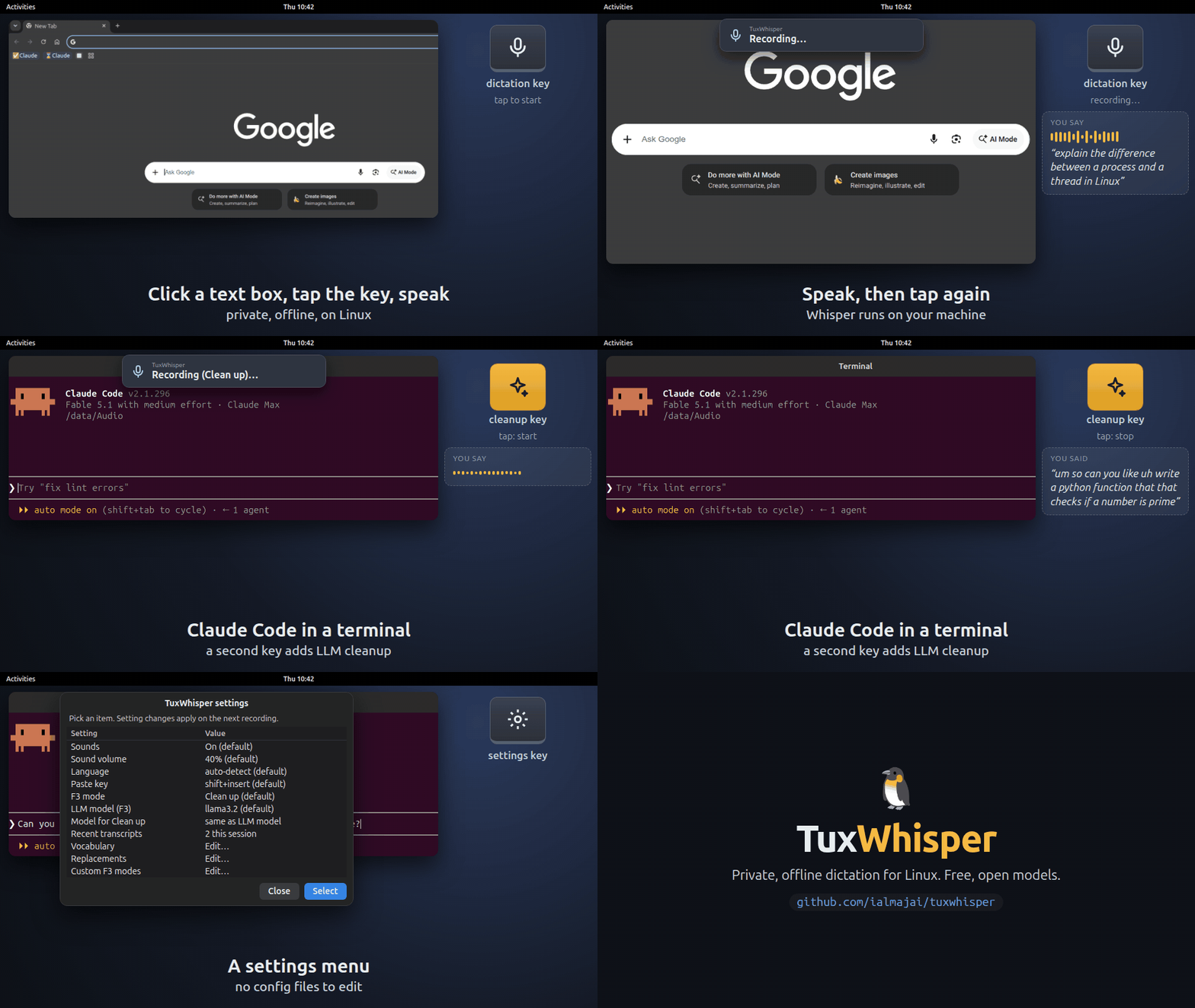
|
+
|
|
3
|
+
Copyright (c) 2026 Ibrahim Almajai
|
|
4
|
+
|
|
5
|
+
Permission is hereby granted, free of charge, to any person obtaining a copy
|
|
6
|
+
of this software and associated documentation files (the "Software"), to deal
|
|
7
|
+
in the Software without restriction, including without limitation the rights
|
|
8
|
+
to use, copy, modify, merge, publish, distribute, sublicense, and/or sell
|
|
9
|
+
copies of the Software, and to permit persons to whom the Software is
|
|
10
|
+
furnished to do so, subject to the following conditions:
|
|
11
|
+
|
|
12
|
+
The above copyright notice and this permission notice shall be included in all
|
|
13
|
+
copies or substantial portions of the Software.
|
|
14
|
+
|
|
15
|
+
THE SOFTWARE IS PROVIDED "AS IS", WITHOUT WARRANTY OF ANY KIND, EXPRESS OR
|
|
16
|
+
IMPLIED, INCLUDING BUT NOT LIMITED TO THE WARRANTIES OF MERCHANTABILITY,
|
|
17
|
+
FITNESS FOR A PARTICULAR PURPOSE AND NONINFRINGEMENT. IN NO EVENT SHALL THE
|
|
18
|
+
AUTHORS OR COPYRIGHT HOLDERS BE LIABLE FOR ANY CLAIM, DAMAGES OR OTHER
|
|
19
|
+
LIABILITY, WHETHER IN AN ACTION OF CONTRACT, TORT OR OTHERWISE, ARISING FROM,
|
|
20
|
+
OUT OF OR IN CONNECTION WITH THE SOFTWARE OR THE USE OR OTHER DEALINGS IN THE
|
|
21
|
+
SOFTWARE.
|
|
@@ -0,0 +1,58 @@
|
|
|
1
|
+
Metadata-Version: 2.5
|
|
2
|
+
Name: tuxwhisper
|
|
3
|
+
Version: 0.2.0
|
|
4
|
+
Summary: Private, offline push-to-talk dictation for Linux, on X11 and Wayland
|
|
5
|
+
Project-URL: Homepage, https://github.com/ialmajai/tuxwhisper
|
|
6
|
+
Project-URL: Documentation, https://github.com/ialmajai/tuxwhisper#readme
|
|
7
|
+
Project-URL: Issues, https://github.com/ialmajai/tuxwhisper/issues
|
|
8
|
+
Author: Ibrahim Almajai
|
|
9
|
+
License-Expression: MIT
|
|
10
|
+
License-File: LICENSE
|
|
11
|
+
Keywords: dictation,linux,speech-to-text,voice-typing,wayland,whisper
|
|
12
|
+
Classifier: Environment :: X11 Applications
|
|
13
|
+
Classifier: Operating System :: POSIX :: Linux
|
|
14
|
+
Classifier: Programming Language :: Python :: 3
|
|
15
|
+
Classifier: Topic :: Multimedia :: Sound/Audio :: Speech
|
|
16
|
+
Requires-Python: <3.15,>=3.11
|
|
17
|
+
Requires-Dist: evdev-binary>=1.6
|
|
18
|
+
Requires-Dist: faster-whisper<2,>=1.2
|
|
19
|
+
Requires-Dist: numpy>=1.24
|
|
20
|
+
Requires-Dist: sounddevice>=0.5
|
|
21
|
+
Provides-Extra: cuda
|
|
22
|
+
Requires-Dist: nvidia-cublas-cu12; extra == 'cuda'
|
|
23
|
+
Requires-Dist: nvidia-cudnn-cu12==9.*; extra == 'cuda'
|
|
24
|
+
Provides-Extra: vulkan
|
|
25
|
+
Requires-Dist: pywhispercpp<2,>=1.5; extra == 'vulkan'
|
|
26
|
+
Description-Content-Type: text/markdown
|
|
27
|
+
|
|
28
|
+
# TuxWhisper
|
|
29
|
+
|
|
30
|
+
**Private, offline dictation for Linux.** Press a key, speak, and your words are typed wherever
|
|
31
|
+
your cursor is: a browser text box, an LLM chat prompt, your editor or your terminal. Speech
|
|
32
|
+
recognition ([faster-whisper](https://github.com/SYSTRAN/faster-whisper)) and the optional LLM
|
|
33
|
+
cleanup ([Ollama](https://ollama.com)) run on your own machine with free, open models.
|
|
34
|
+
|
|
35
|
+
|
|
36
|
+
|
|
37
|
+
## Install
|
|
38
|
+
|
|
39
|
+
```bash
|
|
40
|
+
uv tool install tuxwhisper # NVIDIA GPU: uv tool install 'tuxwhisper[cuda]'
|
|
41
|
+
tuxwhisper setup
|
|
42
|
+
```
|
|
43
|
+
|
|
44
|
+
`tuxwhisper setup` installs the system packages it needs (Debian, Ubuntu, Fedora, Arch and
|
|
45
|
+
openSUSE), sets up the background service and, on GNOME, binds the keys. It says what each step
|
|
46
|
+
does and asks before anything that needs your password. On an AMD or Intel GPU, it builds the
|
|
47
|
+
Vulkan engine for you.
|
|
48
|
+
|
|
49
|
+
Then click into any text box, press F5, wait for the start sound, speak, and press F5 again.
|
|
50
|
+
|
|
51
|
+
| Key | Action |
|
|
52
|
+
|-----|--------|
|
|
53
|
+
| **F5** | Tap to start and stop, or hold to talk |
|
|
54
|
+
| **F3** | Same, with local LLM cleanup |
|
|
55
|
+
| **F4** | Save the last recording for fine-tuning |
|
|
56
|
+
| **Alt+F9** | Settings menu |
|
|
57
|
+
|
|
58
|
+
Documentation, other desktops and troubleshooting: <https://github.com/ialmajai/tuxwhisper>
|
|
@@ -0,0 +1,113 @@
|
|
|
1
|
+
# 🐧 TuxWhisper
|
|
2
|
+
|
|
3
|
+
**Private, offline dictation for Linux.** Press a key, speak, and your words are typed
|
|
4
|
+
wherever your cursor is: a browser text box, an LLM chat prompt, your editor or your
|
|
5
|
+
terminal. Everything runs on your own machine with free, open models. Your voice never
|
|
6
|
+
reaches a cloud service, and there's nothing to pay for.
|
|
7
|
+
|
|
8
|
+
[](https://github.com/ialmajai/tuxwhisper/actions/workflows/ci.yml)
|
|
9
|
+
[](LICENSE)
|
|
10
|
+

|
|
11
|
+

|
|
12
|
+
|
|
13
|
+

|
|
14
|
+
|
|
15
|
+
<sub>Re-enactment over real screenshots; the cleaned-up sentence is a local LLM's actual output.</sub>
|
|
16
|
+
|
|
17
|
+
## Features
|
|
18
|
+
|
|
19
|
+
- **Fast:** OpenAI's open Whisper model ([faster-whisper](https://github.com/SYSTRAN/faster-whisper))
|
|
20
|
+
types your words about half a second after you release the key, with an NVIDIA GPU. AMD
|
|
21
|
+
and Intel GPUs work through Vulkan.
|
|
22
|
+
- **Types anywhere:** browsers, editors, terminals, on X11 and Wayland (including GNOME).
|
|
23
|
+
- **LLM cleanup (optional):** F3 runs your words through a local [Ollama](https://ollama.com)
|
|
24
|
+
model (Meta's Llama 3.2 by default) that removes "um"s and fixes punctuation, or rewrites
|
|
25
|
+
them as an email, bullet points or your own mode. The model must fit in the GPU memory of
|
|
26
|
+
the machine running Ollama; otherwise F3 pastes the raw transcript.
|
|
27
|
+
- **Many languages:** dictate in any of Whisper's 100 languages. F3 replies in the language
|
|
28
|
+
you spoke; Llama 3.2 is weak outside English, so [pick a stronger model](docs/llm-cleanup.md)
|
|
29
|
+
for other languages.
|
|
30
|
+
|
|
31
|
+
**Also:** tap or hold to talk, a custom vocabulary for names and jargon, replacements such as
|
|
32
|
+
"new line" → line break, a settings menu with your last 20 transcripts, and
|
|
33
|
+
[saved recordings](docs/saving-takes.md) for fine-tuning Whisper to your voice and accent.
|
|
34
|
+
TuxWhisper types by pasting, then puts back the text you had copied.
|
|
35
|
+
|
|
36
|
+
Tested on GNOME (Wayland) with an NVIDIA GPU and in CPU mode, and on
|
|
37
|
+
[Sway 1.12 and i3 4.25](docs/other-desktops.md) in containers.
|
|
38
|
+
|
|
39
|
+
## Usage
|
|
40
|
+
|
|
41
|
+
| Key | Action |
|
|
42
|
+
|-----|--------|
|
|
43
|
+
| **F5** | Tap to start, tap to stop, or hold to talk. The text is typed at your cursor. |
|
|
44
|
+
| **F3** | Same as F5, with [LLM cleanup](docs/llm-cleanup.md). |
|
|
45
|
+
| **F4** | [Save the last recording](docs/saving-takes.md) and its transcript for fine-tuning. |
|
|
46
|
+
| **Alt+F9** | Open the [settings menu](docs/configuration.md#settings-menu). |
|
|
47
|
+
|
|
48
|
+
The installer binds these keys on GNOME. Wait for the "🎙 Recording…" notification and the start
|
|
49
|
+
sound before speaking.
|
|
50
|
+
|
|
51
|
+
## Install
|
|
52
|
+
|
|
53
|
+
You need Linux with systemd, [uv](https://docs.astral.sh/uv/), and a GPU with about 1.5 GB of
|
|
54
|
+
free memory: NVIDIA (CUDA), or AMD or Intel ([Vulkan](docs/configuration.md#amd-and-intel-gpus-vulkan),
|
|
55
|
+
not yet tested on those). No GPU? TuxWhisper runs on the CPU too, more slowly.
|
|
56
|
+
No uv yet? Its official installer:
|
|
57
|
+
|
|
58
|
+
```bash
|
|
59
|
+
curl -LsSf https://astral.sh/uv/install.sh | sh
|
|
60
|
+
```
|
|
61
|
+
|
|
62
|
+
Then:
|
|
63
|
+
|
|
64
|
+
```bash
|
|
65
|
+
git clone https://github.com/ialmajai/tuxwhisper.git ~/tuxwhisper
|
|
66
|
+
cd ~/tuxwhisper
|
|
67
|
+
./install.sh
|
|
68
|
+
```
|
|
69
|
+
|
|
70
|
+
The installer says what each step does and asks before anything that needs your password.
|
|
71
|
+
It's safe to run again. [Read it](install.sh) first if you like. It installs system packages
|
|
72
|
+
on Debian, Ubuntu, Fedora, Arch and openSUSE; on other distros, use the manual install below.
|
|
73
|
+
|
|
74
|
+
**Advanced:** [Manual install](docs/manual-install.md) runs every step by hand.
|
|
75
|
+
[Other desktops](docs/other-desktops.md) covers KDE, Hyprland, Sway and i3.
|
|
76
|
+
|
|
77
|
+
### Try it
|
|
78
|
+
|
|
79
|
+
Click into any text box, hold F5, wait for the start sound, speak, and release. Nothing
|
|
80
|
+
typed? See [Troubleshooting](docs/troubleshooting.md).
|
|
81
|
+
|
|
82
|
+
> [!TIP]
|
|
83
|
+
> F5 and F3 replace page refresh and find-next in browsers and many editors. Ctrl+R and Ctrl+G
|
|
84
|
+
> still do those.
|
|
85
|
+
|
|
86
|
+
### Optional: LLM cleanup (F3)
|
|
87
|
+
|
|
88
|
+
F3 needs [Ollama](https://ollama.com) and about 2 GB more GPU memory:
|
|
89
|
+
[set it up](docs/llm-cleanup.md#install).
|
|
90
|
+
|
|
91
|
+
## Uninstall
|
|
92
|
+
|
|
93
|
+
```bash
|
|
94
|
+
./uninstall.sh
|
|
95
|
+
```
|
|
96
|
+
|
|
97
|
+
It asks before removing the virtual keyboard rule, and keeps your settings, saved recordings and
|
|
98
|
+
downloaded models, listing where they are.
|
|
99
|
+
|
|
100
|
+
## Documentation
|
|
101
|
+
|
|
102
|
+
- [Manual install](docs/manual-install.md)
|
|
103
|
+
- [LLM cleanup (F3)](docs/llm-cleanup.md)
|
|
104
|
+
- [Saving recordings for fine-tuning (F4)](docs/saving-takes.md)
|
|
105
|
+
- [Configuration](docs/configuration.md): settings menu, custom vocabulary, replacements, GPU and CPU modes
|
|
106
|
+
- [Other desktops](docs/other-desktops.md)
|
|
107
|
+
- [How it works](docs/how-it-works.md)
|
|
108
|
+
- [Security](docs/security.md)
|
|
109
|
+
- [Troubleshooting](docs/troubleshooting.md)
|
|
110
|
+
|
|
111
|
+
## License
|
|
112
|
+
|
|
113
|
+
[MIT](LICENSE) © 2026 Ibrahim Almajai
|
tuxwhisper-0.2.0/asr
ADDED
|
@@ -0,0 +1,10 @@
|
|
|
1
|
+
#!/usr/bin/env bash
|
|
2
|
+
# Runs TuxWhisper from a git clone: the package in tuxwhisper/ with the clone's .venv.
|
|
3
|
+
# Also puts pip-installed cuDNN/cuBLAS and whisper.cpp libraries (if any) on the library path.
|
|
4
|
+
DIR="$(cd "$(dirname "$(readlink -f "$0")")" && pwd)"
|
|
5
|
+
for SITE in "$DIR"/.venv/lib/python3*/site-packages; do
|
|
6
|
+
[ -d "$SITE/nvidia" ] && export LD_LIBRARY_PATH="$SITE/nvidia/cudnn/lib:$SITE/nvidia/cublas/lib${LD_LIBRARY_PATH:+:$LD_LIBRARY_PATH}"
|
|
7
|
+
[ -e "$SITE/libwhisper.so.1" ] && export LD_LIBRARY_PATH="$SITE${LD_LIBRARY_PATH:+:$LD_LIBRARY_PATH}"
|
|
8
|
+
done
|
|
9
|
+
export TUXWHISPER_CMD="$DIR/asr" TUXWHISPER_LIBS_SET=1 PYTHONPATH="$DIR${PYTHONPATH:+:$PYTHONPATH}"
|
|
10
|
+
exec "$DIR/.venv/bin/python" -m tuxwhisper "$@"
|
|
@@ -0,0 +1,31 @@
|
|
|
1
|
+
# TuxWhisper
|
|
2
|
+
|
|
3
|
+
**Private, offline dictation for Linux.** Press a key, speak, and your words are typed wherever
|
|
4
|
+
your cursor is: a browser text box, an LLM chat prompt, your editor or your terminal. Speech
|
|
5
|
+
recognition ([faster-whisper](https://github.com/SYSTRAN/faster-whisper)) and the optional LLM
|
|
6
|
+
cleanup ([Ollama](https://ollama.com)) run on your own machine with free, open models.
|
|
7
|
+
|
|
8
|
+

|
|
9
|
+
|
|
10
|
+
## Install
|
|
11
|
+
|
|
12
|
+
```bash
|
|
13
|
+
uv tool install tuxwhisper # NVIDIA GPU: uv tool install 'tuxwhisper[cuda]'
|
|
14
|
+
tuxwhisper setup
|
|
15
|
+
```
|
|
16
|
+
|
|
17
|
+
`tuxwhisper setup` installs the system packages it needs (Debian, Ubuntu, Fedora, Arch and
|
|
18
|
+
openSUSE), sets up the background service and, on GNOME, binds the keys. It says what each step
|
|
19
|
+
does and asks before anything that needs your password. On an AMD or Intel GPU, it builds the
|
|
20
|
+
Vulkan engine for you.
|
|
21
|
+
|
|
22
|
+
Then click into any text box, press F5, wait for the start sound, speak, and press F5 again.
|
|
23
|
+
|
|
24
|
+
| Key | Action |
|
|
25
|
+
|-----|--------|
|
|
26
|
+
| **F5** | Tap to start and stop, or hold to talk |
|
|
27
|
+
| **F3** | Same, with local LLM cleanup |
|
|
28
|
+
| **F4** | Save the last recording for fine-tuning |
|
|
29
|
+
| **Alt+F9** | Settings menu |
|
|
30
|
+
|
|
31
|
+
Documentation, other desktops and troubleshooting: <https://github.com/ialmajai/tuxwhisper>
|
|
@@ -0,0 +1,205 @@
|
|
|
1
|
+
#!/usr/bin/env bash
|
|
2
|
+
# TuxWhisper installer. Safe to run again: each step skips what is already done.
|
|
3
|
+
# Run it from a git clone (./install.sh), or as `tuxwhisper setup` after installing from PyPI.
|
|
4
|
+
# docs/manual-install.md does the same steps by hand.
|
|
5
|
+
# --yes answer yes to every question
|
|
6
|
+
# --packages-only install the system packages and stop (used by CI)
|
|
7
|
+
# --engine=E cuda (NVIDIA), vulkan (AMD/Intel GPUs) or cpu; detected when not given
|
|
8
|
+
set -euo pipefail
|
|
9
|
+
|
|
10
|
+
DIR="$(cd "$(dirname "${BASH_SOURCE[0]}")" && pwd)"
|
|
11
|
+
cd "$DIR"
|
|
12
|
+
# `tuxwhisper setup` runs this script from inside the installed package and passes its command;
|
|
13
|
+
# a git clone runs ./asr, which uses the clone's .venv.
|
|
14
|
+
PACKAGED="${TUXWHISPER_PACKAGED:-}"
|
|
15
|
+
CMD="${TUXWHISPER_CMD:-$DIR/asr}"
|
|
16
|
+
UNIT_DIR="${XDG_CONFIG_HOME:-$HOME/.config}/systemd/user"
|
|
17
|
+
APPS_DIR="${XDG_DATA_HOME:-$HOME/.local/share}/applications"
|
|
18
|
+
RULE=/etc/udev/rules.d/60-uinput.rules
|
|
19
|
+
RULE_TEXT='KERNEL=="uinput", TAG+="uaccess", OPTIONS+="static_node=uinput"'
|
|
20
|
+
YES=0 PACKAGES_ONLY=0 engine=
|
|
21
|
+
for arg in "$@"; do
|
|
22
|
+
case "$arg" in
|
|
23
|
+
--yes) YES=1 ;;
|
|
24
|
+
--packages-only) PACKAGES_ONLY=1 ;;
|
|
25
|
+
--engine=cuda|--engine=vulkan|--engine=cpu) engine=${arg#--engine=} ;;
|
|
26
|
+
*) echo "Unknown option: $arg" >&2; exit 2 ;;
|
|
27
|
+
esac
|
|
28
|
+
done
|
|
29
|
+
SUDO=sudo; [ "$(id -u)" = 0 ] && SUDO=
|
|
30
|
+
|
|
31
|
+
step() { printf '\n\033[1m%s\033[0m\n' "$*"; }
|
|
32
|
+
note() { printf ' %s\n' "$*"; }
|
|
33
|
+
ask() { local a; [ "$YES" = 1 ] && return 0; read -r -p " $1 [Y/n] " a; [[ -z $a || $a =~ ^[Yy] ]]; }
|
|
34
|
+
|
|
35
|
+
case "$DIR$CMD" in *[\"\|\&\\]*) echo "Move TuxWhisper to a path without \" | & or \\ characters." >&2; exit 1 ;; esac
|
|
36
|
+
|
|
37
|
+
# Speech engine: faster-whisper with CUDA on NVIDIA, whisper.cpp with Vulkan on AMD or Intel GPUs
|
|
38
|
+
# (PCI vendors 0x1002 and 0x8086), otherwise faster-whisper on the CPU.
|
|
39
|
+
if [ -z "$engine" ]; then
|
|
40
|
+
if command -v nvidia-smi >/dev/null && nvidia-smi -L >/dev/null 2>&1; then engine=cuda
|
|
41
|
+
elif grep -qsxE '0x(1002|8086)' /sys/class/drm/card*/device/vendor; then engine=vulkan
|
|
42
|
+
else engine=cpu; fi
|
|
43
|
+
fi
|
|
44
|
+
|
|
45
|
+
step "1/6 System packages"
|
|
46
|
+
# A compiler and kernel headers build the keyboard library; PortAudio reads the microphone.
|
|
47
|
+
# The rest are clipboard tools, the settings menu, notifications and the start/stop sounds.
|
|
48
|
+
# CI installs these lists on each distro; keep docs/manual-install.md in sync.
|
|
49
|
+
# shellcheck source=/dev/null
|
|
50
|
+
. /etc/os-release 2>/dev/null || true
|
|
51
|
+
case " ${ID:-} ${ID_LIKE:-} " in
|
|
52
|
+
*" debian "*|*" ubuntu "*) pm=(apt-get install -y) pkgs=(libportaudio2 xclip wl-clipboard zenity libnotify-bin sound-theme-freedesktop)
|
|
53
|
+
vulkan=(g++ cmake libvulkan-dev glslc spirv-headers glslang-tools mesa-vulkan-drivers) ;;
|
|
54
|
+
*" fedora "*) pm=(dnf install -y) pkgs=(portaudio xclip wl-clipboard zenity libnotify sound-theme-freedesktop)
|
|
55
|
+
vulkan=(gcc-c++ cmake vulkan-loader-devel glslc spirv-headers-devel glslang mesa-vulkan-drivers) ;;
|
|
56
|
+
*" arch "*) pm=(pacman -S --needed --noconfirm) pkgs=(portaudio xclip wl-clipboard zenity libnotify sound-theme-freedesktop)
|
|
57
|
+
vulkan=(gcc cmake vulkan-icd-loader vulkan-headers shaderc spirv-headers glslang vulkan-radeon vulkan-intel) ;;
|
|
58
|
+
*" suse "*|*" opensuse "*) pm=(zypper -n install) pkgs=(portaudio xclip wl-clipboard zenity libnotify-tools sound-theme-freedesktop)
|
|
59
|
+
vulkan=(gcc-c++ cmake vulkan-devel shaderc spirv-headers glslang-devel libvulkan_radeon libvulkan_intel) ;;
|
|
60
|
+
*) pm=() pkgs=() vulkan=() ;;
|
|
61
|
+
esac
|
|
62
|
+
# The Vulkan engine is compiled on install: a C++ compiler, CMake, Vulkan headers and shader tools.
|
|
63
|
+
[ "$engine" = vulkan ] && pkgs+=("${vulkan[@]}")
|
|
64
|
+
have_all() {
|
|
65
|
+
{ command -v xclip || command -v wl-copy; } && command -v zenity && command -v notify-send &&
|
|
66
|
+
[ -f /usr/share/sounds/freedesktop/stereo/device-added.oga ] &&
|
|
67
|
+
{ ldconfig -p 2>/dev/null || /sbin/ldconfig -p; } | grep libportaudio >/dev/null &&
|
|
68
|
+
{ [ "$engine" != vulkan ] || { command -v g++ && command -v cmake && command -v glslc &&
|
|
69
|
+
command -v glslangValidator && [ -f /usr/include/vulkan/vulkan.h ]; }; }
|
|
70
|
+
} >/dev/null 2>&1
|
|
71
|
+
if have_all; then
|
|
72
|
+
note "Already installed."
|
|
73
|
+
elif [ ${#pm[@]} = 0 ]; then
|
|
74
|
+
note "Unknown distro (${ID:-?}). Install the packages listed in docs/manual-install.md, then run this again."
|
|
75
|
+
exit 1
|
|
76
|
+
else
|
|
77
|
+
note "This runs: ${SUDO:+sudo }${pm[*]} ${pkgs[*]}"
|
|
78
|
+
if ask "Install them?"; then
|
|
79
|
+
[ "${pm[0]}" = apt-get ] && $SUDO apt-get update -q
|
|
80
|
+
$SUDO "${pm[@]}" "${pkgs[@]}"
|
|
81
|
+
else
|
|
82
|
+
note "Skipped. Without them the Python packages may fail to build in the next step."
|
|
83
|
+
fi
|
|
84
|
+
fi
|
|
85
|
+
[ "$PACKAGES_ONLY" = 1 ] && exit 0
|
|
86
|
+
|
|
87
|
+
# uv's installer puts uv in ~/.local/bin, which a shell opened before it isn't searching yet.
|
|
88
|
+
command -v uv >/dev/null || PATH="${XDG_BIN_HOME:-$HOME/.local/bin}:$PATH"
|
|
89
|
+
command -v uv >/dev/null || { echo "Install uv first: https://docs.astral.sh/uv/getting-started/installation/" >&2; exit 1; }
|
|
90
|
+
command -v systemctl >/dev/null || { echo "TuxWhisper needs systemd. See docs/manual-install.md." >&2; exit 1; }
|
|
91
|
+
|
|
92
|
+
step "2/6 Python packages"
|
|
93
|
+
case "$engine" in
|
|
94
|
+
cuda) extra="[cuda]"; note "NVIDIA GPU: using the CUDA build." ;;
|
|
95
|
+
vulkan) extra="[vulkan]"
|
|
96
|
+
note "AMD or Intel GPU: using whisper.cpp with Vulkan, built here (a few minutes)."
|
|
97
|
+
note "Untested on AMD and Intel so far; if it's slow, run this again with --engine=cpu." ;;
|
|
98
|
+
cpu) extra=""; note "No supported GPU: using the CPU build (slower)." ;;
|
|
99
|
+
esac
|
|
100
|
+
build=(); [ "$engine" = vulkan ] && build=(env GGML_VULKAN=1)
|
|
101
|
+
if [ -n "$PACKAGED" ]; then
|
|
102
|
+
# Installed with uv or pip: add the GPU libraries if this install lacks them.
|
|
103
|
+
PY="$TUXWHISPER_PY"
|
|
104
|
+
case "$engine" in
|
|
105
|
+
cuda) check='import nvidia.cudnn, nvidia.cublas' ;;
|
|
106
|
+
vulkan) check='import os, sysconfig; assert os.path.exists(sysconfig.get_paths()["purelib"] + "/libggml-vulkan.so")' ;;
|
|
107
|
+
cpu) check='pass' ;;
|
|
108
|
+
esac
|
|
109
|
+
if "$PY" -c "$check" 2>/dev/null; then
|
|
110
|
+
note "Already installed."
|
|
111
|
+
else
|
|
112
|
+
spec="tuxwhisper$extra==$TUXWHISPER_VERSION"
|
|
113
|
+
nobin=(); [ "$engine" = vulkan ] && nobin=(--no-binary-package pywhispercpp)
|
|
114
|
+
note "This runs: ${build[*]} uv tool install --reinstall ${nobin[*]} '$spec'"
|
|
115
|
+
"${build[@]}" uv tool install -q --reinstall "${nobin[@]}" "$spec"
|
|
116
|
+
fi
|
|
117
|
+
else
|
|
118
|
+
[ -d .venv ] || uv venv -q --python 3.12 .venv
|
|
119
|
+
uv pip uninstall -q --python .venv evdev 2>/dev/null || true # replaced by evdev-binary in 0.2
|
|
120
|
+
nobin=(); [ "$engine" = vulkan ] && nobin=(--no-binary pywhispercpp)
|
|
121
|
+
"${build[@]}" uv pip install -q --python .venv "${nobin[@]}" -e ".$extra"
|
|
122
|
+
fi
|
|
123
|
+
|
|
124
|
+
step "3/6 Virtual keyboard (lets TuxWhisper type for you)"
|
|
125
|
+
if [ -f "$RULE" ] && grep -qF "$RULE_TEXT" "$RULE"; then
|
|
126
|
+
note "Already set up."
|
|
127
|
+
else
|
|
128
|
+
note "This writes one line to $RULE:"
|
|
129
|
+
note " $RULE_TEXT"
|
|
130
|
+
note "It lets any program you run send keystrokes, not only TuxWhisper (docs/security.md)."
|
|
131
|
+
if ask "Allow it? Needs your password once."; then
|
|
132
|
+
echo "$RULE_TEXT" | $SUDO tee "$RULE" >/dev/null
|
|
133
|
+
$SUDO udevadm control --reload
|
|
134
|
+
$SUDO udevadm trigger --name-match=uinput
|
|
135
|
+
else
|
|
136
|
+
note "Skipped: TuxWhisper will copy each transcript for you to paste with Ctrl+V."
|
|
137
|
+
fi
|
|
138
|
+
fi
|
|
139
|
+
|
|
140
|
+
step "4/6 Background service"
|
|
141
|
+
service=1
|
|
142
|
+
if ! systemctl --user is-active -q graphical-session.target; then
|
|
143
|
+
service=0
|
|
144
|
+
note "Your desktop doesn't start systemd's graphical session (common on i3 and Sway)."
|
|
145
|
+
note "Start TuxWhisper from your window manager's config instead, e.g.:"
|
|
146
|
+
note " exec \"$CMD\" serve"
|
|
147
|
+
note "See docs/other-desktops.md."
|
|
148
|
+
else
|
|
149
|
+
mkdir -p "$UNIT_DIR"
|
|
150
|
+
if [ -f "$UNIT_DIR/tuxwhisper.service" ]; then
|
|
151
|
+
note "Keeping your existing $UNIT_DIR/tuxwhisper.service."
|
|
152
|
+
else
|
|
153
|
+
sed "s|^ExecStart=.*|ExecStart=\"$CMD\" serve|" tuxwhisper.service > "$UNIT_DIR/tuxwhisper.service"
|
|
154
|
+
note "Installed $UNIT_DIR/tuxwhisper.service."
|
|
155
|
+
fi
|
|
156
|
+
# One drop-in file names the engine; NVIDIA needs none (cuda is the default).
|
|
157
|
+
rm -f "$UNIT_DIR/tuxwhisper.service.d/cpu.conf" "$UNIT_DIR/tuxwhisper.service.d/vulkan.conf"
|
|
158
|
+
if [ "$engine" != cuda ]; then
|
|
159
|
+
mkdir -p "$UNIT_DIR/tuxwhisper.service.d"
|
|
160
|
+
printf '[Service]\nEnvironment=ASR_DEVICE=%s\n' "$engine" > "$UNIT_DIR/tuxwhisper.service.d/$engine.conf"
|
|
161
|
+
note "Set ASR_DEVICE=$engine."
|
|
162
|
+
fi
|
|
163
|
+
systemctl --user daemon-reload
|
|
164
|
+
systemctl --user enable -q tuxwhisper
|
|
165
|
+
since="$(date '+%Y-%m-%d %H:%M:%S')"
|
|
166
|
+
systemctl --user restart tuxwhisper
|
|
167
|
+
note "Started; it also starts at every login."
|
|
168
|
+
fi
|
|
169
|
+
|
|
170
|
+
step "5/6 Keyboard shortcuts and app-grid launcher"
|
|
171
|
+
if [[ "${XDG_CURRENT_DESKTOP:-}" == *GNOME* ]]; then
|
|
172
|
+
"$CMD" bind | sed 's/^/ /'
|
|
173
|
+
note "F5 and F3 now replace page refresh and find-next in browsers; Ctrl+R and Ctrl+G still work."
|
|
174
|
+
else
|
|
175
|
+
note "Bind these in your desktop's shortcut settings (docs/other-desktops.md):"
|
|
176
|
+
note " F5 -> \"$CMD\" toggle F3 -> \"$CMD\" rewrite"
|
|
177
|
+
note " F4 -> \"$CMD\" save Alt+F9 -> \"$CMD\" settings"
|
|
178
|
+
fi
|
|
179
|
+
mkdir -p "$APPS_DIR"
|
|
180
|
+
sed "s|@CMD@|$CMD|" tuxwhisper-settings.desktop > "$APPS_DIR/tuxwhisper-settings.desktop"
|
|
181
|
+
note "Added \"TuxWhisper Settings\" to your app grid."
|
|
182
|
+
|
|
183
|
+
step "6/6 Loading the speech model"
|
|
184
|
+
if [ "$service" = 0 ]; then
|
|
185
|
+
note "Skipped: start TuxWhisper from your window manager (step 4), then press F5 to dictate."
|
|
186
|
+
exit 0
|
|
187
|
+
fi
|
|
188
|
+
note "The first start downloads it (about 1.5 GB; the CPU model is smaller). Later starts take about 15 s."
|
|
189
|
+
for _ in $(seq 1 600); do
|
|
190
|
+
log="$(journalctl --user -u tuxwhisper --since "$since" -o cat 2>/dev/null || true)"
|
|
191
|
+
if grep -qx "ready" <<<"$log"; then
|
|
192
|
+
step "Done. Click into any text box, hold F5, wait for the start sound, speak, and release."
|
|
193
|
+
note "Settings: Alt+F9. Optional LLM cleanup (F3): docs/llm-cleanup.md"
|
|
194
|
+
exit 0
|
|
195
|
+
fi
|
|
196
|
+
if ! systemctl --user is-active -q tuxwhisper && [ -n "$log" ]; then
|
|
197
|
+
echo "TuxWhisper stopped while starting. Last log lines:" >&2
|
|
198
|
+
tail -n 5 <<<"$log" >&2
|
|
199
|
+
echo "See docs/troubleshooting.md." >&2
|
|
200
|
+
exit 1
|
|
201
|
+
fi
|
|
202
|
+
sleep 2
|
|
203
|
+
done
|
|
204
|
+
echo "Still loading after 20 minutes. Watch it with: journalctl --user -u tuxwhisper -f" >&2
|
|
205
|
+
exit 1
|
|
@@ -0,0 +1,58 @@
|
|
|
1
|
+
[project]
|
|
2
|
+
name = "tuxwhisper"
|
|
3
|
+
dynamic = ["version"]
|
|
4
|
+
description = "Private, offline push-to-talk dictation for Linux, on X11 and Wayland"
|
|
5
|
+
readme = "docs/pypi.md"
|
|
6
|
+
license = "MIT"
|
|
7
|
+
license-files = ["LICENSE"]
|
|
8
|
+
authors = [{ name = "Ibrahim Almajai" }]
|
|
9
|
+
requires-python = ">=3.11,<3.15" # ctranslate2 (faster-whisper) has wheels up to 3.14
|
|
10
|
+
keywords = ["dictation", "speech-to-text", "whisper", "wayland", "linux", "voice-typing"]
|
|
11
|
+
classifiers = [
|
|
12
|
+
"Operating System :: POSIX :: Linux",
|
|
13
|
+
"Programming Language :: Python :: 3",
|
|
14
|
+
"Environment :: X11 Applications",
|
|
15
|
+
"Topic :: Multimedia :: Sound/Audio :: Speech",
|
|
16
|
+
]
|
|
17
|
+
dependencies = [
|
|
18
|
+
"faster-whisper>=1.2,<2",
|
|
19
|
+
"numpy>=1.24",
|
|
20
|
+
"sounddevice>=0.5",
|
|
21
|
+
"evdev-binary>=1.6", # prebuilt evdev: no compiler or kernel headers needed
|
|
22
|
+
]
|
|
23
|
+
|
|
24
|
+
[project.optional-dependencies]
|
|
25
|
+
# NVIDIA GPUs (ASR_DEVICE=cuda, the default): CUDA libraries for faster-whisper.
|
|
26
|
+
cuda = ["nvidia-cublas-cu12", "nvidia-cudnn-cu12==9.*"]
|
|
27
|
+
# AMD and Intel GPUs (ASR_DEVICE=vulkan): whisper.cpp. The PyPI wheels are CPU-only; build it
|
|
28
|
+
# with GGML_VULKAN=1 and --no-binary-package pywhispercpp (tuxwhisper setup does this).
|
|
29
|
+
vulkan = ["pywhispercpp>=1.5,<2"]
|
|
30
|
+
|
|
31
|
+
[project.scripts]
|
|
32
|
+
tuxwhisper = "tuxwhisper.asr:main"
|
|
33
|
+
|
|
34
|
+
[project.urls]
|
|
35
|
+
Homepage = "https://github.com/ialmajai/tuxwhisper"
|
|
36
|
+
Documentation = "https://github.com/ialmajai/tuxwhisper#readme"
|
|
37
|
+
Issues = "https://github.com/ialmajai/tuxwhisper/issues"
|
|
38
|
+
|
|
39
|
+
[build-system]
|
|
40
|
+
requires = ["hatchling"]
|
|
41
|
+
build-backend = "hatchling.build"
|
|
42
|
+
|
|
43
|
+
[tool.hatch.version]
|
|
44
|
+
path = "tuxwhisper/__init__.py"
|
|
45
|
+
|
|
46
|
+
[tool.hatch.build.targets.wheel]
|
|
47
|
+
packages = ["tuxwhisper"]
|
|
48
|
+
|
|
49
|
+
# `tuxwhisper setup` and `uninstall` run the same scripts as a git clone.
|
|
50
|
+
[tool.hatch.build.targets.wheel.force-include]
|
|
51
|
+
"install.sh" = "tuxwhisper/data/install.sh"
|
|
52
|
+
"uninstall.sh" = "tuxwhisper/data/uninstall.sh"
|
|
53
|
+
"tuxwhisper.service" = "tuxwhisper/data/tuxwhisper.service"
|
|
54
|
+
"tuxwhisper-settings.desktop" = "tuxwhisper/data/tuxwhisper-settings.desktop"
|
|
55
|
+
|
|
56
|
+
[tool.hatch.build.targets.sdist]
|
|
57
|
+
include = ["tuxwhisper", "install.sh", "uninstall.sh", "tuxwhisper.service",
|
|
58
|
+
"tuxwhisper-settings.desktop", "asr", "docs/pypi.md", "LICENSE", "README.md"]
|