treex-cli 0.1.11__tar.gz → 0.1.12__tar.gz
This diff represents the content of publicly available package versions that have been released to one of the supported registries. The information contained in this diff is provided for informational purposes only and reflects changes between package versions as they appear in their respective public registries.
- {treex_cli-0.1.11/treex_cli.egg-info → treex_cli-0.1.12}/PKG-INFO +69 -16
- treex_cli-0.1.12/README.md +156 -0
- {treex_cli-0.1.11 → treex_cli-0.1.12}/pyproject.toml +2 -2
- {treex_cli-0.1.11 → treex_cli-0.1.12}/treex.py +218 -57
- {treex_cli-0.1.11 → treex_cli-0.1.12/treex_cli.egg-info}/PKG-INFO +69 -16
- treex_cli-0.1.11/README.md +0 -103
- {treex_cli-0.1.11 → treex_cli-0.1.12}/LICENSE +0 -0
- {treex_cli-0.1.11 → treex_cli-0.1.12}/setup.cfg +0 -0
- {treex_cli-0.1.11 → treex_cli-0.1.12}/treex_cli.egg-info/SOURCES.txt +0 -0
- {treex_cli-0.1.11 → treex_cli-0.1.12}/treex_cli.egg-info/dependency_links.txt +0 -0
- {treex_cli-0.1.11 → treex_cli-0.1.12}/treex_cli.egg-info/entry_points.txt +0 -0
- {treex_cli-0.1.11 → treex_cli-0.1.12}/treex_cli.egg-info/top_level.txt +0 -0
|
@@ -1,6 +1,6 @@
|
|
|
1
1
|
Metadata-Version: 2.4
|
|
2
2
|
Name: treex-cli
|
|
3
|
-
Version: 0.1.
|
|
3
|
+
Version: 0.1.12
|
|
4
4
|
Summary: List directory contents as a tree with file and directory metadata
|
|
5
5
|
Author: Corey Goldberg
|
|
6
6
|
Maintainer: Corey Goldberg
|
|
@@ -37,15 +37,19 @@ Dynamic: license-file
|
|
|
37
37
|
|
|
38
38
|
## About
|
|
39
39
|
|
|
40
|
-
`treex` is a command-line utility that recursively scans a directory and
|
|
41
|
-
|
|
40
|
+
`treex` is a command-line utility that recursively scans a directory and lists
|
|
41
|
+
its contents as a tree along with file and directory metadata.
|
|
42
42
|
|
|
43
|
+
### Features:
|
|
44
|
+
|
|
45
|
+
- Respects `.gitignore` rules when Git is installed
|
|
43
46
|
- Shows human-readable file sizes
|
|
44
47
|
- Shows recursive directory sizes
|
|
45
48
|
- Shows line counts for text files
|
|
46
49
|
- Identifies binary and unreadable files by type
|
|
47
50
|
- Optionally shows modification timestamps
|
|
48
|
-
-
|
|
51
|
+
- Optionally includes or excludes files using glob patterns
|
|
52
|
+
- Optionally limits the depth of the displayed tree
|
|
49
53
|
|
|
50
54
|
----
|
|
51
55
|
|
|
@@ -90,32 +94,80 @@ lists its contents as a tree along with file and directory metadata.
|
|
|
90
94
|
|
|
91
95
|
## Installation
|
|
92
96
|
|
|
93
|
-
Install `treex` from [PyPI][pypi-home] using
|
|
97
|
+
Install `treex` from [PyPI][pypi-home] using your preferred Python package manager:
|
|
94
98
|
|
|
95
|
-
- `pip install treex-cli`
|
|
96
|
-
- `pipx install treex-cli`
|
|
99
|
+
- **pip:** `pip install treex-cli`
|
|
100
|
+
- **pipx:** `pipx install treex-cli`
|
|
101
|
+
- **uv:** `uv tool install treex-cli`
|
|
97
102
|
|
|
98
103
|
----
|
|
99
104
|
|
|
100
105
|
## Usage
|
|
101
106
|
|
|
102
107
|
```
|
|
103
|
-
|
|
104
|
-
|
|
108
|
+
usage: treex [-h] [--all] [--modified] [--quiet] [--dirs] [--summary]
|
|
109
|
+
[--include PATTERN] [--exclude PATTERN] [--depth DEPTH]
|
|
110
|
+
[directory]
|
|
105
111
|
|
|
106
112
|
List directory contents as a tree with file and directory metadata.
|
|
107
113
|
|
|
108
114
|
positional arguments:
|
|
109
|
-
directory
|
|
115
|
+
directory directory to scan (default: current directory)
|
|
110
116
|
|
|
111
117
|
options:
|
|
112
|
-
-h, --help
|
|
113
|
-
-a
|
|
114
|
-
-m
|
|
115
|
-
-q
|
|
116
|
-
-d
|
|
117
|
-
-s
|
|
118
|
+
-h, --help show this help message and exit
|
|
119
|
+
--all, -a show all files, including those ignored by Git
|
|
120
|
+
--modified, -m show file modification times
|
|
121
|
+
--quiet, -q don't show file metadata
|
|
122
|
+
--dirs, -d show directories only
|
|
123
|
+
--summary, -s show summary only
|
|
124
|
+
--include, -i PATTERN include files matching a glob pattern
|
|
125
|
+
--exclude, -e PATTERN exclude files matching a glob pattern
|
|
126
|
+
--depth, -D DEPTH limit levels displayed below the starting directory
|
|
127
|
+
```
|
|
128
|
+
|
|
129
|
+
### Filtering files
|
|
130
|
+
|
|
131
|
+
Use `--include` to display only files that match a glob pattern:
|
|
132
|
+
|
|
118
133
|
```
|
|
134
|
+
treex --include '*.py'
|
|
135
|
+
```
|
|
136
|
+
|
|
137
|
+
Use `--exclude` to hide files that match a glob pattern:
|
|
138
|
+
|
|
139
|
+
```
|
|
140
|
+
treex --exclude '*.pyc'
|
|
141
|
+
```
|
|
142
|
+
|
|
143
|
+
Patterns match filenames only, regardless of their location in the directory
|
|
144
|
+
tree. Matching is case-sensitive. When both options are provided, exclusions
|
|
145
|
+
take precedence over inclusions.
|
|
146
|
+
|
|
147
|
+
For example:
|
|
148
|
+
|
|
149
|
+
```
|
|
150
|
+
treex --include '.py' --exclude 'test_.py'
|
|
151
|
+
```
|
|
152
|
+
|
|
153
|
+
This displays Python files except those whose filenames begin with `test_`.
|
|
154
|
+
|
|
155
|
+
Note: quote glob patterns to prevent the shell from expanding them before
|
|
156
|
+
`treex` receives them.
|
|
157
|
+
|
|
158
|
+
### Limiting tree depth
|
|
159
|
+
|
|
160
|
+
Use `--depth` (or `-D`) to limit how many levels below the starting directory
|
|
161
|
+
are displayed:
|
|
162
|
+
|
|
163
|
+
```
|
|
164
|
+
treex --depth 3
|
|
165
|
+
```
|
|
166
|
+
|
|
167
|
+
The depth must be at least 1.
|
|
168
|
+
|
|
169
|
+
Directory sizes and summary totals reflect only files within the limit that pass
|
|
170
|
+
the include/exclude filters.
|
|
119
171
|
|
|
120
172
|
----
|
|
121
173
|
|
|
@@ -123,6 +175,7 @@ options:
|
|
|
123
175
|
|
|
124
176
|
|
|
125
177
|
|
|
178
|
+
|
|
126
179
|
[github-profile]: https://github.com/cgoldberg
|
|
127
180
|
[github-repo]: https://github.com/cgoldberg/treex
|
|
128
181
|
[pypi-home]: https://pypi.org/project/treex-cli
|
|
@@ -0,0 +1,156 @@
|
|
|
1
|
+
# treex
|
|
2
|
+
|
|
3
|
+
## List directory contents as a tree with file and directory metadata
|
|
4
|
+
|
|
5
|
+
- Copyright (c) 2026 [Corey Goldberg][github-profile]
|
|
6
|
+
- Development: [GitHub][github-repo]
|
|
7
|
+
- Releases: [PyPI][pypi-home]
|
|
8
|
+
- License: [MIT][mit-license]
|
|
9
|
+
|
|
10
|
+
----
|
|
11
|
+
|
|
12
|
+
## About
|
|
13
|
+
|
|
14
|
+
`treex` is a command-line utility that recursively scans a directory and lists
|
|
15
|
+
its contents as a tree along with file and directory metadata.
|
|
16
|
+
|
|
17
|
+
### Features:
|
|
18
|
+
|
|
19
|
+
- Respects `.gitignore` rules when Git is installed
|
|
20
|
+
- Shows human-readable file sizes
|
|
21
|
+
- Shows recursive directory sizes
|
|
22
|
+
- Shows line counts for text files
|
|
23
|
+
- Identifies binary and unreadable files by type
|
|
24
|
+
- Optionally shows modification timestamps
|
|
25
|
+
- Optionally includes or excludes files using glob patterns
|
|
26
|
+
- Optionally limits the depth of the displayed tree
|
|
27
|
+
|
|
28
|
+
----
|
|
29
|
+
|
|
30
|
+
## Status
|
|
31
|
+
|
|
32
|
+
<table>
|
|
33
|
+
<tr>
|
|
34
|
+
<td>Latest Version</td>
|
|
35
|
+
<td>
|
|
36
|
+
<a href="https://pypi.org/project/treex-cli">
|
|
37
|
+
<img src="https://img.shields.io/pypi/v/treex-cli.svg">
|
|
38
|
+
</a>
|
|
39
|
+
</td>
|
|
40
|
+
</tr>
|
|
41
|
+
<tr>
|
|
42
|
+
<td>Tests (CI)</td>
|
|
43
|
+
<td>
|
|
44
|
+
<a href="https://github.com/cgoldberg/treex/actions/workflows/test.yml">
|
|
45
|
+
<img src="https://github.com/cgoldberg/treex/actions/workflows/test.yml/badge.svg">
|
|
46
|
+
</a>
|
|
47
|
+
</td>
|
|
48
|
+
</tr>
|
|
49
|
+
<tr>
|
|
50
|
+
<td>Supported Python Versions</td>
|
|
51
|
+
<td>
|
|
52
|
+
<a href="https://pypi.org/project/treex-cli">
|
|
53
|
+
<img src="https://img.shields.io/pypi/pyversions/treex-cli">
|
|
54
|
+
</a>
|
|
55
|
+
</td>
|
|
56
|
+
</tr>
|
|
57
|
+
</table>
|
|
58
|
+
|
|
59
|
+
----
|
|
60
|
+
|
|
61
|
+
## Requirements
|
|
62
|
+
|
|
63
|
+
- Python 3.10+
|
|
64
|
+
- Git 2.0+ (optional)
|
|
65
|
+
- UTF-8-compatible terminal
|
|
66
|
+
|
|
67
|
+
----
|
|
68
|
+
|
|
69
|
+
## Installation
|
|
70
|
+
|
|
71
|
+
Install `treex` from [PyPI][pypi-home] using your preferred Python package manager:
|
|
72
|
+
|
|
73
|
+
- **pip:** `pip install treex-cli`
|
|
74
|
+
- **pipx:** `pipx install treex-cli`
|
|
75
|
+
- **uv:** `uv tool install treex-cli`
|
|
76
|
+
|
|
77
|
+
----
|
|
78
|
+
|
|
79
|
+
## Usage
|
|
80
|
+
|
|
81
|
+
```
|
|
82
|
+
usage: treex [-h] [--all] [--modified] [--quiet] [--dirs] [--summary]
|
|
83
|
+
[--include PATTERN] [--exclude PATTERN] [--depth DEPTH]
|
|
84
|
+
[directory]
|
|
85
|
+
|
|
86
|
+
List directory contents as a tree with file and directory metadata.
|
|
87
|
+
|
|
88
|
+
positional arguments:
|
|
89
|
+
directory directory to scan (default: current directory)
|
|
90
|
+
|
|
91
|
+
options:
|
|
92
|
+
-h, --help show this help message and exit
|
|
93
|
+
--all, -a show all files, including those ignored by Git
|
|
94
|
+
--modified, -m show file modification times
|
|
95
|
+
--quiet, -q don't show file metadata
|
|
96
|
+
--dirs, -d show directories only
|
|
97
|
+
--summary, -s show summary only
|
|
98
|
+
--include, -i PATTERN include files matching a glob pattern
|
|
99
|
+
--exclude, -e PATTERN exclude files matching a glob pattern
|
|
100
|
+
--depth, -D DEPTH limit levels displayed below the starting directory
|
|
101
|
+
```
|
|
102
|
+
|
|
103
|
+
### Filtering files
|
|
104
|
+
|
|
105
|
+
Use `--include` to display only files that match a glob pattern:
|
|
106
|
+
|
|
107
|
+
```
|
|
108
|
+
treex --include '*.py'
|
|
109
|
+
```
|
|
110
|
+
|
|
111
|
+
Use `--exclude` to hide files that match a glob pattern:
|
|
112
|
+
|
|
113
|
+
```
|
|
114
|
+
treex --exclude '*.pyc'
|
|
115
|
+
```
|
|
116
|
+
|
|
117
|
+
Patterns match filenames only, regardless of their location in the directory
|
|
118
|
+
tree. Matching is case-sensitive. When both options are provided, exclusions
|
|
119
|
+
take precedence over inclusions.
|
|
120
|
+
|
|
121
|
+
For example:
|
|
122
|
+
|
|
123
|
+
```
|
|
124
|
+
treex --include '.py' --exclude 'test_.py'
|
|
125
|
+
```
|
|
126
|
+
|
|
127
|
+
This displays Python files except those whose filenames begin with `test_`.
|
|
128
|
+
|
|
129
|
+
Note: quote glob patterns to prevent the shell from expanding them before
|
|
130
|
+
`treex` receives them.
|
|
131
|
+
|
|
132
|
+
### Limiting tree depth
|
|
133
|
+
|
|
134
|
+
Use `--depth` (or `-D`) to limit how many levels below the starting directory
|
|
135
|
+
are displayed:
|
|
136
|
+
|
|
137
|
+
```
|
|
138
|
+
treex --depth 3
|
|
139
|
+
```
|
|
140
|
+
|
|
141
|
+
The depth must be at least 1.
|
|
142
|
+
|
|
143
|
+
Directory sizes and summary totals reflect only files within the limit that pass
|
|
144
|
+
the include/exclude filters.
|
|
145
|
+
|
|
146
|
+
----
|
|
147
|
+
|
|
148
|
+
## Screenshot
|
|
149
|
+
|
|
150
|
+

|
|
151
|
+
|
|
152
|
+
|
|
153
|
+
[github-profile]: https://github.com/cgoldberg
|
|
154
|
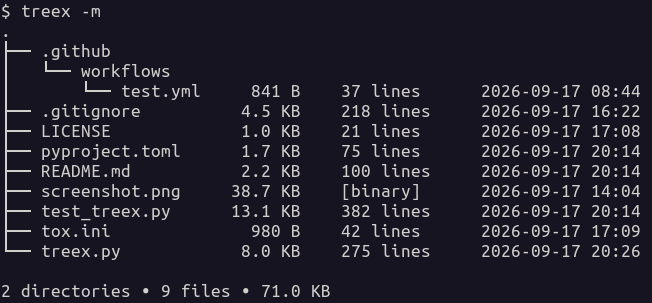
+
[github-repo]: https://github.com/cgoldberg/treex
|
|
155
|
+
[pypi-home]: https://pypi.org/project/treex-cli
|
|
156
|
+
[mit-license]: https://raw.githubusercontent.com/cgoldberg/treex/refs/heads/main/LICENSE
|
|
@@ -4,7 +4,7 @@ build-backend = "setuptools.build_meta"
|
|
|
4
4
|
|
|
5
5
|
[project]
|
|
6
6
|
name = "treex-cli"
|
|
7
|
-
version = "0.1.
|
|
7
|
+
version = "0.1.12"
|
|
8
8
|
description="List directory contents as a tree with file and directory metadata"
|
|
9
9
|
license = "MIT"
|
|
10
10
|
license-files = ["LICENSE"]
|
|
@@ -65,7 +65,7 @@ target-version = "py310"
|
|
|
65
65
|
select = ["ALL"]
|
|
66
66
|
ignore = [
|
|
67
67
|
"ANN", "C901", "COM812", "D", "DTZ001", "DTZ006",
|
|
68
|
-
"FBT", "PLR", "S603", "S607", "T201"
|
|
68
|
+
"FBT", "PLR", "S603", "S607", "T201",
|
|
69
69
|
]
|
|
70
70
|
fixable = ["ALL"]
|
|
71
71
|
|
|
@@ -13,6 +13,7 @@ filesystem is scanned normally without Git filtering.
|
|
|
13
13
|
"""
|
|
14
14
|
|
|
15
15
|
import argparse
|
|
16
|
+
import fnmatch
|
|
16
17
|
import subprocess
|
|
17
18
|
import sys
|
|
18
19
|
from contextlib import suppress
|
|
@@ -104,10 +105,10 @@ def _is_binary_file(path, chunk_size=8192):
|
|
|
104
105
|
chunk = f.read(chunk_size)
|
|
105
106
|
if not chunk:
|
|
106
107
|
return False
|
|
107
|
-
# Check for NUL bytes
|
|
108
|
+
# Check for NUL bytes
|
|
108
109
|
if b"\x00" in chunk:
|
|
109
110
|
return True
|
|
110
|
-
# Treat files that aren't valid UTF-8 as binary
|
|
111
|
+
# Treat files that aren't valid UTF-8 as binary
|
|
111
112
|
try:
|
|
112
113
|
chunk.decode("utf-8")
|
|
113
114
|
except UnicodeDecodeError:
|
|
@@ -169,71 +170,181 @@ def _get_tree_entries(path, gitignore):
|
|
|
169
170
|
return entries
|
|
170
171
|
|
|
171
172
|
|
|
172
|
-
def
|
|
173
|
+
def _matches_pattern(name, pattern):
|
|
174
|
+
"""Match a filename using a case-sensitive glob."""
|
|
175
|
+
return pattern is not None and fnmatch.fnmatchcase(name, pattern)
|
|
176
|
+
|
|
177
|
+
|
|
178
|
+
def _scan_tree(
|
|
173
179
|
path,
|
|
174
|
-
prefix,
|
|
175
|
-
stats,
|
|
176
180
|
gitignore,
|
|
177
|
-
rows,
|
|
178
181
|
show_metadata,
|
|
179
182
|
show_modified,
|
|
180
|
-
|
|
183
|
+
include_pattern=None,
|
|
184
|
+
exclude_pattern=None,
|
|
185
|
+
max_depth=None,
|
|
186
|
+
depth=0,
|
|
181
187
|
):
|
|
182
|
-
"""
|
|
188
|
+
"""Scan and filter the tree, returning nodes for rendering.
|
|
189
|
+
|
|
190
|
+
The starting directory has depth 0. Its immediate entries have
|
|
191
|
+
depth 1. Directories at the depth limit are shown without
|
|
192
|
+
descending into them. Directory sizes include only files within
|
|
193
|
+
the permitted depth that pass the include/exclude filters.
|
|
194
|
+
"""
|
|
195
|
+
if max_depth is not None and depth >= max_depth:
|
|
196
|
+
return []
|
|
183
197
|
entries = _get_tree_entries(path, gitignore)
|
|
184
198
|
if entries is None:
|
|
185
|
-
|
|
186
|
-
|
|
187
|
-
|
|
188
|
-
|
|
189
|
-
|
|
190
|
-
|
|
191
|
-
|
|
192
|
-
|
|
193
|
-
|
|
199
|
+
return [
|
|
200
|
+
{
|
|
201
|
+
"name": "[permission denied]",
|
|
202
|
+
"kind": "error",
|
|
203
|
+
"children": [],
|
|
204
|
+
"size": 0,
|
|
205
|
+
"info": None,
|
|
206
|
+
"modified": None,
|
|
207
|
+
"contains_match": False,
|
|
208
|
+
}
|
|
209
|
+
]
|
|
210
|
+
nodes = []
|
|
194
211
|
for entry in entries:
|
|
195
|
-
|
|
196
|
-
if is_visible:
|
|
197
|
-
is_last = visible_index == len(visible_entries) - 1
|
|
198
|
-
visible_index += 1
|
|
199
|
-
connector = "└── " if is_last else "├── "
|
|
200
|
-
tree_name = prefix + connector + entry.name
|
|
201
|
-
else:
|
|
202
|
-
tree_name = None
|
|
212
|
+
entry_depth = depth + 1
|
|
203
213
|
if entry.is_dir():
|
|
214
|
+
if max_depth is not None and entry_depth >= max_depth:
|
|
215
|
+
children = []
|
|
216
|
+
else:
|
|
217
|
+
children = _scan_tree(
|
|
218
|
+
entry,
|
|
219
|
+
gitignore,
|
|
220
|
+
show_metadata,
|
|
221
|
+
show_modified,
|
|
222
|
+
include_pattern,
|
|
223
|
+
exclude_pattern,
|
|
224
|
+
max_depth,
|
|
225
|
+
entry_depth,
|
|
226
|
+
)
|
|
227
|
+
contains_match = any(child["contains_match"] for child in children)
|
|
228
|
+
if include_pattern is not None and not contains_match:
|
|
229
|
+
continue
|
|
230
|
+
size = (
|
|
231
|
+
sum(child["size"] or 0 for child in children) if show_metadata else None
|
|
232
|
+
)
|
|
233
|
+
nodes.append(
|
|
234
|
+
{
|
|
235
|
+
"name": entry.name,
|
|
236
|
+
"kind": "directory",
|
|
237
|
+
"children": children,
|
|
238
|
+
"size": size,
|
|
239
|
+
"info": None,
|
|
240
|
+
"modified": None,
|
|
241
|
+
"contains_match": contains_match,
|
|
242
|
+
}
|
|
243
|
+
)
|
|
244
|
+
continue
|
|
245
|
+
if not entry.is_file():
|
|
246
|
+
continue
|
|
247
|
+
# Exclusions take precedence over inclusions
|
|
248
|
+
if _matches_pattern(entry.name, exclude_pattern):
|
|
249
|
+
continue
|
|
250
|
+
if include_pattern is not None and not _matches_pattern(
|
|
251
|
+
entry.name,
|
|
252
|
+
include_pattern,
|
|
253
|
+
):
|
|
254
|
+
continue
|
|
255
|
+
if show_metadata:
|
|
256
|
+
size_text, info, size, modified = _file_metadata(entry)
|
|
257
|
+
else:
|
|
258
|
+
size_text, info, size, modified = None, None, None, None
|
|
259
|
+
nodes.append(
|
|
260
|
+
{
|
|
261
|
+
"name": entry.name,
|
|
262
|
+
"kind": "file",
|
|
263
|
+
"children": [],
|
|
264
|
+
"size": size,
|
|
265
|
+
"size_text": size_text,
|
|
266
|
+
"info": info,
|
|
267
|
+
"modified": modified if show_modified else None,
|
|
268
|
+
"contains_match": True,
|
|
269
|
+
}
|
|
270
|
+
)
|
|
271
|
+
return nodes
|
|
272
|
+
|
|
273
|
+
|
|
274
|
+
def _collect_stats(nodes, stats):
|
|
275
|
+
"""Add node counts and sizes to the summary statistics."""
|
|
276
|
+
for node in nodes:
|
|
277
|
+
if node["kind"] == "directory":
|
|
204
278
|
stats["directories"] += 1
|
|
205
|
-
|
|
279
|
+
_collect_stats(node["children"], stats)
|
|
280
|
+
elif node["kind"] == "file":
|
|
281
|
+
stats["files"] += 1
|
|
282
|
+
if stats["total_size"] is not None:
|
|
283
|
+
stats["total_size"] += node["size"]
|
|
284
|
+
|
|
285
|
+
|
|
286
|
+
def _render_tree(nodes, prefix, rows, show_metadata, show_files):
|
|
287
|
+
"""Render nodes as tree rows."""
|
|
288
|
+
visible = [node for node in nodes if show_files or node["kind"] != "file"]
|
|
289
|
+
for index, node in enumerate(visible):
|
|
290
|
+
is_last = index == len(visible) - 1
|
|
291
|
+
connector = "└── " if is_last else "├── "
|
|
292
|
+
tree_name = prefix + connector + node["name"]
|
|
293
|
+
if node["kind"] == "error":
|
|
206
294
|
rows.append((tree_name, None))
|
|
207
|
-
|
|
295
|
+
continue
|
|
296
|
+
if node["kind"] == "directory":
|
|
297
|
+
metadata = (
|
|
298
|
+
(_format_size(node["size"]), None, None) if show_metadata else None
|
|
299
|
+
)
|
|
300
|
+
rows.append((tree_name, metadata))
|
|
208
301
|
extension = " " if is_last else "│ "
|
|
209
|
-
|
|
210
|
-
|
|
302
|
+
_render_tree(
|
|
303
|
+
node["children"],
|
|
211
304
|
prefix + extension,
|
|
212
|
-
stats,
|
|
213
|
-
gitignore,
|
|
214
305
|
rows,
|
|
215
306
|
show_metadata,
|
|
216
|
-
show_modified,
|
|
217
307
|
show_files,
|
|
218
308
|
)
|
|
219
|
-
|
|
220
|
-
|
|
221
|
-
rows[row_index] = (tree_name, (_format_size(dir_size), None, None))
|
|
222
|
-
elif entry.is_file():
|
|
309
|
+
elif show_files:
|
|
310
|
+
metadata = None
|
|
223
311
|
if show_metadata:
|
|
224
|
-
|
|
225
|
-
|
|
226
|
-
|
|
227
|
-
|
|
228
|
-
|
|
229
|
-
|
|
230
|
-
|
|
231
|
-
|
|
232
|
-
|
|
233
|
-
|
|
234
|
-
|
|
235
|
-
|
|
236
|
-
|
|
312
|
+
metadata = (
|
|
313
|
+
node["size_text"],
|
|
314
|
+
node["info"],
|
|
315
|
+
node["modified"],
|
|
316
|
+
)
|
|
317
|
+
rows.append((tree_name, metadata))
|
|
318
|
+
|
|
319
|
+
|
|
320
|
+
def _collect_tree(
|
|
321
|
+
path,
|
|
322
|
+
prefix,
|
|
323
|
+
stats,
|
|
324
|
+
gitignore,
|
|
325
|
+
rows,
|
|
326
|
+
show_metadata,
|
|
327
|
+
show_modified,
|
|
328
|
+
show_files,
|
|
329
|
+
include_pattern=None,
|
|
330
|
+
exclude_pattern=None,
|
|
331
|
+
max_depth=None,
|
|
332
|
+
):
|
|
333
|
+
"""Collect filtered tree rows and update summary statistics."""
|
|
334
|
+
if not show_metadata:
|
|
335
|
+
stats["total_size"] = None
|
|
336
|
+
nodes = _scan_tree(
|
|
337
|
+
Path(path),
|
|
338
|
+
gitignore,
|
|
339
|
+
show_metadata,
|
|
340
|
+
show_modified,
|
|
341
|
+
include_pattern,
|
|
342
|
+
exclude_pattern,
|
|
343
|
+
max_depth,
|
|
344
|
+
)
|
|
345
|
+
_collect_stats(nodes, stats)
|
|
346
|
+
_render_tree(nodes, prefix, rows, show_metadata, show_files)
|
|
347
|
+
return sum(node["size"] or 0 for node in nodes)
|
|
237
348
|
|
|
238
349
|
|
|
239
350
|
def print_tree(
|
|
@@ -245,12 +356,14 @@ def print_tree(
|
|
|
245
356
|
show_modified=False,
|
|
246
357
|
show_tree=True,
|
|
247
358
|
show_files=True,
|
|
359
|
+
include_pattern=None,
|
|
360
|
+
exclude_pattern=None,
|
|
361
|
+
max_depth=None,
|
|
248
362
|
):
|
|
249
363
|
"""Print the directory tree with aligned metadata."""
|
|
250
364
|
if stats is None:
|
|
251
365
|
stats = {"directories": 0, "files": 0, "total_size": 0}
|
|
252
366
|
rows = []
|
|
253
|
-
# Walk the filesystem once and collect the output
|
|
254
367
|
_collect_tree(
|
|
255
368
|
Path(directory),
|
|
256
369
|
prefix,
|
|
@@ -260,21 +373,25 @@ def print_tree(
|
|
|
260
373
|
show_metadata,
|
|
261
374
|
show_modified,
|
|
262
375
|
show_files,
|
|
376
|
+
include_pattern,
|
|
377
|
+
exclude_pattern,
|
|
378
|
+
max_depth,
|
|
263
379
|
)
|
|
264
380
|
if show_tree:
|
|
265
381
|
# Align metadata with the longest tree/name
|
|
266
|
-
|
|
382
|
+
max_width = max((len(tree_name) for tree_name, _ in rows), default=0)
|
|
267
383
|
for tree_name, metadata in rows:
|
|
268
384
|
if metadata is None:
|
|
269
385
|
print(tree_name)
|
|
270
386
|
continue
|
|
271
387
|
size_text, info, modified = metadata
|
|
272
|
-
output = f"{tree_name:<{
|
|
388
|
+
output = f"{tree_name:<{max_width}}{size_text:>10}"
|
|
273
389
|
if info is not None:
|
|
274
390
|
output += f" {info:<12}"
|
|
275
391
|
if modified is not None:
|
|
276
392
|
output += f" {modified}"
|
|
277
393
|
print(output)
|
|
394
|
+
|
|
278
395
|
return stats
|
|
279
396
|
|
|
280
397
|
|
|
@@ -291,11 +408,33 @@ def print_summary(stats):
|
|
|
291
408
|
print(summary)
|
|
292
409
|
|
|
293
410
|
|
|
411
|
+
def _positive_int(value):
|
|
412
|
+
"""Parse a positive integer."""
|
|
413
|
+
try:
|
|
414
|
+
number = int(value)
|
|
415
|
+
except ValueError:
|
|
416
|
+
msg = "must be a positive integer"
|
|
417
|
+
raise argparse.ArgumentTypeError(msg) from None
|
|
418
|
+
if number < 1:
|
|
419
|
+
msg = "must be at least 1"
|
|
420
|
+
raise argparse.ArgumentTypeError(msg)
|
|
421
|
+
return number
|
|
422
|
+
|
|
423
|
+
|
|
294
424
|
def parse_args(argv=None):
|
|
295
425
|
"""Parse command-line arguments."""
|
|
426
|
+
|
|
427
|
+
def formatter(prog):
|
|
428
|
+
return argparse.HelpFormatter(
|
|
429
|
+
prog,
|
|
430
|
+
width=80,
|
|
431
|
+
max_help_position=30,
|
|
432
|
+
)
|
|
433
|
+
|
|
296
434
|
parser = argparse.ArgumentParser(
|
|
297
435
|
description="List directory contents as a tree "
|
|
298
436
|
"with file and directory metadata.",
|
|
437
|
+
formatter_class=formatter,
|
|
299
438
|
)
|
|
300
439
|
parser.add_argument(
|
|
301
440
|
"directory",
|
|
@@ -305,35 +444,54 @@ def parse_args(argv=None):
|
|
|
305
444
|
help="directory to scan (default: current directory)",
|
|
306
445
|
)
|
|
307
446
|
parser.add_argument(
|
|
308
|
-
"-a",
|
|
309
447
|
"--all",
|
|
448
|
+
"-a",
|
|
310
449
|
action="store_true",
|
|
311
450
|
help="show all files, including those ignored by Git",
|
|
312
451
|
)
|
|
313
452
|
parser.add_argument(
|
|
314
|
-
"-m",
|
|
315
453
|
"--modified",
|
|
454
|
+
"-m",
|
|
316
455
|
action="store_true",
|
|
317
456
|
help="show file modification times",
|
|
318
457
|
)
|
|
319
458
|
parser.add_argument(
|
|
320
|
-
"-q",
|
|
321
459
|
"--quiet",
|
|
460
|
+
"-q",
|
|
322
461
|
action="store_true",
|
|
323
462
|
help="don't show file metadata",
|
|
324
463
|
)
|
|
325
464
|
parser.add_argument(
|
|
326
|
-
"-d",
|
|
327
465
|
"--dirs",
|
|
466
|
+
"-d",
|
|
328
467
|
action="store_true",
|
|
329
468
|
help="show directories only",
|
|
330
469
|
)
|
|
331
470
|
parser.add_argument(
|
|
332
|
-
"-s",
|
|
333
471
|
"--summary",
|
|
472
|
+
"-s",
|
|
334
473
|
action="store_true",
|
|
335
474
|
help="show summary only",
|
|
336
475
|
)
|
|
476
|
+
parser.add_argument(
|
|
477
|
+
"--include",
|
|
478
|
+
"-i",
|
|
479
|
+
metavar="PATTERN",
|
|
480
|
+
help="include files matching a glob pattern",
|
|
481
|
+
)
|
|
482
|
+
parser.add_argument(
|
|
483
|
+
"--exclude",
|
|
484
|
+
"-e",
|
|
485
|
+
metavar="PATTERN",
|
|
486
|
+
help="exclude files matching a glob pattern",
|
|
487
|
+
)
|
|
488
|
+
parser.add_argument(
|
|
489
|
+
"--depth",
|
|
490
|
+
"-D",
|
|
491
|
+
type=_positive_int,
|
|
492
|
+
metavar="DEPTH",
|
|
493
|
+
help="limit levels displayed below the starting directory",
|
|
494
|
+
)
|
|
337
495
|
return parser.parse_args(argv)
|
|
338
496
|
|
|
339
497
|
|
|
@@ -358,6 +516,9 @@ def main():
|
|
|
358
516
|
show_modified=args.modified,
|
|
359
517
|
show_tree=show_tree,
|
|
360
518
|
show_files=show_files,
|
|
519
|
+
include_pattern=args.include,
|
|
520
|
+
exclude_pattern=args.exclude,
|
|
521
|
+
max_depth=args.depth,
|
|
361
522
|
)
|
|
362
523
|
if show_tree:
|
|
363
524
|
print()
|
|
@@ -1,6 +1,6 @@
|
|
|
1
1
|
Metadata-Version: 2.4
|
|
2
2
|
Name: treex-cli
|
|
3
|
-
Version: 0.1.
|
|
3
|
+
Version: 0.1.12
|
|
4
4
|
Summary: List directory contents as a tree with file and directory metadata
|
|
5
5
|
Author: Corey Goldberg
|
|
6
6
|
Maintainer: Corey Goldberg
|
|
@@ -37,15 +37,19 @@ Dynamic: license-file
|
|
|
37
37
|
|
|
38
38
|
## About
|
|
39
39
|
|
|
40
|
-
`treex` is a command-line utility that recursively scans a directory and
|
|
41
|
-
|
|
40
|
+
`treex` is a command-line utility that recursively scans a directory and lists
|
|
41
|
+
its contents as a tree along with file and directory metadata.
|
|
42
42
|
|
|
43
|
+
### Features:
|
|
44
|
+
|
|
45
|
+
- Respects `.gitignore` rules when Git is installed
|
|
43
46
|
- Shows human-readable file sizes
|
|
44
47
|
- Shows recursive directory sizes
|
|
45
48
|
- Shows line counts for text files
|
|
46
49
|
- Identifies binary and unreadable files by type
|
|
47
50
|
- Optionally shows modification timestamps
|
|
48
|
-
-
|
|
51
|
+
- Optionally includes or excludes files using glob patterns
|
|
52
|
+
- Optionally limits the depth of the displayed tree
|
|
49
53
|
|
|
50
54
|
----
|
|
51
55
|
|
|
@@ -90,32 +94,80 @@ lists its contents as a tree along with file and directory metadata.
|
|
|
90
94
|
|
|
91
95
|
## Installation
|
|
92
96
|
|
|
93
|
-
Install `treex` from [PyPI][pypi-home] using
|
|
97
|
+
Install `treex` from [PyPI][pypi-home] using your preferred Python package manager:
|
|
94
98
|
|
|
95
|
-
- `pip install treex-cli`
|
|
96
|
-
- `pipx install treex-cli`
|
|
99
|
+
- **pip:** `pip install treex-cli`
|
|
100
|
+
- **pipx:** `pipx install treex-cli`
|
|
101
|
+
- **uv:** `uv tool install treex-cli`
|
|
97
102
|
|
|
98
103
|
----
|
|
99
104
|
|
|
100
105
|
## Usage
|
|
101
106
|
|
|
102
107
|
```
|
|
103
|
-
|
|
104
|
-
|
|
108
|
+
usage: treex [-h] [--all] [--modified] [--quiet] [--dirs] [--summary]
|
|
109
|
+
[--include PATTERN] [--exclude PATTERN] [--depth DEPTH]
|
|
110
|
+
[directory]
|
|
105
111
|
|
|
106
112
|
List directory contents as a tree with file and directory metadata.
|
|
107
113
|
|
|
108
114
|
positional arguments:
|
|
109
|
-
directory
|
|
115
|
+
directory directory to scan (default: current directory)
|
|
110
116
|
|
|
111
117
|
options:
|
|
112
|
-
-h, --help
|
|
113
|
-
-a
|
|
114
|
-
-m
|
|
115
|
-
-q
|
|
116
|
-
-d
|
|
117
|
-
-s
|
|
118
|
+
-h, --help show this help message and exit
|
|
119
|
+
--all, -a show all files, including those ignored by Git
|
|
120
|
+
--modified, -m show file modification times
|
|
121
|
+
--quiet, -q don't show file metadata
|
|
122
|
+
--dirs, -d show directories only
|
|
123
|
+
--summary, -s show summary only
|
|
124
|
+
--include, -i PATTERN include files matching a glob pattern
|
|
125
|
+
--exclude, -e PATTERN exclude files matching a glob pattern
|
|
126
|
+
--depth, -D DEPTH limit levels displayed below the starting directory
|
|
127
|
+
```
|
|
128
|
+
|
|
129
|
+
### Filtering files
|
|
130
|
+
|
|
131
|
+
Use `--include` to display only files that match a glob pattern:
|
|
132
|
+
|
|
118
133
|
```
|
|
134
|
+
treex --include '*.py'
|
|
135
|
+
```
|
|
136
|
+
|
|
137
|
+
Use `--exclude` to hide files that match a glob pattern:
|
|
138
|
+
|
|
139
|
+
```
|
|
140
|
+
treex --exclude '*.pyc'
|
|
141
|
+
```
|
|
142
|
+
|
|
143
|
+
Patterns match filenames only, regardless of their location in the directory
|
|
144
|
+
tree. Matching is case-sensitive. When both options are provided, exclusions
|
|
145
|
+
take precedence over inclusions.
|
|
146
|
+
|
|
147
|
+
For example:
|
|
148
|
+
|
|
149
|
+
```
|
|
150
|
+
treex --include '.py' --exclude 'test_.py'
|
|
151
|
+
```
|
|
152
|
+
|
|
153
|
+
This displays Python files except those whose filenames begin with `test_`.
|
|
154
|
+
|
|
155
|
+
Note: quote glob patterns to prevent the shell from expanding them before
|
|
156
|
+
`treex` receives them.
|
|
157
|
+
|
|
158
|
+
### Limiting tree depth
|
|
159
|
+
|
|
160
|
+
Use `--depth` (or `-D`) to limit how many levels below the starting directory
|
|
161
|
+
are displayed:
|
|
162
|
+
|
|
163
|
+
```
|
|
164
|
+
treex --depth 3
|
|
165
|
+
```
|
|
166
|
+
|
|
167
|
+
The depth must be at least 1.
|
|
168
|
+
|
|
169
|
+
Directory sizes and summary totals reflect only files within the limit that pass
|
|
170
|
+
the include/exclude filters.
|
|
119
171
|
|
|
120
172
|
----
|
|
121
173
|
|
|
@@ -123,6 +175,7 @@ options:
|
|
|
123
175
|
|
|
124
176
|

|
|
125
177
|
|
|
178
|
+
|
|
126
179
|
[github-profile]: https://github.com/cgoldberg
|
|
127
180
|
[github-repo]: https://github.com/cgoldberg/treex
|
|
128
181
|
[pypi-home]: https://pypi.org/project/treex-cli
|
treex_cli-0.1.11/README.md
DELETED
|
@@ -1,103 +0,0 @@
|
|
|
1
|
-
# treex
|
|
2
|
-
|
|
3
|
-
## List directory contents as a tree with file and directory metadata
|
|
4
|
-
|
|
5
|
-
- Copyright (c) 2026 [Corey Goldberg][github-profile]
|
|
6
|
-
- Development: [GitHub][github-repo]
|
|
7
|
-
- Releases: [PyPI][pypi-home]
|
|
8
|
-
- License: [MIT][mit-license]
|
|
9
|
-
|
|
10
|
-
----
|
|
11
|
-
|
|
12
|
-
## About
|
|
13
|
-
|
|
14
|
-
`treex` is a command-line utility that recursively scans a directory and
|
|
15
|
-
lists its contents as a tree along with file and directory metadata.
|
|
16
|
-
|
|
17
|
-
- Shows human-readable file sizes
|
|
18
|
-
- Shows recursive directory sizes
|
|
19
|
-
- Shows line counts for text files
|
|
20
|
-
- Identifies binary and unreadable files by type
|
|
21
|
-
- Optionally shows modification timestamps
|
|
22
|
-
- Respects `.gitignore` rules when Git is installed
|
|
23
|
-
|
|
24
|
-
----
|
|
25
|
-
|
|
26
|
-
## Status
|
|
27
|
-
|
|
28
|
-
<table>
|
|
29
|
-
<tr>
|
|
30
|
-
<td>Latest Version</td>
|
|
31
|
-
<td>
|
|
32
|
-
<a href="https://pypi.org/project/treex-cli">
|
|
33
|
-
<img src="https://img.shields.io/pypi/v/treex-cli.svg">
|
|
34
|
-
</a>
|
|
35
|
-
</td>
|
|
36
|
-
</tr>
|
|
37
|
-
<tr>
|
|
38
|
-
<td>Tests (CI)</td>
|
|
39
|
-
<td>
|
|
40
|
-
<a href="https://github.com/cgoldberg/treex/actions/workflows/test.yml">
|
|
41
|
-
<img src="https://github.com/cgoldberg/treex/actions/workflows/test.yml/badge.svg">
|
|
42
|
-
</a>
|
|
43
|
-
</td>
|
|
44
|
-
</tr>
|
|
45
|
-
<tr>
|
|
46
|
-
<td>Supported Python Versions</td>
|
|
47
|
-
<td>
|
|
48
|
-
<a href="https://pypi.org/project/treex-cli">
|
|
49
|
-
<img src="https://img.shields.io/pypi/pyversions/treex-cli">
|
|
50
|
-
</a>
|
|
51
|
-
</td>
|
|
52
|
-
</tr>
|
|
53
|
-
</table>
|
|
54
|
-
|
|
55
|
-
----
|
|
56
|
-
|
|
57
|
-
## Requirements
|
|
58
|
-
|
|
59
|
-
- Python 3.10+
|
|
60
|
-
- Git 2.0+ (optional)
|
|
61
|
-
- UTF-8-compatible terminal
|
|
62
|
-
|
|
63
|
-
----
|
|
64
|
-
|
|
65
|
-
## Installation
|
|
66
|
-
|
|
67
|
-
Install `treex` from [PyPI][pypi-home] using either `pip` or `pipx`:
|
|
68
|
-
|
|
69
|
-
- `pip install treex-cli`
|
|
70
|
-
- `pipx install treex-cli`
|
|
71
|
-
|
|
72
|
-
----
|
|
73
|
-
|
|
74
|
-
## Usage
|
|
75
|
-
|
|
76
|
-
```
|
|
77
|
-
$ treex --help
|
|
78
|
-
usage: treex [-h] [-a] [-m] [-q] [-d] [-s] [directory]
|
|
79
|
-
|
|
80
|
-
List directory contents as a tree with file and directory metadata.
|
|
81
|
-
|
|
82
|
-
positional arguments:
|
|
83
|
-
directory directory to scan (default: current directory)
|
|
84
|
-
|
|
85
|
-
options:
|
|
86
|
-
-h, --help show this help message and exit
|
|
87
|
-
-a, --all show all files, including those ignored by Git
|
|
88
|
-
-m, --modified show file modification times
|
|
89
|
-
-q, --quiet don't show file metadata
|
|
90
|
-
-d, --dirs show directories only
|
|
91
|
-
-s, --summary show summary only
|
|
92
|
-
```
|
|
93
|
-
|
|
94
|
-
----
|
|
95
|
-
|
|
96
|
-
## Screenshot
|
|
97
|
-
|
|
98
|
-

|
|
99
|
-
|
|
100
|
-
[github-profile]: https://github.com/cgoldberg
|
|
101
|
-
[github-repo]: https://github.com/cgoldberg/treex
|
|
102
|
-
[pypi-home]: https://pypi.org/project/treex-cli
|
|
103
|
-
[mit-license]: https://raw.githubusercontent.com/cgoldberg/treex/refs/heads/main/LICENSE
|
|
File without changes
|
|
File without changes
|
|
File without changes
|
|
File without changes
|
|
File without changes
|
|
File without changes
|