treex-cli 0.1.10__tar.gz → 0.1.12__tar.gz
This diff represents the content of publicly available package versions that have been released to one of the supported registries. The information contained in this diff is provided for informational purposes only and reflects changes between package versions as they appear in their respective public registries.
- {treex_cli-0.1.10/treex_cli.egg-info → treex_cli-0.1.12}/PKG-INFO +69 -16
- treex_cli-0.1.12/README.md +156 -0
- {treex_cli-0.1.10 → treex_cli-0.1.12}/pyproject.toml +2 -2
- treex_cli-0.1.12/treex.py +534 -0
- {treex_cli-0.1.10 → treex_cli-0.1.12/treex_cli.egg-info}/PKG-INFO +69 -16
- treex_cli-0.1.10/README.md +0 -103
- treex_cli-0.1.10/treex.py +0 -348
- {treex_cli-0.1.10 → treex_cli-0.1.12}/LICENSE +0 -0
- {treex_cli-0.1.10 → treex_cli-0.1.12}/setup.cfg +0 -0
- {treex_cli-0.1.10 → treex_cli-0.1.12}/treex_cli.egg-info/SOURCES.txt +0 -0
- {treex_cli-0.1.10 → treex_cli-0.1.12}/treex_cli.egg-info/dependency_links.txt +0 -0
- {treex_cli-0.1.10 → treex_cli-0.1.12}/treex_cli.egg-info/entry_points.txt +0 -0
- {treex_cli-0.1.10 → treex_cli-0.1.12}/treex_cli.egg-info/top_level.txt +0 -0
|
@@ -1,6 +1,6 @@
|
|
|
1
1
|
Metadata-Version: 2.4
|
|
2
2
|
Name: treex-cli
|
|
3
|
-
Version: 0.1.
|
|
3
|
+
Version: 0.1.12
|
|
4
4
|
Summary: List directory contents as a tree with file and directory metadata
|
|
5
5
|
Author: Corey Goldberg
|
|
6
6
|
Maintainer: Corey Goldberg
|
|
@@ -37,15 +37,19 @@ Dynamic: license-file
|
|
|
37
37
|
|
|
38
38
|
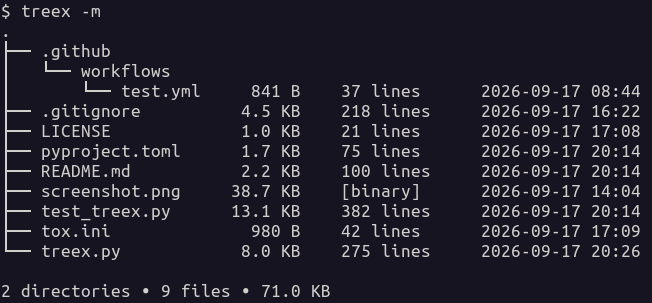
## About
|
|
39
39
|
|
|
40
|
-
`treex` is a command-line utility that recursively scans a directory and
|
|
41
|
-
|
|
40
|
+
`treex` is a command-line utility that recursively scans a directory and lists
|
|
41
|
+
its contents as a tree along with file and directory metadata.
|
|
42
42
|
|
|
43
|
+
### Features:
|
|
44
|
+
|
|
45
|
+
- Respects `.gitignore` rules when Git is installed
|
|
43
46
|
- Shows human-readable file sizes
|
|
44
47
|
- Shows recursive directory sizes
|
|
45
48
|
- Shows line counts for text files
|
|
46
49
|
- Identifies binary and unreadable files by type
|
|
47
50
|
- Optionally shows modification timestamps
|
|
48
|
-
-
|
|
51
|
+
- Optionally includes or excludes files using glob patterns
|
|
52
|
+
- Optionally limits the depth of the displayed tree
|
|
49
53
|
|
|
50
54
|
----
|
|
51
55
|
|
|
@@ -90,32 +94,80 @@ lists its contents as a tree along with file and directory metadata.
|
|
|
90
94
|
|
|
91
95
|
## Installation
|
|
92
96
|
|
|
93
|
-
Install `treex` from [PyPI][pypi-home] using
|
|
97
|
+
Install `treex` from [PyPI][pypi-home] using your preferred Python package manager:
|
|
94
98
|
|
|
95
|
-
- `pip install treex-cli`
|
|
96
|
-
- `pipx install treex-cli`
|
|
99
|
+
- **pip:** `pip install treex-cli`
|
|
100
|
+
- **pipx:** `pipx install treex-cli`
|
|
101
|
+
- **uv:** `uv tool install treex-cli`
|
|
97
102
|
|
|
98
103
|
----
|
|
99
104
|
|
|
100
105
|
## Usage
|
|
101
106
|
|
|
102
107
|
```
|
|
103
|
-
|
|
104
|
-
|
|
108
|
+
usage: treex [-h] [--all] [--modified] [--quiet] [--dirs] [--summary]
|
|
109
|
+
[--include PATTERN] [--exclude PATTERN] [--depth DEPTH]
|
|
110
|
+
[directory]
|
|
105
111
|
|
|
106
112
|
List directory contents as a tree with file and directory metadata.
|
|
107
113
|
|
|
108
114
|
positional arguments:
|
|
109
|
-
directory
|
|
115
|
+
directory directory to scan (default: current directory)
|
|
110
116
|
|
|
111
117
|
options:
|
|
112
|
-
-h, --help
|
|
113
|
-
-a
|
|
114
|
-
-m
|
|
115
|
-
-q
|
|
116
|
-
-d
|
|
117
|
-
-s
|
|
118
|
+
-h, --help show this help message and exit
|
|
119
|
+
--all, -a show all files, including those ignored by Git
|
|
120
|
+
--modified, -m show file modification times
|
|
121
|
+
--quiet, -q don't show file metadata
|
|
122
|
+
--dirs, -d show directories only
|
|
123
|
+
--summary, -s show summary only
|
|
124
|
+
--include, -i PATTERN include files matching a glob pattern
|
|
125
|
+
--exclude, -e PATTERN exclude files matching a glob pattern
|
|
126
|
+
--depth, -D DEPTH limit levels displayed below the starting directory
|
|
127
|
+
```
|
|
128
|
+
|
|
129
|
+
### Filtering files
|
|
130
|
+
|
|
131
|
+
Use `--include` to display only files that match a glob pattern:
|
|
132
|
+
|
|
118
133
|
```
|
|
134
|
+
treex --include '*.py'
|
|
135
|
+
```
|
|
136
|
+
|
|
137
|
+
Use `--exclude` to hide files that match a glob pattern:
|
|
138
|
+
|
|
139
|
+
```
|
|
140
|
+
treex --exclude '*.pyc'
|
|
141
|
+
```
|
|
142
|
+
|
|
143
|
+
Patterns match filenames only, regardless of their location in the directory
|
|
144
|
+
tree. Matching is case-sensitive. When both options are provided, exclusions
|
|
145
|
+
take precedence over inclusions.
|
|
146
|
+
|
|
147
|
+
For example:
|
|
148
|
+
|
|
149
|
+
```
|
|
150
|
+
treex --include '.py' --exclude 'test_.py'
|
|
151
|
+
```
|
|
152
|
+
|
|
153
|
+
This displays Python files except those whose filenames begin with `test_`.
|
|
154
|
+
|
|
155
|
+
Note: quote glob patterns to prevent the shell from expanding them before
|
|
156
|
+
`treex` receives them.
|
|
157
|
+
|
|
158
|
+
### Limiting tree depth
|
|
159
|
+
|
|
160
|
+
Use `--depth` (or `-D`) to limit how many levels below the starting directory
|
|
161
|
+
are displayed:
|
|
162
|
+
|
|
163
|
+
```
|
|
164
|
+
treex --depth 3
|
|
165
|
+
```
|
|
166
|
+
|
|
167
|
+
The depth must be at least 1.
|
|
168
|
+
|
|
169
|
+
Directory sizes and summary totals reflect only files within the limit that pass
|
|
170
|
+
the include/exclude filters.
|
|
119
171
|
|
|
120
172
|
----
|
|
121
173
|
|
|
@@ -123,6 +175,7 @@ options:
|
|
|
123
175
|
|
|
124
176
|
|
|
125
177
|
|
|
178
|
+
|
|
126
179
|
[github-profile]: https://github.com/cgoldberg
|
|
127
180
|
[github-repo]: https://github.com/cgoldberg/treex
|
|
128
181
|
[pypi-home]: https://pypi.org/project/treex-cli
|
|
@@ -0,0 +1,156 @@
|
|
|
1
|
+
# treex
|
|
2
|
+
|
|
3
|
+
## List directory contents as a tree with file and directory metadata
|
|
4
|
+
|
|
5
|
+
- Copyright (c) 2026 [Corey Goldberg][github-profile]
|
|
6
|
+
- Development: [GitHub][github-repo]
|
|
7
|
+
- Releases: [PyPI][pypi-home]
|
|
8
|
+
- License: [MIT][mit-license]
|
|
9
|
+
|
|
10
|
+
----
|
|
11
|
+
|
|
12
|
+
## About
|
|
13
|
+
|
|
14
|
+
`treex` is a command-line utility that recursively scans a directory and lists
|
|
15
|
+
its contents as a tree along with file and directory metadata.
|
|
16
|
+
|
|
17
|
+
### Features:
|
|
18
|
+
|
|
19
|
+
- Respects `.gitignore` rules when Git is installed
|
|
20
|
+
- Shows human-readable file sizes
|
|
21
|
+
- Shows recursive directory sizes
|
|
22
|
+
- Shows line counts for text files
|
|
23
|
+
- Identifies binary and unreadable files by type
|
|
24
|
+
- Optionally shows modification timestamps
|
|
25
|
+
- Optionally includes or excludes files using glob patterns
|
|
26
|
+
- Optionally limits the depth of the displayed tree
|
|
27
|
+
|
|
28
|
+
----
|
|
29
|
+
|
|
30
|
+
## Status
|
|
31
|
+
|
|
32
|
+
<table>
|
|
33
|
+
<tr>
|
|
34
|
+
<td>Latest Version</td>
|
|
35
|
+
<td>
|
|
36
|
+
<a href="https://pypi.org/project/treex-cli">
|
|
37
|
+
<img src="https://img.shields.io/pypi/v/treex-cli.svg">
|
|
38
|
+
</a>
|
|
39
|
+
</td>
|
|
40
|
+
</tr>
|
|
41
|
+
<tr>
|
|
42
|
+
<td>Tests (CI)</td>
|
|
43
|
+
<td>
|
|
44
|
+
<a href="https://github.com/cgoldberg/treex/actions/workflows/test.yml">
|
|
45
|
+
<img src="https://github.com/cgoldberg/treex/actions/workflows/test.yml/badge.svg">
|
|
46
|
+
</a>
|
|
47
|
+
</td>
|
|
48
|
+
</tr>
|
|
49
|
+
<tr>
|
|
50
|
+
<td>Supported Python Versions</td>
|
|
51
|
+
<td>
|
|
52
|
+
<a href="https://pypi.org/project/treex-cli">
|
|
53
|
+
<img src="https://img.shields.io/pypi/pyversions/treex-cli">
|
|
54
|
+
</a>
|
|
55
|
+
</td>
|
|
56
|
+
</tr>
|
|
57
|
+
</table>
|
|
58
|
+
|
|
59
|
+
----
|
|
60
|
+
|
|
61
|
+
## Requirements
|
|
62
|
+
|
|
63
|
+
- Python 3.10+
|
|
64
|
+
- Git 2.0+ (optional)
|
|
65
|
+
- UTF-8-compatible terminal
|
|
66
|
+
|
|
67
|
+
----
|
|
68
|
+
|
|
69
|
+
## Installation
|
|
70
|
+
|
|
71
|
+
Install `treex` from [PyPI][pypi-home] using your preferred Python package manager:
|
|
72
|
+
|
|
73
|
+
- **pip:** `pip install treex-cli`
|
|
74
|
+
- **pipx:** `pipx install treex-cli`
|
|
75
|
+
- **uv:** `uv tool install treex-cli`
|
|
76
|
+
|
|
77
|
+
----
|
|
78
|
+
|
|
79
|
+
## Usage
|
|
80
|
+
|
|
81
|
+
```
|
|
82
|
+
usage: treex [-h] [--all] [--modified] [--quiet] [--dirs] [--summary]
|
|
83
|
+
[--include PATTERN] [--exclude PATTERN] [--depth DEPTH]
|
|
84
|
+
[directory]
|
|
85
|
+
|
|
86
|
+
List directory contents as a tree with file and directory metadata.
|
|
87
|
+
|
|
88
|
+
positional arguments:
|
|
89
|
+
directory directory to scan (default: current directory)
|
|
90
|
+
|
|
91
|
+
options:
|
|
92
|
+
-h, --help show this help message and exit
|
|
93
|
+
--all, -a show all files, including those ignored by Git
|
|
94
|
+
--modified, -m show file modification times
|
|
95
|
+
--quiet, -q don't show file metadata
|
|
96
|
+
--dirs, -d show directories only
|
|
97
|
+
--summary, -s show summary only
|
|
98
|
+
--include, -i PATTERN include files matching a glob pattern
|
|
99
|
+
--exclude, -e PATTERN exclude files matching a glob pattern
|
|
100
|
+
--depth, -D DEPTH limit levels displayed below the starting directory
|
|
101
|
+
```
|
|
102
|
+
|
|
103
|
+
### Filtering files
|
|
104
|
+
|
|
105
|
+
Use `--include` to display only files that match a glob pattern:
|
|
106
|
+
|
|
107
|
+
```
|
|
108
|
+
treex --include '*.py'
|
|
109
|
+
```
|
|
110
|
+
|
|
111
|
+
Use `--exclude` to hide files that match a glob pattern:
|
|
112
|
+
|
|
113
|
+
```
|
|
114
|
+
treex --exclude '*.pyc'
|
|
115
|
+
```
|
|
116
|
+
|
|
117
|
+
Patterns match filenames only, regardless of their location in the directory
|
|
118
|
+
tree. Matching is case-sensitive. When both options are provided, exclusions
|
|
119
|
+
take precedence over inclusions.
|
|
120
|
+
|
|
121
|
+
For example:
|
|
122
|
+
|
|
123
|
+
```
|
|
124
|
+
treex --include '.py' --exclude 'test_.py'
|
|
125
|
+
```
|
|
126
|
+
|
|
127
|
+
This displays Python files except those whose filenames begin with `test_`.
|
|
128
|
+
|
|
129
|
+
Note: quote glob patterns to prevent the shell from expanding them before
|
|
130
|
+
`treex` receives them.
|
|
131
|
+
|
|
132
|
+
### Limiting tree depth
|
|
133
|
+
|
|
134
|
+
Use `--depth` (or `-D`) to limit how many levels below the starting directory
|
|
135
|
+
are displayed:
|
|
136
|
+
|
|
137
|
+
```
|
|
138
|
+
treex --depth 3
|
|
139
|
+
```
|
|
140
|
+
|
|
141
|
+
The depth must be at least 1.
|
|
142
|
+
|
|
143
|
+
Directory sizes and summary totals reflect only files within the limit that pass
|
|
144
|
+
the include/exclude filters.
|
|
145
|
+
|
|
146
|
+
----
|
|
147
|
+
|
|
148
|
+
## Screenshot
|
|
149
|
+
|
|
150
|
+

|
|
151
|
+
|
|
152
|
+
|
|
153
|
+
[github-profile]: https://github.com/cgoldberg
|
|
154
|
+
[github-repo]: https://github.com/cgoldberg/treex
|
|
155
|
+
[pypi-home]: https://pypi.org/project/treex-cli
|
|
156
|
+
[mit-license]: https://raw.githubusercontent.com/cgoldberg/treex/refs/heads/main/LICENSE
|
|
@@ -4,7 +4,7 @@ build-backend = "setuptools.build_meta"
|
|
|
4
4
|
|
|
5
5
|
[project]
|
|
6
6
|
name = "treex-cli"
|
|
7
|
-
version = "0.1.
|
|
7
|
+
version = "0.1.12"
|
|
8
8
|
description="List directory contents as a tree with file and directory metadata"
|
|
9
9
|
license = "MIT"
|
|
10
10
|
license-files = ["LICENSE"]
|
|
@@ -65,7 +65,7 @@ target-version = "py310"
|
|
|
65
65
|
select = ["ALL"]
|
|
66
66
|
ignore = [
|
|
67
67
|
"ANN", "C901", "COM812", "D", "DTZ001", "DTZ006",
|
|
68
|
-
"FBT", "PLR", "S603", "S607", "T201"
|
|
68
|
+
"FBT", "PLR", "S603", "S607", "T201",
|
|
69
69
|
]
|
|
70
70
|
fixable = ["ALL"]
|
|
71
71
|
|