topology-scanner 1.0.0__tar.gz
This diff represents the content of publicly available package versions that have been released to one of the supported registries. The information contained in this diff is provided for informational purposes only and reflects changes between package versions as they appear in their respective public registries.
- topology_scanner-1.0.0/LICENSE +21 -0
- topology_scanner-1.0.0/PKG-INFO +246 -0
- topology_scanner-1.0.0/README.md +210 -0
- topology_scanner-1.0.0/pyproject.toml +79 -0
- topology_scanner-1.0.0/setup.cfg +4 -0
- topology_scanner-1.0.0/src/topology_scanner/__init__.py +11 -0
- topology_scanner-1.0.0/src/topology_scanner/__main__.py +4 -0
- topology_scanner-1.0.0/src/topology_scanner/classifier.py +122 -0
- topology_scanner-1.0.0/src/topology_scanner/cli.py +205 -0
- topology_scanner-1.0.0/src/topology_scanner/export.py +392 -0
- topology_scanner-1.0.0/src/topology_scanner/graph.py +178 -0
- topology_scanner-1.0.0/src/topology_scanner/history.py +252 -0
- topology_scanner-1.0.0/src/topology_scanner/rangos.py +66 -0
- topology_scanner-1.0.0/src/topology_scanner/scanner.py +160 -0
- topology_scanner-1.0.0/src/topology_scanner/snmp.py +783 -0
- topology_scanner-1.0.0/src/topology_scanner/webapp.py +1782 -0
- topology_scanner-1.0.0/src/topology_scanner.egg-info/PKG-INFO +246 -0
- topology_scanner-1.0.0/src/topology_scanner.egg-info/SOURCES.txt +31 -0
- topology_scanner-1.0.0/src/topology_scanner.egg-info/dependency_links.txt +1 -0
- topology_scanner-1.0.0/src/topology_scanner.egg-info/entry_points.txt +3 -0
- topology_scanner-1.0.0/src/topology_scanner.egg-info/requires.txt +15 -0
- topology_scanner-1.0.0/src/topology_scanner.egg-info/top_level.txt +1 -0
- topology_scanner-1.0.0/tests/test_classifier.py +104 -0
- topology_scanner-1.0.0/tests/test_cli.py +412 -0
- topology_scanner-1.0.0/tests/test_demo_arbol.py +58 -0
- topology_scanner-1.0.0/tests/test_export.py +623 -0
- topology_scanner-1.0.0/tests/test_graph.py +255 -0
- topology_scanner-1.0.0/tests/test_history.py +309 -0
- topology_scanner-1.0.0/tests/test_rangos.py +72 -0
- topology_scanner-1.0.0/tests/test_scanner.py +192 -0
- topology_scanner-1.0.0/tests/test_snmp.py +904 -0
- topology_scanner-1.0.0/tests/test_version.py +13 -0
- topology_scanner-1.0.0/tests/test_webapp.py +1114 -0
|
@@ -0,0 +1,21 @@
|
|
|
1
|
+
MIT License
|
|
2
|
+
|
|
3
|
+
Copyright (c) 2026 Daniel Serrano Marín
|
|
4
|
+
|
|
5
|
+
Permission is hereby granted, free of charge, to any person obtaining a copy
|
|
6
|
+
of this software and associated documentation files (the "Software"), to deal
|
|
7
|
+
in the Software without restriction, including without limitation the rights
|
|
8
|
+
to use, copy, modify, merge, publish, distribute, sublicense, and/or sell
|
|
9
|
+
copies of the Software, and to permit persons to whom the Software is
|
|
10
|
+
furnished to do so, subject to the following conditions:
|
|
11
|
+
|
|
12
|
+
The above copyright notice and this permission notice shall be included in all
|
|
13
|
+
copies or substantial portions of the Software.
|
|
14
|
+
|
|
15
|
+
THE SOFTWARE IS PROVIDED "AS IS", WITHOUT WARRANTY OF ANY KIND, EXPRESS OR
|
|
16
|
+
IMPLIED, INCLUDING BUT NOT LIMITED TO THE WARRANTIES OF MERCHANTABILITY,
|
|
17
|
+
FITNESS FOR A PARTICULAR PURPOSE AND NONINFRINGEMENT. IN NO EVENT SHALL THE
|
|
18
|
+
AUTHORS OR COPYRIGHT HOLDERS BE LIABLE FOR ANY CLAIM, DAMAGES OR OTHER
|
|
19
|
+
LIABILITY, WHETHER IN AN ACTION OF CONTRACT, TORT OR OTHERWISE, ARISING FROM,
|
|
20
|
+
OUT OF OR IN CONNECTION WITH THE SOFTWARE OR THE USE OR OTHER DEALINGS IN THE
|
|
21
|
+
SOFTWARE.
|
|
@@ -0,0 +1,246 @@
|
|
|
1
|
+
Metadata-Version: 2.4
|
|
2
|
+
Name: topology-scanner
|
|
3
|
+
Version: 1.0.0
|
|
4
|
+
Summary: Network topology scanner (nmap + SNMP) with device classification and an interactive HTML map
|
|
5
|
+
Author: danielsm107
|
|
6
|
+
License-Expression: MIT
|
|
7
|
+
Project-URL: Homepage, https://github.com/danielsm107/network-topology-scanner
|
|
8
|
+
Project-URL: Issues, https://github.com/danielsm107/network-topology-scanner/issues
|
|
9
|
+
Project-URL: Changelog, https://github.com/danielsm107/network-topology-scanner/blob/main/CHANGELOG.md
|
|
10
|
+
Keywords: nmap,snmp,lldp,network,topology,scanner,inventory
|
|
11
|
+
Classifier: Development Status :: 5 - Production/Stable
|
|
12
|
+
Classifier: Environment :: Console
|
|
13
|
+
Classifier: Environment :: Web Environment
|
|
14
|
+
Classifier: Intended Audience :: System Administrators
|
|
15
|
+
Classifier: Operating System :: OS Independent
|
|
16
|
+
Classifier: Programming Language :: Python :: 3
|
|
17
|
+
Classifier: Programming Language :: Python :: 3.10
|
|
18
|
+
Classifier: Programming Language :: Python :: 3.12
|
|
19
|
+
Classifier: Topic :: System :: Networking :: Monitoring
|
|
20
|
+
Requires-Python: >=3.10
|
|
21
|
+
Description-Content-Type: text/markdown
|
|
22
|
+
License-File: LICENSE
|
|
23
|
+
Requires-Dist: python-nmap>=0.7.1
|
|
24
|
+
Requires-Dist: networkx>=3.0
|
|
25
|
+
Requires-Dist: pyvis>=0.3.2
|
|
26
|
+
Provides-Extra: dev
|
|
27
|
+
Requires-Dist: pytest>=8.0; extra == "dev"
|
|
28
|
+
Requires-Dist: pytest-cov>=5.0; extra == "dev"
|
|
29
|
+
Requires-Dist: ruff>=0.6; extra == "dev"
|
|
30
|
+
Provides-Extra: web
|
|
31
|
+
Requires-Dist: streamlit>=1.33; extra == "web"
|
|
32
|
+
Provides-Extra: snmp
|
|
33
|
+
Requires-Dist: pysnmp>=7.1; extra == "snmp"
|
|
34
|
+
Requires-Dist: cryptography>=43; extra == "snmp"
|
|
35
|
+
Dynamic: license-file
|
|
36
|
+
|
|
37
|
+
# Network Topology Scanner
|
|
38
|
+
|
|
39
|
+
[](https://github.com/danielsm107/network-topology-scanner/actions/workflows/ci.yml)
|
|
40
|
+
|
|
41
|
+
Scans a network range, discovers active hosts, their open ports/services,
|
|
42
|
+
vendor (via MAC) and device type, and generates an interactive HTML topology
|
|
43
|
+
graph with icons per category (router, PC, NAS, printer, etc). Flags hosts
|
|
44
|
+
with sensitive open ports in red (Telnet, SMB, RDP, FTP, VNC), stores every
|
|
45
|
+
scan in SQLite to diff against the previous one (new/dropped hosts, ports
|
|
46
|
+
that changed), and can export the inventory to CSV. Optionally queries your
|
|
47
|
+
routers/switches over SNMP to draw the **real topology** (which host hangs
|
|
48
|
+
from which switch port or access point) instead of an approximate star.
|
|
49
|
+
Available as a CLI or as a local web interface (Streamlit, optional).
|
|
50
|
+
|
|
51
|
+
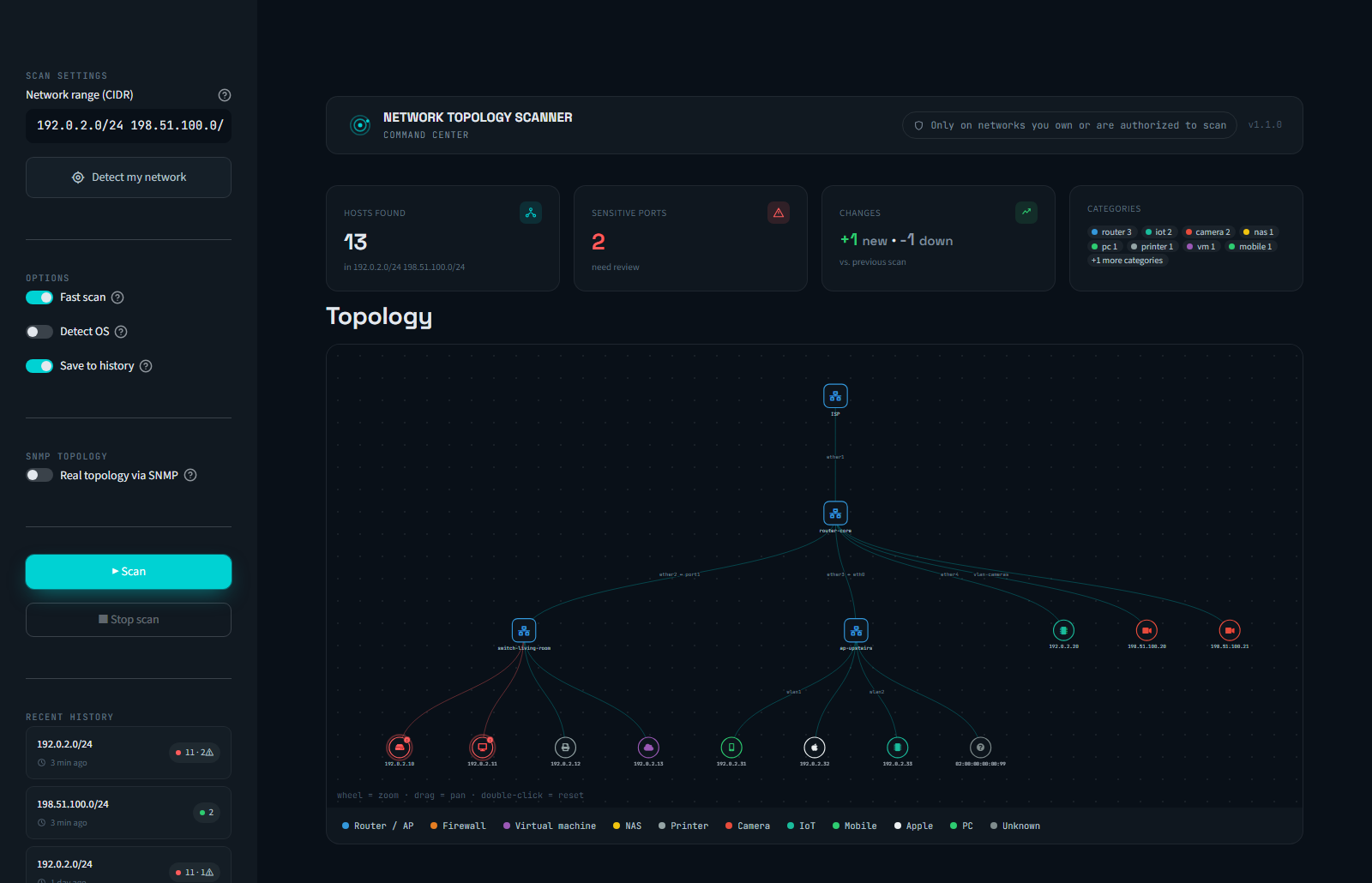
|
|
52
|
+
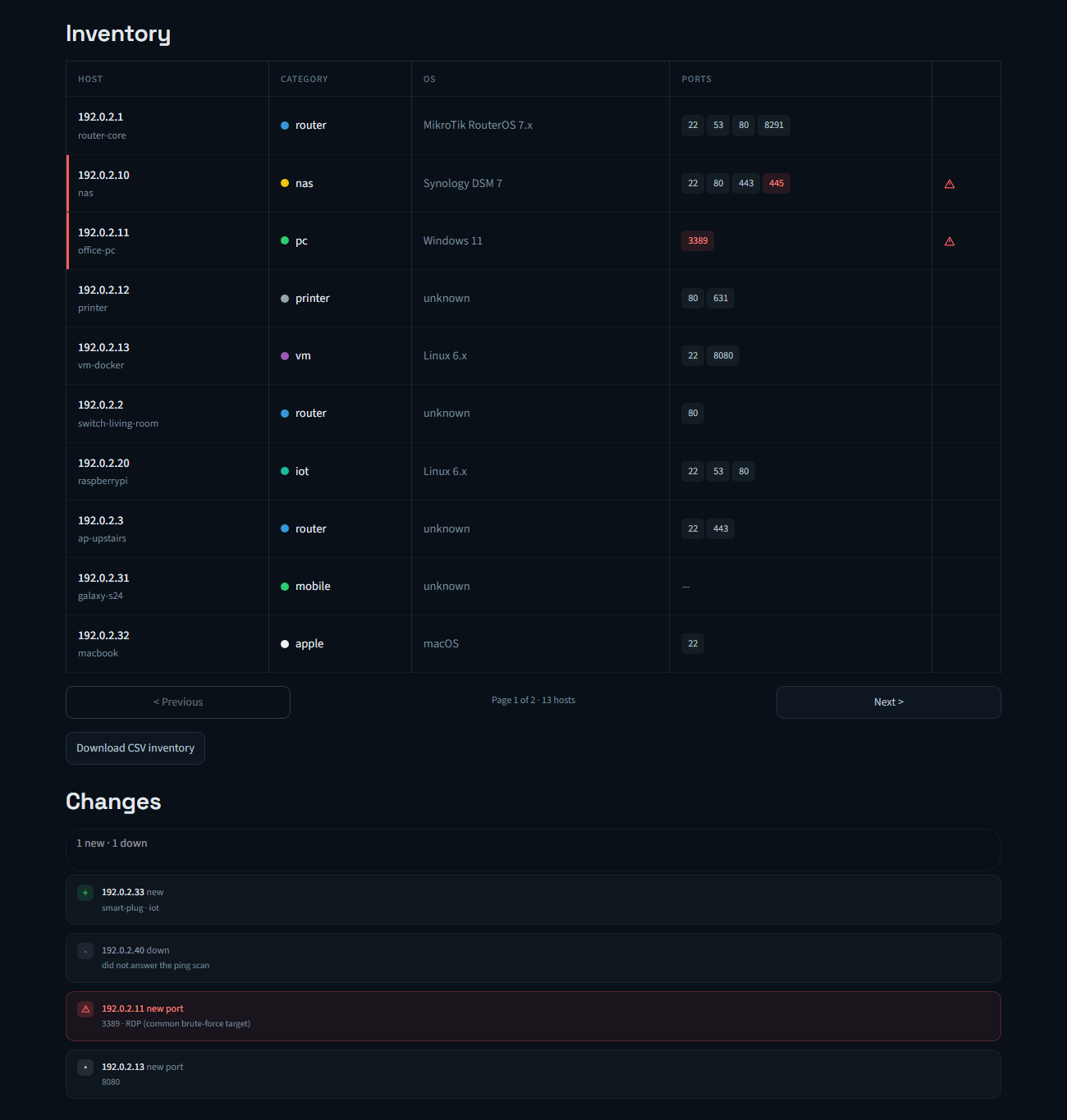
|
|
53
|
+
|
|
54
|
+
*Screenshots use fictional demo data — no real network is exposed here.*
|
|
55
|
+
|
|
56
|
+
## ⚠️ Legal notice
|
|
57
|
+
Only use this tool **on networks you own or have explicit authorization to
|
|
58
|
+
scan** (your homelab, or your workplace's network if you have permission).
|
|
59
|
+
Scanning networks without consent is illegal in most countries.
|
|
60
|
+
|
|
61
|
+
## Project structure
|
|
62
|
+
|
|
63
|
+
```
|
|
64
|
+
network-topology-scanner/
|
|
65
|
+
├── src/topology_scanner/
|
|
66
|
+
│ ├── scanner.py # nmap scanning (discovery + ports)
|
|
67
|
+
│ ├── classifier.py # Device classification by MAC/vendor
|
|
68
|
+
│ ├── graph.py # Graph construction (networkx)
|
|
69
|
+
│ ├── export.py # HTML export (pyvis), text and CSV
|
|
70
|
+
│ ├── history.py # Scan history in SQLite (diff vs. the previous scan)
|
|
71
|
+
│ ├── snmp.py # Real topology via SNMP (ARP, routes, MAC table, neighbors)
|
|
72
|
+
│ ├── cli.py # Command-line interface
|
|
73
|
+
│ └── webapp.py # Web interface (Streamlit, optional)
|
|
74
|
+
├── scripts/demo_arbol.py # Fictional SNMP tree for the README screenshot
|
|
75
|
+
├── tests/ # pytest, with nmap mocks (no real network needed)
|
|
76
|
+
└── pyproject.toml # single source of dependencies (pip install -e ".[dev,web,snmp]")
|
|
77
|
+
```
|
|
78
|
+
|
|
79
|
+
## Installation
|
|
80
|
+
|
|
81
|
+
Requires Python 3.10+.
|
|
82
|
+
|
|
83
|
+
```bash
|
|
84
|
+
# System dependency
|
|
85
|
+
sudo apt install nmap # Linux
|
|
86
|
+
# On Windows: download the installer from nmap.org
|
|
87
|
+
|
|
88
|
+
# Virtual environment
|
|
89
|
+
python3 -m venv venv
|
|
90
|
+
source venv/bin/activate # Linux/Mac
|
|
91
|
+
# venv\Scripts\Activate.ps1 # Windows PowerShell
|
|
92
|
+
|
|
93
|
+
# From PyPI
|
|
94
|
+
pip install topology-scanner
|
|
95
|
+
pip install "topology-scanner[web,snmp]" # optional: web interface and real topology via SNMP
|
|
96
|
+
```
|
|
97
|
+
|
|
98
|
+
For development, from a clone of the repo:
|
|
99
|
+
|
|
100
|
+
```bash
|
|
101
|
+
pip install -e ".[dev,web,snmp]"
|
|
102
|
+
```
|
|
103
|
+
|
|
104
|
+
## Usage
|
|
105
|
+
|
|
106
|
+
```bash
|
|
107
|
+
sudo topology-scanner 192.168.1.0/24
|
|
108
|
+
sudo topology-scanner 192.168.1.0/24 --rapido
|
|
109
|
+
sudo topology-scanner 192.168.1.0/24 --con-so --output my_network.html
|
|
110
|
+
|
|
111
|
+
# Several ranges at once (e.g. your LAN and a homelab subnet behind another router)
|
|
112
|
+
sudo topology-scanner 192.168.1.0/24 10.0.10.0/24
|
|
113
|
+
|
|
114
|
+
# Real topology: query the router(s) over SNMP (see below)
|
|
115
|
+
export TOPOLOGY_SNMP_COMMUNITY='your-read-only-community'
|
|
116
|
+
sudo -E topology-scanner 192.168.1.0/24 --snmp 192.168.1.1
|
|
117
|
+
|
|
118
|
+
# Alternative without the installed entry point:
|
|
119
|
+
sudo python3 -m topology_scanner 192.168.1.0/24
|
|
120
|
+
```
|
|
121
|
+
|
|
122
|
+
| Flag | Description | Default |
|
|
123
|
+
|-------------------|-------------------------------------------------------------------|-----------------------|
|
|
124
|
+
| `range` | CIDR range(s) to scan, space-separated; history is kept per range | (required) |
|
|
125
|
+
| `--ports` | Ports to scan (nmap format) | common ports |
|
|
126
|
+
| `--nmap-args` | Extra arguments passed to nmap | `-sV -T4` |
|
|
127
|
+
| `--output` | Output HTML file name | `topologia_red.html` |
|
|
128
|
+
| `--con-so` | Enables OS detection (-O), the slowest option | disabled |
|
|
129
|
+
| `--sin-2-fases` | Disables the preliminary ping scan, scans the full range directly | disabled |
|
|
130
|
+
| `--rapido` | Max-speed preset, ports only (incompatible with `--con-so`/`--nmap-args`) | disabled |
|
|
131
|
+
| `--csv` | Also exports a CSV inventory to the given path | disabled |
|
|
132
|
+
| `--history-db` | SQLite file where scan history is stored | `historial.db` |
|
|
133
|
+
| `--sin-historial` | Skips saving the scan to history / diffing against the previous one | disabled |
|
|
134
|
+
| `--snmp` | Routers/switches to query over SNMP v2c (comma-separated IPs) | disabled (star layout) |
|
|
135
|
+
|
|
136
|
+
## Web interface
|
|
137
|
+
|
|
138
|
+
Requires the `[web]` extra (see Installation). Form with automatic detection
|
|
139
|
+
of your local network, real cancellable scanning (kills the actual nmap
|
|
140
|
+
process, not just the UI), results table, CSV download and the embedded
|
|
141
|
+
graph. Several ranges can be scanned at once by separating them with
|
|
142
|
+
spaces in the range field. The "Real topology via SNMP" switch in the sidebar draws the tree
|
|
143
|
+
described below, over SNMP v2c or v3 (community and keys are password
|
|
144
|
+
inputs; leave them empty to use the `TOPOLOGY_SNMP_*` environment variables).
|
|
145
|
+
|
|
146
|
+
```bash
|
|
147
|
+
topology-scanner-web
|
|
148
|
+
# or, without the installed entry point:
|
|
149
|
+
streamlit run src/topology_scanner/webapp.py
|
|
150
|
+
```
|
|
151
|
+
|
|
152
|
+
## Real topology via SNMP
|
|
153
|
+
|
|
154
|
+
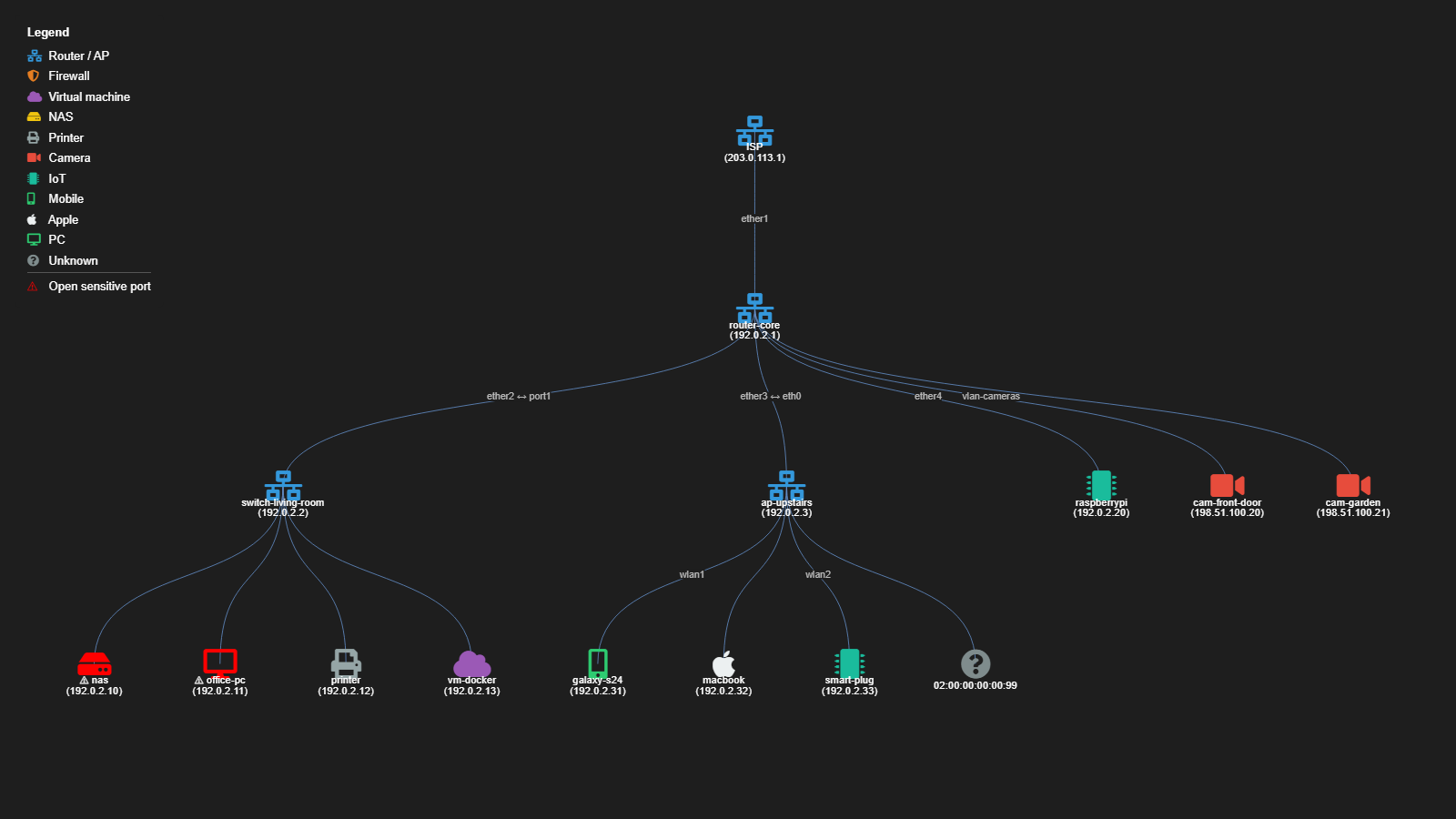
By default the graph is an approximate star: nmap knows *which* hosts are
|
|
155
|
+
alive, not *how* they are connected. With `--snmp`, the scanner reads a few
|
|
156
|
+
standard tables from your routers/switches and builds a tree instead:
|
|
157
|
+
|
|
158
|
+
| SNMP table | What it tells | Used for |
|
|
159
|
+
|---|---|---|
|
|
160
|
+
| Routes (`ipCidrRouteTable`) | "10.0.10.0/24 is behind 192.168.1.44" | Upstream gateway, downstream routers and their subnets |
|
|
161
|
+
| Neighbors (MikroTik `mtxrNeighborTable`, MNDP/LLDP/CDP) | "Access point X is on my ether2" | Links between network devices |
|
|
162
|
+
| Neighbors (standard `LLDP-MIB`, any vendor) | "Switch Y sees me on its port3" | Links, with the port on **both** ends (`ether2 ↔ port3`) |
|
|
163
|
+
| MAC table (`BRIDGE-MIB`) | "MAC aa:bb:… is on port wlan1" | Which port each host is on |
|
|
164
|
+
| ARP (`ipNetToMediaTable`) | "192.168.1.20 is aa:bb:…" | Matching MACs to the IPs nmap found |
|
|
165
|
+
|
|
166
|
+
Hosts seen on a port that leads to another network device hang from that
|
|
167
|
+
device; hosts that only SNMP sees (not detected by nmap) are shown too —
|
|
168
|
+
an unknown device on a switch port is exactly what you want to notice. If no
|
|
169
|
+
device answers, the scan still finishes with the star layout.
|
|
170
|
+
|
|
171
|
+
|
|
172
|
+
|
|
173
|
+
*Fictional demo data, generated with `python scripts/demo_arbol.py` (no scan involved).*
|
|
174
|
+
|
|
175
|
+
**Setup** (MikroTik RouterOS example — read-only, restricted to the
|
|
176
|
+
scanning machine):
|
|
177
|
+
|
|
178
|
+
```
|
|
179
|
+
/snmp community add name=<long-random-string> addresses=<scanner-ip>/32 read-access=yes write-access=no
|
|
180
|
+
/snmp community set [find name=public] disabled=yes
|
|
181
|
+
/snmp set enabled=yes
|
|
182
|
+
```
|
|
183
|
+
|
|
184
|
+
The community is read from the `TOPOLOGY_SNMP_COMMUNITY` environment
|
|
185
|
+
variable, never from a command-line argument (arguments show up in `ps` and
|
|
186
|
+
in your shell history). On Windows PowerShell:
|
|
187
|
+
`$env:TOPOLOGY_SNMP_COMMUNITY = "..."`.
|
|
188
|
+
|
|
189
|
+
**SNMPv3** (recommended: v2c sends the community in clear text). In RouterOS
|
|
190
|
+
v6 the community name is the v3 user, and `security=private` means
|
|
191
|
+
authentication + encryption:
|
|
192
|
+
|
|
193
|
+
```
|
|
194
|
+
/snmp community add name=<user> addresses=<scanner-ip>/32 security=private \
|
|
195
|
+
authentication-protocol=SHA1 authentication-password=<8+ chars> \
|
|
196
|
+
encryption-protocol=AES encryption-password=<8+ chars> read-access=yes write-access=no
|
|
197
|
+
```
|
|
198
|
+
|
|
199
|
+
| Variable | Meaning | Default |
|
|
200
|
+
|---|---|---|
|
|
201
|
+
| `TOPOLOGY_SNMP_USER` | v3 user (if set, v3 is used and the community is ignored) | — |
|
|
202
|
+
| `TOPOLOGY_SNMP_AUTH_KEY` | Authentication key (8+ characters) | required |
|
|
203
|
+
| `TOPOLOGY_SNMP_PRIV_KEY` | Encryption key (8+ characters); empty = authenticate without encryption | — |
|
|
204
|
+
| `TOPOLOGY_SNMP_AUTH_PROTO` | `MD5`, `SHA`, `SHA224`, `SHA256`, `SHA384`, `SHA512` | `SHA` |
|
|
205
|
+
| `TOPOLOGY_SNMP_PRIV_PROTO` | `DES`, `AES`, `AES192`, `AES256` | `AES` |
|
|
206
|
+
|
|
207
|
+
**Current limitations**: links between network devices come
|
|
208
|
+
from MikroTik's neighbor table and from the standard LLDP-MIB, so devices
|
|
209
|
+
that don't run LLDP (or don't expose it over SNMP) are only placed by
|
|
210
|
+
routes, ARP and the MAC table.
|
|
211
|
+
|
|
212
|
+
## Device classification
|
|
213
|
+
|
|
214
|
+
Each host's MAC address is used to look up its vendor (via nmap's built-in
|
|
215
|
+
database), which is then heuristically mapped to a category with its own
|
|
216
|
+
icon: router, firewall, VM, NAS, printer, camera, IoT, mobile, Apple, PC.
|
|
217
|
+
|
|
218
|
+
**Limitation**: MAC resolution only works if the scanning machine is on the
|
|
219
|
+
**same L2 segment** as the target host (ARP doesn't cross routers/VLANs).
|
|
220
|
+
Hosts on other subnets will show up as category "unknown".
|
|
221
|
+
|
|
222
|
+
## Tests
|
|
223
|
+
|
|
224
|
+
```bash
|
|
225
|
+
pytest tests/ -v
|
|
226
|
+
pytest tests/ --cov=topology_scanner # with coverage
|
|
227
|
+
```
|
|
228
|
+
|
|
229
|
+
`scanner.py` tests use `unittest.mock` to simulate nmap's responses, so they
|
|
230
|
+
run without a real network or the nmap binary installed.
|
|
231
|
+
|
|
232
|
+
## Roadmap
|
|
233
|
+
|
|
234
|
+
- [x] Visual alerts for sensitive open ports (RDP, Telnet, SMB, FTP, VNC)
|
|
235
|
+
- [x] Scan history in SQLite (new/dropped hosts, ports that change)
|
|
236
|
+
- [x] CSV export for audits/inventory
|
|
237
|
+
- [x] Visual icon/color legend in the HTML
|
|
238
|
+
- [x] Web interface with Streamlit
|
|
239
|
+
- [x] CI: run tests + ruff on every push
|
|
240
|
+
- [x] Real topology via SNMP against routers/switches, CLI (instead of the approximate star layout)
|
|
241
|
+
- [x] SNMP in the web interface
|
|
242
|
+
- [x] Standard LLDP-MIB (links between devices from any vendor, with the port on both ends)
|
|
243
|
+
- [x] SNMPv3 (authentication and encryption)
|
|
244
|
+
- [x] v1.0 on PyPI, published by GitHub Actions from a tag (trusted publishing, no tokens)
|
|
245
|
+
|
|
246
|
+
See [CHANGELOG.md](https://github.com/danielsm107/network-topology-scanner/blob/main/CHANGELOG.md) for release notes.
|
|
@@ -0,0 +1,210 @@
|
|
|
1
|
+
# Network Topology Scanner
|
|
2
|
+
|
|
3
|
+
[](https://github.com/danielsm107/network-topology-scanner/actions/workflows/ci.yml)
|
|
4
|
+
|
|
5
|
+
Scans a network range, discovers active hosts, their open ports/services,
|
|
6
|
+
vendor (via MAC) and device type, and generates an interactive HTML topology
|
|
7
|
+
graph with icons per category (router, PC, NAS, printer, etc). Flags hosts
|
|
8
|
+
with sensitive open ports in red (Telnet, SMB, RDP, FTP, VNC), stores every
|
|
9
|
+
scan in SQLite to diff against the previous one (new/dropped hosts, ports
|
|
10
|
+
that changed), and can export the inventory to CSV. Optionally queries your
|
|
11
|
+
routers/switches over SNMP to draw the **real topology** (which host hangs
|
|
12
|
+
from which switch port or access point) instead of an approximate star.
|
|
13
|
+
Available as a CLI or as a local web interface (Streamlit, optional).
|
|
14
|
+
|
|
15
|
+

|
|
16
|
+

|
|
17
|
+
|
|
18
|
+
*Screenshots use fictional demo data — no real network is exposed here.*
|
|
19
|
+
|
|
20
|
+
## ⚠️ Legal notice
|
|
21
|
+
Only use this tool **on networks you own or have explicit authorization to
|
|
22
|
+
scan** (your homelab, or your workplace's network if you have permission).
|
|
23
|
+
Scanning networks without consent is illegal in most countries.
|
|
24
|
+
|
|
25
|
+
## Project structure
|
|
26
|
+
|
|
27
|
+
```
|
|
28
|
+
network-topology-scanner/
|
|
29
|
+
├── src/topology_scanner/
|
|
30
|
+
│ ├── scanner.py # nmap scanning (discovery + ports)
|
|
31
|
+
│ ├── classifier.py # Device classification by MAC/vendor
|
|
32
|
+
│ ├── graph.py # Graph construction (networkx)
|
|
33
|
+
│ ├── export.py # HTML export (pyvis), text and CSV
|
|
34
|
+
│ ├── history.py # Scan history in SQLite (diff vs. the previous scan)
|
|
35
|
+
│ ├── snmp.py # Real topology via SNMP (ARP, routes, MAC table, neighbors)
|
|
36
|
+
│ ├── cli.py # Command-line interface
|
|
37
|
+
│ └── webapp.py # Web interface (Streamlit, optional)
|
|
38
|
+
├── scripts/demo_arbol.py # Fictional SNMP tree for the README screenshot
|
|
39
|
+
├── tests/ # pytest, with nmap mocks (no real network needed)
|
|
40
|
+
└── pyproject.toml # single source of dependencies (pip install -e ".[dev,web,snmp]")
|
|
41
|
+
```
|
|
42
|
+
|
|
43
|
+
## Installation
|
|
44
|
+
|
|
45
|
+
Requires Python 3.10+.
|
|
46
|
+
|
|
47
|
+
```bash
|
|
48
|
+
# System dependency
|
|
49
|
+
sudo apt install nmap # Linux
|
|
50
|
+
# On Windows: download the installer from nmap.org
|
|
51
|
+
|
|
52
|
+
# Virtual environment
|
|
53
|
+
python3 -m venv venv
|
|
54
|
+
source venv/bin/activate # Linux/Mac
|
|
55
|
+
# venv\Scripts\Activate.ps1 # Windows PowerShell
|
|
56
|
+
|
|
57
|
+
# From PyPI
|
|
58
|
+
pip install topology-scanner
|
|
59
|
+
pip install "topology-scanner[web,snmp]" # optional: web interface and real topology via SNMP
|
|
60
|
+
```
|
|
61
|
+
|
|
62
|
+
For development, from a clone of the repo:
|
|
63
|
+
|
|
64
|
+
```bash
|
|
65
|
+
pip install -e ".[dev,web,snmp]"
|
|
66
|
+
```
|
|
67
|
+
|
|
68
|
+
## Usage
|
|
69
|
+
|
|
70
|
+
```bash
|
|
71
|
+
sudo topology-scanner 192.168.1.0/24
|
|
72
|
+
sudo topology-scanner 192.168.1.0/24 --rapido
|
|
73
|
+
sudo topology-scanner 192.168.1.0/24 --con-so --output my_network.html
|
|
74
|
+
|
|
75
|
+
# Several ranges at once (e.g. your LAN and a homelab subnet behind another router)
|
|
76
|
+
sudo topology-scanner 192.168.1.0/24 10.0.10.0/24
|
|
77
|
+
|
|
78
|
+
# Real topology: query the router(s) over SNMP (see below)
|
|
79
|
+
export TOPOLOGY_SNMP_COMMUNITY='your-read-only-community'
|
|
80
|
+
sudo -E topology-scanner 192.168.1.0/24 --snmp 192.168.1.1
|
|
81
|
+
|
|
82
|
+
# Alternative without the installed entry point:
|
|
83
|
+
sudo python3 -m topology_scanner 192.168.1.0/24
|
|
84
|
+
```
|
|
85
|
+
|
|
86
|
+
| Flag | Description | Default |
|
|
87
|
+
|-------------------|-------------------------------------------------------------------|-----------------------|
|
|
88
|
+
| `range` | CIDR range(s) to scan, space-separated; history is kept per range | (required) |
|
|
89
|
+
| `--ports` | Ports to scan (nmap format) | common ports |
|
|
90
|
+
| `--nmap-args` | Extra arguments passed to nmap | `-sV -T4` |
|
|
91
|
+
| `--output` | Output HTML file name | `topologia_red.html` |
|
|
92
|
+
| `--con-so` | Enables OS detection (-O), the slowest option | disabled |
|
|
93
|
+
| `--sin-2-fases` | Disables the preliminary ping scan, scans the full range directly | disabled |
|
|
94
|
+
| `--rapido` | Max-speed preset, ports only (incompatible with `--con-so`/`--nmap-args`) | disabled |
|
|
95
|
+
| `--csv` | Also exports a CSV inventory to the given path | disabled |
|
|
96
|
+
| `--history-db` | SQLite file where scan history is stored | `historial.db` |
|
|
97
|
+
| `--sin-historial` | Skips saving the scan to history / diffing against the previous one | disabled |
|
|
98
|
+
| `--snmp` | Routers/switches to query over SNMP v2c (comma-separated IPs) | disabled (star layout) |
|
|
99
|
+
|
|
100
|
+
## Web interface
|
|
101
|
+
|
|
102
|
+
Requires the `[web]` extra (see Installation). Form with automatic detection
|
|
103
|
+
of your local network, real cancellable scanning (kills the actual nmap
|
|
104
|
+
process, not just the UI), results table, CSV download and the embedded
|
|
105
|
+
graph. Several ranges can be scanned at once by separating them with
|
|
106
|
+
spaces in the range field. The "Real topology via SNMP" switch in the sidebar draws the tree
|
|
107
|
+
described below, over SNMP v2c or v3 (community and keys are password
|
|
108
|
+
inputs; leave them empty to use the `TOPOLOGY_SNMP_*` environment variables).
|
|
109
|
+
|
|
110
|
+
```bash
|
|
111
|
+
topology-scanner-web
|
|
112
|
+
# or, without the installed entry point:
|
|
113
|
+
streamlit run src/topology_scanner/webapp.py
|
|
114
|
+
```
|
|
115
|
+
|
|
116
|
+
## Real topology via SNMP
|
|
117
|
+
|
|
118
|
+
By default the graph is an approximate star: nmap knows *which* hosts are
|
|
119
|
+
alive, not *how* they are connected. With `--snmp`, the scanner reads a few
|
|
120
|
+
standard tables from your routers/switches and builds a tree instead:
|
|
121
|
+
|
|
122
|
+
| SNMP table | What it tells | Used for |
|
|
123
|
+
|---|---|---|
|
|
124
|
+
| Routes (`ipCidrRouteTable`) | "10.0.10.0/24 is behind 192.168.1.44" | Upstream gateway, downstream routers and their subnets |
|
|
125
|
+
| Neighbors (MikroTik `mtxrNeighborTable`, MNDP/LLDP/CDP) | "Access point X is on my ether2" | Links between network devices |
|
|
126
|
+
| Neighbors (standard `LLDP-MIB`, any vendor) | "Switch Y sees me on its port3" | Links, with the port on **both** ends (`ether2 ↔ port3`) |
|
|
127
|
+
| MAC table (`BRIDGE-MIB`) | "MAC aa:bb:… is on port wlan1" | Which port each host is on |
|
|
128
|
+
| ARP (`ipNetToMediaTable`) | "192.168.1.20 is aa:bb:…" | Matching MACs to the IPs nmap found |
|
|
129
|
+
|
|
130
|
+
Hosts seen on a port that leads to another network device hang from that
|
|
131
|
+
device; hosts that only SNMP sees (not detected by nmap) are shown too —
|
|
132
|
+
an unknown device on a switch port is exactly what you want to notice. If no
|
|
133
|
+
device answers, the scan still finishes with the star layout.
|
|
134
|
+
|
|
135
|
+

|
|
136
|
+
|
|
137
|
+
*Fictional demo data, generated with `python scripts/demo_arbol.py` (no scan involved).*
|
|
138
|
+
|
|
139
|
+
**Setup** (MikroTik RouterOS example — read-only, restricted to the
|
|
140
|
+
scanning machine):
|
|
141
|
+
|
|
142
|
+
```
|
|
143
|
+
/snmp community add name=<long-random-string> addresses=<scanner-ip>/32 read-access=yes write-access=no
|
|
144
|
+
/snmp community set [find name=public] disabled=yes
|
|
145
|
+
/snmp set enabled=yes
|
|
146
|
+
```
|
|
147
|
+
|
|
148
|
+
The community is read from the `TOPOLOGY_SNMP_COMMUNITY` environment
|
|
149
|
+
variable, never from a command-line argument (arguments show up in `ps` and
|
|
150
|
+
in your shell history). On Windows PowerShell:
|
|
151
|
+
`$env:TOPOLOGY_SNMP_COMMUNITY = "..."`.
|
|
152
|
+
|
|
153
|
+
**SNMPv3** (recommended: v2c sends the community in clear text). In RouterOS
|
|
154
|
+
v6 the community name is the v3 user, and `security=private` means
|
|
155
|
+
authentication + encryption:
|
|
156
|
+
|
|
157
|
+
```
|
|
158
|
+
/snmp community add name=<user> addresses=<scanner-ip>/32 security=private \
|
|
159
|
+
authentication-protocol=SHA1 authentication-password=<8+ chars> \
|
|
160
|
+
encryption-protocol=AES encryption-password=<8+ chars> read-access=yes write-access=no
|
|
161
|
+
```
|
|
162
|
+
|
|
163
|
+
| Variable | Meaning | Default |
|
|
164
|
+
|---|---|---|
|
|
165
|
+
| `TOPOLOGY_SNMP_USER` | v3 user (if set, v3 is used and the community is ignored) | — |
|
|
166
|
+
| `TOPOLOGY_SNMP_AUTH_KEY` | Authentication key (8+ characters) | required |
|
|
167
|
+
| `TOPOLOGY_SNMP_PRIV_KEY` | Encryption key (8+ characters); empty = authenticate without encryption | — |
|
|
168
|
+
| `TOPOLOGY_SNMP_AUTH_PROTO` | `MD5`, `SHA`, `SHA224`, `SHA256`, `SHA384`, `SHA512` | `SHA` |
|
|
169
|
+
| `TOPOLOGY_SNMP_PRIV_PROTO` | `DES`, `AES`, `AES192`, `AES256` | `AES` |
|
|
170
|
+
|
|
171
|
+
**Current limitations**: links between network devices come
|
|
172
|
+
from MikroTik's neighbor table and from the standard LLDP-MIB, so devices
|
|
173
|
+
that don't run LLDP (or don't expose it over SNMP) are only placed by
|
|
174
|
+
routes, ARP and the MAC table.
|
|
175
|
+
|
|
176
|
+
## Device classification
|
|
177
|
+
|
|
178
|
+
Each host's MAC address is used to look up its vendor (via nmap's built-in
|
|
179
|
+
database), which is then heuristically mapped to a category with its own
|
|
180
|
+
icon: router, firewall, VM, NAS, printer, camera, IoT, mobile, Apple, PC.
|
|
181
|
+
|
|
182
|
+
**Limitation**: MAC resolution only works if the scanning machine is on the
|
|
183
|
+
**same L2 segment** as the target host (ARP doesn't cross routers/VLANs).
|
|
184
|
+
Hosts on other subnets will show up as category "unknown".
|
|
185
|
+
|
|
186
|
+
## Tests
|
|
187
|
+
|
|
188
|
+
```bash
|
|
189
|
+
pytest tests/ -v
|
|
190
|
+
pytest tests/ --cov=topology_scanner # with coverage
|
|
191
|
+
```
|
|
192
|
+
|
|
193
|
+
`scanner.py` tests use `unittest.mock` to simulate nmap's responses, so they
|
|
194
|
+
run without a real network or the nmap binary installed.
|
|
195
|
+
|
|
196
|
+
## Roadmap
|
|
197
|
+
|
|
198
|
+
- [x] Visual alerts for sensitive open ports (RDP, Telnet, SMB, FTP, VNC)
|
|
199
|
+
- [x] Scan history in SQLite (new/dropped hosts, ports that change)
|
|
200
|
+
- [x] CSV export for audits/inventory
|
|
201
|
+
- [x] Visual icon/color legend in the HTML
|
|
202
|
+
- [x] Web interface with Streamlit
|
|
203
|
+
- [x] CI: run tests + ruff on every push
|
|
204
|
+
- [x] Real topology via SNMP against routers/switches, CLI (instead of the approximate star layout)
|
|
205
|
+
- [x] SNMP in the web interface
|
|
206
|
+
- [x] Standard LLDP-MIB (links between devices from any vendor, with the port on both ends)
|
|
207
|
+
- [x] SNMPv3 (authentication and encryption)
|
|
208
|
+
- [x] v1.0 on PyPI, published by GitHub Actions from a tag (trusted publishing, no tokens)
|
|
209
|
+
|
|
210
|
+
See [CHANGELOG.md](https://github.com/danielsm107/network-topology-scanner/blob/main/CHANGELOG.md) for release notes.
|
|
@@ -0,0 +1,79 @@
|
|
|
1
|
+
[build-system]
|
|
2
|
+
requires = ["setuptools>=68.0"]
|
|
3
|
+
build-backend = "setuptools.build_meta"
|
|
4
|
+
|
|
5
|
+
[project]
|
|
6
|
+
name = "topology-scanner"
|
|
7
|
+
version = "1.0.0"
|
|
8
|
+
description = "Network topology scanner (nmap + SNMP) with device classification and an interactive HTML map"
|
|
9
|
+
readme = "README.md"
|
|
10
|
+
license = "MIT"
|
|
11
|
+
requires-python = ">=3.10"
|
|
12
|
+
authors = [{ name = "danielsm107" }]
|
|
13
|
+
keywords = ["nmap", "snmp", "lldp", "network", "topology", "scanner", "inventory"]
|
|
14
|
+
classifiers = [
|
|
15
|
+
"Development Status :: 5 - Production/Stable",
|
|
16
|
+
"Environment :: Console",
|
|
17
|
+
"Environment :: Web Environment",
|
|
18
|
+
"Intended Audience :: System Administrators",
|
|
19
|
+
"Operating System :: OS Independent",
|
|
20
|
+
"Programming Language :: Python :: 3",
|
|
21
|
+
"Programming Language :: Python :: 3.10",
|
|
22
|
+
"Programming Language :: Python :: 3.12",
|
|
23
|
+
"Topic :: System :: Networking :: Monitoring",
|
|
24
|
+
]
|
|
25
|
+
dependencies = [
|
|
26
|
+
"python-nmap>=0.7.1",
|
|
27
|
+
"networkx>=3.0",
|
|
28
|
+
"pyvis>=0.3.2",
|
|
29
|
+
]
|
|
30
|
+
|
|
31
|
+
[project.optional-dependencies]
|
|
32
|
+
dev = [
|
|
33
|
+
"pytest>=8.0",
|
|
34
|
+
"pytest-cov>=5.0",
|
|
35
|
+
"ruff>=0.6",
|
|
36
|
+
]
|
|
37
|
+
web = [
|
|
38
|
+
# >=1.33 por st.fragment(run_every=...), que usa _fragmento_progreso()
|
|
39
|
+
# para refrescar el estado del escaneo sin recargar toda la página.
|
|
40
|
+
"streamlit>=1.33",
|
|
41
|
+
]
|
|
42
|
+
snmp = [
|
|
43
|
+
# >=7.1: API asyncio con nombres snake_case (walk_cmd,
|
|
44
|
+
# UdpTransportTarget.create) que usa snmp.py. Exige Python >=3.10.
|
|
45
|
+
"pysnmp>=7.1",
|
|
46
|
+
# pysnmp la usa para cifrar en SNMPv3 (AES/DES) pero no la declara como
|
|
47
|
+
# dependencia; >=43 por cryptography.hazmat.decrepit, que es lo que importa.
|
|
48
|
+
"cryptography>=43",
|
|
49
|
+
]
|
|
50
|
+
|
|
51
|
+
[project.urls]
|
|
52
|
+
Homepage = "https://github.com/danielsm107/network-topology-scanner"
|
|
53
|
+
Issues = "https://github.com/danielsm107/network-topology-scanner/issues"
|
|
54
|
+
Changelog = "https://github.com/danielsm107/network-topology-scanner/blob/main/CHANGELOG.md"
|
|
55
|
+
|
|
56
|
+
[project.scripts]
|
|
57
|
+
topology-scanner = "topology_scanner.cli:main"
|
|
58
|
+
topology-scanner-web = "topology_scanner.webapp:lanzar"
|
|
59
|
+
|
|
60
|
+
[tool.setuptools.packages.find]
|
|
61
|
+
where = ["src"]
|
|
62
|
+
|
|
63
|
+
[tool.pytest.ini_options]
|
|
64
|
+
pythonpath = ["src"]
|
|
65
|
+
testpaths = ["tests"]
|
|
66
|
+
|
|
67
|
+
[tool.ruff]
|
|
68
|
+
target-version = "py310"
|
|
69
|
+
# El código ya usa líneas más largas que las 88 por defecto (diccionarios de
|
|
70
|
+
# datos, f-strings en español) sin que aporte legibilidad partirlas todas.
|
|
71
|
+
line-length = 120
|
|
72
|
+
|
|
73
|
+
[tool.ruff.lint]
|
|
74
|
+
# Sin esto, ruff sin [tool.ruff.lint] activa ~800 reglas (prácticamente
|
|
75
|
+
# "ALL", incluidas categorías irrelevantes aquí como async/trio o
|
|
76
|
+
# compatibilidad py2/3) - demasiado ruido para CI. Selección explícita:
|
|
77
|
+
# pyflakes + pycodestyle, imports (I, ya usado para ordenar), pyupgrade,
|
|
78
|
+
# bugbear, simplify y las reglas propias de ruff.
|
|
79
|
+
select = ["E", "F", "I", "UP", "B", "SIM", "RUF"]
|
|
@@ -0,0 +1,11 @@
|
|
|
1
|
+
"""topology_scanner — escáner de topología de red con nmap + networkx + pyvis."""
|
|
2
|
+
|
|
3
|
+
from importlib.metadata import PackageNotFoundError, version
|
|
4
|
+
|
|
5
|
+
try:
|
|
6
|
+
# pyproject.toml es la única fuente de verdad para la versión - antes
|
|
7
|
+
# había una copia a mano aquí que podía desincronizarse.
|
|
8
|
+
__version__ = version("topology-scanner")
|
|
9
|
+
except PackageNotFoundError:
|
|
10
|
+
# Código fuente sin instalar (ni siquiera "pip install -e .")
|
|
11
|
+
__version__ = "0+unknown"
|